Domain Services for Windows: Best Practices for Windows Interoperability Biswajeet Mahapatra Product Manager [email_address] David Shepherd Senior Technical Specialist [email_address]
What is Domain Services for Windows (DSfW)? Prerequisites for Successful Implementation Deployment Scenarios Demonstration  DSfW in OES2 SP2 and beyond Third Party Applications Support Agenda
What is Domain Services for Windows?
What is Domain Services for Windows? Domain Services for Windows (DSfW) is a suite of technologies Provides AD style authentication to users, applications eDirectory ™  users can access AD resources and applications with a cross forest trust in place Access to Open Enterprise Server services like file and print services hosted on Novell Storage Services ™  or POSIX file systems is unchanged
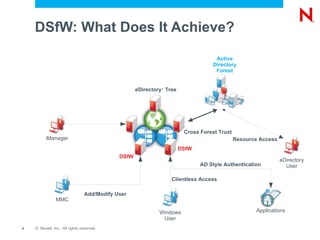
DSfW: What Does It Achieve? eDirectory ™  Tree Active Directory Forest DSfW DSfW Cross Forest Trust Resource Access eDirectory User Windows User AD Style Authentication MMC Add/Modify User iManager Clientless Access Applications
Benefits of DSfW Access Novell ®  Open Enterprise Server (OES) file system without a Novell Client ™  on the workstation Single Identity and single login to access resources from Linux, AD and other services Standardized administration tool in a heterogeneous environment Applications needing AD style Authentication can be seamlessly used with OES deployments Integration of Windows desktops into a Linux environment Leverage existing eDirectory ™  tree to create a AD forest without rip-and-replace.
Prerequisites for Successful Implementation
Understand What You Are Trying To Achieve with DSfW Client-less authentication and access to Novell ®  resources?
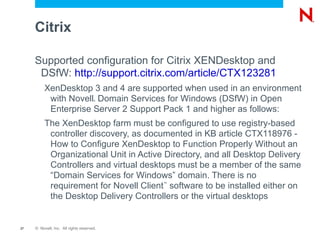
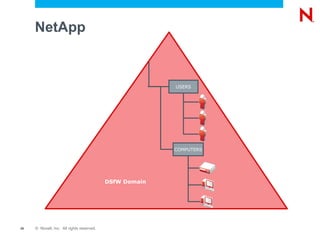
Access to AD applications? Check if  Windows based application is going to work with DSfW Can it be in a DSfW Forest? (NetApp, Citrix)
Does it need an  AD forest with Trust established (SharePoint)
Examine your existing eDirectory ™  structure:   eDirectory designs with a hierarchical structure of Organization objects is more suited for DSfW than a flat structure Domain Name:   The first DSfW servers DNS Suffix needs to match the AD Domain Name and suffix. For example if your AD domain name is dc=novell,dc=com then the DNS Suffix needs to be novell.com Schema checks:  Check your schema in accordance with Novell ®  TID 7003431 Partitioning and replication:  Check the general tree health and how the existing partitions map to DSfW Planning Considerations
Planning Considerations  DSfW into an existing tree eDirectory ™  versions need to be up to date.
At least one existing eDirectory 8.8 Server should be in the tree with the rest at 8.73.10 or later.
Put at least one Open Enterprise Server 2 Linux Server in place to begin with with any NetWare ®  6.5 Servers on SP8
Time synchronization is key. Kerberos is also time sensitive
Deployment Options
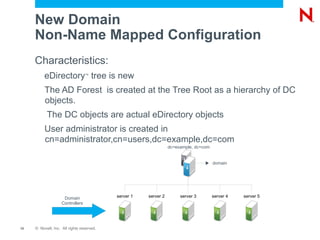
New Domain Non-Name Mapped Configuration Characteristics: eDirectory ™  tree is new
The AD Forest  is created at the Tree Root as a hierarchy of DC objects.
The DC objects are actual eDirectory objects
User administrator is created in cn=administrator,cn=users,dc=example,dc=com server 1 server 2 server 3 server 4 server 5 dc=example, dc=com Domain Controllers
New Domain Non-Name Mapped Configuration Why would this be used? Single Server Tree
New Tree just for DSfW. No other Novell ®  application considerations
The eDirectory ™  Tree Administrator is also the DSfW  Administrator. No eDirectory user called admin is created
A domain is automatically mapped to the eDirectory container e.g. domain acme.com is mapped to container dc=acme,dc=com
Into Existing eDirectory ™  Trees Name-Mapped Configuration Characteristics An existing eDirectory Tree's partitioned container is used to map the DSfW domain  The eDirectory Tree Administrator is different from the First Domain Administrator  The domain mapping to eDirectory Tree is managed by the eDirectory Tree Administrator
Into Existing eDirectory ™  Trees Name-Mapped Configuration Why would this be used ? To add DSfW to an existing eDirectory environment
To allow the use of Novell Workstations without the  Novell  Client ™
To preserve use of existing Novell based applications such as GroupWise ®  and the Novell Client
Microsoft Applications access can be established through an AD style trust
Demonstration of Deployment

Cl310

  • 1.
    Domain Services forWindows: Best Practices for Windows Interoperability Biswajeet Mahapatra Product Manager [email_address] David Shepherd Senior Technical Specialist [email_address]
  • 2.
    What is DomainServices for Windows (DSfW)? Prerequisites for Successful Implementation Deployment Scenarios Demonstration DSfW in OES2 SP2 and beyond Third Party Applications Support Agenda
  • 3.
    What is DomainServices for Windows?
  • 4.
    What is DomainServices for Windows? Domain Services for Windows (DSfW) is a suite of technologies Provides AD style authentication to users, applications eDirectory ™ users can access AD resources and applications with a cross forest trust in place Access to Open Enterprise Server services like file and print services hosted on Novell Storage Services ™ or POSIX file systems is unchanged
  • 5.
    DSfW: What DoesIt Achieve? eDirectory ™ Tree Active Directory Forest DSfW DSfW Cross Forest Trust Resource Access eDirectory User Windows User AD Style Authentication MMC Add/Modify User iManager Clientless Access Applications
  • 6.
    Benefits of DSfWAccess Novell ® Open Enterprise Server (OES) file system without a Novell Client ™ on the workstation Single Identity and single login to access resources from Linux, AD and other services Standardized administration tool in a heterogeneous environment Applications needing AD style Authentication can be seamlessly used with OES deployments Integration of Windows desktops into a Linux environment Leverage existing eDirectory ™ tree to create a AD forest without rip-and-replace.
  • 7.
  • 8.
    Understand What YouAre Trying To Achieve with DSfW Client-less authentication and access to Novell ® resources?
  • 9.
    Access to ADapplications? Check if Windows based application is going to work with DSfW Can it be in a DSfW Forest? (NetApp, Citrix)
  • 10.
    Does it needan AD forest with Trust established (SharePoint)
  • 11.
    Examine your existingeDirectory ™ structure: eDirectory designs with a hierarchical structure of Organization objects is more suited for DSfW than a flat structure Domain Name: The first DSfW servers DNS Suffix needs to match the AD Domain Name and suffix. For example if your AD domain name is dc=novell,dc=com then the DNS Suffix needs to be novell.com Schema checks: Check your schema in accordance with Novell ® TID 7003431 Partitioning and replication: Check the general tree health and how the existing partitions map to DSfW Planning Considerations
  • 12.
    Planning Considerations DSfW into an existing tree eDirectory ™ versions need to be up to date.
  • 13.
    At least oneexisting eDirectory 8.8 Server should be in the tree with the rest at 8.73.10 or later.
  • 14.
    Put at leastone Open Enterprise Server 2 Linux Server in place to begin with with any NetWare ® 6.5 Servers on SP8
  • 15.
    Time synchronization iskey. Kerberos is also time sensitive
  • 16.
  • 17.
    New Domain Non-NameMapped Configuration Characteristics: eDirectory ™ tree is new
  • 18.
    The AD Forest is created at the Tree Root as a hierarchy of DC objects.
  • 19.
    The DC objectsare actual eDirectory objects
  • 20.
    User administrator iscreated in cn=administrator,cn=users,dc=example,dc=com server 1 server 2 server 3 server 4 server 5 dc=example, dc=com Domain Controllers
  • 21.
    New Domain Non-NameMapped Configuration Why would this be used? Single Server Tree
  • 22.
    New Tree justfor DSfW. No other Novell ® application considerations
  • 23.
    The eDirectory ™ Tree Administrator is also the DSfW Administrator. No eDirectory user called admin is created
  • 24.
    A domain isautomatically mapped to the eDirectory container e.g. domain acme.com is mapped to container dc=acme,dc=com
  • 25.
    Into Existing eDirectory™ Trees Name-Mapped Configuration Characteristics An existing eDirectory Tree's partitioned container is used to map the DSfW domain The eDirectory Tree Administrator is different from the First Domain Administrator The domain mapping to eDirectory Tree is managed by the eDirectory Tree Administrator
  • 26.
    Into Existing eDirectory™ Trees Name-Mapped Configuration Why would this be used ? To add DSfW to an existing eDirectory environment
  • 27.
    To allow theuse of Novell Workstations without the Novell Client ™
  • 28.
    To preserve useof existing Novell based applications such as GroupWise ® and the Novell Client
  • 29.
    Microsoft Applications accesscan be established through an AD style trust
  • 30.