Consolidating Enterprise Storage
     Using Open Systems
                Kevin Halgren
           Assistant Director – ISS
       Systems and Network Services
            Washburn University
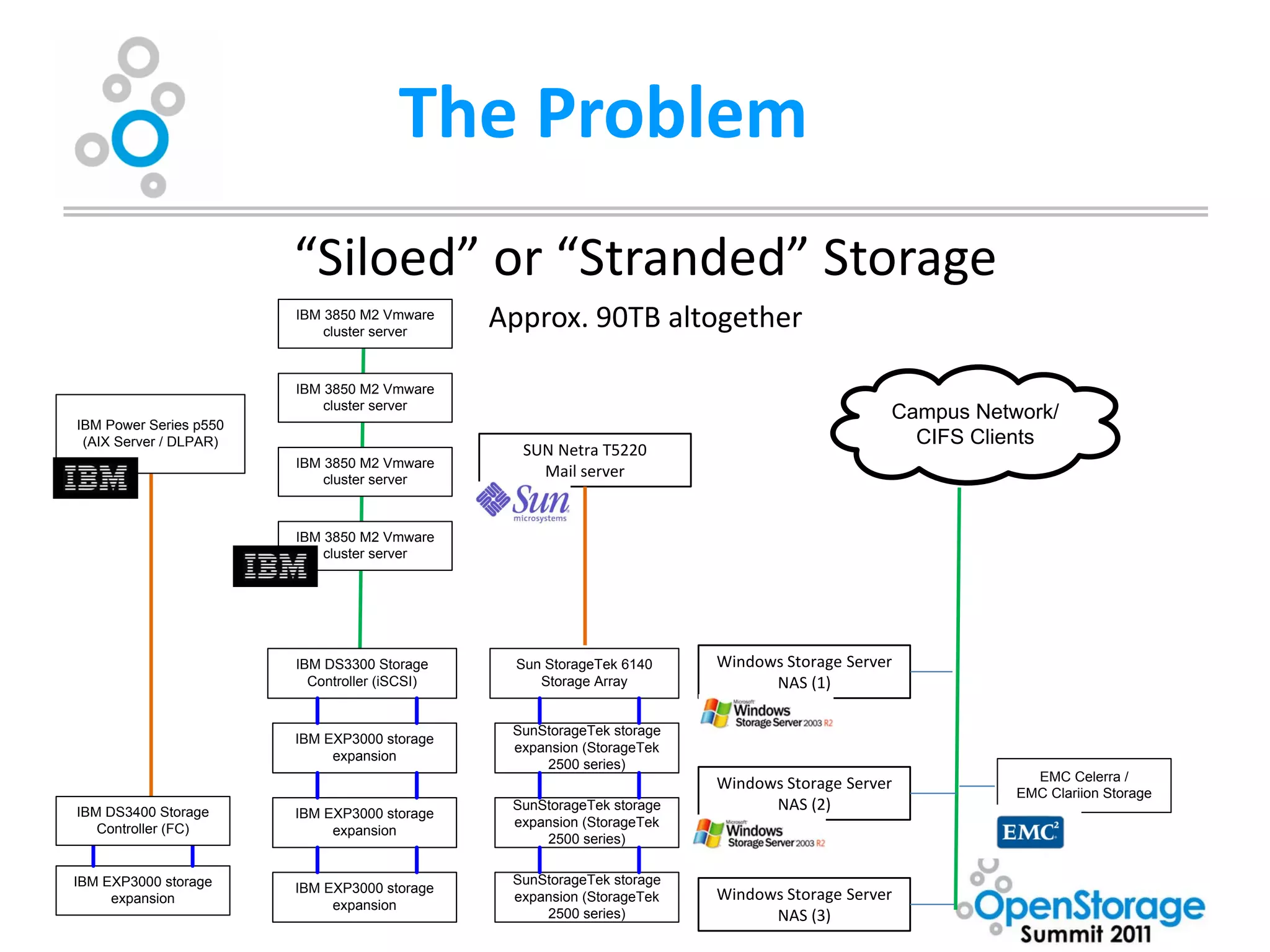
The Problem
                        “Siloed” or “Stranded” Storage
                        IBM 3850 M2 Vmware
                            cluster server
                                               Approx. 90TB altogether

                        IBM 3850 M2 Vmware
                            cluster server
                                                                                             Campus Network/
IBM Power Series p550
 (AIX Server / DLPAR)                                                                          CIFS Clients
                                                 SUN Netra T5220
                        IBM 3850 M2 Vmware
                            cluster server
                                                   Mail server


                        IBM 3850 M2 Vmware
                            cluster server


                        IBM DS3300 Storage       Sun StorageTek 6140    Windows Storage Server
                          Controller (iSCSI)        Storage Array             NAS (1)

                                                SunStorageTek storage
                        IBM EXP3000 storage
                                                expansion (StorageTek
                             expansion
                                                    2500 series)
                                                                                                          EMC Celerra /
                                                                        Windows Storage Server
                                                                                                        EMC Clariion Storage
IBM DS3400 Storage      IBM EXP3000 storage
                                                SunStorageTek storage         NAS (2)
   Controller (FC)                              expansion (StorageTek
                             expansion
                                                    2500 series)


IBM EXP3000 storage                             SunStorageTek storage
     expansion
                        IBM EXP3000 storage
                                                expansion (StorageTek   Windows Storage Server
                             expansion
                                                    2500 series)              NAS (3)
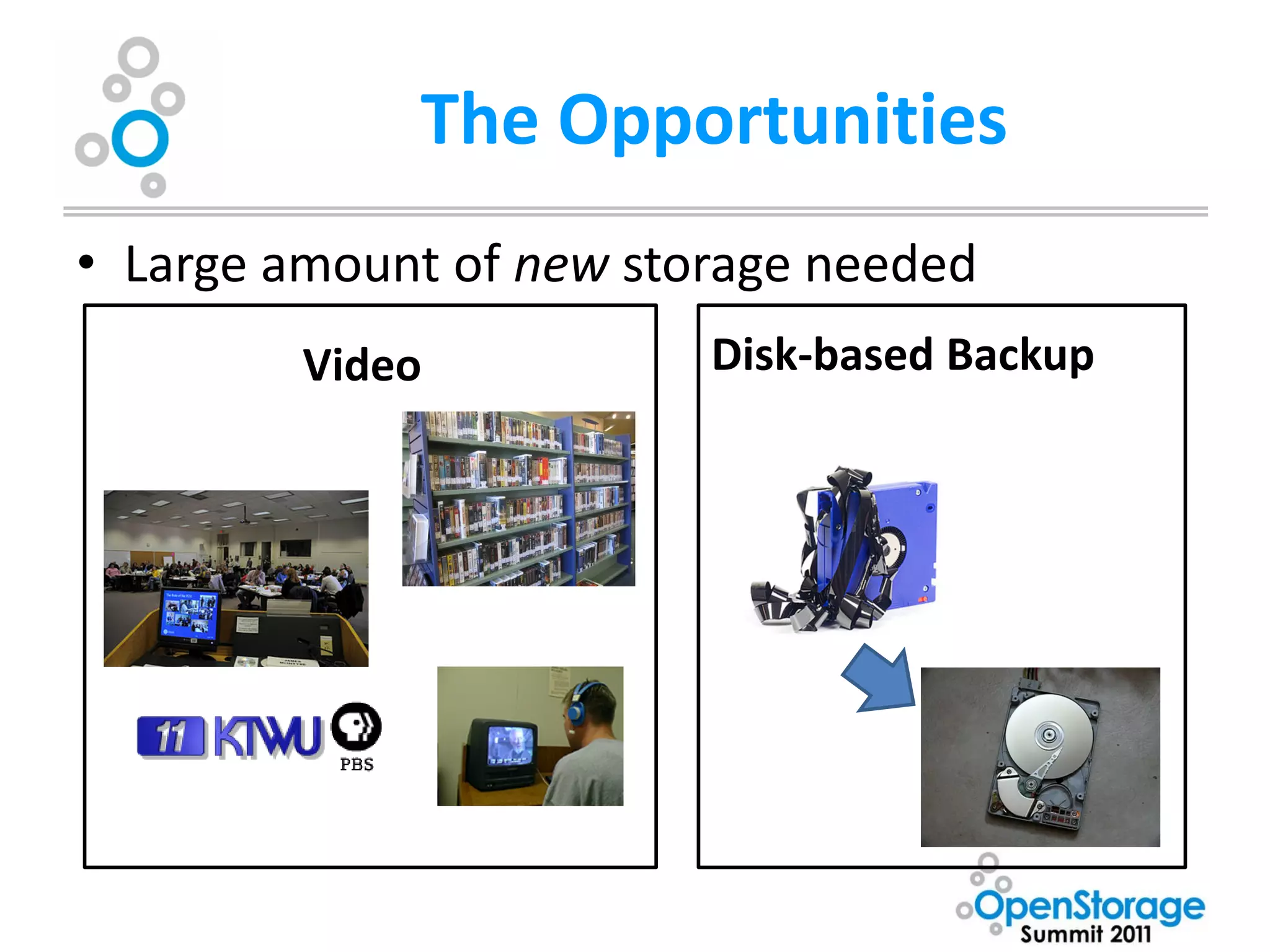
The Opportunities
• Large amount of new storage needed
         Video           Disk-based Backup
Additional Challenges
• Need a solution that scales to meet future
  needs
• Need to be able to accommodate existing
  enterprise systems
• Don’t have a lot of money to go around, need
  to be able to justify the up-front costs of a
  consolidated system
Looking for a solution

      “Yes, we recognize this is a problem,
       what are you going to do about it”

• Reach out to peers
• Reach out to technology partners
• Do my own research
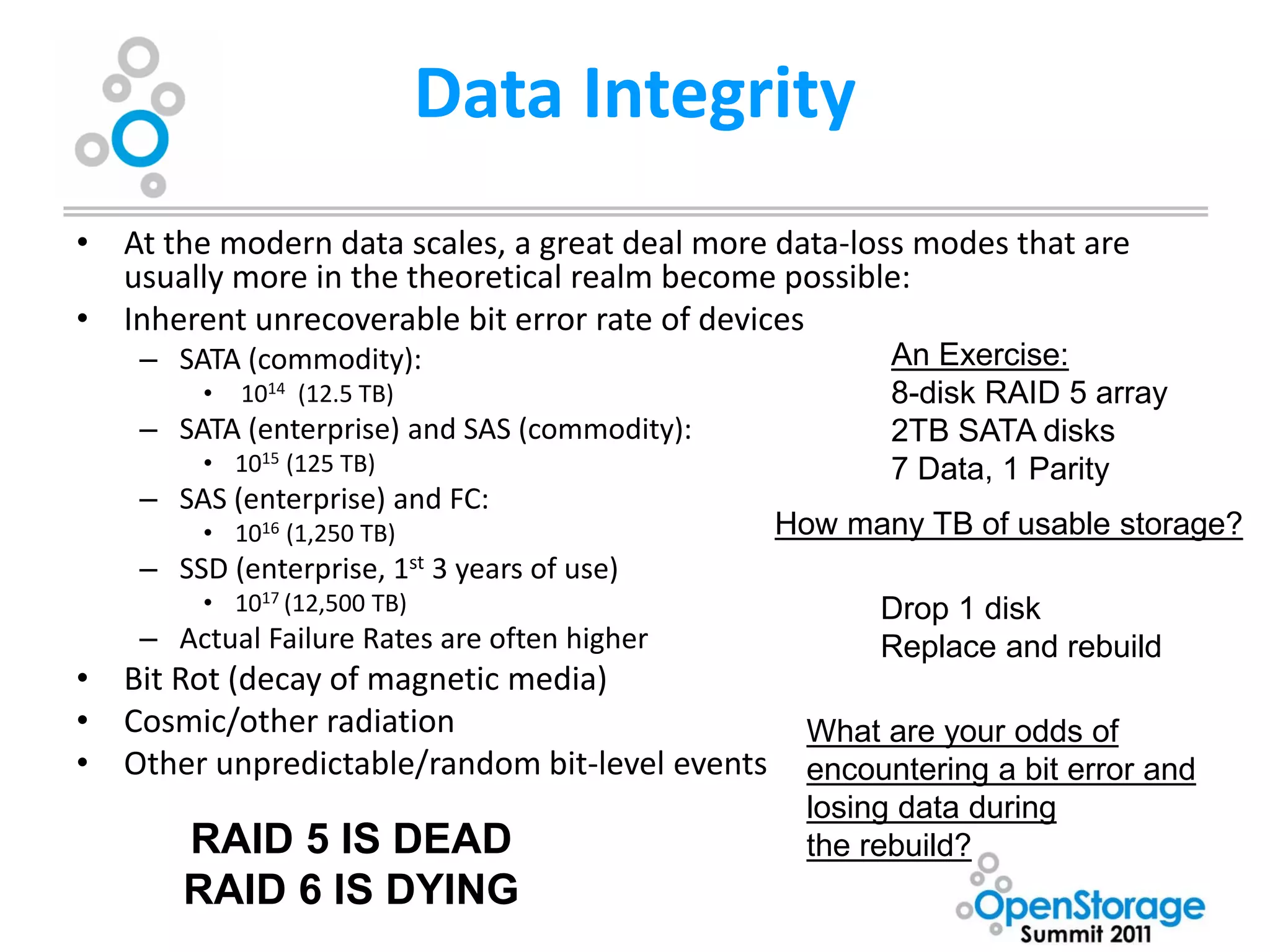
Data Integrity
• At the modern data scales, a great deal more data-loss modes that are
  usually more in the theoretical realm become possible:
• Inherent unrecoverable bit error rate of devices
    – SATA (commodity):                                 An Exercise:
         •   1014 (12.5 TB)                             8-disk RAID 5 array
    – SATA (enterprise) and SAS (commodity):            2TB SATA disks
         • 1015 (125 TB)                                7 Data, 1 Parity
    – SAS (enterprise) and FC:
         • 1016 (1,250 TB)                      How many TB of usable storage?
    – SSD (enterprise, 1st 3 years of use)
         • 1017 (12,500 TB)                            Drop 1 disk
    – Actual Failure Rates are often higher            Replace and rebuild
• Bit Rot (decay of magnetic media)
• Cosmic/other radiation                          What are your odds of
• Other unpredictable/random bit-level events     encountering a bit error and
                                                  losing data during
       RAID 5 IS DEAD                             the rebuild?
       RAID 6 IS DYING
Researching Solutions

• Traditional SAN
  – FC, FCoE
  – iSCSI
• Most solutions use RAID on the back end
• Buy all new storage, throw the old storage
  away
• Vendor lock-in
ZFS

• 128-bit “filesystem”
• Maximum pool size – 256 zettabytes (278 bytes)
• Copy-on-Write transactional model + End-to-End
  checksumming provides unparalleled data integrity
• Very high performance – I/O pipelining, block-level
  write optimization, POSIX compliant, extensible
  caches
• ZFS presentation layers support block filesystems
  (e.g. CIFS, NFS) and volume storage (iSCSI, FC)
ZFS


           I truly believe the future of
         enterprise storage lies with ZFS

It is a total rethinking of how storage is handled,
    obsoleting the 20-year-old paradigms most
                  systems use today
Who is that?

Why them?
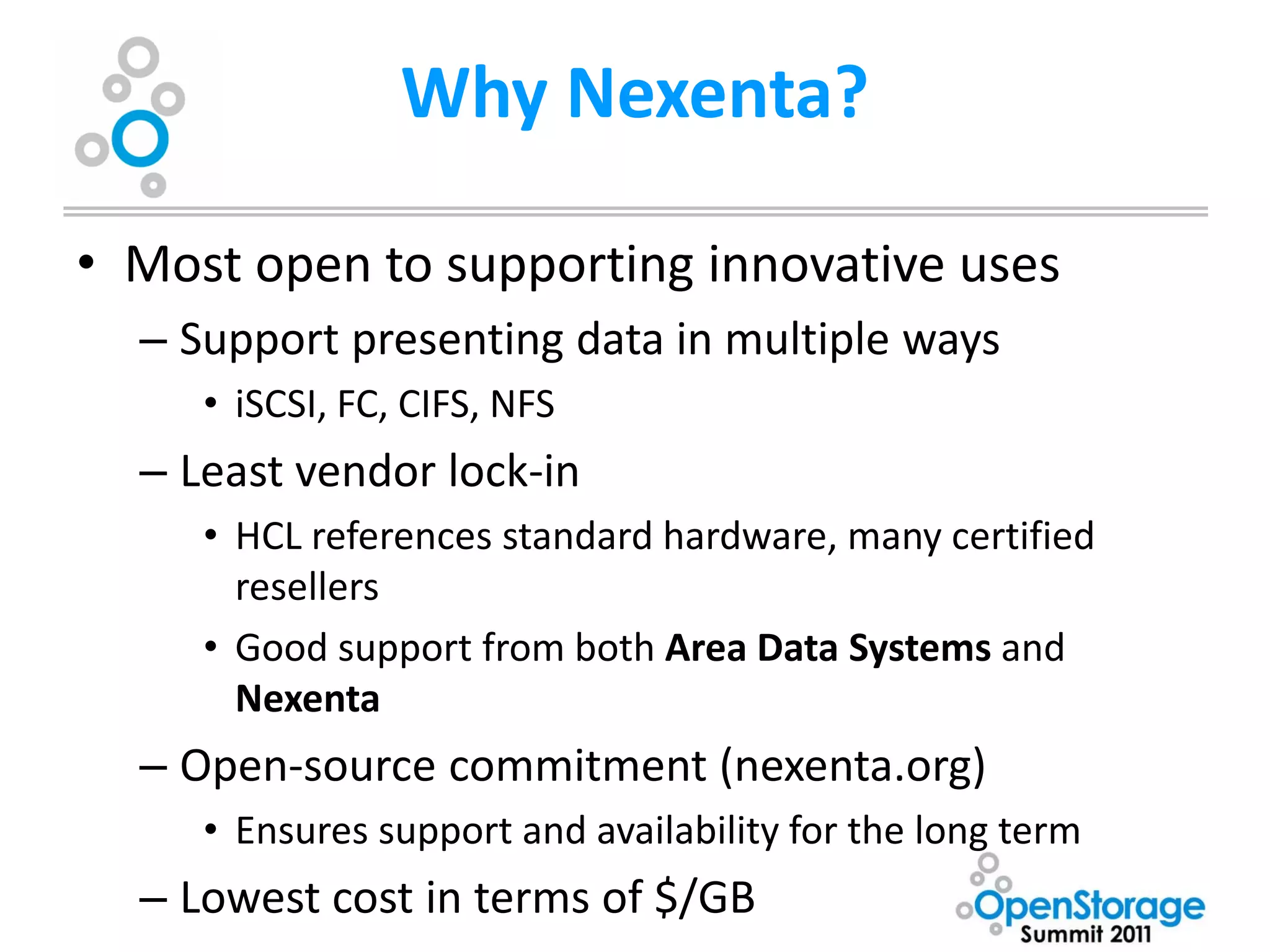
Why Nexenta?

• Most open to supporting innovative uses
  – Support presenting data in multiple ways
     • iSCSI, FC, CIFS, NFS
  – Least vendor lock-in
     • HCL references standard hardware, many certified
       resellers
     • Good support from both Area Data Systems and
       Nexenta
  – Open-source commitment (nexenta.org)
     • Ensures support and availability for the long term
  – Lowest cost in terms of $/GB
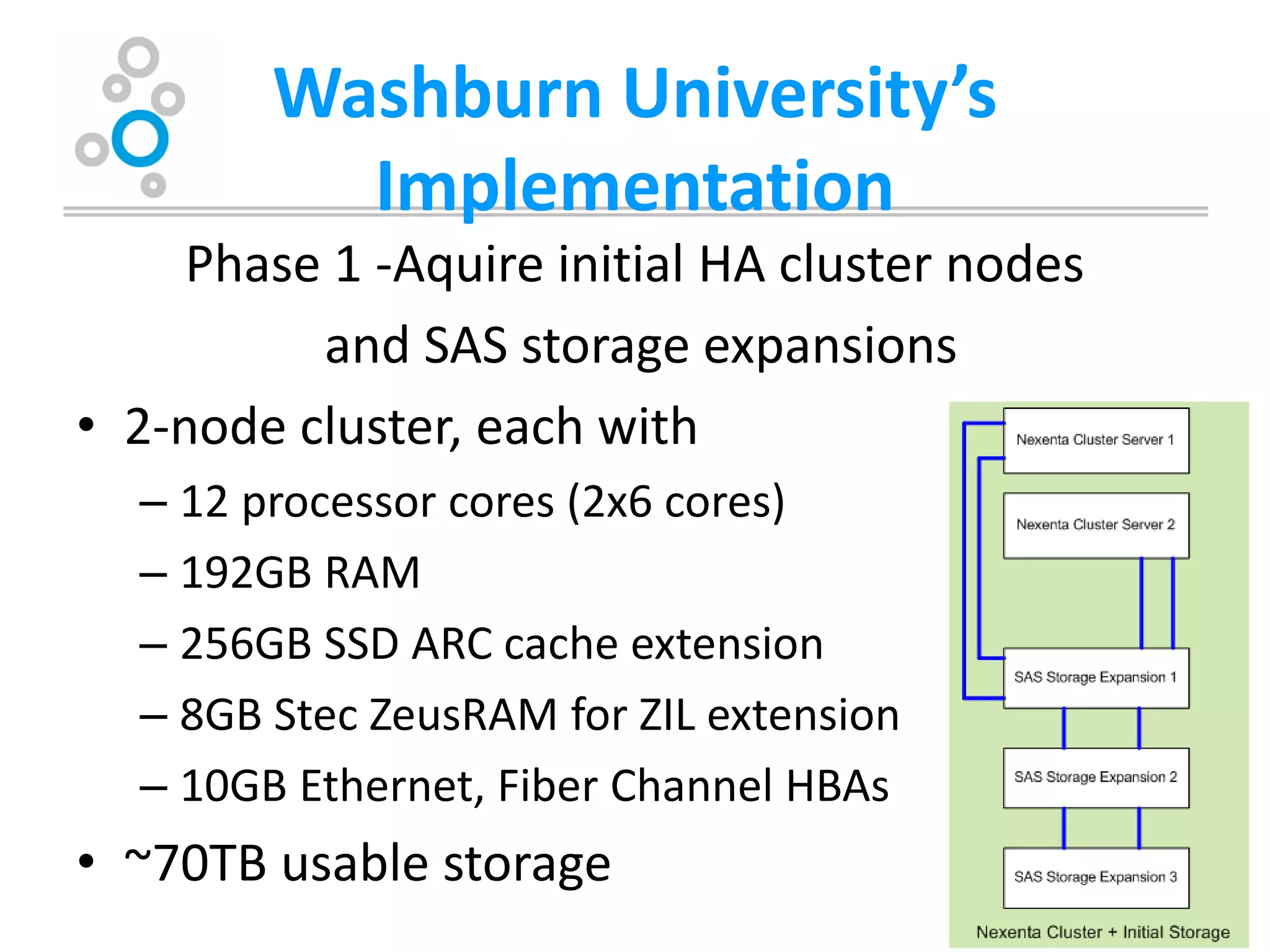
Washburn University’s
          Implementation
     Phase 1 -Aquire initial HA cluster nodes
          and SAS storage expansions
• 2-node cluster, each with
  – 12 processor cores (2x6 cores)
  – 192GB RAM
  – 256GB SSD ARC cache extension
  – 8GB Stec ZeusRAM for ZIL extension
  – 10GB Ethernet, Fiber Channel HBAs
• ~70TB usable storage
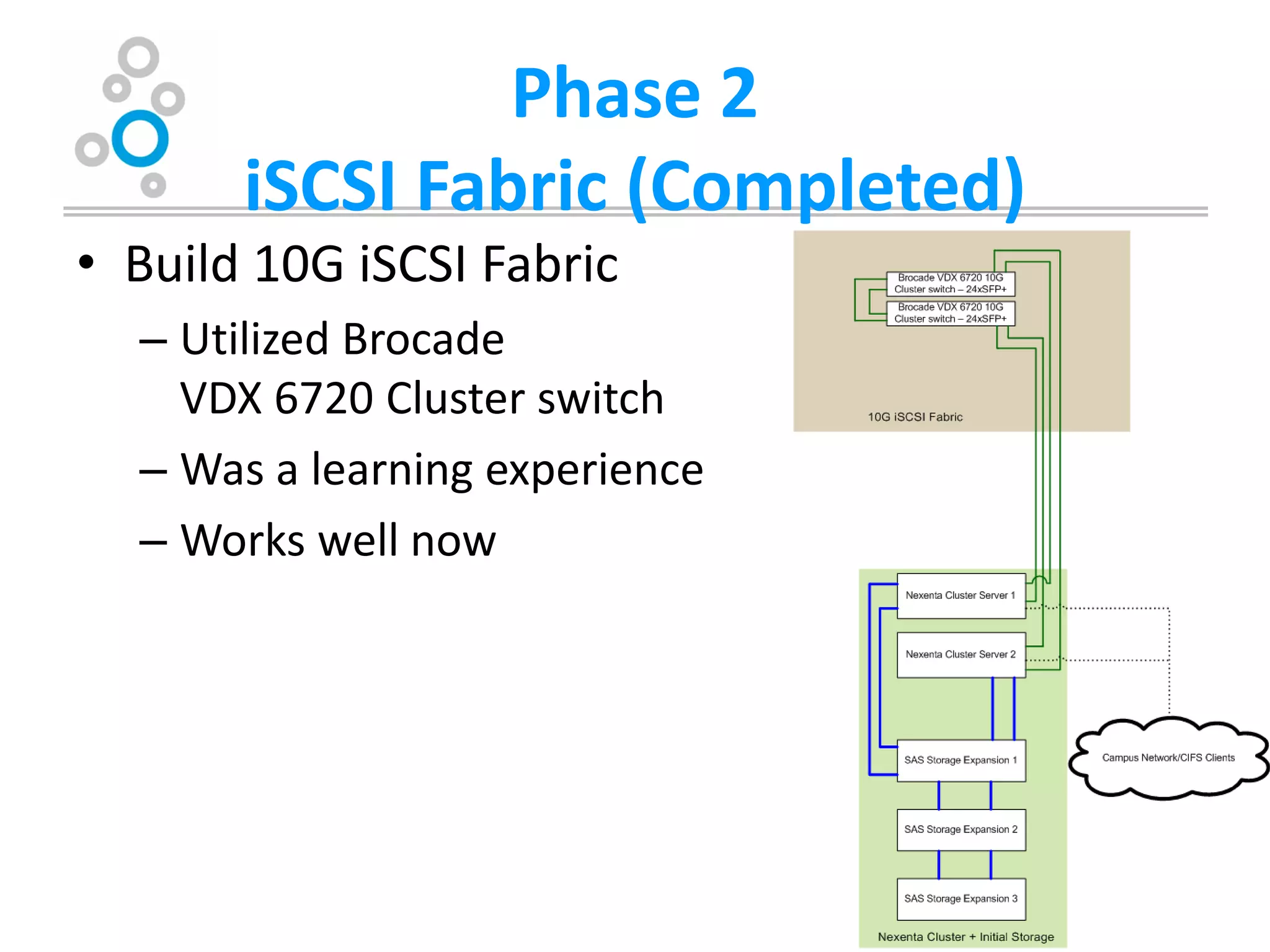
Phase 2
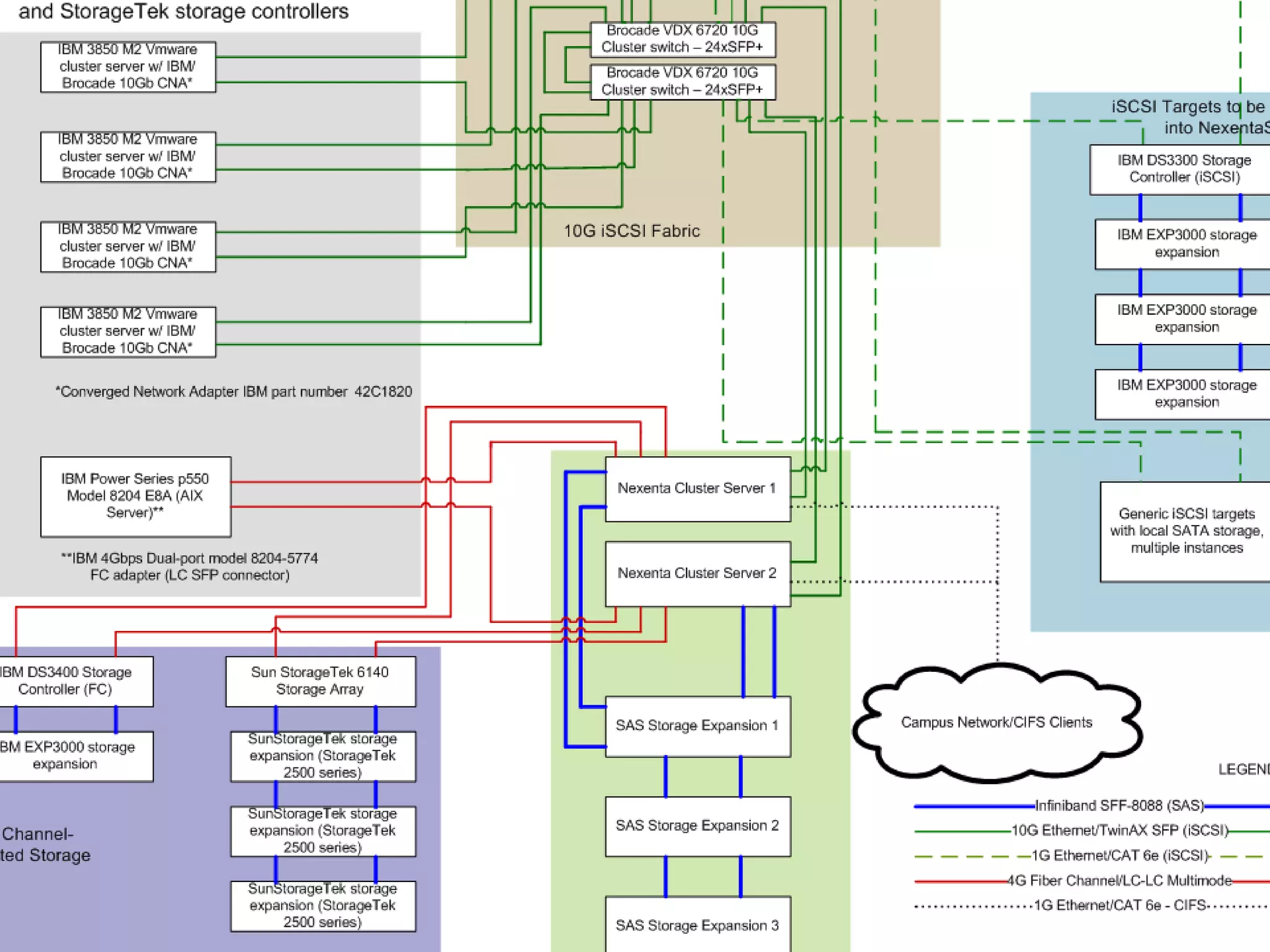
       iSCSI Fabric (Completed)
• Build 10G iSCSI Fabric
  – Utilized Brocade
    VDX 6720 Cluster switch
  – Was a learning experience
  – Works well now
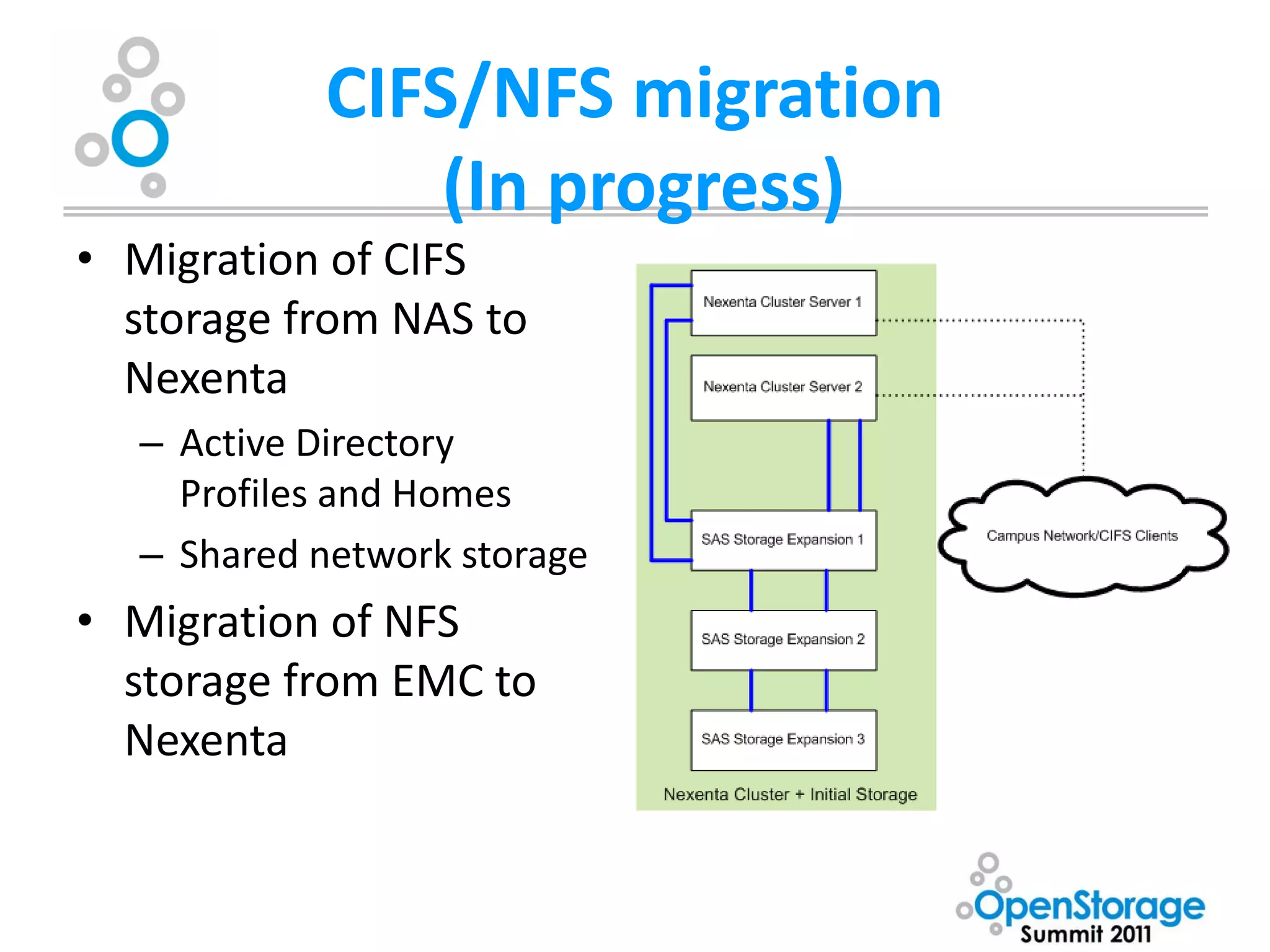
CIFS/NFS migration
               (In progress)
• Migration of CIFS
  storage from NAS to
  Nexenta
  – Active Directory
    Profiles and Homes
  – Shared network storage
• Migration of NFS
  storage from EMC to
  Nexenta
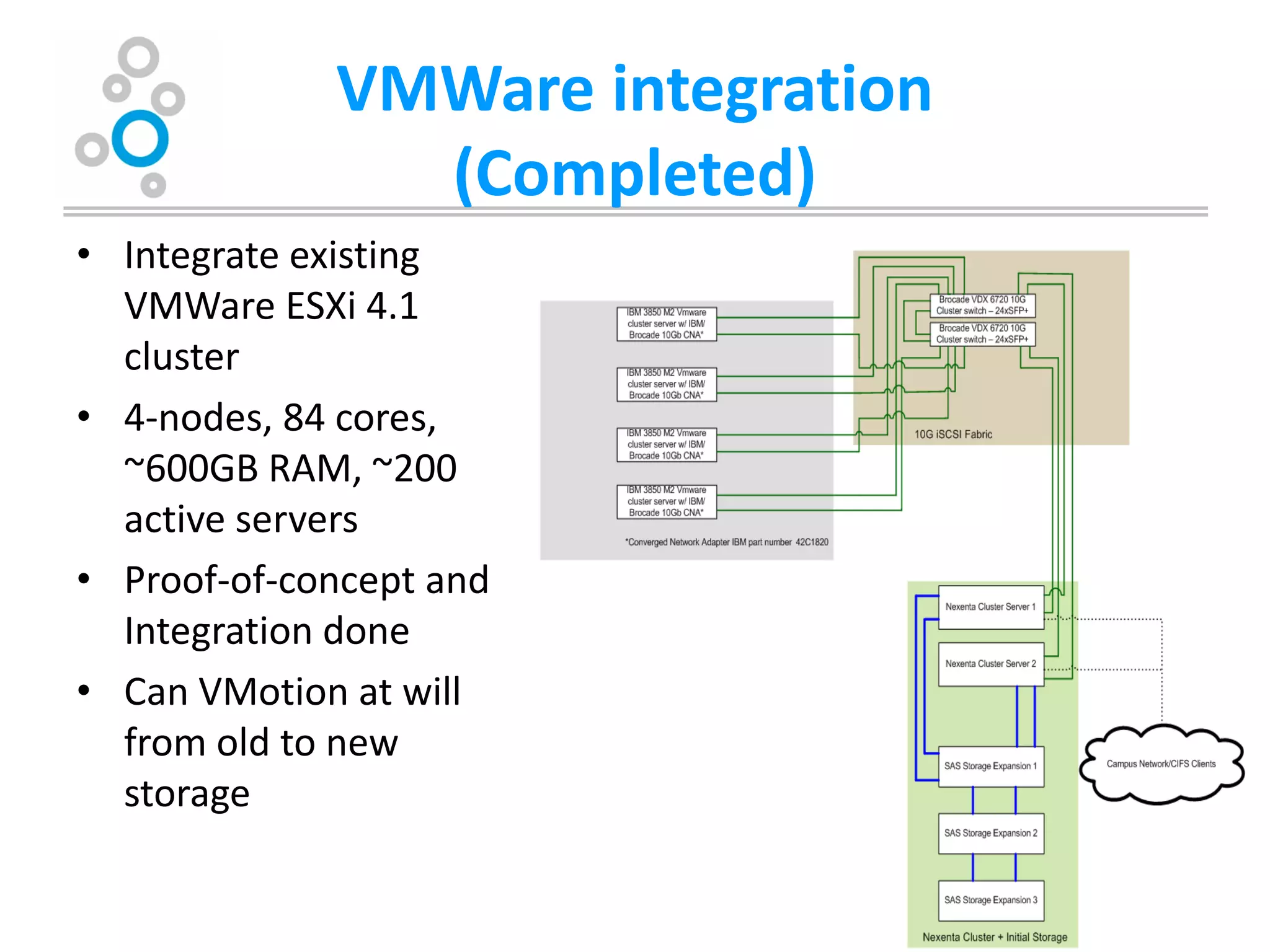
VMWare integration
               (Completed)
• Integrate existing
  VMWare ESXi 4.1
  cluster
• 4-nodes, 84 cores,
  ~600GB RAM, ~200
  active servers
• Proof-of-concept and
  Integration done
• Can VMotion at will
  from old to new
  storage
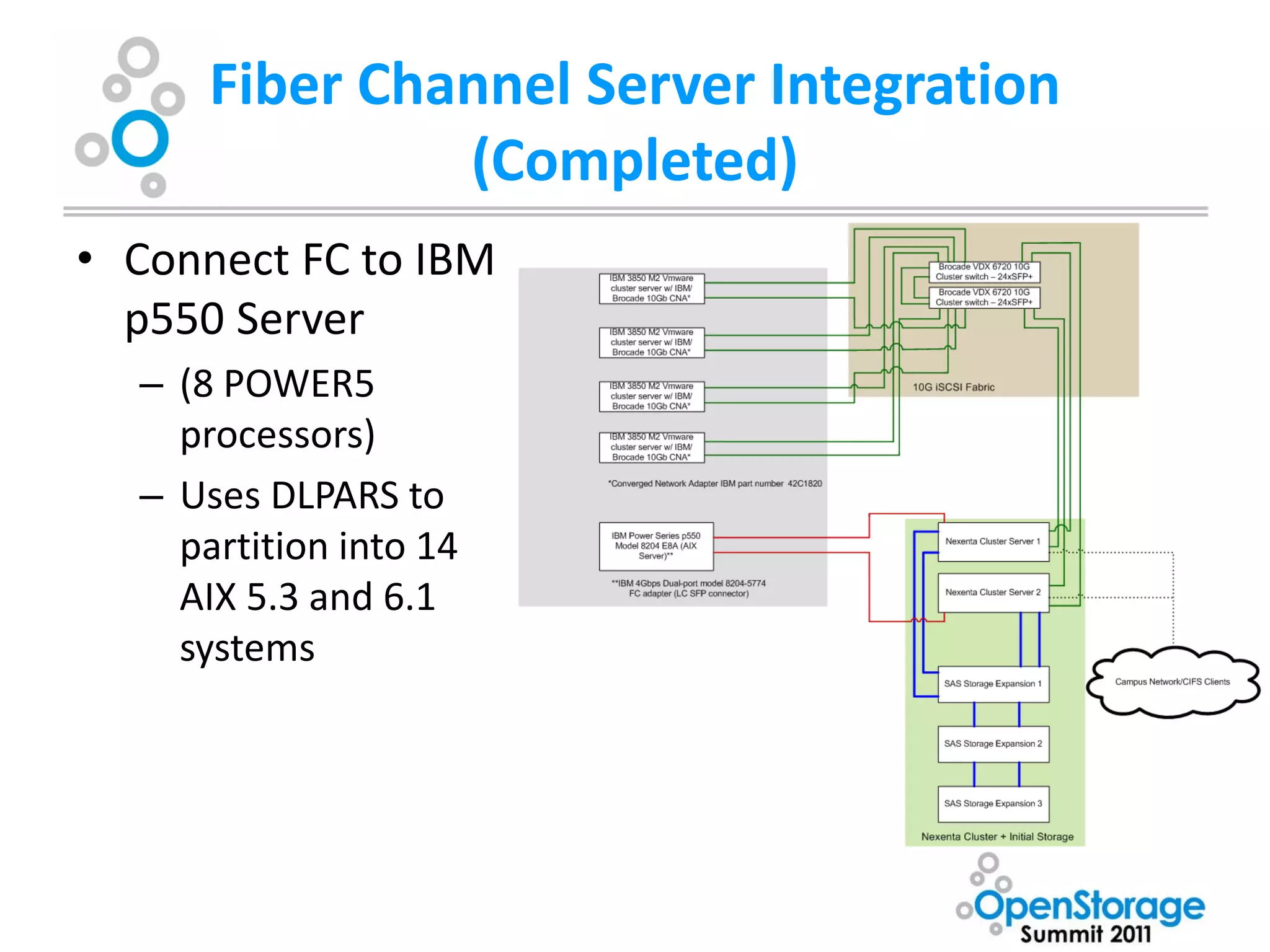
Fiber Channel Server Integration
               (Completed)
• Connect FC to IBM
  p550 Server
  – (8 POWER5
    processors)
  – Uses DLPARS to
    partition into 14
    AIX 5.3 and 6.1
    systems
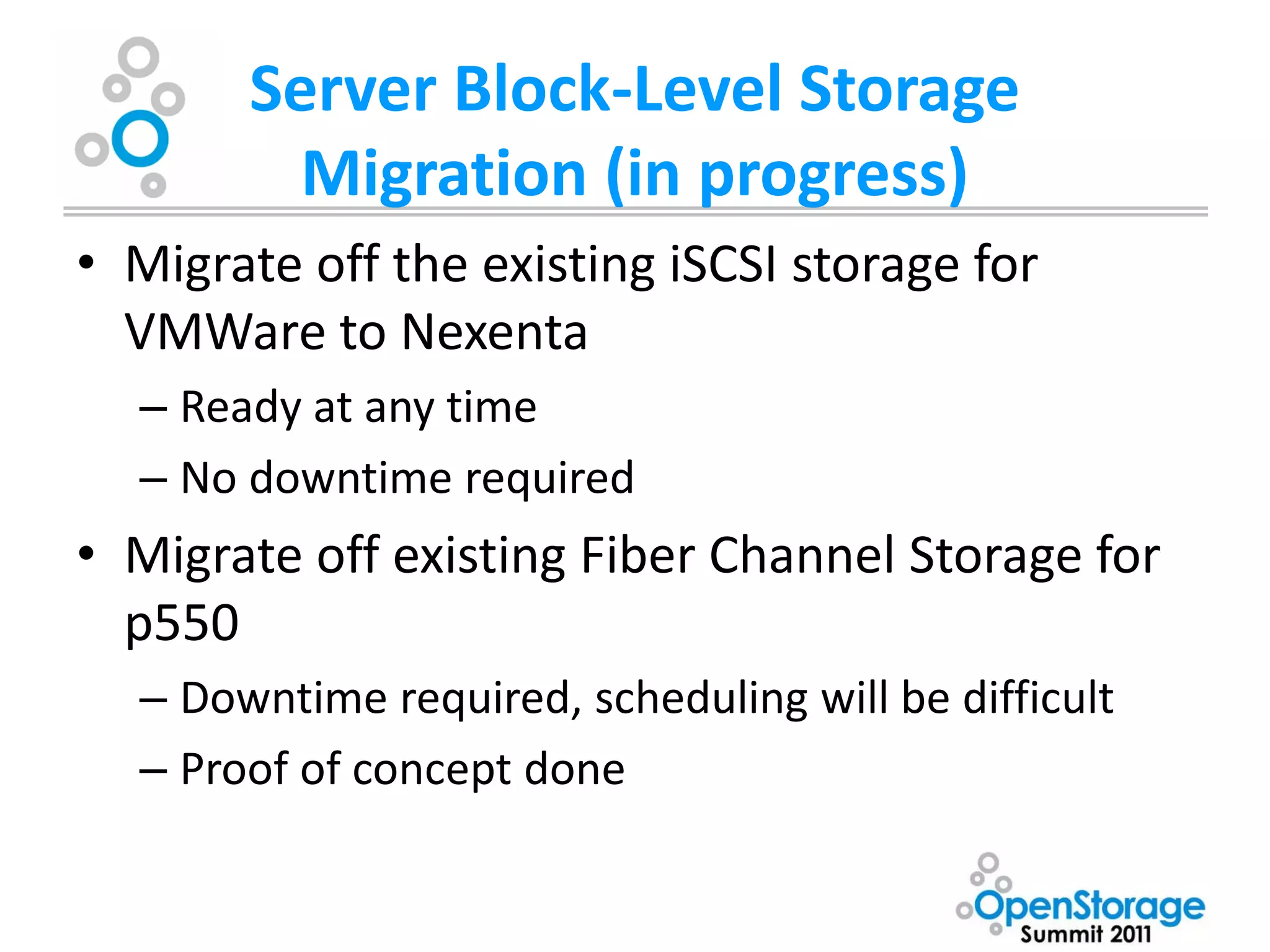
Server Block-Level Storage
         Migration (in progress)
• Migrate off the existing iSCSI storage for
  VMWare to Nexenta
  – Ready at any time
  – No downtime required
• Migrate off existing Fiber Channel Storage for
  p550
  – Downtime required, scheduling will be difficult
  – Proof of concept done
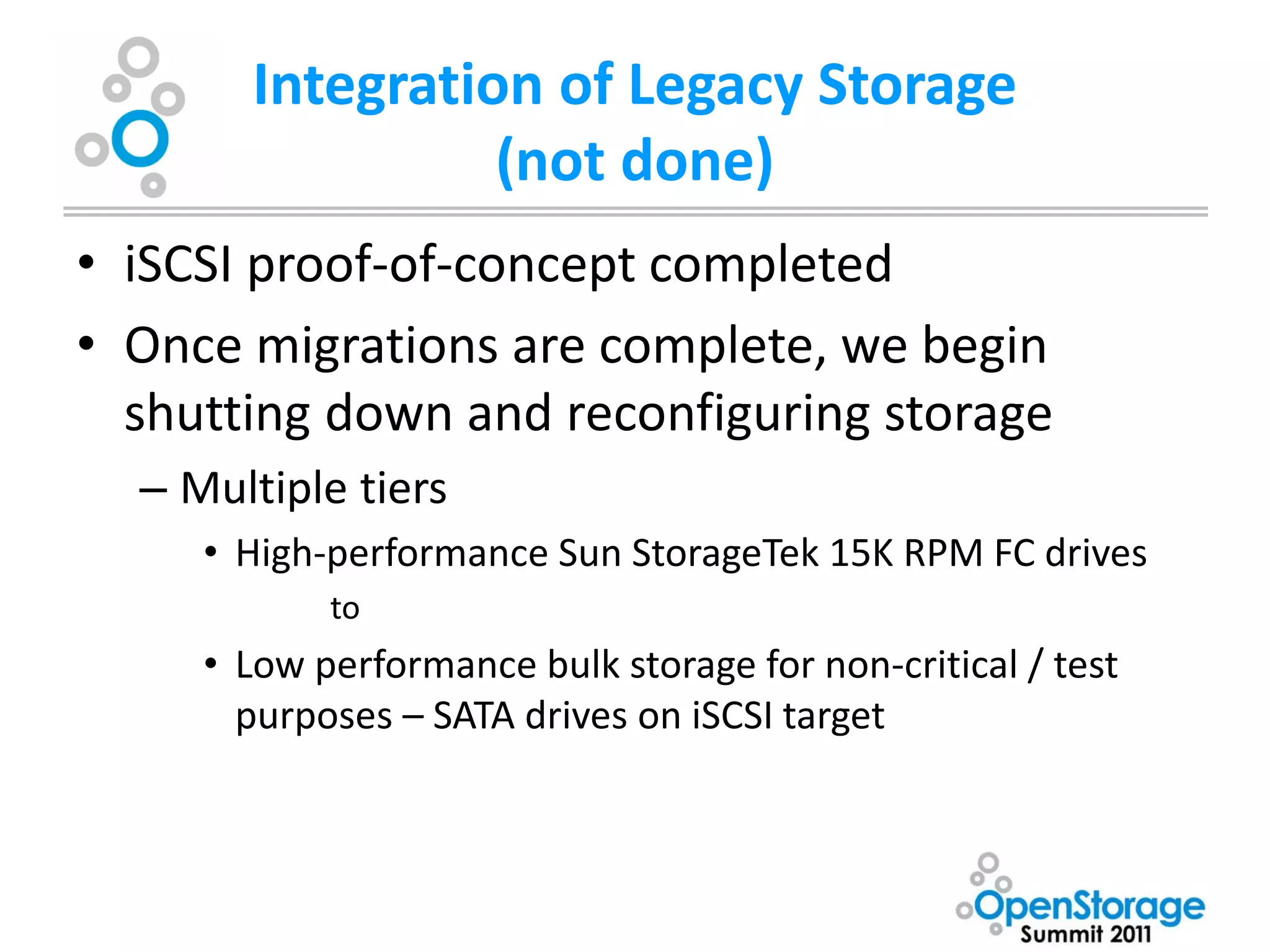
Integration of Legacy Storage
                 (not done)
• iSCSI proof-of-concept completed
• Once migrations are complete, we begin
  shutting down and reconfiguring storage
  – Multiple tiers
     • High-performance Sun StorageTek 15K RPM FC drives
            to
     • Low performance bulk storage for non-critical / test
       purposes – SATA drives on iSCSI target
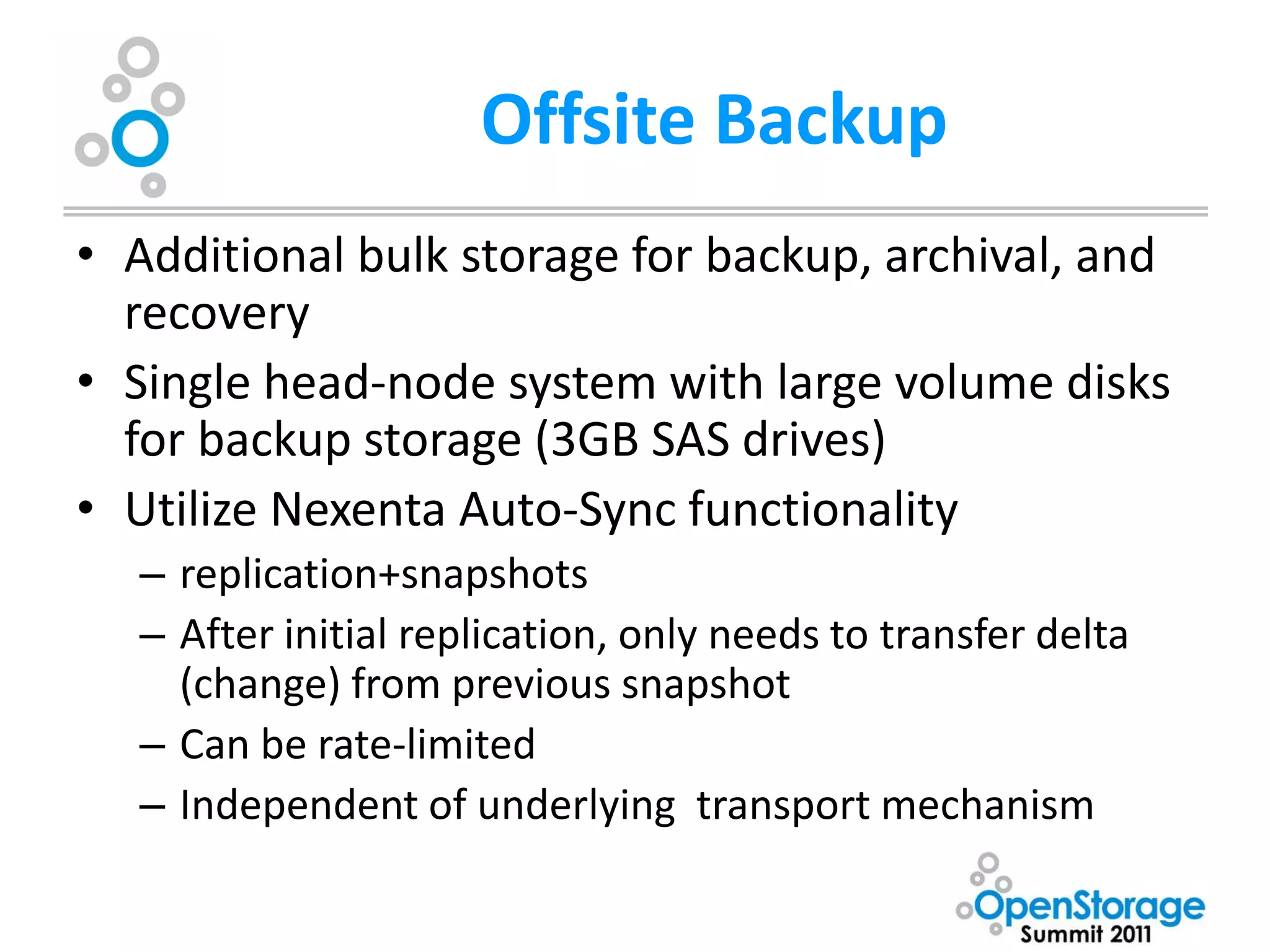
Offsite Backup
• Additional bulk storage for backup, archival, and
  recovery
• Single head-node system with large volume disks
  for backup storage (3GB SAS drives)
• Utilize Nexenta Auto-Sync functionality
  – replication+snapshots
  – After initial replication, only needs to transfer delta
    (change) from previous snapshot
  – Can be rate-limited
  – Independent of underlying transport mechanism
Endgame

• My admins get a single interface to manage
  storage and disk-based backup
• ZFS helps ensure reliability and performance
  of disparate storage systems
• Nexenta and Area Data Systems provides
  support for an integrated system
  (3rd-party hardware is our problem, however)
Backup Slides

Understanding ZFS
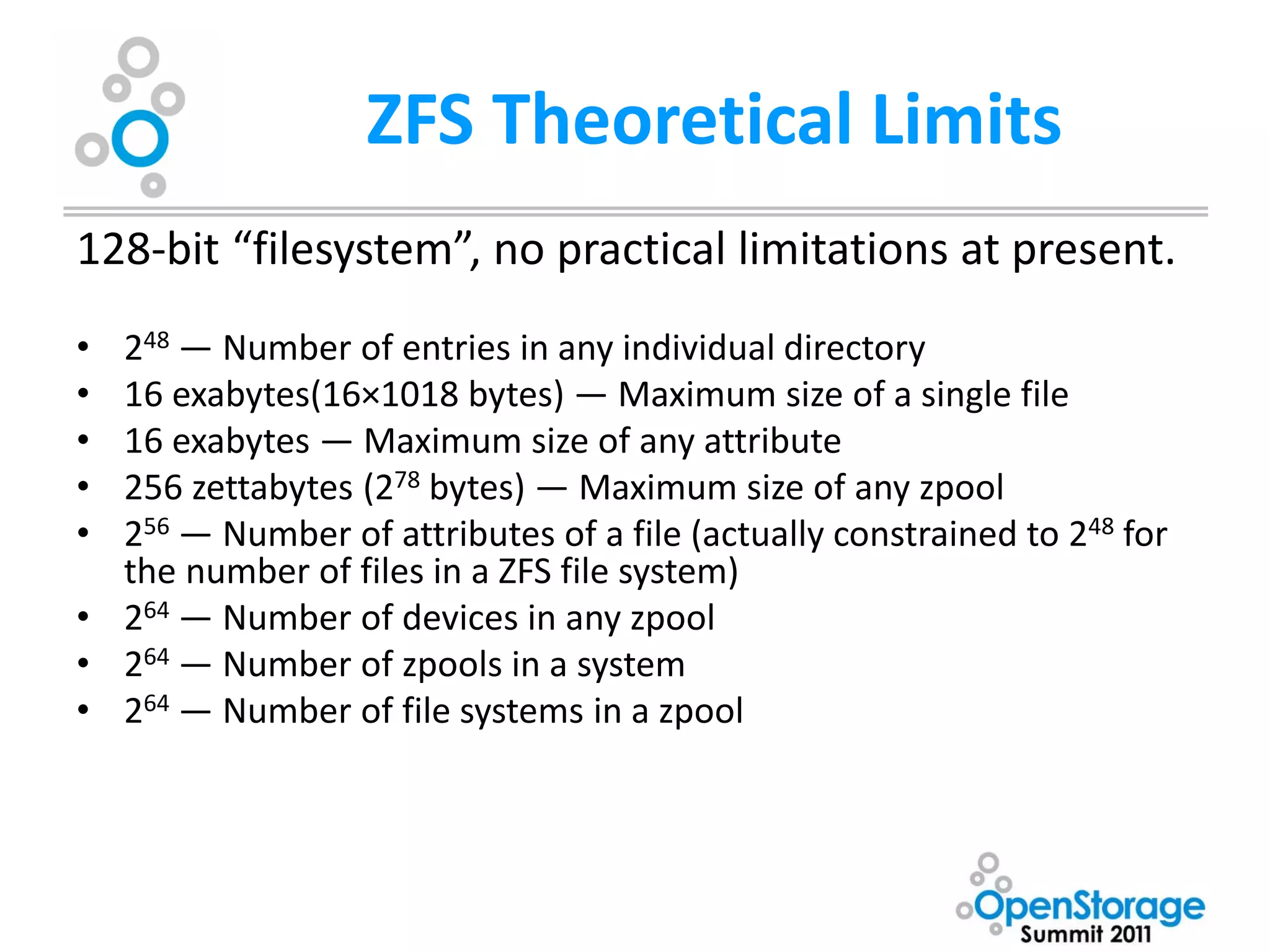
ZFS Theoretical Limits
128-bit “filesystem”, no practical limitations at present.
• 248 — Number of entries in any individual directory
• 16 exabytes(16×1018 bytes) — Maximum size of a single file
• 16 exabytes — Maximum size of any attribute
• 256 zettabytes (278 bytes) — Maximum size of any zpool
• 256 — Number of attributes of a file (actually constrained to 248 for
  the number of files in a ZFS file system)
• 264 — Number of devices in any zpool
• 264 — Number of zpools in a system
• 264 — Number of file systems in a zpool
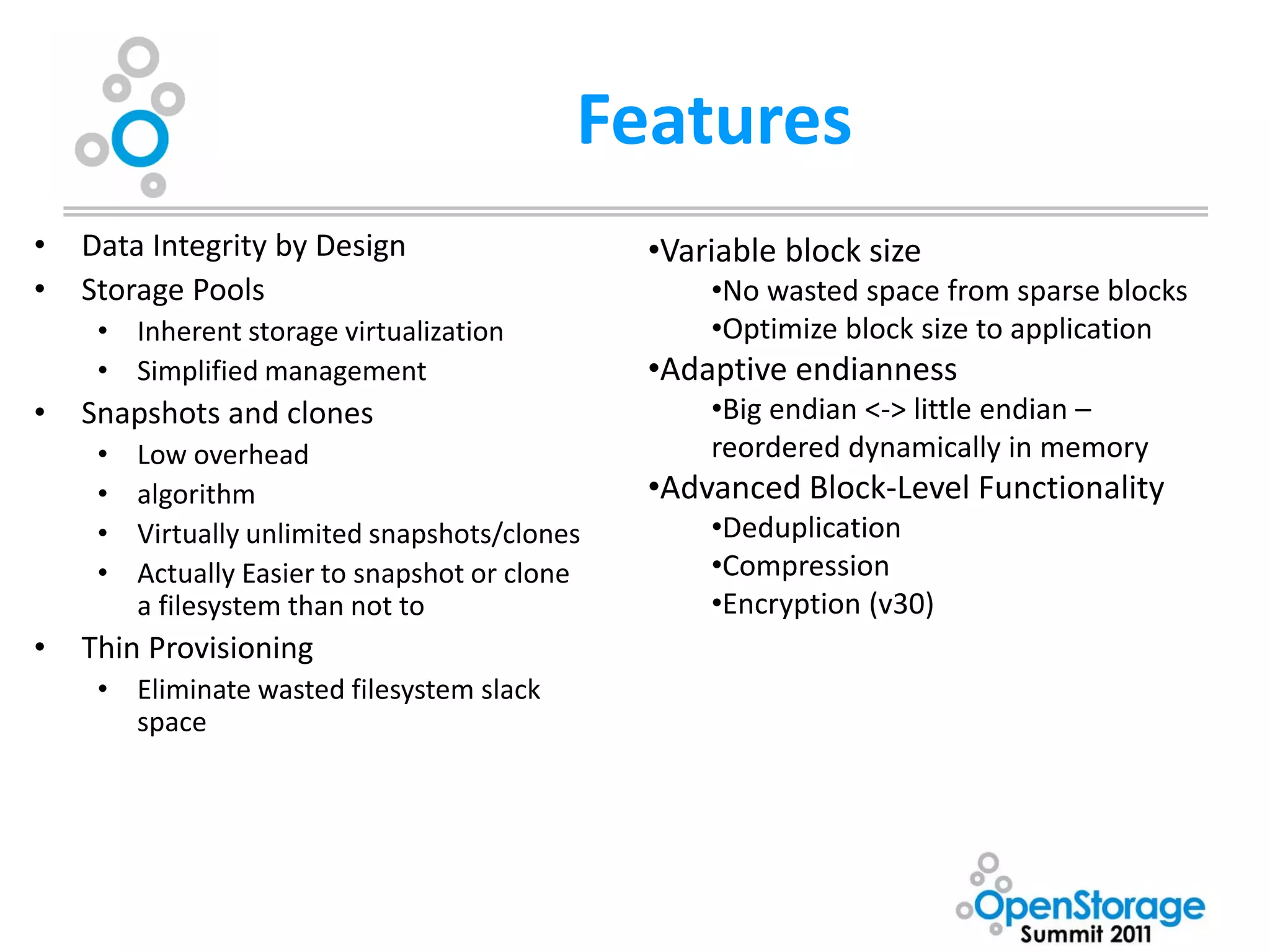
Features
•   Data Integrity by Design                    •Variable block size
•   Storage Pools                                   •No wasted space from sparse blocks
     • Inherent storage virtualization              •Optimize block size to application
     • Simplified management                    •Adaptive endianness
•   Snapshots and clones                            •Big endian <-> little endian –
     •   Low overhead                               reordered dynamically in memory
     •   algorithm                              •Advanced Block-Level Functionality
     •   Virtually unlimited snapshots/clones       •Deduplication
     •   Actually Easier to snapshot or clone       •Compression
         a filesystem than not to                   •Encryption (v30)
•   Thin Provisioning
     • Eliminate wasted filesystem slack
       space
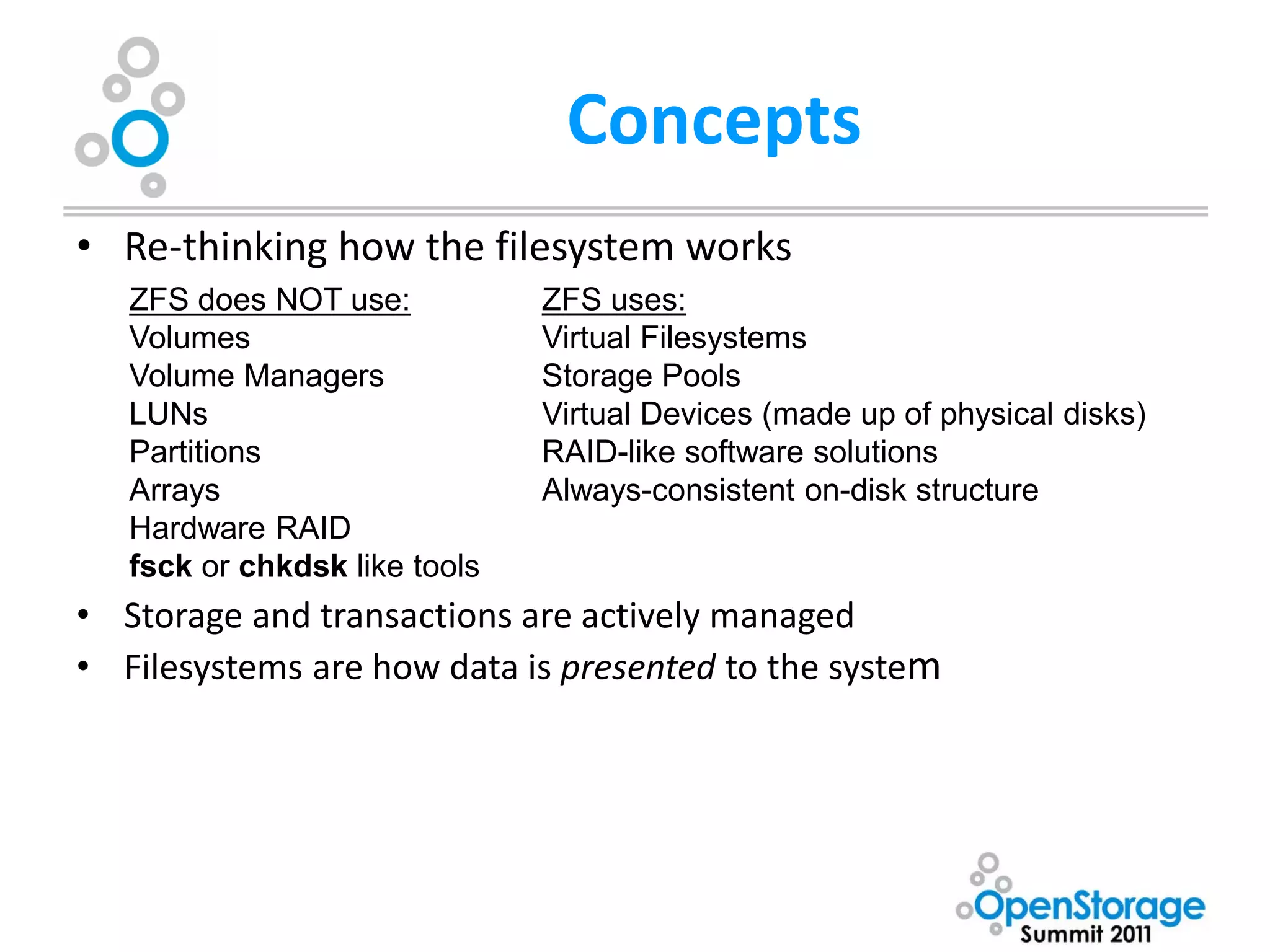
Concepts
• Re-thinking how the filesystem works
   ZFS does NOT use:           ZFS uses:
   Volumes                     Virtual Filesystems
   Volume Managers             Storage Pools
   LUNs                        Virtual Devices (made up of physical disks)
   Partitions                  RAID-like software solutions
   Arrays                      Always-consistent on-disk structure
   Hardware RAID
   fsck or chkdsk like tools
• Storage and transactions are actively managed
• Filesystems are how data is presented to the system
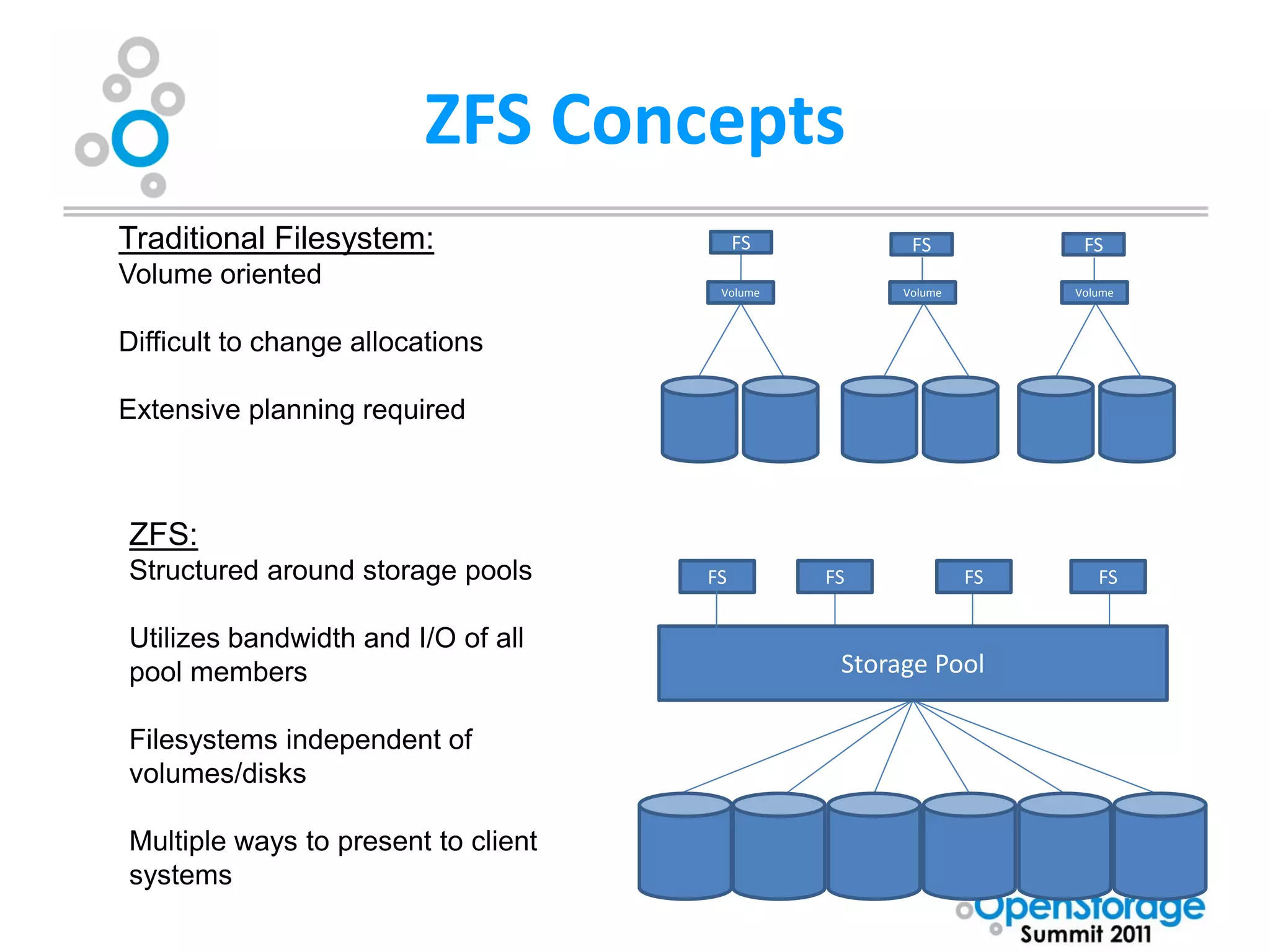
ZFS Concepts
Traditional Filesystem:                   FS          FS            FS
Volume oriented                       Volume         Volume        Volume


Difficult to change allocations

Extensive planning required


ZFS:
Structured around storage pools      FS        FS             FS      FS


Utilizes bandwidth and I/O of all
pool members                                    Storage Pool

Filesystems independent of
volumes/disks

Multiple ways to present to client
systems
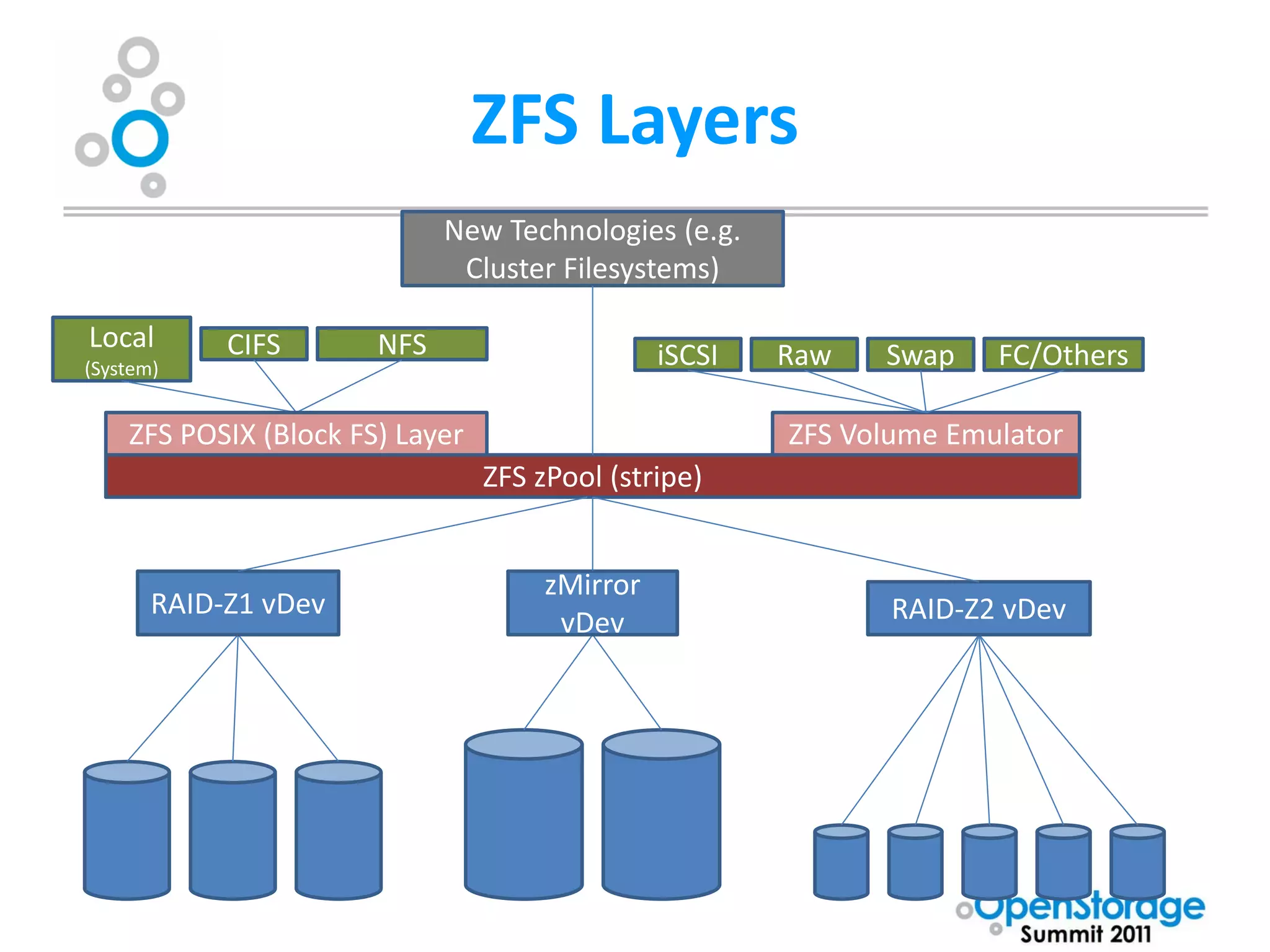
ZFS Layers
                             New Technologies (e.g.
                              Cluster Filesystems)

Local       CIFS       NFS
(System)                                        iSCSI   Raw   Swap    FC/Others

    ZFS POSIX (Block FS) Layer                          ZFS Volume Emulator
                                 ZFS zPool (stripe)


                                      zMirror
       RAID-Z1 vDev                                            RAID-Z2 vDev
                                       vDev
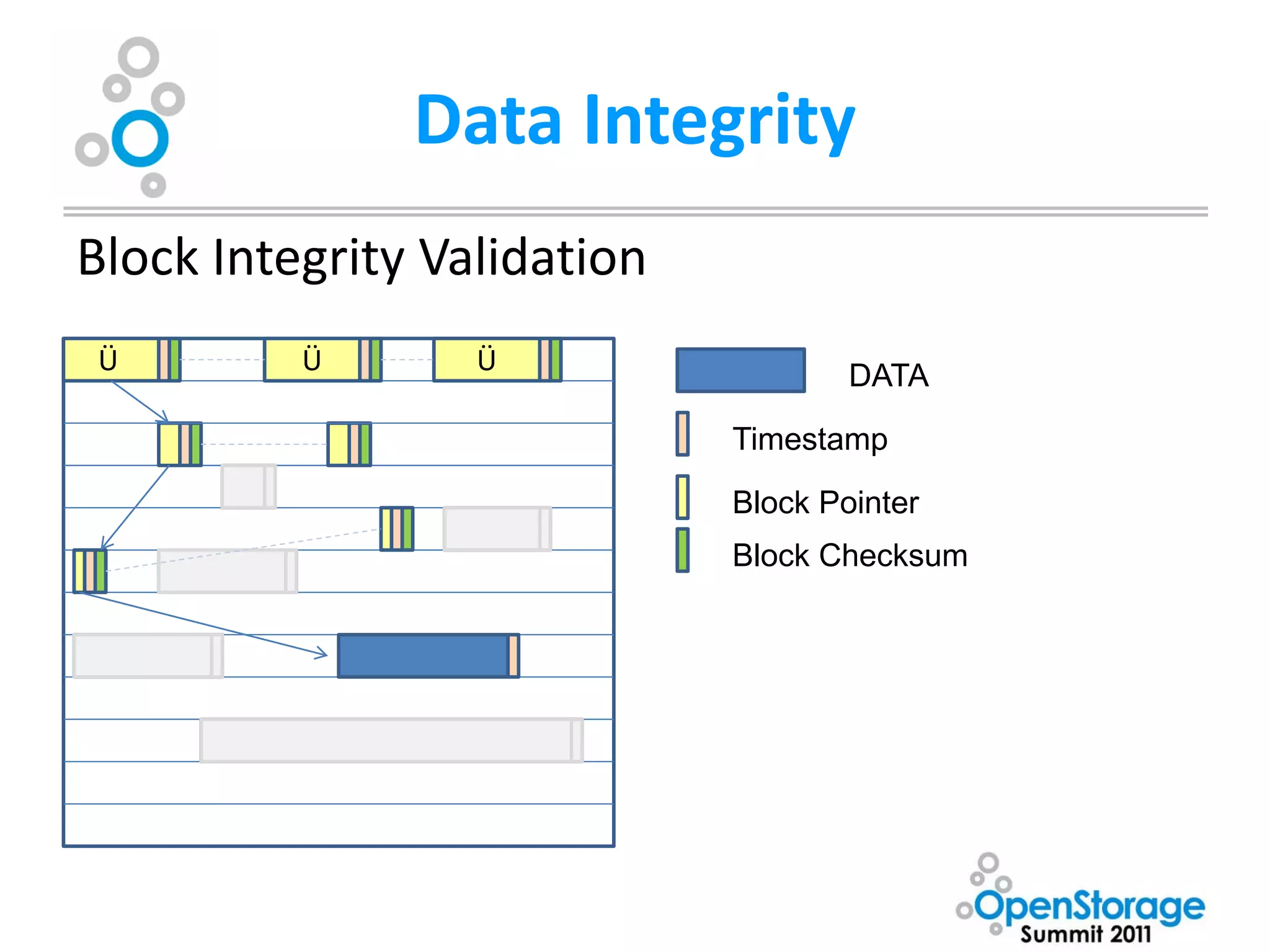
Data Integrity
Block Integrity Validation
Ü         Ü       Ü
                                     DATA

                             Timestamp

                             Block Pointer
                             Block Checksum
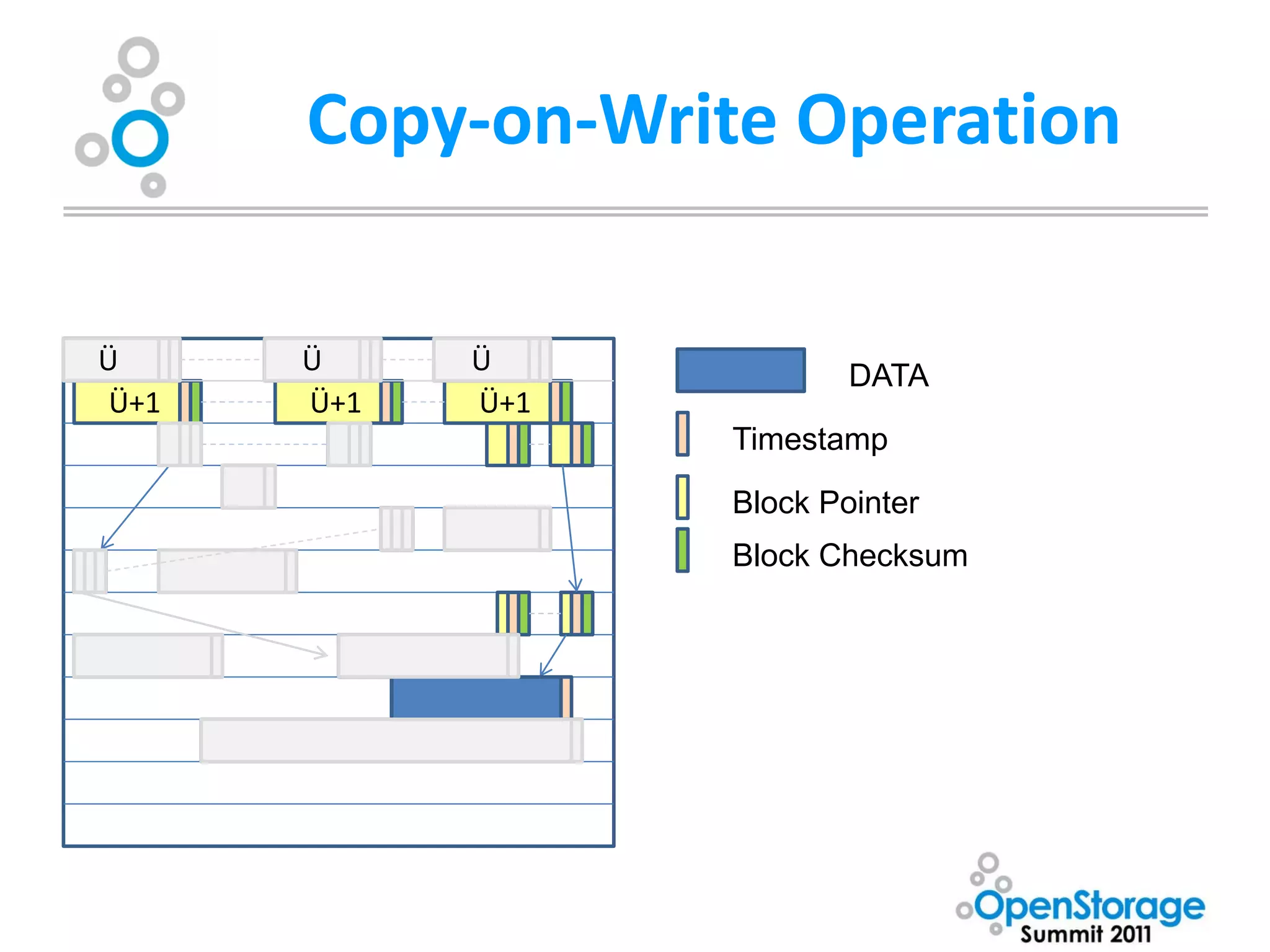
Copy-on-Write Operation

Ü      Ü     Ü
                           DATA
 Ü+1   Ü+1   Ü+1
                   Timestamp

                   Block Pointer
                   Block Checksum
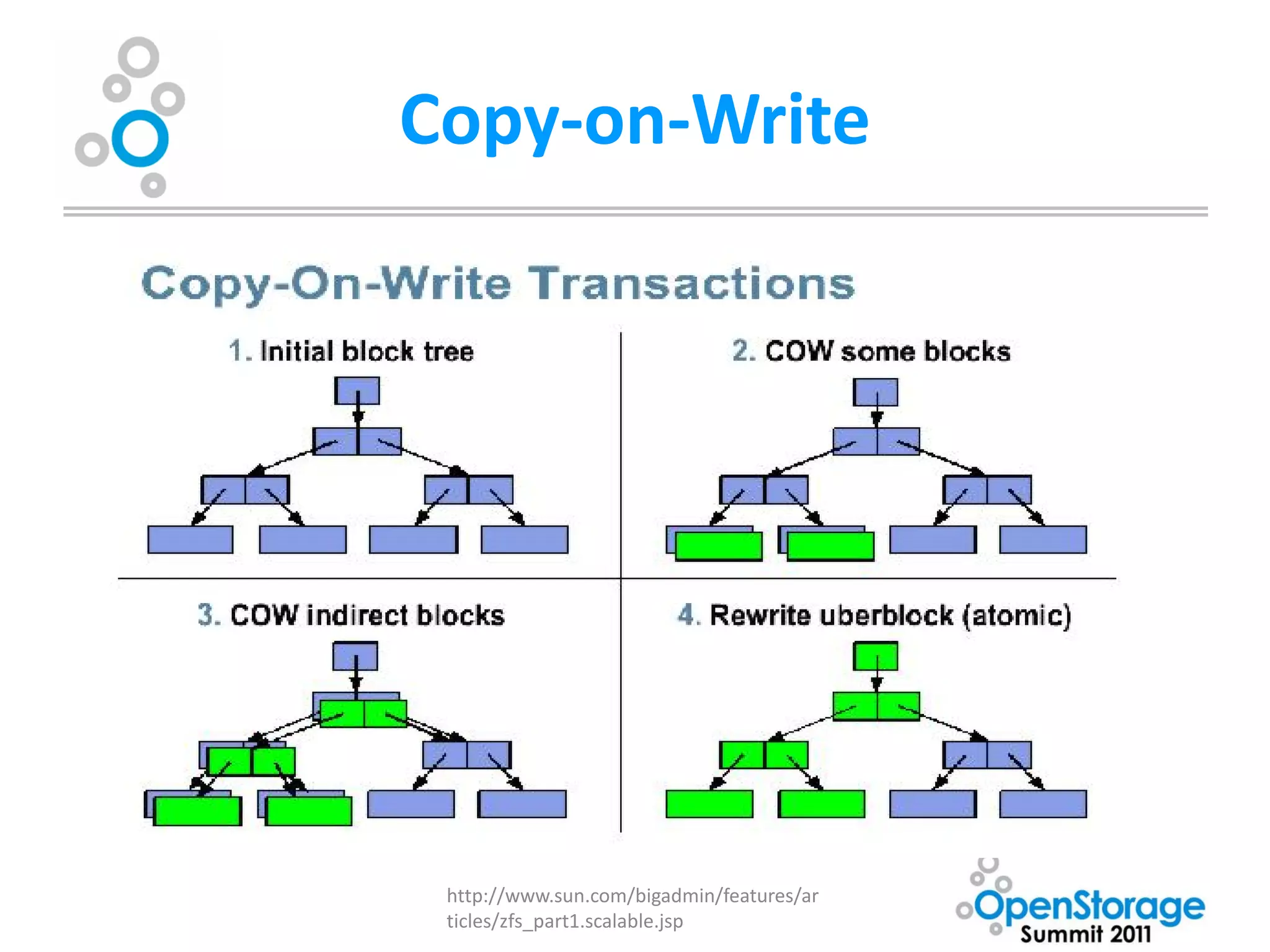
Copy-on-Write


 http://www.sun.com/bigadmin/features/ar
 ticles/zfs_part1.scalable.jsp
Data Integrity
• Copy-on-Write transactional model+End-to-End
  checksumming provides unparalleled data integrity
   – Blocks are never overwritten in place. A new block is
     allocated modified data is written to the new block,
     metadata blocks are updated (also using copy-on-write
     model) with new pointers. Blocks are only freed once all
     Uberblock pointers have been updated. [Merkle tree]
   – Multiple updates are grouped into transaction groups in
     memory, ZFS Intent Log (ZIL) can be used for synchronous
     writes (POSIX demands confirmation that data is on media
     before telling the OS the operation was successful)
   – Eliminates the need for journaling or logging filesystem,
     utilities such as fsck/chkdsk
Data Integrity – RAIDZ
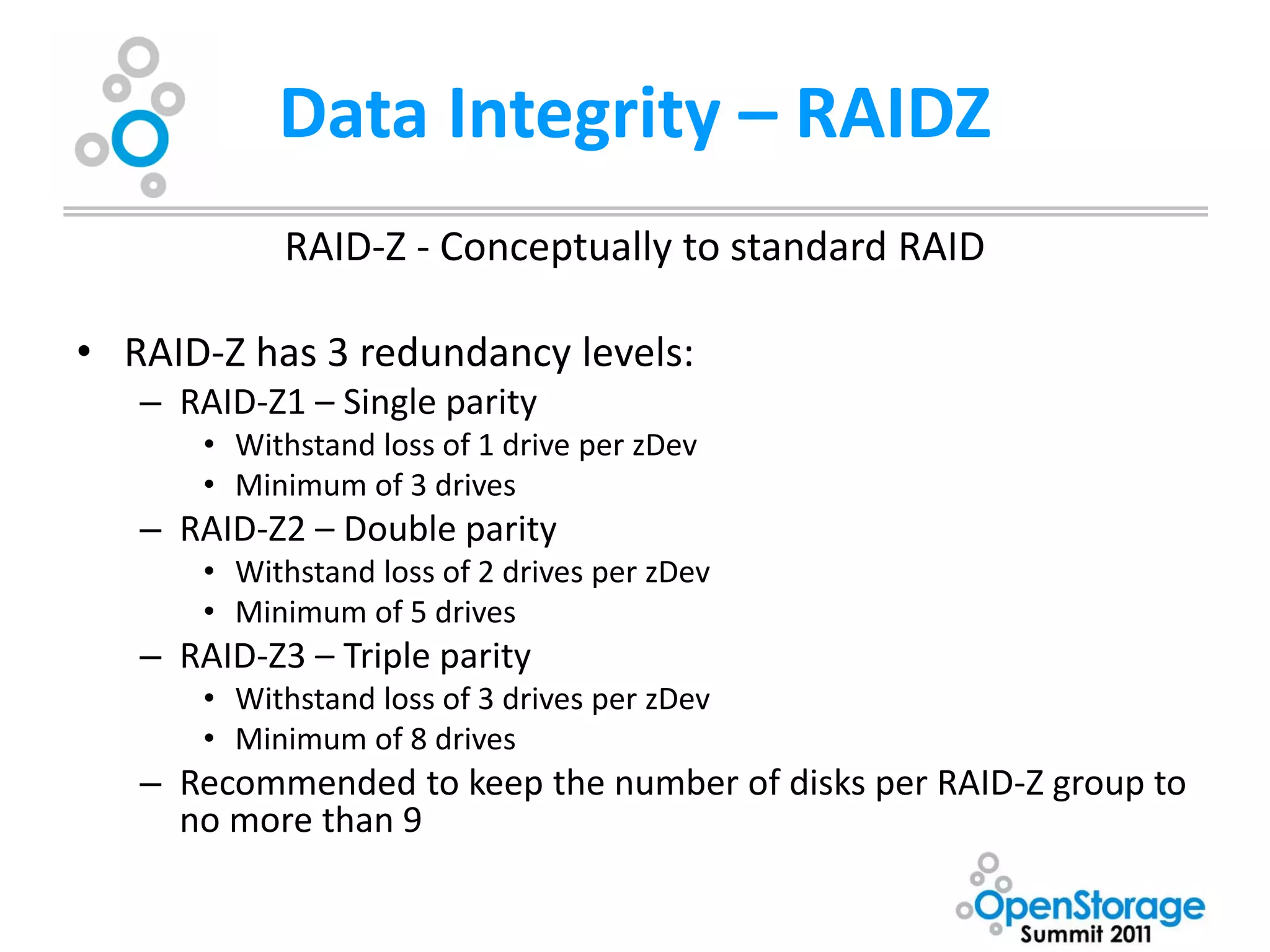
            RAID-Z - Conceptually to standard RAID

• RAID-Z has 3 redundancy levels:
   – RAID-Z1 – Single parity
       • Withstand loss of 1 drive per zDev
       • Minimum of 3 drives
   – RAID-Z2 – Double parity
       • Withstand loss of 2 drives per zDev
       • Minimum of 5 drives
   – RAID-Z3 – Triple parity
       • Withstand loss of 3 drives per zDev
       • Minimum of 8 drives
   – Recommended to keep the number of disks per RAID-Z group to
     no more than 9
RAIDZ (continued)
• RAID-Z uses all drives for data and/or parity. Parity bits are assigned to
  data blocks, blocks are spanned across multiple drives
• RAID-Z may span blocks across fewer than the total available drives. At
  minimum, all blocks will spread across a number of disks equal to parity.
  In a catastrophic failure of greater than [parity] number of disks, data may
  still be recoverable.
• Resilvering (rebuilding a zDev when a drive is lost) is only performed
  against actual data in use. Empty blocks are not processed.
• Blocks are checked against checksums to verify integrity of the data when
  resilvering, there is no blind XOR as with standard RAID. Data errors are
  corrected when resilvering.
• Interrupting the resilvering process does not require a restart from the
  beginning.
Data Integrity - Zmirror
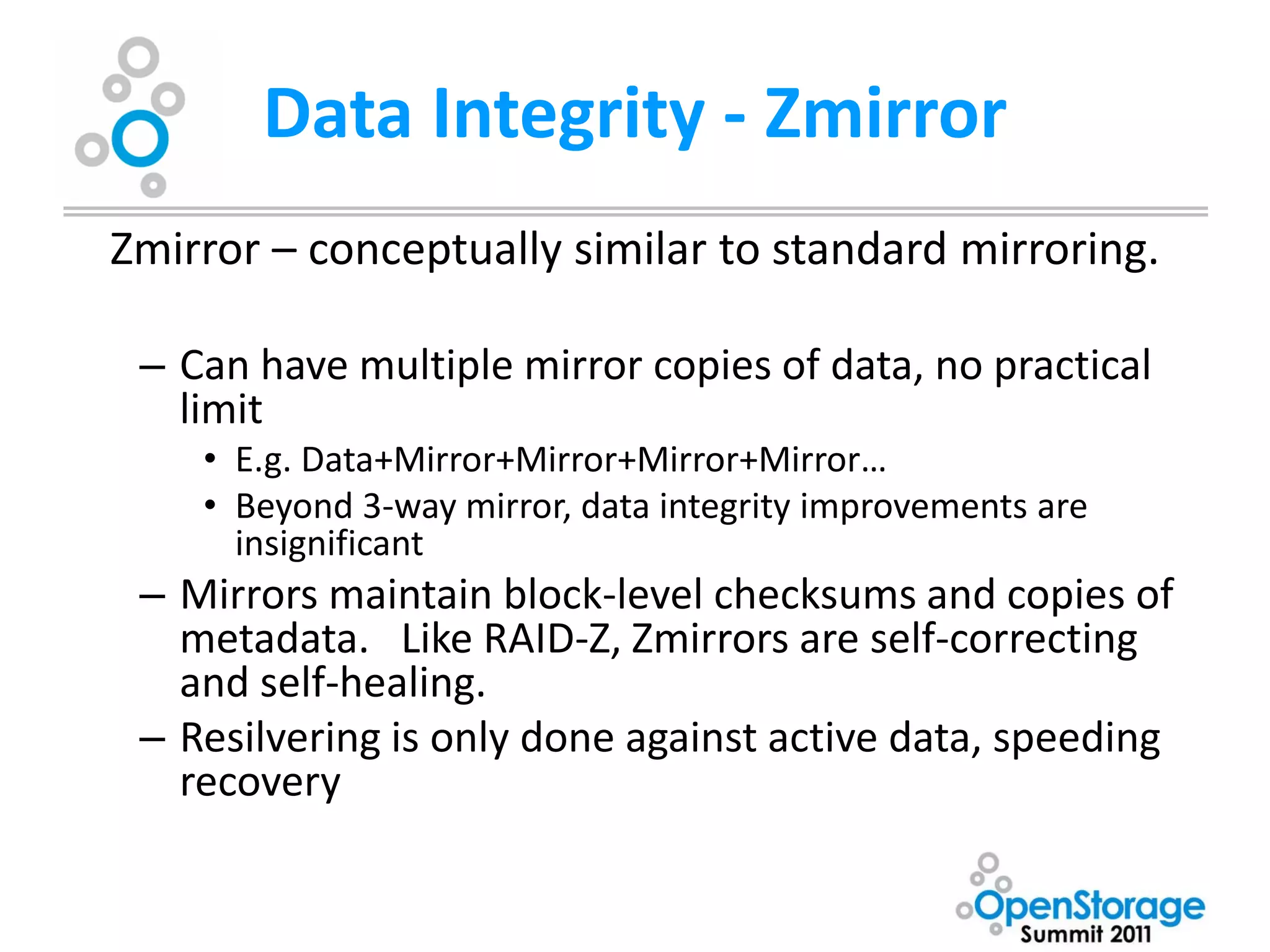
Zmirror – conceptually similar to standard mirroring.

 – Can have multiple mirror copies of data, no practical
   limit
    • E.g. Data+Mirror+Mirror+Mirror+Mirror…
    • Beyond 3-way mirror, data integrity improvements are
      insignificant
 – Mirrors maintain block-level checksums and copies of
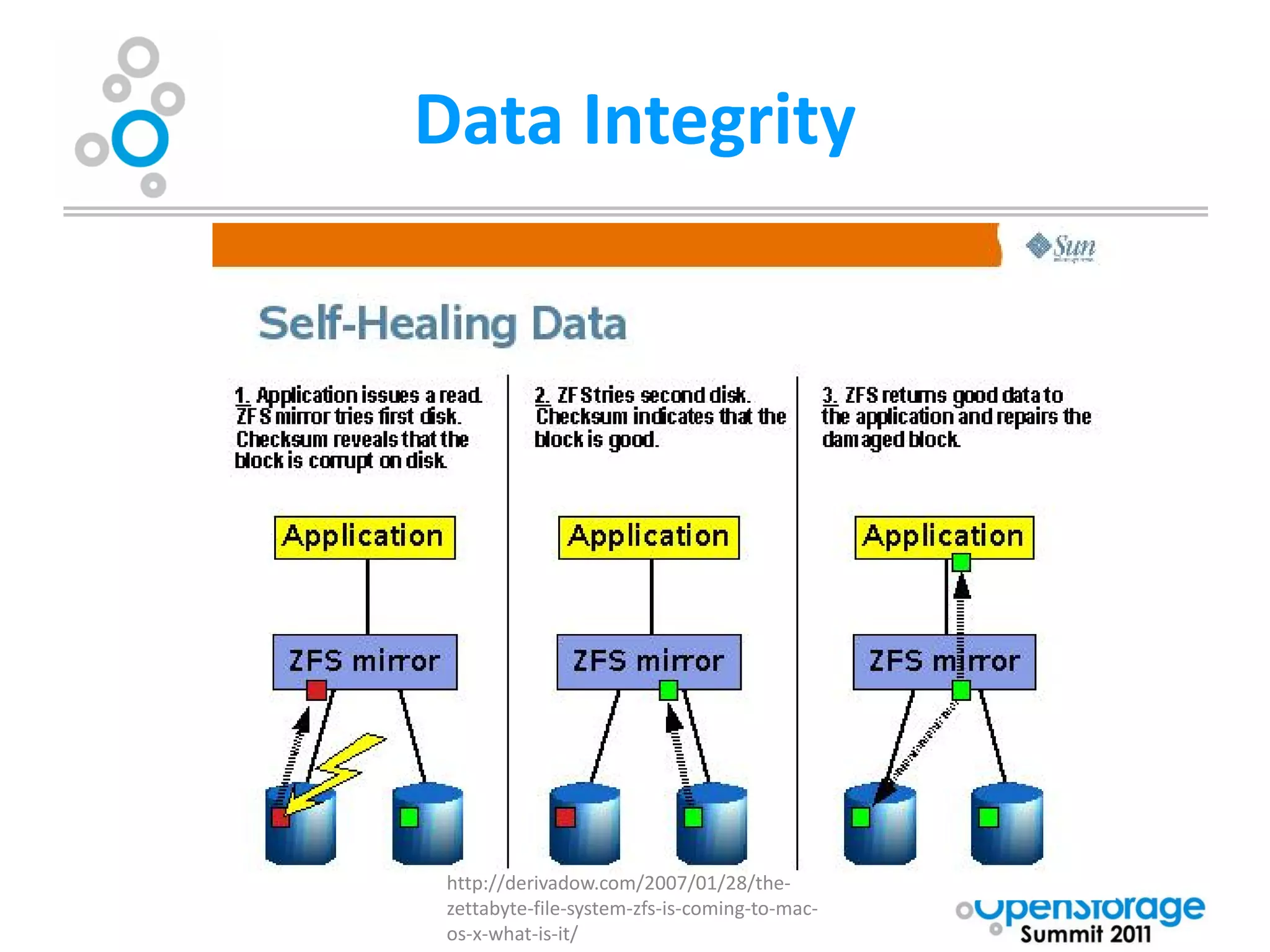
   metadata. Like RAID-Z, Zmirrors are self-correcting
   and self-healing.
 – Resilvering is only done against active data, speeding
   recovery
Data Integrity


 http://derivadow.com/2007/01/28/the-
 zettabyte-file-system-zfs-is-coming-to-mac-
 os-x-what-is-it/
Data integrity
• Disk scrubbing
  – Background process that checks for corrupt data.
  – Uses the same process as is used for resilvering
    (recovering RAID-Z or zMirror volumes)
  – Checks all copies of data blocks, block pointers,
    uberblocks, etc. for bit/block errors. Finds,
    corrects, and reports those errors
  – Typically configured to check all data on a vDev
    weekly (for SATA) or monthly (for SAS or better)
Data Integrity
• Additional notes
  – Better off giving ZFS direct access to drives than
    through RAID or caching controller (cheap
    controllers)
  – Works very well with less reliable (cheap) disks
  – Protects against known (RAID write hole, blind
    XOR) and unpredictable (cosmic rays, firmware
    errors) data loss vulnerabilities
  – Standard RAID and Mirroring become less reliable
    as data volumes and disk sizes increase
Performance
             Storage Capacity is cheap
         Storage Performance is expensive

• Performance basics:
  – IOPS (Input/Output operations per second)
     • Databases, small files, lots of small block writes
     • High IO -> Low throughput
  – Throughput (Megabits or MegaBytes per seconds)
     • large or contiguous files (e.g. video)
     • High Throughput -> Low IO
Performance
•   IOPS = 1000[ms/s] / (average read seek time [ms]) + (maximum rotational
    latency [ms]/2))
      – Basic physics, any higher numbers are a result of cache
      – Rough numbers:
          • 5400 RPM – 30-50 IOPS
          • 7200 RPM – 60-80 IOPS
          • 10000 RPM – 100-140 IOPS
          • 15000 RPM – 150-190 IOPS
          • SSD – Varies!

•   Disk Throughput
     – Highly variable, often little correlation to rotational speed. Typically 50-
        100 MB/sec
     – Significantly affected by block size (defaults 4K in NTFS, 128K in ZFS)
Performance
            ZFS software RAID roughly equivalent in
             performance to traditional hardware
                       RAID solutions

• RAIDZ performance in software is comparable to dedicated
  hardware RAID controller performance
• RAIDZ will have slower IOPS than RAID5/6 in very large arrays,
  there are maximum disks per vDev recommendations for
  RAIDZ levels because of this
• As with conventional RAID, Zmirror provides better
  performance I/O and throughput than RAIDZ with parity
Performance
                             I/O Pipelining
                    Not FIFO (First-in/First-out)
                 Modeled on CPU instruction pipeline

• Establishes priorities for I/O operations based on type of I/O
    • POSIX sync writes, reads, writes
    • Based on data location on disk, locations closer to read/write heads are prioritized
      over more distant disk locations
    • Drive-by scheduling – if a high-priority I/O is going to a different region of the disk,
      it also issues pending nearby I/O’s
• Establishes deadlines for each operation
Performance
          Block-level performance optimization
                            Above the physical disk and RAIDZ vdev
•   Non-synchronous writes are not written immediately to disk (!). By default ZFS
    collects writes for 30 seconds or until RAM gets nearly 90% full. Arranges data
    optimally in memory then writes multiple I/O operations in a single block write.
•   This also enhances read operations in many cases. I/O closely related in time is
    contiguous on the disk, and may even exist in the same block. This also
    dramatically reduces fragmentation.
•   Uses variable block sizes (up to maximum, typically 128K blocks). Substantially
    reduces wasted sparse data in small blocks. Optimizes block size to the type of
    operation – smaller blocks for high I/O random writes, larger blocks for high-
    throughput write operations.
•   Performs full block reads with read ahead, faster to read a lot of excess data and
    throw the unneeded data away than to do a lot of repositioning of the drive head
•   Dynamic striping across all available vDevs
Performance
                                 ZFS Intent Log (ZIL)
                         Functionally similar to a write cache
        “What the system intends to write to the filesystem
                  but hasn’t had time to do yet”

• Write data to ZIL, return confirmation to higher-level system that data is
  safely on non-volatile media, safely migrate it to normal storage later
• POSIX compliant, e.g. “fsync()” results in immediate write to non-volatile
  storage
    – Highest Priority operations
    – ZIL by default spans all available disks in a pool and is mirror in system memory if
      enough is available
Performance
               Enhancing ZIL performance.

• ZIL-dedicated write-optimized SSD recommended
   – For highest reliability, mirrored SSD
• Moves high-priority synchronous writes off of slower spinning
  disks
• In the event of a crash, ZIL pending and uncleared operations
  still in the ZIL can be replayed to ensure data on-disk is up-to-
  date
   – Alternatively, using ZIL and ZFS block checksum, can roll data back to a
     specified time
Performance
• ZFS Adaptive Replacement Cache (ARC)
  – Read Cache
  – Uses most of available memory to cache filesystem data (first 1GB
    reserved for OS)
  – Supports multiple independent prefetch streams with automatic length
    and stride detection
  – Two cache lists
      • 1) Recently referenced entries
      • 2) Frequently referenced entries
      • Cache lists are scorecarded with a system that keeps track of recently
        evicted cache entries – validates cached data over a longer period
  – Can used dedicated storage (SSD recommended) to enhance performance
Other features
• Adaptive Endianness
  – Writes data in original system endian format (big
    or little-endian)
  – Will reorder it in memory before presenting it to a
    system using opposite endianness
• Unlimited snapshots
• Supports filesystem cloning
• Supports Thin Provisioning with or without
  quotas and reservations
Limitations
• What can’t it do?
  – Make Julienne fries
  – Be restricted – it is fully open source! (CDDL)
  – Block Pointer rewrite not yet implemented (2 years behind schedule). This
    will allow:
      • Pool resizing (shrinking)
      • Defragmentation (fragmentation is minimized by design)
      • Applying or removing deduplication, compression, and/or encryption
         to already written data
  – Know if an underlying device is lying to it about a POSIX fsync() write
  – Does not yet support SSD TRIM operations
  – Not really suitable or beneficial for desktop-class systems with a single
    disk and limited RAM
  – No built-in HA clustering of head nodes

OSS Presentation by Kevin Halgren

  • 1.
    Consolidating Enterprise Storage Using Open Systems Kevin Halgren Assistant Director – ISS Systems and Network Services Washburn University
  • 2.
    The Problem “Siloed” or “Stranded” Storage IBM 3850 M2 Vmware cluster server Approx. 90TB altogether IBM 3850 M2 Vmware cluster server Campus Network/ IBM Power Series p550 (AIX Server / DLPAR) CIFS Clients SUN Netra T5220 IBM 3850 M2 Vmware cluster server Mail server IBM 3850 M2 Vmware cluster server IBM DS3300 Storage Sun StorageTek 6140 Windows Storage Server Controller (iSCSI) Storage Array NAS (1) SunStorageTek storage IBM EXP3000 storage expansion (StorageTek expansion 2500 series) EMC Celerra / Windows Storage Server EMC Clariion Storage IBM DS3400 Storage IBM EXP3000 storage SunStorageTek storage NAS (2) Controller (FC) expansion (StorageTek expansion 2500 series) IBM EXP3000 storage SunStorageTek storage expansion IBM EXP3000 storage expansion (StorageTek Windows Storage Server expansion 2500 series) NAS (3)
  • 3.
    The Opportunities • Largeamount of new storage needed Video Disk-based Backup
  • 4.
    Additional Challenges • Needa solution that scales to meet future needs • Need to be able to accommodate existing enterprise systems • Don’t have a lot of money to go around, need to be able to justify the up-front costs of a consolidated system
  • 5.
    Looking for asolution “Yes, we recognize this is a problem, what are you going to do about it” • Reach out to peers • Reach out to technology partners • Do my own research
  • 6.
    Data Integrity • Atthe modern data scales, a great deal more data-loss modes that are usually more in the theoretical realm become possible: • Inherent unrecoverable bit error rate of devices – SATA (commodity): An Exercise: • 1014 (12.5 TB) 8-disk RAID 5 array – SATA (enterprise) and SAS (commodity): 2TB SATA disks • 1015 (125 TB) 7 Data, 1 Parity – SAS (enterprise) and FC: • 1016 (1,250 TB) How many TB of usable storage? – SSD (enterprise, 1st 3 years of use) • 1017 (12,500 TB) Drop 1 disk – Actual Failure Rates are often higher Replace and rebuild • Bit Rot (decay of magnetic media) • Cosmic/other radiation What are your odds of • Other unpredictable/random bit-level events encountering a bit error and losing data during RAID 5 IS DEAD the rebuild? RAID 6 IS DYING
  • 7.
    Researching Solutions • TraditionalSAN – FC, FCoE – iSCSI • Most solutions use RAID on the back end • Buy all new storage, throw the old storage away • Vendor lock-in
  • 8.
    ZFS • 128-bit “filesystem” •Maximum pool size – 256 zettabytes (278 bytes) • Copy-on-Write transactional model + End-to-End checksumming provides unparalleled data integrity • Very high performance – I/O pipelining, block-level write optimization, POSIX compliant, extensible caches • ZFS presentation layers support block filesystems (e.g. CIFS, NFS) and volume storage (iSCSI, FC)
  • 9.
    ZFS I truly believe the future of enterprise storage lies with ZFS It is a total rethinking of how storage is handled, obsoleting the 20-year-old paradigms most systems use today
  • 10.
  • 11.
    Why Nexenta? • Mostopen to supporting innovative uses – Support presenting data in multiple ways • iSCSI, FC, CIFS, NFS – Least vendor lock-in • HCL references standard hardware, many certified resellers • Good support from both Area Data Systems and Nexenta – Open-source commitment (nexenta.org) • Ensures support and availability for the long term – Lowest cost in terms of $/GB
  • 12.
    Washburn University’s Implementation Phase 1 -Aquire initial HA cluster nodes and SAS storage expansions • 2-node cluster, each with – 12 processor cores (2x6 cores) – 192GB RAM – 256GB SSD ARC cache extension – 8GB Stec ZeusRAM for ZIL extension – 10GB Ethernet, Fiber Channel HBAs • ~70TB usable storage
  • 13.
    Phase 2 iSCSI Fabric (Completed) • Build 10G iSCSI Fabric – Utilized Brocade VDX 6720 Cluster switch – Was a learning experience – Works well now
  • 14.
    CIFS/NFS migration (In progress) • Migration of CIFS storage from NAS to Nexenta – Active Directory Profiles and Homes – Shared network storage • Migration of NFS storage from EMC to Nexenta
  • 15.
    VMWare integration (Completed) • Integrate existing VMWare ESXi 4.1 cluster • 4-nodes, 84 cores, ~600GB RAM, ~200 active servers • Proof-of-concept and Integration done • Can VMotion at will from old to new storage
  • 16.
    Fiber Channel ServerIntegration (Completed) • Connect FC to IBM p550 Server – (8 POWER5 processors) – Uses DLPARS to partition into 14 AIX 5.3 and 6.1 systems
  • 17.
    Server Block-Level Storage Migration (in progress) • Migrate off the existing iSCSI storage for VMWare to Nexenta – Ready at any time – No downtime required • Migrate off existing Fiber Channel Storage for p550 – Downtime required, scheduling will be difficult – Proof of concept done
  • 18.
    Integration of LegacyStorage (not done) • iSCSI proof-of-concept completed • Once migrations are complete, we begin shutting down and reconfiguring storage – Multiple tiers • High-performance Sun StorageTek 15K RPM FC drives to • Low performance bulk storage for non-critical / test purposes – SATA drives on iSCSI target
  • 20.
    Offsite Backup • Additionalbulk storage for backup, archival, and recovery • Single head-node system with large volume disks for backup storage (3GB SAS drives) • Utilize Nexenta Auto-Sync functionality – replication+snapshots – After initial replication, only needs to transfer delta (change) from previous snapshot – Can be rate-limited – Independent of underlying transport mechanism
  • 21.
    Endgame • My adminsget a single interface to manage storage and disk-based backup • ZFS helps ensure reliability and performance of disparate storage systems • Nexenta and Area Data Systems provides support for an integrated system (3rd-party hardware is our problem, however)
  • 22.
  • 23.
    ZFS Theoretical Limits 128-bit“filesystem”, no practical limitations at present. • 248 — Number of entries in any individual directory • 16 exabytes(16×1018 bytes) — Maximum size of a single file • 16 exabytes — Maximum size of any attribute • 256 zettabytes (278 bytes) — Maximum size of any zpool • 256 — Number of attributes of a file (actually constrained to 248 for the number of files in a ZFS file system) • 264 — Number of devices in any zpool • 264 — Number of zpools in a system • 264 — Number of file systems in a zpool
  • 24.
    Features • Data Integrity by Design •Variable block size • Storage Pools •No wasted space from sparse blocks • Inherent storage virtualization •Optimize block size to application • Simplified management •Adaptive endianness • Snapshots and clones •Big endian <-> little endian – • Low overhead reordered dynamically in memory • algorithm •Advanced Block-Level Functionality • Virtually unlimited snapshots/clones •Deduplication • Actually Easier to snapshot or clone •Compression a filesystem than not to •Encryption (v30) • Thin Provisioning • Eliminate wasted filesystem slack space
  • 25.
    Concepts • Re-thinking howthe filesystem works ZFS does NOT use: ZFS uses: Volumes Virtual Filesystems Volume Managers Storage Pools LUNs Virtual Devices (made up of physical disks) Partitions RAID-like software solutions Arrays Always-consistent on-disk structure Hardware RAID fsck or chkdsk like tools • Storage and transactions are actively managed • Filesystems are how data is presented to the system
  • 26.
    ZFS Concepts Traditional Filesystem: FS FS FS Volume oriented Volume Volume Volume Difficult to change allocations Extensive planning required ZFS: Structured around storage pools FS FS FS FS Utilizes bandwidth and I/O of all pool members Storage Pool Filesystems independent of volumes/disks Multiple ways to present to client systems
  • 27.
    ZFS Layers New Technologies (e.g. Cluster Filesystems) Local CIFS NFS (System) iSCSI Raw Swap FC/Others ZFS POSIX (Block FS) Layer ZFS Volume Emulator ZFS zPool (stripe) zMirror RAID-Z1 vDev RAID-Z2 vDev vDev
  • 28.
    Data Integrity Block IntegrityValidation Ü Ü Ü DATA Timestamp Block Pointer Block Checksum
  • 29.
    Copy-on-Write Operation Ü Ü Ü DATA Ü+1 Ü+1 Ü+1 Timestamp Block Pointer Block Checksum
  • 30.
  • 31.
    Data Integrity • Copy-on-Writetransactional model+End-to-End checksumming provides unparalleled data integrity – Blocks are never overwritten in place. A new block is allocated modified data is written to the new block, metadata blocks are updated (also using copy-on-write model) with new pointers. Blocks are only freed once all Uberblock pointers have been updated. [Merkle tree] – Multiple updates are grouped into transaction groups in memory, ZFS Intent Log (ZIL) can be used for synchronous writes (POSIX demands confirmation that data is on media before telling the OS the operation was successful) – Eliminates the need for journaling or logging filesystem, utilities such as fsck/chkdsk
  • 32.
    Data Integrity –RAIDZ RAID-Z - Conceptually to standard RAID • RAID-Z has 3 redundancy levels: – RAID-Z1 – Single parity • Withstand loss of 1 drive per zDev • Minimum of 3 drives – RAID-Z2 – Double parity • Withstand loss of 2 drives per zDev • Minimum of 5 drives – RAID-Z3 – Triple parity • Withstand loss of 3 drives per zDev • Minimum of 8 drives – Recommended to keep the number of disks per RAID-Z group to no more than 9
  • 33.
    RAIDZ (continued) • RAID-Zuses all drives for data and/or parity. Parity bits are assigned to data blocks, blocks are spanned across multiple drives • RAID-Z may span blocks across fewer than the total available drives. At minimum, all blocks will spread across a number of disks equal to parity. In a catastrophic failure of greater than [parity] number of disks, data may still be recoverable. • Resilvering (rebuilding a zDev when a drive is lost) is only performed against actual data in use. Empty blocks are not processed. • Blocks are checked against checksums to verify integrity of the data when resilvering, there is no blind XOR as with standard RAID. Data errors are corrected when resilvering. • Interrupting the resilvering process does not require a restart from the beginning.
  • 34.
    Data Integrity -Zmirror Zmirror – conceptually similar to standard mirroring. – Can have multiple mirror copies of data, no practical limit • E.g. Data+Mirror+Mirror+Mirror+Mirror… • Beyond 3-way mirror, data integrity improvements are insignificant – Mirrors maintain block-level checksums and copies of metadata. Like RAID-Z, Zmirrors are self-correcting and self-healing. – Resilvering is only done against active data, speeding recovery
  • 35.
    Data Integrity http://derivadow.com/2007/01/28/the- zettabyte-file-system-zfs-is-coming-to-mac- os-x-what-is-it/
  • 36.
    Data integrity • Diskscrubbing – Background process that checks for corrupt data. – Uses the same process as is used for resilvering (recovering RAID-Z or zMirror volumes) – Checks all copies of data blocks, block pointers, uberblocks, etc. for bit/block errors. Finds, corrects, and reports those errors – Typically configured to check all data on a vDev weekly (for SATA) or monthly (for SAS or better)
  • 37.
    Data Integrity • Additionalnotes – Better off giving ZFS direct access to drives than through RAID or caching controller (cheap controllers) – Works very well with less reliable (cheap) disks – Protects against known (RAID write hole, blind XOR) and unpredictable (cosmic rays, firmware errors) data loss vulnerabilities – Standard RAID and Mirroring become less reliable as data volumes and disk sizes increase
  • 38.
    Performance Storage Capacity is cheap Storage Performance is expensive • Performance basics: – IOPS (Input/Output operations per second) • Databases, small files, lots of small block writes • High IO -> Low throughput – Throughput (Megabits or MegaBytes per seconds) • large or contiguous files (e.g. video) • High Throughput -> Low IO
  • 39.
    Performance • IOPS = 1000[ms/s] / (average read seek time [ms]) + (maximum rotational latency [ms]/2)) – Basic physics, any higher numbers are a result of cache – Rough numbers: • 5400 RPM – 30-50 IOPS • 7200 RPM – 60-80 IOPS • 10000 RPM – 100-140 IOPS • 15000 RPM – 150-190 IOPS • SSD – Varies! • Disk Throughput – Highly variable, often little correlation to rotational speed. Typically 50- 100 MB/sec – Significantly affected by block size (defaults 4K in NTFS, 128K in ZFS)
  • 40.
    Performance ZFS software RAID roughly equivalent in performance to traditional hardware RAID solutions • RAIDZ performance in software is comparable to dedicated hardware RAID controller performance • RAIDZ will have slower IOPS than RAID5/6 in very large arrays, there are maximum disks per vDev recommendations for RAIDZ levels because of this • As with conventional RAID, Zmirror provides better performance I/O and throughput than RAIDZ with parity
  • 41.
    Performance I/O Pipelining Not FIFO (First-in/First-out) Modeled on CPU instruction pipeline • Establishes priorities for I/O operations based on type of I/O • POSIX sync writes, reads, writes • Based on data location on disk, locations closer to read/write heads are prioritized over more distant disk locations • Drive-by scheduling – if a high-priority I/O is going to a different region of the disk, it also issues pending nearby I/O’s • Establishes deadlines for each operation
  • 42.
    Performance Block-level performance optimization Above the physical disk and RAIDZ vdev • Non-synchronous writes are not written immediately to disk (!). By default ZFS collects writes for 30 seconds or until RAM gets nearly 90% full. Arranges data optimally in memory then writes multiple I/O operations in a single block write. • This also enhances read operations in many cases. I/O closely related in time is contiguous on the disk, and may even exist in the same block. This also dramatically reduces fragmentation. • Uses variable block sizes (up to maximum, typically 128K blocks). Substantially reduces wasted sparse data in small blocks. Optimizes block size to the type of operation – smaller blocks for high I/O random writes, larger blocks for high- throughput write operations. • Performs full block reads with read ahead, faster to read a lot of excess data and throw the unneeded data away than to do a lot of repositioning of the drive head • Dynamic striping across all available vDevs
  • 43.
    Performance ZFS Intent Log (ZIL) Functionally similar to a write cache “What the system intends to write to the filesystem but hasn’t had time to do yet” • Write data to ZIL, return confirmation to higher-level system that data is safely on non-volatile media, safely migrate it to normal storage later • POSIX compliant, e.g. “fsync()” results in immediate write to non-volatile storage – Highest Priority operations – ZIL by default spans all available disks in a pool and is mirror in system memory if enough is available
  • 44.
    Performance Enhancing ZIL performance. • ZIL-dedicated write-optimized SSD recommended – For highest reliability, mirrored SSD • Moves high-priority synchronous writes off of slower spinning disks • In the event of a crash, ZIL pending and uncleared operations still in the ZIL can be replayed to ensure data on-disk is up-to- date – Alternatively, using ZIL and ZFS block checksum, can roll data back to a specified time
  • 45.
    Performance • ZFS AdaptiveReplacement Cache (ARC) – Read Cache – Uses most of available memory to cache filesystem data (first 1GB reserved for OS) – Supports multiple independent prefetch streams with automatic length and stride detection – Two cache lists • 1) Recently referenced entries • 2) Frequently referenced entries • Cache lists are scorecarded with a system that keeps track of recently evicted cache entries – validates cached data over a longer period – Can used dedicated storage (SSD recommended) to enhance performance
  • 46.
    Other features • AdaptiveEndianness – Writes data in original system endian format (big or little-endian) – Will reorder it in memory before presenting it to a system using opposite endianness • Unlimited snapshots • Supports filesystem cloning • Supports Thin Provisioning with or without quotas and reservations
  • 47.
    Limitations • What can’tit do? – Make Julienne fries – Be restricted – it is fully open source! (CDDL) – Block Pointer rewrite not yet implemented (2 years behind schedule). This will allow: • Pool resizing (shrinking) • Defragmentation (fragmentation is minimized by design) • Applying or removing deduplication, compression, and/or encryption to already written data – Know if an underlying device is lying to it about a POSIX fsync() write – Does not yet support SSD TRIM operations – Not really suitable or beneficial for desktop-class systems with a single disk and limited RAM – No built-in HA clustering of head nodes