

Performance boosting with
 Database Virtualization
            Kyle Hailey
     http://dboptimizer.com
• Technology
   • Full Cloning
   • Thin Provision Cloning
   • Database Virtualization
• IBM & Delphix Benchmark
   • OLTP
   • DSS
   • Concurrent databases
• Problems, Solutions, Tools
   • Oracle
   • Network
   • I/O
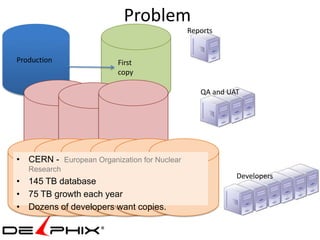
Problem
                                             Reports


Production               First
                         copy

                                                QA and UAT


• CERN - European Organization for Nuclear
   Research
                                                         Developers
• 145 TB database
• 75 TB growth each year
• Dozens of developers want copies.
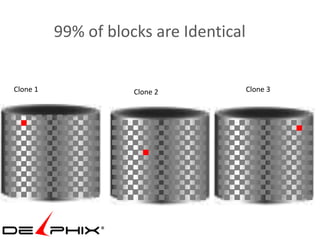
99% of blocks are Identical


Clone 1              Clone 2            Clone 3
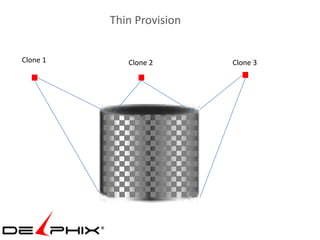
Thin Provision


Clone 1      Clone 2       Clone 3
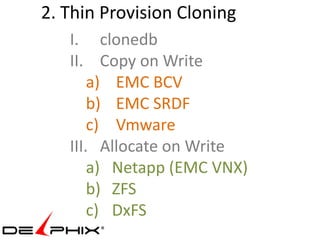
2. Thin Provision Cloning
   I. clonedb
   II. Copy on Write
       a) EMC BCV
       b) EMC SRDF
       c) Vmware
   III. Allocate on Write
       a) Netapp (EMC VNX)
       b) ZFS
       c) DxFS
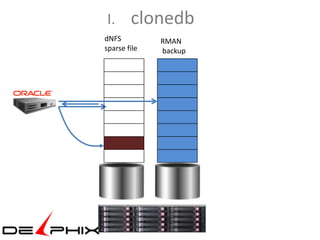
I.      clonedb
dNFS          RMAN
sparse file   backup
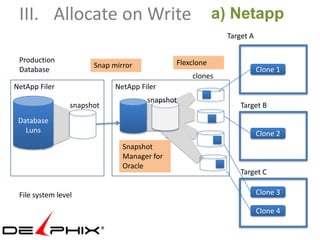
III. Allocate on Write                                  a) Netapp
                                                          Target A


 Production                                  Flexclone
                       Snap mirror
 Database                                                            Clone 1
                                                 clones
NetApp Filer                 NetApp Filer
                                      snapshot
                 snapshot                                     Target B
 Database
   Luns                                                              Clone 2
                               Snapshot
                               Manager for
                               Oracle
                                                              Target C

 File system level                                                   Clone 3

                                                                     Clone 4
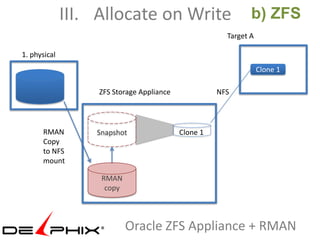
III. Allocate on Write                          b) ZFS
                                                       Target A

1. physical
                                                                  Clone 1

                   ZFS Storage Appliance             NFS


      RMAN        Snapshot                 Clone 1
      Copy
      to NFS
      mount

                   RMAN
                    copy


                           Oracle ZFS Appliance + RMAN
Review : Part I
   1. Full Cloning
   2. Thin Provision
     I.       clonedb
     II.      Copy on Write
     III.     Allocate on Write
            a) Netapp ( also EMC VNX)
            b) ZFS
            c) DxFS
   3. Database Virtualization
             SMU
             Delphix
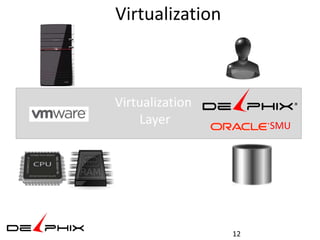
Virtualization


Virtualization
    Layer             SMU


                 12
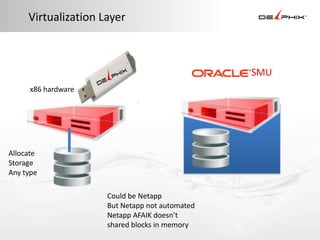
Virtualization Layer


                                                SMU
     x86 hardware


Allocate
Storage
Any type

                     Could be Netapp
                     But Netapp not automated
                     Netapp AFAIK doesn’t
                     shared blocks in memory
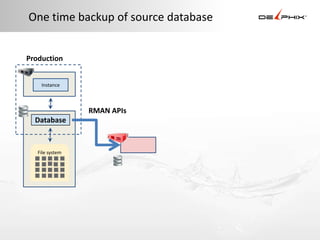
One time backup of source database


Production


    Instance


                 RMAN APIs
  Database


   File system
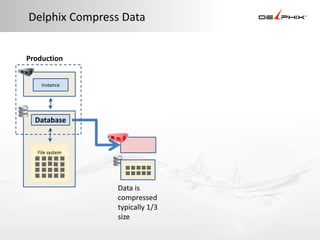
Delphix Compress Data


Production


    Instance


  Database


   File system


                 Data is
                 compressed
                 typically 1/3
                 size
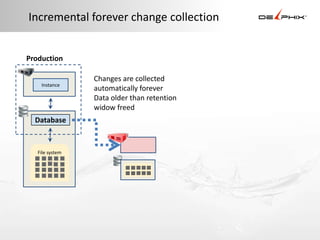
Incremental forever change collection


Production

                 Changes are collected
    Instance
                 automatically forever
                 Data older than retention
                 widow freed
  Database


   File system
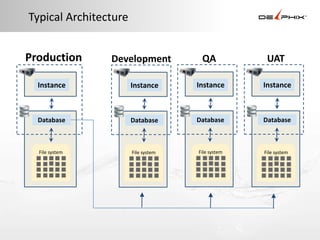
Typical Architecture


Production      Development           QA            UAT

  Instance             Instance      Instance      Instance


  Database             Database      Database      Database


  File system          File system   File system   File system
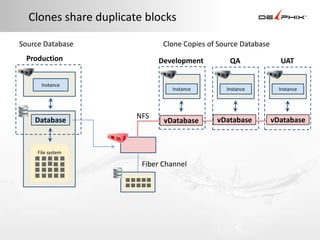
Clones share duplicate blocks

Source Database               Clone Copies of Source Database
 Production                  Development         QA               UAT

      Instance
                                Instance        Instance          Instance


                       NFS                   vDatabase          vDatabase
    Database                  vDatabase


     File system

                        Fiber Channel
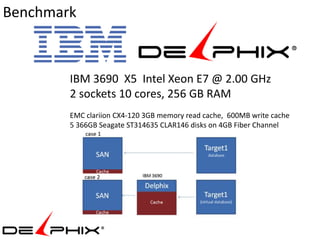
Benchmark


        IBM 3690 X5 Intel Xeon E7 @ 2.00 GHz
        2 sockets 10 cores, 256 GB RAM
        EMC clariion CX4-120 3GB memory read cache, 600MB write cache
        5 366GB Seagate ST314635 CLAR146 disks on 4GB Fiber Channel
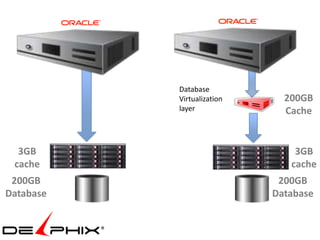
Database
           Virtualization     200GB
           layer              Cache


  3GB                           3GB
 cache                         cache
 200GB                       200GB
Database                    Database
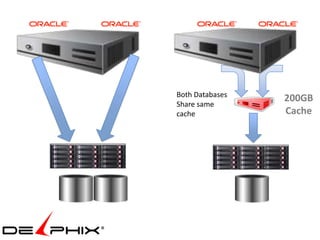
Both Databases
                 200GB
Share same
cache            Cache
Tests with Swingbench
•   OLTP on original vs virtual
•   OLTP on 2 original vs 2 virtual
•   DSS on original vs virtual
•   DSS on 2 virtual
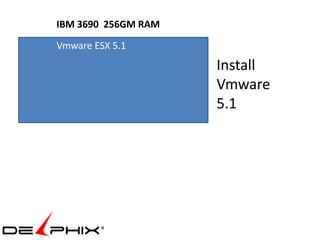
IBM 3690 256GM RAM
Vmware ESX 5.1
                     Install
                     Vmware
                     5.1
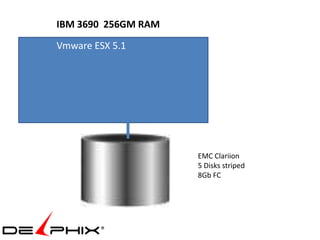
IBM 3690 256GM RAM
Vmware ESX 5.1


                     EMC Clariion
                     5 Disks striped
                     8Gb FC
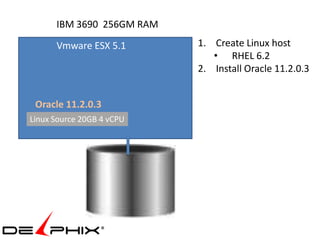
IBM 3690 256GM RAM
      Vmware ESX 5.1       1. Create Linux host
                              • RHEL 6.2
                           2. Install Oracle 11.2.0.3


 Oracle 11.2.0.3
Linux Source 20GB 4 vCPU
IBM 3690 256GM RAM
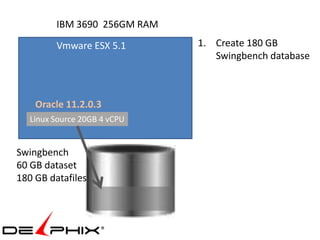
         Vmware ESX 5.1       1. Create 180 GB
                                 Swingbench database


    Oracle 11.2.0.3
   Linux Source 20GB 4 vCPU


Swingbench
60 GB dataset
180 GB datafiles
IBM 3690 256GM RAM
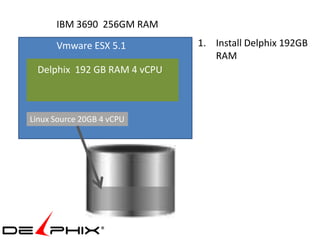
      Vmware ESX 5.1         1. Install Delphix 192GB
                                RAM
 Delphix 192 GB RAM 4 vCPU


Linux Source 20GB 4 vCPU
IBM 3690 256GM RAM
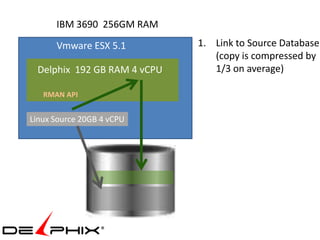
      Vmware ESX 5.1         1. Link to Source Database
                                (copy is compressed by
 Delphix 192 GB RAM 4 vCPU      1/3 on average)

   RMAN API


Linux Source 20GB 4 vCPU
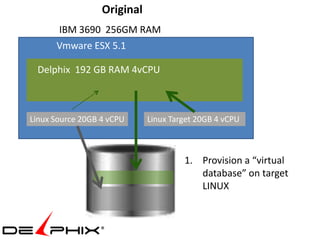
Original
      IBM 3690 256GM RAM
      Vmware ESX 5.1

 Delphix 192 GB RAM 4vCPU


Linux Source 20GB 4 vCPU     Linux Target 20GB 4 vCPU


                                      1. Provision a “virtual
                                         database” on target
                                         LINUX
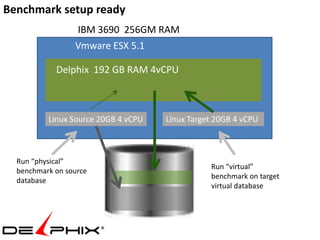
Benchmark setup ready
                 IBM 3690 256GM RAM
                 Vmware ESX 5.1

            Delphix 192 GB RAM 4vCPU


          Linux Source 20GB 4 vCPU   Linux Target 20GB 4 vCPU


  Run “physical”
                                                Run “virtual”
  benchmark on source
                                                benchmark on target
  database
                                                virtual database
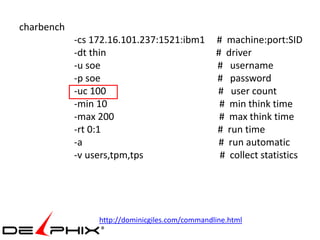
charbench
            -cs 172.16.101.237:1521:ibm1         # machine:port:SID
            -dt thin                             # driver
            -u soe                               # username
            -p soe                               # password
            -uc 100                              # user count
            -min 10                               # min think time
            -max 200                              # max think time
            -rt 0:1                              # run time
            -a                                   # run automatic
            -v users,tpm,tps                      # collect statistics


                 http://dominicgiles.com/commandline.html
Author :     Dominic Giles
Version :    2.4.0.845

Results will be written to results.xml.

Time      Users TPM TPS
3:11:51 PM [0/30] 0    0
3:11:52 PM [30/30] 49 49
3:11:53 PM [30/30] 442 393
3:11:54 PM [30/30] 856 414
3:11:55 PM [30/30] 1146 290
3:11:56 PM [30/30] 1355 209
3:11:57 PM [30/30] 1666 311
3:11:58 PM [30/30] 2015 349
3:11:59 PM [30/30] 2289 274
3:12:00 PM [30/30] 2554 265
3:12:01 PM [30/30] 2940 386
3:12:02 PM [30/30] 3208 268
3:12:03 PM [30/30] 3520 312
3:12:04 PM [30/30] 3835 315
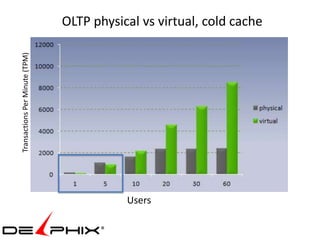
Transactions Per Minute (TPM)   OLTP physical vs virtual, cold cache


                                           Users
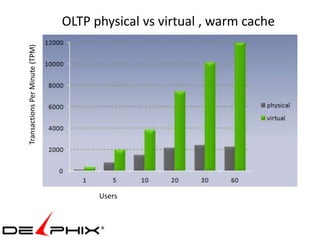
OLTP physical vs virtual , warm cache
Transactions Per Minute (TPM)


                                      Users
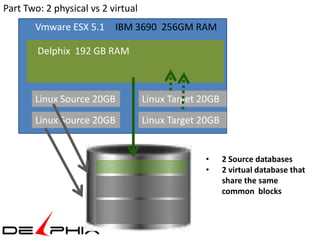
Part Two: 2 physical vs 2 virtual
       Vmware ESX 5.1 IBM 3690 256GM RAM

        Delphix 192 GB RAM


       Linux Source 20GB            Linux Target 20GB
       Linux Source 20GB            Linux Target 20GB


                                                  •     2 Source databases
                                                  •     2 virtual database that
                                                        share the same
                                                        common blocks
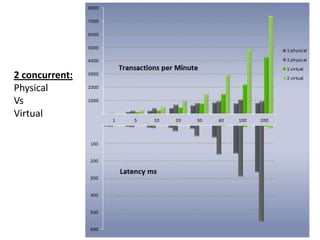
2 concurrent:
Physical
Vs
Virtual
                Users
seconds
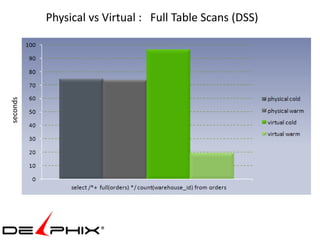
          Physical vs Virtual : Full Table Scans (DSS)
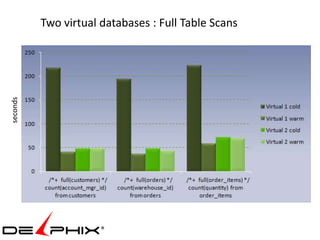
Two virtual databases : Full Table Scans
seconds
Problems
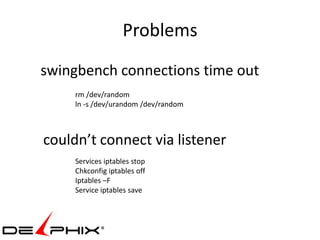
swingbench connections time out
     rm /dev/random
     ln -s /dev/urandom /dev/random


couldn’t connect via listener
     Services iptables stop
     Chkconfig iptables off
     Iptables –F
     Service iptables save
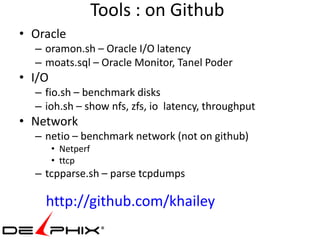
Tools : on Github
• Oracle
  – oramon.sh – Oracle I/O latency
  – moats.sql – Oracle Monitor, Tanel Poder
• I/O
  – fio.sh – benchmark disks
  – ioh.sh – show nfs, zfs, io latency, throughput
• Network
  – netio – benchmark network (not on github)
        • Netperf
        • ttcp
  – tcpparse.sh – parse tcpdumps

    http://github.com/khailey
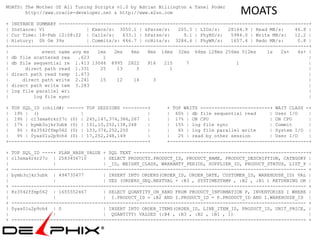
MOATS: The Mother Of All Tuning Scripts v1.0 by Adrian Billington & Tanel Poder
       http://www.oracle-developer.net & http://www.e2sn.com                          MOATS
+ INSTANCE SUMMARY ------------------------------------------------------------------------------------------+
| Instance: V1               | Execs/s: 3050.1 | sParse/s:    205.5 | LIOs/s:   28164.9 | Read MB/s:    46.8 |
| Cur Time: 18-Feb 12:08:22 | Calls/s:    633.1 | hParse/s:     9.1 | PhyRD/s:   5984.0 | Write MB/s:   12.2 |
| History: 0h 0m 39s         | Commits/s: 446.7 | ccHits/s: 3284.6 | PhyWR/s:    1657.4 | Redo MB/s:     0.8 |
+------------------------------------------------------------------------------------------------------------+
|            event name avg ms   1ms   2ms   4ms   8ms 16ms 32ms 64ms 128ms 256ms 512ms       1s   2s+   4s+ |
| db file scattered rea   .623     1                                                                         |
| db file sequential re 1.413 13046 8995 2822      916   215     7                 1                         |
|      direct path read 1.331     25    13     3           1                                                 |
| direct path read temp 1.673                                                                                |
|     direct path write 2.241     15    12    14     3                                                       |
| direct path write tem 3.283                                                                                |
| log file parallel wri                                                                                      |
|         log file sync                                                                                      |

+ TOP SQL_ID (child#) -----+ TOP SESSIONS ---------+       + TOP WAITS -------------------------+ WAIT CLASS -+
| 19% | ()                 |                       |       | 60% | db file sequential read      | User I/O    |
| 19% | c13sma6rkr27c (0) | 245,147,374,386,267    |       | 17% | ON CPU                       | ON CPU      |
| 17% | bymb3ujkr3ubk (0) | 131,10,252,138,248     |       | 15% | log file sync                | Commit      |
|   9% | 8z3542ffmp562 (0) | 133,374,252,250       |       |   6% | log file parallel write     | System I/O |
|   9% | 0yas01u2p9ch4 (0) | 17,252,248,149        |       |   2% | read by other session       | User I/O    |
+--------------------------------------------------+       +--------------------------------------------------+

+   TOP SQL_ID ----+ PLAN_HASH_VALUE + SQL TEXT ---------------------------------------------------------------+
|   c13sma6rkr27c | 2583456710       | SELECT PRODUCTS.PRODUCT_ID, PRODUCT_NAME, PRODUCT_DESCRIPTION, CATEGORY |
|                  |                 | _ID, WEIGHT_CLASS, WARRANTY_PERIOD, SUPPLIER_ID, PRODUCT_STATUS, LIST_P |
+   ---------------------------------------------------------------------------------------------------------- +
|   bymb3ujkr3ubk | 494735477        | INSERT INTO ORDERS(ORDER_ID, ORDER_DATE, CUSTOMER_ID, WAREHOUSE_ID) VAL |
|                  |                 | UES (ORDERS_SEQ.NEXTVAL + :B3 , SYSTIMESTAMP , :B2 , :B1 ) RETURNING OR |
+   ---------------------------------------------------------------------------------------------------------- +
|   8z3542ffmp562 | 1655552467       | SELECT QUANTITY_ON_HAND FROM PRODUCT_INFORMATION P, INVENTORIES I WHERE |
|                  |                 | I.PRODUCT_ID = :B2 AND I.PRODUCT_ID = P.PRODUCT_ID AND I.WAREHOUSE_ID |
+   ---------------------------------------------------------------------------------------------------------- +
|   0yas01u2p9ch4 | 0                | INSERT INTO ORDER_ITEMS(ORDER_ID, LINE_ITEM_ID, PRODUCT_ID, UNIT_PRICE, |
|                  |                 | QUANTITY) VALUES (:B4 , :B3 , :B2 , :B1 , 1)                            |
+   ---------------------------------------------------------------------------------------------------------- +
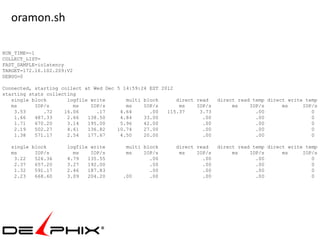
oramon.sh

RUN_TIME=-1
COLLECT_LIST=
FAST_SAMPLE=iolatency
TARGET=172.16.102.209:V2
DEBUG=0

Connected, starting collect at Wed Dec 5 14:59:24 EST 2012
starting stats collecting
   single block       logfile write       multi block      direct read    direct read temp direct write temp
   ms      IOP/s        ms    IOP/s       ms    IOP/s       ms    IOP/s        ms    IOP/s      ms     IOP/s
    3.53      .72    16.06      .17     4.64      .00   115.37     3.73                .00                0
    1.66   487.33     2.66   138.50     4.84    33.00               .00                .00                0
    1.71   670.20     3.14   195.00     5.96    42.00               .00                .00                0
    2.19   502.27     4.61   136.82    10.74    27.00               .00                .00                0
    1.38   571.17     2.54   177.67     4.50    20.00               .00                .00                0

  single block        logfile write       multi block     direct read     direct read temp direct write temp
  ms      IOP/s         ms    IOP/s       ms    IOP/s      ms    IOP/s         ms    IOP/s      ms     IOP/s
   3.22   526.36      4.79   135.55               .00              .00                 .00                0
   2.37   657.20      3.27   192.00               .00              .00                 .00                0
   1.32   591.17      2.46   187.83               .00              .00                 .00                0
   2.23   668.60      3.09   204.20      .00      .00              .00                 .00                0
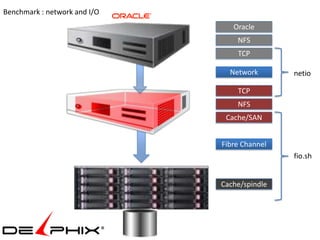
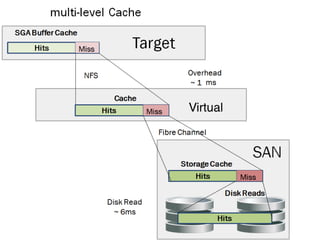
Benchmark : network and I/O
                                 Oracle
                                  NFS
                                  TCP

                                Network       netio

                                  TCP
                                  NFS
                               Cache/SAN


                              Fibre Channel
                                              fio.sh


                              Cache/spindle
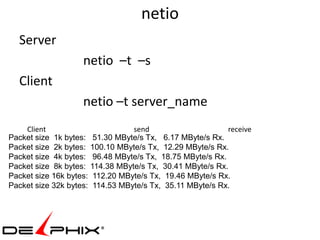
netio
  Server
                   netio –t –s
  Client
                   netio –t server_name
    Client                       send                     receive
Packet size 1k bytes: 51.30 MByte/s Tx, 6.17 MByte/s Rx.
Packet size 2k bytes: 100.10 MByte/s Tx, 12.29 MByte/s Rx.
Packet size 4k bytes: 96.48 MByte/s Tx, 18.75 MByte/s Rx.
Packet size 8k bytes: 114.38 MByte/s Tx, 30.41 MByte/s Rx.
Packet size 16k bytes: 112.20 MByte/s Tx, 19.46 MByte/s Rx.
Packet size 32k bytes: 114.53 MByte/s Tx, 35.11 MByte/s Rx.
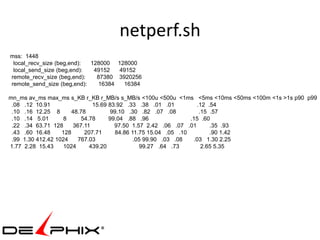
netperf.sh
mss: 1448
 local_recv_size (beg,end): 128000 128000
 local_send_size (beg,end):  49152  49152
remote_recv_size (beg,end):   87380 3920256
remote_send_size (beg,end):   16384   16384

mn_ms av_ms max_ms s_KB r_KB r_MB/s s_MB/s <100u <500u <1ms <5ms <10ms <50ms <100m <1s >1s p90 p99
 .08 .12 10.91                 15.69 83.92 .33 .38 .01 .01         .12 .54
 .10 .16 12.25 8       48.78         99.10 .30 .82 .07 .08          .15 .57
 .10 .14 5.01       8      54.78     99.04 .88 .96               .15 .60
 .22 .34 63.71 128     367.11          97.50 1.57 2.42 .06 .07 .01      .35 .93
 .43 .60 16.48     128      207.71     84.86 11.75 15.04 .05 .10        .90 1.42
 .99 1.30 412.42 1024    767.03               .05 99.90 .03 .08   .03 1.30 2.25
1.77 2.28 15.43     1024      439.20             99.27 .64 .73       2.65 5.35
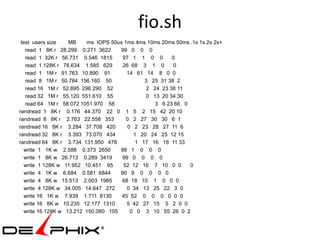
fio.sh
 test users size    MB     ms IOPS 50us 1ms 4ms 10ms 20ms 50ms .1s 1s 2s 2s+
   read 1 8K r 28.299 0.271 3622      99 0 0 0
   read 1 32K r 56.731 0.546 1815      97 1 1 0 0       0
   read 1 128K r 78.634 1.585 629      26 68 3 1 0       0
   read 1 1M r 91.763 10.890 91          14 61 14 8 0 0
   read 8 1M r 50.784 156.160 50               3 25 31 38 2
   read 16 1M r 52.895 296.290 52              2 24 23 38 11
   read 32 1M r 55.120 551.610 55              0 13 20 34 30
   read 64 1M r 58.072 1051.970 58                3 6 23 66 0
randread 1 8K r 0.176 44.370 22 0 1 5 2 15 42 20 10
randread 8 8K r 2.763 22.558 353         0 2 27 30 30 6 1
randread 16 8K r 3.284 37.708 420        0 2 23 28 27 11 6
randread 32 8K r 3.393 73.070 434          1 20 24 25 12 15
randread 64 8K r 3.734 131.950 478          1 17 16 18 11 33
   write 1 1K w 2.588 0.373 2650      98 1 0 0 0
   write 1 8K w 26.713 0.289 3419      99 0 0 0 0
   write 1 128K w 11.952 10.451 95     52 12 16 7 10 0 0       0
   write 4 1K w 6.684 0.581 6844      90 9 0 0 0 0
   write 4 8K w 15.513 2.003 1985      68 18 10 1 0 0 0
   write 4 128K w 34.005 14.647 272      0 34 13 25 22 3 0
   write 16 1K w 7.939 1.711 8130      45 52 0 0 0 0 0 0
   write 16 8K w 10.235 12.177 1310      5 42 27 15 5 2 0 0
   write 16 128K w 13.212 150.080 105     0 0 3 10 55 26 0 2
ß
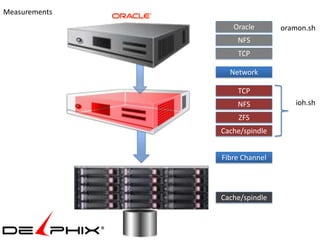
Measurements
                  Oracle       oramon.sh
                   NFS
                   TCP

                 Network

                   TCP
                   NFS            ioh.sh
                   ZFS
               Cache/spindle


               Fibre Channel


               Cache/spindle
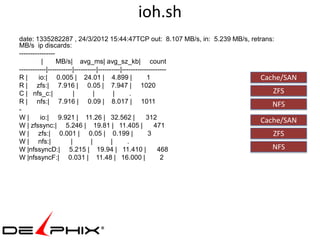
ioh.sh
date: 1335282287 , 24/3/2012 15:44:47TCP out: 8.107 MB/s, in: 5.239 MB/s, retrans:
MB/s ip discards:
----------------
           |     MB/s| avg_ms| avg_sz_kb| count
------------|-----------|----------|----------|--------------------
R|       io:| 0.005 | 24.01 | 4.899 |                     1                   Cache/SAN
R | zfs:| 7.916 | 0.05 | 7.947 | 1020
C | nfs_c:|              |         |        |      .                             ZFS
R | nfs:| 7.916 | 0.09 | 8.017 | 1011                                            NFS
-
W|        io:| 9.921 | 11.26 | 32.562 |                   312                 Cache/SAN
W | zfssync:| 5.246 | 19.81 | 11.405 |                       471
W | zfs:| 0.001 | 0.05 | 0.199 |                           3                     ZFS
W | nfs:|              |         |        |      .
W |nfssyncD:| 5.215 | 19.94 | 11.410 |                         468               NFS
W |nfssyncF:| 0.031 | 11.48 | 16.000 |                          2
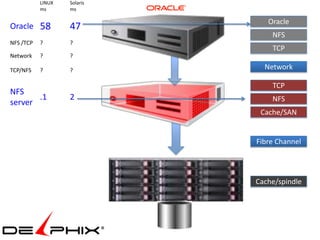
LINUX   Solaris
           ms      ms

                                Oracle
Oracle 58          47
                                 NFS
NFS /TCP   ?       ?
                                 TCP
Network    ?       ?

TCP/NFS    ?       ?           Network

                                 TCP
NFS
       .1          2             NFS
server
                              Cache/SAN


                             Fibre Channel


                             Cache/spindle
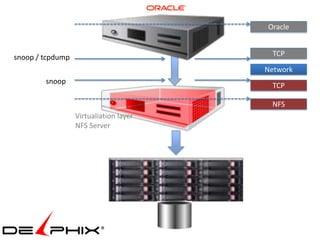
Oracle


snoop / tcpdump                          TCP

                                        Network
        snoop
                                         TCP

                                         NFS
                  Virtualiation layer
                  NFS Server
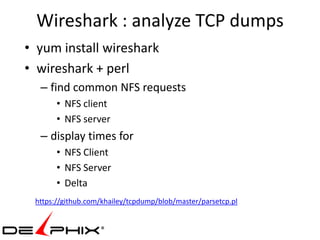
Wireshark : analyze TCP dumps
• yum install wireshark
• wireshark + perl
  – find common NFS requests
       • NFS client
       • NFS server
  – display times for
       • NFS Client
       • NFS Server
       • Delta
 https://github.com/khailey/tcpdump/blob/master/parsetcp.pl
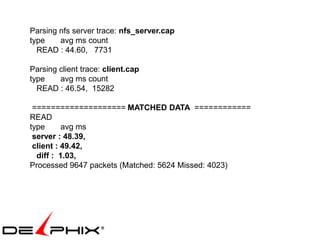
Parsing nfs server trace: nfs_server.cap
type    avg ms count
  READ : 44.60, 7731

Parsing client trace: client.cap
type    avg ms count
  READ : 46.54, 15282

 ==================== MATCHED DATA ============
READ
type      avg ms
 server : 48.39,
 client : 49.42,
  diff : 1.03,
Processed 9647 packets (Matched: 5624 Missed: 4023)
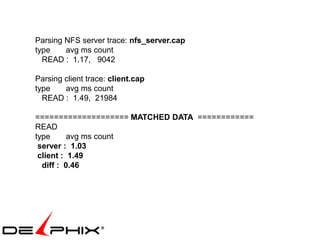
Parsing NFS server trace: nfs_server.cap
type    avg ms count
  READ : 1.17, 9042

Parsing client trace: client.cap
type    avg ms count
  READ : 1.49, 21984

==================== MATCHED DATA ============
READ
type      avg ms count
 server : 1.03
 client : 1.49
  diff : 0.46
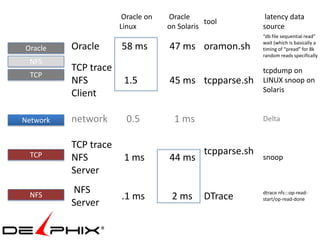
Oracle on   Oracle                    latency data
                                              tool
                      Linux        on Solaris               source
                                                            “db file sequential read”
                                                            wait (which is basically a
Oracle    Oracle      58 ms        47 ms oramon.sh          timing of “pread” for 8k
                                                            random reads specifically
 NFS
          TCP trace                                         tcpdump on
 TCP
          NFS          1.5         45 ms tcpparse.sh        LINUX snoop on
                                                            Solaris
          Client

Network   network       0.5          1 ms                   Delta


          TCP trace
 TCP                                          tcpparse.sh
          NFS          1 ms        44 ms                    snoop
          Server
          NFS                                               dtrace nfs:::op-read-
 NFS                  .1 ms         2 ms      DTrace        start/op-read-done
          Server
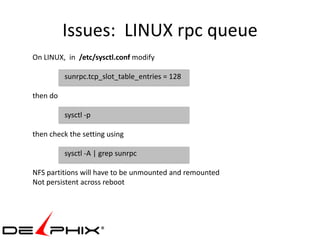
Issues: LINUX rpc queue
On LINUX, in /etc/sysctl.conf modify

          sunrpc.tcp_slot_table_entries = 128

then do

          sysctl -p

then check the setting using

          sysctl -A | grep sunrpc

NFS partitions will have to be unmounted and remounted
Not persistent across reboot
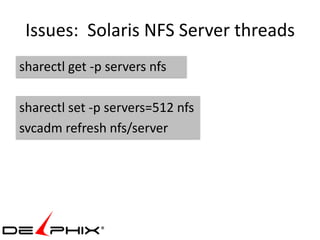
Issues: Solaris NFS Server threads
sharectl get -p servers nfs

sharectl set -p servers=512 nfs
svcadm refresh nfs/server
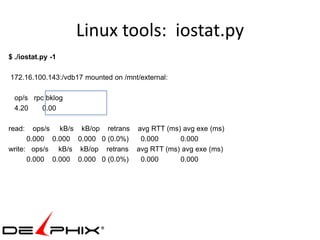
Linux tools: iostat.py
$ ./iostat.py -1

172.16.100.143:/vdb17 mounted on /mnt/external:

 op/s rpc bklog
 4.20    0.00

read:   ops/s kB/s kB/op retrans avg RTT (ms) avg exe (ms)
      0.000 0.000 0.000 0 (0.0%)  0.000      0.000
write: ops/s kB/s kB/op retrans avg RTT (ms) avg exe (ms)
      0.000 0.000 0.000 0 (0.0%)  0.000      0.000
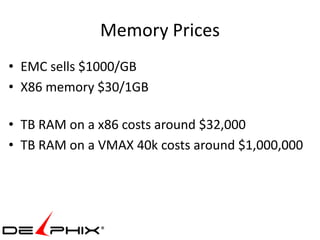
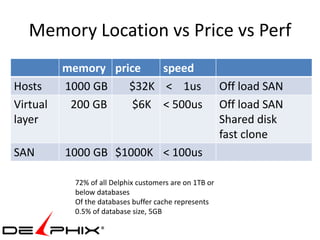
Memory Prices
• EMC sells $1000/GB
• X86 memory $30/1GB

• TB RAM on a x86 costs around $32,000
• TB RAM on a VMAX 40k costs around $1,000,000
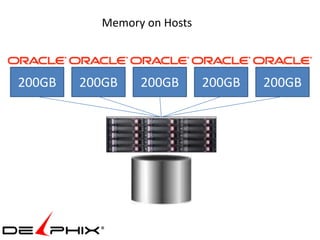
Memory on Hosts


200GB   200GB   200GB       200GB   200GB
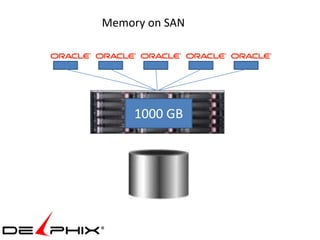
Memory on SAN


     1000 GB
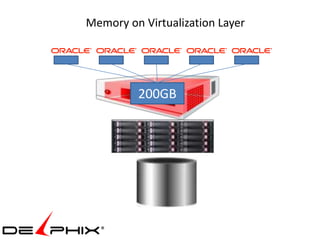
Memory on Virtualization Layer


         200GB
Memory Location vs Price vs Perf
          memory price   speed
Hosts     1000 GB   $32K < 1us                           Off load SAN
Virtual    200 GB    $6K < 500us                         Off load SAN
layer                                                    Shared disk
                                                         fast clone
SAN       1000 GB $1000K < 100us

            72% of all Delphix customers are on 1TB or
            below databases
            Of the databases buffer cache represents
            0.5% of database size, 5GB
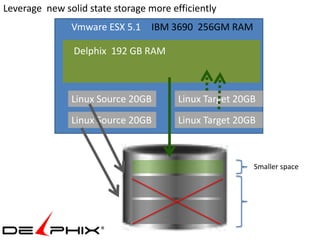
Leverage new solid state storage more efficiently
               Vmware ESX 5.1 IBM 3690 256GM RAM

                Delphix 192 GB RAM


               Linux Source 20GB        Linux Target 20GB
               Linux Source 20GB        Linux Target 20GB


                                                        Smaller space
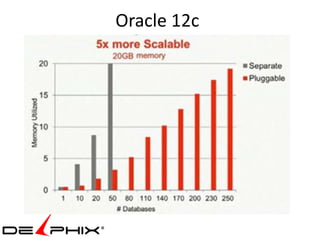
Oracle 12c
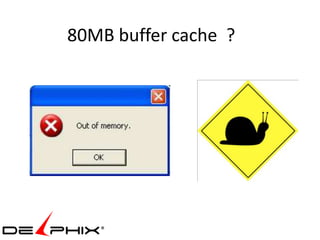
80MB buffer cache ?
with

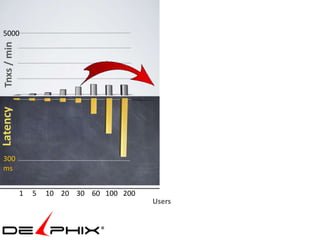
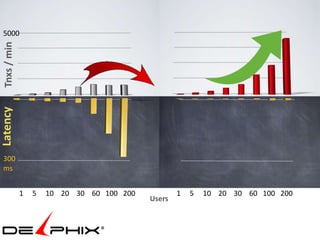
 5000
 Tnxs / min
Latency


 300
 ms


              1   5   10 20 30 60 100 200           1   5   10 20 30 60 100 200
                                            Users
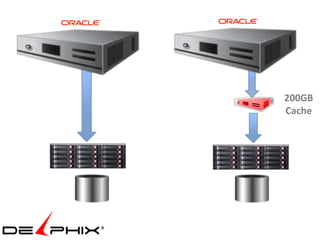
200GB
Cache
5000
 Tnxs / min
Latency


 300
 ms


              1   5   10 20 30 60 100 200           1   5   10 20 30 60 100 200
                                            Users
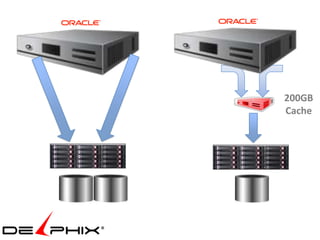
200GB
Cache
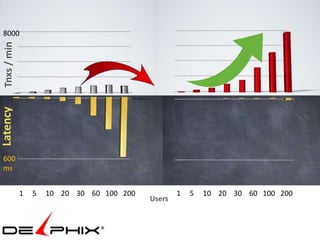
8000
 Tnxs / min
Latency


 600
 ms


              1   5   10 20 30 60 100 200           1   5   10 20 30 60 100 200
                                            Users

Collaborate vdb performance

  • 1.
    Performance boosting with Database Virtualization Kyle Hailey http://dboptimizer.com
  • 2.
    • Technology • Full Cloning • Thin Provision Cloning • Database Virtualization • IBM & Delphix Benchmark • OLTP • DSS • Concurrent databases • Problems, Solutions, Tools • Oracle • Network • I/O
  • 3.
    Problem Reports Production First copy QA and UAT • CERN - European Organization for Nuclear Research Developers • 145 TB database • 75 TB growth each year • Dozens of developers want copies.
  • 4.
    99% of blocksare Identical Clone 1 Clone 2 Clone 3
  • 6.
    Thin Provision Clone 1 Clone 2 Clone 3
  • 7.
    2. Thin ProvisionCloning I. clonedb II. Copy on Write a) EMC BCV b) EMC SRDF c) Vmware III. Allocate on Write a) Netapp (EMC VNX) b) ZFS c) DxFS
  • 8.
    I. clonedb dNFS RMAN sparse file backup
  • 9.
    III. Allocate onWrite a) Netapp Target A Production Flexclone Snap mirror Database Clone 1 clones NetApp Filer NetApp Filer snapshot snapshot Target B Database Luns Clone 2 Snapshot Manager for Oracle Target C File system level Clone 3 Clone 4
  • 10.
    III. Allocate onWrite b) ZFS Target A 1. physical Clone 1 ZFS Storage Appliance NFS RMAN Snapshot Clone 1 Copy to NFS mount RMAN copy Oracle ZFS Appliance + RMAN
  • 11.
    Review : PartI 1. Full Cloning 2. Thin Provision I. clonedb II. Copy on Write III. Allocate on Write a) Netapp ( also EMC VNX) b) ZFS c) DxFS 3. Database Virtualization  SMU  Delphix
  • 12.
  • 13.
    Virtualization Layer SMU x86 hardware Allocate Storage Any type Could be Netapp But Netapp not automated Netapp AFAIK doesn’t shared blocks in memory
  • 14.
    One time backupof source database Production Instance RMAN APIs Database File system
  • 15.
    Delphix Compress Data Production Instance Database File system Data is compressed typically 1/3 size
  • 16.
    Incremental forever changecollection Production Changes are collected Instance automatically forever Data older than retention widow freed Database File system
  • 17.
    Typical Architecture Production Development QA UAT Instance Instance Instance Instance Database Database Database Database File system File system File system File system
  • 18.
    Clones share duplicateblocks Source Database Clone Copies of Source Database Production Development QA UAT Instance Instance Instance Instance NFS vDatabase vDatabase Database vDatabase File system Fiber Channel
  • 19.
    Benchmark IBM 3690 X5 Intel Xeon E7 @ 2.00 GHz 2 sockets 10 cores, 256 GB RAM EMC clariion CX4-120 3GB memory read cache, 600MB write cache 5 366GB Seagate ST314635 CLAR146 disks on 4GB Fiber Channel
  • 20.
    Database Virtualization 200GB layer Cache 3GB 3GB cache cache 200GB 200GB Database Database
  • 21.
    Both Databases 200GB Share same cache Cache
  • 23.
    Tests with Swingbench • OLTP on original vs virtual • OLTP on 2 original vs 2 virtual • DSS on original vs virtual • DSS on 2 virtual
  • 24.
    IBM 3690 256GMRAM Vmware ESX 5.1 Install Vmware 5.1
  • 25.
    IBM 3690 256GMRAM Vmware ESX 5.1 EMC Clariion 5 Disks striped 8Gb FC
  • 26.
    IBM 3690 256GMRAM Vmware ESX 5.1 1. Create Linux host • RHEL 6.2 2. Install Oracle 11.2.0.3 Oracle 11.2.0.3 Linux Source 20GB 4 vCPU
  • 27.
    IBM 3690 256GMRAM Vmware ESX 5.1 1. Create 180 GB Swingbench database Oracle 11.2.0.3 Linux Source 20GB 4 vCPU Swingbench 60 GB dataset 180 GB datafiles
  • 28.
    IBM 3690 256GMRAM Vmware ESX 5.1 1. Install Delphix 192GB RAM Delphix 192 GB RAM 4 vCPU Linux Source 20GB 4 vCPU
  • 29.
    IBM 3690 256GMRAM Vmware ESX 5.1 1. Link to Source Database (copy is compressed by Delphix 192 GB RAM 4 vCPU 1/3 on average) RMAN API Linux Source 20GB 4 vCPU
  • 30.
    Original IBM 3690 256GM RAM Vmware ESX 5.1 Delphix 192 GB RAM 4vCPU Linux Source 20GB 4 vCPU Linux Target 20GB 4 vCPU 1. Provision a “virtual database” on target LINUX
  • 31.
    Benchmark setup ready IBM 3690 256GM RAM Vmware ESX 5.1 Delphix 192 GB RAM 4vCPU Linux Source 20GB 4 vCPU Linux Target 20GB 4 vCPU Run “physical” Run “virtual” benchmark on source benchmark on target database virtual database
  • 32.
    charbench -cs 172.16.101.237:1521:ibm1 # machine:port:SID -dt thin # driver -u soe # username -p soe # password -uc 100 # user count -min 10 # min think time -max 200 # max think time -rt 0:1 # run time -a # run automatic -v users,tpm,tps # collect statistics http://dominicgiles.com/commandline.html
  • 33.
    Author : Dominic Giles Version : 2.4.0.845 Results will be written to results.xml. Time Users TPM TPS 3:11:51 PM [0/30] 0 0 3:11:52 PM [30/30] 49 49 3:11:53 PM [30/30] 442 393 3:11:54 PM [30/30] 856 414 3:11:55 PM [30/30] 1146 290 3:11:56 PM [30/30] 1355 209 3:11:57 PM [30/30] 1666 311 3:11:58 PM [30/30] 2015 349 3:11:59 PM [30/30] 2289 274 3:12:00 PM [30/30] 2554 265 3:12:01 PM [30/30] 2940 386 3:12:02 PM [30/30] 3208 268 3:12:03 PM [30/30] 3520 312 3:12:04 PM [30/30] 3835 315
  • 34.
    Transactions Per Minute(TPM) OLTP physical vs virtual, cold cache Users
  • 35.
    OLTP physical vsvirtual , warm cache Transactions Per Minute (TPM) Users
  • 36.
    Part Two: 2physical vs 2 virtual Vmware ESX 5.1 IBM 3690 256GM RAM Delphix 192 GB RAM Linux Source 20GB Linux Target 20GB Linux Source 20GB Linux Target 20GB • 2 Source databases • 2 virtual database that share the same common blocks
  • 37.
  • 38.
    seconds Physical vs Virtual : Full Table Scans (DSS)
  • 39.
    Two virtual databases: Full Table Scans seconds
  • 40.
    Problems swingbench connections timeout rm /dev/random ln -s /dev/urandom /dev/random couldn’t connect via listener Services iptables stop Chkconfig iptables off Iptables –F Service iptables save
  • 41.
    Tools : onGithub • Oracle – oramon.sh – Oracle I/O latency – moats.sql – Oracle Monitor, Tanel Poder • I/O – fio.sh – benchmark disks – ioh.sh – show nfs, zfs, io latency, throughput • Network – netio – benchmark network (not on github) • Netperf • ttcp – tcpparse.sh – parse tcpdumps http://github.com/khailey
  • 42.
    MOATS: The MotherOf All Tuning Scripts v1.0 by Adrian Billington & Tanel Poder http://www.oracle-developer.net & http://www.e2sn.com MOATS + INSTANCE SUMMARY ------------------------------------------------------------------------------------------+ | Instance: V1 | Execs/s: 3050.1 | sParse/s: 205.5 | LIOs/s: 28164.9 | Read MB/s: 46.8 | | Cur Time: 18-Feb 12:08:22 | Calls/s: 633.1 | hParse/s: 9.1 | PhyRD/s: 5984.0 | Write MB/s: 12.2 | | History: 0h 0m 39s | Commits/s: 446.7 | ccHits/s: 3284.6 | PhyWR/s: 1657.4 | Redo MB/s: 0.8 | +------------------------------------------------------------------------------------------------------------+ | event name avg ms 1ms 2ms 4ms 8ms 16ms 32ms 64ms 128ms 256ms 512ms 1s 2s+ 4s+ | | db file scattered rea .623 1 | | db file sequential re 1.413 13046 8995 2822 916 215 7 1 | | direct path read 1.331 25 13 3 1 | | direct path read temp 1.673 | | direct path write 2.241 15 12 14 3 | | direct path write tem 3.283 | | log file parallel wri | | log file sync | + TOP SQL_ID (child#) -----+ TOP SESSIONS ---------+ + TOP WAITS -------------------------+ WAIT CLASS -+ | 19% | () | | | 60% | db file sequential read | User I/O | | 19% | c13sma6rkr27c (0) | 245,147,374,386,267 | | 17% | ON CPU | ON CPU | | 17% | bymb3ujkr3ubk (0) | 131,10,252,138,248 | | 15% | log file sync | Commit | | 9% | 8z3542ffmp562 (0) | 133,374,252,250 | | 6% | log file parallel write | System I/O | | 9% | 0yas01u2p9ch4 (0) | 17,252,248,149 | | 2% | read by other session | User I/O | +--------------------------------------------------+ +--------------------------------------------------+ + TOP SQL_ID ----+ PLAN_HASH_VALUE + SQL TEXT ---------------------------------------------------------------+ | c13sma6rkr27c | 2583456710 | SELECT PRODUCTS.PRODUCT_ID, PRODUCT_NAME, PRODUCT_DESCRIPTION, CATEGORY | | | | _ID, WEIGHT_CLASS, WARRANTY_PERIOD, SUPPLIER_ID, PRODUCT_STATUS, LIST_P | + ---------------------------------------------------------------------------------------------------------- + | bymb3ujkr3ubk | 494735477 | INSERT INTO ORDERS(ORDER_ID, ORDER_DATE, CUSTOMER_ID, WAREHOUSE_ID) VAL | | | | UES (ORDERS_SEQ.NEXTVAL + :B3 , SYSTIMESTAMP , :B2 , :B1 ) RETURNING OR | + ---------------------------------------------------------------------------------------------------------- + | 8z3542ffmp562 | 1655552467 | SELECT QUANTITY_ON_HAND FROM PRODUCT_INFORMATION P, INVENTORIES I WHERE | | | | I.PRODUCT_ID = :B2 AND I.PRODUCT_ID = P.PRODUCT_ID AND I.WAREHOUSE_ID | + ---------------------------------------------------------------------------------------------------------- + | 0yas01u2p9ch4 | 0 | INSERT INTO ORDER_ITEMS(ORDER_ID, LINE_ITEM_ID, PRODUCT_ID, UNIT_PRICE, | | | | QUANTITY) VALUES (:B4 , :B3 , :B2 , :B1 , 1) | + ---------------------------------------------------------------------------------------------------------- +
  • 43.
    oramon.sh RUN_TIME=-1 COLLECT_LIST= FAST_SAMPLE=iolatency TARGET=172.16.102.209:V2 DEBUG=0 Connected, starting collectat Wed Dec 5 14:59:24 EST 2012 starting stats collecting single block logfile write multi block direct read direct read temp direct write temp ms IOP/s ms IOP/s ms IOP/s ms IOP/s ms IOP/s ms IOP/s 3.53 .72 16.06 .17 4.64 .00 115.37 3.73 .00 0 1.66 487.33 2.66 138.50 4.84 33.00 .00 .00 0 1.71 670.20 3.14 195.00 5.96 42.00 .00 .00 0 2.19 502.27 4.61 136.82 10.74 27.00 .00 .00 0 1.38 571.17 2.54 177.67 4.50 20.00 .00 .00 0 single block logfile write multi block direct read direct read temp direct write temp ms IOP/s ms IOP/s ms IOP/s ms IOP/s ms IOP/s ms IOP/s 3.22 526.36 4.79 135.55 .00 .00 .00 0 2.37 657.20 3.27 192.00 .00 .00 .00 0 1.32 591.17 2.46 187.83 .00 .00 .00 0 2.23 668.60 3.09 204.20 .00 .00 .00 .00 0
  • 44.
    Benchmark : networkand I/O Oracle NFS TCP Network netio TCP NFS Cache/SAN Fibre Channel fio.sh Cache/spindle
  • 45.
    netio Server netio –t –s Client netio –t server_name Client send receive Packet size 1k bytes: 51.30 MByte/s Tx, 6.17 MByte/s Rx. Packet size 2k bytes: 100.10 MByte/s Tx, 12.29 MByte/s Rx. Packet size 4k bytes: 96.48 MByte/s Tx, 18.75 MByte/s Rx. Packet size 8k bytes: 114.38 MByte/s Tx, 30.41 MByte/s Rx. Packet size 16k bytes: 112.20 MByte/s Tx, 19.46 MByte/s Rx. Packet size 32k bytes: 114.53 MByte/s Tx, 35.11 MByte/s Rx.
  • 46.
    netperf.sh mss: 1448 local_recv_size(beg,end): 128000 128000 local_send_size (beg,end): 49152 49152 remote_recv_size (beg,end): 87380 3920256 remote_send_size (beg,end): 16384 16384 mn_ms av_ms max_ms s_KB r_KB r_MB/s s_MB/s <100u <500u <1ms <5ms <10ms <50ms <100m <1s >1s p90 p99 .08 .12 10.91 15.69 83.92 .33 .38 .01 .01 .12 .54 .10 .16 12.25 8 48.78 99.10 .30 .82 .07 .08 .15 .57 .10 .14 5.01 8 54.78 99.04 .88 .96 .15 .60 .22 .34 63.71 128 367.11 97.50 1.57 2.42 .06 .07 .01 .35 .93 .43 .60 16.48 128 207.71 84.86 11.75 15.04 .05 .10 .90 1.42 .99 1.30 412.42 1024 767.03 .05 99.90 .03 .08 .03 1.30 2.25 1.77 2.28 15.43 1024 439.20 99.27 .64 .73 2.65 5.35
  • 47.
    fio.sh test userssize MB ms IOPS 50us 1ms 4ms 10ms 20ms 50ms .1s 1s 2s 2s+ read 1 8K r 28.299 0.271 3622 99 0 0 0 read 1 32K r 56.731 0.546 1815 97 1 1 0 0 0 read 1 128K r 78.634 1.585 629 26 68 3 1 0 0 read 1 1M r 91.763 10.890 91 14 61 14 8 0 0 read 8 1M r 50.784 156.160 50 3 25 31 38 2 read 16 1M r 52.895 296.290 52 2 24 23 38 11 read 32 1M r 55.120 551.610 55 0 13 20 34 30 read 64 1M r 58.072 1051.970 58 3 6 23 66 0 randread 1 8K r 0.176 44.370 22 0 1 5 2 15 42 20 10 randread 8 8K r 2.763 22.558 353 0 2 27 30 30 6 1 randread 16 8K r 3.284 37.708 420 0 2 23 28 27 11 6 randread 32 8K r 3.393 73.070 434 1 20 24 25 12 15 randread 64 8K r 3.734 131.950 478 1 17 16 18 11 33 write 1 1K w 2.588 0.373 2650 98 1 0 0 0 write 1 8K w 26.713 0.289 3419 99 0 0 0 0 write 1 128K w 11.952 10.451 95 52 12 16 7 10 0 0 0 write 4 1K w 6.684 0.581 6844 90 9 0 0 0 0 write 4 8K w 15.513 2.003 1985 68 18 10 1 0 0 0 write 4 128K w 34.005 14.647 272 0 34 13 25 22 3 0 write 16 1K w 7.939 1.711 8130 45 52 0 0 0 0 0 0 write 16 8K w 10.235 12.177 1310 5 42 27 15 5 2 0 0 write 16 128K w 13.212 150.080 105 0 0 3 10 55 26 0 2
  • 50.
  • 51.
    Measurements Oracle oramon.sh NFS TCP Network TCP NFS ioh.sh ZFS Cache/spindle Fibre Channel Cache/spindle
  • 52.
    ioh.sh date: 1335282287 ,24/3/2012 15:44:47TCP out: 8.107 MB/s, in: 5.239 MB/s, retrans: MB/s ip discards: ---------------- | MB/s| avg_ms| avg_sz_kb| count ------------|-----------|----------|----------|-------------------- R| io:| 0.005 | 24.01 | 4.899 | 1 Cache/SAN R | zfs:| 7.916 | 0.05 | 7.947 | 1020 C | nfs_c:| | | | . ZFS R | nfs:| 7.916 | 0.09 | 8.017 | 1011 NFS - W| io:| 9.921 | 11.26 | 32.562 | 312 Cache/SAN W | zfssync:| 5.246 | 19.81 | 11.405 | 471 W | zfs:| 0.001 | 0.05 | 0.199 | 3 ZFS W | nfs:| | | | . W |nfssyncD:| 5.215 | 19.94 | 11.410 | 468 NFS W |nfssyncF:| 0.031 | 11.48 | 16.000 | 2
  • 53.
    LINUX Solaris ms ms Oracle Oracle 58 47 NFS NFS /TCP ? ? TCP Network ? ? TCP/NFS ? ? Network TCP NFS .1 2 NFS server Cache/SAN Fibre Channel Cache/spindle
  • 54.
    Oracle snoop / tcpdump TCP Network snoop TCP NFS Virtualiation layer NFS Server
  • 55.
    Wireshark : analyzeTCP dumps • yum install wireshark • wireshark + perl – find common NFS requests • NFS client • NFS server – display times for • NFS Client • NFS Server • Delta https://github.com/khailey/tcpdump/blob/master/parsetcp.pl
  • 56.
    Parsing nfs servertrace: nfs_server.cap type avg ms count READ : 44.60, 7731 Parsing client trace: client.cap type avg ms count READ : 46.54, 15282 ==================== MATCHED DATA ============ READ type avg ms server : 48.39, client : 49.42, diff : 1.03, Processed 9647 packets (Matched: 5624 Missed: 4023)
  • 57.
    Parsing NFS servertrace: nfs_server.cap type avg ms count READ : 1.17, 9042 Parsing client trace: client.cap type avg ms count READ : 1.49, 21984 ==================== MATCHED DATA ============ READ type avg ms count server : 1.03 client : 1.49 diff : 0.46
  • 58.
    Oracle on Oracle latency data tool Linux on Solaris source “db file sequential read” wait (which is basically a Oracle Oracle 58 ms 47 ms oramon.sh timing of “pread” for 8k random reads specifically NFS TCP trace tcpdump on TCP NFS 1.5 45 ms tcpparse.sh LINUX snoop on Solaris Client Network network 0.5 1 ms Delta TCP trace TCP tcpparse.sh NFS 1 ms 44 ms snoop Server NFS dtrace nfs:::op-read- NFS .1 ms 2 ms DTrace start/op-read-done Server
  • 59.
    Issues: LINUX rpcqueue On LINUX, in /etc/sysctl.conf modify sunrpc.tcp_slot_table_entries = 128 then do sysctl -p then check the setting using sysctl -A | grep sunrpc NFS partitions will have to be unmounted and remounted Not persistent across reboot
  • 60.
    Issues: Solaris NFSServer threads sharectl get -p servers nfs sharectl set -p servers=512 nfs svcadm refresh nfs/server
  • 61.
    Linux tools: iostat.py $./iostat.py -1 172.16.100.143:/vdb17 mounted on /mnt/external: op/s rpc bklog 4.20 0.00 read: ops/s kB/s kB/op retrans avg RTT (ms) avg exe (ms) 0.000 0.000 0.000 0 (0.0%) 0.000 0.000 write: ops/s kB/s kB/op retrans avg RTT (ms) avg exe (ms) 0.000 0.000 0.000 0 (0.0%) 0.000 0.000
  • 62.
    Memory Prices • EMCsells $1000/GB • X86 memory $30/1GB • TB RAM on a x86 costs around $32,000 • TB RAM on a VMAX 40k costs around $1,000,000
  • 63.
    Memory on Hosts 200GB 200GB 200GB 200GB 200GB
  • 64.
  • 65.
  • 66.
    Memory Location vsPrice vs Perf memory price speed Hosts 1000 GB $32K < 1us Off load SAN Virtual 200 GB $6K < 500us Off load SAN layer Shared disk fast clone SAN 1000 GB $1000K < 100us 72% of all Delphix customers are on 1TB or below databases Of the databases buffer cache represents 0.5% of database size, 5GB
  • 67.
    Leverage new solidstate storage more efficiently Vmware ESX 5.1 IBM 3690 256GM RAM Delphix 192 GB RAM Linux Source 20GB Linux Target 20GB Linux Source 20GB Linux Target 20GB Smaller space
  • 68.
  • 69.
  • 70.
    with 5000 Tnxs/ min Latency 300 ms 1 5 10 20 30 60 100 200 1 5 10 20 30 60 100 200 Users
  • 71.
  • 72.
    5000 Tnxs /min Latency 300 ms 1 5 10 20 30 60 100 200 1 5 10 20 30 60 100 200 Users
  • 73.
  • 74.
    8000 Tnxs /min Latency 600 ms 1 5 10 20 30 60 100 200 1 5 10 20 30 60 100 200 Users

Editor's Notes

  • #4 Prod critical for businessPerformance of prod is highest priorityProtect prod from any extra load
  • #6 Fastest query is the query not run
  • #9 Performance issuesSingle point in time
  • #11 Oracle Database Cloning Solution Using Oracle Recovery Manager and Sun ZFS Storage Appliancehttp://www.oracle.com/technetwork/articles/systems-hardware-architecture/cloning-solution-353626.pdf
  • #13 Database virtualization is to the data tier whatVMware is to the compute tier. On the compute tier VMware allows the same hardware to be shared by multiple machines. On the data tier virtualization allows the same datafiles to be shared by multiple clones allowing almost instantaneous creation of new copies of databases with almost no disk footprint.  
  • #22 250 pdb x 200 GB = 50 TBEMC sells 1GB$1000Dell sells 32GB $1,000.terabyte of RAM on a Dell costs around $32,000terabyte of RAM on a VMAX 40k costs around $1,000,000.
  • #33 Most of swingbench&apos;s parameters can be changed from the command line. That is to say, the swingconfig.xml file (or the other example files in the sample directory) can be used as templates for a run and each runs parameters can be modified from the command line. The -h option lists command line options[dgiles@macbook-2 bin]$ ./charbench -husage: parameters: -D &lt;variable=value&gt; use value for given environment variable -a run automatically -be &lt;stopafter&gt; end recording statistics after. Value is in the form hh:mm -bs &lt;startafter&gt; start recording statistics after. Value is in the form hh:mm -c &lt;filename&gt; specify config file -co &lt;hostname&gt; specify/override coordinator in configuration file. -com &lt;comment&gt; specify comment for this benchmark run (in double quotes) -cpuloc &lt;hostname &gt; specify/overide location of the cpu monitor. -cs &lt;connectstring&gt; override connect string in configuration file -debug turn on debug output -di &lt;shortname(s)&gt; disable transactions(s) by short name, comma separated -dt &lt;drivertype&gt; override driver type in configuration file (thin,oci, ttdirect, ttclient) -en &lt;shortname(s)&gt; enable transactions(s) by short name, comma separated -h,--help print this message -i run interactively (default) -ld &lt;milliseconds&gt; specify/overide the logon delay (milliseconds) -max &lt;milliseconds&gt; override maximum think time in configuration file -min &lt;milliseconds&gt; override minimum think time in configuration file -p &lt;password&gt; override password in configuration file -r &lt;filename&gt; specify results file -rr specify/overide refresh rate for charts in secs -rt &lt;runtime&gt; specify/overide run time for the benchmark. Value is in the form hh:mm -s run silent -u &lt;username&gt; override username in configuration file -uc &lt;number&gt; override user count in configuration file. -v &lt;options&gt; display run statistics (vmstat/sar like output), options include (comma separated no spaces).trans|cpu|disk|dml|tpm|tps|usersThe following examples show how this functionality can be used Example 1.$ &gt; ./swingbench -cs //localhost/DOM102 -dt thin Will start swingbench using the local config file (swingconfig.xml) but overriding its connectstring and driver type. All other values in the file will be used. Example 2.$ &gt; ./swingbench -c sample/ccconfig.xml -cs //localhost/DOM102 -dt thin Will start swingbench using the config file sample/ccconfig.xml and overriding its connectstring and driver type. All other values in the file will be used. Example 3.$ &gt; ./minibench -c sample/soeconfig.xml -cs //localhost/DOM102 -dt thin -uc 50 -min 0 -max 100 -a Will start minibench (a lighter weight frontend) using the config file sample/ccconfig.xml and overriding its connectstring and driver type. It also overrides the user count and think times. The &quot;-a&quot; option starts the run without any user interaction. Example 4.$ &gt; ./charbench -c sample/soeconfig.xml -cs //localhost/DOM102 -dt thin -cpulocoraclelinux -uc 20 -min 0 -max 100 -a -v users,tpm,tps,cpuAuthor : Dominic GilesVersion : 2.3.0.344Results will be written to results.xml.Time Users TPM TPS User System Wait Idle5:08:19 PM 0 0 0 0 0 0 05:08:21 PM 3 0 0 4 4 3 895:08:22 PM 8 0 0 4 4 3 895:08:23 PM 12 0 0 4 4 3 895:08:24 PM 16 0 0 8 43 0 495:08:25 PM 20 0 0 8 43 0 495:08:26 PM 20 2 2 8 43 0 495:08:27 PM 20 29 27 8 43 0 495:08:28 PM 20 49 20 53 34 1 12Will start charbench (a character based version of swingbench) using the config file sample/ccconfig.xml and overriding its connectstring and driver type. It also overrides the user count and think times. The &quot;-a&quot; option starts the run without any user interaction. This example also connects to the cpumonitor (started previously). It uses the -v option to continually display cpu load information. Example 5.$ &gt; ./minibench -c sample/soeconfig.xml -cs //localhost/DOM102 -cpuloclocalhost -co localhostWill start minibench using the config file sample/ccconfig.xml and overriding its connectstring. It also specifies a cpu monitor started locally on the machine and attaches to a coordinator process also started on the local machine. Example 6.$ &gt; ./minibench -c sample/soeconfig.xml -cs //localhost/DOM102 -cpuloclocalhost -rt 1:30 Will start minibench using the config file sample/ccconfig.xml and overriding its connectstring. It also specifies a cpu monitor started locally on the machine. The &quot;-rt&quot; parameter tells swingbench to run for 1 hour 30 and then stop. Example 7.$ &gt; ./coordinator -g$ &gt; ssh -f node1 &apos;cdswingbench/bin;swingbench/bin/cpumonitor&apos;;$ &gt; ssh -f node2 &apos;cdswingbench/bin;swingbench/bin/cpumonitor&apos;;$ &gt; ssh -f node3 &apos;cdswingbench/bin;swingbench/bin/cpumonitor&apos;;$ &gt; ssh -f node4 &apos;cdswingbench/bin;swingbench/bin/cpumonitor&apos;;$ &gt; ./minibench -cs //node1/RAC1 -cpulocnode1 -co localhost &amp;$ &gt; ./minibench -cs //node2/RAC2 -cpulocnode2 -co localhost &amp;$ &gt; ./minibench -cs //node3/RAC3 -cpulocnode3 -co localhost &amp;$ &gt; ./minibench -cs //node4/RAC4 -cpulocnode4 -co localhost &amp;$ &gt; ./clusteroverviewIn 2.3 the loadgenerators can use the additional command line option -g to specify which load generation group they are in i.e.$ &gt; ./minibench -cs //node1/RAC1 -cpulocnode1 -co localhost -g group1 &amp;This collection of commands will first start a coordinator in grpahical mode on the local machine. The next 4 commands secure shell to the 4 nodes of a cluster and start a cpumonitor (swingbench needs to be installed on each of them). The following commands start four load generators with the minibench front end each referencing the thecpumonitor started on each database instance, they also attach to the local coordinator. Finally the last command starts clusteroverview (currently its configuration needs to be specified in its config file). Its possible to stop all of the load generators and coordinator with the following command $ &gt; ./coordinator -stop
  • #69 Once Last Thinghttp://www.dadbm.com/wp-content/uploads/2013/01/12c_pluggable_database_vs_separate_database.png
  • #74 250 pdb x 200 GB = 50 TBEMC sells 1GB$1000Dell sells 32GB $1,000.terabyte of RAM on a Dell costs around $32,000terabyte of RAM on a VMAX 40k costs around $1,000,000.
  • #75 http://www.emc.com/collateral/emcwsca/master-price-list.pdf    These prices obtain on pages 897/898:Storage engine for VMAX 40k with 256 GB RAM is around $393,000Storage engine for VMAX 40k with  48 GB RAM is around $200,000So, the cost of RAM here is 193,000 / 208 = $927 a gigabyte.   That seems like a good deal for EMC, as Dell sells 32 GB RAM DIMMs for just over $1,000.    So, a terabyte of RAM on a Dell costs around $32,000, and a terabyte of RAM on a VMAX 40k costs around $1,000,000.2) Most DBs have a buffer cache that is less than 0.5% (not 5%, 0.5%) of the datafile size.