SECURING PRIVATE ENVIORNMENT
         BY USING NAT

        PROJECT REPORT
ACKNOWLDGEMENT
The project is based on network addressing translation(nat).
The beauty of configuring nat on routers is that it can help
users access internet on private ip address which are
otherwise excluded by internet service provider(isp).
We have used inter VLAN technology to make work efficient
between 3 different and independent organisations. The
vlans have been divided into web servers and internet
clients.
DESCRIPTION

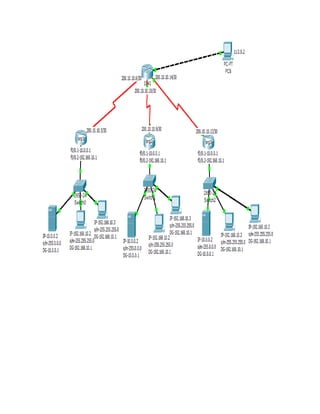
We have three organisations. Org1, org2 and org3.
Each organisation comprises a router, to route the data from
and to isp. There are manageable switches in each
organisation and we have created separate vlans for servers
and internet clients.
If we want the communication between the internet clients
and servers then we configure inter vlan concept on the
router. And if we want to block some internet clients cannot
access our servers then we create acl for that particular user.
These organisations are linked externally to an isp which
provides live(public) ip addresses to each organisation, and
isp also provides the internet connections to others.
CONFIGURATION

FOR ORG1


%SYS-5-CONFIG_I: Configured frROUTER ORG1
Router>en
Router#config t
Enter configuration commands, one per line. End with CNTL/Z.
Router(config)#hostname ORG1
ORG1(config)#line console 0
ORG1(config-line)#password net
ORG1(config-line)#login
ORG1(config-line)#exit
ORG1(config)#line vty 0 4
ORG1(config-line)#password net
ORG1(config-line)#login
ORG1(config-line)#exit
ORG1(config)#enable password net
ORG1(config)#enable secret net1
ORG1(config)#int f0/0
ORG1(config-if)#no sh

%LINK-5-CHANGED: Interface FastEthernet0/0, changed state to up
ORG1(config-if)#exit
ORG1(config)#int f0/0.1

%LINK-5-CHANGED: Interface FastEthernet0/0.1, changed state to
upRouter(config-subif)#encapsulation dot1q 2
ORG1(config-subif)#ip nat inside
ORG1(config-subif)#ip address 10.0.0.1 255.0.0.0
ORG1(config-subif)#no sh
ORG1(config-subif)#exit
ORG1(config)#int f0/0.2

ORG1(config-subif)#encapsulation dot1q 3
ORG1(config-subif)#ip nat inside
ORG1(config-subif)#ip address 192.168.10.1 255.255.255.240
ORG1(config-subif)#no sh
ORG1(config-subif)#exit
ORG1(config)#int s0/0/0
ORG1(config-if)#ip nat outside
ORG1(config-if)#clock rate 64000
ORG1(config-if)#ip address 200.10.10.5 255.255.255.252
ORG1(config-if)#no sh

%LINK-5-CHANGED: Interface Serial0/0/0, changed state to down
ORG1(config-if)#exit
ORG1(config)#ip route 0.0.0.0 0.0.0.0 serial 0/0/0

We have place our web server in the private area so that the internet client cannot
directly access it. So, we have configured static nat and open port number 80(http)
only.

ORG1(config)#ip nat inside source static tcp 10.0.0.2 80 200.10.10.17 80

In our organisation our clients want to access internet so we will configure
dynamic nat with overload for clients.
ORG1(config)#access-list 20 permit any
ORG1(config)#ip nat pool netmax 200.10.10.18 200.10.10.18 netmask
255.255.255.240
ORG1(config)#ip nat inside source list 20 pool netmax overload
ORG1(config)#exit

ORG1#wr
Building configuration...
[OK]
ORG1#


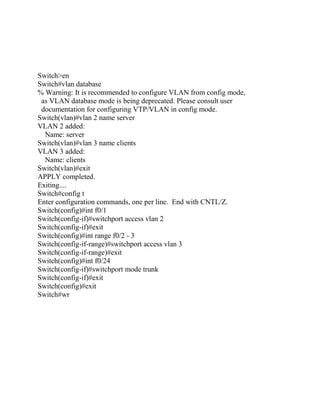
SWITCH
Switch>en
Switch#vlan database
% Warning: It is recommended to configure VLAN from config mode,
 as VLAN database mode is being deprecated. Please consult user
 documentation for configuring VTP/VLAN in config mode.
Switch(vlan)#vlan 2 name server
VLAN 2 added:
  Name: server
Switch(vlan)#vlan 3 name clients
VLAN 3 added:
  Name: clients
Switch(vlan)#exit
APPLY completed.
Exiting....
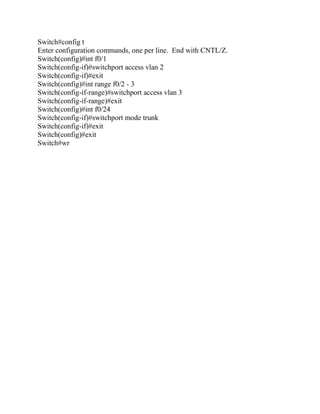
Switch#config t
Enter configuration commands, one per line. End with CNTL/Z.
Switch(config)#int f0/1
Switch(config-if)#switchport access vlan 2
Switch(config-if)#exit
Switch(config)#int range f0/2 - 3
Switch(config-if-range)#switchport access vlan 3
Switch(config-if-range)#exit
Switch(config)#int f0/24
Switch(config-if)#switchport mode trunk
Switch(config-if)#exit
Switch(config)#exit
Switch#wr
FOR ORG2

ROUTER
Router>en
Router#config t
Enter configuration commands, one per line. End with CNTL/Z.
Router(config)#hostname ORG2
ORG2(config)#line console 0
ORG2(config-line)#password net
ORG2(config-line)#login
ORG2(config-line)#exit
ORG2(config)#line vty 0 4
ORG2(config-line)#password net
ORG2(config-line)#login
ORG2(config-line)#exit
ORG2(config)#enable password net
ORG2(config)#enable secret net1
ORG2(config)#int f0/0
ORG2(config-if)#no sh
%LINK-5-CHANGED: Interface FastEthernet0/0, changed state to up
ORG2(config-if)#exit
ORG2(config)#int f0/0.1

%LINK-5-CHANGED: Interface FastEthernet0/0.1, changed state to
upRouter(config-subif)#encapsulation dot1q 2
ORG2(config-subif)#ip nat inside
ORG2(config-subif)#ip address 10.0.0.1 255.0.0.0
ORG2(config-subif)#no sh
ORG2(config-subif)#exit
ORG2(config)#int f0/0.2

ORG2(config-subif)#encapsulation dot1q 3
ORG2(config-subif)#ip nat inside
ORG2(config-subif)#ip address 192.168.10.1 255.255.255.240
ORG2(config-subif)#no sh
ORG2(config-subif)#exit
ORG2(config)#int s0/0/0
ORG2(config-if)#ip nat outside
ORG2(config-if)#clock rate 64000
ORG2(config-if)#ip address 200.10.10.9 255.255.255.252
ORG2(config-if)#no sh
%LINK-5-CHANGED: Interface Serial0/0/0, changed state to down
ORG2(config-if)#exit
ORG2(config)#ip route 0.0.0.0 0.0.0.0 serial 0/0/0
ORG2(config)#ip nat inside source static 10.0.0.2 200.10.10.33
ORG2(config)#access-list 20 permit any
ORG2(config)#ip nat pool netmax 200.10.10.34 200.10.10.36 netmask
255.255.255.240
ORG2(config)#ip nat inside source list 20 pool netmax
ORG2(config)#exit
%SYS-5-CONFIG_I: Configured from console by console
ORG2#wr
Building configuration...
[OK]
ORG2#


SWITCH
Switch>en
Switch#vlan database
% Warning: It is recommended to configure VLAN from config mode,
 as VLAN database mode is being deprecated. Please consult user
 documentation for configuring VTP/VLAN in config mode.
Switch(vlan)#vlan 2 name server
VLAN 2 added:
  Name: server
Switch(vlan)#vlan 3 name clients
VLAN 3 added:
  Name: clients
Switch(vlan)#exit
APPLY completed.
Exiting....
Switch#config t
Enter configuration commands, one per line. End with CNTL/Z.
Switch(config)#int f0/1
Switch(config-if)#switchport access vlan 2
Switch(config-if)#exit
Switch(config)#int range f0/2 - 3
Switch(config-if-range)#switchport access vlan 3
Switch(config-if-range)#exit
Switch(config)#int f0/24
Switch(config-if)#switchport mode trunk
Switch(config-if)#exit
Switch(config)#exit
Switch#wr
FOR ORG3

ROUTER
Router>en
Router#config t
Enter configuration commands, one per line. End with CNTL/Z.
Router(config)#hostname ORG3
ORG3(config)#line console 0
ORG3(config-line)#password net
ORG3(config-line)#login
ORG3(config-line)#exit
ORG3(config)#line vty 0 4
ORG3(config-line)#password net
ORG3(config-line)#login
ORG3(config-line)#exit
ORG3(config)#enable password net
ORG3(config)#enable secret net1
ORG3(config)#int f0/0
ORG3(config-if)#no sh
%LINK-5-CHANGED: Interface FastEthernet0/0, changed state to up
ORG3(config-if)#exit
ORG3(config)#int f0/0.1

%LINK-5-CHANGED: Interface FastEthernet0/0.1, changed state to
upRouter(config-subif)#encapsulation dot1q 2
ORG3(config-subif)#ip nat inside
ORG3(config-subif)#ip address 10.0.0.1 255.0.0.0
ORG3(config-subif)#no sh
ORG3(config-subif)#exit
ORG3(config)#int f0/0.2
ORG3(config-subif)#encapsulation dot1q 3
ORG3(config-subif)#ip nat inside
ORG3(config-subif)#ip address 192.168.10.1 255.255.255.240
ORG3(config-subif)#no sh
ORG3(config-subif)#exit
ORG3(config)#int s0/0/0
ORG3(config-if)#ip nat outside
ORG3(config-if)#clock rate 64000
ORG3(config-if)#ip address 200.10.10.13 255.255.255.252
ORG3(config-if)#no sh

%LINK-5-CHANGED: Interface Serial0/0/0, changed state to down
ORG3(config-if)#exit
ORG3(config)#ip route 0.0.0.0 0.0.0.0 serial 0/0/0
ORG3(config)#ip nat inside source static 10.0.0.2 200.10.10.50
ORG3(config)#access-list 20 permit any
ORG3(config)#ip nat pool netmax 200.10.10.51 200.10.10.51 netmask
255.255.255.240
ORG3(config)#ip nat inside source list 20 pool netmax overload
ORG3(config)#exit
%SYS-5-CONFIG_I: Configured from console by console
ORG3#wr
Building configuration...
[OK]
ORG3#


SWITCH
Switch>en
Switch#vlan database
% Warning: It is recommended to configure VLAN from config mode,
 as VLAN database mode is being deprecated. Please consult user
 documentation for configuring VTP/VLAN in config mode.
Switch(vlan)#vlan 2 name server
VLAN 2 added:
  Name: server
Switch(vlan)#vlan 3 name clients
VLAN 3 added:
  Name: clients
Switch(vlan)#exit
APPLY completed.
Exiting....
Switch#config t
Enter configuration commands, one per line. End with CNTL/Z.
Switch(config)#int f0/1
Switch(config-if)#switchport access vlan 2
Switch(config-if)#exit
Switch(config)#int range f0/2 - 3
Switch(config-if-range)#switchport access vlan 3
Switch(config-if-range)#exit
Switch(config)#int f0/24
Switch(config-if)#switchport mode trunk
Switch(config-if)#exit
Switch(config)#exit
Switch#wr
REFERENCES

 •   Wikipedia
 •   Google
 •   www.edu.ac.in
 •   NETMAX TECHNOLOGIES
 •   CISCO

Nat report2

  • 1.
    SECURING PRIVATE ENVIORNMENT BY USING NAT PROJECT REPORT
  • 3.
    ACKNOWLDGEMENT The project isbased on network addressing translation(nat). The beauty of configuring nat on routers is that it can help users access internet on private ip address which are otherwise excluded by internet service provider(isp). We have used inter VLAN technology to make work efficient between 3 different and independent organisations. The vlans have been divided into web servers and internet clients.
  • 4.
    DESCRIPTION We have threeorganisations. Org1, org2 and org3. Each organisation comprises a router, to route the data from and to isp. There are manageable switches in each organisation and we have created separate vlans for servers and internet clients. If we want the communication between the internet clients and servers then we configure inter vlan concept on the router. And if we want to block some internet clients cannot access our servers then we create acl for that particular user. These organisations are linked externally to an isp which provides live(public) ip addresses to each organisation, and isp also provides the internet connections to others.
  • 5.
    CONFIGURATION FOR ORG1 %SYS-5-CONFIG_I: ConfiguredfrROUTER ORG1 Router>en Router#config t Enter configuration commands, one per line. End with CNTL/Z. Router(config)#hostname ORG1 ORG1(config)#line console 0 ORG1(config-line)#password net ORG1(config-line)#login ORG1(config-line)#exit ORG1(config)#line vty 0 4 ORG1(config-line)#password net ORG1(config-line)#login ORG1(config-line)#exit
  • 6.
    ORG1(config)#enable password net ORG1(config)#enablesecret net1 ORG1(config)#int f0/0 ORG1(config-if)#no sh %LINK-5-CHANGED: Interface FastEthernet0/0, changed state to up ORG1(config-if)#exit ORG1(config)#int f0/0.1 %LINK-5-CHANGED: Interface FastEthernet0/0.1, changed state to upRouter(config-subif)#encapsulation dot1q 2 ORG1(config-subif)#ip nat inside ORG1(config-subif)#ip address 10.0.0.1 255.0.0.0 ORG1(config-subif)#no sh ORG1(config-subif)#exit ORG1(config)#int f0/0.2 ORG1(config-subif)#encapsulation dot1q 3 ORG1(config-subif)#ip nat inside ORG1(config-subif)#ip address 192.168.10.1 255.255.255.240 ORG1(config-subif)#no sh ORG1(config-subif)#exit ORG1(config)#int s0/0/0 ORG1(config-if)#ip nat outside ORG1(config-if)#clock rate 64000 ORG1(config-if)#ip address 200.10.10.5 255.255.255.252 ORG1(config-if)#no sh %LINK-5-CHANGED: Interface Serial0/0/0, changed state to down ORG1(config-if)#exit ORG1(config)#ip route 0.0.0.0 0.0.0.0 serial 0/0/0 We have place our web server in the private area so that the internet client cannot directly access it. So, we have configured static nat and open port number 80(http) only. ORG1(config)#ip nat inside source static tcp 10.0.0.2 80 200.10.10.17 80 In our organisation our clients want to access internet so we will configure dynamic nat with overload for clients.
  • 7.
    ORG1(config)#access-list 20 permitany ORG1(config)#ip nat pool netmax 200.10.10.18 200.10.10.18 netmask 255.255.255.240 ORG1(config)#ip nat inside source list 20 pool netmax overload ORG1(config)#exit ORG1#wr Building configuration... [OK] ORG1# SWITCH
  • 8.
    Switch>en Switch#vlan database % Warning:It is recommended to configure VLAN from config mode, as VLAN database mode is being deprecated. Please consult user documentation for configuring VTP/VLAN in config mode. Switch(vlan)#vlan 2 name server VLAN 2 added: Name: server Switch(vlan)#vlan 3 name clients VLAN 3 added: Name: clients Switch(vlan)#exit APPLY completed. Exiting.... Switch#config t Enter configuration commands, one per line. End with CNTL/Z. Switch(config)#int f0/1 Switch(config-if)#switchport access vlan 2 Switch(config-if)#exit Switch(config)#int range f0/2 - 3 Switch(config-if-range)#switchport access vlan 3 Switch(config-if-range)#exit Switch(config)#int f0/24 Switch(config-if)#switchport mode trunk Switch(config-if)#exit Switch(config)#exit Switch#wr
  • 9.
    FOR ORG2 ROUTER Router>en Router#config t Enterconfiguration commands, one per line. End with CNTL/Z. Router(config)#hostname ORG2 ORG2(config)#line console 0 ORG2(config-line)#password net ORG2(config-line)#login ORG2(config-line)#exit ORG2(config)#line vty 0 4 ORG2(config-line)#password net ORG2(config-line)#login ORG2(config-line)#exit ORG2(config)#enable password net ORG2(config)#enable secret net1 ORG2(config)#int f0/0 ORG2(config-if)#no sh %LINK-5-CHANGED: Interface FastEthernet0/0, changed state to up ORG2(config-if)#exit ORG2(config)#int f0/0.1 %LINK-5-CHANGED: Interface FastEthernet0/0.1, changed state to upRouter(config-subif)#encapsulation dot1q 2 ORG2(config-subif)#ip nat inside ORG2(config-subif)#ip address 10.0.0.1 255.0.0.0 ORG2(config-subif)#no sh ORG2(config-subif)#exit ORG2(config)#int f0/0.2 ORG2(config-subif)#encapsulation dot1q 3 ORG2(config-subif)#ip nat inside ORG2(config-subif)#ip address 192.168.10.1 255.255.255.240 ORG2(config-subif)#no sh ORG2(config-subif)#exit
  • 10.
    ORG2(config)#int s0/0/0 ORG2(config-if)#ip natoutside ORG2(config-if)#clock rate 64000 ORG2(config-if)#ip address 200.10.10.9 255.255.255.252 ORG2(config-if)#no sh %LINK-5-CHANGED: Interface Serial0/0/0, changed state to down ORG2(config-if)#exit ORG2(config)#ip route 0.0.0.0 0.0.0.0 serial 0/0/0 ORG2(config)#ip nat inside source static 10.0.0.2 200.10.10.33 ORG2(config)#access-list 20 permit any ORG2(config)#ip nat pool netmax 200.10.10.34 200.10.10.36 netmask 255.255.255.240 ORG2(config)#ip nat inside source list 20 pool netmax ORG2(config)#exit %SYS-5-CONFIG_I: Configured from console by console ORG2#wr Building configuration... [OK] ORG2# SWITCH Switch>en Switch#vlan database % Warning: It is recommended to configure VLAN from config mode, as VLAN database mode is being deprecated. Please consult user documentation for configuring VTP/VLAN in config mode. Switch(vlan)#vlan 2 name server VLAN 2 added: Name: server Switch(vlan)#vlan 3 name clients VLAN 3 added: Name: clients Switch(vlan)#exit APPLY completed. Exiting....
  • 11.
    Switch#config t Enter configurationcommands, one per line. End with CNTL/Z. Switch(config)#int f0/1 Switch(config-if)#switchport access vlan 2 Switch(config-if)#exit Switch(config)#int range f0/2 - 3 Switch(config-if-range)#switchport access vlan 3 Switch(config-if-range)#exit Switch(config)#int f0/24 Switch(config-if)#switchport mode trunk Switch(config-if)#exit Switch(config)#exit Switch#wr
  • 12.
    FOR ORG3 ROUTER Router>en Router#config t Enterconfiguration commands, one per line. End with CNTL/Z. Router(config)#hostname ORG3 ORG3(config)#line console 0 ORG3(config-line)#password net ORG3(config-line)#login ORG3(config-line)#exit ORG3(config)#line vty 0 4 ORG3(config-line)#password net ORG3(config-line)#login ORG3(config-line)#exit ORG3(config)#enable password net ORG3(config)#enable secret net1 ORG3(config)#int f0/0 ORG3(config-if)#no sh %LINK-5-CHANGED: Interface FastEthernet0/0, changed state to up ORG3(config-if)#exit ORG3(config)#int f0/0.1 %LINK-5-CHANGED: Interface FastEthernet0/0.1, changed state to upRouter(config-subif)#encapsulation dot1q 2 ORG3(config-subif)#ip nat inside ORG3(config-subif)#ip address 10.0.0.1 255.0.0.0 ORG3(config-subif)#no sh ORG3(config-subif)#exit ORG3(config)#int f0/0.2 ORG3(config-subif)#encapsulation dot1q 3 ORG3(config-subif)#ip nat inside ORG3(config-subif)#ip address 192.168.10.1 255.255.255.240 ORG3(config-subif)#no sh ORG3(config-subif)#exit
  • 13.
    ORG3(config)#int s0/0/0 ORG3(config-if)#ip natoutside ORG3(config-if)#clock rate 64000 ORG3(config-if)#ip address 200.10.10.13 255.255.255.252 ORG3(config-if)#no sh %LINK-5-CHANGED: Interface Serial0/0/0, changed state to down ORG3(config-if)#exit ORG3(config)#ip route 0.0.0.0 0.0.0.0 serial 0/0/0 ORG3(config)#ip nat inside source static 10.0.0.2 200.10.10.50 ORG3(config)#access-list 20 permit any ORG3(config)#ip nat pool netmax 200.10.10.51 200.10.10.51 netmask 255.255.255.240 ORG3(config)#ip nat inside source list 20 pool netmax overload ORG3(config)#exit %SYS-5-CONFIG_I: Configured from console by console ORG3#wr Building configuration... [OK] ORG3# SWITCH Switch>en Switch#vlan database % Warning: It is recommended to configure VLAN from config mode, as VLAN database mode is being deprecated. Please consult user documentation for configuring VTP/VLAN in config mode. Switch(vlan)#vlan 2 name server VLAN 2 added: Name: server Switch(vlan)#vlan 3 name clients VLAN 3 added: Name: clients Switch(vlan)#exit APPLY completed. Exiting.... Switch#config t Enter configuration commands, one per line. End with CNTL/Z.
  • 14.
    Switch(config)#int f0/1 Switch(config-if)#switchport accessvlan 2 Switch(config-if)#exit Switch(config)#int range f0/2 - 3 Switch(config-if-range)#switchport access vlan 3 Switch(config-if-range)#exit Switch(config)#int f0/24 Switch(config-if)#switchport mode trunk Switch(config-if)#exit Switch(config)#exit Switch#wr
  • 15.
    REFERENCES • Wikipedia • Google • www.edu.ac.in • NETMAX TECHNOLOGIES • CISCO