Ch.6 – OSPF 
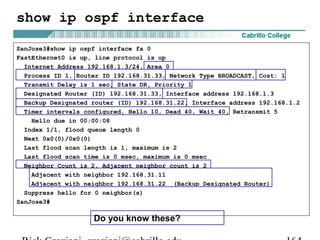
Part 2 of 2: Multi-Area OSPF 
CCNP version 3.0 
Rick Graziani 
Cabrillo College
Note 
• Optional: This lab coincides with my Multi-area OSPF Lab 
handout, Rick's OSPF Scenarios (Word doc) 
• Most of the slides in this presentation do not come directly 
from CCNP 1 version 3.0, OSPF, but slides which contain 
a little more detail and explanation of OSPF. 
Rick Graziani graziani@cabrillo.edu 2
Optional: Rick’s OSPF Scenarios 
Optional: We will be using the following handout for this presentation: 
Rick’s OSPF Handout: 
1. OSPF Multi-Area - All Normal Areas 
2. OSPF Multi-Area - Stub Area 
3. OSPF Multi-Area - Totally Stubby Area 
This handouts can be downloaded from (Word doc): 
• http://www.cabrillo.cc.ca.us/ciscoacad/curriculum/presentations/semes 
ter5/OSPF_Scenario_Handout.doc 
Rick Graziani graziani@cabrillo.edu 3
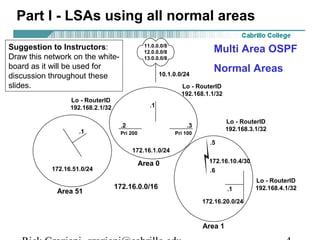
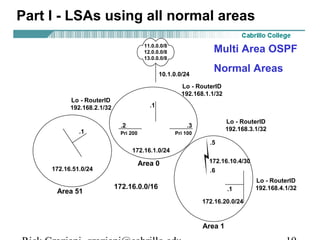
Part I - LSAs using all normal areas 
Multi Area OSPF 
Normal Areas 
11.0.0.0/8 
12.0.0.0/8 
13.0.0.0/8 
10.1.0.0/24 
ASBR 
.1 
Lo - RouterID 
192.168.1.1/32 
.2 .3 
Lo - RouterID 
192.168.3.1/32 Pri 200 Pri 100 
Suggestion to Instructors: 
Draw this network on the white-board 
as it will be used for 
discussion throughout these 
slides. 
Lo - RouterID 
192.168.2.1/32 
ABR-1 ABR-2 
172.16.1.0/24 
Area 0 
172.16.0.0/16 
.1 
172.16.51.0/24 
.5 
172.16.10.4/30 
.6 
Area 51 Internal 
.1 
172.16.20.0/24 
Area 1 
Lo - RouterID 
192.168.4.1/32 
Rick Graziani graziani@cabrillo.edu 4
Topics 
• Areas 
• LSAs 
• show ip ospf database (summary of link state database) 
• show ip route 
• Stub Areas 
• Totally Stubby Areas 
• E1 and E2 routes 
• Default Routes 
• Route Summarization 
• NSSA (Not So Stubby Areas) 
• Multiple ABR Scenario 
• Multiple ASBR Scenario 
• Virtual Links 
• Load Balancing 
• show commands 
Rick Graziani graziani@cabrillo.edu 5
Issues with large OSPF nets 
• Large link-state table 
– Each router maintains a LSDB for all links in the area 
– The LSDB requires the use of memory 
• Frequent SPF calculations 
– A topology change in an area causes each router to re-run SPF to 
rebuild the SPF tree and the routing table. 
– A flapping link will affect an entire area. 
– SPF re-calculations are done only for changes within that area. 
• Large routing table 
– Typically, the larger the area the larger the routing table. 
– A larger routing table requires more memory and takes more time 
to perform the route look-ups. 
Solution: Divide the network into multiple areas 
Rick Graziani graziani@cabrillo.edu 6
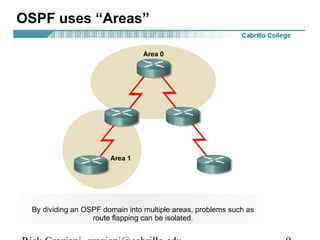
OSPF uses “Areas” 
• Hierarchical routing enables you to separate large internetworks (autonomous 
systems) into smaller internetworks that are called areas. 
• With this technique, routing still occurs between the areas (called inter-area 
routing), but many of the smaller internal routing operations, such as 
recalculating the database – re-running the SPF algorithm, are restricted within 
an area. 
Rick Graziani graziani@cabrillo.edu 7
An advantage of Multiple Areas 
• Question: I understand the routing table is recalculated every time the router 
receives an new version of an LSA. Does OSPF recalculate its routing table 
when their is a topology change in another area? show ip ospf displays no 
change in SPF execution, but show ip ospf database shows a change in the 
topology? 
• Answer: Good question! OSPF areas are designed to keep issues like flapping 
links within an area. SPF is not recalculated if the topology change is in 
another area. The interesting thing is that OSPF distributes inter-area (between 
areas) topology information using a distance-vector method. OSPF uses link-state 
principles only within an area. ABRs do not announce topological 
information between areas, instead, only routing information is injected into 
other areas. ABRs relay routing information between areas via distance vector 
technique similar to RIP or IGRP. This is why show ip ospf does not show a 
change in the number of times SPF has been executed when the topology 
change is in another area. 
• Note: It is still a good idea to perform route summarization between areas, 
announcing multiple routes as a single inter-area route. This will hide any 
changes in one area from affecting routing tables in other areas. 
Rick Graziani graziani@cabrillo.edu 8
OSPF uses “Areas” 
Rick Graziani graziani@cabrillo.edu 9
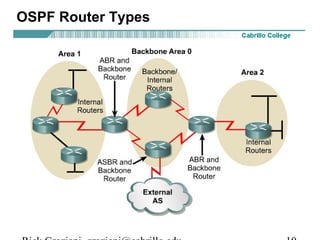
OSPF Router Types 
Rick Graziani graziani@cabrillo.edu 10
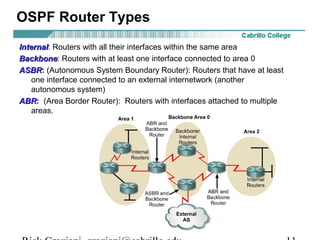
OSPF Router Types 
IInntteerrnnaall: Routers with all their interfaces within the same area 
BBaacckkbboonnee: Routers with at least one interface connected to area 0 
AASSBBRR: (Autonomous System Boundary Router): Routers that have at least 
one interface connected to an external internetwork (another 
autonomous system) 
AABBRR: (Area Border Router): Routers with interfaces attached to multiple 
areas. 
Rick Graziani graziani@cabrillo.edu 11
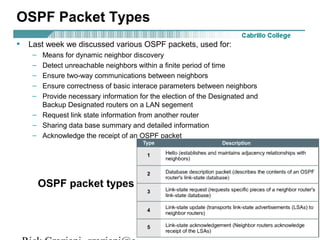
OSPF Packet Types 
• Last week we discussed various OSPF packets, used for: 
– Means for dynamic neighbor discovery 
– Detect unreachable neighbors within a finite period of time 
– Ensure two-way communications between neighbors 
– Ensure correctness of basic interace parameters between neighbors 
– Provide necessary information for the election of the Designated and 
Backup Designated routers on a LAN segement 
– Request link state information from another router 
– Sharing data base summary and detailed information 
– Acknowledge the receipt of an OSPF packet 
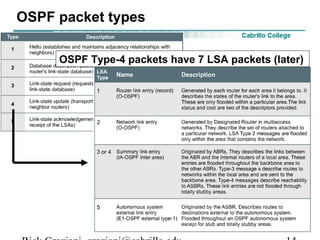
OSPF packet types 
Rick Graziani graziani@cabrillo.edu 12
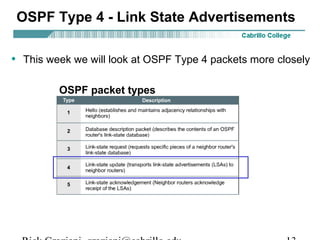
OSPF Type 4 - Link State Advertisements 
• This week we will look at OSPF Type 4 packets more closely 
OSPF packet types 
Rick Graziani graziani@cabrillo.edu 13
OSPF packet types 
OSPF Type-4 packets have 7 LSA packets (later) 
Rick Graziani graziani@cabrillo.edu 14
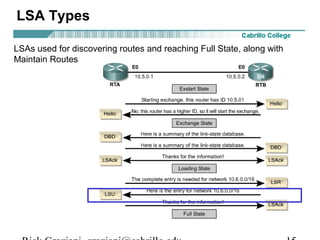
LSA Types 
LSAs used for discovering routes and reaching Full State, along with 
Maintain Routes 
Rick Graziani graziani@cabrillo.edu 15
LSA Types 
LSA Types 1 through 5 
• We will look at these in detail as we discuss areas in this chapter. 
LSA Type 6 MOSPF (Multicast OSPF) 
• Not supported by Cisco. 
• MOSPF enhances OSPF by letting routers use their link-state 
databases to build multicast distribution trees for the forwarding of 
multicast traffic. 
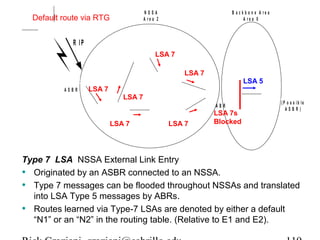
LSA Type 7 NSSA External Link Entry 
• Originated by an ASBR connected to an NSSA. 
• Type 7 messages can be flooded throughout NSSAs and translated 
into LSA Type 5 messages by ABRs. 
• Routes learned via Type-7 LSAs are denoted by either a “N1” or and 
“N2” in the routing table. (Compare to E1 and E2). 
• We will discuss this more later when we look at NSSA areas. 
Rick Graziani graziani@cabrillo.edu 16
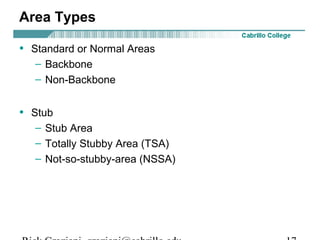
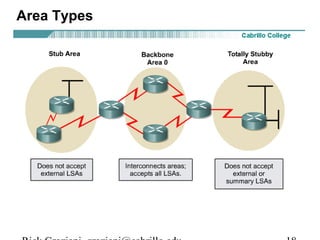
Area Types 
• Standard or Normal Areas 
– Backbone 
– Non-Backbone 
• Stub 
– Stub Area 
– Totally Stubby Area (TSA) 
– Not-so-stubby-area (NSSA) 
Rick Graziani graziani@cabrillo.edu 17
Area Types 
Rick Graziani graziani@cabrillo.edu 18
Part I - LSAs using all normal areas 
Multi Area OSPF 
Normal Areas 
11.0.0.0/8 
12.0.0.0/8 
13.0.0.0/8 
10.1.0.0/24 
ASBR 
.1 
Lo - RouterID 
192.168.1.1/32 
.2 .3 
Lo - RouterID 
192.168.3.1/32 Pri 200 Pri 100 
Lo - RouterID 
192.168.2.1/32 
ABR-1 ABR-2 
172.16.1.0/24 
Area 0 
172.16.0.0/16 
.1 
172.16.51.0/24 
.5 
172.16.10.4/30 
.6 
Area 51 Internal 
.1 
172.16.20.0/24 
Area 1 
Lo - RouterID 
192.168.4.1/32 
Rick Graziani graziani@cabrillo.edu 19
Part I - LSAs using all normal areas 
Routes Received on all OSPF Routers 
Overview of Normal Areas – This will all be explained! 
Receives all routes from within A.S.: 
• Within the local area – LSA 1 and LSA 2 
• From other areas (Inter-Area) – LSA 3, LSA 4, LSA 5 
Receives all routes from External A.S.’s (External AS means routes not from this 
OSPF routing domain): 
• From external AS’s – LSA 5 
• As long as routes are being redistributed by the ASBR (more later) 
Default Routes 
• Received only if default-information-originate command was used (later) 
• If default-information-originate command is not used, then the default 
route is not received 
Rick Graziani graziani@cabrillo.edu 20
Part I - LSAs using all normal areas 
• Your Turn - In groups, examine running-configs 
• Look at the running-configs for “1. OSPF Multi-Areas 
- All Normal Areas” 
• Look at the OSPF network statements! 
Rick Graziani graziani@cabrillo.edu 21
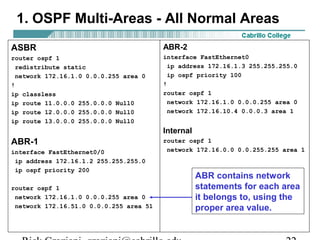
1. OSPF Multi-Areas - All Normal Areas 
ASBR 
router ospf 1 
redistribute static 
network 172.16.1.0 0.0.0.255 area 0 
! 
ip classless 
ip route 11.0.0.0 255.0.0.0 Null0 
ip route 12.0.0.0 255.0.0.0 Null0 
ip route 13.0.0.0 255.0.0.0 Null0 
ABR-1 
interface FastEthernet0/0 
ip address 172.16.1.2 255.255.255.0 
ip ospf priority 200 
router ospf 1 
network 172.16.1.0 0.0.0.255 area 0 
network 172.16.51.0 0.0.0.255 area 51 
ABR-2 
interface FastEthernet0 
ip address 172.16.1.3 255.255.255.0 
ip ospf priority 100 
! 
router ospf 1 
network 172.16.1.0 0.0.0.255 area 0 
network 172.16.10.4 0.0.0.3 area 1 
Internal 
router ospf 1 
network 172.16.0.0 0.0.255.255 area 1 
ABR contains network 
statements for each area 
it belongs to, using the 
proper area value. 
Rick Graziani graziani@cabrillo.edu 22
Understanding LSAs 
• show ip ospf database 
– This is not the link state database, only a summary. 
– It is a tool to help determine what routes are included in the routing table. 
– We will look at this output to learn the tool as well as become familiar with 
the different types of LSAs. 
– To view the link state database use: show ip ospf database [router| 
network|…] 
LSA Header 
0 1 2 3 
0 1 2 3 4 5 6 7 8 9 0 1 2 3 4 5 6 7 8 9 0 1 2 3 4 5 6 7 8 9 0 1 
+-+-+-+-+-+-+-+-+-+-+-+-+-+-+-+-+-+-+-+-+-+-+-+-+-+-+-+-+-+-+-+-+ 
| LS age | Options | LS type | 
+-+-+-+-+-+-+-+-+-+-+-+-+-+-+-+-+-+-+-+-+-+-+-+-+-+-+-+-+-+-+-+-+ 
| Link State ID | 
+-+-+-+-+-+-+-+-+-+-+-+-+-+-+-+-+-+-+-+-+-+-+-+-+-+-+-+-+-+-+-+-+ 
| Advertising Router | 
+-+-+-+-+-+-+-+-+-+-+-+-+-+-+-+-+-+-+-+-+-+-+-+-+-+-+-+-+-+-+-+-+ 
| LS sequence number | 
+-+-+-+-+-+-+-+-+-+-+-+-+-+-+-+-+-+-+-+-+-+-+-+-+-+-+-+-+-+-+-+-+ 
| LS checksum | length | 
+-+-+-+-+-+-+-+-+-+-+-+-+-+-+-+-+-+-+-+-+-+-+-+-+-+-+-+-+-+-+-+-+ 
Rick Graziani graziani@cabrillo.edu 23
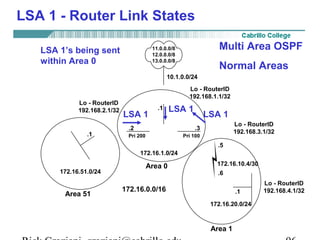
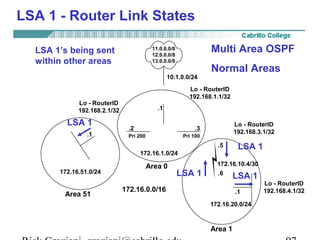
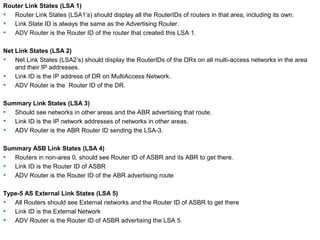
LSA 1 - Router Link States 
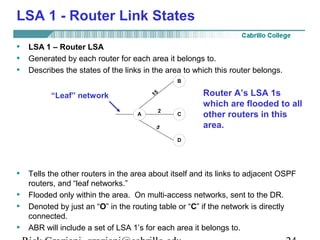
• LSA 1 – Router LSA 
• Generated by each router for each area it belongs to. 
• Describes the states of the links in the area to which this router belongs. 
15 
2 
B 
A C 
D 
5 
Router A’s LSA 1s 
which are flooded to all 
other routers in this 
area. 
“Leaf” network 
• Tells the other routers in the area about itself and its links to adjacent OSPF 
routers, and “leaf networks.” 
• Flooded only within the area. On multi-access networks, sent to the DR. 
• Denoted by just an “O” in the routing table or “C” if the network is directly 
connected. 
• ABR will include a set of LSA 1’s for each area it belongs to. 
Rick Graziani graziani@cabrillo.edu 24
LSA 1 - Router Link States 
• When a new LSA 1 is received and installed in the LSDB, the router 
forwards that LSA, using hop-by-hop or asynchronous flooding. 
• The LSA is sent out all OSPF interfaces that are in the Exchange State 
or a higher state. 
• For interfaces in Exstart or lesser state, the router will wait until it is out 
of Exstart. 
Rick Graziani graziani@cabrillo.edu 25
LSA 1 - Router Link States 
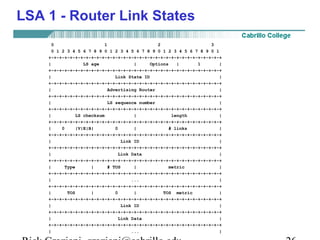
0 1 2 3 
0 1 2 3 4 5 6 7 8 9 0 1 2 3 4 5 6 7 8 9 0 1 2 3 4 5 6 7 8 9 0 1 
+-+-+-+-+-+-+-+-+-+-+-+-+-+-+-+-+-+-+-+-+-+-+-+-+-+-+-+-+-+-+-+-+ 
| LS age | Options | 1 | 
+-+-+-+-+-+-+-+-+-+-+-+-+-+-+-+-+-+-+-+-+-+-+-+-+-+-+-+-+-+-+-+-+ 
| Link State ID | 
+-+-+-+-+-+-+-+-+-+-+-+-+-+-+-+-+-+-+-+-+-+-+-+-+-+-+-+-+-+-+-+-+ 
| Advertising Router | 
+-+-+-+-+-+-+-+-+-+-+-+-+-+-+-+-+-+-+-+-+-+-+-+-+-+-+-+-+-+-+-+-+ 
| LS sequence number | 
+-+-+-+-+-+-+-+-+-+-+-+-+-+-+-+-+-+-+-+-+-+-+-+-+-+-+-+-+-+-+-+-+ 
| LS checksum | length | 
+-+-+-+-+-+-+-+-+-+-+-+-+-+-+-+-+-+-+-+-+-+-+-+-+-+-+-+-+-+-+-+-+ 
| 0 |V|E|B| 0 | # links | 
+-+-+-+-+-+-+-+-+-+-+-+-+-+-+-+-+-+-+-+-+-+-+-+-+-+-+-+-+-+-+-+-+ 
| Link ID | 
+-+-+-+-+-+-+-+-+-+-+-+-+-+-+-+-+-+-+-+-+-+-+-+-+-+-+-+-+-+-+-+-+ 
| Link Data | 
+-+-+-+-+-+-+-+-+-+-+-+-+-+-+-+-+-+-+-+-+-+-+-+-+-+-+-+-+-+-+-+-+ 
| Type | # TOS | metric | 
+-+-+-+-+-+-+-+-+-+-+-+-+-+-+-+-+-+-+-+-+-+-+-+-+-+-+-+-+-+-+-+-+ 
| ... | 
+-+-+-+-+-+-+-+-+-+-+-+-+-+-+-+-+-+-+-+-+-+-+-+-+-+-+-+-+-+-+-+-+ 
| TOS | 0 | TOS metric | 
+-+-+-+-+-+-+-+-+-+-+-+-+-+-+-+-+-+-+-+-+-+-+-+-+-+-+-+-+-+-+-+-+ 
| Link ID | 
+-+-+-+-+-+-+-+-+-+-+-+-+-+-+-+-+-+-+-+-+-+-+-+-+-+-+-+-+-+-+-+-+ 
| Link Data | 
+-+-+-+-+-+-+-+-+-+-+-+-+-+-+-+-+-+-+-+-+-+-+-+-+-+-+-+-+-+-+-+-+ 
| ... | 
Rick Graziani graziani@cabrillo.edu 26
LSA 1 - Router Link States 
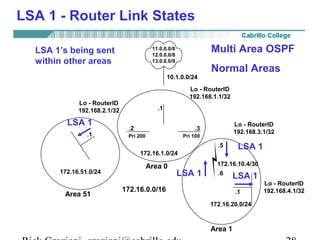
11.0.0.0/8 
12.0.0.0/8 
13.0.0.0/8 
10.1.0.0/24 
ASBR 
LSA 1 .1 
LSA 1 LSA 1 
Multi Area OSPF 
Normal Areas 
Lo - RouterID 
192.168.1.1/32 
.2 .3 
Lo - RouterID 
192.168.3.1/32 Pri 200 Pri 100 
LSA 1’s being sent 
within Area 0 
Lo - RouterID 
192.168.2.1/32 
ABR-1 ABR-2 
172.16.1.0/24 
Area 0 
172.16.0.0/16 
.1 
172.16.51.0/24 
.5 
172.16.10.4/30 
.6 
Area 51 Internal 
.1 
172.16.20.0/24 
Area 1 
Lo - RouterID 
192.168.4.1/32 
Rick Graziani graziani@cabrillo.edu 27
LSA 1 - Router Link States 
11.0.0.0/8 
12.0.0.0/8 
13.0.0.0/8 
10.1.0.0/24 
ASBR 
.1 
Multi Area OSPF 
Normal Areas 
Lo - RouterID 
192.168.1.1/32 
.2 .3 
Lo - RouterID 
192.168.3.1/32 Pri 200 Pri 100 
LSA 1’s being sent 
within other areas 
Lo - RouterID 
192.168.2.1/32 
ABR-1 ABR-2 
172.16.1.0/24 
Area 0 
172.16.0.0/16 
LSA 1 
.1 
172.16.51.0/24 
.5 
LSA 1 
172.16.10.4/30 
.6 
LSA 1 
Area 51 Internal 
LSA 1 
.1 
172.16.20.0/24 
Area 1 
Lo - RouterID 
192.168.4.1/32 
Rick Graziani graziani@cabrillo.edu 28
LSA 1 - Router Link States 
11.0.0.0/8 
12.0.0.0/8 
13.0.0.0/8 
10.1.0.0/24 
ASBR 
.1 
Multi Area OSPF 
Normal Areas 
Lo - RouterID 
192.168.1.1/32 
.2 .3 
Lo - RouterID 
192.168.3.1/32 Pri 200 Pri 100 
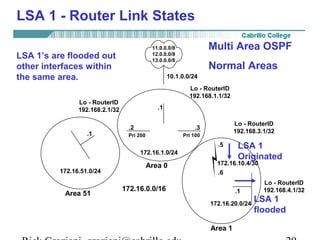
LSA 1’s are flooded out 
other interfaces within 
the same area. 
Lo - RouterID 
192.168.2.1/32 
ABR-1 ABR-2 
172.16.1.0/24 
Area 0 
172.16.0.0/16 
.1 
172.16.51.0/24 
.5 
LSA 1 
Originated 
172.16.10.4/30 
.6 
Area 51 Internal 
.1 
172.16.20.0/24 
Area 1 
Lo - RouterID 
192.168.4.1/32 
LSA 1 
flooded 
Rick Graziani graziani@cabrillo.edu 29
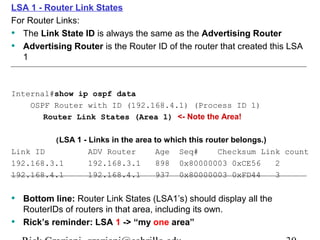
LSA 1 - Router Link States 
For Router Links: 
• The Link State ID is always the same as the Advertising Router 
• Advertising Router is the Router ID of the router that created this LSA 
1 
Internal#show ip ospf data 
OSPF Router with ID (192.168.4.1) (Process ID 1) 
Router Link States (Area 1) <- Note the Area! 
(LSA 1 - Links in the area to which this router belongs.) 
Link ID ADV Router Age Seq# Checksum Link count 
192.168.3.1 192.168.3.1 898 0x80000003 0xCE56 2 
192.168.4.1 192.168.4.1 937 0x80000003 0xFD44 3 
• Bottom line: Router Link States (LSA1’s) should display all the 
RouterIDs of routers in that area, including its own. 
• Rick’s reminder: LSA 1 -> “my one area” 
Rick Graziani graziani@cabrillo.edu 30
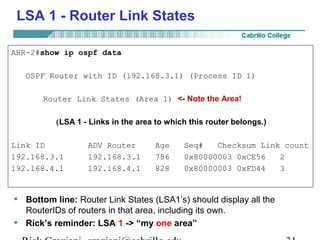
LSA 1 - Router Link States 
ABR-2#show ip ospf data 
OSPF Router with ID (192.168.3.1) (Process ID 1) 
Router Link States (Area 1) <- Note the Area! 
(LSA 1 - Links in the area to which this router belongs.) 
Link ID ADV Router Age Seq# Checksum Link count 
192.168.3.1 192.168.3.1 786 0x80000003 0xCE56 2 
192.168.4.1 192.168.4.1 828 0x80000003 0xFD44 3 
• Bottom line: Router Link States (LSA1’s) should display all the 
RouterIDs of routers in that area, including its own. 
• Rick’s reminder: LSA 1 -> “my one area” 
Rick Graziani graziani@cabrillo.edu 31
LSA 1 - Router Link States 
ABR-2 - show ip route 
172.16.0.0/16 is variably subnetted, 4 subnets, 3 masks 
O IA 172.16.51.1/32 [110/2] via 172.16.1.2, 00:11:44, FastEthernet0 
O 172.16.20.0/24 [110/782] via 172.16.10.6, 00:12:29, Serial0 
C 172.16.10.4/30 is directly connected, Serial0 
C 172.16.1.0/24 is directly connected, FastEthernet0 
O E2 11.0.0.0/8 [110/20] via 172.16.1.1, 00:11:44, FastEthernet0 
O E2 12.0.0.0/8 [110/20] via 172.16.1.1, 00:11:44, FastEthernet0 
O E2 13.0.0.0/8 [110/20] via 172.16.1.1, 00:11:44, FastEthernet0 
192.168.3.0/32 is subnetted, 1 subnets 
C 192.168.3.1 is directly connected, Loopback1 
• Denoted by just an “O” in the routing table, or a “C” 
• Why is there only just an”O” for this network and not the other 
networks? 
– Directly connected or via another area. 
Rick Graziani graziani@cabrillo.edu 32
Your Turn -Discuss in groups (LSA 1s) 
• Using the Multi-area OSPF Lab Handout: “Lab 1. – OSPF 
Normal Areas” verify these results. 
• Look at the link state database summary (show ip ospf 
database) commands and the Router Links States (LSA1s) for 
each router. 
• Look at the routing tables (show ip route) and notice the routes 
within that router’s area. 
• Why do some routers have more than one set of Router Links 
States? 
• Where does “show ip ospf database” tell you the RouterID. 
• Where does “show ip ospf database” tell you the Area. 
Rick Graziani graziani@cabrillo.edu 33
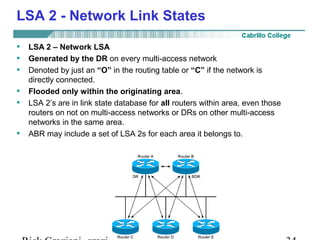
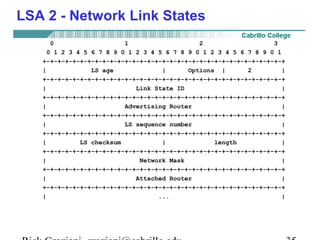
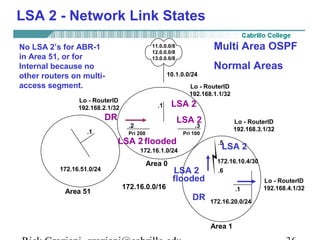
LSA 2 - Network Link States 
• LSA 2 – Network LSA 
• Generated by the DR on every multi-access network 
• Denoted by just an “O” in the routing table or “C” if the network is 
directly connected. 
• Flooded only within the originating area. 
• LSA 2’s are in link state database for all routers within area, even those 
routers on not on multi-access networks or DRs on other multi-access 
networks in the same area. 
• ABR may include a set of LSA 2s for each area it belongs to. 
Rick Graziani graziani@cabrillo.edu 34
LSA 2 - Network Link States 
0 1 2 3 
0 1 2 3 4 5 6 7 8 9 0 1 2 3 4 5 6 7 8 9 0 1 2 3 4 5 6 7 8 9 0 1 
+-+-+-+-+-+-+-+-+-+-+-+-+-+-+-+-+-+-+-+-+-+-+-+-+-+-+-+-+-+-+-+-+ 
| LS age | Options | 2 | 
+-+-+-+-+-+-+-+-+-+-+-+-+-+-+-+-+-+-+-+-+-+-+-+-+-+-+-+-+-+-+-+-+ 
| Link State ID | 
+-+-+-+-+-+-+-+-+-+-+-+-+-+-+-+-+-+-+-+-+-+-+-+-+-+-+-+-+-+-+-+-+ 
| Advertising Router | 
+-+-+-+-+-+-+-+-+-+-+-+-+-+-+-+-+-+-+-+-+-+-+-+-+-+-+-+-+-+-+-+-+ 
| LS sequence number | 
+-+-+-+-+-+-+-+-+-+-+-+-+-+-+-+-+-+-+-+-+-+-+-+-+-+-+-+-+-+-+-+-+ 
| LS checksum | length | 
+-+-+-+-+-+-+-+-+-+-+-+-+-+-+-+-+-+-+-+-+-+-+-+-+-+-+-+-+-+-+-+-+ 
| Network Mask | 
+-+-+-+-+-+-+-+-+-+-+-+-+-+-+-+-+-+-+-+-+-+-+-+-+-+-+-+-+-+-+-+-+ 
| Attached Router | 
+-+-+-+-+-+-+-+-+-+-+-+-+-+-+-+-+-+-+-+-+-+-+-+-+-+-+-+-+-+-+-+-+ 
| ... | 
Rick Graziani graziani@cabrillo.edu 35
LSA 2 - Network Link States 
11.0.0.0/8 
12.0.0.0/8 
13.0.0.0/8 
10.1.0.0/24 
ASBR 
.1 
Multi Area OSPF 
Normal Areas 
Lo - RouterID 
192.168.1.1/32 
LSA 2 
LSA 2 
.2 .3 
Lo - RouterID 
192.168.3.1/32 Pri 200 Pri 100 
No LSA 2’s for ABR-1 
in Area 51, or for 
Internal because no 
other routers on multi-access 
segment. 
Lo - RouterID 
192.168.2.1/32 
DR 
ABR-1 ABR-2 
LSA 2 
flooded LSA 2 
172.16.1.0/24 
Area 0 
172.16.0.0/16 
.1 
172.16.51.0/24 
.5 
172.16.10.4/30 
.6 
LSA 2 
flooded 
Area 51 Internal 
.1 
172.16.20.0/24 
Area 1 
Lo - RouterID 
192.168.4.1/32 
DR 
Rick Graziani graziani@cabrillo.edu 36
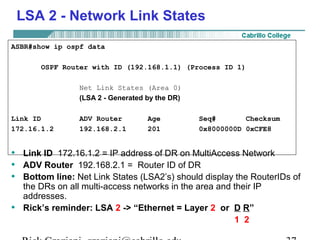
LSA 2 - Network Link States 
ASBR#show ip ospf data 
OSPF Router with ID (192.168.1.1) (Process ID 1) 
Net Link States (Area 0) 
(LSA 2 - Generated by the DR) 
Link ID ADV Router Age Seq# Checksum 
172.16.1.2 192.168.2.1 201 0x8000000D 0xCFE8 
• Link ID 172.16.1.2 = IP address of DR on MultiAccess Network 
• ADV Router 192.168.2.1 = Router ID of DR 
• Bottom line: Net Link States (LSA2’s) should display the RouterIDs of 
the DRs on all multi-access networks in the area and their IP 
addresses. 
• Rick’s reminder: LSA 2 -> “Ethernet = Layer 2 or D R” 
1 2 
Rick Graziani graziani@cabrillo.edu 37
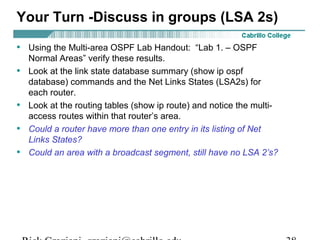
Your Turn -Discuss in groups (LSA 2s) 
• Using the Multi-area OSPF Lab Handout: “Lab 1. – OSPF 
Normal Areas” verify these results. 
• Look at the link state database summary (show ip ospf 
database) commands and the Net Links States (LSA2s) for 
each router. 
• Look at the routing tables (show ip route) and notice the multi-access 
routes within that router’s area. 
• Could a router have more than one entry in its listing of Net 
Links States? 
• Could an area with a broadcast segment, still have no LSA 2’s? 
Rick Graziani graziani@cabrillo.edu 38
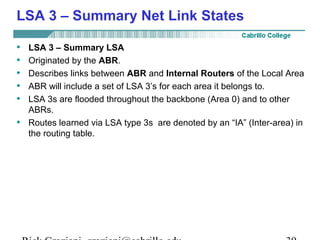
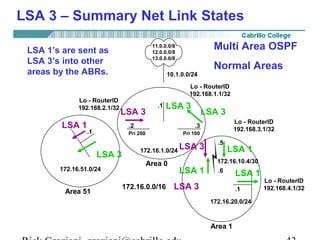
LSA 3 – Summary Net Link States 
• LSA 3 – Summary LSA 
• Originated by the ABR. 
• Describes links between ABR and Internal Routers of the Local Area 
• ABR will include a set of LSA 3’s for each area it belongs to. 
• LSA 3s are flooded throughout the backbone (Area 0) and to other 
ABRs. 
• Routes learned via LSA type 3s are denoted by an “IA” (Inter-area) in 
the routing table. 
Rick Graziani graziani@cabrillo.edu 39
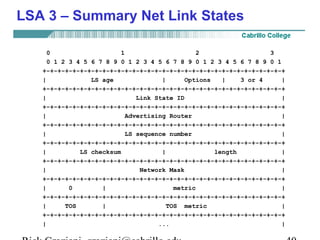
LSA 3 – Summary Net Link States 
0 1 2 3 
0 1 2 3 4 5 6 7 8 9 0 1 2 3 4 5 6 7 8 9 0 1 2 3 4 5 6 7 8 9 0 1 
+-+-+-+-+-+-+-+-+-+-+-+-+-+-+-+-+-+-+-+-+-+-+-+-+-+-+-+-+-+-+-+-+ 
| LS age | Options | 3 or 4 | 
+-+-+-+-+-+-+-+-+-+-+-+-+-+-+-+-+-+-+-+-+-+-+-+-+-+-+-+-+-+-+-+-+ 
| Link State ID | 
+-+-+-+-+-+-+-+-+-+-+-+-+-+-+-+-+-+-+-+-+-+-+-+-+-+-+-+-+-+-+-+-+ 
| Advertising Router | 
+-+-+-+-+-+-+-+-+-+-+-+-+-+-+-+-+-+-+-+-+-+-+-+-+-+-+-+-+-+-+-+-+ 
| LS sequence number | 
+-+-+-+-+-+-+-+-+-+-+-+-+-+-+-+-+-+-+-+-+-+-+-+-+-+-+-+-+-+-+-+-+ 
| LS checksum | length | 
+-+-+-+-+-+-+-+-+-+-+-+-+-+-+-+-+-+-+-+-+-+-+-+-+-+-+-+-+-+-+-+-+ 
| Network Mask | 
+-+-+-+-+-+-+-+-+-+-+-+-+-+-+-+-+-+-+-+-+-+-+-+-+-+-+-+-+-+-+-+-+ 
| 0 | metric | 
+-+-+-+-+-+-+-+-+-+-+-+-+-+-+-+-+-+-+-+-+-+-+-+-+-+-+-+-+-+-+-+-+ 
| TOS | TOS metric | 
+-+-+-+-+-+-+-+-+-+-+-+-+-+-+-+-+-+-+-+-+-+-+-+-+-+-+-+-+-+-+-+-+ 
| ... | 
Rick Graziani graziani@cabrillo.edu 40
LSA 3 – Summary Net Link States 
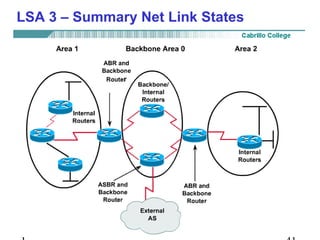
Rick Graziani graziani@cabrillo.edu 41
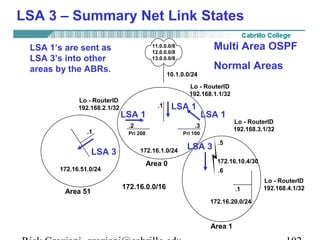
LSA 3 – Summary Net Link States 
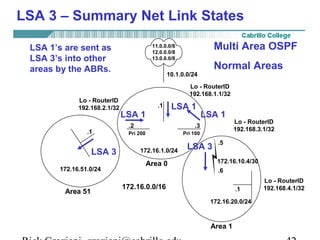
11.0.0.0/8 
12.0.0.0/8 
13.0.0.0/8 
10.1.0.0/24 
ASBR 
.1 
Multi Area OSPF 
Normal Areas 
Lo - RouterID 
192.168.1.1/32 
LSA 1 
LSA 1 LSA 1 
.2 .3 
Lo - RouterID 
192.168.3.1/32 Pri 200 Pri 100 
LSA 1’s are sent as 
LSA 3’s into other 
areas by the ABRs. 
Lo - RouterID 
192.168.2.1/32 
ABR-1 ABR-2 
LSA 3 172.16.1.0/24 
LSA 3 
Area 0 
172.16.0.0/16 
.1 
172.16.51.0/24 
.5 
172.16.10.4/30 
.6 
Area 51 Internal 
.1 
172.16.20.0/24 
Area 1 
Lo - RouterID 
192.168.4.1/32 
Rick Graziani graziani@cabrillo.edu 42
LSA 3 – Summary Net Link States 
11.0.0.0/8 
12.0.0.0/8 
13.0.0.0/8 
10.1.0.0/24 
ASBR 
.1 
Multi Area OSPF 
Normal Areas 
Lo - RouterID 
192.168.1.1/32 
LSA 3 
LSA 3 
LSA 3 
.2 .3 
Lo - RouterID 
192.168.3.1/32 Pri 200 Pri 100 
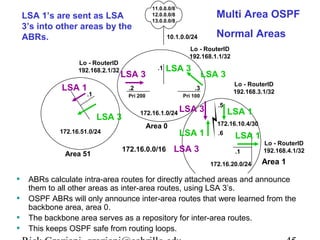
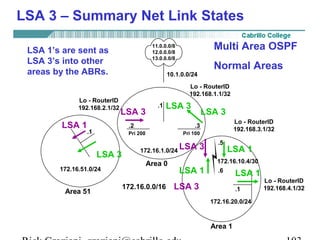
LSA 1’s are sent as 
LSA 3’s into other 
areas by the ABRs. 
Lo - RouterID 
192.168.2.1/32 
ABR-1 ABR-2 
172.16.1.0/24 
Area 0 
172.16.0.0/16 
.1 
LSA 1 
LSA 3 
172.16.51.0/24 
.5 
LSA 1 
172.16.10.4/30 
.6 
LSA 3 
LSA 1 
LSA 3 
Area 51 Internal 
LSA 1 
.1 
172.16.20.0/24 
Area 1 
Lo - RouterID 
192.168.4.1/32 
Rick Graziani graziani@cabrillo.edu 43
11.0.0.0/8 
12.0.0.0/8 
13.0.0.0/8 
10.1.0.0/24 
ASBR 
.1 
Multi Area OSPF 
Normal Areas 
Lo - RouterID 
192.168.1.1/32 
LSA 1’s are sent as LSA 3’s 
into other areas by the 
ABRs. 
LSA 3 
LSA 3 
LSA 3 
.2 .3 
Lo - RouterID 
192.168.3.1/32 Pri 200 Pri 100 
Lo - RouterID 
192.168.2.1/32 
ABR-1 ABR-2 
172.16.1.0/24 
Area 0 
172.16.0.0/16 
.1 
LSA 1 
LSA 3 
172.16.51.0/24 
.5 
LSA 1 
172.16.10.4/30 
.6 
LSA 3 
LSA 1 
LSA 3 
Area 51 Internal 
LSA 1 
.1 
172.16.20.0/24 
• Routers only see the topology of the area they belong to. 
• When a link in one area changes, the adjacent routers originate in LSA 1’s and 
Area 1 
Lo - RouterID 
192.168.4.1/32 
Area 1 
flood them within the area, causing intra-area (internal) routers to re-run the 
SPF and recalculating the routing table. 
• ABRs do not announce topological information between areas. 
• ABRs only inject routing information into other areas, which is basically a 
distance-vector technique. 
Rick Graziani graziani@cabrillo.edu 44
11.0.0.0/8 
12.0.0.0/8 
13.0.0.0/8 
10.1.0.0/24 
ASBR 
.1 
Multi Area OSPF 
Normal Areas 
Lo - RouterID 
192.168.1.1/32 
LSA 1’s are sent as LSA 
3’s into other areas by the 
ABRs. 
LSA 3 
LSA 3 
LSA 3 
.2 .3 
Lo - RouterID 
192.168.3.1/32 Pri 200 Pri 100 
Lo - RouterID 
192.168.2.1/32 
ABR-1 ABR-2 
172.16.1.0/24 
Area 0 
172.16.0.0/16 
.1 
LSA 1 
LSA 3 
172.16.51.0/24 
.5 
LSA 1 
172.16.10.4/30 
.6 
LSA 3 
LSA 1 
LSA 3 
Area 51 Internal 
LSA 1 
.1 
172.16.20.0/24 
• ABRs calculate intra-area routes for directly attached areas and announce 
them to all other areas as inter-area routes, using LSA Area 3’1 
s. 
• OSPF ABRs will only announce inter-area routes that were learned from the 
Lo - RouterID 
192.168.4.1/32 
Area 1 
backbone area, area 0. 
• The backbone area serves as a repository for inter-area routes. 
• This keeps OSPF safe from routing loops. 
Rick Graziani graziani@cabrillo.edu 45
LSA 3 – Summary Net Link States 
11.0.0.0/8 
12.0.0.0/8 
13.0.0.0/8 
10.1.0.0/24 
ASBR 
.1 
Multi Area OSPF 
Normal Areas 
Lo - RouterID 
192.168.1.1/32 
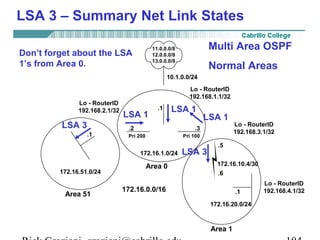
Don’t forget about the LSA 
1’s from Area 0. 
LSA 1 
LSA 1 LSA 1 
.2 .3 
Lo - RouterID 
192.168.3.1/32 Pri 200 Pri 100 
Lo - RouterID 
192.168.2.1/32 
ABR-1 ABR-2 
172.16.1.0/24 
Area 0 
172.16.0.0/16 
.1 
LSA 3 
172.16.51.0/24 
.5 
172.16.10.4/30 
.6 
LSA 3 
Area 51 Internal 
.1 
172.16.20.0/24 
Area 1 
Lo - RouterID 
192.168.4.1/32 
Rick Graziani graziani@cabrillo.edu 46
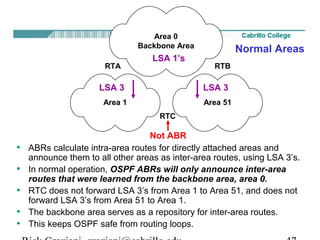
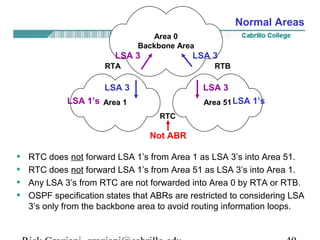
Area 0 
Backbone Area 
LSA 1’s 
RTA RTB 
LSA 3 LSA 3 
Area 1 Area 51 
RTC 
Normal Areas 
Not ABR 
• ABRs calculate intra-area routes for directly attached areas and 
announce them to all other areas as inter-area routes, using LSA 3’s. 
• In normal operation, OSPF ABRs will only announce inter-area 
routes that were learned from the backbone area, area 0. 
• RTC does not forward LSA 3’s from Area 1 to Area 51, and does not 
forward LSA 3’s from Area 51 to Area 1. 
• The backbone area serves as a repository for inter-area routes. 
• This keeps OSPF safe from routing loops. 
Rick Graziani graziani@cabrillo.edu 47
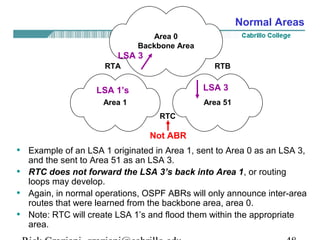
Area 0 
Backbone Area 
LSA 3 
RTA RTB 
LSA 3 
LSA 1’s 
Area 1 Area 51 
RTC 
Normal Areas 
Not ABR 
• Example of an LSA 1 originated in Area 1, sent to Area 0 as an LSA 3, 
and the sent to Area 51 as an LSA 3. 
• RTC does not forward the LSA 3’s back into Area 1, or routing 
loops may develop. 
• Again, in normal operations, OSPF ABRs will only announce inter-area 
routes that were learned from the backbone area, area 0. 
• Note: RTC will create LSA 1’s and flood them within the appropriate 
area. 
Rick Graziani graziani@cabrillo.edu 48
Area 0 
Backbone Area 
LSA 3 LSA 3 
RTA RTB 
LSA 3 LSA 3 
LSA 1’s LSA 1’s 
Area 1 Area 51 
RTC 
Normal Areas 
Not ABR 
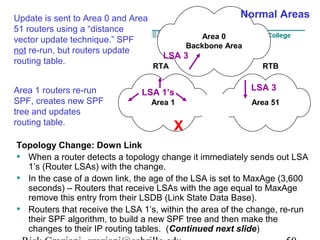
• RTC does not forward LSA 1’s from Area 1 as LSA 3’s into Area 51. 
• RTC does not forward LSA 1’s from Area 51 as LSA 3’s into Area 1. 
• Any LSA 3’s from RTC are not forwarded into Area 0 by RTA or RTB. 
• OSPF specification states that ABRs are restricted to considering LSA 
3’s only from the backbone area to avoid routing information loops. 
Rick Graziani graziani@cabrillo.edu 49
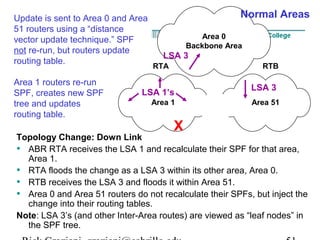
Area 0 
Normal Areas 
Backbone Area 
LSA 3 
RTA RTB 
Update is sent to Area 0 and Area 
51 routers using a “distance 
vector update technique.” SPF 
not re-run, but routers update 
routing table. 
LSA 1’s 
LSA 3 
Area 1 Area 51 
RTC 
X 
Area 1 routers re-run 
SPF, creates new SPF 
tree and updates 
routing table. 
Topology Change: Down Link 
• When a router detects a topology change it immediately sends out LSA 
1’s (Router LSAs) with the change. 
• In the case of a down link, the age of the LSA is set to MaxAge (3,600 
seconds) – Routers that receive LSAs with the age equal to MaxAge 
remove this entry from their LSDB (Link State Data Base). 
• Routers that receive the LSA 1’s, within the area of the change, re-run 
their SPF algorithm, to build a new SPF tree and then make the 
changes to their IP routing tables. (Continued next slide) 
Rick Graziani graziani@cabrillo.edu 50
Area 0 
Normal Areas 
Backbone Area 
LSA 3 
RTA RTB 
Update is sent to Area 0 and Area 
51 routers using a “distance 
vector update technique.” SPF 
not re-run, but routers update 
routing table. 
LSA 1’s 
LSA 3 
Area 1 Area 51 
RTC 
X 
Area 1 routers re-run 
SPF, creates new SPF 
tree and updates 
routing table. 
Topology Change: Down Link 
• ABR RTA receives the LSA 1 and recalculate their SPF for that area, 
Area 1. 
• RTA floods the change as a LSA 3 within its other area, Area 0. 
• RTB receives the LSA 3 and floods it within Area 51. 
• Area 0 and Area 51 routers do not recalculate their SPFs, but inject the 
change into their routing tables. 
Note: LSA 3’s (and other Inter-Area routes) are viewed as “leaf nodes” in 
the SPF tree. 
Rick Graziani graziani@cabrillo.edu 51
LSA 3 – Summary Net Link States 
Multi Area OSPF 
Normal Areas 
11.0.0.0/8 
12.0.0.0/8 
13.0.0.0/8 
10.1.0.0/24 
ASBR 
.1 
Lo - RouterID 
192.168.1.1/32 
.2 .3 
Lo - RouterID 
192.168.3.1/32 Pri 200 Pri 100 
Lo - RouterID 
192.168.2.1/32 
ABR-1 ABR-2 
172.16.1.0/24 
Area 0 
172.16.0.0/16 
.1 
172.16.51.0/24 
.5 
172.16.10.4/30 
.6 
Area 51 Internal 
.1 
172.16.20.0/24 
Area 1 
Lo - RouterID 
192.168.4.1/32 
Rick Graziani graziani@cabrillo.edu 52
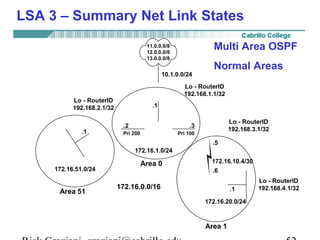
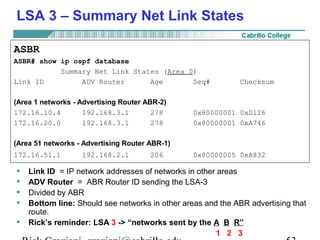
LSA 3 – Summary Net Link States 
ASBR 
ASBR# show ip ospf database 
Summary Net Link States (Area 0) 
Link ID ADV Router Age Seq# Checksum 
(Area 1 networks - Advertising Router ABR-2) 
172.16.10.4 192.168.3.1 278 0x80000001 0xD126 
172.16.20.0 192.168.3.1 278 0x80000001 0xA746 
(Area 51 networks - Advertising Router ABR-1) 
172.16.51.1 192.168.2.1 206 0x80000005 0xA832 
• Link ID = IP network addresses of networks in other areas 
• ADV Router = ABR Router ID sending the LSA-3 
• Divided by ABR 
• Bottom line: Should see networks in other areas and the ABR advertising that 
route. 
• Rick’s reminder: LSA 3 -> “networks sent by the A B R” 
1 2 3 
Rick Graziani graziani@cabrillo.edu 53
LSA 3 – Summary Net Link States 
ASBR 
ASBR# show ip route 
172.16.0.0/16 is variably subnetted, 4 subnets, 3 masks 
O IA 172.16.51.1/32 [110/2] via 172.16.1.2, 00:02:54, FastEthernet0/0 
O IA 172.16.20.0/24 [110/783] via 172.16.1.3, 00:02:54, FastEthernet0/0 
O IA 172.16.10.4/30 [110/782] via 172.16.1.3, 00:02:54, FastEthernet0/0 
C 172.16.1.0/24 is directly connected, FastEthernet0/0 
10.0.0.0/24 is subnetted, 1 subnets 
C 10.1.0.0 is directly connected, FastEthernet0/1 
S 11.0.0.0/8 is directly connected, Null0 
S 12.0.0.0/8 is directly connected, Null0 
192.168.1.0/32 is subnetted, 1 subnets 
C 192.168.1.1 is directly connected, Loopback0 
S 13.0.0.0/8 is directly connected, Null0 
• Routes learned via LSA type 3s are denoted by an “IA” (Inter-Area 
Routes) in the routing table. 
Rick Graziani graziani@cabrillo.edu 54
Another example: non-area 0 router, Internal 
Internal# show ip ospf database 
LSA 3 - Generated by the ABR. Describes links between ABR and 
Internal Routers of the Local Area 
(Area 51 networks - Advertising Router ABR-2) 
Summary Net Link States (Area 1) 
Link ID ADV Router Age Seq# Checksum 
172.16.1.0 192.168.3.1 848 0x80000005 0xD339 
172.16.51.1 192.168.3.1 843 0x80000001 0xB329 
Internal# show ip route 
172.16.0.0/16 is variably subnetted, 4 subnets, 3 masks 
O IA 172.16.51.1/32 [110/783] via 172.16.10.5, 00:13:48, Serial0 
C 172.16.20.0/24 is directly connected, FastEthernet0 
C 172.16.10.4/30 is directly connected, Serial0 
O IA 172.16.1.0/24 [110/782] via 172.16.10.5, 00:13:53, Serial0 
192.168.4.0/32 is subnetted, 1 subnets 
C 192.168.4.1 is directly connected, Loopback0 
O E2 11.0.0.0/8 [110/20] via 172.16.10.5, 00:14:41, Serial0 
O E2 12.0.0.0/8 [110/20] via 172.16.10.5, 00:14:41, Serial0 
O E2 13.0.0.0/8 [110/20] via 172.16.10.5, 00:14:42, Serial0 
Rick Graziani graziani@cabrillo.edu 55
Your Turn -Discuss in groups (LSA 3s) 
• Using the Multi-area OSPF Lab Handout: “Lab 1. – 
OSPF Normal Areas” verify these results. 
• Look at the link state database summary (show ip 
ospf database) commands and the Summary Net 
Links States (LSA3s) for each router. 
• Look at the routing tables (show ip route) and notice 
the Interarea (IA) routes. 
• Why do some routers have more than one set of 
Summary Net Links States? 
Rick Graziani graziani@cabrillo.edu 56
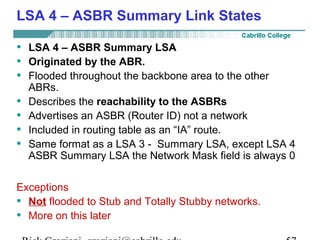
LSA 4 – ASBR Summary Link States 
• LSA 4 – ASBR Summary LSA 
• Originated by the ABR. 
• Flooded throughout the backbone area to the other 
ABRs. 
• Describes the reachability to the ASBRs 
• Advertises an ASBR (Router ID) not a network 
• Included in routing table as an “IA” route. 
• Same format as a LSA 3 - Summary LSA, except LSA 4 
ASBR Summary LSA the Network Mask field is always 0 
Exceptions 
• Not flooded to Stub and Totally Stubby networks. 
• More on this later 
Rick Graziani graziani@cabrillo.edu 57
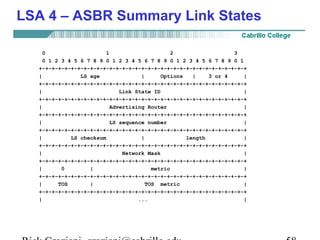
LSA 4 – ASBR Summary Link States 
0 1 2 3 
0 1 2 3 4 5 6 7 8 9 0 1 2 3 4 5 6 7 8 9 0 1 2 3 4 5 6 7 8 9 0 1 
+-+-+-+-+-+-+-+-+-+-+-+-+-+-+-+-+-+-+-+-+-+-+-+-+-+-+-+-+-+-+-+-+ 
| LS age | Options | 3 or 4 | 
+-+-+-+-+-+-+-+-+-+-+-+-+-+-+-+-+-+-+-+-+-+-+-+-+-+-+-+-+-+-+-+-+ 
| Link State ID | 
+-+-+-+-+-+-+-+-+-+-+-+-+-+-+-+-+-+-+-+-+-+-+-+-+-+-+-+-+-+-+-+-+ 
| Advertising Router | 
+-+-+-+-+-+-+-+-+-+-+-+-+-+-+-+-+-+-+-+-+-+-+-+-+-+-+-+-+-+-+-+-+ 
| LS sequence number | 
+-+-+-+-+-+-+-+-+-+-+-+-+-+-+-+-+-+-+-+-+-+-+-+-+-+-+-+-+-+-+-+-+ 
| LS checksum | length | 
+-+-+-+-+-+-+-+-+-+-+-+-+-+-+-+-+-+-+-+-+-+-+-+-+-+-+-+-+-+-+-+-+ 
| Network Mask | 
+-+-+-+-+-+-+-+-+-+-+-+-+-+-+-+-+-+-+-+-+-+-+-+-+-+-+-+-+-+-+-+-+ 
| 0 | metric | 
+-+-+-+-+-+-+-+-+-+-+-+-+-+-+-+-+-+-+-+-+-+-+-+-+-+-+-+-+-+-+-+-+ 
| TOS | TOS metric | 
+-+-+-+-+-+-+-+-+-+-+-+-+-+-+-+-+-+-+-+-+-+-+-+-+-+-+-+-+-+-+-+-+ 
| ... | 
Rick Graziani graziani@cabrillo.edu 58
11.0.0.0/8 
12.0.0.0/8 
13.0.0.0/8 
10.1.0.0/24 
ASBR 
.1 
Lo - RouterID 
192.168.1.1/32 
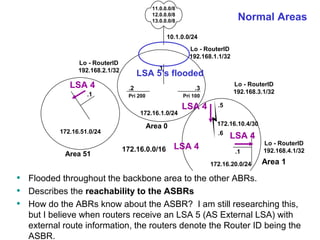
Normal Areas 
LSA 5’s flooded 
.2 .3 
Lo - RouterID 
192.168.3.1/32 Pri 200 Pri 100 
Lo - RouterID 
192.168.2.1/32 
ABR-1 ABR-2 
172.16.1.0/24 
Area 0 
172.16.0.0/16 
LSA 4 
.1 
172.16.51.0/24 
.5 
172.16.10.4/30 
.6 
LSA 4 
LSA 4 
Area 51 Internal 
LSA 4 
.1 
172.16.20.0/24 
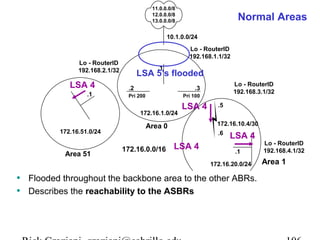
• Flooded throughout the backbone area to the other ABRs. 
• Describes the reachability to the ASBRs 
Area 1 
• How do the ABRs know about the ASBR? I am still researching this, 
but I believe when routers receive an LSA 5 (AS External LSA) with 
external route information, the routers denote the Router ID being the 
ASBR. 
Lo - RouterID 
192.168.4.1/32 
Area 1 
Rick Graziani graziani@cabrillo.edu 59
LSA 4 – ASBR Summary Link States 
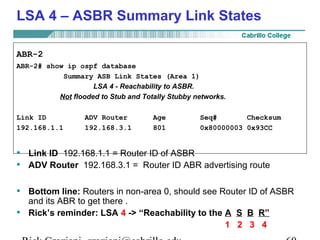
ABR-2 
ABR-2# show ip ospf database 
Summary ASB Link States (Area 1) 
LSA 4 - Reachability to ASBR. 
Not flooded to Stub and Totally Stubby networks. 
Link ID ADV Router Age Seq# Checksum 
192.168.1.1 192.168.3.1 801 0x80000003 0x93CC 
• Link ID 192.168.1.1 = Router ID of ASBR 
• ADV Router 192.168.3.1 = Router ID ABR advertising route 
• Bottom line: Routers in non-area 0, should see Router ID of ASBR 
and its ABR to get there . 
• Rick’s reminder: LSA 4 -> “Reachability to the A S B R” 
1 2 3 4 
Rick Graziani graziani@cabrillo.edu 60
LSA 4 – ASBR Summary Link States 
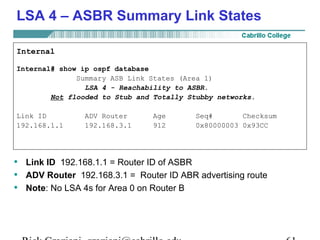
Internal 
Internal# show ip ospf database 
Summary ASB Link States (Area 1) 
LSA 4 - Reachability to ASBR. 
Not flooded to Stub and Totally Stubby networks. 
Link ID ADV Router Age Seq# Checksum 
192.168.1.1 192.168.3.1 912 0x80000003 0x93CC 
• Link ID 192.168.1.1 = Router ID of ASBR 
• ADV Router 192.168.3.1 = Router ID ABR advertising route 
• Note: No LSA 4s for Area 0 on Router B 
Rick Graziani graziani@cabrillo.edu 61
Your Turn -Discuss in groups (LSA 4s) 
• Using the Multi-area OSPF Lab Handout: “Lab 1. – OSPF 
Normal Areas” verify these results. 
• Look at the link state database summary (show ip ospf 
database) commands and the Summary Net Links States 
(LSA4s) for each router. 
• Why do some routers have more than one set of Summary ASB 
Links States and others may not (like RouterA and ASBR)? 
• Which Area 0 routers have LSA 4’s in their LSDB? 
• Why don’t some Area 0 routers have LSA 4’s in their LSDB? 
Rick Graziani graziani@cabrillo.edu 62
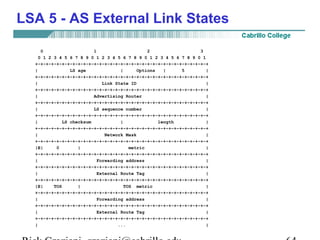
LSA 5 - AS External Link States 
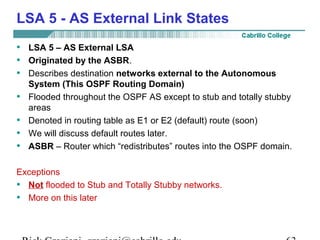
• LSA 5 – AS External LSA 
• Originated by the ASBR. 
• Describes destination networks external to the Autonomous 
System (This OSPF Routing Domain) 
• Flooded throughout the OSPF AS except to stub and totally stubby 
areas 
• Denoted in routing table as E1 or E2 (default) route (soon) 
• We will discuss default routes later. 
• ASBR – Router which “redistributes” routes into the OSPF domain. 
Exceptions 
• Not flooded to Stub and Totally Stubby networks. 
• More on this later 
Rick Graziani graziani@cabrillo.edu 63
LSA 5 - AS External Link States 
0 1 2 3 
0 1 2 3 4 5 6 7 8 9 0 1 2 3 4 5 6 7 8 9 0 1 2 3 4 5 6 7 8 9 0 1 
+-+-+-+-+-+-+-+-+-+-+-+-+-+-+-+-+-+-+-+-+-+-+-+-+-+-+-+-+-+-+-+-+ 
| LS age | Options | 5 | 
+-+-+-+-+-+-+-+-+-+-+-+-+-+-+-+-+-+-+-+-+-+-+-+-+-+-+-+-+-+-+-+-+ 
| Link State ID | 
+-+-+-+-+-+-+-+-+-+-+-+-+-+-+-+-+-+-+-+-+-+-+-+-+-+-+-+-+-+-+-+-+ 
| Advertising Router | 
+-+-+-+-+-+-+-+-+-+-+-+-+-+-+-+-+-+-+-+-+-+-+-+-+-+-+-+-+-+-+-+-+ 
| LS sequence number | 
+-+-+-+-+-+-+-+-+-+-+-+-+-+-+-+-+-+-+-+-+-+-+-+-+-+-+-+-+-+-+-+-+ 
| LS checksum | length | 
+-+-+-+-+-+-+-+-+-+-+-+-+-+-+-+-+-+-+-+-+-+-+-+-+-+-+-+-+-+-+-+-+ 
| Network Mask | 
+-+-+-+-+-+-+-+-+-+-+-+-+-+-+-+-+-+-+-+-+-+-+-+-+-+-+-+-+-+-+-+-+ 
|E| 0 | metric | 
+-+-+-+-+-+-+-+-+-+-+-+-+-+-+-+-+-+-+-+-+-+-+-+-+-+-+-+-+-+-+-+-+ 
| Forwarding address | 
+-+-+-+-+-+-+-+-+-+-+-+-+-+-+-+-+-+-+-+-+-+-+-+-+-+-+-+-+-+-+-+-+ 
| External Route Tag | 
+-+-+-+-+-+-+-+-+-+-+-+-+-+-+-+-+-+-+-+-+-+-+-+-+-+-+-+-+-+-+-+-+ 
|E| TOS | TOS metric | 
+-+-+-+-+-+-+-+-+-+-+-+-+-+-+-+-+-+-+-+-+-+-+-+-+-+-+-+-+-+-+-+-+ 
| Forwarding address | 
+-+-+-+-+-+-+-+-+-+-+-+-+-+-+-+-+-+-+-+-+-+-+-+-+-+-+-+-+-+-+-+-+ 
| External Route Tag | 
+-+-+-+-+-+-+-+-+-+-+-+-+-+-+-+-+-+-+-+-+-+-+-+-+-+-+-+-+-+-+-+-+ 
| ... | 
Rick Graziani graziani@cabrillo.edu 64
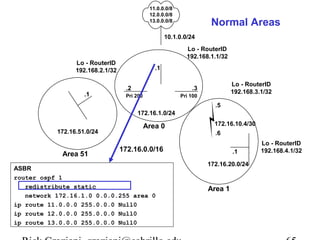
11.0.0.0/8 
12.0.0.0/8 
13.0.0.0/8 
10.1.0.0/24 
ASBR 
.1 
Normal Areas 
Lo - RouterID 
192.168.1.1/32 
.2 .3 
Lo - RouterID 
192.168.3.1/32 Pri 200 Pri 100 
Lo - RouterID 
192.168.2.1/32 
ABR-1 ABR-2 
172.16.1.0/24 
Area 0 
172.16.0.0/16 
.1 
172.16.51.0/24 
.5 
172.16.10.4/30 
.6 
Area 51 Internal 
.1 
172.16.20.0/24 
Area 1 
Lo - RouterID 
192.168.4.1/32 
ASBR 
router ospf 1 
redistribute static 
network 172.16.1.0 0.0.0.255 area 0 
ip route 11.0.0.0 255.0.0.0 Null0 
ip route 12.0.0.0 255.0.0.0 Null0 
ip route 13.0.0.0 255.0.0.0 Null0 
Rick Graziani graziani@cabrillo.edu 65
11.0.0.0/8 
12.0.0.0/8 
13.0.0.0/8 
10.1.0.0/24 
ASBR 
.1 
Normal Areas 
Lo - RouterID 
192.168.1.1/32 
LSA 5’s flooded 
redistribute static 
network 172.16.1.0 0.0.0.255 area 0 
ip route 11.0.0.0 255.0.0.0 Null0 
ip route 12.0.0.0 255.0.0.0 Null0 
ip route 13.0.0.0 255.0.0.0 Null0 
LSA 5 
.2 .3 
Lo - RouterID 
192.168.3.1/32 Pri 200 Pri 100 
Lo - RouterID 
192.168.2.1/32 
ABR-1 ABR-2 
172.16.1.0/24 
Area 0 
172.16.0.0/16 
LSA 5 
.1 
172.16.51.0/24 
.5 
172.16.10.4/30 
.6 
LSA 5 
LSA 5 
Area 51 Internal 
LSA 5 
.1 
172.16.20.0/24 
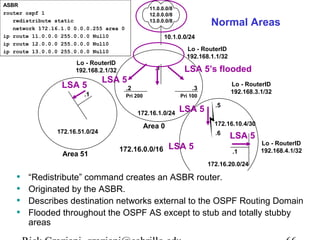
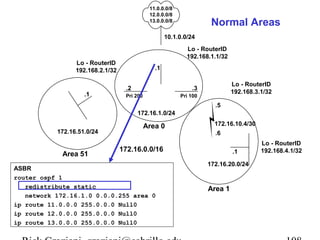
• “Redistribute” command creates an ASBR router. 
• Originated by the ASBR. 
Area 1 
• Describes destination networks external to the OSPF Routing Domain 
• Flooded throughout the OSPF AS except to stub and totally stubby 
areas 
Lo - RouterID 
192.168.4.1/32 
ASBR 
router ospf 1 
Rick Graziani graziani@cabrillo.edu 66
LSA 5 - AS External Link States 
ABR-2 
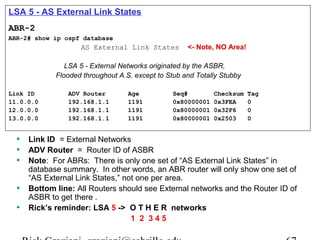
ABR-2# show ip ospf database 
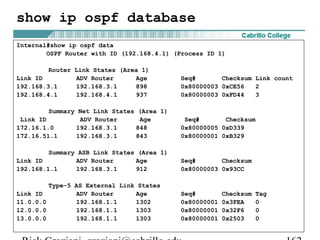
AS External Link States <- Note, NO Area! 
LSA 5 - External Networks originated by the ASBR, 
Flooded throughout A.S. except to Stub and Totally Stubby 
Link ID ADV Router Age Seq# Checksum Tag 
11.0.0.0 192.168.1.1 1191 0x80000001 0x3FEA 0 
12.0.0.0 192.168.1.1 1191 0x80000001 0x32F6 0 
13.0.0.0 192.168.1.1 1191 0x80000001 0x2503 0 
• Link ID = External Networks 
• ADV Router = Router ID of ASBR 
• Note: For ABRs: There is only one set of “AS External Link States” in 
database summary. In other words, an ABR router will only show one set of 
“AS External Link States,” not one per area. 
• Bottom line: All Routers should see External networks and the Router ID of 
ASBR to get there . 
• Rick’s reminder: LSA 5 -> O T H E R networks 
1 2 3 4 5 
Rick Graziani graziani@cabrillo.edu 67
LSA 5 - AS External Link States 
ABR-2 
ABR-2# show ip route 
172.16.0.0/16 is variably subnetted, 4 subnets, 3 masks 
O IA 172.16.51.1/32 [110/2] via 172.16.1.2, 00:11:44, FastEthernet0 
O 172.16.20.0/24 [110/782] via 172.16.10.6, 00:12:29, Serial0 
C 172.16.10.4/30 is directly connected, Serial0 
C 172.16.1.0/24 is directly connected, FastEthernet0 
O E2 11.0.0.0/8 [110/20] via 172.16.1.1, 00:11:44, FastEthernet0 
O E2 12.0.0.0/8 [110/20] via 172.16.1.1, 00:11:44, FastEthernet0 
O E2 13.0.0.0/8 [110/20] via 172.16.1.1, 00:11:44, FastEthernet0 
192.168.3.0/32 is subnetted, 1 subnets 
C 192.168.3.1 is directly connected, Loopback1 
• Designated by “E2” 
• Notice that the cost is 20 for all three routes, we will see why later. 
• It has to do with E2 routes and where the default cost is 20. 
– Redistribute command (Route Optimization chapter): If a value is not 
specified for the metric option, and no value is specified using the default-metric 
command, the default metric value is 0, except for OSPF where 
the default cost is 20. 
Rick Graziani graziani@cabrillo.edu 68
LSA 5 - AS External Link States 
Internal# show ip ospf database 
Type-5 AS External Link States 
LSA 5 - External Networks originated by the ASBR, 
Flooded throughout A.S. except to Stub and Totally Stubby 
Link ID ADV Router Age Seq# Checksum Tag 
11.0.0.0 192.168.1.1 1191 0x80000001 0x3FEA 0 
12.0.0.0 192.168.1.1 1191 0x80000001 0x32F6 0 
13.0.0.0 192.168.1.1 1191 0x80000001 0x2503 0 
Internal# show ip route 
172.16.0.0/16 is variably subnetted, 4 subnets, 3 masks 
O IA 172.16.51.1/32 [110/783] via 172.16.10.5, 00:13:48, Serial0 
C 172.16.20.0/24 is directly connected, FastEthernet0 
C 172.16.10.4/30 is directly connected, Serial0 
O IA 172.16.1.0/24 [110/782] via 172.16.10.5, 00:13:53, Serial0 
192.168.4.0/32 is subnetted, 1 subnets 
C 192.168.4.1 is directly connected, Loopback0 
O E2 11.0.0.0/8 [110/20] via 172.16.10.5, 00:14:41, Serial0 
O E2 12.0.0.0/8 [110/20] via 172.16.10.5, 00:14:41, Serial0 
O E2 13.0.0.0/8 [110/20] via 172.16.10.5, 00:14:42, Serial0 
Rick Graziani graziani@cabrillo.edu 69
LSA 5 - AS External Link States 
E1 vs. E2 External Routes 
• External routes fall under two categories: 
– external type 1 
– external type 2 (default) 
• The difference between the two is in the way the cost (metric) of the 
route is being calculated. 
• The cost of a type 2 route is always the external cost, irrespective of 
the interior cost to reach that route. 
• A type 1 cost is the addition of the external cost and the internal cost 
used to reach that route. 
• A type 1 route is always preferred over a type 2 route for the same 
destination. 
• More later… 
Rick Graziani graziani@cabrillo.edu 70
Your Turn -Discuss in groups (LSA 5s) 
• Using the Multi-area OSPF Lab Handout: “Lab 1. – OSPF 
Normal Areas” verify these results. 
• Look at the link state database summary (show ip ospf 
database) commands and the AS External Links States (LSA5s) 
for each router. 
• Also, look at the routing tables for each router. 
• How many sets of LSA 5s does the ABRs have in their link state 
summary database? Notice the ASBRs entries. 
Rick Graziani graziani@cabrillo.edu 71
Stub Areas 
Considerations for both Stub and Totally Stubby Areas 
• An area could be qualified a stub when: 
– There is a single exit point (a single ABR) from that area. More 
than one ABR can be used, but be ready to “accept non-optimal 
routing paths.” 
– If routing to outside of the area does not have to take an optimal 
path. 
• The area is not needed as a transit area for virtual links (later). 
• The ASBR is not within the stub area 
• The area is not the backbone area (area 0) 
• Stub areas will result in memory and processing savings depending 
upon the size of the network. 
Rick Graziani graziani@cabrillo.edu 72
11.0.0.0/8 
12.0.0.0/8 
13.0.0.0/8 
10.1.0.0/24 
ASBR 
.1 
Lo - RouterID 
192.168.1.1/32 
.2 .3 
Lo - RouterID 
192.168.3.1/32 Pri 200 Pri 100 
Lo - RouterID 
192.168.2.1/32 
ABR-1 ABR-2 
172.16.1.0/24 
Area 0 
172.16.0.0/16 
.1 
172.16.51.0/24 
.5 
172.16.10.4/30 
.6 
Area 51 Internal 
.1 
172.16.20.0/24 
Area 1 
Lo - RouterID 
192.168.4.1/32 
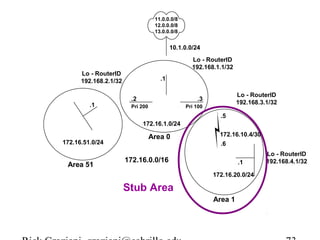
Stub Area 
Rick Graziani graziani@cabrillo.edu 73
Stub Areas 
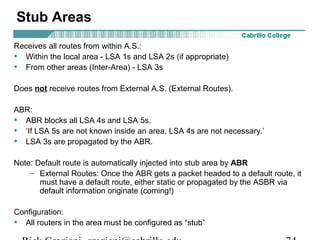
Receives all routes from within A.S.: 
• Within the local area - LSA 1s and LSA 2s (if appropriate) 
• From other areas (Inter-Area) - LSA 3s 
Does not receive routes from External A.S. (External Routes). 
ABR: 
• ABR blocks all LSA 4s and LSA 5s. 
• ‘If LSA 5s are not known inside an area, LSA 4s are not necessary.’ 
• LSA 3s are propagated by the ABR. 
Note: Default route is automatically injected into stub area by ABR 
– External Routes: Once the ABR gets a packet headed to a default route, it 
must have a default route, either static or propagated by the ASBR via 
default information originate (coming!) 
Configuration: 
• All routers in the area must be configured as “stub” 
Rick Graziani graziani@cabrillo.edu 74
Stub Areas 
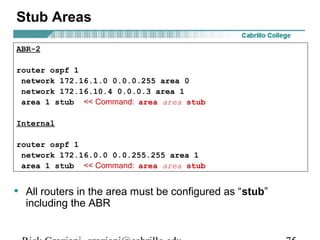
ABR-2 
router ospf 1 
network 172.16.1.0 0.0.0.255 area 0 
network 172.16.10.4 0.0.0.3 area 1 
area 1 stub << Command: area area stub 
Internal 
router ospf 1 
network 172.16.0.0 0.0.255.255 area 1 
area 1 stub << Command: area area stub 
• All routers in the area must be configured as “stub” 
including the ABR 
Rick Graziani graziani@cabrillo.edu 75
11.0.0.0/8 
12.0.0.0/8 
13.0.0.0/8 
10.1.0.0/24 
ASBR 
.1 
Lo - RouterID 
192.168.1.1/32 
.2 .3 
Lo - RouterID 
192.168.3.1/32 Pri 200 Pri 100 
Lo - RouterID 
192.168.2.1/32 
LSA 4 
ABR-1 ABR-2 
LSA 5 
LSA 5 
172.16.1.0/24 
Blocked X Area 0 
172.16.0.0/16 
.1 
LSA 3 
172.16.51.0/24 
LSA .5 
3 
LSA 4 
X Blocked 
172.16.10.4/30 
.6 
Area 51 Internal 
Default 
route to 
ABR 
.1 
injected Area 1 
172.16.20.0/24 
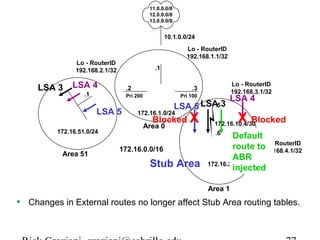
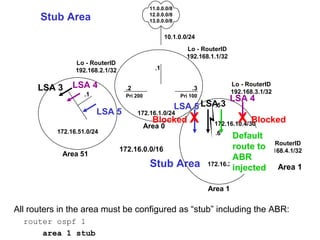
• LSA 3s (Inter-Area routes) are propagated by the ABR. 
• ABR blocks all LSA 4s (reachabilitly to ASBR) and Area LSA 5s 1 
(External routes) 
• The ABR injects a default route into the stub area, pointing to the ABR. (This 
Lo - RouterID 
192.168.4.1/32 
Stub Area 
does not mean the ABR has a default route of its own.) 
• Essentially, internal routers in a Stub Area only see Inter-Area OSPF routes 
and the default route to the ABR – No External routes. 
Rick Graziani graziani@cabrillo.edu 76
11.0.0.0/8 
12.0.0.0/8 
13.0.0.0/8 
10.1.0.0/24 
ASBR 
.1 
Lo - RouterID 
192.168.1.1/32 
.2 .3 
Lo - RouterID 
192.168.3.1/32 Pri 200 Pri 100 
Lo - RouterID 
192.168.2.1/32 
LSA 4 
ABR-1 ABR-2 
LSA 5 
LSA 5 
172.16.1.0/24 
Blocked X Area 0 
172.16.0.0/16 
.1 
LSA 3 
172.16.51.0/24 
LSA .5 
3 
LSA 4 
X Blocked 
172.16.10.4/30 
.6 
Area 51 Internal 
Default 
route to 
ABR 
.1 
injected 
172.16.20.0/24 
Area 1 
Lo - RouterID 
192.168.4.1/32 
Stub Area 
• Changes in External routes no longer affect Stub Area routing tables. 
Rick Graziani graziani@cabrillo.edu 77
Stub Areas 
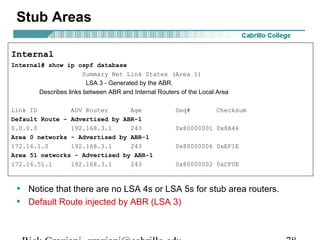
Internal 
Internal# show ip ospf database 
Summary Net Link States (Area 1) 
LSA 3 - Generated by the ABR. 
Describes links between ABR and Internal Routers of the Local Area 
Link ID ADV Router Age Seq# Checksum 
Default Route – Advertised by ABR-1 
0.0.0.0 192.168.3.1 243 0x80000001 0x8A46 
Area 0 networks - Advertised by ABR-1 
172.16.1.0 192.168.3.1 243 0x80000006 0xEF1E 
Area 51 networks - Advertised by ABR-1 
172.16.51.1 192.168.3.1 243 0x80000002 0xCF0E 
• Notice that there are no LSA 4s or LSA 5s for stub area routers. 
• Default Route injected by ABR (LSA 3) 
Rick Graziani graziani@cabrillo.edu 78
Stub Areas 
Internal 
Internal# show ip route 
Gateway of last resort is 172.16.10.5 to network 0.0.0.0 
172.16.0.0/16 is variably subnetted, 4 subnets, 3 masks 
O IA 172.16.51.1/32 [110/783] via 172.16.10.5, 00:03:08, Serial0 
C 172.16.20.0/24 is directly connected, FastEthernet0 
C 172.16.10.4/30 is directly connected, Serial0 
O IA 172.16.1.0/24 [110/782] via 172.16.10.5, 00:03:08, Serial0 
192.168.4.0/32 is subnetted, 1 subnets 
C 192.168.4.1 is directly connected, Loopback0 
O*IA 0.0.0.0/0 [110/782] via 172.16.10.5, 00:03:08, Serial0 
NOTE on default route: 
• ABR will advertise a default route with a cost of 1 
• cost of 65 = 1 + 64 (serial link) 
• Using bandwidth of 128K, not 64K: 782 = (100,000,000/128,000) + 1 
Rick Graziani graziani@cabrillo.edu 79
Stub Areas 
ABR-2 
ABR-2# show ip route 
Gateway of last resort is not set 
172.16.0.0/16 is variably subnetted, 4 subnets, 3 masks 
O IA 172.16.51.1/32 [110/2] via 172.16.1.2, 00:01:59,FastEthernet0 
O 172.16.20.0/24 [110/782] via 172.16.10.6, 00:01:59, Serial0 
C 172.16.10.4/30 is directly connected, Serial0 
C 172.16.1.0/24 is directly connected, FastEthernet0 
O E2 11.0.0.0/8 [110/20] via 172.16.1.1, 00:01:59, FastEthernet0 
O E2 12.0.0.0/8 [110/20] via 172.16.1.1, 00:01:59, FastEthernet0 
O E2 13.0.0.0/8 [110/20] via 172.16.1.1, 00:01:59, FastEthernet0 
192.168.3.0/32 is subnetted, 1 subnets 
C 192.168.3.1 is directly connected, Loopback1 
• Notice, there is no automatic default route on ABR, as there are with the 
internal stub routers. 
Rick Graziani graziani@cabrillo.edu 80
Your Turn -Discuss in groups (Stub) 
• Using the Multi-area OSPF Lab Handout: “Lab 2. – OSPF Stub 
Area. 
• Look at the link state database summary (show ip ospf 
database) commands and the Summary Net Links States (LSA 
3s). 
Note: A Stub area may have more than one ABR, but because of 
the default route, the internal routers will not be able to 
determine which router is the optimal gateway outside the AS 
and end up load balancing between the multiple ABRs. 
Rick Graziani graziani@cabrillo.edu 81
Totally Stubby Areas 
“Cisco proprietary”, however the RFC does make some provisions for this 
as an optional feature.. 
Same considerations as with Stub areas: 
• An area could be qualified a stub when there is a single exit point (a 
single ABR) from that area or if routing to outside of the area does not 
have to take an optimal path. 
• The area is not needed as a transit area for virtual links (later). 
• The ASBR is not within the stub area 
• The area is not the backbone area (area 0) 
• Stub areas will result in memory and processing savings depending 
upon the size of the network. - This is even more true with Totally 
Stubby areas 
Rick Graziani graziani@cabrillo.edu 82
11.0.0.0/8 
12.0.0.0/8 
13.0.0.0/8 
10.1.0.0/24 
ASBR 
.1 
Lo - RouterID 
192.168.1.1/32 
.2 .3 
Lo - RouterID 
192.168.3.1/32 Pri 200 Pri 100 
Lo - RouterID 
192.168.2.1/32 
ABR-1 ABR-2 
172.16.1.0/24 
Area 0 
172.16.0.0/16 
.1 
172.16.51.0/24 
.5 
172.16.10.4/30 
.6 
Area 51 Internal 
.1 
172.16.20.0/24 
Area 1 
Lo - RouterID 
192.168.4.1/32 
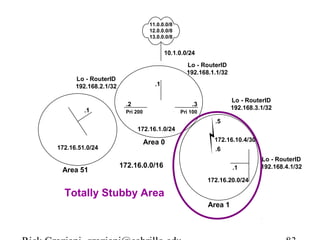
Totally Stubby Area 
Rick Graziani graziani@cabrillo.edu 83
Totally Stubby Areas 
Receives routes from within A.S.: 
• Only from within the local area - LSA 1s and LSA 2s (if appropriate) 
• Does not receive routes from other areas (Inter-Area) - LSA 3s 
Does not receive routes from External A.S. (External Routes) 
ABR: 
• ABR blocks all LSA 4s and LSA 5s. 
• ABR blocks all LSA 3s, except propagating a default route. 
• Default route is injected into totally stubby area by ABR. 
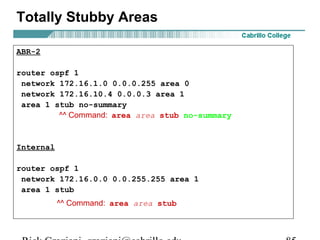
Configuring: 
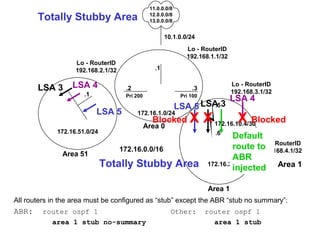
• All routers must be configured as “stub” 
• ABR must be configured as “stub no-summary” 
Rick Graziani graziani@cabrillo.edu 84
Totally Stubby Areas 
ABR-2 
router ospf 1 
network 172.16.1.0 0.0.0.255 area 0 
network 172.16.10.4 0.0.0.3 area 1 
area 1 stub no-summary 
^^ Command: area area stub no-summary 
Internal 
router ospf 1 
network 172.16.0.0 0.0.255.255 area 1 
area 1 stub 
^^ Command: area area stub 
Rick Graziani graziani@cabrillo.edu 85
11.0.0.0/8 
12.0.0.0/8 
13.0.0.0/8 
10.1.0.0/24 
ASBR 
.1 
Lo - RouterID 
192.168.1.1/32 
.2 .3 
Lo - RouterID 
192.168.3.1/32 Pri 200 Pri 100 
Lo - RouterID 
192.168.2.1/32 
LSA 4 
ABR-1 ABR-2 
LSA 5 
LSA 5 
172.16.1.0/24 
Blocked X Area 0 
172.16.0.0/16 
.1 
LSA 3 
172.16.51.0/24 
LSA .5 
3 
LSA 4 
X Blocked 
172.16.10.4/30 
.6 
X 
Area 51 Internal 
Default 
route to 
ABR 
.1 
injected Area 1 
172.16.20.0/24 
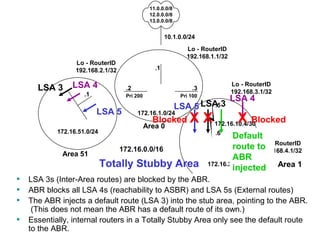
• LSA 3s (Inter-Area routes) are blocked by the ABR. 
• ABR blocks all LSA 4s (reachability to ASBR) and LSA Area 5s 1 
(External routes) 
• The ABR injects a default route (LSA 3) into the stub area, pointing to the ABR. 
Lo - RouterID 
192.168.4.1/32 
Totally Stubby Area 
(This does not mean the ABR has a default route of its own.) 
• Essentially, internal routers in a Totally Stubby Area only see the default route 
to the ABR. 
Rick Graziani graziani@cabrillo.edu 86
11.0.0.0/8 
12.0.0.0/8 
13.0.0.0/8 
10.1.0.0/24 
ASBR 
.1 
Lo - RouterID 
192.168.1.1/32 
.2 .3 
Lo - RouterID 
192.168.3.1/32 Pri 200 Pri 100 
Lo - RouterID 
192.168.2.1/32 
LSA 4 
ABR-1 ABR-2 
LSA 5 
LSA 5 
172.16.1.0/24 
Blocked X Area 0 
172.16.0.0/16 
.1 
LSA 3 
172.16.51.0/24 
LSA .5 
3 
LSA 4 
X Blocked 
172.16.10.4/30 
.6 
X 
Area 51 Internal 
Default 
route to 
ABR 
.1 
injected Area 1 
172.16.20.0/24 
Area 1 
Lo - RouterID 
192.168.4.1/32 
Totally Stubby Area 
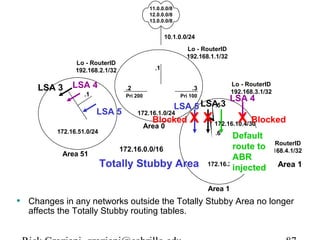
• Changes in any networks outside the Totally Stubby Area no longer 
affects the Totally Stubby routing tables. 
Rick Graziani graziani@cabrillo.edu 87
Totally Stubby Areas 
Internal 
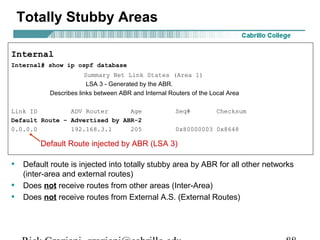
Internal# show ip ospf database 
Summary Net Link States (Area 1) 
LSA 3 - Generated by the ABR. 
Describes links between ABR and Internal Routers of the Local Area 
Link ID ADV Router Age Seq# Checksum 
Default Route – Advertised by ABR-2 
0.0.0.0 192.168.3.1 205 0x80000003 0x8648 
Default Route injected by ABR (LSA 3) 
• Default route is injected into totally stubby area by ABR for all other networks 
(inter-area and external routes) 
• Does not receive routes from other areas (Inter-Area) 
• Does not receive routes from External A.S. (External Routes) 
Rick Graziani graziani@cabrillo.edu 88
Totally Stubby Areas 
Internal 
Internal# show ip route 
Gateway of last resort is 172.16.10.5 to network 0.0.0.0 
172.16.0.0/16 is variably subnetted, 2 subnets, 2 masks 
C 172.16.20.0/24 is directly connected, FastEthernet0 
C 172.16.10.4/30 is directly connected, Serial0 
192.168.4.0/32 is subnetted, 1 subnets 
C 192.168.4.1 is directly connected, Loopback0 
O*IA 0.0.0.0/0 [110/782] via 172.16.10.5, 00:03:09, Serial0 
• Default route is injected into totally stubby area by ABR for all other networks 
(inter-area and external routes) 
• Does not receive routes from other areas (Inter-Area) 
• Does not receive routes from External A.S. (External Routes) 
Rick Graziani graziani@cabrillo.edu 89
Totally Stubby Areas 
ABR-2 
ABR-2# show ip route 
Gateway of last resort is not set 
172.16.0.0/16 is variably subnetted, 4 subnets, 3 masks 
O IA 172.16.51.1/32 [110/2] via 172.16.1.2, 00:02:35,FastEthernet0 
O 172.16.20.0/24 [110/782] via 172.16.10.6, 00:02:35, Serial0 
C 172.16.10.4/30 is directly connected, Serial0 
C 172.16.1.0/24 is directly connected, FastEthernet0 
O E2 11.0.0.0/8 [110/20] via 172.16.1.1, 00:02:35, FastEthernet0 
O E2 12.0.0.0/8 [110/20] via 172.16.1.1, 00:02:35, FastEthernet0 
O E2 13.0.0.0/8 [110/20] via 172.16.1.1, 00:02:35, FastEthernet0 
192.168.3.0/32 is subnetted, 1 subnets 
C 192.168.3.1 is directly connected, Loopback1 
• ABR will forward Intra-Area routes (to other areas within AS) 
• Notice, there is not an automatic default route in the ABR’s routing 
table like there is with the internal Totally Stubby routers. 
Rick Graziani graziani@cabrillo.edu 90
OSPF design considerations 
OSPF Design Tips 
• Different people have different approaches to designing OSPF 
networks. 
• The important thing to remember is that any protocol can fail 
under pressure. 
• “The idea is not to challenge the protocol but rather to work with 
it in order to get the best behavior.” CCO 
Rick Graziani graziani@cabrillo.edu 91
OSPF design considerations 
Number of Routers per Area 
The maximum number of routers per area depends on several factors, 
including the following: 
· What kind of area do you have? 
· What kind of CPU power do you have in that area? 
· What kind of media? 
· Will you be running OSPF in NBMA mode? 
· Is your NBMA network meshed? 
· Do you have a lot of external LSAs in the network? 
· Are other areas well summarized? 
For this reason, it's difficult to specify a maximum number of routers per 
area. 
Rick Graziani graziani@cabrillo.edu 92
OSPF design considerations 
Stub and Totally Stubby Areas: 
• An area could be qualified a stub when there is a single exit point (a 
single ABR) from that area or if routing to outside of the area does not 
have to take an optimal path. 
• The area is not needed as a transit area for virtual links (later). 
• The ASBR is not within the stub area 
• The area is not the backbone area (area 0) 
• Stub areas will result in memory and processing savings depending 
upon the size of the network. - This is even more true with Totally 
Stubby areas 
• Totally Stubby areas is a Cisco enhancement. 
Rick Graziani graziani@cabrillo.edu 93
Quick Review 
• Areas 
• LSAs 
• Stub Area 
• Totally Stubby Area 
Rick Graziani graziani@cabrillo.edu 94
LSA-1 - Router LSA 
Rick Graziani graziani@cabrillo.edu 95
LSA 1 - Router Link States 
11.0.0.0/8 
12.0.0.0/8 
13.0.0.0/8 
10.1.0.0/24 
ASBR 
LSA 1 .1 
LSA 1 LSA 1 
Multi Area OSPF 
Normal Areas 
Lo - RouterID 
192.168.1.1/32 
.2 .3 
Lo - RouterID 
192.168.3.1/32 Pri 200 Pri 100 
LSA 1’s being sent 
within Area 0 
Lo - RouterID 
192.168.2.1/32 
ABR-1 ABR-2 
172.16.1.0/24 
Area 0 
172.16.0.0/16 
.1 
172.16.51.0/24 
.5 
172.16.10.4/30 
.6 
Area 51 Internal 
.1 
172.16.20.0/24 
Area 1 
Lo - RouterID 
192.168.4.1/32 
Rick Graziani graziani@cabrillo.edu 96
LSA 1 - Router Link States 
11.0.0.0/8 
12.0.0.0/8 
13.0.0.0/8 
10.1.0.0/24 
ASBR 
.1 
Multi Area OSPF 
Normal Areas 
Lo - RouterID 
192.168.1.1/32 
.2 .3 
Lo - RouterID 
192.168.3.1/32 Pri 200 Pri 100 
LSA 1’s being sent 
within other areas 
Lo - RouterID 
192.168.2.1/32 
ABR-1 ABR-2 
172.16.1.0/24 
Area 0 
172.16.0.0/16 
LSA 1 
.1 
172.16.51.0/24 
.5 
LSA 1 
172.16.10.4/30 
.6 
LSA 1 
Area 51 Internal 
LSA 1 
.1 
172.16.20.0/24 
Area 1 
Lo - RouterID 
192.168.4.1/32 
Rick Graziani graziani@cabrillo.edu 97
LSA 1 - Router Link States 
11.0.0.0/8 
12.0.0.0/8 
13.0.0.0/8 
10.1.0.0/24 
ASBR 
.1 
Multi Area OSPF 
Normal Areas 
Lo - RouterID 
192.168.1.1/32 
.2 .3 
Lo - RouterID 
192.168.3.1/32 Pri 200 Pri 100 
LSA 1’s are flooded out 
other interfaces within 
the same area. 
Lo - RouterID 
192.168.2.1/32 
ABR-1 ABR-2 
172.16.1.0/24 
Area 0 
172.16.0.0/16 
.1 
172.16.51.0/24 
.5 
LSA 1 
Originated 
172.16.10.4/30 
.6 
Area 51 Internal 
.1 
172.16.20.0/24 
Area 1 
Lo - RouterID 
192.168.4.1/32 
LSA 1 
flooded 
Rick Graziani graziani@cabrillo.edu 98
LSA-2 - Network LSA 
Rick Graziani graziani@cabrillo.edu 99
LSA 2 - Network Link States 
11.0.0.0/8 
12.0.0.0/8 
13.0.0.0/8 
10.1.0.0/24 
ASBR 
.1 
Multi Area OSPF 
Normal Areas 
Lo - RouterID 
192.168.1.1/32 
LSA 2 
LSA 2 
.2 .3 
Lo - RouterID 
192.168.3.1/32 Pri 200 Pri 100 
No LSA 2’s for ABR-1 
in Area 51, or for 
Internal because no 
other routers on multi-access 
segment. 
Lo - RouterID 
192.168.2.1/32 
DR 
ABR-1 ABR-2 
LSA 2 
flooded LSA 2 
172.16.1.0/24 
Area 0 
172.16.0.0/16 
.1 
172.16.51.0/24 
.5 
172.16.10.4/30 
.6 
LSA 2 
flooded 
Area 51 Internal 
.1 
172.16.20.0/24 
Area 1 
Lo - RouterID 
192.168.4.1/32 
DR 
Rick Graziani graziani@cabrillo.edu 100
LSA-3 - Summary LSA 
Rick Graziani graziani@cabrillo.edu 101
LSA 3 – Summary Net Link States 
11.0.0.0/8 
12.0.0.0/8 
13.0.0.0/8 
10.1.0.0/24 
ASBR 
.1 
Multi Area OSPF 
Normal Areas 
Lo - RouterID 
192.168.1.1/32 
LSA 1 
LSA 1 LSA 1 
.2 .3 
Lo - RouterID 
192.168.3.1/32 Pri 200 Pri 100 
LSA 1’s are sent as 
LSA 3’s into other 
areas by the ABRs. 
Lo - RouterID 
192.168.2.1/32 
ABR-1 ABR-2 
LSA 3 172.16.1.0/24 
LSA 3 
Area 0 
172.16.0.0/16 
.1 
172.16.51.0/24 
.5 
172.16.10.4/30 
.6 
Area 51 Internal 
.1 
172.16.20.0/24 
Area 1 
Lo - RouterID 
192.168.4.1/32 
Rick Graziani graziani@cabrillo.edu 102
LSA 3 – Summary Net Link States 
11.0.0.0/8 
12.0.0.0/8 
13.0.0.0/8 
10.1.0.0/24 
ASBR 
.1 
Multi Area OSPF 
Normal Areas 
Lo - RouterID 
192.168.1.1/32 
LSA 3 
LSA 3 
LSA 3 
.2 .3 
Lo - RouterID 
192.168.3.1/32 Pri 200 Pri 100 
LSA 1’s are sent as 
LSA 3’s into other 
areas by the ABRs. 
Lo - RouterID 
192.168.2.1/32 
ABR-1 ABR-2 
172.16.1.0/24 
Area 0 
172.16.0.0/16 
.1 
LSA 1 
LSA 3 
172.16.51.0/24 
.5 
LSA 1 
172.16.10.4/30 
.6 
LSA 3 
LSA 1 
LSA 3 
Area 51 Internal 
LSA 1 
.1 
172.16.20.0/24 
Area 1 
Lo - RouterID 
192.168.4.1/32 
Rick Graziani graziani@cabrillo.edu 103
LSA 3 – Summary Net Link States 
11.0.0.0/8 
12.0.0.0/8 
13.0.0.0/8 
10.1.0.0/24 
ASBR 
.1 
Multi Area OSPF 
Normal Areas 
Lo - RouterID 
192.168.1.1/32 
Don’t forget about the LSA 
1’s from Area 0. 
LSA 1 
LSA 1 LSA 1 
.2 .3 
Lo - RouterID 
192.168.3.1/32 Pri 200 Pri 100 
Lo - RouterID 
192.168.2.1/32 
ABR-1 ABR-2 
172.16.1.0/24 
Area 0 
172.16.0.0/16 
.1 
LSA 3 
172.16.51.0/24 
.5 
172.16.10.4/30 
.6 
LSA 3 
Area 51 Internal 
.1 
172.16.20.0/24 
Area 1 
Lo - RouterID 
192.168.4.1/32 
Rick Graziani graziani@cabrillo.edu 104
LSA-4 – ASBR Summary LSA 
Rick Graziani graziani@cabrillo.edu 105
11.0.0.0/8 
12.0.0.0/8 
13.0.0.0/8 
10.1.0.0/24 
ASBR 
.1 
Lo - RouterID 
192.168.1.1/32 
Normal Areas 
LSA 5’s flooded 
.2 .3 
Lo - RouterID 
192.168.3.1/32 Pri 200 Pri 100 
Lo - RouterID 
192.168.2.1/32 
ABR-1 ABR-2 
172.16.1.0/24 
Area 0 
172.16.0.0/16 
LSA 4 
.1 
172.16.51.0/24 
.5 
172.16.10.4/30 
.6 
LSA 4 
LSA 4 
Area 51 Internal 
LSA 4 
.1 
172.16.20.0/24 
• Flooded throughout the backbone area to the other ABRs. 
• Describes the reachability to the ASBRs 
Area 1 
Lo - RouterID 
192.168.4.1/32 
Area 1 
Rick Graziani graziani@cabrillo.edu 106
LSA-5 - External LSA 
Rick Graziani graziani@cabrillo.edu 107
11.0.0.0/8 
12.0.0.0/8 
13.0.0.0/8 
10.1.0.0/24 
ASBR 
.1 
Normal Areas 
Lo - RouterID 
192.168.1.1/32 
.2 .3 
Lo - RouterID 
192.168.3.1/32 Pri 200 Pri 100 
Lo - RouterID 
192.168.2.1/32 
ABR-1 ABR-2 
172.16.1.0/24 
Area 0 
172.16.0.0/16 
.1 
172.16.51.0/24 
.5 
172.16.10.4/30 
.6 
Area 51 Internal 
.1 
172.16.20.0/24 
Area 1 
Lo - RouterID 
192.168.4.1/32 
ASBR 
router ospf 1 
redistribute static 
network 172.16.1.0 0.0.0.255 area 0 
ip route 11.0.0.0 255.0.0.0 Null0 
ip route 12.0.0.0 255.0.0.0 Null0 
ip route 13.0.0.0 255.0.0.0 Null0 
Rick Graziani graziani@cabrillo.edu 108
11.0.0.0/8 
12.0.0.0/8 
13.0.0.0/8 
10.1.0.0/24 
ASBR 
.1 
Normal Areas 
Lo - RouterID 
192.168.1.1/32 
LSA 5’s flooded 
redistribute static 
network 172.16.1.0 0.0.0.255 area 0 
ip route 11.0.0.0 255.0.0.0 Null0 
ip route 12.0.0.0 255.0.0.0 Null0 
ip route 13.0.0.0 255.0.0.0 Null0 
LSA 5 
.2 .3 
Lo - RouterID 
192.168.3.1/32 Pri 200 Pri 100 
Lo - RouterID 
192.168.2.1/32 
ABR-1 ABR-2 
172.16.1.0/24 
Area 0 
172.16.0.0/16 
LSA 5 
.1 
172.16.51.0/24 
.5 
172.16.10.4/30 
.6 
LSA 5 
LSA 5 
Area 51 Internal 
LSA 5 
.1 
172.16.20.0/24 
• “Redistribute” command creates an ASBR router. 
• Originated by the ASBR. 
Area 1 
• Describes destination networks external to the OSPF Routing Domain 
• Flooded throughout the OSPF AS except to stub and totally stubby 
areas 
Lo - RouterID 
192.168.4.1/32 
ASBR 
router ospf 1 
Rick Graziani graziani@cabrillo.edu 109
Stub Area 
Rick Graziani graziani@cabrillo.edu 110
11.0.0.0/8 
12.0.0.0/8 
13.0.0.0/8 
10.1.0.0/24 
ASBR 
.1 
Lo - RouterID 
192.168.1.1/32 
.2 .3 
Lo - RouterID 
192.168.3.1/32 Pri 200 Pri 100 
Lo - RouterID 
192.168.2.1/32 
LSA 4 
ABR-1 ABR-2 
LSA 5 
LSA 5 
172.16.1.0/24 
Blocked X Area 0 
172.16.0.0/16 
.1 
LSA 3 
172.16.51.0/24 
LSA .5 
3 
LSA 4 
X Blocked 
172.16.10.4/30 
.6 
Area 51 Internal 
Default 
route to 
ABR 
.1 
injected 
172.16.20.0/24 
Area 1 
Lo - RouterID 
192.168.4.1/32 
Stub Area 
Rick Graziani graziani@cabrillo.edu 111
Totally Stubby Area 
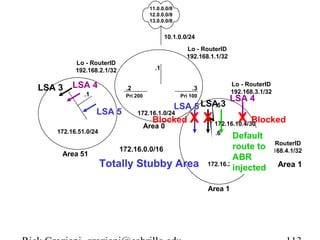
Rick Graziani graziani@cabrillo.edu 112
11.0.0.0/8 
12.0.0.0/8 
13.0.0.0/8 
10.1.0.0/24 
ASBR 
.1 
Lo - RouterID 
192.168.1.1/32 
.2 .3 
Lo - RouterID 
192.168.3.1/32 Pri 200 Pri 100 
Lo - RouterID 
192.168.2.1/32 
LSA 4 
ABR-1 ABR-2 
LSA 5 
LSA 5 
172.16.1.0/24 
Blocked X Area 0 
172.16.0.0/16 
.1 
LSA 3 
172.16.51.0/24 
LSA .5 
3 
LSA 4 
X Blocked 
172.16.10.4/30 
.6 
X 
Area 51 Internal 
Default 
route to 
ABR 
.1 
injected Area 1 
172.16.20.0/24 
Area 1 
Lo - RouterID 
192.168.4.1/32 
Totally Stubby Area 
Rick Graziani graziani@cabrillo.edu 113
Next 
• E1 and E2 routes 
• Default Routes 
• Route Summarization 
• NSSA (Not So Stubby Areas) 
• Multiple ABR Scenario 
• Multiple ASBR Scenario 
• Virtual Links 
• Load Balancing 
• show commands 
Rick Graziani graziani@cabrillo.edu 114
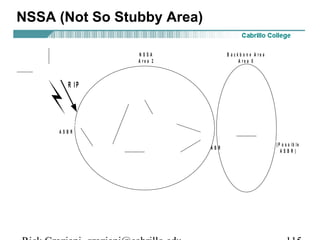
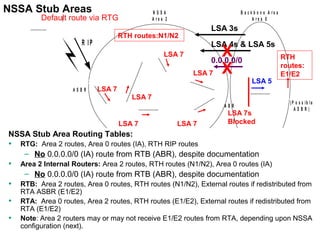
NSSA (Not So Stubby Area) 
N S S A 
A r e a 2 
B a c k b o n e A r e a 
A r e a 0 
R I P 
R T G 
A S B R 
R T B R T A 
A B R ( P o s s i b l e 
A S B R ) 
R T D 
R T C 
R T E 
R T F 
R T H 
Rick Graziani graziani@cabrillo.edu 115
NSSA (Not So Stubby Area) 
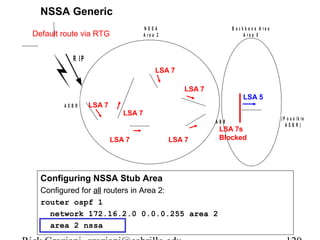
• Relatively new, standards based OSPF enhancement, RFC 1587. 
• NSSA allows an area to remain a stub area, but carry external routing 
information (Type 7 LSAs) from its stubby end back towards the OSPF 
backbone. 
• ASBR in NSSA injects external routing information into the backbone 
and the NSSA area, but rejects external routing information coming 
from the ABR. 
• The ABR does not inject a default route into the NSSA. 
– This is true for a NSSA Stub, but a default route is injected for a 
NSSA Totally Stubby area. 
• Note: RFC 1587, “A default route must not be injected into the NSSA 
as a summary (type-3) LSA as in the stub area case.” 
• What??? 
• Following scenario is only example of how NSSA works. For the 
purposes of learning about NSSAs, don’t get hung up on the why’s and 
what if’s. 
Rick Graziani graziani@cabrillo.edu 116
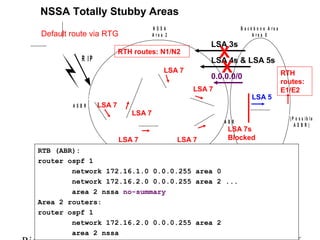
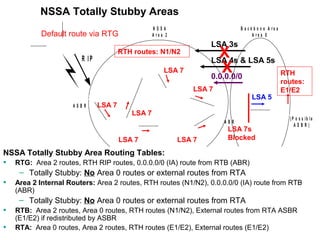
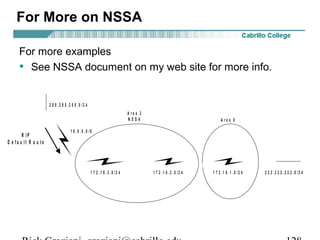
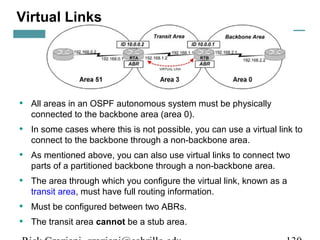
N S S A 
A r e a 2 
B a c k b o n e A r e a 
A r e a 0 
Default route via RTG 
R I P 
R T G 
A S B R 
R T B R T A 
A B R ( P o s s i b l e 
A S B R ) 
R T D 
R T C 
R T E 
R T F 
R T H 
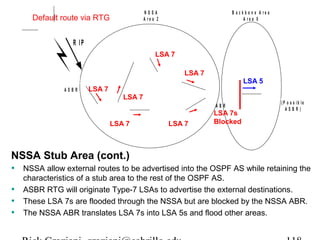
NSSA Stub Area 
• Area 2 would like to be a stub network. 
• RTH only supports RIP, so RTG will run RIP and redistribute those routes in 
OSPF. 
• Unfortunately, this makes the area 2 router, RTG, an ASBR and therefore 
area 2 can no longer be a stub area. 
• RTH does not need to learn routes from OSPF, a default route to RTG is all it 
needs. 
• But all OSPF routers must know about the networks attached to the RIP 
router, RTH, to route packets to them. 
Rick Graziani graziani@cabrillo.edu 117
N S S A 
A r e a 2 
B a c k b o n e A r e a 
A r e a 0 
Default route via RTG 
R I P 
R T G 
A S B R 
LSA 5 
R T B R T A 
A B R ( P o s s i b l e 
A S B R ) 
LSA 7 
R T D 
R T C 
R T E 
LSA 7 
R T F 
R T H 
LSA 7 
LSA 7 
LSA 7 
LSA 7 
LSA 7s 
Blocked 
NSSA Stub Area (cont.) 
• NSSA allow external routes to be advertised into the OSPF AS while retaining the 
characteristics of a stub area to the rest of the OSPF AS. 
• ASBR RTG will originate Type-7 LSAs to advertise the external destinations. 
• These LSA 7s are flooded through the NSSA but are blocked by the NSSA ABR. 
• The NSSA ABR translates LSA 7s into LSA 5s and flood other areas. 
Rick Graziani graziani@cabrillo.edu 118
N S S A 
A r e a 2 
B a c k b o n e A r e a 
A r e a 0 
Default route via RTG 
R I P 
R T G 
A S B R 
LSA 5 
R T B R T A 
A B R ( P o s s i b l e 
A S B R ) 
LSA 7 
R T D 
R T C 
R T E 
LSA 7 
R T F 
R T H 
LSA 7 
LSA 7 
LSA 7 
LSA 7 
LSA 7s 
Blocked 
Type 7 LSA NSSA External Link Entry 
• Originated by an ASBR connected to an NSSA. 
• Type 7 messages can be flooded throughout NSSAs and translated 
into LSA Type 5 messages by ABRs. 
• Routes learned via Type-7 LSAs are denoted by either a default 
“N1” or an “N2” in the routing table. (Relative to E1 and E2). 
Rick Graziani graziani@cabrillo.edu 119
N S S A 
A r e a 2 
NSSA Generic 
Default route via RTG 
R I P 
R T G 
A S B R 
LSA 7 
R T D 
R T C 
R T E 
LSA 7 
R T F 
R T H 
LSA 7 
LSA 7 
Configuring NSSA Stub Area 
Configured for all routers in Area 2: 
router ospf 1 
LSA 5 
R T B R T A 
A B R ( P o s s i b l e 
LSA 7 
LSA 7 
network 172.16.2.0 0.0.0.255 area 2 
area 2 nssa 
B a c k b o n e A r e a 
A r e a 0 
A S B R ) 
LSA 7s 
Blocked 
Rick Graziani graziani@cabrillo.edu 120
NSSA (Not So Stubby Area) 
NSSA Stub and NSSA Totally Stubby 
• There are two flavors in NSSA: 
– Stub 
– Totally Stubby 
• Area 2 routers may or may not receive Inter-area routes from RTA, depending 
upon NSSA configuration 
• NSSA areas have take on the same characteristics as stub and totally stubby 
areas, along with the characteristics of NSSA areas. 
Rick Graziani graziani@cabrillo.edu 121
NSSA –Stub 
NSSA stub areas: 
• NSSAs that block type 4 and 5, but allow type 3. 
• To make a stub area into an NSSA, use the following command under 
the OSPF configuration. 
• This command must be configured on all routers in area 2. 
router ospf 1 
area 2 nssa 
Rick Graziani graziani@cabrillo.edu 122
N S S A 
A r e a 2 
B a c k b o n e A r e a 
A r e a 0 
NSSA Stub Areas 
Default route via RTG 
R I P 
R T G 
A S B R 
LSA 4s & LSA 5s X 
X RTH 
LSA 5 
LSA 3s 
0.0.0.0/0 
routes: 
E1/E2 
R T B R T A 
A B R ( P o s s i b l e 
A S B R ) 
RTH routes:N1/N2 
LSA 7 
R T D 
R T C 
R T E 
LSA 7 
R T F 
R T H 
LSA 7 
LSA 7 
LSA 7 
LSA 7 
LSA 7s 
Blocked 
NSSA Stub Area Routing Tables: 
• RTG: Area 2 routes, Area 0 routes (IA), RTH RIP routes 
– No 0.0.0.0/0 (IA) route from RTB (ABR), despite documentation 
• Area 2 Internal Routers: Area 2 routes, RTH routes (N1/N2), Area 0 routes (IA) 
– No 0.0.0.0/0 (IA) route from RTB (ABR), despite documentation 
• RTB: Area 2 routes, Area 0 routes, RTH routes (N1/N2), External routes if redistributed from 
RTA ASBR (E1/E2) 
• RTA: Area 0 routes, Area 2 routes, RTH routes (E1/E2), External routes if redistributed from 
RTA (E1/E2) 
• Note: Area 2 routers may or may not receive E1/E2 routes from RTA, depending upon NSSA 
configuration (next). 
Rick Graziani graziani@cabrillo.edu 123
NSSA Stub Areas 
Default route via RTG 
R I P 
R T G 
A S B R 
R T H 
Area 2 routers: 
router ospf 1 
N S S A 
A r e a 2 
RTH routes:N1/N2 
LSA 7 
R T D 
R T C 
R T E 
LSA 7 
R T F 
LSA 7 
LSA 7 
LSA 3s 
LSA 4s & LSA 5s X 
X RTH 
0.0.0.0/0 
LSA 7 
LSA 7 
network 172.16.2.0 0.0.0.255 area 2 
area 2 nssa 
B a c k b o n e A r e a 
A r e a 0 
LSA 5 
routes: 
E1/E2 
R T B R T A 
A B R ( P o s s i b l e 
A S B R ) 
LSA 7s 
Blocked 
Rick Graziani graziani@cabrillo.edu 124
NSSA – Totally Stubby 
NSSA Totally Stubby Area 
• NSSA totally stub areas: Allow only summary default routes and filters everything 
else. 
• To configure an NSSA totally stub area, use the following command under the 
OSPF configuration on the NSSA ABR: 
router ospf 1 
area 2 nssa no-summary 
• Configure this command on NSSA ABRs only. 
• All other routers in area 2 (internal area 2 routers): 
router ospf 1 
area 2 nssa 
• After defining the NSSA totally stub area, area 2 has the following characteristics (in 
addition to the above NSSA characteristics): 
· No type 3 or 4 summary LSAs are allowed in area 2. This means no 
inter-area routes are allowed in area 2. 
· A default route is injected into the NSSA totally stub area as a type 3 
summary LSA by the ABR. 
Rick Graziani graziani@cabrillo.edu 125
NSSA Totally Stubby Areas 
N S S A 
A r e a 2 
B a c k b o n e A r e a 
A r e a 0 
Default route via RTG 
R I P 
R T G 
A S B R 
LSA 4s & LSA 5s X 
LSA 5 
LSA 3s X 
0.0.0.0/0 
RTH 
routes: 
E1/E2 
R T B R T A 
A B R ( P o s s i b l e 
A S B R ) 
RTH routes: N1/N2 
LSA 7 
R T D 
R T C 
R T E 
LSA 7 
R T F 
R T H 
LSA 7 
LSA 7 
LSA 7 
LSA 7 
LSA 7s 
Blocked 
RTB (ABR): 
router ospf 1 
network 172.16.1.0 0.0.0.255 area 0 
network 172.16.2.0 0.0.0.255 area 2 ... 
area 2 nssa no-summary 
Area 2 routers: 
router ospf 1 
network 172.16.2.0 0.0.0.255 area 2 
area 2 nssa 
Rick Graziani graziani@cabrillo.edu 126
NSSA Totally Stubby Areas 
N S S A 
A r e a 2 
B a c k b o n e A r e a 
A r e a 0 
Default route via RTG 
R I P 
R T G 
A S B R 
LSA 4s & LSA 5s X 
LSA 5 
LSA 3s X 
0.0.0.0/0 
RTH 
routes: 
E1/E2 
R T B R T A 
A B R ( P o s s i b l e 
A S B R ) 
RTH routes: N1/N2 
LSA 7 
R T D 
R T C 
R T E 
LSA 7 
R T F 
R T H 
LSA 7 
LSA 7 
LSA 7 
LSA 7 
LSA 7s 
Blocked 
NSSA Totally Stubby Area Routing Tables: 
• RTG: Area 2 routes, RTH RIP routes, 0.0.0.0/0 (IA) route from RTB (ABR) 
– Totally Stubby: No Area 0 routes or external routes from RTA 
• Area 2 Internal Routers: Area 2 routes, RTH routes (N1/N2), 0.0.0.0/0 (IA) route from RTB 
(ABR) 
– Totally Stubby: No Area 0 routes or external routes from RTA 
• RTB: Area 2 routes, Area 0 routes, RTH routes (N1/N2), External routes from RTA ASBR 
(E1/E2) if redistributed by ASBR 
• RTA: Area 0 routes, Area 2 routes, RTH routes (E1/E2), External routes (E1/E2) 
Rick Graziani graziani@cabrillo.edu 127
For More on NSSA 
For more examples 
• See NSSA document on my web site for more info. 
A r e a 2 
N S S A A r e a 0 
2 0 0 . 2 0 0 . 2 0 0 . 0 / 2 4 
1 0 . 0 . 0 . 0 / 8 
R T D R T C R T B R T A 
R T E 
R I P 
D e f a u l t R o u t e 
1 7 2 . 1 6 . 3 . 0 / 2 4 1 7 2 . 1 6 . 2 . 0 / 2 4 1 7 2 . 1 6 . 1 . 0 / 2 4 
2 2 2 . 2 2 2 . 2 2 2 . 0 / 2 4 
Rick Graziani graziani@cabrillo.edu 128
Virtual Links 
Rick Graziani graziani@cabrillo.edu 129
Virtual Links 
• All areas in an OSPF autonomous system must be physically 
connected to the backbone area (area 0). 
• In some cases where this is not possible, you can use a virtual link to 
connect to the backbone through a non-backbone area. 
• As mentioned above, you can also use virtual links to connect two 
parts of a partitioned backbone through a non-backbone area. 
• The area through which you configure the virtual link, known as a 
transit area, must have full routing information. 
• Must be configured between two ABRs. 
• The transit area cannot be a stub area. 
Rick Graziani graziani@cabrillo.edu 130
Virtual Links 
• A virtual link has the following two requirements: 
– It must be established between two routers that share a common 
area and are both ABRs. 
– One of these two routers must be connected to the backbone. 
• Doyle, “should be used only as a temporary fix to an unavoidable 
topology problem.” 
Rick Graziani graziani@cabrillo.edu 131
Virtual Links 
The command to configure a virtual link is as follows: 
area <area-id> virtual-link <remote-router-id> 
RTA(config)#router ospf 1 
RTA(config-router)#network 192.168.0.0 0.0.0.255 area 51 
RTA(config-router)#network 192.168.1.0 0.0.0.255 area 3 
RTA(config-router)#area 3 virtual-link 10.0.0.1 
... 
RTB(config)#router ospf 1 
RTB(config-router)#network 192.168.1.0 0.0.0.255 area 3 
RTB(config-router)#network 192.168.2.0 0.0.0.255 area 0 
RTB(config-router)#area 3 virtual-link 10.0.0.2 
Rick Graziani graziani@cabrillo.edu 132
Virtual Links 
• OSPF allows for linking discontinuous parts of the backbone using a 
virtual link. 
• In some cases, different area 0s need to be linked together. This can 
occur if, for example, a company is trying to merge two separate 
OSPF networks into one network with a common area 0. 
• In other instances, virtual-links are added for redundancy in case 
some router failure causes the backbone to be split into two. (CCO) 
• Whatever the reason may be, a virtual link can be configured 
between separate ABRs that touch area 0 from each side and having 
a common area. 
Rick Graziani graziani@cabrillo.edu 133
Virtual Links – Another Example 
Rick Graziani graziani@cabrillo.edu 134
Route Summarization 
Inter-Area Route Summarization - Area Range 
• By default ABRs do not summarize routes between areas. 
• Route summarization is the consolidation of advertised addresses. 
• This feature causes a single summary route to be advertised to other areas by 
an ABR. 
• In OSPF, an ABR will advertise networks in one area into another area. 
• If the network numbers in an area are assigned in a way such that they are 
contiguous, you can configure the ABR to advertise a summary route that 
covers all the individual networks within the area that fall into the specified 
range. 
On the ABR (Summarizes routes before injecting them into different area) 
Router(config-router)# area area-id range network-address 
subnet-mask 
• area-id - Identifier of the area about which routes are 
to be summarized. (From area) 
Rick Graziani graziani@cabrillo.edu 135
Route Summarization 
• RTB is summarizing the range of subnets from 128.213.64.0 to 128.213.95.0 
into one range: 128.213.64.0 255.255.224.0. 
• This is achieved by masking the first three left most bits of 64 using a mask of 
255.255.224.0. 
128.213.64.0/24 - 010 00000 
128.213.95.0/24 – 010 11111 
----------------------------------------- 
128.213.64.0/19 - 01000000 
Rick Graziani graziani@cabrillo.edu 136
Route Summarization 
• In the same way, RTC is generating the summary address 128.213.96.0 
255.255.224.0 into the backbone. 
• Note that this summarization was successful because we have two distinct 
ranges of subnets, 64-95 and 96-127. 
128.213.96.0/24 - 011 00000 
128.213.127.0/24 – 011 11111 
----------------------------------------- 
128.213.96.0/19 - 01100000 
Rick Graziani graziani@cabrillo.edu 137
Route Summarization 
128.213.64.0/24 - 010 00000 
128.213.95.0/24 – 010 11111 
----------------------------------------- 
128.213.64.0/19 - 01000000 
RTB 
router ospf 100 
area 1 range 128.213.64.0 255.255.224.0 
Rick Graziani graziani@cabrillo.edu 138
Route Summarization 
128.213.96.0/24 - 011 00000 
128.213.127.0/24 – 011 11111 
----------------------------------------- 
128.213.96.0/19 - 01100000 
RTC 
router ospf 100 
area 2 range 128.213.96.0 255.255.224.0 
Rick Graziani graziani@cabrillo.edu 139
Route Summarization 
External Route Summarization - summary-address 
• When redistributing routes from other protocols into OSPF (later), each route is 
advertised individually in an external link state advertisement (LSA). 
• However, you can configure the Cisco IOS software to advertise a single route 
for all the redistributed routes that are covered by a specified network address 
and mask. 
• Doing so helps decrease the size of the OSPF link state database. 
On the ASBR only (Summarizes external routes before injecting them into the 
OSPF domain.) 
Router(config-router)# summary-address network-address 
subnet-mask 
Rick Graziani graziani@cabrillo.edu 140
Route Summarization 
RTA 
router ospf 100 
summary-address 128.213.64.0 255.255.224.0 
redistribute bgp 50 metric 1000 subnets (later) 
RTD 
router ospf 100 
summary-address 128.213.96.0 255.255.224.0 
redistribute bgp 20 metric 1000 subnets (later) 
Rick Graziani graziani@cabrillo.edu 141
Injecting Default Routes into OSPF 
• By default, 0.0.0.0/0 route is not propagated from the ASBR to other 
routers. 
• An autonomous system boundary router (ASBR) can be forced to 
generate a default route into the OSPF domain. 
• As discussed earlier, a router becomes an ASBR whenever routes are 
redistributed into an OSPF domain. 
• However, an ASBR does not, by default, generate a default route into 
the OSPF routing domain. 
Rick Graziani graziani@cabrillo.edu 142
Injecting Default Routes into OSPF 
The way that OSPF generates default routes (0.0.0.0) varies depending 
on the type of area the default route is being injected into. 
Stub and Totally Stubby Areas 
• For stub and totally stubby areas, the area border router (ABR) to the 
stub area generates a summary link-state advertisement (LSA) with the 
link-state ID 0.0.0.0. 
• This is true even if the ABR doesn't have a default route. 
• In this scenario, you don't need to use the default-information 
originate command. 
Rick Graziani graziani@cabrillo.edu 143
11.0.0.0/8 
12.0.0.0/8 
13.0.0.0/8 
10.1.0.0/24 
ASBR 
.1 
Lo - RouterID 
192.168.1.1/32 
.2 .3 
Lo - RouterID 
192.168.3.1/32 Pri 200 Pri 100 
Stub Area 
Lo - RouterID 
192.168.2.1/32 
LSA 4 
ABR-1 ABR-2 
LSA 5 
LSA 5 
172.16.1.0/24 
Blocked X Area 0 
172.16.0.0/16 
.1 
LSA 3 
172.16.51.0/24 
LSA .5 
3 
LSA 4 
X Blocked 
172.16.10.4/30 
.6 
Area 51 Internal 
Default 
route to 
ABR 
.1 
injected Area 1 
172.16.20.0/24 
Area 1 
Lo - RouterID 
192.168.4.1/32 
Stub Area 
All routers in the area must be configured as “stub” including the ABR: 
router ospf 1 
area 1 stub 
Rick Graziani graziani@cabrillo.edu 144
11.0.0.0/8 
12.0.0.0/8 
13.0.0.0/8 
10.1.0.0/24 
ASBR 
.1 
Lo - RouterID 
192.168.1.1/32 
Totally Stubby Area 
.2 .3 
Lo - RouterID 
192.168.3.1/32 Pri 200 Pri 100 
Lo - RouterID 
192.168.2.1/32 
LSA 4 
ABR-1 ABR-2 
LSA 5 
LSA 5 
172.16.1.0/24 
Blocked X Area 0 
172.16.0.0/16 
.1 
LSA 3 
172.16.51.0/24 
LSA .5 
3 
LSA 4 
X Blocked 
172.16.10.4/30 
.6 
X 
Area 51 Internal 
Default 
route to 
ABR 
.1 
injected Area 1 
172.16.20.0/24 
Area 1 
Lo - RouterID 
192.168.4.1/32 
Totally Stubby Area 
All routers in the area must be configured as “stub” except the ABR “stub no summary”: 
ABR: router ospf 1 Other: router ospf 1 
area 1 stub no-summary area 1 stub 
Rick Graziani graziani@cabrillo.edu 145
Injecting Default Routes into OSPF 
Normal Areas 
• By default, in normal areas routers don't generate default routes. 
• To have an OSPF router generate a default route, use the default-information 
originate command. 
• This generates an external type-2 link with link-state ID 0.0.0.0 and 
network mask 0.0.0.0. 
• This command should only be used on the ASBR. 
– Some documentation states this command works only on an 
ASBR while other documentation states this command turns a 
router into an ASBR. 
Rick Graziani graziani@cabrillo.edu 146
Injecting Default Routes into OSPF 
To have OSPF generate a default route use the following: 
router ospf 10 
default-information originate [always] [metric metric-value] 
[metric-type type-value] [route-map map-name] 
Rick Graziani graziani@cabrillo.edu 147
Injecting Default Routes into OSPF 
There are two ways to generate a default. 
1) default-information originate 
• If the ASBR already has the default route (ip route 0.0.0.0 0.0.0.0), 
you can advertise 0.0.0.0 into the area. 
2) default-information originate always 
• If the ASBR doesn't have the route (ip route 0.0.0.0 0.0.0.0), you can 
add the keyword always to the default-information originate 
command, and then advertise 0.0.0.0. 
• You should be careful when using the always keyword. If your router 
advertises a default (0.0.0.0) inside the domain and does not have a 
default itself or a path to reach the destinations, routing will be 
broken. 
Rick Graziani graziani@cabrillo.edu 148
Injecting Default Routes into OSPF 
11.0.0.0/8 
12.0.0.0/8 
13.0.0.0/8 
10.1.0.0/24 
.1 
Lo - RouterID 
192.168.1.1/32 
0.0.0.0/0 
0.0.0.0/0 0.0.0.0/0 
.2 .3 
Lo - RouterID 
192.168.3.1/32 Pri 200 Pri 100 
0.0.0.0/0 
172.16.1.0/24 
Area 0 
172.16.0.0/16 
Lo - RouterID 
192.168.2.1/32 
.1 
0.0.0.0/0 
172.16.51.0/24 
.5 
172.16.10.4/30 
.6 
0.0.0.0/0 0.0.0.0/0 
Area 51 Internal 
ASBR 
router ospf 1 
ASBR 
ABR-1 ABR-2 
redistribute static 
network 172.16.1.0 0.0.0.255 area 0 
default-information originate 
ip route 0.0.0.0 0.0.0.0 10.0.0.2 
.1 
172.16.20.0/24 
Area 1 
Lo - RouterID 
192.168.4.1/32 
Rick Graziani graziani@cabrillo.edu 149
Injecting Default Routes into OSPF 
11.0.0.0/8 
12.0.0.0/8 
13.0.0.0/8 
10.1.0.0/24 
.1 
No 0.0.0.0/0 route, but 
propagated anyway or 
“always” 
Lo - RouterID 
192.168.1.1/32 
0.0.0.0/0 0.0.0.0/0 
.2 .3 
Lo - RouterID 
192.168.3.1/32 Pri 200 Pri 100 
0.0.0.0/0 
172.16.1.0/24 
Area 0 
172.16.0.0/16 
Lo - RouterID 
192.168.2.1/32 
.1 
0.0.0.0/0 
172.16.51.0/24 
.5 
172.16.10.4/30 
.6 
0.0.0.0/0 0.0.0.0/0 
Area 51 Internal 
ASBR 
router ospf 1 
ASBR 
ABR-1 ABR-2 
redistribute static 
network 172.16.1.0 0.0.0.255 area 0 
default-information originate always 
ip route 0.0.0.0 0.0.0.0 10.0.0.2 
.1 
172.16.20.0/24 
Area 1 
Lo - RouterID 
192.168.4.1/32 
Rick Graziani graziani@cabrillo.edu 150
Redistributing External Routes 
E1 vs. E2 External Routes 
• External routes fall under two categories, external type 1 and 
external type 2. 
• The difference between the two is in the way the cost (metric) of the 
route is being calculated. 
• A type 1 (E1) cost is the addition of the external cost and the internal 
cost used to reach that route. 
• The cost of a type 2 (E2) route is always the external cost, 
irrespective of the interior cost to reach that route. 
• Type 2 (E2) is the default! 
Rick Graziani graziani@cabrillo.edu 151
Redistributing External Routes 
router ospf 1 
redistribute routing-protocol metric-type [1|2] 
• metric-type 1 - A type 1 cost is the addition of the external cost and 
the internal cost used to reach that route. 
redistribute rip [metric value] metric-type 1 
• metric-type 2 - The cost of a type 2 route is always the external 
cost, irrespective of the interior cost to reach that route. 
redistribute rip [metric value] metric-type 2 
• We will look at this command, along with internal/external costs, later 
in the chapter discussion route redistribution. 
Rick Graziani graziani@cabrillo.edu 152
Redistributing External Routes 
metric-type 2 - The cost of a type 2 route is always the external cost, 
irrespective of the interior cost to reach that route. 
redistribute rip [metric value] metric-type 2 
More later, but here is a taste of the metric value option … 
• If a value is not specified for the metric value option, and no value is 
specified using the default-metric command, the default metric value 
is 0, except for OSPF where the default cost is 20. 
• 0 is only understood by IS-IS and not by RIP, IGRP and EIGRP. 
• RIP, IGRP and EIGRP must have the appropriate metrics assigned to 
any redistributed routes, or redistribution will not work. 
• Use a value consistent with the destination protocol. 
Rick Graziani graziani@cabrillo.edu 153
Redistributing External Routes 
L o o p 1 6 2 . 1 0 . 5 . 1 / 1 6 
R I P 
574 510 
. 1 . 4 
R o u t e r E 
A S - R e m o t e 
192.10.10.0 
L o o p 1 . 1 0 . 2 0 2 . 2 0 6 / 2 4 
. 2 
10.0.0.0/8 
R I P 
. 1 
metric-type 1 
510 
A S B R 
. 3 
L o o p 1 . 5 . 2 0 2 . 2 0 6 / 2 4 
510 
RIP routes redistributed with a 
metric (cost) of 500 plus the 
outgoing cost of the interface 
and a metric-type 1 
. 1 . 2 
R o u t e r A 
S w i t c h 
2 0 6 . 2 0 2 . 0 . 0 / 2 4 
O S P F 
A r e a 0 
510 
574 
L o o p 1 . 0 . 2 0 2 . 2 0 6 / 2 4 R o u t e r B 
. 1 
L o o p 2 . 0 . 2 0 2 . 2 0 6 / 2 4 
2 0 6 . 2 0 2 . 1 . 0 / 2 4 
574 . 2 
584 
R o u t e r C 
. 1 
L o o p 1 . 2 . 2 0 2 . 2 0 6 / 2 4 
S w i t c h 
O S P F 
A r e a 1 
2 0 6 . 2 0 2 . 2 . 0 / 2 4 
. 2 
R o u t e r D 
584 
L o o p 2 . 2 . 2 0 2 . 2 0 6 
/24 
O S P F 
A r e a 5 1 
. 2 
. 1 
574 
R o u t e r F 
L o o p 2 . 1 0 . 2 0 2 . 2 0 6 / 2 4 
1 9 2 . 1 0 . 5 . 0 / 2 4 
ASBR 
router ospf 1 
redistribute rip metric 500 metric-type 1 
network 206.202.0.0 0.0.0.255 area 0 
Rick Graziani graziani@cabrillo.edu 154
Redistributing External Routes 
L o o p 1 6 2 . 1 0 . 5 . 1 / 1 6 
R I P 
500 
. 1 . 4 
R o u t e r E 
A S - R e m o t e 
192.10.10.0 
L o o p 1 . 1 0 . 2 0 2 . 2 0 6 / 2 4 
. 2 
10.0.0.0/8 
R I P 
. 1 
metric-type 2 
RIP routes redistributed with a 
metric (cost) of 500 and a 
metric-type 2 (default) 
500 
A S B R 
. 3 
L o o p 1 . 5 . 2 0 2 . 2 0 6 / 2 4 
500 
. 1 . 2 
R o u t e r A 
S w i t c h 
2 0 6 . 2 0 2 . 0 . 0 / 2 4 
O S P F 
A r e a 0 
L o o p 1 . 0 . 2 0 2 . 2 0 6 / 2 4 R o u t e r B 
. 1 
L o o p 2 . 0 . 2 0 2 . 2 0 6 / 2 4 
2 0 6 . 2 0 2 . 1 . 0 / 2 4 
. 2 
500 500 
R o u t e r C 
. 1 
500 
L o o p 1 . 2 . 2 0 2 . 2 0 6 / 2 4 
S w i t c h 
O S P F 
A r e a 1 
2 0 6 . 2 0 2 . 2 . 0 / 2 4 
. 2 
R o u t e r D 
L o o p 2 . 2 . 2 0 2 . 2 0 6 
/24 
O S P F 
A r e a 5 1 
. 2 
. 1 
500 
R o u t e r F 
L o o p 2 . 1 0 . 2 0 2 . 2 0 6 / 2 4 
1 9 2 . 1 0 . 5 . 0 / 2 4 
ASBR 
router ospf 1 
redistribute rip metric 500 metric-type 2 
network 206.202.0.0 0.0.0.255 area 0 
Rick Graziani graziani@cabrillo.edu 155
Redistributing External Routes 
So when should you redistribute a Type-1 (E1) External route? 
• If there is more than one ABR for the area and the area is not a stub or 
totally stubby area. 
– In this case one of the ABRs may provide a shorter path 
for certain non-area 0 internal routers, than other ABRs. 
– E1 routes will include all internal costs from the internal 
router to the ABR and to the ASBR, allowing each router 
to choose which ABR provides the shorter path. 
• Multiple ASBRs redistributing the same networks. 
– In this case the routers’ cost to each ASBR can be used 
to choose the shortest path to the destination. 
Rick Graziani graziani@cabrillo.edu 156
Know your outputs 
• show ip route 
• show ip ospf 
• show ip ospf neighbor 
• show ip ospf border-router 
• show ip database 
• show ip interface 
Rick Graziani graziani@cabrillo.edu 157
show ip route 
Internal#show ip route 
Codes: C - connected, S - static, I - IGRP, R - RIP, M - mobile, B - BGP 
D - EIGRP, EX - EIGRP external, O - OSPF, IA - OSPF inter area 
N1 - OSPF NSSA external type 1, N2 - OSPF NSSA external type 2 
E1 - OSPF external type 1, E2 - OSPF external type 2, E - EGP 
<text omitted> 
Gateway of last resort is not set 
172.16.0.0/16 is variably subnetted, 4 subnets, 3 masks 
O IA 172.16.51.1/32 [110/783] via 172.16.10.5, 00:13:48, Serial0 
C 172.16.20.0/24 is directly connected, FastEthernet0 
C 172.16.10.4/30 is directly connected, Serial0 
O IA 172.16.1.0/24 [110/782] via 172.16.10.5, 00:13:53, Serial0 
192.168.4.0/32 is subnetted, 1 subnets 
C 192.168.4.1 is directly connected, Loopback0 
O E2 11.0.0.0/8 [110/20] via 172.16.10.5, 00:14:41, Serial0 
O E2 12.0.0.0/8 [110/20] via 172.16.10.5, 00:14:41, Serial0 
O E2 13.0.0.0/8 [110/20] via 172.16.10.5, 00:14:42, Serial0 
Internal# 
• LSA 1 and LSA 2: Denoted by “O” or “C” 
• LSA 3: Denoted by “IA” 
• LSA 5: Denoted by “E1” or “E2” (default) 
Rick Graziani graziani@cabrillo.edu 158
show ip ospf 
ABR-2#show ip ospf 
Routing Process "ospf 1" with ID 192.168.3.1 
Supports only single TOS(TOS0) routes 
It is an area border router 
SPF schedule delay 5 secs, Hold time between two SPFs 10 secs 
Minimum LSA interval 5 secs. Minimum LSA arrival 1 secs 
Number of external LSA 3. Checksum Sum 0x97E3 
Number of DCbitless external LSA 0 
Number of DoNotAge external LSA 0 
Number of areas in this router is 2. 2 normal 0 stub 0 nssa 
External flood list length 0 
Area BACKBONE(0) 
Number of interfaces in this area is 1 
Area has no authentication 
SPF algorithm executed 8 times 
<text omitted> 
Area 1 
Number of interfaces in this area is 1 
Area has no authentication 
SPF algorithm executed 5 times 
<text omitted> 
Rick Graziani graziani@cabrillo.edu 159
show ip ospf neighbor 
ASBR#show ip ospf neighbor 
Neighbor ID Pri State Dead Time Address Interface 
192.168.3.1 100 FULL/BDR 00:00:37 172.16.1.3 FastEthernet0/0 
192.168.2.1 200 FULL/DR 00:00:33 172.16.1.2 FastEthernet0/0 
• Displays a list of neighbors and their link state status 
Rick Graziani graziani@cabrillo.edu 160
show ip ospf border-router 
• To display the internal OSPF routing table entries to an Area Border Router (ABR) and 
Autonomous System Boundary Router (ASBR), use the show ip ospf border-routers 
privileged EXEC command. 
• LSA 4’s (routes to ASBRs) are not installed in the main IP routing table but in the special 
internal OSPF routing table. 
This command will displays any ABRs in the area or any ASBRs in the OSPF routing domain. 
• Destination - Router ID of the destination. 
• Next Hop - Next hop toward the destination. 
• Cost - Cost of using this route. 
• Type - The router type of the destination; it is either an ABR or ASBR or both. 
• Rte Type - The type of this route; it is either an intra-area or interarea route. 
• Area - The area ID of the area from which this route is learned. 
• SPF No - The internal number of the shortest path first (SPF) calculation that installs this route. 
ABR-1#show ip ospf border 
OSPF Process 1 internal Routing Table 
Codes: i - Intra-area route, I - Inter-area route 
i 192.168.1.1 [1] via 172.16.1.1, FastEthernet0/0, ASBR, Area 0, SPF 38 
i 192.168.3.1 [1] via 172.16.1.3, FastEthernet0/0, ABR, Area 0, SPF 38 
ABR-1# 
Rick Graziani graziani@cabrillo.edu 161
show ip ospf database 
Internal#show ip ospf data 
OSPF Router with ID (192.168.4.1) (Process ID 1) 
Router Link States (Area 1) 
Link ID ADV Router Age Seq# Checksum Link count 
192.168.3.1 192.168.3.1 898 0x80000003 0xCE56 2 
192.168.4.1 192.168.4.1 937 0x80000003 0xFD44 3 
Summary Net Link States (Area 1) 
Link ID ADV Router Age Seq# Checksum 
172.16.1.0 192.168.3.1 848 0x80000005 0xD339 
172.16.51.1 192.168.3.1 843 0x80000001 0xB329 
Summary ASB Link States (Area 1) 
Link ID ADV Router Age Seq# Checksum 
192.168.1.1 192.168.3.1 912 0x80000003 0x93CC 
Type-5 AS External Link States 
Link ID ADV Router Age Seq# Checksum Tag 
11.0.0.0 192.168.1.1 1302 0x80000001 0x3FEA 0 
12.0.0.0 192.168.1.1 1303 0x80000001 0x32F6 0 
13.0.0.0 192.168.1.1 1303 0x80000001 0x2503 0 
Rick Graziani graziani@cabrillo.edu 162
Router Link States (LSA 1) 
• Router Link States (LSA1’s) should display all the RouterIDs of routers in that area, including its own. 
• Link State ID is always the same as the Advertising Router. 
• ADV Router is the Router ID of the router that created this LSA 1. 
Net Link States (LSA 2) 
• Net Link States (LSA2’s) should display the RouterIDs of the DRs on all multi-access networks in the area 
and their IP addresses. 
• Link ID is the IP address of DR on MultiAccess Network. 
• ADV Router is the Router ID of the DR. 
Summary Link States (LSA 3) 
• Should see networks in other areas and the ABR advertising that route. 
• Link ID is the IP network addresses of networks in other areas. 
• ADV Router is the ABR Router ID sending the LSA-3. 
Summary ASB Link States (LSA 4) 
• Routers in non-area 0, should see Router ID of ASBR and its ABR to get there. 
• Link ID is the Router ID of ASBR 
• ADV Router is the Router ID of the ABR advertising route 
Type-5 AS External Link States (LSA 5) 
• All Routers should see External networks and the Router ID of ASBR to get there 
• Link ID is the External Network 
• ADV Router is the Router ID of ASBR advertising the LSA 5. 
Rick Graziani graziani@cabrillo.edu 163
show ip ospf interface 
SanJose3#show ip ospf interface fa 0 
FastEthernet0 is up, line protocol is up 
Internet Address 192.168.1.3/24, Area 0 
Process ID 1, Router ID 192.168.31.33, Network Type BROADCAST, Cost: 1 
Transmit Delay is 1 sec, State DR, Priority 1 
Designated Router (ID) 192.168.31.33, Interface address 192.168.1.3 
Backup Designated router (ID) 192.168.31.22, Interface address 192.168.1.2 
Timer intervals configured, Hello 10, Dead 40, Wait 40, Retransmit 5 
Hello due in 00:00:08 
Index 1/1, flood queue length 0 
Next 0x0(0)/0x0(0) 
Last flood scan length is 1, maximum is 2 
Last flood scan time is 0 msec, maximum is 0 msec 
Neighbor Count is 2, Adjacent neighbor count is 2 
Adjacent with neighbor 192.168.31.11 
Adjacent with neighbor 192.168.31.22 (Backup Designated Router) 
Suppress hello for 0 neighbor(s) 
SanJose3# 
Do you know these? 
Rick Graziani graziani@cabrillo.edu 164
OSPF Extra’s, FAQs, and FYIs 
• The following sections contain information to help you understand 
OSPF. 
• This information is not necessarily on the CCNP Advanced Routing 
Exam. 
Rick Graziani graziani@cabrillo.edu 165
Extra: OSPF over ISDN 
• OSPF Hello traffic can keep an ISDN link up indefinitely. 
• By entering the command “ip ospf demand-circuit” on one side of a BRI, 
adjacencies will be formed and: 
– Ongoing OSPF Hellos will be suppressed 
– The DNA (Do-Not-Age) bit is set in the LSA so that this entry is not aged in 
the router’s LSDB. 
• LSA is not flooded when reaching LSRefresh 
• LSA is not flooded if there is a new version but the contents are the 
same 
show ip ospf interface bri 0 
• “Run as demand circuit” 
• “(Hello Suppressed)” 
show ip ospf neighbor 
• Dead Time: “-” 
Rick Graziani graziani@cabrillo.edu 166
Extra: OSPF over ISDN 
Router1 
interface BRI1/1 
ip address 192.158.254.13 {/30} 
ip ospf demand-circuit 
router ospf 20 
network 192.158.254.0 0.0.0.255 area 0 
Router2 
interface BRI1/0 
ip address 192.158.254.14 {/30} 
router ospf 20 
network 192.158.254.0 0.0.0.255 area 0 
Note: You need to configure the demand circuit at one end of the link only. 
However, if you configure this command on both ends it does not cause any 
harm. 
Suggestion: To reduce the affect of link flaps on the demand circuit, configure 
the area that contains the demand circuit as totally stub. 
• In this case configure Area 1 to be a totally stubby area. 
• Summarizing routes on Router 1 can also help if the flapping link is within the 
summarized range. 
Rick Graziani graziani@cabrillo.edu 167
Extra: OSPF and Load Balancing 
• OSPF only supports equal-cost load balancing. 
• By default, four equally good routes to the same destination are 
kept in the routing table for load balancing. 
• This can be increased up to six with the maximum-paths 
command. 
• The bandwidth and/or ip ospf cost (or in the case of serial 
links [1.544 Mbps] the lack of) commands can be used to make 
unequal-cost links look like equal-cost links to OSPF for load 
balancing. 
– This should be done with caution, as it may burden slower 
links and/or not make efficient use of faster links. 
Rick Graziani graziani@cabrillo.edu 168
Extra: OSPF and DNS Lookups 
• Loopback interfaces simplify the management and 
troubleshooting of OSPF routing domains by providing 
predictable Router Ids. 
• This can be taken one step further by recording the Router Ids 
in a Domain Name Service (DNS) database. 
• The router can then be configured to consult the server 
address-to-name mappings, or Reverse DNS lookups, and then 
display the routers by name instead of by Router ID. 
Rick Graziani graziani@cabrillo.edu 169
Extra: OSPF and DNS Lookups 
ASBR#show ip ospf data 
OSPF Router with ID (192.168.1.1) (Process ID 1) 
Router Link States (Area 0) 
Link ID ADV Router Age Seq# Checksum Link count 
172.16.10.5 ABR-1 412 0x8000000F 0x6F9C 1 
192.168.1.1 ABR-2 201 0x80000012 0x8D3D 1 
192.168.2.1 ABR-2 205 0x80000016 0x7E46 1 
192.168.3.1 ABR-2 205 0x80000005 0x9C36 1 
ASBR was configured to perform DNS lookups as follows: 
ip name-server 172.16.1.100 
ip ospf name-lookup 
• The first command specifies the DNS server. 
• The second command enables the OSPF process to perform DNS lookups. 
• This can also be used for identifying router interfaces such as ABR-1 and 
ABR-2 
Rick Graziani graziani@cabrillo.edu 170
Extra: IOS 12.01(T) – router-id 
router-id 
• To use a fixed router ID, use the router-id router configuration 
command. 
• To force OSPF to use the previous OSPF router ID behavior, use the 
no form of this command. 
• Takes precedence over Loopback address 
router ospf 1 
router-id ip-address 
Rick Graziani graziani@cabrillo.edu 171
OSPF and Redistribution (later) 
• “Before Cisco IOS Software Release 12.1.3, when redistributing connected 
routes into OSPF, connected networks included in the network statements 
under router OSPF advertised in Type-1, Type-2, or Type-3 link-state 
advertisements (LSAs) were also announced in Type-5 LSAs.” 
• In other words, if you are using the redistributed connected command, any 
connected networks included using the OSPF network command, were not 
only advertised as normal using LSA Type 1, 2, or 3, but also as an external 
LSA Type-5. 
• “Memory is required to store those Type-5 LSAs. The storage also requires a 
CPU to process the LSAs during full or partial Shortest Path First (SPF) runs 
and to flood them when some instability occurs.” 
• “In Cisco IOS Software Release 12.1(3) and later, the Type-5 LSAs are no 
longer created for connected networks included in the network statements 
under router OSPF.” 
Redistributing Connected Networks into OSPF 
• http://www.cisco.com/warp/public/104/redist-conn.html 
Rick Graziani graziani@cabrillo.edu 172
Question from another instructor (later)… 
• I was teaching redistribution of RIP into OSPF and couldn't explain the Baypoint output on p. 132 of 
the lab manual. Since both 172.16.8.0 and 172.16.7.0 are being redistributed into OSPF with a 
default metric of 10, why does the .7.0 network have a metric of 20? 
• The reason for the difference is that when using the redistribute connected command, those 
connected networks are not affected by the default-metric command. So once the ospf, 'redistribute 
connected subnets' command is entered on SJ1, those directly connected networks, being 
redistributed into rip, are no longer affected by the default-metric value. 
For more info see: 
http://www.cisco.com/univercd/cc/td/doc/product/software/ios122/122cgcr/fiprrp_r/ind_r/1rfindp2.htm 
"You cannot use the 'default-metric' command to affect the metric used to advertise 'connected' 
routes." 
Usually, it is not advisable to redistribute connected networks into area 0, but thats another story. 
• In other words, if you are using the redistributed connected command, any connected networks 
included using the OSPF network command, were not only advertised as normal using LSA Type 1, 
2, or 3, but also as an external LSA Type-5. 
We saw this in our multi-area OSPF labs when some students were using 12.0.5 and others were 
using 12.2. With 12.0.5 an internal OSPF route, LSA Type-1, was also being advertised as a LSA 
Type-5, when they used the "redistribute connected" command. 
Rick Graziani graziani@cabrillo.edu 173
OSPF FAQs and FYIs 
Q: Why are loopbacks advertised as /32 host routes in OSPF? 
A: Loopbacks are considered host routes in OSPF, and they're 
advertised as /32. For more information, see section 9.1 of RFC 
2328. In Cisco IOS ® version 11.3T and 12.0, if the ip ospf network 
point-to-point command is configured under loopbacks, then 
OSPF advertises the loopback subnet as the actual subnet 
configured on loopbacks. 
http://www.cisco.com/warp/public/104/9.html 
Q: Can a virtual link cross more than one area. 
A: No. 
Rick Graziani graziani@cabrillo.edu 174
OSPF FAQs and FYIs 
Q: What happens within OSPF if there is more than one route to a 
destination? What is the preference of OSPF in choosing a best 
route? 
A: Here is the OSPF preference rules: 
• Intra-area routes area always most preferred. 
• Inter-area routes are preferred over AS or NSSA external routes. 
• AS-external routes and NSSA-external routes are of equal preference. 
Within these routes, preferences are as follows: 
– External Type-1 routes are always preferred 
• If equal, route-metric (cost) is the tie-breaker 
– External Type-2 routes 
• If equal, route metric and distance to the originating router are 
used as tie-breakers. 
– If still a tie (Type-1 or Type-2), AS-external (LSA 5) routes are 
preferred over NSSA external (LSA 7) routes. 
• If these rules do not solve the tie, routes are installed as parallel routes. 
Rick Graziani graziani@cabrillo.edu 175
OSPF FAQs and FYIs 
OSPF Packet Pacing 
• Introduced in Cisco IOS 11.3 
• Helps avoid packet drops at the receiving side, caused by uncontrolled 
bursts of link-state updates. 
• The receiving router may not be able to queue and process all of the 
packets so some packets are dropped. 
• To make matters worse, when the sending router does not receive 
LSAcks for all of the LSAs sent, so retransmits along with other LSAs 
needed to be sent. 
• Currently Cisco IOS Packet Pacing, every 33 milliseconds (non-configurable) 
the router builds a link-state update and sends it to its 
neighbors. 
• The next group of LSAs is transmitted after another 33 milliseconds. 
• This speeds up convergence and decreases the length of the transition 
period. 
Rick Graziani graziani@cabrillo.edu 176
OSPF FAQs and FYIs 
OSPF Group Pacing 
• Introduced in Cisco IOS 11.3 
• Every LSA is aged whiled stored in the LSDB. 
• ALL LSAs are aged independently of one another. 
• When an LSA reaches LSRefreshTime (30 minutes) the router that 
originated the it floods the LSA. 
• When an LSA reaches MaxAge (60 minutes) the router floods the LSA, 
even if it did not originate the LSA. 
• If a router has a lot of LSAs, maintaining a separate timer can be 
expensive. 
• With Cisco OSPF Group Pacing, LSAs are collected into groups by 
their ages, with ages within 4 minutes by default (can be configured). 
• The router maintains timers for LSA groups instead of individual LSAs. 
• This is used for all LSA operations including LSA aging and LSA 
refreshing. 
Rick Graziani graziani@cabrillo.edu 177
OSPF FAQs and FYIs (Know this!) 
Cisco SPF Scheduling (Review) 
• SPF algorithm is CPU intensive and takes some time depending upon 
the size of the area (coming next week), the number of routers, the size 
of the link state database. 
• A flapping link can cause an OSPF router to keep on recomputing a 
new routing table, and never converge. 
• To minimize this problem: 
– SPF calculations are delayed by 5 seconds after receiving an 
LSU (Link State Update) 
– Delay between consecutive SPF calculations is 10 seconds 
• You can configure the delay time between when OSPF receives a 
topology change and when it starts a shortest path first (SPF) 
calculation (spf-delay). 
• You can also configure the hold time between two consecutive SPF 
calculations (spf-holdtime). 
Router(config-router)#timers spf spf-delay spf-holdtime 
Rick Graziani graziani@cabrillo.edu 178
OSPF Design Issues – Some extra info! 
• Number of Routers per Area 
• Number of Neighbors 
• Number of Areas per ABR 
• Full Mesh vs. Partial Mesh 
• Memory Issues 
Rick Graziani graziani@cabrillo.edu 179
OSPF Design Issues 
• The following information is taken from Cisco CCO. 
• http://www.cisco.com/warp/public/104/3.html 
• The OSPF RFC (1583) did not specify any guidelines for the number of routers 
in an area or number the of neighbors per segment or what is the best way to 
architect a network. 
• Different people have different approaches to designing OSPF networks. 
• The important thing to remember is that any protocol can fail under pressure. 
• The idea is not to challenge the protocol but rather to work with it in order to get 
the best behavior. 
• The following are a list of things to consider. 
– Number of Routers per Area 
– Number of Neighbors 
– Number of Areas per ABR 
– Full Mesh vs. Partial Mesh 
– Memory Issues 
Rick Graziani graziani@cabrillo.edu 180
OSPF Design Issues 
Number of Routers per Area 
The maximum number of routers per area depends on several factors, 
including the following: 
• What kind of area do you have? 
• What kind of CPU power do you have in that area? 
• What kind of media? 
• Will you be running OSPF in NBMA mode? 
• Is your NBMA network meshed? 
• Do you have a lot of external LSAs in the network? 
• Are other areas well summarized? 
• For this reason, it's difficult to specify a maximum number of routers 
per area. 
Rick Graziani graziani@cabrillo.edu 181
OSPF Design Issues 
Number of Neighbors 
• The number of routers connected to the same LAN is also important. 
• Each LAN has a DR and BDR that build adjacencies with all other 
routers. 
• The fewer neighbors that exist on the LAN, the smaller the number of 
adjacencies a DR or BDR have to build. 
• That depends on how much power your router has. You could always 
change the OSPF priority to select your DR. 
• Also if possible, try to avoid having the same router be the DR on 
more than one segment. 
• If DR selection is based on the highest RID, then one router could 
accidentally become a DR over all segments it is connected to. 
• This router would be doing extra effort while other routers are idle. 
Rick Graziani graziani@cabrillo.edu 182
OSPF Design Issues 
Number of Areas per ABR 
• ABRs will keep a copy of the database for all areas they service. 
• If a router is connected to five areas for example, it will have to keep a list of 
five different databases. 
• The number of areas per ABR is a number that is dependent on many 
factors, including type of area (normal, stub, NSSA), ABR CPU power, 
number of routes per area, and number of external routes per area. 
• For this reason, a specific number of areas per ABR cannot be 
recommended. 
• Of course, it's better not to overload an ABR when you can always spread 
the areas over other routers. 
• The following diagram shows the difference between one ABR holding five 
different databases (including area 0) and two ABRs holding three databases 
each. 
• Again, these are just guidelines, the more areas you configure per ABR the 
lower performance you get. In some cases, the lower performance can be 
tolerated. 
Rick Graziani graziani@cabrillo.edu 183
OSPF Design Issues 
Full Mesh vs. Partial Mesh 
• Non Broadcast Multi-Access (NBMA) clouds such as Frame 
Relay or X.25, are always a challenge. 
• The combination of low bandwidth and too many link-states is a 
recipe for problems. 
• A partial mesh topology has proven to behave much better than 
a full mesh. 
• A carefully laid out point-to-point or point-to-multipoint network 
works much better than multipoint networks that have to deal 
with DR issues. 
Rick Graziani graziani@cabrillo.edu 184
OSPF Design Issues 
Memory Issues 
• It is not easy to figure out the memory needed for a particular OSPF configuration. Memory 
issues usually come up when too many external routes are injected in the OSPF domain. A 
backbone area with 40 routers and a default route to the outside world would have less 
memory issues compared with a backbone area with 4 routers and 33,000 external routes 
injected into OSPF. 
• Memory could also be conserved by using a good OSPF design. Summarization at the area 
border routers and use of stub areas could further minimize the number of routes 
exchanged. 
• The total memory used by OSPF is the sum of the memory used in the routing table (show 
ip route summary) and the memory used in the link-state database. The following 
numbers are a rule of thumb estimate. Each entry in the routing table will consume between 
approximately 200 and 280 bytes plus 44 bytes per extra path. Each LSA will consume a 
100 byte overhead plus the size of the actual link state advertisement, possibly another 60 
to 100 bytes (for router links, this depends on the number of interfaces on the router). This 
should be added to memory used by other processes and by the IOS itself. If you really 
want to know the exact number, you can do a show memory with and without OSPF being 
turned on. The difference in the processor memory used would be the answer (keep a 
backup copy of the configs). 
• Normally, a routing table with less than 500K bytes could be accommodated with 2 to 4 MB 
RAM; Large networks with greater than 500K may need 8 to 16 MB, or 32 to 64 MB if full 
routes are injected from the Internet. 
Rick Graziani graziani@cabrillo.edu 185
Whew! 
Rick Graziani graziani@cabrillo.edu 186
Ch.6 – OSPF 
Part 2 of 2: Multi-Area OSPF 
CCNP version 3.0 
Rick Graziani 
Cabrillo College

OSPF- Multi area

  • 1.
    Ch.6 – OSPF Part 2 of 2: Multi-Area OSPF CCNP version 3.0 Rick Graziani Cabrillo College
  • 2.
    Note • Optional:This lab coincides with my Multi-area OSPF Lab handout, Rick's OSPF Scenarios (Word doc) • Most of the slides in this presentation do not come directly from CCNP 1 version 3.0, OSPF, but slides which contain a little more detail and explanation of OSPF. Rick Graziani graziani@cabrillo.edu 2
  • 3.
    Optional: Rick’s OSPFScenarios Optional: We will be using the following handout for this presentation: Rick’s OSPF Handout: 1. OSPF Multi-Area - All Normal Areas 2. OSPF Multi-Area - Stub Area 3. OSPF Multi-Area - Totally Stubby Area This handouts can be downloaded from (Word doc): • http://www.cabrillo.cc.ca.us/ciscoacad/curriculum/presentations/semes ter5/OSPF_Scenario_Handout.doc Rick Graziani graziani@cabrillo.edu 3
  • 4.
    Part I -LSAs using all normal areas Multi Area OSPF Normal Areas 11.0.0.0/8 12.0.0.0/8 13.0.0.0/8 10.1.0.0/24 ASBR .1 Lo - RouterID 192.168.1.1/32 .2 .3 Lo - RouterID 192.168.3.1/32 Pri 200 Pri 100 Suggestion to Instructors: Draw this network on the white-board as it will be used for discussion throughout these slides. Lo - RouterID 192.168.2.1/32 ABR-1 ABR-2 172.16.1.0/24 Area 0 172.16.0.0/16 .1 172.16.51.0/24 .5 172.16.10.4/30 .6 Area 51 Internal .1 172.16.20.0/24 Area 1 Lo - RouterID 192.168.4.1/32 Rick Graziani graziani@cabrillo.edu 4
  • 5.
    Topics • Areas • LSAs • show ip ospf database (summary of link state database) • show ip route • Stub Areas • Totally Stubby Areas • E1 and E2 routes • Default Routes • Route Summarization • NSSA (Not So Stubby Areas) • Multiple ABR Scenario • Multiple ASBR Scenario • Virtual Links • Load Balancing • show commands Rick Graziani graziani@cabrillo.edu 5
  • 6.
    Issues with largeOSPF nets • Large link-state table – Each router maintains a LSDB for all links in the area – The LSDB requires the use of memory • Frequent SPF calculations – A topology change in an area causes each router to re-run SPF to rebuild the SPF tree and the routing table. – A flapping link will affect an entire area. – SPF re-calculations are done only for changes within that area. • Large routing table – Typically, the larger the area the larger the routing table. – A larger routing table requires more memory and takes more time to perform the route look-ups. Solution: Divide the network into multiple areas Rick Graziani graziani@cabrillo.edu 6
  • 7.
    OSPF uses “Areas” • Hierarchical routing enables you to separate large internetworks (autonomous systems) into smaller internetworks that are called areas. • With this technique, routing still occurs between the areas (called inter-area routing), but many of the smaller internal routing operations, such as recalculating the database – re-running the SPF algorithm, are restricted within an area. Rick Graziani graziani@cabrillo.edu 7
  • 8.
    An advantage ofMultiple Areas • Question: I understand the routing table is recalculated every time the router receives an new version of an LSA. Does OSPF recalculate its routing table when their is a topology change in another area? show ip ospf displays no change in SPF execution, but show ip ospf database shows a change in the topology? • Answer: Good question! OSPF areas are designed to keep issues like flapping links within an area. SPF is not recalculated if the topology change is in another area. The interesting thing is that OSPF distributes inter-area (between areas) topology information using a distance-vector method. OSPF uses link-state principles only within an area. ABRs do not announce topological information between areas, instead, only routing information is injected into other areas. ABRs relay routing information between areas via distance vector technique similar to RIP or IGRP. This is why show ip ospf does not show a change in the number of times SPF has been executed when the topology change is in another area. • Note: It is still a good idea to perform route summarization between areas, announcing multiple routes as a single inter-area route. This will hide any changes in one area from affecting routing tables in other areas. Rick Graziani graziani@cabrillo.edu 8
  • 9.
    OSPF uses “Areas” Rick Graziani graziani@cabrillo.edu 9
  • 10.
    OSPF Router Types Rick Graziani graziani@cabrillo.edu 10
  • 11.
    OSPF Router Types IInntteerrnnaall: Routers with all their interfaces within the same area BBaacckkbboonnee: Routers with at least one interface connected to area 0 AASSBBRR: (Autonomous System Boundary Router): Routers that have at least one interface connected to an external internetwork (another autonomous system) AABBRR: (Area Border Router): Routers with interfaces attached to multiple areas. Rick Graziani graziani@cabrillo.edu 11
  • 12.
    OSPF Packet Types • Last week we discussed various OSPF packets, used for: – Means for dynamic neighbor discovery – Detect unreachable neighbors within a finite period of time – Ensure two-way communications between neighbors – Ensure correctness of basic interace parameters between neighbors – Provide necessary information for the election of the Designated and Backup Designated routers on a LAN segement – Request link state information from another router – Sharing data base summary and detailed information – Acknowledge the receipt of an OSPF packet OSPF packet types Rick Graziani graziani@cabrillo.edu 12
  • 13.
    OSPF Type 4- Link State Advertisements • This week we will look at OSPF Type 4 packets more closely OSPF packet types Rick Graziani graziani@cabrillo.edu 13
  • 14.
    OSPF packet types OSPF Type-4 packets have 7 LSA packets (later) Rick Graziani graziani@cabrillo.edu 14
  • 15.
    LSA Types LSAsused for discovering routes and reaching Full State, along with Maintain Routes Rick Graziani graziani@cabrillo.edu 15
  • 16.
    LSA Types LSATypes 1 through 5 • We will look at these in detail as we discuss areas in this chapter. LSA Type 6 MOSPF (Multicast OSPF) • Not supported by Cisco. • MOSPF enhances OSPF by letting routers use their link-state databases to build multicast distribution trees for the forwarding of multicast traffic. LSA Type 7 NSSA External Link Entry • Originated by an ASBR connected to an NSSA. • Type 7 messages can be flooded throughout NSSAs and translated into LSA Type 5 messages by ABRs. • Routes learned via Type-7 LSAs are denoted by either a “N1” or and “N2” in the routing table. (Compare to E1 and E2). • We will discuss this more later when we look at NSSA areas. Rick Graziani graziani@cabrillo.edu 16
  • 17.
    Area Types •Standard or Normal Areas – Backbone – Non-Backbone • Stub – Stub Area – Totally Stubby Area (TSA) – Not-so-stubby-area (NSSA) Rick Graziani graziani@cabrillo.edu 17
  • 18.
    Area Types RickGraziani graziani@cabrillo.edu 18
  • 19.
    Part I -LSAs using all normal areas Multi Area OSPF Normal Areas 11.0.0.0/8 12.0.0.0/8 13.0.0.0/8 10.1.0.0/24 ASBR .1 Lo - RouterID 192.168.1.1/32 .2 .3 Lo - RouterID 192.168.3.1/32 Pri 200 Pri 100 Lo - RouterID 192.168.2.1/32 ABR-1 ABR-2 172.16.1.0/24 Area 0 172.16.0.0/16 .1 172.16.51.0/24 .5 172.16.10.4/30 .6 Area 51 Internal .1 172.16.20.0/24 Area 1 Lo - RouterID 192.168.4.1/32 Rick Graziani graziani@cabrillo.edu 19
  • 20.
    Part I -LSAs using all normal areas Routes Received on all OSPF Routers Overview of Normal Areas – This will all be explained! Receives all routes from within A.S.: • Within the local area – LSA 1 and LSA 2 • From other areas (Inter-Area) – LSA 3, LSA 4, LSA 5 Receives all routes from External A.S.’s (External AS means routes not from this OSPF routing domain): • From external AS’s – LSA 5 • As long as routes are being redistributed by the ASBR (more later) Default Routes • Received only if default-information-originate command was used (later) • If default-information-originate command is not used, then the default route is not received Rick Graziani graziani@cabrillo.edu 20
  • 21.
    Part I -LSAs using all normal areas • Your Turn - In groups, examine running-configs • Look at the running-configs for “1. OSPF Multi-Areas - All Normal Areas” • Look at the OSPF network statements! Rick Graziani graziani@cabrillo.edu 21
  • 22.
    1. OSPF Multi-Areas- All Normal Areas ASBR router ospf 1 redistribute static network 172.16.1.0 0.0.0.255 area 0 ! ip classless ip route 11.0.0.0 255.0.0.0 Null0 ip route 12.0.0.0 255.0.0.0 Null0 ip route 13.0.0.0 255.0.0.0 Null0 ABR-1 interface FastEthernet0/0 ip address 172.16.1.2 255.255.255.0 ip ospf priority 200 router ospf 1 network 172.16.1.0 0.0.0.255 area 0 network 172.16.51.0 0.0.0.255 area 51 ABR-2 interface FastEthernet0 ip address 172.16.1.3 255.255.255.0 ip ospf priority 100 ! router ospf 1 network 172.16.1.0 0.0.0.255 area 0 network 172.16.10.4 0.0.0.3 area 1 Internal router ospf 1 network 172.16.0.0 0.0.255.255 area 1 ABR contains network statements for each area it belongs to, using the proper area value. Rick Graziani graziani@cabrillo.edu 22
  • 23.
    Understanding LSAs •show ip ospf database – This is not the link state database, only a summary. – It is a tool to help determine what routes are included in the routing table. – We will look at this output to learn the tool as well as become familiar with the different types of LSAs. – To view the link state database use: show ip ospf database [router| network|…] LSA Header 0 1 2 3 0 1 2 3 4 5 6 7 8 9 0 1 2 3 4 5 6 7 8 9 0 1 2 3 4 5 6 7 8 9 0 1 +-+-+-+-+-+-+-+-+-+-+-+-+-+-+-+-+-+-+-+-+-+-+-+-+-+-+-+-+-+-+-+-+ | LS age | Options | LS type | +-+-+-+-+-+-+-+-+-+-+-+-+-+-+-+-+-+-+-+-+-+-+-+-+-+-+-+-+-+-+-+-+ | Link State ID | +-+-+-+-+-+-+-+-+-+-+-+-+-+-+-+-+-+-+-+-+-+-+-+-+-+-+-+-+-+-+-+-+ | Advertising Router | +-+-+-+-+-+-+-+-+-+-+-+-+-+-+-+-+-+-+-+-+-+-+-+-+-+-+-+-+-+-+-+-+ | LS sequence number | +-+-+-+-+-+-+-+-+-+-+-+-+-+-+-+-+-+-+-+-+-+-+-+-+-+-+-+-+-+-+-+-+ | LS checksum | length | +-+-+-+-+-+-+-+-+-+-+-+-+-+-+-+-+-+-+-+-+-+-+-+-+-+-+-+-+-+-+-+-+ Rick Graziani graziani@cabrillo.edu 23
  • 24.
    LSA 1 -Router Link States • LSA 1 – Router LSA • Generated by each router for each area it belongs to. • Describes the states of the links in the area to which this router belongs. 15 2 B A C D 5 Router A’s LSA 1s which are flooded to all other routers in this area. “Leaf” network • Tells the other routers in the area about itself and its links to adjacent OSPF routers, and “leaf networks.” • Flooded only within the area. On multi-access networks, sent to the DR. • Denoted by just an “O” in the routing table or “C” if the network is directly connected. • ABR will include a set of LSA 1’s for each area it belongs to. Rick Graziani graziani@cabrillo.edu 24
  • 25.
    LSA 1 -Router Link States • When a new LSA 1 is received and installed in the LSDB, the router forwards that LSA, using hop-by-hop or asynchronous flooding. • The LSA is sent out all OSPF interfaces that are in the Exchange State or a higher state. • For interfaces in Exstart or lesser state, the router will wait until it is out of Exstart. Rick Graziani graziani@cabrillo.edu 25
  • 26.
    LSA 1 -Router Link States 0 1 2 3 0 1 2 3 4 5 6 7 8 9 0 1 2 3 4 5 6 7 8 9 0 1 2 3 4 5 6 7 8 9 0 1 +-+-+-+-+-+-+-+-+-+-+-+-+-+-+-+-+-+-+-+-+-+-+-+-+-+-+-+-+-+-+-+-+ | LS age | Options | 1 | +-+-+-+-+-+-+-+-+-+-+-+-+-+-+-+-+-+-+-+-+-+-+-+-+-+-+-+-+-+-+-+-+ | Link State ID | +-+-+-+-+-+-+-+-+-+-+-+-+-+-+-+-+-+-+-+-+-+-+-+-+-+-+-+-+-+-+-+-+ | Advertising Router | +-+-+-+-+-+-+-+-+-+-+-+-+-+-+-+-+-+-+-+-+-+-+-+-+-+-+-+-+-+-+-+-+ | LS sequence number | +-+-+-+-+-+-+-+-+-+-+-+-+-+-+-+-+-+-+-+-+-+-+-+-+-+-+-+-+-+-+-+-+ | LS checksum | length | +-+-+-+-+-+-+-+-+-+-+-+-+-+-+-+-+-+-+-+-+-+-+-+-+-+-+-+-+-+-+-+-+ | 0 |V|E|B| 0 | # links | +-+-+-+-+-+-+-+-+-+-+-+-+-+-+-+-+-+-+-+-+-+-+-+-+-+-+-+-+-+-+-+-+ | Link ID | +-+-+-+-+-+-+-+-+-+-+-+-+-+-+-+-+-+-+-+-+-+-+-+-+-+-+-+-+-+-+-+-+ | Link Data | +-+-+-+-+-+-+-+-+-+-+-+-+-+-+-+-+-+-+-+-+-+-+-+-+-+-+-+-+-+-+-+-+ | Type | # TOS | metric | +-+-+-+-+-+-+-+-+-+-+-+-+-+-+-+-+-+-+-+-+-+-+-+-+-+-+-+-+-+-+-+-+ | ... | +-+-+-+-+-+-+-+-+-+-+-+-+-+-+-+-+-+-+-+-+-+-+-+-+-+-+-+-+-+-+-+-+ | TOS | 0 | TOS metric | +-+-+-+-+-+-+-+-+-+-+-+-+-+-+-+-+-+-+-+-+-+-+-+-+-+-+-+-+-+-+-+-+ | Link ID | +-+-+-+-+-+-+-+-+-+-+-+-+-+-+-+-+-+-+-+-+-+-+-+-+-+-+-+-+-+-+-+-+ | Link Data | +-+-+-+-+-+-+-+-+-+-+-+-+-+-+-+-+-+-+-+-+-+-+-+-+-+-+-+-+-+-+-+-+ | ... | Rick Graziani graziani@cabrillo.edu 26
  • 27.
    LSA 1 -Router Link States 11.0.0.0/8 12.0.0.0/8 13.0.0.0/8 10.1.0.0/24 ASBR LSA 1 .1 LSA 1 LSA 1 Multi Area OSPF Normal Areas Lo - RouterID 192.168.1.1/32 .2 .3 Lo - RouterID 192.168.3.1/32 Pri 200 Pri 100 LSA 1’s being sent within Area 0 Lo - RouterID 192.168.2.1/32 ABR-1 ABR-2 172.16.1.0/24 Area 0 172.16.0.0/16 .1 172.16.51.0/24 .5 172.16.10.4/30 .6 Area 51 Internal .1 172.16.20.0/24 Area 1 Lo - RouterID 192.168.4.1/32 Rick Graziani graziani@cabrillo.edu 27
  • 28.
    LSA 1 -Router Link States 11.0.0.0/8 12.0.0.0/8 13.0.0.0/8 10.1.0.0/24 ASBR .1 Multi Area OSPF Normal Areas Lo - RouterID 192.168.1.1/32 .2 .3 Lo - RouterID 192.168.3.1/32 Pri 200 Pri 100 LSA 1’s being sent within other areas Lo - RouterID 192.168.2.1/32 ABR-1 ABR-2 172.16.1.0/24 Area 0 172.16.0.0/16 LSA 1 .1 172.16.51.0/24 .5 LSA 1 172.16.10.4/30 .6 LSA 1 Area 51 Internal LSA 1 .1 172.16.20.0/24 Area 1 Lo - RouterID 192.168.4.1/32 Rick Graziani graziani@cabrillo.edu 28
  • 29.
    LSA 1 -Router Link States 11.0.0.0/8 12.0.0.0/8 13.0.0.0/8 10.1.0.0/24 ASBR .1 Multi Area OSPF Normal Areas Lo - RouterID 192.168.1.1/32 .2 .3 Lo - RouterID 192.168.3.1/32 Pri 200 Pri 100 LSA 1’s are flooded out other interfaces within the same area. Lo - RouterID 192.168.2.1/32 ABR-1 ABR-2 172.16.1.0/24 Area 0 172.16.0.0/16 .1 172.16.51.0/24 .5 LSA 1 Originated 172.16.10.4/30 .6 Area 51 Internal .1 172.16.20.0/24 Area 1 Lo - RouterID 192.168.4.1/32 LSA 1 flooded Rick Graziani graziani@cabrillo.edu 29
  • 30.
    LSA 1 -Router Link States For Router Links: • The Link State ID is always the same as the Advertising Router • Advertising Router is the Router ID of the router that created this LSA 1 Internal#show ip ospf data OSPF Router with ID (192.168.4.1) (Process ID 1) Router Link States (Area 1) <- Note the Area! (LSA 1 - Links in the area to which this router belongs.) Link ID ADV Router Age Seq# Checksum Link count 192.168.3.1 192.168.3.1 898 0x80000003 0xCE56 2 192.168.4.1 192.168.4.1 937 0x80000003 0xFD44 3 • Bottom line: Router Link States (LSA1’s) should display all the RouterIDs of routers in that area, including its own. • Rick’s reminder: LSA 1 -> “my one area” Rick Graziani graziani@cabrillo.edu 30
  • 31.
    LSA 1 -Router Link States ABR-2#show ip ospf data OSPF Router with ID (192.168.3.1) (Process ID 1) Router Link States (Area 1) <- Note the Area! (LSA 1 - Links in the area to which this router belongs.) Link ID ADV Router Age Seq# Checksum Link count 192.168.3.1 192.168.3.1 786 0x80000003 0xCE56 2 192.168.4.1 192.168.4.1 828 0x80000003 0xFD44 3 • Bottom line: Router Link States (LSA1’s) should display all the RouterIDs of routers in that area, including its own. • Rick’s reminder: LSA 1 -> “my one area” Rick Graziani graziani@cabrillo.edu 31
  • 32.
    LSA 1 -Router Link States ABR-2 - show ip route 172.16.0.0/16 is variably subnetted, 4 subnets, 3 masks O IA 172.16.51.1/32 [110/2] via 172.16.1.2, 00:11:44, FastEthernet0 O 172.16.20.0/24 [110/782] via 172.16.10.6, 00:12:29, Serial0 C 172.16.10.4/30 is directly connected, Serial0 C 172.16.1.0/24 is directly connected, FastEthernet0 O E2 11.0.0.0/8 [110/20] via 172.16.1.1, 00:11:44, FastEthernet0 O E2 12.0.0.0/8 [110/20] via 172.16.1.1, 00:11:44, FastEthernet0 O E2 13.0.0.0/8 [110/20] via 172.16.1.1, 00:11:44, FastEthernet0 192.168.3.0/32 is subnetted, 1 subnets C 192.168.3.1 is directly connected, Loopback1 • Denoted by just an “O” in the routing table, or a “C” • Why is there only just an”O” for this network and not the other networks? – Directly connected or via another area. Rick Graziani graziani@cabrillo.edu 32
  • 33.
    Your Turn -Discussin groups (LSA 1s) • Using the Multi-area OSPF Lab Handout: “Lab 1. – OSPF Normal Areas” verify these results. • Look at the link state database summary (show ip ospf database) commands and the Router Links States (LSA1s) for each router. • Look at the routing tables (show ip route) and notice the routes within that router’s area. • Why do some routers have more than one set of Router Links States? • Where does “show ip ospf database” tell you the RouterID. • Where does “show ip ospf database” tell you the Area. Rick Graziani graziani@cabrillo.edu 33
  • 34.
    LSA 2 -Network Link States • LSA 2 – Network LSA • Generated by the DR on every multi-access network • Denoted by just an “O” in the routing table or “C” if the network is directly connected. • Flooded only within the originating area. • LSA 2’s are in link state database for all routers within area, even those routers on not on multi-access networks or DRs on other multi-access networks in the same area. • ABR may include a set of LSA 2s for each area it belongs to. Rick Graziani graziani@cabrillo.edu 34
  • 35.
    LSA 2 -Network Link States 0 1 2 3 0 1 2 3 4 5 6 7 8 9 0 1 2 3 4 5 6 7 8 9 0 1 2 3 4 5 6 7 8 9 0 1 +-+-+-+-+-+-+-+-+-+-+-+-+-+-+-+-+-+-+-+-+-+-+-+-+-+-+-+-+-+-+-+-+ | LS age | Options | 2 | +-+-+-+-+-+-+-+-+-+-+-+-+-+-+-+-+-+-+-+-+-+-+-+-+-+-+-+-+-+-+-+-+ | Link State ID | +-+-+-+-+-+-+-+-+-+-+-+-+-+-+-+-+-+-+-+-+-+-+-+-+-+-+-+-+-+-+-+-+ | Advertising Router | +-+-+-+-+-+-+-+-+-+-+-+-+-+-+-+-+-+-+-+-+-+-+-+-+-+-+-+-+-+-+-+-+ | LS sequence number | +-+-+-+-+-+-+-+-+-+-+-+-+-+-+-+-+-+-+-+-+-+-+-+-+-+-+-+-+-+-+-+-+ | LS checksum | length | +-+-+-+-+-+-+-+-+-+-+-+-+-+-+-+-+-+-+-+-+-+-+-+-+-+-+-+-+-+-+-+-+ | Network Mask | +-+-+-+-+-+-+-+-+-+-+-+-+-+-+-+-+-+-+-+-+-+-+-+-+-+-+-+-+-+-+-+-+ | Attached Router | +-+-+-+-+-+-+-+-+-+-+-+-+-+-+-+-+-+-+-+-+-+-+-+-+-+-+-+-+-+-+-+-+ | ... | Rick Graziani graziani@cabrillo.edu 35
  • 36.
    LSA 2 -Network Link States 11.0.0.0/8 12.0.0.0/8 13.0.0.0/8 10.1.0.0/24 ASBR .1 Multi Area OSPF Normal Areas Lo - RouterID 192.168.1.1/32 LSA 2 LSA 2 .2 .3 Lo - RouterID 192.168.3.1/32 Pri 200 Pri 100 No LSA 2’s for ABR-1 in Area 51, or for Internal because no other routers on multi-access segment. Lo - RouterID 192.168.2.1/32 DR ABR-1 ABR-2 LSA 2 flooded LSA 2 172.16.1.0/24 Area 0 172.16.0.0/16 .1 172.16.51.0/24 .5 172.16.10.4/30 .6 LSA 2 flooded Area 51 Internal .1 172.16.20.0/24 Area 1 Lo - RouterID 192.168.4.1/32 DR Rick Graziani graziani@cabrillo.edu 36
  • 37.
    LSA 2 -Network Link States ASBR#show ip ospf data OSPF Router with ID (192.168.1.1) (Process ID 1) Net Link States (Area 0) (LSA 2 - Generated by the DR) Link ID ADV Router Age Seq# Checksum 172.16.1.2 192.168.2.1 201 0x8000000D 0xCFE8 • Link ID 172.16.1.2 = IP address of DR on MultiAccess Network • ADV Router 192.168.2.1 = Router ID of DR • Bottom line: Net Link States (LSA2’s) should display the RouterIDs of the DRs on all multi-access networks in the area and their IP addresses. • Rick’s reminder: LSA 2 -> “Ethernet = Layer 2 or D R” 1 2 Rick Graziani graziani@cabrillo.edu 37
  • 38.
    Your Turn -Discussin groups (LSA 2s) • Using the Multi-area OSPF Lab Handout: “Lab 1. – OSPF Normal Areas” verify these results. • Look at the link state database summary (show ip ospf database) commands and the Net Links States (LSA2s) for each router. • Look at the routing tables (show ip route) and notice the multi-access routes within that router’s area. • Could a router have more than one entry in its listing of Net Links States? • Could an area with a broadcast segment, still have no LSA 2’s? Rick Graziani graziani@cabrillo.edu 38
  • 39.
    LSA 3 –Summary Net Link States • LSA 3 – Summary LSA • Originated by the ABR. • Describes links between ABR and Internal Routers of the Local Area • ABR will include a set of LSA 3’s for each area it belongs to. • LSA 3s are flooded throughout the backbone (Area 0) and to other ABRs. • Routes learned via LSA type 3s are denoted by an “IA” (Inter-area) in the routing table. Rick Graziani graziani@cabrillo.edu 39
  • 40.
    LSA 3 –Summary Net Link States 0 1 2 3 0 1 2 3 4 5 6 7 8 9 0 1 2 3 4 5 6 7 8 9 0 1 2 3 4 5 6 7 8 9 0 1 +-+-+-+-+-+-+-+-+-+-+-+-+-+-+-+-+-+-+-+-+-+-+-+-+-+-+-+-+-+-+-+-+ | LS age | Options | 3 or 4 | +-+-+-+-+-+-+-+-+-+-+-+-+-+-+-+-+-+-+-+-+-+-+-+-+-+-+-+-+-+-+-+-+ | Link State ID | +-+-+-+-+-+-+-+-+-+-+-+-+-+-+-+-+-+-+-+-+-+-+-+-+-+-+-+-+-+-+-+-+ | Advertising Router | +-+-+-+-+-+-+-+-+-+-+-+-+-+-+-+-+-+-+-+-+-+-+-+-+-+-+-+-+-+-+-+-+ | LS sequence number | +-+-+-+-+-+-+-+-+-+-+-+-+-+-+-+-+-+-+-+-+-+-+-+-+-+-+-+-+-+-+-+-+ | LS checksum | length | +-+-+-+-+-+-+-+-+-+-+-+-+-+-+-+-+-+-+-+-+-+-+-+-+-+-+-+-+-+-+-+-+ | Network Mask | +-+-+-+-+-+-+-+-+-+-+-+-+-+-+-+-+-+-+-+-+-+-+-+-+-+-+-+-+-+-+-+-+ | 0 | metric | +-+-+-+-+-+-+-+-+-+-+-+-+-+-+-+-+-+-+-+-+-+-+-+-+-+-+-+-+-+-+-+-+ | TOS | TOS metric | +-+-+-+-+-+-+-+-+-+-+-+-+-+-+-+-+-+-+-+-+-+-+-+-+-+-+-+-+-+-+-+-+ | ... | Rick Graziani graziani@cabrillo.edu 40
  • 41.
    LSA 3 –Summary Net Link States Rick Graziani graziani@cabrillo.edu 41
  • 42.
    LSA 3 –Summary Net Link States 11.0.0.0/8 12.0.0.0/8 13.0.0.0/8 10.1.0.0/24 ASBR .1 Multi Area OSPF Normal Areas Lo - RouterID 192.168.1.1/32 LSA 1 LSA 1 LSA 1 .2 .3 Lo - RouterID 192.168.3.1/32 Pri 200 Pri 100 LSA 1’s are sent as LSA 3’s into other areas by the ABRs. Lo - RouterID 192.168.2.1/32 ABR-1 ABR-2 LSA 3 172.16.1.0/24 LSA 3 Area 0 172.16.0.0/16 .1 172.16.51.0/24 .5 172.16.10.4/30 .6 Area 51 Internal .1 172.16.20.0/24 Area 1 Lo - RouterID 192.168.4.1/32 Rick Graziani graziani@cabrillo.edu 42
  • 43.
    LSA 3 –Summary Net Link States 11.0.0.0/8 12.0.0.0/8 13.0.0.0/8 10.1.0.0/24 ASBR .1 Multi Area OSPF Normal Areas Lo - RouterID 192.168.1.1/32 LSA 3 LSA 3 LSA 3 .2 .3 Lo - RouterID 192.168.3.1/32 Pri 200 Pri 100 LSA 1’s are sent as LSA 3’s into other areas by the ABRs. Lo - RouterID 192.168.2.1/32 ABR-1 ABR-2 172.16.1.0/24 Area 0 172.16.0.0/16 .1 LSA 1 LSA 3 172.16.51.0/24 .5 LSA 1 172.16.10.4/30 .6 LSA 3 LSA 1 LSA 3 Area 51 Internal LSA 1 .1 172.16.20.0/24 Area 1 Lo - RouterID 192.168.4.1/32 Rick Graziani graziani@cabrillo.edu 43
  • 44.
    11.0.0.0/8 12.0.0.0/8 13.0.0.0/8 10.1.0.0/24 ASBR .1 Multi Area OSPF Normal Areas Lo - RouterID 192.168.1.1/32 LSA 1’s are sent as LSA 3’s into other areas by the ABRs. LSA 3 LSA 3 LSA 3 .2 .3 Lo - RouterID 192.168.3.1/32 Pri 200 Pri 100 Lo - RouterID 192.168.2.1/32 ABR-1 ABR-2 172.16.1.0/24 Area 0 172.16.0.0/16 .1 LSA 1 LSA 3 172.16.51.0/24 .5 LSA 1 172.16.10.4/30 .6 LSA 3 LSA 1 LSA 3 Area 51 Internal LSA 1 .1 172.16.20.0/24 • Routers only see the topology of the area they belong to. • When a link in one area changes, the adjacent routers originate in LSA 1’s and Area 1 Lo - RouterID 192.168.4.1/32 Area 1 flood them within the area, causing intra-area (internal) routers to re-run the SPF and recalculating the routing table. • ABRs do not announce topological information between areas. • ABRs only inject routing information into other areas, which is basically a distance-vector technique. Rick Graziani graziani@cabrillo.edu 44
  • 45.
    11.0.0.0/8 12.0.0.0/8 13.0.0.0/8 10.1.0.0/24 ASBR .1 Multi Area OSPF Normal Areas Lo - RouterID 192.168.1.1/32 LSA 1’s are sent as LSA 3’s into other areas by the ABRs. LSA 3 LSA 3 LSA 3 .2 .3 Lo - RouterID 192.168.3.1/32 Pri 200 Pri 100 Lo - RouterID 192.168.2.1/32 ABR-1 ABR-2 172.16.1.0/24 Area 0 172.16.0.0/16 .1 LSA 1 LSA 3 172.16.51.0/24 .5 LSA 1 172.16.10.4/30 .6 LSA 3 LSA 1 LSA 3 Area 51 Internal LSA 1 .1 172.16.20.0/24 • ABRs calculate intra-area routes for directly attached areas and announce them to all other areas as inter-area routes, using LSA Area 3’1 s. • OSPF ABRs will only announce inter-area routes that were learned from the Lo - RouterID 192.168.4.1/32 Area 1 backbone area, area 0. • The backbone area serves as a repository for inter-area routes. • This keeps OSPF safe from routing loops. Rick Graziani graziani@cabrillo.edu 45
  • 46.
    LSA 3 –Summary Net Link States 11.0.0.0/8 12.0.0.0/8 13.0.0.0/8 10.1.0.0/24 ASBR .1 Multi Area OSPF Normal Areas Lo - RouterID 192.168.1.1/32 Don’t forget about the LSA 1’s from Area 0. LSA 1 LSA 1 LSA 1 .2 .3 Lo - RouterID 192.168.3.1/32 Pri 200 Pri 100 Lo - RouterID 192.168.2.1/32 ABR-1 ABR-2 172.16.1.0/24 Area 0 172.16.0.0/16 .1 LSA 3 172.16.51.0/24 .5 172.16.10.4/30 .6 LSA 3 Area 51 Internal .1 172.16.20.0/24 Area 1 Lo - RouterID 192.168.4.1/32 Rick Graziani graziani@cabrillo.edu 46
  • 47.
    Area 0 BackboneArea LSA 1’s RTA RTB LSA 3 LSA 3 Area 1 Area 51 RTC Normal Areas Not ABR • ABRs calculate intra-area routes for directly attached areas and announce them to all other areas as inter-area routes, using LSA 3’s. • In normal operation, OSPF ABRs will only announce inter-area routes that were learned from the backbone area, area 0. • RTC does not forward LSA 3’s from Area 1 to Area 51, and does not forward LSA 3’s from Area 51 to Area 1. • The backbone area serves as a repository for inter-area routes. • This keeps OSPF safe from routing loops. Rick Graziani graziani@cabrillo.edu 47
  • 48.
    Area 0 BackboneArea LSA 3 RTA RTB LSA 3 LSA 1’s Area 1 Area 51 RTC Normal Areas Not ABR • Example of an LSA 1 originated in Area 1, sent to Area 0 as an LSA 3, and the sent to Area 51 as an LSA 3. • RTC does not forward the LSA 3’s back into Area 1, or routing loops may develop. • Again, in normal operations, OSPF ABRs will only announce inter-area routes that were learned from the backbone area, area 0. • Note: RTC will create LSA 1’s and flood them within the appropriate area. Rick Graziani graziani@cabrillo.edu 48
  • 49.
    Area 0 BackboneArea LSA 3 LSA 3 RTA RTB LSA 3 LSA 3 LSA 1’s LSA 1’s Area 1 Area 51 RTC Normal Areas Not ABR • RTC does not forward LSA 1’s from Area 1 as LSA 3’s into Area 51. • RTC does not forward LSA 1’s from Area 51 as LSA 3’s into Area 1. • Any LSA 3’s from RTC are not forwarded into Area 0 by RTA or RTB. • OSPF specification states that ABRs are restricted to considering LSA 3’s only from the backbone area to avoid routing information loops. Rick Graziani graziani@cabrillo.edu 49
  • 50.
    Area 0 NormalAreas Backbone Area LSA 3 RTA RTB Update is sent to Area 0 and Area 51 routers using a “distance vector update technique.” SPF not re-run, but routers update routing table. LSA 1’s LSA 3 Area 1 Area 51 RTC X Area 1 routers re-run SPF, creates new SPF tree and updates routing table. Topology Change: Down Link • When a router detects a topology change it immediately sends out LSA 1’s (Router LSAs) with the change. • In the case of a down link, the age of the LSA is set to MaxAge (3,600 seconds) – Routers that receive LSAs with the age equal to MaxAge remove this entry from their LSDB (Link State Data Base). • Routers that receive the LSA 1’s, within the area of the change, re-run their SPF algorithm, to build a new SPF tree and then make the changes to their IP routing tables. (Continued next slide) Rick Graziani graziani@cabrillo.edu 50
  • 51.
    Area 0 NormalAreas Backbone Area LSA 3 RTA RTB Update is sent to Area 0 and Area 51 routers using a “distance vector update technique.” SPF not re-run, but routers update routing table. LSA 1’s LSA 3 Area 1 Area 51 RTC X Area 1 routers re-run SPF, creates new SPF tree and updates routing table. Topology Change: Down Link • ABR RTA receives the LSA 1 and recalculate their SPF for that area, Area 1. • RTA floods the change as a LSA 3 within its other area, Area 0. • RTB receives the LSA 3 and floods it within Area 51. • Area 0 and Area 51 routers do not recalculate their SPFs, but inject the change into their routing tables. Note: LSA 3’s (and other Inter-Area routes) are viewed as “leaf nodes” in the SPF tree. Rick Graziani graziani@cabrillo.edu 51
  • 52.
    LSA 3 –Summary Net Link States Multi Area OSPF Normal Areas 11.0.0.0/8 12.0.0.0/8 13.0.0.0/8 10.1.0.0/24 ASBR .1 Lo - RouterID 192.168.1.1/32 .2 .3 Lo - RouterID 192.168.3.1/32 Pri 200 Pri 100 Lo - RouterID 192.168.2.1/32 ABR-1 ABR-2 172.16.1.0/24 Area 0 172.16.0.0/16 .1 172.16.51.0/24 .5 172.16.10.4/30 .6 Area 51 Internal .1 172.16.20.0/24 Area 1 Lo - RouterID 192.168.4.1/32 Rick Graziani graziani@cabrillo.edu 52
  • 53.
    LSA 3 –Summary Net Link States ASBR ASBR# show ip ospf database Summary Net Link States (Area 0) Link ID ADV Router Age Seq# Checksum (Area 1 networks - Advertising Router ABR-2) 172.16.10.4 192.168.3.1 278 0x80000001 0xD126 172.16.20.0 192.168.3.1 278 0x80000001 0xA746 (Area 51 networks - Advertising Router ABR-1) 172.16.51.1 192.168.2.1 206 0x80000005 0xA832 • Link ID = IP network addresses of networks in other areas • ADV Router = ABR Router ID sending the LSA-3 • Divided by ABR • Bottom line: Should see networks in other areas and the ABR advertising that route. • Rick’s reminder: LSA 3 -> “networks sent by the A B R” 1 2 3 Rick Graziani graziani@cabrillo.edu 53
  • 54.
    LSA 3 –Summary Net Link States ASBR ASBR# show ip route 172.16.0.0/16 is variably subnetted, 4 subnets, 3 masks O IA 172.16.51.1/32 [110/2] via 172.16.1.2, 00:02:54, FastEthernet0/0 O IA 172.16.20.0/24 [110/783] via 172.16.1.3, 00:02:54, FastEthernet0/0 O IA 172.16.10.4/30 [110/782] via 172.16.1.3, 00:02:54, FastEthernet0/0 C 172.16.1.0/24 is directly connected, FastEthernet0/0 10.0.0.0/24 is subnetted, 1 subnets C 10.1.0.0 is directly connected, FastEthernet0/1 S 11.0.0.0/8 is directly connected, Null0 S 12.0.0.0/8 is directly connected, Null0 192.168.1.0/32 is subnetted, 1 subnets C 192.168.1.1 is directly connected, Loopback0 S 13.0.0.0/8 is directly connected, Null0 • Routes learned via LSA type 3s are denoted by an “IA” (Inter-Area Routes) in the routing table. Rick Graziani graziani@cabrillo.edu 54
  • 55.
    Another example: non-area0 router, Internal Internal# show ip ospf database LSA 3 - Generated by the ABR. Describes links between ABR and Internal Routers of the Local Area (Area 51 networks - Advertising Router ABR-2) Summary Net Link States (Area 1) Link ID ADV Router Age Seq# Checksum 172.16.1.0 192.168.3.1 848 0x80000005 0xD339 172.16.51.1 192.168.3.1 843 0x80000001 0xB329 Internal# show ip route 172.16.0.0/16 is variably subnetted, 4 subnets, 3 masks O IA 172.16.51.1/32 [110/783] via 172.16.10.5, 00:13:48, Serial0 C 172.16.20.0/24 is directly connected, FastEthernet0 C 172.16.10.4/30 is directly connected, Serial0 O IA 172.16.1.0/24 [110/782] via 172.16.10.5, 00:13:53, Serial0 192.168.4.0/32 is subnetted, 1 subnets C 192.168.4.1 is directly connected, Loopback0 O E2 11.0.0.0/8 [110/20] via 172.16.10.5, 00:14:41, Serial0 O E2 12.0.0.0/8 [110/20] via 172.16.10.5, 00:14:41, Serial0 O E2 13.0.0.0/8 [110/20] via 172.16.10.5, 00:14:42, Serial0 Rick Graziani graziani@cabrillo.edu 55
  • 56.
    Your Turn -Discussin groups (LSA 3s) • Using the Multi-area OSPF Lab Handout: “Lab 1. – OSPF Normal Areas” verify these results. • Look at the link state database summary (show ip ospf database) commands and the Summary Net Links States (LSA3s) for each router. • Look at the routing tables (show ip route) and notice the Interarea (IA) routes. • Why do some routers have more than one set of Summary Net Links States? Rick Graziani graziani@cabrillo.edu 56
  • 57.
    LSA 4 –ASBR Summary Link States • LSA 4 – ASBR Summary LSA • Originated by the ABR. • Flooded throughout the backbone area to the other ABRs. • Describes the reachability to the ASBRs • Advertises an ASBR (Router ID) not a network • Included in routing table as an “IA” route. • Same format as a LSA 3 - Summary LSA, except LSA 4 ASBR Summary LSA the Network Mask field is always 0 Exceptions • Not flooded to Stub and Totally Stubby networks. • More on this later Rick Graziani graziani@cabrillo.edu 57
  • 58.
    LSA 4 –ASBR Summary Link States 0 1 2 3 0 1 2 3 4 5 6 7 8 9 0 1 2 3 4 5 6 7 8 9 0 1 2 3 4 5 6 7 8 9 0 1 +-+-+-+-+-+-+-+-+-+-+-+-+-+-+-+-+-+-+-+-+-+-+-+-+-+-+-+-+-+-+-+-+ | LS age | Options | 3 or 4 | +-+-+-+-+-+-+-+-+-+-+-+-+-+-+-+-+-+-+-+-+-+-+-+-+-+-+-+-+-+-+-+-+ | Link State ID | +-+-+-+-+-+-+-+-+-+-+-+-+-+-+-+-+-+-+-+-+-+-+-+-+-+-+-+-+-+-+-+-+ | Advertising Router | +-+-+-+-+-+-+-+-+-+-+-+-+-+-+-+-+-+-+-+-+-+-+-+-+-+-+-+-+-+-+-+-+ | LS sequence number | +-+-+-+-+-+-+-+-+-+-+-+-+-+-+-+-+-+-+-+-+-+-+-+-+-+-+-+-+-+-+-+-+ | LS checksum | length | +-+-+-+-+-+-+-+-+-+-+-+-+-+-+-+-+-+-+-+-+-+-+-+-+-+-+-+-+-+-+-+-+ | Network Mask | +-+-+-+-+-+-+-+-+-+-+-+-+-+-+-+-+-+-+-+-+-+-+-+-+-+-+-+-+-+-+-+-+ | 0 | metric | +-+-+-+-+-+-+-+-+-+-+-+-+-+-+-+-+-+-+-+-+-+-+-+-+-+-+-+-+-+-+-+-+ | TOS | TOS metric | +-+-+-+-+-+-+-+-+-+-+-+-+-+-+-+-+-+-+-+-+-+-+-+-+-+-+-+-+-+-+-+-+ | ... | Rick Graziani graziani@cabrillo.edu 58
  • 59.
    11.0.0.0/8 12.0.0.0/8 13.0.0.0/8 10.1.0.0/24 ASBR .1 Lo - RouterID 192.168.1.1/32 Normal Areas LSA 5’s flooded .2 .3 Lo - RouterID 192.168.3.1/32 Pri 200 Pri 100 Lo - RouterID 192.168.2.1/32 ABR-1 ABR-2 172.16.1.0/24 Area 0 172.16.0.0/16 LSA 4 .1 172.16.51.0/24 .5 172.16.10.4/30 .6 LSA 4 LSA 4 Area 51 Internal LSA 4 .1 172.16.20.0/24 • Flooded throughout the backbone area to the other ABRs. • Describes the reachability to the ASBRs Area 1 • How do the ABRs know about the ASBR? I am still researching this, but I believe when routers receive an LSA 5 (AS External LSA) with external route information, the routers denote the Router ID being the ASBR. Lo - RouterID 192.168.4.1/32 Area 1 Rick Graziani graziani@cabrillo.edu 59
  • 60.
    LSA 4 –ASBR Summary Link States ABR-2 ABR-2# show ip ospf database Summary ASB Link States (Area 1) LSA 4 - Reachability to ASBR. Not flooded to Stub and Totally Stubby networks. Link ID ADV Router Age Seq# Checksum 192.168.1.1 192.168.3.1 801 0x80000003 0x93CC • Link ID 192.168.1.1 = Router ID of ASBR • ADV Router 192.168.3.1 = Router ID ABR advertising route • Bottom line: Routers in non-area 0, should see Router ID of ASBR and its ABR to get there . • Rick’s reminder: LSA 4 -> “Reachability to the A S B R” 1 2 3 4 Rick Graziani graziani@cabrillo.edu 60
  • 61.
    LSA 4 –ASBR Summary Link States Internal Internal# show ip ospf database Summary ASB Link States (Area 1) LSA 4 - Reachability to ASBR. Not flooded to Stub and Totally Stubby networks. Link ID ADV Router Age Seq# Checksum 192.168.1.1 192.168.3.1 912 0x80000003 0x93CC • Link ID 192.168.1.1 = Router ID of ASBR • ADV Router 192.168.3.1 = Router ID ABR advertising route • Note: No LSA 4s for Area 0 on Router B Rick Graziani graziani@cabrillo.edu 61
  • 62.
    Your Turn -Discussin groups (LSA 4s) • Using the Multi-area OSPF Lab Handout: “Lab 1. – OSPF Normal Areas” verify these results. • Look at the link state database summary (show ip ospf database) commands and the Summary Net Links States (LSA4s) for each router. • Why do some routers have more than one set of Summary ASB Links States and others may not (like RouterA and ASBR)? • Which Area 0 routers have LSA 4’s in their LSDB? • Why don’t some Area 0 routers have LSA 4’s in their LSDB? Rick Graziani graziani@cabrillo.edu 62
  • 63.
    LSA 5 -AS External Link States • LSA 5 – AS External LSA • Originated by the ASBR. • Describes destination networks external to the Autonomous System (This OSPF Routing Domain) • Flooded throughout the OSPF AS except to stub and totally stubby areas • Denoted in routing table as E1 or E2 (default) route (soon) • We will discuss default routes later. • ASBR – Router which “redistributes” routes into the OSPF domain. Exceptions • Not flooded to Stub and Totally Stubby networks. • More on this later Rick Graziani graziani@cabrillo.edu 63
  • 64.
    LSA 5 -AS External Link States 0 1 2 3 0 1 2 3 4 5 6 7 8 9 0 1 2 3 4 5 6 7 8 9 0 1 2 3 4 5 6 7 8 9 0 1 +-+-+-+-+-+-+-+-+-+-+-+-+-+-+-+-+-+-+-+-+-+-+-+-+-+-+-+-+-+-+-+-+ | LS age | Options | 5 | +-+-+-+-+-+-+-+-+-+-+-+-+-+-+-+-+-+-+-+-+-+-+-+-+-+-+-+-+-+-+-+-+ | Link State ID | +-+-+-+-+-+-+-+-+-+-+-+-+-+-+-+-+-+-+-+-+-+-+-+-+-+-+-+-+-+-+-+-+ | Advertising Router | +-+-+-+-+-+-+-+-+-+-+-+-+-+-+-+-+-+-+-+-+-+-+-+-+-+-+-+-+-+-+-+-+ | LS sequence number | +-+-+-+-+-+-+-+-+-+-+-+-+-+-+-+-+-+-+-+-+-+-+-+-+-+-+-+-+-+-+-+-+ | LS checksum | length | +-+-+-+-+-+-+-+-+-+-+-+-+-+-+-+-+-+-+-+-+-+-+-+-+-+-+-+-+-+-+-+-+ | Network Mask | +-+-+-+-+-+-+-+-+-+-+-+-+-+-+-+-+-+-+-+-+-+-+-+-+-+-+-+-+-+-+-+-+ |E| 0 | metric | +-+-+-+-+-+-+-+-+-+-+-+-+-+-+-+-+-+-+-+-+-+-+-+-+-+-+-+-+-+-+-+-+ | Forwarding address | +-+-+-+-+-+-+-+-+-+-+-+-+-+-+-+-+-+-+-+-+-+-+-+-+-+-+-+-+-+-+-+-+ | External Route Tag | +-+-+-+-+-+-+-+-+-+-+-+-+-+-+-+-+-+-+-+-+-+-+-+-+-+-+-+-+-+-+-+-+ |E| TOS | TOS metric | +-+-+-+-+-+-+-+-+-+-+-+-+-+-+-+-+-+-+-+-+-+-+-+-+-+-+-+-+-+-+-+-+ | Forwarding address | +-+-+-+-+-+-+-+-+-+-+-+-+-+-+-+-+-+-+-+-+-+-+-+-+-+-+-+-+-+-+-+-+ | External Route Tag | +-+-+-+-+-+-+-+-+-+-+-+-+-+-+-+-+-+-+-+-+-+-+-+-+-+-+-+-+-+-+-+-+ | ... | Rick Graziani graziani@cabrillo.edu 64
  • 65.
    11.0.0.0/8 12.0.0.0/8 13.0.0.0/8 10.1.0.0/24 ASBR .1 Normal Areas Lo - RouterID 192.168.1.1/32 .2 .3 Lo - RouterID 192.168.3.1/32 Pri 200 Pri 100 Lo - RouterID 192.168.2.1/32 ABR-1 ABR-2 172.16.1.0/24 Area 0 172.16.0.0/16 .1 172.16.51.0/24 .5 172.16.10.4/30 .6 Area 51 Internal .1 172.16.20.0/24 Area 1 Lo - RouterID 192.168.4.1/32 ASBR router ospf 1 redistribute static network 172.16.1.0 0.0.0.255 area 0 ip route 11.0.0.0 255.0.0.0 Null0 ip route 12.0.0.0 255.0.0.0 Null0 ip route 13.0.0.0 255.0.0.0 Null0 Rick Graziani graziani@cabrillo.edu 65
  • 66.
    11.0.0.0/8 12.0.0.0/8 13.0.0.0/8 10.1.0.0/24 ASBR .1 Normal Areas Lo - RouterID 192.168.1.1/32 LSA 5’s flooded redistribute static network 172.16.1.0 0.0.0.255 area 0 ip route 11.0.0.0 255.0.0.0 Null0 ip route 12.0.0.0 255.0.0.0 Null0 ip route 13.0.0.0 255.0.0.0 Null0 LSA 5 .2 .3 Lo - RouterID 192.168.3.1/32 Pri 200 Pri 100 Lo - RouterID 192.168.2.1/32 ABR-1 ABR-2 172.16.1.0/24 Area 0 172.16.0.0/16 LSA 5 .1 172.16.51.0/24 .5 172.16.10.4/30 .6 LSA 5 LSA 5 Area 51 Internal LSA 5 .1 172.16.20.0/24 • “Redistribute” command creates an ASBR router. • Originated by the ASBR. Area 1 • Describes destination networks external to the OSPF Routing Domain • Flooded throughout the OSPF AS except to stub and totally stubby areas Lo - RouterID 192.168.4.1/32 ASBR router ospf 1 Rick Graziani graziani@cabrillo.edu 66
  • 67.
    LSA 5 -AS External Link States ABR-2 ABR-2# show ip ospf database AS External Link States <- Note, NO Area! LSA 5 - External Networks originated by the ASBR, Flooded throughout A.S. except to Stub and Totally Stubby Link ID ADV Router Age Seq# Checksum Tag 11.0.0.0 192.168.1.1 1191 0x80000001 0x3FEA 0 12.0.0.0 192.168.1.1 1191 0x80000001 0x32F6 0 13.0.0.0 192.168.1.1 1191 0x80000001 0x2503 0 • Link ID = External Networks • ADV Router = Router ID of ASBR • Note: For ABRs: There is only one set of “AS External Link States” in database summary. In other words, an ABR router will only show one set of “AS External Link States,” not one per area. • Bottom line: All Routers should see External networks and the Router ID of ASBR to get there . • Rick’s reminder: LSA 5 -> O T H E R networks 1 2 3 4 5 Rick Graziani graziani@cabrillo.edu 67
  • 68.
    LSA 5 -AS External Link States ABR-2 ABR-2# show ip route 172.16.0.0/16 is variably subnetted, 4 subnets, 3 masks O IA 172.16.51.1/32 [110/2] via 172.16.1.2, 00:11:44, FastEthernet0 O 172.16.20.0/24 [110/782] via 172.16.10.6, 00:12:29, Serial0 C 172.16.10.4/30 is directly connected, Serial0 C 172.16.1.0/24 is directly connected, FastEthernet0 O E2 11.0.0.0/8 [110/20] via 172.16.1.1, 00:11:44, FastEthernet0 O E2 12.0.0.0/8 [110/20] via 172.16.1.1, 00:11:44, FastEthernet0 O E2 13.0.0.0/8 [110/20] via 172.16.1.1, 00:11:44, FastEthernet0 192.168.3.0/32 is subnetted, 1 subnets C 192.168.3.1 is directly connected, Loopback1 • Designated by “E2” • Notice that the cost is 20 for all three routes, we will see why later. • It has to do with E2 routes and where the default cost is 20. – Redistribute command (Route Optimization chapter): If a value is not specified for the metric option, and no value is specified using the default-metric command, the default metric value is 0, except for OSPF where the default cost is 20. Rick Graziani graziani@cabrillo.edu 68
  • 69.
    LSA 5 -AS External Link States Internal# show ip ospf database Type-5 AS External Link States LSA 5 - External Networks originated by the ASBR, Flooded throughout A.S. except to Stub and Totally Stubby Link ID ADV Router Age Seq# Checksum Tag 11.0.0.0 192.168.1.1 1191 0x80000001 0x3FEA 0 12.0.0.0 192.168.1.1 1191 0x80000001 0x32F6 0 13.0.0.0 192.168.1.1 1191 0x80000001 0x2503 0 Internal# show ip route 172.16.0.0/16 is variably subnetted, 4 subnets, 3 masks O IA 172.16.51.1/32 [110/783] via 172.16.10.5, 00:13:48, Serial0 C 172.16.20.0/24 is directly connected, FastEthernet0 C 172.16.10.4/30 is directly connected, Serial0 O IA 172.16.1.0/24 [110/782] via 172.16.10.5, 00:13:53, Serial0 192.168.4.0/32 is subnetted, 1 subnets C 192.168.4.1 is directly connected, Loopback0 O E2 11.0.0.0/8 [110/20] via 172.16.10.5, 00:14:41, Serial0 O E2 12.0.0.0/8 [110/20] via 172.16.10.5, 00:14:41, Serial0 O E2 13.0.0.0/8 [110/20] via 172.16.10.5, 00:14:42, Serial0 Rick Graziani graziani@cabrillo.edu 69
  • 70.
    LSA 5 -AS External Link States E1 vs. E2 External Routes • External routes fall under two categories: – external type 1 – external type 2 (default) • The difference between the two is in the way the cost (metric) of the route is being calculated. • The cost of a type 2 route is always the external cost, irrespective of the interior cost to reach that route. • A type 1 cost is the addition of the external cost and the internal cost used to reach that route. • A type 1 route is always preferred over a type 2 route for the same destination. • More later… Rick Graziani graziani@cabrillo.edu 70
  • 71.
    Your Turn -Discussin groups (LSA 5s) • Using the Multi-area OSPF Lab Handout: “Lab 1. – OSPF Normal Areas” verify these results. • Look at the link state database summary (show ip ospf database) commands and the AS External Links States (LSA5s) for each router. • Also, look at the routing tables for each router. • How many sets of LSA 5s does the ABRs have in their link state summary database? Notice the ASBRs entries. Rick Graziani graziani@cabrillo.edu 71
  • 72.
    Stub Areas Considerationsfor both Stub and Totally Stubby Areas • An area could be qualified a stub when: – There is a single exit point (a single ABR) from that area. More than one ABR can be used, but be ready to “accept non-optimal routing paths.” – If routing to outside of the area does not have to take an optimal path. • The area is not needed as a transit area for virtual links (later). • The ASBR is not within the stub area • The area is not the backbone area (area 0) • Stub areas will result in memory and processing savings depending upon the size of the network. Rick Graziani graziani@cabrillo.edu 72
  • 73.
    11.0.0.0/8 12.0.0.0/8 13.0.0.0/8 10.1.0.0/24 ASBR .1 Lo - RouterID 192.168.1.1/32 .2 .3 Lo - RouterID 192.168.3.1/32 Pri 200 Pri 100 Lo - RouterID 192.168.2.1/32 ABR-1 ABR-2 172.16.1.0/24 Area 0 172.16.0.0/16 .1 172.16.51.0/24 .5 172.16.10.4/30 .6 Area 51 Internal .1 172.16.20.0/24 Area 1 Lo - RouterID 192.168.4.1/32 Stub Area Rick Graziani graziani@cabrillo.edu 73
  • 74.
    Stub Areas Receivesall routes from within A.S.: • Within the local area - LSA 1s and LSA 2s (if appropriate) • From other areas (Inter-Area) - LSA 3s Does not receive routes from External A.S. (External Routes). ABR: • ABR blocks all LSA 4s and LSA 5s. • ‘If LSA 5s are not known inside an area, LSA 4s are not necessary.’ • LSA 3s are propagated by the ABR. Note: Default route is automatically injected into stub area by ABR – External Routes: Once the ABR gets a packet headed to a default route, it must have a default route, either static or propagated by the ASBR via default information originate (coming!) Configuration: • All routers in the area must be configured as “stub” Rick Graziani graziani@cabrillo.edu 74
  • 75.
    Stub Areas ABR-2 router ospf 1 network 172.16.1.0 0.0.0.255 area 0 network 172.16.10.4 0.0.0.3 area 1 area 1 stub << Command: area area stub Internal router ospf 1 network 172.16.0.0 0.0.255.255 area 1 area 1 stub << Command: area area stub • All routers in the area must be configured as “stub” including the ABR Rick Graziani graziani@cabrillo.edu 75
  • 76.
    11.0.0.0/8 12.0.0.0/8 13.0.0.0/8 10.1.0.0/24 ASBR .1 Lo - RouterID 192.168.1.1/32 .2 .3 Lo - RouterID 192.168.3.1/32 Pri 200 Pri 100 Lo - RouterID 192.168.2.1/32 LSA 4 ABR-1 ABR-2 LSA 5 LSA 5 172.16.1.0/24 Blocked X Area 0 172.16.0.0/16 .1 LSA 3 172.16.51.0/24 LSA .5 3 LSA 4 X Blocked 172.16.10.4/30 .6 Area 51 Internal Default route to ABR .1 injected Area 1 172.16.20.0/24 • LSA 3s (Inter-Area routes) are propagated by the ABR. • ABR blocks all LSA 4s (reachabilitly to ASBR) and Area LSA 5s 1 (External routes) • The ABR injects a default route into the stub area, pointing to the ABR. (This Lo - RouterID 192.168.4.1/32 Stub Area does not mean the ABR has a default route of its own.) • Essentially, internal routers in a Stub Area only see Inter-Area OSPF routes and the default route to the ABR – No External routes. Rick Graziani graziani@cabrillo.edu 76
  • 77.
    11.0.0.0/8 12.0.0.0/8 13.0.0.0/8 10.1.0.0/24 ASBR .1 Lo - RouterID 192.168.1.1/32 .2 .3 Lo - RouterID 192.168.3.1/32 Pri 200 Pri 100 Lo - RouterID 192.168.2.1/32 LSA 4 ABR-1 ABR-2 LSA 5 LSA 5 172.16.1.0/24 Blocked X Area 0 172.16.0.0/16 .1 LSA 3 172.16.51.0/24 LSA .5 3 LSA 4 X Blocked 172.16.10.4/30 .6 Area 51 Internal Default route to ABR .1 injected 172.16.20.0/24 Area 1 Lo - RouterID 192.168.4.1/32 Stub Area • Changes in External routes no longer affect Stub Area routing tables. Rick Graziani graziani@cabrillo.edu 77
  • 78.
    Stub Areas Internal Internal# show ip ospf database Summary Net Link States (Area 1) LSA 3 - Generated by the ABR. Describes links between ABR and Internal Routers of the Local Area Link ID ADV Router Age Seq# Checksum Default Route – Advertised by ABR-1 0.0.0.0 192.168.3.1 243 0x80000001 0x8A46 Area 0 networks - Advertised by ABR-1 172.16.1.0 192.168.3.1 243 0x80000006 0xEF1E Area 51 networks - Advertised by ABR-1 172.16.51.1 192.168.3.1 243 0x80000002 0xCF0E • Notice that there are no LSA 4s or LSA 5s for stub area routers. • Default Route injected by ABR (LSA 3) Rick Graziani graziani@cabrillo.edu 78
  • 79.
    Stub Areas Internal Internal# show ip route Gateway of last resort is 172.16.10.5 to network 0.0.0.0 172.16.0.0/16 is variably subnetted, 4 subnets, 3 masks O IA 172.16.51.1/32 [110/783] via 172.16.10.5, 00:03:08, Serial0 C 172.16.20.0/24 is directly connected, FastEthernet0 C 172.16.10.4/30 is directly connected, Serial0 O IA 172.16.1.0/24 [110/782] via 172.16.10.5, 00:03:08, Serial0 192.168.4.0/32 is subnetted, 1 subnets C 192.168.4.1 is directly connected, Loopback0 O*IA 0.0.0.0/0 [110/782] via 172.16.10.5, 00:03:08, Serial0 NOTE on default route: • ABR will advertise a default route with a cost of 1 • cost of 65 = 1 + 64 (serial link) • Using bandwidth of 128K, not 64K: 782 = (100,000,000/128,000) + 1 Rick Graziani graziani@cabrillo.edu 79
  • 80.
    Stub Areas ABR-2 ABR-2# show ip route Gateway of last resort is not set 172.16.0.0/16 is variably subnetted, 4 subnets, 3 masks O IA 172.16.51.1/32 [110/2] via 172.16.1.2, 00:01:59,FastEthernet0 O 172.16.20.0/24 [110/782] via 172.16.10.6, 00:01:59, Serial0 C 172.16.10.4/30 is directly connected, Serial0 C 172.16.1.0/24 is directly connected, FastEthernet0 O E2 11.0.0.0/8 [110/20] via 172.16.1.1, 00:01:59, FastEthernet0 O E2 12.0.0.0/8 [110/20] via 172.16.1.1, 00:01:59, FastEthernet0 O E2 13.0.0.0/8 [110/20] via 172.16.1.1, 00:01:59, FastEthernet0 192.168.3.0/32 is subnetted, 1 subnets C 192.168.3.1 is directly connected, Loopback1 • Notice, there is no automatic default route on ABR, as there are with the internal stub routers. Rick Graziani graziani@cabrillo.edu 80
  • 81.
    Your Turn -Discussin groups (Stub) • Using the Multi-area OSPF Lab Handout: “Lab 2. – OSPF Stub Area. • Look at the link state database summary (show ip ospf database) commands and the Summary Net Links States (LSA 3s). Note: A Stub area may have more than one ABR, but because of the default route, the internal routers will not be able to determine which router is the optimal gateway outside the AS and end up load balancing between the multiple ABRs. Rick Graziani graziani@cabrillo.edu 81
  • 82.
    Totally Stubby Areas “Cisco proprietary”, however the RFC does make some provisions for this as an optional feature.. Same considerations as with Stub areas: • An area could be qualified a stub when there is a single exit point (a single ABR) from that area or if routing to outside of the area does not have to take an optimal path. • The area is not needed as a transit area for virtual links (later). • The ASBR is not within the stub area • The area is not the backbone area (area 0) • Stub areas will result in memory and processing savings depending upon the size of the network. - This is even more true with Totally Stubby areas Rick Graziani graziani@cabrillo.edu 82
  • 83.
    11.0.0.0/8 12.0.0.0/8 13.0.0.0/8 10.1.0.0/24 ASBR .1 Lo - RouterID 192.168.1.1/32 .2 .3 Lo - RouterID 192.168.3.1/32 Pri 200 Pri 100 Lo - RouterID 192.168.2.1/32 ABR-1 ABR-2 172.16.1.0/24 Area 0 172.16.0.0/16 .1 172.16.51.0/24 .5 172.16.10.4/30 .6 Area 51 Internal .1 172.16.20.0/24 Area 1 Lo - RouterID 192.168.4.1/32 Totally Stubby Area Rick Graziani graziani@cabrillo.edu 83
  • 84.
    Totally Stubby Areas Receives routes from within A.S.: • Only from within the local area - LSA 1s and LSA 2s (if appropriate) • Does not receive routes from other areas (Inter-Area) - LSA 3s Does not receive routes from External A.S. (External Routes) ABR: • ABR blocks all LSA 4s and LSA 5s. • ABR blocks all LSA 3s, except propagating a default route. • Default route is injected into totally stubby area by ABR. Configuring: • All routers must be configured as “stub” • ABR must be configured as “stub no-summary” Rick Graziani graziani@cabrillo.edu 84
  • 85.
    Totally Stubby Areas ABR-2 router ospf 1 network 172.16.1.0 0.0.0.255 area 0 network 172.16.10.4 0.0.0.3 area 1 area 1 stub no-summary ^^ Command: area area stub no-summary Internal router ospf 1 network 172.16.0.0 0.0.255.255 area 1 area 1 stub ^^ Command: area area stub Rick Graziani graziani@cabrillo.edu 85
  • 86.
    11.0.0.0/8 12.0.0.0/8 13.0.0.0/8 10.1.0.0/24 ASBR .1 Lo - RouterID 192.168.1.1/32 .2 .3 Lo - RouterID 192.168.3.1/32 Pri 200 Pri 100 Lo - RouterID 192.168.2.1/32 LSA 4 ABR-1 ABR-2 LSA 5 LSA 5 172.16.1.0/24 Blocked X Area 0 172.16.0.0/16 .1 LSA 3 172.16.51.0/24 LSA .5 3 LSA 4 X Blocked 172.16.10.4/30 .6 X Area 51 Internal Default route to ABR .1 injected Area 1 172.16.20.0/24 • LSA 3s (Inter-Area routes) are blocked by the ABR. • ABR blocks all LSA 4s (reachability to ASBR) and LSA Area 5s 1 (External routes) • The ABR injects a default route (LSA 3) into the stub area, pointing to the ABR. Lo - RouterID 192.168.4.1/32 Totally Stubby Area (This does not mean the ABR has a default route of its own.) • Essentially, internal routers in a Totally Stubby Area only see the default route to the ABR. Rick Graziani graziani@cabrillo.edu 86
  • 87.
    11.0.0.0/8 12.0.0.0/8 13.0.0.0/8 10.1.0.0/24 ASBR .1 Lo - RouterID 192.168.1.1/32 .2 .3 Lo - RouterID 192.168.3.1/32 Pri 200 Pri 100 Lo - RouterID 192.168.2.1/32 LSA 4 ABR-1 ABR-2 LSA 5 LSA 5 172.16.1.0/24 Blocked X Area 0 172.16.0.0/16 .1 LSA 3 172.16.51.0/24 LSA .5 3 LSA 4 X Blocked 172.16.10.4/30 .6 X Area 51 Internal Default route to ABR .1 injected Area 1 172.16.20.0/24 Area 1 Lo - RouterID 192.168.4.1/32 Totally Stubby Area • Changes in any networks outside the Totally Stubby Area no longer affects the Totally Stubby routing tables. Rick Graziani graziani@cabrillo.edu 87
  • 88.
    Totally Stubby Areas Internal Internal# show ip ospf database Summary Net Link States (Area 1) LSA 3 - Generated by the ABR. Describes links between ABR and Internal Routers of the Local Area Link ID ADV Router Age Seq# Checksum Default Route – Advertised by ABR-2 0.0.0.0 192.168.3.1 205 0x80000003 0x8648 Default Route injected by ABR (LSA 3) • Default route is injected into totally stubby area by ABR for all other networks (inter-area and external routes) • Does not receive routes from other areas (Inter-Area) • Does not receive routes from External A.S. (External Routes) Rick Graziani graziani@cabrillo.edu 88
  • 89.
    Totally Stubby Areas Internal Internal# show ip route Gateway of last resort is 172.16.10.5 to network 0.0.0.0 172.16.0.0/16 is variably subnetted, 2 subnets, 2 masks C 172.16.20.0/24 is directly connected, FastEthernet0 C 172.16.10.4/30 is directly connected, Serial0 192.168.4.0/32 is subnetted, 1 subnets C 192.168.4.1 is directly connected, Loopback0 O*IA 0.0.0.0/0 [110/782] via 172.16.10.5, 00:03:09, Serial0 • Default route is injected into totally stubby area by ABR for all other networks (inter-area and external routes) • Does not receive routes from other areas (Inter-Area) • Does not receive routes from External A.S. (External Routes) Rick Graziani graziani@cabrillo.edu 89
  • 90.
    Totally Stubby Areas ABR-2 ABR-2# show ip route Gateway of last resort is not set 172.16.0.0/16 is variably subnetted, 4 subnets, 3 masks O IA 172.16.51.1/32 [110/2] via 172.16.1.2, 00:02:35,FastEthernet0 O 172.16.20.0/24 [110/782] via 172.16.10.6, 00:02:35, Serial0 C 172.16.10.4/30 is directly connected, Serial0 C 172.16.1.0/24 is directly connected, FastEthernet0 O E2 11.0.0.0/8 [110/20] via 172.16.1.1, 00:02:35, FastEthernet0 O E2 12.0.0.0/8 [110/20] via 172.16.1.1, 00:02:35, FastEthernet0 O E2 13.0.0.0/8 [110/20] via 172.16.1.1, 00:02:35, FastEthernet0 192.168.3.0/32 is subnetted, 1 subnets C 192.168.3.1 is directly connected, Loopback1 • ABR will forward Intra-Area routes (to other areas within AS) • Notice, there is not an automatic default route in the ABR’s routing table like there is with the internal Totally Stubby routers. Rick Graziani graziani@cabrillo.edu 90
  • 91.
    OSPF design considerations OSPF Design Tips • Different people have different approaches to designing OSPF networks. • The important thing to remember is that any protocol can fail under pressure. • “The idea is not to challenge the protocol but rather to work with it in order to get the best behavior.” CCO Rick Graziani graziani@cabrillo.edu 91
  • 92.
    OSPF design considerations Number of Routers per Area The maximum number of routers per area depends on several factors, including the following: · What kind of area do you have? · What kind of CPU power do you have in that area? · What kind of media? · Will you be running OSPF in NBMA mode? · Is your NBMA network meshed? · Do you have a lot of external LSAs in the network? · Are other areas well summarized? For this reason, it's difficult to specify a maximum number of routers per area. Rick Graziani graziani@cabrillo.edu 92
  • 93.
    OSPF design considerations Stub and Totally Stubby Areas: • An area could be qualified a stub when there is a single exit point (a single ABR) from that area or if routing to outside of the area does not have to take an optimal path. • The area is not needed as a transit area for virtual links (later). • The ASBR is not within the stub area • The area is not the backbone area (area 0) • Stub areas will result in memory and processing savings depending upon the size of the network. - This is even more true with Totally Stubby areas • Totally Stubby areas is a Cisco enhancement. Rick Graziani graziani@cabrillo.edu 93
  • 94.
    Quick Review •Areas • LSAs • Stub Area • Totally Stubby Area Rick Graziani graziani@cabrillo.edu 94
  • 95.
    LSA-1 - RouterLSA Rick Graziani graziani@cabrillo.edu 95
  • 96.
    LSA 1 -Router Link States 11.0.0.0/8 12.0.0.0/8 13.0.0.0/8 10.1.0.0/24 ASBR LSA 1 .1 LSA 1 LSA 1 Multi Area OSPF Normal Areas Lo - RouterID 192.168.1.1/32 .2 .3 Lo - RouterID 192.168.3.1/32 Pri 200 Pri 100 LSA 1’s being sent within Area 0 Lo - RouterID 192.168.2.1/32 ABR-1 ABR-2 172.16.1.0/24 Area 0 172.16.0.0/16 .1 172.16.51.0/24 .5 172.16.10.4/30 .6 Area 51 Internal .1 172.16.20.0/24 Area 1 Lo - RouterID 192.168.4.1/32 Rick Graziani graziani@cabrillo.edu 96
  • 97.
    LSA 1 -Router Link States 11.0.0.0/8 12.0.0.0/8 13.0.0.0/8 10.1.0.0/24 ASBR .1 Multi Area OSPF Normal Areas Lo - RouterID 192.168.1.1/32 .2 .3 Lo - RouterID 192.168.3.1/32 Pri 200 Pri 100 LSA 1’s being sent within other areas Lo - RouterID 192.168.2.1/32 ABR-1 ABR-2 172.16.1.0/24 Area 0 172.16.0.0/16 LSA 1 .1 172.16.51.0/24 .5 LSA 1 172.16.10.4/30 .6 LSA 1 Area 51 Internal LSA 1 .1 172.16.20.0/24 Area 1 Lo - RouterID 192.168.4.1/32 Rick Graziani graziani@cabrillo.edu 97
  • 98.
    LSA 1 -Router Link States 11.0.0.0/8 12.0.0.0/8 13.0.0.0/8 10.1.0.0/24 ASBR .1 Multi Area OSPF Normal Areas Lo - RouterID 192.168.1.1/32 .2 .3 Lo - RouterID 192.168.3.1/32 Pri 200 Pri 100 LSA 1’s are flooded out other interfaces within the same area. Lo - RouterID 192.168.2.1/32 ABR-1 ABR-2 172.16.1.0/24 Area 0 172.16.0.0/16 .1 172.16.51.0/24 .5 LSA 1 Originated 172.16.10.4/30 .6 Area 51 Internal .1 172.16.20.0/24 Area 1 Lo - RouterID 192.168.4.1/32 LSA 1 flooded Rick Graziani graziani@cabrillo.edu 98
  • 99.
    LSA-2 - NetworkLSA Rick Graziani graziani@cabrillo.edu 99
  • 100.
    LSA 2 -Network Link States 11.0.0.0/8 12.0.0.0/8 13.0.0.0/8 10.1.0.0/24 ASBR .1 Multi Area OSPF Normal Areas Lo - RouterID 192.168.1.1/32 LSA 2 LSA 2 .2 .3 Lo - RouterID 192.168.3.1/32 Pri 200 Pri 100 No LSA 2’s for ABR-1 in Area 51, or for Internal because no other routers on multi-access segment. Lo - RouterID 192.168.2.1/32 DR ABR-1 ABR-2 LSA 2 flooded LSA 2 172.16.1.0/24 Area 0 172.16.0.0/16 .1 172.16.51.0/24 .5 172.16.10.4/30 .6 LSA 2 flooded Area 51 Internal .1 172.16.20.0/24 Area 1 Lo - RouterID 192.168.4.1/32 DR Rick Graziani graziani@cabrillo.edu 100
  • 101.
    LSA-3 - SummaryLSA Rick Graziani graziani@cabrillo.edu 101
  • 102.
    LSA 3 –Summary Net Link States 11.0.0.0/8 12.0.0.0/8 13.0.0.0/8 10.1.0.0/24 ASBR .1 Multi Area OSPF Normal Areas Lo - RouterID 192.168.1.1/32 LSA 1 LSA 1 LSA 1 .2 .3 Lo - RouterID 192.168.3.1/32 Pri 200 Pri 100 LSA 1’s are sent as LSA 3’s into other areas by the ABRs. Lo - RouterID 192.168.2.1/32 ABR-1 ABR-2 LSA 3 172.16.1.0/24 LSA 3 Area 0 172.16.0.0/16 .1 172.16.51.0/24 .5 172.16.10.4/30 .6 Area 51 Internal .1 172.16.20.0/24 Area 1 Lo - RouterID 192.168.4.1/32 Rick Graziani graziani@cabrillo.edu 102
  • 103.
    LSA 3 –Summary Net Link States 11.0.0.0/8 12.0.0.0/8 13.0.0.0/8 10.1.0.0/24 ASBR .1 Multi Area OSPF Normal Areas Lo - RouterID 192.168.1.1/32 LSA 3 LSA 3 LSA 3 .2 .3 Lo - RouterID 192.168.3.1/32 Pri 200 Pri 100 LSA 1’s are sent as LSA 3’s into other areas by the ABRs. Lo - RouterID 192.168.2.1/32 ABR-1 ABR-2 172.16.1.0/24 Area 0 172.16.0.0/16 .1 LSA 1 LSA 3 172.16.51.0/24 .5 LSA 1 172.16.10.4/30 .6 LSA 3 LSA 1 LSA 3 Area 51 Internal LSA 1 .1 172.16.20.0/24 Area 1 Lo - RouterID 192.168.4.1/32 Rick Graziani graziani@cabrillo.edu 103
  • 104.
    LSA 3 –Summary Net Link States 11.0.0.0/8 12.0.0.0/8 13.0.0.0/8 10.1.0.0/24 ASBR .1 Multi Area OSPF Normal Areas Lo - RouterID 192.168.1.1/32 Don’t forget about the LSA 1’s from Area 0. LSA 1 LSA 1 LSA 1 .2 .3 Lo - RouterID 192.168.3.1/32 Pri 200 Pri 100 Lo - RouterID 192.168.2.1/32 ABR-1 ABR-2 172.16.1.0/24 Area 0 172.16.0.0/16 .1 LSA 3 172.16.51.0/24 .5 172.16.10.4/30 .6 LSA 3 Area 51 Internal .1 172.16.20.0/24 Area 1 Lo - RouterID 192.168.4.1/32 Rick Graziani graziani@cabrillo.edu 104
  • 105.
    LSA-4 – ASBRSummary LSA Rick Graziani graziani@cabrillo.edu 105
  • 106.
    11.0.0.0/8 12.0.0.0/8 13.0.0.0/8 10.1.0.0/24 ASBR .1 Lo - RouterID 192.168.1.1/32 Normal Areas LSA 5’s flooded .2 .3 Lo - RouterID 192.168.3.1/32 Pri 200 Pri 100 Lo - RouterID 192.168.2.1/32 ABR-1 ABR-2 172.16.1.0/24 Area 0 172.16.0.0/16 LSA 4 .1 172.16.51.0/24 .5 172.16.10.4/30 .6 LSA 4 LSA 4 Area 51 Internal LSA 4 .1 172.16.20.0/24 • Flooded throughout the backbone area to the other ABRs. • Describes the reachability to the ASBRs Area 1 Lo - RouterID 192.168.4.1/32 Area 1 Rick Graziani graziani@cabrillo.edu 106
  • 107.
    LSA-5 - ExternalLSA Rick Graziani graziani@cabrillo.edu 107
  • 108.
    11.0.0.0/8 12.0.0.0/8 13.0.0.0/8 10.1.0.0/24 ASBR .1 Normal Areas Lo - RouterID 192.168.1.1/32 .2 .3 Lo - RouterID 192.168.3.1/32 Pri 200 Pri 100 Lo - RouterID 192.168.2.1/32 ABR-1 ABR-2 172.16.1.0/24 Area 0 172.16.0.0/16 .1 172.16.51.0/24 .5 172.16.10.4/30 .6 Area 51 Internal .1 172.16.20.0/24 Area 1 Lo - RouterID 192.168.4.1/32 ASBR router ospf 1 redistribute static network 172.16.1.0 0.0.0.255 area 0 ip route 11.0.0.0 255.0.0.0 Null0 ip route 12.0.0.0 255.0.0.0 Null0 ip route 13.0.0.0 255.0.0.0 Null0 Rick Graziani graziani@cabrillo.edu 108
  • 109.
    11.0.0.0/8 12.0.0.0/8 13.0.0.0/8 10.1.0.0/24 ASBR .1 Normal Areas Lo - RouterID 192.168.1.1/32 LSA 5’s flooded redistribute static network 172.16.1.0 0.0.0.255 area 0 ip route 11.0.0.0 255.0.0.0 Null0 ip route 12.0.0.0 255.0.0.0 Null0 ip route 13.0.0.0 255.0.0.0 Null0 LSA 5 .2 .3 Lo - RouterID 192.168.3.1/32 Pri 200 Pri 100 Lo - RouterID 192.168.2.1/32 ABR-1 ABR-2 172.16.1.0/24 Area 0 172.16.0.0/16 LSA 5 .1 172.16.51.0/24 .5 172.16.10.4/30 .6 LSA 5 LSA 5 Area 51 Internal LSA 5 .1 172.16.20.0/24 • “Redistribute” command creates an ASBR router. • Originated by the ASBR. Area 1 • Describes destination networks external to the OSPF Routing Domain • Flooded throughout the OSPF AS except to stub and totally stubby areas Lo - RouterID 192.168.4.1/32 ASBR router ospf 1 Rick Graziani graziani@cabrillo.edu 109
  • 110.
    Stub Area RickGraziani graziani@cabrillo.edu 110
  • 111.
    11.0.0.0/8 12.0.0.0/8 13.0.0.0/8 10.1.0.0/24 ASBR .1 Lo - RouterID 192.168.1.1/32 .2 .3 Lo - RouterID 192.168.3.1/32 Pri 200 Pri 100 Lo - RouterID 192.168.2.1/32 LSA 4 ABR-1 ABR-2 LSA 5 LSA 5 172.16.1.0/24 Blocked X Area 0 172.16.0.0/16 .1 LSA 3 172.16.51.0/24 LSA .5 3 LSA 4 X Blocked 172.16.10.4/30 .6 Area 51 Internal Default route to ABR .1 injected 172.16.20.0/24 Area 1 Lo - RouterID 192.168.4.1/32 Stub Area Rick Graziani graziani@cabrillo.edu 111
  • 112.
    Totally Stubby Area Rick Graziani graziani@cabrillo.edu 112
  • 113.
    11.0.0.0/8 12.0.0.0/8 13.0.0.0/8 10.1.0.0/24 ASBR .1 Lo - RouterID 192.168.1.1/32 .2 .3 Lo - RouterID 192.168.3.1/32 Pri 200 Pri 100 Lo - RouterID 192.168.2.1/32 LSA 4 ABR-1 ABR-2 LSA 5 LSA 5 172.16.1.0/24 Blocked X Area 0 172.16.0.0/16 .1 LSA 3 172.16.51.0/24 LSA .5 3 LSA 4 X Blocked 172.16.10.4/30 .6 X Area 51 Internal Default route to ABR .1 injected Area 1 172.16.20.0/24 Area 1 Lo - RouterID 192.168.4.1/32 Totally Stubby Area Rick Graziani graziani@cabrillo.edu 113
  • 114.
    Next • E1and E2 routes • Default Routes • Route Summarization • NSSA (Not So Stubby Areas) • Multiple ABR Scenario • Multiple ASBR Scenario • Virtual Links • Load Balancing • show commands Rick Graziani graziani@cabrillo.edu 114
  • 115.
    NSSA (Not SoStubby Area) N S S A A r e a 2 B a c k b o n e A r e a A r e a 0 R I P R T G A S B R R T B R T A A B R ( P o s s i b l e A S B R ) R T D R T C R T E R T F R T H Rick Graziani graziani@cabrillo.edu 115
  • 116.
    NSSA (Not SoStubby Area) • Relatively new, standards based OSPF enhancement, RFC 1587. • NSSA allows an area to remain a stub area, but carry external routing information (Type 7 LSAs) from its stubby end back towards the OSPF backbone. • ASBR in NSSA injects external routing information into the backbone and the NSSA area, but rejects external routing information coming from the ABR. • The ABR does not inject a default route into the NSSA. – This is true for a NSSA Stub, but a default route is injected for a NSSA Totally Stubby area. • Note: RFC 1587, “A default route must not be injected into the NSSA as a summary (type-3) LSA as in the stub area case.” • What??? • Following scenario is only example of how NSSA works. For the purposes of learning about NSSAs, don’t get hung up on the why’s and what if’s. Rick Graziani graziani@cabrillo.edu 116
  • 117.
    N S SA A r e a 2 B a c k b o n e A r e a A r e a 0 Default route via RTG R I P R T G A S B R R T B R T A A B R ( P o s s i b l e A S B R ) R T D R T C R T E R T F R T H NSSA Stub Area • Area 2 would like to be a stub network. • RTH only supports RIP, so RTG will run RIP and redistribute those routes in OSPF. • Unfortunately, this makes the area 2 router, RTG, an ASBR and therefore area 2 can no longer be a stub area. • RTH does not need to learn routes from OSPF, a default route to RTG is all it needs. • But all OSPF routers must know about the networks attached to the RIP router, RTH, to route packets to them. Rick Graziani graziani@cabrillo.edu 117
  • 118.
    N S SA A r e a 2 B a c k b o n e A r e a A r e a 0 Default route via RTG R I P R T G A S B R LSA 5 R T B R T A A B R ( P o s s i b l e A S B R ) LSA 7 R T D R T C R T E LSA 7 R T F R T H LSA 7 LSA 7 LSA 7 LSA 7 LSA 7s Blocked NSSA Stub Area (cont.) • NSSA allow external routes to be advertised into the OSPF AS while retaining the characteristics of a stub area to the rest of the OSPF AS. • ASBR RTG will originate Type-7 LSAs to advertise the external destinations. • These LSA 7s are flooded through the NSSA but are blocked by the NSSA ABR. • The NSSA ABR translates LSA 7s into LSA 5s and flood other areas. Rick Graziani graziani@cabrillo.edu 118
  • 119.
    N S SA A r e a 2 B a c k b o n e A r e a A r e a 0 Default route via RTG R I P R T G A S B R LSA 5 R T B R T A A B R ( P o s s i b l e A S B R ) LSA 7 R T D R T C R T E LSA 7 R T F R T H LSA 7 LSA 7 LSA 7 LSA 7 LSA 7s Blocked Type 7 LSA NSSA External Link Entry • Originated by an ASBR connected to an NSSA. • Type 7 messages can be flooded throughout NSSAs and translated into LSA Type 5 messages by ABRs. • Routes learned via Type-7 LSAs are denoted by either a default “N1” or an “N2” in the routing table. (Relative to E1 and E2). Rick Graziani graziani@cabrillo.edu 119
  • 120.
    N S SA A r e a 2 NSSA Generic Default route via RTG R I P R T G A S B R LSA 7 R T D R T C R T E LSA 7 R T F R T H LSA 7 LSA 7 Configuring NSSA Stub Area Configured for all routers in Area 2: router ospf 1 LSA 5 R T B R T A A B R ( P o s s i b l e LSA 7 LSA 7 network 172.16.2.0 0.0.0.255 area 2 area 2 nssa B a c k b o n e A r e a A r e a 0 A S B R ) LSA 7s Blocked Rick Graziani graziani@cabrillo.edu 120
  • 121.
    NSSA (Not SoStubby Area) NSSA Stub and NSSA Totally Stubby • There are two flavors in NSSA: – Stub – Totally Stubby • Area 2 routers may or may not receive Inter-area routes from RTA, depending upon NSSA configuration • NSSA areas have take on the same characteristics as stub and totally stubby areas, along with the characteristics of NSSA areas. Rick Graziani graziani@cabrillo.edu 121
  • 122.
    NSSA –Stub NSSAstub areas: • NSSAs that block type 4 and 5, but allow type 3. • To make a stub area into an NSSA, use the following command under the OSPF configuration. • This command must be configured on all routers in area 2. router ospf 1 area 2 nssa Rick Graziani graziani@cabrillo.edu 122
  • 123.
    N S SA A r e a 2 B a c k b o n e A r e a A r e a 0 NSSA Stub Areas Default route via RTG R I P R T G A S B R LSA 4s & LSA 5s X X RTH LSA 5 LSA 3s 0.0.0.0/0 routes: E1/E2 R T B R T A A B R ( P o s s i b l e A S B R ) RTH routes:N1/N2 LSA 7 R T D R T C R T E LSA 7 R T F R T H LSA 7 LSA 7 LSA 7 LSA 7 LSA 7s Blocked NSSA Stub Area Routing Tables: • RTG: Area 2 routes, Area 0 routes (IA), RTH RIP routes – No 0.0.0.0/0 (IA) route from RTB (ABR), despite documentation • Area 2 Internal Routers: Area 2 routes, RTH routes (N1/N2), Area 0 routes (IA) – No 0.0.0.0/0 (IA) route from RTB (ABR), despite documentation • RTB: Area 2 routes, Area 0 routes, RTH routes (N1/N2), External routes if redistributed from RTA ASBR (E1/E2) • RTA: Area 0 routes, Area 2 routes, RTH routes (E1/E2), External routes if redistributed from RTA (E1/E2) • Note: Area 2 routers may or may not receive E1/E2 routes from RTA, depending upon NSSA configuration (next). Rick Graziani graziani@cabrillo.edu 123
  • 124.
    NSSA Stub Areas Default route via RTG R I P R T G A S B R R T H Area 2 routers: router ospf 1 N S S A A r e a 2 RTH routes:N1/N2 LSA 7 R T D R T C R T E LSA 7 R T F LSA 7 LSA 7 LSA 3s LSA 4s & LSA 5s X X RTH 0.0.0.0/0 LSA 7 LSA 7 network 172.16.2.0 0.0.0.255 area 2 area 2 nssa B a c k b o n e A r e a A r e a 0 LSA 5 routes: E1/E2 R T B R T A A B R ( P o s s i b l e A S B R ) LSA 7s Blocked Rick Graziani graziani@cabrillo.edu 124
  • 125.
    NSSA – TotallyStubby NSSA Totally Stubby Area • NSSA totally stub areas: Allow only summary default routes and filters everything else. • To configure an NSSA totally stub area, use the following command under the OSPF configuration on the NSSA ABR: router ospf 1 area 2 nssa no-summary • Configure this command on NSSA ABRs only. • All other routers in area 2 (internal area 2 routers): router ospf 1 area 2 nssa • After defining the NSSA totally stub area, area 2 has the following characteristics (in addition to the above NSSA characteristics): · No type 3 or 4 summary LSAs are allowed in area 2. This means no inter-area routes are allowed in area 2. · A default route is injected into the NSSA totally stub area as a type 3 summary LSA by the ABR. Rick Graziani graziani@cabrillo.edu 125
  • 126.
    NSSA Totally StubbyAreas N S S A A r e a 2 B a c k b o n e A r e a A r e a 0 Default route via RTG R I P R T G A S B R LSA 4s & LSA 5s X LSA 5 LSA 3s X 0.0.0.0/0 RTH routes: E1/E2 R T B R T A A B R ( P o s s i b l e A S B R ) RTH routes: N1/N2 LSA 7 R T D R T C R T E LSA 7 R T F R T H LSA 7 LSA 7 LSA 7 LSA 7 LSA 7s Blocked RTB (ABR): router ospf 1 network 172.16.1.0 0.0.0.255 area 0 network 172.16.2.0 0.0.0.255 area 2 ... area 2 nssa no-summary Area 2 routers: router ospf 1 network 172.16.2.0 0.0.0.255 area 2 area 2 nssa Rick Graziani graziani@cabrillo.edu 126
  • 127.
    NSSA Totally StubbyAreas N S S A A r e a 2 B a c k b o n e A r e a A r e a 0 Default route via RTG R I P R T G A S B R LSA 4s & LSA 5s X LSA 5 LSA 3s X 0.0.0.0/0 RTH routes: E1/E2 R T B R T A A B R ( P o s s i b l e A S B R ) RTH routes: N1/N2 LSA 7 R T D R T C R T E LSA 7 R T F R T H LSA 7 LSA 7 LSA 7 LSA 7 LSA 7s Blocked NSSA Totally Stubby Area Routing Tables: • RTG: Area 2 routes, RTH RIP routes, 0.0.0.0/0 (IA) route from RTB (ABR) – Totally Stubby: No Area 0 routes or external routes from RTA • Area 2 Internal Routers: Area 2 routes, RTH routes (N1/N2), 0.0.0.0/0 (IA) route from RTB (ABR) – Totally Stubby: No Area 0 routes or external routes from RTA • RTB: Area 2 routes, Area 0 routes, RTH routes (N1/N2), External routes from RTA ASBR (E1/E2) if redistributed by ASBR • RTA: Area 0 routes, Area 2 routes, RTH routes (E1/E2), External routes (E1/E2) Rick Graziani graziani@cabrillo.edu 127
  • 128.
    For More onNSSA For more examples • See NSSA document on my web site for more info. A r e a 2 N S S A A r e a 0 2 0 0 . 2 0 0 . 2 0 0 . 0 / 2 4 1 0 . 0 . 0 . 0 / 8 R T D R T C R T B R T A R T E R I P D e f a u l t R o u t e 1 7 2 . 1 6 . 3 . 0 / 2 4 1 7 2 . 1 6 . 2 . 0 / 2 4 1 7 2 . 1 6 . 1 . 0 / 2 4 2 2 2 . 2 2 2 . 2 2 2 . 0 / 2 4 Rick Graziani graziani@cabrillo.edu 128
  • 129.
    Virtual Links RickGraziani graziani@cabrillo.edu 129
  • 130.
    Virtual Links •All areas in an OSPF autonomous system must be physically connected to the backbone area (area 0). • In some cases where this is not possible, you can use a virtual link to connect to the backbone through a non-backbone area. • As mentioned above, you can also use virtual links to connect two parts of a partitioned backbone through a non-backbone area. • The area through which you configure the virtual link, known as a transit area, must have full routing information. • Must be configured between two ABRs. • The transit area cannot be a stub area. Rick Graziani graziani@cabrillo.edu 130
  • 131.
    Virtual Links •A virtual link has the following two requirements: – It must be established between two routers that share a common area and are both ABRs. – One of these two routers must be connected to the backbone. • Doyle, “should be used only as a temporary fix to an unavoidable topology problem.” Rick Graziani graziani@cabrillo.edu 131
  • 132.
    Virtual Links Thecommand to configure a virtual link is as follows: area <area-id> virtual-link <remote-router-id> RTA(config)#router ospf 1 RTA(config-router)#network 192.168.0.0 0.0.0.255 area 51 RTA(config-router)#network 192.168.1.0 0.0.0.255 area 3 RTA(config-router)#area 3 virtual-link 10.0.0.1 ... RTB(config)#router ospf 1 RTB(config-router)#network 192.168.1.0 0.0.0.255 area 3 RTB(config-router)#network 192.168.2.0 0.0.0.255 area 0 RTB(config-router)#area 3 virtual-link 10.0.0.2 Rick Graziani graziani@cabrillo.edu 132
  • 133.
    Virtual Links •OSPF allows for linking discontinuous parts of the backbone using a virtual link. • In some cases, different area 0s need to be linked together. This can occur if, for example, a company is trying to merge two separate OSPF networks into one network with a common area 0. • In other instances, virtual-links are added for redundancy in case some router failure causes the backbone to be split into two. (CCO) • Whatever the reason may be, a virtual link can be configured between separate ABRs that touch area 0 from each side and having a common area. Rick Graziani graziani@cabrillo.edu 133
  • 134.
    Virtual Links –Another Example Rick Graziani graziani@cabrillo.edu 134
  • 135.
    Route Summarization Inter-AreaRoute Summarization - Area Range • By default ABRs do not summarize routes between areas. • Route summarization is the consolidation of advertised addresses. • This feature causes a single summary route to be advertised to other areas by an ABR. • In OSPF, an ABR will advertise networks in one area into another area. • If the network numbers in an area are assigned in a way such that they are contiguous, you can configure the ABR to advertise a summary route that covers all the individual networks within the area that fall into the specified range. On the ABR (Summarizes routes before injecting them into different area) Router(config-router)# area area-id range network-address subnet-mask • area-id - Identifier of the area about which routes are to be summarized. (From area) Rick Graziani graziani@cabrillo.edu 135
  • 136.
    Route Summarization •RTB is summarizing the range of subnets from 128.213.64.0 to 128.213.95.0 into one range: 128.213.64.0 255.255.224.0. • This is achieved by masking the first three left most bits of 64 using a mask of 255.255.224.0. 128.213.64.0/24 - 010 00000 128.213.95.0/24 – 010 11111 ----------------------------------------- 128.213.64.0/19 - 01000000 Rick Graziani graziani@cabrillo.edu 136
  • 137.
    Route Summarization •In the same way, RTC is generating the summary address 128.213.96.0 255.255.224.0 into the backbone. • Note that this summarization was successful because we have two distinct ranges of subnets, 64-95 and 96-127. 128.213.96.0/24 - 011 00000 128.213.127.0/24 – 011 11111 ----------------------------------------- 128.213.96.0/19 - 01100000 Rick Graziani graziani@cabrillo.edu 137
  • 138.
    Route Summarization 128.213.64.0/24- 010 00000 128.213.95.0/24 – 010 11111 ----------------------------------------- 128.213.64.0/19 - 01000000 RTB router ospf 100 area 1 range 128.213.64.0 255.255.224.0 Rick Graziani graziani@cabrillo.edu 138
  • 139.
    Route Summarization 128.213.96.0/24- 011 00000 128.213.127.0/24 – 011 11111 ----------------------------------------- 128.213.96.0/19 - 01100000 RTC router ospf 100 area 2 range 128.213.96.0 255.255.224.0 Rick Graziani graziani@cabrillo.edu 139
  • 140.
    Route Summarization ExternalRoute Summarization - summary-address • When redistributing routes from other protocols into OSPF (later), each route is advertised individually in an external link state advertisement (LSA). • However, you can configure the Cisco IOS software to advertise a single route for all the redistributed routes that are covered by a specified network address and mask. • Doing so helps decrease the size of the OSPF link state database. On the ASBR only (Summarizes external routes before injecting them into the OSPF domain.) Router(config-router)# summary-address network-address subnet-mask Rick Graziani graziani@cabrillo.edu 140
  • 141.
    Route Summarization RTA router ospf 100 summary-address 128.213.64.0 255.255.224.0 redistribute bgp 50 metric 1000 subnets (later) RTD router ospf 100 summary-address 128.213.96.0 255.255.224.0 redistribute bgp 20 metric 1000 subnets (later) Rick Graziani graziani@cabrillo.edu 141
  • 142.
    Injecting Default Routesinto OSPF • By default, 0.0.0.0/0 route is not propagated from the ASBR to other routers. • An autonomous system boundary router (ASBR) can be forced to generate a default route into the OSPF domain. • As discussed earlier, a router becomes an ASBR whenever routes are redistributed into an OSPF domain. • However, an ASBR does not, by default, generate a default route into the OSPF routing domain. Rick Graziani graziani@cabrillo.edu 142
  • 143.
    Injecting Default Routesinto OSPF The way that OSPF generates default routes (0.0.0.0) varies depending on the type of area the default route is being injected into. Stub and Totally Stubby Areas • For stub and totally stubby areas, the area border router (ABR) to the stub area generates a summary link-state advertisement (LSA) with the link-state ID 0.0.0.0. • This is true even if the ABR doesn't have a default route. • In this scenario, you don't need to use the default-information originate command. Rick Graziani graziani@cabrillo.edu 143
  • 144.
    11.0.0.0/8 12.0.0.0/8 13.0.0.0/8 10.1.0.0/24 ASBR .1 Lo - RouterID 192.168.1.1/32 .2 .3 Lo - RouterID 192.168.3.1/32 Pri 200 Pri 100 Stub Area Lo - RouterID 192.168.2.1/32 LSA 4 ABR-1 ABR-2 LSA 5 LSA 5 172.16.1.0/24 Blocked X Area 0 172.16.0.0/16 .1 LSA 3 172.16.51.0/24 LSA .5 3 LSA 4 X Blocked 172.16.10.4/30 .6 Area 51 Internal Default route to ABR .1 injected Area 1 172.16.20.0/24 Area 1 Lo - RouterID 192.168.4.1/32 Stub Area All routers in the area must be configured as “stub” including the ABR: router ospf 1 area 1 stub Rick Graziani graziani@cabrillo.edu 144
  • 145.
    11.0.0.0/8 12.0.0.0/8 13.0.0.0/8 10.1.0.0/24 ASBR .1 Lo - RouterID 192.168.1.1/32 Totally Stubby Area .2 .3 Lo - RouterID 192.168.3.1/32 Pri 200 Pri 100 Lo - RouterID 192.168.2.1/32 LSA 4 ABR-1 ABR-2 LSA 5 LSA 5 172.16.1.0/24 Blocked X Area 0 172.16.0.0/16 .1 LSA 3 172.16.51.0/24 LSA .5 3 LSA 4 X Blocked 172.16.10.4/30 .6 X Area 51 Internal Default route to ABR .1 injected Area 1 172.16.20.0/24 Area 1 Lo - RouterID 192.168.4.1/32 Totally Stubby Area All routers in the area must be configured as “stub” except the ABR “stub no summary”: ABR: router ospf 1 Other: router ospf 1 area 1 stub no-summary area 1 stub Rick Graziani graziani@cabrillo.edu 145
  • 146.
    Injecting Default Routesinto OSPF Normal Areas • By default, in normal areas routers don't generate default routes. • To have an OSPF router generate a default route, use the default-information originate command. • This generates an external type-2 link with link-state ID 0.0.0.0 and network mask 0.0.0.0. • This command should only be used on the ASBR. – Some documentation states this command works only on an ASBR while other documentation states this command turns a router into an ASBR. Rick Graziani graziani@cabrillo.edu 146
  • 147.
    Injecting Default Routesinto OSPF To have OSPF generate a default route use the following: router ospf 10 default-information originate [always] [metric metric-value] [metric-type type-value] [route-map map-name] Rick Graziani graziani@cabrillo.edu 147
  • 148.
    Injecting Default Routesinto OSPF There are two ways to generate a default. 1) default-information originate • If the ASBR already has the default route (ip route 0.0.0.0 0.0.0.0), you can advertise 0.0.0.0 into the area. 2) default-information originate always • If the ASBR doesn't have the route (ip route 0.0.0.0 0.0.0.0), you can add the keyword always to the default-information originate command, and then advertise 0.0.0.0. • You should be careful when using the always keyword. If your router advertises a default (0.0.0.0) inside the domain and does not have a default itself or a path to reach the destinations, routing will be broken. Rick Graziani graziani@cabrillo.edu 148
  • 149.
    Injecting Default Routesinto OSPF 11.0.0.0/8 12.0.0.0/8 13.0.0.0/8 10.1.0.0/24 .1 Lo - RouterID 192.168.1.1/32 0.0.0.0/0 0.0.0.0/0 0.0.0.0/0 .2 .3 Lo - RouterID 192.168.3.1/32 Pri 200 Pri 100 0.0.0.0/0 172.16.1.0/24 Area 0 172.16.0.0/16 Lo - RouterID 192.168.2.1/32 .1 0.0.0.0/0 172.16.51.0/24 .5 172.16.10.4/30 .6 0.0.0.0/0 0.0.0.0/0 Area 51 Internal ASBR router ospf 1 ASBR ABR-1 ABR-2 redistribute static network 172.16.1.0 0.0.0.255 area 0 default-information originate ip route 0.0.0.0 0.0.0.0 10.0.0.2 .1 172.16.20.0/24 Area 1 Lo - RouterID 192.168.4.1/32 Rick Graziani graziani@cabrillo.edu 149
  • 150.
    Injecting Default Routesinto OSPF 11.0.0.0/8 12.0.0.0/8 13.0.0.0/8 10.1.0.0/24 .1 No 0.0.0.0/0 route, but propagated anyway or “always” Lo - RouterID 192.168.1.1/32 0.0.0.0/0 0.0.0.0/0 .2 .3 Lo - RouterID 192.168.3.1/32 Pri 200 Pri 100 0.0.0.0/0 172.16.1.0/24 Area 0 172.16.0.0/16 Lo - RouterID 192.168.2.1/32 .1 0.0.0.0/0 172.16.51.0/24 .5 172.16.10.4/30 .6 0.0.0.0/0 0.0.0.0/0 Area 51 Internal ASBR router ospf 1 ASBR ABR-1 ABR-2 redistribute static network 172.16.1.0 0.0.0.255 area 0 default-information originate always ip route 0.0.0.0 0.0.0.0 10.0.0.2 .1 172.16.20.0/24 Area 1 Lo - RouterID 192.168.4.1/32 Rick Graziani graziani@cabrillo.edu 150
  • 151.
    Redistributing External Routes E1 vs. E2 External Routes • External routes fall under two categories, external type 1 and external type 2. • The difference between the two is in the way the cost (metric) of the route is being calculated. • A type 1 (E1) cost is the addition of the external cost and the internal cost used to reach that route. • The cost of a type 2 (E2) route is always the external cost, irrespective of the interior cost to reach that route. • Type 2 (E2) is the default! Rick Graziani graziani@cabrillo.edu 151
  • 152.
    Redistributing External Routes router ospf 1 redistribute routing-protocol metric-type [1|2] • metric-type 1 - A type 1 cost is the addition of the external cost and the internal cost used to reach that route. redistribute rip [metric value] metric-type 1 • metric-type 2 - The cost of a type 2 route is always the external cost, irrespective of the interior cost to reach that route. redistribute rip [metric value] metric-type 2 • We will look at this command, along with internal/external costs, later in the chapter discussion route redistribution. Rick Graziani graziani@cabrillo.edu 152
  • 153.
    Redistributing External Routes metric-type 2 - The cost of a type 2 route is always the external cost, irrespective of the interior cost to reach that route. redistribute rip [metric value] metric-type 2 More later, but here is a taste of the metric value option … • If a value is not specified for the metric value option, and no value is specified using the default-metric command, the default metric value is 0, except for OSPF where the default cost is 20. • 0 is only understood by IS-IS and not by RIP, IGRP and EIGRP. • RIP, IGRP and EIGRP must have the appropriate metrics assigned to any redistributed routes, or redistribution will not work. • Use a value consistent with the destination protocol. Rick Graziani graziani@cabrillo.edu 153
  • 154.
    Redistributing External Routes L o o p 1 6 2 . 1 0 . 5 . 1 / 1 6 R I P 574 510 . 1 . 4 R o u t e r E A S - R e m o t e 192.10.10.0 L o o p 1 . 1 0 . 2 0 2 . 2 0 6 / 2 4 . 2 10.0.0.0/8 R I P . 1 metric-type 1 510 A S B R . 3 L o o p 1 . 5 . 2 0 2 . 2 0 6 / 2 4 510 RIP routes redistributed with a metric (cost) of 500 plus the outgoing cost of the interface and a metric-type 1 . 1 . 2 R o u t e r A S w i t c h 2 0 6 . 2 0 2 . 0 . 0 / 2 4 O S P F A r e a 0 510 574 L o o p 1 . 0 . 2 0 2 . 2 0 6 / 2 4 R o u t e r B . 1 L o o p 2 . 0 . 2 0 2 . 2 0 6 / 2 4 2 0 6 . 2 0 2 . 1 . 0 / 2 4 574 . 2 584 R o u t e r C . 1 L o o p 1 . 2 . 2 0 2 . 2 0 6 / 2 4 S w i t c h O S P F A r e a 1 2 0 6 . 2 0 2 . 2 . 0 / 2 4 . 2 R o u t e r D 584 L o o p 2 . 2 . 2 0 2 . 2 0 6 /24 O S P F A r e a 5 1 . 2 . 1 574 R o u t e r F L o o p 2 . 1 0 . 2 0 2 . 2 0 6 / 2 4 1 9 2 . 1 0 . 5 . 0 / 2 4 ASBR router ospf 1 redistribute rip metric 500 metric-type 1 network 206.202.0.0 0.0.0.255 area 0 Rick Graziani graziani@cabrillo.edu 154
  • 155.
    Redistributing External Routes L o o p 1 6 2 . 1 0 . 5 . 1 / 1 6 R I P 500 . 1 . 4 R o u t e r E A S - R e m o t e 192.10.10.0 L o o p 1 . 1 0 . 2 0 2 . 2 0 6 / 2 4 . 2 10.0.0.0/8 R I P . 1 metric-type 2 RIP routes redistributed with a metric (cost) of 500 and a metric-type 2 (default) 500 A S B R . 3 L o o p 1 . 5 . 2 0 2 . 2 0 6 / 2 4 500 . 1 . 2 R o u t e r A S w i t c h 2 0 6 . 2 0 2 . 0 . 0 / 2 4 O S P F A r e a 0 L o o p 1 . 0 . 2 0 2 . 2 0 6 / 2 4 R o u t e r B . 1 L o o p 2 . 0 . 2 0 2 . 2 0 6 / 2 4 2 0 6 . 2 0 2 . 1 . 0 / 2 4 . 2 500 500 R o u t e r C . 1 500 L o o p 1 . 2 . 2 0 2 . 2 0 6 / 2 4 S w i t c h O S P F A r e a 1 2 0 6 . 2 0 2 . 2 . 0 / 2 4 . 2 R o u t e r D L o o p 2 . 2 . 2 0 2 . 2 0 6 /24 O S P F A r e a 5 1 . 2 . 1 500 R o u t e r F L o o p 2 . 1 0 . 2 0 2 . 2 0 6 / 2 4 1 9 2 . 1 0 . 5 . 0 / 2 4 ASBR router ospf 1 redistribute rip metric 500 metric-type 2 network 206.202.0.0 0.0.0.255 area 0 Rick Graziani graziani@cabrillo.edu 155
  • 156.
    Redistributing External Routes So when should you redistribute a Type-1 (E1) External route? • If there is more than one ABR for the area and the area is not a stub or totally stubby area. – In this case one of the ABRs may provide a shorter path for certain non-area 0 internal routers, than other ABRs. – E1 routes will include all internal costs from the internal router to the ABR and to the ASBR, allowing each router to choose which ABR provides the shorter path. • Multiple ASBRs redistributing the same networks. – In this case the routers’ cost to each ASBR can be used to choose the shortest path to the destination. Rick Graziani graziani@cabrillo.edu 156
  • 157.
    Know your outputs • show ip route • show ip ospf • show ip ospf neighbor • show ip ospf border-router • show ip database • show ip interface Rick Graziani graziani@cabrillo.edu 157
  • 158.
    show ip route Internal#show ip route Codes: C - connected, S - static, I - IGRP, R - RIP, M - mobile, B - BGP D - EIGRP, EX - EIGRP external, O - OSPF, IA - OSPF inter area N1 - OSPF NSSA external type 1, N2 - OSPF NSSA external type 2 E1 - OSPF external type 1, E2 - OSPF external type 2, E - EGP <text omitted> Gateway of last resort is not set 172.16.0.0/16 is variably subnetted, 4 subnets, 3 masks O IA 172.16.51.1/32 [110/783] via 172.16.10.5, 00:13:48, Serial0 C 172.16.20.0/24 is directly connected, FastEthernet0 C 172.16.10.4/30 is directly connected, Serial0 O IA 172.16.1.0/24 [110/782] via 172.16.10.5, 00:13:53, Serial0 192.168.4.0/32 is subnetted, 1 subnets C 192.168.4.1 is directly connected, Loopback0 O E2 11.0.0.0/8 [110/20] via 172.16.10.5, 00:14:41, Serial0 O E2 12.0.0.0/8 [110/20] via 172.16.10.5, 00:14:41, Serial0 O E2 13.0.0.0/8 [110/20] via 172.16.10.5, 00:14:42, Serial0 Internal# • LSA 1 and LSA 2: Denoted by “O” or “C” • LSA 3: Denoted by “IA” • LSA 5: Denoted by “E1” or “E2” (default) Rick Graziani graziani@cabrillo.edu 158
  • 159.
    show ip ospf ABR-2#show ip ospf Routing Process "ospf 1" with ID 192.168.3.1 Supports only single TOS(TOS0) routes It is an area border router SPF schedule delay 5 secs, Hold time between two SPFs 10 secs Minimum LSA interval 5 secs. Minimum LSA arrival 1 secs Number of external LSA 3. Checksum Sum 0x97E3 Number of DCbitless external LSA 0 Number of DoNotAge external LSA 0 Number of areas in this router is 2. 2 normal 0 stub 0 nssa External flood list length 0 Area BACKBONE(0) Number of interfaces in this area is 1 Area has no authentication SPF algorithm executed 8 times <text omitted> Area 1 Number of interfaces in this area is 1 Area has no authentication SPF algorithm executed 5 times <text omitted> Rick Graziani graziani@cabrillo.edu 159
  • 160.
    show ip ospfneighbor ASBR#show ip ospf neighbor Neighbor ID Pri State Dead Time Address Interface 192.168.3.1 100 FULL/BDR 00:00:37 172.16.1.3 FastEthernet0/0 192.168.2.1 200 FULL/DR 00:00:33 172.16.1.2 FastEthernet0/0 • Displays a list of neighbors and their link state status Rick Graziani graziani@cabrillo.edu 160
  • 161.
    show ip ospfborder-router • To display the internal OSPF routing table entries to an Area Border Router (ABR) and Autonomous System Boundary Router (ASBR), use the show ip ospf border-routers privileged EXEC command. • LSA 4’s (routes to ASBRs) are not installed in the main IP routing table but in the special internal OSPF routing table. This command will displays any ABRs in the area or any ASBRs in the OSPF routing domain. • Destination - Router ID of the destination. • Next Hop - Next hop toward the destination. • Cost - Cost of using this route. • Type - The router type of the destination; it is either an ABR or ASBR or both. • Rte Type - The type of this route; it is either an intra-area or interarea route. • Area - The area ID of the area from which this route is learned. • SPF No - The internal number of the shortest path first (SPF) calculation that installs this route. ABR-1#show ip ospf border OSPF Process 1 internal Routing Table Codes: i - Intra-area route, I - Inter-area route i 192.168.1.1 [1] via 172.16.1.1, FastEthernet0/0, ASBR, Area 0, SPF 38 i 192.168.3.1 [1] via 172.16.1.3, FastEthernet0/0, ABR, Area 0, SPF 38 ABR-1# Rick Graziani graziani@cabrillo.edu 161
  • 162.
    show ip ospfdatabase Internal#show ip ospf data OSPF Router with ID (192.168.4.1) (Process ID 1) Router Link States (Area 1) Link ID ADV Router Age Seq# Checksum Link count 192.168.3.1 192.168.3.1 898 0x80000003 0xCE56 2 192.168.4.1 192.168.4.1 937 0x80000003 0xFD44 3 Summary Net Link States (Area 1) Link ID ADV Router Age Seq# Checksum 172.16.1.0 192.168.3.1 848 0x80000005 0xD339 172.16.51.1 192.168.3.1 843 0x80000001 0xB329 Summary ASB Link States (Area 1) Link ID ADV Router Age Seq# Checksum 192.168.1.1 192.168.3.1 912 0x80000003 0x93CC Type-5 AS External Link States Link ID ADV Router Age Seq# Checksum Tag 11.0.0.0 192.168.1.1 1302 0x80000001 0x3FEA 0 12.0.0.0 192.168.1.1 1303 0x80000001 0x32F6 0 13.0.0.0 192.168.1.1 1303 0x80000001 0x2503 0 Rick Graziani graziani@cabrillo.edu 162
  • 163.
    Router Link States(LSA 1) • Router Link States (LSA1’s) should display all the RouterIDs of routers in that area, including its own. • Link State ID is always the same as the Advertising Router. • ADV Router is the Router ID of the router that created this LSA 1. Net Link States (LSA 2) • Net Link States (LSA2’s) should display the RouterIDs of the DRs on all multi-access networks in the area and their IP addresses. • Link ID is the IP address of DR on MultiAccess Network. • ADV Router is the Router ID of the DR. Summary Link States (LSA 3) • Should see networks in other areas and the ABR advertising that route. • Link ID is the IP network addresses of networks in other areas. • ADV Router is the ABR Router ID sending the LSA-3. Summary ASB Link States (LSA 4) • Routers in non-area 0, should see Router ID of ASBR and its ABR to get there. • Link ID is the Router ID of ASBR • ADV Router is the Router ID of the ABR advertising route Type-5 AS External Link States (LSA 5) • All Routers should see External networks and the Router ID of ASBR to get there • Link ID is the External Network • ADV Router is the Router ID of ASBR advertising the LSA 5. Rick Graziani graziani@cabrillo.edu 163
  • 164.
    show ip ospfinterface SanJose3#show ip ospf interface fa 0 FastEthernet0 is up, line protocol is up Internet Address 192.168.1.3/24, Area 0 Process ID 1, Router ID 192.168.31.33, Network Type BROADCAST, Cost: 1 Transmit Delay is 1 sec, State DR, Priority 1 Designated Router (ID) 192.168.31.33, Interface address 192.168.1.3 Backup Designated router (ID) 192.168.31.22, Interface address 192.168.1.2 Timer intervals configured, Hello 10, Dead 40, Wait 40, Retransmit 5 Hello due in 00:00:08 Index 1/1, flood queue length 0 Next 0x0(0)/0x0(0) Last flood scan length is 1, maximum is 2 Last flood scan time is 0 msec, maximum is 0 msec Neighbor Count is 2, Adjacent neighbor count is 2 Adjacent with neighbor 192.168.31.11 Adjacent with neighbor 192.168.31.22 (Backup Designated Router) Suppress hello for 0 neighbor(s) SanJose3# Do you know these? Rick Graziani graziani@cabrillo.edu 164
  • 165.
    OSPF Extra’s, FAQs,and FYIs • The following sections contain information to help you understand OSPF. • This information is not necessarily on the CCNP Advanced Routing Exam. Rick Graziani graziani@cabrillo.edu 165
  • 166.
    Extra: OSPF overISDN • OSPF Hello traffic can keep an ISDN link up indefinitely. • By entering the command “ip ospf demand-circuit” on one side of a BRI, adjacencies will be formed and: – Ongoing OSPF Hellos will be suppressed – The DNA (Do-Not-Age) bit is set in the LSA so that this entry is not aged in the router’s LSDB. • LSA is not flooded when reaching LSRefresh • LSA is not flooded if there is a new version but the contents are the same show ip ospf interface bri 0 • “Run as demand circuit” • “(Hello Suppressed)” show ip ospf neighbor • Dead Time: “-” Rick Graziani graziani@cabrillo.edu 166
  • 167.
    Extra: OSPF overISDN Router1 interface BRI1/1 ip address 192.158.254.13 {/30} ip ospf demand-circuit router ospf 20 network 192.158.254.0 0.0.0.255 area 0 Router2 interface BRI1/0 ip address 192.158.254.14 {/30} router ospf 20 network 192.158.254.0 0.0.0.255 area 0 Note: You need to configure the demand circuit at one end of the link only. However, if you configure this command on both ends it does not cause any harm. Suggestion: To reduce the affect of link flaps on the demand circuit, configure the area that contains the demand circuit as totally stub. • In this case configure Area 1 to be a totally stubby area. • Summarizing routes on Router 1 can also help if the flapping link is within the summarized range. Rick Graziani graziani@cabrillo.edu 167
  • 168.
    Extra: OSPF andLoad Balancing • OSPF only supports equal-cost load balancing. • By default, four equally good routes to the same destination are kept in the routing table for load balancing. • This can be increased up to six with the maximum-paths command. • The bandwidth and/or ip ospf cost (or in the case of serial links [1.544 Mbps] the lack of) commands can be used to make unequal-cost links look like equal-cost links to OSPF for load balancing. – This should be done with caution, as it may burden slower links and/or not make efficient use of faster links. Rick Graziani graziani@cabrillo.edu 168
  • 169.
    Extra: OSPF andDNS Lookups • Loopback interfaces simplify the management and troubleshooting of OSPF routing domains by providing predictable Router Ids. • This can be taken one step further by recording the Router Ids in a Domain Name Service (DNS) database. • The router can then be configured to consult the server address-to-name mappings, or Reverse DNS lookups, and then display the routers by name instead of by Router ID. Rick Graziani graziani@cabrillo.edu 169
  • 170.
    Extra: OSPF andDNS Lookups ASBR#show ip ospf data OSPF Router with ID (192.168.1.1) (Process ID 1) Router Link States (Area 0) Link ID ADV Router Age Seq# Checksum Link count 172.16.10.5 ABR-1 412 0x8000000F 0x6F9C 1 192.168.1.1 ABR-2 201 0x80000012 0x8D3D 1 192.168.2.1 ABR-2 205 0x80000016 0x7E46 1 192.168.3.1 ABR-2 205 0x80000005 0x9C36 1 ASBR was configured to perform DNS lookups as follows: ip name-server 172.16.1.100 ip ospf name-lookup • The first command specifies the DNS server. • The second command enables the OSPF process to perform DNS lookups. • This can also be used for identifying router interfaces such as ABR-1 and ABR-2 Rick Graziani graziani@cabrillo.edu 170
  • 171.
    Extra: IOS 12.01(T)– router-id router-id • To use a fixed router ID, use the router-id router configuration command. • To force OSPF to use the previous OSPF router ID behavior, use the no form of this command. • Takes precedence over Loopback address router ospf 1 router-id ip-address Rick Graziani graziani@cabrillo.edu 171
  • 172.
    OSPF and Redistribution(later) • “Before Cisco IOS Software Release 12.1.3, when redistributing connected routes into OSPF, connected networks included in the network statements under router OSPF advertised in Type-1, Type-2, or Type-3 link-state advertisements (LSAs) were also announced in Type-5 LSAs.” • In other words, if you are using the redistributed connected command, any connected networks included using the OSPF network command, were not only advertised as normal using LSA Type 1, 2, or 3, but also as an external LSA Type-5. • “Memory is required to store those Type-5 LSAs. The storage also requires a CPU to process the LSAs during full or partial Shortest Path First (SPF) runs and to flood them when some instability occurs.” • “In Cisco IOS Software Release 12.1(3) and later, the Type-5 LSAs are no longer created for connected networks included in the network statements under router OSPF.” Redistributing Connected Networks into OSPF • http://www.cisco.com/warp/public/104/redist-conn.html Rick Graziani graziani@cabrillo.edu 172
  • 173.
    Question from anotherinstructor (later)… • I was teaching redistribution of RIP into OSPF and couldn't explain the Baypoint output on p. 132 of the lab manual. Since both 172.16.8.0 and 172.16.7.0 are being redistributed into OSPF with a default metric of 10, why does the .7.0 network have a metric of 20? • The reason for the difference is that when using the redistribute connected command, those connected networks are not affected by the default-metric command. So once the ospf, 'redistribute connected subnets' command is entered on SJ1, those directly connected networks, being redistributed into rip, are no longer affected by the default-metric value. For more info see: http://www.cisco.com/univercd/cc/td/doc/product/software/ios122/122cgcr/fiprrp_r/ind_r/1rfindp2.htm "You cannot use the 'default-metric' command to affect the metric used to advertise 'connected' routes." Usually, it is not advisable to redistribute connected networks into area 0, but thats another story. • In other words, if you are using the redistributed connected command, any connected networks included using the OSPF network command, were not only advertised as normal using LSA Type 1, 2, or 3, but also as an external LSA Type-5. We saw this in our multi-area OSPF labs when some students were using 12.0.5 and others were using 12.2. With 12.0.5 an internal OSPF route, LSA Type-1, was also being advertised as a LSA Type-5, when they used the "redistribute connected" command. Rick Graziani graziani@cabrillo.edu 173
  • 174.
    OSPF FAQs andFYIs Q: Why are loopbacks advertised as /32 host routes in OSPF? A: Loopbacks are considered host routes in OSPF, and they're advertised as /32. For more information, see section 9.1 of RFC 2328. In Cisco IOS ® version 11.3T and 12.0, if the ip ospf network point-to-point command is configured under loopbacks, then OSPF advertises the loopback subnet as the actual subnet configured on loopbacks. http://www.cisco.com/warp/public/104/9.html Q: Can a virtual link cross more than one area. A: No. Rick Graziani graziani@cabrillo.edu 174
  • 175.
    OSPF FAQs andFYIs Q: What happens within OSPF if there is more than one route to a destination? What is the preference of OSPF in choosing a best route? A: Here is the OSPF preference rules: • Intra-area routes area always most preferred. • Inter-area routes are preferred over AS or NSSA external routes. • AS-external routes and NSSA-external routes are of equal preference. Within these routes, preferences are as follows: – External Type-1 routes are always preferred • If equal, route-metric (cost) is the tie-breaker – External Type-2 routes • If equal, route metric and distance to the originating router are used as tie-breakers. – If still a tie (Type-1 or Type-2), AS-external (LSA 5) routes are preferred over NSSA external (LSA 7) routes. • If these rules do not solve the tie, routes are installed as parallel routes. Rick Graziani graziani@cabrillo.edu 175
  • 176.
    OSPF FAQs andFYIs OSPF Packet Pacing • Introduced in Cisco IOS 11.3 • Helps avoid packet drops at the receiving side, caused by uncontrolled bursts of link-state updates. • The receiving router may not be able to queue and process all of the packets so some packets are dropped. • To make matters worse, when the sending router does not receive LSAcks for all of the LSAs sent, so retransmits along with other LSAs needed to be sent. • Currently Cisco IOS Packet Pacing, every 33 milliseconds (non-configurable) the router builds a link-state update and sends it to its neighbors. • The next group of LSAs is transmitted after another 33 milliseconds. • This speeds up convergence and decreases the length of the transition period. Rick Graziani graziani@cabrillo.edu 176
  • 177.
    OSPF FAQs andFYIs OSPF Group Pacing • Introduced in Cisco IOS 11.3 • Every LSA is aged whiled stored in the LSDB. • ALL LSAs are aged independently of one another. • When an LSA reaches LSRefreshTime (30 minutes) the router that originated the it floods the LSA. • When an LSA reaches MaxAge (60 minutes) the router floods the LSA, even if it did not originate the LSA. • If a router has a lot of LSAs, maintaining a separate timer can be expensive. • With Cisco OSPF Group Pacing, LSAs are collected into groups by their ages, with ages within 4 minutes by default (can be configured). • The router maintains timers for LSA groups instead of individual LSAs. • This is used for all LSA operations including LSA aging and LSA refreshing. Rick Graziani graziani@cabrillo.edu 177
  • 178.
    OSPF FAQs andFYIs (Know this!) Cisco SPF Scheduling (Review) • SPF algorithm is CPU intensive and takes some time depending upon the size of the area (coming next week), the number of routers, the size of the link state database. • A flapping link can cause an OSPF router to keep on recomputing a new routing table, and never converge. • To minimize this problem: – SPF calculations are delayed by 5 seconds after receiving an LSU (Link State Update) – Delay between consecutive SPF calculations is 10 seconds • You can configure the delay time between when OSPF receives a topology change and when it starts a shortest path first (SPF) calculation (spf-delay). • You can also configure the hold time between two consecutive SPF calculations (spf-holdtime). Router(config-router)#timers spf spf-delay spf-holdtime Rick Graziani graziani@cabrillo.edu 178
  • 179.
    OSPF Design Issues– Some extra info! • Number of Routers per Area • Number of Neighbors • Number of Areas per ABR • Full Mesh vs. Partial Mesh • Memory Issues Rick Graziani graziani@cabrillo.edu 179
  • 180.
    OSPF Design Issues • The following information is taken from Cisco CCO. • http://www.cisco.com/warp/public/104/3.html • The OSPF RFC (1583) did not specify any guidelines for the number of routers in an area or number the of neighbors per segment or what is the best way to architect a network. • Different people have different approaches to designing OSPF networks. • The important thing to remember is that any protocol can fail under pressure. • The idea is not to challenge the protocol but rather to work with it in order to get the best behavior. • The following are a list of things to consider. – Number of Routers per Area – Number of Neighbors – Number of Areas per ABR – Full Mesh vs. Partial Mesh – Memory Issues Rick Graziani graziani@cabrillo.edu 180
  • 181.
    OSPF Design Issues Number of Routers per Area The maximum number of routers per area depends on several factors, including the following: • What kind of area do you have? • What kind of CPU power do you have in that area? • What kind of media? • Will you be running OSPF in NBMA mode? • Is your NBMA network meshed? • Do you have a lot of external LSAs in the network? • Are other areas well summarized? • For this reason, it's difficult to specify a maximum number of routers per area. Rick Graziani graziani@cabrillo.edu 181
  • 182.
    OSPF Design Issues Number of Neighbors • The number of routers connected to the same LAN is also important. • Each LAN has a DR and BDR that build adjacencies with all other routers. • The fewer neighbors that exist on the LAN, the smaller the number of adjacencies a DR or BDR have to build. • That depends on how much power your router has. You could always change the OSPF priority to select your DR. • Also if possible, try to avoid having the same router be the DR on more than one segment. • If DR selection is based on the highest RID, then one router could accidentally become a DR over all segments it is connected to. • This router would be doing extra effort while other routers are idle. Rick Graziani graziani@cabrillo.edu 182
  • 183.
    OSPF Design Issues Number of Areas per ABR • ABRs will keep a copy of the database for all areas they service. • If a router is connected to five areas for example, it will have to keep a list of five different databases. • The number of areas per ABR is a number that is dependent on many factors, including type of area (normal, stub, NSSA), ABR CPU power, number of routes per area, and number of external routes per area. • For this reason, a specific number of areas per ABR cannot be recommended. • Of course, it's better not to overload an ABR when you can always spread the areas over other routers. • The following diagram shows the difference between one ABR holding five different databases (including area 0) and two ABRs holding three databases each. • Again, these are just guidelines, the more areas you configure per ABR the lower performance you get. In some cases, the lower performance can be tolerated. Rick Graziani graziani@cabrillo.edu 183
  • 184.
    OSPF Design Issues Full Mesh vs. Partial Mesh • Non Broadcast Multi-Access (NBMA) clouds such as Frame Relay or X.25, are always a challenge. • The combination of low bandwidth and too many link-states is a recipe for problems. • A partial mesh topology has proven to behave much better than a full mesh. • A carefully laid out point-to-point or point-to-multipoint network works much better than multipoint networks that have to deal with DR issues. Rick Graziani graziani@cabrillo.edu 184
  • 185.
    OSPF Design Issues Memory Issues • It is not easy to figure out the memory needed for a particular OSPF configuration. Memory issues usually come up when too many external routes are injected in the OSPF domain. A backbone area with 40 routers and a default route to the outside world would have less memory issues compared with a backbone area with 4 routers and 33,000 external routes injected into OSPF. • Memory could also be conserved by using a good OSPF design. Summarization at the area border routers and use of stub areas could further minimize the number of routes exchanged. • The total memory used by OSPF is the sum of the memory used in the routing table (show ip route summary) and the memory used in the link-state database. The following numbers are a rule of thumb estimate. Each entry in the routing table will consume between approximately 200 and 280 bytes plus 44 bytes per extra path. Each LSA will consume a 100 byte overhead plus the size of the actual link state advertisement, possibly another 60 to 100 bytes (for router links, this depends on the number of interfaces on the router). This should be added to memory used by other processes and by the IOS itself. If you really want to know the exact number, you can do a show memory with and without OSPF being turned on. The difference in the processor memory used would be the answer (keep a backup copy of the configs). • Normally, a routing table with less than 500K bytes could be accommodated with 2 to 4 MB RAM; Large networks with greater than 500K may need 8 to 16 MB, or 32 to 64 MB if full routes are injected from the Internet. Rick Graziani graziani@cabrillo.edu 185
  • 186.
    Whew! Rick Grazianigraziani@cabrillo.edu 186
  • 187.
    Ch.6 – OSPF Part 2 of 2: Multi-Area OSPF CCNP version 3.0 Rick Graziani Cabrillo College