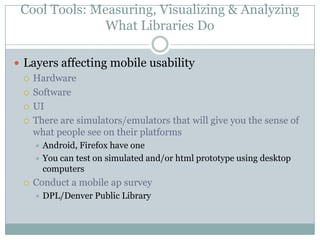
HighlightsCIL 2011
3 Things to Balance When Building Great Web Sites (Building Great Web Sites Session)1.  Useful2. Desirable 3.  UsableThink about what people need when they come onto our web site. This should drive our content strategy.Critical Tasks
Content AuditAssess content this way.Catalog every piece of contentConsider the following when assessing:AccuracyUsefulnessWeb-writtenOn-messageFrequency of useLast updated
Content Audit (cont)Rank each piece of content
Writing for the WebWrite in a conversational toneFriendlier and more inviting to usersMake content scannableMore bulletsBreak up informationMore white spaceRemove wordsMake urlsscannable
Writing for the webUse active voiceThe library=wePatrons=youPatrons=IOne thought per sentenceFragments can work in this genre
Site DesirabilitySite needs to be attractiveSkip clip artUse common conventions: grids, cms templatesMobile accessHelps narrow focusHelps increase accessSkokie public library as an example
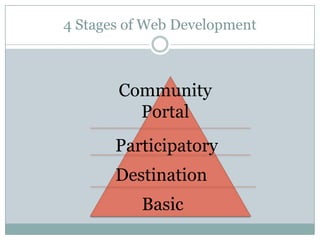
4 Stages of Web DevelopmentCommunity    PortalParticipatoryDestinationBasic
4 Stages DefinedBasicNecessary informationFunctionalityNo major usability issuesDestinationLibrary created contentBasic interactivityParticipatorySerious user generated contentPatrons creating cultureBook ReviewsWe put their stuff up, allow them the spaceCommunity PortalSite as a community platformSite as community knowledge-bank*Most sites 75% of the information isn’t getting looked at
Improve Your Library’s Web SiteArlington Public LibraryUse a blog to compliment their web sitePromote programsPress releases
Set Goals for their BlogNeeded a modern platform for newsAlso use for emergency postingsIt’s the place to talk about anything about the libraryLibrary as a single system but each library branch has its own identityPlace for community engagementsThe comments exceeded expectationThey get local news coverage from what they write on their blog “ARL Now”750 visits to their blog a day
Growing PainsCommunity engagementAdministration wasn’t comfortable with negative commentsRefined their comment policy as a resultCreated a governance planHow to handle the negative topicsHow to handle the “sensitive issues”Weekly PR meetingMonthly meeting to discuss news ideas
Other Blog FactsUse it as a second CMSHave tight integration into their web site, users moves between the blog and the site and don’t realizeHolistic media structureGood governance gives users what information they want
Darien Public Library (Conn)Community Tagging InitiativeAsked librarians to tag booksGave them specific goals (number of books they were asked to tag)Some for assignments for kidsNow they regularly tag their favorite booksPatrons also now tag booksKids for usefulness for assignmentsReaders in general to keep track of their reading lists**Hunter could do this for commonly researched topics or assignments**
Topeka PL, being “Metasocial”Status updatesLong postsBlogs, Wiki, longer descriptions under FlickR photos For events, news, articlesCommentsBlogs, YouTube, FlickR, FacebookVisual (Photos/Videos)A way to extend events by sharing them onlineLive StreamingCapture moments as they are happening
Topeka PL, being “Metasocial” (cont)Friending/Following/SubscribingChecking-inFacebook/FourSq, etc.Quick StuffLiking, rating, poking, fave, etc.Q.  What should we be doing?  Need goals, a strategy, write a project plan.
Three Keys to Engaging Digital NativesMichelle Manafy, Director of Content, Free Pint LimitedComputers in Libraries, March 21, 2011
By the time they finish college, kids today will have spent over 10,000 hours playing videogames, sent and received over 200,000 emails and instant messages and spent more than 10,000 hours talking on cell phones.  —Mark PrenskyThose who turn 15 in 2016 are likely to spend between 1,200 and 1,500 hours a year on digital technologies. —Urs GasserBy 2018, Digital Natives will have “transformed the workplace,” changing organizations, sweeping away many previous expectations in the process. — Gartner GroupDigital Natives will be “the beneficiaries of hidden advantages …that allow them to learn and work … in ways that others cannot.” —Macolm Gladwell
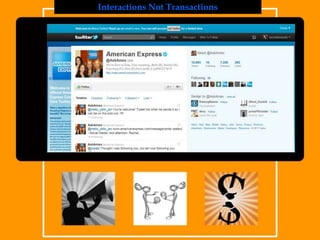
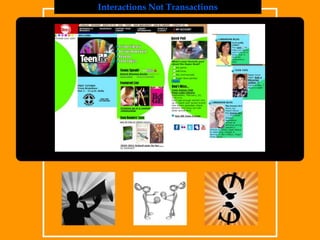
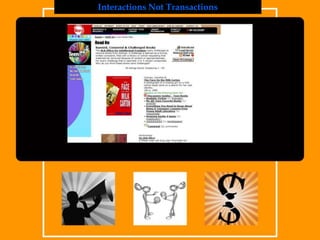
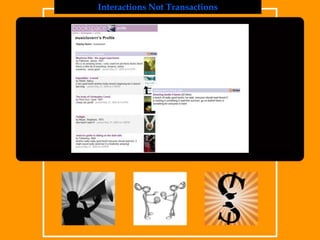
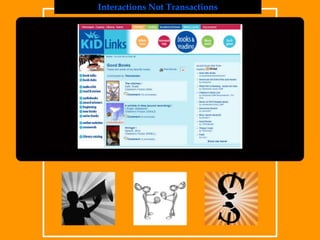
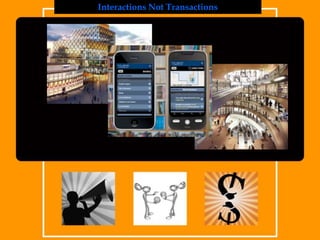
Interactions Not Transactions
Three Keys to Engaging Digital NativesPublic Opinion not Private Lives Knowledge Sharing not Knowledge HoardingInteractions not Transactions
ConnectFollow me on Twitter http://twitter.com/michellemanafyConnect with me on LinkedInhttp://www.linkedin.com/in/michellemanafyLearn more about our work at FreePint http://www.freepint.comRead the book
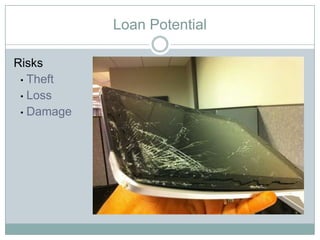
Loan PotentialRisksTheft
Loss
DamageLoan PotentialInstitutions lending iPads
MIT (on 4hr loan)
NCSU (on 7 day loan)
FDU (on 2hr loan, can’t leave library)
Boston College (2 day loan)
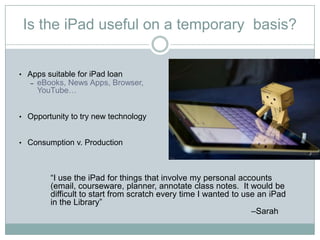
Preloaded with apps and App Store disabledIs the iPad useful on a temporary  basis?Apps suitable for iPad loan
eBooks, News Apps, Browser, YouTube…
Opportunity to try new technology
Consumption v. Production“I use the iPad for things that involve my personal accounts (email, courseware, planner, annotate class notes.  It would be difficult to start from scratch every time I wanted to use an iPad in the Library”                                                                                      –Sarah
Wider ImplicationsProject: iPad,  not yet completed
Luxury Item… to pervasive technology
Designing for the iPad / Tablet.Wider ImplicationsiPad for Academic UseFlexible / Fast computing
Other Tablet Devices
Consumption vs. ProductionUsing iPad, Track B, Ryerson UniversityGreat commuting companionVLC player ap can convert file formatsRead it Later ap allows you to save html to read pages without internet accessDropbox, 2G virual spaceCalendar that’s nativeiStudz, ap calendar geared for studentsABC Notes, ap sticky reminder notes
Using iPad, Track B, Ryerson UniversityAps popular with their students using library iPadsMypantoneSlideshow (for presentations)IbrainstormIannotateInstapaperFlashcard deluxe
Using iPad, Track B, Ryerson UniversityGeneral FindingsMore sections with more students using the iPads would’ve been helpfulGive the students gift cards to get more aps installedGet more licenses for the softwareGet more peripheralsWould consider other tablet computers as well, none were available at the time of this study
Using iPad, Track B, Ryerson UniversityChallenges1st generation hardwareInitial setupContent licensingBlogging platformLoan PotentialRisks are theft, loss and damageOther schools that do it:  Boston College, MIT, NCSU, but they come preloaded and aps cannot be be added.
Using iPad, Track B, Ryerson UniversityUseful?Cool to try new technologiesConsider consumption vs. productionArticle in “Inside Higher Ed” talks about thisFlexible and fast computingAlso consider other tablet devices
1. Planet SurveyThe culture of surveying runs deep“Librarians as sociologists” –or, my first survey ventureTo understand the entirety of the faculty world, we need to look beyond our own survey effortsSome important surveyors we should follow
The Higher-Ed “Industry” LevelUCLA’s Higher Education Research Institute and Cooperative Institutional Research ProgramLongitudinal studies of college lifeFaculty coverage emphasizes quality of life, compensation, classroom realities, administrative relationships. In short: A gold mine of dataThe American College Teacher: National Norms for 2007-08 (March 2009)HERI provides a larger-than-library view of faculty life, and their data are instructive for usOther organizations, including The College Board, study faculty issues too
Two Definitive Survey LeadersIn a crowded field of library-surveyors, some stand out. My top picks:	The University of Washington Libraries Faculty Library Use Survey	Emory University Library SurveyBoth institutions share their data as widely as possible
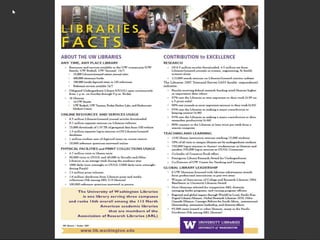
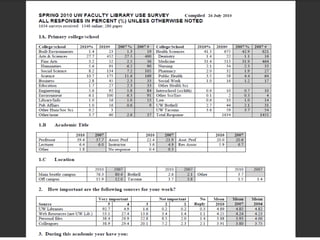
The University of Washington LibrariesSurveys users annually and longitudinallyBreaks them down by user type, discipline and a host of other descriptorsAggressively surveys the facultyHas sustained these efforts for yearsThe result: a faculty user population that is responsiveA key benefit: survey efforts provide a foundation for communication, alliance building and other strategic efforts
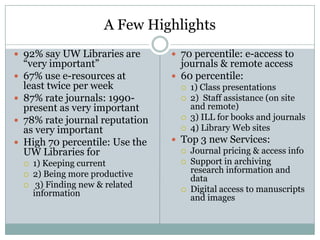
A Few Highlights92% say UW Libraries are “very important”67% use e-resources at least twice per week87% rate journals: 1990-present as very important78% rate journal reputation as very importantHigh 70 percentile: Use the UW Libraries for 1) Keeping current 2) Being more productive 3) Finding new & related information70 percentile: e-access to journals & remote access60 percentile:  1) Class presentations 2)  Staff assistance (on site and remote)3) ILL for books and journals4) Library Web sitesTop 3 new Services:Journal pricing & access infoSupport in archiving research information and dataDigital access to manuscripts and images
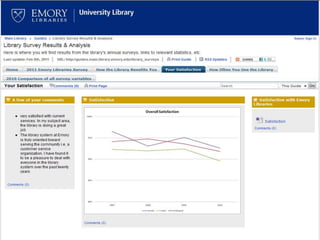
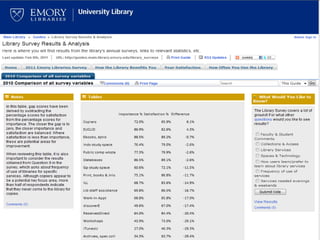
Emory University Library FindingsExtensive surveying and good response ratesTop Five Services:CatalogE-BooksDatabasesPrint BooksWalk-in Reference AppointmentsThese are dynamic and change
Some Further Notes From the FieldFormal sources trump informal (Hart, 1997)By discipline: Faculty consult “newer” and “older” sources (Maughan, 1999)Many surveys focus site visits versus onlineFaculty are following content, i.e. they’ll use print-or-digital as needed (Budd et al 2003)Ag- and Bioscience faculty favor their primary, “canonical” literature (Kurupuu et al, 2006)
Some Further Notes From the FieldThey may not use value-added utilities, e.g., Google images vsArtSTOR (Gregory, 2007)84% favored self-guided library tutorials; class presentations ranked lower (Hrycaj et al, 2007)At 6 large campuses, 49% started with Google and the remainder with the Library webMore articles retrieved from library-licensed content (Niu et al, 2009, 2010):
Some TakeawaysThe faculty employ many info-retrieval stylesThey value library services in many waysThey respond to persistent library marketingThey are primarily focused on institution- and discipline-level concernsBut, Some good news: a majority accept the idea that we have something to say about digital futures
4. Turning the Ithaka S + R 2009Faculty SurveyAimed at many readers, far beyond the information professionsSeeks to make definitive statements that can inform strategic planning
Ithaka’s Key FindingsMore faculty start at the “network” level (49%)Three categories define library services:“Gateway”“Buyer”“Archive”Each role carries both risk— but also opportunityEach category encompasses a universe of activityThe Eternal Optimist: Let’s look at the risks and also at the opportunities that the data suggest
“The Gateway”E-access, counseling, one-to-one—all contactA gradual decline in recognition of “Gateway” services (70% 2003, 59% 2009)This despite major investments in access (electronic, the commons, the staff)The Risk: Ithaka questions reference & other outreach can hold faculty attentionThe Opportunity: New roles, new services and new identities.  In other words, what we’re doing
“The Buyer”Widely recognized as important, particularly among humanistsEmerging as a key “identity” for research librariesThe down side: We do much more than buy resources; This moniker doesn’t tell the larger storyThe up side: We are still working out the long-term advantages that come with the buyer roleThe Opportunity:  Use branding, outreach and personal relationships to expand upon this area of strength
“The Archive”Humanists continue to value this roleThe sciences and social sciences less so—but are they aware of all our e-archiving roles?Academics have mixed reactions to repositoriesTraditional peer-reviewed pipelines matter the mostThe Opportunity: Link “persistence” to institutional identity. Join forces with institutional surveyors for greater impact
New Roles: “Teaching Support” and “Research Support”60% rate both teaching and research support as importantThe “Key Insights” report doesn’t focus on online teaching and teaching portals per seThe Opportunity:  Follow the faculty into online teaching domains and co-create with them
A Forceful Question:“Because faculty have easy access to content online, the role librarians play at this institution is becoming less important”Only 14% strongly agreed with this statementBut that’s up from 8% in 2006 The opportunity: We can still advance our strategic roles through a variety of opportunistic strategies
5. The Limits of SurveysSurvey data are compass pointsWisdom gained “on the ground” is crucial for understanding faculty needsWe possess direct knowledge of the user community, and must trust our instincts
Innovative, Trend-Setting ActivitiesNew digital roles:Library content management & leadership—ranging from webmaster to editorial workPre-publication content managementThe California Curation Center’s (UC3) NSF-funded data management tool development effortOnline teaching tools are a new frontier, and are evolving quickly
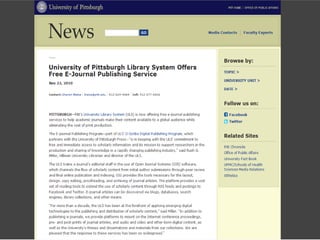
Libraries and the Future of ContentWe posses all the needed skills to act as  a publisherLibrary-driven publishing can link research, creation and archiving togetherExamples:  UC eScholarship, University of Pittsburgh’s electronic journal platform
Where Ithaka and I Agree:  Collaboration is CrucialLink our survey data with IROs, othersExtract the most useful findings from surveys such as Ithaka’sMatch solid survey efforts with strategic analysis of the organization (universities) and the stakeholders (e.g., the faculty)
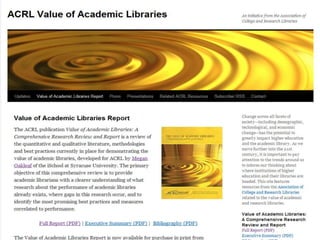
ACRL’s Work Shows the WayOatleaf, Megan. The Value of Academic Libraries: A Comprehensive Research Review and Report. Chicago, ACRL, 2010
Key Recommendations From The ReportDo not accept that libraries are “ancillary”Publish and lecture in other higher-education professional venues— not just our ownConnect library “value” to institutional research missionsJoin the college accreditation processesMake liaisons with sponsored research officesIntegrate teaching-related library resources (online and more)
ConclusionsFollow faculty surveys, to be sure—including Ithaka!Test survey findings by searching for “opportunity” where data suggest “risk”Engage the faculty directlyTest your own hypotheses, suppositions and postulationsForm alliances within and beyond the library, with other faculty surveyors
ReferencesBudd, John M. and Christenson, Corrie.  Social Sciences Literature and Electronic Information. Portal:  Libraries and the academy 3.4 (2003) 643-651Emory University, Library Survey Home Page: http://guides.main.library.emory.edu/content.php?pid=106575&sid=1075550Faculty Attitudes and Behaviors Regarding Scholarly Communication: Survey Findings from the University of California, August 2007. http://osc.universityofcalifornia.edu/OSC-survey-instrument-20070828.pdfGregory, Tori R. Under-Served or Under-Surveyed: The Information Needs of Studio Art Faculty in the Southwestern United States. Art Documentation, Vol. 26, No 2, 2007Hart, Richard L. Information gathering among the faculty of a comprehensive college:  Formality and Globality.Journal of Academic Librarianship, Vol. 23, No. 1, January 1997Higher Education Research Institute at UCLA, Cooperative Institutional Research Program.  Retrieved from http://www.heri.ucla.edu/index.phpHrycaj, Paul, and Russo, Michael. Reflections on Surveys of Faculty Attitudes Toward Collaboration with Librarians. Journal of Academic Librarianship, Vol. 33, No. 6  December 2007 Ithaka S +R. Faculty Survey 2009: Key Strategic Insights for Libraries, Publishers, and Societies.  By Roger C. Schonfeld and Ross Housewright. Retrieved from  http://www.ithaka.org/ithaka-s-r/research/faculty-surveys-2000-2009Kurupuu, Pali U., and Gruber, Anne Marie. Understanding the information needs of academic scholars in agricultural and biological sciences. . Journal of Academic Librarianship, Vol. 32, No 6, 609-623, November 2006Maughan, Patricia Davitt. Library Resources and Services:  A Cross-Disciplinary Survey of Faculty and Graduate Student Use and Satisfaction. Journal of Academic Librarianship  Vol. 25, No. 5 354-66, September 1999Niu, Xi, and Hemminger, Brad. Information Resources Used by Academic Professors of the United States in the Electronic Age. iConference 2009.  Retrieved from http://hdl.handle.net/2142/15338Niu, Xu, et al. National Study of Information Seeking Behavior of Academic Researchers in the United States.  JASIS, Vo. 61, No. 5, 869-90, 2010.Nyquist, Corrine. An Academic Librarian’s Response to the “ITHAKA Faculty Survey 2009: Key Strategic Insights for Libraries, Publishers and Societies.”  Journal of Interlibrary Loan, Document Delivery & Electronic Reserve 20:4, 275-280
Value of Academic Libraries: A Comprehensive Research Review and Report. Chicago: Association of College and Research Libraries, 2010.  Retrieved from http://www.acrl.ala.org/value/Shulenberger, David. The Relationship Between University Assessment and Library Assessment. Library Assessment Conference , Baltimore, 2010.  Retrieved from libraryassessment.org/bm~doc/shulenburger_david.pdf
Faculty Info Using Behaviors (Terence K. Huwe)General FindingsFaculty consult older and newer sourcesMore articles are being downloaded from databasesThey value library servicesThey respond to persistent library marketingThe library as a “gateway”Electronic journalsReferenceGateway to knowledge of the sources
Faculty Info Using Behaviors (Terence K. Huwe)General FindingsThe library as “buyer”We buy materialsWe can use this as branding, outreach and personal relationships to expand upon this area of strengthThe library as “archive”Librarians should think opportunisticallyLibraries should follow faculty into new electronic domains
111,000,000 users in the United States. (30% of all Facebook users)
100 million active Facebook users on a mobile device.
500,000 active applications.
50% log into the site on a daily basis.More Facebook FactsAverage user has 130 friends.
There are over 900 million objects that people interact with (pages, groups, events and community pages).
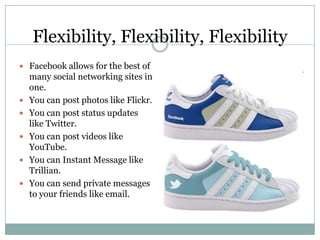
Average user is connected to 80 community pages, groups and events. Flexibility, Flexibility, FlexibilityFacebook allows for the best of many social networking sites in one.You can post photos like Flickr.You can post status updates like Twitter.You can post videos like YouTube.You can Instant Message like Trillian.You can send private messages to your friends like email.
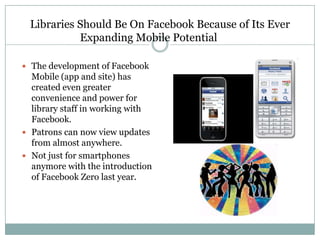
Libraries Should Be On Facebook Because of Its Ever Expanding Mobile Potential	The development of Facebook Mobile (app and site) has created even greater convenience and power for library staff in working with Facebook.Patrons can now view updates from almost anywhere.Not just for smartphones anymore with the introduction of Facebook Zero last year.
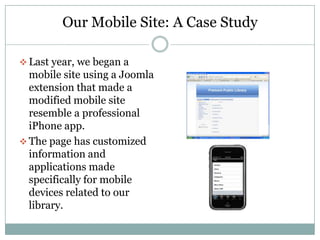
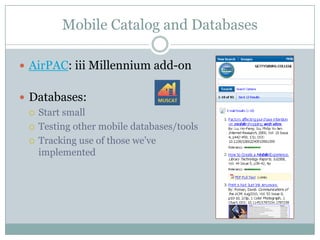
Our Mobile Site: A Case StudyLast year, we began a mobile site using a Joomla extension that made a modified mobile site resemble a professional iPhone app.
The page has customized information and applications made specifically for mobile devices related to our library.What We LearnedDoing it ourselves can cause a great number of headaches when compared with the ease of Facebook.
Doing it ourselves allowed us to do a few things not available through Facebook.
But was the trade off worth it?What Else We LearnedNobody really used our mobile site, but we continued to receive feedback about our Facebook page.
Based on our library’s size and budget, continued development on such a site was not worth the effort.
Our mobile site has now become merely a static informational tool.
Leave It To Beaver was a really great show!So Now…The Secrets of Our Facebook SuccessBe unique.
Be practical.
Be innovative.
Be fun.And One Last Piece of Advice…Try not to duplicate your web site.Your Facebook page needs to be different.
Now My Young Jedi, Tell Me Something I Don’t Know!You can embed one blog as a RSS feed into your library’s Facebook pageYou can create customized links at the side of your page utilizing Facebook Markup Language.
We Interrupt This Program To Bring You This Important Update…In the most recent update to Facebook Pages, Administrators can now browse Facebook as a page and interact with other pages.
WE GOT APPS!Applications can now be easily added as links to your Facebook page.For example, embed your favorite books and great author quotes through the GoodReads app.
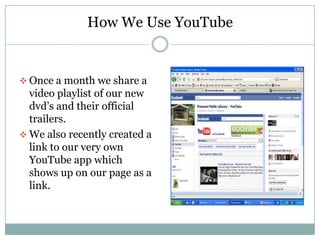
How We Use YouTubeOnce a month we share a video playlist of our new dvd’s and their official trailers.
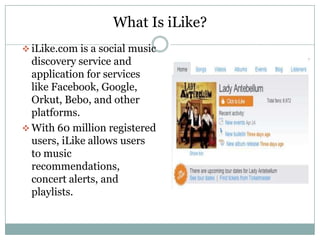
We also recently created a link to our very own YouTube app which shows up on our page as a link.What Is iLike?iLike.com is a social music discovery service and application for services like Facebook, Google, Orkut, Bebo, and other platforms.
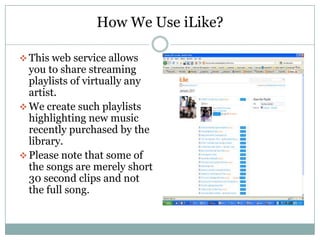
With 60 million registered users, iLike allows users to music recommendations, concert alerts, and playlists.How We Use iLike?This web service allows you to share streaming playlists of virtually any artist.
We create such playlists highlighting new music recently purchased by the library.
Please note that some of the songs are merely short 30 second clips and not the full song.PodcastsWe publish technology training podcasts through iLike.com.
iLike supplies the streaming player for all our broadcasting needs.
We have created a tab that allows you to listen to the recording directly in Facebook.Dapper.netDapper is a free web-based service that allows you to extract information from any web site by using data mapping.
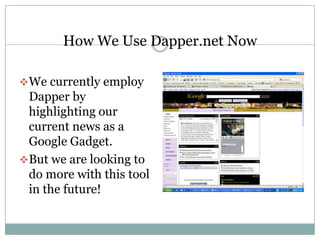
Options include rss feeds, Google gadgets, widgets, xml, and more.How We Use Dapper.net NowWe currently employ Dapper by highlighting our current news as a Google Gadget.
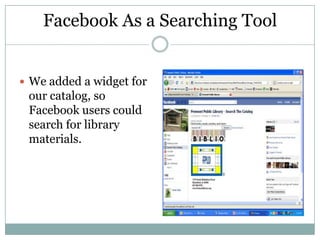
But we are looking to do more with this tool in the future!Facebook As a Searching ToolWe added a widget for our catalog, so Facebook users could search for library materials.
Facebook As a Communication ToolA Facebook page allows you to message your fans directly.Use at your own risk as you do not wish to overload your fans with too many notifications.
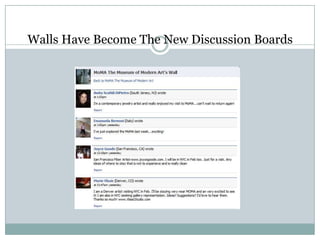
Walls Have Become The New Discussion Boards
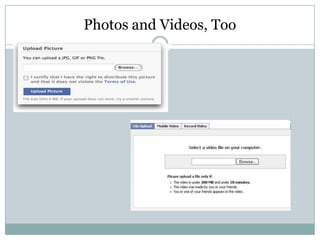
Photos and Videos, Too
Battle of the Social Network Stars: Twitter Vs. FacebookThe services have different purposes.Twitter is active communication.Facebook is passive communication.
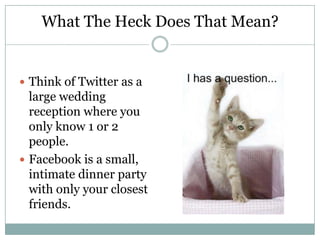
What The Heck Does That Mean?Think of Twitter as a large wedding reception where you only know 1 or 2 people.Facebook is a small, intimate dinner party with only your closest friends.
What We Learned About TwitterWith just a few followers, the number of tweets increased very rapidly in a matter of minutes.Creating original tweets that are interesting to your followers is a full-time job.The 3rd party apps for Twitter seem slower and sometimes require a new tab to open on your browser.
Our First Attempt at Integration: FacebookTwitterThis app will connect your Facebook account and Twitter account allowing your Facebook updates to post on your Twitter.
What We DiscoveredThe Facebook updates were generally too long when posted to Twitter creating links that meant nothing.Attempting to post from Twitter to Facebook did not work at all.
What Else We LearnedFamous people and winners, more so than anyone else, love to tweet.For that reason, more so than any other, are we sometimes fascinated by Twitter.
How Did We Make Our Twitter FlyWe began to follow famous authors and retweeted their posts.Our users could hear what their favorite author was doing, writing about, watching on tv, listening to on the radio.
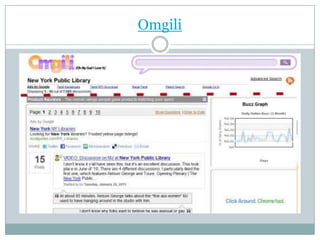
Omgili
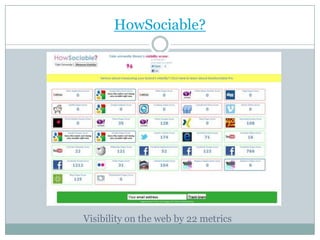
HowSociable?Visibility on the web by 22 metrics
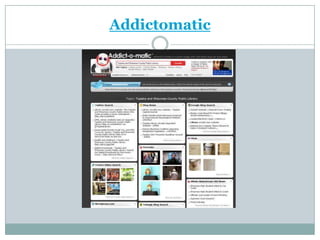
Addictomatic
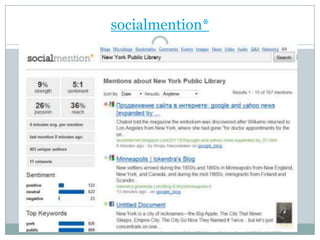
socialmention*
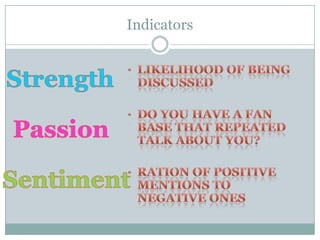
Indicatorslikelihood of being discussed
do you have a fan base that repeated talk about you?
ration of positive mentions to negative onesStrengthPassionSentiment
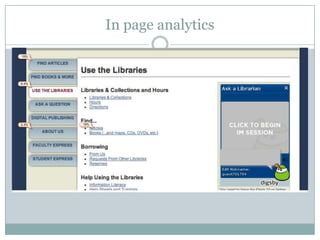
Google analytics in page analytics	Available from Content sectionVisualize user interaction
In page analytics
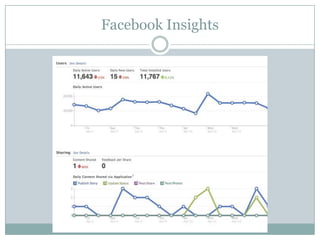
Facebook InsightsQuantitative: fans, users, page viewsEngagement: Likes, comments
Facebook Insights
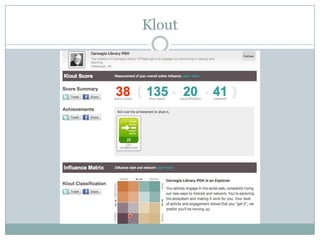
Kloutmeasurement of overall online influencefrom 1 to 100 with higher scores representing a wider and stronger sphere of influence uses over 35 variables on Facebook and Twitter
Klout
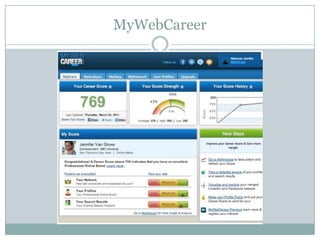
MywebcareerDiscover, evaluate and monitor your professional online brandFICO-like career score: 350-850
MyWebCareer
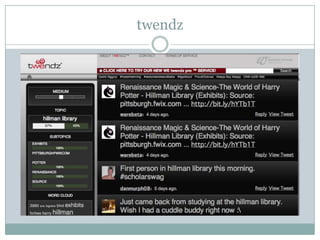
twendz
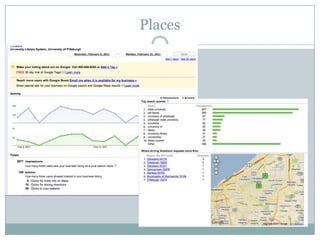
Google PlacesActivity: views, impressionsActions: maps, driving directions, clicks to website
Places
HootsuiteSocial media dashboardRecently added analytics
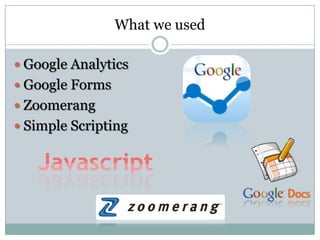
What we usedGoogle AnalyticsGoogle FormsZoomerangSimple Scripting
Google Analytics: Dead Simple ImplementationSign up at google.com/analyticsEnter the URL for your site’s home page into the Website’s URL boxAdd a simple script to the html code of your website (Google supplies the code)Use Sams Teach Yourself Google Analytics in 10 Minutes by Michael Miller
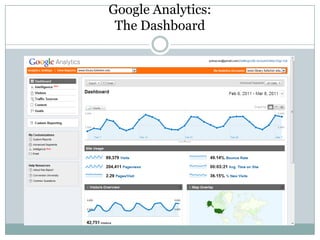
Google Analytics: The Dashboard
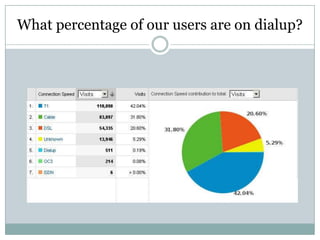
What percentage of our users are on dialup?
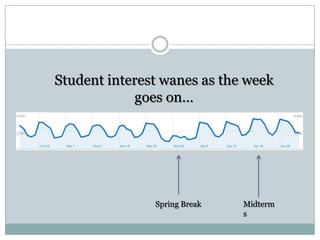
Traffic PatternsStudent interest wanes as the week goes on…Spring BreakMidterms
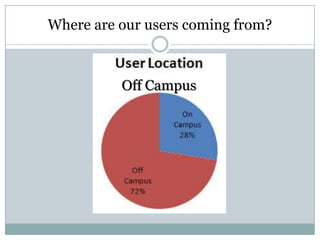
Where are our users coming from?Off Campus
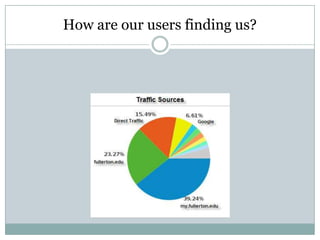
How are our users finding us?
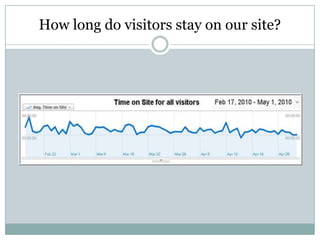
How long do visitors stay on our site?
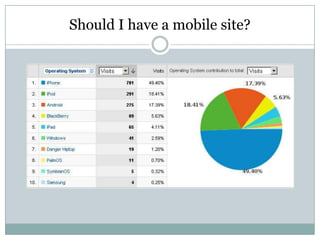
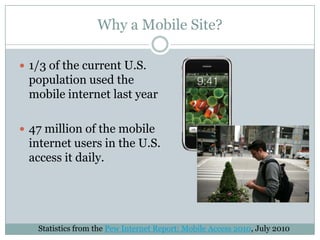
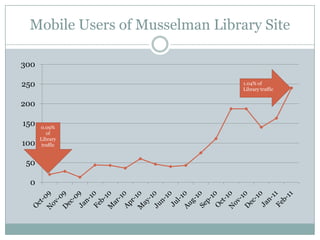
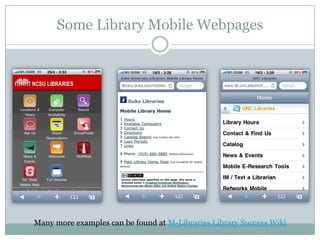
Should I have a mobile site?
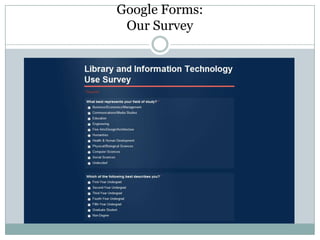
Google Forms: Our Survey
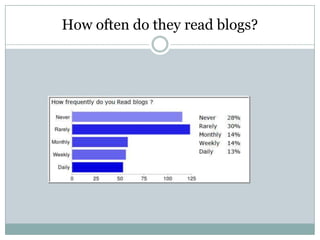
How often do they read blogs?
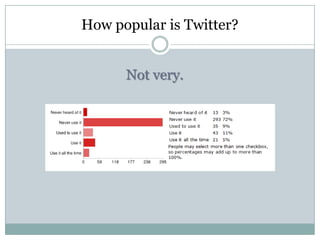
How popular is Twitter?Not very.
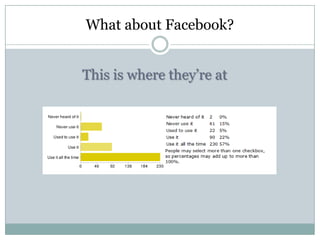
What about Facebook?This is where they’re at
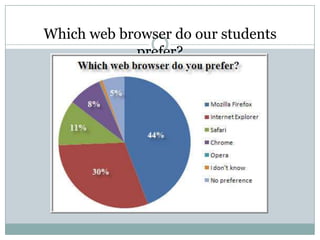
Which web browser do our students prefer?
Why use In-House Web Metrics Tools?Analytics used to have issues with external linksWe wanted to define what a session wasWanted to more closely define on-campus private IP locations
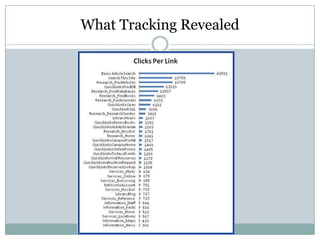
What we usedJavascript event captureEvents captured were keypress, mouse clicks and scrollsExternal file, script called on each page –similar to Google AnalyticsEvents captured and stored in a database Tutorials available on the web
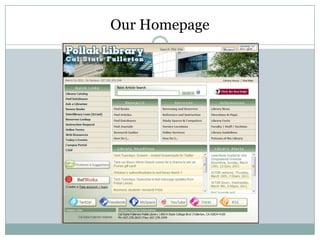
Our Homepage
What Tracking Revealed
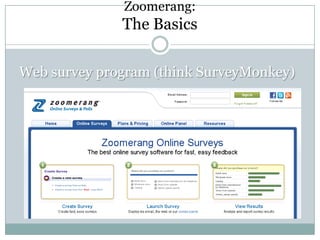
Zoomerang: The BasicsWeb survey program (think SurveyMonkey)
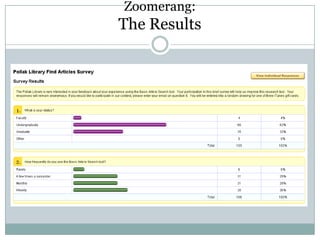
Zoomerang: The Results
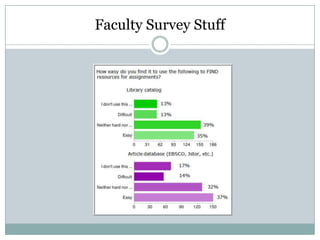
Faculty Survey Stuff
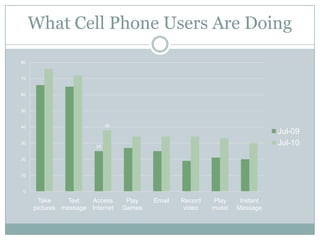
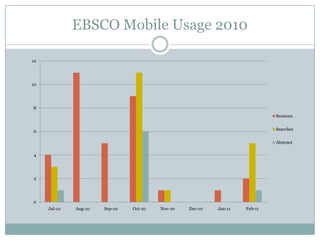
Why a Mobile Site?1/3 of the current U.S. population used the mobile internet last year47 million of the mobile internet users in the U.S. access it daily.Statistics from the Pew Internet Report: Mobile Access 2010, July 2010
What Cell Phone Users Are Doing

Cis2011 report

  • 1.
  • 2.
    3 Things toBalance When Building Great Web Sites (Building Great Web Sites Session)1. Useful2. Desirable 3. UsableThink about what people need when they come onto our web site. This should drive our content strategy.Critical Tasks
  • 3.
    Content AuditAssess contentthis way.Catalog every piece of contentConsider the following when assessing:AccuracyUsefulnessWeb-writtenOn-messageFrequency of useLast updated
  • 4.
    Content Audit (cont)Rankeach piece of content
  • 5.
    Writing for theWebWrite in a conversational toneFriendlier and more inviting to usersMake content scannableMore bulletsBreak up informationMore white spaceRemove wordsMake urlsscannable
  • 6.
    Writing for thewebUse active voiceThe library=wePatrons=youPatrons=IOne thought per sentenceFragments can work in this genre
  • 7.
    Site DesirabilitySite needsto be attractiveSkip clip artUse common conventions: grids, cms templatesMobile accessHelps narrow focusHelps increase accessSkokie public library as an example
  • 8.
    4 Stages ofWeb DevelopmentCommunity PortalParticipatoryDestinationBasic
  • 9.
    4 Stages DefinedBasicNecessaryinformationFunctionalityNo major usability issuesDestinationLibrary created contentBasic interactivityParticipatorySerious user generated contentPatrons creating cultureBook ReviewsWe put their stuff up, allow them the spaceCommunity PortalSite as a community platformSite as community knowledge-bank*Most sites 75% of the information isn’t getting looked at
  • 10.
    Improve Your Library’sWeb SiteArlington Public LibraryUse a blog to compliment their web sitePromote programsPress releases
  • 11.
    Set Goals fortheir BlogNeeded a modern platform for newsAlso use for emergency postingsIt’s the place to talk about anything about the libraryLibrary as a single system but each library branch has its own identityPlace for community engagementsThe comments exceeded expectationThey get local news coverage from what they write on their blog “ARL Now”750 visits to their blog a day
  • 12.
    Growing PainsCommunity engagementAdministrationwasn’t comfortable with negative commentsRefined their comment policy as a resultCreated a governance planHow to handle the negative topicsHow to handle the “sensitive issues”Weekly PR meetingMonthly meeting to discuss news ideas
  • 13.
    Other Blog FactsUseit as a second CMSHave tight integration into their web site, users moves between the blog and the site and don’t realizeHolistic media structureGood governance gives users what information they want
  • 14.
    Darien Public Library(Conn)Community Tagging InitiativeAsked librarians to tag booksGave them specific goals (number of books they were asked to tag)Some for assignments for kidsNow they regularly tag their favorite booksPatrons also now tag booksKids for usefulness for assignmentsReaders in general to keep track of their reading lists**Hunter could do this for commonly researched topics or assignments**
  • 15.
    Topeka PL, being“Metasocial”Status updatesLong postsBlogs, Wiki, longer descriptions under FlickR photos For events, news, articlesCommentsBlogs, YouTube, FlickR, FacebookVisual (Photos/Videos)A way to extend events by sharing them onlineLive StreamingCapture moments as they are happening
  • 16.
    Topeka PL, being“Metasocial” (cont)Friending/Following/SubscribingChecking-inFacebook/FourSq, etc.Quick StuffLiking, rating, poking, fave, etc.Q. What should we be doing? Need goals, a strategy, write a project plan.
  • 17.
    Three Keys toEngaging Digital NativesMichelle Manafy, Director of Content, Free Pint LimitedComputers in Libraries, March 21, 2011
  • 18.
    By the timethey finish college, kids today will have spent over 10,000 hours playing videogames, sent and received over 200,000 emails and instant messages and spent more than 10,000 hours talking on cell phones. —Mark PrenskyThose who turn 15 in 2016 are likely to spend between 1,200 and 1,500 hours a year on digital technologies. —Urs GasserBy 2018, Digital Natives will have “transformed the workplace,” changing organizations, sweeping away many previous expectations in the process. — Gartner GroupDigital Natives will be “the beneficiaries of hidden advantages …that allow them to learn and work … in ways that others cannot.” —Macolm Gladwell
  • 19.
  • 20.
  • 21.
  • 22.
  • 23.
  • 24.
  • 25.
  • 26.
  • 27.
  • 28.
  • 29.
    Three Keys toEngaging Digital NativesPublic Opinion not Private Lives Knowledge Sharing not Knowledge HoardingInteractions not Transactions
  • 30.
    ConnectFollow me onTwitter http://twitter.com/michellemanafyConnect with me on LinkedInhttp://www.linkedin.com/in/michellemanafyLearn more about our work at FreePint http://www.freepint.comRead the book
  • 31.
  • 32.
  • 33.
  • 34.
  • 35.
    NCSU (on 7day loan)
  • 36.
    FDU (on 2hrloan, can’t leave library)
  • 37.
  • 38.
    Preloaded with appsand App Store disabledIs the iPad useful on a temporary basis?Apps suitable for iPad loan
  • 39.
    eBooks, News Apps,Browser, YouTube…
  • 40.
    Opportunity to trynew technology
  • 41.
    Consumption v. Production“Iuse the iPad for things that involve my personal accounts (email, courseware, planner, annotate class notes. It would be difficult to start from scratch every time I wanted to use an iPad in the Library” –Sarah
  • 42.
  • 43.
    Luxury Item… topervasive technology
  • 44.
    Designing for theiPad / Tablet.Wider ImplicationsiPad for Academic UseFlexible / Fast computing
  • 45.
  • 46.
    Consumption vs. ProductionUsingiPad, Track B, Ryerson UniversityGreat commuting companionVLC player ap can convert file formatsRead it Later ap allows you to save html to read pages without internet accessDropbox, 2G virual spaceCalendar that’s nativeiStudz, ap calendar geared for studentsABC Notes, ap sticky reminder notes
  • 47.
    Using iPad, TrackB, Ryerson UniversityAps popular with their students using library iPadsMypantoneSlideshow (for presentations)IbrainstormIannotateInstapaperFlashcard deluxe
  • 48.
    Using iPad, TrackB, Ryerson UniversityGeneral FindingsMore sections with more students using the iPads would’ve been helpfulGive the students gift cards to get more aps installedGet more licenses for the softwareGet more peripheralsWould consider other tablet computers as well, none were available at the time of this study
  • 49.
    Using iPad, TrackB, Ryerson UniversityChallenges1st generation hardwareInitial setupContent licensingBlogging platformLoan PotentialRisks are theft, loss and damageOther schools that do it: Boston College, MIT, NCSU, but they come preloaded and aps cannot be be added.
  • 50.
    Using iPad, TrackB, Ryerson UniversityUseful?Cool to try new technologiesConsider consumption vs. productionArticle in “Inside Higher Ed” talks about thisFlexible and fast computingAlso consider other tablet devices
  • 51.
    1. Planet SurveyTheculture of surveying runs deep“Librarians as sociologists” –or, my first survey ventureTo understand the entirety of the faculty world, we need to look beyond our own survey effortsSome important surveyors we should follow
  • 52.
    The Higher-Ed “Industry”LevelUCLA’s Higher Education Research Institute and Cooperative Institutional Research ProgramLongitudinal studies of college lifeFaculty coverage emphasizes quality of life, compensation, classroom realities, administrative relationships. In short: A gold mine of dataThe American College Teacher: National Norms for 2007-08 (March 2009)HERI provides a larger-than-library view of faculty life, and their data are instructive for usOther organizations, including The College Board, study faculty issues too
  • 53.
    Two Definitive SurveyLeadersIn a crowded field of library-surveyors, some stand out. My top picks: The University of Washington Libraries Faculty Library Use Survey Emory University Library SurveyBoth institutions share their data as widely as possible
  • 54.
    The University ofWashington LibrariesSurveys users annually and longitudinallyBreaks them down by user type, discipline and a host of other descriptorsAggressively surveys the facultyHas sustained these efforts for yearsThe result: a faculty user population that is responsiveA key benefit: survey efforts provide a foundation for communication, alliance building and other strategic efforts
  • 57.
    A Few Highlights92%say UW Libraries are “very important”67% use e-resources at least twice per week87% rate journals: 1990-present as very important78% rate journal reputation as very importantHigh 70 percentile: Use the UW Libraries for 1) Keeping current 2) Being more productive 3) Finding new & related information70 percentile: e-access to journals & remote access60 percentile: 1) Class presentations 2) Staff assistance (on site and remote)3) ILL for books and journals4) Library Web sitesTop 3 new Services:Journal pricing & access infoSupport in archiving research information and dataDigital access to manuscripts and images
  • 60.
    Emory University LibraryFindingsExtensive surveying and good response ratesTop Five Services:CatalogE-BooksDatabasesPrint BooksWalk-in Reference AppointmentsThese are dynamic and change
  • 61.
    Some Further NotesFrom the FieldFormal sources trump informal (Hart, 1997)By discipline: Faculty consult “newer” and “older” sources (Maughan, 1999)Many surveys focus site visits versus onlineFaculty are following content, i.e. they’ll use print-or-digital as needed (Budd et al 2003)Ag- and Bioscience faculty favor their primary, “canonical” literature (Kurupuu et al, 2006)
  • 62.
    Some Further NotesFrom the FieldThey may not use value-added utilities, e.g., Google images vsArtSTOR (Gregory, 2007)84% favored self-guided library tutorials; class presentations ranked lower (Hrycaj et al, 2007)At 6 large campuses, 49% started with Google and the remainder with the Library webMore articles retrieved from library-licensed content (Niu et al, 2009, 2010):
  • 63.
    Some TakeawaysThe facultyemploy many info-retrieval stylesThey value library services in many waysThey respond to persistent library marketingThey are primarily focused on institution- and discipline-level concernsBut, Some good news: a majority accept the idea that we have something to say about digital futures
  • 64.
    4. Turning theIthaka S + R 2009Faculty SurveyAimed at many readers, far beyond the information professionsSeeks to make definitive statements that can inform strategic planning
  • 65.
    Ithaka’s Key FindingsMorefaculty start at the “network” level (49%)Three categories define library services:“Gateway”“Buyer”“Archive”Each role carries both risk— but also opportunityEach category encompasses a universe of activityThe Eternal Optimist: Let’s look at the risks and also at the opportunities that the data suggest
  • 66.
    “The Gateway”E-access, counseling,one-to-one—all contactA gradual decline in recognition of “Gateway” services (70% 2003, 59% 2009)This despite major investments in access (electronic, the commons, the staff)The Risk: Ithaka questions reference & other outreach can hold faculty attentionThe Opportunity: New roles, new services and new identities. In other words, what we’re doing
  • 67.
    “The Buyer”Widely recognizedas important, particularly among humanistsEmerging as a key “identity” for research librariesThe down side: We do much more than buy resources; This moniker doesn’t tell the larger storyThe up side: We are still working out the long-term advantages that come with the buyer roleThe Opportunity: Use branding, outreach and personal relationships to expand upon this area of strength
  • 68.
    “The Archive”Humanists continueto value this roleThe sciences and social sciences less so—but are they aware of all our e-archiving roles?Academics have mixed reactions to repositoriesTraditional peer-reviewed pipelines matter the mostThe Opportunity: Link “persistence” to institutional identity. Join forces with institutional surveyors for greater impact
  • 69.
    New Roles: “TeachingSupport” and “Research Support”60% rate both teaching and research support as importantThe “Key Insights” report doesn’t focus on online teaching and teaching portals per seThe Opportunity: Follow the faculty into online teaching domains and co-create with them
  • 70.
    A Forceful Question:“Becausefaculty have easy access to content online, the role librarians play at this institution is becoming less important”Only 14% strongly agreed with this statementBut that’s up from 8% in 2006 The opportunity: We can still advance our strategic roles through a variety of opportunistic strategies
  • 71.
    5. The Limitsof SurveysSurvey data are compass pointsWisdom gained “on the ground” is crucial for understanding faculty needsWe possess direct knowledge of the user community, and must trust our instincts
  • 72.
    Innovative, Trend-Setting ActivitiesNewdigital roles:Library content management & leadership—ranging from webmaster to editorial workPre-publication content managementThe California Curation Center’s (UC3) NSF-funded data management tool development effortOnline teaching tools are a new frontier, and are evolving quickly
  • 73.
    Libraries and theFuture of ContentWe posses all the needed skills to act as a publisherLibrary-driven publishing can link research, creation and archiving togetherExamples: UC eScholarship, University of Pittsburgh’s electronic journal platform
  • 75.
    Where Ithaka andI Agree: Collaboration is CrucialLink our survey data with IROs, othersExtract the most useful findings from surveys such as Ithaka’sMatch solid survey efforts with strategic analysis of the organization (universities) and the stakeholders (e.g., the faculty)
  • 76.
    ACRL’s Work Showsthe WayOatleaf, Megan. The Value of Academic Libraries: A Comprehensive Research Review and Report. Chicago, ACRL, 2010
  • 78.
    Key Recommendations FromThe ReportDo not accept that libraries are “ancillary”Publish and lecture in other higher-education professional venues— not just our ownConnect library “value” to institutional research missionsJoin the college accreditation processesMake liaisons with sponsored research officesIntegrate teaching-related library resources (online and more)
  • 79.
    ConclusionsFollow faculty surveys,to be sure—including Ithaka!Test survey findings by searching for “opportunity” where data suggest “risk”Engage the faculty directlyTest your own hypotheses, suppositions and postulationsForm alliances within and beyond the library, with other faculty surveyors
  • 80.
    ReferencesBudd, John M.and Christenson, Corrie. Social Sciences Literature and Electronic Information. Portal: Libraries and the academy 3.4 (2003) 643-651Emory University, Library Survey Home Page: http://guides.main.library.emory.edu/content.php?pid=106575&sid=1075550Faculty Attitudes and Behaviors Regarding Scholarly Communication: Survey Findings from the University of California, August 2007. http://osc.universityofcalifornia.edu/OSC-survey-instrument-20070828.pdfGregory, Tori R. Under-Served or Under-Surveyed: The Information Needs of Studio Art Faculty in the Southwestern United States. Art Documentation, Vol. 26, No 2, 2007Hart, Richard L. Information gathering among the faculty of a comprehensive college: Formality and Globality.Journal of Academic Librarianship, Vol. 23, No. 1, January 1997Higher Education Research Institute at UCLA, Cooperative Institutional Research Program. Retrieved from http://www.heri.ucla.edu/index.phpHrycaj, Paul, and Russo, Michael. Reflections on Surveys of Faculty Attitudes Toward Collaboration with Librarians. Journal of Academic Librarianship, Vol. 33, No. 6 December 2007 Ithaka S +R. Faculty Survey 2009: Key Strategic Insights for Libraries, Publishers, and Societies. By Roger C. Schonfeld and Ross Housewright. Retrieved from http://www.ithaka.org/ithaka-s-r/research/faculty-surveys-2000-2009Kurupuu, Pali U., and Gruber, Anne Marie. Understanding the information needs of academic scholars in agricultural and biological sciences. . Journal of Academic Librarianship, Vol. 32, No 6, 609-623, November 2006Maughan, Patricia Davitt. Library Resources and Services: A Cross-Disciplinary Survey of Faculty and Graduate Student Use and Satisfaction. Journal of Academic Librarianship Vol. 25, No. 5 354-66, September 1999Niu, Xi, and Hemminger, Brad. Information Resources Used by Academic Professors of the United States in the Electronic Age. iConference 2009. Retrieved from http://hdl.handle.net/2142/15338Niu, Xu, et al. National Study of Information Seeking Behavior of Academic Researchers in the United States. JASIS, Vo. 61, No. 5, 869-90, 2010.Nyquist, Corrine. An Academic Librarian’s Response to the “ITHAKA Faculty Survey 2009: Key Strategic Insights for Libraries, Publishers and Societies.” Journal of Interlibrary Loan, Document Delivery & Electronic Reserve 20:4, 275-280
  • 81.
    Value of AcademicLibraries: A Comprehensive Research Review and Report. Chicago: Association of College and Research Libraries, 2010. Retrieved from http://www.acrl.ala.org/value/Shulenberger, David. The Relationship Between University Assessment and Library Assessment. Library Assessment Conference , Baltimore, 2010. Retrieved from libraryassessment.org/bm~doc/shulenburger_david.pdf
  • 82.
    Faculty Info UsingBehaviors (Terence K. Huwe)General FindingsFaculty consult older and newer sourcesMore articles are being downloaded from databasesThey value library servicesThey respond to persistent library marketingThe library as a “gateway”Electronic journalsReferenceGateway to knowledge of the sources
  • 83.
    Faculty Info UsingBehaviors (Terence K. Huwe)General FindingsThe library as “buyer”We buy materialsWe can use this as branding, outreach and personal relationships to expand upon this area of strengthThe library as “archive”Librarians should think opportunisticallyLibraries should follow faculty into new electronic domains
  • 84.
    111,000,000 users inthe United States. (30% of all Facebook users)
  • 85.
    100 million activeFacebook users on a mobile device.
  • 86.
  • 87.
    50% log intothe site on a daily basis.More Facebook FactsAverage user has 130 friends.
  • 88.
    There are over900 million objects that people interact with (pages, groups, events and community pages).
  • 89.
    Average user isconnected to 80 community pages, groups and events. Flexibility, Flexibility, FlexibilityFacebook allows for the best of many social networking sites in one.You can post photos like Flickr.You can post status updates like Twitter.You can post videos like YouTube.You can Instant Message like Trillian.You can send private messages to your friends like email.
  • 90.
    Libraries Should BeOn Facebook Because of Its Ever Expanding Mobile Potential The development of Facebook Mobile (app and site) has created even greater convenience and power for library staff in working with Facebook.Patrons can now view updates from almost anywhere.Not just for smartphones anymore with the introduction of Facebook Zero last year.
  • 91.
    Our Mobile Site:A Case StudyLast year, we began a mobile site using a Joomla extension that made a modified mobile site resemble a professional iPhone app.
  • 92.
    The page hascustomized information and applications made specifically for mobile devices related to our library.What We LearnedDoing it ourselves can cause a great number of headaches when compared with the ease of Facebook.
  • 93.
    Doing it ourselvesallowed us to do a few things not available through Facebook.
  • 94.
    But was thetrade off worth it?What Else We LearnedNobody really used our mobile site, but we continued to receive feedback about our Facebook page.
  • 95.
    Based on ourlibrary’s size and budget, continued development on such a site was not worth the effort.
  • 96.
    Our mobile sitehas now become merely a static informational tool.
  • 97.
    Leave It ToBeaver was a really great show!So Now…The Secrets of Our Facebook SuccessBe unique.
  • 98.
  • 99.
  • 100.
    Be fun.And OneLast Piece of Advice…Try not to duplicate your web site.Your Facebook page needs to be different.
  • 101.
    Now My YoungJedi, Tell Me Something I Don’t Know!You can embed one blog as a RSS feed into your library’s Facebook pageYou can create customized links at the side of your page utilizing Facebook Markup Language.
  • 102.
    We Interrupt ThisProgram To Bring You This Important Update…In the most recent update to Facebook Pages, Administrators can now browse Facebook as a page and interact with other pages.
  • 103.
    WE GOT APPS!Applicationscan now be easily added as links to your Facebook page.For example, embed your favorite books and great author quotes through the GoodReads app.
  • 104.
    How We UseYouTubeOnce a month we share a video playlist of our new dvd’s and their official trailers.
  • 105.
    We also recentlycreated a link to our very own YouTube app which shows up on our page as a link.What Is iLike?iLike.com is a social music discovery service and application for services like Facebook, Google, Orkut, Bebo, and other platforms.
  • 106.
    With 60 millionregistered users, iLike allows users to music recommendations, concert alerts, and playlists.How We Use iLike?This web service allows you to share streaming playlists of virtually any artist.
  • 107.
    We create suchplaylists highlighting new music recently purchased by the library.
  • 108.
    Please note thatsome of the songs are merely short 30 second clips and not the full song.PodcastsWe publish technology training podcasts through iLike.com.
  • 109.
    iLike supplies thestreaming player for all our broadcasting needs.
  • 110.
    We have createda tab that allows you to listen to the recording directly in Facebook.Dapper.netDapper is a free web-based service that allows you to extract information from any web site by using data mapping.
  • 111.
    Options include rssfeeds, Google gadgets, widgets, xml, and more.How We Use Dapper.net NowWe currently employ Dapper by highlighting our current news as a Google Gadget.
  • 112.
    But we arelooking to do more with this tool in the future!Facebook As a Searching ToolWe added a widget for our catalog, so Facebook users could search for library materials.
  • 113.
    Facebook As aCommunication ToolA Facebook page allows you to message your fans directly.Use at your own risk as you do not wish to overload your fans with too many notifications.
  • 114.
    Walls Have BecomeThe New Discussion Boards
  • 115.
  • 116.
    Battle of theSocial Network Stars: Twitter Vs. FacebookThe services have different purposes.Twitter is active communication.Facebook is passive communication.
  • 117.
    What The HeckDoes That Mean?Think of Twitter as a large wedding reception where you only know 1 or 2 people.Facebook is a small, intimate dinner party with only your closest friends.
  • 118.
    What We LearnedAbout TwitterWith just a few followers, the number of tweets increased very rapidly in a matter of minutes.Creating original tweets that are interesting to your followers is a full-time job.The 3rd party apps for Twitter seem slower and sometimes require a new tab to open on your browser.
  • 119.
    Our First Attemptat Integration: FacebookTwitterThis app will connect your Facebook account and Twitter account allowing your Facebook updates to post on your Twitter.
  • 120.
    What We DiscoveredTheFacebook updates were generally too long when posted to Twitter creating links that meant nothing.Attempting to post from Twitter to Facebook did not work at all.
  • 121.
    What Else WeLearnedFamous people and winners, more so than anyone else, love to tweet.For that reason, more so than any other, are we sometimes fascinated by Twitter.
  • 122.
    How Did WeMake Our Twitter FlyWe began to follow famous authors and retweeted their posts.Our users could hear what their favorite author was doing, writing about, watching on tv, listening to on the radio.
  • 123.
  • 124.
  • 125.
  • 126.
  • 127.
  • 128.
    do you havea fan base that repeated talk about you?
  • 129.
    ration of positivementions to negative onesStrengthPassionSentiment
  • 130.
    Google analytics inpage analytics Available from Content sectionVisualize user interaction
  • 131.
  • 132.
    Facebook InsightsQuantitative: fans,users, page viewsEngagement: Likes, comments
  • 133.
  • 134.
    Kloutmeasurement of overallonline influencefrom 1 to 100 with higher scores representing a wider and stronger sphere of influence uses over 35 variables on Facebook and Twitter
  • 135.
  • 136.
    MywebcareerDiscover, evaluate andmonitor your professional online brandFICO-like career score: 350-850
  • 137.
  • 138.
  • 139.
    Google PlacesActivity: views,impressionsActions: maps, driving directions, clicks to website
  • 140.
  • 141.
  • 142.
    What we usedGoogleAnalyticsGoogle FormsZoomerangSimple Scripting
  • 143.
    Google Analytics: DeadSimple ImplementationSign up at google.com/analyticsEnter the URL for your site’s home page into the Website’s URL boxAdd a simple script to the html code of your website (Google supplies the code)Use Sams Teach Yourself Google Analytics in 10 Minutes by Michael Miller
  • 144.
  • 145.
    What percentage ofour users are on dialup?
  • 146.
    Traffic PatternsStudent interestwanes as the week goes on…Spring BreakMidterms
  • 147.
    Where are ourusers coming from?Off Campus
  • 148.
    How are ourusers finding us?
  • 149.
    How long dovisitors stay on our site?
  • 150.
    Should I havea mobile site?
  • 151.
  • 152.
    How often dothey read blogs?
  • 153.
    How popular isTwitter?Not very.
  • 154.
    What about Facebook?Thisis where they’re at
  • 155.
    Which web browserdo our students prefer?
  • 156.
    Why use In-HouseWeb Metrics Tools?Analytics used to have issues with external linksWe wanted to define what a session wasWanted to more closely define on-campus private IP locations
  • 157.
    What we usedJavascriptevent captureEvents captured were keypress, mouse clicks and scrollsExternal file, script called on each page –similar to Google AnalyticsEvents captured and stored in a database Tutorials available on the web
  • 158.
  • 159.
  • 160.
    Zoomerang: The BasicsWebsurvey program (think SurveyMonkey)
  • 161.
  • 162.
  • 163.
    Why a MobileSite?1/3 of the current U.S. population used the mobile internet last year47 million of the mobile internet users in the U.S. access it daily.Statistics from the Pew Internet Report: Mobile Access 2010, July 2010
  • 164.
    What Cell PhoneUsers Are Doing