OUTCOMES: 
Student should be able to: 
0Explain the general form 0f C 
structure 
0Write, Compile & Execute of C 
programme 
2
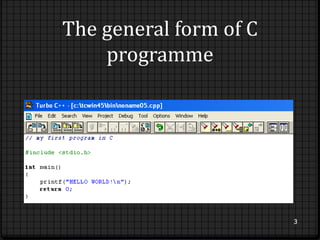
The general form of C 
programme 
3
Follow 3 steps: 
0 Enter the programme 
0 Compile the programme 
0 Run the programme 
2 terms: 
0 Source code – the human readable form of the 
programme. It is stored in a text file 
0 Object code – the executable form of the programme 
created by a compiler 
4
Write the general form of C 
programme 
0 Entering the programme 
The name of the file that holds the source code for the 
programme is technically arbitrary 
C programme are normally contained in files that use 
the file extension (.cpp) 
5
0 Compiling the programme 
You can compile your .cpp file depends on your 
compiler & what option you are using 
e.g: 
Microsoft Visual C++ Express Edition  provide 2 
different ways of compiling a programme: the 
command-line compiler & the Integrated Development 
Environment (IDE) 
6
0 Execute the debugged programme 
After a C programme has been compiled, it is ready to 
be run 
Since the output from a C compiler is executed object 
code, to run the programme, simply enter its name at 
the command prompt 
7
Pre-processor directives and 
header files 
0 Pre-processor 
Is the directive to enables the programme to use certain 
function contained in the external file such as <stdio.h> 
0 Header file 
Contain specific functions that used to accomplish the 
programming task 
e.g: ctype.h, math.h 
8
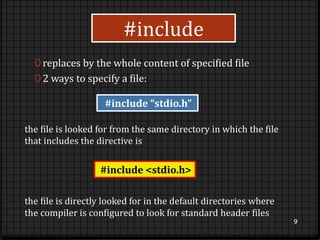
#include 
0 replaces by the whole content of specified file 
0 2 ways to specify a file: 
9 
#include “stdio.h” 
the file is looked for from the same directory in which the file 
that includes the directive is 
#include <stdio.h> 
the file is directly looked for in the default directories where 
the compiler is configured to look for standard header files
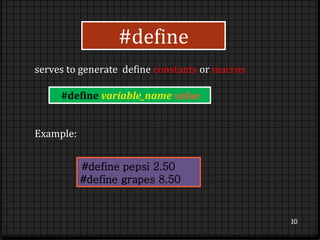
serves to generate define constants or macros 
10 
#define 
#define variable_name value 
#define pepsi 2.50 
#define grapes 8.50 
Example:
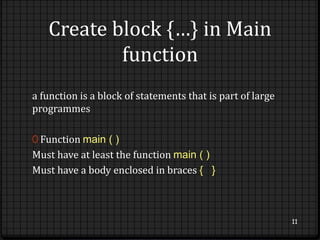
Create block {…} in Main 
function 
a function is a block of statements that is part of large 
programmes 
0 Function main ( ) 
Must have at least the function main ( ) 
Must have a body enclosed in braces { } 
11
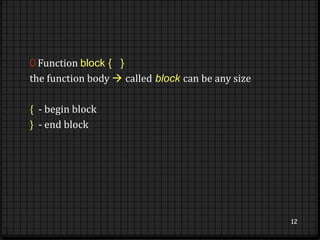
0 Function block { } 
the function body  called block can be any size 
{ - begin block 
} - end block 
12
Create return statement in 
programmes 
0 terminates the execution of a function and returns 
control to the calling function 
0 can also return a value to the calling function 
13
Comments 
0 useful for a variety of purposes 
0 provide the easiest way to point out specific parts of 
code 
0 2 forms: 
//  single line comment 
/* …..*/  multi line comment 
14
Single line comment 
0 useful for simple ‘side’ notes that explain what certain 
parts of the code do 
0 places: next to variable declarations & next to pieces 
of code that may need explanation 
15
0 Example: 
//this is first line 
//this is second line 
//this is third line 
//this is fourth line 
16
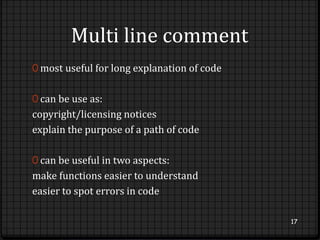
Multi line comment 
0 most useful for long explanation of code 
0 can be use as: 
copyright/licensing notices 
explain the purpose of a path of code 
0 can be useful in two aspects: 
make functions easier to understand 
easier to spot errors in code 
17
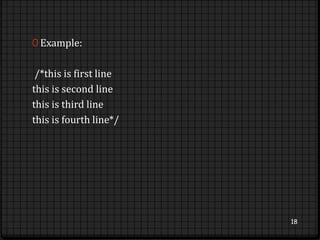
0 Example: 
/*this is first line 
this is second line 
this is third line 
this is fourth line*/ 
18
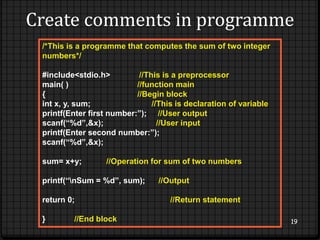
Create comments in programme 
19 
/*This is a programme that computes the sum of two integer 
numbers*/ 
#include<stdio.h> //This is a preprocessor 
main( ) //function main 
{ //Begin block 
int x, y, sum; //This is declaration of variable 
printf(Enter first number:”); //User output 
scanf(“%d”,&x); //User input 
printf(Enter second number:”); 
scanf(“%d”,&x); 
sum= x+y; //Operation for sum of two numbers 
printf(“nSum = %d”, sum); //Output 
return 0; //Return statement 
} //End block

CHAPTER 3

  • 2.
    OUTCOMES: Student shouldbe able to: 0Explain the general form 0f C structure 0Write, Compile & Execute of C programme 2
  • 3.
    The general formof C programme 3
  • 4.
    Follow 3 steps: 0 Enter the programme 0 Compile the programme 0 Run the programme 2 terms: 0 Source code – the human readable form of the programme. It is stored in a text file 0 Object code – the executable form of the programme created by a compiler 4
  • 5.
    Write the generalform of C programme 0 Entering the programme The name of the file that holds the source code for the programme is technically arbitrary C programme are normally contained in files that use the file extension (.cpp) 5
  • 6.
    0 Compiling theprogramme You can compile your .cpp file depends on your compiler & what option you are using e.g: Microsoft Visual C++ Express Edition  provide 2 different ways of compiling a programme: the command-line compiler & the Integrated Development Environment (IDE) 6
  • 7.
    0 Execute thedebugged programme After a C programme has been compiled, it is ready to be run Since the output from a C compiler is executed object code, to run the programme, simply enter its name at the command prompt 7
  • 8.
    Pre-processor directives and header files 0 Pre-processor Is the directive to enables the programme to use certain function contained in the external file such as <stdio.h> 0 Header file Contain specific functions that used to accomplish the programming task e.g: ctype.h, math.h 8
  • 9.
    #include 0 replacesby the whole content of specified file 0 2 ways to specify a file: 9 #include “stdio.h” the file is looked for from the same directory in which the file that includes the directive is #include <stdio.h> the file is directly looked for in the default directories where the compiler is configured to look for standard header files
  • 10.
    serves to generatedefine constants or macros 10 #define #define variable_name value #define pepsi 2.50 #define grapes 8.50 Example:
  • 11.
    Create block {…}in Main function a function is a block of statements that is part of large programmes 0 Function main ( ) Must have at least the function main ( ) Must have a body enclosed in braces { } 11
  • 12.
    0 Function block{ } the function body  called block can be any size { - begin block } - end block 12
  • 13.
    Create return statementin programmes 0 terminates the execution of a function and returns control to the calling function 0 can also return a value to the calling function 13
  • 14.
    Comments 0 usefulfor a variety of purposes 0 provide the easiest way to point out specific parts of code 0 2 forms: //  single line comment /* …..*/  multi line comment 14
  • 15.
    Single line comment 0 useful for simple ‘side’ notes that explain what certain parts of the code do 0 places: next to variable declarations & next to pieces of code that may need explanation 15
  • 16.
    0 Example: //thisis first line //this is second line //this is third line //this is fourth line 16
  • 17.
    Multi line comment 0 most useful for long explanation of code 0 can be use as: copyright/licensing notices explain the purpose of a path of code 0 can be useful in two aspects: make functions easier to understand easier to spot errors in code 17
  • 18.
    0 Example: /*thisis first line this is second line this is third line this is fourth line*/ 18
  • 19.
    Create comments inprogramme 19 /*This is a programme that computes the sum of two integer numbers*/ #include<stdio.h> //This is a preprocessor main( ) //function main { //Begin block int x, y, sum; //This is declaration of variable printf(Enter first number:”); //User output scanf(“%d”,&x); //User input printf(Enter second number:”); scanf(“%d”,&x); sum= x+y; //Operation for sum of two numbers printf(“nSum = %d”, sum); //Output return 0; //Return statement } //End block