Problem Solving
Algorithms
PSPD Using C
Design
Topic & Structure of the lesson
In this chapter you will learn about:
• Problem Solving
• Algorithm
• Pseudocodes
• Flowcharts
PSPD Using C
Design
Key Terms you must be able to use
If you have mastered this topic, you should be
able to use the following terms correctly in your
assignments and exams:
• program
• pseudocode
• flowchart
• algorithm
PSPD Using C
Design
Problem Solving Techniques
In this chapter you will learn about:
 What problem solving is
 The software development method of
problem solving using computers
 Basic algorithm control structures
 The sequence structure
 The selection structure
 The repetition structure
PSPD Using C
Design
Problem Solving Techniques
By the time you have completed this chapter,you
will have acquired the ability to:
 Apply the software development method to
solve problems
 Difference between the Algorithm & the
Flowchart
 Knowing about the control structures
PSPD Using C
Design
Problem Solving
First:
You have to
understand the
problem.
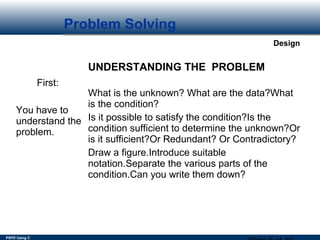
UNDERSTANDING THE PROBLEM
What is the unknown? What are the data?What
is the condition?
Is it possible to satisfy the condition?Is the
condition sufficient to determine the unknown?Or
is it sufficient?Or Redundant? Or Contradictory?
Draw a figure.Introduce suitable
notation.Separate the various parts of the
condition.Can you write them down?
PSPD Using C
Design
Problem Solving
Second:
Find the connection
between the data and
the unknown.
Auxiliary problems
may be devised if
needed.
You should obtain
eventually a plan of
the solution.
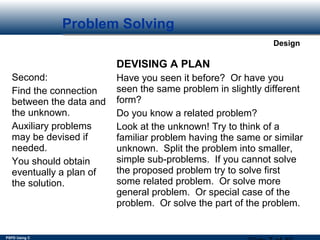
DEVISING A PLAN
Have you seen it before? Or have you
seen the same problem in slightly different
form?
Do you know a related problem?
Look at the unknown! Try to think of a
familiar problem having the same or similar
unknown. Split the problem into smaller,
simple sub-problems. If you cannot solve
the proposed problem try to solve first
some related problem. Or solve more
general problem. Or special case of the
problem. Or solve the part of the problem.
PSPD Using C
Design
Problem Solving
Third:
Carry out your
plan.
CARRYING OUT THE PLAN
Carrying out your plan of the solution,check
each step. Can you see clearly that step is
correct? Can you prove that it is correct?
Fourth:
Examine the
solution
obtained.
LOOKING BACK
Can you check the result? Can you derive
the result differently? Can you use the
result, or the method, for some other
problem?
PSPD Using C
Design
Problem Solving
The software development method
The software development method consists of the
following steps:
 Requirements specification
 Analysis
 Design
 Implementation
 Testing and verification
 Documentation
PSPD Using C
Design
Algorithmic Problem Solving
Algorithmic problem:
Any problem whose solution can be expressed as a
set of executable instructions.
Algorithm:
A well defined computational procedure consisting of
a set of instructions, that takes some value or set of
values, as input, and produces some value or set of
values, as output.
PSPD Using C
Design
Algorithmic Problem Solving
Derived from the name of Mohammed al-
khowarizmi, a Persian mathematician in the ninth
century.
Al-khowarizmi--Algorismus(in Latin)--Algorithm
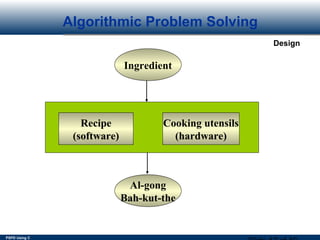
 An algorithm is like a recipe, that converts the
ingredients into some culinary dish.
 The formal written version is a program.
 Algorithms/programs are the software.The machine
that runs the programs is the hardware.
PSPD Using C
Design
Algorithmic Problem Solving
Ingredient
Recipe
(software)
Cooking utensils
(hardware)
Al-gong
Bah-kut-the
PSPD Using C
Design
Characteristics of an Algorithm
 Each step of an algorithm must be exact,
preciously and ambiguously described.
 It must terminate, i.e. it contains a finite
number of steps.
 It must be effective, i.e.., produce the correct
output.
 It must be general, i.e.. to solve every
instance of the problem.
PSPD Using C
Design
Characteristics of an Algorithm
 An Algorithm is implemented in some programming
language.
program = Algorithm + Data Structures.
 Data Structures refer to the types of data used and
how the data are organized in the program.
 An algorithm is usually presented in the form of some
pseudo-code, which is a mixture of English
statement,some mathematical notations,and selected
keywords from a programming language.
PSPD Using C
Design
Characteristics of an Algorithm
PROBLEM:
You are required to design a complete
system which will enable the sum of two
values to be calculated.
 An Algorithm should emphasize the
WHAT’s and not the HOW’s. Consider
the problem below:
PSPD Using C
Design
Problem Solving
To grapple with this problem, we have to
understand the problem from the human
perspective.
A question to ask yourself is this,
“How Would You Calculate the Sum of Two
Values?”
PSPD Using C
Design
Problem Solving
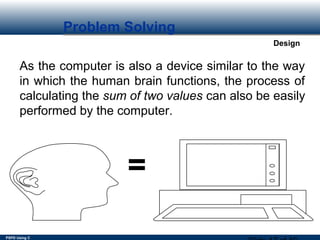
As the computer is also a device similar to the way
in which the human brain functions, the process of
calculating the sum of two values can also be easily
performed by the computer.
=
PSPD Using C
Design
Problem Solving
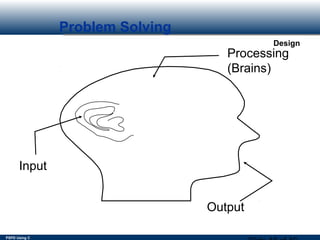
Input
Processing
(Brains)
Output
PSPD Using C
Design
Problem Solving
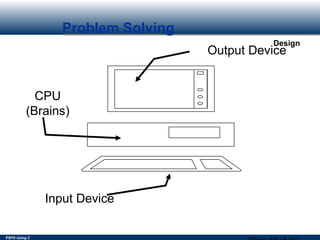
Input Device
Output Device
CPU
(Brains)
PSPD Using C
Design
Problem Solving
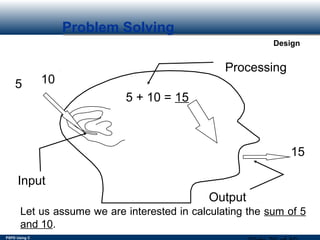
5 10
15
5 + 10 = 15
Input
Processing
Output
Let us assume we are interested in calculating the sum of 5
and 10.
PSPD Using C
Design
Problem Solving
As shown previously, the example values (5 and
10) have been specified explicitly.
As the brain is flexible enough in calculating a
wide range of numbers, the two input values
have to be generalised.
PSPD Using C
Design
Problem Solving
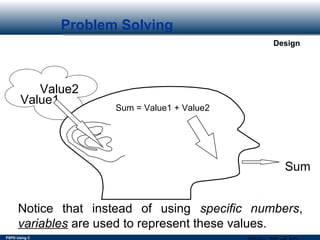
Value1
Value2
Sum
Sum = Value1 + Value2
Notice that instead of using specific numbers,
variables are used to represent these values.
PSPD Using C
Design
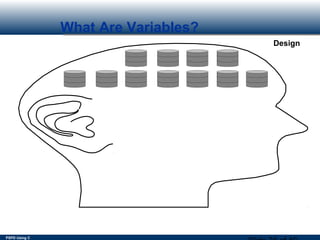
What Are Variables?
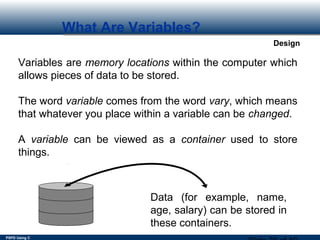
Variables are memory locations within the computer which
allows pieces of data to be stored.
The word variable comes from the word vary, which means
that whatever you place within a variable can be changed.
A variable can be viewed as a container used to store
things.
Data (for example, name,
age, salary) can be stored in
these containers.
PSPD Using C
Design
What Are Variables?
PSPD Using C
Design
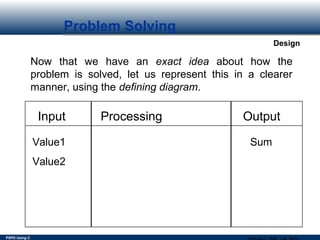
Problem Solving
Now that we have an exact idea about how the
problem is solved, let us represent this in a clearer
manner, using the defining diagram.
Input Processing Output
Value1
Value2
Sum
PSPD Using C
Design
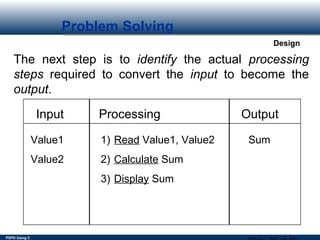
Problem Solving
The next step is to identify the actual processing
steps required to convert the input to become the
output.
Input Processing Output
Value1
Value2
Sum1) Read Value1, Value2
2) Calculate Sum
3) Display Sum
PSPD Using C
Design
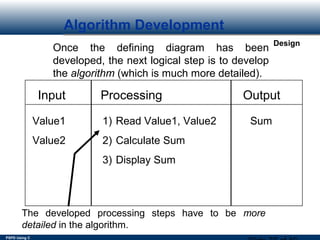
Algorithm Development
Once the defining diagram has been
developed, the next logical step is to develop
the algorithm (which is much more detailed).
Input Processing Output
Value1
Value2
Sum1) Read Value1, Value2
2) Calculate Sum
3) Display Sum
The developed processing steps have to be more
detailed in the algorithm.
PSPD Using C
Design
Algorithm Development
The basic mathematical operators used in algorithms
are as follows:-
+ addition
- subtraction
* multiplication
/ division
= assignment
( ) brackets for grouping calculations
PSPD Using C
Design
Algorithm Development
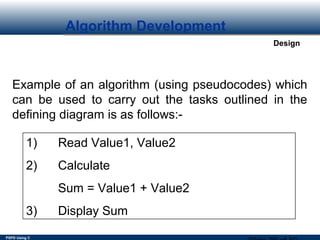
Example of an algorithm (using pseudocodes) which
can be used to carry out the tasks outlined in the
defining diagram is as follows:-
1) Read Value1, Value2
2) Calculate
Sum = Value1 + Value2
3) Display Sum
PSPD Using C
Design
Pseudocoding
A Pseudocode language is semiformal, English-
like language with a limited vocabulary that can be
used to design and describe algorithms.
The pseudocode language can be used for:
 Designing algorithms
 Communicating algorithms as programs
 Implementing algorithms as programs
 Debugging logic errors in program
PSPD Using C
Design
Pseudocode for the Control Structures
The Sequence Control Structure:
The sequence control structure is a series of steps
or statements that are executed in the order in which
they are written in an algorithm.
For Example:
read taxable income
read filing status
compute income tax
PSPD Using C
Design
Cont’d
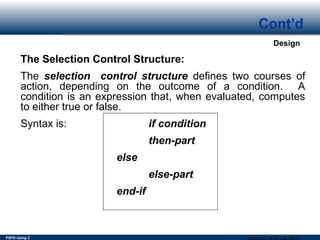
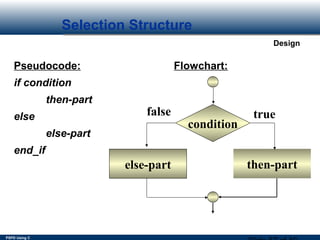
The Selection Control Structure:
The selection control structure defines two courses of
action, depending on the outcome of a condition. A
condition is an expression that, when evaluated, computes
to either true or false.
Syntax is: if condition
then-part
else
else-part
end-if
PSPD Using C
Design
Decision Making
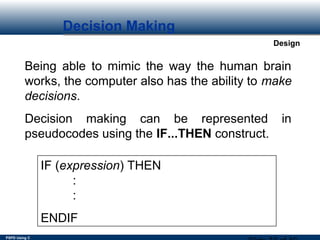
Being able to mimic the way the human brain
works, the computer also has the ability to make
decisions.
Decision making can be represented in
pseudocodes using the IF...THEN construct.
IF (expression) THEN
:
:
ENDIF
PSPD Using C
Design
Decision Making
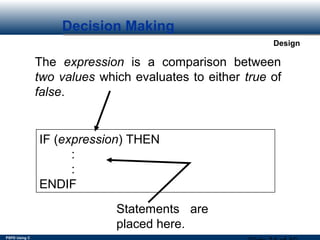
IF (expression) THEN
:
:
ENDIF
The expression is a comparison between
two values which evaluates to either true of
false.
Statements are
placed here.
PSPD Using C
Design
Decision Making
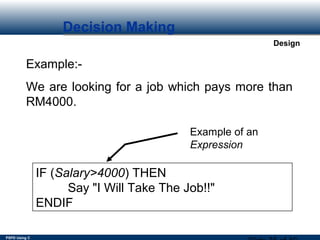
Example:-
We are looking for a job which pays more than
RM4000.
IF (Salary>4000) THEN
Say "I Will Take The Job!!"
ENDIF
Example of an
Expression
PSPD Using C
Design
Decision Making
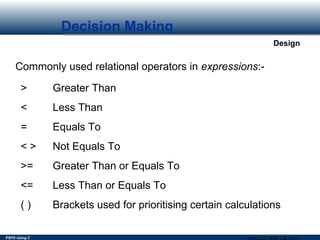
Commonly used relational operators in expressions:-
> Greater Than
< Less Than
= Equals To
< > Not Equals To
>= Greater Than or Equals To
<= Less Than or Equals To
( ) Brackets used for prioritising certain calculations
PSPD Using C
Design
Decision Making
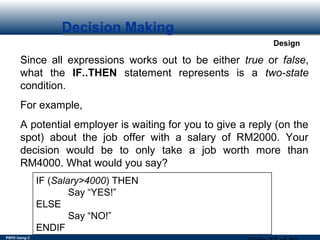
Since all expressions works out to be either true or false,
what the IF..THEN statement represents is a two-state
condition.
For example,
A potential employer is waiting for you to give a reply (on the
spot) about the job offer with a salary of RM2000. Your
decision would be to only take a job worth more than
RM4000. What would you say?
IF (Salary>4000) THEN
Say “YES!”
ELSE
Say “NO!”
ENDIF
PSPD Using C
Design
Decision Making
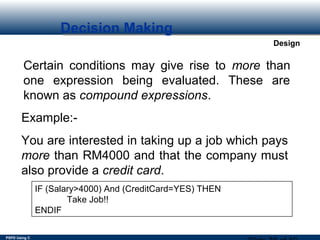
Certain conditions may give rise to more than
one expression being evaluated. These are
known as compound expressions.
Example:-
You are interested in taking up a job which pays
more than RM4000 and that the company must
also provide a credit card.
IF (Salary>4000) And (CreditCard=YES) THEN
Take Job!!
ENDIF
PSPD Using C
Design
Decision Making
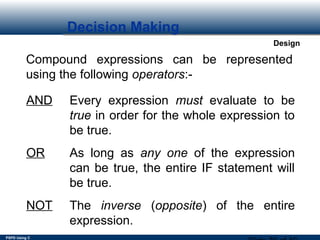
Compound expressions can be represented
using the following operators:-
AND Every expression must evaluate to be
true in order for the whole expression to
be true.
OR As long as any one of the expression
can be true, the entire IF statement will
be true.
NOT The inverse (opposite) of the entire
expression.
PSPD Using C
Design
Decision Making
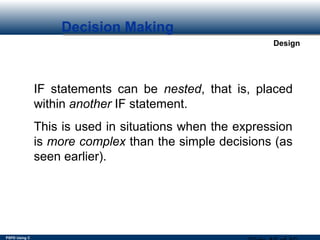
IF statements can be nested, that is, placed
within another IF statement.
This is used in situations when the expression
is more complex than the simple decisions (as
seen earlier).
PSPD Using C
Design
Decision Making
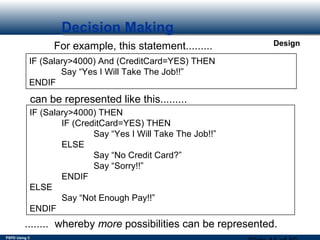
IF (Salary>4000) And (CreditCard=YES) THEN
Say “Yes I Will Take The Job!!”
ENDIF
For example, this statement.........
can be represented like this.........
IF (Salary>4000) THEN
IF (CreditCard=YES) THEN
Say “Yes I Will Take The Job!!”
ELSE
Say “No Credit Card?”
Say “Sorry!!”
ENDIF
ELSE
Say “Not Enough Pay!!”
ENDIF
........ whereby more possibilities can be represented.
PSPD Using C
Design
Decision Making
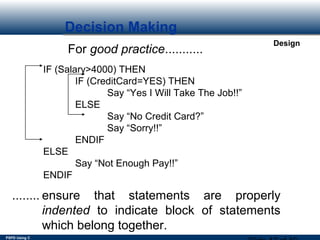
For good practice...........
IF (Salary>4000) THEN
IF (CreditCard=YES) THEN
Say “Yes I Will Take The Job!!”
ELSE
Say “No Credit Card?”
Say “Sorry!!”
ENDIF
ELSE
Say “Not Enough Pay!!”
ENDIF
........ ensure that statements are properly
indented to indicate block of statements
which belong together.
PSPD Using C
Design
Cont’d
For Example:
if a is greater than b then
print “A is greater”
else
print “B is greater”
end if
PSPD Using C
Design
Cont’d
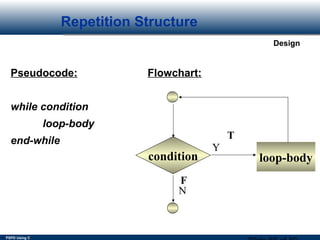
Repetition Control Structure:
The repetition control structure specifies a block of
one or more statements that are repeatedly executed
until a condition is satisfied.
Syntax is:
while condition
loop-body
end-while
PSPD Using C
Design
Looping Constructs
Looping constructs (also known as repetition or
iteration constructs) are a kind of construct found
in pseudocodes which allows statements (or a
group of statements) to be repeated.
The main reason why looping constructs are
provided is because most of the problems which
we encounter everyday requires some degree of
repetition.
PSPD Using C
Design
Looping Constructs
An example of a process which is iterative:-
Payroll processing is very much an iterative
process as the person processing the
payroll applies the same calculations for
each employee to produce the pay slip.
PSPD Using C
Design
Looping Constructs
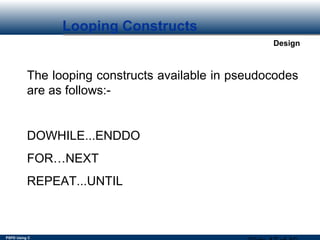
The looping constructs available in pseudocodes
are as follows:-
DOWHILE...ENDDO
FOR…NEXT
REPEAT...UNTIL
PSPD Using C
Design
Looping Constructs
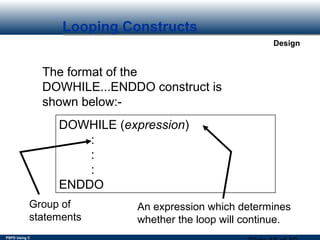
The format of the
DOWHILE...ENDDO construct is
shown below:-
DOWHILE (expression)
:
:
:
ENDDO
Group of
statements
An expression which determines
whether the loop will continue.
PSPD Using C
Design
Looping Constructs
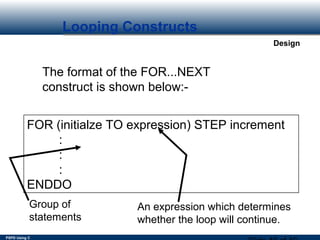
The format of the FOR...NEXT
construct is shown below:-
FOR (initialze TO expression) STEP increment
:
:
:
ENDDO
Group of
statements
An expression which determines
whether the loop will continue.
PSPD Using C
Design
Looping Constructs
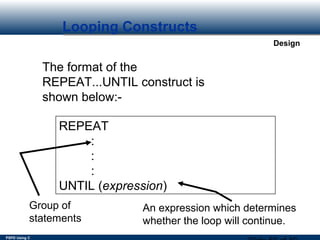
The format of the
REPEAT...UNTIL construct is
shown below:-
REPEAT
:
:
:
UNTIL (expression)
Group of
statements
An expression which determines
whether the loop will continue.
PSPD Using C
Design
Looping Constructs
Take a look at the following example:-
You are required to develop a complete system
which will allow the total payroll to be
calculated.
The system is required to read in the amount to
be paid for each employee.
The moment the system receives an input
value of -99, the system is required to stop and
display the total payroll.
PSPD Using C
Design
Looping Constructs
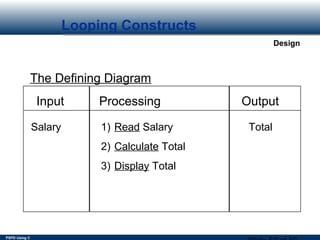
Input Processing Output
Salary Total1) Read Salary
2) Calculate Total
3) Display Total
The Defining Diagram
PSPD Using C
Design
Looping Constructs
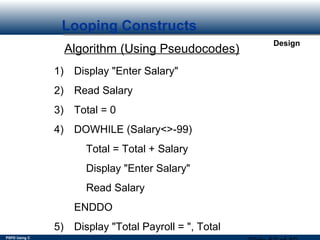
Algorithm (Using Pseudocodes)
1) Display "Enter Salary"
2) Read Salary
3) Total = 0
4) DOWHILE (Salary<>-99)
Total = Total + Salary
Display "Enter Salary"
Read Salary
ENDDO
5) Display "Total Payroll = ", Total
PSPD Using C
Design
Cont’d
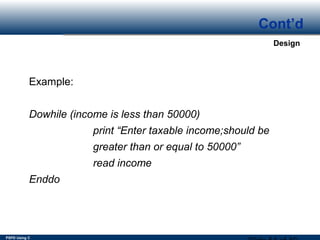
Example:
Dowhile (income is less than 50000)
print “Enter taxable income;should be
greater than or equal to 50000”
read income
Enddo
PSPD Using C
Design
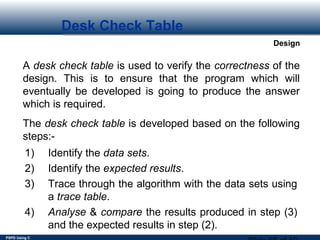
Desk Check Table
A desk check table is used to verify the correctness of the
design. This is to ensure that the program which will
eventually be developed is going to produce the answer
which is required.
The desk check table is developed based on the following
steps:-
1) Identify the data sets.
2) Identify the expected results.
3) Trace through the algorithm with the data sets using
a trace table.
4) Analyse & compare the results produced in step (3)
and the expected results in step (2).
PSPD Using C
Design
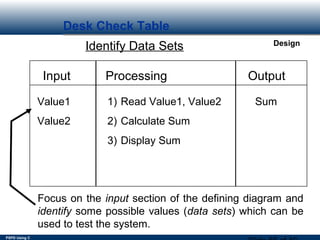
Desk Check Table
Identify Data Sets
Input Processing Output
Value1
Value2
Sum1) Read Value1, Value2
2) Calculate Sum
3) Display Sum
Focus on the input section of the defining diagram and
identify some possible values (data sets) which can be
used to test the system.
PSPD Using C
Design
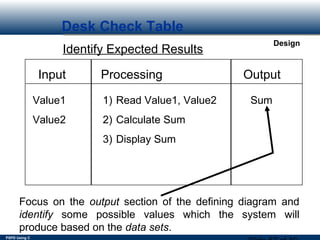
Desk Check Table
Identify Expected Results
Input Processing Output
Value1
Value2
Sum1) Read Value1, Value2
2) Calculate Sum
3) Display Sum
Focus on the output section of the defining diagram and
identify some possible values which the system will
produce based on the data sets.
PSPD Using C
Design
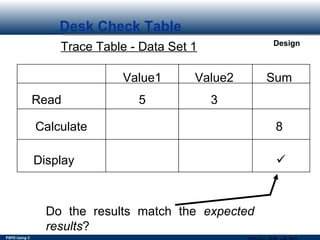
Desk Check Table
Trace Table - Data Set 1
Read
Value1 Value2
5 3
Sum
Calculate 8
Display 
Do the results match the expected
results?
PSPD Using C
Design
Desk Check Table
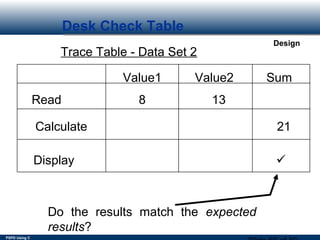
Trace Table - Data Set 2
Read
Value1 Value2
8 13
Sum
Calculate 21
Display 
Do the results match the expected
results?
PSPD Using C
Design
Desk Check Table
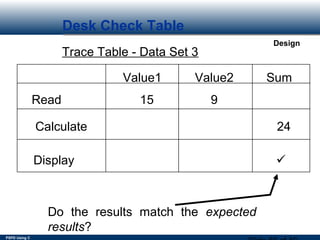
Trace Table - Data Set 3
Read
Value1 Value2
15 9
Sum
Calculate 24
Display 
Do the results match the expected
results?
PSPD Using C
Design
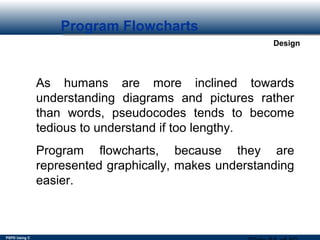
Program Flowcharts
As humans are more inclined towards
understanding diagrams and pictures rather
than words, pseudocodes tends to become
tedious to understand if too lengthy.
Program flowcharts, because they are
represented graphically, makes understanding
easier.
PSPD Using C
Design
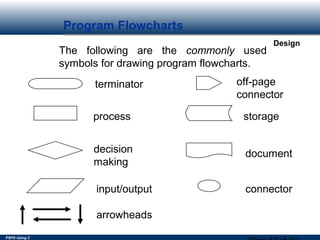
Program Flowcharts
The following are the commonly used
symbols for drawing program flowcharts.
terminator off-page
connector
process storage
decision
making
document
input/output connector
arrowheads
PSPD Using C
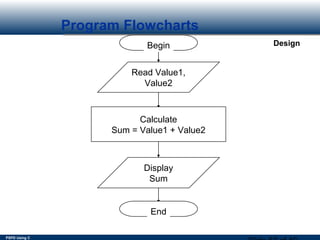
DesignBegin
Read Value1,
Value2
Program Flowcharts
Calculate
Sum = Value1 + Value2
Display
Sum
End
PSPD Using C
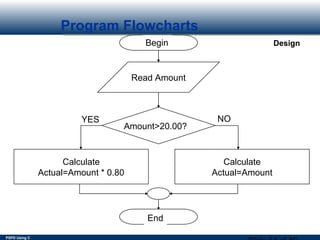
DesignBegin
Read Amount
Program Flowcharts
End
Amount>20.00?
Calculate
Actual=Amount * 0.80
Calculate
Actual=Amount
NOYES
PSPD Using C
Design
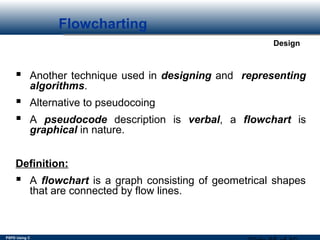
Flowcharting


 Another technique used in designing and representing 
algorithms.
 Alternative to pseudocoing
 A pseudocode description is verbal, a flowchart is
graphical in nature.
Definition:
 A flowchart is a graph consisting of geometrical shapes
that are connected by flow lines.
PSPD Using C
Design
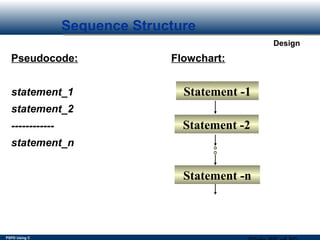
Sequence Structure


Pseudocode: Flowchart:
statement_1
statement_2
------------
statement_n
Statement -1
Statement -2
Statement -n
PSPD Using C
Design
Selection Structure


Pseudocode: Flowchart:
if condition
then-part
else
else-part
end_if
condition
else-part then-part
truefalse
PSPD Using C
Design
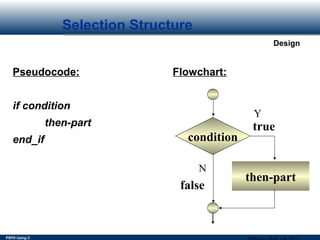
Selection Structure


Pseudocode: Flowchart:
if condition
then-part
end_if condition
then-part
true
false
Y
N
PSPD Using C
Design
Repetition Structure
Pseudocode: Flowchart:
while condition
loop-body
end-while
condition loop-body
F
T
Y
N
PSPD Using C
Design
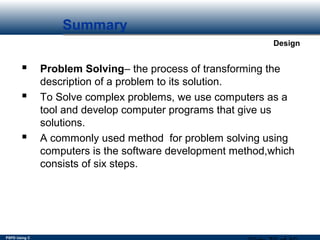
Summary
 Problem Solving– the process of transforming the
description of a problem to its solution.
 To Solve complex problems, we use computers as a
tool and develop computer programs that give us
solutions.
 A commonly used method for problem solving using
computers is the software development method,which
consists of six steps.
PSPD Using C
Design
Summary
1. The Requirements specification, provides us with
a precise definition of the problem. 
2. In the analysis phase we identify problem
inputs,outputs,special constraints, and formulas and
equations to be used.
3. The design phase is concerned with developing an
algorithm for the solution of the problem.
PSPD Using C
Design
Summary
4. The implementation of an algorithm is a computer
program.When executed, it should produce the solution to
the problem.
5. Program Verification is the process of ensuring that a
program meets user requirements.
6. Program testing, on the other hand, is the process of
executing a program to demonstrate its correctness.
7. Program Documentation facilitates the use of the
program,future program maintenance efforts,and program
debugging.
PSPD Using C
Design
Summary
 An algorithm is a sequence of a finite number of steps
arranged in a specific logical order that, when executed,
produce the solution for a problem.
 A pseudocode language is a semiformal,English-like
language with a limited vocabulary that can be used to
design and describe algorithms.
PSPD Using C
Design
Summary
 Any algorithm can be described in terms of three basic
control structures.They are the sequence,selection and
repetition structures.
 The top-down stepwise refinement of algorithms is a
fundamental problem-solving strategy.
 A Flowchart is a graphical representation of an
algorithm.
PSPD Using C
Design
Quick Review Question
1. State the difference between the Dowhile –
Enddo structure and the
Repeat – Until structure.
2. Write an algorithm that will display the first
hundred even numbers
using the Do-While loop.
PSPD Using C
Design
Follow Up Assignment
• This is an individual piece of work.
• Your source code will be discussed at the
end of the next lesson.
PSPD Using C
Design
Summary of Main Teaching Points
• Problem Solving
• Pseudocodes
• Flowcharts
• Basic control structures
• The sequence structure
• The selection structure
• The repetition structure

8.1 alogorithm & prolem solving

  • 1.
  • 2.
    PSPD Using C Design Topic& Structure of the lesson In this chapter you will learn about: • Problem Solving • Algorithm • Pseudocodes • Flowcharts
  • 3.
    PSPD Using C Design KeyTerms you must be able to use If you have mastered this topic, you should be able to use the following terms correctly in your assignments and exams: • program • pseudocode • flowchart • algorithm
  • 4.
    PSPD Using C Design ProblemSolving Techniques In this chapter you will learn about:  What problem solving is  The software development method of problem solving using computers  Basic algorithm control structures  The sequence structure  The selection structure  The repetition structure
  • 5.
    PSPD Using C Design ProblemSolving Techniques By the time you have completed this chapter,you will have acquired the ability to:  Apply the software development method to solve problems  Difference between the Algorithm & the Flowchart  Knowing about the control structures
  • 6.
    PSPD Using C Design ProblemSolving First: You have to understand the problem. UNDERSTANDING THE PROBLEM What is the unknown? What are the data?What is the condition? Is it possible to satisfy the condition?Is the condition sufficient to determine the unknown?Or is it sufficient?Or Redundant? Or Contradictory? Draw a figure.Introduce suitable notation.Separate the various parts of the condition.Can you write them down?
  • 7.
    PSPD Using C Design ProblemSolving Second: Find the connection between the data and the unknown. Auxiliary problems may be devised if needed. You should obtain eventually a plan of the solution. DEVISING A PLAN Have you seen it before? Or have you seen the same problem in slightly different form? Do you know a related problem? Look at the unknown! Try to think of a familiar problem having the same or similar unknown. Split the problem into smaller, simple sub-problems. If you cannot solve the proposed problem try to solve first some related problem. Or solve more general problem. Or special case of the problem. Or solve the part of the problem.
  • 8.
    PSPD Using C Design ProblemSolving Third: Carry out your plan. CARRYING OUT THE PLAN Carrying out your plan of the solution,check each step. Can you see clearly that step is correct? Can you prove that it is correct? Fourth: Examine the solution obtained. LOOKING BACK Can you check the result? Can you derive the result differently? Can you use the result, or the method, for some other problem?
  • 9.
    PSPD Using C Design ProblemSolving The software development method The software development method consists of the following steps:  Requirements specification  Analysis  Design  Implementation  Testing and verification  Documentation
  • 10.
    PSPD Using C Design AlgorithmicProblem Solving Algorithmic problem: Any problem whose solution can be expressed as a set of executable instructions. Algorithm: A well defined computational procedure consisting of a set of instructions, that takes some value or set of values, as input, and produces some value or set of values, as output.
  • 11.
    PSPD Using C Design AlgorithmicProblem Solving Derived from the name of Mohammed al- khowarizmi, a Persian mathematician in the ninth century. Al-khowarizmi--Algorismus(in Latin)--Algorithm  An algorithm is like a recipe, that converts the ingredients into some culinary dish.  The formal written version is a program.  Algorithms/programs are the software.The machine that runs the programs is the hardware.
  • 12.
    PSPD Using C Design AlgorithmicProblem Solving Ingredient Recipe (software) Cooking utensils (hardware) Al-gong Bah-kut-the
  • 13.
    PSPD Using C Design Characteristicsof an Algorithm  Each step of an algorithm must be exact, preciously and ambiguously described.  It must terminate, i.e. it contains a finite number of steps.  It must be effective, i.e.., produce the correct output.  It must be general, i.e.. to solve every instance of the problem.
  • 14.
    PSPD Using C Design Characteristicsof an Algorithm  An Algorithm is implemented in some programming language. program = Algorithm + Data Structures.  Data Structures refer to the types of data used and how the data are organized in the program.  An algorithm is usually presented in the form of some pseudo-code, which is a mixture of English statement,some mathematical notations,and selected keywords from a programming language.
  • 15.
    PSPD Using C Design Characteristicsof an Algorithm PROBLEM: You are required to design a complete system which will enable the sum of two values to be calculated.  An Algorithm should emphasize the WHAT’s and not the HOW’s. Consider the problem below:
  • 16.
    PSPD Using C Design ProblemSolving To grapple with this problem, we have to understand the problem from the human perspective. A question to ask yourself is this, “How Would You Calculate the Sum of Two Values?”
  • 17.
    PSPD Using C Design ProblemSolving As the computer is also a device similar to the way in which the human brain functions, the process of calculating the sum of two values can also be easily performed by the computer. =
  • 18.
    PSPD Using C Design ProblemSolving Input Processing (Brains) Output
  • 19.
    PSPD Using C Design ProblemSolving Input Device Output Device CPU (Brains)
  • 20.
    PSPD Using C Design ProblemSolving 5 10 15 5 + 10 = 15 Input Processing Output Let us assume we are interested in calculating the sum of 5 and 10.
  • 21.
    PSPD Using C Design ProblemSolving As shown previously, the example values (5 and 10) have been specified explicitly. As the brain is flexible enough in calculating a wide range of numbers, the two input values have to be generalised.
  • 22.
    PSPD Using C Design ProblemSolving Value1 Value2 Sum Sum = Value1 + Value2 Notice that instead of using specific numbers, variables are used to represent these values.
  • 23.
    PSPD Using C Design WhatAre Variables? Variables are memory locations within the computer which allows pieces of data to be stored. The word variable comes from the word vary, which means that whatever you place within a variable can be changed. A variable can be viewed as a container used to store things. Data (for example, name, age, salary) can be stored in these containers.
  • 24.
  • 25.
    PSPD Using C Design ProblemSolving Now that we have an exact idea about how the problem is solved, let us represent this in a clearer manner, using the defining diagram. Input Processing Output Value1 Value2 Sum
  • 26.
    PSPD Using C Design ProblemSolving The next step is to identify the actual processing steps required to convert the input to become the output. Input Processing Output Value1 Value2 Sum1) Read Value1, Value2 2) Calculate Sum 3) Display Sum
  • 27.
    PSPD Using C Design AlgorithmDevelopment Once the defining diagram has been developed, the next logical step is to develop the algorithm (which is much more detailed). Input Processing Output Value1 Value2 Sum1) Read Value1, Value2 2) Calculate Sum 3) Display Sum The developed processing steps have to be more detailed in the algorithm.
  • 28.
    PSPD Using C Design AlgorithmDevelopment The basic mathematical operators used in algorithms are as follows:- + addition - subtraction * multiplication / division = assignment ( ) brackets for grouping calculations
  • 29.
    PSPD Using C Design AlgorithmDevelopment Example of an algorithm (using pseudocodes) which can be used to carry out the tasks outlined in the defining diagram is as follows:- 1) Read Value1, Value2 2) Calculate Sum = Value1 + Value2 3) Display Sum
  • 30.
    PSPD Using C Design Pseudocoding APseudocode language is semiformal, English- like language with a limited vocabulary that can be used to design and describe algorithms. The pseudocode language can be used for:  Designing algorithms  Communicating algorithms as programs  Implementing algorithms as programs  Debugging logic errors in program
  • 31.
    PSPD Using C Design Pseudocodefor the Control Structures The Sequence Control Structure: The sequence control structure is a series of steps or statements that are executed in the order in which they are written in an algorithm. For Example: read taxable income read filing status compute income tax
  • 32.
    PSPD Using C Design Cont’d TheSelection Control Structure: The selection control structure defines two courses of action, depending on the outcome of a condition. A condition is an expression that, when evaluated, computes to either true or false. Syntax is: if condition then-part else else-part end-if
  • 33.
    PSPD Using C Design DecisionMaking Being able to mimic the way the human brain works, the computer also has the ability to make decisions. Decision making can be represented in pseudocodes using the IF...THEN construct. IF (expression) THEN : : ENDIF
  • 34.
    PSPD Using C Design DecisionMaking IF (expression) THEN : : ENDIF The expression is a comparison between two values which evaluates to either true of false. Statements are placed here.
  • 35.
    PSPD Using C Design DecisionMaking Example:- We are looking for a job which pays more than RM4000. IF (Salary>4000) THEN Say "I Will Take The Job!!" ENDIF Example of an Expression
  • 36.
    PSPD Using C Design DecisionMaking Commonly used relational operators in expressions:- > Greater Than < Less Than = Equals To < > Not Equals To >= Greater Than or Equals To <= Less Than or Equals To ( ) Brackets used for prioritising certain calculations
  • 37.
    PSPD Using C Design DecisionMaking Since all expressions works out to be either true or false, what the IF..THEN statement represents is a two-state condition. For example, A potential employer is waiting for you to give a reply (on the spot) about the job offer with a salary of RM2000. Your decision would be to only take a job worth more than RM4000. What would you say? IF (Salary>4000) THEN Say “YES!” ELSE Say “NO!” ENDIF
  • 38.
    PSPD Using C Design DecisionMaking Certain conditions may give rise to more than one expression being evaluated. These are known as compound expressions. Example:- You are interested in taking up a job which pays more than RM4000 and that the company must also provide a credit card. IF (Salary>4000) And (CreditCard=YES) THEN Take Job!! ENDIF
  • 39.
    PSPD Using C Design DecisionMaking Compound expressions can be represented using the following operators:- AND Every expression must evaluate to be true in order for the whole expression to be true. OR As long as any one of the expression can be true, the entire IF statement will be true. NOT The inverse (opposite) of the entire expression.
  • 40.
    PSPD Using C Design DecisionMaking IF statements can be nested, that is, placed within another IF statement. This is used in situations when the expression is more complex than the simple decisions (as seen earlier).
  • 41.
    PSPD Using C Design DecisionMaking IF (Salary>4000) And (CreditCard=YES) THEN Say “Yes I Will Take The Job!!” ENDIF For example, this statement......... can be represented like this......... IF (Salary>4000) THEN IF (CreditCard=YES) THEN Say “Yes I Will Take The Job!!” ELSE Say “No Credit Card?” Say “Sorry!!” ENDIF ELSE Say “Not Enough Pay!!” ENDIF ........ whereby more possibilities can be represented.
  • 42.
    PSPD Using C Design DecisionMaking For good practice........... IF (Salary>4000) THEN IF (CreditCard=YES) THEN Say “Yes I Will Take The Job!!” ELSE Say “No Credit Card?” Say “Sorry!!” ENDIF ELSE Say “Not Enough Pay!!” ENDIF ........ ensure that statements are properly indented to indicate block of statements which belong together.
  • 43.
    PSPD Using C Design Cont’d ForExample: if a is greater than b then print “A is greater” else print “B is greater” end if
  • 44.
    PSPD Using C Design Cont’d RepetitionControl Structure: The repetition control structure specifies a block of one or more statements that are repeatedly executed until a condition is satisfied. Syntax is: while condition loop-body end-while
  • 45.
    PSPD Using C Design LoopingConstructs Looping constructs (also known as repetition or iteration constructs) are a kind of construct found in pseudocodes which allows statements (or a group of statements) to be repeated. The main reason why looping constructs are provided is because most of the problems which we encounter everyday requires some degree of repetition.
  • 46.
    PSPD Using C Design LoopingConstructs An example of a process which is iterative:- Payroll processing is very much an iterative process as the person processing the payroll applies the same calculations for each employee to produce the pay slip.
  • 47.
    PSPD Using C Design LoopingConstructs The looping constructs available in pseudocodes are as follows:- DOWHILE...ENDDO FOR…NEXT REPEAT...UNTIL
  • 48.
    PSPD Using C Design LoopingConstructs The format of the DOWHILE...ENDDO construct is shown below:- DOWHILE (expression) : : : ENDDO Group of statements An expression which determines whether the loop will continue.
  • 49.
    PSPD Using C Design LoopingConstructs The format of the FOR...NEXT construct is shown below:- FOR (initialze TO expression) STEP increment : : : ENDDO Group of statements An expression which determines whether the loop will continue.
  • 50.
    PSPD Using C Design LoopingConstructs The format of the REPEAT...UNTIL construct is shown below:- REPEAT : : : UNTIL (expression) Group of statements An expression which determines whether the loop will continue.
  • 51.
    PSPD Using C Design LoopingConstructs Take a look at the following example:- You are required to develop a complete system which will allow the total payroll to be calculated. The system is required to read in the amount to be paid for each employee. The moment the system receives an input value of -99, the system is required to stop and display the total payroll.
  • 52.
    PSPD Using C Design LoopingConstructs Input Processing Output Salary Total1) Read Salary 2) Calculate Total 3) Display Total The Defining Diagram
  • 53.
    PSPD Using C Design LoopingConstructs Algorithm (Using Pseudocodes) 1) Display "Enter Salary" 2) Read Salary 3) Total = 0 4) DOWHILE (Salary<>-99) Total = Total + Salary Display "Enter Salary" Read Salary ENDDO 5) Display "Total Payroll = ", Total
  • 54.
    PSPD Using C Design Cont’d Example: Dowhile(income is less than 50000) print “Enter taxable income;should be greater than or equal to 50000” read income Enddo
  • 55.
    PSPD Using C Design DeskCheck Table A desk check table is used to verify the correctness of the design. This is to ensure that the program which will eventually be developed is going to produce the answer which is required. The desk check table is developed based on the following steps:- 1) Identify the data sets. 2) Identify the expected results. 3) Trace through the algorithm with the data sets using a trace table. 4) Analyse & compare the results produced in step (3) and the expected results in step (2).
  • 56.
    PSPD Using C Design DeskCheck Table Identify Data Sets Input Processing Output Value1 Value2 Sum1) Read Value1, Value2 2) Calculate Sum 3) Display Sum Focus on the input section of the defining diagram and identify some possible values (data sets) which can be used to test the system.
  • 57.
    PSPD Using C Design DeskCheck Table Identify Expected Results Input Processing Output Value1 Value2 Sum1) Read Value1, Value2 2) Calculate Sum 3) Display Sum Focus on the output section of the defining diagram and identify some possible values which the system will produce based on the data sets.
  • 58.
    PSPD Using C Design DeskCheck Table Trace Table - Data Set 1 Read Value1 Value2 5 3 Sum Calculate 8 Display  Do the results match the expected results?
  • 59.
    PSPD Using C Design DeskCheck Table Trace Table - Data Set 2 Read Value1 Value2 8 13 Sum Calculate 21 Display  Do the results match the expected results?
  • 60.
    PSPD Using C Design DeskCheck Table Trace Table - Data Set 3 Read Value1 Value2 15 9 Sum Calculate 24 Display  Do the results match the expected results?
  • 61.
    PSPD Using C Design ProgramFlowcharts As humans are more inclined towards understanding diagrams and pictures rather than words, pseudocodes tends to become tedious to understand if too lengthy. Program flowcharts, because they are represented graphically, makes understanding easier.
  • 62.
    PSPD Using C Design ProgramFlowcharts The following are the commonly used symbols for drawing program flowcharts. terminator off-page connector process storage decision making document input/output connector arrowheads
  • 63.
    PSPD Using C DesignBegin ReadValue1, Value2 Program Flowcharts Calculate Sum = Value1 + Value2 Display Sum End
  • 64.
    PSPD Using C DesignBegin ReadAmount Program Flowcharts End Amount>20.00? Calculate Actual=Amount * 0.80 Calculate Actual=Amount NOYES
  • 65.
    PSPD Using C Design Flowcharting       Another technique used in designing and representing  algorithms.  Alternative to pseudocoing  A pseudocode description is verbal, a flowchart is graphical in nature. Definition:  A flowchart is a graph consisting of geometrical shapes that are connected by flow lines.
  • 66.
    PSPD Using C Design SequenceStructure       Pseudocode: Flowchart: statement_1 statement_2 ------------ statement_n Statement -1 Statement -2 Statement -n
  • 67.
    PSPD Using C Design SelectionStructure       Pseudocode: Flowchart: if condition then-part else else-part end_if condition else-part then-part truefalse
  • 68.
    PSPD Using C Design SelectionStructure       Pseudocode: Flowchart: if condition then-part end_if condition then-part true false Y N
  • 69.
    PSPD Using C Design RepetitionStructure Pseudocode: Flowchart: while condition loop-body end-while condition loop-body F T Y N
  • 70.
    PSPD Using C Design Summary Problem Solving– the process of transforming the description of a problem to its solution.  To Solve complex problems, we use computers as a tool and develop computer programs that give us solutions.  A commonly used method for problem solving using computers is the software development method,which consists of six steps.
  • 71.
    PSPD Using C Design Summary 1.The Requirements specification, provides us with a precise definition of the problem.  2. In the analysis phase we identify problem inputs,outputs,special constraints, and formulas and equations to be used. 3. The design phase is concerned with developing an algorithm for the solution of the problem.
  • 72.
    PSPD Using C Design Summary 4.The implementation of an algorithm is a computer program.When executed, it should produce the solution to the problem. 5. Program Verification is the process of ensuring that a program meets user requirements. 6. Program testing, on the other hand, is the process of executing a program to demonstrate its correctness. 7. Program Documentation facilitates the use of the program,future program maintenance efforts,and program debugging.
  • 73.
    PSPD Using C Design Summary An algorithm is a sequence of a finite number of steps arranged in a specific logical order that, when executed, produce the solution for a problem.  A pseudocode language is a semiformal,English-like language with a limited vocabulary that can be used to design and describe algorithms.
  • 74.
    PSPD Using C Design Summary Any algorithm can be described in terms of three basic control structures.They are the sequence,selection and repetition structures.  The top-down stepwise refinement of algorithms is a fundamental problem-solving strategy.  A Flowchart is a graphical representation of an algorithm.
  • 75.
    PSPD Using C Design QuickReview Question 1. State the difference between the Dowhile – Enddo structure and the Repeat – Until structure. 2. Write an algorithm that will display the first hundred even numbers using the Do-While loop.
  • 76.
    PSPD Using C Design FollowUp Assignment • This is an individual piece of work. • Your source code will be discussed at the end of the next lesson.
  • 77.
    PSPD Using C Design Summaryof Main Teaching Points • Problem Solving • Pseudocodes • Flowcharts • Basic control structures • The sequence structure • The selection structure • The repetition structure

Editor's Notes

  • #17 &amp;lt;number&amp;gt;
  • #18 &amp;lt;number&amp;gt;
  • #19 &amp;lt;number&amp;gt;
  • #20 &amp;lt;number&amp;gt;
  • #21 &amp;lt;number&amp;gt;
  • #22 &amp;lt;number&amp;gt;
  • #23 &amp;lt;number&amp;gt;
  • #24 &amp;lt;number&amp;gt;
  • #25 &amp;lt;number&amp;gt;
  • #26 &amp;lt;number&amp;gt;
  • #27 &amp;lt;number&amp;gt;
  • #28 &amp;lt;number&amp;gt;
  • #29 &amp;lt;number&amp;gt;
  • #30 &amp;lt;number&amp;gt;
  • #34 &amp;lt;number&amp;gt;
  • #35 &amp;lt;number&amp;gt;
  • #36 &amp;lt;number&amp;gt;
  • #37 &amp;lt;number&amp;gt;
  • #38 &amp;lt;number&amp;gt;
  • #39 &amp;lt;number&amp;gt;
  • #40 &amp;lt;number&amp;gt;
  • #41 &amp;lt;number&amp;gt;
  • #42 &amp;lt;number&amp;gt;
  • #43 &amp;lt;number&amp;gt;
  • #46 &amp;lt;number&amp;gt;
  • #47 &amp;lt;number&amp;gt;
  • #48 &amp;lt;number&amp;gt;
  • #49 &amp;lt;number&amp;gt;
  • #50 &amp;lt;number&amp;gt;
  • #51 &amp;lt;number&amp;gt;
  • #52 &amp;lt;number&amp;gt;
  • #53 &amp;lt;number&amp;gt;
  • #54 &amp;lt;number&amp;gt;
  • #56 &amp;lt;number&amp;gt;
  • #57 &amp;lt;number&amp;gt;
  • #58 &amp;lt;number&amp;gt;
  • #59 &amp;lt;number&amp;gt;
  • #60 &amp;lt;number&amp;gt;
  • #61 &amp;lt;number&amp;gt;
  • #62 &amp;lt;number&amp;gt;
  • #63 &amp;lt;number&amp;gt;
  • #64 &amp;lt;number&amp;gt;
  • #65 &amp;lt;number&amp;gt;