Chapter 15 Connecting LANs,  Backbone Networks,  and Virtual LANs Copyright © The McGraw-Hill Companies, Inc. Permission required for reproduction or display.
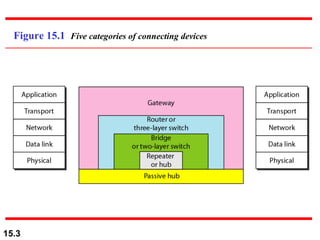
15-1  CONNECTING DEVICES In this section, we divide connecting devices into five different categories based on the layer in which they operate in a network. Passive Hubs Active Hubs Bridges Two-Layer Switches Routers Three-Layer Switches Gateways Topics discussed in this section:
Figure 15.1  Five categories of connecting devices
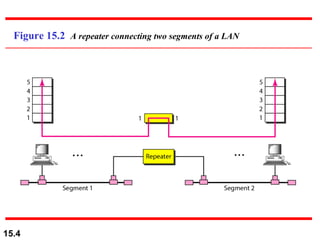
Figure 15.2  A repeater connecting two segments of a LAN
A repeater connects segments of a LAN. Note
A repeater forwards every frame;  it has no filtering capability. Note
A repeater is a regenerator,  not an amplifier. Note
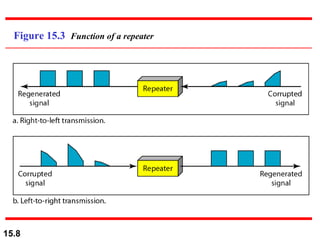
Figure 15.3  Function of a repeater
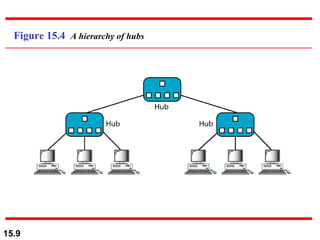
Figure 15.4  A hierarchy of hubs
A bridge has a table used in  filtering decisions. Note
Figure 15.5  A bridge connecting two LANs
A bridge does not change the physical (MAC) addresses in a frame. Note
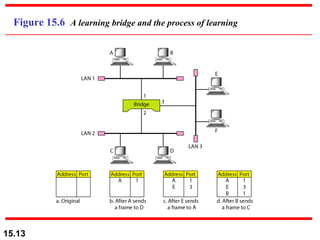
Figure 15.6  A learning bridge and the process of learning
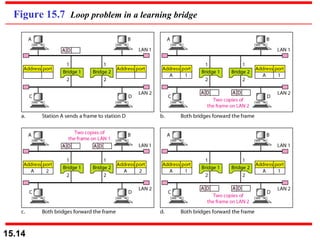
Figure 15.7  Loop problem in a learning bridge
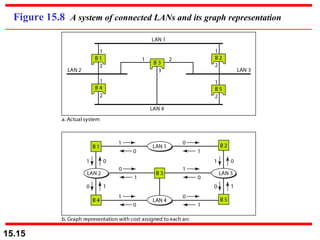
Figure 15.8  A system of connected LANs and its graph representation
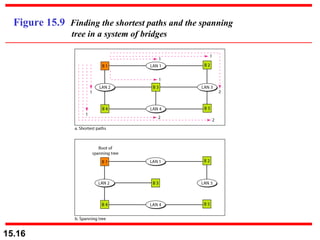
Figure 15.9  Finding the shortest paths and the spanning    tree in a system of bridges
Figure 15.10  Forwarding and blocking ports after using spanning    tree algorithm
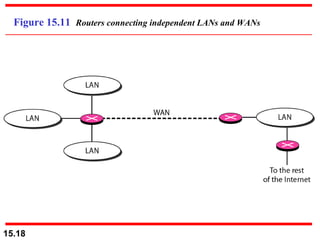
Figure 15.11  Routers connecting independent LANs and WANs
15-2  BACKBONE NETWORKS A backbone network allows several LANs to be connected. In a backbone network, no station is directly connected to the backbone; the stations are part of a LAN, and the backbone connects the LANs.  Bus Backbone Star Backbone Connecting Remote LANs Topics discussed in this section:
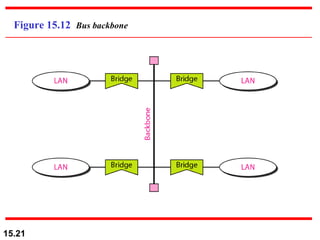
In a bus backbone, the topology  of the backbone is a bus. Note
Figure 15.12  Bus backbone
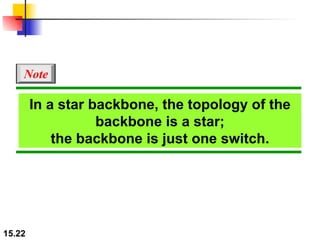
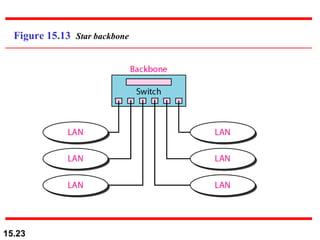
In a star backbone, the topology of the backbone is a star; the backbone is just one switch. Note
Figure 15.13  Star backbone
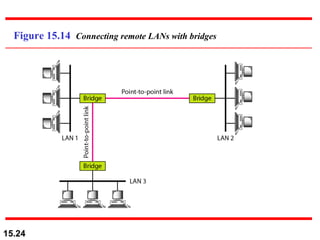
Figure 15.14  Connecting remote LANs with bridges
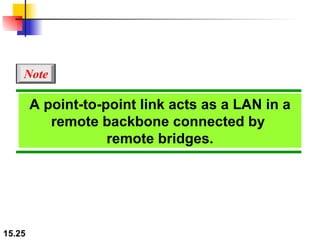
A point-to-point link acts as a LAN in a remote backbone connected by  remote bridges. Note
15-3  VIRTUAL LANs We can roughly define a  virtual local area network  (VLAN) as a local area network configured by software, not by physical wiring. Membership Configuration Communication between Switches IEEE Standard Advantages Topics discussed in this section:
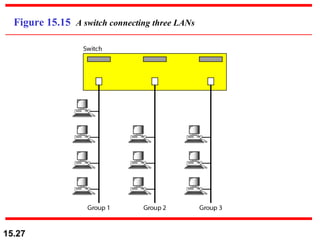
Figure 15.15  A switch connecting three LANs
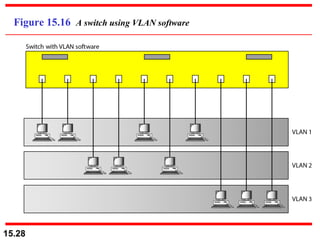
Figure 15.16  A switch using VLAN software
Figure 15.17  Two switches in a backbone using VLAN software
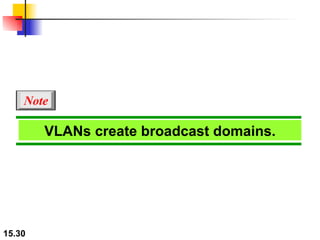
VLANs create broadcast domains. Note

Chapter 15

  • 1.
    Chapter 15 ConnectingLANs, Backbone Networks, and Virtual LANs Copyright © The McGraw-Hill Companies, Inc. Permission required for reproduction or display.
  • 2.
    15-1 CONNECTINGDEVICES In this section, we divide connecting devices into five different categories based on the layer in which they operate in a network. Passive Hubs Active Hubs Bridges Two-Layer Switches Routers Three-Layer Switches Gateways Topics discussed in this section:
  • 3.
    Figure 15.1 Five categories of connecting devices
  • 4.
    Figure 15.2 A repeater connecting two segments of a LAN
  • 5.
    A repeater connectssegments of a LAN. Note
  • 6.
    A repeater forwardsevery frame; it has no filtering capability. Note
  • 7.
    A repeater isa regenerator, not an amplifier. Note
  • 8.
    Figure 15.3 Function of a repeater
  • 9.
    Figure 15.4 A hierarchy of hubs
  • 10.
    A bridge hasa table used in filtering decisions. Note
  • 11.
    Figure 15.5 A bridge connecting two LANs
  • 12.
    A bridge doesnot change the physical (MAC) addresses in a frame. Note
  • 13.
    Figure 15.6 A learning bridge and the process of learning
  • 14.
    Figure 15.7 Loop problem in a learning bridge
  • 15.
    Figure 15.8 A system of connected LANs and its graph representation
  • 16.
    Figure 15.9 Finding the shortest paths and the spanning tree in a system of bridges
  • 17.
    Figure 15.10 Forwarding and blocking ports after using spanning tree algorithm
  • 18.
    Figure 15.11 Routers connecting independent LANs and WANs
  • 19.
    15-2 BACKBONENETWORKS A backbone network allows several LANs to be connected. In a backbone network, no station is directly connected to the backbone; the stations are part of a LAN, and the backbone connects the LANs. Bus Backbone Star Backbone Connecting Remote LANs Topics discussed in this section:
  • 20.
    In a busbackbone, the topology of the backbone is a bus. Note
  • 21.
    Figure 15.12 Bus backbone
  • 22.
    In a starbackbone, the topology of the backbone is a star; the backbone is just one switch. Note
  • 23.
    Figure 15.13 Star backbone
  • 24.
    Figure 15.14 Connecting remote LANs with bridges
  • 25.
    A point-to-point linkacts as a LAN in a remote backbone connected by remote bridges. Note
  • 26.
    15-3 VIRTUALLANs We can roughly define a virtual local area network (VLAN) as a local area network configured by software, not by physical wiring. Membership Configuration Communication between Switches IEEE Standard Advantages Topics discussed in this section:
  • 27.
    Figure 15.15 A switch connecting three LANs
  • 28.
    Figure 15.16 A switch using VLAN software
  • 29.
    Figure 15.17 Two switches in a backbone using VLAN software
  • 30.