Systems Analysis and Design
8th Edition

Chapter 9
Data Design
Chapter Objectives
• Explain data design concepts and structures
• Describe file processing systems
• Explain database systems and define the
  components of a database management
  system (DBMS)
• Describe Web-based data design


                                                2
Chapter Objectives
• Explain data design terminology, including
  entities, fields, common fields, records, files,
  tables, and key fields
• Describe data relationships, draw an entity
  relationship diagram, define cardinality, and
  use cardinality notation
• Explain the concept of normalization
• Explain the importance of codes and describe
  various coding schemes
                                                     3
Chapter Objectives
• Describe relational and object-oriented
  database models
• Explain data warehousing and data mining
• Differentiate between logical and physical
  storage and records
• Explain data control measures


                                               4
Introduction
• You will develop a physical plan for data
  organization, storage, and retrieval
• Begins with a review of data design concepts and
  terminology, then discusses file-based systems
  and database systems, including Web-based
  databases
• Concludes with a discussion of data storage and
  access, including strategic tools such as data
  warehousing and data mining, physical design
  issues, logical and physical records, data storage
  formats, and data controls

                                                       5
Data Design Concepts
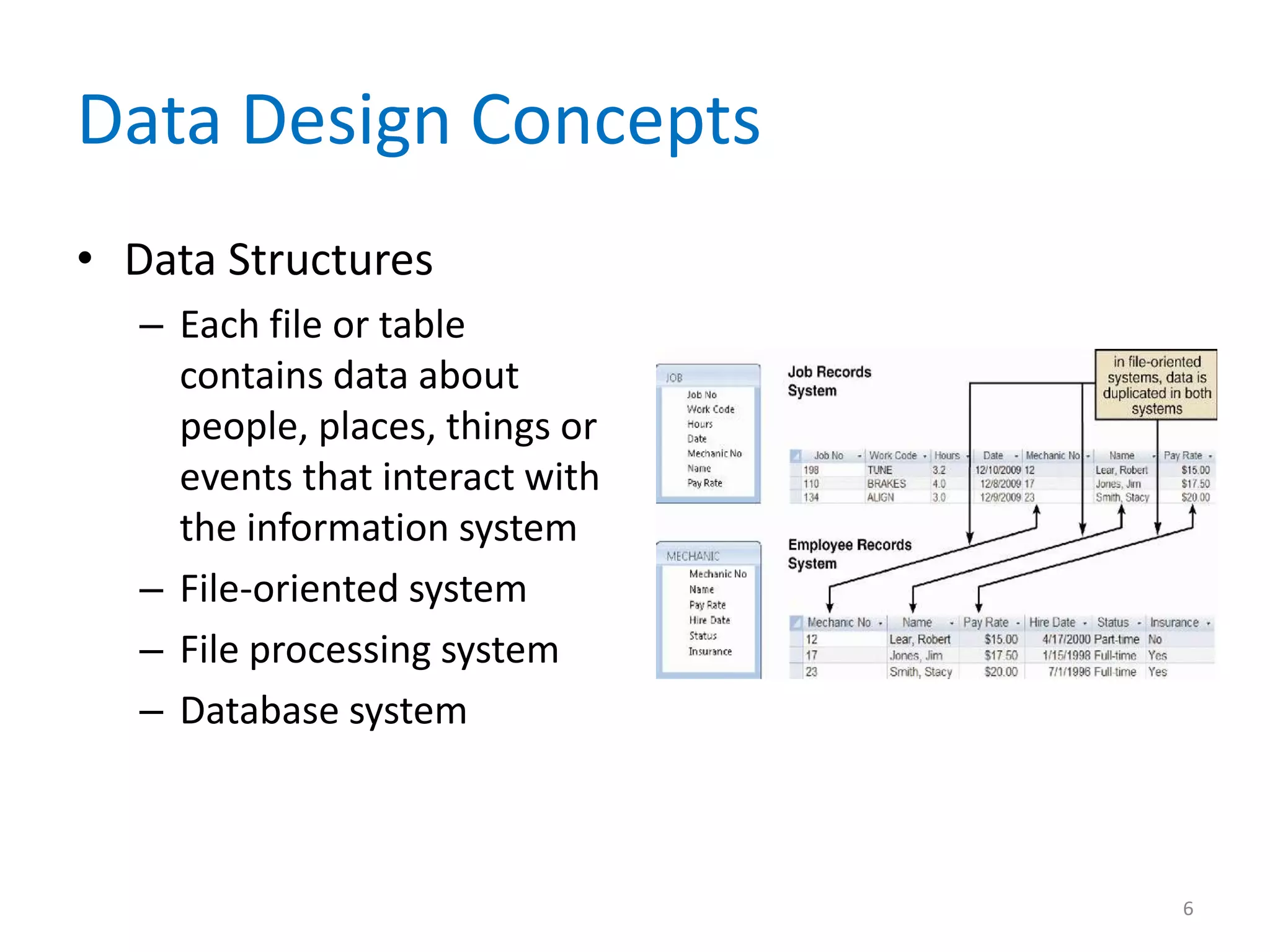
• Data Structures
   – Each file or table
     contains data about
     people, places, things or
     events that interact with
     the information system
   – File-oriented system
   – File processing system
   – Database system


                                 6
Data Design Concepts
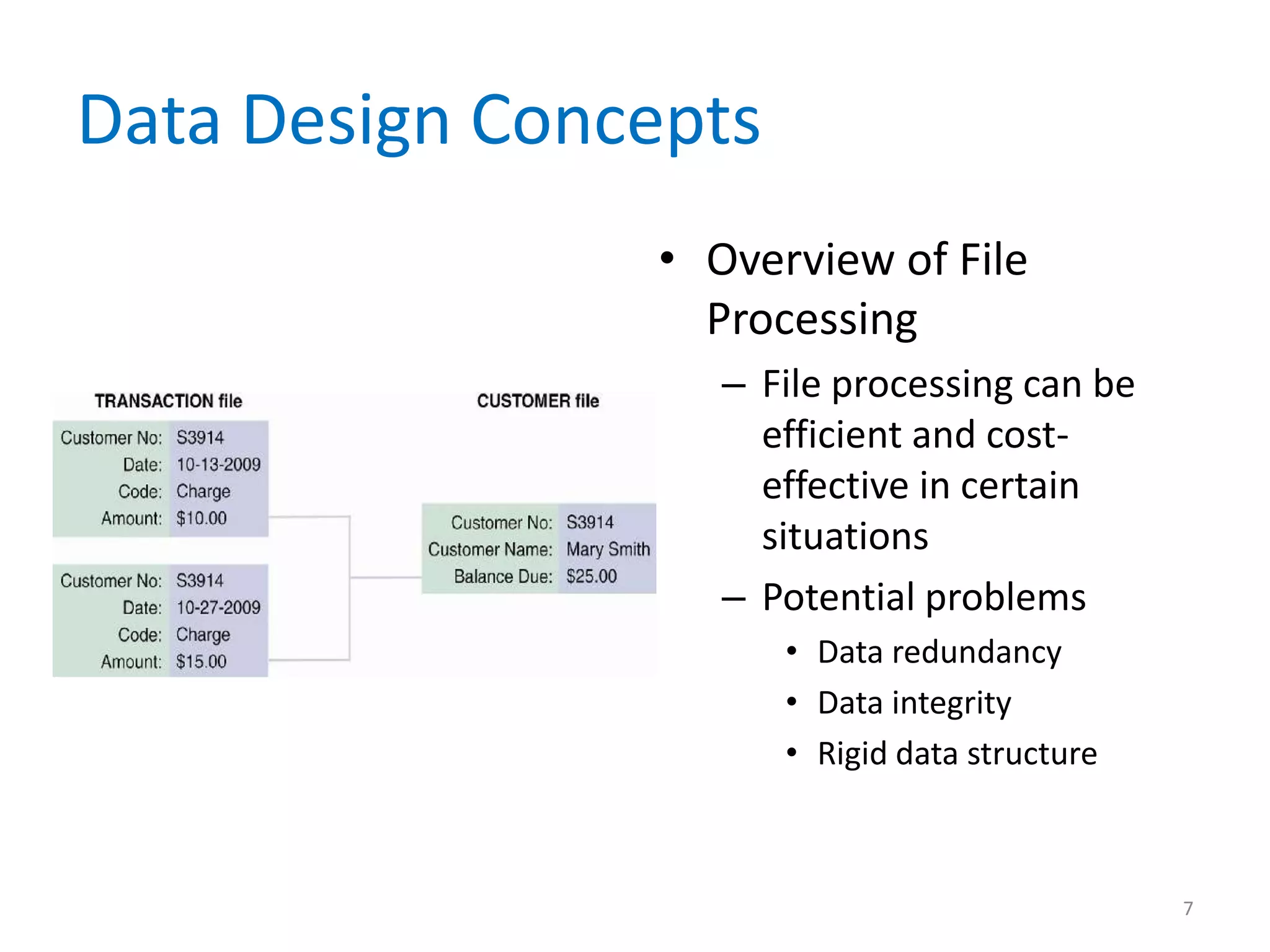
                • Overview of File
                  Processing
                   – File processing can be
                     efficient and cost-
                     effective in certain
                     situations
                   – Potential problems
                       • Data redundancy
                       • Data integrity
                       • Rigid data structure


                                                7
Data Design Concepts
• Overview of File Processing
  – Various types of files
     •   Master file
     •   Table file
     •   Transaction file
     •   Work file
     •   Security file
     •   History file


                                8
Data Design Concepts
• The Evolution from File
  Systems to Database
  Systems
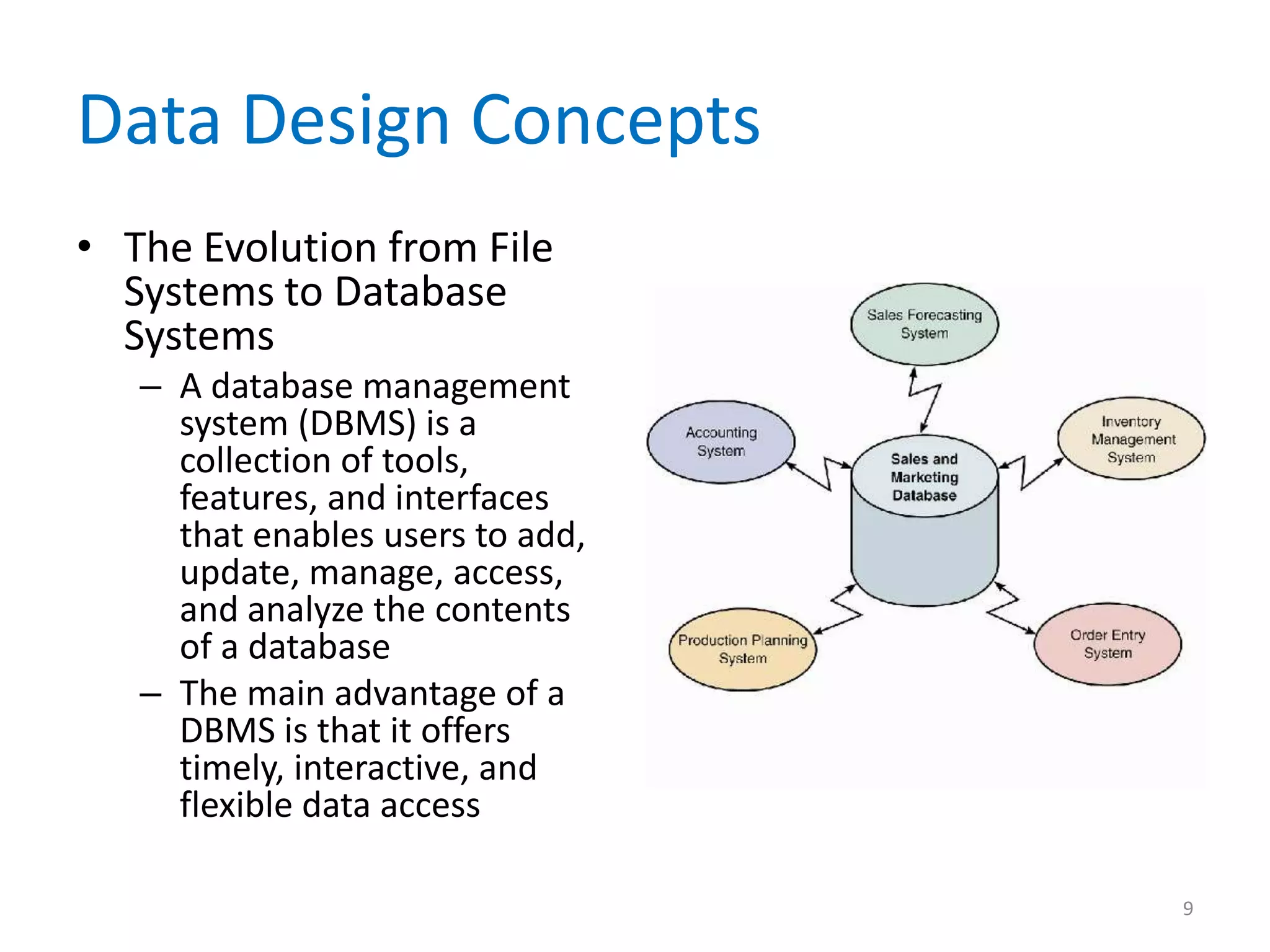
   – A database management
     system (DBMS) is a
     collection of tools,
     features, and interfaces
     that enables users to add,
     update, manage, access,
     and analyze the contents
     of a database
   – The main advantage of a
     DBMS is that it offers
     timely, interactive, and
     flexible data access

                                  9
Data Design Concepts
• The Evolution from File Systems to Database
  Systems
  – Some Advantages
     • Scalability
     • Economy of scale
     • Enterprise-wide application – database administrator
       (DBA)
     • Controlled redundancy
     • Data independence


                                                              10
DBMS Components
              • Interfaces for Users,
                Database Administrators,
                and Related Systems
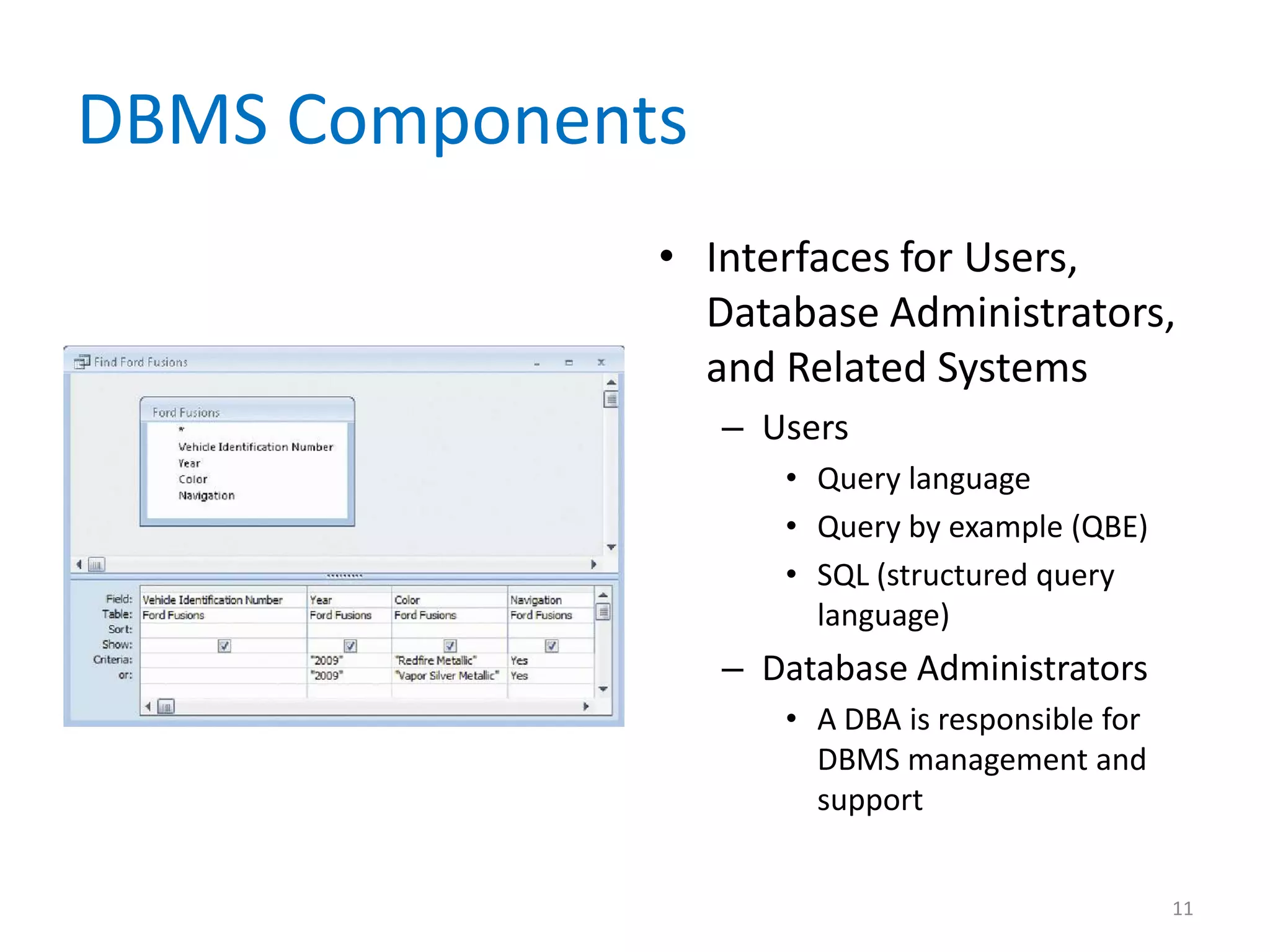
                  – Users
                     • Query language
                     • Query by example (QBE)
                     • SQL (structured query
                       language)
                  – Database Administrators
                     • A DBA is responsible for
                       DBMS management and
                       support


                                                  11
DBMS Components
• Interfaces for Users, Database Administrators,
  and Related Systems
  – Related information systems
     • A DBMS can support several related information
       systems that provide input to, and require specific data
       from, the DBMS
     • No human intervention is required for two-way
       communication


                                                              12
DBMS Components
• Data Manipulation Language
  – A data manipulation language (DML) controls
    database operations, including storing, retrieving,
    updating, and deleting data
• Schema
  – The complete definition of a database, including
    descriptions of all fields, tables, and relationships,
    is called a schema
  – You also can define one or more subschemas

                                                         13
DBMS Components
• Physical Data Repository
  – The data dictionary is transformed into a physical
    data repository, which also contains the schema
    and subschemas
  – The physical repository might be centralized, or
    distributed at several locations
  – ODBC – open database connectivity
  – JDBC – Java database connectivity


                                                         14
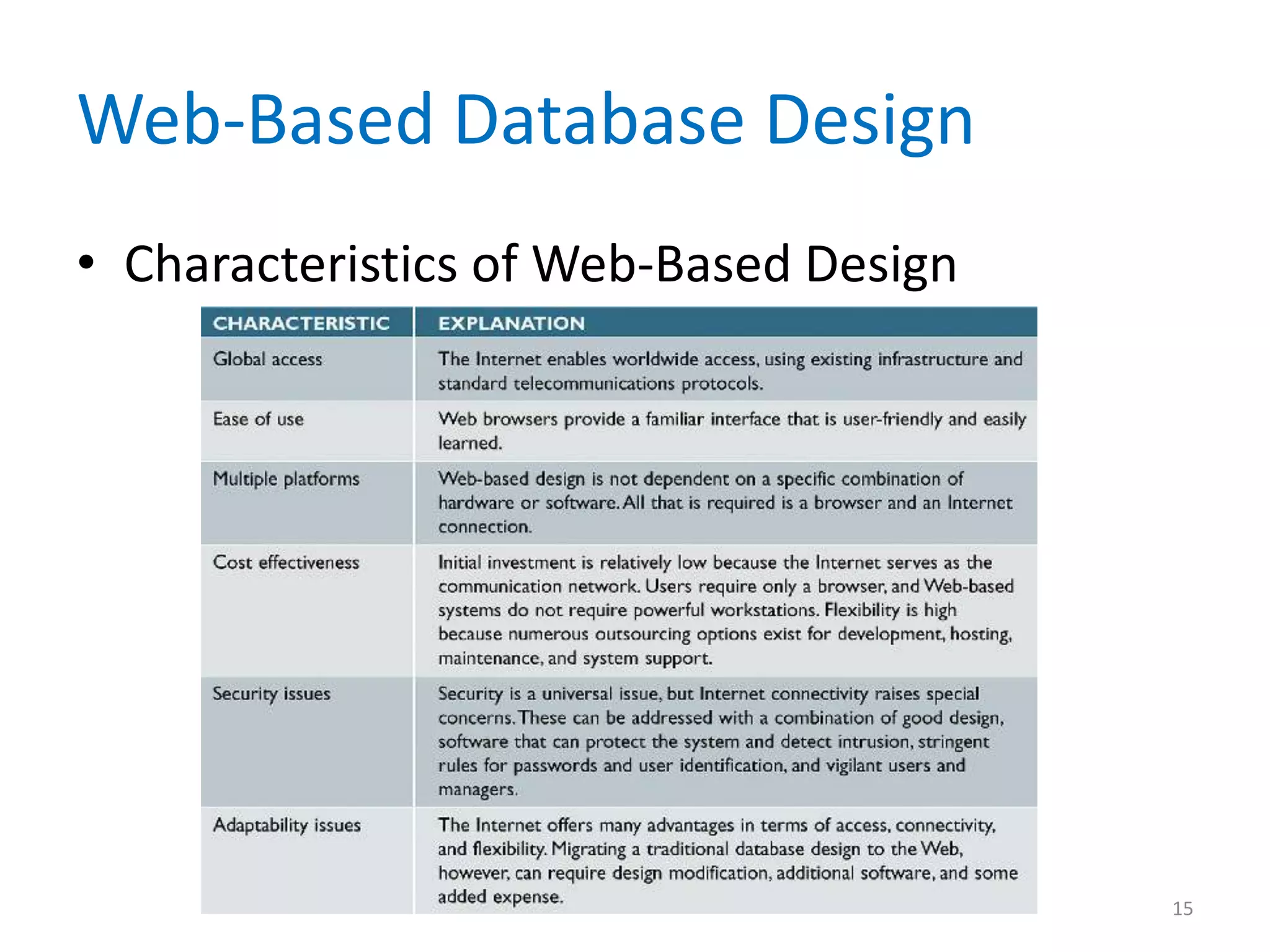
Web-Based Database Design
• Characteristics of Web-Based Design


                                        15
Web-Based Database Design
• Internet Terminology
  – Web browser
  – Web page
  – HTML (Hypertext Markup Language)
  – Tags
  – Web server
  – Web site


                                       16
Web-Based Database Design
• Internet Terminology
  – Intranet
  – Extranet
  – Protocols
  – Web-centric
  – Clients
  – Servers


                            17
Web-Based Database Design
• Connecting a Database to the Web
  – Database must be connected to the Internet or
    intranet
  – Middleware
     • Adobe ColdFusion
• Data Security
  – Well-designed systems provide security at three
    levels: the database itself, the Web server, and the
    telecommunication links that connect the
    components of the system

                                                       18
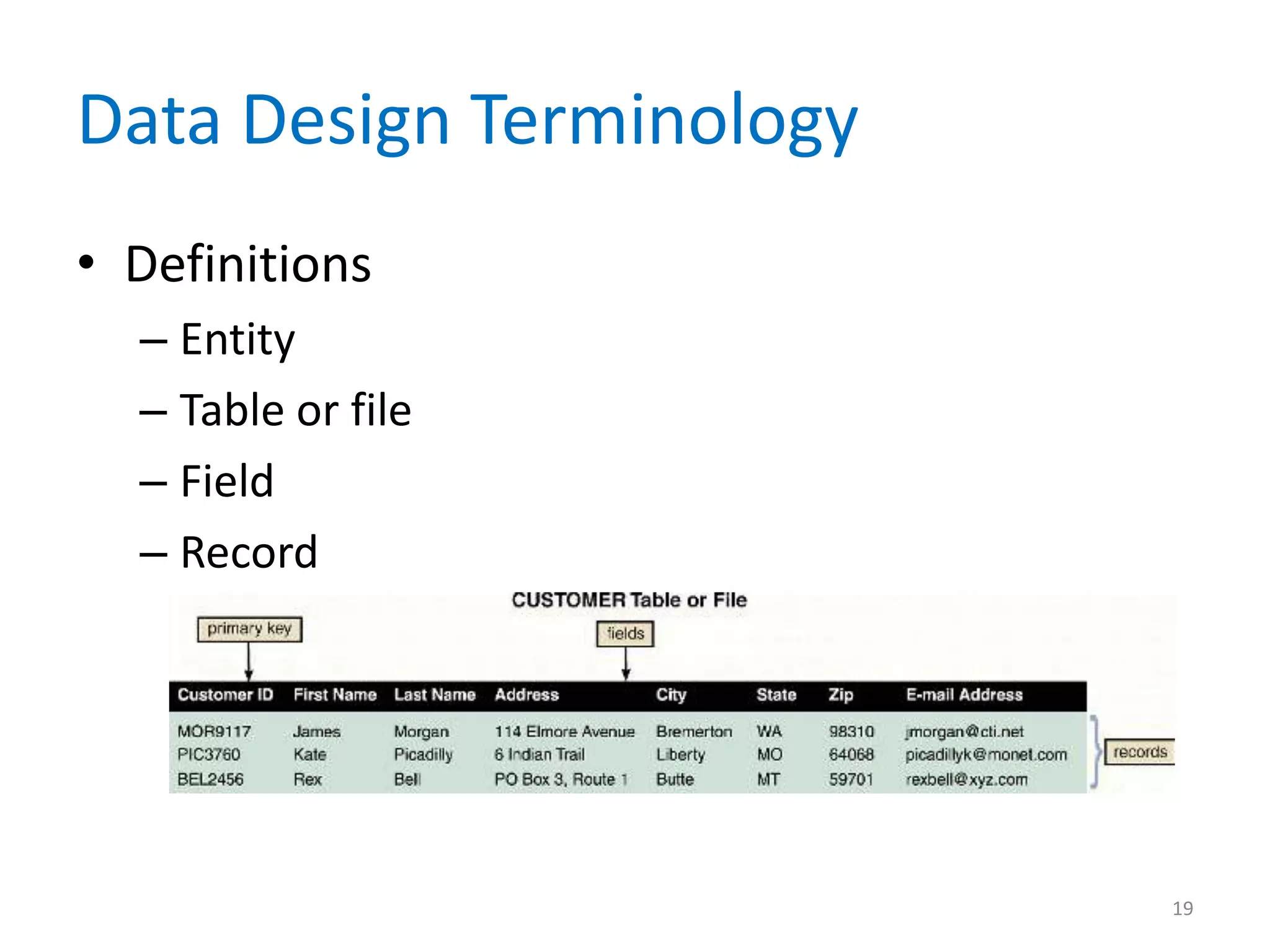
Data Design Terminology
• Definitions
  – Entity
  – Table or file
  – Field
  – Record


                          19
Data Design Terminology
• Key Fields
  – Primary key
  – Candidate key
  – Foreign key
  – Secondary key


                          20
Data Design Terminology
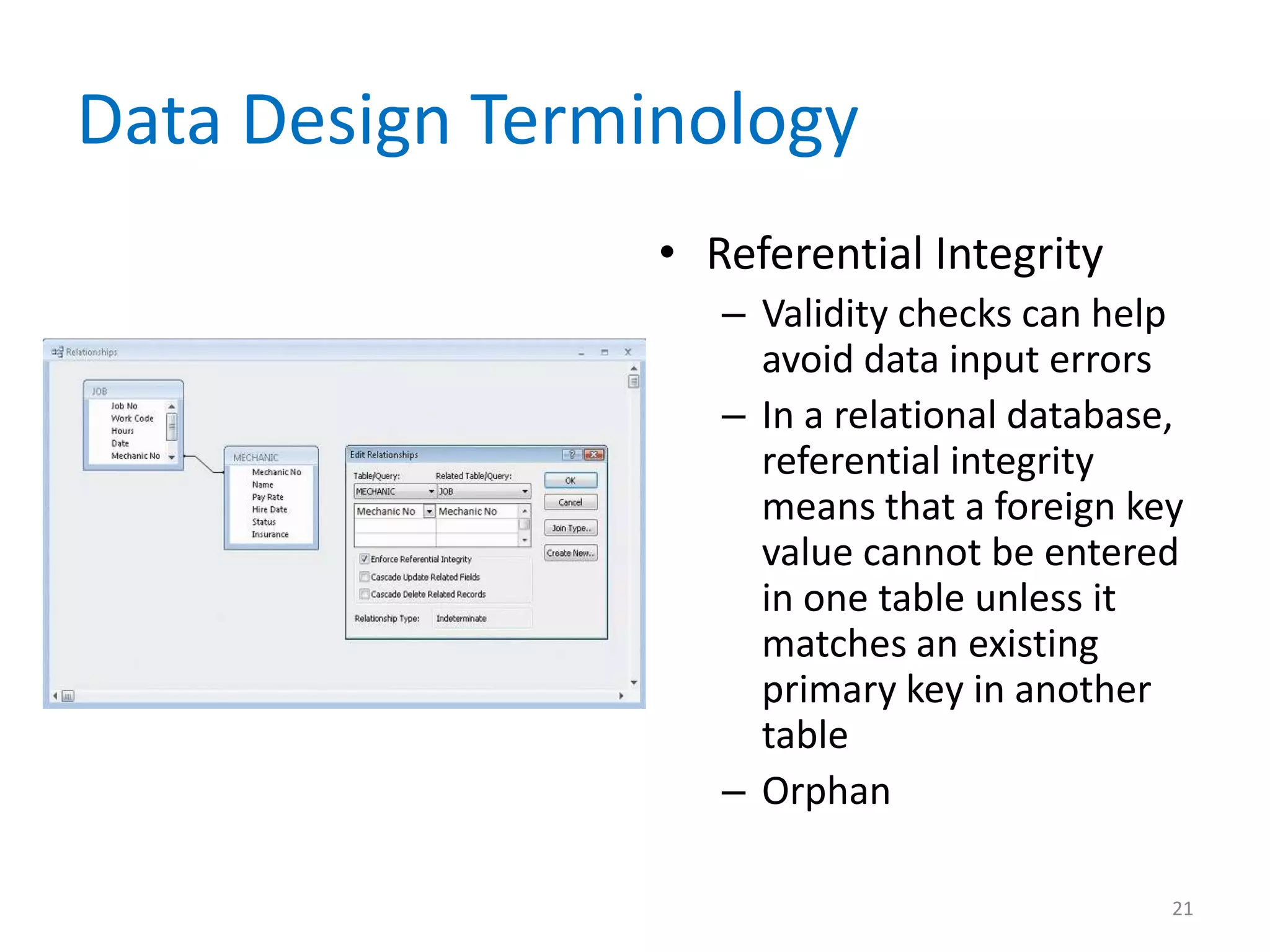
                 • Referential Integrity
                    – Validity checks can help
                      avoid data input errors
                    – In a relational database,
                      referential integrity
                      means that a foreign key
                      value cannot be entered
                      in one table unless it
                      matches an existing
                      primary key in another
                      table
                    – Orphan

                                              21
Entity-Relationship Diagrams
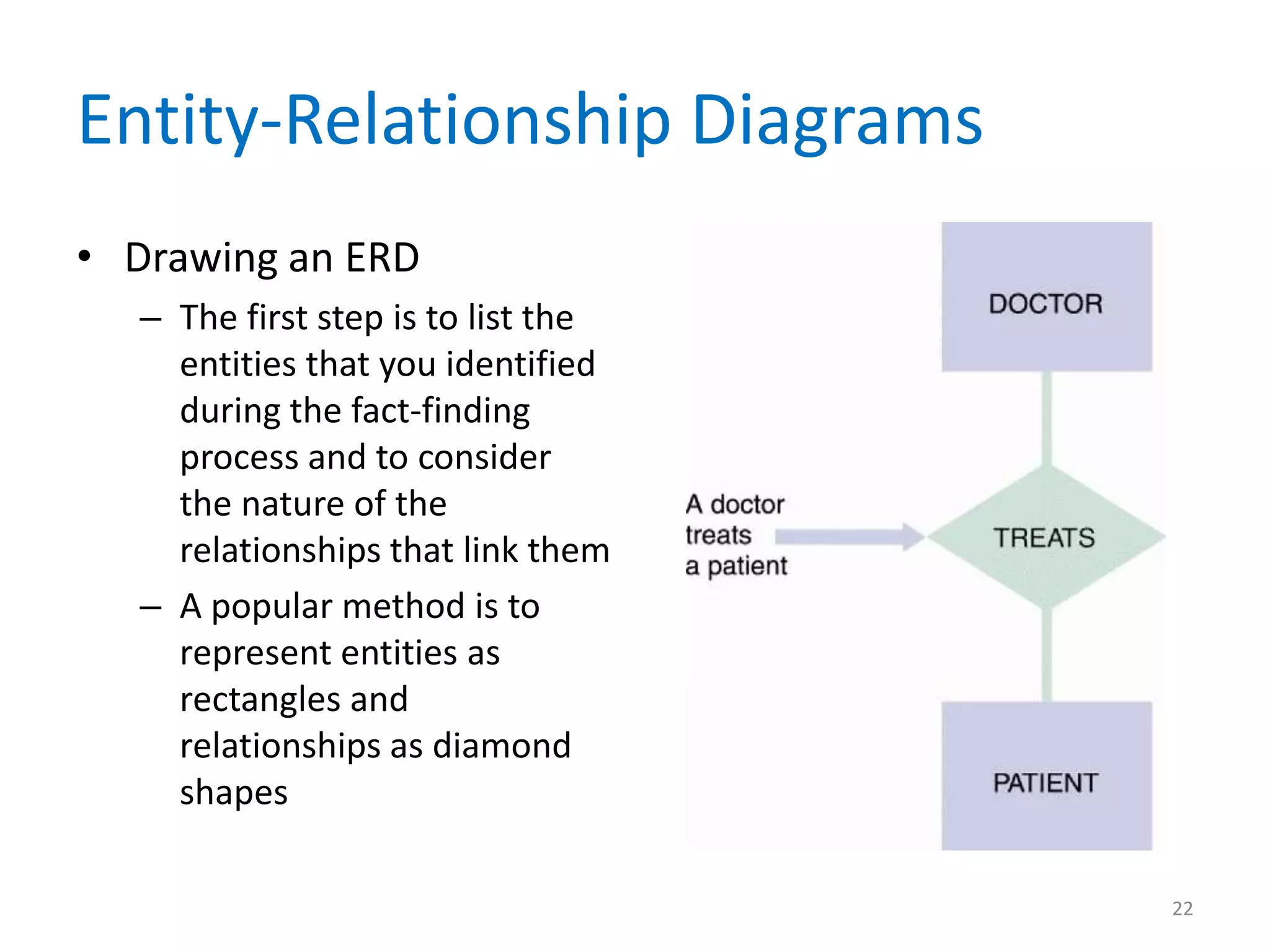
• Drawing an ERD
  – The first step is to list the
    entities that you identified
    during the fact-finding
    process and to consider
    the nature of the
    relationships that link them
  – A popular method is to
    represent entities as
    rectangles and
    relationships as diamond
    shapes

                                    22
Entity-Relationship Diagrams
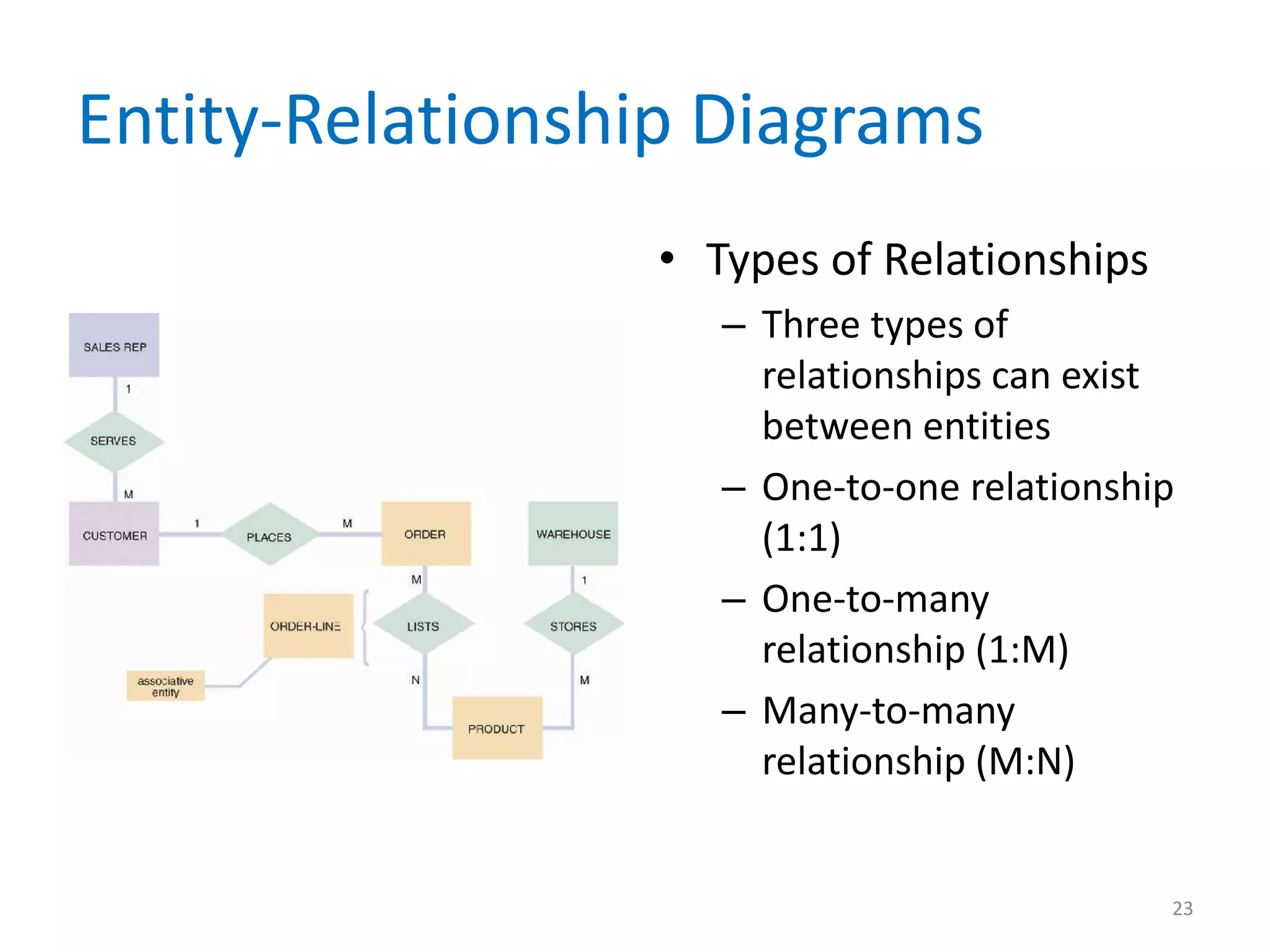
                 • Types of Relationships
                    – Three types of
                      relationships can exist
                      between entities
                    – One-to-one relationship
                      (1:1)
                    – One-to-many
                      relationship (1:M)
                    – Many-to-many
                      relationship (M:N)


                                            23
Entity-Relationship Diagrams
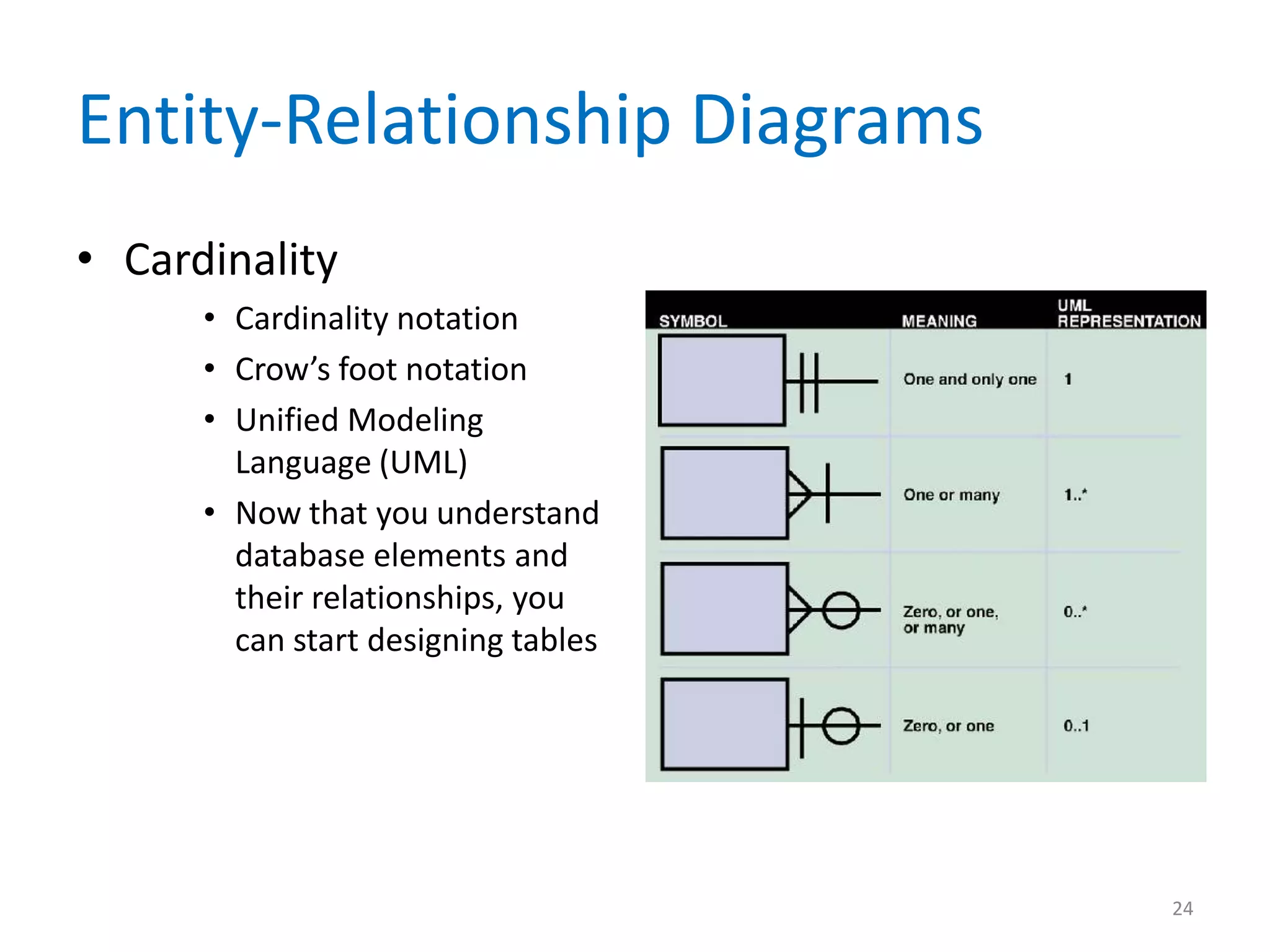
• Cardinality
      • Cardinality notation
      • Crow’s foot notation
      • Unified Modeling
        Language (UML)
      • Now that you understand
        database elements and
        their relationships, you
        can start designing tables


                                     24
Normalization
• Standard Notation Format
  – Designing tables is easier if you use a standard
    notation format to show a table’s structure, fields,
    and primary key

  – Example: NAME (FIELD 1, FIELD 2, FIELD 3)


                                                       25
Normalization
• Repeating Groups and Unnormalized Design
  – Repeating groups
     • Often occur in manual documents prepared by users
  – Unnormalized
  – Enclose the repeating group of fields within a
    second set of parentheses


                                                           26
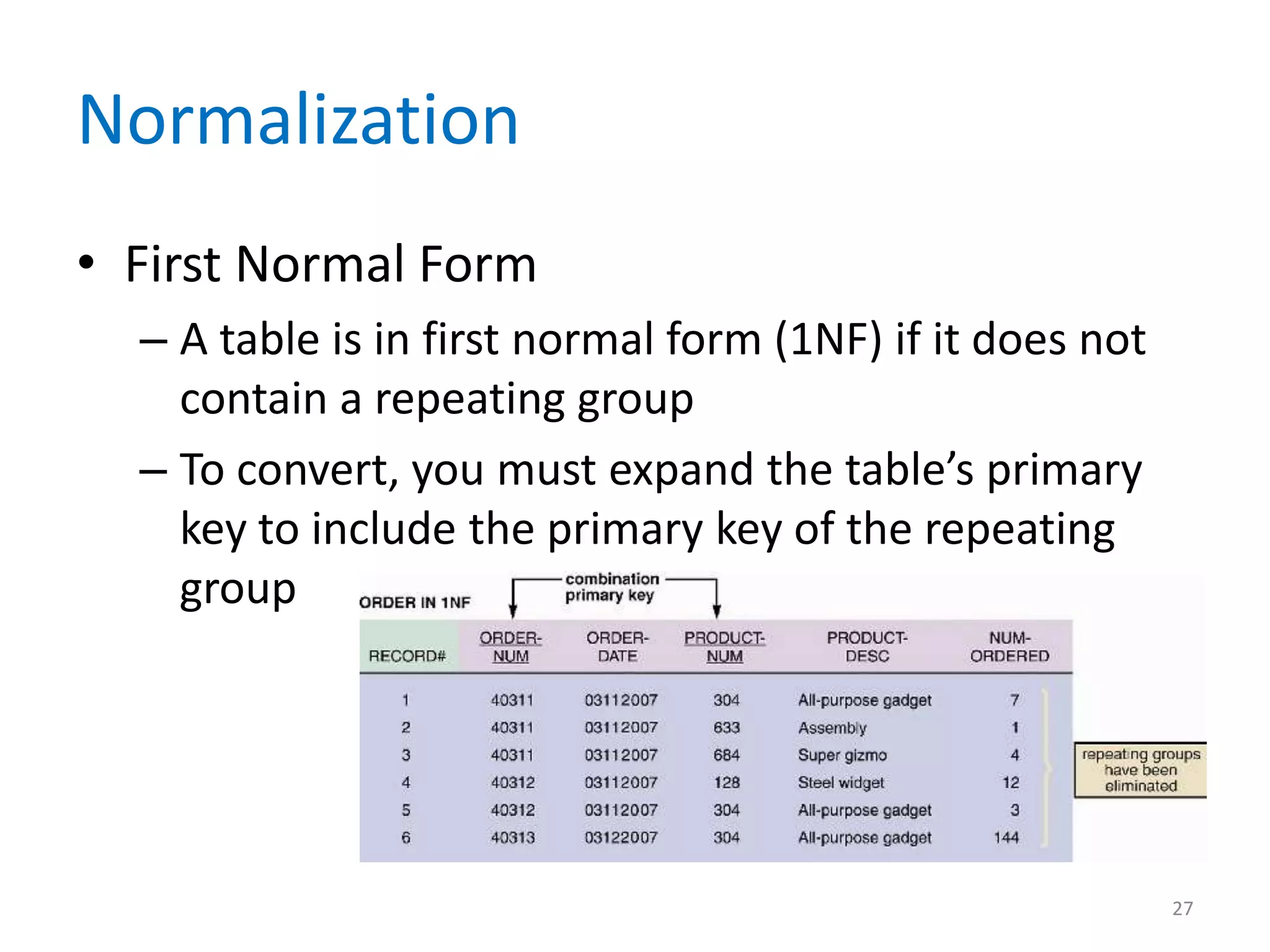
Normalization
• First Normal Form
  – A table is in first normal form (1NF) if it does not
    contain a repeating group
  – To convert, you must expand the table’s primary
    key to include the primary key of the repeating
    group


                                                           27
Normalization
• Second Normal Form
  – A table design is in second normal form (2NF) if it is in
    1NF and if all fields that are not part of the primary
    key are functionally dependent on the entire primary
    key
  – A standard process exists for converting a table from
    1NF to 2NF
  – The objective is to break the original table into two or
    more new tables and reassign the fields so that each
    nonkey field will depend on the entire primary key in
    its table

                                                            28
Normalization
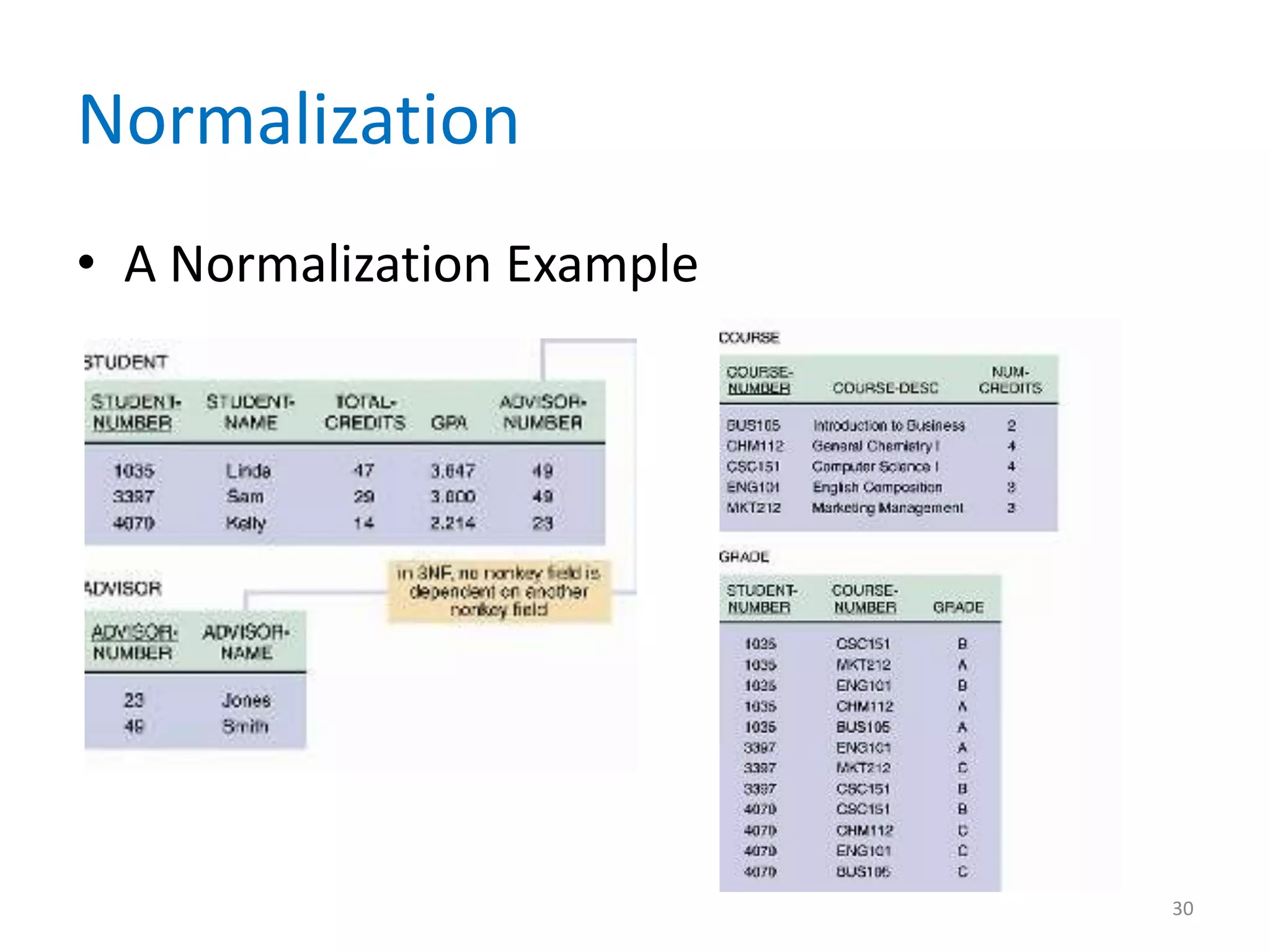
• Third Normal Form
  – 3NF design avoids redundancy and data integrity
    problems that still can exist in 2NF designs
  – A table design is in third normal form (3NF) if it is
    in 2NF and if no nonkey field is dependent on
    another nonkey field
  – To convert the table to 3NF, you must remove all
    fields from the 2NF table that depend on another
    nonkey field and place them in a new table that
    uses the nonkey field as a primary key

                                                            29
Normalization
• A Normalization Example


                            30
Using Codes During Data Design
• Overview of Codes
  – Because codes often are used to represent data,
    you encounter them constantly in your everyday
    life
  – They save storage space and costs, reduce data
    transmission time, and decrease data entry time
  – Can reduce data input errors


                                                      31
Using Codes During Data Design
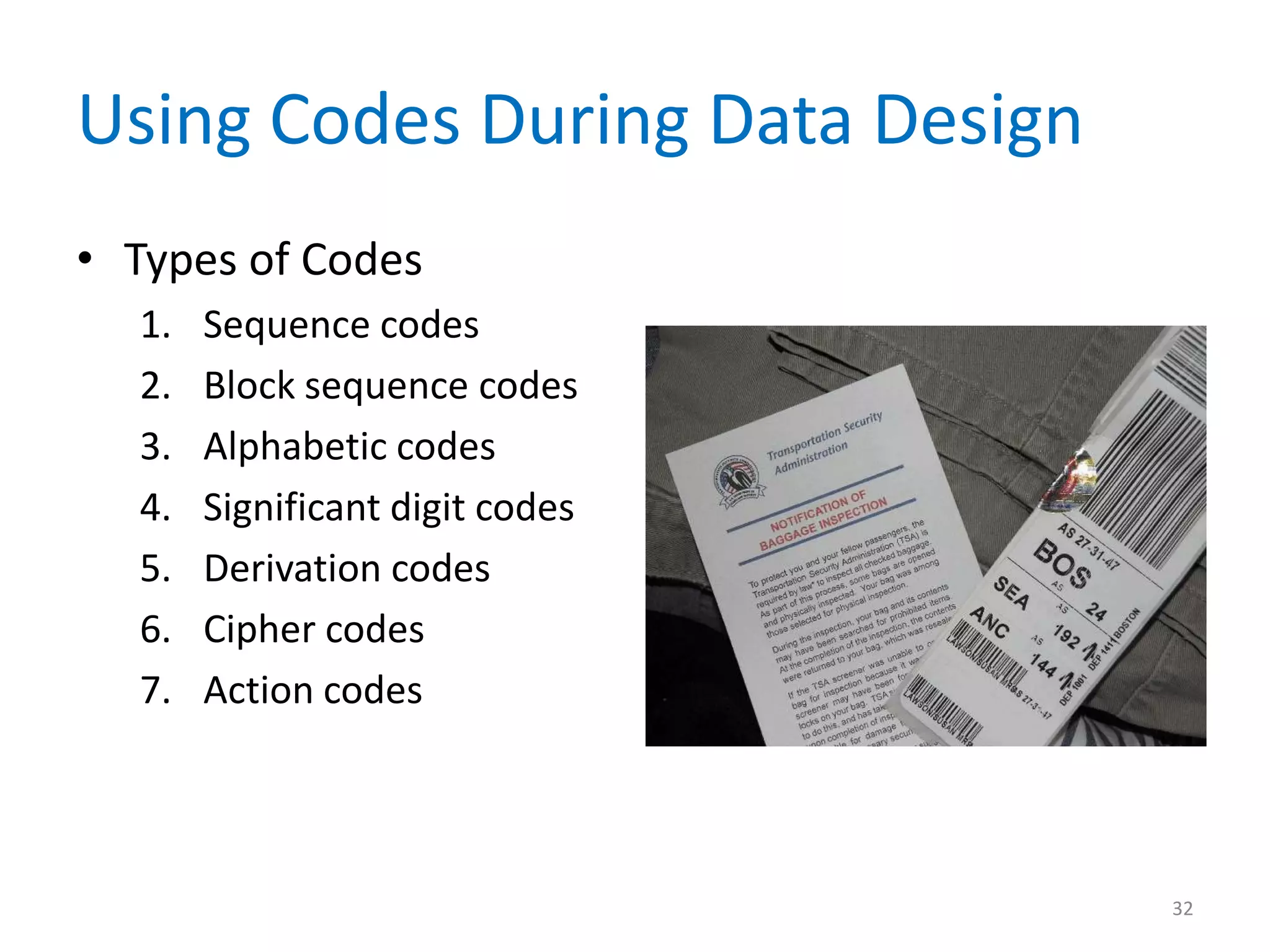
• Types of Codes
  1.   Sequence codes
  2.   Block sequence codes
  3.   Alphabetic codes
  4.   Significant digit codes
  5.   Derivation codes
  6.   Cipher codes
  7.   Action codes


                                 32
Using Codes During Data Design
• Developing a Code
  1.   Keep codes concise
  2.   Allow for expansion
  3.   Keep codes stable
  4.   Make codes unique
  5.   Use sortable codes


                                 33
Using Codes During Data Design
• Developing a Code
  6.   Avoid confusing codes
  7.   Make codes meaningful
  8.   Use a code for a single purpose
  9.   Keep codes consistent


                                         34
Steps in Database Design
1.   Create the initial ERD
2.   Assign all data elements to entities
3.   Create 3NF designs for all tables
4.   Verify all data dictionary entries
     – After creating your final ERD and normalized table
       designs, you can transform them into a database


                                                        35
Database Models
• Relational Databases
  – The relational model was introduced during the
    1970s and became popular because it was flexible
    and powerful
  – Because all the tables are linked, a user can
    request data that meets specific conditions
  – New entities and attributes can be added at any
    time without restructuring the entire database


                                                   36
Database Models
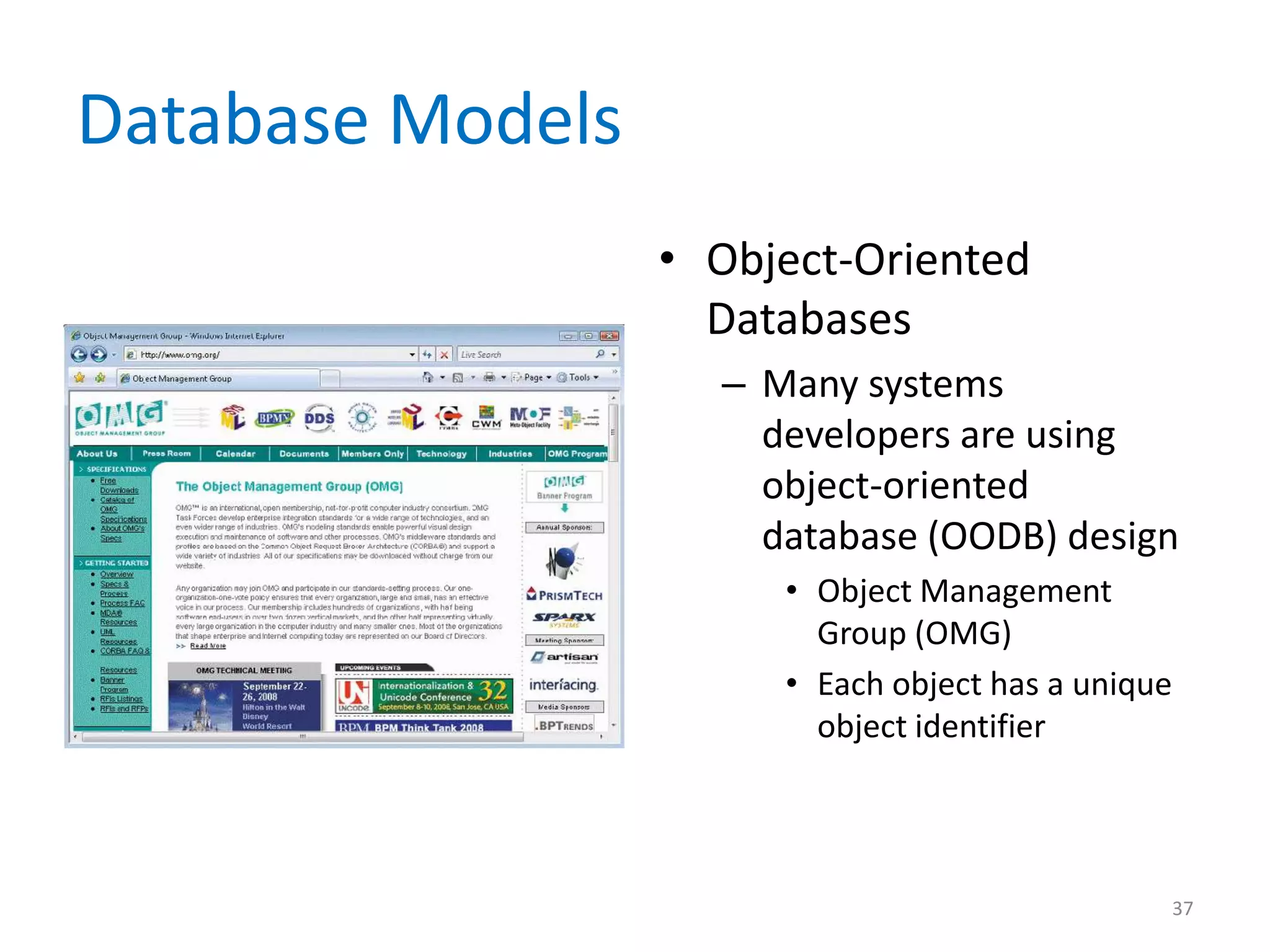
                  • Object-Oriented
                    Databases
                    – Many systems
                      developers are using
                      object-oriented
                      database (OODB) design
                       • Object Management
                         Group (OMG)
                       • Each object has a unique
                         object identifier


                                                37
Data Storage and Access
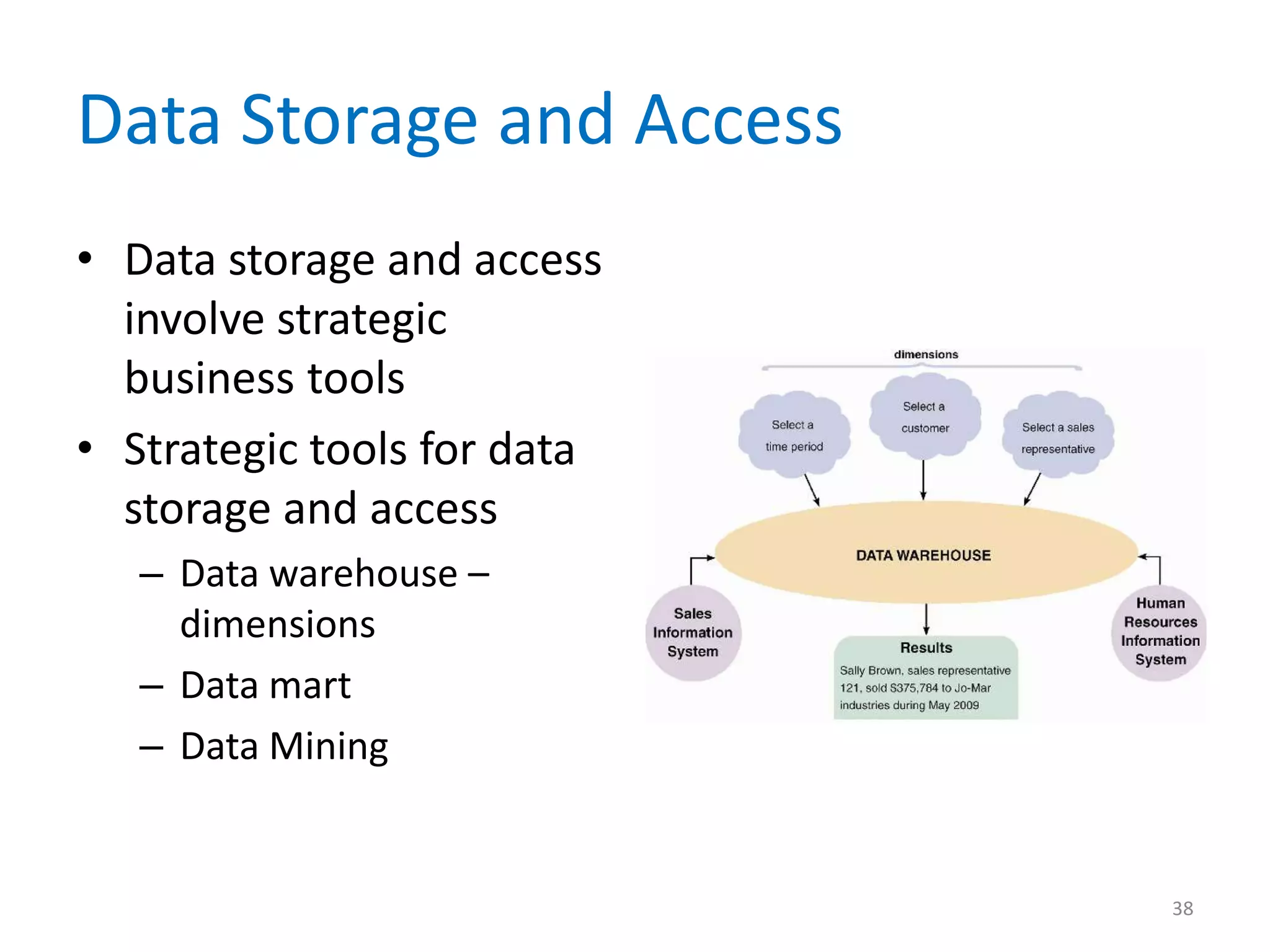
• Data storage and access
  involve strategic
  business tools
• Strategic tools for data
  storage and access
   – Data warehouse –
     dimensions
   – Data mart
   – Data Mining


                             38
Data Storage and Access
• Logical and Physical Storage
  – Logical storage
     • Characters
     • Data element or data item
     • Logical record
  – Physical storage
     • Physical record or block
     • Buffer
     • Blocking factor

                                   39
Data Storage and Access
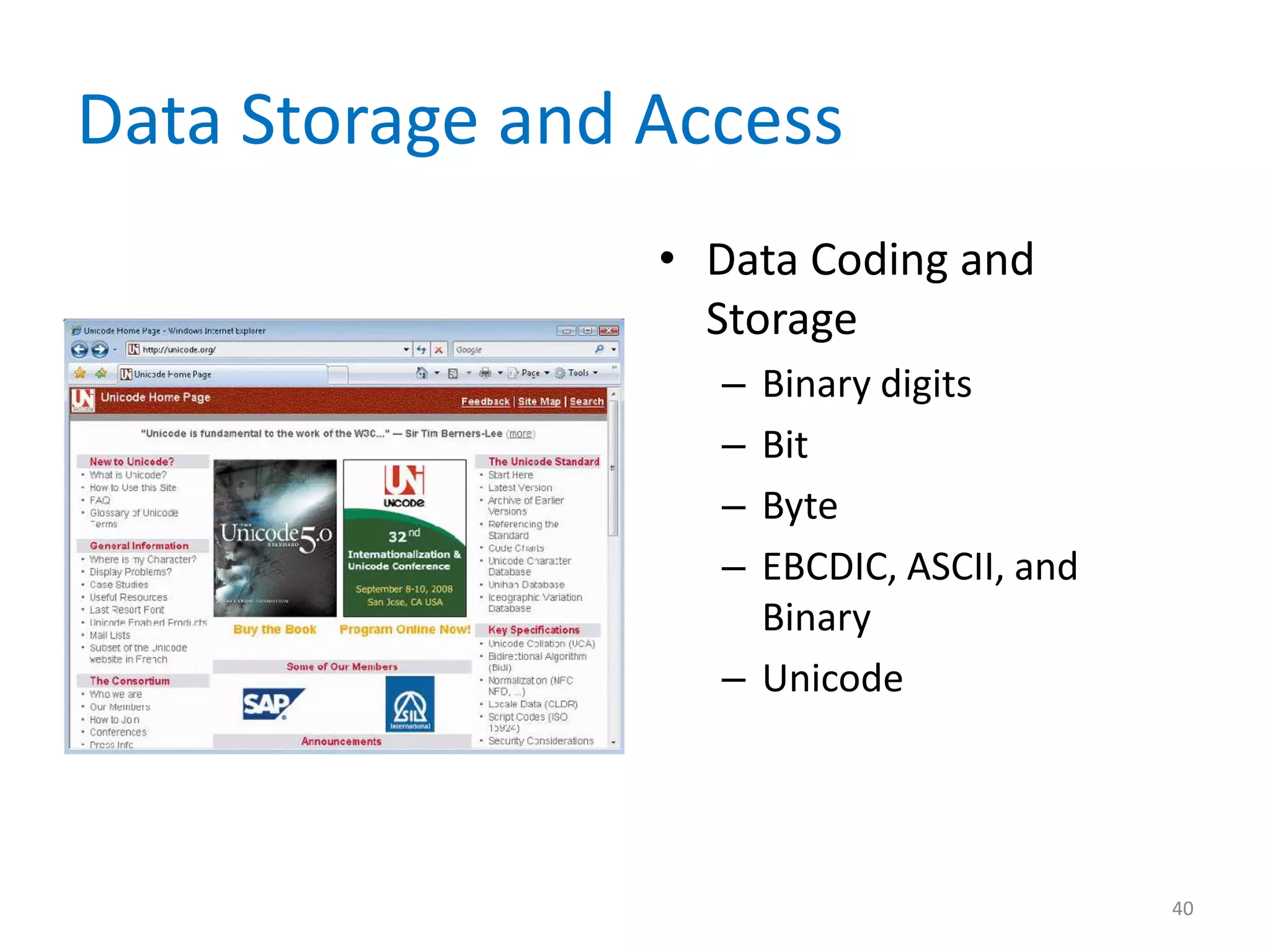
                 • Data Coding and
                   Storage
                   – Binary digits
                   – Bit
                   – Byte
                   – EBCDIC, ASCII, and
                     Binary
                   – Unicode


                                          40
Data Storage and Access
• Data Coding and Storage
  – Storing dates
     • Y2K Issue
     • Most date formats now are based on the model
       established by the International Organization for
       Standardization (ISO)
     • Absolute date


                                                           41
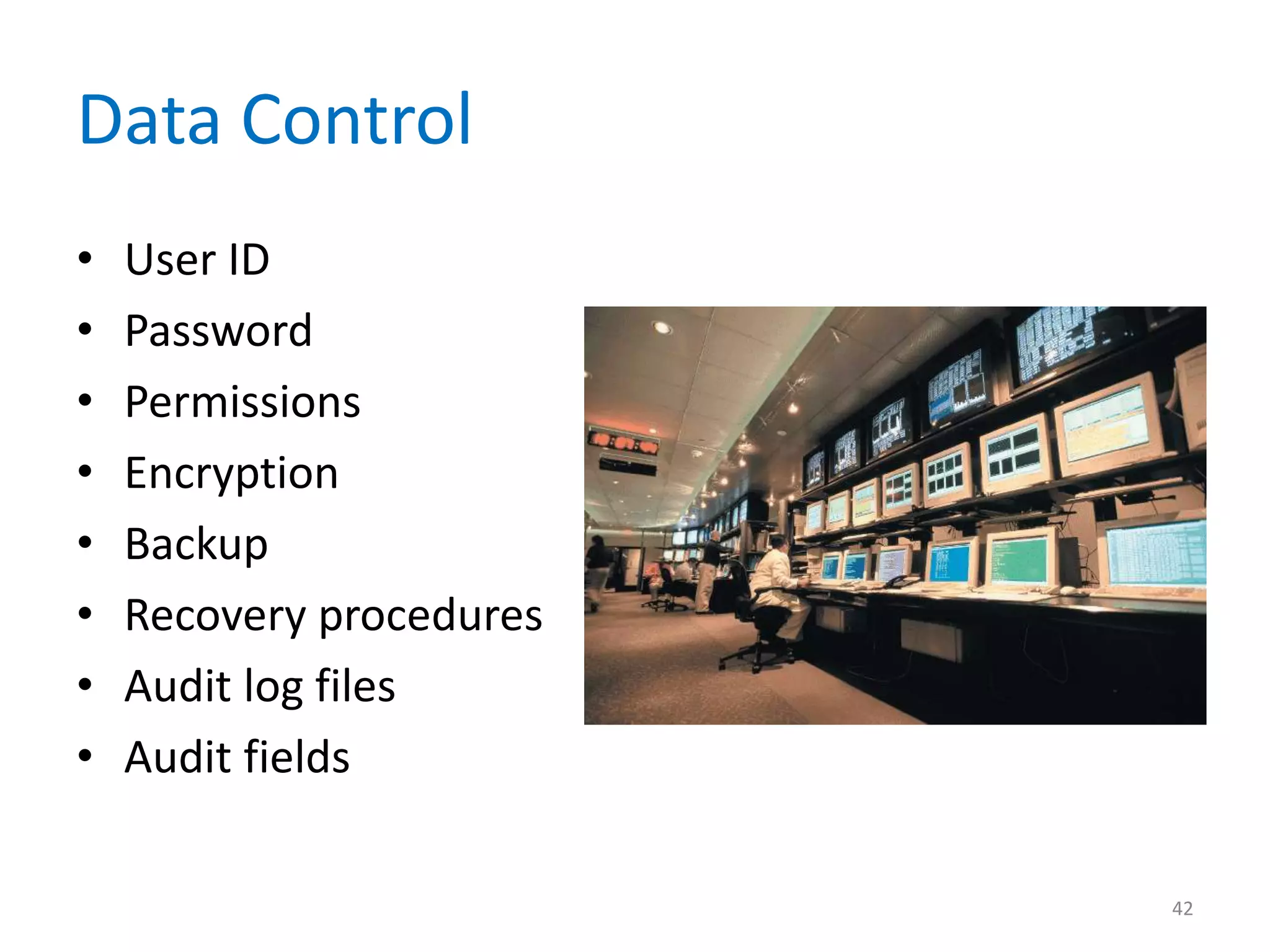
Data Control
•   User ID
•   Password
•   Permissions
•   Encryption
•   Backup
•   Recovery procedures
•   Audit log files
•   Audit fields

                          42
Chapter Summary
• Files and tables contain data about people,
  places, things, or events that affect the
  information system
• DBMS designs are more powerful and flexible
  than traditional file-oriented systems
• An entity-relationship diagram (ERD) is a
  graphic representation of all system entities
  and the relationships among them

                                                  43
Chapter Summary
• A code is a set of letters or numbers used to
  represent data in a system
• The most common database models are
  relational and object-oriented
• Logical storage is information seen through a
  user’s eyes, regardless of how or where that
  information actually is organized or stored


                                                  44
Chapter Summary
• Physical storage is hardware-related and
  involves reading and writing blocks of binary
  data to physical media
• File and database control measures include
  limiting access to the data, data encryption,
  backup/recovery procedures, audit-trail files,
  and internal audit fields

• Chapter 9 complete
                                                   45

Chapter 09

  • 1.
    Systems Analysis andDesign 8th Edition Chapter 9 Data Design
  • 2.
    Chapter Objectives • Explaindata design concepts and structures • Describe file processing systems • Explain database systems and define the components of a database management system (DBMS) • Describe Web-based data design 2
  • 3.
    Chapter Objectives • Explaindata design terminology, including entities, fields, common fields, records, files, tables, and key fields • Describe data relationships, draw an entity relationship diagram, define cardinality, and use cardinality notation • Explain the concept of normalization • Explain the importance of codes and describe various coding schemes 3
  • 4.
    Chapter Objectives • Describerelational and object-oriented database models • Explain data warehousing and data mining • Differentiate between logical and physical storage and records • Explain data control measures 4
  • 5.
    Introduction • You willdevelop a physical plan for data organization, storage, and retrieval • Begins with a review of data design concepts and terminology, then discusses file-based systems and database systems, including Web-based databases • Concludes with a discussion of data storage and access, including strategic tools such as data warehousing and data mining, physical design issues, logical and physical records, data storage formats, and data controls 5
  • 6.
    Data Design Concepts •Data Structures – Each file or table contains data about people, places, things or events that interact with the information system – File-oriented system – File processing system – Database system 6
  • 7.
    Data Design Concepts • Overview of File Processing – File processing can be efficient and cost- effective in certain situations – Potential problems • Data redundancy • Data integrity • Rigid data structure 7
  • 8.
    Data Design Concepts •Overview of File Processing – Various types of files • Master file • Table file • Transaction file • Work file • Security file • History file 8
  • 9.
    Data Design Concepts •The Evolution from File Systems to Database Systems – A database management system (DBMS) is a collection of tools, features, and interfaces that enables users to add, update, manage, access, and analyze the contents of a database – The main advantage of a DBMS is that it offers timely, interactive, and flexible data access 9
  • 10.
    Data Design Concepts •The Evolution from File Systems to Database Systems – Some Advantages • Scalability • Economy of scale • Enterprise-wide application – database administrator (DBA) • Controlled redundancy • Data independence 10
  • 11.
    DBMS Components • Interfaces for Users, Database Administrators, and Related Systems – Users • Query language • Query by example (QBE) • SQL (structured query language) – Database Administrators • A DBA is responsible for DBMS management and support 11
  • 12.
    DBMS Components • Interfacesfor Users, Database Administrators, and Related Systems – Related information systems • A DBMS can support several related information systems that provide input to, and require specific data from, the DBMS • No human intervention is required for two-way communication 12
  • 13.
    DBMS Components • DataManipulation Language – A data manipulation language (DML) controls database operations, including storing, retrieving, updating, and deleting data • Schema – The complete definition of a database, including descriptions of all fields, tables, and relationships, is called a schema – You also can define one or more subschemas 13
  • 14.
    DBMS Components • PhysicalData Repository – The data dictionary is transformed into a physical data repository, which also contains the schema and subschemas – The physical repository might be centralized, or distributed at several locations – ODBC – open database connectivity – JDBC – Java database connectivity 14
  • 15.
    Web-Based Database Design •Characteristics of Web-Based Design 15
  • 16.
    Web-Based Database Design •Internet Terminology – Web browser – Web page – HTML (Hypertext Markup Language) – Tags – Web server – Web site 16
  • 17.
    Web-Based Database Design •Internet Terminology – Intranet – Extranet – Protocols – Web-centric – Clients – Servers 17
  • 18.
    Web-Based Database Design •Connecting a Database to the Web – Database must be connected to the Internet or intranet – Middleware • Adobe ColdFusion • Data Security – Well-designed systems provide security at three levels: the database itself, the Web server, and the telecommunication links that connect the components of the system 18
  • 19.
    Data Design Terminology •Definitions – Entity – Table or file – Field – Record 19
  • 20.
    Data Design Terminology •Key Fields – Primary key – Candidate key – Foreign key – Secondary key 20
  • 21.
    Data Design Terminology • Referential Integrity – Validity checks can help avoid data input errors – In a relational database, referential integrity means that a foreign key value cannot be entered in one table unless it matches an existing primary key in another table – Orphan 21
  • 22.
    Entity-Relationship Diagrams • Drawingan ERD – The first step is to list the entities that you identified during the fact-finding process and to consider the nature of the relationships that link them – A popular method is to represent entities as rectangles and relationships as diamond shapes 22
  • 23.
    Entity-Relationship Diagrams • Types of Relationships – Three types of relationships can exist between entities – One-to-one relationship (1:1) – One-to-many relationship (1:M) – Many-to-many relationship (M:N) 23
  • 24.
    Entity-Relationship Diagrams • Cardinality • Cardinality notation • Crow’s foot notation • Unified Modeling Language (UML) • Now that you understand database elements and their relationships, you can start designing tables 24
  • 25.
    Normalization • Standard NotationFormat – Designing tables is easier if you use a standard notation format to show a table’s structure, fields, and primary key – Example: NAME (FIELD 1, FIELD 2, FIELD 3) 25
  • 26.
    Normalization • Repeating Groupsand Unnormalized Design – Repeating groups • Often occur in manual documents prepared by users – Unnormalized – Enclose the repeating group of fields within a second set of parentheses 26
  • 27.
    Normalization • First NormalForm – A table is in first normal form (1NF) if it does not contain a repeating group – To convert, you must expand the table’s primary key to include the primary key of the repeating group 27
  • 28.
    Normalization • Second NormalForm – A table design is in second normal form (2NF) if it is in 1NF and if all fields that are not part of the primary key are functionally dependent on the entire primary key – A standard process exists for converting a table from 1NF to 2NF – The objective is to break the original table into two or more new tables and reassign the fields so that each nonkey field will depend on the entire primary key in its table 28
  • 29.
    Normalization • Third NormalForm – 3NF design avoids redundancy and data integrity problems that still can exist in 2NF designs – A table design is in third normal form (3NF) if it is in 2NF and if no nonkey field is dependent on another nonkey field – To convert the table to 3NF, you must remove all fields from the 2NF table that depend on another nonkey field and place them in a new table that uses the nonkey field as a primary key 29
  • 30.
  • 31.
    Using Codes DuringData Design • Overview of Codes – Because codes often are used to represent data, you encounter them constantly in your everyday life – They save storage space and costs, reduce data transmission time, and decrease data entry time – Can reduce data input errors 31
  • 32.
    Using Codes DuringData Design • Types of Codes 1. Sequence codes 2. Block sequence codes 3. Alphabetic codes 4. Significant digit codes 5. Derivation codes 6. Cipher codes 7. Action codes 32
  • 33.
    Using Codes DuringData Design • Developing a Code 1. Keep codes concise 2. Allow for expansion 3. Keep codes stable 4. Make codes unique 5. Use sortable codes 33
  • 34.
    Using Codes DuringData Design • Developing a Code 6. Avoid confusing codes 7. Make codes meaningful 8. Use a code for a single purpose 9. Keep codes consistent 34
  • 35.
    Steps in DatabaseDesign 1. Create the initial ERD 2. Assign all data elements to entities 3. Create 3NF designs for all tables 4. Verify all data dictionary entries – After creating your final ERD and normalized table designs, you can transform them into a database 35
  • 36.
    Database Models • RelationalDatabases – The relational model was introduced during the 1970s and became popular because it was flexible and powerful – Because all the tables are linked, a user can request data that meets specific conditions – New entities and attributes can be added at any time without restructuring the entire database 36
  • 37.
    Database Models • Object-Oriented Databases – Many systems developers are using object-oriented database (OODB) design • Object Management Group (OMG) • Each object has a unique object identifier 37
  • 38.
    Data Storage andAccess • Data storage and access involve strategic business tools • Strategic tools for data storage and access – Data warehouse – dimensions – Data mart – Data Mining 38
  • 39.
    Data Storage andAccess • Logical and Physical Storage – Logical storage • Characters • Data element or data item • Logical record – Physical storage • Physical record or block • Buffer • Blocking factor 39
  • 40.
    Data Storage andAccess • Data Coding and Storage – Binary digits – Bit – Byte – EBCDIC, ASCII, and Binary – Unicode 40
  • 41.
    Data Storage andAccess • Data Coding and Storage – Storing dates • Y2K Issue • Most date formats now are based on the model established by the International Organization for Standardization (ISO) • Absolute date 41
  • 42.
    Data Control • User ID • Password • Permissions • Encryption • Backup • Recovery procedures • Audit log files • Audit fields 42
  • 43.
    Chapter Summary • Filesand tables contain data about people, places, things, or events that affect the information system • DBMS designs are more powerful and flexible than traditional file-oriented systems • An entity-relationship diagram (ERD) is a graphic representation of all system entities and the relationships among them 43
  • 44.
    Chapter Summary • Acode is a set of letters or numbers used to represent data in a system • The most common database models are relational and object-oriented • Logical storage is information seen through a user’s eyes, regardless of how or where that information actually is organized or stored 44
  • 45.
    Chapter Summary • Physicalstorage is hardware-related and involves reading and writing blocks of binary data to physical media • File and database control measures include limiting access to the data, data encryption, backup/recovery procedures, audit-trail files, and internal audit fields • Chapter 9 complete 45