Systems Analysis and Design
8th Edition

Chapter 3
Managing Systems Projects
Chapter Objectives
• Explain techniques for estimating task
  completion times and costs
• Describe various scheduling tools, including
  Gantt charts and PERT/CPM charts
• Analyze task dependencies, durations, start
  dates, and end dates


                                                 2
Chapter Objectives
• Identify examples of project management
  software and explain how these programs can
  assist you in project planning, estimating,
  scheduling, monitoring, and reporting
• Explain software change control
• Understand why projects sometimes fail


                                                3
Introduction
• You will learn about project planning,
  estimating, scheduling, monitoring, reporting,
  and the use of project management software
• You also will learn how to control and manage
  project changes as they occur


                                                   4
Project Management Overview
• Project Management
• A successful project must be completed on
  time, within budget, and deliver a quality
  product that satisfies users and meets
  requirements
• Project manager or project leader
• Project coordinator


                                               5
Project Management Overview
• Project managers typically perform four main
  tasks:
  – Project planning
  – Project scheduling
  – Project monitoring and controlling
  – Project reporting


                                                 6
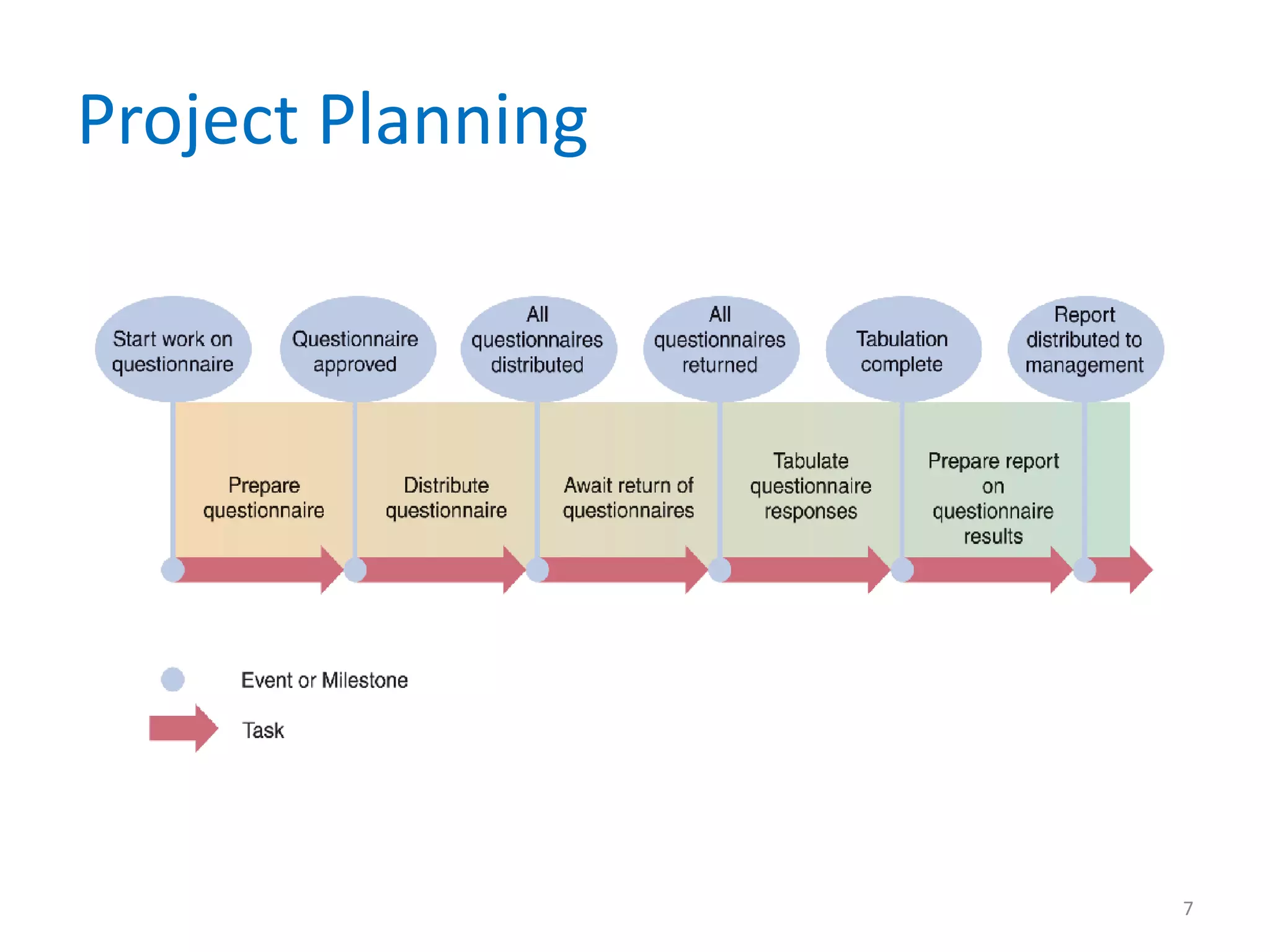
Project Planning


                   7
Project Planning
• Identifying Tasks
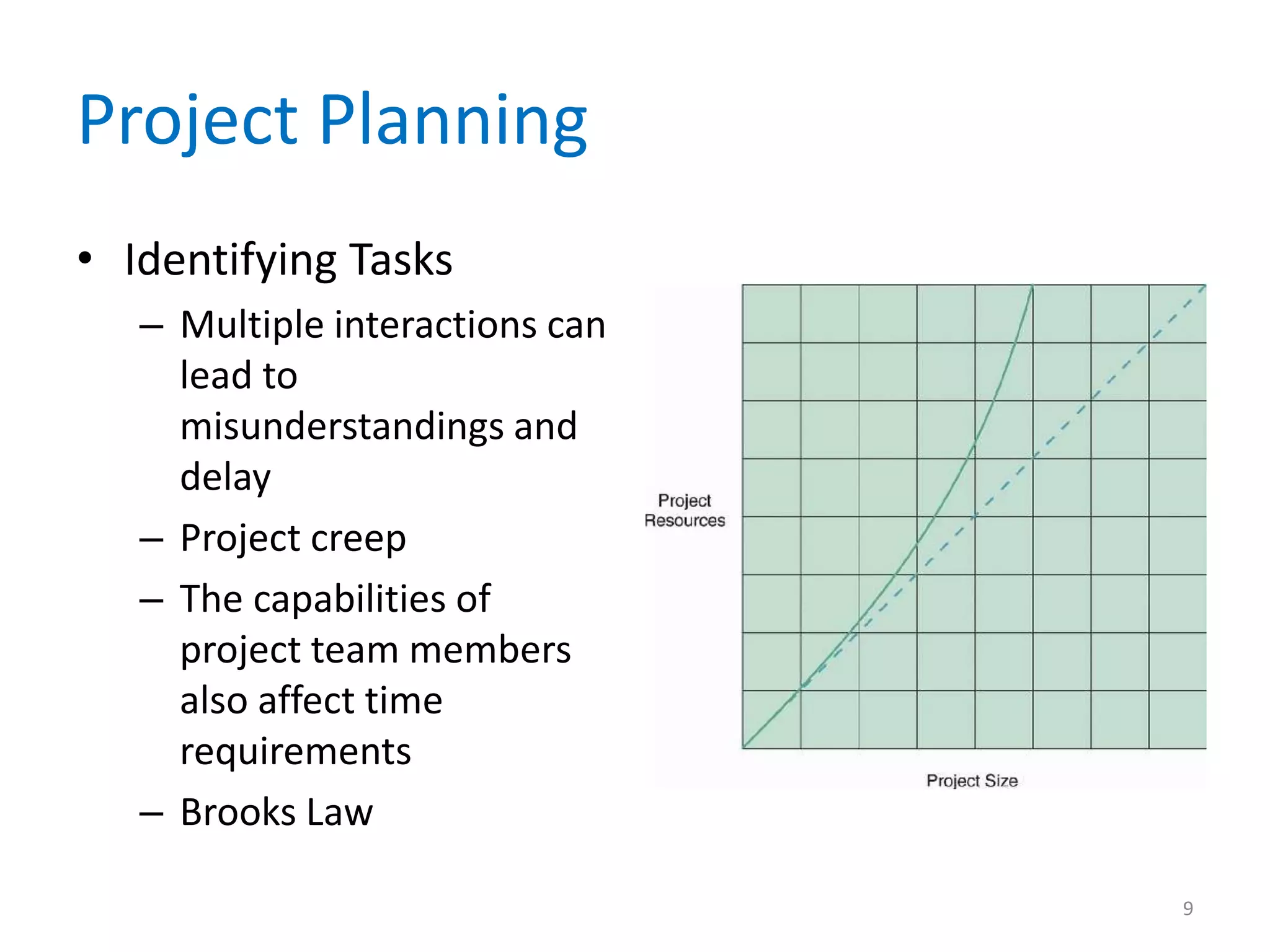
  – One important variable is the size of the project,
    because the amount of work increases
    dramatically as project scope increases
  – A project that is twice as large will be much more
    than twice as complex


                                                         8
Project Planning
• Identifying Tasks
   – Multiple interactions can
     lead to
     misunderstandings and
     delay
   – Project creep
   – The capabilities of
     project team members
     also affect time
     requirements
   – Brooks Law

                                 9
Project Planning
• Estimating Task Completion Time and Cost
  – Person-days
  – Some tasks can be divided evenly so it is possible
    to use different combinations of time and people,
    up to a point
  – In most systems analysis tasks, however, time and
    people are not interchangeable


                                                     10
Project Planning
• Estimating Task Completion Time and Cost
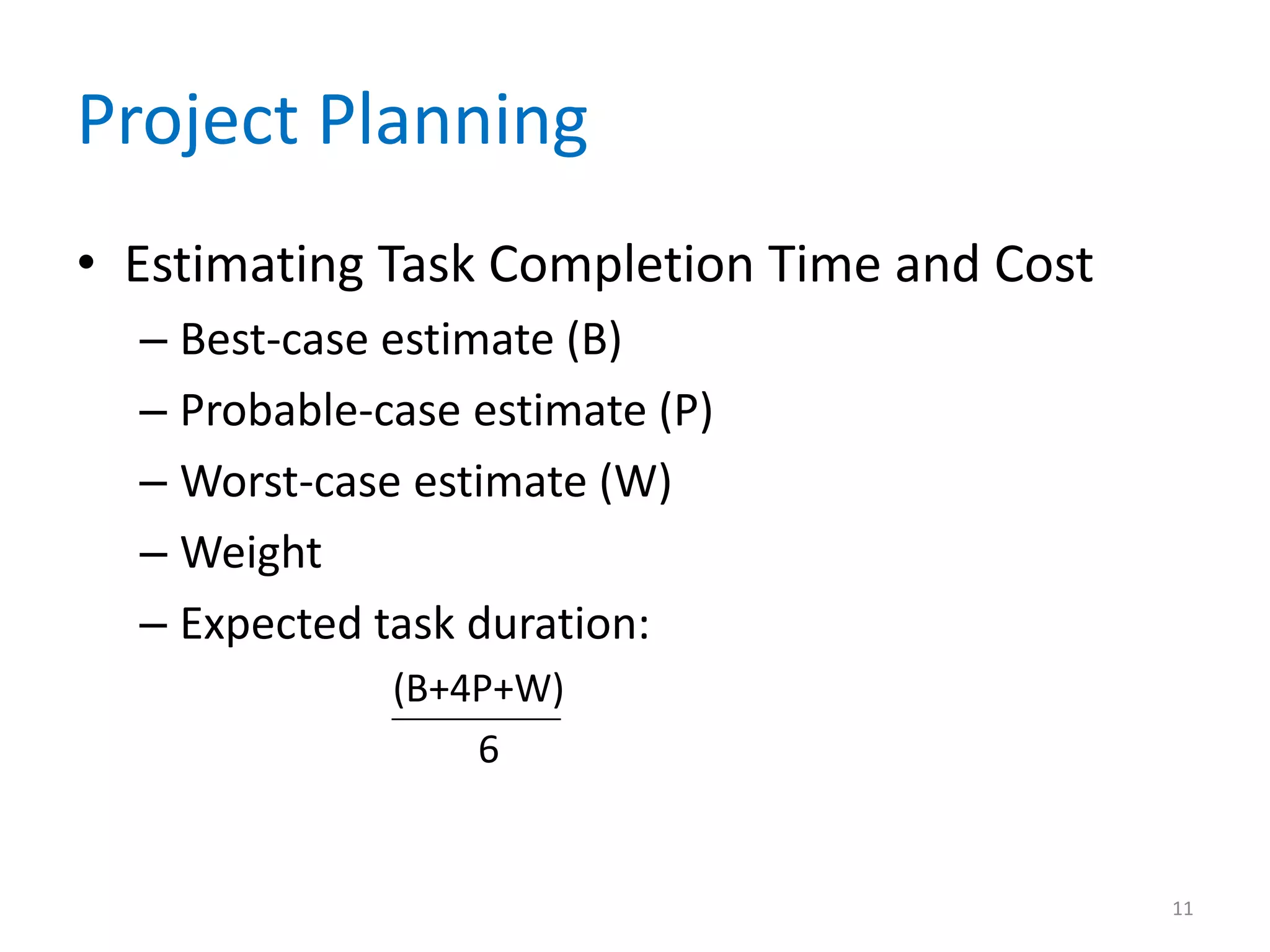
  – Best-case estimate (B)
  – Probable-case estimate (P)
  – Worst-case estimate (W)
  – Weight
  – Expected task duration:
              (B+4P+W)
                  6


                                             11
Project Planning
• Factors Affecting Time and Cost Estimates
  – Project size and scope
  – IT resources
  – Prior experience with similar projects or systems
  – Applicable constraints


                                                        12
Project Scheduling
• A project schedule is a specific timetable
• Project scheduling also involves selecting and
  staffing the project team, assigning specific
  tasks to team members, and arranging for
  other necessary resources
• Must balance task time estimates, sequences,
  and personnel assignments
• Several graphical planning aids can help

                                               13
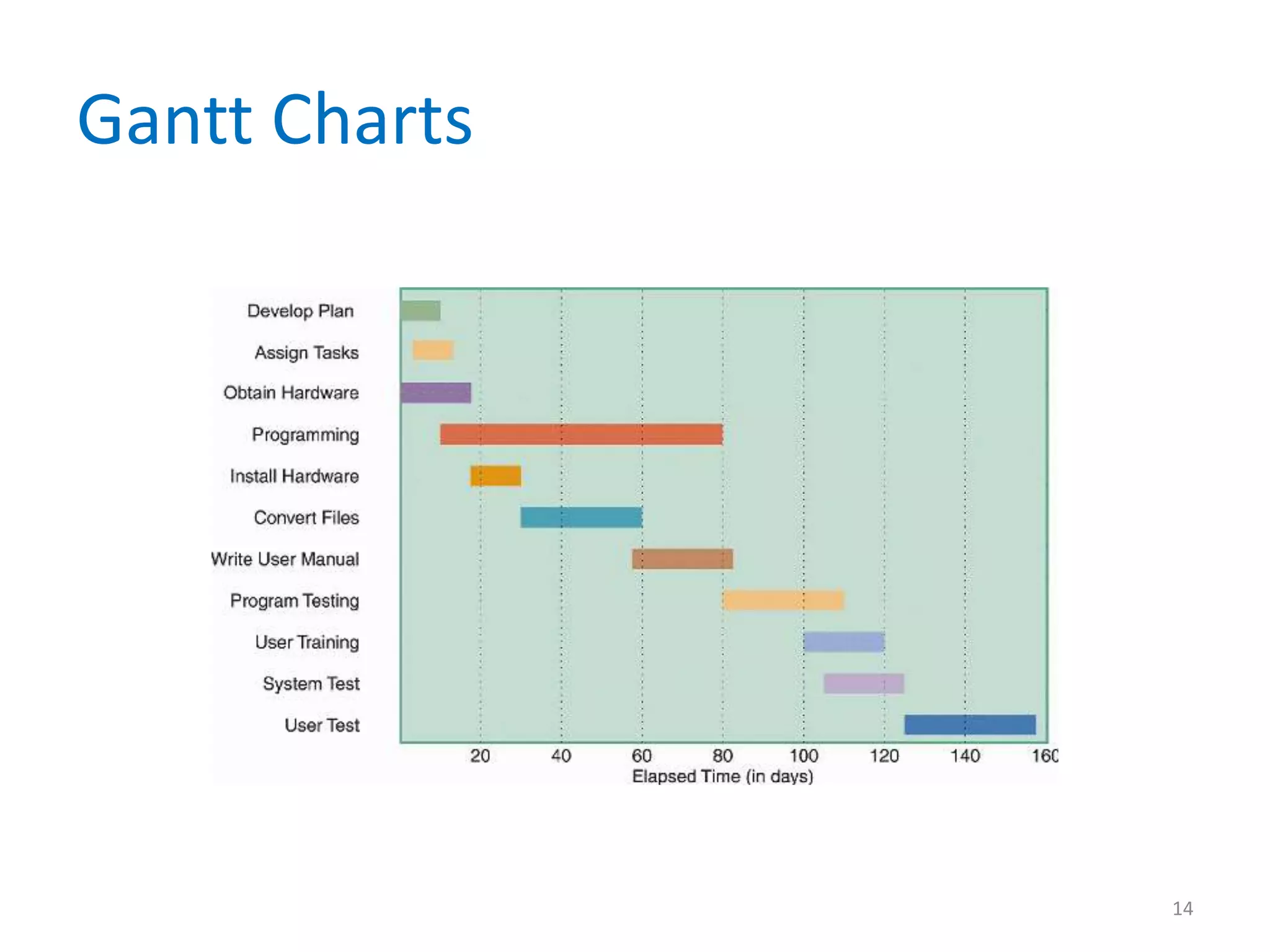
Gantt Charts


               14
PERT/CPM Charts
• The Program Evaluation Review Technique
  (PERT)
• Critical Path Method (CPM)
• The distinctions between the two methods
  have disappeared over time, and today the
  technique is called either PERT, CPM, or
  PERT/CPM


                                              15
PERT/CPM Charts
• Overview of PERT/CPM
  – PERT/CPM is called a bottom-up technique
  – Project tasks
  – Once you know the tasks, their duration, and the
    order in which they must be performed, you can
    calculate the time that it will take to complete the
    project


                                                       16
PERT/CPM Charts
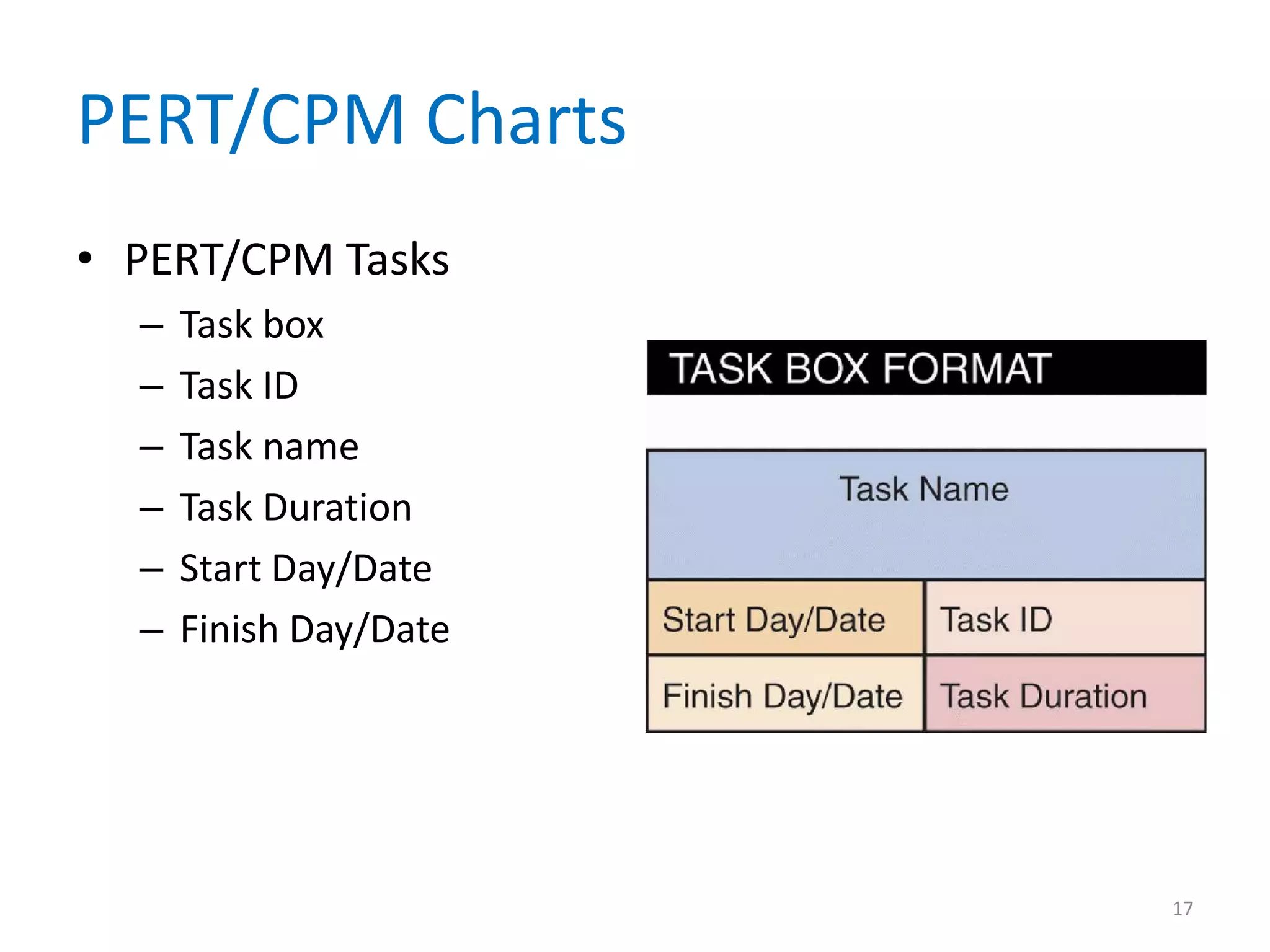
• PERT/CPM Tasks
  –   Task box
  –   Task ID
  –   Task name
  –   Task Duration
  –   Start Day/Date
  –   Finish Day/Date


                        17
PERT/CPM Charts
• Task Patterns
  – Dependent Tasks
  – Multiple successor tasks
     • Concurrent task
     • Predecessor task
     • Successor task
  – Multiple Predecessor Tasks


                                 18
PERT/CPM Charts
• Complex Task Patterns
  – When various task patterns combine, you must
    study the facts carefully in order to understand
    the logical sequence
  – A project schedule will not be accurate unless the
    underlying task pattern is logically correct


                                                         19
PERT/CPM Charts
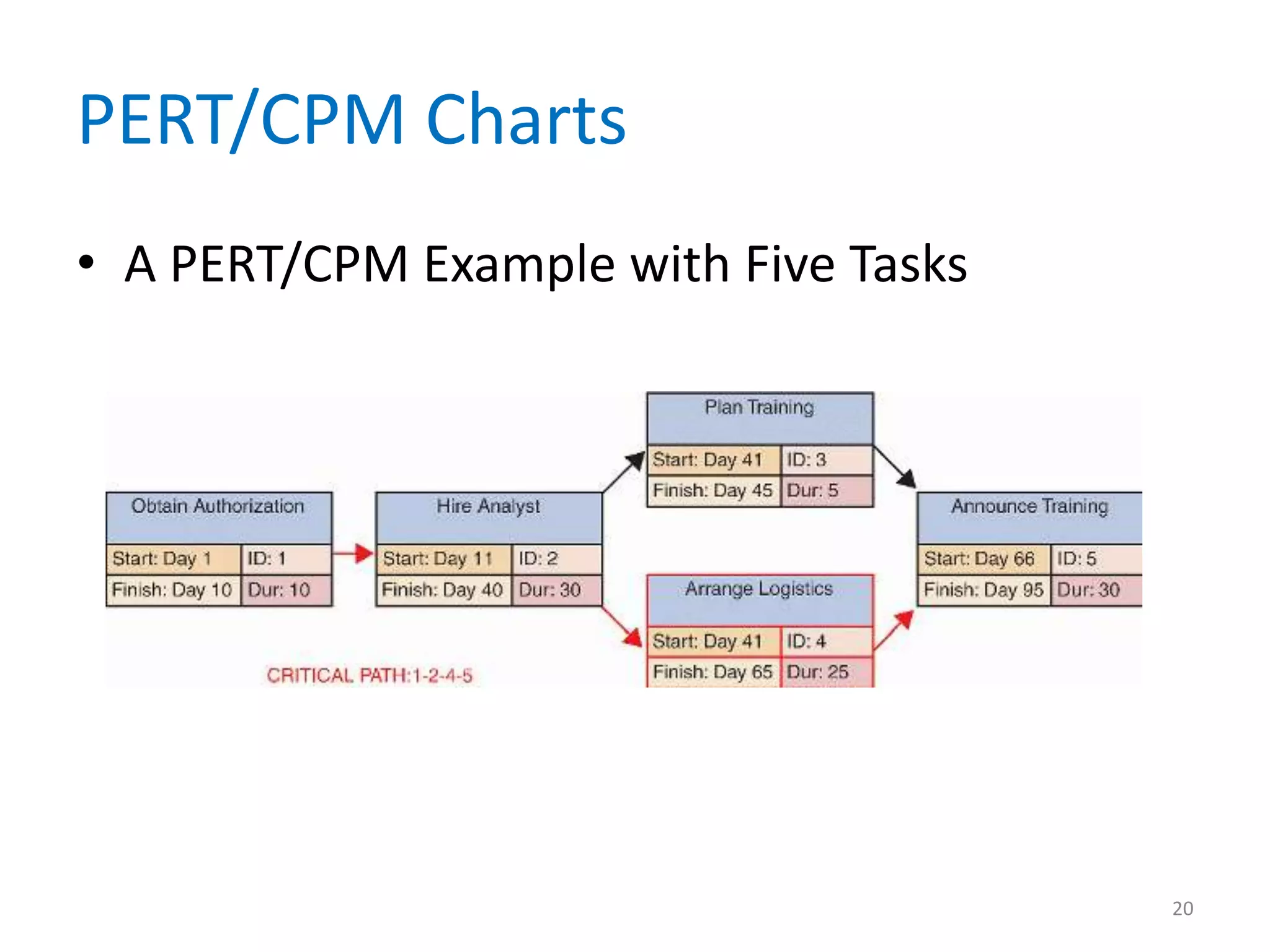
• A PERT/CPM Example with Five Tasks


                                       20
PERT/CPM Charts
• Critical Path
  – Slack time
  – If any task along the critical path falls behind
    schedule, the entire project is delayed
  – A critical path includes all tasks that are vital to
    the project schedule
  – If necessary, a project manager can reassign
    resources to keep the project on schedule


                                                           21
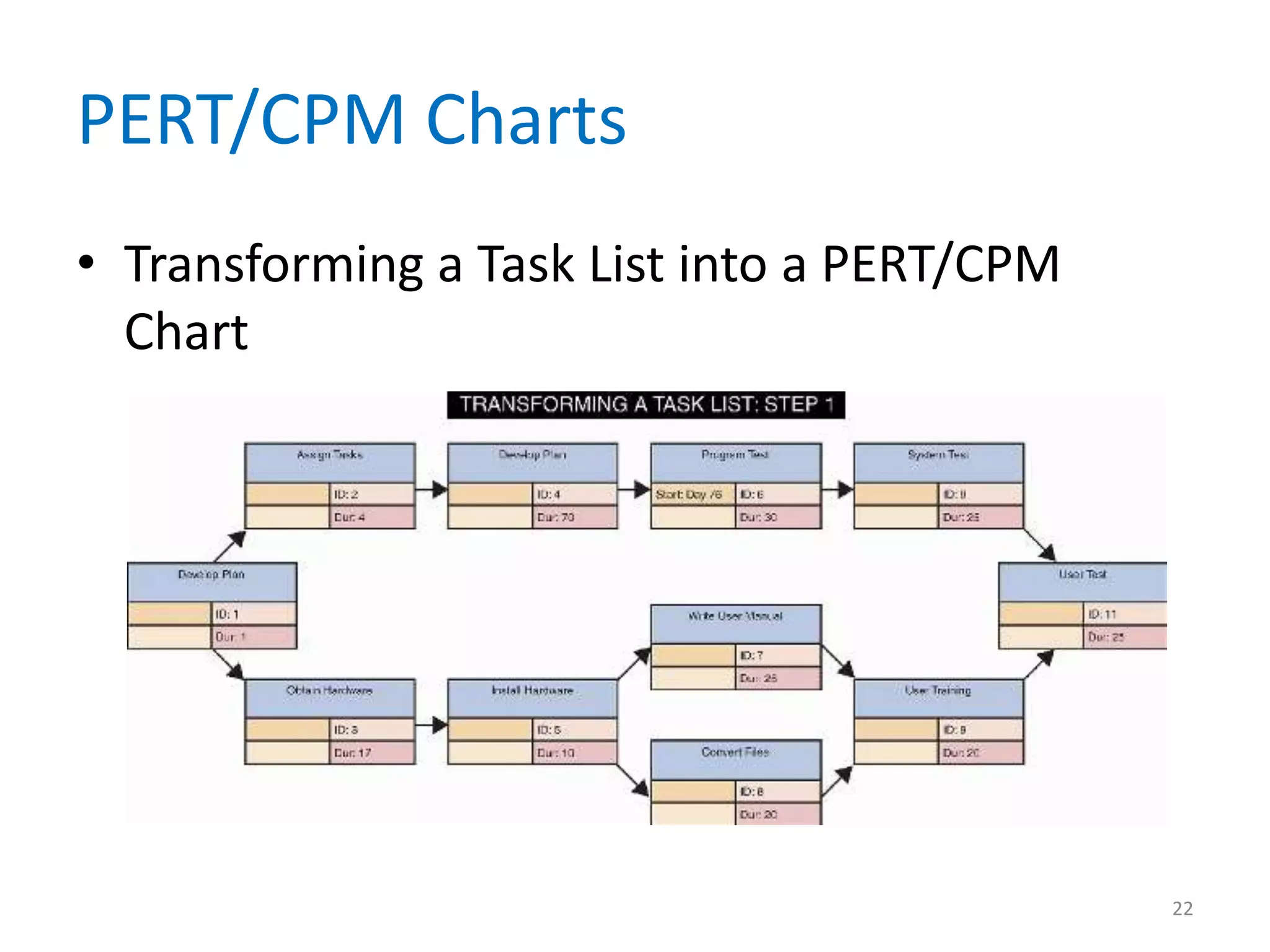
PERT/CPM Charts
• Transforming a Task List into a PERT/CPM
  Chart


                                             22
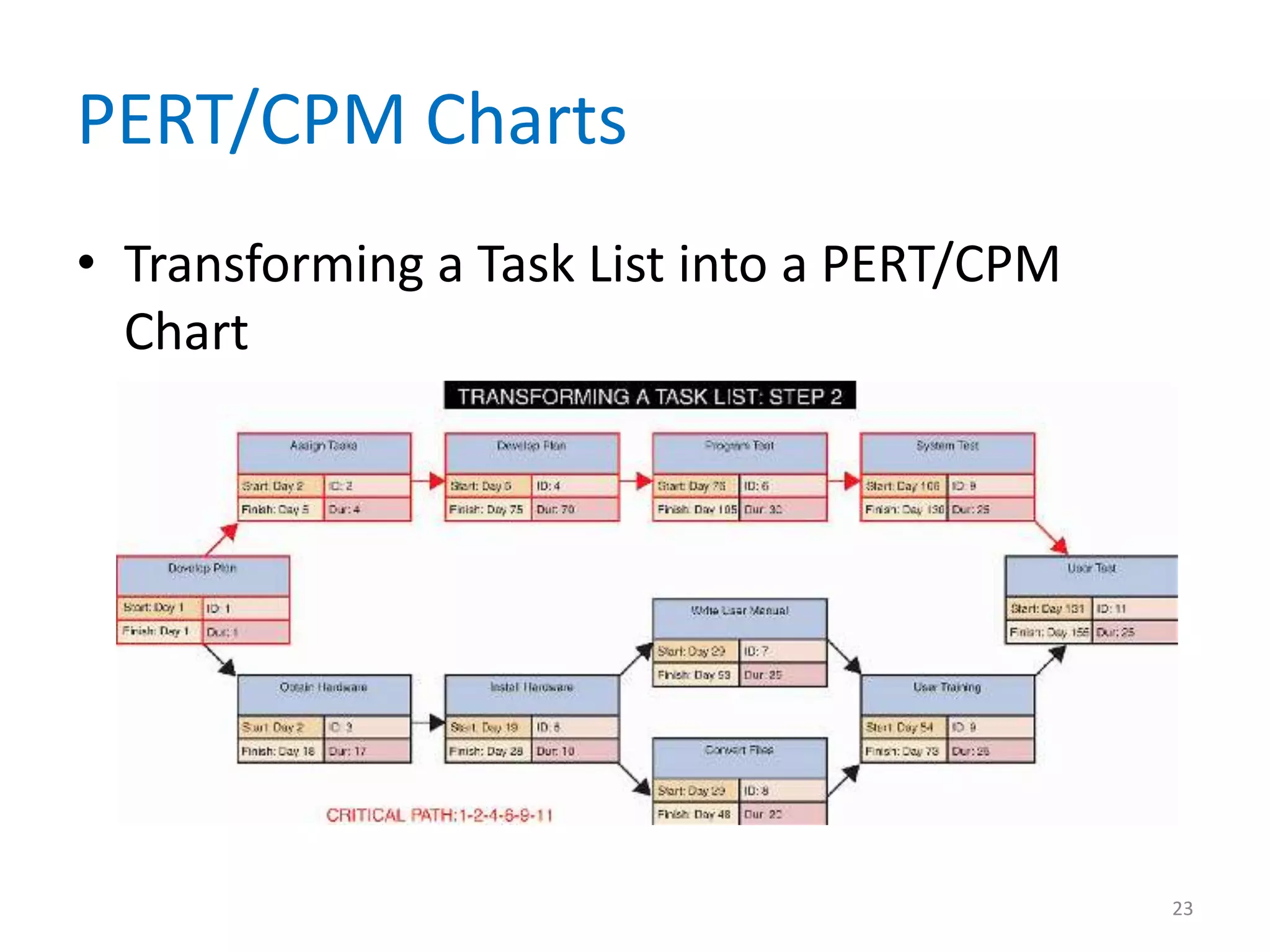
PERT/CPM Charts
• Transforming a Task List into a PERT/CPM
  Chart


                                             23
PERT/CPM Charts
• Comparing Gantt Charts and PERT/CPM
  – Although a Gantt chart offers a rapid overview
    that graphically displays the timing, duration, and
    progress of each task, many project managers find
    PERT/CPM charts more helpful for scheduling,
    monitoring, and controlling projects
  – PERT/CPM and Gantt charts are not mutually
    exclusive techniques


                                                      24
Project Risk Management
• Every IT project involves risks that systems
  analysts and project managers must address
• Risk management
• Steps in Risk Management
  – Develop risk management plan
  – Identify the risks
     • Risk identification


                                                 25
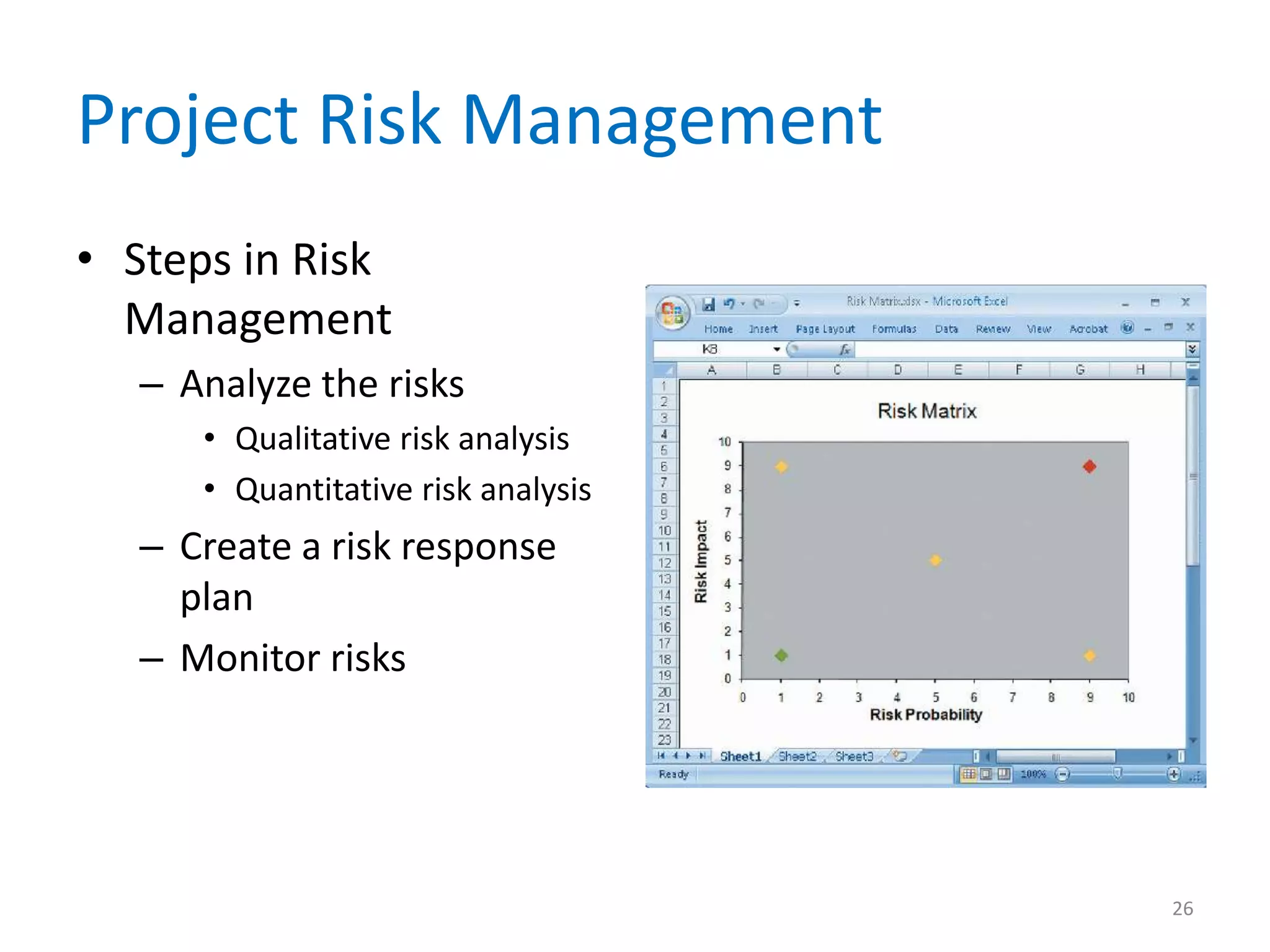
Project Risk Management
• Steps in Risk
  Management
   – Analyze the risks
      • Qualitative risk analysis
      • Quantitative risk analysis
   – Create a risk response
     plan
   – Monitor risks


                                     26
Project Risk Management
• Risk Management Software Tools
  – Most project management software programs,
    such as Microsoft Project, contain various tools
    that a project manager can use
  – The IT team can make a recommendation
    regarding the risks
  – Depending on the nature and magnitude of the
    risk, the final decision might be made by
    management

                                                       27
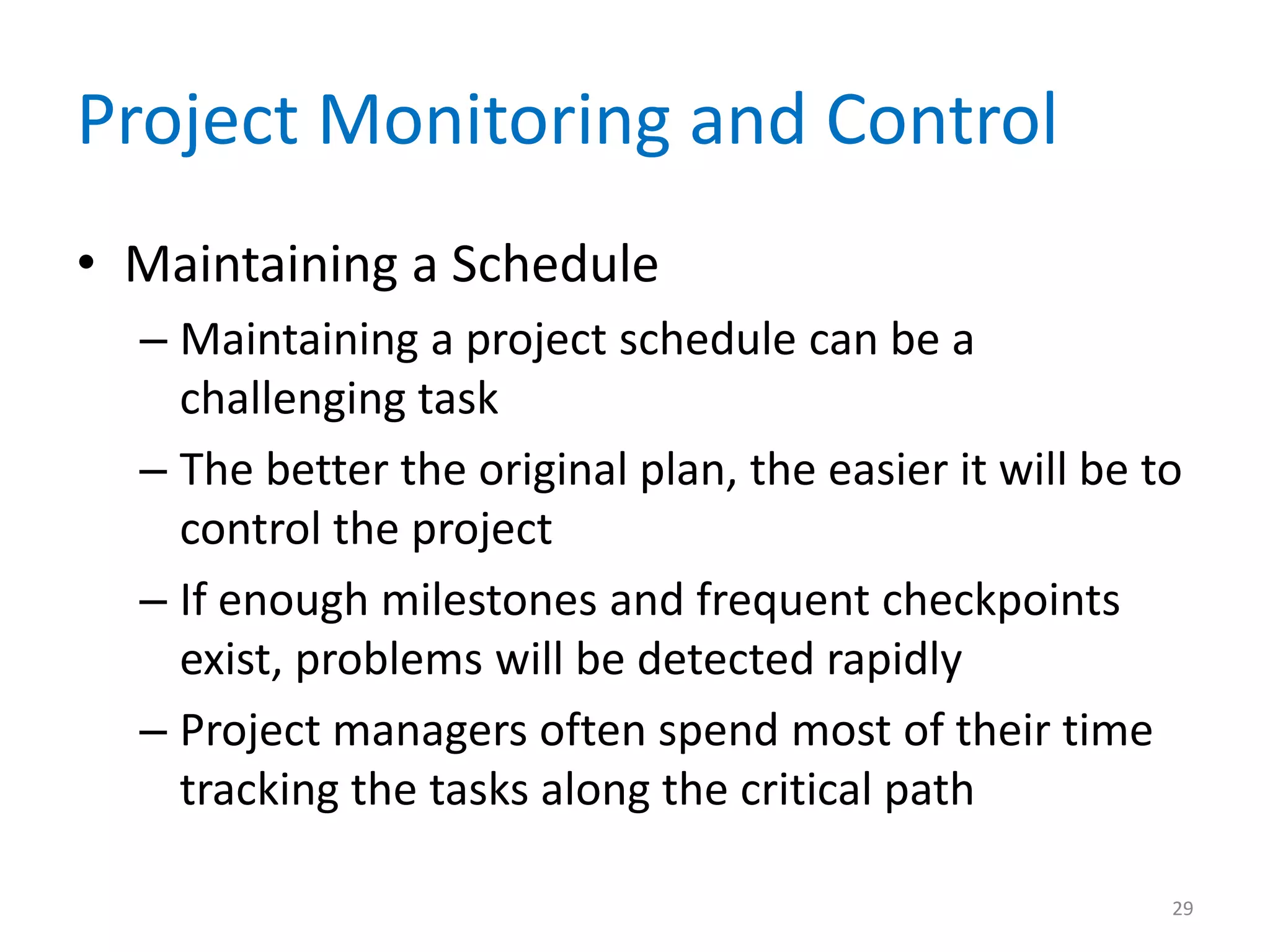
Project Monitoring and Control
• Monitoring and Control Techniques
  – The project manager must keep track of tasks and
    progress of team members, compare actual
    progress with the project plan, verify the
    completion of project milestones, and set
    standards and ensure that they are followed
  – Structured walkthrough
  – Called design reviews, code reviews, or testing
    reviews

                                                   28
Project Monitoring and Control
• Maintaining a Schedule
  – Maintaining a project schedule can be a
    challenging task
  – The better the original plan, the easier it will be to
    control the project
  – If enough milestones and frequent checkpoints
    exist, problems will be detected rapidly
  – Project managers often spend most of their time
    tracking the tasks along the critical path

                                                         29
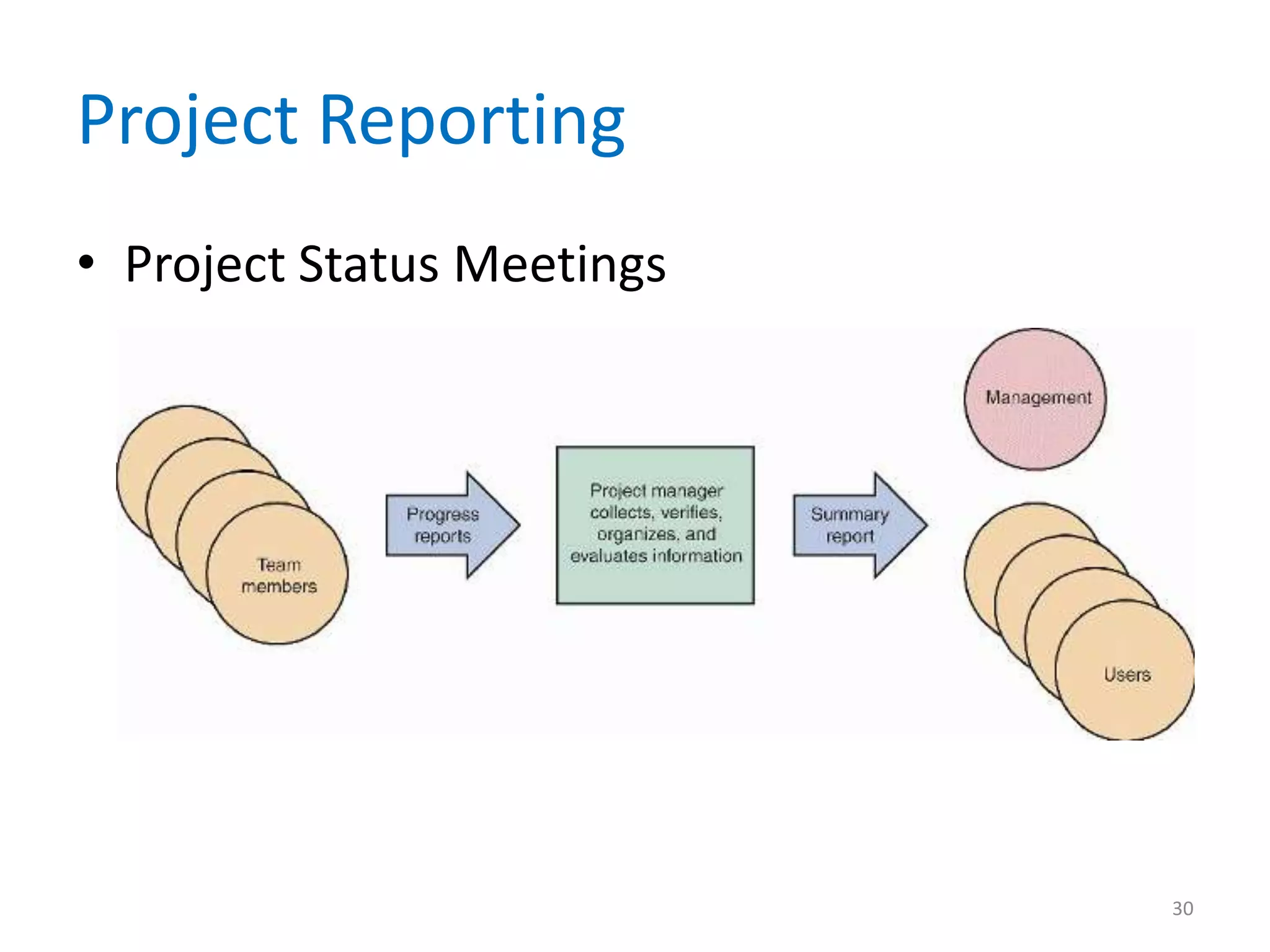
Project Reporting
• Project Status Meetings


                            30
Project Reporting
• Project Status Reports
  – A project manager must report regularly to his or
    her immediate supervisor, upper management,
    and users
  – Should explain what you are doing to handle and
    monitor the problem
  – Most managers recognize that problems do occur
    on most projects; it is better to alert management
    sooner rather than later

                                                     31
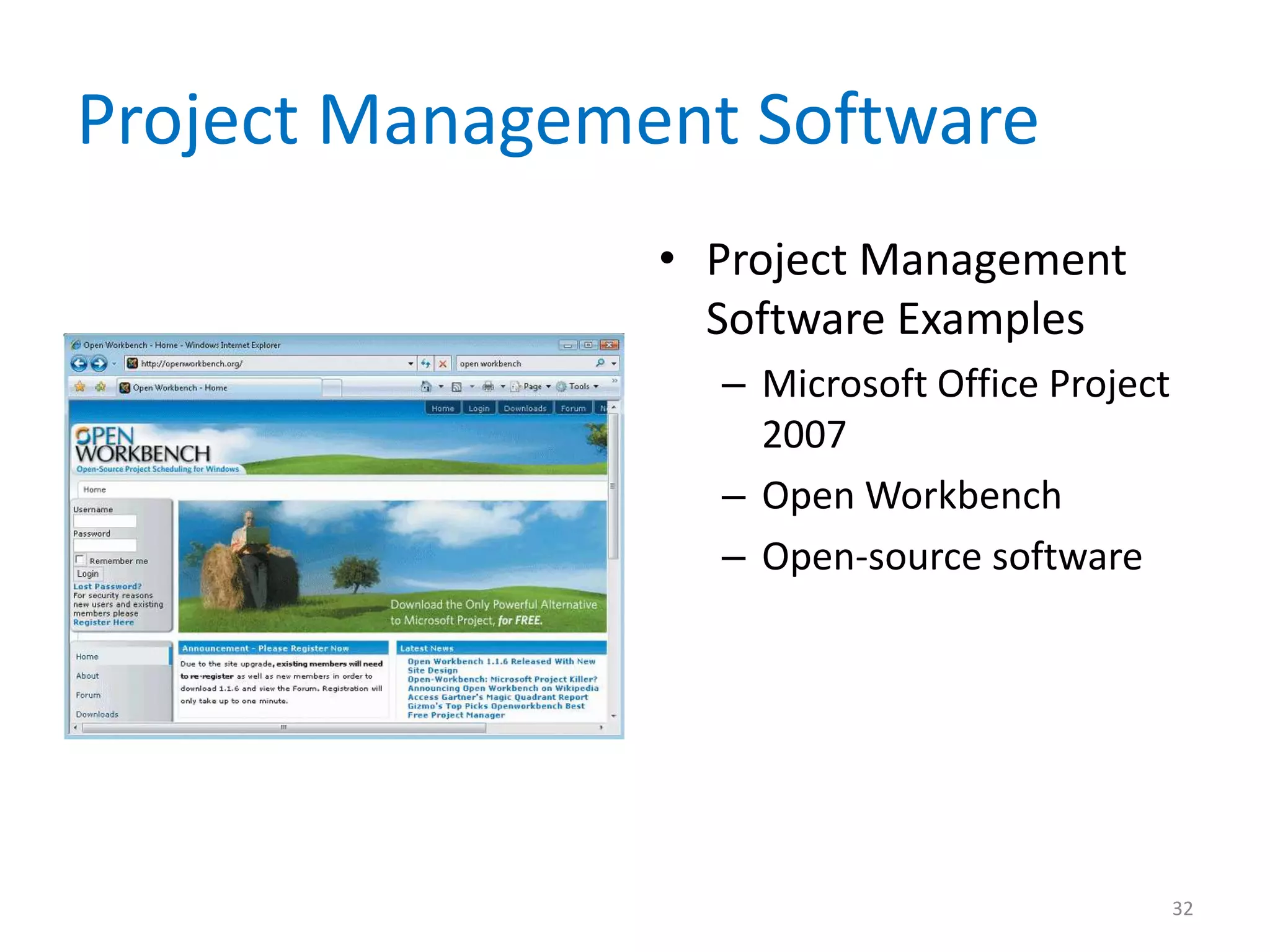
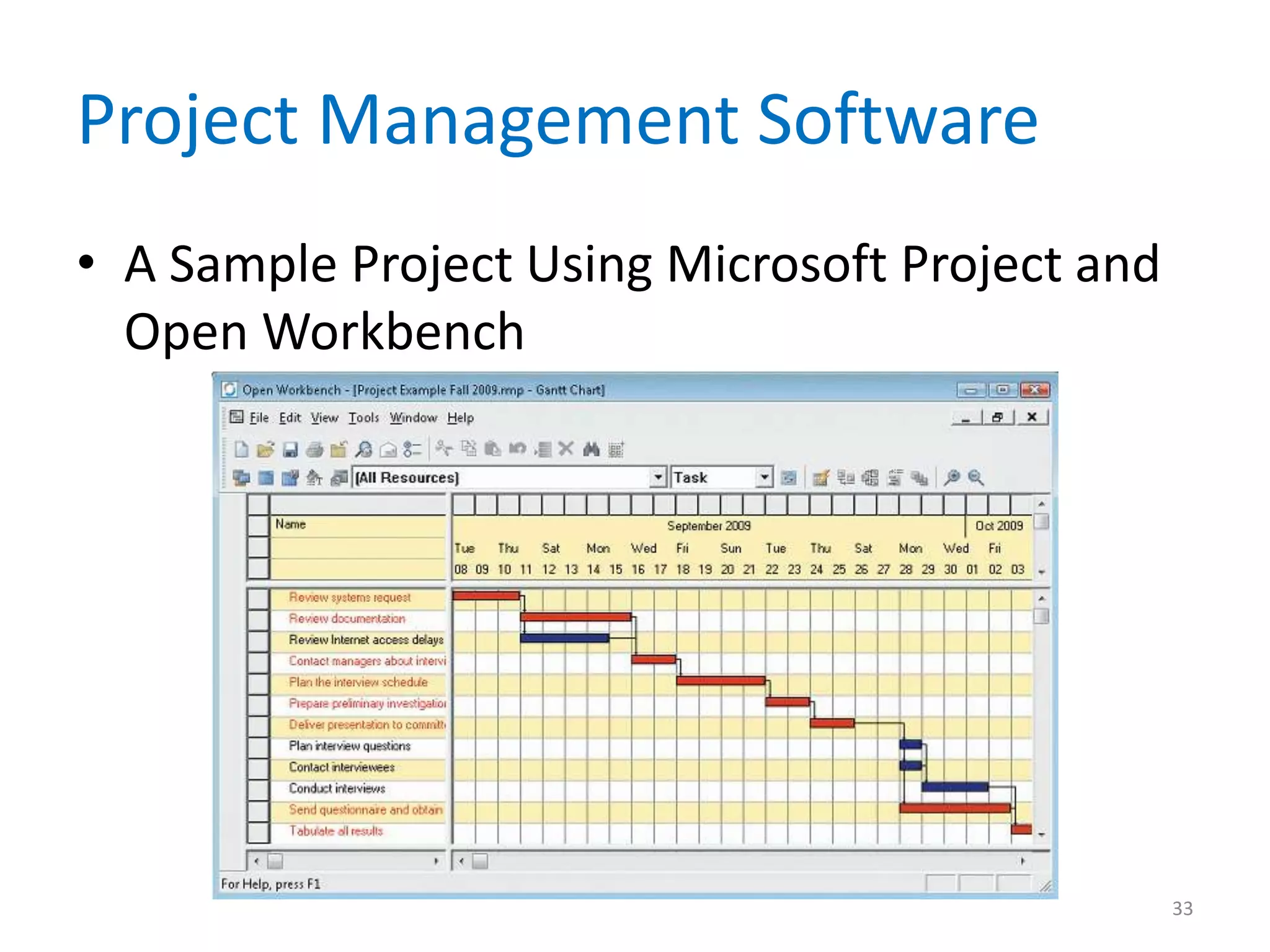
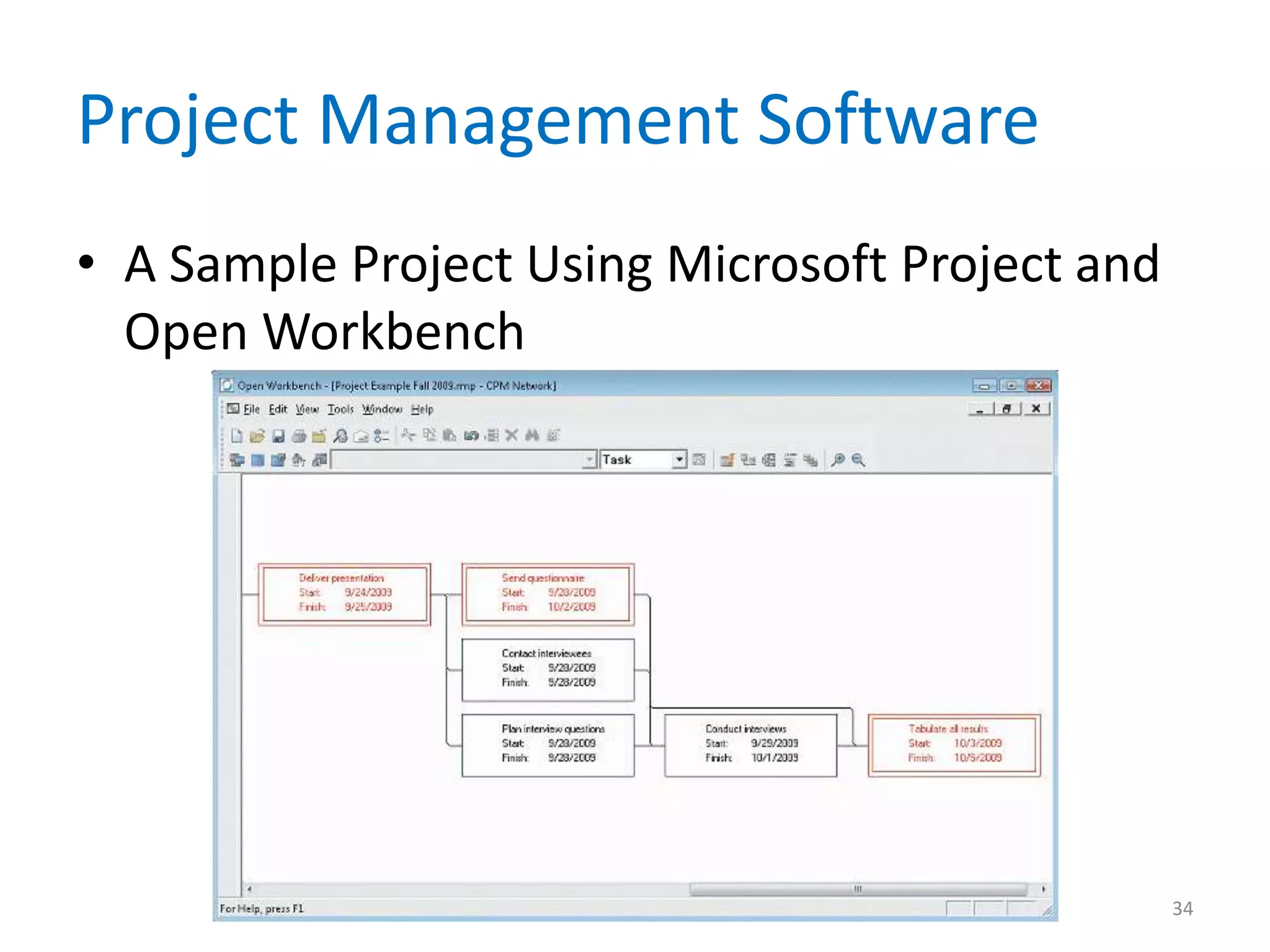
Project Management Software
                • Project Management
                  Software Examples
                  – Microsoft Office Project
                    2007
                  – Open Workbench
                  – Open-source software


                                               32
Project Management Software
• A Sample Project Using Microsoft Project and
  Open Workbench


                                                 33
Project Management Software
• A Sample Project Using Microsoft Project and
  Open Workbench


                                                 34
Software Change Control
• Software Change Control
• A procedure for processing requests for
  changes to an information system’s
  requirements consists of four steps:
     •   Complete a change request form
     •   Take initial action on the request
     •   Analyze the impact of the requested change
     •   Determine the disposition of the requested change


                                                             35
Keys to Project Success
• Business Issues
  – The major objective of every system is to provide
    a solution to a business problem or opportunity
  – A system that falls short of business needs also
    produces problems for users and reduces
    employee morale and productivity


                                                        36
Keys to Project Success
• Budget Issues
  – Cost overruns typically result from one or more of
    the following:
     • Unrealistic estimates
     • Failure to develop an accurate TCO forecast
     • Poor monitoring of progress and inadequate reaction to
       early signs of problems
     • Schedule delays due to unanticipated factors
     • Human resource factors


                                                           37
Keys to Project Success
• Schedule Issues
  – Problems with timetables and project milestones
    can indicate a failure to recognize task
    dependencies, confusion between effort and
    progress, poor monitoring and control methods,
    personality conflicts among team members, or
    turnover of project personnel


                                                      38
Keys to Project Success
• Successful Project Management
  – When problems occur, the project manager’s
    ability to handle the situation becomes the critical
    factor
  – Sometimes, when a project experiences delays or
    cost overruns, the system still can be delivered on
    time and within budget if several less critical
    requirements are trimmed


                                                       39
Keys to Project Success
• Successful Project Management
  – If a project is in trouble because of a lack of
    resources or organizational support, management
    might be willing to give the project more
    commitment and higher priority
  – A typical response is to push back the completion
    date
  – Option only if the original target date is flexible
    and the extension will not create excessive costs
    or other problems

                                                      40
Chapter Summary
• Project management is the process of
  planning, scheduling, monitoring and
  controlling, and reporting upon the
  development of an information system
• Begins with identifying and planning all
  specific tasks or activities
• Can use graphical tools such as Gantt charts
  and PERT/CPM charts to assist in the
  scheduling process

                                                 41
Chapter Summary
• Project managers are responsible for risk
  management
• Every successful information system must
  support business requirements, stay within
  budget, and be available on time
• Sound project management involves the same
  skills as any type of management


                                           42
Chapter Summary
• Chapter 3 complete


                       43

Chapter 03

  • 1.
    Systems Analysis andDesign 8th Edition Chapter 3 Managing Systems Projects
  • 2.
    Chapter Objectives • Explaintechniques for estimating task completion times and costs • Describe various scheduling tools, including Gantt charts and PERT/CPM charts • Analyze task dependencies, durations, start dates, and end dates 2
  • 3.
    Chapter Objectives • Identifyexamples of project management software and explain how these programs can assist you in project planning, estimating, scheduling, monitoring, and reporting • Explain software change control • Understand why projects sometimes fail 3
  • 4.
    Introduction • You willlearn about project planning, estimating, scheduling, monitoring, reporting, and the use of project management software • You also will learn how to control and manage project changes as they occur 4
  • 5.
    Project Management Overview •Project Management • A successful project must be completed on time, within budget, and deliver a quality product that satisfies users and meets requirements • Project manager or project leader • Project coordinator 5
  • 6.
    Project Management Overview •Project managers typically perform four main tasks: – Project planning – Project scheduling – Project monitoring and controlling – Project reporting 6
  • 7.
  • 8.
    Project Planning • IdentifyingTasks – One important variable is the size of the project, because the amount of work increases dramatically as project scope increases – A project that is twice as large will be much more than twice as complex 8
  • 9.
    Project Planning • IdentifyingTasks – Multiple interactions can lead to misunderstandings and delay – Project creep – The capabilities of project team members also affect time requirements – Brooks Law 9
  • 10.
    Project Planning • EstimatingTask Completion Time and Cost – Person-days – Some tasks can be divided evenly so it is possible to use different combinations of time and people, up to a point – In most systems analysis tasks, however, time and people are not interchangeable 10
  • 11.
    Project Planning • EstimatingTask Completion Time and Cost – Best-case estimate (B) – Probable-case estimate (P) – Worst-case estimate (W) – Weight – Expected task duration: (B+4P+W) 6 11
  • 12.
    Project Planning • FactorsAffecting Time and Cost Estimates – Project size and scope – IT resources – Prior experience with similar projects or systems – Applicable constraints 12
  • 13.
    Project Scheduling • Aproject schedule is a specific timetable • Project scheduling also involves selecting and staffing the project team, assigning specific tasks to team members, and arranging for other necessary resources • Must balance task time estimates, sequences, and personnel assignments • Several graphical planning aids can help 13
  • 14.
  • 15.
    PERT/CPM Charts • TheProgram Evaluation Review Technique (PERT) • Critical Path Method (CPM) • The distinctions between the two methods have disappeared over time, and today the technique is called either PERT, CPM, or PERT/CPM 15
  • 16.
    PERT/CPM Charts • Overviewof PERT/CPM – PERT/CPM is called a bottom-up technique – Project tasks – Once you know the tasks, their duration, and the order in which they must be performed, you can calculate the time that it will take to complete the project 16
  • 17.
    PERT/CPM Charts • PERT/CPMTasks – Task box – Task ID – Task name – Task Duration – Start Day/Date – Finish Day/Date 17
  • 18.
    PERT/CPM Charts • TaskPatterns – Dependent Tasks – Multiple successor tasks • Concurrent task • Predecessor task • Successor task – Multiple Predecessor Tasks 18
  • 19.
    PERT/CPM Charts • ComplexTask Patterns – When various task patterns combine, you must study the facts carefully in order to understand the logical sequence – A project schedule will not be accurate unless the underlying task pattern is logically correct 19
  • 20.
    PERT/CPM Charts • APERT/CPM Example with Five Tasks 20
  • 21.
    PERT/CPM Charts • CriticalPath – Slack time – If any task along the critical path falls behind schedule, the entire project is delayed – A critical path includes all tasks that are vital to the project schedule – If necessary, a project manager can reassign resources to keep the project on schedule 21
  • 22.
    PERT/CPM Charts • Transforminga Task List into a PERT/CPM Chart 22
  • 23.
    PERT/CPM Charts • Transforminga Task List into a PERT/CPM Chart 23
  • 24.
    PERT/CPM Charts • ComparingGantt Charts and PERT/CPM – Although a Gantt chart offers a rapid overview that graphically displays the timing, duration, and progress of each task, many project managers find PERT/CPM charts more helpful for scheduling, monitoring, and controlling projects – PERT/CPM and Gantt charts are not mutually exclusive techniques 24
  • 25.
    Project Risk Management •Every IT project involves risks that systems analysts and project managers must address • Risk management • Steps in Risk Management – Develop risk management plan – Identify the risks • Risk identification 25
  • 26.
    Project Risk Management •Steps in Risk Management – Analyze the risks • Qualitative risk analysis • Quantitative risk analysis – Create a risk response plan – Monitor risks 26
  • 27.
    Project Risk Management •Risk Management Software Tools – Most project management software programs, such as Microsoft Project, contain various tools that a project manager can use – The IT team can make a recommendation regarding the risks – Depending on the nature and magnitude of the risk, the final decision might be made by management 27
  • 28.
    Project Monitoring andControl • Monitoring and Control Techniques – The project manager must keep track of tasks and progress of team members, compare actual progress with the project plan, verify the completion of project milestones, and set standards and ensure that they are followed – Structured walkthrough – Called design reviews, code reviews, or testing reviews 28
  • 29.
    Project Monitoring andControl • Maintaining a Schedule – Maintaining a project schedule can be a challenging task – The better the original plan, the easier it will be to control the project – If enough milestones and frequent checkpoints exist, problems will be detected rapidly – Project managers often spend most of their time tracking the tasks along the critical path 29
  • 30.
  • 31.
    Project Reporting • ProjectStatus Reports – A project manager must report regularly to his or her immediate supervisor, upper management, and users – Should explain what you are doing to handle and monitor the problem – Most managers recognize that problems do occur on most projects; it is better to alert management sooner rather than later 31
  • 32.
    Project Management Software • Project Management Software Examples – Microsoft Office Project 2007 – Open Workbench – Open-source software 32
  • 33.
    Project Management Software •A Sample Project Using Microsoft Project and Open Workbench 33
  • 34.
    Project Management Software •A Sample Project Using Microsoft Project and Open Workbench 34
  • 35.
    Software Change Control •Software Change Control • A procedure for processing requests for changes to an information system’s requirements consists of four steps: • Complete a change request form • Take initial action on the request • Analyze the impact of the requested change • Determine the disposition of the requested change 35
  • 36.
    Keys to ProjectSuccess • Business Issues – The major objective of every system is to provide a solution to a business problem or opportunity – A system that falls short of business needs also produces problems for users and reduces employee morale and productivity 36
  • 37.
    Keys to ProjectSuccess • Budget Issues – Cost overruns typically result from one or more of the following: • Unrealistic estimates • Failure to develop an accurate TCO forecast • Poor monitoring of progress and inadequate reaction to early signs of problems • Schedule delays due to unanticipated factors • Human resource factors 37
  • 38.
    Keys to ProjectSuccess • Schedule Issues – Problems with timetables and project milestones can indicate a failure to recognize task dependencies, confusion between effort and progress, poor monitoring and control methods, personality conflicts among team members, or turnover of project personnel 38
  • 39.
    Keys to ProjectSuccess • Successful Project Management – When problems occur, the project manager’s ability to handle the situation becomes the critical factor – Sometimes, when a project experiences delays or cost overruns, the system still can be delivered on time and within budget if several less critical requirements are trimmed 39
  • 40.
    Keys to ProjectSuccess • Successful Project Management – If a project is in trouble because of a lack of resources or organizational support, management might be willing to give the project more commitment and higher priority – A typical response is to push back the completion date – Option only if the original target date is flexible and the extension will not create excessive costs or other problems 40
  • 41.
    Chapter Summary • Projectmanagement is the process of planning, scheduling, monitoring and controlling, and reporting upon the development of an information system • Begins with identifying and planning all specific tasks or activities • Can use graphical tools such as Gantt charts and PERT/CPM charts to assist in the scheduling process 41
  • 42.
    Chapter Summary • Projectmanagers are responsible for risk management • Every successful information system must support business requirements, stay within budget, and be available on time • Sound project management involves the same skills as any type of management 42
  • 43.