WAN AND  ROUTERS     TS, PHẠM VĂN TÍNH PART6
Objective Identify organizations responsible for WAN standards  Explain the difference between a WAN and LAN and the type of addresses each uses  Describe the role of a router in a WAN  Identify internal components of the router and describe their functions  Describe the physical characteristics of the router  Identify common ports on a router  Properly connect Ethernet, serial WAN, and console ports
WAN STANDARDS
WAN Devices
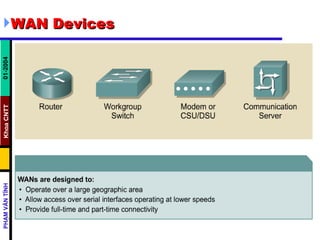
WAN Devices Routers offer many services, including internetworking and WAN interface ports.  Switches in the WAN provide connectivity for voice, data, and video communication.  Modems include interface voice-grade services, channel service units/digital service units (CSU/DSUs) that interface T1/E1 services, and Terminal Adapters/Network Termination 1 (TA/NT1s) that interface Integrated Services Digital Network (ISDN) services.  Communication servers concentrate dial-in and dial-out user communication.
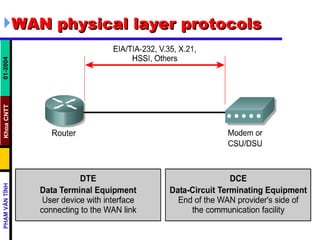
WAN Standards WAN physical layer protocols  describe how to provide electrical, mechanical, operational, and functional connections for WAN services.  WAN data link protocols  describe how frames are carried between systems on a single data link  WAN standards are defined  and managed by a number of recognized authorities, including the following agencies:   International Telecommunication Union-Telecommunication Standardization Sector (ITU-T), formerly the Consultative Committee for International Telegraph and Telephone ( CCITT )  International Organization for Standardization ( ISO )  Internet Engineering Task Force ( IETF )  Electronic Industries Association ( EIA )
WAN physical layer protocols
WAN data link protocols
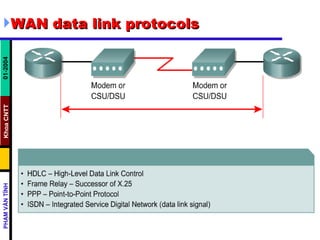
WAN data link protocols  High-Level Data Link Control ( HDLC )  -- an IEEE standard; may not be compatible with different vendors because of the way each vendor has chosen to implement it. HDLC supports both point-to-point and multipoint configurations with minimal overhead   Frame Relay  -- uses high-quality digital facilities; uses simplified framing with no error correction mechanisms, which means it can send Layer 2 information much more rapidly than other WAN protocols  Point-to-Point Protocol ( PPP )  -- described by RFC 1661; two standards developed by the IETF; contains a protocol field to identify the network layer protocol
WAN data link protocols  Simple Data Link Control Protocol ( SDLC )   an IBM-designed WAN data link protocol for System Network Architecture (SNA) environments; largely being replaced by the more versatile HDLC  Serial Line Interface Protocol ( SLIP )   an extremely popular WAN data link protocol for carrying IP packets; being replaced in many applications by the more versatile PPP  Link Access Procedure Balanced ( LAPB )   data link protocol used by X.25; has extensive error checking capabilities
WAN data link protocols  Link Access Procedure D-channel ( LAPD )  the WAN data link protocol used for signaling and call setup on an ISDN D-channel. Data transmissions take place on the ISDN B channels  Link Access Procedure Frame ( LAPF )   for Frame-Mode Bearer Services; a WAN data link protocol, similar to LAPD, used with frame relay technologies
WAN TECHNOLOGIES
WAN Technologies Most common WAN technologies grouped into : Circuit-Switched Services   Packet-Switched Services   Cell-Switched Services   Dedicated Digital Services   Analog services
Circuit-Switched   Services   POTS (Plain Old Telephone Service)  -- not a computer data service, but included for two reasons: (1) many of its technologies are part of the growing data infrastructure, (2) it is a model of an incredibly reliable, easy-to-use, wide-area communications network; typical medium is twisted-pair copper wire Narrowband ISDN (Integrated Services Digital Network)  -- a versatile, widespread, historically important technology; was the first all-digital dial-up service; usage varies greatly from country to country; cost is moderate; maximum bandwidth is 128 kbps for the lower cost BRI (Basic Rate Interface) and about 3 Mbps for the PRI (Primary Rate Interface); usage is fairly widespread, though it varies considerably from country to country; typical medium is twisted-pair copper wire
Packet-Switched Services   X.25  -- an older technology, but still widely used; has extensive error-checking capabilities from the days when WAN links were more prone to errors, which make it reliable but limits its bandwidth; bandwidth may be as high as 2 Mbps; usage is fairly extensive; cost is moderate; typical medium is twisted-pair copper wire Frame Relay  -- a packet-switched version of Narrowband ISDN; has become an extremely popular WAN technology in its own right; more efficient than X.25, but with similar services; maximum bandwidth is 44.736 Mbps; 56kbps and 384kbps are extremely popular in the U.S.; usage is widespread; cost is moderate to low; Typical media include twisted-pair copper wire and optical fiber
Cell-Switched Services   ATM (Asynchronous Transfer Mode)  -- closely related to broadband ISDN; becoming an increasingly important WAN (and even LAN) technology; uses small, fixed length (53 byte) frames to carry data; maximum bandwidth is currently 622 Mbps, though higher speeds are being developed; typical media are twisted-pair copper wire and optical fiber; usage is widespread and increasing; cost is high SMDS (Switched Multimegabit Data Service)  -- closely related to ATM, and typically used in MANs; maximum bandwidth is 44.736 Mbps; typical media are twisted-pair copper wire and optical fiber; usage not very widespread; cost is relatively high
Dedicated Digital Services   T1, T3, E1, E3  -- the T series of services in the U.S. and the E series of services in Europe are extremely important WAN technologies  T1 -- 1.544 Mbps  T3 -- 44.736 Mbps  E1 -- 2.048 Mbps  E3 -- 34.368 Mbps  xDSL (DSL for Digital Subscriber Line and x for a family of technologies)   HDSL  -- high-bit-rate DSL  SDSL  -- single-line DSL  ADSL  -- asymmetric DSL  VDSL  -- very-high-bit-rate DSL  RADSL  -- rate adaptive DSL  SONET (Synchronous Optical Network)  -- a family of very high-speed physical layer technologies; designed for optical fiber, but can also run on copper cables implemented at different OC (optical carrier) levels ranging from 51.84 Mbps (OC-1) to 9,952 Mbps (OC-192)
Analog services Dial-up modems (switched analog) Cable modems (shared analog)   Wireless
ROUTER BASICS
Router Components
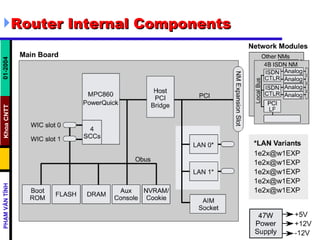
Router Internal Components
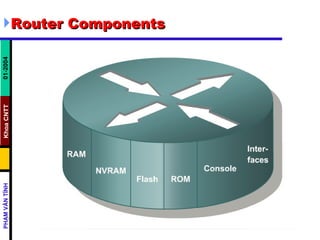
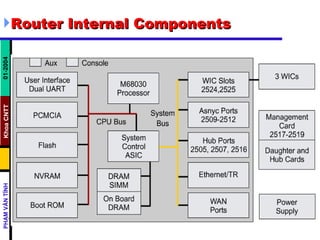
Router Internal Components CPU  – The Central Processing Unit (CPU) executes instructions in the operating system : system initialization, routing functions, and network interface control. The CPU is a microprocessor. Large routers may have multiple CPUs RAM  – Random-access memory (RAM) is used for routing table information, fast switching cache, running configuration, and packet queues. RAM is usually logically divided into main processor memory and shared input/output (I/O) memory. Shared I/O memory is shared among interfaces for temporary storage of packets. The contents of RAM are lost when power is removed.
Router Internal Components Flash  – Flash memory is used for storage of a full Cisco IOS software image. The router normally acquires the default IOS from flash. In most routers an executable copy of the IOS is transferred to RAM during the boot process. In other routers the IOS may be run directly from flash.  NVRAM  – Nonvolatile random-access memory (NVRAM) is used to store the startup configuration. In either case these devices retain contents when power is removed.
Router Internal Components Buses   The system bus is used for communication between the CPU and the interfaces and/or expansion slots. This bus transfers the packets to and from the interfaces.  The CPU bus is used by the CPU for accessing components from router storage. This bus transfers instructions and data to or from specified memory addresses.  ROM  –  Read-only memory (ROM) is used for permanently storing startup diagnostic code (ROM Monitor). The main tasks for ROM are hardware diagnostics during router bootup and loading the Cisco IOS software from flash to RAM.
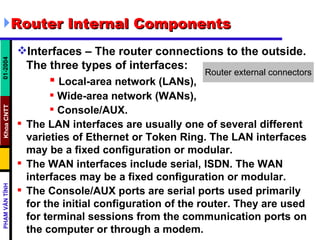
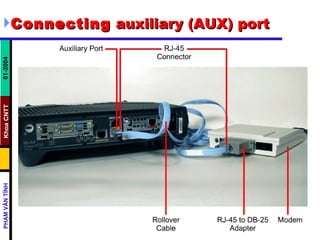
Router Internal Components Interfaces – The router connections to the outside. The three types of interfaces: Local-area network (LANs), Wide-area network (WANs),  Console/AUX.  The LAN interfaces are usually one of several different varieties of Ethernet or Token Ring. The LAN interfaces may be a fixed configuration or modular.  The WAN interfaces include serial, ISDN. The WAN interfaces may be a fixed configuration or modular.  The Console/AUX ports are serial ports used primarily for the initial configuration of the router. They are used for terminal sessions from the communication ports on the computer or through a modem.
Connecting console interfaces
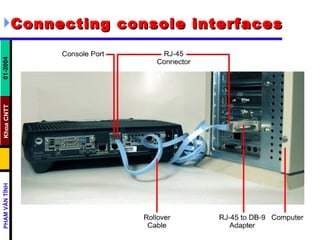
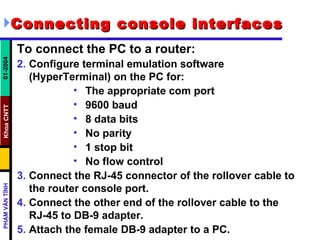
Connecting console interfaces   To connect the PC to a router:  Configure terminal emulation software (HyperTerminal) on the PC for:  The appropriate com port 9600 baud  8 data bits  No parity  1 stop bit  No flow control Connect the RJ-45 connector of the rollover cable to the router console port.  Connect the other end of the rollover cable to the RJ-45 to DB-9 adapter.  Attach the female DB-9 adapter to a PC.
Connecting  auxiliary (AUX) port
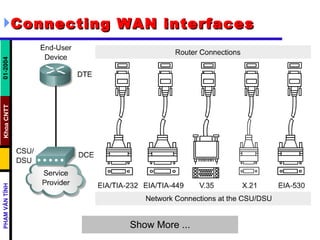
Connecting WAN interfaces
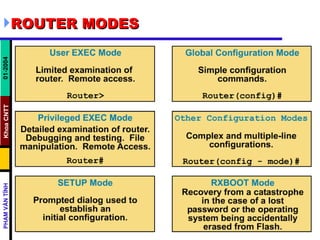
ROUTER MODES

Chapter 02 - Wan Router

  • 1.
    WAN AND ROUTERS TS, PHẠM VĂN TÍNH PART6
  • 2.
    Objective Identify organizationsresponsible for WAN standards Explain the difference between a WAN and LAN and the type of addresses each uses Describe the role of a router in a WAN Identify internal components of the router and describe their functions Describe the physical characteristics of the router Identify common ports on a router Properly connect Ethernet, serial WAN, and console ports
  • 3.
  • 4.
  • 5.
    WAN Devices Routersoffer many services, including internetworking and WAN interface ports. Switches in the WAN provide connectivity for voice, data, and video communication. Modems include interface voice-grade services, channel service units/digital service units (CSU/DSUs) that interface T1/E1 services, and Terminal Adapters/Network Termination 1 (TA/NT1s) that interface Integrated Services Digital Network (ISDN) services. Communication servers concentrate dial-in and dial-out user communication.
  • 6.
    WAN Standards WANphysical layer protocols describe how to provide electrical, mechanical, operational, and functional connections for WAN services. WAN data link protocols describe how frames are carried between systems on a single data link WAN standards are defined and managed by a number of recognized authorities, including the following agencies: International Telecommunication Union-Telecommunication Standardization Sector (ITU-T), formerly the Consultative Committee for International Telegraph and Telephone ( CCITT ) International Organization for Standardization ( ISO ) Internet Engineering Task Force ( IETF ) Electronic Industries Association ( EIA )
  • 7.
  • 8.
    WAN data linkprotocols
  • 9.
    WAN data linkprotocols High-Level Data Link Control ( HDLC ) -- an IEEE standard; may not be compatible with different vendors because of the way each vendor has chosen to implement it. HDLC supports both point-to-point and multipoint configurations with minimal overhead  Frame Relay -- uses high-quality digital facilities; uses simplified framing with no error correction mechanisms, which means it can send Layer 2 information much more rapidly than other WAN protocols Point-to-Point Protocol ( PPP ) -- described by RFC 1661; two standards developed by the IETF; contains a protocol field to identify the network layer protocol
  • 10.
    WAN data linkprotocols Simple Data Link Control Protocol ( SDLC ) an IBM-designed WAN data link protocol for System Network Architecture (SNA) environments; largely being replaced by the more versatile HDLC Serial Line Interface Protocol ( SLIP ) an extremely popular WAN data link protocol for carrying IP packets; being replaced in many applications by the more versatile PPP Link Access Procedure Balanced ( LAPB ) data link protocol used by X.25; has extensive error checking capabilities
  • 11.
    WAN data linkprotocols Link Access Procedure D-channel ( LAPD ) the WAN data link protocol used for signaling and call setup on an ISDN D-channel. Data transmissions take place on the ISDN B channels Link Access Procedure Frame ( LAPF ) for Frame-Mode Bearer Services; a WAN data link protocol, similar to LAPD, used with frame relay technologies
  • 12.
  • 13.
    WAN Technologies Mostcommon WAN technologies grouped into : Circuit-Switched Services Packet-Switched Services Cell-Switched Services Dedicated Digital Services Analog services
  • 14.
    Circuit-Switched Services POTS (Plain Old Telephone Service) -- not a computer data service, but included for two reasons: (1) many of its technologies are part of the growing data infrastructure, (2) it is a model of an incredibly reliable, easy-to-use, wide-area communications network; typical medium is twisted-pair copper wire Narrowband ISDN (Integrated Services Digital Network) -- a versatile, widespread, historically important technology; was the first all-digital dial-up service; usage varies greatly from country to country; cost is moderate; maximum bandwidth is 128 kbps for the lower cost BRI (Basic Rate Interface) and about 3 Mbps for the PRI (Primary Rate Interface); usage is fairly widespread, though it varies considerably from country to country; typical medium is twisted-pair copper wire
  • 15.
    Packet-Switched Services X.25 -- an older technology, but still widely used; has extensive error-checking capabilities from the days when WAN links were more prone to errors, which make it reliable but limits its bandwidth; bandwidth may be as high as 2 Mbps; usage is fairly extensive; cost is moderate; typical medium is twisted-pair copper wire Frame Relay -- a packet-switched version of Narrowband ISDN; has become an extremely popular WAN technology in its own right; more efficient than X.25, but with similar services; maximum bandwidth is 44.736 Mbps; 56kbps and 384kbps are extremely popular in the U.S.; usage is widespread; cost is moderate to low; Typical media include twisted-pair copper wire and optical fiber
  • 16.
    Cell-Switched Services ATM (Asynchronous Transfer Mode) -- closely related to broadband ISDN; becoming an increasingly important WAN (and even LAN) technology; uses small, fixed length (53 byte) frames to carry data; maximum bandwidth is currently 622 Mbps, though higher speeds are being developed; typical media are twisted-pair copper wire and optical fiber; usage is widespread and increasing; cost is high SMDS (Switched Multimegabit Data Service) -- closely related to ATM, and typically used in MANs; maximum bandwidth is 44.736 Mbps; typical media are twisted-pair copper wire and optical fiber; usage not very widespread; cost is relatively high
  • 17.
    Dedicated Digital Services T1, T3, E1, E3 -- the T series of services in the U.S. and the E series of services in Europe are extremely important WAN technologies T1 -- 1.544 Mbps T3 -- 44.736 Mbps E1 -- 2.048 Mbps E3 -- 34.368 Mbps xDSL (DSL for Digital Subscriber Line and x for a family of technologies) HDSL -- high-bit-rate DSL SDSL -- single-line DSL ADSL -- asymmetric DSL VDSL -- very-high-bit-rate DSL RADSL -- rate adaptive DSL SONET (Synchronous Optical Network) -- a family of very high-speed physical layer technologies; designed for optical fiber, but can also run on copper cables implemented at different OC (optical carrier) levels ranging from 51.84 Mbps (OC-1) to 9,952 Mbps (OC-192)
  • 18.
    Analog services Dial-upmodems (switched analog) Cable modems (shared analog) Wireless
  • 19.
  • 20.
  • 21.
  • 22.
  • 23.
    Router Internal ComponentsCPU – The Central Processing Unit (CPU) executes instructions in the operating system : system initialization, routing functions, and network interface control. The CPU is a microprocessor. Large routers may have multiple CPUs RAM – Random-access memory (RAM) is used for routing table information, fast switching cache, running configuration, and packet queues. RAM is usually logically divided into main processor memory and shared input/output (I/O) memory. Shared I/O memory is shared among interfaces for temporary storage of packets. The contents of RAM are lost when power is removed.
  • 24.
    Router Internal ComponentsFlash – Flash memory is used for storage of a full Cisco IOS software image. The router normally acquires the default IOS from flash. In most routers an executable copy of the IOS is transferred to RAM during the boot process. In other routers the IOS may be run directly from flash. NVRAM – Nonvolatile random-access memory (NVRAM) is used to store the startup configuration. In either case these devices retain contents when power is removed.
  • 25.
    Router Internal ComponentsBuses The system bus is used for communication between the CPU and the interfaces and/or expansion slots. This bus transfers the packets to and from the interfaces. The CPU bus is used by the CPU for accessing components from router storage. This bus transfers instructions and data to or from specified memory addresses. ROM – Read-only memory (ROM) is used for permanently storing startup diagnostic code (ROM Monitor). The main tasks for ROM are hardware diagnostics during router bootup and loading the Cisco IOS software from flash to RAM.
  • 26.
    Router Internal ComponentsInterfaces – The router connections to the outside. The three types of interfaces: Local-area network (LANs), Wide-area network (WANs), Console/AUX. The LAN interfaces are usually one of several different varieties of Ethernet or Token Ring. The LAN interfaces may be a fixed configuration or modular. The WAN interfaces include serial, ISDN. The WAN interfaces may be a fixed configuration or modular. The Console/AUX ports are serial ports used primarily for the initial configuration of the router. They are used for terminal sessions from the communication ports on the computer or through a modem.
  • 27.
  • 28.
    Connecting console interfaces To connect the PC to a router: Configure terminal emulation software (HyperTerminal) on the PC for: The appropriate com port 9600 baud 8 data bits No parity 1 stop bit No flow control Connect the RJ-45 connector of the rollover cable to the router console port. Connect the other end of the rollover cable to the RJ-45 to DB-9 adapter. Attach the female DB-9 adapter to a PC.
  • 29.
  • 30.
  • 31.