1
Types of Computer Operations
Real time Processing
Batch Processing
Multitasking
Interactive
Multiprogramming
Transaction processing
Multi-access and timesharing
2
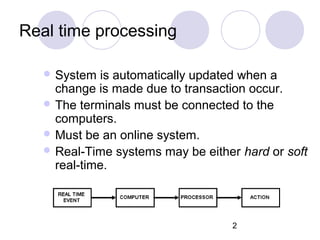
Real time processing
 System is automatically updated when a
change is made due to transaction occur.
 The terminals must be connected to the
computers.
 Must be an online system.
 Real-Time systems may be either hard or soft
real-time.
3
Examples
Medical imaging systems
 Industrial control systems
Traffic Lights
Robots
Flight Simulations
ATM
4
Batch Processing
 Collecting all the inputs together and
putting them into computer in one go or
batch.
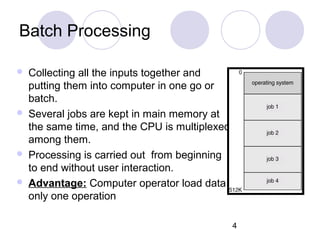
 Several jobs are kept in main memory at
the same time, and the CPU is multiplexed
among them.
 Processing is carried out from beginning
to end without user interaction.
 Advantage: Computer operator load data
only one operation
5
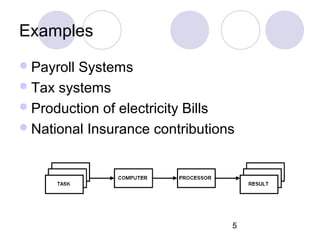
Examples
Payroll Systems
Tax systems
Production of electricity Bills
National Insurance contributions
6
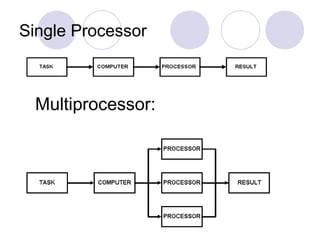
Single Processor
Multiprocessor:
7
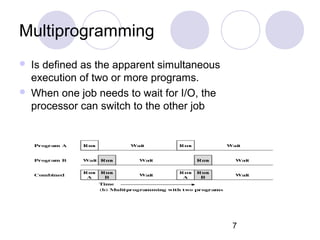
Multiprogramming
 Is defined as the apparent simultaneous
execution of two or more programs.
 When one job needs to wait for I/O, the
processor can switch to the other job
8
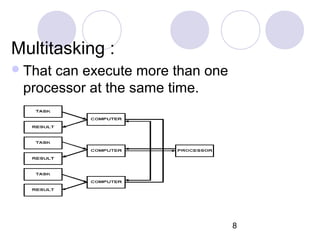
Multitasking :
That can execute more than one
processor at the same time.
9
Transaction Processing
 Processing takes place when needed, rather than at set
intervals like batch processing.
 Demand processing is usually performed on individual items
of data.
 Transactions processed as they occur immediate update of
transactions
 Updates available to all users of the system increased
security risk
 Additional costs in terms of physical resources e.g.
Hardware more complex backup
Example:
 A monthly paid employee leaves halfway through the month.
10
Interactive System
User interacts directly with the system to
supply commands.
Data as the application program
undergoes execution and receives the
results of processing.
Direct to way communication
11
Time Sharing processing
Using multiprogramming to handle
multiple interactive jobs
Processor’s time is shared among multiple
users
Multiple users simultaneously access the
system through terminals.
Examples
 Airline booking Systems
12
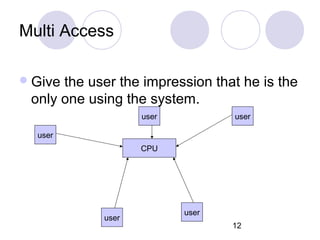
Multi Access
Give the user the impression that he is the
only one using the system.
CPU
user
user
useruser
user

Ch 9 types of computer operations

  • 1.
    1 Types of ComputerOperations Real time Processing Batch Processing Multitasking Interactive Multiprogramming Transaction processing Multi-access and timesharing
  • 2.
    2 Real time processing System is automatically updated when a change is made due to transaction occur.  The terminals must be connected to the computers.  Must be an online system.  Real-Time systems may be either hard or soft real-time.
  • 3.
    3 Examples Medical imaging systems Industrial control systems Traffic Lights Robots Flight Simulations ATM
  • 4.
    4 Batch Processing  Collectingall the inputs together and putting them into computer in one go or batch.  Several jobs are kept in main memory at the same time, and the CPU is multiplexed among them.  Processing is carried out from beginning to end without user interaction.  Advantage: Computer operator load data only one operation
  • 5.
    5 Examples Payroll Systems Tax systems Productionof electricity Bills National Insurance contributions
  • 6.
  • 7.
    7 Multiprogramming  Is definedas the apparent simultaneous execution of two or more programs.  When one job needs to wait for I/O, the processor can switch to the other job
  • 8.
    8 Multitasking : That canexecute more than one processor at the same time.
  • 9.
    9 Transaction Processing  Processingtakes place when needed, rather than at set intervals like batch processing.  Demand processing is usually performed on individual items of data.  Transactions processed as they occur immediate update of transactions  Updates available to all users of the system increased security risk  Additional costs in terms of physical resources e.g. Hardware more complex backup Example:  A monthly paid employee leaves halfway through the month.
  • 10.
    10 Interactive System User interactsdirectly with the system to supply commands. Data as the application program undergoes execution and receives the results of processing. Direct to way communication
  • 11.
    11 Time Sharing processing Usingmultiprogramming to handle multiple interactive jobs Processor’s time is shared among multiple users Multiple users simultaneously access the system through terminals. Examples  Airline booking Systems
  • 12.
    12 Multi Access Give theuser the impression that he is the only one using the system. CPU user user useruser user