Operating System 06
Operating System Classification
Prof Neeraj Bhargava
Vaibhav Khanna
Department of Computer Science
School of Engineering and Systems Sciences
Maharshi Dayanand Saraswati University Ajmer
Operating Systems
Classification
• The variations and differences in the nature of different
operating systems may give the impression that all operating
systems are absolutely different from each-other. But this is
not true.
• All operating systems contain the same components whose
functionalities are almost the same.
• For instance, all the operating systems perform the functions
of storage management, process management, protection of
users from one-another, etc.
• The procedures and methods that are used to perform these
functions might be different but the fundamental concepts
behind these techniques are just the same.
• Operating systems in general, perform similar functions but
may have distinguishing features.
• Therefore, they can be classified into different categories on
different bases.
Single User – Single
Processing System
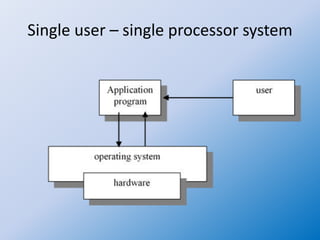
• The simplest of all the computer systems is a single
use-single processor system.
• It has a single processor, runs a single program and
interacts with a single user at a time.
• The operating system for this system is very simple to
design and implement.
• However, the CPU is not utilized to its full potential,
because it sits idle for most of the time.
• In this configuration, all the computing resources are
available to the user all the time. Therefore, operating
system has very simple responsibility.
• A representative example of this category of operating
system is MS-DOS.
Single user – single processor system
Batch Processing Systems
• The main function of a batch processing system is to
automatically keep executing one job to the next job in the
batch.
• The main idea behind a batch processing system is to
reduce the interference of the operator during the processing
or execution of jobs by the computer.
• All functions of a batch processing system are carried out by
the batch monitor. The batch monitor permanently resides in
the low end of the main store.
• The current jobs out of the whole batch are executed in the
remaining storage area.
• In other words, a batch monitor is responsible for controlling
all the environment of the system operation.
• The batch monitor accepts batch initiation commands from the
operator, processes a job, performs the job of job termination
and batch termination.
Batch processing system
Multiprogramming Operating
System
• The objective of a multiprogramming operating system is to increase
the system utilization efficiency.
• The batch processing system tries to reduce the CPU idle time
through operator interaction. However, it cannot reduce the idle time
due to IO operations.
• So, when some IO is being performed by the currently executing job
of a batch, the CPU sits idle without any work to do.
• Thus, the multiprogramming operating system tries to eliminate such
idle times by providing multiple computational tasks for the CPU to
perform.
• This is achieved by keeping multiple jobs in the main store.
• So, when the job that is being currently executed on the CPU needs
some IO, the CPU passes its requirement over to the IO processor.
• Till the time the IO operation is being carried out, the CPU is free
to carry out some other job.
Time Sharing or Multitasking
System
• Time sharing, or multitasking, is a logical
extension of multiprogramming.
• Multiple jobs are executed by the CPU
switching between them, but the switches
occur so frequently that the users may
interact with each program while it is running.
• An interactive, or hands-on, computer system
provides on-line communication between the
user and the system.
• The user gives instructions to the operating
system or to a program directly, and receives
an immediate response.
Parallel Systems
• Most systems to date are single-processor systems; that
is, they have only one main CPU. However, there is a
trend toward multiprocessor systems.
• Such systems have more than one processor in close
communication, sharing the computer bus, the clock,
and sometimes memory and peripheral devices.
• These systems are referred to as tightly coupled
systems.
• There are several reasons for building such systems
such as increased throughput, lower cost, increased
reliability, fault tolerance.
• The Tandem system uses both hardware and software
duplication to ensure continued operation despite faults
• Distributed Systems
Parallel Systems
• A recent trend in computer systems is to distribute
computation among several processors.
• In contrast to the tightly coupled systems, the processors do
not share memory or a clock.
• Instead, each processor has its own memory and clock.
• The processors communicate with one another through
various communication lines
• These systems are usually referred to as loosely coupled
systems, or distributed systems.
• The processors in a distributed system may vary in size and
function.
• They may include small microprocessors, workstations,
minicomputers, and large general-purpose computer systems.
• These processors are referred to by a number of different
names, such as sites, nodes, computers, and so on,
depending on the context in which they are mentioned.
Distributed systems
These systems are designed for achieving:
• Resource sharing.
• Computation speedup.
• Reliability.
• Communication.
Real Time Systems
• Another form of a special-purpose operating system is
the real-time system.
• A real-time system is used when there are rigid time
requirements on the operation of a processor or the
flow of data, and thus is often used as a control device
in a dedicated application.
• Sensors bring data to the computer. The computer must
analyze the data and possibly adjust controls to modify
the sensor inputs.
• Systems that control scientific experiments, medical
imaging systems, industrial control systems, and some
display systems are real-time systems.
• Also included are some automobile-engine fuel-injection
systems, home-appliance controllers, and weapon
systems.
Soft Real Time Systems
• A less restrictive type of real-time
system is a soft real-time system,
where a critical real-time task gets
priority over other tasks, and retains
that priority until it completes.
Assignment
• Briefly discuss the classification of Operating
Systems

Operating system 06 operating system classification

  • 1.
    Operating System 06 OperatingSystem Classification Prof Neeraj Bhargava Vaibhav Khanna Department of Computer Science School of Engineering and Systems Sciences Maharshi Dayanand Saraswati University Ajmer
  • 2.
    Operating Systems Classification • Thevariations and differences in the nature of different operating systems may give the impression that all operating systems are absolutely different from each-other. But this is not true. • All operating systems contain the same components whose functionalities are almost the same. • For instance, all the operating systems perform the functions of storage management, process management, protection of users from one-another, etc. • The procedures and methods that are used to perform these functions might be different but the fundamental concepts behind these techniques are just the same. • Operating systems in general, perform similar functions but may have distinguishing features. • Therefore, they can be classified into different categories on different bases.
  • 3.
    Single User –Single Processing System • The simplest of all the computer systems is a single use-single processor system. • It has a single processor, runs a single program and interacts with a single user at a time. • The operating system for this system is very simple to design and implement. • However, the CPU is not utilized to its full potential, because it sits idle for most of the time. • In this configuration, all the computing resources are available to the user all the time. Therefore, operating system has very simple responsibility. • A representative example of this category of operating system is MS-DOS.
  • 4.
    Single user –single processor system
  • 5.
    Batch Processing Systems •The main function of a batch processing system is to automatically keep executing one job to the next job in the batch. • The main idea behind a batch processing system is to reduce the interference of the operator during the processing or execution of jobs by the computer. • All functions of a batch processing system are carried out by the batch monitor. The batch monitor permanently resides in the low end of the main store. • The current jobs out of the whole batch are executed in the remaining storage area. • In other words, a batch monitor is responsible for controlling all the environment of the system operation. • The batch monitor accepts batch initiation commands from the operator, processes a job, performs the job of job termination and batch termination.
  • 6.
  • 7.
    Multiprogramming Operating System • Theobjective of a multiprogramming operating system is to increase the system utilization efficiency. • The batch processing system tries to reduce the CPU idle time through operator interaction. However, it cannot reduce the idle time due to IO operations. • So, when some IO is being performed by the currently executing job of a batch, the CPU sits idle without any work to do. • Thus, the multiprogramming operating system tries to eliminate such idle times by providing multiple computational tasks for the CPU to perform. • This is achieved by keeping multiple jobs in the main store. • So, when the job that is being currently executed on the CPU needs some IO, the CPU passes its requirement over to the IO processor. • Till the time the IO operation is being carried out, the CPU is free to carry out some other job.
  • 8.
    Time Sharing orMultitasking System • Time sharing, or multitasking, is a logical extension of multiprogramming. • Multiple jobs are executed by the CPU switching between them, but the switches occur so frequently that the users may interact with each program while it is running. • An interactive, or hands-on, computer system provides on-line communication between the user and the system. • The user gives instructions to the operating system or to a program directly, and receives an immediate response.
  • 9.
    Parallel Systems • Mostsystems to date are single-processor systems; that is, they have only one main CPU. However, there is a trend toward multiprocessor systems. • Such systems have more than one processor in close communication, sharing the computer bus, the clock, and sometimes memory and peripheral devices. • These systems are referred to as tightly coupled systems. • There are several reasons for building such systems such as increased throughput, lower cost, increased reliability, fault tolerance. • The Tandem system uses both hardware and software duplication to ensure continued operation despite faults • Distributed Systems
  • 10.
    Parallel Systems • Arecent trend in computer systems is to distribute computation among several processors. • In contrast to the tightly coupled systems, the processors do not share memory or a clock. • Instead, each processor has its own memory and clock. • The processors communicate with one another through various communication lines • These systems are usually referred to as loosely coupled systems, or distributed systems. • The processors in a distributed system may vary in size and function. • They may include small microprocessors, workstations, minicomputers, and large general-purpose computer systems. • These processors are referred to by a number of different names, such as sites, nodes, computers, and so on, depending on the context in which they are mentioned.
  • 11.
    Distributed systems These systemsare designed for achieving: • Resource sharing. • Computation speedup. • Reliability. • Communication.
  • 12.
    Real Time Systems •Another form of a special-purpose operating system is the real-time system. • A real-time system is used when there are rigid time requirements on the operation of a processor or the flow of data, and thus is often used as a control device in a dedicated application. • Sensors bring data to the computer. The computer must analyze the data and possibly adjust controls to modify the sensor inputs. • Systems that control scientific experiments, medical imaging systems, industrial control systems, and some display systems are real-time systems. • Also included are some automobile-engine fuel-injection systems, home-appliance controllers, and weapon systems.
  • 13.
    Soft Real TimeSystems • A less restrictive type of real-time system is a soft real-time system, where a critical real-time task gets priority over other tasks, and retains that priority until it completes.
  • 14.
    Assignment • Briefly discussthe classification of Operating Systems