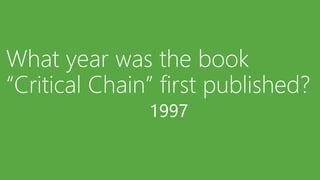
1997
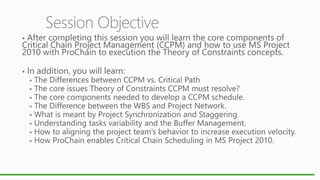
Session Objective












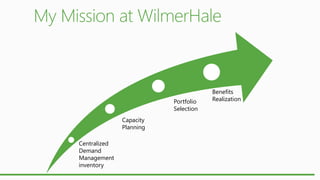
Portfolio
Selection
Capacity
Planning
Centralized
Demand
Management
inventory

Benefits
Realization
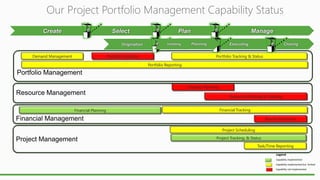
Our Project Portfolio Management Capability Status

Demand Management

Portfolio Selection

Portfolio Tracking & Status
Portfolio Reporting

Capacity Planning
Resource Planning & Tracking
Financial Planning

Financial Tracking
Benefits Realization

Project Scheduling
Project Tracking, & Status
Task/Time Reporting
Legend
Capability implemented
Capability implemented but limited
Capability not implemented
Demand
Mgt

Portfolio
Selection

Portfolio
Track &
Status

Portfolio
Report

Capacity
Planning

Resource
Planning &
Tracking

Financial
Planning

Financial
Tracking

Benefit
Realization

Proj.
Scheduling

Proj
Track &
Status

Task &
Time
Report

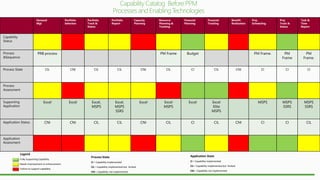
Capability
Status

PRB process

Process
&Sequence
Process State

PM Frame

Budget

PM Frame.

CIL

CNI

CIL

CIL

CNI

CIL

CI

CIL

Excel

Excel

Excel,
MSPS

Excel,
MSPS
SSRS

Excel

Excel
MSPS

Excel

Excel
Elite
MSPS

CNI

CNI

CIL

CIL

CNI

CIL

CI

CIL

PM
Frame.

CI

CI

CI

MSPS

CNI

PM
Frame

MSPS
SSRS

MSPS
SSRS

CI

CI

CIL

Process
Assessment

Supporting
Application

Application Status

Application
Assessment

Legend
Fully Supporting Capability
Needs improvement or enhancement
Failure to support capability

Process State

Application State

CI = Capability implemented

CI = Capability implemented

CIL = Capability implemented but limited

CIL = Capability implemented but limited

CNI = Capability not implemented

CNI = Capability not implemented

CNI
Resource
Constraints

Bottlenecks
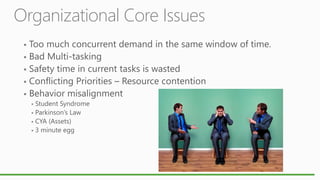
Organizational Core Issues











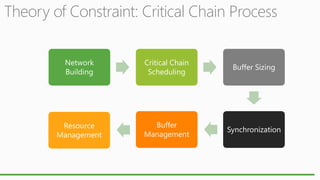
Theory of Constraint: Critical Chain Process
Network
Building

Critical Chain
Scheduling

Buffer Sizing

Resource
Management

Buffer
Management

Synchronization
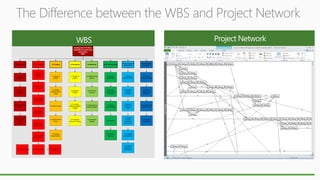
The Difference between the WBS and Project Network
Building the IT Portfolio
Capability Processes and
Deliverables
WBS

1.0 Game Plan

1.1 Baseline
Assessment

4.0 Assessing

5.0 Balancing

6.0 Communicating

7.0 Governance &
Organization

8.0 Assessing
Execution

3.1 Populate
portfolio

4.1 Monitor for
triggers

5.1 Identify tuning
options

6.1 Identify
Stakeholders

7.1 Manage
Portfolio Policies

8.1 Assess
program execution

4.2 Measure
Portfolio

5.2 Determine
Trade-offs

6.2 Create
Communication
Packages

7.2 Integrate
business
processes

8.2 Perform
assessment
comparison

3.3 Define metrics

4.3 Compare
Measures against
Targets

5.3 Select/approve
portfolio changes

6.3 Deliver
communications

7.3 Monitor
compliance
triggers

8.3 Assessment &
execution report

3.4 Build Portfolio
Views

2.1 Plan
Investment
Strategy

3.0 Creating

3.2 Identify
expected risks &
results

2.0 Planning

4.4 Portfolio &
Financial Tracking

5.4 Implement
changes

6.4 Training

7.4 Create/
maintain
governance
processes

8.4 Benefits
Realization

6.5 Portfolio
Reporting

7.5 Establish
Organization

2.2 Plan Portfolio
Structure
1.2 Define
Objectives

2.3 Plan individual
subportfolios
1.3 Define Process
Metrics
2.4 Demand
Management
1.4 Documents the
Portfolio Game
Plan
(Charter)

2.5 Resource
Management

2.6 Financial
Management

2.7 Methodology

2.8 Documentation

3.5 Solution
Implementation

2.9 Capacity
Planning

7.6 Portfolio
Selection &
Governance
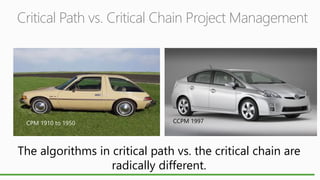
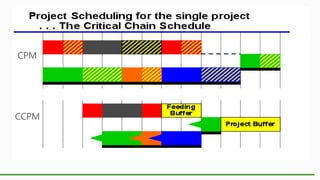
Critical Path vs. Critical Chain Project Management

CPM 1910 to 1950

CCPM 1997

The algorithms in critical path vs. the critical chain are
radically different.
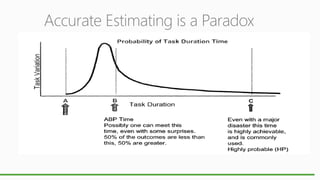
Accurate Estimating is a Paradox
Task variability is a fact of life.



Putting on a pair of Levis



Putting on a pair of Levis you owned in High School



Putting on Sweats
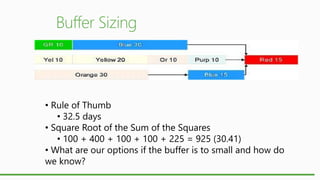
• Rule of Thumb
• 32.5 days
• Square Root of the Sum of the Squares
• 100 + 400 + 100 + 100 + 225 = 925 (30.41)
• What are our options if the buffer is to small and how do
we know?
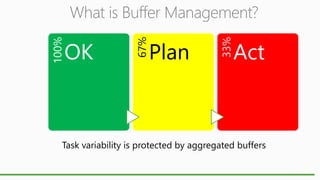
Plan

33%

OK

67%

100%

What is Buffer Management?

Act

Task variability is protected by aggregated buffers
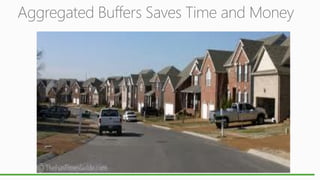
Aggregated Buffers Saves Time and Money
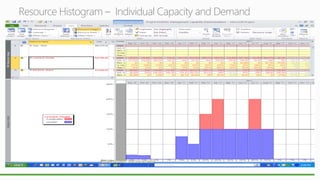
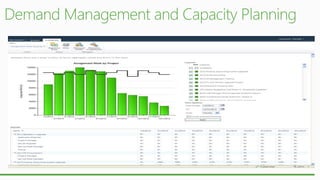
Resource Histogram – Individual Capacity and Demand
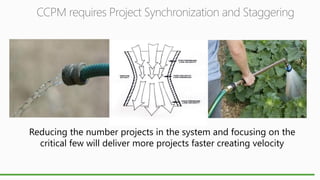
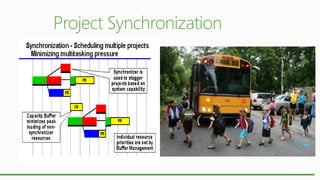
CCPM requires Project Synchronization and Staggering

Reducing the number projects in the system and focusing on the
critical few will deliver more projects faster creating velocity
25
Demand
Mgt

Portfolio
Selection

Portfolio
Track &
Status

Portfolio
Report

Capacity
Planning

Resource
Planning &
Tracking

Financial
Planning

Financial
Tracking

Benefit
Realization

Proj.
Scheduling

Proj
Track &
Status

Task &
Time
Report

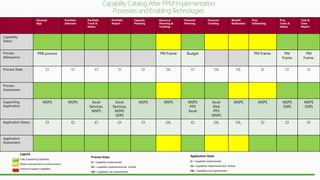
Capability
Status

PRB process

Process
&Sequence
Process State

PM Frame

Budget

PM Frame.

PM
Frame

PM
Frame.

CI

CI

CI

CI

CI

CIL

CI

CIL

CIL

CI

CI

CI

MSPS

MSPS

Excel
Services,
MSPS

Excel
Services,
MSPS
SSRS

MSPS

MSPS

MSPS
PFS
Excel

Excel
Elite
PFS
MSPS

MSPS

MSPS

MSPS
SSRS

MSPS
SSRS

CI

CI

CI

CI

CI

CIL

CI

CIL

CIL

CI

CI

CI

Process
Assessment

Supporting
Application

Application Status

Application
Assessment

Legend
Fully Supporting Capability
Needs improvement or enhancement
Failure to support capability

Process State

Application State

CI = Capability implemented

CI = Capability implemented

CIL = Capability implemented but limited

CIL = Capability implemented but limited

CNI = Capability not implemented

CNI = Capability not implemented
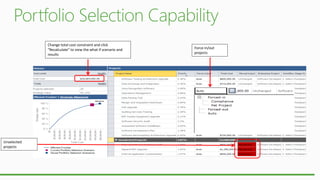
Change total cost constraint and click
“Recalculate” to view the what if scenario and
results

Unselected
projects

Force in/out
projects
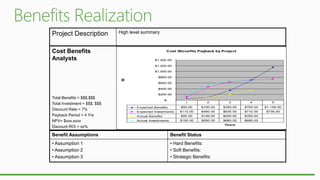
Project Description

High level summary

Cost Benefits
Analysts

Cost /Benefits Payback by Project
$1,400.00
$1,200.00

$$

$1,000.00
$800.00
$600.00
$400.00
$200.00

Total Benefits = $$$,$$$
Total Investment = $$$, $$$
Discount Rate = 7%
Payback Period = 4 Yrs
NPV= $xxx,xxxx
Discount ROI = xx%

$-

1

4

5

$100.00

$350.00

$700.00

$1,150.00

$110.00

$460.00

$635.00

$710.00

$735.00

$25.00

$100.00

$200.00

$350.00

$150.00

Expected Investments
Actual Investments

3

$50.00

Expected Benefits
Actual Benefits

2

$550.00

$660.00

$685.00

Years

Benefit Assumptions

Benefit Status

• Assumption 1
• Assumption 2
• Assumption 3

• Hard Benefits:
• Soft Benefits:
• Strategic Benefits:
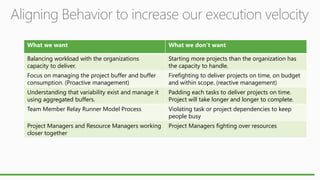
Aligning Behavior to increase our execution velocity
What we want

What we don’t want

Balancing workload with the organizations
capacity to deliver.

Starting more projects than the organization has
the capacity to handle.

Focus on managing the project buffer and buffer
consumption. (Proactive management)

Firefighting to deliver projects on time, on budget
and within scope. (reactive management)

Understanding that variability exist and manage it
using aggregated buffers.

Padding each tasks to deliver projects on time.
Project will take longer and longer to complete.

Team Member Relay Runner Model Process

Violating task or project dependencies to keep
people busy

Project Managers and Resource Managers working
closer together

Project Managers fighting over resources
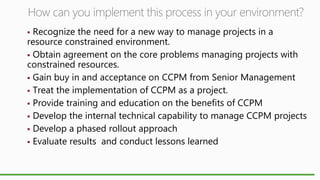
How can you implement this process in your environment?
Recognize the need for a new way to manage projects in a
resource constrained environment.
 Obtain agreement on the core problems managing projects with
constrained resources.
 Gain buy in and acceptance on CCPM from Senior Management
 Treat the implementation of CCPM as a project.
 Provide training and education on the benefits of CCPM
 Develop the internal technical capability to manage CCPM projects
 Develop a phased rollout approach
 Evaluate results and conduct lessons learned

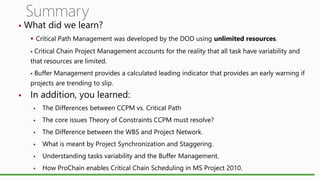
Summary



What did we learn?
 Critical Path Management was developed by the DOD using unlimited resources.

Critical Chain Project Management accounts for the reality that all task have variability and
that resources are limited.


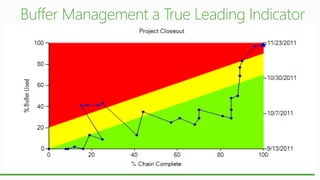
Buffer Management provides a calculated leading indicator that provides an early warning if
projects are trending to slip.




In addition, you learned:


The Differences between CCPM vs. Critical Path



The core issues Theory of Constraints CCPM must resolve?



The Difference between the WBS and Project Network.



What is meant by Project Synchronization and Staggering.



Understanding tasks variability and the Buffer Management.



How ProChain enables Critical Chain Scheduling in MS Project 2010.
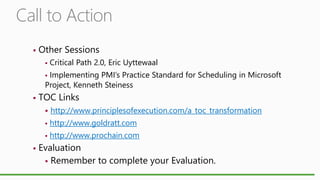
Call to Action


Other Sessions


Critical Path 2.0, Eric Uyttewaal

Implementing PMI’s Practice Standard for Scheduling in Microsoft
Project, Kenneth Steiness




TOC Links



http://www.goldratt.com





http://www.principlesofexecution.com/a_toc_transformation
http://www.prochain.com

Evaluation
 Remember to complete your Evaluation.
CCPM using ms project 2010 and prochain implementing ppm

CCPM using ms project 2010 and prochain implementing ppm

  • 3.
  • 4.
  • 5.
  • 6.
    Our Project PortfolioManagement Capability Status Demand Management Portfolio Selection Portfolio Tracking & Status Portfolio Reporting Capacity Planning Resource Planning & Tracking Financial Planning Financial Tracking Benefits Realization Project Scheduling Project Tracking, & Status Task/Time Reporting Legend Capability implemented Capability implemented but limited Capability not implemented
  • 7.
    Demand Mgt Portfolio Selection Portfolio Track & Status Portfolio Report Capacity Planning Resource Planning & Tracking Financial Planning Financial Tracking Benefit Realization Proj. Scheduling Proj Track& Status Task & Time Report Capability Status PRB process Process &Sequence Process State PM Frame Budget PM Frame. CIL CNI CIL CIL CNI CIL CI CIL Excel Excel Excel, MSPS Excel, MSPS SSRS Excel Excel MSPS Excel Excel Elite MSPS CNI CNI CIL CIL CNI CIL CI CIL PM Frame. CI CI CI MSPS CNI PM Frame MSPS SSRS MSPS SSRS CI CI CIL Process Assessment Supporting Application Application Status Application Assessment Legend Fully Supporting Capability Needs improvement or enhancement Failure to support capability Process State Application State CI = Capability implemented CI = Capability implemented CIL = Capability implemented but limited CIL = Capability implemented but limited CNI = Capability not implemented CNI = Capability not implemented CNI
  • 9.
  • 10.
  • 11.
    Theory of Constraint:Critical Chain Process Network Building Critical Chain Scheduling Buffer Sizing Resource Management Buffer Management Synchronization
  • 12.
    The Difference betweenthe WBS and Project Network Building the IT Portfolio Capability Processes and Deliverables WBS 1.0 Game Plan 1.1 Baseline Assessment 4.0 Assessing 5.0 Balancing 6.0 Communicating 7.0 Governance & Organization 8.0 Assessing Execution 3.1 Populate portfolio 4.1 Monitor for triggers 5.1 Identify tuning options 6.1 Identify Stakeholders 7.1 Manage Portfolio Policies 8.1 Assess program execution 4.2 Measure Portfolio 5.2 Determine Trade-offs 6.2 Create Communication Packages 7.2 Integrate business processes 8.2 Perform assessment comparison 3.3 Define metrics 4.3 Compare Measures against Targets 5.3 Select/approve portfolio changes 6.3 Deliver communications 7.3 Monitor compliance triggers 8.3 Assessment & execution report 3.4 Build Portfolio Views 2.1 Plan Investment Strategy 3.0 Creating 3.2 Identify expected risks & results 2.0 Planning 4.4 Portfolio & Financial Tracking 5.4 Implement changes 6.4 Training 7.4 Create/ maintain governance processes 8.4 Benefits Realization 6.5 Portfolio Reporting 7.5 Establish Organization 2.2 Plan Portfolio Structure 1.2 Define Objectives 2.3 Plan individual subportfolios 1.3 Define Process Metrics 2.4 Demand Management 1.4 Documents the Portfolio Game Plan (Charter) 2.5 Resource Management 2.6 Financial Management 2.7 Methodology 2.8 Documentation 3.5 Solution Implementation 2.9 Capacity Planning 7.6 Portfolio Selection & Governance
  • 13.
    Critical Path vs.Critical Chain Project Management CPM 1910 to 1950 CCPM 1997 The algorithms in critical path vs. the critical chain are radically different.
  • 15.
  • 16.
    Task variability isa fact of life.  Putting on a pair of Levis  Putting on a pair of Levis you owned in High School  Putting on Sweats
  • 17.
    • Rule ofThumb • 32.5 days • Square Root of the Sum of the Squares • 100 + 400 + 100 + 100 + 225 = 925 (30.41) • What are our options if the buffer is to small and how do we know?
  • 18.
    Plan 33% OK 67% 100% What is BufferManagement? Act Task variability is protected by aggregated buffers
  • 19.
  • 20.
    Resource Histogram –Individual Capacity and Demand
  • 21.
    CCPM requires ProjectSynchronization and Staggering Reducing the number projects in the system and focusing on the critical few will deliver more projects faster creating velocity
  • 25.
  • 26.
    Demand Mgt Portfolio Selection Portfolio Track & Status Portfolio Report Capacity Planning Resource Planning & Tracking Financial Planning Financial Tracking Benefit Realization Proj. Scheduling Proj Track& Status Task & Time Report Capability Status PRB process Process &Sequence Process State PM Frame Budget PM Frame. PM Frame PM Frame. CI CI CI CI CI CIL CI CIL CIL CI CI CI MSPS MSPS Excel Services, MSPS Excel Services, MSPS SSRS MSPS MSPS MSPS PFS Excel Excel Elite PFS MSPS MSPS MSPS MSPS SSRS MSPS SSRS CI CI CI CI CI CIL CI CIL CIL CI CI CI Process Assessment Supporting Application Application Status Application Assessment Legend Fully Supporting Capability Needs improvement or enhancement Failure to support capability Process State Application State CI = Capability implemented CI = Capability implemented CIL = Capability implemented but limited CIL = Capability implemented but limited CNI = Capability not implemented CNI = Capability not implemented
  • 27.
    Change total costconstraint and click “Recalculate” to view the what if scenario and results Unselected projects Force in/out projects
  • 29.
    Project Description High levelsummary Cost Benefits Analysts Cost /Benefits Payback by Project $1,400.00 $1,200.00 $$ $1,000.00 $800.00 $600.00 $400.00 $200.00 Total Benefits = $$$,$$$ Total Investment = $$$, $$$ Discount Rate = 7% Payback Period = 4 Yrs NPV= $xxx,xxxx Discount ROI = xx% $- 1 4 5 $100.00 $350.00 $700.00 $1,150.00 $110.00 $460.00 $635.00 $710.00 $735.00 $25.00 $100.00 $200.00 $350.00 $150.00 Expected Investments Actual Investments 3 $50.00 Expected Benefits Actual Benefits 2 $550.00 $660.00 $685.00 Years Benefit Assumptions Benefit Status • Assumption 1 • Assumption 2 • Assumption 3 • Hard Benefits: • Soft Benefits: • Strategic Benefits:
  • 30.
    Aligning Behavior toincrease our execution velocity What we want What we don’t want Balancing workload with the organizations capacity to deliver. Starting more projects than the organization has the capacity to handle. Focus on managing the project buffer and buffer consumption. (Proactive management) Firefighting to deliver projects on time, on budget and within scope. (reactive management) Understanding that variability exist and manage it using aggregated buffers. Padding each tasks to deliver projects on time. Project will take longer and longer to complete. Team Member Relay Runner Model Process Violating task or project dependencies to keep people busy Project Managers and Resource Managers working closer together Project Managers fighting over resources
  • 31.
    How can youimplement this process in your environment? Recognize the need for a new way to manage projects in a resource constrained environment.  Obtain agreement on the core problems managing projects with constrained resources.  Gain buy in and acceptance on CCPM from Senior Management  Treat the implementation of CCPM as a project.  Provide training and education on the benefits of CCPM  Develop the internal technical capability to manage CCPM projects  Develop a phased rollout approach  Evaluate results and conduct lessons learned 
  • 32.
    Summary  What did welearn?  Critical Path Management was developed by the DOD using unlimited resources. Critical Chain Project Management accounts for the reality that all task have variability and that resources are limited.  Buffer Management provides a calculated leading indicator that provides an early warning if projects are trending to slip.   In addition, you learned:  The Differences between CCPM vs. Critical Path  The core issues Theory of Constraints CCPM must resolve?  The Difference between the WBS and Project Network.  What is meant by Project Synchronization and Staggering.  Understanding tasks variability and the Buffer Management.  How ProChain enables Critical Chain Scheduling in MS Project 2010.
  • 33.
    Call to Action  OtherSessions  Critical Path 2.0, Eric Uyttewaal Implementing PMI’s Practice Standard for Scheduling in Microsoft Project, Kenneth Steiness   TOC Links   http://www.goldratt.com   http://www.principlesofexecution.com/a_toc_transformation http://www.prochain.com Evaluation  Remember to complete your Evaluation.