OFFICIAL INDUSTRY ASSOCIATION FOR MICROSOFT OFFICE PROJECT

Enterprise Resource
Management using MS
Project Server 2007
Presented By:

Gerald Leonard
PMP, MCTS, CQIA, ITIL

© 2006 MPA. All rights reserved.

1
Objectives
To ensure you understand:
Why should an organization Implement a Enterprise
Resource Management solution?
How to define Enterprise Resource Management
How to use Microsoft Enterprise Resource Management
features
How to apply Microsoft ERM Tools to effectively
manage resources

Slide 2
Why should an organization Implement a
Enterprise Resource Management solution?
Lack of visibility on current resource’s demand and
capacity.
Not sure if you have the right resources work on the
right initiatives
Not sure if you have enough of the right skill sets and
experience level.
Lack of insight into resource utilization.

Slide 3
What is Enterprise Resource
Management?
The management of a pool of resources belonging to
the whole organization
Analyzing and/or selecting resources based on
availability and type from a central source
Making decisions on how to upgrade an enterprise
resource pool based on its current makeup

Slide 4
Microsoft EPM Features
How can a Microsoft Solution help with Enterprise
Resource Management?
Defining Human Generic Resources
Defining Material Resources
Setting cost rates and resource calendars
Generic Skill Matching
Resource Availability Reporting

Slide 5
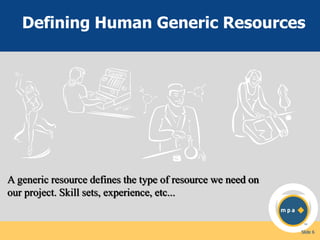
Defining Human Generic Resources

A generic resource defines the type of resource we need on
our project. Skill sets, experience, etc...

Slide 6
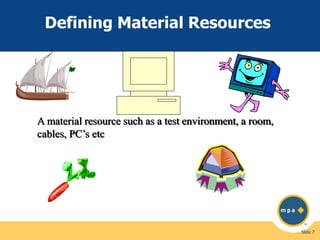
Defining Material Resources

A material resource such as a test environment, a room,
cables, PC’s etc

Slide 7
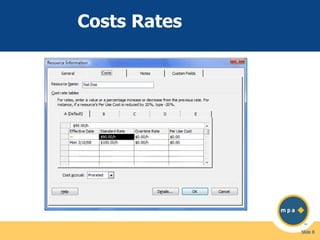
Costs Rates

Slide 8
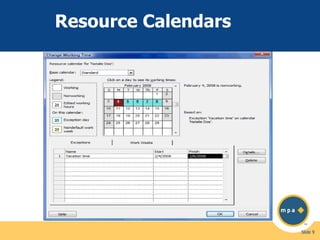
Resource Calendars

Slide 9
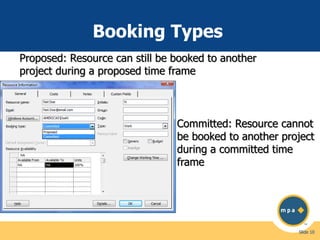
Booking Types
Proposed: Resource can still be booked to another
project during a proposed time frame

Committed: Resource cannot
be booked to another project
during a committed time
frame

Slide 10
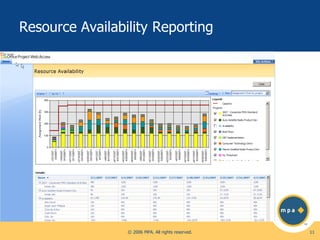
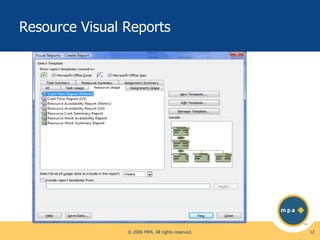
Resource Availability Reporting

© 2006 MPA. All rights reserved.

11
Resource Visual Reports

© 2006 MPA. All rights reserved.

12
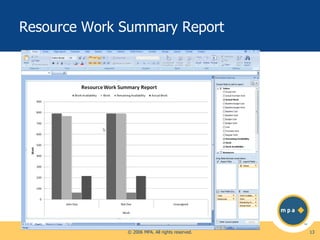
Resource Work Summary Report

© 2006 MPA. All rights reserved.

13
Additional Microsoft EPM
Features
Establishing resource control via Resource Breakdown
Structure (RBS)
Setting resource attributes with custom resource outline
codes
Resource re-deployment via portfolio models
Work Contours
Historical resource usage on projects

Slide 14
New Microsoft Resource Management
Features
Team Builder

Improved skills and resource searching
Create filtered views that are specific to Team Builder
Use filtering and searching when using Team Builder in Project
Web Access

Resource plans

Enables resource demand to be specified independent of project
assignments
Supports start date, finish date, and units of resource allocated
to a project
Allows project summary resource assignment to pull from the
resource plan or project assignments
Resource plans are available in Project Server reports

© 2006 MPA. All rights reserved.

15
New Microsoft Resource Management
Features (Cont)
Team resources

Allows assignments to be published to a team
Team members can see and take ownership of assignments
published to a team
Team capacity and demand can be viewed in Project Server
2007 reports

Resource editing

Enterprise resources can be defined through Project Web Access
or PSI
Supports availability, rate tables, custom fields, and standard
fields

© 2006 MPA. All rights reserved.

16
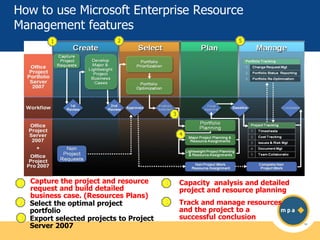
How to use Microsoft Enterprise Resource
Management features
1

5

2

3

4

1
2
3

Capture the project and resource
request and build detailed
business case. (Resources Plans)
Select the optimal project
portfolio
Export selected projects to Project
Server 2007

4

Capacity analysis and detailed
project and resource planning

5

Track and manage resources
and the project to a
successful conclusion
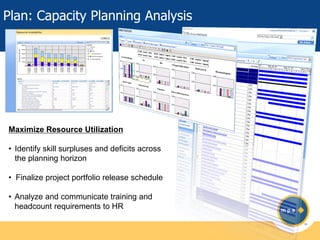
Plan: Capacity Planning Analysis

Maximize Resource Utilization
• Identify skill surpluses and deficits across
the planning horizon

• Finalize project portfolio release schedule
• Analyze and communicate training and
headcount requirements to HR
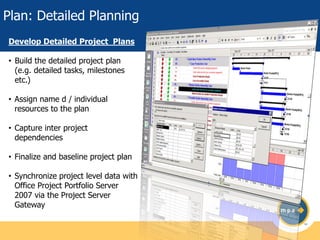
Plan: Detailed Planning
Develop Detailed Project Plans
• Build the detailed project plan
(e.g. detailed tasks, milestones
etc.)
• Assign name d / individual
resources to the plan

• Capture inter project
dependencies
• Finalize and baseline project plan

• Synchronize project level data with
Office Project Portfolio Server
2007 via the Project Server
Gateway
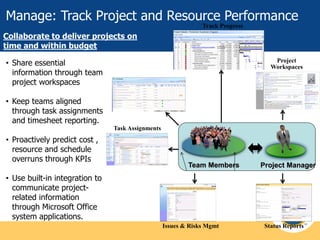
Manage: Track Project and Resource Performance
Track Progress

Collaborate to deliver projects on
time and within budget
• Share essential
information through team
project workspaces

Project
Workspaces

Timesheets

• Keep teams aligned
through task assignments
and timesheet reporting.
Task Assignments

• Proactively predict cost ,
resource and schedule
overruns through KPIs

Timesheets

Team Members

Project Manager

• Use built-in integration to
communicate projectrelated information
through Microsoft Office
system applications.
Issues & Risks Mgmt

Status Reports
DEMO

© 2006 MPA. All rights reserved.

21
Q&A

Gerald Leonard
PMP, MCTS, CQIA, ITIL
Gerald.leonard@verizon.net

© 2006 MPA. All rights reserved.

22

Enterprise Resource Management Using MS Project Server 2007

  • 1.
    OFFICIAL INDUSTRY ASSOCIATIONFOR MICROSOFT OFFICE PROJECT Enterprise Resource Management using MS Project Server 2007 Presented By: Gerald Leonard PMP, MCTS, CQIA, ITIL © 2006 MPA. All rights reserved. 1
  • 2.
    Objectives To ensure youunderstand: Why should an organization Implement a Enterprise Resource Management solution? How to define Enterprise Resource Management How to use Microsoft Enterprise Resource Management features How to apply Microsoft ERM Tools to effectively manage resources Slide 2
  • 3.
    Why should anorganization Implement a Enterprise Resource Management solution? Lack of visibility on current resource’s demand and capacity. Not sure if you have the right resources work on the right initiatives Not sure if you have enough of the right skill sets and experience level. Lack of insight into resource utilization. Slide 3
  • 4.
    What is EnterpriseResource Management? The management of a pool of resources belonging to the whole organization Analyzing and/or selecting resources based on availability and type from a central source Making decisions on how to upgrade an enterprise resource pool based on its current makeup Slide 4
  • 5.
    Microsoft EPM Features Howcan a Microsoft Solution help with Enterprise Resource Management? Defining Human Generic Resources Defining Material Resources Setting cost rates and resource calendars Generic Skill Matching Resource Availability Reporting Slide 5
  • 6.
    Defining Human GenericResources A generic resource defines the type of resource we need on our project. Skill sets, experience, etc... Slide 6
  • 7.
    Defining Material Resources Amaterial resource such as a test environment, a room, cables, PC’s etc Slide 7
  • 8.
  • 9.
  • 10.
    Booking Types Proposed: Resourcecan still be booked to another project during a proposed time frame Committed: Resource cannot be booked to another project during a committed time frame Slide 10
  • 11.
    Resource Availability Reporting ©2006 MPA. All rights reserved. 11
  • 12.
    Resource Visual Reports ©2006 MPA. All rights reserved. 12
  • 13.
    Resource Work SummaryReport © 2006 MPA. All rights reserved. 13
  • 14.
    Additional Microsoft EPM Features Establishingresource control via Resource Breakdown Structure (RBS) Setting resource attributes with custom resource outline codes Resource re-deployment via portfolio models Work Contours Historical resource usage on projects Slide 14
  • 15.
    New Microsoft ResourceManagement Features Team Builder Improved skills and resource searching Create filtered views that are specific to Team Builder Use filtering and searching when using Team Builder in Project Web Access Resource plans Enables resource demand to be specified independent of project assignments Supports start date, finish date, and units of resource allocated to a project Allows project summary resource assignment to pull from the resource plan or project assignments Resource plans are available in Project Server reports © 2006 MPA. All rights reserved. 15
  • 16.
    New Microsoft ResourceManagement Features (Cont) Team resources Allows assignments to be published to a team Team members can see and take ownership of assignments published to a team Team capacity and demand can be viewed in Project Server 2007 reports Resource editing Enterprise resources can be defined through Project Web Access or PSI Supports availability, rate tables, custom fields, and standard fields © 2006 MPA. All rights reserved. 16
  • 17.
    How to useMicrosoft Enterprise Resource Management features 1 5 2 3 4 1 2 3 Capture the project and resource request and build detailed business case. (Resources Plans) Select the optimal project portfolio Export selected projects to Project Server 2007 4 Capacity analysis and detailed project and resource planning 5 Track and manage resources and the project to a successful conclusion
  • 18.
    Plan: Capacity PlanningAnalysis Maximize Resource Utilization • Identify skill surpluses and deficits across the planning horizon • Finalize project portfolio release schedule • Analyze and communicate training and headcount requirements to HR
  • 19.
    Plan: Detailed Planning DevelopDetailed Project Plans • Build the detailed project plan (e.g. detailed tasks, milestones etc.) • Assign name d / individual resources to the plan • Capture inter project dependencies • Finalize and baseline project plan • Synchronize project level data with Office Project Portfolio Server 2007 via the Project Server Gateway
  • 20.
    Manage: Track Projectand Resource Performance Track Progress Collaborate to deliver projects on time and within budget • Share essential information through team project workspaces Project Workspaces Timesheets • Keep teams aligned through task assignments and timesheet reporting. Task Assignments • Proactively predict cost , resource and schedule overruns through KPIs Timesheets Team Members Project Manager • Use built-in integration to communicate projectrelated information through Microsoft Office system applications. Issues & Risks Mgmt Status Reports
  • 21.
    DEMO © 2006 MPA.All rights reserved. 21
  • 22.
    Q&A Gerald Leonard PMP, MCTS,CQIA, ITIL Gerald.leonard@verizon.net © 2006 MPA. All rights reserved. 22