
Capturing Stills, Sounds,
                     and Scenes with AV
                         Foundation
                                  Chris Adamson • @invalidname
                           Voices That Matter: iOS Developer Conference
                                    Nov. 12, 2011 • Boston, MA


Tuesday, November 15, 11
Road Map

               • Media capture technologies in iOS

               • AV Foundation capture concepts

               • Device-specific concerns

               • Doing stuff with captured media


Tuesday, November 15, 11
Capture?
               • Digital media encoding of some real-world source,
                 such as still images, moving images, and/or sound

                           • Contrast with synthetic media: musical
                             synthesizers, CG animation

               • Not the same as "recording", which implies storage

               • Capture devices include cameras and
                 microphones


Tuesday, November 15, 11
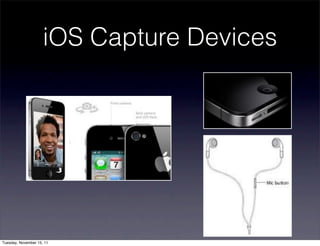
iOS Capture Devices


Tuesday, November 15, 11
Accessing Capture
                                Devices
               • Simple shoot-and-save -
                 UIImagePickerController

               • Core Audio - low level capture and real-time
                 processing

                           • More info in my talk tomorrow

               • AV Foundation


Tuesday, November 15, 11
AV Foundation
               • Introduced in iPhone OS 2.3 as Obj-C
                 wrapper for Core Audio playback, added
                 capture in 3.0

               • Repurposed in iOS 4 as audio/video capture,
                 editing, export, and playback framework

               • Ported to OS X in Lion, heir apparent to
                 QuickTime


Tuesday, November 15, 11
#import this!
               • AVFoundation.framework

               • CoreMedia.framework

               • Possibly also:

                    • CoreVideo, CoreImage, CoreGraphics

                    • AudioToolbox, AudioUnits


Tuesday, November 15, 11
Core Media
               • C-based helper framework for AVF

               • Structures to represent media buffers and
                 queues of buffers, media times and time
                 ranges

               • Low-level conversion and calculation functions

                           • Does not provide capture, editing, or
                             playback functionality


Tuesday, November 15, 11
AV Foundation
               • Editing / Playback classes

                    • Assets, compositions, and tracks. Player
                      and player layer. Asset readers and writers

               • Capture classes

                    • Devices, inputs, outputs, and the session


Tuesday, November 15, 11
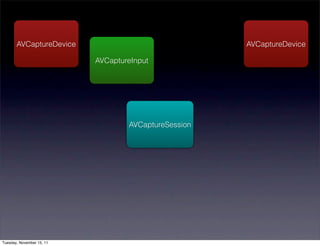
How it fits together…


Tuesday, November 15, 11
AVCaptureSession


Tuesday, November 15, 11
AVCaptureDevice


                           AVCaptureSession


Tuesday, November 15, 11
AVCaptureDevice

                           AVCaptureInput


                                   AVCaptureSession


Tuesday, November 15, 11
AVCaptureDevice                                AVCaptureDevice

                           AVCaptureInput


                                   AVCaptureSession


Tuesday, November 15, 11
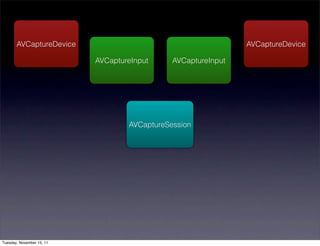
AVCaptureDevice                                         AVCaptureDevice

                           AVCaptureInput     AVCaptureInput


                                   AVCaptureSession


Tuesday, November 15, 11
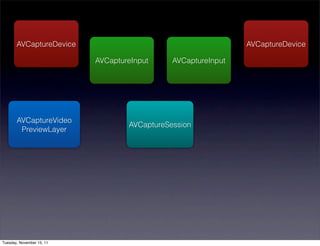
AVCaptureDevice                                         AVCaptureDevice

                           AVCaptureInput     AVCaptureInput


       AVCaptureVideo
                                   AVCaptureSession
        PreviewLayer


Tuesday, November 15, 11
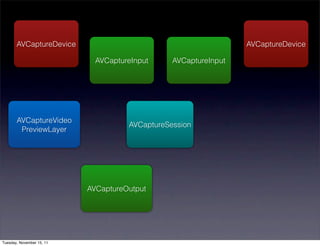
AVCaptureDevice                                           AVCaptureDevice

                             AVCaptureInput     AVCaptureInput


       AVCaptureVideo
                                     AVCaptureSession
        PreviewLayer


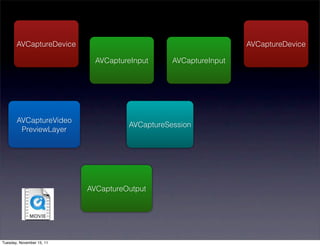
                           AVCaptureOutput


Tuesday, November 15, 11
AVCaptureDevice                                           AVCaptureDevice

                             AVCaptureInput     AVCaptureInput


       AVCaptureVideo
                                     AVCaptureSession
        PreviewLayer


                           AVCaptureOutput


Tuesday, November 15, 11
AVCaptureDevice                                           AVCaptureDevice

                             AVCaptureInput     AVCaptureInput


       AVCaptureVideo
                                     AVCaptureSession
        PreviewLayer


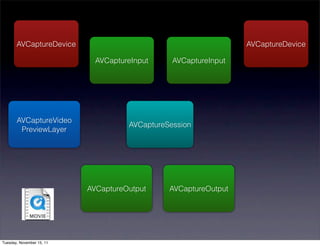
                           AVCaptureOutput     AVCaptureOutput


Tuesday, November 15, 11
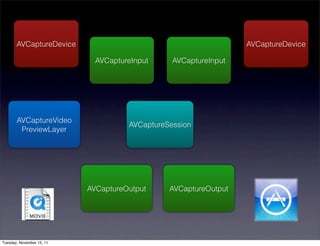
AVCaptureDevice                                           AVCaptureDevice

                             AVCaptureInput     AVCaptureInput


       AVCaptureVideo
                                     AVCaptureSession
        PreviewLayer


                           AVCaptureOutput     AVCaptureOutput


Tuesday, November 15, 11
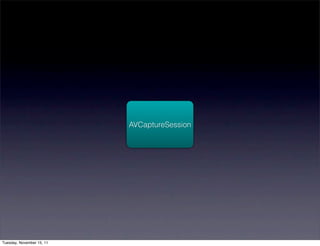
AVCaptureSession


               • Coordinates the flow of capture from inputs to
                 outputs

               • Create, add inputs and outputs, start running


        captureSession = [[AVCaptureSession alloc] init];


Tuesday, November 15, 11
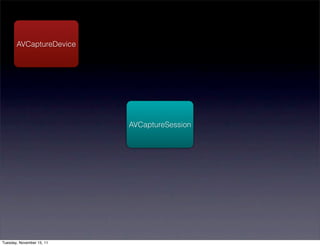
AVCaptureDevice
               • Represents a device that can perform media
                 capture (cameras, microphones)

               • Could be connected as external accessory or
                 Bluetooth

                    • You cannot make assumptions based on
                      device model


Tuesday, November 15, 11
Discovering Devices

               • AVCaptureDevice class methods devices,
                 deviceWithUniqueID, devicesWithMediaType,
                 defaultDeviceWithMediaType

               • Media types include audio, video, muxed
                 (audio and video in one stream), plus some
                 outliers (timecode, etc.)


Tuesday, November 15, 11
Inspecting Devices

               • position (property): is the camera on the front
                 or the back?

               • supportsAVCaptureSessionPreset: allows you
                 to inspect whether it can copy at one of
                 several predefined image resolutions


Tuesday, November 15, 11
Photo traits
        • Focus & exposure

             • isFocusModeSupported:, focusMode,
               focusPointOfInterestSupported, focusPointOfInterest,
               focusAdjusting

             • isExposureModeSupported:, exposureMode,
               exposurePointOfInterestSupported, etc.

        • White balance

             • isWhiteBalanceModeSupported:, whiteBalanceMode,
               whiteBalanceModeAdjusting

Tuesday, November 15, 11
Light up

               • Flash and Torch

                    • hasFlash, isFlashModeSupported:
                      flashMode, flashActive, flashAvailable

                    • hasTorch, isTorchModeSupported:,
                      torchMode, torchLevel, torchAvailable


Tuesday, November 15, 11
AVCaptureSession
                             sessionPreset
               • Constants for video capture quality. Allows
                 you to inspect capabilities, trade
                 performance/framerate for resolution

               • Default is AVCaptureSessionPresetHigh

               • For still photos:
                 AVCaptureSessionPresetPhoto


Tuesday, November 15, 11
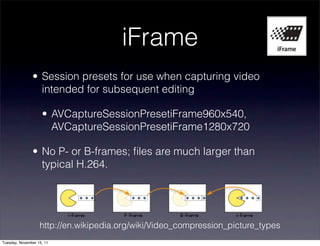
iFrame
               • Session presets for use when capturing video
                 intended for subsequent editing

                    • AVCaptureSessionPresetiFrame960x540,
                      AVCaptureSessionPresetiFrame1280x720

               • No P- or B-frames; files are much larger than
                 typical H.264.


                   http://en.wikipedia.org/wiki/Video_compression_picture_types
Tuesday, November 15, 11
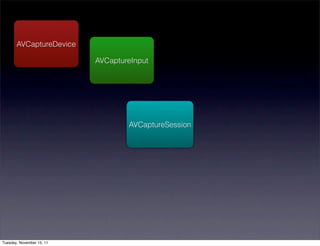
Capture inputs

               • Connect a device to the capture session

               • Instances of AVCaptureDeviceInput

               • create with -initWithDevice:error: or
                 deviceInputForDevice:error


Tuesday, November 15, 11
AVCaptureDevice *videoDevice =
      ! [AVCaptureDevice defaultDeviceWithMediaType:
      ! AVMediaTypeVideo];

      if (videoDevice) {
      ! AVCaptureDeviceInput *videoInput =
       ! [AVCaptureDeviceInput
      ! ! deviceInputWithDevice:videoDevice
      ! ! ! ! ! ! ! ! error:&setUpError];
      ! if (videoInput) {
      ! ! [captureSession addInput: videoInput];
      ! }
      }


Tuesday, November 15, 11
Capture preview
               • AVCapturePreviewLayer: A CALayer that
                 shows what's currently being captured from
                 video input

                    • Remember: CALayer, not UIView

               • videoGravity property determines how it will
                 deal with preview that doesn't match bounds:
                 aspect, fill, or resize


Tuesday, November 15, 11
AVCaptureVideoPreviewLayer *previewLayer =
    ! [AVCaptureVideoPreviewLayer
    ! ! layerWithSession:captureSession];
    previewLayer.frame = captureView.layer.bounds;
    previewLayer.videoGravity =
    ! AVLayerVideoGravityResizeAspect;
    [captureView.layer addSublayer:previewLayer];


Tuesday, November 15, 11
Capture Outputs
               • File output: AVCaptureMovieFileOutput and
                 AVCaptureAudioFileOutput

               • Photo output: AVCaptureStillImageOutput

               • Image processing: AVCaptureDataOutput

                    • More on this one later…


Tuesday, November 15, 11
AVCaptureFileOutput
               • startRecordingToOutputURL:recordingDelegate:

               • The delegate must be set and must implement two
                 callbacks:

                    • captureOutput:didStartRecordingToOutputFileAt 
                      URL:fromConnections:

                    • captureOutput:didFinishRecordingToOutputFileAt 
                      URL:fromConnections:

               • Then connect to capture session

Tuesday, November 15, 11
captureMovieOutput =
 ! [[AVCaptureMovieFileOutput alloc] init];

 if (! captureMovieURL) {
 ! captureMoviePath = [getCaptureMoviePath() retain];
 ! captureMovieURL = [[NSURL alloc]
 ! ! ! initFileURLWithPath:captureMoviePath];
 }

 NSLog (@"recording to %@", captureMovieURL);
 [captureSession addOutput:captureMovieOutput];


Tuesday, November 15, 11
Cranking it up
               • -[AVCaptureSession startRunning] starts
                 capturing from all connected inputs

                    • If you have a preview layer, it will start
                      getting updated

               • File outputs do not start writing to filesystem
                 until you call startRecording on them


Tuesday, November 15, 11
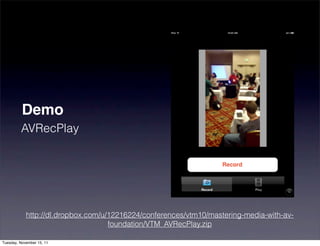
Demo
         AVRecPlay


            http://dl.dropbox.com/u/12216224/conferences/vtm10/mastering-media-with-av-
                                    foundation/VTM_AVRecPlay.zip

Tuesday, November 15, 11
Orientation issues
               • Default orientation of an iOS device is portrait

               • The AVCaptureConnections between the
                 device inputs and the session have a read-
                 write videoOrientation property.

               • Capture layer's orientation property should
                 match


Tuesday, November 15, 11
Capture Processing
               • Analyzing or manipulating capture data as it
                 comes in

               • Audio: real-time effects ("I Am T-Pain"),
                 oscilloscopes, etc.

                    • May make more sense to use Audio Units

               • Video: bar code readers, face-finders, etc.


Tuesday, November 15, 11
Data Outputs
               • Connects your code to the capture session
                 via a delegate callback

               • Delegate callback occurs on a serial GCD
                 queue that you provide (can be
                 dispatch_get_main_queue(), should not be
                 dispatch_get_current_queue(), must not be
                 NULL).


Tuesday, November 15, 11
Creating the data
                                output

      AVCaptureVideoDataOutput *captureOutput =
      ! [[AVCaptureVideoDataOutput alloc] init];
      captureOutput.alwaysDiscardsLateVideoFrames =
      ! YES;
      [captureOutput setSampleBufferDelegate:self
      ! ! ! ! queue:dispatch_get_main_queue()];


Tuesday, November 15, 11
Configuring the data
                                output
     NSString* key =
     ! (NSString*)kCVPixelBufferPixelFormatTypeKey;
     NSNumber* value =
     ! [NSNumber numberWithUnsignedInt:
     ! ! kCVPixelFormatType_32BGRA];
     NSDictionary* videoSettings = [NSDictionary
     ! dictionaryWithObject:value forKey:key];
     [captureOutput setVideoSettings:videoSettings];


Tuesday, November 15, 11
Analyzing the data
               • You get the callback captureOutput:
                 didOutputSampleBuffer:fromConnection:

               • Second parameter is a CMSampleBufferRef,
                 Core Media's opaque type for sample buffers

                    • Could be video… could be audio… (but you
                      can tell from the connection and its input
                      and output ports)


Tuesday, November 15, 11
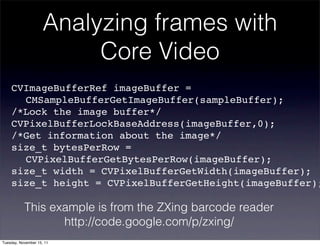
Analyzing frames with
                          Core Video
    CVImageBufferRef imageBuffer =
    ! CMSampleBufferGetImageBuffer(sampleBuffer);
    /*Lock the image buffer*/
    CVPixelBufferLockBaseAddress(imageBuffer,0);
    /*Get information about the image*/
    size_t bytesPerRow =
    ! CVPixelBufferGetBytesPerRow(imageBuffer);
    size_t width = CVPixelBufferGetWidth(imageBuffer);
    size_t height = CVPixelBufferGetHeight(imageBuffer);

           This example is from the ZXing barcode reader
                  http://code.google.com/p/zxing/
Tuesday, November 15, 11
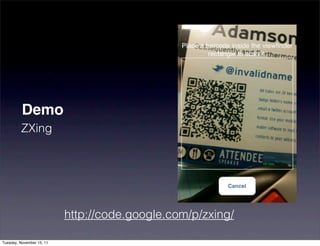
Demo
         ZXing


                           http://code.google.com/p/zxing/

Tuesday, November 15, 11
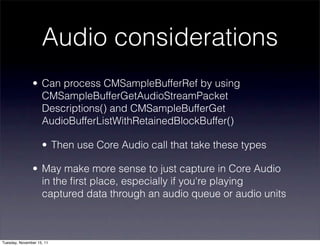
Audio considerations
               • Can process CMSampleBufferRef by using
                 CMSampleBufferGetAudioStreamPacket
                 Descriptions() and CMSampleBufferGet
                 AudioBufferListWithRetainedBlockBuffer()

                    • Then use Core Audio call that take these types

               • May make more sense to just capture in Core Audio
                 in the first place, especially if you're playing
                 captured data through an audio queue or audio units


Tuesday, November 15, 11
Face Finding in
                         iOS 5

               • iOS 5 introduces Core Image, which allows us
                 to chain effects on images

               • Also includes some interesting image
                 processing classes


Tuesday, November 15, 11
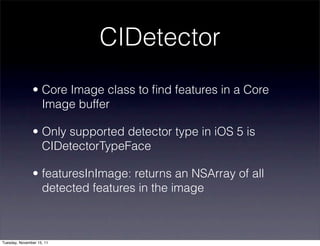
CIDetector
               • Core Image class to find features in a Core
                 Image buffer

               • Only supported detector type in iOS 5 is
                 CIDetectorTypeFace

               • featuresInImage: returns an NSArray of all
                 detected features in the image


Tuesday, November 15, 11
Convert CM to CV to CI
         CVPixelBufferRef cvPixelBuffer =
         ! CMSampleBufferGetImageBuffer(sampleBuffer);
         CFDictionaryRef attachmentsDict =
         ! CMCopyDictionaryOfAttachments(
         ! ! kCFAllocatorSystemDefault,
         ! ! sampleBuffer,
         ! ! kCMAttachmentMode_ShouldPropagate);
         CIImage *ciImage = [[CIImage alloc]
         ! ! initWithCVPixelBuffer:cvPixelBuffer
         ! ! options:(__bridge NSDictionary*)
         ! ! ! ! attachmentsDict];


Tuesday, November 15, 11
Creating the CIDetector
      NSDictionary *faceDetectorDict =
      ! ! [NSDictionary dictionaryWithObjectsAndKeys:
      ! ! ! CIDetectorAccuracyHigh,
       ! ! ! CIDetectorAccuracy,
      ! ! ! nil];
      CIDetector *faceDetector =
        [CIDetector detectorOfType:CIDetectorTypeFace
                           context:nil
                           options:faceDetectorDict];
      NSArray *faces = [faceDetector
      ! ! ! featuresInImage:ciImage];


Tuesday, November 15, 11
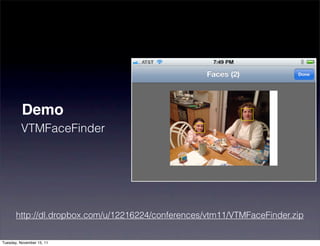
Demo
         VTMFaceFinder


       http://dl.dropbox.com/u/12216224/conferences/vtm11/VTMFaceFinder.zip

Tuesday, November 15, 11
Boxing the faces

 for (CIFaceFeature *faceFeature in self.facesArray) {
   CGRect boxRect = CGRectMake(
     faceFeature.bounds.origin.x * self.scaleToApply,
     faceFeature.bounds.origin.y * self.scaleToApply,
     faceFeature.bounds.size.width * self.scaleToApply,
     faceFeature.bounds.size.height * self.scaleToApply);
   CGContextSetStrokeColorWithColor(cgContext,
     [UIColor yellowColor].CGColor);
   CGContextStrokeRect(cgContext, boxRect);
 }


Tuesday, November 15, 11
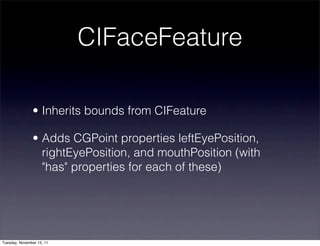
CIFaceFeature

               • Inherits bounds from CIFeature

               • Adds CGPoint properties leftEyePosition,
                 rightEyePosition, and mouthPosition (with
                 "has" properties for each of these)


Tuesday, November 15, 11
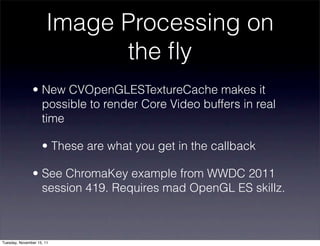
Image Processing on
                             the fly
               • New CVOpenGLESTextureCache makes it
                 possible to render Core Video buffers in real
                 time

                    • These are what you get in the callback

               • See ChromaKey example from WWDC 2011
                 session 419. Requires mad OpenGL ES skillz.


Tuesday, November 15, 11
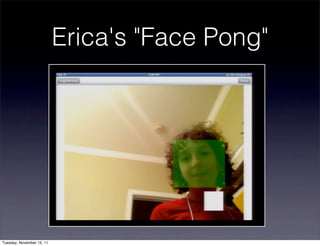
Erica's "Face Pong"


Tuesday, November 15, 11
Recap
               • Start with an AVCaptureSession

               • Discover devices and create inputs

               • Create and configure outputs

               • Start the session

               • Start recording or wait to start handling
                 callbacks


Tuesday, November 15, 11
Recap: Easy parts
               • Basic capture apps (preview-only or record to
                 file) will require little or no Core Media or other
                 C APIs.

               • Default devices are usually the one you want
                 (back megapixel camera on the iPhone, best
                 available microphone, etc.)

               • Capture API is pretty easy to understand and
                 remember (compare to the editing API)


Tuesday, November 15, 11
Recap: Hard parts
               • Core Media calls require high comfort level
                 with C, Core Foundation, functions that take 8
                 or more parameters, etc.

               • Lots of bit-munging when you parse a CV
                 buffer (pixel formats, strides)

               • Callbacks do not have an infinite amount of
                 time or resources to finish their work


Tuesday, November 15, 11
Resources
               • devforums.apple.com

                    • No mailing list at lists.apple.com

               • WWDC session videos and slides (four in
                 2011, three in 2010)

               • Stack Overflow


Tuesday, November 15, 11
Q&A


                           Watch my blog for updated sample code:
                               http://www.subfurther.com/blog
                                        @invalidname

Tuesday, November 15, 11

Capturing Stills, Sounds, and Scenes with AV Foundation

  • 1.
    Capturing Stills, Sounds, and Scenes with AV Foundation Chris Adamson • @invalidname Voices That Matter: iOS Developer Conference Nov. 12, 2011 • Boston, MA Tuesday, November 15, 11
  • 2.
    Road Map • Media capture technologies in iOS • AV Foundation capture concepts • Device-specific concerns • Doing stuff with captured media Tuesday, November 15, 11
  • 3.
    Capture? • Digital media encoding of some real-world source, such as still images, moving images, and/or sound • Contrast with synthetic media: musical synthesizers, CG animation • Not the same as "recording", which implies storage • Capture devices include cameras and microphones Tuesday, November 15, 11
  • 4.
  • 5.
    Accessing Capture Devices • Simple shoot-and-save - UIImagePickerController • Core Audio - low level capture and real-time processing • More info in my talk tomorrow • AV Foundation Tuesday, November 15, 11
  • 6.
    AV Foundation • Introduced in iPhone OS 2.3 as Obj-C wrapper for Core Audio playback, added capture in 3.0 • Repurposed in iOS 4 as audio/video capture, editing, export, and playback framework • Ported to OS X in Lion, heir apparent to QuickTime Tuesday, November 15, 11
  • 7.
    #import this! • AVFoundation.framework • CoreMedia.framework • Possibly also: • CoreVideo, CoreImage, CoreGraphics • AudioToolbox, AudioUnits Tuesday, November 15, 11
  • 8.
    Core Media • C-based helper framework for AVF • Structures to represent media buffers and queues of buffers, media times and time ranges • Low-level conversion and calculation functions • Does not provide capture, editing, or playback functionality Tuesday, November 15, 11
  • 9.
    AV Foundation • Editing / Playback classes • Assets, compositions, and tracks. Player and player layer. Asset readers and writers • Capture classes • Devices, inputs, outputs, and the session Tuesday, November 15, 11
  • 10.
    How it fitstogether… Tuesday, November 15, 11
  • 11.
  • 12.
  • 13.
    AVCaptureDevice AVCaptureSession Tuesday, November 15, 11
  • 14.
    AVCaptureDevice AVCaptureInput AVCaptureSession Tuesday, November 15, 11
  • 15.
    AVCaptureDevice AVCaptureDevice AVCaptureInput AVCaptureSession Tuesday, November 15, 11
  • 16.
    AVCaptureDevice AVCaptureDevice AVCaptureInput AVCaptureInput AVCaptureSession Tuesday, November 15, 11
  • 17.
    AVCaptureDevice AVCaptureDevice AVCaptureInput AVCaptureInput AVCaptureVideo AVCaptureSession PreviewLayer Tuesday, November 15, 11
  • 18.
    AVCaptureDevice AVCaptureDevice AVCaptureInput AVCaptureInput AVCaptureVideo AVCaptureSession PreviewLayer AVCaptureOutput Tuesday, November 15, 11
  • 19.
    AVCaptureDevice AVCaptureDevice AVCaptureInput AVCaptureInput AVCaptureVideo AVCaptureSession PreviewLayer AVCaptureOutput Tuesday, November 15, 11
  • 20.
    AVCaptureDevice AVCaptureDevice AVCaptureInput AVCaptureInput AVCaptureVideo AVCaptureSession PreviewLayer AVCaptureOutput AVCaptureOutput Tuesday, November 15, 11
  • 21.
    AVCaptureDevice AVCaptureDevice AVCaptureInput AVCaptureInput AVCaptureVideo AVCaptureSession PreviewLayer AVCaptureOutput AVCaptureOutput Tuesday, November 15, 11
  • 22.
    AVCaptureSession • Coordinates the flow of capture from inputs to outputs • Create, add inputs and outputs, start running captureSession = [[AVCaptureSession alloc] init]; Tuesday, November 15, 11
  • 23.
    AVCaptureDevice • Represents a device that can perform media capture (cameras, microphones) • Could be connected as external accessory or Bluetooth • You cannot make assumptions based on device model Tuesday, November 15, 11
  • 24.
    Discovering Devices • AVCaptureDevice class methods devices, deviceWithUniqueID, devicesWithMediaType, defaultDeviceWithMediaType • Media types include audio, video, muxed (audio and video in one stream), plus some outliers (timecode, etc.) Tuesday, November 15, 11
  • 25.
    Inspecting Devices • position (property): is the camera on the front or the back? • supportsAVCaptureSessionPreset: allows you to inspect whether it can copy at one of several predefined image resolutions Tuesday, November 15, 11
  • 26.
    Photo traits • Focus & exposure • isFocusModeSupported:, focusMode, focusPointOfInterestSupported, focusPointOfInterest, focusAdjusting • isExposureModeSupported:, exposureMode, exposurePointOfInterestSupported, etc. • White balance • isWhiteBalanceModeSupported:, whiteBalanceMode, whiteBalanceModeAdjusting Tuesday, November 15, 11
  • 27.
    Light up • Flash and Torch • hasFlash, isFlashModeSupported: flashMode, flashActive, flashAvailable • hasTorch, isTorchModeSupported:, torchMode, torchLevel, torchAvailable Tuesday, November 15, 11
  • 28.
    AVCaptureSession sessionPreset • Constants for video capture quality. Allows you to inspect capabilities, trade performance/framerate for resolution • Default is AVCaptureSessionPresetHigh • For still photos: AVCaptureSessionPresetPhoto Tuesday, November 15, 11
  • 29.
    iFrame • Session presets for use when capturing video intended for subsequent editing • AVCaptureSessionPresetiFrame960x540, AVCaptureSessionPresetiFrame1280x720 • No P- or B-frames; files are much larger than typical H.264. http://en.wikipedia.org/wiki/Video_compression_picture_types Tuesday, November 15, 11
  • 30.
    Capture inputs • Connect a device to the capture session • Instances of AVCaptureDeviceInput • create with -initWithDevice:error: or deviceInputForDevice:error Tuesday, November 15, 11
  • 31.
    AVCaptureDevice *videoDevice = ! [AVCaptureDevice defaultDeviceWithMediaType: ! AVMediaTypeVideo]; if (videoDevice) { ! AVCaptureDeviceInput *videoInput = ! [AVCaptureDeviceInput ! ! deviceInputWithDevice:videoDevice ! ! ! ! ! ! ! ! error:&setUpError]; ! if (videoInput) { ! ! [captureSession addInput: videoInput]; ! } } Tuesday, November 15, 11
  • 32.
    Capture preview • AVCapturePreviewLayer: A CALayer that shows what's currently being captured from video input • Remember: CALayer, not UIView • videoGravity property determines how it will deal with preview that doesn't match bounds: aspect, fill, or resize Tuesday, November 15, 11
  • 33.
    AVCaptureVideoPreviewLayer *previewLayer = ! [AVCaptureVideoPreviewLayer ! ! layerWithSession:captureSession]; previewLayer.frame = captureView.layer.bounds; previewLayer.videoGravity = ! AVLayerVideoGravityResizeAspect; [captureView.layer addSublayer:previewLayer]; Tuesday, November 15, 11
  • 34.
    Capture Outputs • File output: AVCaptureMovieFileOutput and AVCaptureAudioFileOutput • Photo output: AVCaptureStillImageOutput • Image processing: AVCaptureDataOutput • More on this one later… Tuesday, November 15, 11
  • 35.
    AVCaptureFileOutput • startRecordingToOutputURL:recordingDelegate: • The delegate must be set and must implement two callbacks: • captureOutput:didStartRecordingToOutputFileAt  URL:fromConnections: • captureOutput:didFinishRecordingToOutputFileAt  URL:fromConnections: • Then connect to capture session Tuesday, November 15, 11
  • 36.
    captureMovieOutput = ![[AVCaptureMovieFileOutput alloc] init]; if (! captureMovieURL) { ! captureMoviePath = [getCaptureMoviePath() retain]; ! captureMovieURL = [[NSURL alloc] ! ! ! initFileURLWithPath:captureMoviePath]; } NSLog (@"recording to %@", captureMovieURL); [captureSession addOutput:captureMovieOutput]; Tuesday, November 15, 11
  • 37.
    Cranking it up • -[AVCaptureSession startRunning] starts capturing from all connected inputs • If you have a preview layer, it will start getting updated • File outputs do not start writing to filesystem until you call startRecording on them Tuesday, November 15, 11
  • 38.
    Demo AVRecPlay http://dl.dropbox.com/u/12216224/conferences/vtm10/mastering-media-with-av- foundation/VTM_AVRecPlay.zip Tuesday, November 15, 11
  • 39.
    Orientation issues • Default orientation of an iOS device is portrait • The AVCaptureConnections between the device inputs and the session have a read- write videoOrientation property. • Capture layer's orientation property should match Tuesday, November 15, 11
  • 40.
    Capture Processing • Analyzing or manipulating capture data as it comes in • Audio: real-time effects ("I Am T-Pain"), oscilloscopes, etc. • May make more sense to use Audio Units • Video: bar code readers, face-finders, etc. Tuesday, November 15, 11
  • 41.
    Data Outputs • Connects your code to the capture session via a delegate callback • Delegate callback occurs on a serial GCD queue that you provide (can be dispatch_get_main_queue(), should not be dispatch_get_current_queue(), must not be NULL). Tuesday, November 15, 11
  • 42.
    Creating the data output AVCaptureVideoDataOutput *captureOutput = ! [[AVCaptureVideoDataOutput alloc] init]; captureOutput.alwaysDiscardsLateVideoFrames = ! YES; [captureOutput setSampleBufferDelegate:self ! ! ! ! queue:dispatch_get_main_queue()]; Tuesday, November 15, 11
  • 43.
    Configuring the data output NSString* key = ! (NSString*)kCVPixelBufferPixelFormatTypeKey; NSNumber* value = ! [NSNumber numberWithUnsignedInt: ! ! kCVPixelFormatType_32BGRA]; NSDictionary* videoSettings = [NSDictionary ! dictionaryWithObject:value forKey:key]; [captureOutput setVideoSettings:videoSettings]; Tuesday, November 15, 11
  • 44.
    Analyzing the data • You get the callback captureOutput: didOutputSampleBuffer:fromConnection: • Second parameter is a CMSampleBufferRef, Core Media's opaque type for sample buffers • Could be video… could be audio… (but you can tell from the connection and its input and output ports) Tuesday, November 15, 11
  • 45.
    Analyzing frames with Core Video CVImageBufferRef imageBuffer = ! CMSampleBufferGetImageBuffer(sampleBuffer); /*Lock the image buffer*/ CVPixelBufferLockBaseAddress(imageBuffer,0); /*Get information about the image*/ size_t bytesPerRow = ! CVPixelBufferGetBytesPerRow(imageBuffer); size_t width = CVPixelBufferGetWidth(imageBuffer); size_t height = CVPixelBufferGetHeight(imageBuffer); This example is from the ZXing barcode reader http://code.google.com/p/zxing/ Tuesday, November 15, 11
  • 46.
    Demo ZXing http://code.google.com/p/zxing/ Tuesday, November 15, 11
  • 47.
    Audio considerations • Can process CMSampleBufferRef by using CMSampleBufferGetAudioStreamPacket Descriptions() and CMSampleBufferGet AudioBufferListWithRetainedBlockBuffer() • Then use Core Audio call that take these types • May make more sense to just capture in Core Audio in the first place, especially if you're playing captured data through an audio queue or audio units Tuesday, November 15, 11
  • 48.
    Face Finding in iOS 5 • iOS 5 introduces Core Image, which allows us to chain effects on images • Also includes some interesting image processing classes Tuesday, November 15, 11
  • 49.
    CIDetector • Core Image class to find features in a Core Image buffer • Only supported detector type in iOS 5 is CIDetectorTypeFace • featuresInImage: returns an NSArray of all detected features in the image Tuesday, November 15, 11
  • 50.
    Convert CM toCV to CI CVPixelBufferRef cvPixelBuffer = ! CMSampleBufferGetImageBuffer(sampleBuffer); CFDictionaryRef attachmentsDict = ! CMCopyDictionaryOfAttachments( ! ! kCFAllocatorSystemDefault, ! ! sampleBuffer, ! ! kCMAttachmentMode_ShouldPropagate); CIImage *ciImage = [[CIImage alloc] ! ! initWithCVPixelBuffer:cvPixelBuffer ! ! options:(__bridge NSDictionary*) ! ! ! ! attachmentsDict]; Tuesday, November 15, 11
  • 51.
    Creating the CIDetector NSDictionary *faceDetectorDict = ! ! [NSDictionary dictionaryWithObjectsAndKeys: ! ! ! CIDetectorAccuracyHigh, ! ! ! CIDetectorAccuracy, ! ! ! nil]; CIDetector *faceDetector = [CIDetector detectorOfType:CIDetectorTypeFace context:nil options:faceDetectorDict]; NSArray *faces = [faceDetector ! ! ! featuresInImage:ciImage]; Tuesday, November 15, 11
  • 52.
    Demo VTMFaceFinder http://dl.dropbox.com/u/12216224/conferences/vtm11/VTMFaceFinder.zip Tuesday, November 15, 11
  • 53.
    Boxing the faces for (CIFaceFeature *faceFeature in self.facesArray) { CGRect boxRect = CGRectMake( faceFeature.bounds.origin.x * self.scaleToApply, faceFeature.bounds.origin.y * self.scaleToApply, faceFeature.bounds.size.width * self.scaleToApply, faceFeature.bounds.size.height * self.scaleToApply); CGContextSetStrokeColorWithColor(cgContext, [UIColor yellowColor].CGColor); CGContextStrokeRect(cgContext, boxRect); } Tuesday, November 15, 11
  • 54.
    CIFaceFeature • Inherits bounds from CIFeature • Adds CGPoint properties leftEyePosition, rightEyePosition, and mouthPosition (with "has" properties for each of these) Tuesday, November 15, 11
  • 55.
    Image Processing on the fly • New CVOpenGLESTextureCache makes it possible to render Core Video buffers in real time • These are what you get in the callback • See ChromaKey example from WWDC 2011 session 419. Requires mad OpenGL ES skillz. Tuesday, November 15, 11
  • 56.
  • 57.
    Recap • Start with an AVCaptureSession • Discover devices and create inputs • Create and configure outputs • Start the session • Start recording or wait to start handling callbacks Tuesday, November 15, 11
  • 58.
    Recap: Easy parts • Basic capture apps (preview-only or record to file) will require little or no Core Media or other C APIs. • Default devices are usually the one you want (back megapixel camera on the iPhone, best available microphone, etc.) • Capture API is pretty easy to understand and remember (compare to the editing API) Tuesday, November 15, 11
  • 59.
    Recap: Hard parts • Core Media calls require high comfort level with C, Core Foundation, functions that take 8 or more parameters, etc. • Lots of bit-munging when you parse a CV buffer (pixel formats, strides) • Callbacks do not have an infinite amount of time or resources to finish their work Tuesday, November 15, 11
  • 60.
    Resources • devforums.apple.com • No mailing list at lists.apple.com • WWDC session videos and slides (four in 2011, three in 2010) • Stack Overflow Tuesday, November 15, 11
  • 61.
    Q&A Watch my blog for updated sample code: http://www.subfurther.com/blog @invalidname Tuesday, November 15, 11