COMPUTER GRAPHICS
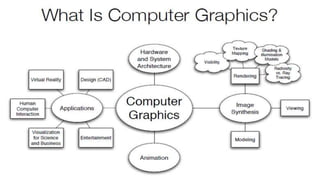
What Is Computer Graphics?
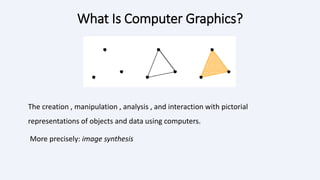
The creation , manipulation , analysis , and interaction with pictorial
representations of objects and data using computers.
More precisely: image synthesis
WHY COMPUTER GRAPHICS?
•About 50% of the brain neurons are associated with vision
•Dominant form of computer output
•Enrich the discovery process and facilitate new inventions
GOALS OF COMPUTER GRAPHICS
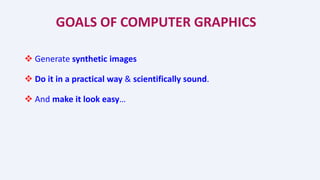
 Generate synthetic images
 Do it in a practical way & scientifically sound.
 And make it look easy…
1. APPLICATIONS
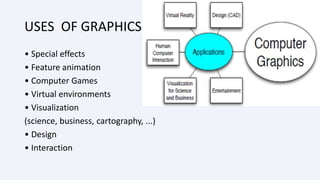
USES OF GRAPHICS
• Special effects
• Feature animation
• Computer Games
• Virtual environments
• Visualization
(science, business, cartography, ...)
• Design
• Interaction
ENGINEERING DESIGN
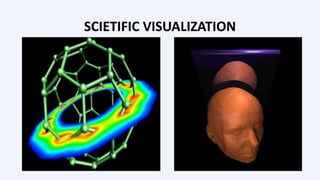
SCIETIFIC VISUALIZATION
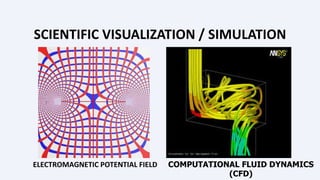
SCIENTIFIC VISUALIZATION / SIMULATION
ELECTROMAGNETIC POTENTIAL FIELD COMPUTATIONAL FLUID DYNAMICS
(CFD)
VIRTUAL REALITY
Virtual tour of historical remains
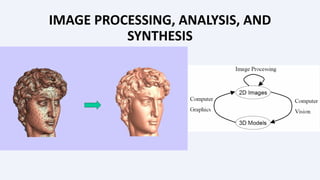
IMAGE PROCESSING, ANALYSIS, AND
SYNTHESIS
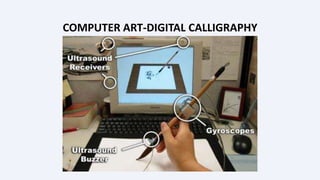
COMPUTER ART-DIGITAL CALLIGRAPHY
MEDICAL APPLICATIONS
ARCHITECTURAL IMAGE
MOVIES
If you can image it, it can be done with computer graphics!
More than one billion dollars on special effects.
No end in sight for this trend!
2. HARDWARE AND
SYSTEM
ARCHITECTURE
3. ANIMATION
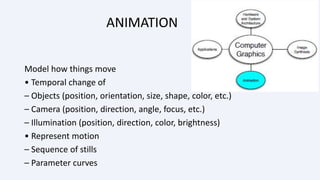
ANIMATION
Model how things move
• Temporal change of
– Objects (position, orientation, size, shape, color, etc.)
– Camera (position, direction, angle, focus, etc.)
– Illumination (position, direction, color, brightness)
• Represent motion
– Sequence of stills
– Parameter curves
4. MODELING
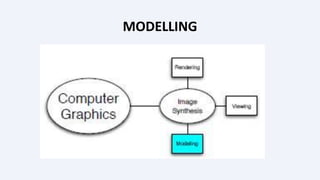
MODELLING
MODELING
How to represent real environments
– Geometry: curves, surfaces, volumes
– Photometry: light, color, reflectance
• How to build these representations
– Interactive: sculpt it
– Algorithmic: let it grow (fractals, extraction)
– Scanning: via 3D sensing
• Generate primitives
– Lines, triangles, quads, patches
– Cylinder, spheres
– Higher-order primitives
5. RENDERING
RENDERING
COMPUTER GRAPHICS
BASIC
PRINCIPLES AND
CONCEPTS
1. PIXEL
Pixels are placed on a regular 2-dimensional grid,
and are often represented using dots or squares.
Each pixel is a sample of an original image, where
more samples typically provide a more accurate
representation of the original.
The intensity of each pixel is variable; in color
systems, each pixel has typically three
components such as red, green, and blue.
2. GRAPHICS
 Graphics are visual presentations on a surface, such as a
computer screen. Examples are photographs, drawing, graphics
designs, maps, engineering drawings, or other images.
 Graphics often combine text and illustration. Graphic design
consist of the deliberate selection, creation.
3. RENDERING
 Rendering is the generation of a 2D image from a 3D model by means of
computer programs.
 A scene file contains objects in a strictly defined language or data structure;
it would contain geometry, viewpoint, texture, lighting, and shading information
as a description of the virtual scene.
 The rendering program is usually built into the computer graphics software.
The term "rendering" may be by analogy with an "artist's rendering" of a scene.
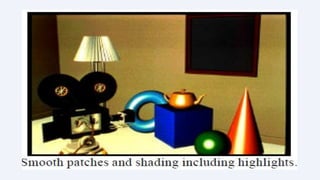
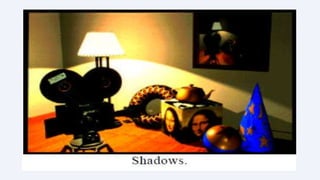
VARIOUS RENDERING QUALITIES
4. 3D PROJECTION
 3D PROJECTIONS is a method
of mapping 3D points to a 2D
plane.
 Current methods for
displaying graphical data are
based on planar two
dimensional media, the use of
this type of projection is
widespread, especially in
C.G, engineering and
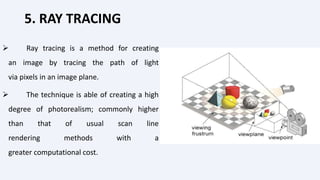
5. RAY TRACING
 Ray tracing is a method for creating
an image by tracing the path of light
via pixels in an image plane.
 The technique is able of creating a high
degree of photorealism; commonly higher
than that of usual scan line
rendering methods with a
greater computational cost.
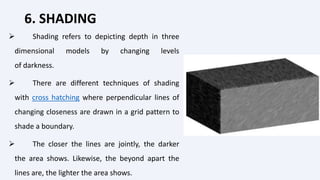
6. SHADING
 Shading refers to depicting depth in three
dimensional models by changing levels
of darkness.
 There are different techniques of shading
with cross hatching where perpendicular lines of
changing closeness are drawn in a grid pattern to
shade a boundary.
 The closer the lines are jointly, the darker
the area shows. Likewise, the beyond apart the
lines are, the lighter the area shows.
7. TEXTURE MAPPING
Texture mapping is the process of mapping an image onto a triangle
in order to increase the detail of the rendering.
The image that gets mapped onto the triangle is called a texture
map or texture and is usually a regular color image.
THANK U

1 COMPUTER GRAPHICS.ppt

  • 1.
  • 3.
    What Is ComputerGraphics? The creation , manipulation , analysis , and interaction with pictorial representations of objects and data using computers. More precisely: image synthesis
  • 4.
    WHY COMPUTER GRAPHICS? •About50% of the brain neurons are associated with vision •Dominant form of computer output •Enrich the discovery process and facilitate new inventions
  • 5.
    GOALS OF COMPUTERGRAPHICS  Generate synthetic images  Do it in a practical way & scientifically sound.  And make it look easy…
  • 7.
  • 8.
    USES OF GRAPHICS •Special effects • Feature animation • Computer Games • Virtual environments • Visualization (science, business, cartography, ...) • Design • Interaction
  • 9.
  • 10.
  • 11.
    SCIENTIFIC VISUALIZATION /SIMULATION ELECTROMAGNETIC POTENTIAL FIELD COMPUTATIONAL FLUID DYNAMICS (CFD)
  • 12.
    VIRTUAL REALITY Virtual tourof historical remains
  • 13.
  • 14.
  • 15.
  • 16.
  • 17.
    MOVIES If you canimage it, it can be done with computer graphics! More than one billion dollars on special effects. No end in sight for this trend!
  • 18.
  • 20.
  • 21.
    ANIMATION Model how thingsmove • Temporal change of – Objects (position, orientation, size, shape, color, etc.) – Camera (position, direction, angle, focus, etc.) – Illumination (position, direction, color, brightness) • Represent motion – Sequence of stills – Parameter curves
  • 22.
  • 23.
  • 24.
    MODELING How to representreal environments – Geometry: curves, surfaces, volumes – Photometry: light, color, reflectance • How to build these representations – Interactive: sculpt it – Algorithmic: let it grow (fractals, extraction) – Scanning: via 3D sensing • Generate primitives – Lines, triangles, quads, patches – Cylinder, spheres – Higher-order primitives
  • 26.
  • 27.
  • 28.
  • 29.
    1. PIXEL Pixels areplaced on a regular 2-dimensional grid, and are often represented using dots or squares. Each pixel is a sample of an original image, where more samples typically provide a more accurate representation of the original. The intensity of each pixel is variable; in color systems, each pixel has typically three components such as red, green, and blue.
  • 30.
    2. GRAPHICS  Graphicsare visual presentations on a surface, such as a computer screen. Examples are photographs, drawing, graphics designs, maps, engineering drawings, or other images.  Graphics often combine text and illustration. Graphic design consist of the deliberate selection, creation.
  • 31.
    3. RENDERING  Renderingis the generation of a 2D image from a 3D model by means of computer programs.  A scene file contains objects in a strictly defined language or data structure; it would contain geometry, viewpoint, texture, lighting, and shading information as a description of the virtual scene.  The rendering program is usually built into the computer graphics software. The term "rendering" may be by analogy with an "artist's rendering" of a scene.
  • 32.
  • 38.
    4. 3D PROJECTION 3D PROJECTIONS is a method of mapping 3D points to a 2D plane.  Current methods for displaying graphical data are based on planar two dimensional media, the use of this type of projection is widespread, especially in C.G, engineering and
  • 39.
    5. RAY TRACING Ray tracing is a method for creating an image by tracing the path of light via pixels in an image plane.  The technique is able of creating a high degree of photorealism; commonly higher than that of usual scan line rendering methods with a greater computational cost.
  • 40.
    6. SHADING  Shadingrefers to depicting depth in three dimensional models by changing levels of darkness.  There are different techniques of shading with cross hatching where perpendicular lines of changing closeness are drawn in a grid pattern to shade a boundary.  The closer the lines are jointly, the darker the area shows. Likewise, the beyond apart the lines are, the lighter the area shows.
  • 41.
    7. TEXTURE MAPPING Texturemapping is the process of mapping an image onto a triangle in order to increase the detail of the rendering. The image that gets mapped onto the triangle is called a texture map or texture and is usually a regular color image.
  • 42.