BTEC Unit 1 – The Online World
Learning Aim B
What will we cover?
Investigate components of the internet and
how digital devices exchange and store
information
1. Understand what the internet is, how it
works, and how it is structured.
2. Understand the concepts, functions and
impact of the worldwide web (WWW).
What will we cover?
1. Understand the purpose, concepts, processes
and implications of email
2. Understand the concepts, processes and
implications of data exchange and compare
different methods
3. Understand the concepts, processes and
implications of data storage
The Internet- Starter activity
• Find a definition of the internet.
Short video explaining the internet.
• https://www.youtube.com/watch?v=oj7A2YD
gIWE
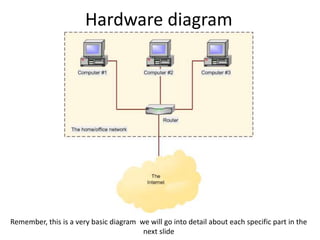
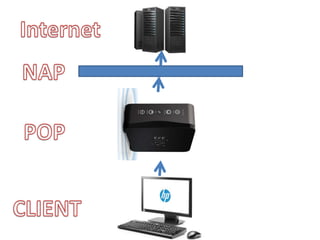
Hardware diagram
Remember, this is a very basic diagram we will go into detail about each specific part in the
next slide
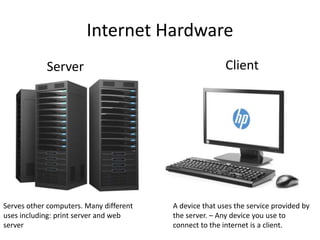
Internet Hardware
Server
Serves other computers. Many different
uses including: print server and web
server
Client
A device that uses the service provided by
the server. – Any device you use to
connect to the internet is a client.
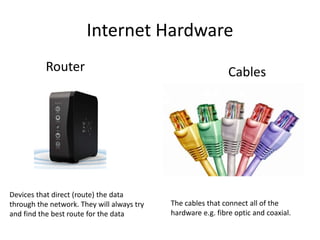
Internet Hardware
Router
Devices that direct (route) the data
through the network. They will always try
and find the best route for the data
Cables
The cables that connect all of the
hardware e.g. fibre optic and coaxial.
Internet Hardware
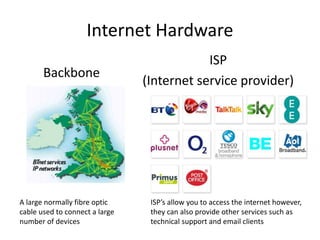
Backbone
A large normally fibre optic
cable used to connect a large
number of devices
ISP
(Internet service provider)
ISP’s allow you to access the internet however,
they can also provide other services such as
technical support and email clients
Task 1
• Give a definition of
the following terms:
1. Client
2. Server
3. Router
4. ISP
Connection Methods
Task 1
Find one benefit and one disadvantage of the
following three connection methods
1. Wireless
2. Broadband
3. Dial-Up
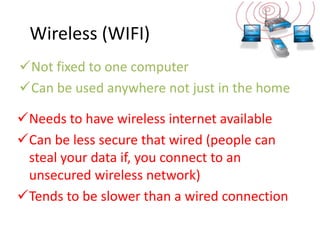
Wireless (WIFI)
Not fixed to one computer
Can be used anywhere not just in the home
Needs to have wireless internet available
Can be less secure that wired (people can
steal your data if, you connect to an
unsecured wireless network)
Tends to be slower than a wired connection
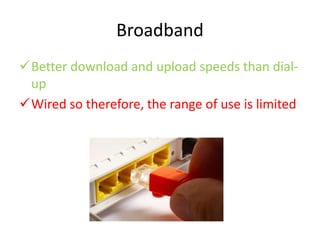
Broadband
Better download and upload speeds than dial-
up
Wired so therefore, the range of use is limited
Dial-Up
Can be used with existing telephone lines
meaning, it can be used in areas that do not
have broadband yet.
Older technology can give poor reception
Usually slower than broadband or wifi.
http://www.youtube.com/watch?v=gsNaR6FRuO0
Task 2
• Create a Poster explaining the benefits of
Broadband over the other two connection
methods.
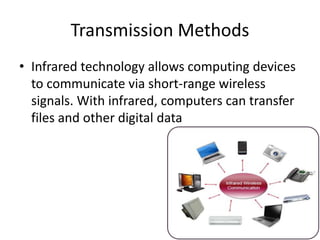
Transmission Methods
• Infrared technology allows computing devices
to communicate via short-range wireless
signals. With infrared, computers can transfer
files and other digital data
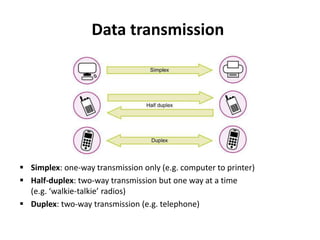
Data transmission
 Simplex: one-way transmission only (e.g. computer to printer)
 Half-duplex: two-way transmission but one way at a time
(e.g. ‘walkie-talkie’ radios)
 Duplex: two-way transmission (e.g. telephone)
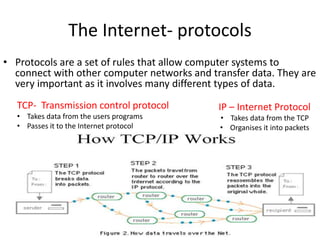
The Internet- protocols
• Protocols are a set of rules that allow computer systems to
connect with other computer networks and transfer data. They are
very important as it involves many different types of data.
TCP- Transmission control protocol
• Takes data from the users programs
• Passes it to the Internet protocol
IP – Internet Protocol
• Takes data from the TCP
• Organises it into packets
World Wide Web
• The World Wide Web is the multimedia part
of the internet.
Hyperlinks
Hyperlinks link different
pages together when a
user clicks a hyperlink it
takes the person to
another website or page
on the website
Web servers
Websites are stored on web
servers. When a user visits a
website it is temporarily
downloaded onto the users
computer. It is the web servers
job to deliver the web page
requested.
Browsers-
All webpages are
accessed through a
web browser. These are
applications that allow
a user to enter a URL
and view a web page.

Btec unit 1 the online world learning aim b

  • 1.
    BTEC Unit 1– The Online World Learning Aim B
  • 2.
    What will wecover? Investigate components of the internet and how digital devices exchange and store information 1. Understand what the internet is, how it works, and how it is structured. 2. Understand the concepts, functions and impact of the worldwide web (WWW).
  • 3.
    What will wecover? 1. Understand the purpose, concepts, processes and implications of email 2. Understand the concepts, processes and implications of data exchange and compare different methods 3. Understand the concepts, processes and implications of data storage
  • 4.
    The Internet- Starteractivity • Find a definition of the internet.
  • 5.
    Short video explainingthe internet. • https://www.youtube.com/watch?v=oj7A2YD gIWE
  • 6.
    Hardware diagram Remember, thisis a very basic diagram we will go into detail about each specific part in the next slide
  • 7.
    Internet Hardware Server Serves othercomputers. Many different uses including: print server and web server Client A device that uses the service provided by the server. – Any device you use to connect to the internet is a client.
  • 8.
    Internet Hardware Router Devices thatdirect (route) the data through the network. They will always try and find the best route for the data Cables The cables that connect all of the hardware e.g. fibre optic and coaxial.
  • 9.
    Internet Hardware Backbone A largenormally fibre optic cable used to connect a large number of devices ISP (Internet service provider) ISP’s allow you to access the internet however, they can also provide other services such as technical support and email clients
  • 11.
    Task 1 • Givea definition of the following terms: 1. Client 2. Server 3. Router 4. ISP
  • 12.
    Connection Methods Task 1 Findone benefit and one disadvantage of the following three connection methods 1. Wireless 2. Broadband 3. Dial-Up
  • 13.
    Wireless (WIFI) Not fixedto one computer Can be used anywhere not just in the home Needs to have wireless internet available Can be less secure that wired (people can steal your data if, you connect to an unsecured wireless network) Tends to be slower than a wired connection
  • 14.
    Broadband Better download andupload speeds than dial- up Wired so therefore, the range of use is limited
  • 15.
    Dial-Up Can be usedwith existing telephone lines meaning, it can be used in areas that do not have broadband yet. Older technology can give poor reception Usually slower than broadband or wifi. http://www.youtube.com/watch?v=gsNaR6FRuO0
  • 16.
    Task 2 • Createa Poster explaining the benefits of Broadband over the other two connection methods.
  • 17.
    Transmission Methods • Infraredtechnology allows computing devices to communicate via short-range wireless signals. With infrared, computers can transfer files and other digital data
  • 18.
    Data transmission  Simplex:one-way transmission only (e.g. computer to printer)  Half-duplex: two-way transmission but one way at a time (e.g. ‘walkie-talkie’ radios)  Duplex: two-way transmission (e.g. telephone)
  • 19.
    The Internet- protocols •Protocols are a set of rules that allow computer systems to connect with other computer networks and transfer data. They are very important as it involves many different types of data. TCP- Transmission control protocol • Takes data from the users programs • Passes it to the Internet protocol IP – Internet Protocol • Takes data from the TCP • Organises it into packets
  • 20.
    World Wide Web •The World Wide Web is the multimedia part of the internet. Hyperlinks Hyperlinks link different pages together when a user clicks a hyperlink it takes the person to another website or page on the website Web servers Websites are stored on web servers. When a user visits a website it is temporarily downloaded onto the users computer. It is the web servers job to deliver the web page requested. Browsers- All webpages are accessed through a web browser. These are applications that allow a user to enter a URL and view a web page.

Editor's Notes

  • #11 PoP – Point of presence allows you to have access to the internet (normally controlled by an ISP) NAP – Network access point where all of the different networks interconnect for example your home network onto the internet
  • #18 Fibre optic and wired is also included in this list however, we have already looked at this in a previous lesson.
  • #19 18