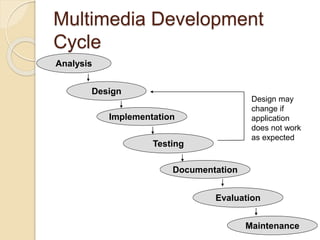
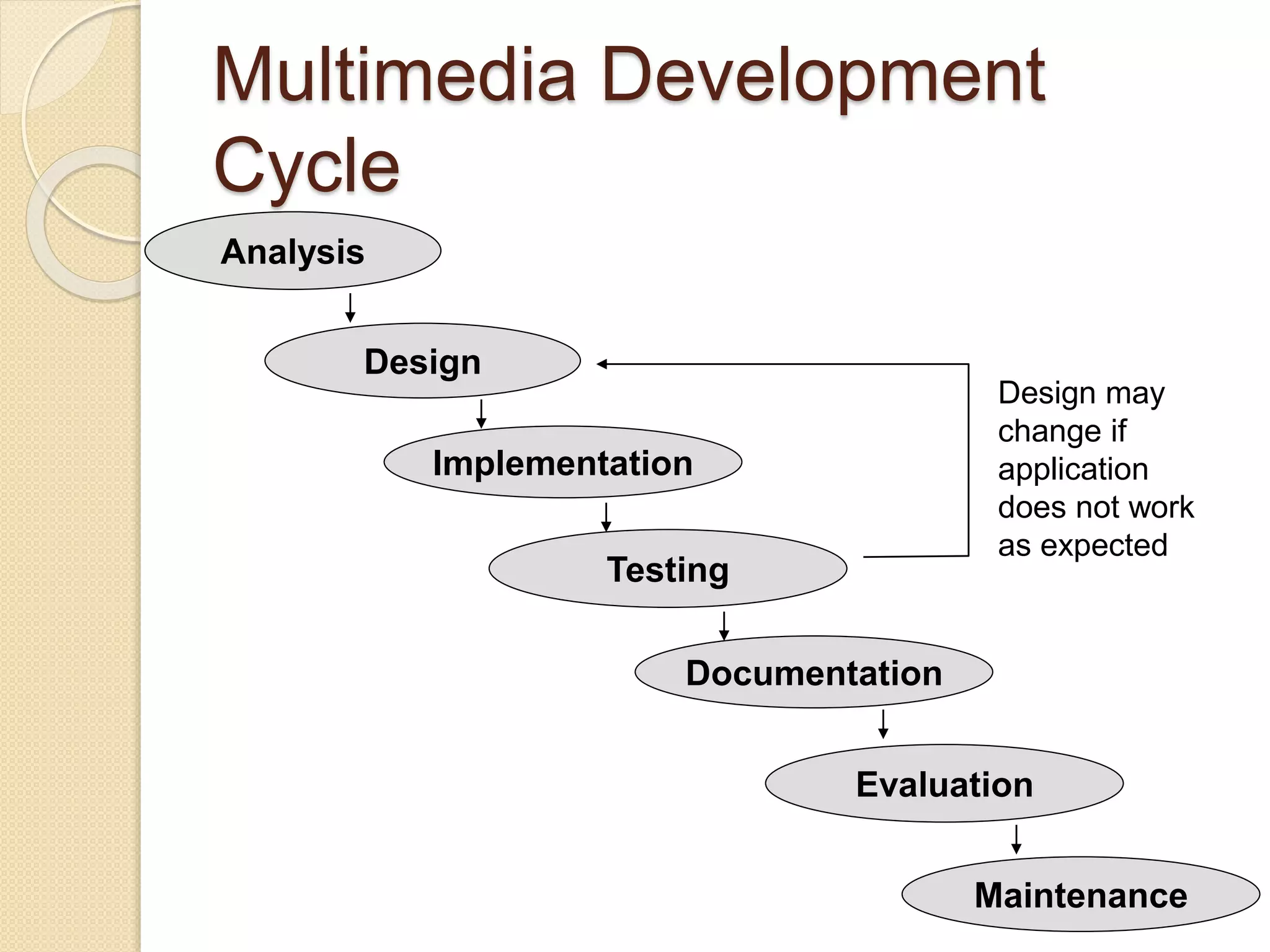
Multimedia Development
Cycle
Maintenance
Design may
change if
application
does not work
as expected
Analysis
Design
Implementation
Testing
Documentation
Evaluation
Software Development
Lifecycle
 Development of a program forms part
of a natural lifecycle. New solutions
are designed due to:
◦ A system failing
◦ Users needs change over time
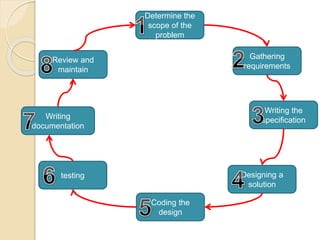
Determine the
scope of the
problem
Coding the
design
Writing
documentation
testing Designing a
solution
Writing the
specification
Gathering
requirements
Review and
maintain
Stage 1 – Determine the scope
of the problem
 What are the boundaries of the
problem? (Scope). It is important to
note what is and also what is not
covered by the program, and who is
affected by it.
 Understanding all of these elements
combined help understand the nature
of the program.
Stage 2 – Gather
requirements
 What is wanted from the program off
your stakeholders, so that it can
specify what the program is going to
do (looking at the function
requirements)
 A high number of commercial
solutions fail because not enough
research is done in this stage.
 They are often collected describing
individually how each task is going to
be achieved.
Stage 3 – Writing the
specification
 Make a list of all the elements which
cover:
◦ Inputs and outputs
◦ Processing
◦ Storage
◦ User interface
◦ constraints
Stage 4: Designing the
solution
 Solution is built using suitable design
tools (it shows a set of
procedures)(pseudocode and flow
diagrams)
 Can be paper or electronic
 Without correct planning and design a
lot of time is wasted from mistakes
made!
Stage 5 & 6 – coding &
testing
 Convert the design into code. It is
important that stage 6 is mostly done
simultaneously by the program being
tested in smaller sections the same
way as each broken down element is
coded.
 Testing is vital. Two main methods for
testing are the black box and white
box testing methods….
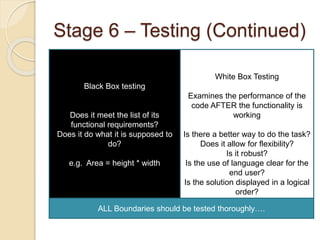
Stage 6 – Testing (Continued)
Black Box testing
Does it meet the list of its
functional requirements?
Does it do what it is supposed to
do?
e.g. Area = height * width
White Box Testing
Examines the performance of the
code AFTER the functionality is
working
Is there a better way to do the task?
Does it allow for flexibility?
Is it robust?
Is the use of language clear for the
end user?
Is the solution displayed in a logical
order?
ALL Boundaries should be tested thoroughly….
Stage 7 – Writing Documentation
 There are three types of
documentation
◦ Internal documentation
◦ Technical documentation
◦ User documentation
Internal Documentation
 Use correct naming conventions
especially when naming your
variables!
 Good use of comments, describing the
purpose of the bits of code
 Use a tidy layout, complete with
indentation and blocking correctly
Technical Documentation
 Written by developers for other developers to read
 Often uses jargon and programming terminology, but it
must also be backed up with a clear and concise
explanation!
 Should cover –
◦ Requirements
◦ Design
◦ Flow charts
◦ DFD
◦ Data type list
◦ Testing
◦ Corrective actions for errors
◦ Copy of documented code
◦ Recommendations for future improvements/enhancements
User documentation
 Technical terms and jargon are
avoided!
 Installation
 How to use the program
 Troubleshooting
 Help
 Examples of program working
 This can be paper format, text files or
screencast/video animations.
Stage 8 - Review and
Maintain
 Reviewing is reflective by comparing
this to the original stakeholder
requirements – does it do what you
want it to do, how well does it work?
 Maintenance is ongoing, fixing minor
errors as they occur and making small
adjustments as you feel they are
necessary, adding extra features and
extra functionality

Software development lifecycle

  • 1.
    Multimedia Development Cycle Maintenance Design may changeif application does not work as expected Analysis Design Implementation Testing Documentation Evaluation
  • 2.
    Software Development Lifecycle  Developmentof a program forms part of a natural lifecycle. New solutions are designed due to: ◦ A system failing ◦ Users needs change over time
  • 3.
    Determine the scope ofthe problem Coding the design Writing documentation testing Designing a solution Writing the specification Gathering requirements Review and maintain
  • 4.
    Stage 1 –Determine the scope of the problem  What are the boundaries of the problem? (Scope). It is important to note what is and also what is not covered by the program, and who is affected by it.  Understanding all of these elements combined help understand the nature of the program.
  • 5.
    Stage 2 –Gather requirements  What is wanted from the program off your stakeholders, so that it can specify what the program is going to do (looking at the function requirements)  A high number of commercial solutions fail because not enough research is done in this stage.  They are often collected describing individually how each task is going to be achieved.
  • 6.
    Stage 3 –Writing the specification  Make a list of all the elements which cover: ◦ Inputs and outputs ◦ Processing ◦ Storage ◦ User interface ◦ constraints
  • 7.
    Stage 4: Designingthe solution  Solution is built using suitable design tools (it shows a set of procedures)(pseudocode and flow diagrams)  Can be paper or electronic  Without correct planning and design a lot of time is wasted from mistakes made!
  • 8.
    Stage 5 &6 – coding & testing  Convert the design into code. It is important that stage 6 is mostly done simultaneously by the program being tested in smaller sections the same way as each broken down element is coded.  Testing is vital. Two main methods for testing are the black box and white box testing methods….
  • 9.
    Stage 6 –Testing (Continued) Black Box testing Does it meet the list of its functional requirements? Does it do what it is supposed to do? e.g. Area = height * width White Box Testing Examines the performance of the code AFTER the functionality is working Is there a better way to do the task? Does it allow for flexibility? Is it robust? Is the use of language clear for the end user? Is the solution displayed in a logical order? ALL Boundaries should be tested thoroughly….
  • 10.
    Stage 7 –Writing Documentation  There are three types of documentation ◦ Internal documentation ◦ Technical documentation ◦ User documentation
  • 11.
    Internal Documentation  Usecorrect naming conventions especially when naming your variables!  Good use of comments, describing the purpose of the bits of code  Use a tidy layout, complete with indentation and blocking correctly
  • 12.
    Technical Documentation  Writtenby developers for other developers to read  Often uses jargon and programming terminology, but it must also be backed up with a clear and concise explanation!  Should cover – ◦ Requirements ◦ Design ◦ Flow charts ◦ DFD ◦ Data type list ◦ Testing ◦ Corrective actions for errors ◦ Copy of documented code ◦ Recommendations for future improvements/enhancements
  • 13.
    User documentation  Technicalterms and jargon are avoided!  Installation  How to use the program  Troubleshooting  Help  Examples of program working  This can be paper format, text files or screencast/video animations.
  • 14.
    Stage 8 -Review and Maintain  Reviewing is reflective by comparing this to the original stakeholder requirements – does it do what you want it to do, how well does it work?  Maintenance is ongoing, fixing minor errors as they occur and making small adjustments as you feel they are necessary, adding extra features and extra functionality