Information Systems


Features and Functions of an MIS
Functions of Information Systems
• An information system has four main
  functions
   – Input
   – Storage
   – Processing
   – Output


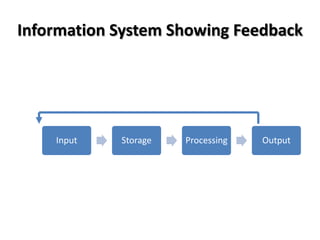
• There is often a control or feedback loop
so that the system output can affect future
input.
Information System Showing Feedback


    Input   Storage   Processing   Output
Input
• Input to an information system has two parts:
   – Detailed data which is stored and processed
     and forms the basis of the output from the
     system

  – The user must tell the system what sort of
    analyses they want from the system
    (sometimes hidden from the user and the IT
    dept. sets this up)
Storage
• Data should be stored at the most detailed level

• IT department may choose to store various
  summaries of the data

• IT department should take regular backups of the
  data

• These backups should be stored in a different
  location in case of a disaster
Processing
• It’s what turns data into information
   – Simple: i.e. adding up all the individual items
     sold by a supermarket and producing totals by
     store, by product, by time or by day

  – Complex: i.e. computer program performs
    complex calculations and makes assumptions
    about any missing data
Output
• Output can be in two formats: Graphical and
  Textual

• Graphical often used for seeing ‘the bigger
  picture’, usually presented as
  charts, diagrams, graphs or pictures

• Textual used for when it important to analyse the
  detail, often presented as characters, numbers or
  text
Control and Feedback Loops
• Control or Feedback loop is what happens in
  the organisation as a result of the output from
  an information system

• It should have some effect, direct or not, on
  future inputs to the information system
Closed and Open Systems
• A Closed Loop system: the user has some
  choice about what to report on, but they are
  limited to predefined output formats

• In an Open Loop system there is often great
  flexibility on what to report on and the format
  in which the information is output
Types of Information System
• Marketing Systems – sales performance

• Financial Systems – costs and investments

• Human Resources (HR) Systems – staffing and
  professional development

• Management Information Systems (MIS) – decision
  support
Features of an MIS

• MIS is a decision support system

• Input queries and response is predetermined

• Used to ask the same questions repeatedly

• Example – List the top 10 sales by product type
  for this month, showing the percentage change
  against previous month
Key Elements of a MIS
         Data

         People

       Hardware

        Software

   Telecommunications
Key Elements of a MIS
Data
• Accurate
• Stored in the most logical way
• Storage often different to how input
• Needs to be summarised to create useful
  information
• May not be most logical, cheapest or easiest
  way
Key Elements of a MIS
People
• Capture the data

• Extract the information

• Important people realise importance of data
  to the organisation
Key Elements of a MIS
Hardware
• One PC or runs on a server

• Internet or intranet access

• Do not usually need specialist hardware
Key Elements of a MIS
Software
• Simple system – standard software
• Most use specialised software
• System configured to match data and
  information needed
• 1 – 1000’s users
• Simple to complex
• Cheap to very expensive
Key Elements of a MIS
Telecommunications
• May be delivered across the internet but could
  lead to security problems

• Can be delivered via an intranet within company
  firewall to prevent unauthorised access

• Can be a dedicated telecommunications
  network to provide high level of security

BTEC National in ICT: Unit 3 - MIS Features and Functions

  • 1.
  • 2.
    Functions of InformationSystems • An information system has four main functions – Input – Storage – Processing – Output • There is often a control or feedback loop so that the system output can affect future input.
  • 3.
    Information System ShowingFeedback Input Storage Processing Output
  • 4.
    Input • Input toan information system has two parts: – Detailed data which is stored and processed and forms the basis of the output from the system – The user must tell the system what sort of analyses they want from the system (sometimes hidden from the user and the IT dept. sets this up)
  • 5.
    Storage • Data shouldbe stored at the most detailed level • IT department may choose to store various summaries of the data • IT department should take regular backups of the data • These backups should be stored in a different location in case of a disaster
  • 6.
    Processing • It’s whatturns data into information – Simple: i.e. adding up all the individual items sold by a supermarket and producing totals by store, by product, by time or by day – Complex: i.e. computer program performs complex calculations and makes assumptions about any missing data
  • 7.
    Output • Output canbe in two formats: Graphical and Textual • Graphical often used for seeing ‘the bigger picture’, usually presented as charts, diagrams, graphs or pictures • Textual used for when it important to analyse the detail, often presented as characters, numbers or text
  • 8.
    Control and FeedbackLoops • Control or Feedback loop is what happens in the organisation as a result of the output from an information system • It should have some effect, direct or not, on future inputs to the information system
  • 9.
    Closed and OpenSystems • A Closed Loop system: the user has some choice about what to report on, but they are limited to predefined output formats • In an Open Loop system there is often great flexibility on what to report on and the format in which the information is output
  • 10.
    Types of InformationSystem • Marketing Systems – sales performance • Financial Systems – costs and investments • Human Resources (HR) Systems – staffing and professional development • Management Information Systems (MIS) – decision support
  • 11.
    Features of anMIS • MIS is a decision support system • Input queries and response is predetermined • Used to ask the same questions repeatedly • Example – List the top 10 sales by product type for this month, showing the percentage change against previous month
  • 12.
    Key Elements ofa MIS Data People Hardware Software Telecommunications
  • 13.
    Key Elements ofa MIS Data • Accurate • Stored in the most logical way • Storage often different to how input • Needs to be summarised to create useful information • May not be most logical, cheapest or easiest way
  • 14.
    Key Elements ofa MIS People • Capture the data • Extract the information • Important people realise importance of data to the organisation
  • 15.
    Key Elements ofa MIS Hardware • One PC or runs on a server • Internet or intranet access • Do not usually need specialist hardware
  • 16.
    Key Elements ofa MIS Software • Simple system – standard software • Most use specialised software • System configured to match data and information needed • 1 – 1000’s users • Simple to complex • Cheap to very expensive
  • 17.
    Key Elements ofa MIS Telecommunications • May be delivered across the internet but could lead to security problems • Can be delivered via an intranet within company firewall to prevent unauthorised access • Can be a dedicated telecommunications network to provide high level of security