Module 2
Types of Information System
Transaction Processing Systems, Office
Automation Systems, Process Control Systems
(Production Information Systems, Marketing
Information Systems, Financial Information
Systems, Human Resource Information System),
Decision Support Systems, Group Decision
Support Systems, Executive Information System.
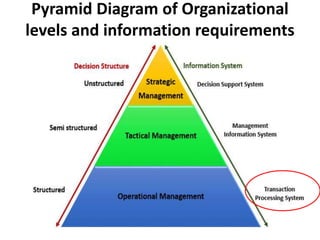
Pyramid Diagram of Organizational
levels and information requirements
Transaction:
• A business activity between seller and buy to exchange an asset
for payment.
• Basic business operations such as customer orders, purchase
orders, receipts, time cards, invoices, and payroll checks in an
organization.
Types of Transactions:
• Internal Transactions:
Those transactions, which are internal to the company and are related with
the internal working of any organization. For example Recruitment Policy,
Promotion Policy, Production policy etc.
• External Transactions:
Those transactions, which are external to the organization and are related
with the external sources, are regarded as External Transaction. For example
sales, purchase etc.
Transaction Processing System (TPS)
• Transaction processing systems are used to
record day to day business transactions of the
organization. They are used by users at the
operational management level.
• The decisions made by operational managers
are routine and highly structured.
• The information produced from the
transaction processing system is very detailed.
Examples of transaction processing
systems include;
• Point of Sale Systems – records daily sales
• Payroll systems – processing employees
salary, loans management, etc.
• Stock Control systems – keeping track of
inventory levels
• Airline booking systems – flights booking
management
Qualifiers
In order to qualify as a TPS, transactions made by the system
must pass the ACID test. The ACID tests refers to the following
four pre-requisites:
1. Atomicity
Atomicity means that a transaction is either completed in full or
not at all. For example, if funds are transferred from one account
to another, this only counts as a bone fide transaction if both the
withdrawal and deposit take place. If one account is debited and
the other is not credited, it does not qualify as a transaction. TPS
systems ensure that transactions take place in their entirety.
Qualifiers
2. Consistency
TPS systems exist within a set of operating rules (or integrity
constraints). If an integrity constraint states that all
transactions in a database must have a positive value, any
transaction with a negative value would be refused.
3. Isolation
Transactions must appear to take place in isolation. For
example, when a fund transfer is made between two
accounts the debiting of one and the crediting of another
must appear to take place simultaneously. The funds
cannot be credited to an account before they are debited
from another.
Qualifiers
• 4. Durability
Once transactions are completed they cannot be
undone. To ensure that this is the case even if
the TPS suffers failure, a log will be created to
document all completed transactions.
These four conditions ensure that TPS systems
carry out their transactions in a methodical,
standardized and reliable manner.
Features of Transaction Processing Systems
• Rapid response – Fast performance with a
rapid response time is critical. Transaction
processing systems are usually measured
by the number of transactions they can
process in a given period of time.
• Continuous Availability – The system must
be available during the time period when
the users are entering transactions. Many
organizations rely heavily on their TPS. A
breakdown will disrupt operations or even
stop the business.
Features of Transaction Processing Systems
• Data Integrity – The system must be able
to handle hardware or software problems
without corrupting data. Multiple users must
be protected from attempting to change the
same piece of data at the same time, for
example two operators cannot sell the same
seat on an airplane.
• Ease Of Use – Often users of transaction
processing systems are casual users. The
system should be simple for them to
understand, protect them from data-entry
errors as much as possible, and allow them
to easily correct their errors.
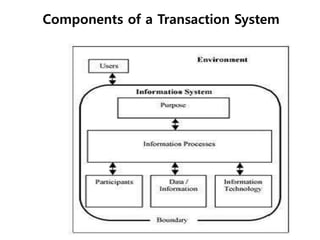
Components of a Transaction System
• The user of the information system is the
person belonging to the organization
that owns the transaction system.
• Participants are the people who conduct
the information processing.
• People from the environment become
participants of the system as they directly
enter transactions and perform
validation.
Components of a Transaction System
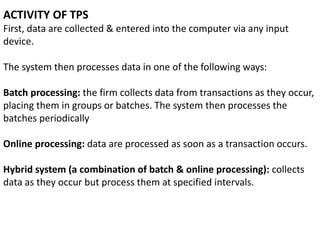
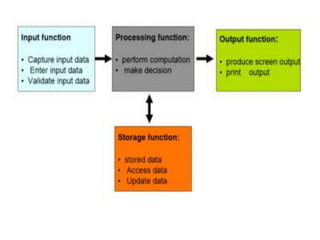
ACTIVITY OF TPS
First, data are collected & entered into the computer via any input
device.
The system then processes data in one of the following ways:
Batch processing: the firm collects data from transactions as they occur,
placing them in groups or batches. The system then processes the
batches periodically
Online processing: data are processed as soon as a transaction occurs.
Hybrid system (a combination of batch & online processing): collects
data as they occur but process them at specified intervals.
Office Automation Systems
(OAS)
What is Automation
• The word automation refers to a method of
using a wide range of computer- and
machine-aided tasks to help improve
productivity and create easier ways to do
business. Different types of automation are
commonly used in different types of
industries.
Office automation refers to the varied computer
machinery and software used to digitally create,
collect, store, manipulate, and relay office
information needed for accomplishing basic
tasks. Raw data storage, electronic transfer, and
the management of electronic business
information comprise the basic activities of an
office automation system. Office automation
helps in optimizing or automating existing office
procedures.
What is Office Automation
Advantages
•Replacing human operators in tasks that involve hard physical or
monotonous work.
•Replacing humans in tasks done in dangerous environments (i.e.
fire, space, volcanoes, nuclear facilities, underwater, etc.)
•Performing tasks that are beyond human capabilities of size,
weight, speed, endurance, etc.
•Economy improvement: Automation may improve in economy of
enterprises, society or most of humanity. For example, when an
enterprise invests in automation, technology recovers its
investment; or when a state or country increases its income due
to automation like Germany or Japan in the 20th Century.
•Reduces operation time and work handling time significantly.
•Frees up workers to take on other roles.
Office automation systems
(OAS)
Office automation systems (OAS) are configurations
of networked computer hardware and software. A
variety of office automation systems are now applied
to business and communication functions that used
to be performed manually or in multiple locations of a
Organization, such as preparing written
communications and strategic planning. In addition,
functions that once required coordinating the
expertise of outside specialists in typesetting,
printing, or electronic recording can now be
integrated into the everyday work of an organization,
saving both time and money.
(1) electronic publishing
(2) electronic communication
(3) electronic collaboration
(4) image processing
(5) office management
Types of functions integrated by
office automation systems include
At the heart of these systems is often a local
area network (LAN). The LAN allows users to
transmit data, voice, mail, and images across
the network to any destination, whether that
destination is in the local office on the LAN, or
in another country or continent, through a
connecting network. An OAS makes office work
more efficient and increases productivity.
Backbone of Office Automation
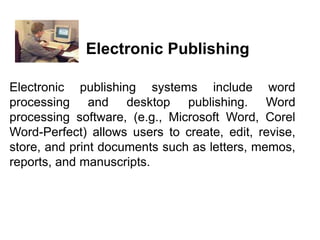
Electronic publishing systems include word
processing and desktop publishing. Word
processing software, (e.g., Microsoft Word, Corel
Word-Perfect) allows users to create, edit, revise,
store, and print documents such as letters, memos,
reports, and manuscripts.
Electronic Publishing
Electronic communication systems
include electronic mail (e-mail), voice
mail, facsimile (fax), and desktop
videoconferencing.
Electronic Communication
E-mail is software that allows users, via their
computer keyboards, to create, send, and receive
messages and files to or from anywhere in the world.
Most e-mail systems let the user do other
sophisticated tasks such as filter, prioritize, or file
messages; forward copies of messages to other
users; create and save drafts of messages; send
"carbon copies"; and request automatic confirmation
of the delivery of a message. E-mail is very popular
because it is easy to use, offers fast delivery, and is
inexpensive. Examples of e-mail software are
Eudora, Lotus Notes, and Microsoft Outlook.
Electronic Mail.
Voice mail is a sophisticated telephone
answering machine. It digitizes incoming
voice messages and stores them on disk.
When the recipient is ready to listen, the
message is converted from its digitized
version back to audio, or sound. Recipients
may save messages for future use, delete
them, or forward them to other people.
Voice Mail.
Desktop videoconferencing is one of the fastest
growing forms of videoconferencing. Desktop
videoconferencing requires a network and a
desktop computer with special application
software (e.g., Microsoft Lync-2010) as well as a
small camera installed on top of the monitor.
Images of a computer user from the desktop
computer are captured and sent across the
network to the other computers and users that
are participating in the conference. This type of
videoconferencing simulates face-to-face
meetings of individuals.
Desktop Videoconferencing
Electronic collaboration is made possible through
electronic meeting and collaborative work systems
and teleconferencing. Electronic meeting and
collaborative work systems allow teams of coworkers
to use networks of microcomputers to share
information, update schedules and plans, and
cooperate on projects regardless of geographic
distance. Special software called groupware is
needed to allow two or more people to edit or
otherwise work on the same files simultaneously.
Electronic Collaboration
Image processing systems include electronic
document management, presentation graphics,
and multimedia systems. Imaging systems convert
text, drawings, and photographs into digital form
that can be stored in a computer system. This
digital form can be manipulated, stored, printed, or
sent via a modem to another computer. Imaging
systems may use scanners, digital cameras, video
capture cards, or advanced graphic computers.
Companies use imaging systems for a variety of
documents such as insurance forms, medical
records, dental records, and mortgage
applications.
Image Processing
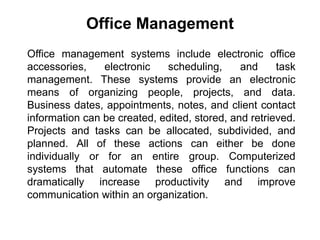
Office management systems include electronic office
accessories, electronic scheduling, and task
management. These systems provide an electronic
means of organizing people, projects, and data.
Business dates, appointments, notes, and client contact
information can be created, edited, stored, and retrieved.
Projects and tasks can be allocated, subdivided, and
planned. All of these actions can either be done
individually or for an entire group. Computerized
systems that automate these office functions can
dramatically increase productivity and improve
communication within an organization.
Office Management
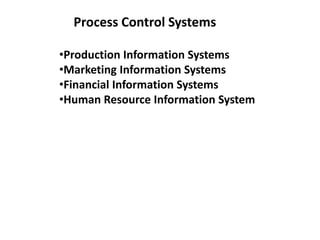
Process Control Systems
•Production Information Systems
•Marketing Information Systems
•Financial Information Systems
•Human Resource Information System
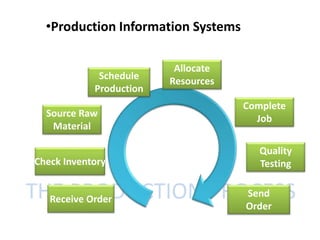
THE PRODUCTION PROCESSReceive Order
Check Inventory
Source Raw
Material
Schedule
Production
Allocate
Resources
Complete
Job
Quality
Testing
Send
Order
•Production Information Systems
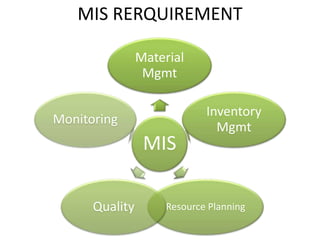
MIS
Material
Mgmt
Inventory
Mgmt
Resource PlanningQuality
Monitoring
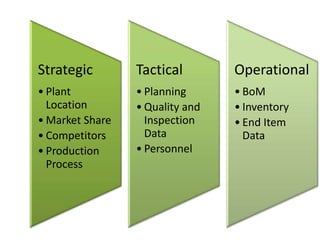
MIS RERQUIREMENT
Strategic
• Plant
Location
• Market Share
• Competitors
• Production
Process
Tactical
• Planning
• Quality and
Inspection
Data
• Personnel
Operational
• BoM
• Inventory
• End Item
Data
Marketing Information System (MIS) is a
permanent arrangement (system or setup)
for provision of regular availability of
relevant, reliable, adequate, and timely
information for making marketing
decisions.
Marketing Information System
How it works
The system consists of
•People
•equipment’s
•facilities,
•and procedures
directed to
gather, analyze, evaluate, update, distribute, and
preserve the information to assist marketing decision-
making, i.e., analyzing, planning, implementing, and
controlling of marketing activities.
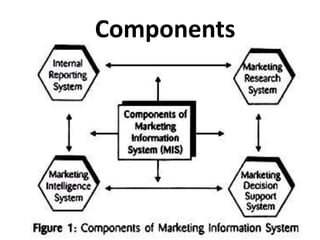
Components
This system concerns with collecting, analyzing,
interpreting, and distributing needed information
from records of various departments of the company.
It also includes:
•sales and purchase
•ordering system
•sales force reporting system
•inventory level
•receivable-payables
•marketing staff
•Costs
• the past research works, and other
literatures/reports available within organisation.
1. Internal Records System
Marketing intelligence system
A manager can use one or more below mentioned methods:
i. Reading newspapers, books, and other publications.
ii. Watching TV, hearing radio, or Internet surfing.
iii. Talking to customers, dealers, suppliers, and other
relevant parties.
iv. Talking to other managers and employees of his company
as well as of other companies.
v. Maintaining live contacts with other officials and agencies.
vi. Purchasing useful information from professional sources.
vii. Assigning marketing intelligence task to professional
agencies, etc.
Marketing Research System
Marketing research is a powerful and
independent branch of the MIS. In certain
cases, managers need detailed information
on the specific problem of the specific
marketing area. Thus, it is a formal study of
specific problems, opportunities, or
situations. Normally, it is carried out for
solving the specific problem.
According to the definition, the MDSS
includes tools, techniques or models used
for:
(1) Data collection,
(2) Data analysis,
(3) Interpreting results, and
(4) Supporting managerial decision-making.
Marketing Decision Support System (MDSS)
Financial Information System
Financial Information Systems accumulate and
analyze financial data in order to make good
financial management decisions in running the
business.
Financial information system is:
•Information system that tracks financial events and
summarizes information
•supports adequate management reporting, policy
decisions, and preparation of auditable financial
statements
•Should be designed with good relationships between
software, hardware, personnel, procedures, controls
and data
FIS Building Blocks
•General ledger
•Budgetary accounting
•Accounts payable
•Accounts receivable
The noncore or other modules are:
Payroll system
Budget development
Procurement
Project ledger
Asset module.
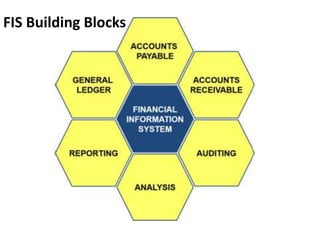
FIS Building Blocks
1. GENERAL LEDGER
The General Ledger is one of the main Financial modules containing
primarily of the:
• Chart of Accounts
•General journal entry
•Transaction journal
2. ACCOUNT RECEIVABLE
The Account Receivable portion mainly handles transactions on:
•PO in entry
•Approval systems
•Budgeting - Customer Information
FIS Building Blocks
FIS Building Blocks
3. ACCOUNT PAYABLE
The Account Payable portion mainly handles transactions on:
•PO out
•Approval systems
•Supplier terms
•Supplier Information
4. ANALYSIS
The Analysis tool is a powerful module which can be used to sort and
evaluate financial performance, enhance decision process, by using
tools:
•Financial Reporting - Search engine
5. REPORTING
The Reporting module provides the feedback mechanism as
to the performance of not only the whole financial, but also
the business in general. It serves as a tool for financial
strategic decision making.
6. AUDIT
The Audit module is used to simplify and quicken data audits
of selected accounts or transactions.
FIS Building Blocks
The Human Resource Information System
(HRIS) is a software or online solution for
the
•data entry
•data tracking, and
•data information needs of the Human
Resources, payroll, management, and
accounting functions within a business.
The Human Resource Information
System (HRIS)
Management of all employee information: Data such as
names, titles, addresses, and salaries are a basic start. Salary
and position history, reporting structures, performance
appraisal histories, and other critical employee information.
Company-related documents such as employee handbooks,
emergency evacuation procedures, and safety guidelines.
Benefits administration including enrollment, status changes,
and personal information updating. In an ideal system, you
can allow employees to look up and review their own
information, including vacation tracking.
Human Resource Information Systems (HRIS) provide
overall:
Complete integration with payroll and other company
financial software and accounting systems.
Applicant tracking and resume management: When your
system is seamless, the recruiter can click a hired button and
all of the information from the applicant is transferred to the
employee side of things.
Performance development plans: It's not just enough to have
plans, if they are recorded in a central system, then they can
easily follow the employee from position to position.
Human Resource Information Systems (HRIS) provide
overall:
Disciplinary Actions: It's important to keep track of who has
been suspended, demoted, or had other negative
actions taken against them noted—even after the employee
leaves your organization.
Training records: This is especially critical in a company where
certifications and licenses are required. In other companies,
training records may not have that level of importance, but
you may still find that having the information is useful.
Human Resource Information Systems (HRIS) provide
overall:
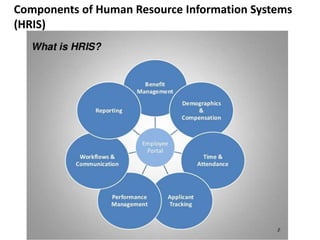
Components of Human Resource Information Systems
(HRIS)
Components of Human Resource Information Systems
(HRIS)
Database
HRIS core offering includes a database to store employee
information. HR professionals can input all personnel data
into the system which can be accessed from anywhere, round
the clock.
Time and Labour Management
Activities like time and labour management can highly time
consuming. HRIS package allows employees to input their
own hours worked and allows managers to immediately verify
vacation requests, and the data is directly fed to the payroll.
Components of Human Resource Information Systems
(HRIS)
Payroll Function
Payroll function is yet another major component of a HRIS
model. HR can easily download or unload employee hours,
and issue cheques or payroll deposits to employees.
Benefits
Some HRIS employers allow employers to establish and
maintain medical benefits and retirement investments
through their software.
Components of Human Resource Information Systems
(HRIS)
Employee Interface
Most HRIS packages allow for an employee to have limited user access.
Employee users access a part of the database where they can update
their personal information, review pay scales, change retirement benefit
programs, update direct deposit information or download benefit
election documents.
Recruitment and Retention
Finally, it can be said that recruitment and retention are the most
important components of HRIS. Finding new talent, acquiring them,
keeping them engaged and finally being able to retain them are the
major task of a HR person. HRs also have to ensure that employees are
also provided with the required training; receives proper compensation
and benefits from the organization.
Decision support systems (DSS)
Interactive software-based systems intended to help
managers in decision-making by accessing large volumes of
information generated from various related information
systems involved in organizational business processes, such as
office automation system, transaction processing system, etc.
Programmed and Non-programmed Decisions
Programmed decisions are basically automated processes,
general routine work, where:
•These decisions have been taken several times.
•These decisions follow some guidelines or rules.
Non-programmed decisions occur in unusual and non-
addressed situations, so:
•It would be a new decision.
•There will not be any rules to follow.
•These decisions are made based on the available
information.
•These decisions are based on the manger's discretion,
instinct, perception and judgment.
Components of a DSS
Following are the components of the Decision Support System:
Database Management System (DBMS): To solve a problem the
necessary data may come from internal or external database. In an
organization, internal data are generated by a system such as TPS and
MIS. External data come from a variety of sources such as newspapers,
online data services, databases (financial, marketing, human resources).
Model Management System: It stores and accesses models that
managers use to make decisions. Such models are used for designing
manufacturing facility, analyzing the financial health of an organization,
forecasting demand of a product or service, etc.
Support Tools: Support tools like online help; pulls down menus, user
interfaces, graphical analysis, error correction mechanism, facilitates the
user interactions with the system.
Classification of DSS
Text Oriented DSS: It contains textually represented
information that could have a bearing on decision. It allows
documents to be electronically created, revised and viewed as
needed.
Database Oriented DSS: Database plays a major role here; it
contains organized and highly structured data.
Spreadsheet Oriented DSS: It contains information in spread
sheets that allows create, view, modify procedural knowledge
and also instructs the system to execute self-contained
instructions. The most popular tool is Excel and Lotus 1-2-3.
Classification of DSS
Solver Oriented DSS: It is based on a solver, which is an
algorithm or procedure written for performing certain
calculations and particular program type.
Rules Oriented DSS: Procedures are adopted in rules oriented
DSS. Expert system is the example.
Compound DSS: It is built by using two or more of the five
structures explained above.
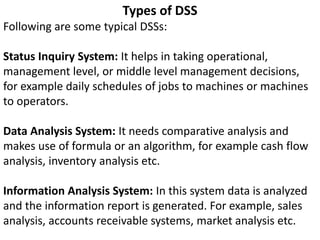
Types of DSS
Following are some typical DSSs:
Status Inquiry System: It helps in taking operational,
management level, or middle level management decisions,
for example daily schedules of jobs to machines or machines
to operators.
Data Analysis System: It needs comparative analysis and
makes use of formula or an algorithm, for example cash flow
analysis, inventory analysis etc.
Information Analysis System: In this system data is analyzed
and the information report is generated. For example, sales
analysis, accounts receivable systems, market analysis etc.
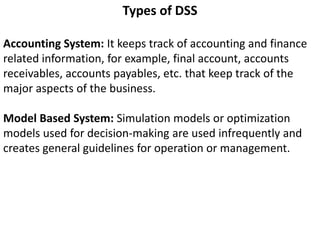
Types of DSS
Accounting System: It keeps track of accounting and finance
related information, for example, final account, accounts
receivables, accounts payables, etc. that keep track of the
major aspects of the business.
Model Based System: Simulation models or optimization
models used for decision-making are used infrequently and
creates general guidelines for operation or management.

Mis unit ii

  • 1.
    Module 2 Types ofInformation System Transaction Processing Systems, Office Automation Systems, Process Control Systems (Production Information Systems, Marketing Information Systems, Financial Information Systems, Human Resource Information System), Decision Support Systems, Group Decision Support Systems, Executive Information System.
  • 2.
    Pyramid Diagram ofOrganizational levels and information requirements
  • 3.
    Transaction: • A businessactivity between seller and buy to exchange an asset for payment. • Basic business operations such as customer orders, purchase orders, receipts, time cards, invoices, and payroll checks in an organization. Types of Transactions: • Internal Transactions: Those transactions, which are internal to the company and are related with the internal working of any organization. For example Recruitment Policy, Promotion Policy, Production policy etc. • External Transactions: Those transactions, which are external to the organization and are related with the external sources, are regarded as External Transaction. For example sales, purchase etc.
  • 4.
    Transaction Processing System(TPS) • Transaction processing systems are used to record day to day business transactions of the organization. They are used by users at the operational management level. • The decisions made by operational managers are routine and highly structured. • The information produced from the transaction processing system is very detailed.
  • 5.
    Examples of transactionprocessing systems include; • Point of Sale Systems – records daily sales • Payroll systems – processing employees salary, loans management, etc. • Stock Control systems – keeping track of inventory levels • Airline booking systems – flights booking management
  • 6.
    Qualifiers In order toqualify as a TPS, transactions made by the system must pass the ACID test. The ACID tests refers to the following four pre-requisites: 1. Atomicity Atomicity means that a transaction is either completed in full or not at all. For example, if funds are transferred from one account to another, this only counts as a bone fide transaction if both the withdrawal and deposit take place. If one account is debited and the other is not credited, it does not qualify as a transaction. TPS systems ensure that transactions take place in their entirety.
  • 7.
    Qualifiers 2. Consistency TPS systemsexist within a set of operating rules (or integrity constraints). If an integrity constraint states that all transactions in a database must have a positive value, any transaction with a negative value would be refused. 3. Isolation Transactions must appear to take place in isolation. For example, when a fund transfer is made between two accounts the debiting of one and the crediting of another must appear to take place simultaneously. The funds cannot be credited to an account before they are debited from another.
  • 8.
    Qualifiers • 4. Durability Oncetransactions are completed they cannot be undone. To ensure that this is the case even if the TPS suffers failure, a log will be created to document all completed transactions. These four conditions ensure that TPS systems carry out their transactions in a methodical, standardized and reliable manner.
  • 9.
    Features of TransactionProcessing Systems • Rapid response – Fast performance with a rapid response time is critical. Transaction processing systems are usually measured by the number of transactions they can process in a given period of time. • Continuous Availability – The system must be available during the time period when the users are entering transactions. Many organizations rely heavily on their TPS. A breakdown will disrupt operations or even stop the business.
  • 10.
    Features of TransactionProcessing Systems • Data Integrity – The system must be able to handle hardware or software problems without corrupting data. Multiple users must be protected from attempting to change the same piece of data at the same time, for example two operators cannot sell the same seat on an airplane. • Ease Of Use – Often users of transaction processing systems are casual users. The system should be simple for them to understand, protect them from data-entry errors as much as possible, and allow them to easily correct their errors.
  • 11.
    Components of aTransaction System • The user of the information system is the person belonging to the organization that owns the transaction system. • Participants are the people who conduct the information processing. • People from the environment become participants of the system as they directly enter transactions and perform validation.
  • 12.
    Components of aTransaction System
  • 13.
    ACTIVITY OF TPS First,data are collected & entered into the computer via any input device. The system then processes data in one of the following ways: Batch processing: the firm collects data from transactions as they occur, placing them in groups or batches. The system then processes the batches periodically Online processing: data are processed as soon as a transaction occurs. Hybrid system (a combination of batch & online processing): collects data as they occur but process them at specified intervals.
  • 15.
  • 16.
    What is Automation •The word automation refers to a method of using a wide range of computer- and machine-aided tasks to help improve productivity and create easier ways to do business. Different types of automation are commonly used in different types of industries.
  • 17.
    Office automation refersto the varied computer machinery and software used to digitally create, collect, store, manipulate, and relay office information needed for accomplishing basic tasks. Raw data storage, electronic transfer, and the management of electronic business information comprise the basic activities of an office automation system. Office automation helps in optimizing or automating existing office procedures. What is Office Automation
  • 18.
    Advantages •Replacing human operatorsin tasks that involve hard physical or monotonous work. •Replacing humans in tasks done in dangerous environments (i.e. fire, space, volcanoes, nuclear facilities, underwater, etc.) •Performing tasks that are beyond human capabilities of size, weight, speed, endurance, etc. •Economy improvement: Automation may improve in economy of enterprises, society or most of humanity. For example, when an enterprise invests in automation, technology recovers its investment; or when a state or country increases its income due to automation like Germany or Japan in the 20th Century. •Reduces operation time and work handling time significantly. •Frees up workers to take on other roles.
  • 19.
    Office automation systems (OAS) Officeautomation systems (OAS) are configurations of networked computer hardware and software. A variety of office automation systems are now applied to business and communication functions that used to be performed manually or in multiple locations of a Organization, such as preparing written communications and strategic planning. In addition, functions that once required coordinating the expertise of outside specialists in typesetting, printing, or electronic recording can now be integrated into the everyday work of an organization, saving both time and money.
  • 20.
    (1) electronic publishing (2)electronic communication (3) electronic collaboration (4) image processing (5) office management Types of functions integrated by office automation systems include
  • 21.
    At the heartof these systems is often a local area network (LAN). The LAN allows users to transmit data, voice, mail, and images across the network to any destination, whether that destination is in the local office on the LAN, or in another country or continent, through a connecting network. An OAS makes office work more efficient and increases productivity. Backbone of Office Automation
  • 22.
    Electronic publishing systemsinclude word processing and desktop publishing. Word processing software, (e.g., Microsoft Word, Corel Word-Perfect) allows users to create, edit, revise, store, and print documents such as letters, memos, reports, and manuscripts. Electronic Publishing
  • 23.
    Electronic communication systems includeelectronic mail (e-mail), voice mail, facsimile (fax), and desktop videoconferencing. Electronic Communication
  • 24.
    E-mail is softwarethat allows users, via their computer keyboards, to create, send, and receive messages and files to or from anywhere in the world. Most e-mail systems let the user do other sophisticated tasks such as filter, prioritize, or file messages; forward copies of messages to other users; create and save drafts of messages; send "carbon copies"; and request automatic confirmation of the delivery of a message. E-mail is very popular because it is easy to use, offers fast delivery, and is inexpensive. Examples of e-mail software are Eudora, Lotus Notes, and Microsoft Outlook. Electronic Mail.
  • 25.
    Voice mail isa sophisticated telephone answering machine. It digitizes incoming voice messages and stores them on disk. When the recipient is ready to listen, the message is converted from its digitized version back to audio, or sound. Recipients may save messages for future use, delete them, or forward them to other people. Voice Mail.
  • 26.
    Desktop videoconferencing isone of the fastest growing forms of videoconferencing. Desktop videoconferencing requires a network and a desktop computer with special application software (e.g., Microsoft Lync-2010) as well as a small camera installed on top of the monitor. Images of a computer user from the desktop computer are captured and sent across the network to the other computers and users that are participating in the conference. This type of videoconferencing simulates face-to-face meetings of individuals. Desktop Videoconferencing
  • 27.
    Electronic collaboration ismade possible through electronic meeting and collaborative work systems and teleconferencing. Electronic meeting and collaborative work systems allow teams of coworkers to use networks of microcomputers to share information, update schedules and plans, and cooperate on projects regardless of geographic distance. Special software called groupware is needed to allow two or more people to edit or otherwise work on the same files simultaneously. Electronic Collaboration
  • 28.
    Image processing systemsinclude electronic document management, presentation graphics, and multimedia systems. Imaging systems convert text, drawings, and photographs into digital form that can be stored in a computer system. This digital form can be manipulated, stored, printed, or sent via a modem to another computer. Imaging systems may use scanners, digital cameras, video capture cards, or advanced graphic computers. Companies use imaging systems for a variety of documents such as insurance forms, medical records, dental records, and mortgage applications. Image Processing
  • 29.
    Office management systemsinclude electronic office accessories, electronic scheduling, and task management. These systems provide an electronic means of organizing people, projects, and data. Business dates, appointments, notes, and client contact information can be created, edited, stored, and retrieved. Projects and tasks can be allocated, subdivided, and planned. All of these actions can either be done individually or for an entire group. Computerized systems that automate these office functions can dramatically increase productivity and improve communication within an organization. Office Management
  • 30.
    Process Control Systems •ProductionInformation Systems •Marketing Information Systems •Financial Information Systems •Human Resource Information System
  • 31.
    THE PRODUCTION PROCESSReceiveOrder Check Inventory Source Raw Material Schedule Production Allocate Resources Complete Job Quality Testing Send Order •Production Information Systems
  • 32.
  • 33.
    Strategic • Plant Location • MarketShare • Competitors • Production Process Tactical • Planning • Quality and Inspection Data • Personnel Operational • BoM • Inventory • End Item Data
  • 34.
    Marketing Information System(MIS) is a permanent arrangement (system or setup) for provision of regular availability of relevant, reliable, adequate, and timely information for making marketing decisions. Marketing Information System
  • 35.
    How it works Thesystem consists of •People •equipment’s •facilities, •and procedures directed to gather, analyze, evaluate, update, distribute, and preserve the information to assist marketing decision- making, i.e., analyzing, planning, implementing, and controlling of marketing activities.
  • 36.
  • 37.
    This system concernswith collecting, analyzing, interpreting, and distributing needed information from records of various departments of the company. It also includes: •sales and purchase •ordering system •sales force reporting system •inventory level •receivable-payables •marketing staff •Costs • the past research works, and other literatures/reports available within organisation. 1. Internal Records System
  • 38.
    Marketing intelligence system Amanager can use one or more below mentioned methods: i. Reading newspapers, books, and other publications. ii. Watching TV, hearing radio, or Internet surfing. iii. Talking to customers, dealers, suppliers, and other relevant parties. iv. Talking to other managers and employees of his company as well as of other companies. v. Maintaining live contacts with other officials and agencies. vi. Purchasing useful information from professional sources. vii. Assigning marketing intelligence task to professional agencies, etc.
  • 39.
    Marketing Research System Marketingresearch is a powerful and independent branch of the MIS. In certain cases, managers need detailed information on the specific problem of the specific marketing area. Thus, it is a formal study of specific problems, opportunities, or situations. Normally, it is carried out for solving the specific problem.
  • 40.
    According to thedefinition, the MDSS includes tools, techniques or models used for: (1) Data collection, (2) Data analysis, (3) Interpreting results, and (4) Supporting managerial decision-making. Marketing Decision Support System (MDSS)
  • 41.
    Financial Information System FinancialInformation Systems accumulate and analyze financial data in order to make good financial management decisions in running the business.
  • 42.
    Financial information systemis: •Information system that tracks financial events and summarizes information •supports adequate management reporting, policy decisions, and preparation of auditable financial statements •Should be designed with good relationships between software, hardware, personnel, procedures, controls and data
  • 43.
    FIS Building Blocks •Generalledger •Budgetary accounting •Accounts payable •Accounts receivable The noncore or other modules are: Payroll system Budget development Procurement Project ledger Asset module.
  • 44.
  • 45.
    1. GENERAL LEDGER TheGeneral Ledger is one of the main Financial modules containing primarily of the: • Chart of Accounts •General journal entry •Transaction journal 2. ACCOUNT RECEIVABLE The Account Receivable portion mainly handles transactions on: •PO in entry •Approval systems •Budgeting - Customer Information FIS Building Blocks
  • 46.
    FIS Building Blocks 3.ACCOUNT PAYABLE The Account Payable portion mainly handles transactions on: •PO out •Approval systems •Supplier terms •Supplier Information 4. ANALYSIS The Analysis tool is a powerful module which can be used to sort and evaluate financial performance, enhance decision process, by using tools: •Financial Reporting - Search engine
  • 47.
    5. REPORTING The Reportingmodule provides the feedback mechanism as to the performance of not only the whole financial, but also the business in general. It serves as a tool for financial strategic decision making. 6. AUDIT The Audit module is used to simplify and quicken data audits of selected accounts or transactions. FIS Building Blocks
  • 48.
    The Human ResourceInformation System (HRIS) is a software or online solution for the •data entry •data tracking, and •data information needs of the Human Resources, payroll, management, and accounting functions within a business. The Human Resource Information System (HRIS)
  • 49.
    Management of allemployee information: Data such as names, titles, addresses, and salaries are a basic start. Salary and position history, reporting structures, performance appraisal histories, and other critical employee information. Company-related documents such as employee handbooks, emergency evacuation procedures, and safety guidelines. Benefits administration including enrollment, status changes, and personal information updating. In an ideal system, you can allow employees to look up and review their own information, including vacation tracking. Human Resource Information Systems (HRIS) provide overall:
  • 50.
    Complete integration withpayroll and other company financial software and accounting systems. Applicant tracking and resume management: When your system is seamless, the recruiter can click a hired button and all of the information from the applicant is transferred to the employee side of things. Performance development plans: It's not just enough to have plans, if they are recorded in a central system, then they can easily follow the employee from position to position. Human Resource Information Systems (HRIS) provide overall:
  • 51.
    Disciplinary Actions: It'simportant to keep track of who has been suspended, demoted, or had other negative actions taken against them noted—even after the employee leaves your organization. Training records: This is especially critical in a company where certifications and licenses are required. In other companies, training records may not have that level of importance, but you may still find that having the information is useful. Human Resource Information Systems (HRIS) provide overall:
  • 52.
    Components of HumanResource Information Systems (HRIS)
  • 53.
    Components of HumanResource Information Systems (HRIS) Database HRIS core offering includes a database to store employee information. HR professionals can input all personnel data into the system which can be accessed from anywhere, round the clock. Time and Labour Management Activities like time and labour management can highly time consuming. HRIS package allows employees to input their own hours worked and allows managers to immediately verify vacation requests, and the data is directly fed to the payroll.
  • 54.
    Components of HumanResource Information Systems (HRIS) Payroll Function Payroll function is yet another major component of a HRIS model. HR can easily download or unload employee hours, and issue cheques or payroll deposits to employees. Benefits Some HRIS employers allow employers to establish and maintain medical benefits and retirement investments through their software.
  • 55.
    Components of HumanResource Information Systems (HRIS) Employee Interface Most HRIS packages allow for an employee to have limited user access. Employee users access a part of the database where they can update their personal information, review pay scales, change retirement benefit programs, update direct deposit information or download benefit election documents. Recruitment and Retention Finally, it can be said that recruitment and retention are the most important components of HRIS. Finding new talent, acquiring them, keeping them engaged and finally being able to retain them are the major task of a HR person. HRs also have to ensure that employees are also provided with the required training; receives proper compensation and benefits from the organization.
  • 56.
    Decision support systems(DSS) Interactive software-based systems intended to help managers in decision-making by accessing large volumes of information generated from various related information systems involved in organizational business processes, such as office automation system, transaction processing system, etc.
  • 57.
    Programmed and Non-programmedDecisions Programmed decisions are basically automated processes, general routine work, where: •These decisions have been taken several times. •These decisions follow some guidelines or rules. Non-programmed decisions occur in unusual and non- addressed situations, so: •It would be a new decision. •There will not be any rules to follow. •These decisions are made based on the available information. •These decisions are based on the manger's discretion, instinct, perception and judgment.
  • 58.
    Components of aDSS Following are the components of the Decision Support System: Database Management System (DBMS): To solve a problem the necessary data may come from internal or external database. In an organization, internal data are generated by a system such as TPS and MIS. External data come from a variety of sources such as newspapers, online data services, databases (financial, marketing, human resources). Model Management System: It stores and accesses models that managers use to make decisions. Such models are used for designing manufacturing facility, analyzing the financial health of an organization, forecasting demand of a product or service, etc. Support Tools: Support tools like online help; pulls down menus, user interfaces, graphical analysis, error correction mechanism, facilitates the user interactions with the system.
  • 59.
    Classification of DSS TextOriented DSS: It contains textually represented information that could have a bearing on decision. It allows documents to be electronically created, revised and viewed as needed. Database Oriented DSS: Database plays a major role here; it contains organized and highly structured data. Spreadsheet Oriented DSS: It contains information in spread sheets that allows create, view, modify procedural knowledge and also instructs the system to execute self-contained instructions. The most popular tool is Excel and Lotus 1-2-3.
  • 60.
    Classification of DSS SolverOriented DSS: It is based on a solver, which is an algorithm or procedure written for performing certain calculations and particular program type. Rules Oriented DSS: Procedures are adopted in rules oriented DSS. Expert system is the example. Compound DSS: It is built by using two or more of the five structures explained above.
  • 61.
    Types of DSS Followingare some typical DSSs: Status Inquiry System: It helps in taking operational, management level, or middle level management decisions, for example daily schedules of jobs to machines or machines to operators. Data Analysis System: It needs comparative analysis and makes use of formula or an algorithm, for example cash flow analysis, inventory analysis etc. Information Analysis System: In this system data is analyzed and the information report is generated. For example, sales analysis, accounts receivable systems, market analysis etc.
  • 62.
    Types of DSS AccountingSystem: It keeps track of accounting and finance related information, for example, final account, accounts receivables, accounts payables, etc. that keep track of the major aspects of the business. Model Based System: Simulation models or optimization models used for decision-making are used infrequently and creates general guidelines for operation or management.