Broadcast receivers
Ilio Catallo, Eleonora Ciceri – Politecnico di Milano
ilio.catallo@polimi.it, eleonora.ciceri@polimi.it
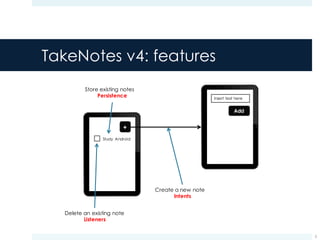
TakeNotes v4: features
2
Study Android
Delete an existing note
Listeners
Insert text here
Create a new note
Intents
Store existing notes
Persistence
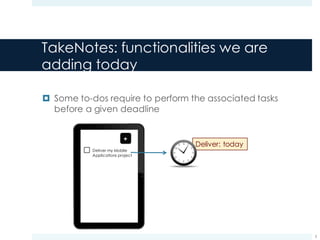
TakeNotes: functionalities we are
adding today
¤ Some to-dos require to perform the associated tasks
before a given deadline
3
Deliver my Mobile
Applications project
Deliver: today
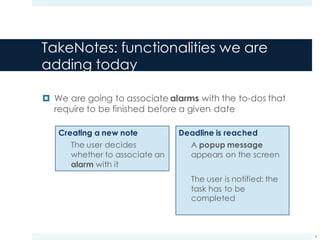
TakeNotes: functionalities we are
adding today
¤ We are going to associate alarms with the to-dos that
require to be finished before a given date
4
Creating a new note
The user decides
whether to associate an
alarm with it
Deadline is reached
A popup message
appears on the screen
The user is notified: the
task has to be
completed
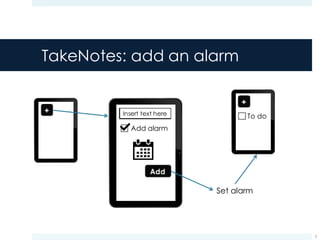
TakeNotes: add an alarm
5
Insert text here
Add alarm
Set alarm
To do
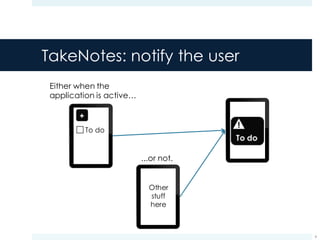
TakeNotes: notify the user
6
Either when the
application is active…
To do
...or not.
Other
stuff
here
!
Broadcast Intents
7
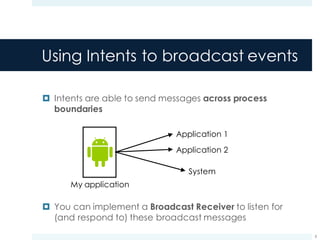
Using Intents to broadcast events
¤ Intents are able to send messages across process
boundaries
¤ You can implement a Broadcast Receiver to listen for
(and respond to) these broadcast messages
8
Application 1
Application 2
System
My application
Broadcast Intents
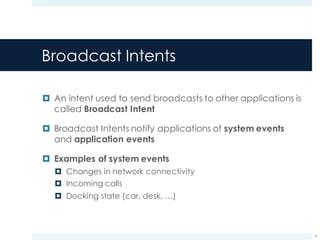
¤ An intent used to send broadcasts to other applications is
called Broadcast Intent
¤ Broadcast Intents notify applications of system events
and application events
¤ Examples of system events
¤ Changes in network connectivity
¤ Incoming calls
¤ Docking state (car, desk, …)
9
Types of broadcasts
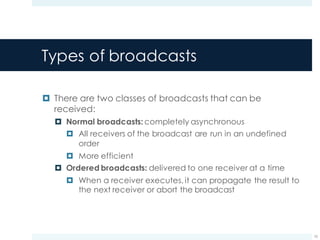
¤ There are two classes of broadcasts that can be
received:
¤ Normal broadcasts: completely asynchronous
¤ All receivers of the broadcast are run in an undefined
order
¤ More efficient
¤ Ordered broadcasts: delivered to one receiver at a time
¤ When a receiver executes, it can propagate the result to
the next receiver or abort the broadcast
10
Normal broadcasts
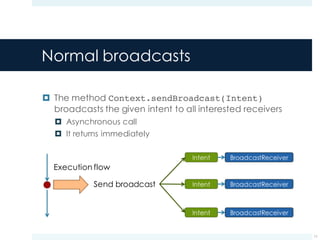
¤ The method Context.sendBroadcast(Intent)
broadcasts the given intent to all interested receivers
¤ Asynchronous call
¤ It returns immediately
11
Execution flow
Send broadcast
Normal broadcasts
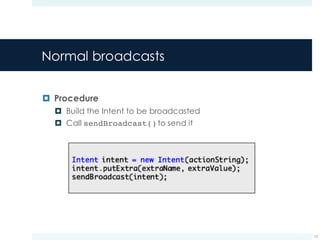
¤ Procedure
¤ Build the Intent to be broadcasted
¤ Call sendBroadcast()to send it
12
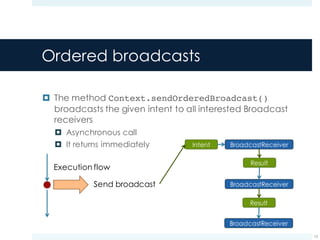
Ordered broadcasts
¤ The method Context.sendOrderedBroadcast()
broadcasts the given intent to all interested Broadcast
receivers
¤ Asynchronous call
¤ It returns immediately
13
Execution flow
Send broadcast
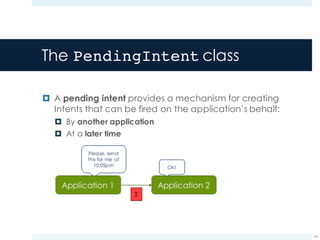
The PendingIntent class
¤ A pending intent provides a mechanism for creating
Intents that can be fired on the application’s behalf:
¤ By another application
¤ At a later time
14
I
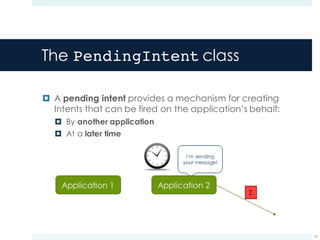
The PendingIntent class
¤ A pending intent provides a mechanism for creating
Intents that can be fired on the application’s behalf:
¤ By another application
¤ At a later time
15
I
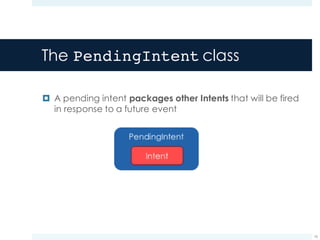
The PendingIntent class
¤ A pending intent packages other Intents that will be fired
in response to a future event
16
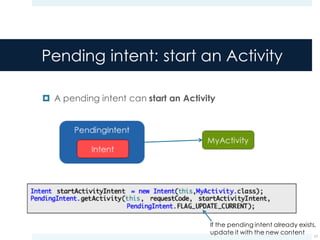
Pending intent: start an Activity
¤ A pending intent can start an Activity
17
If the pending intent already exists,
update it with the new content
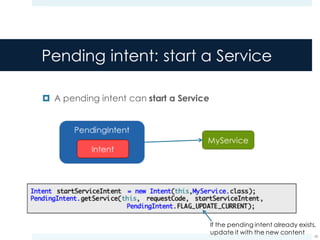
Pending intent: start a Service
¤ A pending intent can start a Service
18
If the pending intent already exists,
update it with the new content
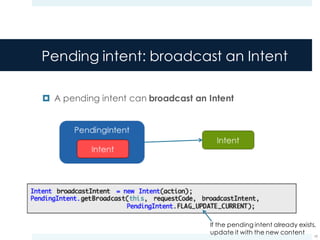
Pending intent: broadcast an Intent
¤ A pending intent can broadcast an Intent
19
If the pending intent already exists,
update it with the new content
Broadcast receivers
20
Broadcast receivers
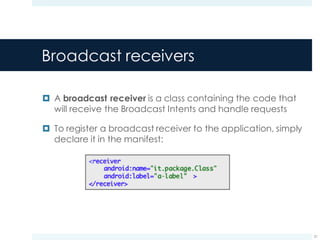
¤ A broadcast receiver is a class containing the code that
will receive the Broadcast Intents and handle requests
¤ To register a broadcast receiver to the application, simply
declare it in the manifest:
21
The onReceive() method
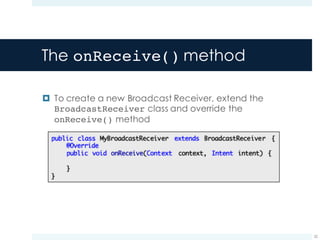
¤ To create a new Broadcast Receiver, extend the
BroadcastReceiver class and override the
onReceive() method
22
The onReceive() method
¤ The onReceive() method is executed when a Broadcast
Intent is received that matches its purpose
¤ As answers, the Broadcast Receiver:
¤ Update contents
¤ Launch services
¤ Update Activity UI
¤ Notify the user using the Notification Manager
23
Start activities: Intents vs. Broadcasts
¤ Note that the Intent broadcast mechanism is completely
separated from Intents that are used to start activities
¤ There is no way for a broadcast receiver to see or
capture Intents used with the startActivity() method
¤ Starting an activity with an Intent is a foreground operation
that modifies what the user is currently interacting with
¤ Broadcasting an Intent is a background operation that the
user is not normally aware of
24
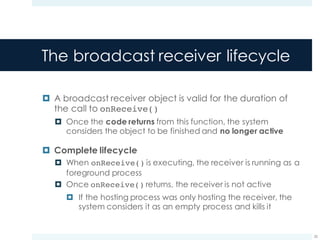
The broadcast receiver lifecycle
¤ A broadcast receiver object is valid for the duration of
the call to onReceive()
¤ Once the code returns from this function, the system
considers the object to be finished and no longer active
¤ Complete lifecycle
¤ When onReceive() is executing, the receiver is running as a
foreground process
¤ Once onReceive() returns, the receiver is not active
¤ If the hosting process was only hosting the receiver, the
system considers it as an empty process and kills it
25
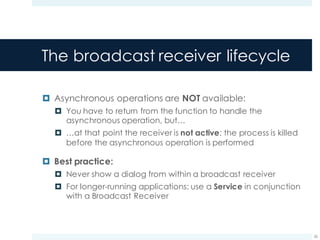
The broadcast receiver lifecycle
¤ Asynchronous operations are NOT available:
¤ You have to return from the function to handle the
asynchronous operation, but…
¤ …at that point the receiver is not active: the process is killed
before the asynchronous operation is performed
¤ Best practice:
¤ Never show a dialog from within a broadcast receiver
¤ For longer-running applications: use a Service in conjunction
with a Broadcast Receiver
26
Delaying actions
27
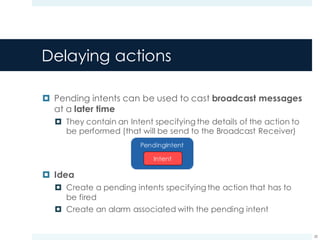
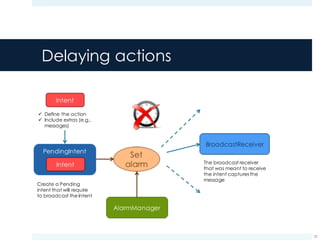
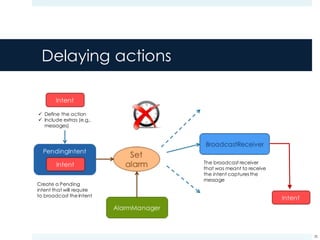
Delaying actions
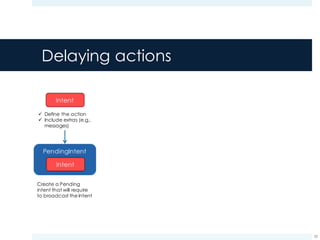
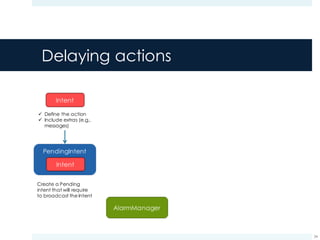
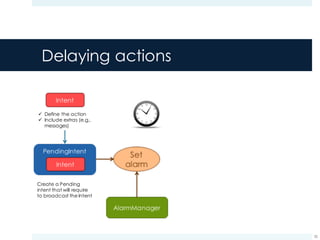
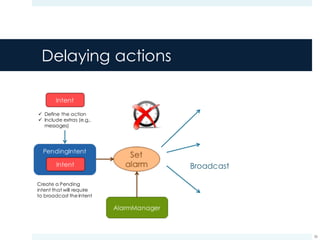
¤ Pending intents can be used to cast broadcast messages
at a later time
¤ They contain an Intent specifying the details of the action to
be performed (that will be send to the Broadcast Receiver)
¤ Idea
¤ Create a pending intents specifying the action that has to
be fired
¤ Create an alarm associated with the pending intent
28
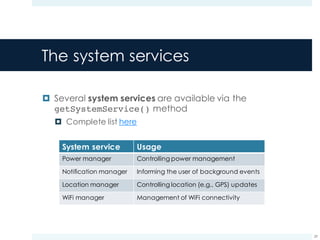
The system services
¤ Several system services are available via the
getSystemService() method
¤ Complete list here
29
System service Usage
Power manager Controlling power management
Notification manager Informing the user of background events
Location manager Controlling location (e.g., GPS) updates
WiFi manager Management of WiFi connectivity
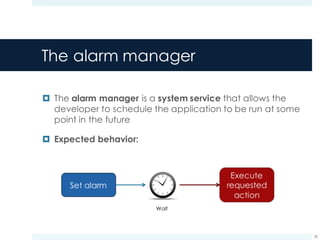
The alarm manager
¤ The alarm manager is a system service that allows the
developer to schedule the application to be run at some
point in the future
¤ Expected behavior:
30
Wait
The alarm manager
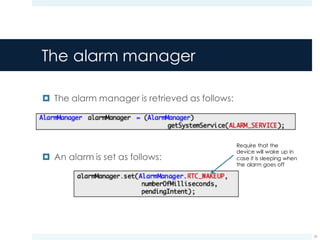
¤ The alarm manager is retrieved as follows:
¤ An alarm is set as follows:
31
Require that the
device will wake up in
case it is sleeping when
the alarm goes off
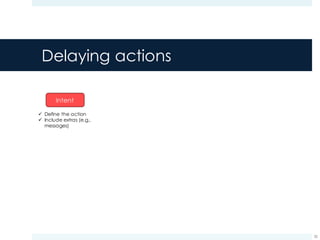
Delaying actions
32
ü Define the action
ü Include extras (e.g.,
messages)
Delaying actions
33
ü Define the action
ü Include extras (e.g.,
messages)
Create a Pending
intent that will require
to broadcast the Intent
Delaying actions
34
ü Define the action
ü Include extras (e.g.,
messages)
Create a Pending
intent that will require
to broadcast the Intent
Delaying actions
35
ü Define the action
ü Include extras (e.g.,
messages)
Create a Pending
intent that will require
to broadcast the Intent
Delaying actions
36
ü Define the action
ü Include extras (e.g.,
messages)
Create a Pending
intent that will require
to broadcast the Intent
Broadcast
Delaying actions
37
ü Define the action
ü Include extras (e.g.,
messages)
Create a Pending
intent that will require
to broadcast the Intent
The broadcast receiver
that was meant to receive
the intent captures the
message
Delaying actions
38
ü Define the action
ü Include extras (e.g.,
messages)
Create a Pending
intent that will require
to broadcast the Intent
The broadcast receiver
that was meant to receive
the intent captures the
message
More on views
39
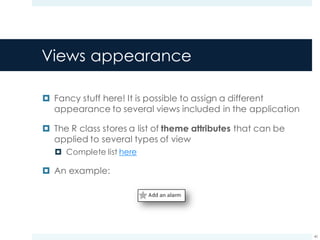
Views appearance
¤ Fancy stuff here! It is possible to assign a different
appearance to several views included in the application
¤ The R class stores a list of theme attributes that can be
applied to several types of view
¤ Complete list here
¤ An example:
40
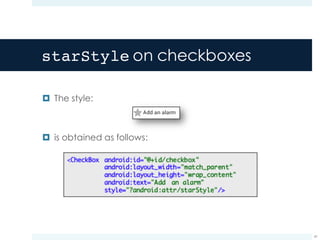
starStyle on checkboxes
¤ The style:
¤ is obtained as follows:
41
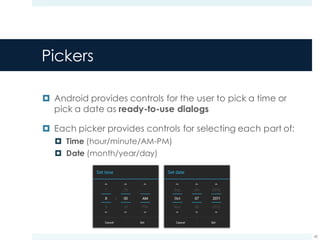
Pickers
¤ Android provides controls for the user to pick a time or
pick a date as ready-to-use dialogs
¤ Each picker provides controls for selecting each part of:
¤ Time (hour/minute/AM-PM)
¤ Date (month/year/day)
42
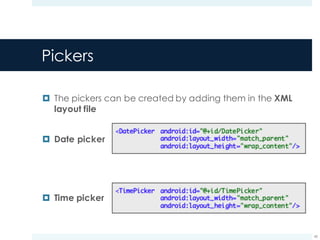
Pickers
¤ The pickers can be created by adding them in the XML
layout file
¤ Date picker
¤ Time picker
43
TakeNotes v5
Adding alarms and displaying them
44
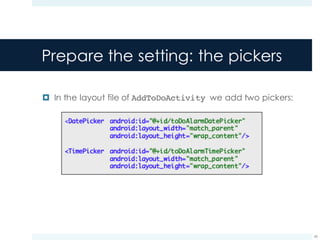
Prepare the setting: the pickers
¤ In the layout file of AddToDoActivity we add two pickers:
45
Prepare the setting: the pickers
¤ In the layout file of AddToDoActivity we add two pickers:
46
Noticed something strange?
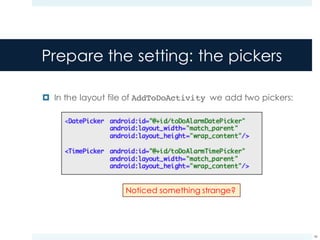
Prepare the setting: the pickers
¤ In the layout file of AddToDoActivity we add two pickers:
47
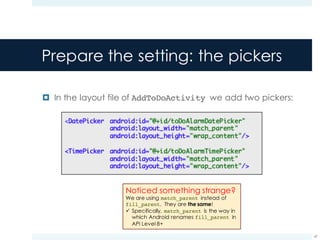
Noticed something strange?
We are using match_parent instead of
fill_parent. They are the same!
ü Specifically, match_parent is the way in
which Android renames fill_parent in
API Level 8+
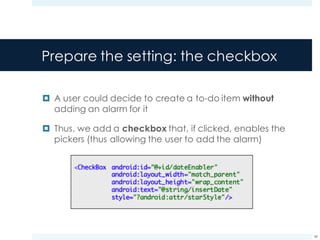
Prepare the setting: the checkbox
¤ A user could decide to create a to-do item without
adding an alarm for it
¤ Thus, we add a checkbox that, if clicked, enables the
pickers (thus allowing the user to add the alarm)
48
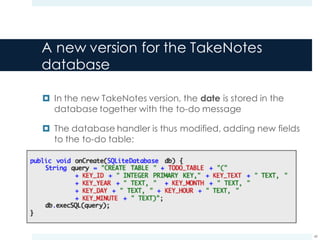
A new version for the TakeNotes
database
¤ In the new TakeNotes version, the date is stored in the
database together with the to-do message
¤ The database handler is thus modified, adding new fields
to the to-do table:
49
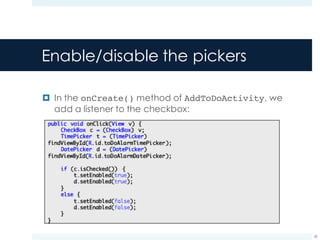
Enable/disable the pickers
¤ In the onCreate() method of AddToDoActivity, we
add a listener to the checkbox:
50
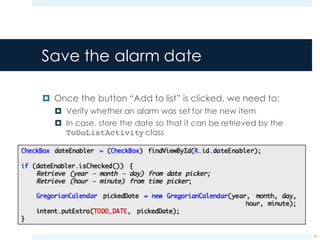
Save the alarm date
¤ Once the button “Add to list” is clicked, we need to:
¤ Verify whether an alarm was set for the new item
¤ In case, store the date so that it can be retrieved by the
ToDoListActivity class
51
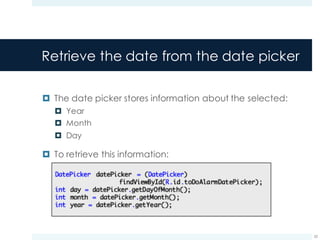
Retrieve the date from the date picker
¤ The date picker stores information about the selected:
¤ Year
¤ Month
¤ Day
¤ To retrieve this information:
52
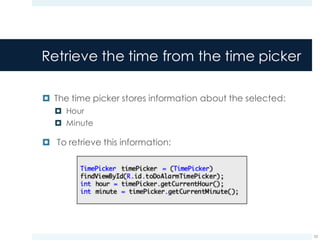
Retrieve the time from the time picker
¤ The time picker stores information about the selected:
¤ Hour
¤ Minute
¤ To retrieve this information:
53
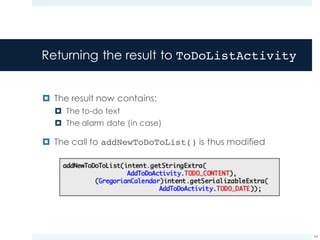
Returning the result to ToDoListActivity
¤ The result now contains:
¤ The to-do text
¤ The alarm date (in case)
¤ The call to addNewToDoToList() is thus modified
54
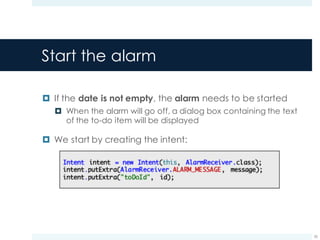
Start the alarm
¤ If the date is not empty, the alarm needs to be started
¤ When the alarm will go off, a dialog box containing the text
of the to-do item will be displayed
¤ We start by creating the intent:
55
Start the alarm
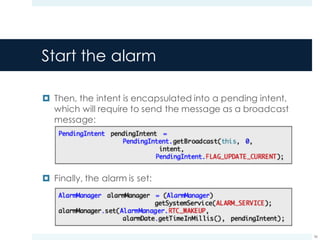
¤ Then, the intent is encapsulated into a pending intent,
which will require to send the message as a broadcast
message:
¤ Finally, the alarm is set:
56
Handle the request
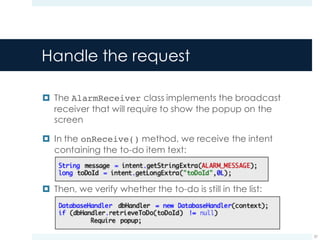
¤ The AlarmReceiver class implements the broadcast
receiver that will require to show the popup on the
screen
¤ In the onReceive() method, we receive the intent
containing the to-do item text:
¤ Then, we verify whether the to-do is still in the list:
57
Require the popup
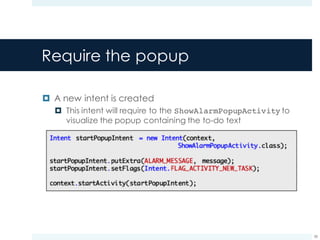
¤ A new intent is created
¤ This intent will require to the ShowAlarmPopupActivity to
visualize the popup containing the to-do text
58
Display the popup
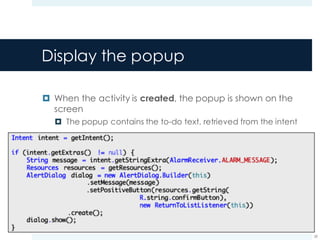
¤ When the activity is created, the popup is shown on the
screen
¤ The popup contains the to-do text, retrieved from the intent
59
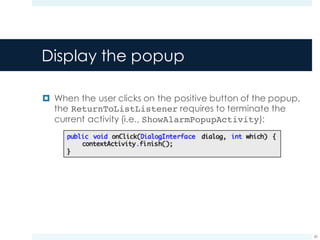
Display the popup
¤ When the user clicks on the positive button of the popup,
the ReturnToListListener requires to terminate the
current activity (i.e., ShowAlarmPopupActivity):
60
References
61
References
¤ BroadcastReceiver class reference:
http://developer.android.com/reference/android/conte
nt/BroadcastReceiver.html
¤ DatePicker class reference:
http://developer.android.com/reference/android/widge
t/DatePicker.html
¤ Android developers guide, Pickers
http://developer.android.com/guide/topics/ui/controls/
pickers.html
62

Broadcast Receivers in Android

  • 1.
    Broadcast receivers Ilio Catallo,Eleonora Ciceri – Politecnico di Milano ilio.catallo@polimi.it, eleonora.ciceri@polimi.it
  • 2.
    TakeNotes v4: features 2 StudyAndroid Delete an existing note Listeners Insert text here Create a new note Intents Store existing notes Persistence
  • 3.
    TakeNotes: functionalities weare adding today ¤ Some to-dos require to perform the associated tasks before a given deadline 3 Deliver my Mobile Applications project Deliver: today
  • 4.
    TakeNotes: functionalities weare adding today ¤ We are going to associate alarms with the to-dos that require to be finished before a given date 4 Creating a new note The user decides whether to associate an alarm with it Deadline is reached A popup message appears on the screen The user is notified: the task has to be completed
  • 5.
    TakeNotes: add analarm 5 Insert text here Add alarm Set alarm To do
  • 6.
    TakeNotes: notify theuser 6 Either when the application is active… To do ...or not. Other stuff here !
  • 7.
  • 8.
    Using Intents tobroadcast events ¤ Intents are able to send messages across process boundaries ¤ You can implement a Broadcast Receiver to listen for (and respond to) these broadcast messages 8 Application 1 Application 2 System My application
  • 9.
    Broadcast Intents ¤ Anintent used to send broadcasts to other applications is called Broadcast Intent ¤ Broadcast Intents notify applications of system events and application events ¤ Examples of system events ¤ Changes in network connectivity ¤ Incoming calls ¤ Docking state (car, desk, …) 9
  • 10.
    Types of broadcasts ¤There are two classes of broadcasts that can be received: ¤ Normal broadcasts: completely asynchronous ¤ All receivers of the broadcast are run in an undefined order ¤ More efficient ¤ Ordered broadcasts: delivered to one receiver at a time ¤ When a receiver executes, it can propagate the result to the next receiver or abort the broadcast 10
  • 11.
    Normal broadcasts ¤ Themethod Context.sendBroadcast(Intent) broadcasts the given intent to all interested receivers ¤ Asynchronous call ¤ It returns immediately 11 Execution flow Send broadcast
  • 12.
    Normal broadcasts ¤ Procedure ¤Build the Intent to be broadcasted ¤ Call sendBroadcast()to send it 12
  • 13.
    Ordered broadcasts ¤ Themethod Context.sendOrderedBroadcast() broadcasts the given intent to all interested Broadcast receivers ¤ Asynchronous call ¤ It returns immediately 13 Execution flow Send broadcast
  • 14.
    The PendingIntent class ¤A pending intent provides a mechanism for creating Intents that can be fired on the application’s behalf: ¤ By another application ¤ At a later time 14 I
  • 15.
    The PendingIntent class ¤A pending intent provides a mechanism for creating Intents that can be fired on the application’s behalf: ¤ By another application ¤ At a later time 15 I
  • 16.
    The PendingIntent class ¤A pending intent packages other Intents that will be fired in response to a future event 16
  • 17.
    Pending intent: startan Activity ¤ A pending intent can start an Activity 17 If the pending intent already exists, update it with the new content
  • 18.
    Pending intent: starta Service ¤ A pending intent can start a Service 18 If the pending intent already exists, update it with the new content
  • 19.
    Pending intent: broadcastan Intent ¤ A pending intent can broadcast an Intent 19 If the pending intent already exists, update it with the new content
  • 20.
  • 21.
    Broadcast receivers ¤ Abroadcast receiver is a class containing the code that will receive the Broadcast Intents and handle requests ¤ To register a broadcast receiver to the application, simply declare it in the manifest: 21
  • 22.
    The onReceive() method ¤To create a new Broadcast Receiver, extend the BroadcastReceiver class and override the onReceive() method 22
  • 23.
    The onReceive() method ¤The onReceive() method is executed when a Broadcast Intent is received that matches its purpose ¤ As answers, the Broadcast Receiver: ¤ Update contents ¤ Launch services ¤ Update Activity UI ¤ Notify the user using the Notification Manager 23
  • 24.
    Start activities: Intentsvs. Broadcasts ¤ Note that the Intent broadcast mechanism is completely separated from Intents that are used to start activities ¤ There is no way for a broadcast receiver to see or capture Intents used with the startActivity() method ¤ Starting an activity with an Intent is a foreground operation that modifies what the user is currently interacting with ¤ Broadcasting an Intent is a background operation that the user is not normally aware of 24
  • 25.
    The broadcast receiverlifecycle ¤ A broadcast receiver object is valid for the duration of the call to onReceive() ¤ Once the code returns from this function, the system considers the object to be finished and no longer active ¤ Complete lifecycle ¤ When onReceive() is executing, the receiver is running as a foreground process ¤ Once onReceive() returns, the receiver is not active ¤ If the hosting process was only hosting the receiver, the system considers it as an empty process and kills it 25
  • 26.
    The broadcast receiverlifecycle ¤ Asynchronous operations are NOT available: ¤ You have to return from the function to handle the asynchronous operation, but… ¤ …at that point the receiver is not active: the process is killed before the asynchronous operation is performed ¤ Best practice: ¤ Never show a dialog from within a broadcast receiver ¤ For longer-running applications: use a Service in conjunction with a Broadcast Receiver 26
  • 27.
  • 28.
    Delaying actions ¤ Pendingintents can be used to cast broadcast messages at a later time ¤ They contain an Intent specifying the details of the action to be performed (that will be send to the Broadcast Receiver) ¤ Idea ¤ Create a pending intents specifying the action that has to be fired ¤ Create an alarm associated with the pending intent 28
  • 29.
    The system services ¤Several system services are available via the getSystemService() method ¤ Complete list here 29 System service Usage Power manager Controlling power management Notification manager Informing the user of background events Location manager Controlling location (e.g., GPS) updates WiFi manager Management of WiFi connectivity
  • 30.
    The alarm manager ¤The alarm manager is a system service that allows the developer to schedule the application to be run at some point in the future ¤ Expected behavior: 30 Wait
  • 31.
    The alarm manager ¤The alarm manager is retrieved as follows: ¤ An alarm is set as follows: 31 Require that the device will wake up in case it is sleeping when the alarm goes off
  • 32.
    Delaying actions 32 ü Definethe action ü Include extras (e.g., messages)
  • 33.
    Delaying actions 33 ü Definethe action ü Include extras (e.g., messages) Create a Pending intent that will require to broadcast the Intent
  • 34.
    Delaying actions 34 ü Definethe action ü Include extras (e.g., messages) Create a Pending intent that will require to broadcast the Intent
  • 35.
    Delaying actions 35 ü Definethe action ü Include extras (e.g., messages) Create a Pending intent that will require to broadcast the Intent
  • 36.
    Delaying actions 36 ü Definethe action ü Include extras (e.g., messages) Create a Pending intent that will require to broadcast the Intent Broadcast
  • 37.
    Delaying actions 37 ü Definethe action ü Include extras (e.g., messages) Create a Pending intent that will require to broadcast the Intent The broadcast receiver that was meant to receive the intent captures the message
  • 38.
    Delaying actions 38 ü Definethe action ü Include extras (e.g., messages) Create a Pending intent that will require to broadcast the Intent The broadcast receiver that was meant to receive the intent captures the message
  • 39.
  • 40.
    Views appearance ¤ Fancystuff here! It is possible to assign a different appearance to several views included in the application ¤ The R class stores a list of theme attributes that can be applied to several types of view ¤ Complete list here ¤ An example: 40
  • 41.
    starStyle on checkboxes ¤The style: ¤ is obtained as follows: 41
  • 42.
    Pickers ¤ Android providescontrols for the user to pick a time or pick a date as ready-to-use dialogs ¤ Each picker provides controls for selecting each part of: ¤ Time (hour/minute/AM-PM) ¤ Date (month/year/day) 42
  • 43.
    Pickers ¤ The pickerscan be created by adding them in the XML layout file ¤ Date picker ¤ Time picker 43
  • 44.
    TakeNotes v5 Adding alarmsand displaying them 44
  • 45.
    Prepare the setting:the pickers ¤ In the layout file of AddToDoActivity we add two pickers: 45
  • 46.
    Prepare the setting:the pickers ¤ In the layout file of AddToDoActivity we add two pickers: 46 Noticed something strange?
  • 47.
    Prepare the setting:the pickers ¤ In the layout file of AddToDoActivity we add two pickers: 47 Noticed something strange? We are using match_parent instead of fill_parent. They are the same! ü Specifically, match_parent is the way in which Android renames fill_parent in API Level 8+
  • 48.
    Prepare the setting:the checkbox ¤ A user could decide to create a to-do item without adding an alarm for it ¤ Thus, we add a checkbox that, if clicked, enables the pickers (thus allowing the user to add the alarm) 48
  • 49.
    A new versionfor the TakeNotes database ¤ In the new TakeNotes version, the date is stored in the database together with the to-do message ¤ The database handler is thus modified, adding new fields to the to-do table: 49
  • 50.
    Enable/disable the pickers ¤In the onCreate() method of AddToDoActivity, we add a listener to the checkbox: 50
  • 51.
    Save the alarmdate ¤ Once the button “Add to list” is clicked, we need to: ¤ Verify whether an alarm was set for the new item ¤ In case, store the date so that it can be retrieved by the ToDoListActivity class 51
  • 52.
    Retrieve the datefrom the date picker ¤ The date picker stores information about the selected: ¤ Year ¤ Month ¤ Day ¤ To retrieve this information: 52
  • 53.
    Retrieve the timefrom the time picker ¤ The time picker stores information about the selected: ¤ Hour ¤ Minute ¤ To retrieve this information: 53
  • 54.
    Returning the resultto ToDoListActivity ¤ The result now contains: ¤ The to-do text ¤ The alarm date (in case) ¤ The call to addNewToDoToList() is thus modified 54
  • 55.
    Start the alarm ¤If the date is not empty, the alarm needs to be started ¤ When the alarm will go off, a dialog box containing the text of the to-do item will be displayed ¤ We start by creating the intent: 55
  • 56.
    Start the alarm ¤Then, the intent is encapsulated into a pending intent, which will require to send the message as a broadcast message: ¤ Finally, the alarm is set: 56
  • 57.
    Handle the request ¤The AlarmReceiver class implements the broadcast receiver that will require to show the popup on the screen ¤ In the onReceive() method, we receive the intent containing the to-do item text: ¤ Then, we verify whether the to-do is still in the list: 57
  • 58.
    Require the popup ¤A new intent is created ¤ This intent will require to the ShowAlarmPopupActivity to visualize the popup containing the to-do text 58
  • 59.
    Display the popup ¤When the activity is created, the popup is shown on the screen ¤ The popup contains the to-do text, retrieved from the intent 59
  • 60.
    Display the popup ¤When the user clicks on the positive button of the popup, the ReturnToListListener requires to terminate the current activity (i.e., ShowAlarmPopupActivity): 60
  • 61.
  • 62.
    References ¤ BroadcastReceiver classreference: http://developer.android.com/reference/android/conte nt/BroadcastReceiver.html ¤ DatePicker class reference: http://developer.android.com/reference/android/widge t/DatePicker.html ¤ Android developers guide, Pickers http://developer.android.com/guide/topics/ui/controls/ pickers.html 62