Data Transfer between
Activities & Databases
Lecturer Faiz Ur Rehman
University of Mianwali
Intent
• Android uses Intent for communicating between the components of
an Application and also from one application to another application.
• Intent are the objects which is used in android for passing the
information among Activities in an Application and from one app to
another also. Intent are used for communicating between the
Application components and it also provides the connectivity
between two apps
Types of Intent
Example
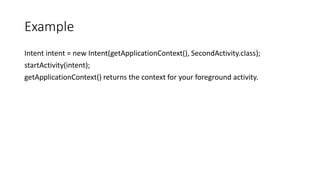
Intent intent = new Intent(getApplicationContext(), SecondActivity.class);
startActivity(intent);
getApplicationContext() returns the context for your foreground activity.
Explicit Intent:
• Explicit Intents are used to connect the application internally.
• Explicit Intent work internally within an application to perform
navigation and data transfer.
• Example.
Intent intent = new Intent(getApplicationContext(), SecondActivity.class);
startActivity(intent);
Implicit Intent:
• In Implicit Intents we do need to specify the name of the component.
• We just specify the Action which has to be performed and further this
action is handled by the component of another application.
• The basic example of implicit Intent is to open any web page
• Example
Intent intentObj = new Intent(Intent.ACTION_VIEW);
intentObj.setData(Uri.parse("https://www.abhiandroid.com"));
startActivity(intentObj);
Intent Uses in android:
1. Intent for an Activity:
• Every screen in Android application represents an activity. To start a
new activity you need to pass an Intent object to startActivity()
method. This Intent object helps to start a new activity and passing
data to the second activity
2. Intent for Services:
• Services work in background of an Android application and it does not
require any user Interface. Intents could be used to start a Service
that performs one-time task
• (for example:Downloading some file)
3. Intent for Broadcast Receivers:
• There are various message that an app receives, these messages are
called as Broadcast Receivers. (For example, a broadcast message
could be initiated to intimate that the file downloading is completed
and ready to use). Android system initiates some broadcast message
on several events, such as System Reboot, Low Battery warning
message etc.
4. Display a list of contacts
5. Dial a phone call etc.
Implicit Example Code
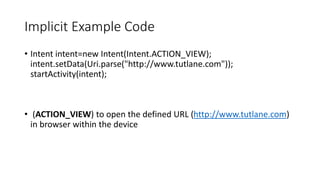
• Intent intent=new Intent(Intent.ACTION_VIEW);
intent.setData(Uri.parse("http://www.tutlane.com"));
startActivity(intent);
• (ACTION_VIEW) to open the defined URL (http://www.tutlane.com)
in browser within the device
XML Code
• <?xml version="1.0" encoding="utf-8"?>
<RelativeLayout
xmlns:android="http://schemas.android.com/apk/res/android"
xmlns:tools="http://schemas.android.com/tools"
android:layout_width="match_parent"
android:layout_height="match_parent"
tools:context="com.tutlane.intents.MainActivity">
<EditText
android:layout_width="wrap_content"
android:layout_height="wrap_content"
android:id="@+id/urlText"
android:layout_alignParentTop="true"
android:layout_centerHorizontal="true"
android:layout_marginTop="100dp"
android:ems="10" />
<Button
android:layout_width="wrap_content"
android:layout_height="wrap_content"
android:id="@+id/btnNavigate"
android:layout_below="@+id/urlText"
android:text="Navigate"
android:layout_centerHorizontal="true" />
</RelativeLayout>
MainActivity.java
• package com.tutlane.intents;
import android.content.Intent;
import android.net.Uri;
import android.support.v7.app.AppCompatActivity;
import android.os.Bundle;
import android.view.View;
import android.widget.Button;
import android.widget.EditText;
public class MainActivity extends AppCompatActivity {
@Override
protected void onCreate(Bundle savedInstanceState) {
super.onCreate(savedInstanceState);
setContentView(R.layout.activity_main);
•
final EditText editText = (EditText)findViewById(R.id.urlText);
Button btn = (Button) findViewById(R.id.btnNavigate);
btn.setOnClickListener(new View.OnClickListener() {
@Override
public void onClick(View v) {
String url = editText.getText().toString();
Intent intent = new Intent(Intent.ACTION_VIEW, Uri.parse(url));
startActivity(intent);
}
});
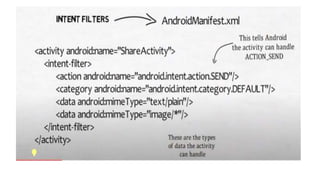
Intent Filter:
Intent Filter:
• decide the behavior of an intent.
• -Intent about the navigation of one activity to another,that can be
achieve by declaring intent filter.
• -We can declare an Intent Filter for an Activity in manifest file.
• - Intent filters specify the type of intents that an Activity, service or
Broadcast receiver can respond to.
Syntax of Intent Filters:
• <activity android:name=".MainActivity">
• <intent-filter
• android:icon="@drawable/icon" android:label="@string/label" >
• <action android:name="android.intent.action.MAIN" />
• <category android:name="android.intent.category.LAUNCHER" />
</intent-filter>
• </activity>
What are icons and labels
• icon: This is displayed as icon for activity. You can check or save png
image of name icon in drawable folder.
android:icon="@drawable/icon"
• • label: The label / title that appears at top in Toolbar of that
particular Activity. You can check or edit label name by opening String
XML file present inside Values folder
android:label = "@string/label“ or android:label = "New Activity“
Just like icon attribute, if you have not declared any label for your
activity then it will be same as your parent activity
• Elements In Intent Filter:
• There are following three elements in an intent filter:
• 1.Action
• 2.Data
• 3.Category
Multipurpose Internet Mail Extensions
Action
Examples
Data
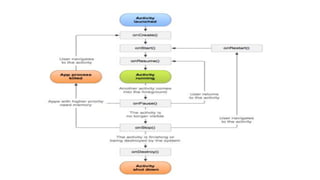
Activity Lifecycle:
• Activity is a screen that user interact with. Every Activity in android
has lifecycle like created, started, resumed, paused, stopped or
destroyed. These different states are known as Activity Lifecycle.
• onCreate() – Called when the activity is first created
• onStart() – Called just after it’s creation or by restart method after
onStop(). Here Activity start becoming visible to user
• onResume() – Called when Activity is visible to user and user can interact
with it
• onPause() – Called when Activity content is not visible because user
resume previous activity
• onStop() – Called when activity is not visible to user because some other
activity takes place of it
• onRestart() – Called when user comes on screen or resume the activity
which was stopped
• onDestroy – Called when Activity is not in background
Broadcast Receiver
• Broadcast Receiver is a component which will allow android system or
other apps to deliver events to the app like sending a low battery
message or screen turned off message to the app. The apps can also
initiate broadcasts to let other apps know that required data available
in a device to use it.
• Generally, we use Intents to deliver broadcast events to other apps
and Broadcast Receivers use status bar notifications to let user know
that broadcast event occurs.
• is implemented as a subclass of Broadcast Receiver and each
broadcast is delivered as an Intent object.
Two important steps to make
BroadcastReceiver:
• Registering Broadcast Receiver
• • Creating the Broadcast Receiver
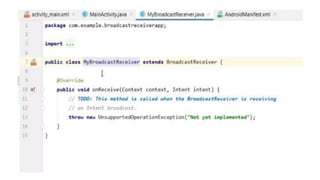
• A broadcast receiver is implemented as a subclass of BroadcastReceiver
class and overriding the onReceive() method where each message is
received as a Intent object parameter.
• Example-
public class MyReceiver extends BroadcastReceiver
{
public void onReceive(Context context, Intent intent)
{
Toast.makeText(context, "Intent Detected.",
Toast.LENGTH_LONG).show(); } }
System generated events are:
• android.intent.action.BATTERY_CHANGED
• • android.intent.action.BATTERY_LOW
• • android.intent.action.BATTERY_OKAY
• • android.intent.action.BOOT_COMPLETED
• • android.intent.action.BUG_REPORT
• • android.intent.action.CALL
• • android.intent.action.CALL_BUTTON
• • android.intent.action.DATE_CHANGED
• • android.intent.action.REBOOT
Create Button click Event
Registered this button to event
Go to your xml file
Create intent instance , set action , set flag,
send intent
Create another app for Receiving
Receiver app is not registered yet
‘’’’’’’’’’’’’’’’’’’’’’’
+
`

Data Transfer between activities and Database

  • 1.
    Data Transfer between Activities& Databases Lecturer Faiz Ur Rehman University of Mianwali
  • 2.
    Intent • Android usesIntent for communicating between the components of an Application and also from one application to another application. • Intent are the objects which is used in android for passing the information among Activities in an Application and from one app to another also. Intent are used for communicating between the Application components and it also provides the connectivity between two apps
  • 3.
  • 5.
    Example Intent intent =new Intent(getApplicationContext(), SecondActivity.class); startActivity(intent); getApplicationContext() returns the context for your foreground activity.
  • 7.
    Explicit Intent: • ExplicitIntents are used to connect the application internally. • Explicit Intent work internally within an application to perform navigation and data transfer. • Example. Intent intent = new Intent(getApplicationContext(), SecondActivity.class); startActivity(intent);
  • 8.
    Implicit Intent: • InImplicit Intents we do need to specify the name of the component. • We just specify the Action which has to be performed and further this action is handled by the component of another application. • The basic example of implicit Intent is to open any web page • Example Intent intentObj = new Intent(Intent.ACTION_VIEW); intentObj.setData(Uri.parse("https://www.abhiandroid.com")); startActivity(intentObj);
  • 9.
    Intent Uses inandroid: 1. Intent for an Activity: • Every screen in Android application represents an activity. To start a new activity you need to pass an Intent object to startActivity() method. This Intent object helps to start a new activity and passing data to the second activity
  • 10.
    2. Intent forServices: • Services work in background of an Android application and it does not require any user Interface. Intents could be used to start a Service that performs one-time task • (for example:Downloading some file)
  • 11.
    3. Intent forBroadcast Receivers: • There are various message that an app receives, these messages are called as Broadcast Receivers. (For example, a broadcast message could be initiated to intimate that the file downloading is completed and ready to use). Android system initiates some broadcast message on several events, such as System Reboot, Low Battery warning message etc. 4. Display a list of contacts 5. Dial a phone call etc.
  • 12.
    Implicit Example Code •Intent intent=new Intent(Intent.ACTION_VIEW); intent.setData(Uri.parse("http://www.tutlane.com")); startActivity(intent); • (ACTION_VIEW) to open the defined URL (http://www.tutlane.com) in browser within the device
  • 13.
    XML Code • <?xmlversion="1.0" encoding="utf-8"?> <RelativeLayout xmlns:android="http://schemas.android.com/apk/res/android" xmlns:tools="http://schemas.android.com/tools" android:layout_width="match_parent" android:layout_height="match_parent" tools:context="com.tutlane.intents.MainActivity"> <EditText android:layout_width="wrap_content" android:layout_height="wrap_content" android:id="@+id/urlText" android:layout_alignParentTop="true" android:layout_centerHorizontal="true" android:layout_marginTop="100dp" android:ems="10" /> <Button android:layout_width="wrap_content" android:layout_height="wrap_content" android:id="@+id/btnNavigate" android:layout_below="@+id/urlText" android:text="Navigate" android:layout_centerHorizontal="true" /> </RelativeLayout>
  • 14.
    MainActivity.java • package com.tutlane.intents; importandroid.content.Intent; import android.net.Uri; import android.support.v7.app.AppCompatActivity; import android.os.Bundle; import android.view.View; import android.widget.Button; import android.widget.EditText; public class MainActivity extends AppCompatActivity { @Override protected void onCreate(Bundle savedInstanceState) { super.onCreate(savedInstanceState); setContentView(R.layout.activity_main); • final EditText editText = (EditText)findViewById(R.id.urlText); Button btn = (Button) findViewById(R.id.btnNavigate); btn.setOnClickListener(new View.OnClickListener() { @Override public void onClick(View v) { String url = editText.getText().toString(); Intent intent = new Intent(Intent.ACTION_VIEW, Uri.parse(url)); startActivity(intent); } });
  • 16.
  • 18.
    Intent Filter: • decidethe behavior of an intent. • -Intent about the navigation of one activity to another,that can be achieve by declaring intent filter. • -We can declare an Intent Filter for an Activity in manifest file. • - Intent filters specify the type of intents that an Activity, service or Broadcast receiver can respond to.
  • 19.
    Syntax of IntentFilters: • <activity android:name=".MainActivity"> • <intent-filter • android:icon="@drawable/icon" android:label="@string/label" > • <action android:name="android.intent.action.MAIN" /> • <category android:name="android.intent.category.LAUNCHER" /> </intent-filter> • </activity>
  • 20.
    What are iconsand labels • icon: This is displayed as icon for activity. You can check or save png image of name icon in drawable folder. android:icon="@drawable/icon" • • label: The label / title that appears at top in Toolbar of that particular Activity. You can check or edit label name by opening String XML file present inside Values folder android:label = "@string/label“ or android:label = "New Activity“ Just like icon attribute, if you have not declared any label for your activity then it will be same as your parent activity
  • 21.
    • Elements InIntent Filter: • There are following three elements in an intent filter: • 1.Action • 2.Data • 3.Category
  • 22.
  • 24.
  • 25.
  • 26.
  • 28.
    Activity Lifecycle: • Activityis a screen that user interact with. Every Activity in android has lifecycle like created, started, resumed, paused, stopped or destroyed. These different states are known as Activity Lifecycle.
  • 29.
    • onCreate() –Called when the activity is first created • onStart() – Called just after it’s creation or by restart method after onStop(). Here Activity start becoming visible to user • onResume() – Called when Activity is visible to user and user can interact with it • onPause() – Called when Activity content is not visible because user resume previous activity • onStop() – Called when activity is not visible to user because some other activity takes place of it • onRestart() – Called when user comes on screen or resume the activity which was stopped • onDestroy – Called when Activity is not in background
  • 31.
    Broadcast Receiver • BroadcastReceiver is a component which will allow android system or other apps to deliver events to the app like sending a low battery message or screen turned off message to the app. The apps can also initiate broadcasts to let other apps know that required data available in a device to use it. • Generally, we use Intents to deliver broadcast events to other apps and Broadcast Receivers use status bar notifications to let user know that broadcast event occurs. • is implemented as a subclass of Broadcast Receiver and each broadcast is delivered as an Intent object.
  • 32.
    Two important stepsto make BroadcastReceiver: • Registering Broadcast Receiver • • Creating the Broadcast Receiver
  • 33.
    • A broadcastreceiver is implemented as a subclass of BroadcastReceiver class and overriding the onReceive() method where each message is received as a Intent object parameter. • Example- public class MyReceiver extends BroadcastReceiver { public void onReceive(Context context, Intent intent) { Toast.makeText(context, "Intent Detected.", Toast.LENGTH_LONG).show(); } }
  • 34.
    System generated eventsare: • android.intent.action.BATTERY_CHANGED • • android.intent.action.BATTERY_LOW • • android.intent.action.BATTERY_OKAY • • android.intent.action.BOOT_COMPLETED • • android.intent.action.BUG_REPORT • • android.intent.action.CALL • • android.intent.action.CALL_BUTTON • • android.intent.action.DATE_CHANGED • • android.intent.action.REBOOT
  • 38.
  • 39.
    Registered this buttonto event Go to your xml file
  • 40.
    Create intent instance, set action , set flag, send intent
  • 41.
    Create another appfor Receiving
  • 42.
    Receiver app isnot registered yet
  • 50.
  • 51.
  • 55.