BP202:
Rapid XPages Development
using the
Application Layout Control
Howard Greenberg, TLCC
Paul Della-Nebbia, TLCC

© 2014 IBM Corporation
Acknowledgements and Disclaimers
Availability. References in this presentation to IBM products, programs, or services do not imply that they will be available in all countries in which IBM operates.
The workshops, sessions and materials have been prepared by IBM or the session speakers and reflect their own views. They are provided for informational purposes only, and are neither
intended to, nor shall have the effect of being, legal or other guidance or advice to any participant. While efforts were made to verify the completeness and accuracy of the information
contained in this presentation, it is provided AS-IS without warranty of any kind, express or implied. IBM shall not be responsible for any damages arising out of the use of, or otherwise
related to, this presentation or any other materials. Nothing contained in this presentation is intended to, nor shall have the effect of, creating any warranties or representations from IBM or
its suppliers or licensors, or altering the terms and conditions of the applicable license agreement governing the use of IBM software.
All customer examples described are presented as illustrations of how those customers have used IBM products and the results they may have achieved. Actual environmental costs and
performance characteristics may vary by customer. Nothing contained in these materials is intended to, nor shall have the effect of, stating or implying that any activities undertaken by you
will result in any specific sales, revenue growth or other results.

© Copyright IBM Corporation 2014. All rights reserved.
 U.S. Government Users Restricted Rights - Use, duplication or disclosure restricted by GSA ADP Schedule Contract with IBM Corp.
 IBM, the IBM logo, ibm.com, Domino, and Notes are trademarks or registered trademarks of International Business Machines Corporation in the United States, other countries, or both. If
these and other IBM trademarked terms are marked on their first occurrence in this information with a trademark symbol (® or ™), these symbols indicate U.S. registered or common law
trademarks owned by IBM at the time this information was published. Such trademarks may also be registered or common law trademarks in other countries. A current list of IBM
trademarks is available on the Web at “Copyright and trademark information” at www.ibm.com/legal/copytrade.shtml
Other company, product, or service names may be trademarks or service marks of others.

2
Who are we?
 Howard Greenberg & Paul Della-Nebbia
– Teaching Notes and Domino since 1994
– Partners at TLCC, the Leader in Notes and Domino Training
– And Now, the Leader in XPages Training

3
About TLCC
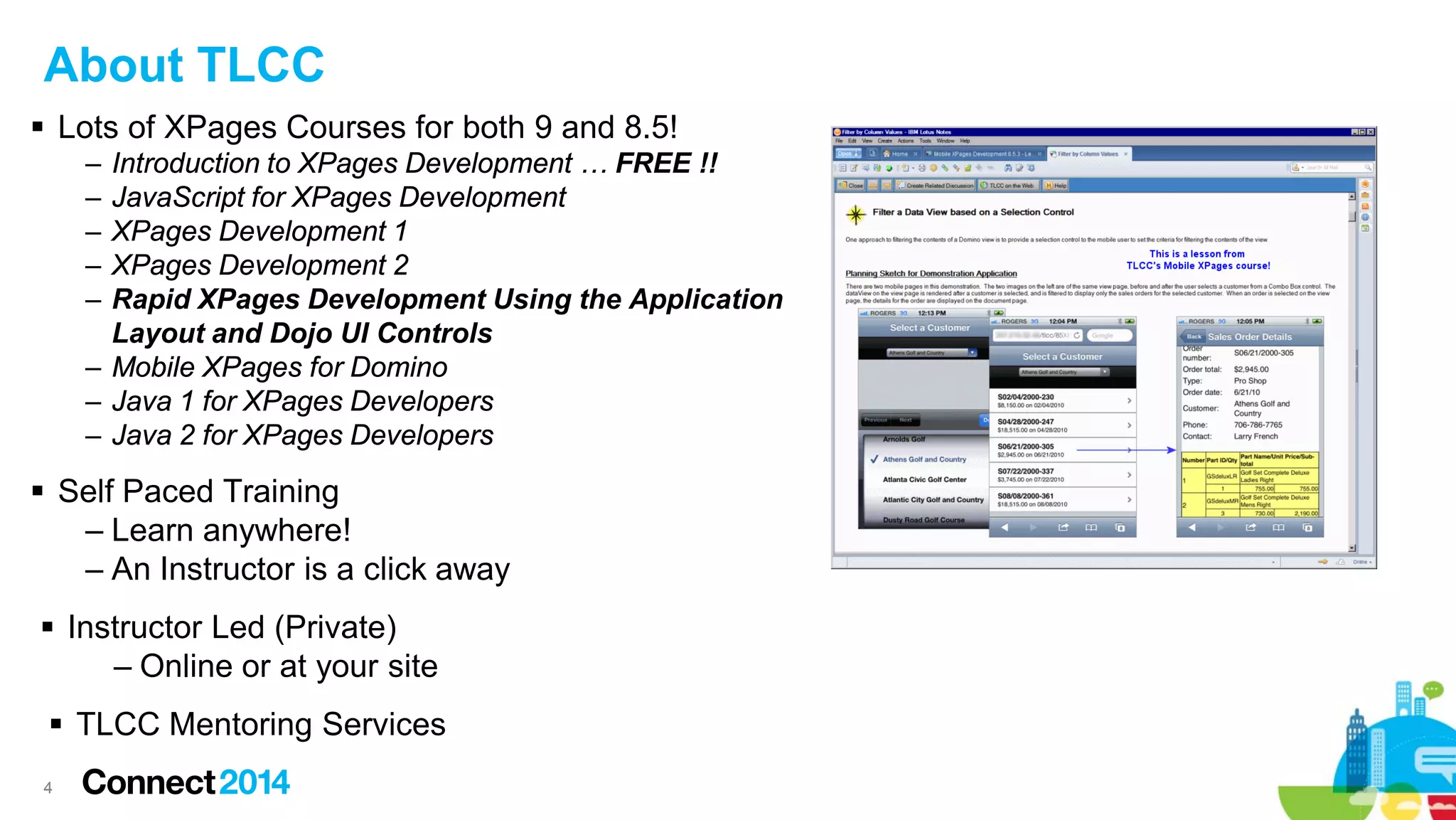
 Lots of XPages Courses for both 9 and 8.5!
‒
‒
‒
‒
‒

Introduction to XPages Development … FREE !!
JavaScript for XPages Development
XPages Development 1
XPages Development 2
Rapid XPages Development Using the Application
Layout and Dojo UI Controls
‒ Mobile XPages for Domino
‒ Java 1 for XPages Developers
‒ Java 2 for XPages Developers

 Self Paced Training
‒ Learn anywhere!
‒ An Instructor is a click away
 Instructor Led (Private)
‒ Online or at your site
 TLCC Mentoring Services
4
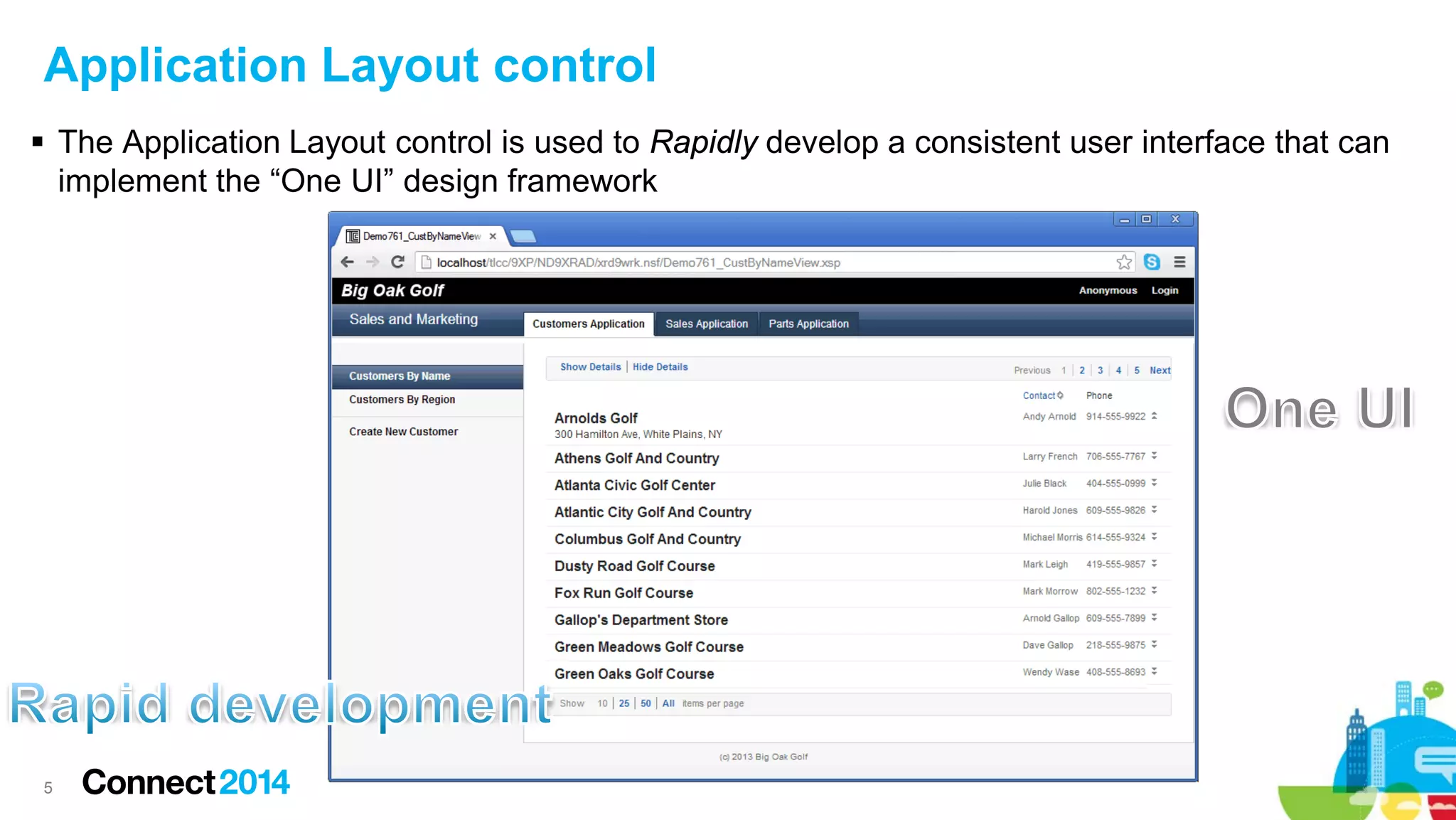
Application Layout control
 The Application Layout control is used to Rapidly develop a consistent user interface that can
implement the “One UI” design framework

5
 Prerequisites & Configuration
 OneUI version 2.1 Themes
 Tree Nodes and Navigators
 Application Layout Design Framework
 Designing an Application Layout in a Custom Control
 Navigation and Context
 Application Layout Design strategies
 Wrap up

6
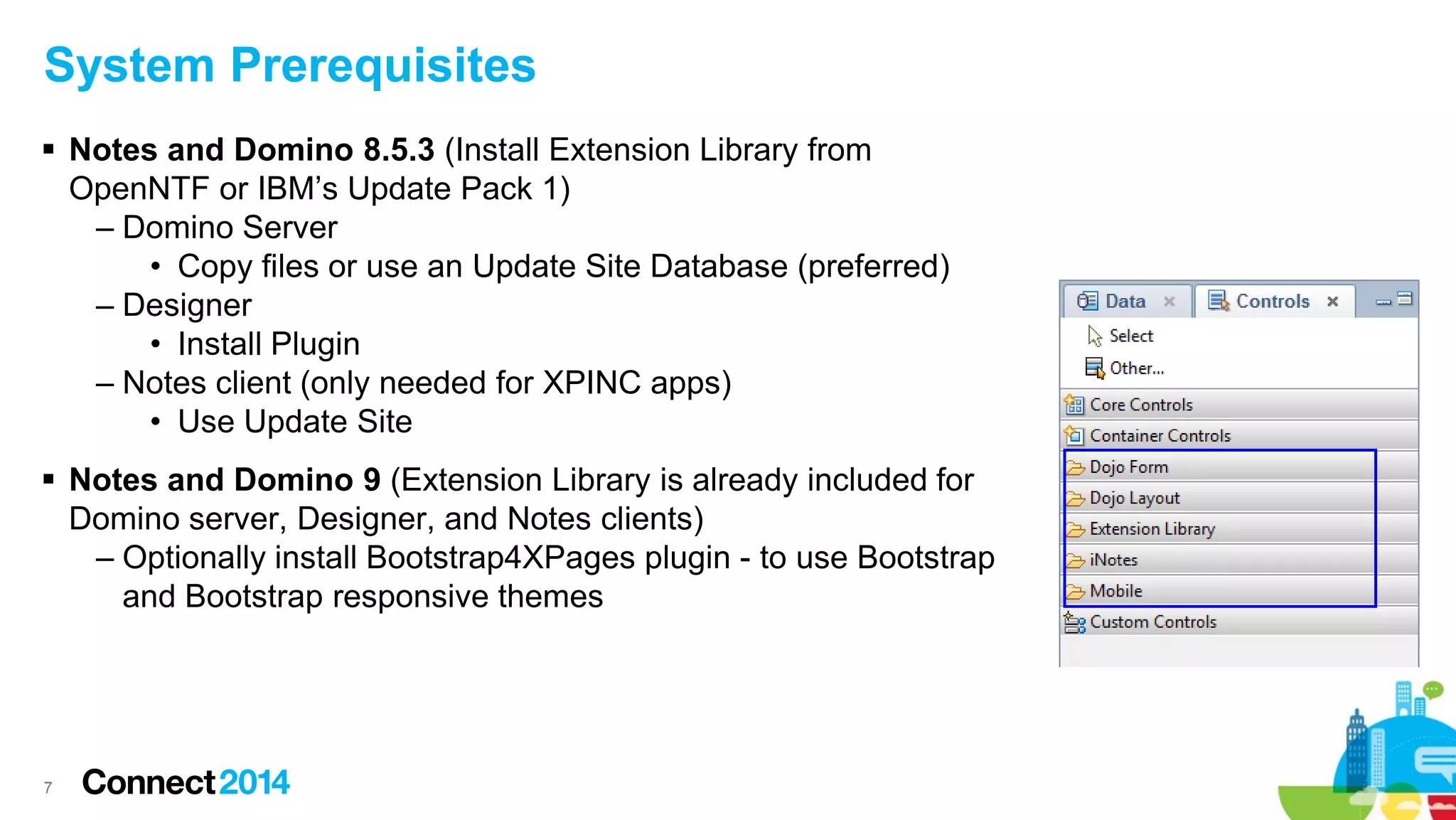
System Prerequisites
 Notes and Domino 8.5.3 (Install Extension Library from
OpenNTF or IBM’s Update Pack 1)
– Domino Server
• Copy files or use an Update Site Database (preferred)
– Designer
• Install Plugin
– Notes client (only needed for XPINC apps)
• Use Update Site
 Notes and Domino 9 (Extension Library is already included for
Domino server, Designer, and Notes clients)
– Optionally install Bootstrap4XPages plugin - to use Bootstrap
and Bootstrap responsive themes

7
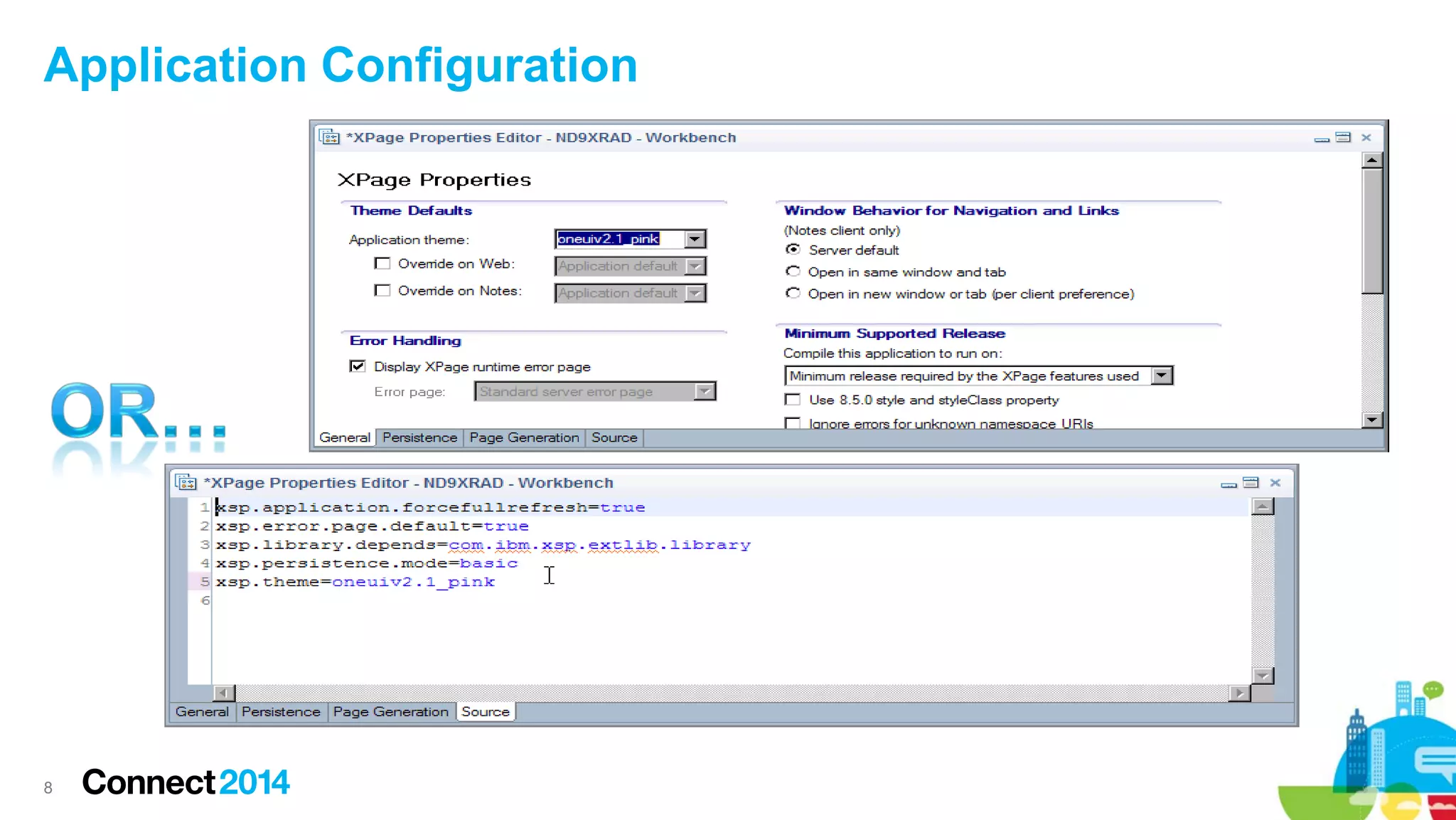
Application Configuration

8
 Prerequisites & Configuration
 OneUI version 2.1 Themes
 Tree Nodes and Navigators
 Application Layout Design Framework
 Designing an Application Layout in a Custom Control
 Navigation and Context
 Application Layout Design strategies
 Wrap up

9
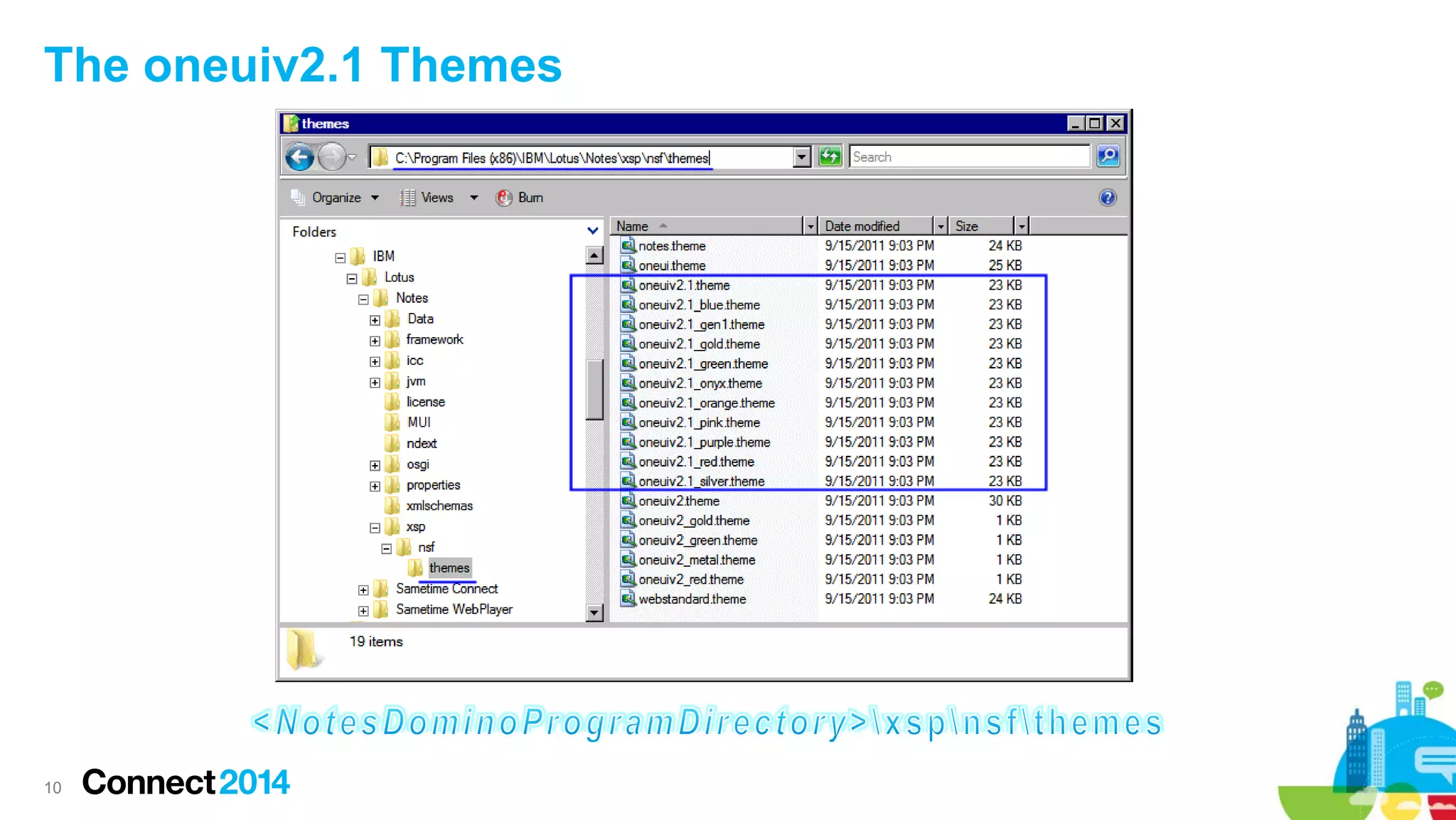
The oneuiv2.1 Themes

10
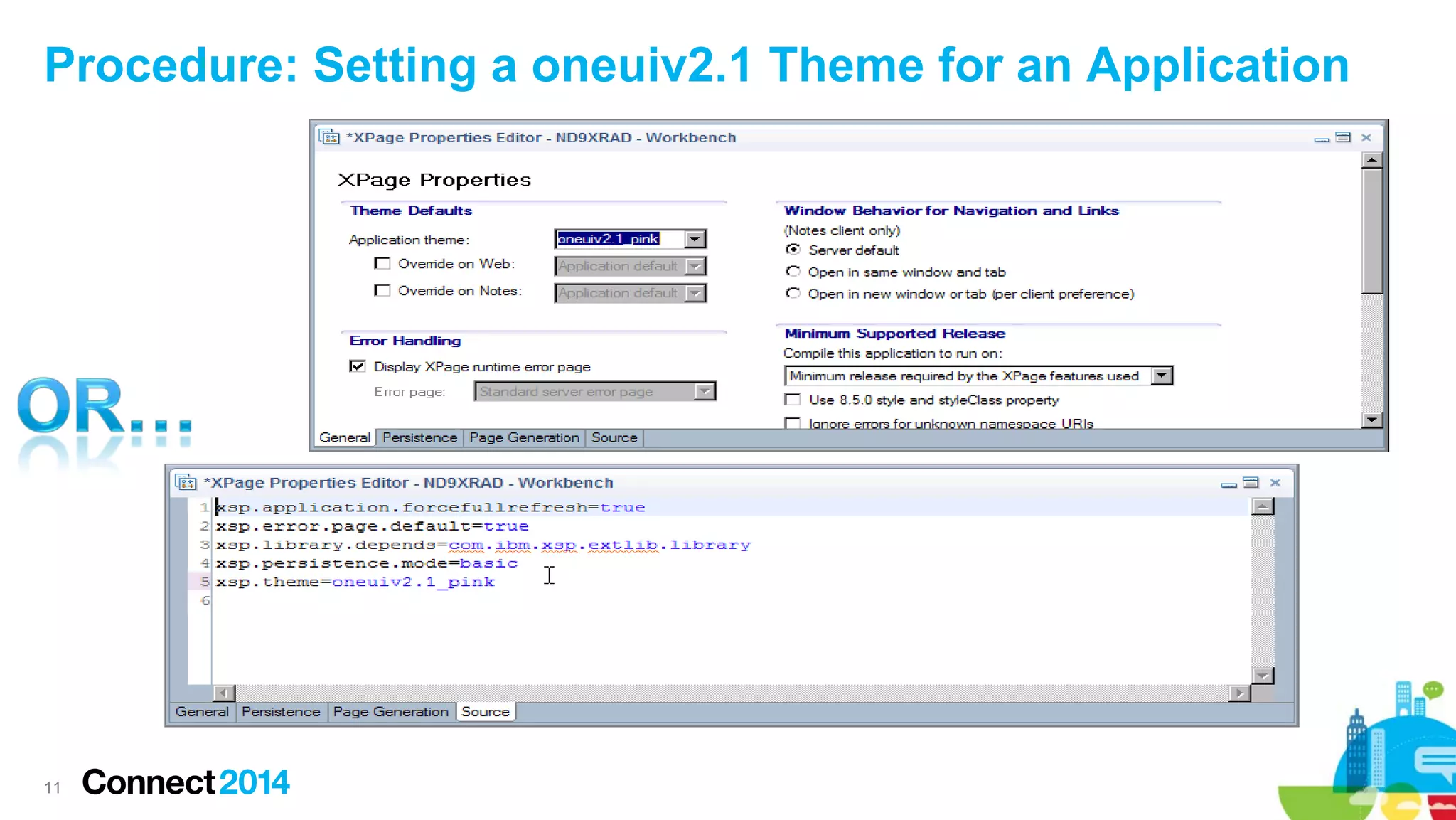
Procedure: Setting a oneuiv2.1 Theme for an Application

11
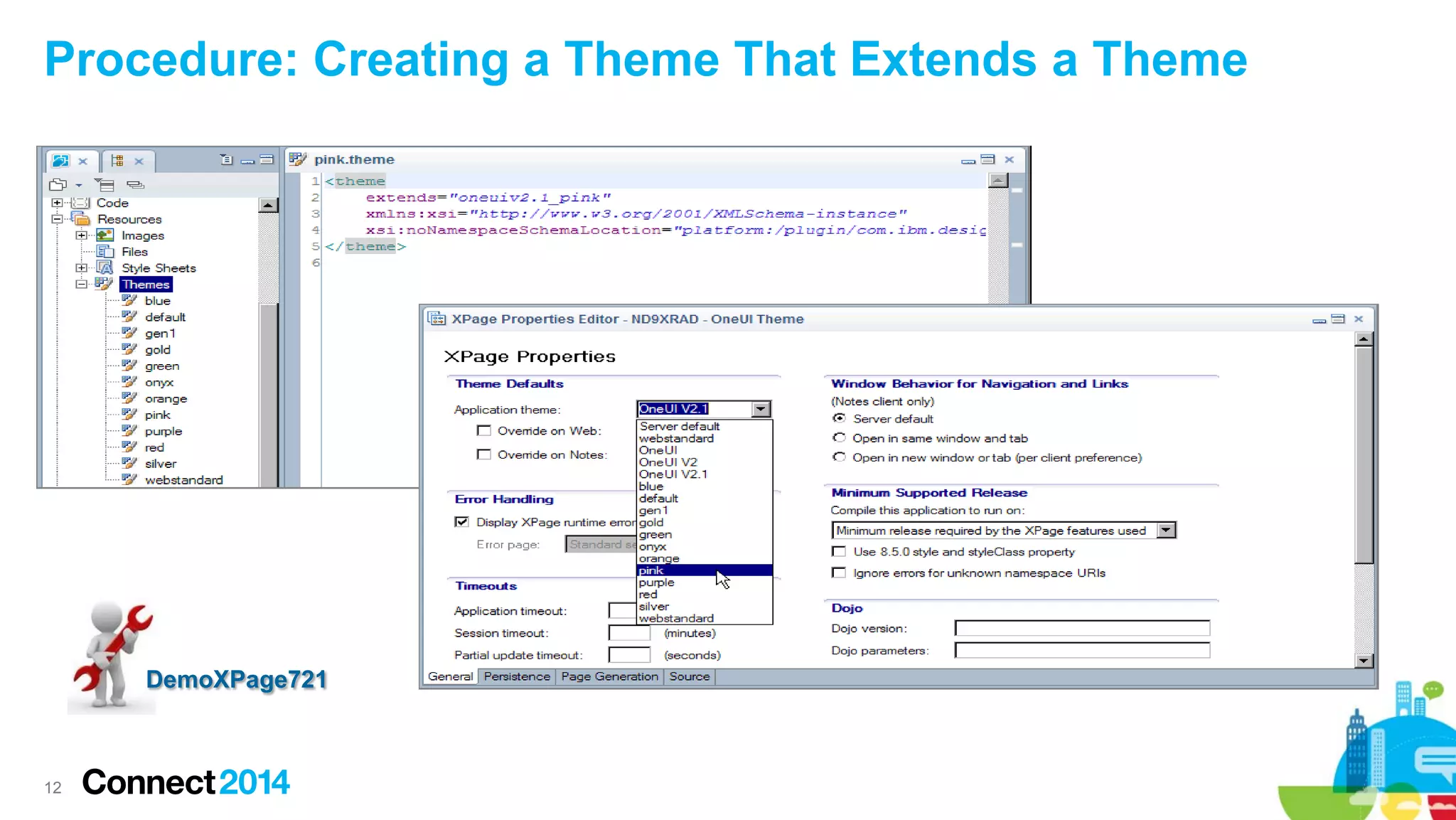
Procedure: Creating a Theme That Extends a Theme

DemoXPage721

12
 Prerequisites & Configuration
 OneUI version 2.1 Themes
 Tree Nodes and Navigators
 Application Layout Design Framework
 Designing an Application Layout in a Custom Control
 Navigation and Context
 Application Layout Design strategies
 Wrap up

13
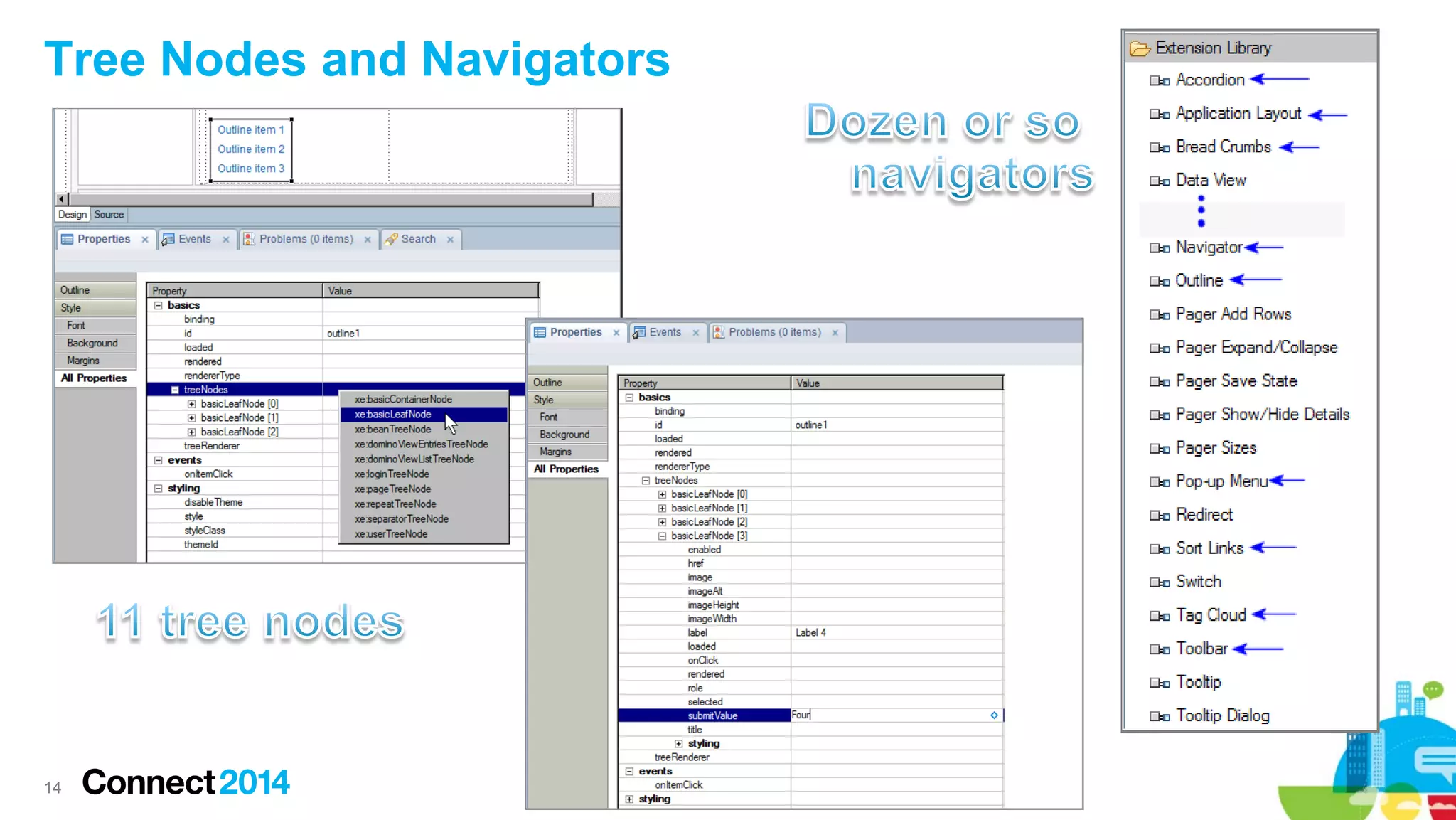
Tree Nodes and Navigators

14
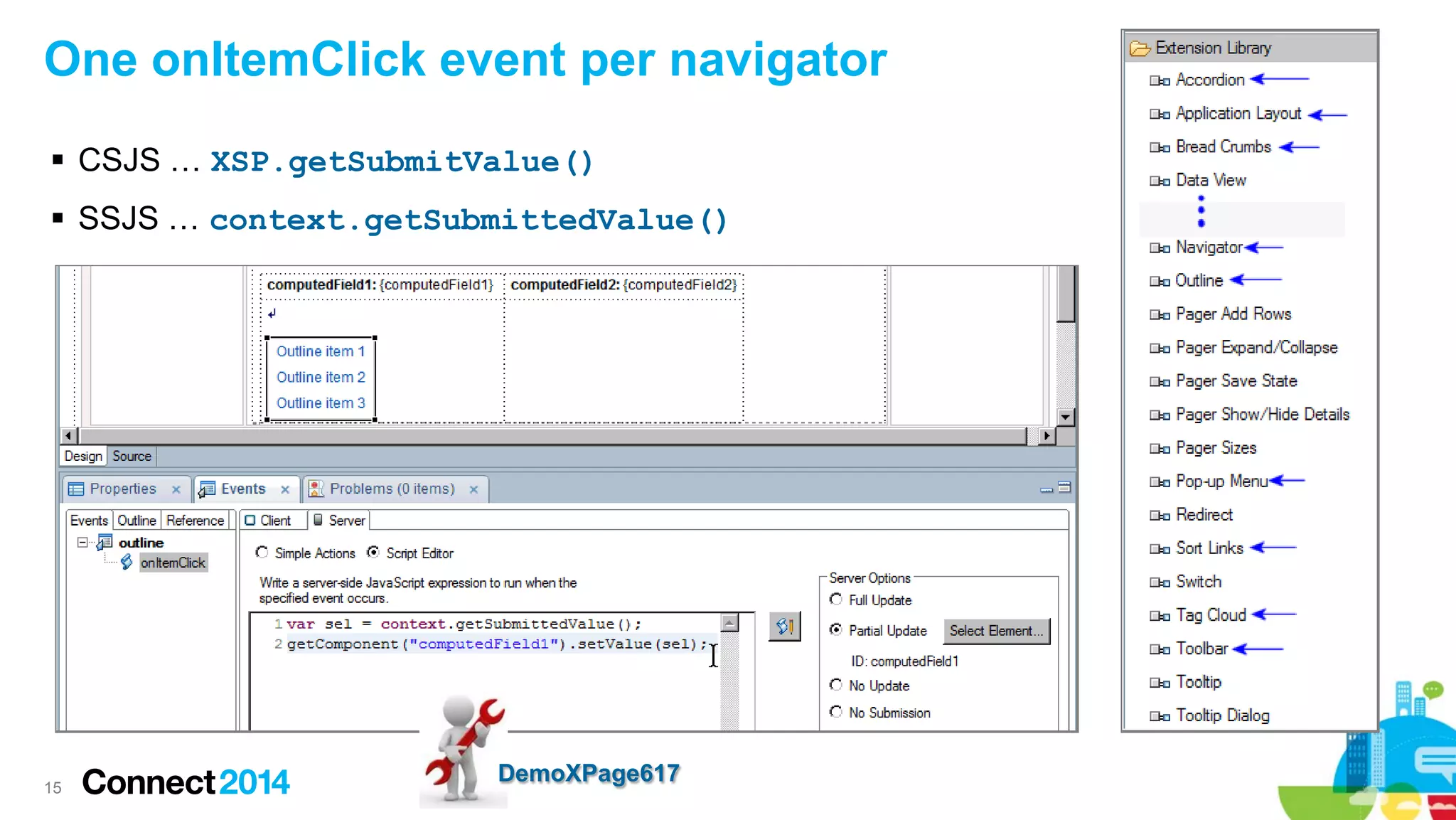
One onItemClick event per navigator
 CSJS … XSP.getSubmitValue()
 SSJS … context.getSubmittedValue()

15

DemoXPage617
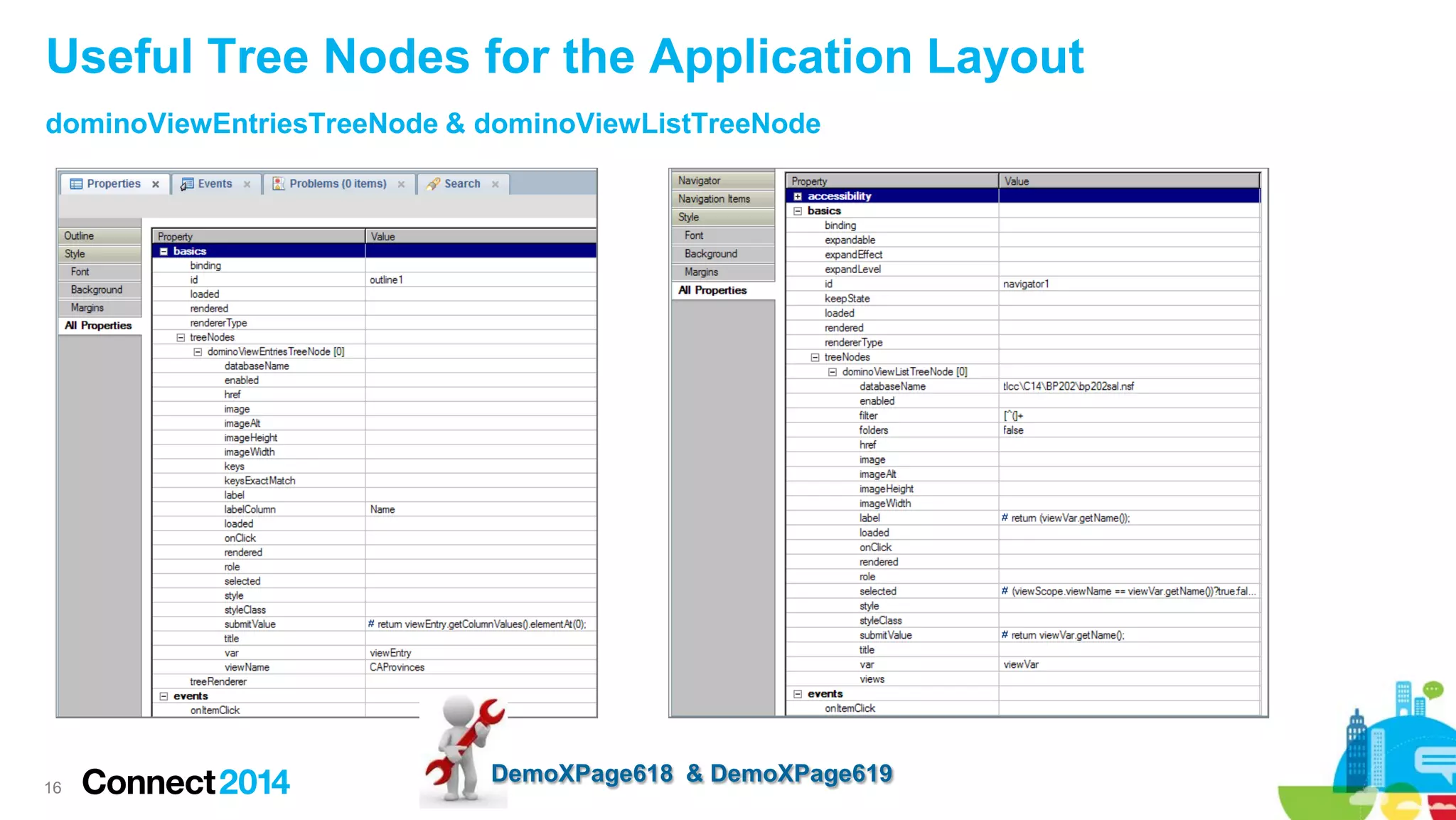
Useful Tree Nodes for the Application Layout
dominoViewEntriesTreeNode & dominoViewListTreeNode

16

DemoXPage618 & DemoXPage619
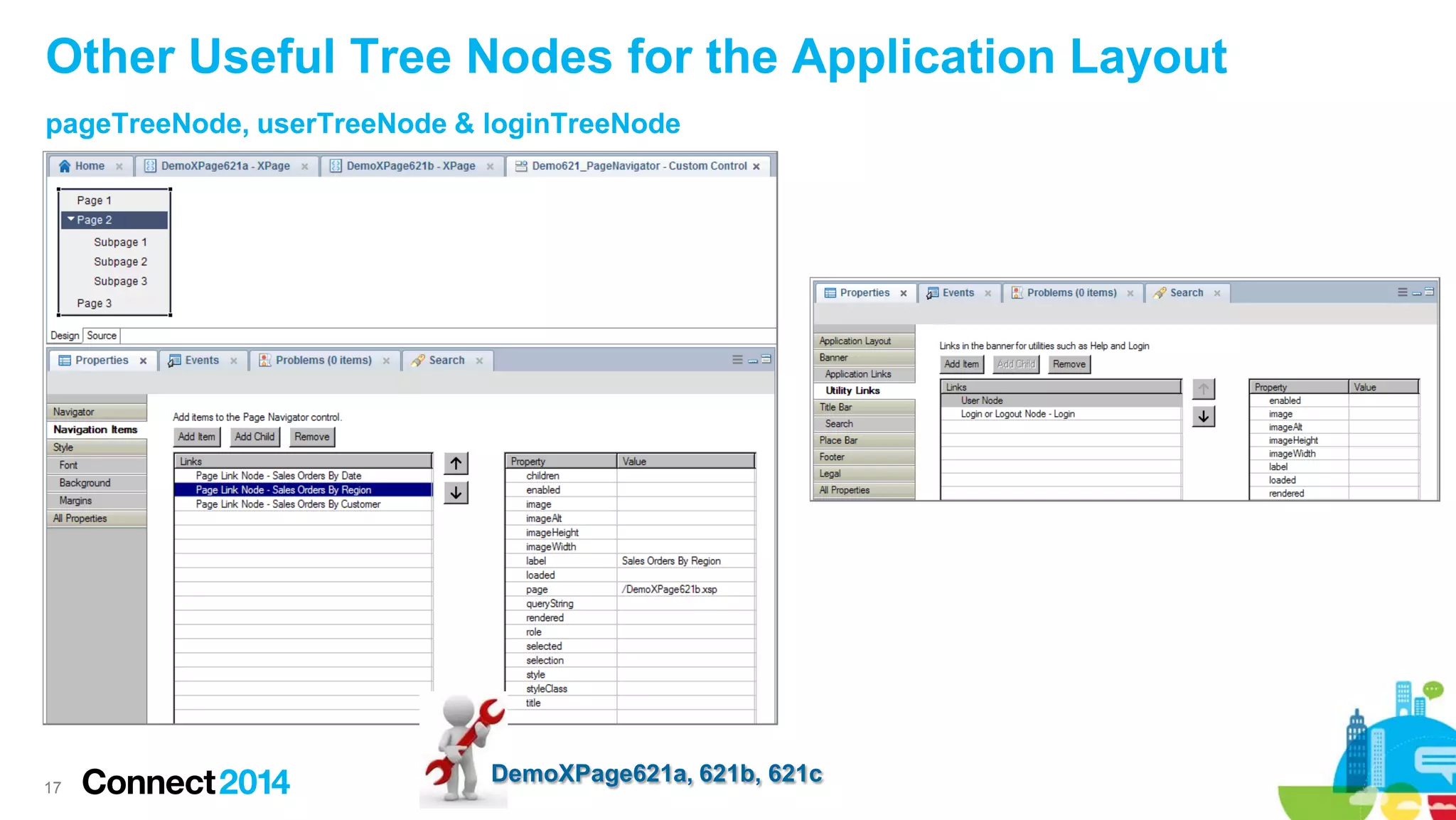
Other Useful Tree Nodes for the Application Layout
pageTreeNode, userTreeNode & loginTreeNode

17

DemoXPage621a, 621b, 621c
 Prerequisites & Configuration
 OneUI version 2.1 Themes
 Tree Nodes and Navigators
 Application Layout Design Framework
 Designing an Application Layout in a Custom Control
 Navigation and Context
 Application Layout Design strategies
 Wrap up

18
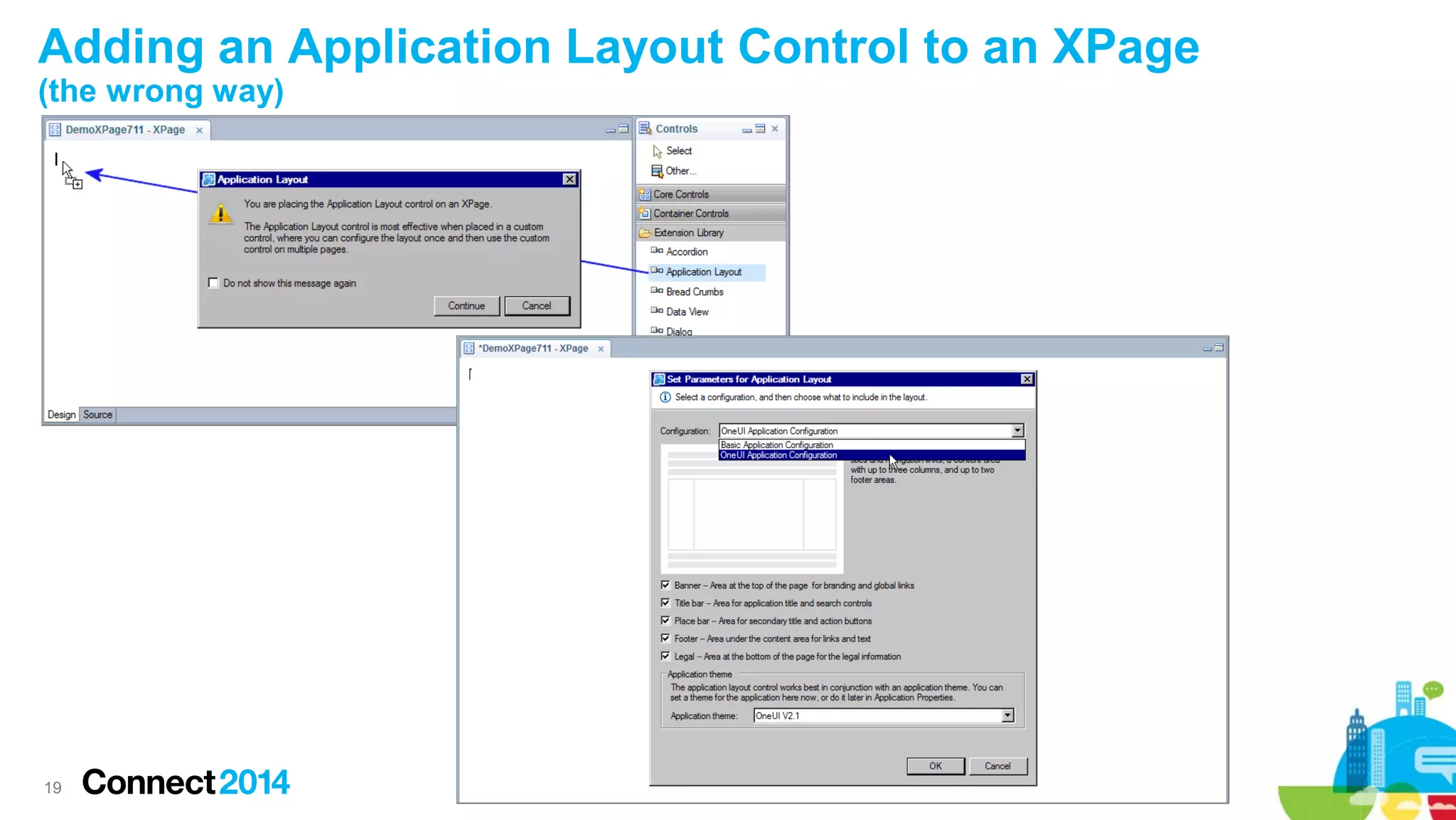
Adding an Application Layout Control to an XPage
(the wrong way)

19
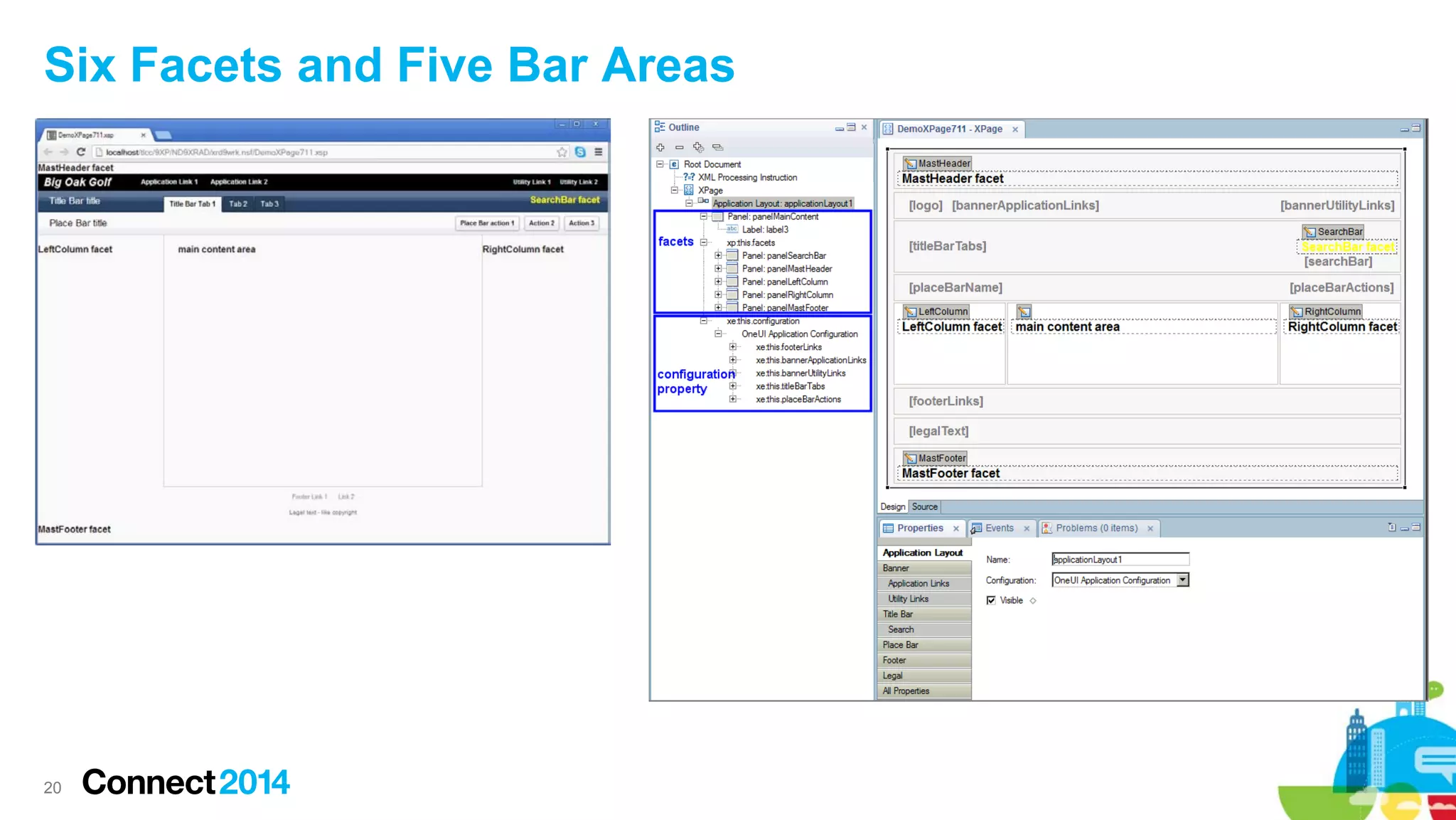
Six Facets and Five Bar Areas

20
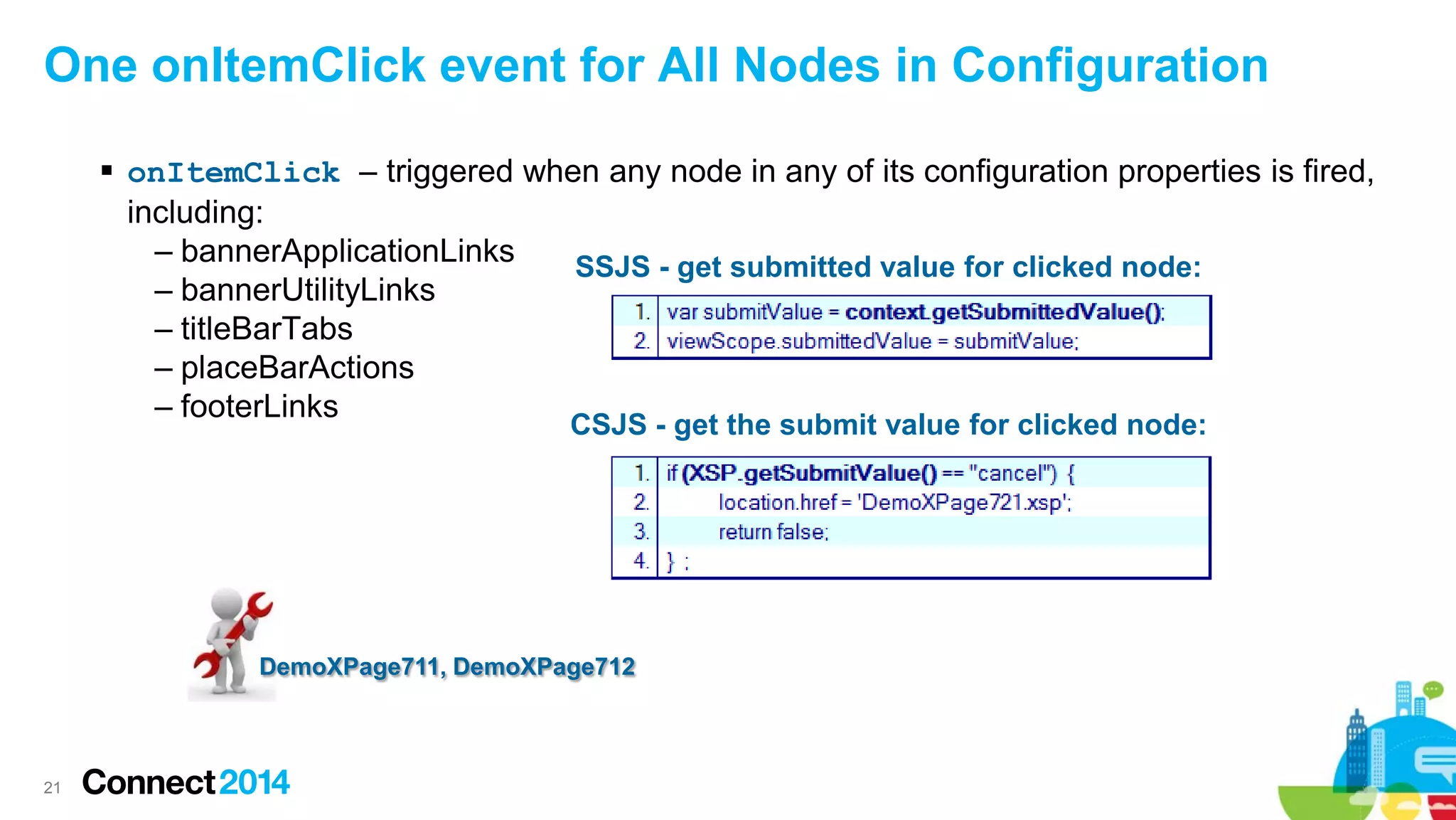
One onItemClick event for All Nodes in Configuration
 onItemClick – triggered when any node in any of its configuration properties is fired,
including:
– bannerApplicationLinks
SSJS - get submitted value for clicked node:
– bannerUtilityLinks
– titleBarTabs
– placeBarActions
– footerLinks
CSJS - get the submit value for clicked node:

DemoXPage711, DemoXPage712

21
 Prerequisites & Configuration
 OneUI version 2.1 Themes
 Tree Nodes and Navigators
 Application Layout Design Framework
 Designing an Application Layout in a Custom Control
 Navigation and Context
 Application Layout Design strategies
 Wrap up

22
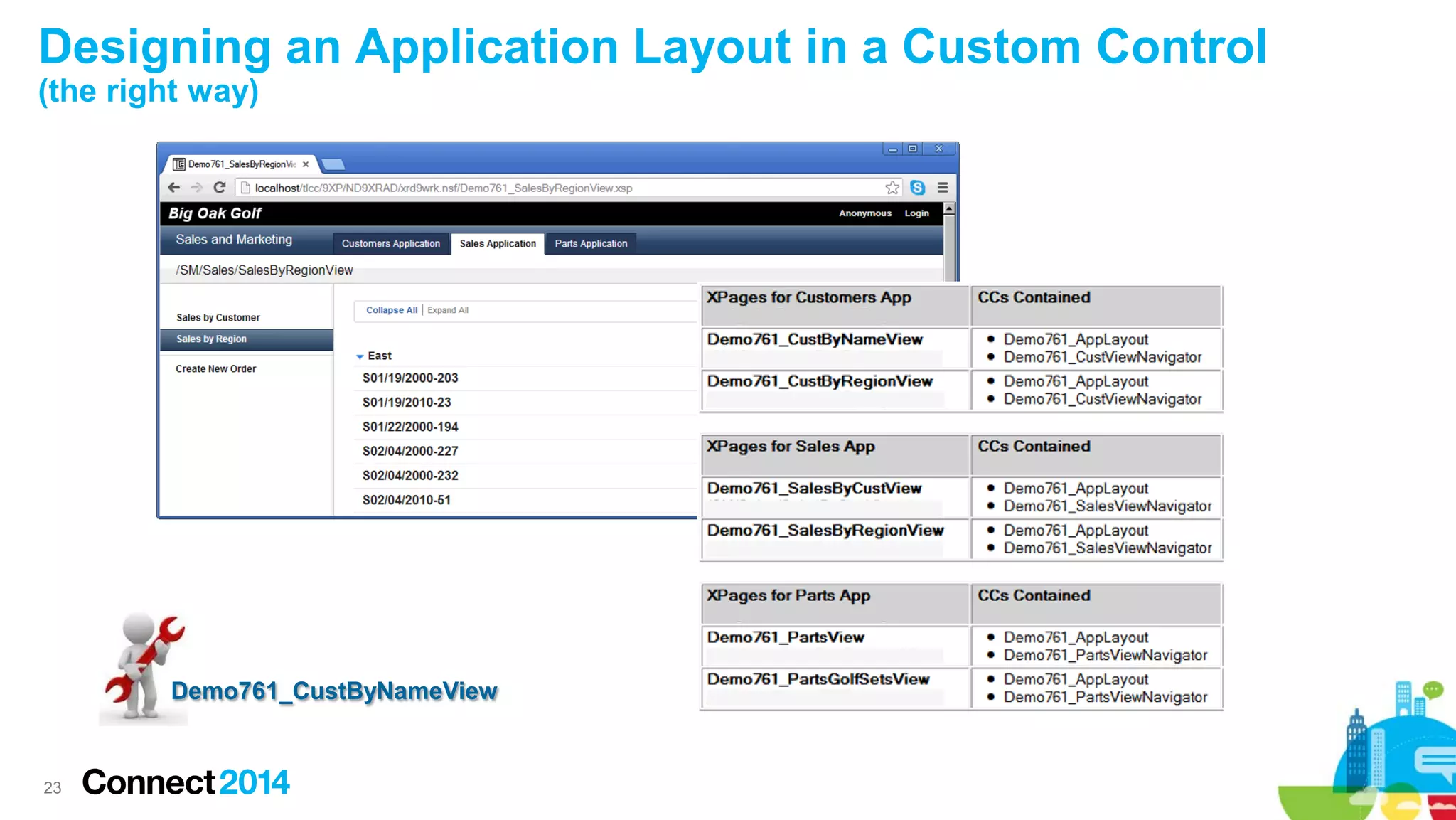
Designing an Application Layout in a Custom Control
(the right way)

Demo761_CustByNameView

23
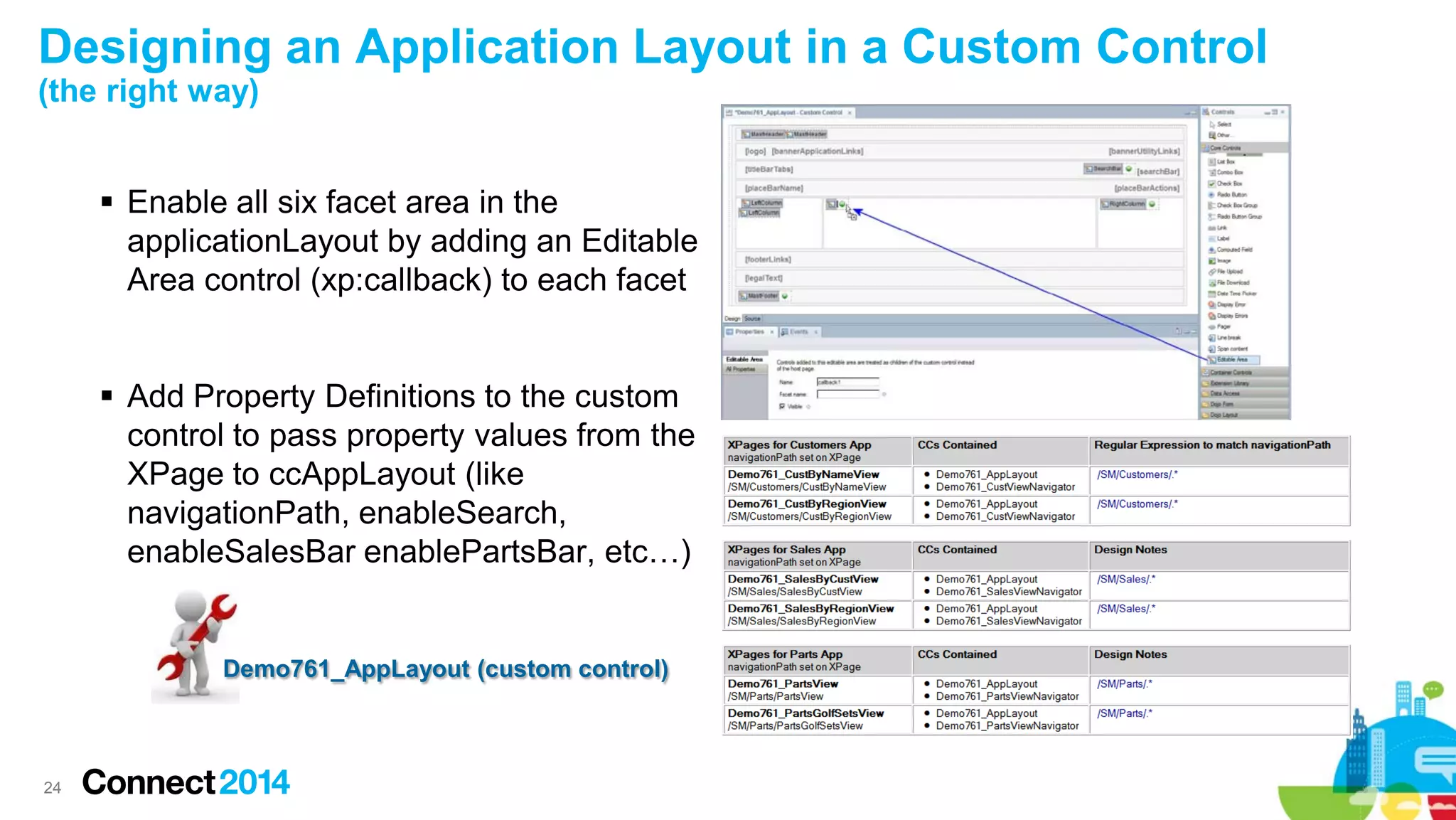
Designing an Application Layout in a Custom Control
(the right way)
 Enable all six facet area in the
applicationLayout by adding an Editable
Area control (xp:callback) to each facet

 Add Property Definitions to the custom
control to pass property values from the
XPage to ccAppLayout (like
navigationPath, enableSearch,
enableSalesBar enablePartsBar, etc…)

Demo761_AppLayout (custom control)

24
Designing an Application Layout in a Custom Control
(procedure)
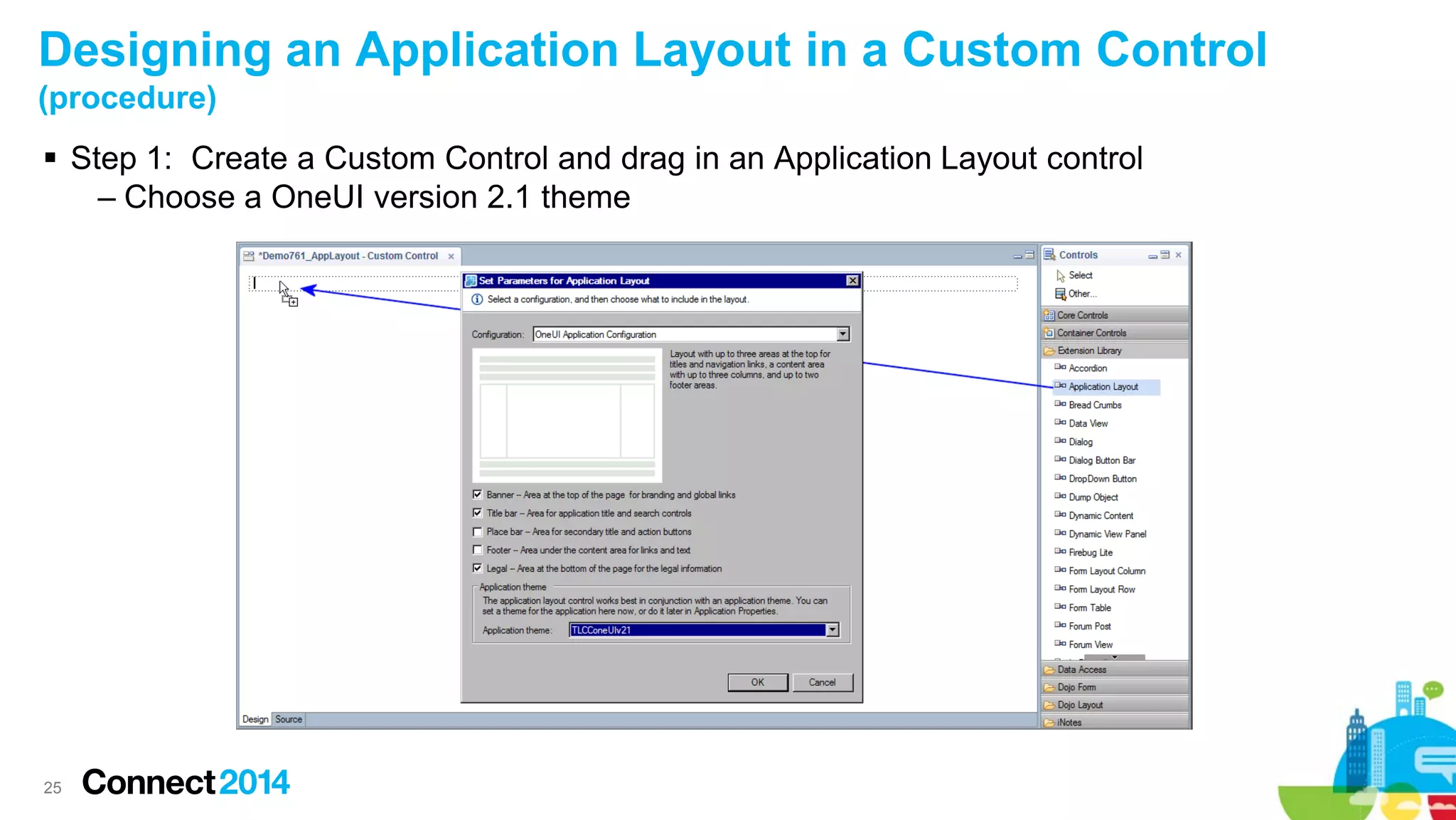
 Step 1: Create a Custom Control and drag in an Application Layout control
– Choose a OneUI version 2.1 theme

25
Designing an Application Layout in a Custom Control
(procedure continued)
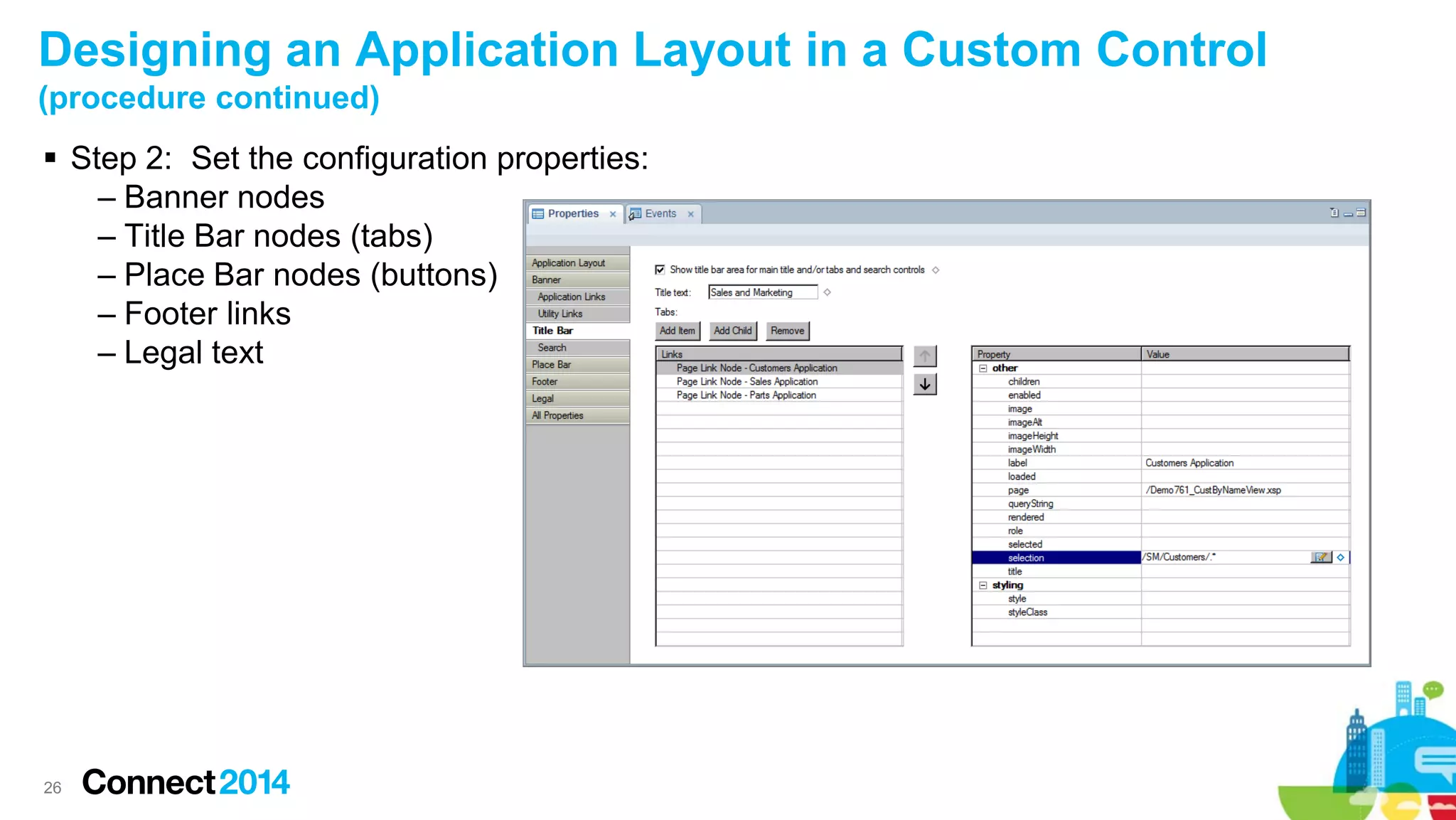
 Step 2: Set the configuration properties:
– Banner nodes
– Title Bar nodes (tabs)
– Place Bar nodes (buttons)
– Footer links
– Legal text

26
Designing an Application Layout in a Custom Control
(procedure continued)
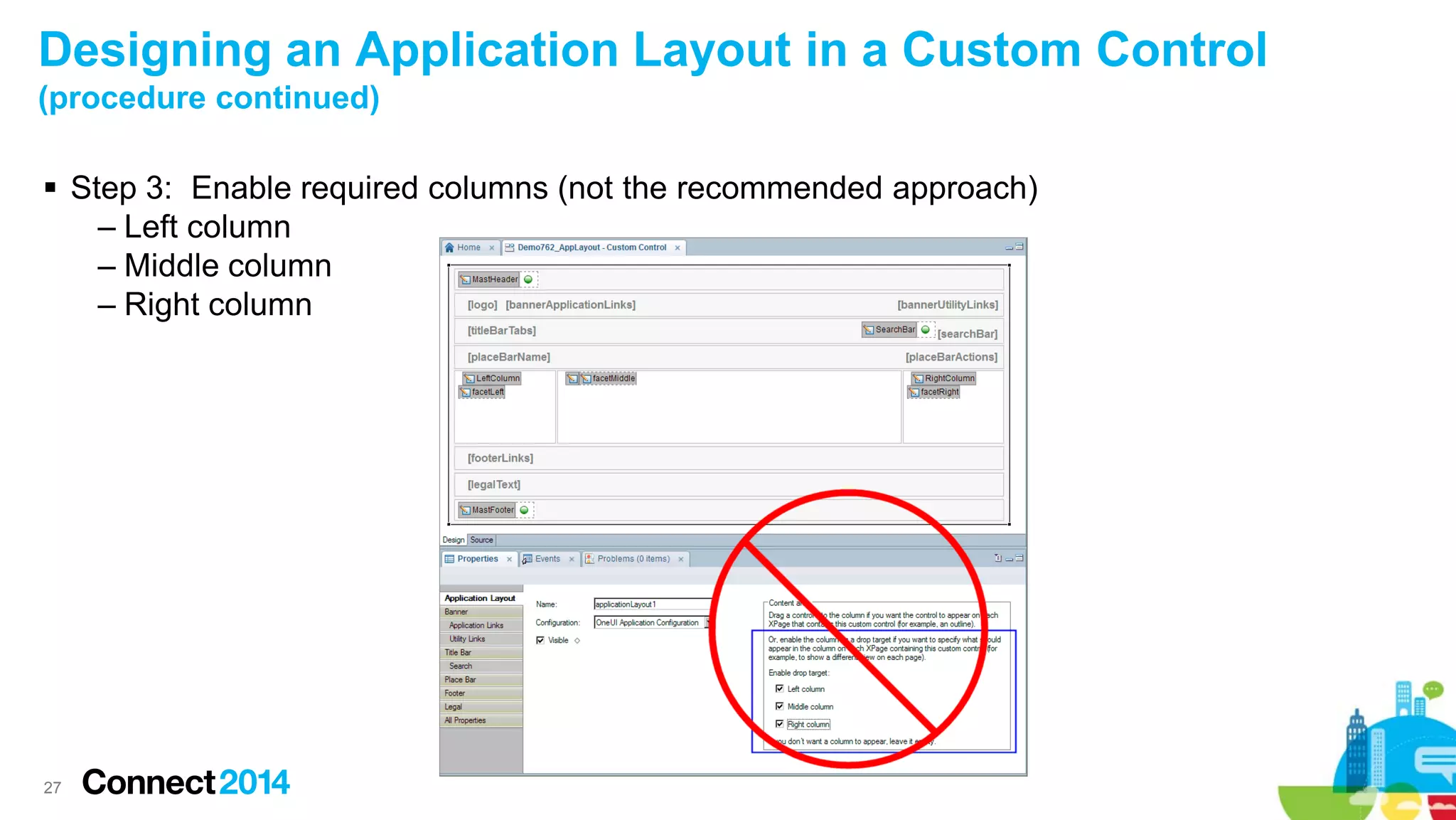
 Step 3: Enable required columns (not the recommended approach)
– Left column
– Middle column
– Right column

27
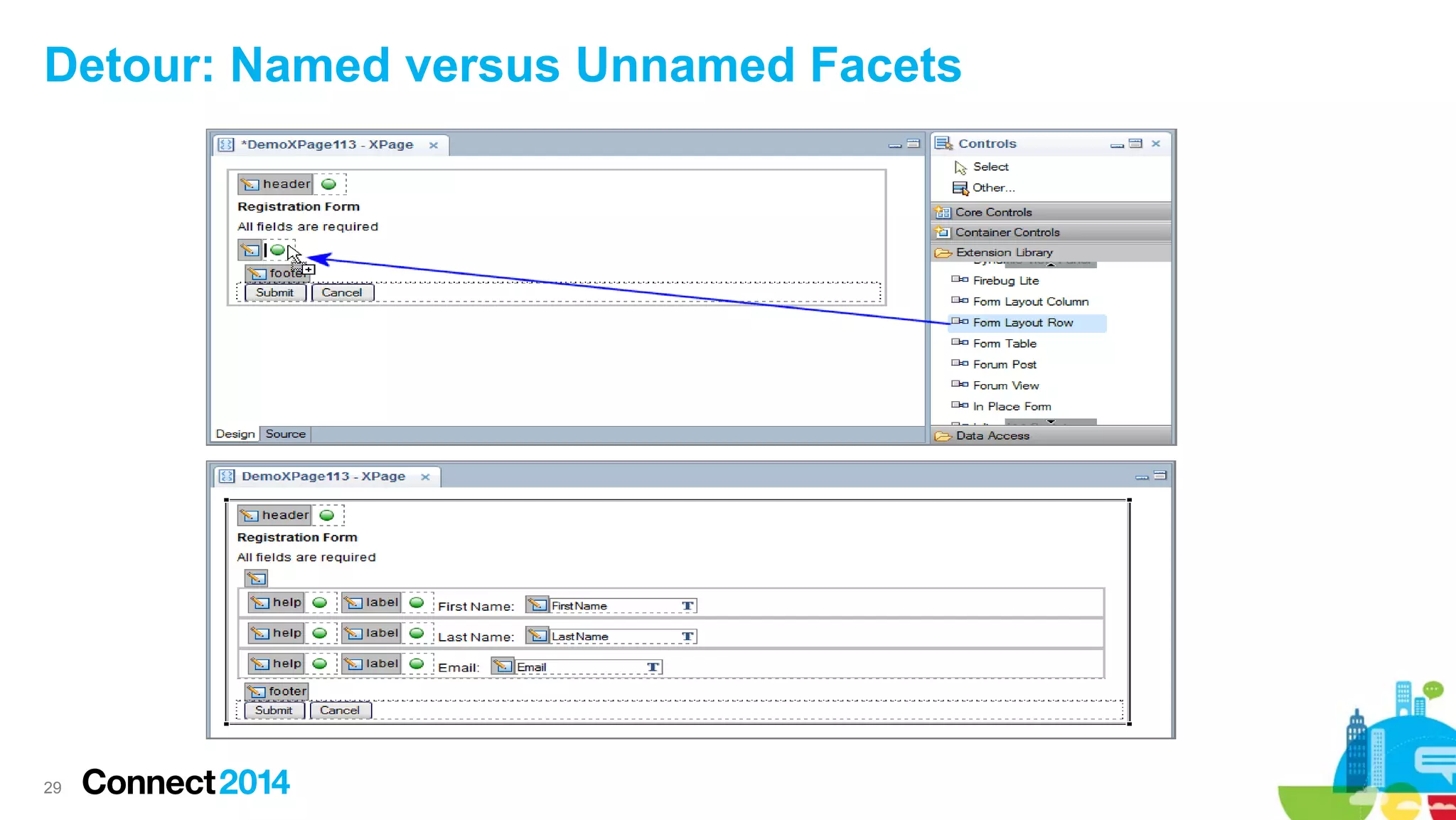
Detour: What’s a facet?
A.

A named area in a control, addressable via xp:key

B.

The resulting drop location to add a component for an Editable Area added to a
custom control.

C.

A named child instead of a sequential one. Only used if the parent chooses to.
Sequential children are comparatively autonomous.

D.

All of the above.

E.

None of the above.

28
Detour: Named versus Unnamed Facets

29
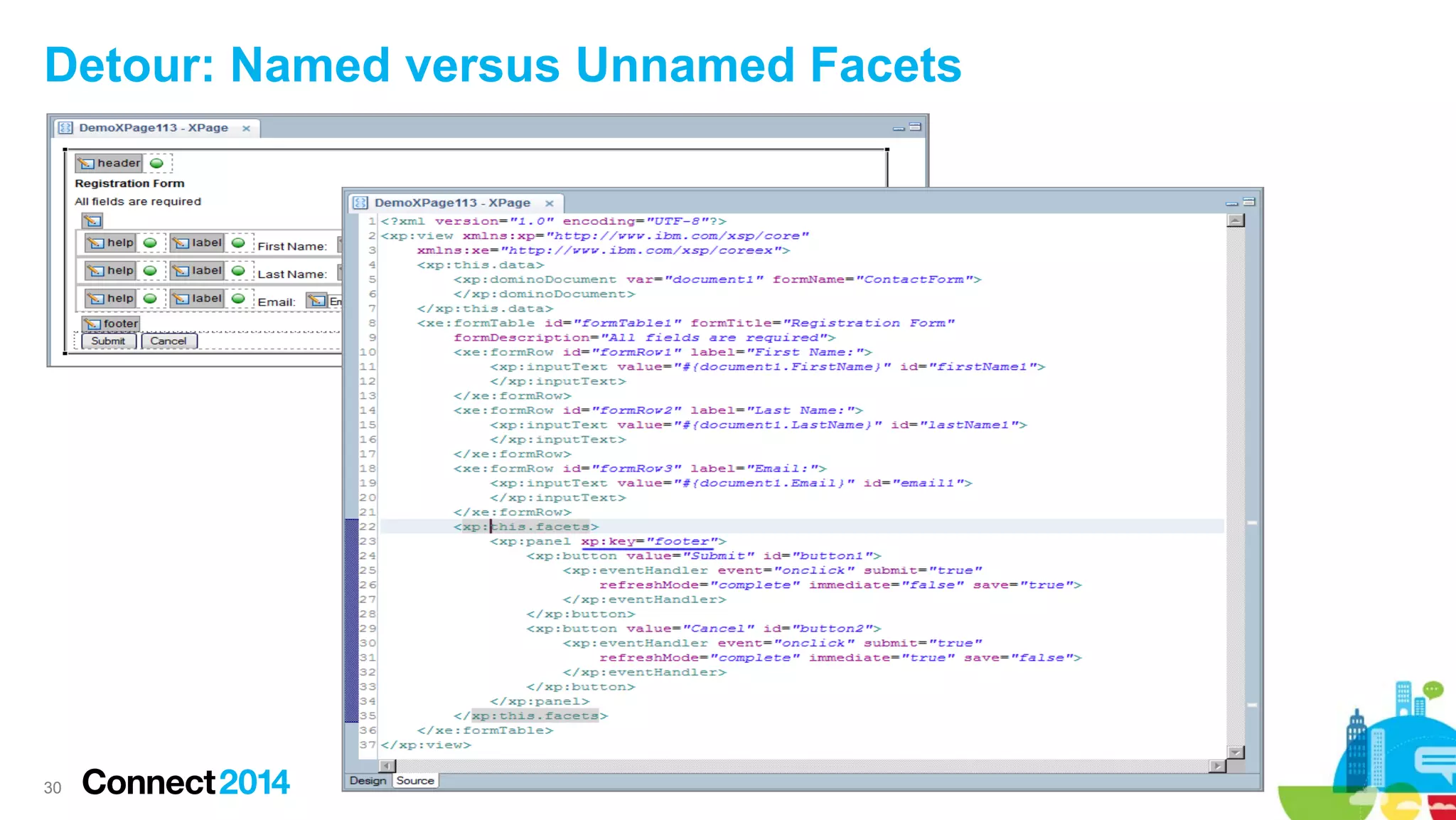
Detour: Named versus Unnamed Facets

30
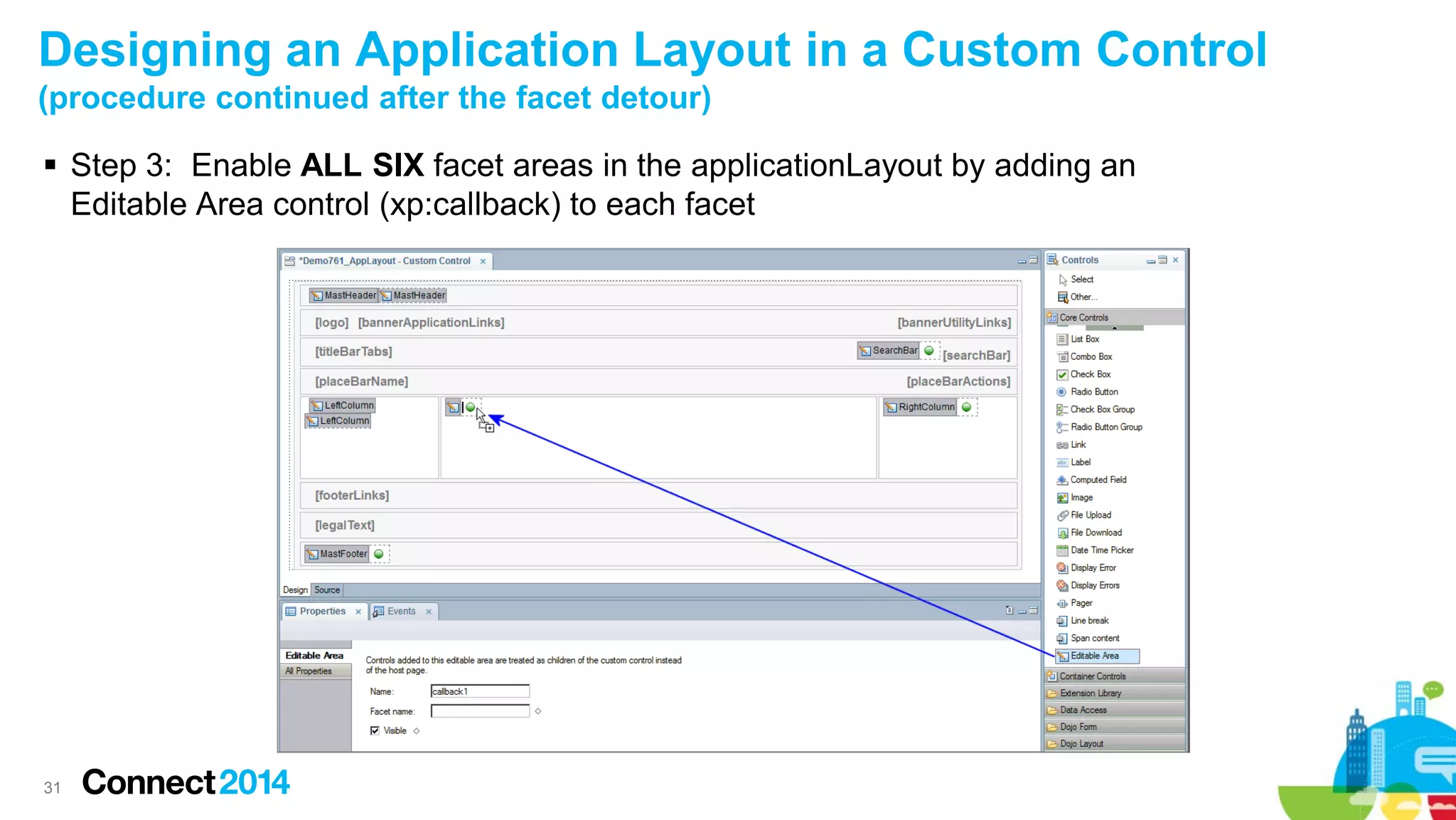
Designing an Application Layout in a Custom Control
(procedure continued after the facet detour)
 Step 3: Enable ALL SIX facet areas in the applicationLayout by adding an
Editable Area control (xp:callback) to each facet

31
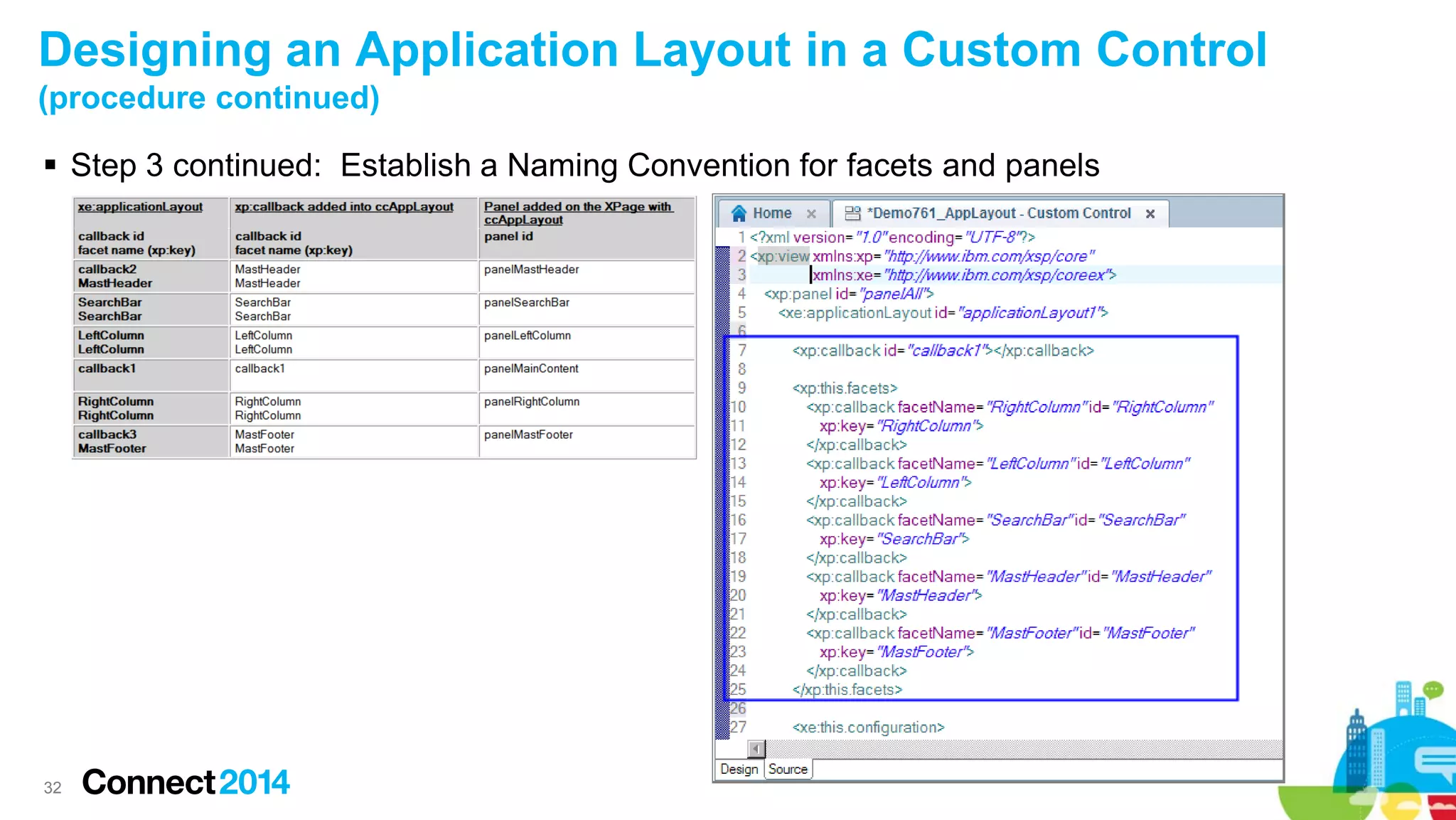
Designing an Application Layout in a Custom Control
(procedure continued)
 Step 3 continued: Establish a Naming Convention for facets and panels

32
Designing an Application Layout in a Custom Control
(procedure continued)
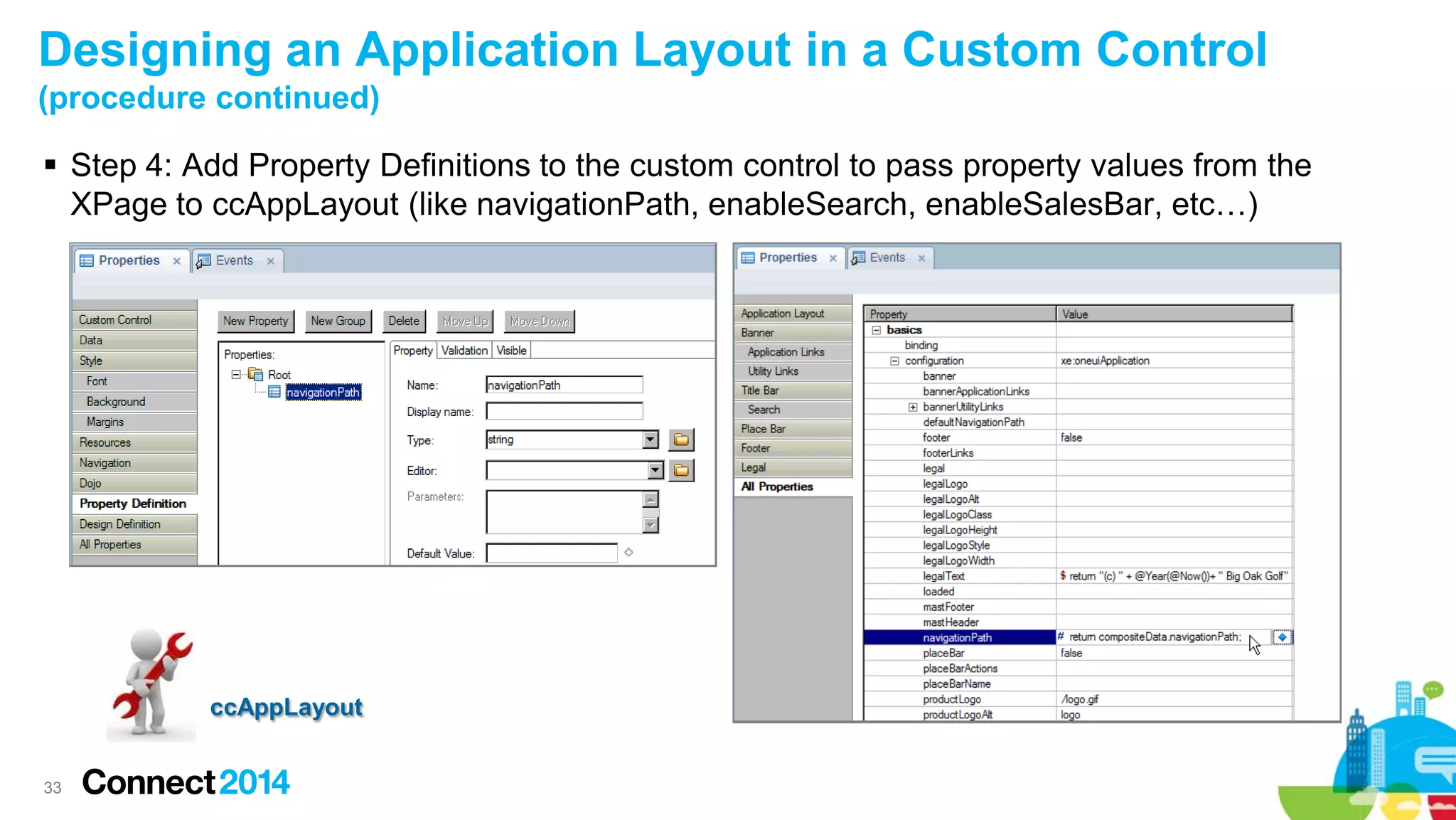
 Step 4: Add Property Definitions to the custom control to pass property values from the
XPage to ccAppLayout (like navigationPath, enableSearch, enableSalesBar, etc…)

ccAppLayout

33
 Prerequisites & Configuration
 OneUI version 2.1 Themes
 Tree Nodes and Navigators
 Application Layout Design Framework
 Designing an Application Layout in a Custom Control
 Navigation and Context
 Application Layout Design strategies
 Wrap up

34
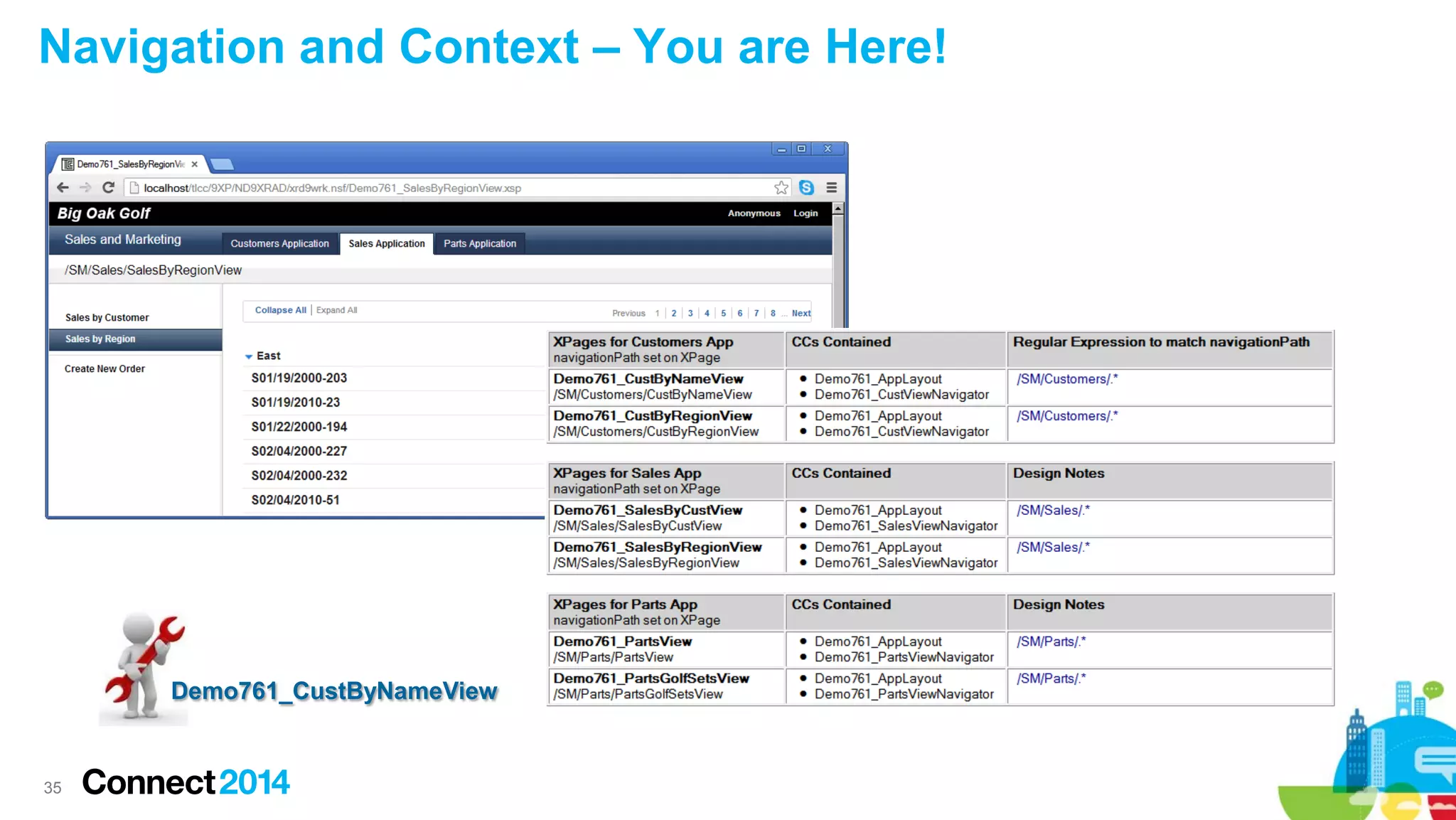
Navigation and Context – You are Here!

Demo761_CustByNameView

35
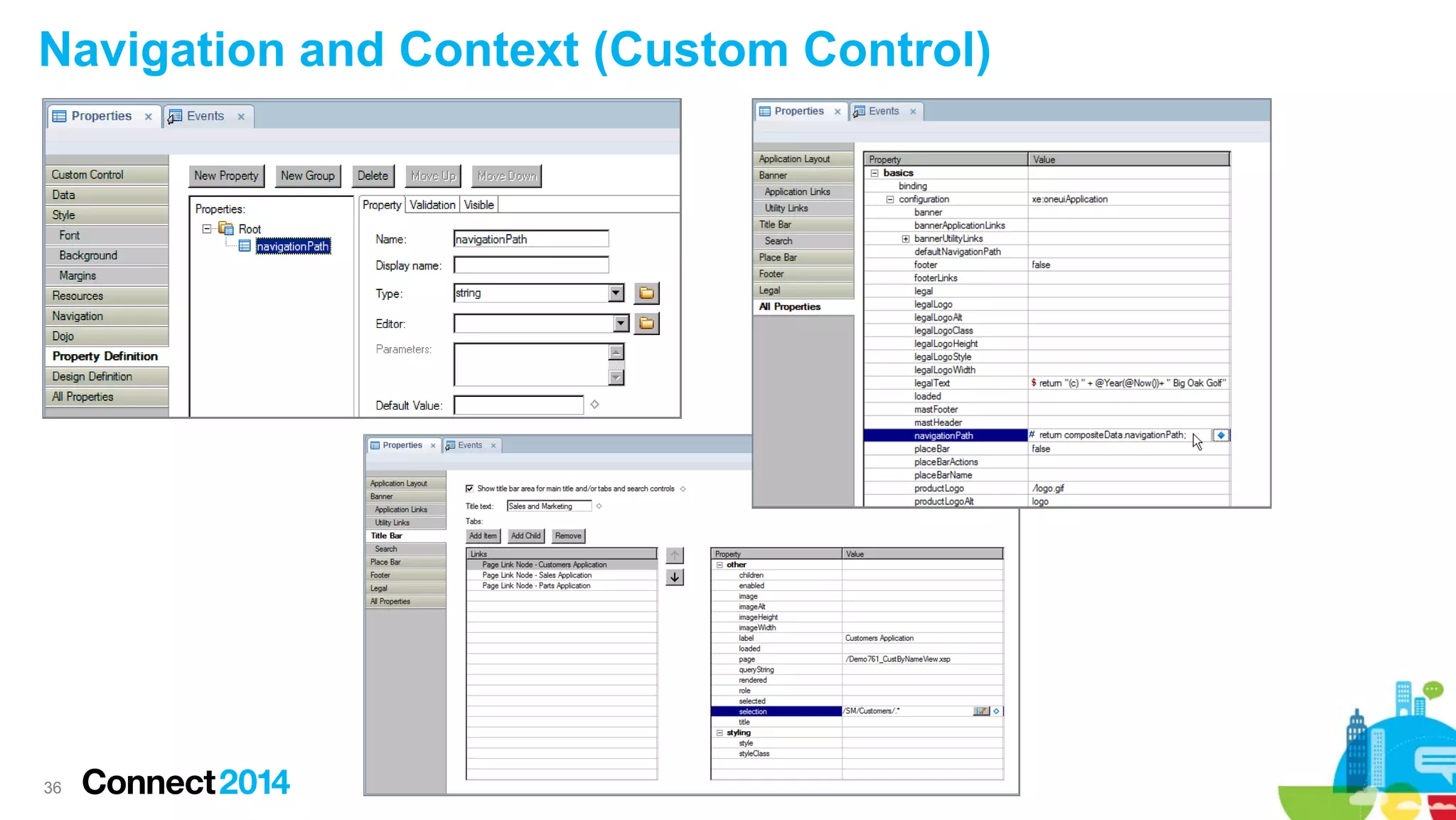
Navigation and Context (Custom Control)

36
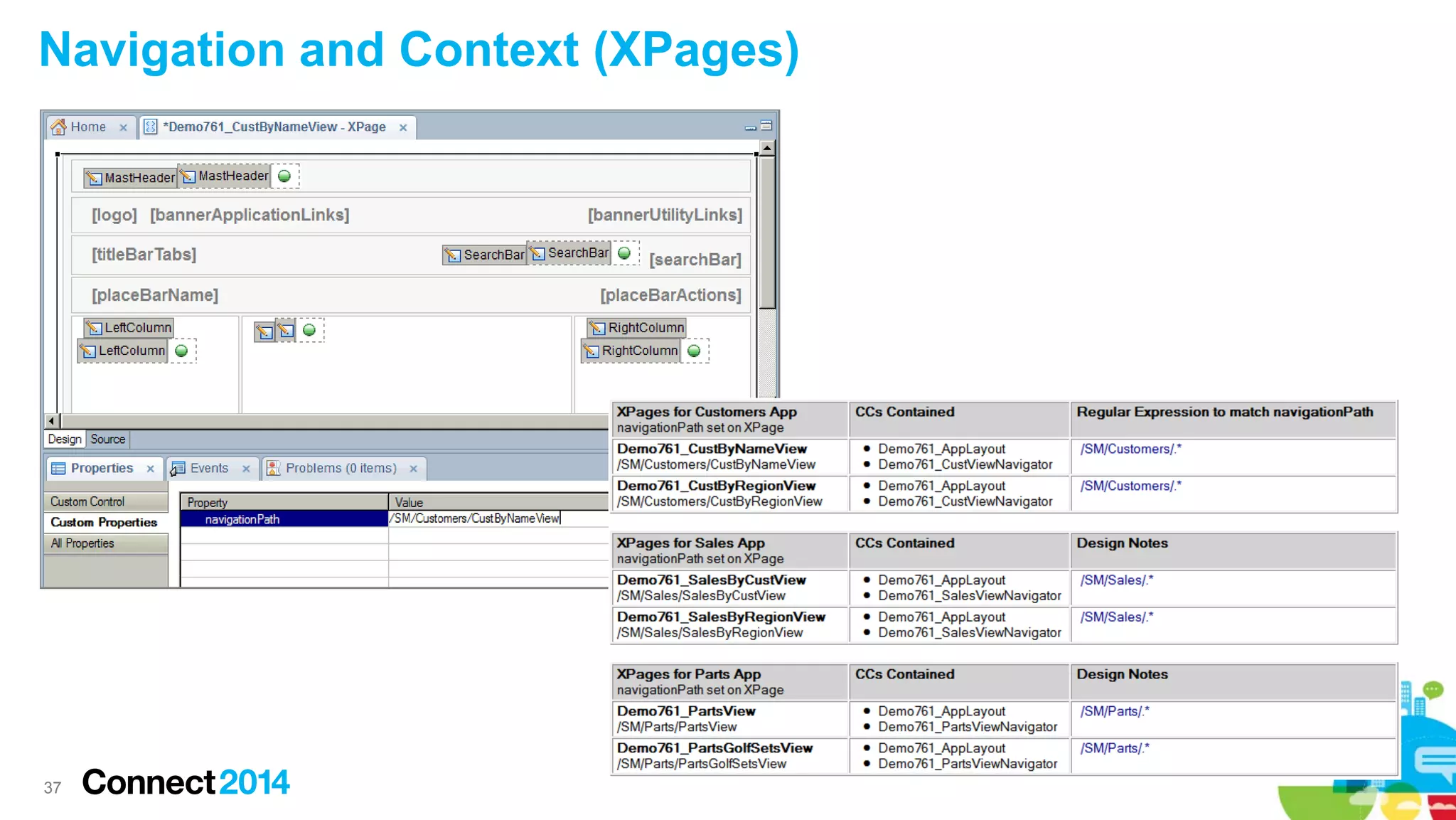
Navigation and Context (XPages)

37
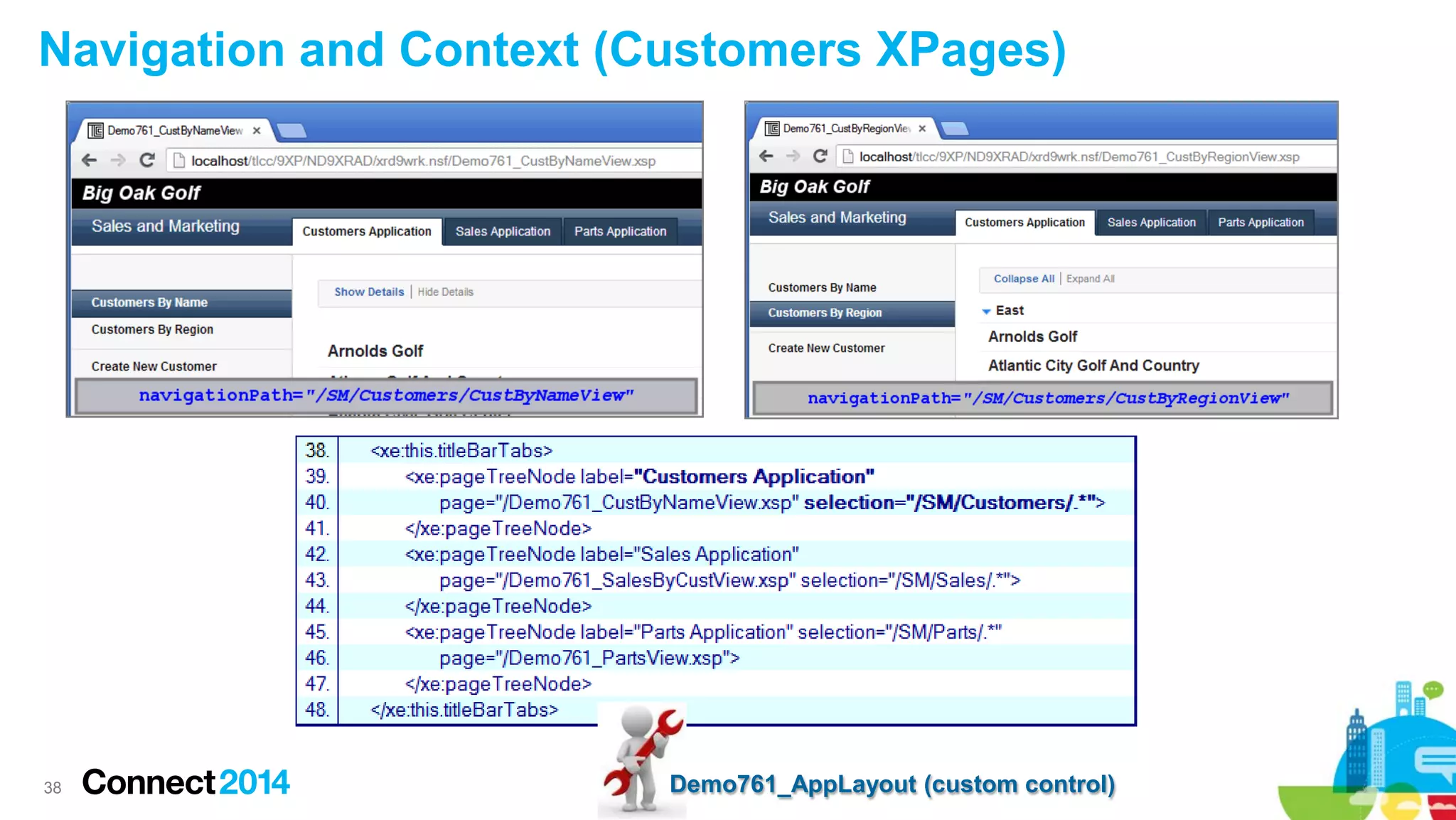
Navigation and Context (Customers XPages)

38

Demo761_AppLayout (custom control)
 Prerequisites & Configuration
 OneUI version 2.1 Themes
 Tree Nodes and Navigators
 Application Layout Design Framework
 Designing an Application Layout in a Custom Control
 Navigation and Context
 Application Layout Design strategies
 Wrap up

39
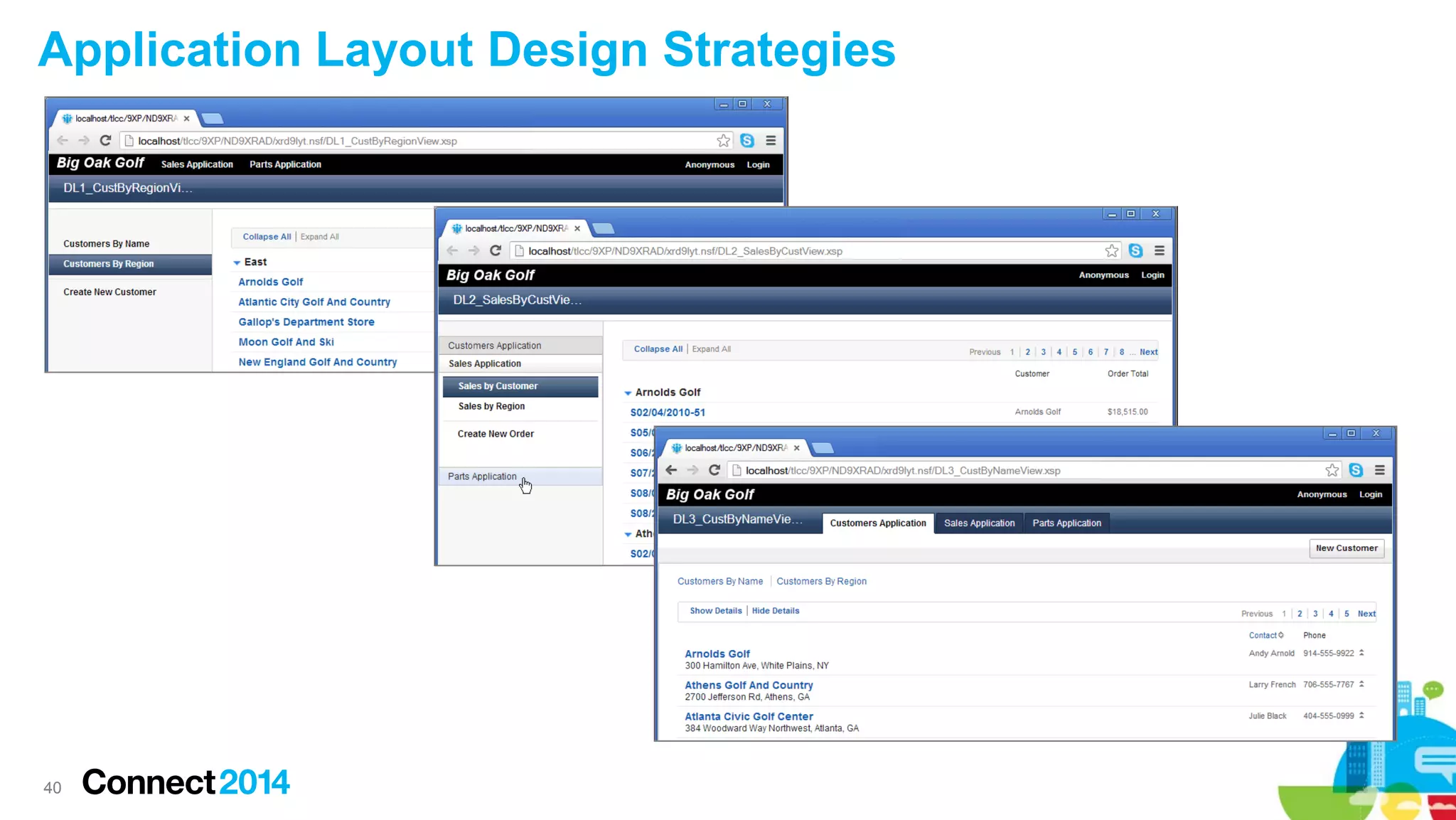
Application Layout Design Strategies

40
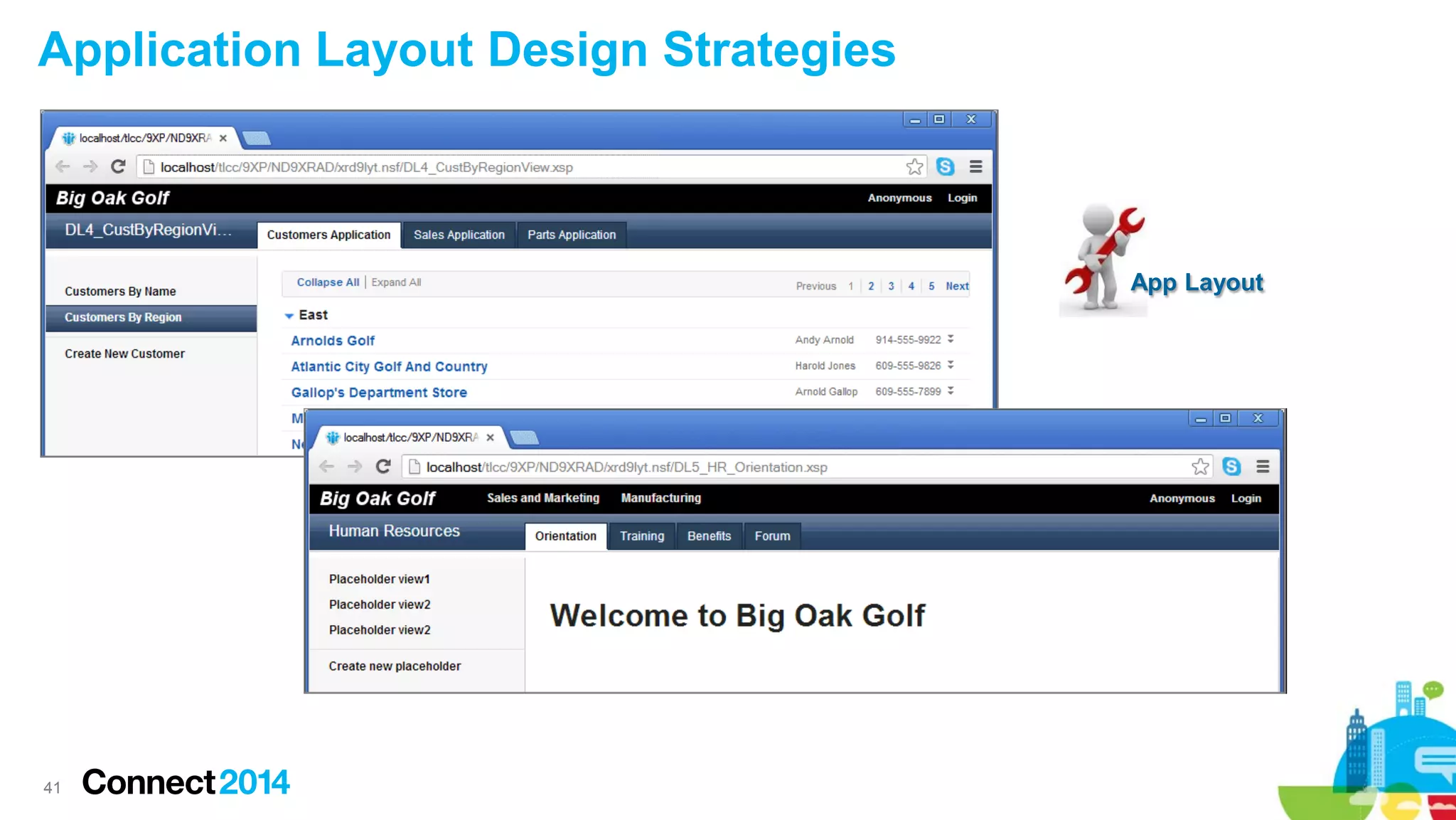
Application Layout Design Strategies

App Layout

41
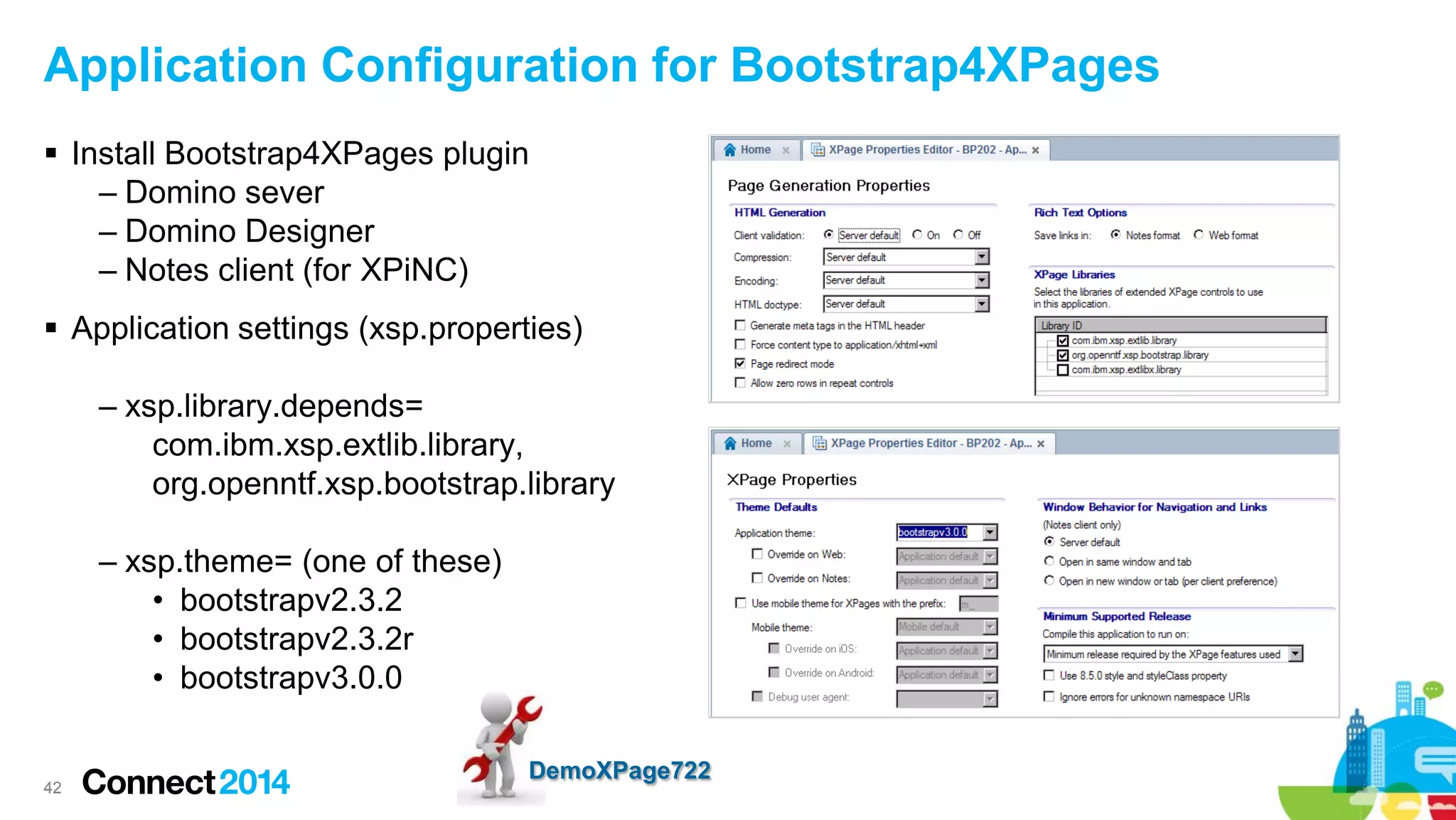
Application Configuration for Bootstrap4XPages
 Install Bootstrap4XPages plugin
– Domino sever
– Domino Designer
– Notes client (for XPiNC)
 Application settings (xsp.properties)
– xsp.library.depends=
com.ibm.xsp.extlib.library,
org.openntf.xsp.bootstrap.library
– xsp.theme= (one of these)
• bootstrapv2.3.2
• bootstrapv2.3.2r
• bootstrapv3.0.0

42

DemoXPage722
 Prerequisites & Configuration
 OneUI version 2.1 Themes
 Tree Nodes and Navigators
 Application Layout Design Framework
 Designing an Application Layout in a Custom Control
 Navigation and Context
 Application Layout Design strategies
 Wrap up

43
Get the Slides and Demo Database

http://www.tlcc.com/BP202

44
Key Points
 OneUI is a very good idea
 The Application Layout control is used to Rapidly develop a consistent user interface that
can implement the “One UI” design framework (awesome)
 Application Layout control + Bootstrap4XPages (totally awesome)
 One onItemClick event per navigator
– CSJS … XSP.getSubmitValue()
– SSJS … context.getSubmittedValue()
 Enable all six facet areas in the applicationLayout by adding an Editable Area control
(xp:callback) to each facet
 Add Property Definitions to the custom control to pass property values from the XPage to
ccAppLayout (like navigationPath, enableSearch, enableSalesBar enablePartsBar, etc…)

45
 Access Connect Online to complete your session surveys using any:
– Web or mobile browser
– Connect Online kiosk onsite

46

Connect 2014 - BP202: Rapid XPages Development Using the Application Layout Control

  • 1.
    BP202: Rapid XPages Development usingthe Application Layout Control Howard Greenberg, TLCC Paul Della-Nebbia, TLCC © 2014 IBM Corporation
  • 2.
    Acknowledgements and Disclaimers Availability.References in this presentation to IBM products, programs, or services do not imply that they will be available in all countries in which IBM operates. The workshops, sessions and materials have been prepared by IBM or the session speakers and reflect their own views. They are provided for informational purposes only, and are neither intended to, nor shall have the effect of being, legal or other guidance or advice to any participant. While efforts were made to verify the completeness and accuracy of the information contained in this presentation, it is provided AS-IS without warranty of any kind, express or implied. IBM shall not be responsible for any damages arising out of the use of, or otherwise related to, this presentation or any other materials. Nothing contained in this presentation is intended to, nor shall have the effect of, creating any warranties or representations from IBM or its suppliers or licensors, or altering the terms and conditions of the applicable license agreement governing the use of IBM software. All customer examples described are presented as illustrations of how those customers have used IBM products and the results they may have achieved. Actual environmental costs and performance characteristics may vary by customer. Nothing contained in these materials is intended to, nor shall have the effect of, stating or implying that any activities undertaken by you will result in any specific sales, revenue growth or other results. © Copyright IBM Corporation 2014. All rights reserved.  U.S. Government Users Restricted Rights - Use, duplication or disclosure restricted by GSA ADP Schedule Contract with IBM Corp.  IBM, the IBM logo, ibm.com, Domino, and Notes are trademarks or registered trademarks of International Business Machines Corporation in the United States, other countries, or both. If these and other IBM trademarked terms are marked on their first occurrence in this information with a trademark symbol (® or ™), these symbols indicate U.S. registered or common law trademarks owned by IBM at the time this information was published. Such trademarks may also be registered or common law trademarks in other countries. A current list of IBM trademarks is available on the Web at “Copyright and trademark information” at www.ibm.com/legal/copytrade.shtml Other company, product, or service names may be trademarks or service marks of others. 2
  • 3.
    Who are we? Howard Greenberg & Paul Della-Nebbia – Teaching Notes and Domino since 1994 – Partners at TLCC, the Leader in Notes and Domino Training – And Now, the Leader in XPages Training 3
  • 4.
    About TLCC  Lotsof XPages Courses for both 9 and 8.5! ‒ ‒ ‒ ‒ ‒ Introduction to XPages Development … FREE !! JavaScript for XPages Development XPages Development 1 XPages Development 2 Rapid XPages Development Using the Application Layout and Dojo UI Controls ‒ Mobile XPages for Domino ‒ Java 1 for XPages Developers ‒ Java 2 for XPages Developers  Self Paced Training ‒ Learn anywhere! ‒ An Instructor is a click away  Instructor Led (Private) ‒ Online or at your site  TLCC Mentoring Services 4
  • 5.
    Application Layout control The Application Layout control is used to Rapidly develop a consistent user interface that can implement the “One UI” design framework 5
  • 6.
     Prerequisites &Configuration  OneUI version 2.1 Themes  Tree Nodes and Navigators  Application Layout Design Framework  Designing an Application Layout in a Custom Control  Navigation and Context  Application Layout Design strategies  Wrap up 6
  • 7.
    System Prerequisites  Notesand Domino 8.5.3 (Install Extension Library from OpenNTF or IBM’s Update Pack 1) – Domino Server • Copy files or use an Update Site Database (preferred) – Designer • Install Plugin – Notes client (only needed for XPINC apps) • Use Update Site  Notes and Domino 9 (Extension Library is already included for Domino server, Designer, and Notes clients) – Optionally install Bootstrap4XPages plugin - to use Bootstrap and Bootstrap responsive themes 7
  • 8.
  • 9.
     Prerequisites &Configuration  OneUI version 2.1 Themes  Tree Nodes and Navigators  Application Layout Design Framework  Designing an Application Layout in a Custom Control  Navigation and Context  Application Layout Design strategies  Wrap up 9
  • 10.
  • 11.
    Procedure: Setting aoneuiv2.1 Theme for an Application 11
  • 12.
    Procedure: Creating aTheme That Extends a Theme DemoXPage721 12
  • 13.
     Prerequisites &Configuration  OneUI version 2.1 Themes  Tree Nodes and Navigators  Application Layout Design Framework  Designing an Application Layout in a Custom Control  Navigation and Context  Application Layout Design strategies  Wrap up 13
  • 14.
    Tree Nodes andNavigators 14
  • 15.
    One onItemClick eventper navigator  CSJS … XSP.getSubmitValue()  SSJS … context.getSubmittedValue() 15 DemoXPage617
  • 16.
    Useful Tree Nodesfor the Application Layout dominoViewEntriesTreeNode & dominoViewListTreeNode 16 DemoXPage618 & DemoXPage619
  • 17.
    Other Useful TreeNodes for the Application Layout pageTreeNode, userTreeNode & loginTreeNode 17 DemoXPage621a, 621b, 621c
  • 18.
     Prerequisites &Configuration  OneUI version 2.1 Themes  Tree Nodes and Navigators  Application Layout Design Framework  Designing an Application Layout in a Custom Control  Navigation and Context  Application Layout Design strategies  Wrap up 18
  • 19.
    Adding an ApplicationLayout Control to an XPage (the wrong way) 19
  • 20.
    Six Facets andFive Bar Areas 20
  • 21.
    One onItemClick eventfor All Nodes in Configuration  onItemClick – triggered when any node in any of its configuration properties is fired, including: – bannerApplicationLinks SSJS - get submitted value for clicked node: – bannerUtilityLinks – titleBarTabs – placeBarActions – footerLinks CSJS - get the submit value for clicked node: DemoXPage711, DemoXPage712 21
  • 22.
     Prerequisites &Configuration  OneUI version 2.1 Themes  Tree Nodes and Navigators  Application Layout Design Framework  Designing an Application Layout in a Custom Control  Navigation and Context  Application Layout Design strategies  Wrap up 22
  • 23.
    Designing an ApplicationLayout in a Custom Control (the right way) Demo761_CustByNameView 23
  • 24.
    Designing an ApplicationLayout in a Custom Control (the right way)  Enable all six facet area in the applicationLayout by adding an Editable Area control (xp:callback) to each facet  Add Property Definitions to the custom control to pass property values from the XPage to ccAppLayout (like navigationPath, enableSearch, enableSalesBar enablePartsBar, etc…) Demo761_AppLayout (custom control) 24
  • 25.
    Designing an ApplicationLayout in a Custom Control (procedure)  Step 1: Create a Custom Control and drag in an Application Layout control – Choose a OneUI version 2.1 theme 25
  • 26.
    Designing an ApplicationLayout in a Custom Control (procedure continued)  Step 2: Set the configuration properties: – Banner nodes – Title Bar nodes (tabs) – Place Bar nodes (buttons) – Footer links – Legal text 26
  • 27.
    Designing an ApplicationLayout in a Custom Control (procedure continued)  Step 3: Enable required columns (not the recommended approach) – Left column – Middle column – Right column 27
  • 28.
    Detour: What’s afacet? A. A named area in a control, addressable via xp:key B. The resulting drop location to add a component for an Editable Area added to a custom control. C. A named child instead of a sequential one. Only used if the parent chooses to. Sequential children are comparatively autonomous. D. All of the above. E. None of the above. 28
  • 29.
    Detour: Named versusUnnamed Facets 29
  • 30.
    Detour: Named versusUnnamed Facets 30
  • 31.
    Designing an ApplicationLayout in a Custom Control (procedure continued after the facet detour)  Step 3: Enable ALL SIX facet areas in the applicationLayout by adding an Editable Area control (xp:callback) to each facet 31
  • 32.
    Designing an ApplicationLayout in a Custom Control (procedure continued)  Step 3 continued: Establish a Naming Convention for facets and panels 32
  • 33.
    Designing an ApplicationLayout in a Custom Control (procedure continued)  Step 4: Add Property Definitions to the custom control to pass property values from the XPage to ccAppLayout (like navigationPath, enableSearch, enableSalesBar, etc…) ccAppLayout 33
  • 34.
     Prerequisites &Configuration  OneUI version 2.1 Themes  Tree Nodes and Navigators  Application Layout Design Framework  Designing an Application Layout in a Custom Control  Navigation and Context  Application Layout Design strategies  Wrap up 34
  • 35.
    Navigation and Context– You are Here! Demo761_CustByNameView 35
  • 36.
    Navigation and Context(Custom Control) 36
  • 37.
  • 38.
    Navigation and Context(Customers XPages) 38 Demo761_AppLayout (custom control)
  • 39.
     Prerequisites &Configuration  OneUI version 2.1 Themes  Tree Nodes and Navigators  Application Layout Design Framework  Designing an Application Layout in a Custom Control  Navigation and Context  Application Layout Design strategies  Wrap up 39
  • 40.
  • 41.
    Application Layout DesignStrategies App Layout 41
  • 42.
    Application Configuration forBootstrap4XPages  Install Bootstrap4XPages plugin – Domino sever – Domino Designer – Notes client (for XPiNC)  Application settings (xsp.properties) – xsp.library.depends= com.ibm.xsp.extlib.library, org.openntf.xsp.bootstrap.library – xsp.theme= (one of these) • bootstrapv2.3.2 • bootstrapv2.3.2r • bootstrapv3.0.0 42 DemoXPage722
  • 43.
     Prerequisites &Configuration  OneUI version 2.1 Themes  Tree Nodes and Navigators  Application Layout Design Framework  Designing an Application Layout in a Custom Control  Navigation and Context  Application Layout Design strategies  Wrap up 43
  • 44.
    Get the Slidesand Demo Database http://www.tlcc.com/BP202 44
  • 45.
    Key Points  OneUIis a very good idea  The Application Layout control is used to Rapidly develop a consistent user interface that can implement the “One UI” design framework (awesome)  Application Layout control + Bootstrap4XPages (totally awesome)  One onItemClick event per navigator – CSJS … XSP.getSubmitValue() – SSJS … context.getSubmittedValue()  Enable all six facet areas in the applicationLayout by adding an Editable Area control (xp:callback) to each facet  Add Property Definitions to the custom control to pass property values from the XPage to ccAppLayout (like navigationPath, enableSearch, enableSalesBar enablePartsBar, etc…) 45
  • 46.
     Access ConnectOnline to complete your session surveys using any: – Web or mobile browser – Connect Online kiosk onsite 46