Just the facets, ma’am
Tweet about this event: #xpages
and mention us: @teamstudio @TLCCLTD @Balassaitis
September 25, 2013
@teamstudio
teamstudio.com
@TLCCLTD
@Balassaitis
Taline Badrikian
Marketing Director
Who we are
• Our background is in creating tools for collaborative
computing in mid-size and large enterprises, primarily for
Lotus Notes
• Easy-to-use tools for developers and administrators
• 2300+ active customers, 47 countries
• Offices in US, UK and Japan
• Entered mobile space in 2010 with Unplugged – easy
mobilization of Notes apps to Blackberry, Android and iOS
Teamstudio Unplugged
• Your Mobile Domino Server – take your Notes
apps with you!
• End users access Notes applications from
mobile devices whether online or offline
• Leverages existing skills and technology –
XPages – Replication model you already know
• IBM Collaboration Solutions Award Winner 2013
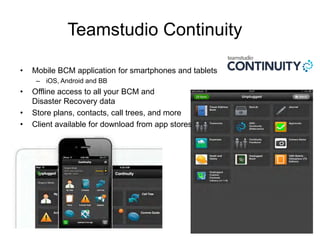
Teamstudio Continuity
• Mobile BCM application for smartphones and tablets
– iOS, Android and BB
• Offline access to all your BCM and
Disaster Recovery data
• Store plans, contacts, call trees, and more
• Client available for download from app stores
Teamstudio
• Next webinar October 17
• DCLUG – October 24th
• BLUG All Things Mobile – October 29th
• Promotions:
– Free Analyzer and Upgrade Filters when you buy Build Manager
– Chance to win an iPad mini when you get a demo of Teamstudio
Continuity
Howard Greenberg
TLCC
@TLCCLtd
#XPages
Your Host Today:
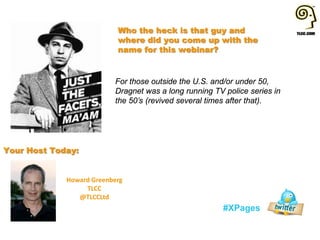
Who the heck is that guy and
where did you come up with the
name for this webinar?
For those outside the U.S. and/or under 50,
Dragnet was a long running TV police series in
the 50’s (revived several times after that).
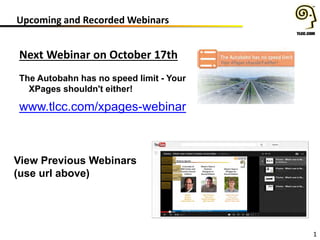
Upcoming and Recorded Webinars
1
Next Webinar on October 17th
The Autobahn has no speed limit - Your
XPages shouldn't either!
www.tlcc.com/xpages-webinar
View Previous Webinars
(use url above)
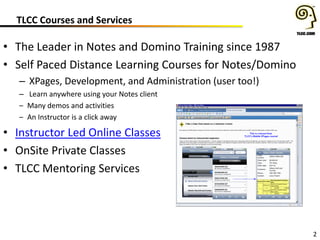
TLCC Courses and Services
2
• The Leader in Notes and Domino Training since 1987
• Self Paced Distance Learning Courses for Notes/Domino
– XPages, Development, and Administration (user too!)
– Learn anywhere using your Notes client
– Many demos and activities
– An Instructor is a click away
• Instructor Led Online Classes
• OnSite Private Classes
• TLCC Mentoring Services
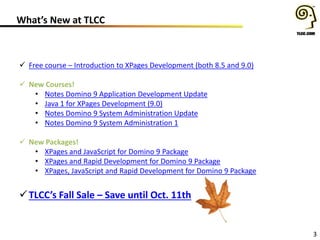
What’s New at TLCC
3
 Free course – Introduction to XPages Development (both 8.5 and 9.0)
 New Courses!
• Notes Domino 9 Application Development Update
• Java 1 for XPages Development (9.0)
• Notes Domino 9 System Administration Update
• Notes Domino 9 System Administration 1
 New Packages!
• XPages and JavaScript for Domino 9 Package
• XPages and Rapid Development for Domino 9 Package
• XPages, JavaScript and Rapid Development for Domino 9 Package
TLCC’s Fall Sale – Save until Oct. 11th
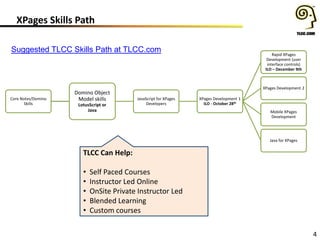
XPages Skills Path
4
Core Notes/Domino
Skills
Domino Object
Model skills
LotusScript or
Java
JavaScript for XPages
Developers
XPages Development 1
ILO - October 28th
Rapid XPages
Development (user
interface controls)
ILO – December 9th
XPages Development 2
Mobile XPages
Development
Java for XPages
Suggested TLCC Skills Path at TLCC.com
TLCC Can Help:
• Self Paced Courses
• Instructor Led Online
• OnSite Private Instructor Led
• Blended Learning
• Custom courses
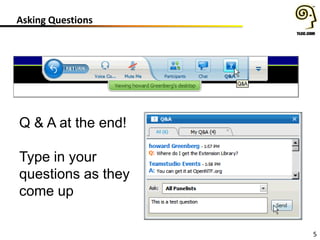
Asking Questions
5
Q & A at the end!
Type in your
questions as they
come up
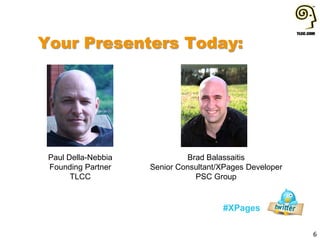
Your Presenters Today:
#XPages
6
Paul Della-Nebbia
Founding Partner
TLCC
Brad Balassaitis
Senior Consultant/XPages Developer
PSC Group
7
What We’ll Cover …
• Callbacks, Facets and Keys
• Adding an Editable Area to a Custom Control
• Form Table design framework
• Data View design framework
• Application Layout design framework
• Dynamic Content and Facets
• Q & A
8
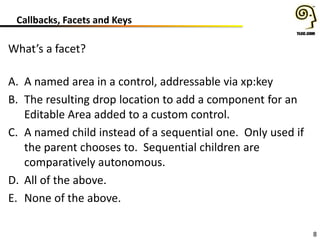
Callbacks, Facets and Keys
What’s a facet?
A. A named area in a control, addressable via xp:key
B. The resulting drop location to add a component for an
Editable Area added to a custom control.
C. A named child instead of a sequential one. Only used if
the parent chooses to. Sequential children are
comparatively autonomous.
D. All of the above.
E. None of the above.
9
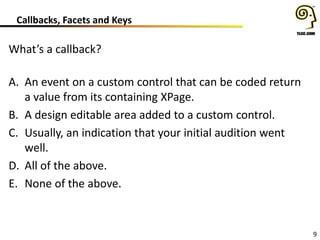
Callbacks, Facets and Keys
What’s a callback?
A. An event on a custom control that can be coded return
a value from its containing XPage.
B. A design editable area added to a custom control.
C. Usually, an indication that your initial audition went
well.
D. All of the above.
E. None of the above.
10
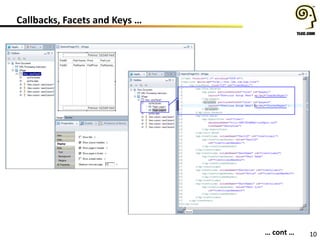
Callbacks, Facets and Keys …
• Callbacks, Facets and Keys
… cont …
11
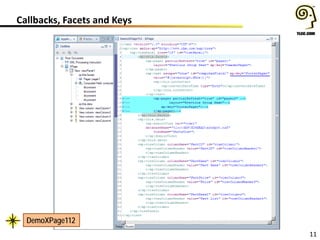
Callbacks, Facets and Keys
DemoXPage112
DemoXPage112
12
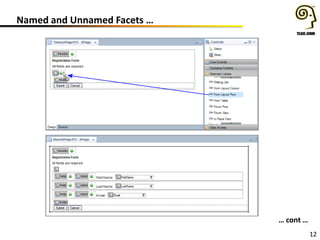
Named and Unnamed Facets …
… cont …
13
Named and Unnamed Facets
14
What We’ll Cover …
• Callbacks, Facets and Keys
• Adding an Editable Area to a Custom Control
• Form Table design framework
• Data View design framework
• Application Layout design framework
• Dynamic Content and Facets
• Q & A
15
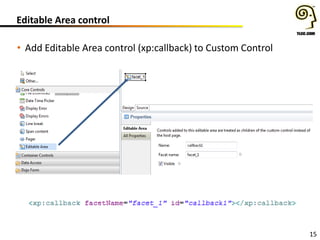
Editable Area control
• Add Editable Area control (xp:callback) to Custom Control
16
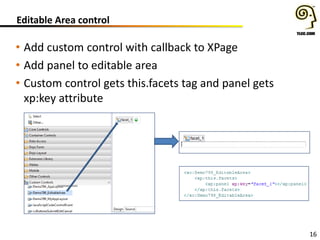
Editable Area control
• Add custom control with callback to XPage
• Add panel to editable area
• Custom control gets this.facets tag and panel gets
xp:key attribute
17
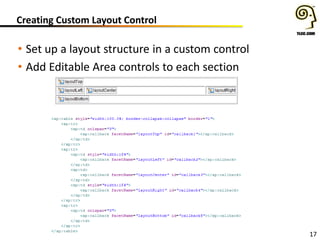
Creating Custom Layout Control
• Set up a layout structure in a custom control
• Add Editable Area controls to each section
18
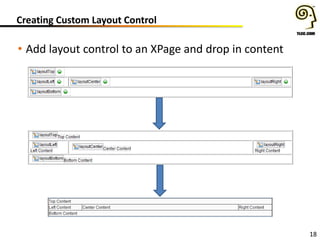
Creating Custom Layout Control
• Add layout control to an XPage and drop in content
19
What We’ll Cover …
• Callbacks, Facets and Keys
• Adding an Editable Area to a Custom Control
• Form Table design framework
• Data View design framework
• Application Layout design framework
• Dynamic Content and Facets
• Q & A
20
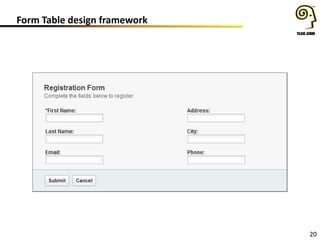
Form Table design framework
21
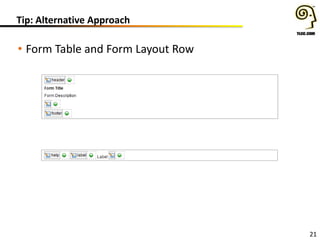
Tip: Alternative Approach
• Form Table and Form Layout Row
22
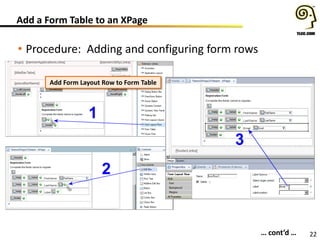
Add a Form Table to an XPage
• Procedure: Adding and configuring form rows
1
2
3
… cont’d …
Add Form Layout Row to Form Table
23
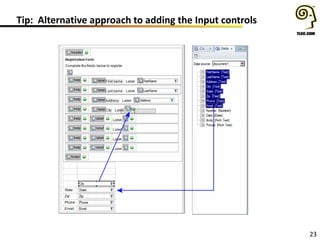
Tip: Alternative approach to adding the Input controls
24
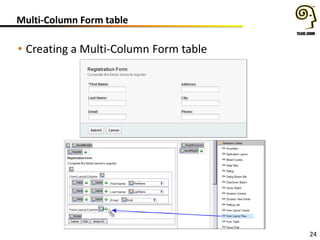
Multi-Column Form table
• Creating a Multi-Column Form table
25
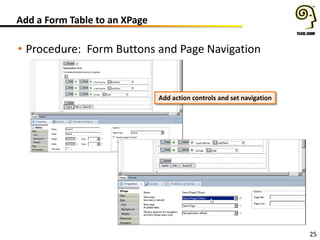
Add a Form Table to an XPage
• Procedure: Form Buttons and Page Navigation
Add action controls and set navigation
26
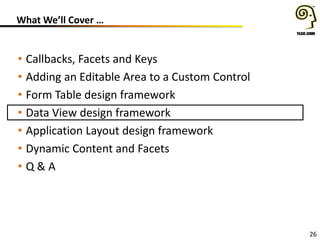
What We’ll Cover …
• Callbacks, Facets and Keys
• Adding an Editable Area to a Custom Control
• Form Table design framework
• Data View design framework
• Application Layout design framework
• Dynamic Content and Facets
• Q & A
27
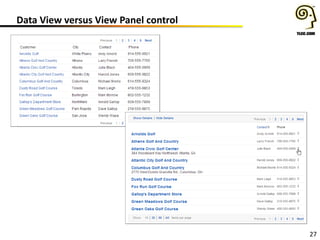
Data View versus View Panel control
28
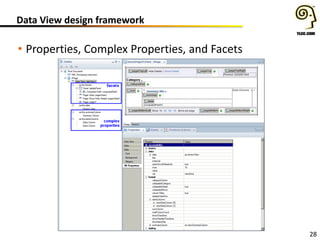
Data View design framework
• Properties, Complex Properties, and Facets
29
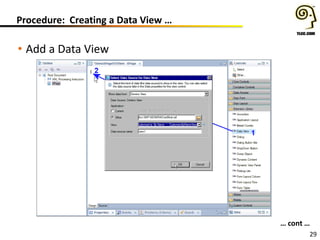
Procedure: Creating a Data View …
• Add a Data View
… cont …
30
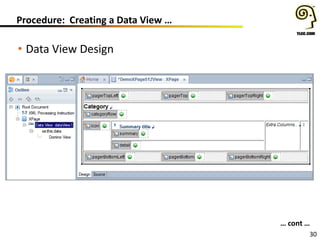
Procedure: Creating a Data View …
• Data View Design
… cont …
31
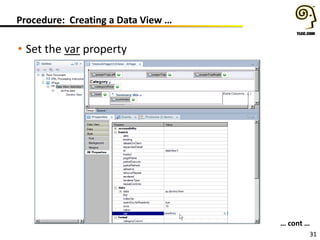
Procedure: Creating a Data View …
• Set the var property
… cont …
32
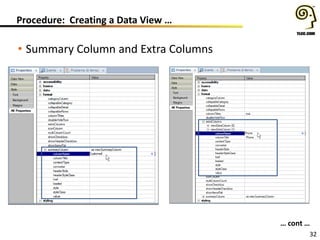
Procedure: Creating a Data View …
• Summary Column and Extra Columns
… cont …
33
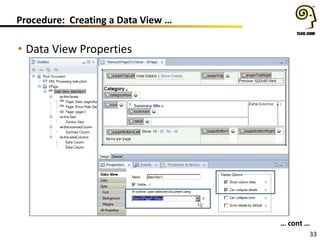
Procedure: Creating a Data View …
• Data View Properties
… cont …
34
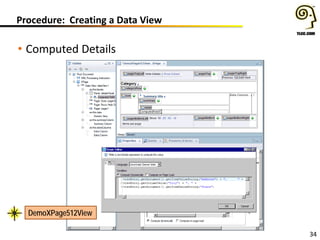
Procedure: Creating a Data View
• Computed Details
DemoXPage512View
35
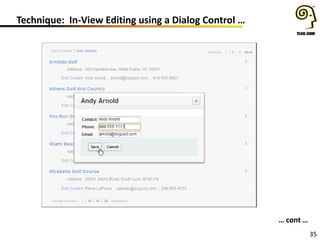
Technique: In-View Editing using a Dialog Control …
… cont …
36
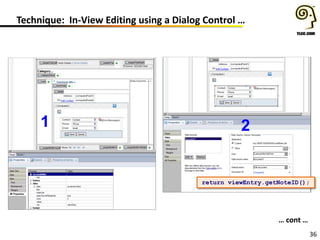
Technique: In-View Editing using a Dialog Control …
… cont …
1 2
return viewEntry.getNoteID();
37
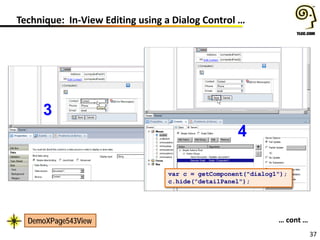
Technique: In-View Editing using a Dialog Control …
3
4
… cont …
var c = getComponent("dialog1");
c.hide("detailPanel");
DemoXPage543View
38
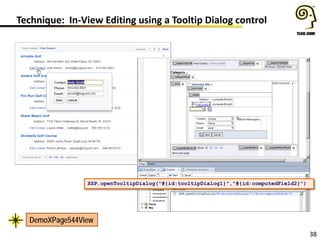
Technique: In-View Editing using a Tooltip Dialog control
XSP.openTooltipDialog("#{id:tooltipDialog1}","#{id:computedField2}")
DemoXPage544View
39
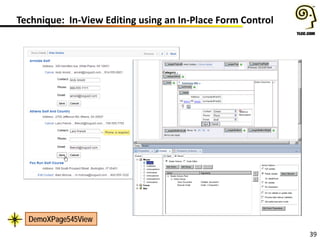
Technique: In-View Editing using an In-Place Form Control
DemoXPage545View
40
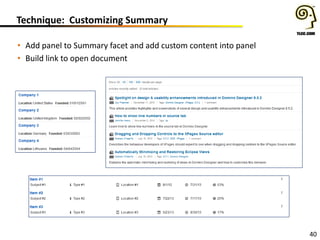
Technique: Customizing Summary
• Add panel to Summary facet and add custom content into panel
• Build link to open document
41
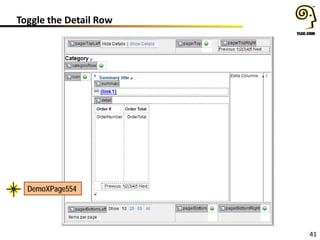
Toggle the Detail Row
DemoXPage554
42
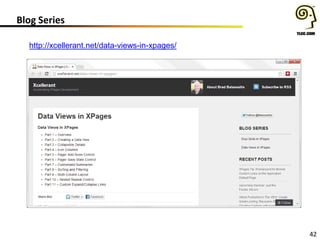
Blog Series
http://xcellerant.net/data-views-in-xpages/
43
What We’ll Cover …
• Callbacks, Facets and Keys
• Adding an Editable Area to a Custom Control
• Form Table design framework
• Data View design framework
• Application Layout design framework
• Dynamic Content and Facets
• Q & A
44
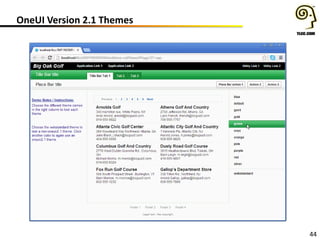
OneUI Version 2.1 Themes
45
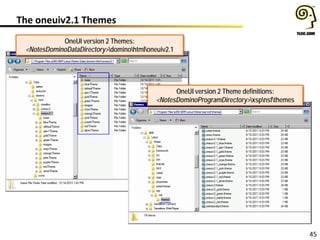
The oneuiv2.1 Themes
OneUI version 2 Themes:
<NotesDominoDataDirectory>dominohtmloneuiv2.1
OneUI version 2 Theme definitions:
<NotesDominoProgramDirectory>xspnsfthemes
46
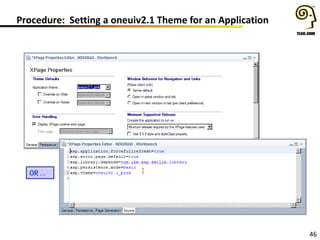
Procedure: Setting a oneuiv2.1 Theme for an Application
OR …
47
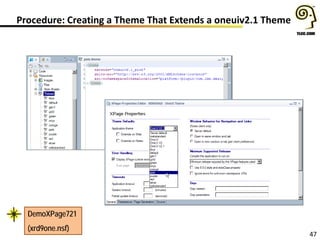
Procedure: Creating a Theme That Extends a oneuiv2.1 Theme
DemoXPage721
(xrd9one.nsf)
48
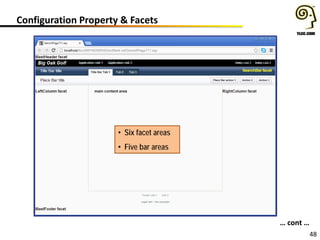
Configuration Property & Facets
… cont …
• Six facet areas
• Five bar areas
49
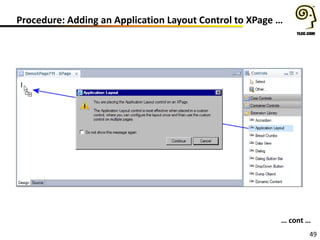
Procedure: Adding an Application Layout Control to XPage …
… cont …
50
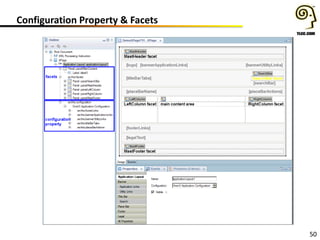
Configuration Property & Facets
51
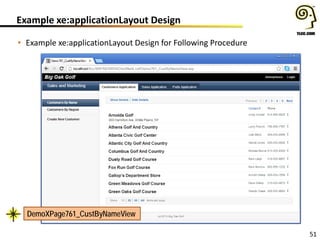
Example xe:applicationLayout Design
• Example xe:applicationLayout Design for Following Procedure
DemoXPage761_CustByNameView
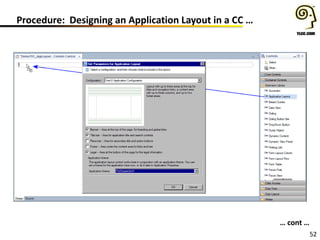
52
Procedure: Designing an Application Layout in a CC …
… cont …
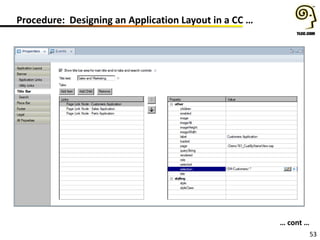
53
Procedure: Designing an Application Layout in a CC …
… cont …
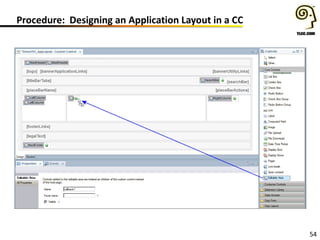
54
Procedure: Designing an Application Layout in a CC
55
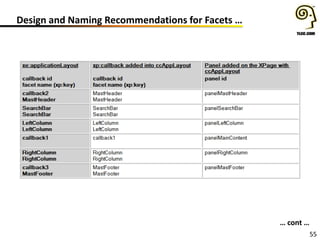
Design and Naming Recommendations for Facets …
… cont …
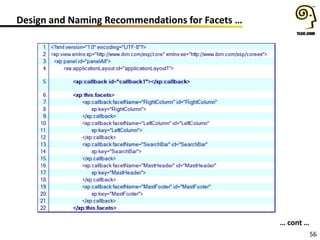
56
Design and Naming Recommendations for Facets …
… cont …
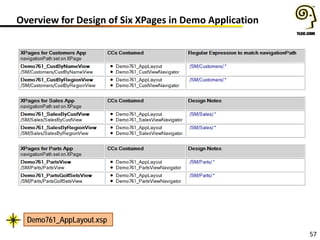
57
Overview for Design of Six XPages in Demo Application
Demo761_AppLayout.xsp
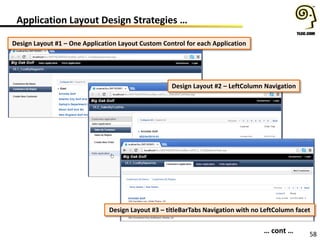
58
Application Layout Design Strategies …
Design Layout #1 – One Application Layout Custom Control for each Application
… cont …
Design Layout #2 – LeftColumn Navigation
Design Layout #3 – titleBarTabs Navigation with no LeftColumn facet
59
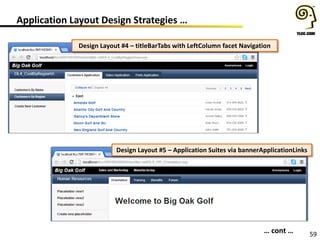
Application Layout Design Strategies …
• Application Layout Design Strategies …
… cont …
Design Layout #4 – titleBarTabs with LeftColumn facet Navigation
Design Layout #5 – Application Suites via bannerApplicationLinks
60
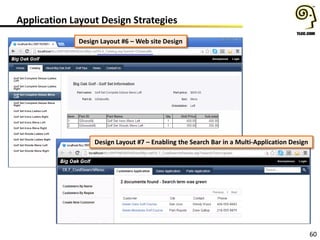
Application Layout Design Strategies
• Application Layout Design Strategies
Design Layout #6 – Web site Design
Design Layout #7 – Enabling the Search Bar in a Multi-Application Design
61
What We’ll Cover …
• Callbacks, Facets and Keys
• Adding an Editable Area to a Custom Control
• Form Table design framework
• Data View design framework
• Application Layout design framework
• Dynamic Content and Facets
• Q & A
62
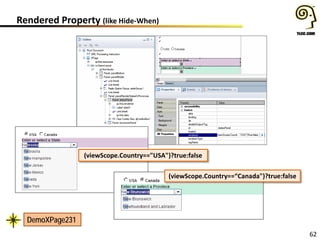
Rendered Property (like Hide-When)
(viewScope.Country=="USA")?true:false
(viewScope.Country==“Canada")?true:false
DemoXPage231
63
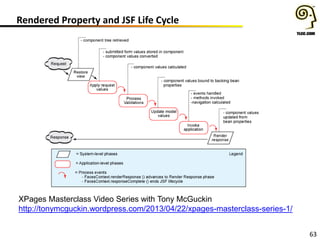
Rendered Property and JSF Life Cycle
XPages Masterclass Video Series with Tony McGuckin
http://tonymcguckin.wordpress.com/2013/04/22/xpages-masterclass-series-1/
64
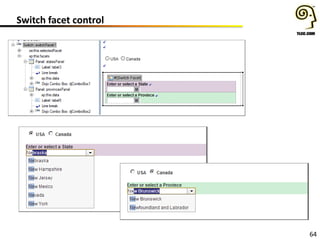
Switch facet control
65
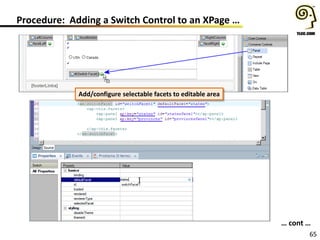
Procedure: Adding a Switch Control to an XPage …
Add/configure selectable facets to editable area
… cont …
66
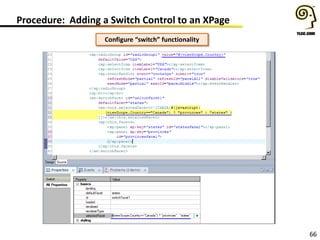
Procedure: Adding a Switch Control to an XPage
Configure “switch” functionality
67
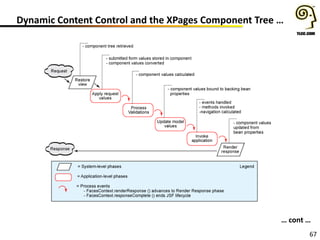
Dynamic Content Control and the XPages Component Tree …
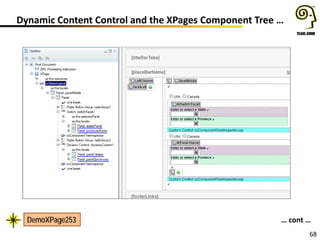
… cont …
68
Dynamic Content Control and the XPages Component Tree …
… cont …DemoXPage253
69
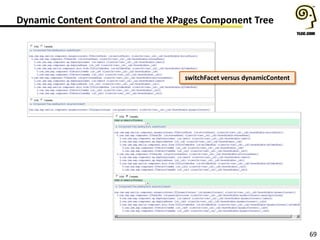
Dynamic Content Control and the XPages Component Tree
switchFacet versus dynamicContent
70
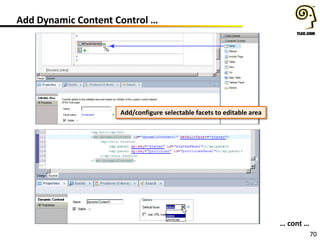
Add Dynamic Content Control …
… cont …
Add/configure selectable facets to editable area
71
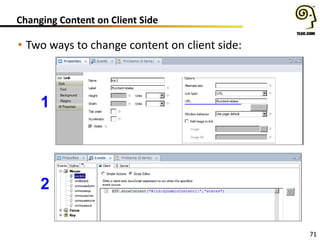
Changing Content on Client Side
• Two ways to change content on client side:
1
2
72
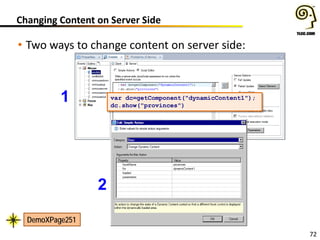
Changing Content on Server Side
1
2
var dc=getComponent("dynamicContent1");
dc.show("provinces")
• Two ways to change content on server side:
DemoXPage251
73
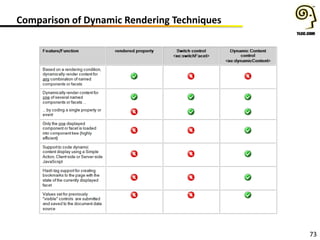
Comparison of Dynamic Rendering Techniques
74
Some Key Points …
• Facets are named areas in a control, addressable via xp:key
• Form Table, Data View and Application Layout controls
– framework controls to display Domino documents and views
– Rapid XPages development of Web 2.0 apps in a oneui framework
– details facet of xe:dataView like a built-in repeat
• Rendered property …
– Like hide-when, often the first choice for dynamic content, but …
• Inefficient in JSF life cycle (recalculated in all 4 application-level
phases)
• Inefficient in component tree (rendered=“false”)
• Use xe:dynamicContent control
– Offers greatest flexibility to dynamically switch content
– Only the displayed facet is added to the component tree representation
for XPage
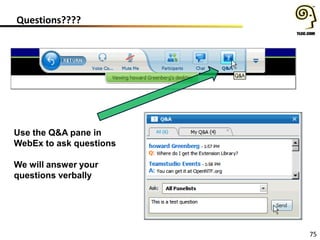
Questions????
75
Use the Q&A pane in
WebEx to ask questions
We will answer your
questions verbally
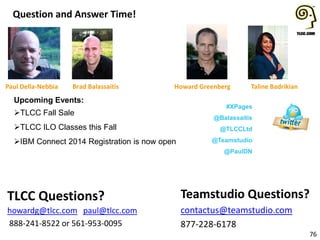
Question and Answer Time!
76
Teamstudio Questions?
contactus@teamstudio.com
877-228-6178
TLCC Questions?
howardg@tlcc.com paul@tlcc.com
888-241-8522 or 561-953-0095
Howard Greenberg Taline Badrikian
Upcoming Events:
TLCC Fall Sale
TLCC ILO Classes this Fall
IBM Connect 2014 Registration is now open
#XPages
@Balassaitis
@TLCCLtd
@Teamstudio
@PaulDN
Paul Della-Nebbia Brad Balassaitis

Just the Facets, Ma'am

  • 1.
    Just the facets,ma’am Tweet about this event: #xpages and mention us: @teamstudio @TLCCLTD @Balassaitis September 25, 2013
  • 2.
  • 3.
    Who we are •Our background is in creating tools for collaborative computing in mid-size and large enterprises, primarily for Lotus Notes • Easy-to-use tools for developers and administrators • 2300+ active customers, 47 countries • Offices in US, UK and Japan • Entered mobile space in 2010 with Unplugged – easy mobilization of Notes apps to Blackberry, Android and iOS
  • 4.
    Teamstudio Unplugged • YourMobile Domino Server – take your Notes apps with you! • End users access Notes applications from mobile devices whether online or offline • Leverages existing skills and technology – XPages – Replication model you already know • IBM Collaboration Solutions Award Winner 2013
  • 5.
    Teamstudio Continuity • MobileBCM application for smartphones and tablets – iOS, Android and BB • Offline access to all your BCM and Disaster Recovery data • Store plans, contacts, call trees, and more • Client available for download from app stores
  • 6.
    Teamstudio • Next webinarOctober 17 • DCLUG – October 24th • BLUG All Things Mobile – October 29th • Promotions: – Free Analyzer and Upgrade Filters when you buy Build Manager – Chance to win an iPad mini when you get a demo of Teamstudio Continuity
  • 7.
    Howard Greenberg TLCC @TLCCLtd #XPages Your HostToday: Who the heck is that guy and where did you come up with the name for this webinar? For those outside the U.S. and/or under 50, Dragnet was a long running TV police series in the 50’s (revived several times after that).
  • 8.
    Upcoming and RecordedWebinars 1 Next Webinar on October 17th The Autobahn has no speed limit - Your XPages shouldn't either! www.tlcc.com/xpages-webinar View Previous Webinars (use url above)
  • 9.
    TLCC Courses andServices 2 • The Leader in Notes and Domino Training since 1987 • Self Paced Distance Learning Courses for Notes/Domino – XPages, Development, and Administration (user too!) – Learn anywhere using your Notes client – Many demos and activities – An Instructor is a click away • Instructor Led Online Classes • OnSite Private Classes • TLCC Mentoring Services
  • 10.
    What’s New atTLCC 3  Free course – Introduction to XPages Development (both 8.5 and 9.0)  New Courses! • Notes Domino 9 Application Development Update • Java 1 for XPages Development (9.0) • Notes Domino 9 System Administration Update • Notes Domino 9 System Administration 1  New Packages! • XPages and JavaScript for Domino 9 Package • XPages and Rapid Development for Domino 9 Package • XPages, JavaScript and Rapid Development for Domino 9 Package TLCC’s Fall Sale – Save until Oct. 11th
  • 11.
    XPages Skills Path 4 CoreNotes/Domino Skills Domino Object Model skills LotusScript or Java JavaScript for XPages Developers XPages Development 1 ILO - October 28th Rapid XPages Development (user interface controls) ILO – December 9th XPages Development 2 Mobile XPages Development Java for XPages Suggested TLCC Skills Path at TLCC.com TLCC Can Help: • Self Paced Courses • Instructor Led Online • OnSite Private Instructor Led • Blended Learning • Custom courses
  • 12.
    Asking Questions 5 Q &A at the end! Type in your questions as they come up
  • 13.
    Your Presenters Today: #XPages 6 PaulDella-Nebbia Founding Partner TLCC Brad Balassaitis Senior Consultant/XPages Developer PSC Group
  • 14.
    7 What We’ll Cover… • Callbacks, Facets and Keys • Adding an Editable Area to a Custom Control • Form Table design framework • Data View design framework • Application Layout design framework • Dynamic Content and Facets • Q & A
  • 15.
    8 Callbacks, Facets andKeys What’s a facet? A. A named area in a control, addressable via xp:key B. The resulting drop location to add a component for an Editable Area added to a custom control. C. A named child instead of a sequential one. Only used if the parent chooses to. Sequential children are comparatively autonomous. D. All of the above. E. None of the above.
  • 16.
    9 Callbacks, Facets andKeys What’s a callback? A. An event on a custom control that can be coded return a value from its containing XPage. B. A design editable area added to a custom control. C. Usually, an indication that your initial audition went well. D. All of the above. E. None of the above.
  • 17.
    10 Callbacks, Facets andKeys … • Callbacks, Facets and Keys … cont …
  • 18.
    11 Callbacks, Facets andKeys DemoXPage112 DemoXPage112
  • 19.
    12 Named and UnnamedFacets … … cont …
  • 20.
  • 21.
    14 What We’ll Cover… • Callbacks, Facets and Keys • Adding an Editable Area to a Custom Control • Form Table design framework • Data View design framework • Application Layout design framework • Dynamic Content and Facets • Q & A
  • 22.
    15 Editable Area control •Add Editable Area control (xp:callback) to Custom Control
  • 23.
    16 Editable Area control •Add custom control with callback to XPage • Add panel to editable area • Custom control gets this.facets tag and panel gets xp:key attribute
  • 24.
    17 Creating Custom LayoutControl • Set up a layout structure in a custom control • Add Editable Area controls to each section
  • 25.
    18 Creating Custom LayoutControl • Add layout control to an XPage and drop in content
  • 26.
    19 What We’ll Cover… • Callbacks, Facets and Keys • Adding an Editable Area to a Custom Control • Form Table design framework • Data View design framework • Application Layout design framework • Dynamic Content and Facets • Q & A
  • 27.
  • 28.
    21 Tip: Alternative Approach •Form Table and Form Layout Row
  • 29.
    22 Add a FormTable to an XPage • Procedure: Adding and configuring form rows 1 2 3 … cont’d … Add Form Layout Row to Form Table
  • 30.
    23 Tip: Alternative approachto adding the Input controls
  • 31.
    24 Multi-Column Form table •Creating a Multi-Column Form table
  • 32.
    25 Add a FormTable to an XPage • Procedure: Form Buttons and Page Navigation Add action controls and set navigation
  • 33.
    26 What We’ll Cover… • Callbacks, Facets and Keys • Adding an Editable Area to a Custom Control • Form Table design framework • Data View design framework • Application Layout design framework • Dynamic Content and Facets • Q & A
  • 34.
    27 Data View versusView Panel control
  • 35.
    28 Data View designframework • Properties, Complex Properties, and Facets
  • 36.
    29 Procedure: Creating aData View … • Add a Data View … cont …
  • 37.
    30 Procedure: Creating aData View … • Data View Design … cont …
  • 38.
    31 Procedure: Creating aData View … • Set the var property … cont …
  • 39.
    32 Procedure: Creating aData View … • Summary Column and Extra Columns … cont …
  • 40.
    33 Procedure: Creating aData View … • Data View Properties … cont …
  • 41.
    34 Procedure: Creating aData View • Computed Details DemoXPage512View
  • 42.
    35 Technique: In-View Editingusing a Dialog Control … … cont …
  • 43.
    36 Technique: In-View Editingusing a Dialog Control … … cont … 1 2 return viewEntry.getNoteID();
  • 44.
    37 Technique: In-View Editingusing a Dialog Control … 3 4 … cont … var c = getComponent("dialog1"); c.hide("detailPanel"); DemoXPage543View
  • 45.
    38 Technique: In-View Editingusing a Tooltip Dialog control XSP.openTooltipDialog("#{id:tooltipDialog1}","#{id:computedField2}") DemoXPage544View
  • 46.
    39 Technique: In-View Editingusing an In-Place Form Control DemoXPage545View
  • 47.
    40 Technique: Customizing Summary •Add panel to Summary facet and add custom content into panel • Build link to open document
  • 48.
    41 Toggle the DetailRow DemoXPage554
  • 49.
  • 50.
    43 What We’ll Cover… • Callbacks, Facets and Keys • Adding an Editable Area to a Custom Control • Form Table design framework • Data View design framework • Application Layout design framework • Dynamic Content and Facets • Q & A
  • 51.
  • 52.
    45 The oneuiv2.1 Themes OneUIversion 2 Themes: <NotesDominoDataDirectory>dominohtmloneuiv2.1 OneUI version 2 Theme definitions: <NotesDominoProgramDirectory>xspnsfthemes
  • 53.
    46 Procedure: Setting aoneuiv2.1 Theme for an Application OR …
  • 54.
    47 Procedure: Creating aTheme That Extends a oneuiv2.1 Theme DemoXPage721 (xrd9one.nsf)
  • 55.
    48 Configuration Property &Facets … cont … • Six facet areas • Five bar areas
  • 56.
    49 Procedure: Adding anApplication Layout Control to XPage … … cont …
  • 57.
  • 58.
    51 Example xe:applicationLayout Design •Example xe:applicationLayout Design for Following Procedure DemoXPage761_CustByNameView
  • 59.
    52 Procedure: Designing anApplication Layout in a CC … … cont …
  • 60.
    53 Procedure: Designing anApplication Layout in a CC … … cont …
  • 61.
    54 Procedure: Designing anApplication Layout in a CC
  • 62.
    55 Design and NamingRecommendations for Facets … … cont …
  • 63.
    56 Design and NamingRecommendations for Facets … … cont …
  • 64.
    57 Overview for Designof Six XPages in Demo Application Demo761_AppLayout.xsp
  • 65.
    58 Application Layout DesignStrategies … Design Layout #1 – One Application Layout Custom Control for each Application … cont … Design Layout #2 – LeftColumn Navigation Design Layout #3 – titleBarTabs Navigation with no LeftColumn facet
  • 66.
    59 Application Layout DesignStrategies … • Application Layout Design Strategies … … cont … Design Layout #4 – titleBarTabs with LeftColumn facet Navigation Design Layout #5 – Application Suites via bannerApplicationLinks
  • 67.
    60 Application Layout DesignStrategies • Application Layout Design Strategies Design Layout #6 – Web site Design Design Layout #7 – Enabling the Search Bar in a Multi-Application Design
  • 68.
    61 What We’ll Cover… • Callbacks, Facets and Keys • Adding an Editable Area to a Custom Control • Form Table design framework • Data View design framework • Application Layout design framework • Dynamic Content and Facets • Q & A
  • 69.
    62 Rendered Property (likeHide-When) (viewScope.Country=="USA")?true:false (viewScope.Country==“Canada")?true:false DemoXPage231
  • 70.
    63 Rendered Property andJSF Life Cycle XPages Masterclass Video Series with Tony McGuckin http://tonymcguckin.wordpress.com/2013/04/22/xpages-masterclass-series-1/
  • 71.
  • 72.
    65 Procedure: Adding aSwitch Control to an XPage … Add/configure selectable facets to editable area … cont …
  • 73.
    66 Procedure: Adding aSwitch Control to an XPage Configure “switch” functionality
  • 74.
    67 Dynamic Content Controland the XPages Component Tree … … cont …
  • 75.
    68 Dynamic Content Controland the XPages Component Tree … … cont …DemoXPage253
  • 76.
    69 Dynamic Content Controland the XPages Component Tree switchFacet versus dynamicContent
  • 77.
    70 Add Dynamic ContentControl … … cont … Add/configure selectable facets to editable area
  • 78.
    71 Changing Content onClient Side • Two ways to change content on client side: 1 2
  • 79.
    72 Changing Content onServer Side 1 2 var dc=getComponent("dynamicContent1"); dc.show("provinces") • Two ways to change content on server side: DemoXPage251
  • 80.
    73 Comparison of DynamicRendering Techniques
  • 81.
    74 Some Key Points… • Facets are named areas in a control, addressable via xp:key • Form Table, Data View and Application Layout controls – framework controls to display Domino documents and views – Rapid XPages development of Web 2.0 apps in a oneui framework – details facet of xe:dataView like a built-in repeat • Rendered property … – Like hide-when, often the first choice for dynamic content, but … • Inefficient in JSF life cycle (recalculated in all 4 application-level phases) • Inefficient in component tree (rendered=“false”) • Use xe:dynamicContent control – Offers greatest flexibility to dynamically switch content – Only the displayed facet is added to the component tree representation for XPage
  • 82.
    Questions???? 75 Use the Q&Apane in WebEx to ask questions We will answer your questions verbally
  • 83.
    Question and AnswerTime! 76 Teamstudio Questions? contactus@teamstudio.com 877-228-6178 TLCC Questions? howardg@tlcc.com paul@tlcc.com 888-241-8522 or 561-953-0095 Howard Greenberg Taline Badrikian Upcoming Events: TLCC Fall Sale TLCC ILO Classes this Fall IBM Connect 2014 Registration is now open #XPages @Balassaitis @TLCCLtd @Teamstudio @PaulDN Paul Della-Nebbia Brad Balassaitis