icfi.com |
Drupal
Theming for Developers | June 11, 2015
icfi.com | 2
Agenda
Our Objectives
Drupal Theming training is aimed at
providing a comprehensive intro
building customized layouts.
• Understand what a Theme is
• Write a basic theme
• Understand components of a
Theme
• Customization Strategies
• Theme Tools (Dev Theming Module)
• Coding Standards
• Coding vs Configuration
Today’s Agenda
 Introduction to Theming
 Basic Theme Structure
 Overriding Layouts
 Theming Tools and Resources
 Coding vs Configuration
icfi.com | 3
• • • • • •
What is a
theme?
1
icfi.com | 4
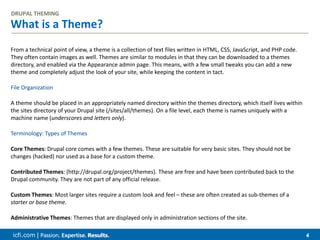
What is a Theme?
DRUPAL THEMING
From a technical point of view, a theme is a collection of text files written in HTML, CSS, JavaScript, and PHP code.
They often contain images as well. Themes are similar to modules in that they can be downloaded to a themes
directory, and enabled via the Appearance admin page. This means, with a few small tweaks you can add a new
theme and completely adjust the look of your site, while keeping the content in tact.
File Organization
A theme should be placed in an appropriately named directory within the themes directory, which itself lives within
the sites directory of your Drupal site (/sites/all/themes). On a file level, each theme is names uniquely with a
machine name (underscores and letters only).
Terminology: Types of Themes
Core Themes: Drupal core comes with a few themes. These are suitable for very basic sites. They should not be
changes (hacked) nor used as a base for a custom theme.
Contributed Themes: (http://drupal.org/project/themes). These are free and have been contributed back to the
Drupal community. They are not part of any official release.
Custom Themes: Most larger sites require a custom look and feel – these are often created as sub-themes of a
starter or base theme.
Administrative Themes: Themes that are displayed only in administration sections of the site.
icfi.com | 5
• • • • • •
Writing a basic
theme
2
icfi.com | 6
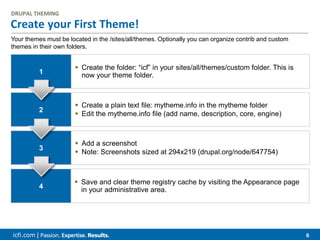
Create your First Theme!
DRUPAL THEMING
1
 Create the folder: “icf” in your sites/all/themes/custom folder. This is
now your theme folder.
2
 Create a plain text file: mytheme.info in the mytheme folder
 Edit the mytheme.info file (add name, description, core, engine)
3
 Add a screenshot
 Note: Screenshots sized at 294x219 (drupal.org/node/647754)
4
 Save and clear theme registry cache by visiting the Appearance page
in your administrative area.
Your themes must be located in the /sites/all/themes. Optionally you can organize contrib and custom
themes in their own folders.
icfi.com | 7
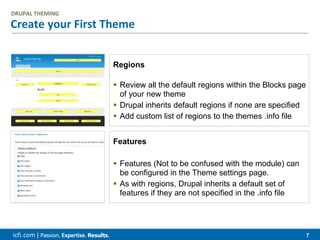
Create your First Theme
DRUPAL THEMING
Regions
 Review all the default regions within the Blocks page
of your new theme
 Drupal inherits default regions if none are specified
 Add custom list of regions to the themes .info file
Features
 Features (Not to be confused with the module) can
be configured in the Theme settings page.
 As with regions, Drupal inherits a default set of
features if they are not specified in the .info file
icfi.com | 8
• • • • • •
Theme
components
4
icfi.com |
Page  9
The Anatomy of a Theme
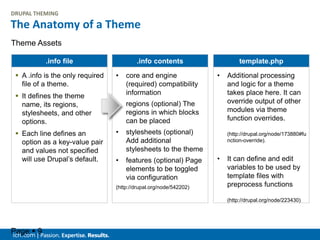
 A .info is the only required
file of a theme.
 It defines the theme
name, its regions,
stylesheets, and other
options.
 Each line defines an
option as a key-value pair
and values not specified
will use Drupal’s default.
.info file
• core and engine
(required) compatibility
information
• regions (optional) The
regions in which blocks
can be placed
• stylesheets (optional)
Add additional
stylesheets to the theme
• features (optional) Page
elements to be toggled
via configuration
(http://drupal.org/node/542202)
.info contents
• Additional processing
and logic for a theme
takes place here. It can
override output of other
modules via theme
function overrides.
(http://drupal.org/node/173880#fu
nction-override).
• It can define and edit
variables to be used by
template files with
preprocess functions
(http://drupal.org/node/223430)
template.php
Theme Assets
DRUPAL THEMING
icfi.com |
Page  10
The Anatomy of a Theme
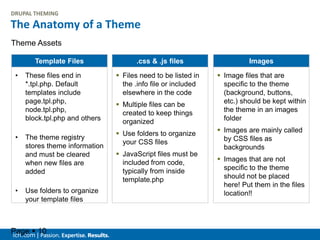
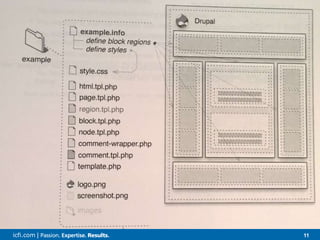
• These files end in
*.tpl.php. Default
templates include
page.tpl.php,
node.tpl.php,
block.tpl.php and others
• The theme registry
stores theme information
and must be cleared
when new files are
added
• Use folders to organize
your template files
Template Files
 Files need to be listed in
the .info file or included
elsewhere in the code
 Multiple files can be
created to keep things
organized
 Use folders to organize
your CSS files
 JavaScript files must be
included from code,
typically from inside
template.php
.css & .js files
 Image files that are
specific to the theme
(background, buttons,
etc.) should be kept within
the theme in an images
folder
 Images are mainly called
by CSS files as
backgrounds
 Images that are not
specific to the theme
should not be placed
here! Put them in the files
location!!
Images
Theme Assets
DRUPAL THEMING
icfi.com | 11
When to use one method over the other
Theme Regions
CUSTOM LAYOUTS
Display Suite
 Splits up Configuration
 Uses Familiar Interface
 Use Theme Regions, too
 Limited Layouts
 Collapsable Regions
 Custom View Modes
Panels
 Centralizes Configuration
 Unique Interface
 Regions in Content Area
 Create Custom Layouts
 Fixed Layout Regions
 No Custom View Modes
icfi.com | 12
• • • • • •
Customization
Strategies
4
icfi.com | 13
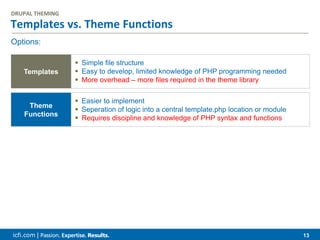
Templates vs. Theme Functions
DRUPAL THEMING
Options:
Templates
 Simple file structure
 Easy to develop, limited knowledge of PHP programming needed
 More overhead – more files required in the theme library
Theme
Functions
 Easier to implement
 Seperation of logic into a central template.php location or module
 Requires discipline and knowledge of PHP syntax and functions
icfi.com | 14
Overriding Template Files
DRUPAL THEMING
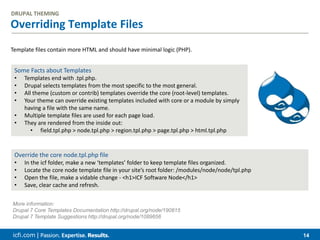
Template files contain more HTML and should have minimal logic (PHP).
Some Facts about Templates
• Templates end with .tpl.php.
• Drupal selects templates from the most specific to the most general.
• All theme (custom or contrib) templates override the core (root-level) templates.
• Your theme can override existing templates included with core or a module by simply
having a file with the same name.
• Multiple template files are used for each page load.
• They are rendered from the inside out:
• field.tpl.php > node.tpl.php > region.tpl.php > page.tpl.php > html.tpl.php
Override the core node.tpl.php file
• In the icf folder, make a new ‘templates’ folder to keep template files organized.
• Locate the core node template file in your site’s root folder: /modules/node/node/tpl.php
• Open the file, make a vidable change - <h1>ICF Software Node</h1>
• Save, clear cache and refresh.
More information:
Drupal 7 Core Templates Documentation http://drupal.org/node/190815
Drupal 7 Template Suggestions http://drupal.org/node/1089656
icfi.com | 15
More on Overrides
DRUPAL THEMING
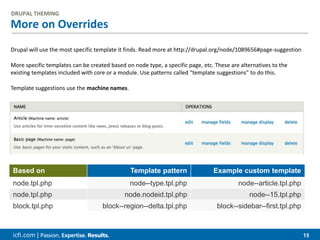
Drupal will use the most specific template it finds. Read more at http://drupal.org/node/1089656#page-suggestion
More specific templates can be created based on node type, a specific page, etc. These are alternatives to the
existing templates included with core or a module. Use patterns called “template suggestions” to do this.
Template suggestions use the machine names.
Based on Template pattern Example custom template
node.tpl.php node--type.tpl.php node--article.tpl.php
node.tpl.php node.nodeid.tpl.php node--15.tpl.php
block.tpl.php block--region--delta.tpl.php block--sidebar--first.tpl.php
icfi.com | 16
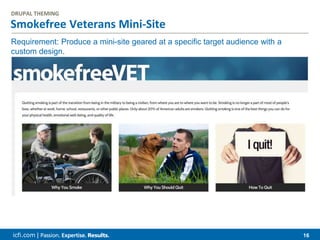
Smokefree Veterans Mini-Site
DRUPAL THEMING
Requirement: Produce a mini-site geared at a specific target audience with a
custom design.
icfi.com | 17
• • • • • •
Tools for
theming
5
icfi.com | 18
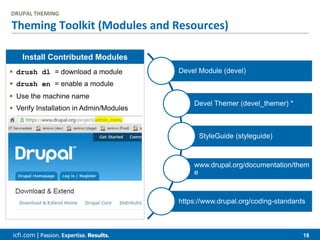
Theming Toolkit (Modules and Resources)
DRUPAL THEMING
Devel Module (devel)
Devel Themer (devel_themer) *
StyleGuide (styleguide)
www.drupal.org/documentation/them
e
https://www.drupal.org/coding-standards
Install Contributed Modules
 drush dl = download a module
 drush en = enable a module
 Use the machine name
 Verify Installation in Admin/Modules
icfi.com | 19
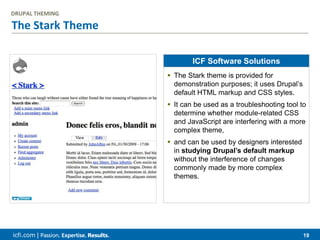
The Stark Theme
DRUPAL THEMING
ICF Software Solutions
 The Stark theme is provided for
demonstration purposes; it uses Drupal’s
default HTML markup and CSS styles.
 It can be used as a troubleshooting tool to
determine whether module-related CSS
and JavaScript are interfering with a more
complex theme,
 and can be used by designers interested
in studying Drupal’s default markup
without the interference of changes
commonly made by more complex
themes.
icfi.com | 20
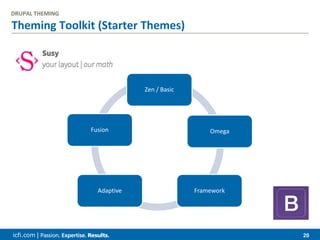
Theming Toolkit (Starter Themes)
Zen / Basic
Omega
FrameworkAdaptive
Fusion
DRUPAL THEMING
icfi.com | 21
Discussion & Questions

Drupal Theming for Developers

  • 1.
    icfi.com | Drupal Theming forDevelopers | June 11, 2015
  • 2.
    icfi.com | 2 Agenda OurObjectives Drupal Theming training is aimed at providing a comprehensive intro building customized layouts. • Understand what a Theme is • Write a basic theme • Understand components of a Theme • Customization Strategies • Theme Tools (Dev Theming Module) • Coding Standards • Coding vs Configuration Today’s Agenda  Introduction to Theming  Basic Theme Structure  Overriding Layouts  Theming Tools and Resources  Coding vs Configuration
  • 3.
    icfi.com | 3 •• • • • • What is a theme? 1
  • 4.
    icfi.com | 4 Whatis a Theme? DRUPAL THEMING From a technical point of view, a theme is a collection of text files written in HTML, CSS, JavaScript, and PHP code. They often contain images as well. Themes are similar to modules in that they can be downloaded to a themes directory, and enabled via the Appearance admin page. This means, with a few small tweaks you can add a new theme and completely adjust the look of your site, while keeping the content in tact. File Organization A theme should be placed in an appropriately named directory within the themes directory, which itself lives within the sites directory of your Drupal site (/sites/all/themes). On a file level, each theme is names uniquely with a machine name (underscores and letters only). Terminology: Types of Themes Core Themes: Drupal core comes with a few themes. These are suitable for very basic sites. They should not be changes (hacked) nor used as a base for a custom theme. Contributed Themes: (http://drupal.org/project/themes). These are free and have been contributed back to the Drupal community. They are not part of any official release. Custom Themes: Most larger sites require a custom look and feel – these are often created as sub-themes of a starter or base theme. Administrative Themes: Themes that are displayed only in administration sections of the site.
  • 5.
    icfi.com | 5 •• • • • • Writing a basic theme 2
  • 6.
    icfi.com | 6 Createyour First Theme! DRUPAL THEMING 1  Create the folder: “icf” in your sites/all/themes/custom folder. This is now your theme folder. 2  Create a plain text file: mytheme.info in the mytheme folder  Edit the mytheme.info file (add name, description, core, engine) 3  Add a screenshot  Note: Screenshots sized at 294x219 (drupal.org/node/647754) 4  Save and clear theme registry cache by visiting the Appearance page in your administrative area. Your themes must be located in the /sites/all/themes. Optionally you can organize contrib and custom themes in their own folders.
  • 7.
    icfi.com | 7 Createyour First Theme DRUPAL THEMING Regions  Review all the default regions within the Blocks page of your new theme  Drupal inherits default regions if none are specified  Add custom list of regions to the themes .info file Features  Features (Not to be confused with the module) can be configured in the Theme settings page.  As with regions, Drupal inherits a default set of features if they are not specified in the .info file
  • 8.
    icfi.com | 8 •• • • • • Theme components 4
  • 9.
    icfi.com | Page 9 The Anatomy of a Theme  A .info is the only required file of a theme.  It defines the theme name, its regions, stylesheets, and other options.  Each line defines an option as a key-value pair and values not specified will use Drupal’s default. .info file • core and engine (required) compatibility information • regions (optional) The regions in which blocks can be placed • stylesheets (optional) Add additional stylesheets to the theme • features (optional) Page elements to be toggled via configuration (http://drupal.org/node/542202) .info contents • Additional processing and logic for a theme takes place here. It can override output of other modules via theme function overrides. (http://drupal.org/node/173880#fu nction-override). • It can define and edit variables to be used by template files with preprocess functions (http://drupal.org/node/223430) template.php Theme Assets DRUPAL THEMING
  • 10.
    icfi.com | Page 10 The Anatomy of a Theme • These files end in *.tpl.php. Default templates include page.tpl.php, node.tpl.php, block.tpl.php and others • The theme registry stores theme information and must be cleared when new files are added • Use folders to organize your template files Template Files  Files need to be listed in the .info file or included elsewhere in the code  Multiple files can be created to keep things organized  Use folders to organize your CSS files  JavaScript files must be included from code, typically from inside template.php .css & .js files  Image files that are specific to the theme (background, buttons, etc.) should be kept within the theme in an images folder  Images are mainly called by CSS files as backgrounds  Images that are not specific to the theme should not be placed here! Put them in the files location!! Images Theme Assets DRUPAL THEMING
  • 11.
    icfi.com | 11 Whento use one method over the other Theme Regions CUSTOM LAYOUTS Display Suite  Splits up Configuration  Uses Familiar Interface  Use Theme Regions, too  Limited Layouts  Collapsable Regions  Custom View Modes Panels  Centralizes Configuration  Unique Interface  Regions in Content Area  Create Custom Layouts  Fixed Layout Regions  No Custom View Modes
  • 12.
    icfi.com | 12 •• • • • • Customization Strategies 4
  • 13.
    icfi.com | 13 Templatesvs. Theme Functions DRUPAL THEMING Options: Templates  Simple file structure  Easy to develop, limited knowledge of PHP programming needed  More overhead – more files required in the theme library Theme Functions  Easier to implement  Seperation of logic into a central template.php location or module  Requires discipline and knowledge of PHP syntax and functions
  • 14.
    icfi.com | 14 OverridingTemplate Files DRUPAL THEMING Template files contain more HTML and should have minimal logic (PHP). Some Facts about Templates • Templates end with .tpl.php. • Drupal selects templates from the most specific to the most general. • All theme (custom or contrib) templates override the core (root-level) templates. • Your theme can override existing templates included with core or a module by simply having a file with the same name. • Multiple template files are used for each page load. • They are rendered from the inside out: • field.tpl.php > node.tpl.php > region.tpl.php > page.tpl.php > html.tpl.php Override the core node.tpl.php file • In the icf folder, make a new ‘templates’ folder to keep template files organized. • Locate the core node template file in your site’s root folder: /modules/node/node/tpl.php • Open the file, make a vidable change - <h1>ICF Software Node</h1> • Save, clear cache and refresh. More information: Drupal 7 Core Templates Documentation http://drupal.org/node/190815 Drupal 7 Template Suggestions http://drupal.org/node/1089656
  • 15.
    icfi.com | 15 Moreon Overrides DRUPAL THEMING Drupal will use the most specific template it finds. Read more at http://drupal.org/node/1089656#page-suggestion More specific templates can be created based on node type, a specific page, etc. These are alternatives to the existing templates included with core or a module. Use patterns called “template suggestions” to do this. Template suggestions use the machine names. Based on Template pattern Example custom template node.tpl.php node--type.tpl.php node--article.tpl.php node.tpl.php node.nodeid.tpl.php node--15.tpl.php block.tpl.php block--region--delta.tpl.php block--sidebar--first.tpl.php
  • 16.
    icfi.com | 16 SmokefreeVeterans Mini-Site DRUPAL THEMING Requirement: Produce a mini-site geared at a specific target audience with a custom design.
  • 17.
    icfi.com | 17 •• • • • • Tools for theming 5
  • 18.
    icfi.com | 18 ThemingToolkit (Modules and Resources) DRUPAL THEMING Devel Module (devel) Devel Themer (devel_themer) * StyleGuide (styleguide) www.drupal.org/documentation/them e https://www.drupal.org/coding-standards Install Contributed Modules  drush dl = download a module  drush en = enable a module  Use the machine name  Verify Installation in Admin/Modules
  • 19.
    icfi.com | 19 TheStark Theme DRUPAL THEMING ICF Software Solutions  The Stark theme is provided for demonstration purposes; it uses Drupal’s default HTML markup and CSS styles.  It can be used as a troubleshooting tool to determine whether module-related CSS and JavaScript are interfering with a more complex theme,  and can be used by designers interested in studying Drupal’s default markup without the interference of changes commonly made by more complex themes.
  • 20.
    icfi.com | 20 ThemingToolkit (Starter Themes) Zen / Basic Omega FrameworkAdaptive Fusion DRUPAL THEMING
  • 21.