Application Layout Control
Tweet about this event: #XPages
and mention us: @teamstudio @TLCCLTD
@PaulDN
March 13, 2014
@teamstudio
teamstudio.com
@TLCCLTD
tlcc.com
Courtney Carter
Inbound Marketing Specialist
Who We Are
• Our background is in creating tools for collaborative
computing in mid-size and large enterprises,
primarily for IBM Notes
• Easy-to-use tools for developers and administrators
• 2300+ active customers, 47 countries
• Offices in US, UK and Japan
• Entered mobile space in 2010 with Unplugged: easy
mobilization of Notes apps to Blackberry, Android
and iOS
Teamstudio Unplugged
• Your mobile Domino server: take your Notes apps
with you!
• End-users access Notes applications from mobile
devices whether online or offline
• Leverages existing skills and technology – XPages –
a replication model you already know
• Unplugged 3.0 recently released
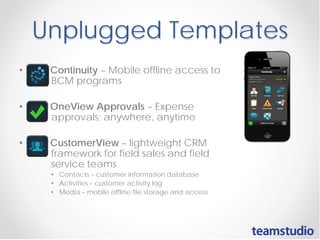
Unplugged Templates
• Continuity – Mobile offline access to
BCM programs
• OneView Approvals – Expense
approvals; anywhere, anytime
• CustomerView – lightweight CRM
framework for field sales and field
service teams
• Contacts – customer information database
• Activities – customer activity log
• Media – mobile offline file storage and access
• Next Wireless Wednesdays webinar: Part 3 on April 2,
2014
o Learn Domino mobile development
• Next Teamstudio/TLCC webinar: April 10, 2014
• May Teamstudio/TLCC webinar: May 13, 2014
• Promotion:
• Demo our end-to-end source code control and version
management tools, and be entered to win an XBOX gaming
system
Rapid XPages Development using the
Application Layout Control
1
#XPages
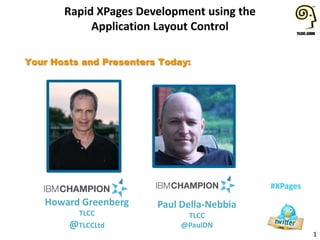
Your Hosts and Presenters Today:
Howard Greenberg
TLCC
@TLCCLtd
Paul Della-Nebbia
TLCC
@PaulDN
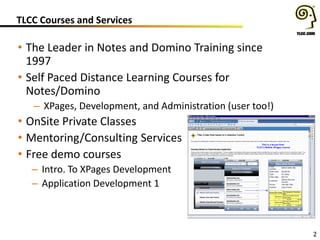
TLCC Courses and Services
• The Leader in Notes and Domino Training since
1997
• Self Paced Distance Learning Courses for
Notes/Domino
– XPages, Development, and Administration (user too!)
• OnSite Private Classes
• Mentoring/Consulting Services
• Free demo courses
– Intro. To XPages Development
– Application Development 1
2
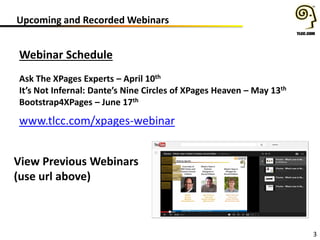
Upcoming and Recorded Webinars
3
Webinar Schedule
Ask The XPages Experts – April 10th
It’s Not Infernal: Dante’s Nine Circles of XPages Heaven – May 13th
Bootstrap4XPages – June 17th
www.tlcc.com/xpages-webinar
View Previous Webinars
(use url above)
Engage User Conference
• In Europe? Don’t Miss Engage (formerly BLUG)
– March 17th and 18th
– FREE!
– Over 50 breakout sessions by
the leading experts
• Tack on an extra day of training on March 19th
– Rapid XPages Development
• With Howard Greenberg
• Get TLCC’s Four Day Rapid XPages Development course as
part of the tuition!!!
– A $600 value by itself!
Click here for more information
4
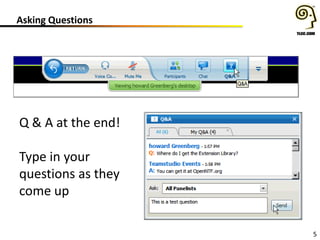
Asking Questions
5
Q & A at the end!
Type in your
questions as they
come up
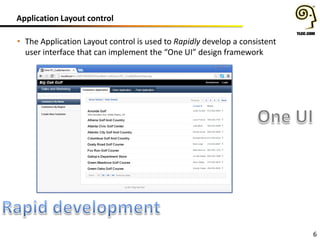
Application Layout control
6
• The Application Layout control is used to Rapidly develop a consistent
user interface that can implement the “One UI” design framework
Agenda
7
• Prerequisites & Configuration
• OneUI version 2.1 Themes
• Tree Nodes and Navigators
• Application Layout Design Framework
• Designing an Application Layout in a Custom Control
• Navigation and Context
• Application Layout Design strategies
• Wrap up
System Prerequisites
8
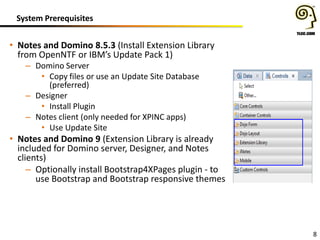
• Notes and Domino 8.5.3 (Install Extension Library
from OpenNTF or IBM’s Update Pack 1)
– Domino Server
• Copy files or use an Update Site Database
(preferred)
– Designer
• Install Plugin
– Notes client (only needed for XPINC apps)
• Use Update Site
• Notes and Domino 9 (Extension Library is already
included for Domino server, Designer, and Notes
clients)
– Optionally install Bootstrap4XPages plugin - to
use Bootstrap and Bootstrap responsive themes
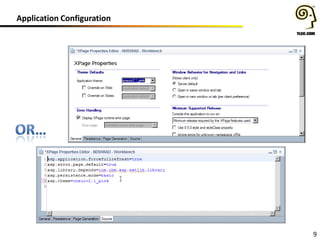
Application Configuration
9
Agenda
10
• Prerequisites & Configuration
• OneUI version 2.1 Themes
• Tree Nodes and Navigators
• Application Layout Design Framework
• Designing an Application Layout in a Custom Control
• Navigation and Context
• Application Layout Design strategies
• Wrap up
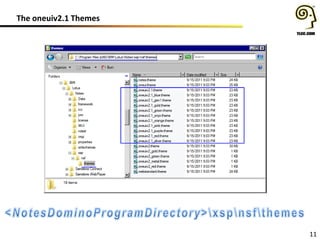
The oneuiv2.1 Themes
11
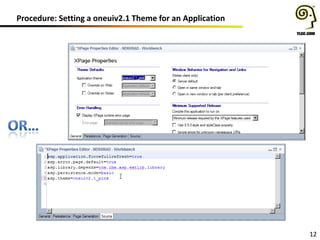
Procedure: Setting a oneuiv2.1 Theme for an Application
12
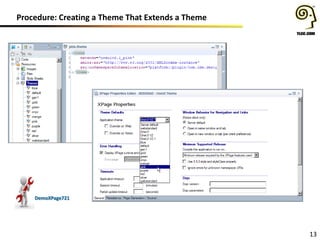
Procedure: Creating a Theme That Extends a Theme
13
DemoXPage721
Agenda
14
• Prerequisites & Configuration
• OneUI version 2.1 Themes
• Tree Nodes and Navigators
• Application Layout Design Framework
• Designing an Application Layout in a Custom Control
• Navigation and Context
• Application Layout Design strategies
• Wrap up
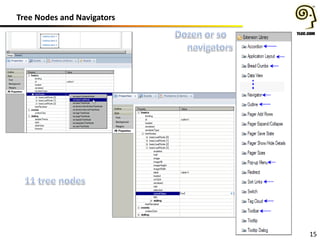
Tree Nodes and Navigators
15
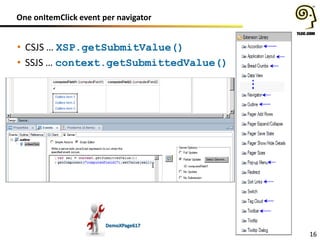
One onItemClick event per navigator
16
• CSJS … XSP.getSubmitValue()
• SSJS … context.getSubmittedValue()
DemoXPage617
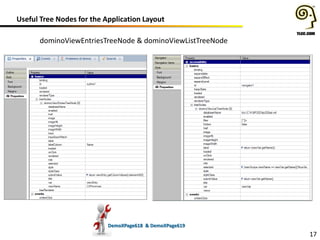
Useful Tree Nodes for the Application Layout
17
DemoXPage618 & DemoXPage619
dominoViewEntriesTreeNode & dominoViewListTreeNode
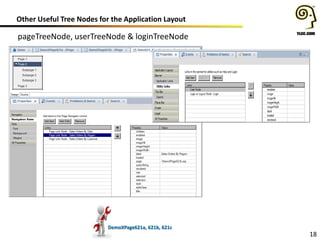
Other Useful Tree Nodes for the Application Layout
18
pageTreeNode, userTreeNode & loginTreeNode
DemoXPage621a, 621b, 621c
Agenda
19
• Prerequisites & Configuration
• OneUI version 2.1 Themes
• Tree Nodes and Navigators
• Application Layout Design Framework
• Designing an Application Layout in a Custom Control
• Navigation and Context
• Application Layout Design strategies
• Wrap up
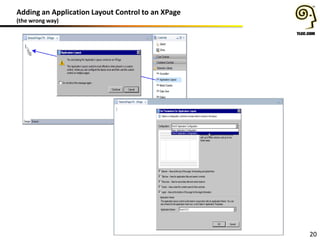
Adding an Application Layout Control to an XPage
(the wrong way)
20
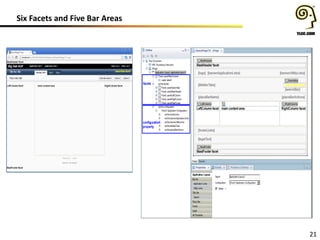
Six Facets and Five Bar Areas
21
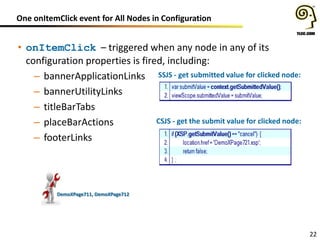
One onItemClick event for All Nodes in Configuration
22
• onItemClick – triggered when any node in any of its
configuration properties is fired, including:
– bannerApplicationLinks
– bannerUtilityLinks
– titleBarTabs
– placeBarActions
– footerLinks
DemoXPage711, DemoXPage712
SSJS - get submitted value for clicked node:
CSJS - get the submit value for clicked node:
Agenda
23
• Prerequisites & Configuration
• OneUI version 2.1 Themes
• Tree Nodes and Navigators
• Application Layout Design Framework
• Designing an Application Layout in a Custom Control
• Navigation and Context
• Application Layout Design strategies
• Wrap up
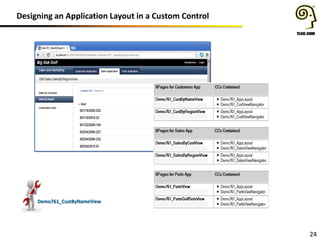
Designing an Application Layout in a Custom Control
24
Demo761_CustByNameView
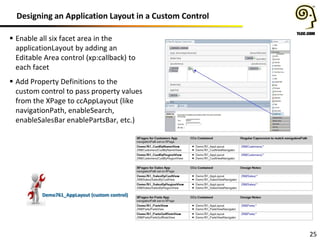
Designing an Application Layout in a Custom Control
25
Demo761_AppLayout (custom control)
 Enable all six facet area in the
applicationLayout by adding an
Editable Area control (xp:callback) to
each facet
 Add Property Definitions to the
custom control to pass property values
from the XPage to ccAppLayout (like
navigationPath, enableSearch,
enableSalesBar enablePartsBar, etc.)
Designing an Application Layout in a Custom Control
26
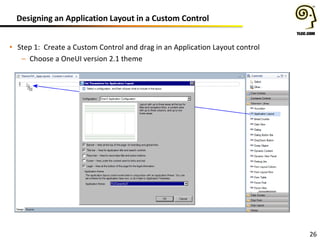
• Step 1: Create a Custom Control and drag in an Application Layout control
– Choose a OneUI version 2.1 theme
Designing an Application Layout in a Custom Control
27
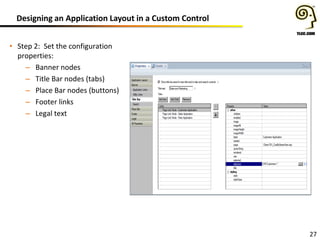
• Step 2: Set the configuration
properties:
– Banner nodes
– Title Bar nodes (tabs)
– Place Bar nodes (buttons)
– Footer links
– Legal text
Designing an Application Layout in a Custom Control
28
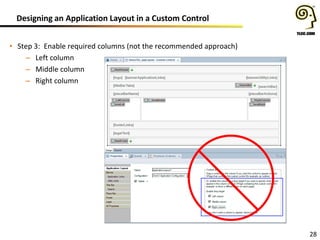
• Step 3: Enable required columns (not the recommended approach)
– Left column
– Middle column
– Right column
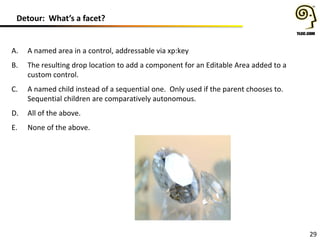
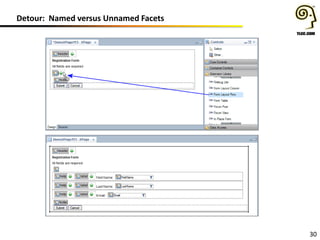
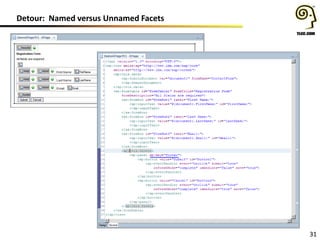
Detour: What’s a facet?
29
A. A named area in a control, addressable via xp:key
B. The resulting drop location to add a component for an Editable Area added to a
custom control.
C. A named child instead of a sequential one. Only used if the parent chooses to.
Sequential children are comparatively autonomous.
D. All of the above.
E. None of the above.
Detour: Named versus Unnamed Facets
30
Detour: Named versus Unnamed Facets
31
Designing an Application Layout in a Custom Control (continuued)
32
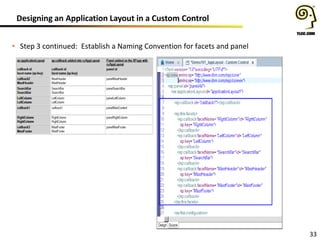
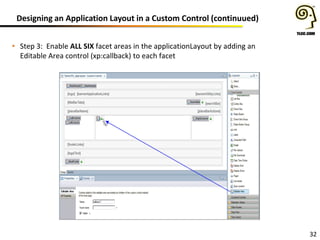
• Step 3: Enable ALL SIX facet areas in the applicationLayout by adding an
Editable Area control (xp:callback) to each facet
Designing an Application Layout in a Custom Control
33
• Step 3 continued: Establish a Naming Convention for facets and panel
Designing an Application Layout in a Custom Control
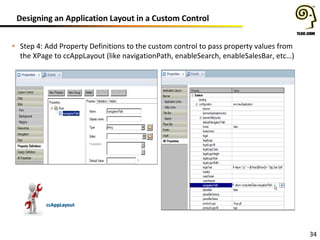
34
• Step 4: Add Property Definitions to the custom control to pass property values from
the XPage to ccAppLayout (like navigationPath, enableSearch, enableSalesBar, etc…)
ccAppLayout
Agenda
35
• Prerequisites & Configuration
• OneUI version 2.1 Themes
• Tree Nodes and Navigators
• Application Layout Design Framework
• Designing an Application Layout in a Custom Control
• Navigation and Context
• Application Layout Design strategies
• Wrap up
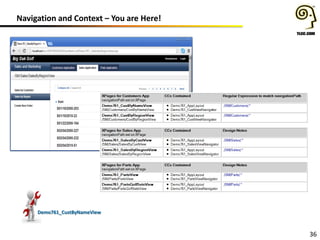
Navigation and Context – You are Here!
36
Demo761_CustByNameView
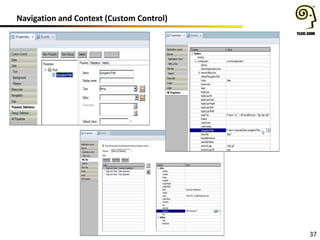
Navigation and Context (Custom Control)
37
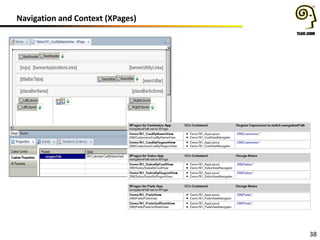
Navigation and Context (XPages)
38
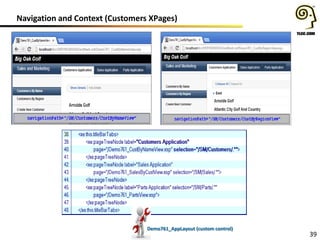
Navigation and Context (Customers XPages)
39
Demo761_AppLayout (custom control)
Agenda
40
• Prerequisites & Configuration
• OneUI version 2.1 Themes
• Tree Nodes and Navigators
• Application Layout Design Framework
• Designing an Application Layout in a Custom Control
• Navigation and Context
• Application Layout Design strategies
• Wrap up
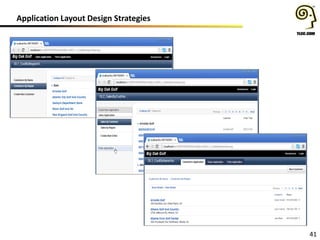
Application Layout Design Strategies
41
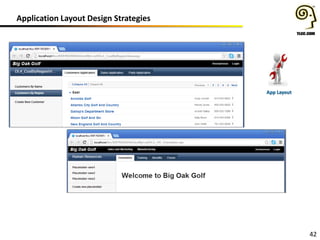
Application Layout Design Strategies
42
App Layout
Application Configuration for Bootstrap4XPages
43
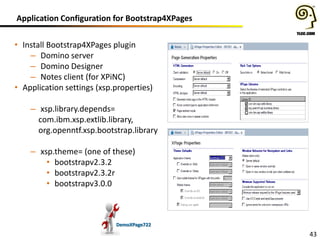
• Install Bootstrap4XPages plugin
– Domino server
– Domino Designer
– Notes client (for XPiNC)
• Application settings (xsp.properties)
– xsp.library.depends=
com.ibm.xsp.extlib.library,
org.openntf.xsp.bootstrap.library
– xsp.theme= (one of these)
• bootstrapv2.3.2
• bootstrapv2.3.2r
• bootstrapv3.0.0
DemoXPage722
Agenda
44
• Prerequisites & Configuration
• OneUI version 2.1 Themes
• Tree Nodes and Navigators
• Application Layout Design Framework
• Designing an Application Layout in a Custom Control
• Navigation and Context
• Application Layout Design strategies
• Wrap up
Get the Slides and Demo Database
http://www.tlcc.com/mar-webinar
45
Key Points
46
• OneUI is a very good idea
• The Application Layout control is used to Rapidly develop a
consistent user interface that can implement the “One UI”
design framework (awesome)
• Application Layout control + Bootstrap4XPages (totally
awesome)
• One onItemClick event per navigator
– CSJS … XSP.getSubmitValue()
– SSJS … context.getSubmittedValue()
• Enable all six facet areas in the applicationLayout by adding an
Editable Area control (xp:callback) to each facet
• Add Property Definitions to the custom control to pass property
values from the XPage to ccAppLayout (like navigationPath,
enableSearch, enableSalesBar enablePartsBar, etc…)
Questions????
47
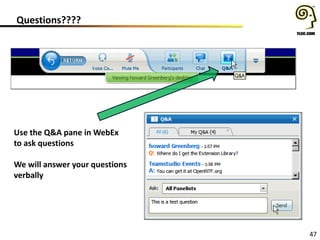
Use the Q&A pane in WebEx
to ask questions
We will answer your questions
verbally
Download the demo - www.tlcc.com/mar-webinar
Upcoming Events:
Engage in the Netherlands, March 17th-18th
TLCC TackItOn the day after!
Atlanta User Group Meeting on April 7th
Question and Answer Time!
48
Teamstudio Questions?
contactus@teamstudio.com
877-228-6178
TLCC Questions?
howardg@tlcc.com paul@tlcc.com
888-241-8522 or 561-953-0095
Howard Greenberg Courtney Carter
#XPages
@ptcalhoun
@TLCCLtd
@Teamstudio
@PaulDN
Paul Della-Nebbia

XPages Application Layout Control - TLCC March, 2014 Webinar

  • 1.
    Application Layout Control Tweetabout this event: #XPages and mention us: @teamstudio @TLCCLTD @PaulDN March 13, 2014
  • 2.
  • 3.
    Who We Are •Our background is in creating tools for collaborative computing in mid-size and large enterprises, primarily for IBM Notes • Easy-to-use tools for developers and administrators • 2300+ active customers, 47 countries • Offices in US, UK and Japan • Entered mobile space in 2010 with Unplugged: easy mobilization of Notes apps to Blackberry, Android and iOS
  • 4.
    Teamstudio Unplugged • Yourmobile Domino server: take your Notes apps with you! • End-users access Notes applications from mobile devices whether online or offline • Leverages existing skills and technology – XPages – a replication model you already know • Unplugged 3.0 recently released
  • 5.
    Unplugged Templates • Continuity– Mobile offline access to BCM programs • OneView Approvals – Expense approvals; anywhere, anytime • CustomerView – lightweight CRM framework for field sales and field service teams • Contacts – customer information database • Activities – customer activity log • Media – mobile offline file storage and access
  • 6.
    • Next WirelessWednesdays webinar: Part 3 on April 2, 2014 o Learn Domino mobile development • Next Teamstudio/TLCC webinar: April 10, 2014 • May Teamstudio/TLCC webinar: May 13, 2014 • Promotion: • Demo our end-to-end source code control and version management tools, and be entered to win an XBOX gaming system
  • 7.
    Rapid XPages Developmentusing the Application Layout Control 1 #XPages Your Hosts and Presenters Today: Howard Greenberg TLCC @TLCCLtd Paul Della-Nebbia TLCC @PaulDN
  • 8.
    TLCC Courses andServices • The Leader in Notes and Domino Training since 1997 • Self Paced Distance Learning Courses for Notes/Domino – XPages, Development, and Administration (user too!) • OnSite Private Classes • Mentoring/Consulting Services • Free demo courses – Intro. To XPages Development – Application Development 1 2
  • 9.
    Upcoming and RecordedWebinars 3 Webinar Schedule Ask The XPages Experts – April 10th It’s Not Infernal: Dante’s Nine Circles of XPages Heaven – May 13th Bootstrap4XPages – June 17th www.tlcc.com/xpages-webinar View Previous Webinars (use url above)
  • 10.
    Engage User Conference •In Europe? Don’t Miss Engage (formerly BLUG) – March 17th and 18th – FREE! – Over 50 breakout sessions by the leading experts • Tack on an extra day of training on March 19th – Rapid XPages Development • With Howard Greenberg • Get TLCC’s Four Day Rapid XPages Development course as part of the tuition!!! – A $600 value by itself! Click here for more information 4
  • 11.
    Asking Questions 5 Q &A at the end! Type in your questions as they come up
  • 12.
    Application Layout control 6 •The Application Layout control is used to Rapidly develop a consistent user interface that can implement the “One UI” design framework
  • 13.
    Agenda 7 • Prerequisites &Configuration • OneUI version 2.1 Themes • Tree Nodes and Navigators • Application Layout Design Framework • Designing an Application Layout in a Custom Control • Navigation and Context • Application Layout Design strategies • Wrap up
  • 14.
    System Prerequisites 8 • Notesand Domino 8.5.3 (Install Extension Library from OpenNTF or IBM’s Update Pack 1) – Domino Server • Copy files or use an Update Site Database (preferred) – Designer • Install Plugin – Notes client (only needed for XPINC apps) • Use Update Site • Notes and Domino 9 (Extension Library is already included for Domino server, Designer, and Notes clients) – Optionally install Bootstrap4XPages plugin - to use Bootstrap and Bootstrap responsive themes
  • 15.
  • 16.
    Agenda 10 • Prerequisites &Configuration • OneUI version 2.1 Themes • Tree Nodes and Navigators • Application Layout Design Framework • Designing an Application Layout in a Custom Control • Navigation and Context • Application Layout Design strategies • Wrap up
  • 17.
  • 18.
    Procedure: Setting aoneuiv2.1 Theme for an Application 12
  • 19.
    Procedure: Creating aTheme That Extends a Theme 13 DemoXPage721
  • 20.
    Agenda 14 • Prerequisites &Configuration • OneUI version 2.1 Themes • Tree Nodes and Navigators • Application Layout Design Framework • Designing an Application Layout in a Custom Control • Navigation and Context • Application Layout Design strategies • Wrap up
  • 21.
    Tree Nodes andNavigators 15
  • 22.
    One onItemClick eventper navigator 16 • CSJS … XSP.getSubmitValue() • SSJS … context.getSubmittedValue() DemoXPage617
  • 23.
    Useful Tree Nodesfor the Application Layout 17 DemoXPage618 & DemoXPage619 dominoViewEntriesTreeNode & dominoViewListTreeNode
  • 24.
    Other Useful TreeNodes for the Application Layout 18 pageTreeNode, userTreeNode & loginTreeNode DemoXPage621a, 621b, 621c
  • 25.
    Agenda 19 • Prerequisites &Configuration • OneUI version 2.1 Themes • Tree Nodes and Navigators • Application Layout Design Framework • Designing an Application Layout in a Custom Control • Navigation and Context • Application Layout Design strategies • Wrap up
  • 26.
    Adding an ApplicationLayout Control to an XPage (the wrong way) 20
  • 27.
    Six Facets andFive Bar Areas 21
  • 28.
    One onItemClick eventfor All Nodes in Configuration 22 • onItemClick – triggered when any node in any of its configuration properties is fired, including: – bannerApplicationLinks – bannerUtilityLinks – titleBarTabs – placeBarActions – footerLinks DemoXPage711, DemoXPage712 SSJS - get submitted value for clicked node: CSJS - get the submit value for clicked node:
  • 29.
    Agenda 23 • Prerequisites &Configuration • OneUI version 2.1 Themes • Tree Nodes and Navigators • Application Layout Design Framework • Designing an Application Layout in a Custom Control • Navigation and Context • Application Layout Design strategies • Wrap up
  • 30.
    Designing an ApplicationLayout in a Custom Control 24 Demo761_CustByNameView
  • 31.
    Designing an ApplicationLayout in a Custom Control 25 Demo761_AppLayout (custom control)  Enable all six facet area in the applicationLayout by adding an Editable Area control (xp:callback) to each facet  Add Property Definitions to the custom control to pass property values from the XPage to ccAppLayout (like navigationPath, enableSearch, enableSalesBar enablePartsBar, etc.)
  • 32.
    Designing an ApplicationLayout in a Custom Control 26 • Step 1: Create a Custom Control and drag in an Application Layout control – Choose a OneUI version 2.1 theme
  • 33.
    Designing an ApplicationLayout in a Custom Control 27 • Step 2: Set the configuration properties: – Banner nodes – Title Bar nodes (tabs) – Place Bar nodes (buttons) – Footer links – Legal text
  • 34.
    Designing an ApplicationLayout in a Custom Control 28 • Step 3: Enable required columns (not the recommended approach) – Left column – Middle column – Right column
  • 35.
    Detour: What’s afacet? 29 A. A named area in a control, addressable via xp:key B. The resulting drop location to add a component for an Editable Area added to a custom control. C. A named child instead of a sequential one. Only used if the parent chooses to. Sequential children are comparatively autonomous. D. All of the above. E. None of the above.
  • 36.
    Detour: Named versusUnnamed Facets 30
  • 37.
    Detour: Named versusUnnamed Facets 31
  • 38.
    Designing an ApplicationLayout in a Custom Control (continuued) 32 • Step 3: Enable ALL SIX facet areas in the applicationLayout by adding an Editable Area control (xp:callback) to each facet
  • 39.
    Designing an ApplicationLayout in a Custom Control 33 • Step 3 continued: Establish a Naming Convention for facets and panel
  • 40.
    Designing an ApplicationLayout in a Custom Control 34 • Step 4: Add Property Definitions to the custom control to pass property values from the XPage to ccAppLayout (like navigationPath, enableSearch, enableSalesBar, etc…) ccAppLayout
  • 41.
    Agenda 35 • Prerequisites &Configuration • OneUI version 2.1 Themes • Tree Nodes and Navigators • Application Layout Design Framework • Designing an Application Layout in a Custom Control • Navigation and Context • Application Layout Design strategies • Wrap up
  • 42.
    Navigation and Context– You are Here! 36 Demo761_CustByNameView
  • 43.
    Navigation and Context(Custom Control) 37
  • 44.
  • 45.
    Navigation and Context(Customers XPages) 39 Demo761_AppLayout (custom control)
  • 46.
    Agenda 40 • Prerequisites &Configuration • OneUI version 2.1 Themes • Tree Nodes and Navigators • Application Layout Design Framework • Designing an Application Layout in a Custom Control • Navigation and Context • Application Layout Design strategies • Wrap up
  • 47.
  • 48.
    Application Layout DesignStrategies 42 App Layout
  • 49.
    Application Configuration forBootstrap4XPages 43 • Install Bootstrap4XPages plugin – Domino server – Domino Designer – Notes client (for XPiNC) • Application settings (xsp.properties) – xsp.library.depends= com.ibm.xsp.extlib.library, org.openntf.xsp.bootstrap.library – xsp.theme= (one of these) • bootstrapv2.3.2 • bootstrapv2.3.2r • bootstrapv3.0.0 DemoXPage722
  • 50.
    Agenda 44 • Prerequisites &Configuration • OneUI version 2.1 Themes • Tree Nodes and Navigators • Application Layout Design Framework • Designing an Application Layout in a Custom Control • Navigation and Context • Application Layout Design strategies • Wrap up
  • 51.
    Get the Slidesand Demo Database http://www.tlcc.com/mar-webinar 45
  • 52.
    Key Points 46 • OneUIis a very good idea • The Application Layout control is used to Rapidly develop a consistent user interface that can implement the “One UI” design framework (awesome) • Application Layout control + Bootstrap4XPages (totally awesome) • One onItemClick event per navigator – CSJS … XSP.getSubmitValue() – SSJS … context.getSubmittedValue() • Enable all six facet areas in the applicationLayout by adding an Editable Area control (xp:callback) to each facet • Add Property Definitions to the custom control to pass property values from the XPage to ccAppLayout (like navigationPath, enableSearch, enableSalesBar enablePartsBar, etc…)
  • 53.
    Questions???? 47 Use the Q&Apane in WebEx to ask questions We will answer your questions verbally
  • 54.
    Download the demo- www.tlcc.com/mar-webinar Upcoming Events: Engage in the Netherlands, March 17th-18th TLCC TackItOn the day after! Atlanta User Group Meeting on April 7th Question and Answer Time! 48 Teamstudio Questions? contactus@teamstudio.com 877-228-6178 TLCC Questions? howardg@tlcc.com paul@tlcc.com 888-241-8522 or 561-953-0095 Howard Greenberg Courtney Carter #XPages @ptcalhoun @TLCCLtd @Teamstudio @PaulDN Paul Della-Nebbia