Block Diagrams Algebra
Presentation
Submitted By :
Name : Tushar Devaji Khodankar
Enrollment No. : BE18S02F010
Course Code : ME 4017
Course Name : Automatic Control System
Branch/Year : Mechanical (BE)
BlockDiagrams
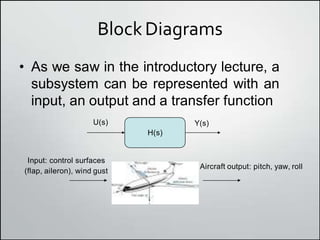
• As we saw in the introductory lecture, a
subsystem can be represented with an
input, an output and a transfer function
U(s) Y(s)
H(s)
Input: control surfaces
(flap, aileron), wind gust
Aircraft output: pitch, yaw, roll
Block Diagrams
• Many systems are composed of multiple
subsystems
• In this lecture we will examine methods for
combining subsystems and simplifying
block diagrams
Examples of subsystems
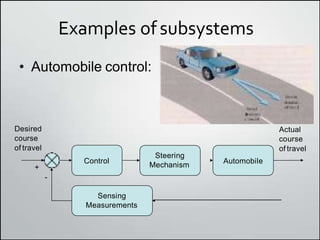
• Automobile control:
Sensing
Measurements
Steering
Mechanism
Automobile
Control
Desired
course
of travel
Actual
course
of travel
-
+
Examples ofSubsystems
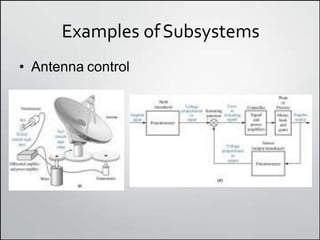
• Antenna control
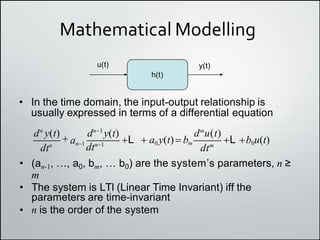
Mathematical Modelling
h(t)
• In the time domain, the input-output relationship is
usually expressed in terms of a differential equation
u(t) y(t)
• (an-1, …, a0, bm, … b0) are the systemʼs parameters, n ≥
m
• The system is LTI (Linear Time Invariant) iff the
parameters are time-invariant
• n is the order of the system
dtn
dtm
an1
dtn1
dn
y(t)  dn1
y(t) dm
u(t)
L  a0 y(t) bm L b0u(t)
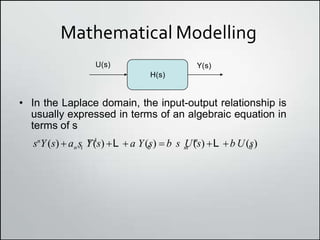
Mathematical Modelling
H(s)
• In the Laplace domain, the input-output relationship is
usually expressed in terms of an algebraic equation in
terms of s
U(s) Y(s)
m 0
n1 m
n1 0
sn
Y(s)  a s Y(s) L  a Y(s)  b s U(s) L b U(s)
Cascaded systems
• In time, a cascaded
system requires a
convolution
• In the Laplace
domain, this is simply
a product
H(s)
U(s) Y1(s)
H1(s)
Y(s)
Y(s) U(s)H(s)H1(s)
htd



h(t)
utht u
u(t) y1(t)
h1(t)
y(t)
y(t) (u(t)*h(t))*h1(t)
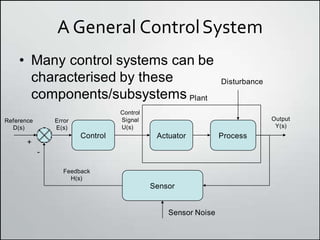
A General ControlSystem
• Many control systems can be
Sensor
Actuator Process
Control
Reference
D(s)
Output
Y(s)
+
Error
E(s)
Control
Signal
U(s)
characterised by these
components/subsystems Plant
Disturbance
Sensor Noise
-
Feedback
H(s)
Simplifying Block Diagrams
• The objectives of a block diagram are
– To provide an understanding of the signal
flows in the system
– To enable modelling of complex systems from
simple building blocks
– To allow us to generate the overall system
transfer function
• A few rules allow us to simplify complex
block diagrams into familiar forms
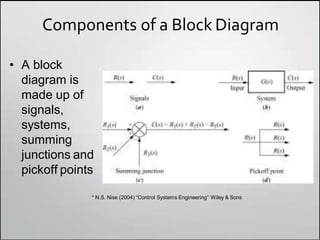
Components of a Block Diagram
• A block
diagram is
made up of
signals,
systems,
summing
junctions and
pickoff points
* N.S. Nise (2004) “Control Systems Engineering” Wiley & Sons
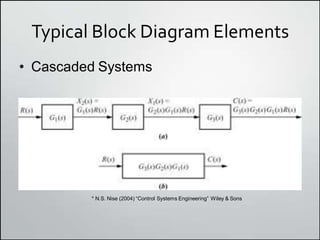
Typical Block Diagram Elements
• Cascaded Systems
* N.S. Nise (2004) “Control Systems Engineering” Wiley & Sons
Typical Block Diagram Elements
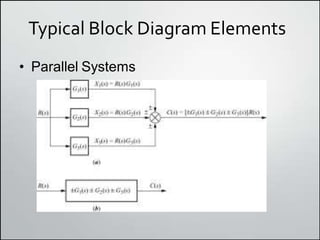
• Parallel Systems
Typical Block Diagram Elements
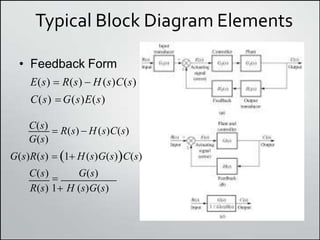
• Feedback Form
E(s)  R(s)  H (s)C(s)
C(s) G(s)E(s)
C(s)
 R(s)  H(s)C(s)
G(s)
G(s)R(s)  1 H(s)G(s)C(s)
C(s)  G(s)
R(s) 1 H (s)G(s)
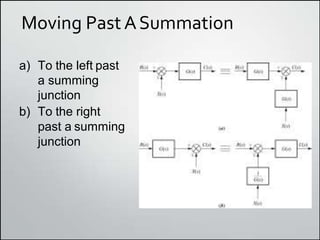
Moving Past ASummation
a) To the left past
a summing
junction
b) To the right
past a summing
junction
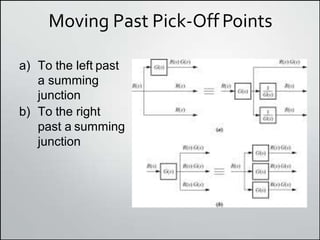
Moving Past Pick-Off Points
a) To the left past
a summing
junction
b) To the right
past a summing
junction
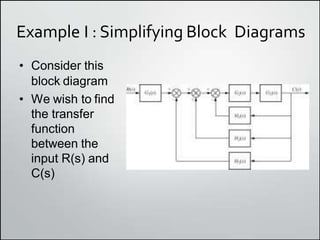
Example I : Simplifying Block Diagrams
• Consider this
block diagram
• We wish to find
the transfer
function
between the
input R(s) and
C(s)
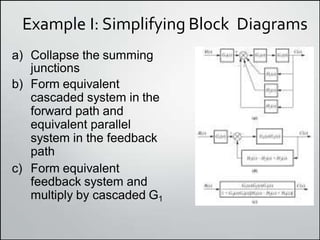
Example I: Simplifying Block Diagrams
a) Collapse the summing
junctions
b) Form equivalent
cascaded system in the
forward path and
equivalent parallel
system in the feedback
path
c) Form equivalent
feedback system and
multiply by cascaded G1
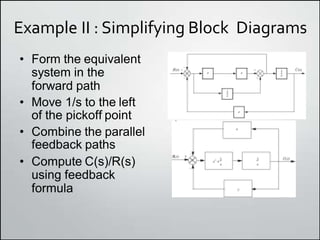
Example II : Simplifying Block Diagrams
• Form the equivalent
system in the
forward path
• Move 1/s to the left
of the pickoff point
• Combine the parallel
feedback paths
• Compute C(s)/R(s)
using feedback
formula
Example III: Shuttle PitchControl
• Manipulating block
diagrams is important
but how do they relate
to the real world?
• Here is an example of
a real system that
incorporates feedback
to control the pitch of
the vehicle (amongst
other things)
Example III: Shuttle PitchControl
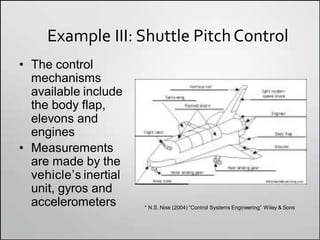
• The control
mechanisms
available include
the body flap,
elevons and
engines
• Measurements
are made by the
vehicleʼs inertial
unit, gyros and
accelerometers * N.S. Nise (2004) “Control Systems Engineering” Wiley & Sons
Example III : Shuttle PitchControl
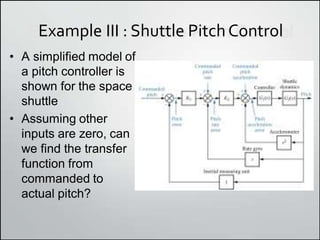
• A simplified model of
a pitch controller is
shown for the space
shuttle
• Assuming other
inputs are zero, can
we find the transfer
function from
commanded to
actual pitch?
Example III : Shuttle PitchControl
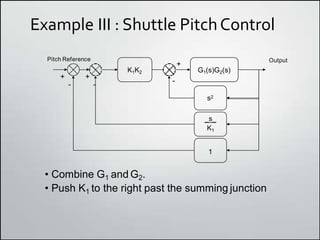
G1(s)G2(s)
K1K2
Pitch Reference Output
-
+
- -
+ +
_s_
K1
1
s2
• Combine G1 and G2.
• Push K1 to the right past the summing junction
Example III: Shuttle PitchControl
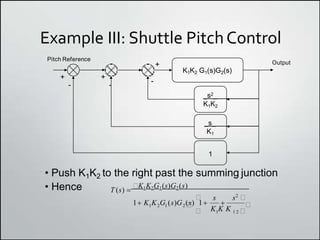
K1K2 G1(s)G2(s)
Pitch Reference
Output
-
+
-
+
-
+
_s2_
K1K2
_s_
K1
1
• Push K1K2 to the right past the summing junction
• Hence
K K K
T (s) 
K1K2G1(s)G2(s)
 s s2

1 K K G (s)G (s) 1 
1 2 1 2  
 1 1 2 
Example III: Shuttle PitchControl
• Matlab provides us with a tool called
Simulink that allows us to represent
systems by their block diagram
• Weʼll take a bit of time to see how we
construct a Simulink model of this system
Closed LoopFeedback
• We have suggested that many control
systems take on a familiar feedback form
• Intuition tells us that feedback is useful –
imagine driving your car with your eyes
closed
• Let us examine why this is the case from a
mathematical perspective
Single-Loop FeedbackSystem
Value
Output
Transducer
Desired+
-
Feedback
Signal
Controller Plant
Control
Signal
K(s) G(s)
H
d(t) e(t) u(t)
error
y(t)
f (t)
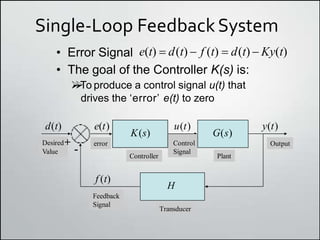
• Error Signal e(t)  d(t)  f (t)  d(t)  Ky(t)
• The goal of the Controller K(s) is:


To produce a control signal u(t) that
drives the ʻerrorʼ e(t) to zero
ControllerObjectives
• Controller cannot drive error to zero
instantaneously as the plant G(s) has dynamics
• Clearly a ʻlargeʼ control signal will move the
plant more quickly
• The gain of the controller should be large so that
even small values of e(t) will produce large
values of u(t)
• However, large values of gain will cause
instability
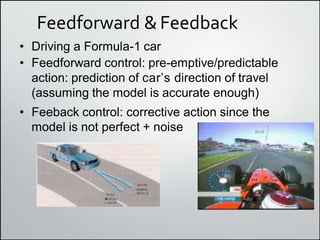
Feedforward &Feedback
• Driving a Formula-1 car
• Feedforward control: pre-emptive/predictable
action: prediction of carʼs direction of travel
(assuming the model is accurate enough)
• Feeback control: corrective action since the
model is not perfect + noise
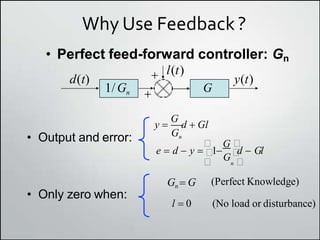
Why Use Feedback ?
• Perfect feed-forward controller: Gn
• Output and error: Gn
y 
G
d  Gl
 G 
e  d  y  1
G 
d  Gl
• Only zero when:
Gn  G
 n 
(Perfect Knowledge)
l  0 (No load or disturbance)
y(t)
d(t)
1/Gn
l(t)


G
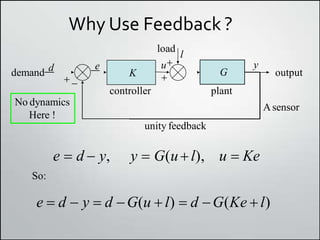
Why Use Feedback ?
e

 
K
u
unity feedback
G
y
controller plant
demand d output
Asensor
load
l
No dynamics
Here !
e  d  y, y  G(ul), u  Ke
So:
e  d  y  d G(u  l)  d G(Ke  l)
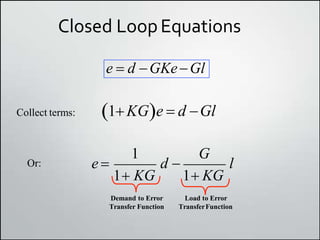
Closed LoopEquations
e  d GKeGl
1KGe  d Gl
Collect terms:
1 G
e  d  l
1 KG 1 KG
Or:
Demand to Error Load to Error
Transfer Function TransferFunction
Closed LoopEquations
G
1 KG
K
d
l
y


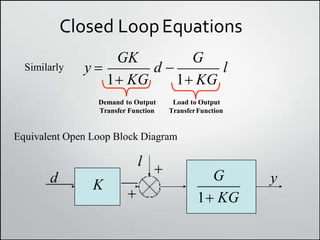
Equivalent Open Loop Block Diagram
GK G
y  d  l
1 KG 1 KG
Similarly
Demand to Output Load to Output
Transfer Function TransferFunction
Rejecting Loads and Disturbances
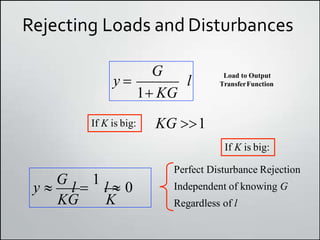
l
y 
G
1 KG
Load to Output
TransferFunction
If K is big: KG 1
KG K
y 
G
l 
1
l  0
If K is big:
Perfect Disturbance Rejection
Independent of knowing G
Regardless of l
Tracking Performance
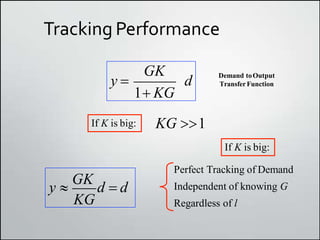
d
y 
GK
1 KG
Demand toOutput
TransferFunction
If K is big: KG 1
KG
y 
GK
d  d
If K is big:
Perfect Tracking of Demand
Independent of knowing G
Regardless of l
Two Key Problems
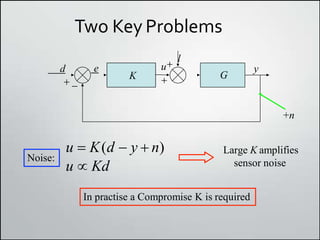
y

d e
 
u l
K G
Noise:
Large K amplifies
sensor noise
u  K(d  y  n)
u  Kd
In practise a Compromise K is required
+n
Conclusions
• We have examined methods for
computing the transfer function by
reducing block diagrams to simple form
• We have also presented arguments for
using feedback in control systems

Block Diagram Algebra

  • 1.
    Block Diagrams Algebra Presentation SubmittedBy : Name : Tushar Devaji Khodankar Enrollment No. : BE18S02F010 Course Code : ME 4017 Course Name : Automatic Control System Branch/Year : Mechanical (BE)
  • 2.
    BlockDiagrams • As wesaw in the introductory lecture, a subsystem can be represented with an input, an output and a transfer function U(s) Y(s) H(s) Input: control surfaces (flap, aileron), wind gust Aircraft output: pitch, yaw, roll
  • 3.
    Block Diagrams • Manysystems are composed of multiple subsystems • In this lecture we will examine methods for combining subsystems and simplifying block diagrams
  • 4.
    Examples of subsystems •Automobile control: Sensing Measurements Steering Mechanism Automobile Control Desired course of travel Actual course of travel - +
  • 5.
  • 6.
    Mathematical Modelling h(t) • Inthe time domain, the input-output relationship is usually expressed in terms of a differential equation u(t) y(t) • (an-1, …, a0, bm, … b0) are the systemʼs parameters, n ≥ m • The system is LTI (Linear Time Invariant) iff the parameters are time-invariant • n is the order of the system dtn dtm an1 dtn1 dn y(t)  dn1 y(t) dm u(t) L  a0 y(t) bm L b0u(t)
  • 7.
    Mathematical Modelling H(s) • Inthe Laplace domain, the input-output relationship is usually expressed in terms of an algebraic equation in terms of s U(s) Y(s) m 0 n1 m n1 0 sn Y(s)  a s Y(s) L  a Y(s)  b s U(s) L b U(s)
  • 8.
    Cascaded systems • Intime, a cascaded system requires a convolution • In the Laplace domain, this is simply a product H(s) U(s) Y1(s) H1(s) Y(s) Y(s) U(s)H(s)H1(s) htd    h(t) utht u u(t) y1(t) h1(t) y(t) y(t) (u(t)*h(t))*h1(t)
  • 9.
    A General ControlSystem •Many control systems can be Sensor Actuator Process Control Reference D(s) Output Y(s) + Error E(s) Control Signal U(s) characterised by these components/subsystems Plant Disturbance Sensor Noise - Feedback H(s)
  • 10.
    Simplifying Block Diagrams •The objectives of a block diagram are – To provide an understanding of the signal flows in the system – To enable modelling of complex systems from simple building blocks – To allow us to generate the overall system transfer function • A few rules allow us to simplify complex block diagrams into familiar forms
  • 11.
    Components of aBlock Diagram • A block diagram is made up of signals, systems, summing junctions and pickoff points * N.S. Nise (2004) “Control Systems Engineering” Wiley & Sons
  • 12.
    Typical Block DiagramElements • Cascaded Systems * N.S. Nise (2004) “Control Systems Engineering” Wiley & Sons
  • 13.
    Typical Block DiagramElements • Parallel Systems
  • 14.
    Typical Block DiagramElements • Feedback Form E(s)  R(s)  H (s)C(s) C(s) G(s)E(s) C(s)  R(s)  H(s)C(s) G(s) G(s)R(s)  1 H(s)G(s)C(s) C(s)  G(s) R(s) 1 H (s)G(s)
  • 15.
    Moving Past ASummation a)To the left past a summing junction b) To the right past a summing junction
  • 16.
    Moving Past Pick-OffPoints a) To the left past a summing junction b) To the right past a summing junction
  • 17.
    Example I :Simplifying Block Diagrams • Consider this block diagram • We wish to find the transfer function between the input R(s) and C(s)
  • 18.
    Example I: SimplifyingBlock Diagrams a) Collapse the summing junctions b) Form equivalent cascaded system in the forward path and equivalent parallel system in the feedback path c) Form equivalent feedback system and multiply by cascaded G1
  • 19.
    Example II :Simplifying Block Diagrams • Form the equivalent system in the forward path • Move 1/s to the left of the pickoff point • Combine the parallel feedback paths • Compute C(s)/R(s) using feedback formula
  • 20.
    Example III: ShuttlePitchControl • Manipulating block diagrams is important but how do they relate to the real world? • Here is an example of a real system that incorporates feedback to control the pitch of the vehicle (amongst other things)
  • 21.
    Example III: ShuttlePitchControl • The control mechanisms available include the body flap, elevons and engines • Measurements are made by the vehicleʼs inertial unit, gyros and accelerometers * N.S. Nise (2004) “Control Systems Engineering” Wiley & Sons
  • 22.
    Example III :Shuttle PitchControl • A simplified model of a pitch controller is shown for the space shuttle • Assuming other inputs are zero, can we find the transfer function from commanded to actual pitch?
  • 23.
    Example III :Shuttle PitchControl G1(s)G2(s) K1K2 Pitch Reference Output - + - - + + _s_ K1 1 s2 • Combine G1 and G2. • Push K1 to the right past the summing junction
  • 24.
    Example III: ShuttlePitchControl K1K2 G1(s)G2(s) Pitch Reference Output - + - + - + _s2_ K1K2 _s_ K1 1 • Push K1K2 to the right past the summing junction • Hence K K K T (s)  K1K2G1(s)G2(s)  s s2  1 K K G (s)G (s) 1  1 2 1 2    1 1 2 
  • 25.
    Example III: ShuttlePitchControl • Matlab provides us with a tool called Simulink that allows us to represent systems by their block diagram • Weʼll take a bit of time to see how we construct a Simulink model of this system
  • 26.
    Closed LoopFeedback • Wehave suggested that many control systems take on a familiar feedback form • Intuition tells us that feedback is useful – imagine driving your car with your eyes closed • Let us examine why this is the case from a mathematical perspective
  • 27.
    Single-Loop FeedbackSystem Value Output Transducer Desired+ - Feedback Signal Controller Plant Control Signal K(s)G(s) H d(t) e(t) u(t) error y(t) f (t) • Error Signal e(t)  d(t)  f (t)  d(t)  Ky(t) • The goal of the Controller K(s) is:   To produce a control signal u(t) that drives the ʻerrorʼ e(t) to zero
  • 28.
    ControllerObjectives • Controller cannotdrive error to zero instantaneously as the plant G(s) has dynamics • Clearly a ʻlargeʼ control signal will move the plant more quickly • The gain of the controller should be large so that even small values of e(t) will produce large values of u(t) • However, large values of gain will cause instability
  • 29.
    Feedforward &Feedback • Drivinga Formula-1 car • Feedforward control: pre-emptive/predictable action: prediction of carʼs direction of travel (assuming the model is accurate enough) • Feeback control: corrective action since the model is not perfect + noise
  • 30.
    Why Use Feedback? • Perfect feed-forward controller: Gn • Output and error: Gn y  G d  Gl  G  e  d  y  1 G  d  Gl • Only zero when: Gn  G  n  (Perfect Knowledge) l  0 (No load or disturbance) y(t) d(t) 1/Gn l(t)   G
  • 31.
    Why Use Feedback? e    K u unity feedback G y controller plant demand d output Asensor load l No dynamics Here ! e  d  y, y  G(ul), u  Ke So: e  d  y  d G(u  l)  d G(Ke  l)
  • 32.
    Closed LoopEquations e d GKeGl 1KGe  d Gl Collect terms: 1 G e  d  l 1 KG 1 KG Or: Demand to Error Load to Error Transfer Function TransferFunction
  • 33.
    Closed LoopEquations G 1 KG K d l y   EquivalentOpen Loop Block Diagram GK G y  d  l 1 KG 1 KG Similarly Demand to Output Load to Output Transfer Function TransferFunction
  • 34.
    Rejecting Loads andDisturbances l y  G 1 KG Load to Output TransferFunction If K is big: KG 1 KG K y  G l  1 l  0 If K is big: Perfect Disturbance Rejection Independent of knowing G Regardless of l
  • 35.
    Tracking Performance d y  GK 1KG Demand toOutput TransferFunction If K is big: KG 1 KG y  GK d  d If K is big: Perfect Tracking of Demand Independent of knowing G Regardless of l
  • 36.
    Two Key Problems y  de   u l K G Noise: Large K amplifies sensor noise u  K(d  y  n) u  Kd In practise a Compromise K is required +n
  • 37.
    Conclusions • We haveexamined methods for computing the transfer function by reducing block diagrams to simple form • We have also presented arguments for using feedback in control systems