

BitTorrent – A revolution
in P2P networking
Mihir Jyoti Chakrabarti, Arijit Roy, Anirban
Sen
27 11 06
Swami Vivekananda Institute of Science and
Technology
Introduction
WHAT IS P2P NETWORKING?
2
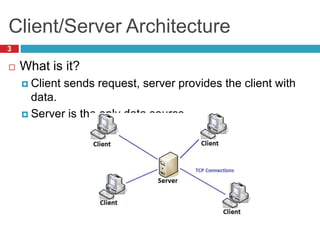
Client/Server Architecture
 What is it?
 Client sends request, server provides the client with
data.
 Server is the only data source.
3
Client/Server Architecture
4
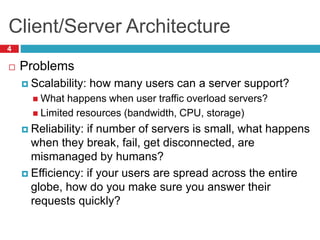
 Problems
 Scalability: how many users can a server support?
 What happens when user traffic overload servers?
 Limited resources (bandwidth, CPU, storage)
 Reliability: if number of servers is small, what happens
when they break, fail, get disconnected, are
mismanaged by humans?
 Efficiency: if your users are spread across the entire
globe, how do you make sure you answer their
requests quickly?
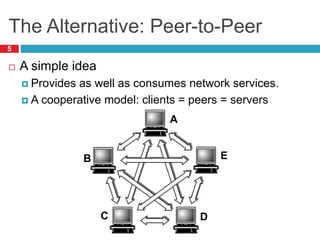
The Alternative: Peer-to-Peer
 A simple idea
 Provides as well as consumes network services.
 A cooperative model: clients = peers = servers
5
A
B E
DC
Peer to Peer
6
 The benefits
 Scalability: Number of “servers” grows with users
 BYOR: bring your own resources (storage, CPU, B/W)
 Reliability: load spread across many peers
 Probability of them all failing is very low…
 Efficiency: peers are distributed
 Peers can try and get service from nearby peers
Types of P2P programs
7
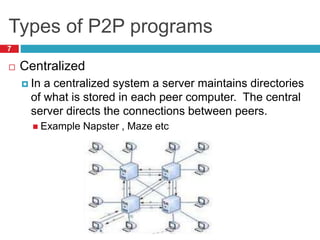
 Centralized
 In a centralized system a server maintains directories
of what is stored in each peer computer. The central
server directs the connections between peers.
 Example Napster , Maze etc
Types of P2P programs
8
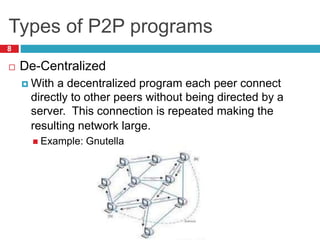
 De-Centralized
 With a decentralized program each peer connect
directly to other peers without being directed by a
server. This connection is repeated making the
resulting network large.
 Example: Gnutella
What is BitTorrent
9
 Programmer Bram Cohen designed the protocol in
April 2001 and released its first implementation of
the BitTorrent client on 2 July 2001.
 Protocol for the practice of peer-to-peer file sharing
 Designed for fast, efficient content distribution
 Ideal for large files, e.g. movies, DVDs, ISOs, etc.
 Not a full fledged P2P system
 Does not support searching for files
Important Terminology
10
 .torrent – Metadata file containing information(size,
about) about file to be shared via BitTorrent.
 Share Ratio – The ratio of the amount of data you've
uploaded to the amount of data you've downloaded.
 Peer – One instance of a BitTorrent client running on a
computer connected to the Internet to which other clients
connect and transfer data.
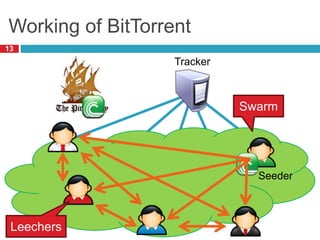
 Seeder – A peer who has a complete copy of the torrent
and offers it for upload.
Important Terminology
11
 Leech – Usually a peer who has a negative effect on
the swarm by having a very poor share ratio - in other
words, downloading much more than they upload.
 Swarm – Together, all peers (including seeders) sharing
a torrent. For example, six ordinary peers and
two seeders make a swarm of eight.
 Tracker – A tracker is a server that keeps track of which
seeds and peers are in the swarm. The tracker is not
directly involved in the data transfer and does not have a
copy of the file.
 Piece – This refers to the torrent files being divided up
into equal specific sized pieces (i.e. 512Kb, 1Mb).
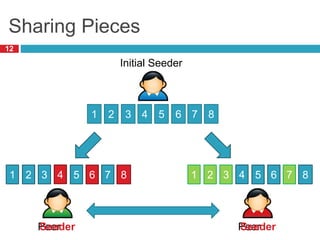
Sharing Pieces
12
Initial Seeder
1 2 3 4 5 6 7 8
Peer
1 2 3
Peer
54 76 8 1 2 3 54 76 8
Seeder Seeder
Working of BitTorrent
13
Tracker
Swarm
Leechers
Seeder
The Beauty of BitTorrent
14
 More seeders = more availability of the full file
 Great for content distribution
 More peers = more replicas of pieces
 More replicas = faster downloads
 Multiple sources for each piece
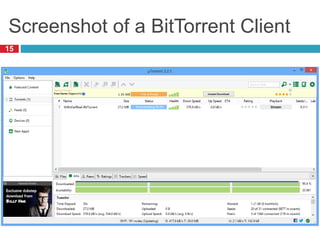
Screenshot of a BitTorrent Client
15
History of BitTorrent
16
 Bram Cohen (born October 12, 1975) created the
first file sharing program to use the protocol, also
known as BitTorrent.
 Prior to version 6.0, BitTorrent was written in Python,
and was free software. Very early versions released
prior to December 30, 2001 were released into
the public domain without a license. Versions up to and
including 3.4.2 were distributed under the MIT license.
 Since version 6.0, the BitTorrent client has been a
rebranded version of µTorrent. As a result, it is no
longer open source.
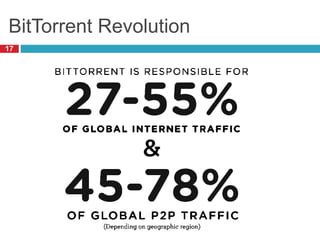
BitTorrent Revolution
17
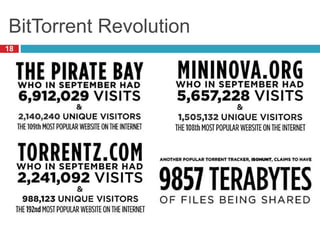
BitTorrent Revolution
18
19
WHAT IS LEGAL AND
ILLEGAL?
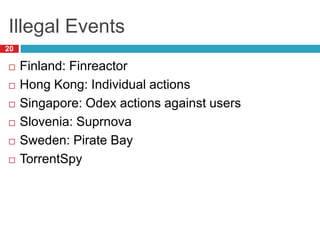
Illegal Events
20
 Finland: Finreactor
 Hong Kong: Individual actions
 Singapore: Odex actions against users
 Slovenia: Suprnova
 Sweden: Pirate Bay
 TorrentSpy
Conclusion
21
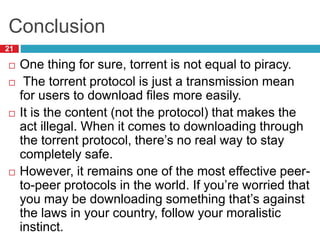
 One thing for sure, torrent is not equal to piracy.
 The torrent protocol is just a transmission mean
for users to download files more easily.
 It is the content (not the protocol) that makes the
act illegal. When it comes to downloading through
the torrent protocol, there’s no real way to stay
completely safe.
 However, it remains one of the most effective peer-
to-peer protocols in the world. If you’re worried that
you may be downloading something that’s against
the laws in your country, follow your moralistic
instinct.
Reference
22
 http://en.wikipedia.org
 http://www.google.co.in
 http://www.krazytech.com
 http://www.slideshare.net
 http://blog.seattlepi.com/timothymccormack/2013/0
7
 http://historycomputer.com/Internet/Conquering/Bit
Torrent.html
 http://www.youtube.com
 http://www.bittorrent.com
Clear Your Doubts
23

Bit torrent a revolution in p2p

  • 1.
    BitTorrent – Arevolution in P2P networking Mihir Jyoti Chakrabarti, Arijit Roy, Anirban Sen 27 11 06 Swami Vivekananda Institute of Science and Technology
  • 2.
  • 3.
    Client/Server Architecture  Whatis it?  Client sends request, server provides the client with data.  Server is the only data source. 3
  • 4.
    Client/Server Architecture 4  Problems Scalability: how many users can a server support?  What happens when user traffic overload servers?  Limited resources (bandwidth, CPU, storage)  Reliability: if number of servers is small, what happens when they break, fail, get disconnected, are mismanaged by humans?  Efficiency: if your users are spread across the entire globe, how do you make sure you answer their requests quickly?
  • 5.
    The Alternative: Peer-to-Peer A simple idea  Provides as well as consumes network services.  A cooperative model: clients = peers = servers 5 A B E DC
  • 6.
    Peer to Peer 6 The benefits  Scalability: Number of “servers” grows with users  BYOR: bring your own resources (storage, CPU, B/W)  Reliability: load spread across many peers  Probability of them all failing is very low…  Efficiency: peers are distributed  Peers can try and get service from nearby peers
  • 7.
    Types of P2Pprograms 7  Centralized  In a centralized system a server maintains directories of what is stored in each peer computer. The central server directs the connections between peers.  Example Napster , Maze etc
  • 8.
    Types of P2Pprograms 8  De-Centralized  With a decentralized program each peer connect directly to other peers without being directed by a server. This connection is repeated making the resulting network large.  Example: Gnutella
  • 9.
    What is BitTorrent 9 Programmer Bram Cohen designed the protocol in April 2001 and released its first implementation of the BitTorrent client on 2 July 2001.  Protocol for the practice of peer-to-peer file sharing  Designed for fast, efficient content distribution  Ideal for large files, e.g. movies, DVDs, ISOs, etc.  Not a full fledged P2P system  Does not support searching for files
  • 10.
    Important Terminology 10  .torrent– Metadata file containing information(size, about) about file to be shared via BitTorrent.  Share Ratio – The ratio of the amount of data you've uploaded to the amount of data you've downloaded.  Peer – One instance of a BitTorrent client running on a computer connected to the Internet to which other clients connect and transfer data.  Seeder – A peer who has a complete copy of the torrent and offers it for upload.
  • 11.
    Important Terminology 11  Leech– Usually a peer who has a negative effect on the swarm by having a very poor share ratio - in other words, downloading much more than they upload.  Swarm – Together, all peers (including seeders) sharing a torrent. For example, six ordinary peers and two seeders make a swarm of eight.  Tracker – A tracker is a server that keeps track of which seeds and peers are in the swarm. The tracker is not directly involved in the data transfer and does not have a copy of the file.  Piece – This refers to the torrent files being divided up into equal specific sized pieces (i.e. 512Kb, 1Mb).
  • 12.
    Sharing Pieces 12 Initial Seeder 12 3 4 5 6 7 8 Peer 1 2 3 Peer 54 76 8 1 2 3 54 76 8 Seeder Seeder
  • 13.
  • 14.
    The Beauty ofBitTorrent 14  More seeders = more availability of the full file  Great for content distribution  More peers = more replicas of pieces  More replicas = faster downloads  Multiple sources for each piece
  • 15.
    Screenshot of aBitTorrent Client 15
  • 16.
    History of BitTorrent 16 Bram Cohen (born October 12, 1975) created the first file sharing program to use the protocol, also known as BitTorrent.  Prior to version 6.0, BitTorrent was written in Python, and was free software. Very early versions released prior to December 30, 2001 were released into the public domain without a license. Versions up to and including 3.4.2 were distributed under the MIT license.  Since version 6.0, the BitTorrent client has been a rebranded version of µTorrent. As a result, it is no longer open source.
  • 17.
  • 18.
  • 19.
    19 WHAT IS LEGALAND ILLEGAL?
  • 20.
    Illegal Events 20  Finland:Finreactor  Hong Kong: Individual actions  Singapore: Odex actions against users  Slovenia: Suprnova  Sweden: Pirate Bay  TorrentSpy
  • 21.
    Conclusion 21  One thingfor sure, torrent is not equal to piracy.  The torrent protocol is just a transmission mean for users to download files more easily.  It is the content (not the protocol) that makes the act illegal. When it comes to downloading through the torrent protocol, there’s no real way to stay completely safe.  However, it remains one of the most effective peer- to-peer protocols in the world. If you’re worried that you may be downloading something that’s against the laws in your country, follow your moralistic instinct.
  • 22.
    Reference 22  http://en.wikipedia.org  http://www.google.co.in http://www.krazytech.com  http://www.slideshare.net  http://blog.seattlepi.com/timothymccormack/2013/0 7  http://historycomputer.com/Internet/Conquering/Bit Torrent.html  http://www.youtube.com  http://www.bittorrent.com
  • 23.