The BitTorrent Protocol
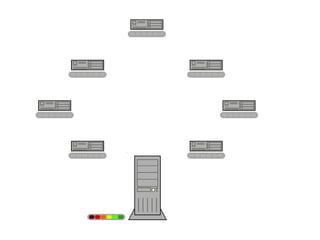
Common ScenarioMillions want to download the same popular huge files (for free)SoftwaresMedia (the real example!)Client-server model failsSingle server failsCan’t afford to deploy enough servers
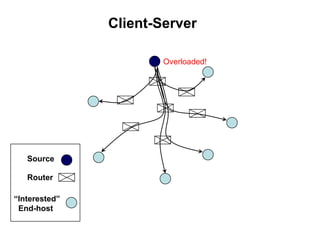
Client-ServerOverloaded!SourceRouter“Interested”   End-host
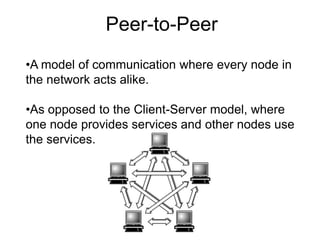
Peer-to-PeerA model of communication where every node in the network acts alike.
As opposed to the Client-Server model, where one node provides services and other nodes use the services. Advantages of P2P ComputingNo central point of failureE.g., the Internet and the Web do not have a central point of failure.Most internet and web services use the client-server model (e.g. HTTP), so a specific service does have a central point of failure.ScalabilitySince every peer is alike, it is possible to add more peers to the system and scale to larger networks.Disadvantage of P2P ComputingDecentralized coordination.
All nodes are not created equal.BitTorrentWritten by Bram Cohen in 2001
Designed to transfer large files
160 million clients, 100 million active users
Used by many different people and organisations
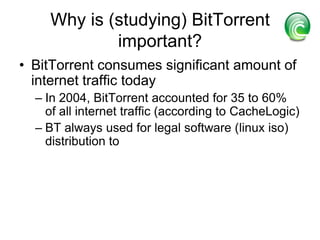
The more popular a large video, audio or software file, the faster and cheaper it can be transferred with BitTorrent“Pull-based” “swarming” approachEach file split into smaller piecesNodes request desired pieces from neighborsAs opposed to parents pushing data that they receivePieces not downloaded in sequential orderEncourages contribution by all nodesPeer-to-peer in natureEven if clients join simultaneously (“flash crowd”)BitTorrent protocol is implemented in applications called BitTorrent Clients such as uTorrent, Bit Comet.
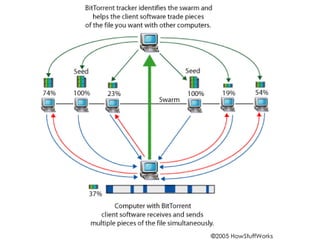
BitTorrent  TerminologyPeers – A node or computer that does not have the complete fileSeed or seeder - A computer with a complete copy of a BitTorrent fileSwarm- A group of computers simultaneously sending (uploading) or receiving (downloading) the same file .torrent - A pointer file that directs your computer to the file you want to download Tracker- A server that manages the BitTorrent file-transfer process
BitTorrent SwarmSwarm
Set of peers all downloading the same file
Organized as a random mesh
Each node knows list of pieces downloaded by neighbors
Node requests pieces it does not own from neighbors
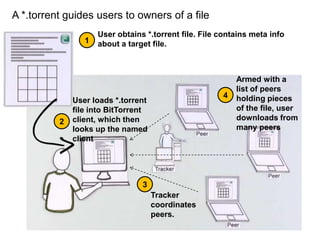
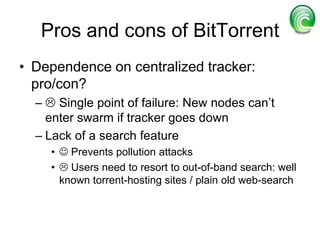
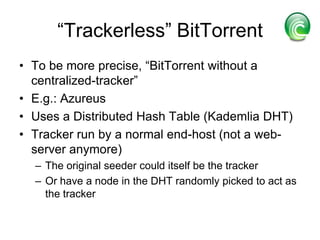
A *.torrent guides users to owners of a fileUser obtains *.torrent file. File contains meta info about a target file.  1Armed with a list of peers holding pieces of the file, user downloads from many peers4User loads *.torrent file into BitTorrent client, which then looks up the named client23Tracker coordinates peers.
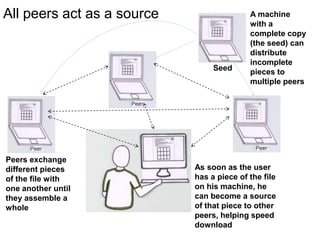
All peers act as a sourceA machine with a complete copy (the seed) can distribute incomplete pieces to multiple peersSeedPeers exchange different pieces of the file with one another until they assemble a wholeAs soon as the user has a piece of the file on his machine, he can become a source of that piece to other peers, helping speed download
The key ingredients of the *.torrent file are the tracker’s address and the unique SHA1 hash All data in a metainfo file is encoded. info: a dictionary that describes the file(s) of the torrent. announce: contains the URL of the “tracker”creation dateComments from the author(optional)created by: (optional)piece length: number of bytes in each piece (integer)pieces: string consisting of the concatenation of all 20-byte SHA1 hash values, one per piece
Bit Torrent Download Download and install the BitTorrent client software
 Check and configure firewall and/or router for BitTorrent (if applicable)
 Find files to download
 Download and open the .torrent pointer file
 Let BitTorrent give and receive pieces of the file
 Stay connected after the download completes to share your .torrent files with othersUpload and Publish File Download and install the BitTorrent client software
 Create a New .torrent filePublish the .torrent file on torrent search Index sites such as PirateBay
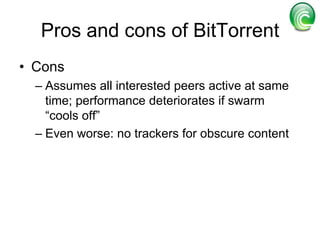
Peer-peer transactions:Choosing pieces to requestRarest-first: Look at all pieces at all peers, and request piece that’s owned by fewest peersIncreases diversity in the pieces downloadedavoids case where a node and each of its peers have exactly the same pieces; increases throughputIncreases likelihood all pieces still available even if original seed leaves before any one node has downloaded entire file

Bit torrent protocol seminar by Sanjay R

  • 1.
  • 2.
    Common ScenarioMillions wantto download the same popular huge files (for free)SoftwaresMedia (the real example!)Client-server model failsSingle server failsCan’t afford to deploy enough servers
  • 3.
  • 4.
    Peer-to-PeerA model ofcommunication where every node in the network acts alike.
  • 5.
    As opposed tothe Client-Server model, where one node provides services and other nodes use the services. Advantages of P2P ComputingNo central point of failureE.g., the Internet and the Web do not have a central point of failure.Most internet and web services use the client-server model (e.g. HTTP), so a specific service does have a central point of failure.ScalabilitySince every peer is alike, it is possible to add more peers to the system and scale to larger networks.Disadvantage of P2P ComputingDecentralized coordination.
  • 6.
    All nodes arenot created equal.BitTorrentWritten by Bram Cohen in 2001
  • 7.
  • 8.
    160 million clients,100 million active users
  • 9.
    Used by manydifferent people and organisations
  • 10.
    The more populara large video, audio or software file, the faster and cheaper it can be transferred with BitTorrent“Pull-based” “swarming” approachEach file split into smaller piecesNodes request desired pieces from neighborsAs opposed to parents pushing data that they receivePieces not downloaded in sequential orderEncourages contribution by all nodesPeer-to-peer in natureEven if clients join simultaneously (“flash crowd”)BitTorrent protocol is implemented in applications called BitTorrent Clients such as uTorrent, Bit Comet.
  • 11.
    BitTorrent TerminologyPeers– A node or computer that does not have the complete fileSeed or seeder - A computer with a complete copy of a BitTorrent fileSwarm- A group of computers simultaneously sending (uploading) or receiving (downloading) the same file .torrent - A pointer file that directs your computer to the file you want to download Tracker- A server that manages the BitTorrent file-transfer process
  • 12.
  • 13.
    Set of peersall downloading the same file
  • 14.
    Organized as arandom mesh
  • 15.
    Each node knowslist of pieces downloaded by neighbors
  • 16.
    Node requests piecesit does not own from neighbors
  • 18.
    A *.torrent guidesusers to owners of a fileUser obtains *.torrent file. File contains meta info about a target file. 1Armed with a list of peers holding pieces of the file, user downloads from many peers4User loads *.torrent file into BitTorrent client, which then looks up the named client23Tracker coordinates peers.
  • 19.
    All peers actas a sourceA machine with a complete copy (the seed) can distribute incomplete pieces to multiple peersSeedPeers exchange different pieces of the file with one another until they assemble a wholeAs soon as the user has a piece of the file on his machine, he can become a source of that piece to other peers, helping speed download
  • 20.
    The key ingredientsof the *.torrent file are the tracker’s address and the unique SHA1 hash All data in a metainfo file is encoded. info: a dictionary that describes the file(s) of the torrent. announce: contains the URL of the “tracker”creation dateComments from the author(optional)created by: (optional)piece length: number of bytes in each piece (integer)pieces: string consisting of the concatenation of all 20-byte SHA1 hash values, one per piece
  • 21.
    Bit Torrent DownloadDownload and install the BitTorrent client software
  • 22.
    Check andconfigure firewall and/or router for BitTorrent (if applicable)
  • 23.
    Find filesto download
  • 24.
    Download andopen the .torrent pointer file
  • 25.
    Let BitTorrentgive and receive pieces of the file
  • 26.
    Stay connectedafter the download completes to share your .torrent files with othersUpload and Publish File Download and install the BitTorrent client software
  • 27.
    Create aNew .torrent filePublish the .torrent file on torrent search Index sites such as PirateBay
  • 28.
    Peer-peer transactions:Choosing piecesto requestRarest-first: Look at all pieces at all peers, and request piece that’s owned by fewest peersIncreases diversity in the pieces downloadedavoids case where a node and each of its peers have exactly the same pieces; increases throughputIncreases likelihood all pieces still available even if original seed leaves before any one node has downloaded entire file