BIM for Interior Design
Shifting of Design workflow
JEFF HONG
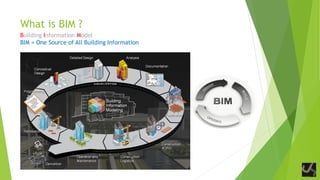
What is BIM ?
Building Information Model
BIM = One Source of All Building Information
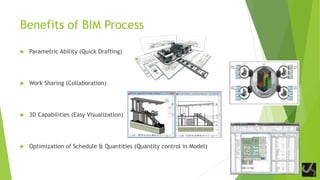
Benefits of BIM Process
 Parametric Ability (Quick Drafting)
 Work Sharing (Collaboration)
 3D Capabilities (Easy Visualization)
 Optimization of Schedule & Quantities (Quantity control in Model)
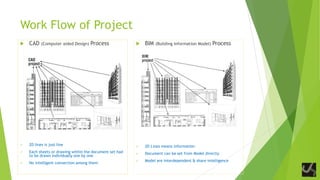
Work Flow of Project
 CAD (Computer aided Design) Process
 2D lines means just lines
 2D lines is just line
 Each sheets or drawing within the document set had
to be drawn individually one by one
 No intelligent connection among them
 BIM (Building Information Model) Process
 2D Lines means information
 Document can be set from Model directly
 Model are interdependent & share intelligence
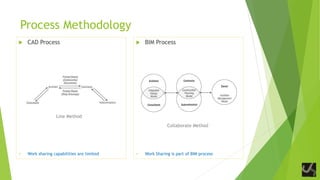
Process Methodology
 CAD Process
Line Method
 Work sharing capabilities are limited
 BIM Process
Collaborate Method
 Work Sharing is part of BIM process
Design Phase
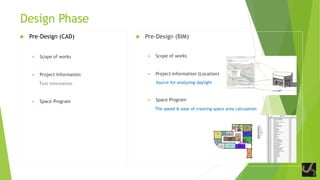
 Pre-Design (CAD)
 Scope of works
 Project Information
Text information
 Space Program
 Pre-Design (BIM)
 Scope of works
 Project Information (Location)
Source for analyzing daylight
 Space Program
The speed & ease of creating space area calculation
Design Phase
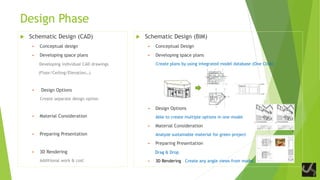
 Schematic Design (CAD)
 Conceptual design
 Developing space plans
Developing individual CAD drawings
(Floor/Ceiling/Elevation…)
 Design Options
Create separate design option
 Material Consideration
 Preparing Presentation
 3D Rendering
Additional work & cost
 Schematic Design (BIM)
 Conceptual Design
 Developing space plans
Create plans by using integrated model database (One Click)
 Design Options
Able to create multiple options in one model
 Material Consideration
Analyze sustainable material for green project
 Preparing Presentation
Drag & Drop
 3D Rendering Create any angle views from model
Design Phase
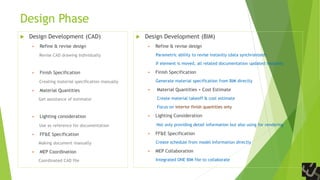
 Design Development (CAD)
 Refine & revise design
Revise CAD drawing individually
 Finish Specification
Creating material specification manually
 Material Quantities
Get assistance of estimator
 Lighting consideration
Use as reference for documentation
 FF&E Specification
Making document manually
 MEP Coordination
Coordinated CAD file
 Design Development (BIM)
 Refine & revise design
Parametric ability to revise instantly (data synchronized)
If element is moved, all related documentation updated instantly
 Finish Specification
Generate material specification from BIM directly
 Material Quantities + Cost Estimate
Create material takeoff & cost estimate
Focus on interior finish quantities only
 Lighting Consideration
Not only providing detail information but also using for rendering
 FF&E Specification
Create schedule from model Information directly
 MEP Collaboration
Integrated ONE BIM file to collaborate
Design Phase
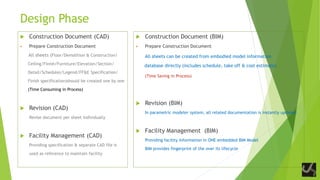
 Construction Document (CAD)
 Prepare Construction Document
All sheets (Floor/Demolition & Construction/
Ceiling/Finish/Furniture/Elevation/Section/
Detail/Schedules/Legend/FF&E Specification/
Finish specification)should be created one by one
(Time Consuming in Process)
 Revision (CAD)
Revise document per sheet individually
 Facility Management (CAD)
Providing specification & separate CAD file is
used as reference to maintain facility
 Construction Document (BIM)
 Prepare Construction Document
All sheets can be created from embodied model information
database directly (includes schedule, take off & cost estimate)
(Time Saving in Process)
 Revision (BIM)
In parametric modeler system, all related documentation is instantly updated
 Facility Management (BIM)
Providing facility information in ONE embedded BIM Model
BIM provides fingerprint of the over its lifecycle
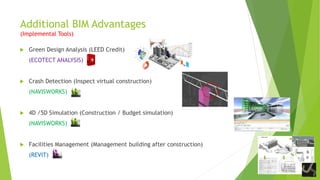
Additional BIM Advantages
(Implemental Tools)
 Green Design Analysis (LEED Credit)
(ECOTECT ANALYSIS)
 Crash Detection (Inspect virtual construction)
(NAVISWORKS)
 4D /5D Simulation (Construction / Budget simulation)
(NAVISWORKS)
 Facilities Management (Management building after construction)
(REVIT)
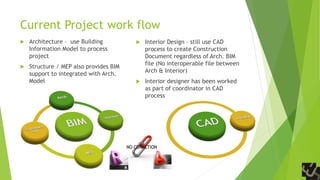
Current Project work flow
 Architecture – use Building
Information Model to process
project
 Structure / MEP also provides BIM
support to integrated with Arch.
Model
 Interior Design – still use CAD
process to create Construction
Document regardless of Arch. BIM
file (No interoperable file between
Arch & Interior)
 Interior designer has been worked
as part of coordinator in CAD
process
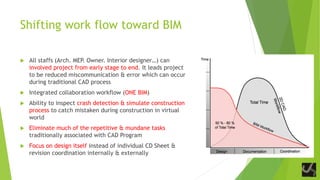
Shifting work flow toward BIM
 All staffs (Arch. MEP. Owner. Interior designer…) can
involved project from early stage to end. It leads project
to be reduced miscommunication & error which can occur
during traditional CAD process
 Integrated collaboration workflow (ONE BIM)
 Ability to inspect crash detection & simulate construction
process to catch mistaken during construction in virtual
world
 Eliminate much of the repetitive & mundane tasks
traditionally associated with CAD Program
 Focus on design itself instead of individual CD Sheet &
revision coordination internally & externally
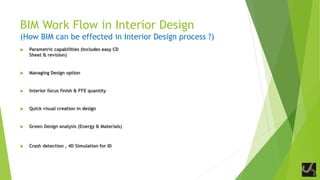
BIM Work Flow in Interior Design
(How BIM can be effected in Interior Design process ?)
 Parametric capabilities (Includes easy CD
Sheet & revision)
 Managing Design option
 Interior focus finish & FFE quantity
 Quick visual creation in design
 Green Design analysis (Energy & Materials)
 Crash detection , 4D Simulation for ID
Qualifications as ID BIM Coordinator
A. Role as bridge between Arch. & Interior Design BIM Process
B. Utilizing BIM software from the point of interior designer angle (Revit Certified)
C. Capability of setting up & managing BIM folder & files
D. Knowledge of BIM process & Software interaction (Revit, Navisworks, Ecotect Analysis…)
E. Ability to solve BIM technical problem
F. Capability of handling green interior projects
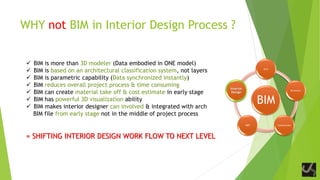
WHY not BIM in Interior Design Process ?
 BIM is more than 3D modeler (Data embodied in ONE model)
 BIM is based on an architectural classification system, not layers
 BIM is parametric capability (Data synchronized instantly)
 BIM reduces overall project process & time consuming
 BIM can create material take off & cost estimate in early stage
 BIM has powerful 3D visualization ability
 BIM makes interior designer can involved & integrated with arch
BIM file from early stage not in the middle of project process
= SHIFTING INTERIOR DESIGN WORK FLOW TO NEXT LEVEL
BIM
Arch
Structure
ConstructionMEP
Interior
Design
THANKS

BIM for Interior Design

  • 1.
    BIM for InteriorDesign Shifting of Design workflow JEFF HONG
  • 2.
    What is BIM? Building Information Model BIM = One Source of All Building Information
  • 3.
    Benefits of BIMProcess  Parametric Ability (Quick Drafting)  Work Sharing (Collaboration)  3D Capabilities (Easy Visualization)  Optimization of Schedule & Quantities (Quantity control in Model)
  • 4.
    Work Flow ofProject  CAD (Computer aided Design) Process  2D lines means just lines  2D lines is just line  Each sheets or drawing within the document set had to be drawn individually one by one  No intelligent connection among them  BIM (Building Information Model) Process  2D Lines means information  Document can be set from Model directly  Model are interdependent & share intelligence
  • 5.
    Process Methodology  CADProcess Line Method  Work sharing capabilities are limited  BIM Process Collaborate Method  Work Sharing is part of BIM process
  • 6.
    Design Phase  Pre-Design(CAD)  Scope of works  Project Information Text information  Space Program  Pre-Design (BIM)  Scope of works  Project Information (Location) Source for analyzing daylight  Space Program The speed & ease of creating space area calculation
  • 7.
    Design Phase  SchematicDesign (CAD)  Conceptual design  Developing space plans Developing individual CAD drawings (Floor/Ceiling/Elevation…)  Design Options Create separate design option  Material Consideration  Preparing Presentation  3D Rendering Additional work & cost  Schematic Design (BIM)  Conceptual Design  Developing space plans Create plans by using integrated model database (One Click)  Design Options Able to create multiple options in one model  Material Consideration Analyze sustainable material for green project  Preparing Presentation Drag & Drop  3D Rendering Create any angle views from model
  • 8.
    Design Phase  DesignDevelopment (CAD)  Refine & revise design Revise CAD drawing individually  Finish Specification Creating material specification manually  Material Quantities Get assistance of estimator  Lighting consideration Use as reference for documentation  FF&E Specification Making document manually  MEP Coordination Coordinated CAD file  Design Development (BIM)  Refine & revise design Parametric ability to revise instantly (data synchronized) If element is moved, all related documentation updated instantly  Finish Specification Generate material specification from BIM directly  Material Quantities + Cost Estimate Create material takeoff & cost estimate Focus on interior finish quantities only  Lighting Consideration Not only providing detail information but also using for rendering  FF&E Specification Create schedule from model Information directly  MEP Collaboration Integrated ONE BIM file to collaborate
  • 9.
    Design Phase  ConstructionDocument (CAD)  Prepare Construction Document All sheets (Floor/Demolition & Construction/ Ceiling/Finish/Furniture/Elevation/Section/ Detail/Schedules/Legend/FF&E Specification/ Finish specification)should be created one by one (Time Consuming in Process)  Revision (CAD) Revise document per sheet individually  Facility Management (CAD) Providing specification & separate CAD file is used as reference to maintain facility  Construction Document (BIM)  Prepare Construction Document All sheets can be created from embodied model information database directly (includes schedule, take off & cost estimate) (Time Saving in Process)  Revision (BIM) In parametric modeler system, all related documentation is instantly updated  Facility Management (BIM) Providing facility information in ONE embedded BIM Model BIM provides fingerprint of the over its lifecycle
  • 10.
    Additional BIM Advantages (ImplementalTools)  Green Design Analysis (LEED Credit) (ECOTECT ANALYSIS)  Crash Detection (Inspect virtual construction) (NAVISWORKS)  4D /5D Simulation (Construction / Budget simulation) (NAVISWORKS)  Facilities Management (Management building after construction) (REVIT)
  • 11.
    Current Project workflow  Architecture – use Building Information Model to process project  Structure / MEP also provides BIM support to integrated with Arch. Model  Interior Design – still use CAD process to create Construction Document regardless of Arch. BIM file (No interoperable file between Arch & Interior)  Interior designer has been worked as part of coordinator in CAD process
  • 12.
    Shifting work flowtoward BIM  All staffs (Arch. MEP. Owner. Interior designer…) can involved project from early stage to end. It leads project to be reduced miscommunication & error which can occur during traditional CAD process  Integrated collaboration workflow (ONE BIM)  Ability to inspect crash detection & simulate construction process to catch mistaken during construction in virtual world  Eliminate much of the repetitive & mundane tasks traditionally associated with CAD Program  Focus on design itself instead of individual CD Sheet & revision coordination internally & externally
  • 13.
    BIM Work Flowin Interior Design (How BIM can be effected in Interior Design process ?)  Parametric capabilities (Includes easy CD Sheet & revision)  Managing Design option  Interior focus finish & FFE quantity  Quick visual creation in design  Green Design analysis (Energy & Materials)  Crash detection , 4D Simulation for ID
  • 14.
    Qualifications as IDBIM Coordinator A. Role as bridge between Arch. & Interior Design BIM Process B. Utilizing BIM software from the point of interior designer angle (Revit Certified) C. Capability of setting up & managing BIM folder & files D. Knowledge of BIM process & Software interaction (Revit, Navisworks, Ecotect Analysis…) E. Ability to solve BIM technical problem F. Capability of handling green interior projects
  • 15.
    WHY not BIMin Interior Design Process ?  BIM is more than 3D modeler (Data embodied in ONE model)  BIM is based on an architectural classification system, not layers  BIM is parametric capability (Data synchronized instantly)  BIM reduces overall project process & time consuming  BIM can create material take off & cost estimate in early stage  BIM has powerful 3D visualization ability  BIM makes interior designer can involved & integrated with arch BIM file from early stage not in the middle of project process = SHIFTING INTERIOR DESIGN WORK FLOW TO NEXT LEVEL BIM Arch Structure ConstructionMEP Interior Design
  • 16.