Working Together: BIM-based Project
Collaboration
David Cohn
David S. Cohn
ƒ Application engineer with The PPI Group
ƒ Contributing editor Desktop Engineering contributing editor
ƒ Former editor of CADalyst, Engineering Automation Report and
CADCAMNet
ƒ Frequent contributor to Computer Graphics World, PC
Magazine, and others
ƒ Registered architect—25+ years experience
ƒ AutoCAD experience—20+ years
ƒ Author of numerous books & articles
ƒ President of Eclipse Software
Productivity
• Digital versus computable
computable
– Word processor vs. spreadsheet
– CAD vs. BIM
Computable Building Model
vs
vs
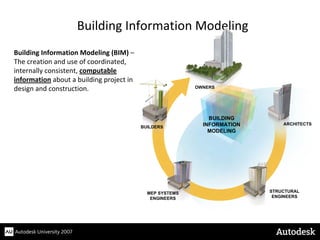
Building Information Modeling (BIM) –
The creation and use of coordinated,
internally consistent, computable
information about a building project in
design and construction.
Building Information Modeling
BUILDING
INFORMATION
MODELING
ARCHITECTS
STRUCTURAL
ENGINEERS
MEP SYSTEMS
ENGINEERS
BUILDERS
OWNERS
The Revit Family of Products
Revit Architecture
(formerly Revit Building)
Revit Structure Revit MEP
(formerly Revit Systems)
• All three are purpose-built
• Based on a parametric building modeling technology
• Use the same underlying relational database and behavioral model to
dynamically capture building information
A Change Anywhere = A Change Everywhere
Parametric
Change
Engine
Parametric
Change
Engine
Components
Components
Views
Views
Annotations
Annotations
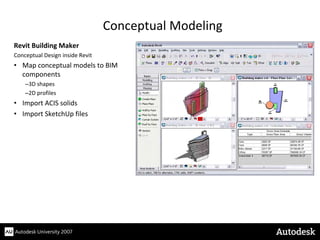
Revit Building Maker
Conceptual Design inside Revit
• Map conceptual models to BIM
components
–3D shapes
–2D profiles
• Import ACIS solids
• Import SketchUp files
Conceptual Modeling
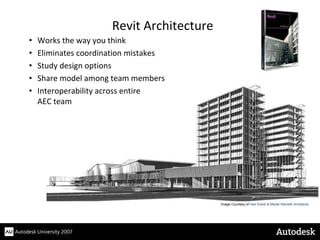
Image Courtesy of Ivan Kubík & Marek Németh Architects
• Works the way you think
• Eliminates coordination mistakes
• Study design options
• Share model among team members
• Interoperability across entire
AEC team
Revit Architecture
• Leverage the architectural model
• Link bi‐directionally with analysis software
• Easily respond to changes
• Use BIM to drive detailing
and fabrication drawings
• Built‐in interference checking
Revit Structure
• Use the same BIM model for HVAC, Piping, Electrical, Plumbing
• Built‐in sizing and system layout tools
• Perform engineering calculations on the model
• Check continuity of systems
Revit MEP
Image
Courtesy
of
RobsonWoese,
Inc.
• The preferred means to share models between architects and
engineers if all are using Revit‐based applications, but are in
separate organizations without access to a shared network (or
even when they are)
– Works similar to an external reference
– Can reload versions of models as needed to coordinate changes
Linking Revit Models
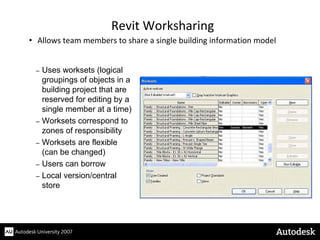
• Allows team members to share a single building information model
Revit Worksharing
– Uses worksets (logical
groupings of objects in a
building project that are
reserved for editing by a
single member at a time)
– Worksets correspond to
zones of responsibility
– Worksets are flexible
(can be changed)
– Users can borrow
– Local version/central
store
• Supported by Copy/Monitor function
– When changes are made to monitored components, the user sees a
notification and can postpone, reject, suppress or accept the change
Revit Coordination Monitoring
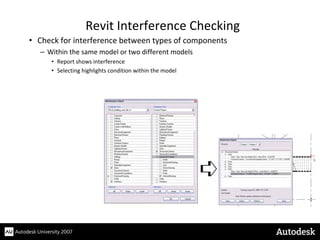
• Check for interference between types of components
– Within the same model or two different models
• Report shows interference
• Selecting highlights condition within the model
Revit Interference Checking
• Many ways to work with other products
– Import and export CAD formats (DWG, DWF, DXF, DGN)
Linking with Other Products
• Create renderings and walkthroughs inside Revit
• Export models for use in Autodesk VIZ or
Autodesk 3ds max
– Understand context of project before it is real
Design Visualization
• In the U.S., commercial & residential buildings consume:
– 40% of total energy
– 70% of electricity
– 40% of all raw materials
– 12% of fresh water supplies
• Buildings produce:
– 30% of all greenhouse gases
– 136 million tons of construction & demolition waste
Sustainable Design
Sustainable Design
Process Issues
• Manual calculation of material quantities is
difficult, expensive and error‐prone
• Solar effects and lighting analysis are difficult
to perform
• Ability to share design information with
building performance analysis applications
Images Courtesy of RTKL Associates Inc
Sustainable Design
Visualizing Green Ideas
Lighting and modeling tools enable architects to
quickly modify their building to see the impact on
energy efficiency.
Integrate the sun’s energy into the design of the
building envelope and fenestration, and knowing
ahead of time that it will work is sustainable design in
action.
Better Decision Making
Tools to Create Sustainable Buildings
• Calculating material quantities is greatly
simplified
• Sun studies enable designers to quickly analyze
sun positions and solar effects
• Designers can perform energy analysis and study
building performance utilizing the gbXML
interface
Images courtesy of: Spine 3D
Partner Products
www.iesve.com
www.greenbuildingstudio.com
Integrated Environmental Solutions (IES)
Sustainable design support through Building performance analysis.
Virtually analyze the Revit model testing different building variables
throughout design
Green Building Studio, Inc.
Energy analysis through FREE web service that integrates through gbXML
export/import
• 50‐80% of the time needed to create a cost estimate using old
methods is spent just on quantification
• Revit links to cost estimating software via:
– Application Programming Interface (API)
– ODBC connection
– Output to Excel
Cost Estimating
Example partner product:
Innovaya
Visual cost estimating providing integration
with Sage Timberline
www.innovaya.com
• Link specifications to the building model so that the building
model and project specifications remain coordinated
Specifications
Example partner product:
e-SPECS
Specification management system that
integrates with Revit through ODBC
www.e-specs.com
Structural Analysis
Coordinating with a number of analysis packages
• Coordinate analysis results more
reliably with structural design
• Reduce errors through bidirectional
linking to industry‐leading analysis
software
• For every person who creates design data
10 people need to use that data
• DWF was created to facilitate those users
– Do not need the original design data
– “Light geometry” that retains the original model geometry AND
intelligent design data
– Facilitates electronic review cycles
Digital Design Review
• Inadequate interoperability costs $15.8 billion annually
– $10.5 billion cost to owners/operators as a result of ongoing facilities
operation and maintenance
• Much of that cost can be mitigated by using information from
BIM in FM
Facilities Management
Autodesk FMDesktop
Reads DWF files published from Revit and
automatically interprets space and room
data. Users can then manage facilities in
FMDesktop and publish markups back to
Revit via DWF.
With the increase of BIM for design, the owner/operator’s use of that building information for facilities management is
becoming more commonplace and more anticipated. Consider these examples:
• Government agencies such as the U.S. GSA now require the delivery of spatial program information from building
information models for major projects that are receiving design funding in Fiscal Year 2007 and beyond
(http://www.gsa.gov/bim).
• To facilitate life‐cycle building process integration and sharing digital datasets, the National Institute of Building
Sciences (NIBS) formed a committee in early 2006 to create a National Building Information Model Standard to
provide a common model for describing facility information (http://www.nibs.org/newsstory1.html#).
• The American Institute of Architects (AIA) is considering how to modify their contract documents to codify the
transfer of a building information model (http://www.aia.org/nwsltr_tap.cfm?pagename=tap_a_documents); putting
in place an agreement structure whereby the building information model and the intellectual property it represents
can flow naturally from the architect to the owner/operator, who can then get better data to manage a building from
the most appropriate source of that data: the architect who designed the building.
Facilities Management
• Increase productivity and accuracy while reducing cycle times
• Reduce waste and inefficiency
• Create more sustainable environment
• Better manage buildings throughout their lifecycle
Conclusions
“Those who have perservered in their learning and use of Revit have
come to love the application and find it anathema to go back to
traditional CAD. For them, the practice of architecture will never be the
same.”
Dr. Lachmi Khemlani
“It’s sad to see an architect drafting in CAD—such a waste of talent and
energy.”
Jeff Millett, AIA
Director of Information and Communications Technology
The Stubbins Associates
Questions & Answers
To contact me:
David S. Cohn
711 Chuckanut Drive North
Bellingham, WA 98229‐6921
360‐733‐0711
mailto:david@dscohn.com
www.dscohn.com
www.dscohn.com

AB114-5 BIM-based Collaboration-PPT.pdf

  • 1.
    Working Together: BIM-basedProject Collaboration David Cohn
  • 2.
    David S. Cohn ƒApplication engineer with The PPI Group ƒ Contributing editor Desktop Engineering contributing editor ƒ Former editor of CADalyst, Engineering Automation Report and CADCAMNet ƒ Frequent contributor to Computer Graphics World, PC Magazine, and others ƒ Registered architect—25+ years experience ƒ AutoCAD experience—20+ years ƒ Author of numerous books & articles ƒ President of Eclipse Software
  • 3.
  • 4.
    • Digital versuscomputable computable – Word processor vs. spreadsheet – CAD vs. BIM Computable Building Model vs vs
  • 5.
    Building Information Modeling(BIM) – The creation and use of coordinated, internally consistent, computable information about a building project in design and construction. Building Information Modeling BUILDING INFORMATION MODELING ARCHITECTS STRUCTURAL ENGINEERS MEP SYSTEMS ENGINEERS BUILDERS OWNERS
  • 6.
    The Revit Familyof Products Revit Architecture (formerly Revit Building) Revit Structure Revit MEP (formerly Revit Systems) • All three are purpose-built • Based on a parametric building modeling technology • Use the same underlying relational database and behavioral model to dynamically capture building information
  • 7.
    A Change Anywhere= A Change Everywhere Parametric Change Engine Parametric Change Engine Components Components Views Views Annotations Annotations
  • 8.
    Revit Building Maker ConceptualDesign inside Revit • Map conceptual models to BIM components –3D shapes –2D profiles • Import ACIS solids • Import SketchUp files Conceptual Modeling
  • 9.
    Image Courtesy ofIvan Kubík & Marek Németh Architects • Works the way you think • Eliminates coordination mistakes • Study design options • Share model among team members • Interoperability across entire AEC team Revit Architecture
  • 10.
    • Leverage thearchitectural model • Link bi‐directionally with analysis software • Easily respond to changes • Use BIM to drive detailing and fabrication drawings • Built‐in interference checking Revit Structure
  • 11.
    • Use thesame BIM model for HVAC, Piping, Electrical, Plumbing • Built‐in sizing and system layout tools • Perform engineering calculations on the model • Check continuity of systems Revit MEP Image Courtesy of RobsonWoese, Inc.
  • 14.
    • The preferredmeans to share models between architects and engineers if all are using Revit‐based applications, but are in separate organizations without access to a shared network (or even when they are) – Works similar to an external reference – Can reload versions of models as needed to coordinate changes Linking Revit Models
  • 15.
    • Allows teammembers to share a single building information model Revit Worksharing – Uses worksets (logical groupings of objects in a building project that are reserved for editing by a single member at a time) – Worksets correspond to zones of responsibility – Worksets are flexible (can be changed) – Users can borrow – Local version/central store
  • 16.
    • Supported byCopy/Monitor function – When changes are made to monitored components, the user sees a notification and can postpone, reject, suppress or accept the change Revit Coordination Monitoring
  • 18.
    • Check forinterference between types of components – Within the same model or two different models • Report shows interference • Selecting highlights condition within the model Revit Interference Checking
  • 20.
    • Many waysto work with other products – Import and export CAD formats (DWG, DWF, DXF, DGN) Linking with Other Products
  • 21.
    • Create renderingsand walkthroughs inside Revit • Export models for use in Autodesk VIZ or Autodesk 3ds max – Understand context of project before it is real Design Visualization
  • 23.
    • In theU.S., commercial & residential buildings consume: – 40% of total energy – 70% of electricity – 40% of all raw materials – 12% of fresh water supplies • Buildings produce: – 30% of all greenhouse gases – 136 million tons of construction & demolition waste Sustainable Design
  • 24.
    Sustainable Design Process Issues •Manual calculation of material quantities is difficult, expensive and error‐prone • Solar effects and lighting analysis are difficult to perform • Ability to share design information with building performance analysis applications Images Courtesy of RTKL Associates Inc
  • 25.
    Sustainable Design Visualizing GreenIdeas Lighting and modeling tools enable architects to quickly modify their building to see the impact on energy efficiency. Integrate the sun’s energy into the design of the building envelope and fenestration, and knowing ahead of time that it will work is sustainable design in action.
  • 26.
    Better Decision Making Toolsto Create Sustainable Buildings • Calculating material quantities is greatly simplified • Sun studies enable designers to quickly analyze sun positions and solar effects • Designers can perform energy analysis and study building performance utilizing the gbXML interface Images courtesy of: Spine 3D
  • 27.
    Partner Products www.iesve.com www.greenbuildingstudio.com Integrated EnvironmentalSolutions (IES) Sustainable design support through Building performance analysis. Virtually analyze the Revit model testing different building variables throughout design Green Building Studio, Inc. Energy analysis through FREE web service that integrates through gbXML export/import
  • 29.
    • 50‐80% ofthe time needed to create a cost estimate using old methods is spent just on quantification • Revit links to cost estimating software via: – Application Programming Interface (API) – ODBC connection – Output to Excel Cost Estimating Example partner product: Innovaya Visual cost estimating providing integration with Sage Timberline www.innovaya.com
  • 30.
    • Link specificationsto the building model so that the building model and project specifications remain coordinated Specifications Example partner product: e-SPECS Specification management system that integrates with Revit through ODBC www.e-specs.com
  • 32.
    Structural Analysis Coordinating witha number of analysis packages • Coordinate analysis results more reliably with structural design • Reduce errors through bidirectional linking to industry‐leading analysis software
  • 34.
    • For everyperson who creates design data 10 people need to use that data • DWF was created to facilitate those users – Do not need the original design data – “Light geometry” that retains the original model geometry AND intelligent design data – Facilitates electronic review cycles Digital Design Review
  • 36.
    • Inadequate interoperabilitycosts $15.8 billion annually – $10.5 billion cost to owners/operators as a result of ongoing facilities operation and maintenance • Much of that cost can be mitigated by using information from BIM in FM Facilities Management Autodesk FMDesktop Reads DWF files published from Revit and automatically interprets space and room data. Users can then manage facilities in FMDesktop and publish markups back to Revit via DWF.
  • 37.
    With the increaseof BIM for design, the owner/operator’s use of that building information for facilities management is becoming more commonplace and more anticipated. Consider these examples: • Government agencies such as the U.S. GSA now require the delivery of spatial program information from building information models for major projects that are receiving design funding in Fiscal Year 2007 and beyond (http://www.gsa.gov/bim). • To facilitate life‐cycle building process integration and sharing digital datasets, the National Institute of Building Sciences (NIBS) formed a committee in early 2006 to create a National Building Information Model Standard to provide a common model for describing facility information (http://www.nibs.org/newsstory1.html#). • The American Institute of Architects (AIA) is considering how to modify their contract documents to codify the transfer of a building information model (http://www.aia.org/nwsltr_tap.cfm?pagename=tap_a_documents); putting in place an agreement structure whereby the building information model and the intellectual property it represents can flow naturally from the architect to the owner/operator, who can then get better data to manage a building from the most appropriate source of that data: the architect who designed the building. Facilities Management
  • 38.
    • Increase productivityand accuracy while reducing cycle times • Reduce waste and inefficiency • Create more sustainable environment • Better manage buildings throughout their lifecycle Conclusions “Those who have perservered in their learning and use of Revit have come to love the application and find it anathema to go back to traditional CAD. For them, the practice of architecture will never be the same.” Dr. Lachmi Khemlani “It’s sad to see an architect drafting in CAD—such a waste of talent and energy.” Jeff Millett, AIA Director of Information and Communications Technology The Stubbins Associates
  • 39.
    Questions & Answers Tocontact me: David S. Cohn 711 Chuckanut Drive North Bellingham, WA 98229‐6921 360‐733‐0711 mailto:david@dscohn.com mailto:david@dscohn.com www.dscohn.com www.dscohn.com