Documentation: 24/02/2013


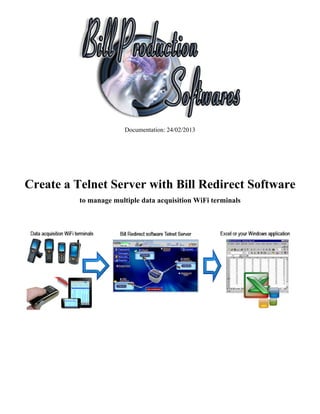
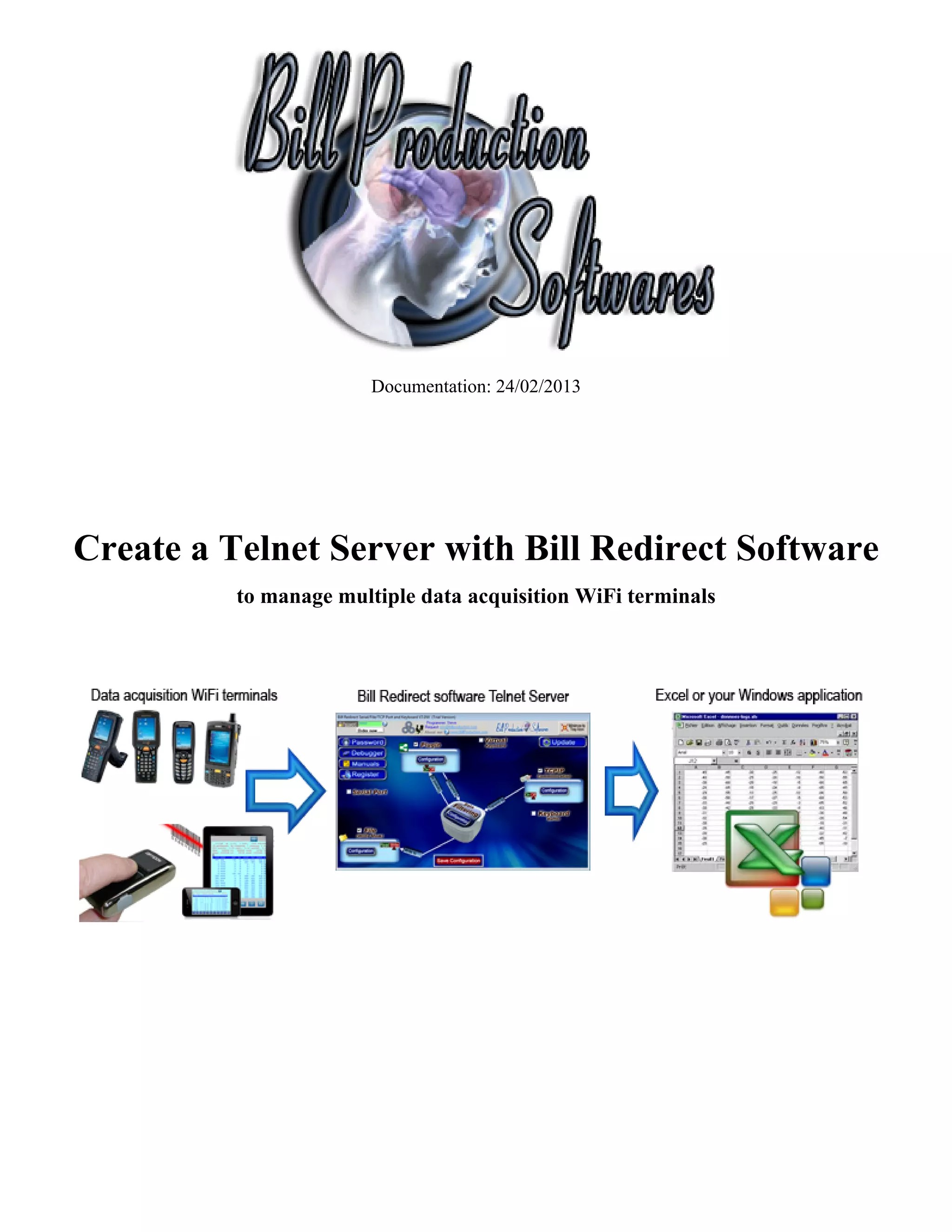
Create a Telnet Server with Bill Redirect Software
          to manage multiple data acquisition WiFi terminals
Use this documentation with the product : Bill Redirect 7.0W or more


                                             If a problem persist or to do more
                                                                 use our
                                         Software configuration and integration service
                                          It's free, fast (usually the same day), and efficient !
                                         Submit your case to info@billproduction.com
                                                and receive a customized solution !


                          Windows Telnet Server for your mobile devices,
RF Terminal data acquisiiton Barcode scanners and any wireless environments data collection devices.
     http://www.billproduction.com/Telnet%20Server%20data%20Acquisition/INDEX.HTML

                                 Email: info@BillProduction.com
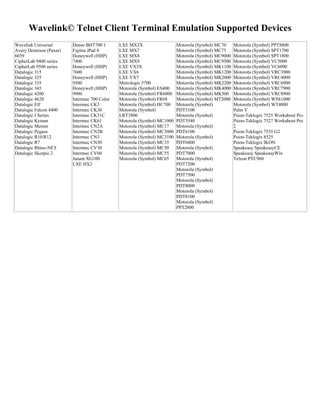
Wavelink© Telnet Client Terminal Emulation Supported Devices
Wavelink Universal       Denso BHT700 1       LXE MX3X                   Motorola (Symbol) MC70     Motorola (Symbol) PPT8800
Avery Dennison (Paxar)   Fujitsu iPad 4       LXE MX7                    Motorola (Symbol) MC75     Motorola (Symbol) SPT1700
6039                     Honeywell (HHP)      LXE MX8                    Motorola (Symbol) MC9000   Motorola (Symbol) SPT1800
CipherLab 9400 series    7400                 LXE MX9                    Motorola (Symbol) MC9500   Motorola (Symbol) VC5000
CipherLab 9500 series    Honeywell (HHP)      LXE VX3X                   Motorola (Symbol) MK1100   Motorola (Symbol) VC6090
Datalogic 315            7600                 LXE VX6                    Motorola (Symbol) MK1200   Motorola (Symbol) VRC3900
Datalogic 325            Honeywell (HHP)      LXE VX7                    Motorola (Symbol) MK2000   Motorola (Symbol) VRC4000
Datalogic 335            9500                 Metrologic 5700            Motorola (Symbol) MK2200   Motorola (Symbol) VRC6900
Datalogic 345            Honeywell (HHP)      Motorola (Symbol) ES400    Motorola (Symbol) MK4000   Motorola (Symbol) VRC7900
Datalogic 4200           9900                 Motorola (Symbol) FR6000   Motorola (Symbol) MK500    Motorola (Symbol) VRC8900
Datalogic 4620           Intermec 700 Color   Motorola (Symbol) FR68     Motorola (Symbol) MT2000   Motorola (Symbol) WSS1000
Datalogic Elf            Intermec CK3         Motorola (Symbol) HC700    Motorola (Symbol)          Motorola (Symbol) WT4000
Datalogic Falcon 4400    Intermec CK30        Motorola (Symbol)          PDT3100                    Palm V
Datalogic J Series       Intermec CK31C       LRT3800                    Motorola (Symbol)          Psion-Teklogix 7525 Workabout Pro
Datalogic Kyman          Intermec CK61        Motorola (Symbol) MC1000   PDT3540                    Psion-Teklogix 7527 Workabout Pro
Datalogic Memor          Intermec CN2A        Motorola (Symbol) MC17     Motorola (Symbol)          2
Datalogic Pegaso         Intermec CN2B        Motorola (Symbol) MC3000   PDT6100                    Psion-Teklogix 7535 G2
Datalogic R10/R12        Intermec CN3         Motorola (Symbol) MC3100   Motorola (Symbol)          Psion-Teklogix 8525
Datalogic R7             Intermec CN30        Motorola (Symbol) MC35     PDT6800                    Psion-Teklogix IKON
Datalogic Rhino-NET      Intermec CV30        Motorola (Symbol) MC50     Motorola (Symbol)          Speakeasy SpeakeasyCE
Datalogic Skorpio 2      Intermec CV60        Motorola (Symbol) MC55     PDT7000                    Speakeasy SpeakeasyWin
                         Janam XG100          Motorola (Symbol) MC65     Motorola (Symbol)          Telxon PTC960
                         LXE HX2                                         PDT7200
                                                                         Motorola (Symbol)
                                                                         PDT7500
                                                                         Motorola (Symbol)
                                                                         PDT8000
                                                                         Motorola (Symbol)
                                                                         PDT8100
                                                                         Motorola (Symbol)
                                                                         PPT2800
Bill Redirect Software Telnet Server perfect to take your inventory, data acquisition or shop floor data
                                                 collection.

This documentation demonstrate how collect data acquisition with an iPhone, iPad, Windows Mobile device,
                   Windows CE device or with any WiFi terminal with a Telnet Client


                                         Step #1 (Installation)


                           Download and install Bill Redirect software
                       http://www.billproduction.com/Bill_COMtoKB.ZIP
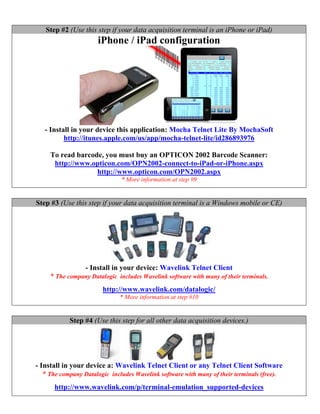
Step #2 (Use this step if your data acquisition terminal is an iPhone or iPad)
                      iPhone / iPad configuration


   - Install in your device this application: Mocha Telnet Lite By MochaSoft
          http://itunes.apple.com/us/app/mocha-telnet-lite/id286893976

     To read barcode, you must buy an OPTICON 2002 Barcode Scanner:
      http://www.opticon.com/OPN2002-connect-to-iPad-or-iPhone.aspx
                   http://www.opticon.com/OPN2002.aspx
                               * More information at step #9


Step #3 (Use this step if your data acquisition terminal is a Windows mobile or CE)


                  - Install in your device: Wavelink Telnet Client
     * The company Datalogic includes Wavelink software with many of their terminals.
                        http://www.wavelink.com/datalogic/
                              * More information at step #10


            Step #4 (Use this step for all other data acquisition devices.)


- Install in your device a: Wavelink Telnet Client or any Telnet Client Software
   * The company Datalogic includes Wavelink software with many of their terminals (free).
      http://www.wavelink.com/p/terminal-emulation_supported-devices
This solution can also work’s with Adroid devices like phone and tablet.
Solution: Install a Telnet Client application in your device from Apps Android Market

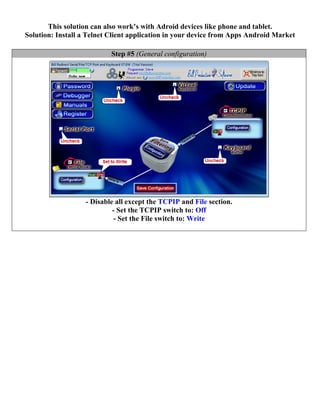
                           Step #5 (General configuration)


                   - Disable all except the TCPIP and File section.
                            - Set the TCPIP switch to: Off
                             - Set the File switch to: Write
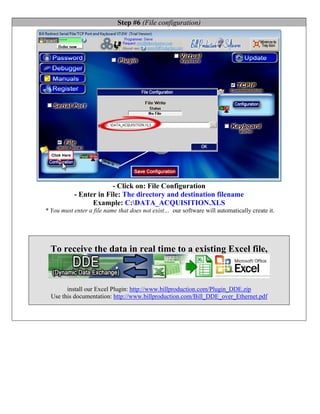
Step #6 (File configuration)


                        - Click on: File Configuration
           - Enter in File: The directory and destination filename
                 Example: C:DATA_ACQUISITION.XLS
* You must enter a file name that does not exist… our software will automatically create it.


  To receive the data in real time to a existing Excel file,


        install our Excel Plugin: http://www.billproduction.com/Plugin_DDE.zip
  Use this documentation: http://www.billproduction.com/Bill_DDE_over_Ethernet.pdf
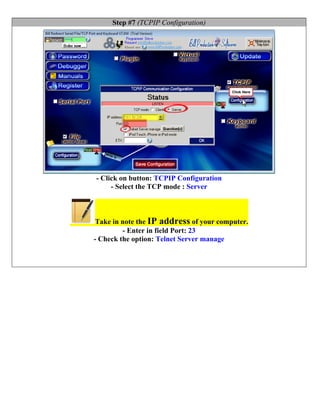
Step #7 (TCPIP Configuration)


- Click on button: TCPIP Configuration
     - Select the TCP mode : Server


 Take in note the IP address of your computer.
         - Enter in field Port: 23
- Check the option: Telnet Server manage
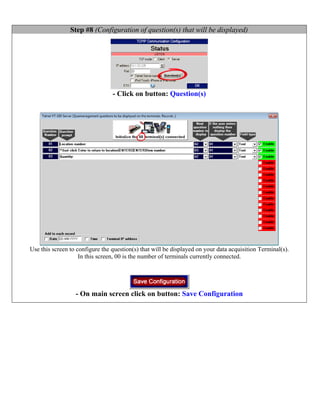
Step #8 (Configuration of question(s) that will be displayed)


                                 - Click on button: Question(s)


Use this screen to configure the question(s) that will be displayed on your data acquisition Terminal(s).
                    In this screen, 00 is the number of terminals currently connected.


                  - On main screen click on button: Save Configuration
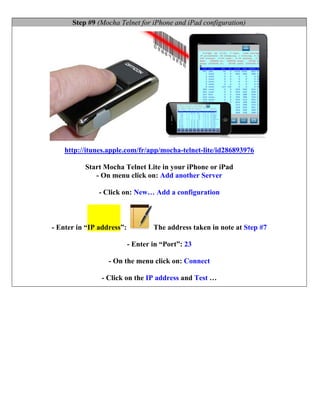
Step #9 (Mocha Telnet for iPhone and iPad configuration)


    http://itunes.apple.com/fr/app/mocha-telnet-lite/id286893976

          Start Mocha Telnet Lite in your iPhone or iPad
             - On menu click on: Add another Server

               - Click on: New… Add a configuration


- Enter in “IP address”:           The address taken in note at Step #7

                           - Enter in “Port”: 23

                  - On the menu click on: Connect

                - Click on the IP address and Test …
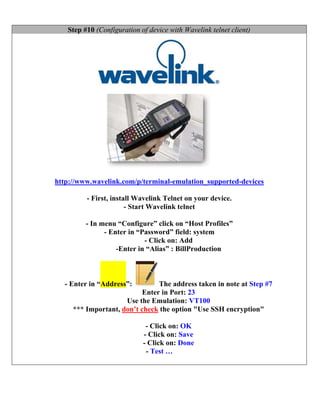
Step #10 (Configuration of device with Wavelink telnet client)


http://www.wavelink.com/p/terminal-emulation_supported-devices

         - First, install Wavelink Telnet on your device.
                       - Start Wavelink telnet

         - In menu “Configure” click on “Host Profiles”
               - Enter in “Password” field: system
                            - Click on: Add
                   -Enter in “Alias” : BillProduction


  - Enter in “Address”:        The address taken in note at Step #7
                          Enter in Port: 23
                     Use the Emulation: VT100
     *** Important, don’t check the option "Use SSH encryption"

                             - Click on: OK
                            - Click on: Save
                            - Click on: Done
                             - Test …
For more documentation visit:


                http://www.billproduction.com/documentation.html


                                              If a problem persist or to do more
                                                                  use our
                                          Software configuration and integration service
                                           It's free, fast (usually the same day), and efficient !
                                          Submit your case to info@billproduction.com
                                                 and receive a customized solution !


For more flexibility/options or an installation package build for your company: info@BillProduction.com

Windows Telnet Server for your mobile devices, RF Terminal data acquisiiton Barcode scanners and any wireless environments data collection devices.

  • 1.
    Documentation: 24/02/2013 Create aTelnet Server with Bill Redirect Software to manage multiple data acquisition WiFi terminals
  • 2.
    Use this documentationwith the product : Bill Redirect 7.0W or more If a problem persist or to do more use our Software configuration and integration service It's free, fast (usually the same day), and efficient ! Submit your case to info@billproduction.com and receive a customized solution ! Windows Telnet Server for your mobile devices, RF Terminal data acquisiiton Barcode scanners and any wireless environments data collection devices. http://www.billproduction.com/Telnet%20Server%20data%20Acquisition/INDEX.HTML Email: info@BillProduction.com
  • 3.
    Wavelink© Telnet ClientTerminal Emulation Supported Devices Wavelink Universal Denso BHT700 1 LXE MX3X Motorola (Symbol) MC70 Motorola (Symbol) PPT8800 Avery Dennison (Paxar) Fujitsu iPad 4 LXE MX7 Motorola (Symbol) MC75 Motorola (Symbol) SPT1700 6039 Honeywell (HHP) LXE MX8 Motorola (Symbol) MC9000 Motorola (Symbol) SPT1800 CipherLab 9400 series 7400 LXE MX9 Motorola (Symbol) MC9500 Motorola (Symbol) VC5000 CipherLab 9500 series Honeywell (HHP) LXE VX3X Motorola (Symbol) MK1100 Motorola (Symbol) VC6090 Datalogic 315 7600 LXE VX6 Motorola (Symbol) MK1200 Motorola (Symbol) VRC3900 Datalogic 325 Honeywell (HHP) LXE VX7 Motorola (Symbol) MK2000 Motorola (Symbol) VRC4000 Datalogic 335 9500 Metrologic 5700 Motorola (Symbol) MK2200 Motorola (Symbol) VRC6900 Datalogic 345 Honeywell (HHP) Motorola (Symbol) ES400 Motorola (Symbol) MK4000 Motorola (Symbol) VRC7900 Datalogic 4200 9900 Motorola (Symbol) FR6000 Motorola (Symbol) MK500 Motorola (Symbol) VRC8900 Datalogic 4620 Intermec 700 Color Motorola (Symbol) FR68 Motorola (Symbol) MT2000 Motorola (Symbol) WSS1000 Datalogic Elf Intermec CK3 Motorola (Symbol) HC700 Motorola (Symbol) Motorola (Symbol) WT4000 Datalogic Falcon 4400 Intermec CK30 Motorola (Symbol) PDT3100 Palm V Datalogic J Series Intermec CK31C LRT3800 Motorola (Symbol) Psion-Teklogix 7525 Workabout Pro Datalogic Kyman Intermec CK61 Motorola (Symbol) MC1000 PDT3540 Psion-Teklogix 7527 Workabout Pro Datalogic Memor Intermec CN2A Motorola (Symbol) MC17 Motorola (Symbol) 2 Datalogic Pegaso Intermec CN2B Motorola (Symbol) MC3000 PDT6100 Psion-Teklogix 7535 G2 Datalogic R10/R12 Intermec CN3 Motorola (Symbol) MC3100 Motorola (Symbol) Psion-Teklogix 8525 Datalogic R7 Intermec CN30 Motorola (Symbol) MC35 PDT6800 Psion-Teklogix IKON Datalogic Rhino-NET Intermec CV30 Motorola (Symbol) MC50 Motorola (Symbol) Speakeasy SpeakeasyCE Datalogic Skorpio 2 Intermec CV60 Motorola (Symbol) MC55 PDT7000 Speakeasy SpeakeasyWin Janam XG100 Motorola (Symbol) MC65 Motorola (Symbol) Telxon PTC960 LXE HX2 PDT7200 Motorola (Symbol) PDT7500 Motorola (Symbol) PDT8000 Motorola (Symbol) PDT8100 Motorola (Symbol) PPT2800
  • 4.
    Bill Redirect SoftwareTelnet Server perfect to take your inventory, data acquisition or shop floor data collection. This documentation demonstrate how collect data acquisition with an iPhone, iPad, Windows Mobile device, Windows CE device or with any WiFi terminal with a Telnet Client Step #1 (Installation) Download and install Bill Redirect software http://www.billproduction.com/Bill_COMtoKB.ZIP
  • 5.
    Step #2 (Usethis step if your data acquisition terminal is an iPhone or iPad) iPhone / iPad configuration - Install in your device this application: Mocha Telnet Lite By MochaSoft http://itunes.apple.com/us/app/mocha-telnet-lite/id286893976 To read barcode, you must buy an OPTICON 2002 Barcode Scanner: http://www.opticon.com/OPN2002-connect-to-iPad-or-iPhone.aspx http://www.opticon.com/OPN2002.aspx * More information at step #9 Step #3 (Use this step if your data acquisition terminal is a Windows mobile or CE) - Install in your device: Wavelink Telnet Client * The company Datalogic includes Wavelink software with many of their terminals. http://www.wavelink.com/datalogic/ * More information at step #10 Step #4 (Use this step for all other data acquisition devices.) - Install in your device a: Wavelink Telnet Client or any Telnet Client Software * The company Datalogic includes Wavelink software with many of their terminals (free). http://www.wavelink.com/p/terminal-emulation_supported-devices
  • 6.
    This solution canalso work’s with Adroid devices like phone and tablet. Solution: Install a Telnet Client application in your device from Apps Android Market Step #5 (General configuration) - Disable all except the TCPIP and File section. - Set the TCPIP switch to: Off - Set the File switch to: Write
  • 7.
    Step #6 (Fileconfiguration) - Click on: File Configuration - Enter in File: The directory and destination filename Example: C:DATA_ACQUISITION.XLS * You must enter a file name that does not exist… our software will automatically create it. To receive the data in real time to a existing Excel file, install our Excel Plugin: http://www.billproduction.com/Plugin_DDE.zip Use this documentation: http://www.billproduction.com/Bill_DDE_over_Ethernet.pdf
  • 8.
    Step #7 (TCPIPConfiguration) - Click on button: TCPIP Configuration - Select the TCP mode : Server Take in note the IP address of your computer. - Enter in field Port: 23 - Check the option: Telnet Server manage
  • 9.
    Step #8 (Configurationof question(s) that will be displayed) - Click on button: Question(s) Use this screen to configure the question(s) that will be displayed on your data acquisition Terminal(s). In this screen, 00 is the number of terminals currently connected. - On main screen click on button: Save Configuration
  • 10.
    Step #9 (MochaTelnet for iPhone and iPad configuration) http://itunes.apple.com/fr/app/mocha-telnet-lite/id286893976 Start Mocha Telnet Lite in your iPhone or iPad - On menu click on: Add another Server - Click on: New… Add a configuration - Enter in “IP address”: The address taken in note at Step #7 - Enter in “Port”: 23 - On the menu click on: Connect - Click on the IP address and Test …
  • 11.
    Step #10 (Configurationof device with Wavelink telnet client) http://www.wavelink.com/p/terminal-emulation_supported-devices - First, install Wavelink Telnet on your device. - Start Wavelink telnet - In menu “Configure” click on “Host Profiles” - Enter in “Password” field: system - Click on: Add -Enter in “Alias” : BillProduction - Enter in “Address”: The address taken in note at Step #7 Enter in Port: 23 Use the Emulation: VT100 *** Important, don’t check the option "Use SSH encryption" - Click on: OK - Click on: Save - Click on: Done - Test …
  • 12.
    For more documentationvisit: http://www.billproduction.com/documentation.html If a problem persist or to do more use our Software configuration and integration service It's free, fast (usually the same day), and efficient ! Submit your case to info@billproduction.com and receive a customized solution ! For more flexibility/options or an installation package build for your company: info@BillProduction.com