Proposal for Point of Sale
and Inventory Management
Systems
Table of Contents
Table of Contents
Introduction
Common features of Web based POS Solution
Detail Features
Inventory Feature Hightlights:
Purchasing/Receiving Feature Hightlights:
Point of Sale Features:
Reports:
Pricing
Summary
Introduction
Retail Point of Sale (POS) systems, also known as POS software, have come a
long way from being bolt-on applications for cash registers. Today, the cash
register as the cornerstone piece of retail technology has been replaced by
PCs, tablets and mobile devices.
We offer integrated software programs and POS systems for "mom-and-pop"
stores to large retail chains, and everything in between. Our web based
solution can handle any combination of checkout, inventory control (Stock)
and customer management (CRM). Our system will help you automate the
point of sale, improve inventory tracking and enable more effective
management of customer data to grow profits and decrease store
inefficiencies.
Common Features of Web based POS Solution
 Point of sale management
 Inventory control
 Accounting management
 Customer relationship management
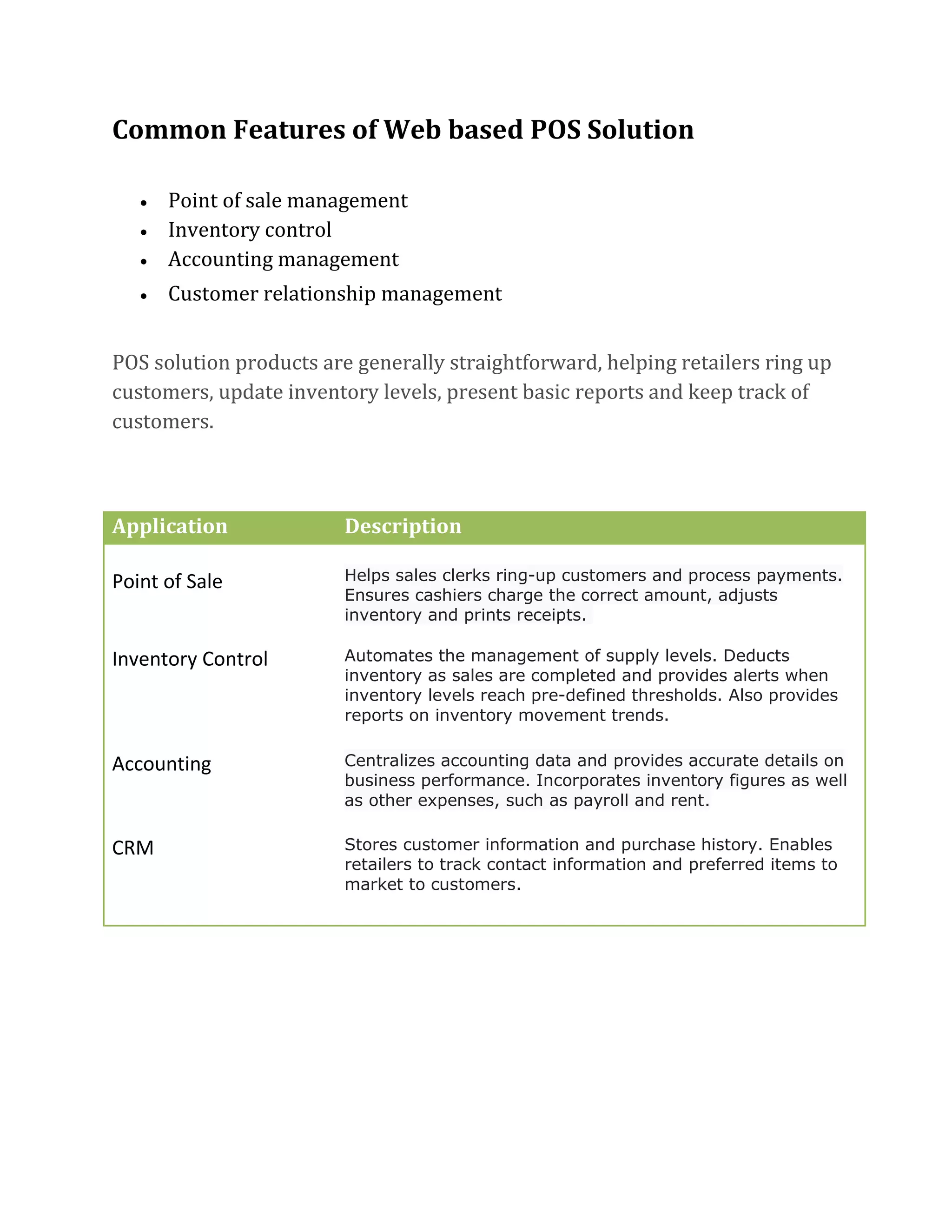
POS solution products are generally straightforward, helping retailers ring up
customers, update inventory levels, present basic reports and keep track of
customers.
Application Description
Point of Sale Helps sales clerks ring-up customers and process payments.
Ensures cashiers charge the correct amount, adjusts
inventory and prints receipts.
Inventory Control Automates the management of supply levels. Deducts
inventory as sales are completed and provides alerts when
inventory levels reach pre-defined thresholds. Also provides
reports on inventory movement trends.
Accounting Centralizes accounting data and provides accurate details on
business performance. Incorporates inventory figures as well
as other expenses, such as payroll and rent.
CRM Stores customer information and purchase history. Enables
retailers to track contact information and preferred items to
market to customers.
Detail Features
Our web based POS solution is accessible from any location. The web based
solution application even allows you to work offline without internet and
syncs back up once online again.
● Accessible Everywhere (Yangon/ Mandalay / etc)
● Central Real-time Inventory Management
○ We can consolidate all our systems to one inventory.
○ We wouldn’t need to send an excel spreadsheet back and forth -
we would all have access to one real-time inventory.
● Multiple warehouses/locations
○ Easy to transferring inventory from one store to another.
○ It is built in so that we can transfer inventory from one store to
another with it being very easy.
● Point of Sales Capability
○ Save your time, increase accuracy and provide greater control
over what happens at the sales counter.
○ With the aid of User friendly screen interfaces, you can process
your sales quickly and efficiently.
○ It will enhance operation, providing with increased speed,
accuracy and control of inventory - all of which lead to increased
profits and more time to focus on growing business.
○ Free training for staff as easy to learn.
○ Prints sales orders and invoices.
○ Handles the visibility of sales, purchases, stock counts, etc based
on the roles assigned to users.
● Web Integration for Inventory
○ You are able to login through any browser on any platform and
see customers, inventory, and everything that is accessible
through the web.
● Ability to have barcode scanning
Inventory Feature Hightlights:
Below are some of the inventory features that come with our POS web based
solution.
Stock Transfers
View stock levels across locations with ease;
Transferring inventory from one store to another is just few clicks away.
Price Lists
Multiple price lists can be associated with one Central inventory, giving
you the freedom to offer different pricing based on location, and/or
customer group. Price lists can also be assigned start/end date for
promotional markdowns.
Sales Promotions
Freedom to create rules and implement your choice of Sales
Promotions. From buy one get one to % off next purchase, giving you
the freedom to create, run, and later view powerful reports on
Promotions.
Coupons
Create, print, and scan to redeem coupons directly from POS.
Coupons can be created stand-alone, or in association with sales
promotions. Later view reports to see how many coupons produced vs.
how many redeemed.
Multiple Tax Rate Support
Have locations/products with different tax rates? No problem.
Tax rates can be set on the product or location level. Set and manage
different tax rates for all of your store locations.
Scalability
Our web based POS solution makes life easier for multi-store
businesses. Accessing customer records, pulling comparison reports
between locations, making inventory transfers and adding new
locations can be done instantly.
Purchasing/Receiving Feature Hightlights:
Reorder & Restock Levels
Automate your ordering process by defining Reorder points & Restock
levels for products. Later use these rules as recommendation or rule for
ordering.
Purchase Order Creation
Create Purchase orders to be sent out to suppliers by email, or print out
and send the hardcopy. Customize text, and add your logo for that
professional feel!
Purchase Order Receiving
Track Purchase Order status to see what has arrived and what is in
transit. Write off damaged goods, and track partial orders.
Stock Replenishment Report
One report to truly revolutionize the ordering process. One click of a
button adds quantities based on restock level, one more click to
generate Purchase Order documents to the multiple suppliers
associated.
Purchasing Report
Clean report by Supplier and/or products ordered in given date range.
View & print from anywhere, at anytime.
Point of Sale Features:
Cloud Hybrid System
Run your POS system both online and offline. System can be
independent from web access and data is auto-synced upon re-
connection.
Suspend Sale
Place sales on hold and reopen at later time for speedy checkout. Add
product. Found item not in the system? No problem, add or edit
products on the fly right at POS.
Void/Return
Create returns with ease, option to print receipts with scanable barcode
to speed up the process.
Speedy Product Lookup
Query products by name or code, scan barcodes, or select items from
inventory list to add them to the transaction.
Real time X-report
View registers totals with breakdown of payment type at the POS with
real-time data. Real-time updating means administrators viewing
current numbers from anywhere at anytime.
Mobile Selling
Run on any device with a web browser that provides the freedom of
mobility.
Reports:
Sales Order/Invoice Report
It shows details for all the Sales Order/Invoices generated in the POS
system within a specified date range.
Cashier’s Report
It shows details for the Cash/Check/Credit Card Payment/Receipt made
on Purchase Order/Sales Order respectively within a specified date
range.
Purchase Order/Receipt Report
It shows details for all the Purchase Order/Receipt generated in the POS
system within a specified date range.
Inventory Status Report
This report shows the Status of the Stock i.e., Cost, Total Qty.
Stock Transfer Report
This reports show details for all the Stock Transfer occurred within a
specified date range.
Pricing
Here is the published pricing model:
(THIS SECTION NEED TO MODIFY ACCORDING TO RULES AND
POLICIES OF THE COMPANY)
Summary
Our POS management web based solution is committed to provide customers
with the service, support, and expertise they require to increase efficiency and
profitability with a solution that provides an unmatched rapid return-on-
investment.

Proposal for Point of Sale and Inventory Management Systems

  • 1.
    Proposal for Pointof Sale and Inventory Management Systems
  • 2.
    Table of Contents Tableof Contents Introduction Common features of Web based POS Solution Detail Features Inventory Feature Hightlights: Purchasing/Receiving Feature Hightlights: Point of Sale Features: Reports: Pricing Summary Introduction Retail Point of Sale (POS) systems, also known as POS software, have come a long way from being bolt-on applications for cash registers. Today, the cash register as the cornerstone piece of retail technology has been replaced by PCs, tablets and mobile devices. We offer integrated software programs and POS systems for "mom-and-pop" stores to large retail chains, and everything in between. Our web based solution can handle any combination of checkout, inventory control (Stock) and customer management (CRM). Our system will help you automate the point of sale, improve inventory tracking and enable more effective management of customer data to grow profits and decrease store inefficiencies.
  • 3.
    Common Features ofWeb based POS Solution  Point of sale management  Inventory control  Accounting management  Customer relationship management POS solution products are generally straightforward, helping retailers ring up customers, update inventory levels, present basic reports and keep track of customers. Application Description Point of Sale Helps sales clerks ring-up customers and process payments. Ensures cashiers charge the correct amount, adjusts inventory and prints receipts. Inventory Control Automates the management of supply levels. Deducts inventory as sales are completed and provides alerts when inventory levels reach pre-defined thresholds. Also provides reports on inventory movement trends. Accounting Centralizes accounting data and provides accurate details on business performance. Incorporates inventory figures as well as other expenses, such as payroll and rent. CRM Stores customer information and purchase history. Enables retailers to track contact information and preferred items to market to customers.
  • 4.
    Detail Features Our webbased POS solution is accessible from any location. The web based solution application even allows you to work offline without internet and syncs back up once online again. ● Accessible Everywhere (Yangon/ Mandalay / etc) ● Central Real-time Inventory Management ○ We can consolidate all our systems to one inventory. ○ We wouldn’t need to send an excel spreadsheet back and forth - we would all have access to one real-time inventory. ● Multiple warehouses/locations ○ Easy to transferring inventory from one store to another. ○ It is built in so that we can transfer inventory from one store to another with it being very easy. ● Point of Sales Capability ○ Save your time, increase accuracy and provide greater control over what happens at the sales counter. ○ With the aid of User friendly screen interfaces, you can process your sales quickly and efficiently. ○ It will enhance operation, providing with increased speed, accuracy and control of inventory - all of which lead to increased profits and more time to focus on growing business. ○ Free training for staff as easy to learn. ○ Prints sales orders and invoices. ○ Handles the visibility of sales, purchases, stock counts, etc based on the roles assigned to users. ● Web Integration for Inventory ○ You are able to login through any browser on any platform and see customers, inventory, and everything that is accessible through the web. ● Ability to have barcode scanning
  • 5.
    Inventory Feature Hightlights: Beloware some of the inventory features that come with our POS web based solution. Stock Transfers View stock levels across locations with ease; Transferring inventory from one store to another is just few clicks away. Price Lists Multiple price lists can be associated with one Central inventory, giving you the freedom to offer different pricing based on location, and/or customer group. Price lists can also be assigned start/end date for promotional markdowns. Sales Promotions Freedom to create rules and implement your choice of Sales Promotions. From buy one get one to % off next purchase, giving you the freedom to create, run, and later view powerful reports on Promotions. Coupons Create, print, and scan to redeem coupons directly from POS. Coupons can be created stand-alone, or in association with sales promotions. Later view reports to see how many coupons produced vs. how many redeemed. Multiple Tax Rate Support Have locations/products with different tax rates? No problem. Tax rates can be set on the product or location level. Set and manage different tax rates for all of your store locations.
  • 6.
    Scalability Our web basedPOS solution makes life easier for multi-store businesses. Accessing customer records, pulling comparison reports between locations, making inventory transfers and adding new locations can be done instantly. Purchasing/Receiving Feature Hightlights: Reorder & Restock Levels Automate your ordering process by defining Reorder points & Restock levels for products. Later use these rules as recommendation or rule for ordering. Purchase Order Creation Create Purchase orders to be sent out to suppliers by email, or print out and send the hardcopy. Customize text, and add your logo for that professional feel! Purchase Order Receiving Track Purchase Order status to see what has arrived and what is in transit. Write off damaged goods, and track partial orders. Stock Replenishment Report One report to truly revolutionize the ordering process. One click of a button adds quantities based on restock level, one more click to generate Purchase Order documents to the multiple suppliers associated. Purchasing Report Clean report by Supplier and/or products ordered in given date range. View & print from anywhere, at anytime.
  • 7.
    Point of SaleFeatures: Cloud Hybrid System Run your POS system both online and offline. System can be independent from web access and data is auto-synced upon re- connection. Suspend Sale Place sales on hold and reopen at later time for speedy checkout. Add product. Found item not in the system? No problem, add or edit products on the fly right at POS. Void/Return Create returns with ease, option to print receipts with scanable barcode to speed up the process. Speedy Product Lookup Query products by name or code, scan barcodes, or select items from inventory list to add them to the transaction. Real time X-report View registers totals with breakdown of payment type at the POS with real-time data. Real-time updating means administrators viewing current numbers from anywhere at anytime. Mobile Selling Run on any device with a web browser that provides the freedom of mobility.
  • 8.
    Reports: Sales Order/Invoice Report Itshows details for all the Sales Order/Invoices generated in the POS system within a specified date range. Cashier’s Report It shows details for the Cash/Check/Credit Card Payment/Receipt made on Purchase Order/Sales Order respectively within a specified date range. Purchase Order/Receipt Report It shows details for all the Purchase Order/Receipt generated in the POS system within a specified date range. Inventory Status Report This report shows the Status of the Stock i.e., Cost, Total Qty. Stock Transfer Report This reports show details for all the Stock Transfer occurred within a specified date range.
  • 9.
    Pricing Here is thepublished pricing model: (THIS SECTION NEED TO MODIFY ACCORDING TO RULES AND POLICIES OF THE COMPANY) Summary Our POS management web based solution is committed to provide customers with the service, support, and expertise they require to increase efficiency and profitability with a solution that provides an unmatched rapid return-on- investment.