

Advanced Design
Implementation
Joshua Jamison
5.15.12


      PRESENTATION   ANDEVCON • MAY 15, 2012
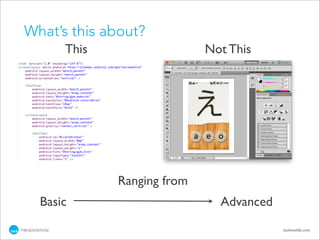
What’s this about?
               This                  Not This


                      Ranging from
        Basic                          Advanced
PRESENTATION                                      tackmobile.com
So... who is this guy?
•   Software Architect &
    Developer

•   Hacking on Android since Beta

•   Multiple Applications to
    market

•   Developer with Tack

•   Still owns an HTC G1

PRESENTATION                        tackmobile.com
Why bother?

•   Android is “ugly”
    Doesn’t have to be

•   Don’t need to design for Android
    Unless you have a brand

•   Just port the iPhone app
    Android != iPhone
Design Strategies
Have a goal


•   Who is your client?
    The person that defines “complete” and
    answers the questions

•   Who is your user?
    The people who will use the application the most
Design Strategies

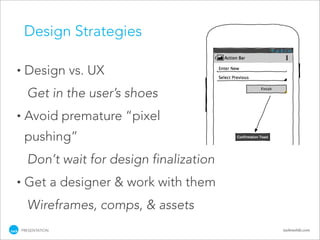
•    Design vs. UX
      Get in the user’s shoes
•    Avoid premature “pixel
     pushing”
      Don’t wait for design finalization
•    Get a designer & work with them
      Wireframes, comps, & assets
    PRESENTATION                           tackmobile.com
Design Strategies


•   Make a plan
    •   How much should be reusable?
    •   How much time is left?
    •   How often can you iterate?
    •   Branding vs OS familiarity


PRESENTATION                           tackmobile.com
Design Strategies
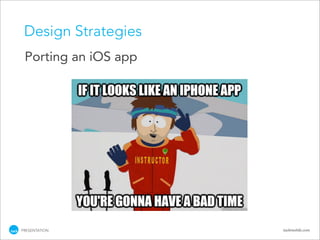
 Porting an iOS app


PRESENTATION          tackmobile.com
Design Strategies
 Porting an iOS app

•   Read through Android Design guidelines
    http://developer.android.com/design
•   Get new assets
•   Action Bar not Navigation Bar
•   App Icon, Button Icons, Button States,
    Fonts, Device dimensions & resolutions

PRESENTATION                                 tackmobile.com
Styles & Themes

•    Names are just a convention: styles.xml,
     themes.xml, makes_no_difference.xml
•    XML files placed in /res/values/ folder
•    Apply a Theme to an Activity / Apply a Style to a
     View
•    Both use <style> tag
•    Themes cascade, Styles do not


    PRESENTATION                                 tackmobile.com
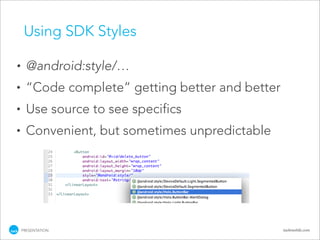
Using SDK Styles

•     @android:style/…
•     “Code complete” getting better and better
•     Use source to see specifics
•     Convenient, but sometimes unpredictable


    PRESENTATION                                  tackmobile.com
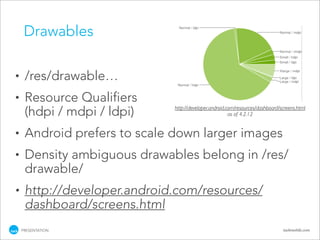
Drawables

•    /res/drawable…
•    Resource Qualifiers
                              http://developer.android.com/resources/dashboard/screens.html
     (hdpi / mdpi / ldpi)                               as of 4.2.12


•    Android prefers to scale down larger images
•    Density ambiguous drawables belong in /res/
     drawable/
•    http://developer.android.com/resources/
     dashboard/screens.html
    PRESENTATION                                                                tackmobile.com
Drawables
 •   px = dip * (dpi / 160)
     •    ldpi     ~120dpi (0.75x)
     •    mdpi     ~160dpi (baseline)
     •    hdpi     ~240dpi (1.5x)
     •    xhdpi    ~320dpi (2.0x)
 •   1dip mdpi = 160 / 160 * 1dip = 1px
 •   Minimum Screen Sizes
     •    small    320dp x 426dp
     •    normal   320dp x 470dp
     •    large    480dp x 640dp
     •    xlarge   720dp x 960dp
 •   Normal hdpi = 480px x ~705px
 •   > http://developer.android.com/guide/practices/
     screens_support.html
PRESENTATION                                           tackmobile.com
9 Patch
•   Good for graphics that will need to scale to fit
    content
•   Must be PNG format and name must end with
    “.9.png”
•   Use draw9patch application in /<sdk install
    path>/tools/
•   Who’s job is this, really?
•   http://developer.android.com/guide/
    developing/tools/draw9patch.html
PRESENTATION                                      tackmobile.com
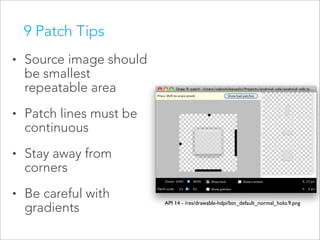
9 Patch Tips
•   Source image should
    be smallest
    repeatable area
•   Patch lines must be
    continuous
•   Stay away from
    corners
•   Be careful with
                          API 14 - /res/drawable-hdpi/btn_default_normal_holo.9.png
    gradients
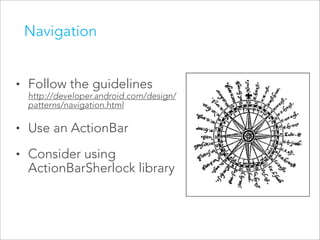
Navigation


•   Follow the guidelines
    http://developer.android.com/design/
    patterns/navigation.html

•   Use an ActionBar
•   Consider using
    ActionBarSherlock library
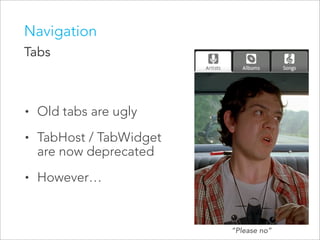
Navigation
Tabs


•   Old tabs are ugly
•   TabHost / TabWidget
    are now deprecated
•   However…


                          “Please no”
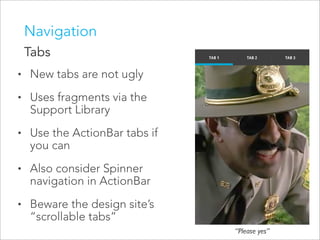
Navigation
    Tabs
•   New tabs are not ugly
•   Uses fragments via the
    Support Library
•   Use the ActionBar tabs if
    you can
•   Also consider Spinner
    navigation in ActionBar
•   Beware the design site’s
    “scrollable tabs”
                                “Please yes”
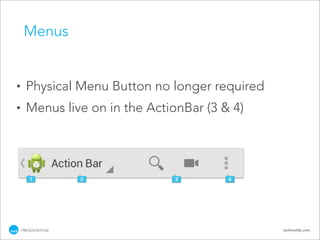
Menus


•     Physical Menu Button no longer required
•     Menus live on in the ActionBar (3 & 4)


    PRESENTATION                                tackmobile.com
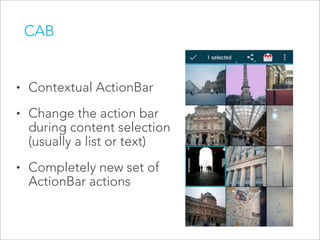
CAB


•   Contextual ActionBar
•   Change the action bar
    during content selection
    (usually a list or text)
•   Completely new set of
    ActionBar actions
XML Drawables

•   Density ambiguous, so belongs in /res/
    drawable/ folder
•   /res/drawable/filename.xml
•   Now with wizard & code complete
•   Drawables documentation:
    http://developer.android.com/guide/topics/resources/
    drawable-resource.html


PRESENTATION                                               tackmobile.com
XML Drawables

•     State List <selector>
      •   Used for buttons with states (including toggle
          and radio)
      •   States: pressed, focused, selected, checked,
          enabled
      •   Don’t forget the “focused” state!
      •   Can be used for colors as well


    PRESENTATION                                    tackmobile.com
XML Drawables

•     Shape <shape> (declarative graphics!)
      •   Geometric shapes: rectangle, oval, line, ring
      •   Useful to nest multiple inside <layer-list>
      •   Good for simple graphics
      •   Complex graphics should be handled with
          images or the graphics API
      •   Warning: Line shape is only horizontal!

    PRESENTATION                                        tackmobile.com
XML Drawables
•     LevelList <level-list>
      •   Essentially gives drawable custom states
      •   <item android:drawable=”@drawable/foo”/>
          or
          <item><shape/></item>
      •   Items can apply to multiple levels: minLevel &
          maxLevel
      •   Change programmatically on the View with
          setLevel() or setImageLevel()
    PRESENTATION                                     tackmobile.com
XML Drawables
•     Many more available
•     Drawables documentation:
      http://developer.android.com/guide/topics/
      resources/drawable-resource.html


    PRESENTATION                                   tackmobile.com
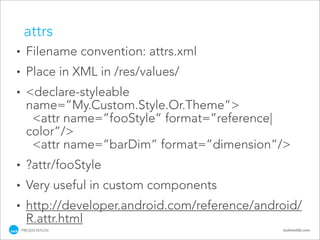
attrs
•   Custom attributes for your styles
•   Abstracts style reference away
•   Useful for Themes
•   Many defaults already available
•   Use the source for examples of making your
    own


PRESENTATION                                 tackmobile.com
attrs
•     Filename convention: attrs.xml
•     Place in XML in /res/values/
•     <declare-styleable
      name=”My.Custom.Style.Or.Theme”>
       <attr name=”fooStyle” format=”reference|
      color”/>
       <attr name=”barDim” format=”dimension”/>
•     ?attr/fooStyle
•     Very useful in custom components
•     http://developer.android.com/reference/android/
      R.attr.html
    PRESENTATION                                 tackmobile.com
Thanks for coming!

•   My Contact Info
         name:     Joshua Jamison
         email:    joshua.jamison@tackmobile.com
         g+:       joshua.jamison@gmail.com
         blog:     workingfromhere.com
•   Resources
         Android Docs: http://developer.android.com
         Android Source: http://source.android.com/
                         https://github.com/android

    PRESENTATION                                   tackmobile.com

Advanced Android Design Implementation

  • 1.
    Advanced Design Implementation Joshua Jamison 5.15.12 PRESENTATION ANDEVCON • MAY 15, 2012
  • 2.
    What’s this about? This Not This Ranging from Basic Advanced PRESENTATION tackmobile.com
  • 3.
    So... who isthis guy? • Software Architect & Developer • Hacking on Android since Beta • Multiple Applications to market • Developer with Tack • Still owns an HTC G1 PRESENTATION tackmobile.com
  • 4.
    Why bother? • Android is “ugly” Doesn’t have to be • Don’t need to design for Android Unless you have a brand • Just port the iPhone app Android != iPhone
  • 5.
    Design Strategies Have agoal • Who is your client? The person that defines “complete” and answers the questions • Who is your user? The people who will use the application the most
  • 6.
    Design Strategies • Design vs. UX Get in the user’s shoes • Avoid premature “pixel pushing” Don’t wait for design finalization • Get a designer & work with them Wireframes, comps, & assets PRESENTATION tackmobile.com
  • 7.
    Design Strategies • Make a plan • How much should be reusable? • How much time is left? • How often can you iterate? • Branding vs OS familiarity PRESENTATION tackmobile.com
  • 8.
    Design Strategies Portingan iOS app PRESENTATION tackmobile.com
  • 9.
    Design Strategies Portingan iOS app • Read through Android Design guidelines http://developer.android.com/design • Get new assets • Action Bar not Navigation Bar • App Icon, Button Icons, Button States, Fonts, Device dimensions & resolutions PRESENTATION tackmobile.com
  • 10.
    Styles & Themes • Names are just a convention: styles.xml, themes.xml, makes_no_difference.xml • XML files placed in /res/values/ folder • Apply a Theme to an Activity / Apply a Style to a View • Both use <style> tag • Themes cascade, Styles do not PRESENTATION tackmobile.com
  • 11.
    Using SDK Styles • @android:style/… • “Code complete” getting better and better • Use source to see specifics • Convenient, but sometimes unpredictable PRESENTATION tackmobile.com
  • 12.
    Drawables • /res/drawable… • Resource Qualifiers http://developer.android.com/resources/dashboard/screens.html (hdpi / mdpi / ldpi) as of 4.2.12 • Android prefers to scale down larger images • Density ambiguous drawables belong in /res/ drawable/ • http://developer.android.com/resources/ dashboard/screens.html PRESENTATION tackmobile.com
  • 13.
    Drawables • px = dip * (dpi / 160) • ldpi ~120dpi (0.75x) • mdpi ~160dpi (baseline) • hdpi ~240dpi (1.5x) • xhdpi ~320dpi (2.0x) • 1dip mdpi = 160 / 160 * 1dip = 1px • Minimum Screen Sizes • small 320dp x 426dp • normal 320dp x 470dp • large 480dp x 640dp • xlarge 720dp x 960dp • Normal hdpi = 480px x ~705px • > http://developer.android.com/guide/practices/ screens_support.html PRESENTATION tackmobile.com
  • 14.
    9 Patch • Good for graphics that will need to scale to fit content • Must be PNG format and name must end with “.9.png” • Use draw9patch application in /<sdk install path>/tools/ • Who’s job is this, really? • http://developer.android.com/guide/ developing/tools/draw9patch.html PRESENTATION tackmobile.com
  • 15.
    9 Patch Tips • Source image should be smallest repeatable area • Patch lines must be continuous • Stay away from corners • Be careful with API 14 - /res/drawable-hdpi/btn_default_normal_holo.9.png gradients
  • 16.
    Navigation • Follow the guidelines http://developer.android.com/design/ patterns/navigation.html • Use an ActionBar • Consider using ActionBarSherlock library
  • 17.
    Navigation Tabs • Old tabs are ugly • TabHost / TabWidget are now deprecated • However… “Please no”
  • 18.
    Navigation Tabs • New tabs are not ugly • Uses fragments via the Support Library • Use the ActionBar tabs if you can • Also consider Spinner navigation in ActionBar • Beware the design site’s “scrollable tabs” “Please yes”
  • 19.
    Menus • Physical Menu Button no longer required • Menus live on in the ActionBar (3 & 4) PRESENTATION tackmobile.com
  • 20.
    CAB • Contextual ActionBar • Change the action bar during content selection (usually a list or text) • Completely new set of ActionBar actions
  • 21.
    XML Drawables • Density ambiguous, so belongs in /res/ drawable/ folder • /res/drawable/filename.xml • Now with wizard & code complete • Drawables documentation: http://developer.android.com/guide/topics/resources/ drawable-resource.html PRESENTATION tackmobile.com
  • 22.
    XML Drawables • State List <selector> • Used for buttons with states (including toggle and radio) • States: pressed, focused, selected, checked, enabled • Don’t forget the “focused” state! • Can be used for colors as well PRESENTATION tackmobile.com
  • 23.
    XML Drawables • Shape <shape> (declarative graphics!) • Geometric shapes: rectangle, oval, line, ring • Useful to nest multiple inside <layer-list> • Good for simple graphics • Complex graphics should be handled with images or the graphics API • Warning: Line shape is only horizontal! PRESENTATION tackmobile.com
  • 24.
    XML Drawables • LevelList <level-list> • Essentially gives drawable custom states • <item android:drawable=”@drawable/foo”/> or <item><shape/></item> • Items can apply to multiple levels: minLevel & maxLevel • Change programmatically on the View with setLevel() or setImageLevel() PRESENTATION tackmobile.com
  • 25.
    XML Drawables • Many more available • Drawables documentation: http://developer.android.com/guide/topics/ resources/drawable-resource.html PRESENTATION tackmobile.com
  • 26.
    attrs • Custom attributes for your styles • Abstracts style reference away • Useful for Themes • Many defaults already available • Use the source for examples of making your own PRESENTATION tackmobile.com
  • 27.
    attrs • Filename convention: attrs.xml • Place in XML in /res/values/ • <declare-styleable name=”My.Custom.Style.Or.Theme”> <attr name=”fooStyle” format=”reference| color”/> <attr name=”barDim” format=”dimension”/> • ?attr/fooStyle • Very useful in custom components • http://developer.android.com/reference/android/ R.attr.html PRESENTATION tackmobile.com
  • 28.
    Thanks for coming! • My Contact Info name: Joshua Jamison email: joshua.jamison@tackmobile.com g+: joshua.jamison@gmail.com blog: workingfromhere.com • Resources Android Docs: http://developer.android.com Android Source: http://source.android.com/ https://github.com/android PRESENTATION tackmobile.com