Android Design Patterns


           Raul Portales
           @sla_shalafi


           Platty Soft
           @plattysoft
Why?


Good Design = Happy Users
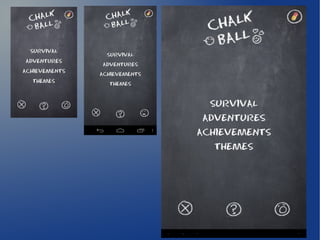
Device Independent Design


Save yourself time and headaches
Device Independent Design
●   Use dips
●   Prefer Relative Layouts
●   Qualify dimensions as resources
       –   Best way to move to tablets
Fragments


 Design for phones and tablets
Reuse as much code as you can
Fragments
●   A Fragment represents a behavior or a portion
    of user interface in an Activity.
●   You can think of a fragment as a modular
    section of an activity, which has its own
    lifecycle, receives its own input events, and
    which you can add or remove while the activity
    is running (sort of like a "sub activity" that you
    can reuse in different activities).
Using Fragments
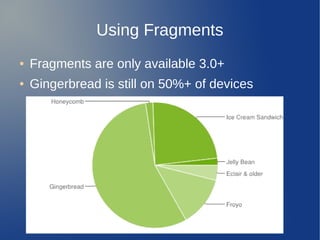
●   Fragments are only available 3.0+
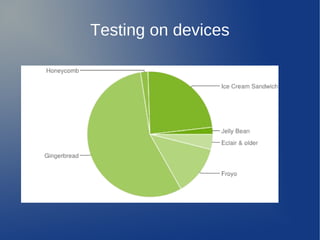
●   Gingerbread is still on 50%+ of devices
Compat Library


Brings Fragments back to 1.6
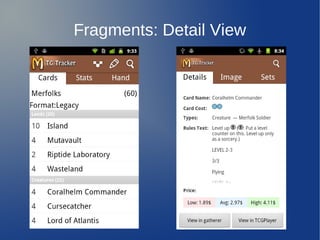
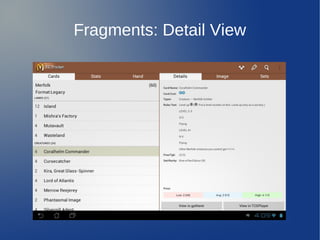
Fragments: Detail View
The tech side
●   MasterFragment
●   DetailFragment
●   Qualify layouts
        –   xlarge-land → 2 fragments
        –   normal → 1 fragment
●   MainActivity
        –   If has a detail fragment, use it
        –   Or write 2 different activities
Fragments
●   onCreateView
●   onViewCreated
●   getActivity
●   getArguments
Common Pitfalls
●   Be aware of the Constructor!!
●   The Activity may not be always there
       –   It may have been destroyed
       –   Or the fragment detached
●   There is no communication among fragments
       –   Do it through the Activity
       –   Better: Use an interface
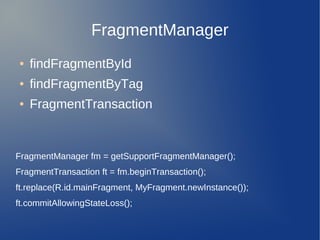
FragmentManager
●   findFragmentById
●   findFragmentByTag
●   FragmentTransaction


FragmentManager fm = getSupportFragmentManager();
FragmentTransaction ft = fm.beginTransaction();
ft.replace(R.id.mainFragment, MyFragment.newInstance());
ft.commitAllowingStateLoss();
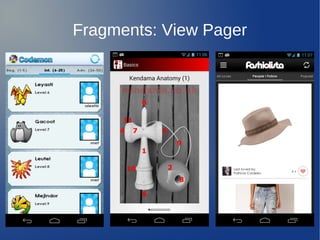
Fragments: View Pager


The most useful utility of Fragments
Fragments: View Pager
The tech side
●   MainActivity
●   FragmentPagerAdapter
       –   Fragments
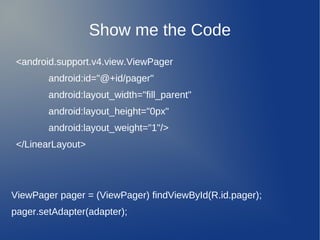
Show me the Code
 <android.support.v4.view.ViewPager
        android:id="@+id/pager"
        android:layout_width="fill_parent"
        android:layout_height="0px"
        android:layout_weight="1"/>
 </LinearLayout>


ViewPager pager = (ViewPager) findViewById(R.id.pager);
pager.setAdapter(adapter);
Action Bar


Main improvement in 3.0 and 4.0
 Has been around since 2009
Action Bar
●   Provide a dedicated space for identifying the
    application brand and user location.
●   Provide consistent navigation and view
    refinement across different applications.
●   Make key actions for the activity (such as
    "search", "create", "share", etc.) prominent and
    accessible to the user in a predictable way.
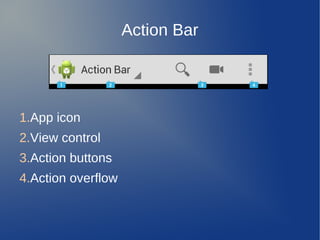
Action Bar


1.App icon
2.View control
3.Action buttons
4.Action overflow
Action Buttons
●   Frequent
●   Important
●   Typical
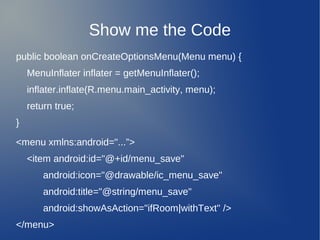
Show me the Code
public boolean onCreateOptionsMenu(Menu menu) {
    MenuInflater inflater = getMenuInflater();
    inflater.inflate(R.menu.main_activity, menu);
    return true;
}

<menu xmlns:android="...”>
    <item android:id="@+id/menu_save"
        android:icon="@drawable/ic_menu_save"
        android:title="@string/menu_save"
        android:showAsAction="ifRoom|withText" />
</menu>
The Action Bar is NOT part of the Compat Library
ActionBarSherlock
●   Deprecated from Inception
       –   Same class names, different packages
●   Based on the Compat library
●   From Android 2.x up
Using ABS
●   Add ABS as library
●   Use the theme for your App
●   getActionBar → getSupportActionBar
●   Activity → SherlockActivity
●   FragmentActivity → SherlockFragmentActivity
●   Fragment → SherlockFragment
●   And so on...
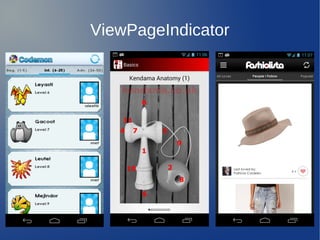
ViewPageIndicator


You have seen it in the screenshots
   Combined with a ViewPager
ViewPageIndicator
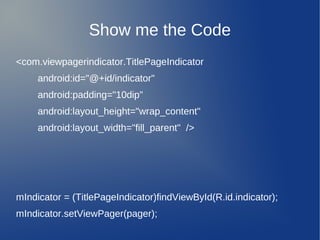
Show me the Code
<com.viewpagerindicator.TitlePageIndicator
     android:id="@+id/indicator"
     android:padding="10dip"
     android:layout_height="wrap_content"
     android:layout_width="fill_parent" />


mIndicator = (TitlePageIndicator)findViewById(R.id.indicator);
mIndicator.setViewPager(pager);
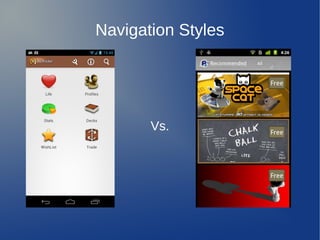
Navigation Styles
●   Top navigation tabs
       –   For a clear landing page
●   Dashboard
       –   For a set of important options
●   Drawer
       –   Combined with a landing page
Navigation Styles


       Vs.
Testing on devices
Testing on devices
Testing on devices
Testing on devices
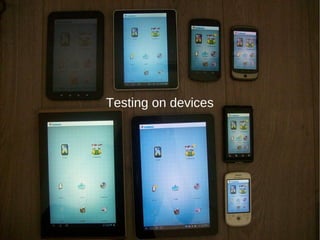
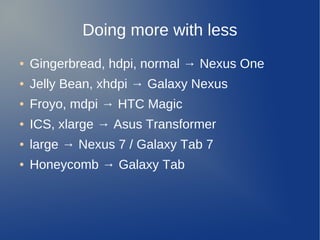
Doing more with less
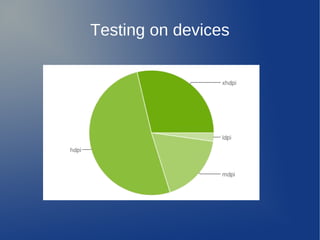
●   Gingerbread, hdpi, normal → Nexus One
●   Jelly Bean, xhdpi → Galaxy Nexus
●   Froyo, mdpi → HTC Magic
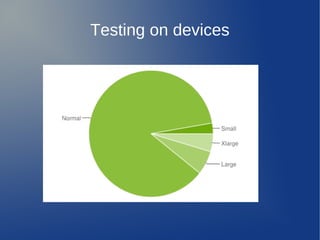
●   ICS, xlarge → Asus Transformer
●   large → Nexus 7 / Galaxy Tab 7
●   Honeycomb → Galaxy Tab
To know more...
●   Android Design Site:
    http://developer.android.com/design
●   Google I/O videos, specially day 3
    https://developers.google.com/events/io/sessions#android
●   ActionBarSherlock
    http://actionbarsherlock.com/
●   ViewPageIndicator
    http://viewpagerindicator.com/
Android Design Patterns


           Raul Portales
           @sla_shalafi


           Platty Soft
           @plattysoft

Android design patterns

  • 1.
    Android Design Patterns Raul Portales @sla_shalafi Platty Soft @plattysoft
  • 2.
    Why? Good Design =Happy Users
  • 3.
    Device Independent Design Saveyourself time and headaches
  • 5.
    Device Independent Design ● Use dips ● Prefer Relative Layouts ● Qualify dimensions as resources – Best way to move to tablets
  • 6.
    Fragments Design forphones and tablets Reuse as much code as you can
  • 7.
    Fragments ● A Fragment represents a behavior or a portion of user interface in an Activity. ● You can think of a fragment as a modular section of an activity, which has its own lifecycle, receives its own input events, and which you can add or remove while the activity is running (sort of like a "sub activity" that you can reuse in different activities).
  • 8.
    Using Fragments ● Fragments are only available 3.0+ ● Gingerbread is still on 50%+ of devices
  • 9.
  • 10.
  • 11.
  • 12.
    The tech side ● MasterFragment ● DetailFragment ● Qualify layouts – xlarge-land → 2 fragments – normal → 1 fragment ● MainActivity – If has a detail fragment, use it – Or write 2 different activities
  • 13.
    Fragments ● onCreateView ● onViewCreated ● getActivity ● getArguments
  • 14.
    Common Pitfalls ● Be aware of the Constructor!! ● The Activity may not be always there – It may have been destroyed – Or the fragment detached ● There is no communication among fragments – Do it through the Activity – Better: Use an interface
  • 15.
    FragmentManager ● findFragmentById ● findFragmentByTag ● FragmentTransaction FragmentManager fm = getSupportFragmentManager(); FragmentTransaction ft = fm.beginTransaction(); ft.replace(R.id.mainFragment, MyFragment.newInstance()); ft.commitAllowingStateLoss();
  • 16.
    Fragments: View Pager Themost useful utility of Fragments
  • 17.
  • 18.
    The tech side ● MainActivity ● FragmentPagerAdapter – Fragments
  • 19.
    Show me theCode <android.support.v4.view.ViewPager android:id="@+id/pager" android:layout_width="fill_parent" android:layout_height="0px" android:layout_weight="1"/> </LinearLayout> ViewPager pager = (ViewPager) findViewById(R.id.pager); pager.setAdapter(adapter);
  • 20.
    Action Bar Main improvementin 3.0 and 4.0 Has been around since 2009
  • 21.
    Action Bar ● Provide a dedicated space for identifying the application brand and user location. ● Provide consistent navigation and view refinement across different applications. ● Make key actions for the activity (such as "search", "create", "share", etc.) prominent and accessible to the user in a predictable way.
  • 22.
    Action Bar 1.App icon 2.Viewcontrol 3.Action buttons 4.Action overflow
  • 23.
    Action Buttons ● Frequent ● Important ● Typical
  • 24.
    Show me theCode public boolean onCreateOptionsMenu(Menu menu) { MenuInflater inflater = getMenuInflater(); inflater.inflate(R.menu.main_activity, menu); return true; } <menu xmlns:android="...”> <item android:id="@+id/menu_save" android:icon="@drawable/ic_menu_save" android:title="@string/menu_save" android:showAsAction="ifRoom|withText" /> </menu>
  • 25.
    The Action Baris NOT part of the Compat Library
  • 27.
    ActionBarSherlock ● Deprecated from Inception – Same class names, different packages ● Based on the Compat library ● From Android 2.x up
  • 28.
    Using ABS ● Add ABS as library ● Use the theme for your App ● getActionBar → getSupportActionBar ● Activity → SherlockActivity ● FragmentActivity → SherlockFragmentActivity ● Fragment → SherlockFragment ● And so on...
  • 29.
    ViewPageIndicator You have seenit in the screenshots Combined with a ViewPager
  • 30.
  • 31.
    Show me theCode <com.viewpagerindicator.TitlePageIndicator android:id="@+id/indicator" android:padding="10dip" android:layout_height="wrap_content" android:layout_width="fill_parent" /> mIndicator = (TitlePageIndicator)findViewById(R.id.indicator); mIndicator.setViewPager(pager);
  • 32.
    Navigation Styles ● Top navigation tabs – For a clear landing page ● Dashboard – For a set of important options ● Drawer – Combined with a landing page
  • 33.
  • 34.
  • 35.
  • 36.
  • 37.
  • 38.
    Doing more withless ● Gingerbread, hdpi, normal → Nexus One ● Jelly Bean, xhdpi → Galaxy Nexus ● Froyo, mdpi → HTC Magic ● ICS, xlarge → Asus Transformer ● large → Nexus 7 / Galaxy Tab 7 ● Honeycomb → Galaxy Tab
  • 39.
    To know more... ● Android Design Site: http://developer.android.com/design ● Google I/O videos, specially day 3 https://developers.google.com/events/io/sessions#android ● ActionBarSherlock http://actionbarsherlock.com/ ● ViewPageIndicator http://viewpagerindicator.com/
  • 41.
    Android Design Patterns Raul Portales @sla_shalafi Platty Soft @plattysoft