Technology in Action Chapter 10 Behind the Scenes: Software Programming
Information Systems System A  collection of pieces working together to achieve  a common goal An information system includes Data People Procedures Hardware/Software System development life cycle (SDLC) An organized process  (or set of steps)  used to develop systems in an orderly fashion NB
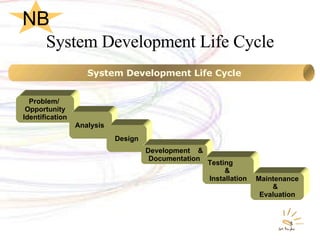
System Development Life Cycle Problem/  Opportunity Identification Analysis  Design Development  & Documentation Testing  &  Installation Maintenance &  Evaluation System Development Life Cycle NB
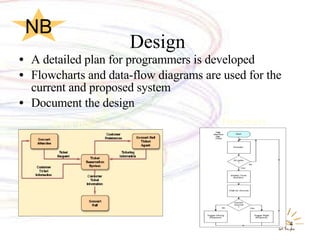
Design  A detailed plan for programmers is developed Flowcharts and data-flow diagrams are used for the current and proposed system Document the design Data-flow diagram Flowchart NB
Development & Documentation Actual programming takes place First phase of the program development life cycle (PDLC) Development is documented User documentation is created
The Life Cycle of a Program Programming is the process of translating a task into a series of commands a computer will use to perform that task Programming involves: Identifying the parts of a task the computer  can perform Describing tasks in a specific and complete manner Translating the tasks into a language that is understood by the computer’s CPU NB
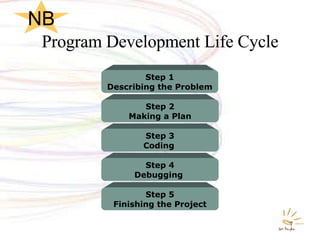
Program Development Life Cycle Step 5 Finishing the Project Step 4 Debugging  Step 3 Coding   Step 2 Making a Plan Step 1 Describing the Problem NB
Step 1 : Describing the Problem The problem statement is: The starting point of programming A description of tasks the program is to accomplish How the program will execute the tasks Created through interaction between the programmer and the user The program statement includes error handling and a testing plan NB
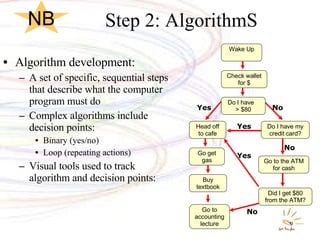
Step 2: AlgorithmS Algorithm development: A set of specific, sequential steps that describe what the computer program must do Complex algorithms include decision points: Binary (yes/no) Loop (repeating actions) Visual tools used to track algorithm and decision points: Head off to cafe Buy textbook Go to accounting lecture Yes  No  No  No  Yes  Yes  Wake Up Check wallet for $ Do I have  > $80 Go get gas Did I get $80 from the ATM? Do I have my credit card? Go to the ATM for cash NB
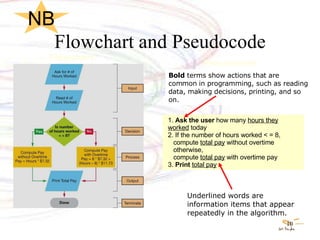
Flowchart and Pseudocode Underlined words are information items that appear repeatedly in the algorithm. 1.  Ask the user  how many  hours they worked  today 2. If the number of hours worked < = 8, compute  total pay  without overtime otherwise, compute  total pay  with overtime pay 3.  Print  total pay Bold  terms show actions that are common in programming, such as reading data, making decisions, printing, and so on. Flowchart  Pseudocode  NB
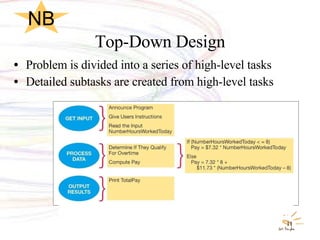
Top-Down Design Problem is divided into a series of high-level tasks Detailed subtasks are created from high-level tasks NB
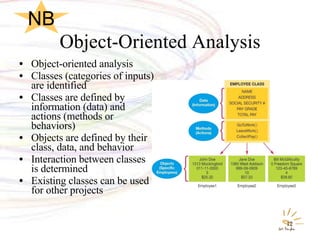
Object-Oriented Analysis Object-oriented analysis Classes (categories of inputs) are identified Classes are defined by information (data) and actions (methods or behaviors) Objects are defined by their class, data, and behavior  Interaction between classes is determined Existing classes can be used for other projects NB
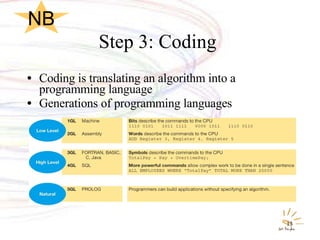
Step 3: Coding  Coding is translating an algorithm into a programming language Generations of programming languages NB
Compilation  Compilation is the process of converting code into machine language Compiler reads the source code and translates it into machine language After compilation, programmers have an executable program NB
Interpreter Interpreter translates source code into a line by line intermediate form Each line is executed before the next line is compiled Programmers do not have to wait for the entire program to be recompiled each time they make a change. Programmers can immediately see the results of changes as they are making them in the code. NB
Step 4: Debugging  Running a program to find errors is known as debugging Sample inputs are used to determine runtime (logic) errors  Debugger: Tool that helps programmers locate runtime errors NB
Step 5: Finishing the Project Users test the program (internal testing) Beta version released: Information collected about errors before final revision Software updates (service packs): Problems found after commercial release Documentation created: User manuals User training NB
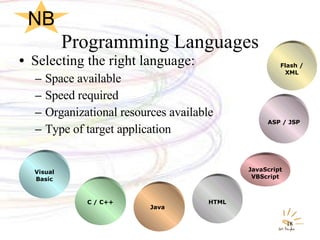
Programming Languages Selecting the right language: Space available Speed required Organizational resources available Type of target application Visual Basic C / C++ Java   HTML JavaScript VBScript ASP / JSP Flash / XML NB
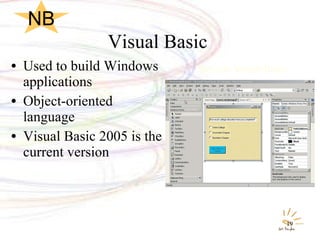
Visual Basic  Used to build Windows applications Object-oriented language Visual Basic 2005 is the current version Sample Visual Basic NB
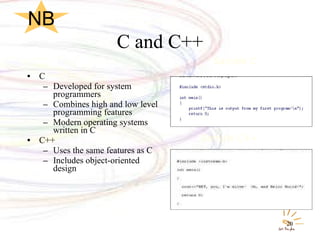
C and C++ C Developed for system programmers Combines high and low level programming features Modern operating systems written in C C++ Uses the same features as C Includes object-oriented design Sample C Sample C++ NB
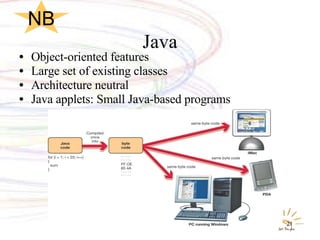
Java Object-oriented features Large set of existing classes Architecture neutral Java applets: Small Java-based programs NB
Web Applications HTML/XHTML  Hypertext Markup Language/Extensible Hypertext Markup Language Not a true programming language Uses special symbols (tags) to control how Web pages are viewed Extensible Markup Language (XML) Enables computers to efficiently transfer information between Web sites NB
Web Applications JavaScript Used to make Web pages more visually appealing and interactive VBScript A subset of Visual Basic Used to add interactivity to Web pages PHP Another scripting language gaining popularity Dynamic Decision Making Web page has the ability to display content based on user choices NB
Web Applications Active Server Pages (ASP) and Java Server Pages (JSP) Adds interactivity capabilities to Web pages Translates user information into a request for more information from a company’s computer Flash Enables elaborate animations to be created for Web pages NB

10tait

  • 1.
    Technology in ActionChapter 10 Behind the Scenes: Software Programming
  • 2.
    Information Systems SystemA collection of pieces working together to achieve a common goal An information system includes Data People Procedures Hardware/Software System development life cycle (SDLC) An organized process (or set of steps) used to develop systems in an orderly fashion NB
  • 3.
    System Development LifeCycle Problem/ Opportunity Identification Analysis Design Development & Documentation Testing & Installation Maintenance & Evaluation System Development Life Cycle NB
  • 4.
    Design Adetailed plan for programmers is developed Flowcharts and data-flow diagrams are used for the current and proposed system Document the design Data-flow diagram Flowchart NB
  • 5.
    Development & DocumentationActual programming takes place First phase of the program development life cycle (PDLC) Development is documented User documentation is created
  • 6.
    The Life Cycleof a Program Programming is the process of translating a task into a series of commands a computer will use to perform that task Programming involves: Identifying the parts of a task the computer can perform Describing tasks in a specific and complete manner Translating the tasks into a language that is understood by the computer’s CPU NB
  • 7.
    Program Development LifeCycle Step 5 Finishing the Project Step 4 Debugging Step 3 Coding Step 2 Making a Plan Step 1 Describing the Problem NB
  • 8.
    Step 1 :Describing the Problem The problem statement is: The starting point of programming A description of tasks the program is to accomplish How the program will execute the tasks Created through interaction between the programmer and the user The program statement includes error handling and a testing plan NB
  • 9.
    Step 2: AlgorithmSAlgorithm development: A set of specific, sequential steps that describe what the computer program must do Complex algorithms include decision points: Binary (yes/no) Loop (repeating actions) Visual tools used to track algorithm and decision points: Head off to cafe Buy textbook Go to accounting lecture Yes No No No Yes Yes Wake Up Check wallet for $ Do I have > $80 Go get gas Did I get $80 from the ATM? Do I have my credit card? Go to the ATM for cash NB
  • 10.
    Flowchart and PseudocodeUnderlined words are information items that appear repeatedly in the algorithm. 1. Ask the user how many hours they worked today 2. If the number of hours worked < = 8, compute total pay without overtime otherwise, compute total pay with overtime pay 3. Print total pay Bold terms show actions that are common in programming, such as reading data, making decisions, printing, and so on. Flowchart Pseudocode NB
  • 11.
    Top-Down Design Problemis divided into a series of high-level tasks Detailed subtasks are created from high-level tasks NB
  • 12.
    Object-Oriented Analysis Object-orientedanalysis Classes (categories of inputs) are identified Classes are defined by information (data) and actions (methods or behaviors) Objects are defined by their class, data, and behavior Interaction between classes is determined Existing classes can be used for other projects NB
  • 13.
    Step 3: Coding Coding is translating an algorithm into a programming language Generations of programming languages NB
  • 14.
    Compilation Compilationis the process of converting code into machine language Compiler reads the source code and translates it into machine language After compilation, programmers have an executable program NB
  • 15.
    Interpreter Interpreter translatessource code into a line by line intermediate form Each line is executed before the next line is compiled Programmers do not have to wait for the entire program to be recompiled each time they make a change. Programmers can immediately see the results of changes as they are making them in the code. NB
  • 16.
    Step 4: Debugging Running a program to find errors is known as debugging Sample inputs are used to determine runtime (logic) errors Debugger: Tool that helps programmers locate runtime errors NB
  • 17.
    Step 5: Finishingthe Project Users test the program (internal testing) Beta version released: Information collected about errors before final revision Software updates (service packs): Problems found after commercial release Documentation created: User manuals User training NB
  • 18.
    Programming Languages Selectingthe right language: Space available Speed required Organizational resources available Type of target application Visual Basic C / C++ Java HTML JavaScript VBScript ASP / JSP Flash / XML NB
  • 19.
    Visual Basic Used to build Windows applications Object-oriented language Visual Basic 2005 is the current version Sample Visual Basic NB
  • 20.
    C and C++C Developed for system programmers Combines high and low level programming features Modern operating systems written in C C++ Uses the same features as C Includes object-oriented design Sample C Sample C++ NB
  • 21.
    Java Object-oriented featuresLarge set of existing classes Architecture neutral Java applets: Small Java-based programs NB
  • 22.
    Web Applications HTML/XHTML Hypertext Markup Language/Extensible Hypertext Markup Language Not a true programming language Uses special symbols (tags) to control how Web pages are viewed Extensible Markup Language (XML) Enables computers to efficiently transfer information between Web sites NB
  • 23.
    Web Applications JavaScriptUsed to make Web pages more visually appealing and interactive VBScript A subset of Visual Basic Used to add interactivity to Web pages PHP Another scripting language gaining popularity Dynamic Decision Making Web page has the ability to display content based on user choices NB
  • 24.
    Web Applications ActiveServer Pages (ASP) and Java Server Pages (JSP) Adds interactivity capabilities to Web pages Translates user information into a request for more information from a company’s computer Flash Enables elaborate animations to be created for Web pages NB

Editor's Notes

  • #2 In this behind-the-scenes chapter, we explore the stages of program development and survey the most popular programming languages.