Principles of Programming
and Software Engineering
1-1
 Coding without a solution design increases
debugging time
 A team of programmers for a large software
development project involves
 An overall plan
 Organization
 Communication
 Software engineering
 Provides techniques to facilitate the development of
computer programs
1-2
 Problem solving
 The process of taking the statement of a problem and
developing a computer program that solves that
problem
 A solution consists of:
 Algorithms
 Algorithm: a step-by-step specification of a function to solve
a problem within a finite amount of time
 Ways to store data
1-3
1-4
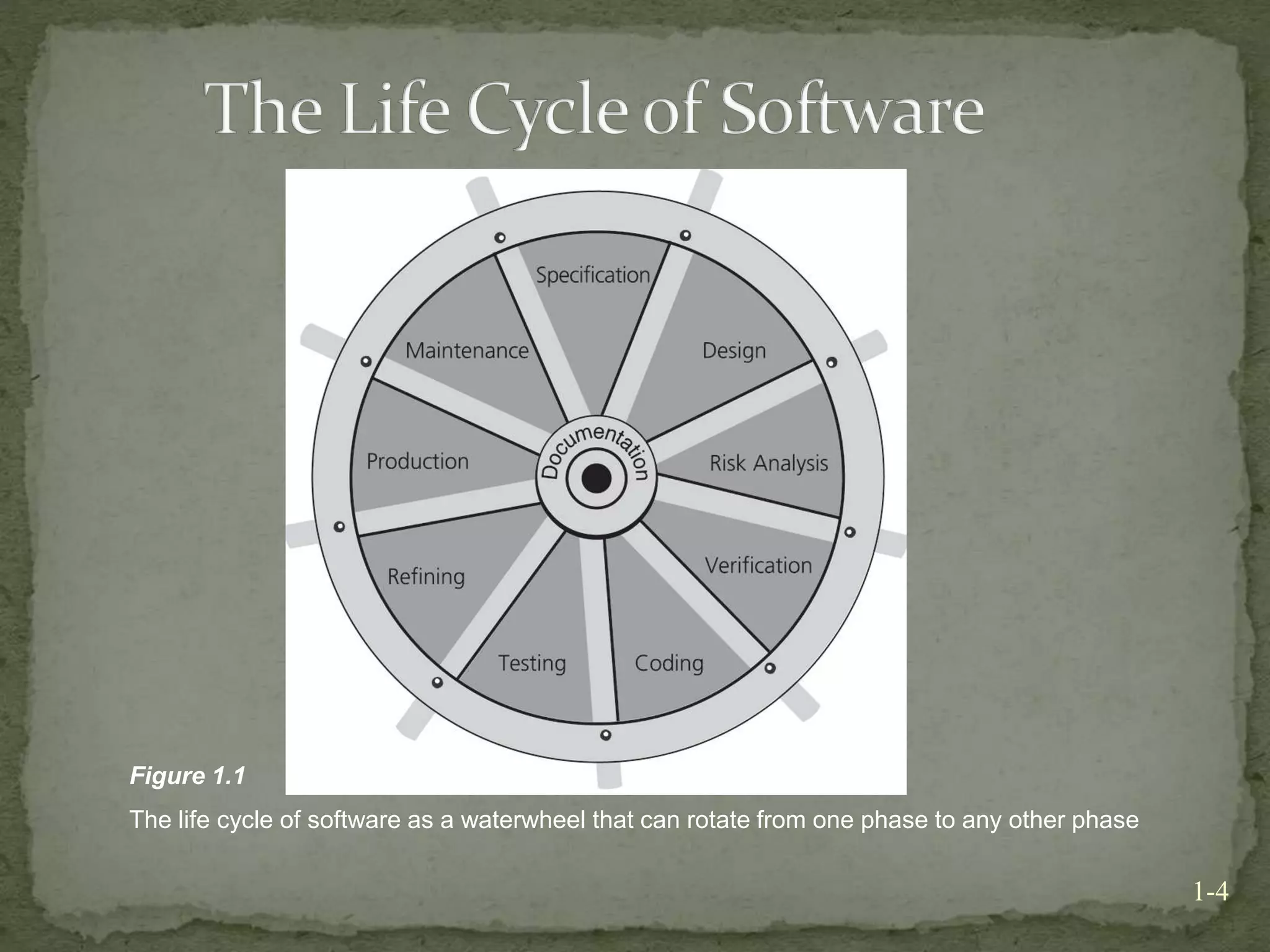
Figure 1.1
The life cycle of software as a waterwheel that can rotate from one phase to any other phase
 Phase 1: Specification
 Aspects of the problem which must be specified:
 What is the input data?
 What data is valid and what data is invalid?
 Who will use the software, and what user interface should be
used?
 What error detection and error messages are desirable?
 What assumptions are possible?
 Are there special cases?
 What is the form of the output?
 What documentation is necessary?
 What enhancements to the program are likely in the future?
1-5
 Phase 1: Specification (Continued)
 Prototype program
 A program that simulates the behavior of portions of the
desired software product
 Phase 2: Design
 Includes:
 Dividing the program into modules
 Specifying the purpose of each module
 Specifying the data flow among modules
1-6
 Phase 2: Design (Continued)
 Modules
 Self-contained units of code
 Should be designed to be:
 Loosely coupled
 Highly cohesive
 Interfaces
 Communication mechanisms among modules
1-7
 Phase 2: Design (Continued)
 Specifications of a function
 A contract between the function and the module that calls it
 Should not commit the function to a particular way of
performing its task
 Include the function’s preconditions and postconditions
 Phase 3: Risk Analysis
 Building software entails risks
 Techniques exist to identify, assess, and manage the
risks of creating a software product
1-8
 Phase 4: Verification
 Formal methods can be used to prove that an algorithm
is correct
 Assertion
 A statement about a particular condition at a certain point in
an algorithm
 Invariant
 A condition that is always true at a particular point in an
algorithm
1-9
 Phase 4: Verification (Continued)
 Loop invariant
 A condition that is true before and after each execution of an
algorithm’s loop
 Can be used to detect errors before coding is started
 The invariant for a correct loop is true:
 Initially, after any initialization steps, but before the loop begins
execution
 Before every iteration of the loop
 After every iteration of the loop
 After the loop terminates
1-10
 Phase 5: Coding (Continued)
 Involves:
 Translating the design into a particular programming
language
 Removing syntax errors
 Phase 6: Testing
 Involves:
 Removing the logical errors
1-11
 Phase 6: Testing (Continued)
 Test data should include:
 Valid data that leads to a known result
 Invalid data
 Random data
 Actual data
 Phase 7: Refining the Solution
 More sophisticated input and output routines
 Additional features
 More error checks
1-12
 Phase 8: Production
 Involves:
 Distribution to the intended users
 Use by the users
 Phase 9: Maintenance
 Involves
 Correcting user-detected errors
 Adding more features
 Modifying existing portions to suit the users better
1-13
 A solution is good if:
 The total cost it incurs over all phases of its life cycle is
minimal
1-14
 The cost of a solution includes:
 Computer resources that the program consumes
 Difficulties encountered by users
 Consequences of a program that does not behave
correctly
 Programs must be well structured and documented
 Efficiency is one aspect of a solution’s cost
1-15
 Abstraction
 Separates the purpose of a module from its
implementation
 Specifications for each module are written before
implementation
 Functional abstraction
 Separates the purpose of a function from its implementation
1-16
 Data abstraction
 Focuses of the operations of data, not on the implementation
of the operations
 Abstract data type (ADT)
 A collection of data and operations on the data
 An ADT’s operations can be used without knowing how the
operations are implemented, if the operations’ specifications
are known
1-17
 Data structure
 A construct that can be defined within a programming
language to store a collection of data
1-18
 Information hiding
 Hide details within a module
 Ensure that no other module can tamper with these
hidden details
 Public view of a module
 Described by its specifications
 Private view of a module
 Consists of details which should not be described by the
specifications
1-19
 Principles of object-oriented programming (OOP)
 Encapsulation
 Objects combine data and operations
 Inheritance
 Classes can inherit properties from other classes
 Polymorphism
 Objects can determine appropriate operations at execution
time
1-20
 Advantages of an object-oriented approach
 Existing classes can be reused
 Program maintenance and verification are easier
1-21
 Object-oriented design (OOD)
 Produces modular solutions for problems that primarily
involve data
 Identifies objects by focusing on the nouns in the
problem statement
1-22
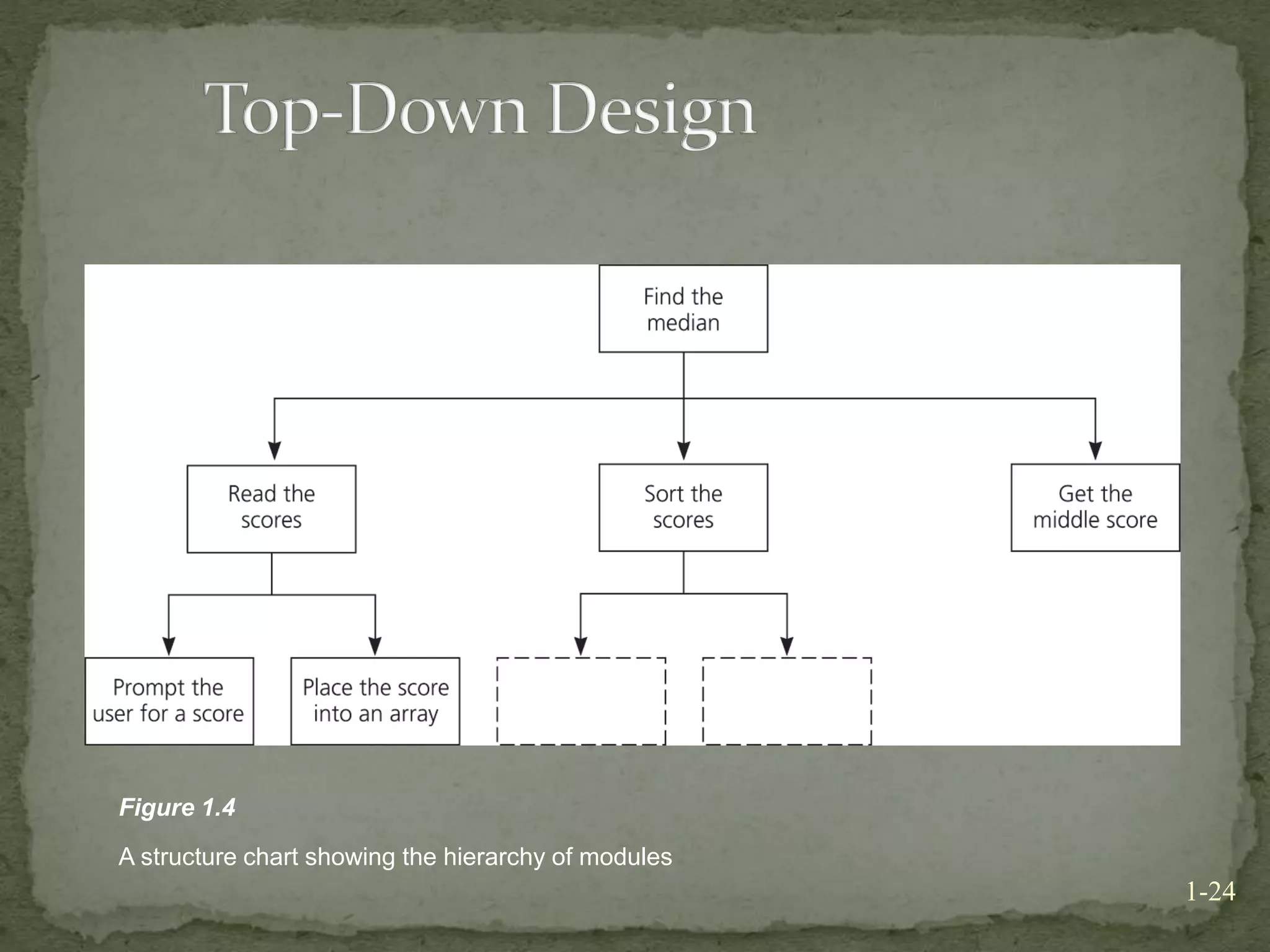
 Top-down design (TDD)
 Produces modular solutions for problems in which the
emphasis is on the algorithms
 Identifies actions by focusing on the verbs in the
problem statement
 A task is addressed at successively lower levels of detail
1-23
1-24
Figure 1.4
A structure chart showing the hierarchy of modules
 Use OOD and TDD together
 Use OOD for problems that primarily involve data
 Use TDD to design algorithms for an object’s
operations
1-25
 Consider TDD to design solutions to problems that
emphasize algorithms over data
 Focus on what, not how, when designing both ADTs
and algorithms
 Consider incorporating previously written software
components into your design
1-26
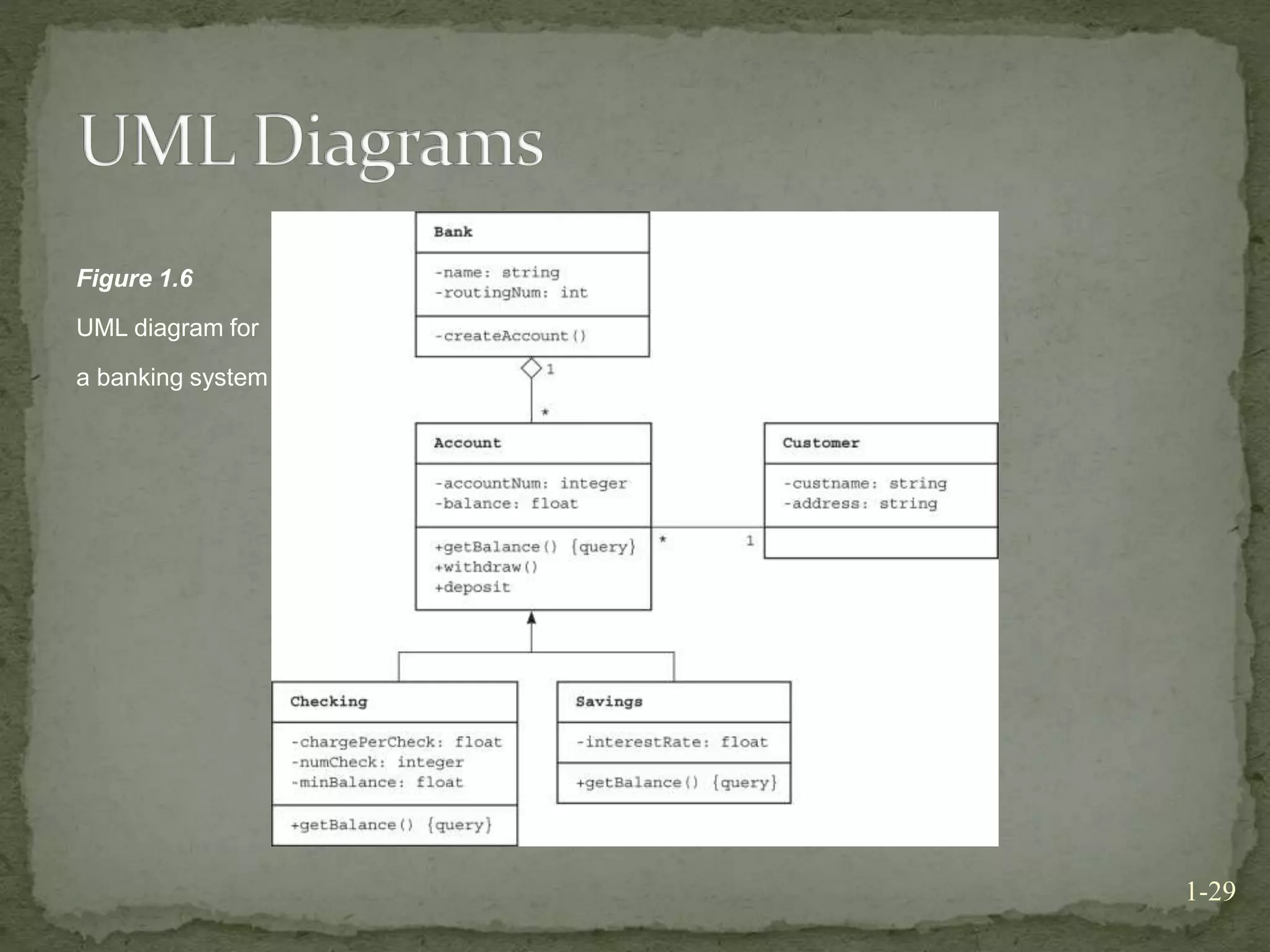
 The Unified Modeling Language (UML) is a modeling
language used to express object-oriented designs
 Class diagrams specify the name of the class, the data
members of the class, and the operations
1-27
 UML (Continued)
 Relationships between classes can be shown by
connecting classes with lines
 Inheritance is shown with a line and an open triangle to the
parent class
 Containment is shown with an arrow to the containing class
 UML provides notation to specify visibility, type,
parameter, and default value information
1-28
1-29
Figure 1.6
UML diagram for
a banking system
 Modularity has a favorable impact on
 Constructing programs
 Debugging programs
 Reading programs
 Modifying programs
 Eliminating redundant code
1-30
 Modifiability is possible through the use of
 Function
 Named constants
 The typedef statement
1-31
 Ease of use
 In an interactive environment, the program should
prompt the user for input in a clear manner
 A program should always echo its input
 The output should be well labeled and easy to read
1-32
 Fail-Safe Programming
 Fail-safe programs will perform reasonably no matter
how anyone uses it
 Test for invalid input data and program logic errors
 Handle errors through exception handling
1-33
 Eight issues of personal style in programming
 Extensive use of functions
 Use of private data fields
 Avoidance of global variables in functions
 Proper use of reference arguments
1-34
 Eight issues of personal style in programming
(Continued)
 Proper use of functions
 Error handling
 Readability
 Documentation
1-35
 Debugging
 Programmer must systematically check a program’s logic
to determine where an error occurs
 Tools to use while debugging:
 Watches
 Breakpoints
 cout statements
 Dump functions
1-36
 Software engineering: techniques to facilitate
development of programs
 Software life cycle consists of nine phases
 Loop invariant: property that is true before and after
each iteration of a loop
 Evaluating the quality of a solution must consideration
a variety of factors
1-37
 A combination of object-oriented and top-down
design techniques leads to a modular solution
 The final solution should be as easy to modify as
possible
 A function should be as independent as possible and
perform one well-defined task
1-38
 Functions should include a comment: purpose,
precondition, and postcondition
 A program should be as fail-safe as possible
 Effective use of available diagnostic aids is one of the
keys to debugging
 Use “dump functions” to help to examine and debug
the contents of data structures
1-39

Principles of programming

  • 1.
    Principles of Programming andSoftware Engineering 1-1
  • 2.
     Coding withouta solution design increases debugging time  A team of programmers for a large software development project involves  An overall plan  Organization  Communication  Software engineering  Provides techniques to facilitate the development of computer programs 1-2
  • 3.
     Problem solving The process of taking the statement of a problem and developing a computer program that solves that problem  A solution consists of:  Algorithms  Algorithm: a step-by-step specification of a function to solve a problem within a finite amount of time  Ways to store data 1-3
  • 4.
    1-4 Figure 1.1 The lifecycle of software as a waterwheel that can rotate from one phase to any other phase
  • 5.
     Phase 1:Specification  Aspects of the problem which must be specified:  What is the input data?  What data is valid and what data is invalid?  Who will use the software, and what user interface should be used?  What error detection and error messages are desirable?  What assumptions are possible?  Are there special cases?  What is the form of the output?  What documentation is necessary?  What enhancements to the program are likely in the future? 1-5
  • 6.
     Phase 1:Specification (Continued)  Prototype program  A program that simulates the behavior of portions of the desired software product  Phase 2: Design  Includes:  Dividing the program into modules  Specifying the purpose of each module  Specifying the data flow among modules 1-6
  • 7.
     Phase 2:Design (Continued)  Modules  Self-contained units of code  Should be designed to be:  Loosely coupled  Highly cohesive  Interfaces  Communication mechanisms among modules 1-7
  • 8.
     Phase 2:Design (Continued)  Specifications of a function  A contract between the function and the module that calls it  Should not commit the function to a particular way of performing its task  Include the function’s preconditions and postconditions  Phase 3: Risk Analysis  Building software entails risks  Techniques exist to identify, assess, and manage the risks of creating a software product 1-8
  • 9.
     Phase 4:Verification  Formal methods can be used to prove that an algorithm is correct  Assertion  A statement about a particular condition at a certain point in an algorithm  Invariant  A condition that is always true at a particular point in an algorithm 1-9
  • 10.
     Phase 4:Verification (Continued)  Loop invariant  A condition that is true before and after each execution of an algorithm’s loop  Can be used to detect errors before coding is started  The invariant for a correct loop is true:  Initially, after any initialization steps, but before the loop begins execution  Before every iteration of the loop  After every iteration of the loop  After the loop terminates 1-10
  • 11.
     Phase 5:Coding (Continued)  Involves:  Translating the design into a particular programming language  Removing syntax errors  Phase 6: Testing  Involves:  Removing the logical errors 1-11
  • 12.
     Phase 6:Testing (Continued)  Test data should include:  Valid data that leads to a known result  Invalid data  Random data  Actual data  Phase 7: Refining the Solution  More sophisticated input and output routines  Additional features  More error checks 1-12
  • 13.
     Phase 8:Production  Involves:  Distribution to the intended users  Use by the users  Phase 9: Maintenance  Involves  Correcting user-detected errors  Adding more features  Modifying existing portions to suit the users better 1-13
  • 14.
     A solutionis good if:  The total cost it incurs over all phases of its life cycle is minimal 1-14
  • 15.
     The costof a solution includes:  Computer resources that the program consumes  Difficulties encountered by users  Consequences of a program that does not behave correctly  Programs must be well structured and documented  Efficiency is one aspect of a solution’s cost 1-15
  • 16.
     Abstraction  Separatesthe purpose of a module from its implementation  Specifications for each module are written before implementation  Functional abstraction  Separates the purpose of a function from its implementation 1-16
  • 17.
     Data abstraction Focuses of the operations of data, not on the implementation of the operations  Abstract data type (ADT)  A collection of data and operations on the data  An ADT’s operations can be used without knowing how the operations are implemented, if the operations’ specifications are known 1-17
  • 18.
     Data structure A construct that can be defined within a programming language to store a collection of data 1-18
  • 19.
     Information hiding Hide details within a module  Ensure that no other module can tamper with these hidden details  Public view of a module  Described by its specifications  Private view of a module  Consists of details which should not be described by the specifications 1-19
  • 20.
     Principles ofobject-oriented programming (OOP)  Encapsulation  Objects combine data and operations  Inheritance  Classes can inherit properties from other classes  Polymorphism  Objects can determine appropriate operations at execution time 1-20
  • 21.
     Advantages ofan object-oriented approach  Existing classes can be reused  Program maintenance and verification are easier 1-21
  • 22.
     Object-oriented design(OOD)  Produces modular solutions for problems that primarily involve data  Identifies objects by focusing on the nouns in the problem statement 1-22
  • 23.
     Top-down design(TDD)  Produces modular solutions for problems in which the emphasis is on the algorithms  Identifies actions by focusing on the verbs in the problem statement  A task is addressed at successively lower levels of detail 1-23
  • 24.
    1-24 Figure 1.4 A structurechart showing the hierarchy of modules
  • 25.
     Use OODand TDD together  Use OOD for problems that primarily involve data  Use TDD to design algorithms for an object’s operations 1-25
  • 26.
     Consider TDDto design solutions to problems that emphasize algorithms over data  Focus on what, not how, when designing both ADTs and algorithms  Consider incorporating previously written software components into your design 1-26
  • 27.
     The UnifiedModeling Language (UML) is a modeling language used to express object-oriented designs  Class diagrams specify the name of the class, the data members of the class, and the operations 1-27
  • 28.
     UML (Continued) Relationships between classes can be shown by connecting classes with lines  Inheritance is shown with a line and an open triangle to the parent class  Containment is shown with an arrow to the containing class  UML provides notation to specify visibility, type, parameter, and default value information 1-28
  • 29.
    1-29 Figure 1.6 UML diagramfor a banking system
  • 30.
     Modularity hasa favorable impact on  Constructing programs  Debugging programs  Reading programs  Modifying programs  Eliminating redundant code 1-30
  • 31.
     Modifiability ispossible through the use of  Function  Named constants  The typedef statement 1-31
  • 32.
     Ease ofuse  In an interactive environment, the program should prompt the user for input in a clear manner  A program should always echo its input  The output should be well labeled and easy to read 1-32
  • 33.
     Fail-Safe Programming Fail-safe programs will perform reasonably no matter how anyone uses it  Test for invalid input data and program logic errors  Handle errors through exception handling 1-33
  • 34.
     Eight issuesof personal style in programming  Extensive use of functions  Use of private data fields  Avoidance of global variables in functions  Proper use of reference arguments 1-34
  • 35.
     Eight issuesof personal style in programming (Continued)  Proper use of functions  Error handling  Readability  Documentation 1-35
  • 36.
     Debugging  Programmermust systematically check a program’s logic to determine where an error occurs  Tools to use while debugging:  Watches  Breakpoints  cout statements  Dump functions 1-36
  • 37.
     Software engineering:techniques to facilitate development of programs  Software life cycle consists of nine phases  Loop invariant: property that is true before and after each iteration of a loop  Evaluating the quality of a solution must consideration a variety of factors 1-37
  • 38.
     A combinationof object-oriented and top-down design techniques leads to a modular solution  The final solution should be as easy to modify as possible  A function should be as independent as possible and perform one well-defined task 1-38
  • 39.
     Functions shouldinclude a comment: purpose, precondition, and postcondition  A program should be as fail-safe as possible  Effective use of available diagnostic aids is one of the keys to debugging  Use “dump functions” to help to examine and debug the contents of data structures 1-39