Basic Searching Skills Dan Sich Librarian for Earth Sciences, Planetary Science, Physics & Astronomy, Electrical & Computer Engineering University of Western Ontario November 3 rd , 2008
Agenda Identifying keywords Building search strategy Keywords vs. subjects Library catalogue Search limits Choosing journal article databases
Why plan? Save time Focus on what you’re after Shift ‘angle of attack’ in logical fashion Avoid wasted effort & repetition Eliminate ‘garbage’ from results
How to plan Describe your topic, make it a question Identify and isolate concepts Identify variant spellings, synonyms, abbreviations/acronyms, terminology Research = search, search & search again Try various combinations Try various resources (books, articles)
Concept mapping Visual representation of relationship between concepts Quick & easy way to ‘brainstorm’ Put top in middle Put ideas & concepts around main topic Group similar ideas together Connect ideas with lines, to show relationships
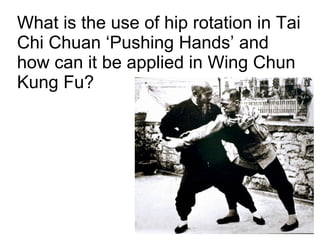
What is the use of hip rotation in Tai Chi Chuan ‘Pushing Hands’ and how can it be applied in Wing Chun Kung Fu?
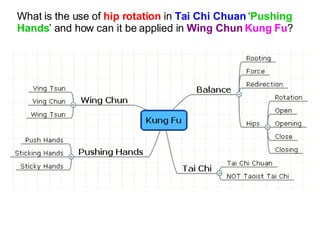
What is the use of  hip rotation  in  Tai Chi Chuan  ‘ Pushing Hands ’ and how can it be applied in  Wing Chun   Kung Fu ?
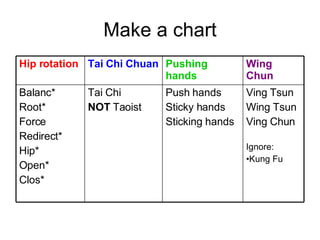
Make a chart Hip rotation Tai Chi Chuan Pushing hands Wing Chun Balanc* Root* Force Redirect* Hip* Open* Clos* Tai Chi NOT  Taoist Push hands Sticky hands Sticking hands Ving Tsun Wing Tsun Ving Chun Ignore: Kung Fu
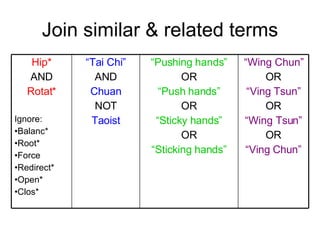
Join similar & related terms Hip* AND Rotat* Ignore: Balanc* Root* Force Redirect* Open* Clos* “ Tai Chi” AND Chuan NOT Taoist “ Pushing hands” OR “ Push hands” OR “ Sticky hands” OR “ Sticking hands” “ Wing Chun” OR “ Ving Tsun” OR “ Wing Tsun” OR “ Ving Chun”
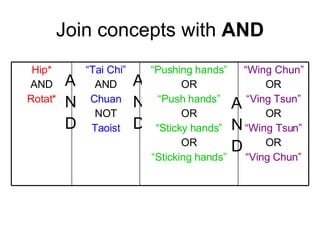
AND AND AND Join concepts with  AND Hip* AND Rotat* “ Tai Chi” AND Chuan NOT Taoist “ Pushing hands” OR “ Push hands” OR “ Sticky hands” OR “ Sticking hands” “ Wing Chun” OR “ Ving Tsun” OR “ Wing Tsun” OR “ Ving Chun”
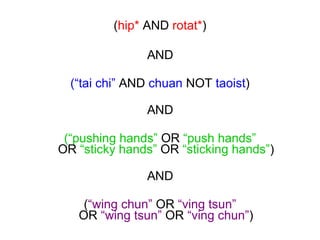
( hip*  AND  rotat* ) AND (“tai chi”  AND  chuan  NOT  taoist ) AND (“pushing hands”  OR  “push hands” OR  “sticky hands”  OR  “sticking hands” ) AND ( “wing chun”  OR  “ving tsun” OR  “wing tsun”  OR  “ving chun” )
Keep a search log Date (because new articles are published daily) What you want to find (your research question) Where you searched (name of database) You search string (terms, Boolean, etc.) Search limits used (date, language, document type, etc.) Number of hits (too many?), useful *new* terms discovered, etc. Useful results (record details somewhere) ...helps you focus efforts and avoid repetition
Keyword searching Different from Title and Author searching Use it when you don’t know title or author
Books Advantages: Introduction to unfamiliar topics Basic information Data, numbers References to further reading Disadvantages: Not as specific as your topic Not all online or keyword searchable
Library Catalogue contains: Books Encyclopedias Dissertaions Journals (no journal articles!) Conference proceedings (no articles!) … and more
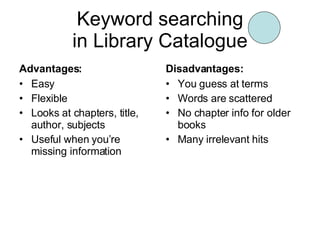
Keyword searching in Library Catalogue Advantages: Easy Flexible Looks at chapters, title, author, subjects Useful when you’re missing information Disadvantages: You guess at terms Words are scattered No chapter info for older books Many irrelevant hits
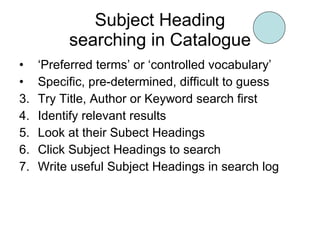
Subject Heading searching in Catalogue ‘ Preferred terms’ or ‘controlled vocabulary’ Specific, pre-determined, difficult to guess Try Title, Author or Keyword search first Identify relevant results Look at their Subect Headings Click Subject Headings to search Write useful Subject Headings in search log
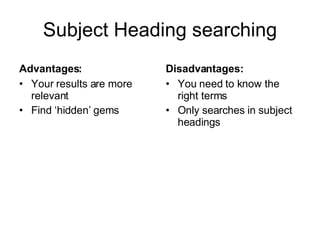
Subject Heading searching Advantages: Your results are more relevant Find ‘hidden’ gems Disadvantages: You need to know the right terms Only searches in subject headings
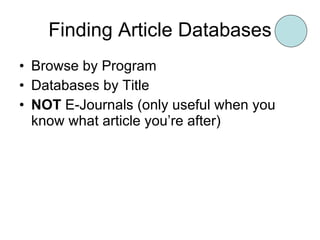
Finding Article Databases Browse by Program Databases by Title NOT  E-Journals (only useful when you know what article you’re after)
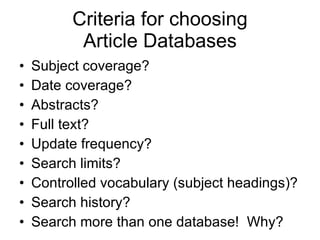
Criteria for choosing Article Databases Subject coverage? Date coverage? Abstracts? Full text? Update frequency? Search limits? Controlled vocabulary (subject headings)? Search history? Search more than one database!  Why?
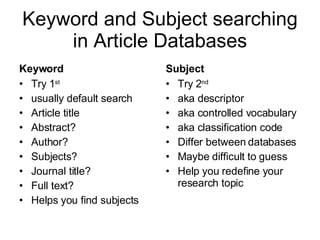
Keyword and Subject searching in Article Databases Keyword Try 1 st usually default search Article title Abstract? Author? Subjects? Journal title? Full text? Helps you find subjects Subject Try 2 nd aka descriptor aka controlled vocabulary aka classification code Differ between databases Maybe difficult to guess Help you redefine your research topic
Searching Article Databases Search one concept at a time Join concepts with AND (using Search History) Gives you flexibility
Going through search results Sort order? Relevance? Publication date? Journal title? (scholarly?) Number of pages? Language?
Going through search results Not finding enough Remove non-crucial AND’d terms Add more OR’d synonyms (e.g., OR taiji, tai ji, quan) Remove NOT’d terms (e.g., NOT taoist) Your results may be too general, or off-topic, but they may lead you to something useful Finding too much garbage Add more AND’d terms Remove irrelevant OR’d terms Add NOT’d terms Add search limits (date, language, publication type, etc.)
Getting articles Get it @ Western Try to get full text version Search Catalogue by ISSN or Journal Title (not abbreviation) Search Catalogue by Conference Proceeding information Don’t give up too easily We don’t have everything Order through Interlibrary Loan for $5
Questions?

Basic Searching Skills

  • 1.
    Basic Searching SkillsDan Sich Librarian for Earth Sciences, Planetary Science, Physics & Astronomy, Electrical & Computer Engineering University of Western Ontario November 3 rd , 2008
  • 2.
    Agenda Identifying keywordsBuilding search strategy Keywords vs. subjects Library catalogue Search limits Choosing journal article databases
  • 3.
    Why plan? Savetime Focus on what you’re after Shift ‘angle of attack’ in logical fashion Avoid wasted effort & repetition Eliminate ‘garbage’ from results
  • 4.
    How to planDescribe your topic, make it a question Identify and isolate concepts Identify variant spellings, synonyms, abbreviations/acronyms, terminology Research = search, search & search again Try various combinations Try various resources (books, articles)
  • 5.
    Concept mapping Visualrepresentation of relationship between concepts Quick & easy way to ‘brainstorm’ Put top in middle Put ideas & concepts around main topic Group similar ideas together Connect ideas with lines, to show relationships
  • 6.
    What is theuse of hip rotation in Tai Chi Chuan ‘Pushing Hands’ and how can it be applied in Wing Chun Kung Fu?
  • 7.
    What is theuse of hip rotation in Tai Chi Chuan ‘ Pushing Hands ’ and how can it be applied in Wing Chun Kung Fu ?
  • 8.
    Make a chartHip rotation Tai Chi Chuan Pushing hands Wing Chun Balanc* Root* Force Redirect* Hip* Open* Clos* Tai Chi NOT Taoist Push hands Sticky hands Sticking hands Ving Tsun Wing Tsun Ving Chun Ignore: Kung Fu
  • 9.
    Join similar &related terms Hip* AND Rotat* Ignore: Balanc* Root* Force Redirect* Open* Clos* “ Tai Chi” AND Chuan NOT Taoist “ Pushing hands” OR “ Push hands” OR “ Sticky hands” OR “ Sticking hands” “ Wing Chun” OR “ Ving Tsun” OR “ Wing Tsun” OR “ Ving Chun”
  • 10.
    AND AND ANDJoin concepts with AND Hip* AND Rotat* “ Tai Chi” AND Chuan NOT Taoist “ Pushing hands” OR “ Push hands” OR “ Sticky hands” OR “ Sticking hands” “ Wing Chun” OR “ Ving Tsun” OR “ Wing Tsun” OR “ Ving Chun”
  • 11.
    ( hip* AND rotat* ) AND (“tai chi” AND chuan NOT taoist ) AND (“pushing hands” OR “push hands” OR “sticky hands” OR “sticking hands” ) AND ( “wing chun” OR “ving tsun” OR “wing tsun” OR “ving chun” )
  • 12.
    Keep a searchlog Date (because new articles are published daily) What you want to find (your research question) Where you searched (name of database) You search string (terms, Boolean, etc.) Search limits used (date, language, document type, etc.) Number of hits (too many?), useful *new* terms discovered, etc. Useful results (record details somewhere) ...helps you focus efforts and avoid repetition
  • 13.
    Keyword searching Differentfrom Title and Author searching Use it when you don’t know title or author
  • 14.
    Books Advantages: Introductionto unfamiliar topics Basic information Data, numbers References to further reading Disadvantages: Not as specific as your topic Not all online or keyword searchable
  • 15.
    Library Catalogue contains:Books Encyclopedias Dissertaions Journals (no journal articles!) Conference proceedings (no articles!) … and more
  • 16.
    Keyword searching inLibrary Catalogue Advantages: Easy Flexible Looks at chapters, title, author, subjects Useful when you’re missing information Disadvantages: You guess at terms Words are scattered No chapter info for older books Many irrelevant hits
  • 17.
    Subject Heading searchingin Catalogue ‘ Preferred terms’ or ‘controlled vocabulary’ Specific, pre-determined, difficult to guess Try Title, Author or Keyword search first Identify relevant results Look at their Subect Headings Click Subject Headings to search Write useful Subject Headings in search log
  • 18.
    Subject Heading searchingAdvantages: Your results are more relevant Find ‘hidden’ gems Disadvantages: You need to know the right terms Only searches in subject headings
  • 19.
    Finding Article DatabasesBrowse by Program Databases by Title NOT E-Journals (only useful when you know what article you’re after)
  • 20.
    Criteria for choosingArticle Databases Subject coverage? Date coverage? Abstracts? Full text? Update frequency? Search limits? Controlled vocabulary (subject headings)? Search history? Search more than one database! Why?
  • 21.
    Keyword and Subjectsearching in Article Databases Keyword Try 1 st usually default search Article title Abstract? Author? Subjects? Journal title? Full text? Helps you find subjects Subject Try 2 nd aka descriptor aka controlled vocabulary aka classification code Differ between databases Maybe difficult to guess Help you redefine your research topic
  • 22.
    Searching Article DatabasesSearch one concept at a time Join concepts with AND (using Search History) Gives you flexibility
  • 23.
    Going through searchresults Sort order? Relevance? Publication date? Journal title? (scholarly?) Number of pages? Language?
  • 24.
    Going through searchresults Not finding enough Remove non-crucial AND’d terms Add more OR’d synonyms (e.g., OR taiji, tai ji, quan) Remove NOT’d terms (e.g., NOT taoist) Your results may be too general, or off-topic, but they may lead you to something useful Finding too much garbage Add more AND’d terms Remove irrelevant OR’d terms Add NOT’d terms Add search limits (date, language, publication type, etc.)
  • 25.
    Getting articles Getit @ Western Try to get full text version Search Catalogue by ISSN or Journal Title (not abbreviation) Search Catalogue by Conference Proceeding information Don’t give up too easily We don’t have everything Order through Interlibrary Loan for $5
  • 26.