Effective Searching
Should We Just Use Google?
 Many of us jump immediately onto Google or
Google Scholar
 We’ll find some helpful hits
 But we may have to spend hours weeding
through the hits
 Google is not exhaustive so we potentially
miss a great deal of research
 So what’s the alternative?
The Alternative
 Target your research
 I can help you ensure that you’re finding the
majority of what is available on your topic
 How?
 Let’s begin with the University Libraries
website: http://search.library.cmu.edu
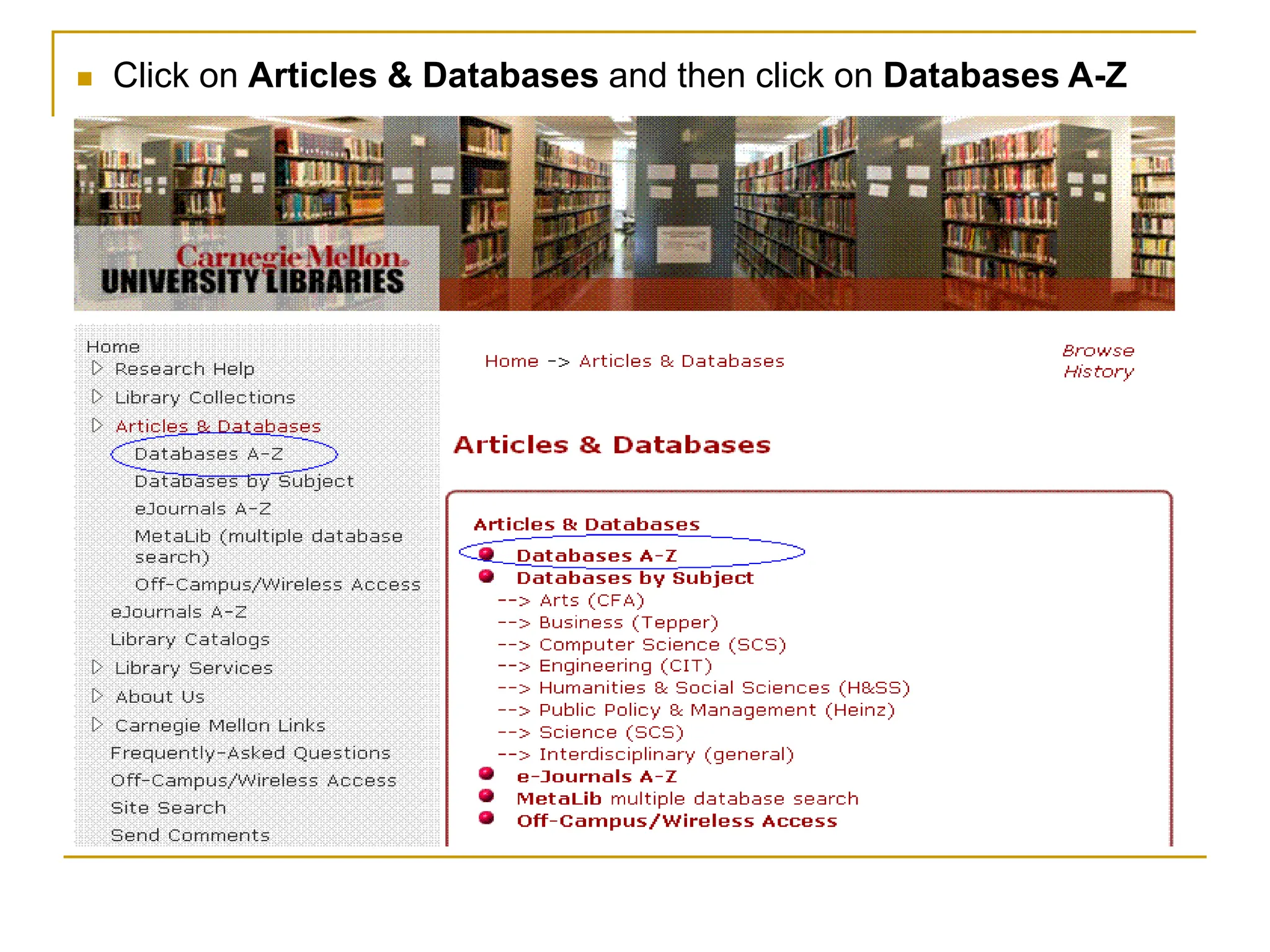
 Click on Articles & Databases and then click on Databases A-Z
Choosing the Best Tools
 The Libraries have hundreds of databases
with a significant amount of research not
found in Google and Google Scholar
 If trying to be exhaustive in your research,
then for computer science topics, search:
 ACM Digital Library
 IEEE Xplore
 INSPEC
 Web of Science
Why Not Just One Tool?
 We should search all four of those databases
rather than just one
 None of them covers everything that’s
published (just like Google)
 They have some overlap
 But we need to search all of them to ensure
we don’t miss any important research
Web of Science Searching
 Let’s experiment with Web of Science (WoS)
to see how we can target our research
 Important: when performing a search in any
database, experiment using a variety of
synonyms
 Sometimes we’re not always quite sure what
those synonyms may be
Sample Search
 Let’s search on: keystroke dynamics
 Sometimes we’re searching on a topic that
uses various words to describe it
 So to target our research, try to pin down the
various words and phrases to use
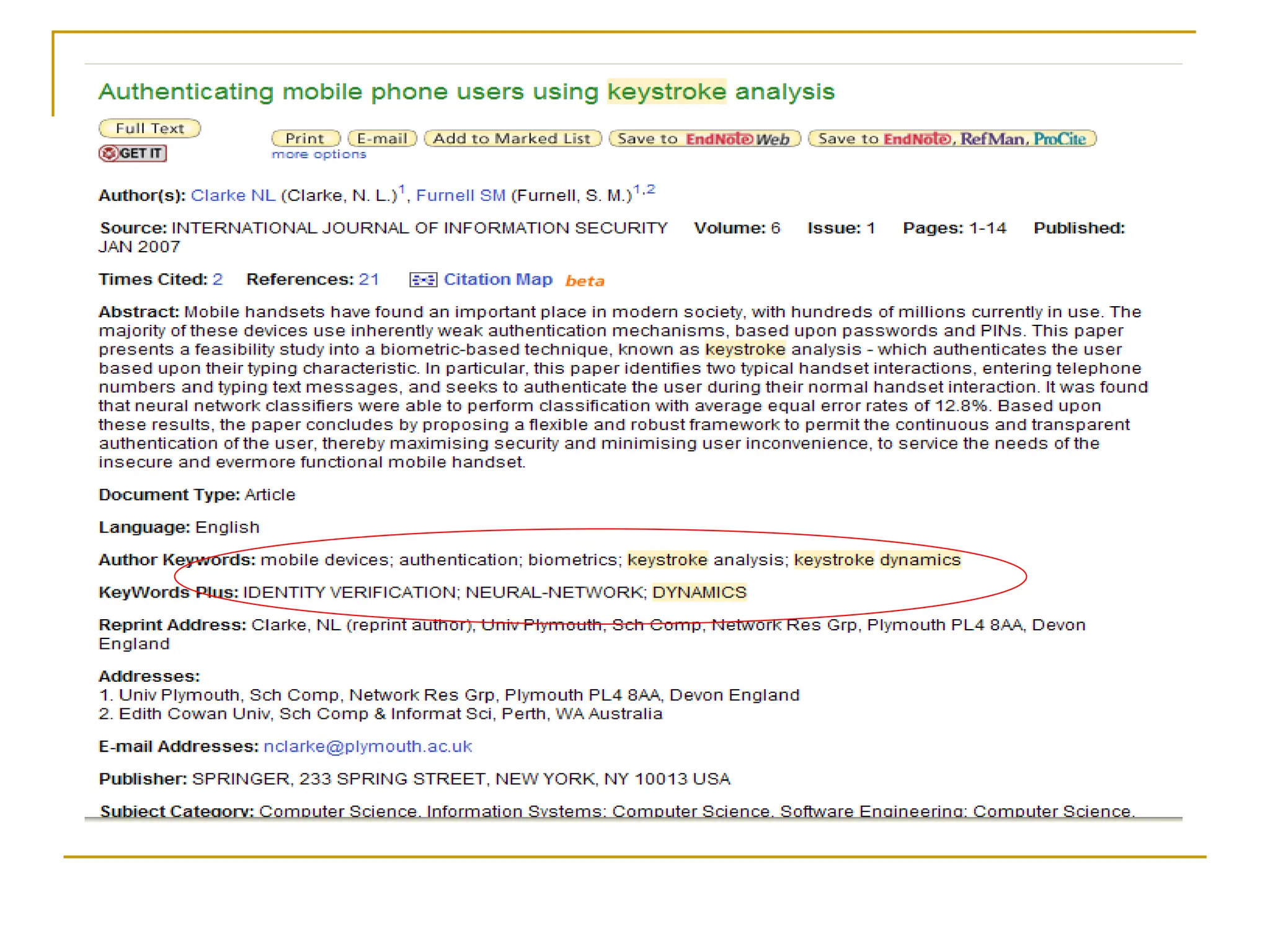
 The next slide is an example hit
 I highlighted in red synonyms we should use
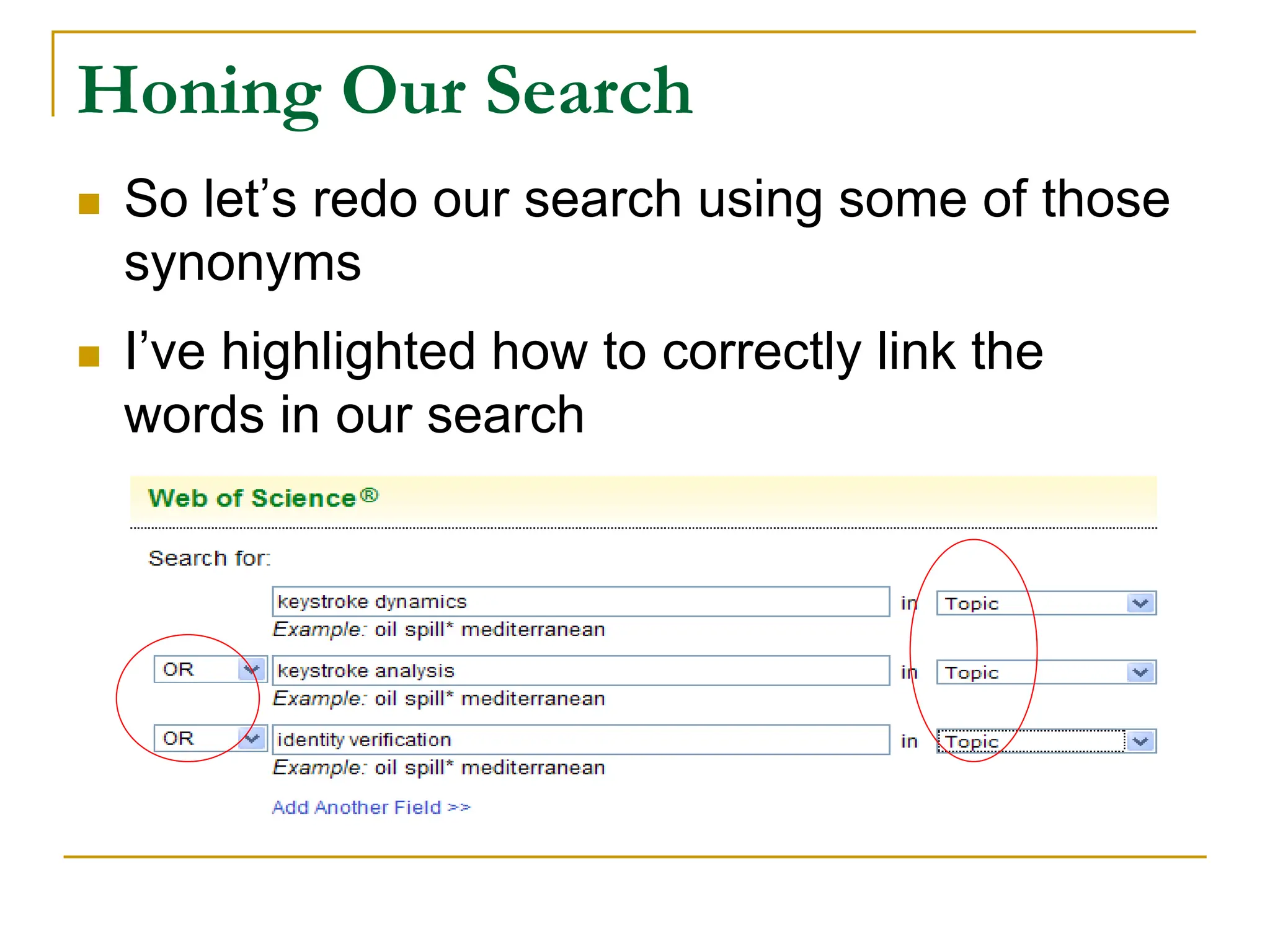
Honing Our Search
 So let’s redo our search using some of those
synonyms
 I’ve highlighted how to correctly link the
words in our search
Refining Our Search
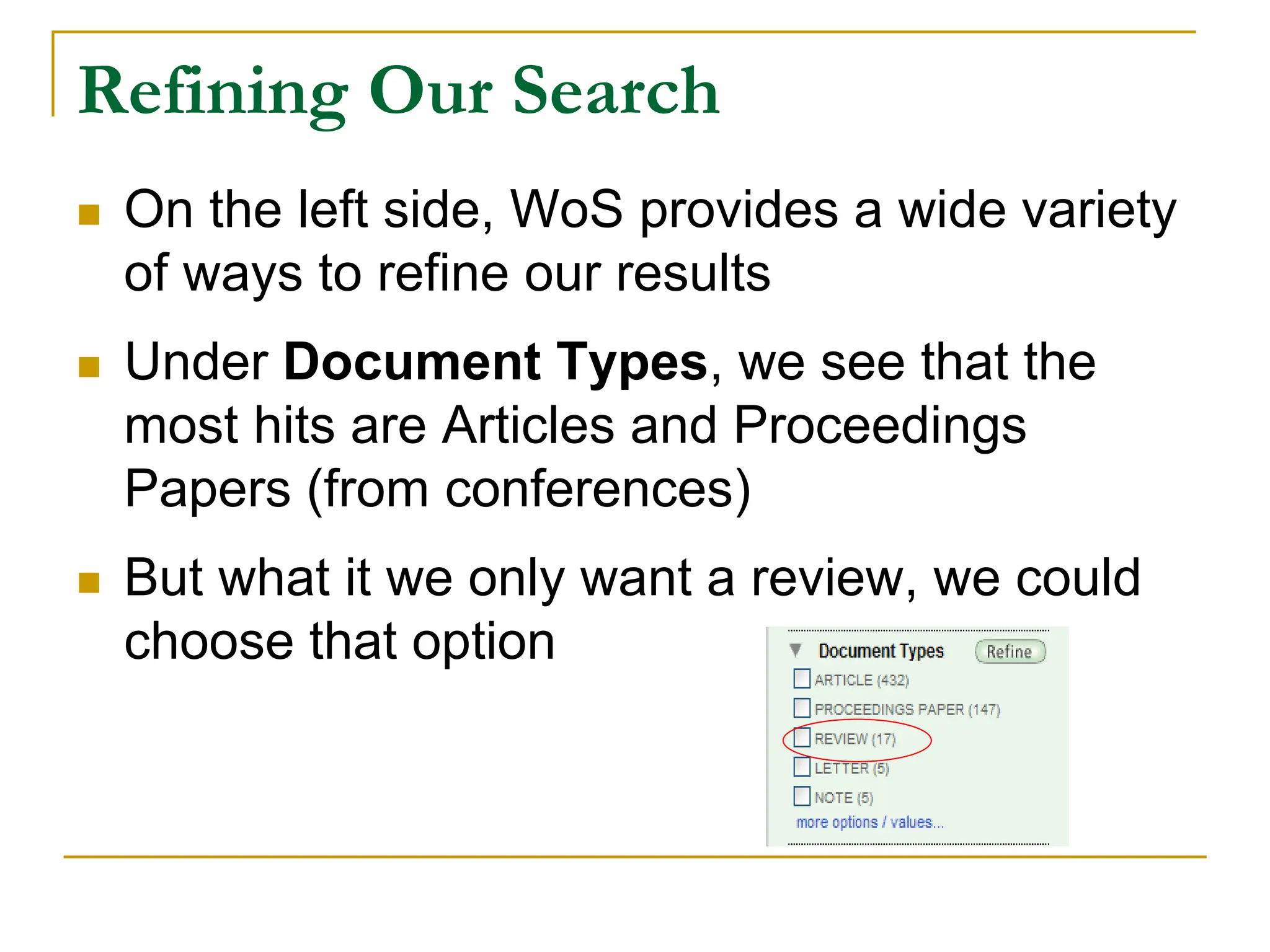
 On the left side, WoS provides a wide variety
of ways to refine our results
 Under Document Types, we see that the
most hits are Articles and Proceedings
Papers (from conferences)
 But what it we only want a review, we could
choose that option
Refining Our Search
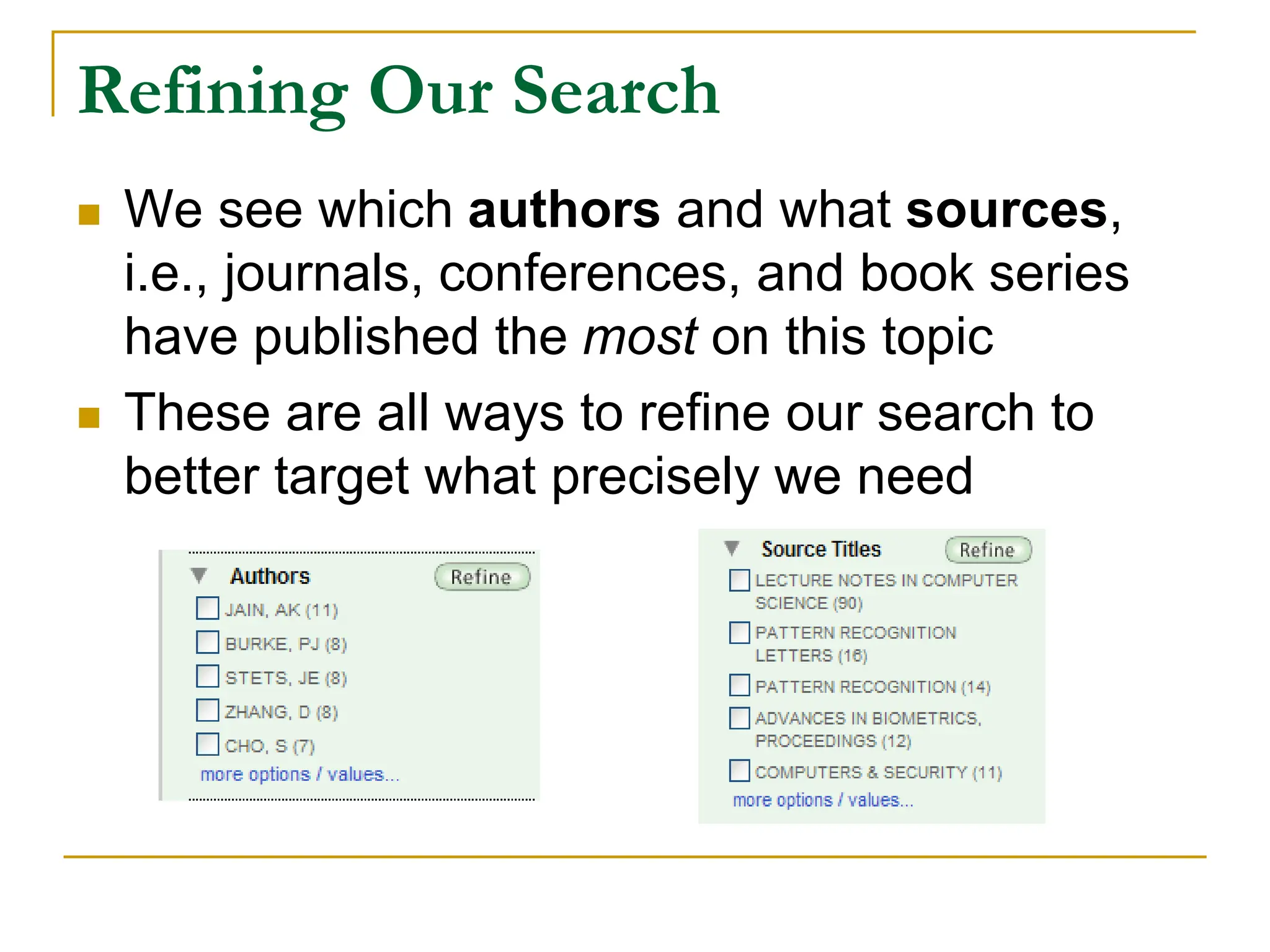
 We see which authors and what sources,
i.e., journals, conferences, and book series
have published the most on this topic
 These are all ways to refine our search to
better target what precisely we need
Additional Tools
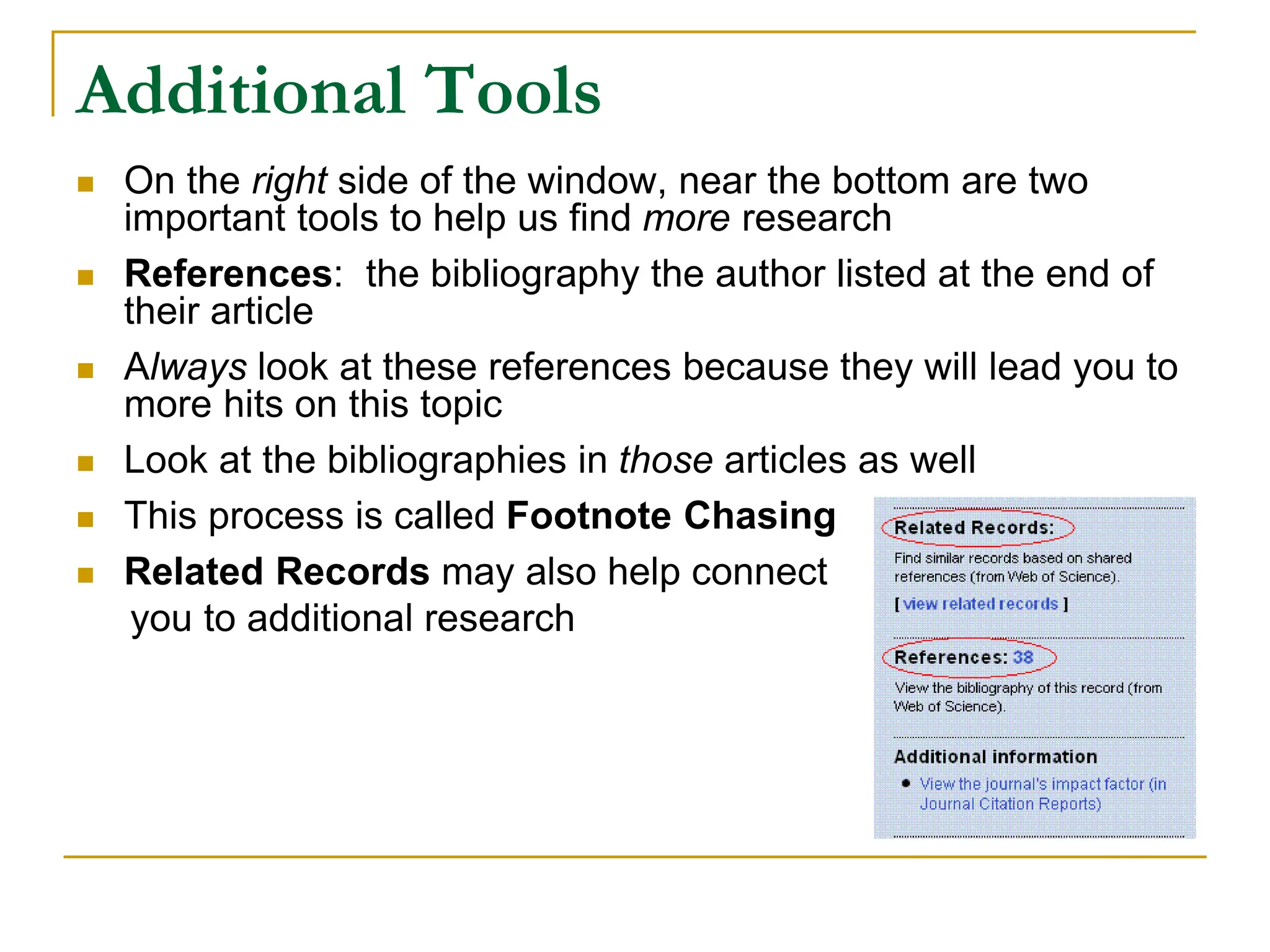
 On the right side of the window, near the bottom are two
important tools to help us find more research
 References: the bibliography the author listed at the end of
their article
 Always look at these references because they will lead you to
more hits on this topic
 Look at the bibliographies in those articles as well
 This process is called Footnote Chasing
 Related Records may also help connect
you to additional research
Reverse Citations
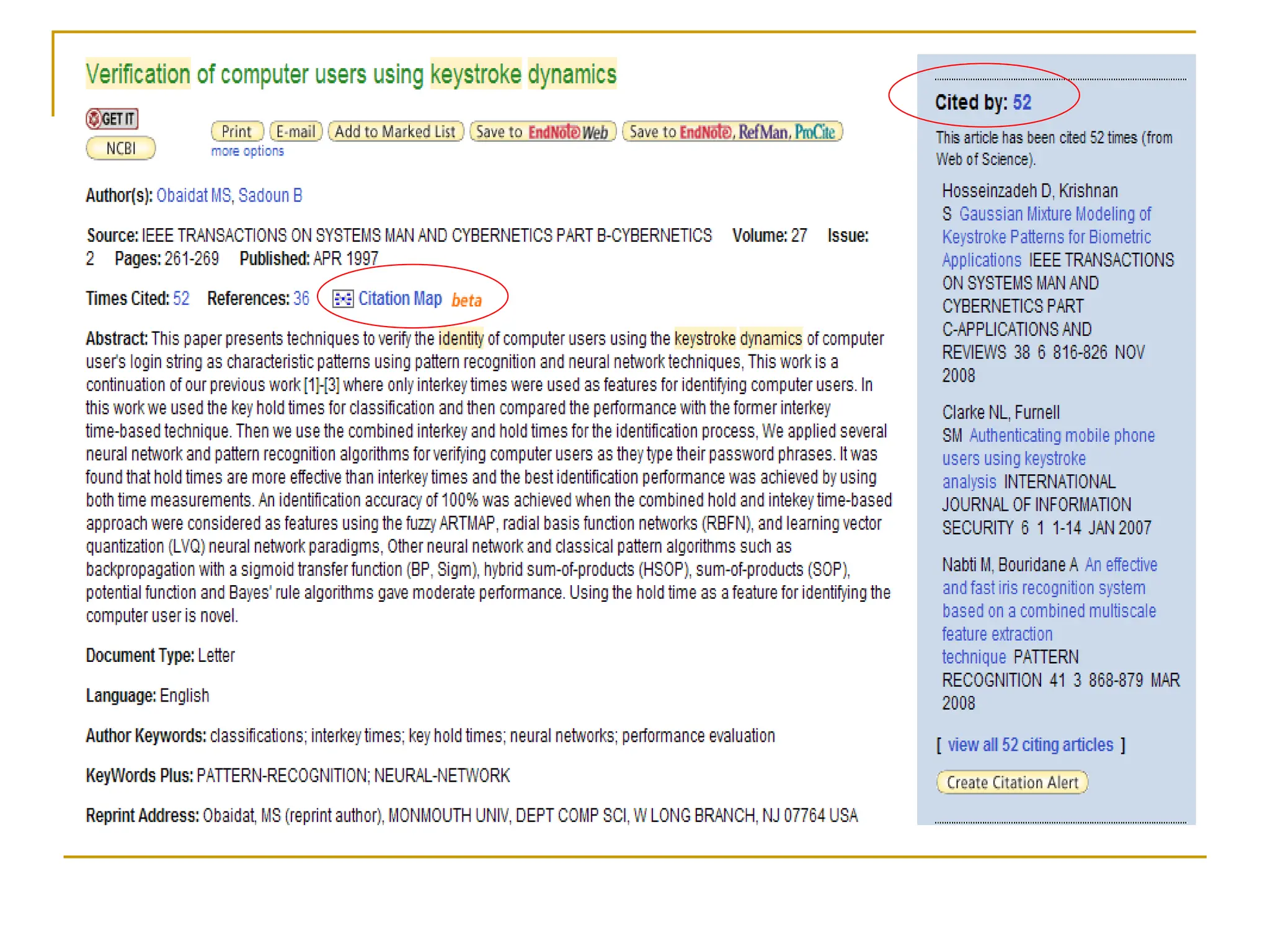
 One of the most powerful tools of WoS is its
ability to show us how frequently an article
has been cited by others
 On the right side we see the quantity of
citations, as well as the individual articles
titles
 We can click on any of them to go directly to
those citations
New Visual Tool
 WoS is offering a fascinating new tool that is
still in beta
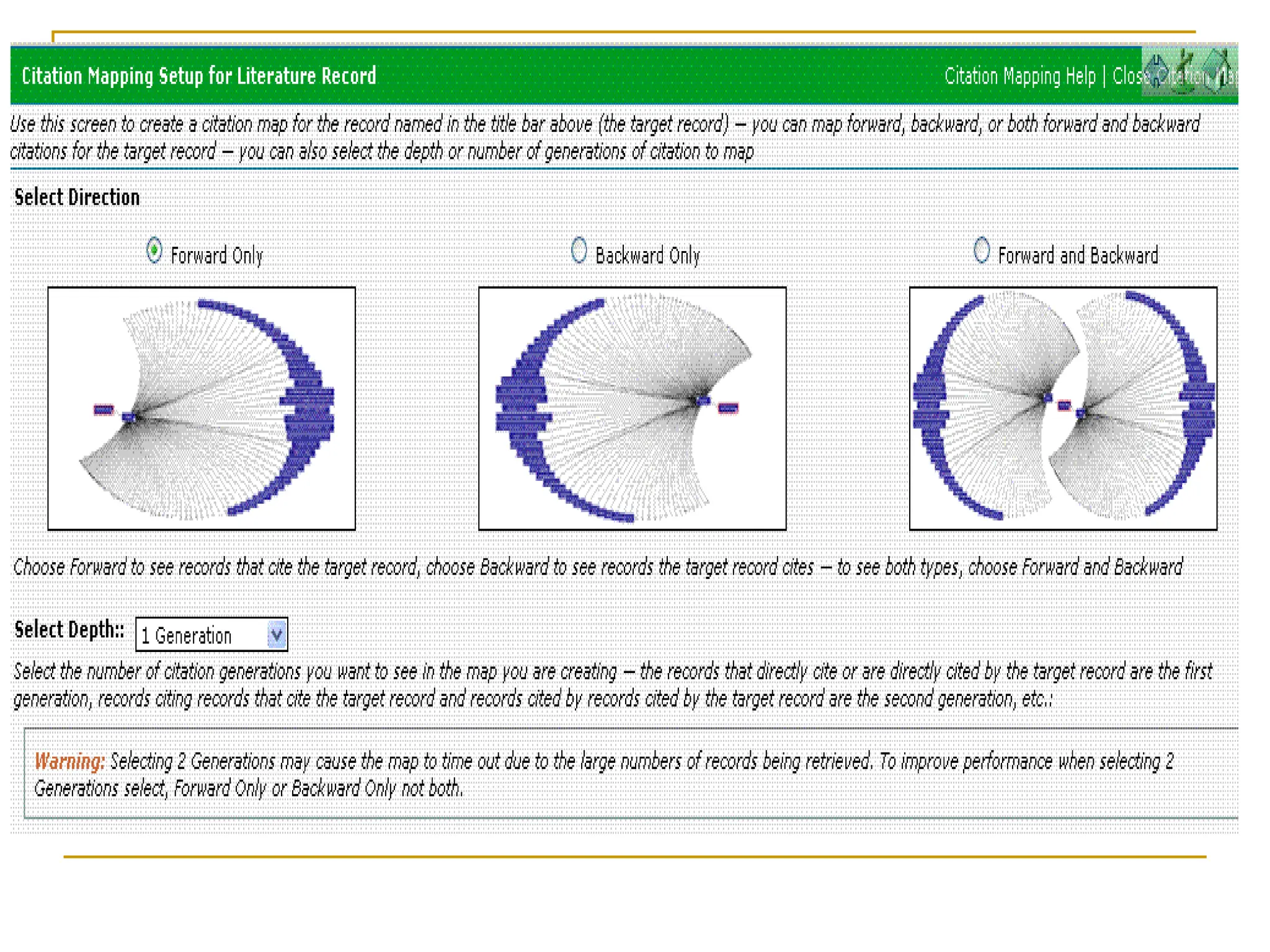
 It shows us visually a citation map, i.e., a trail
of who has cited whom on this topic
 You can view citations going forwards and
backwards
 It’s an extremely powerful tool that we’re just
beginning to learn how to use fully
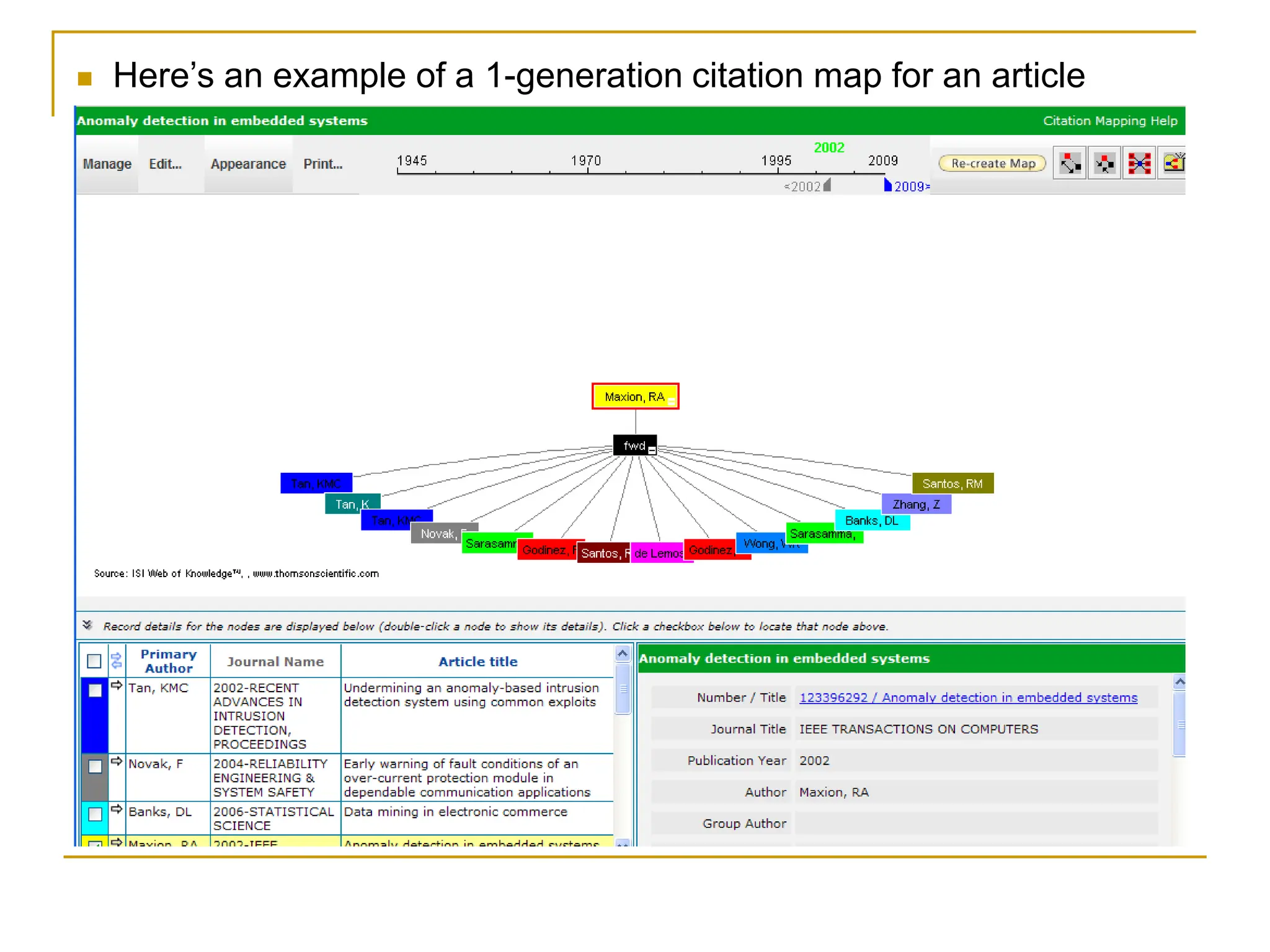
 Here’s an example of a 1-generation citation map for an article
Move Onto Other Resources
 All of what we’ve covered here are tools
available in Web of Science
 I encourage you to search the other
databases mentioned earlier
 You need to ensure you do not miss anything
of importance in your research
For Additional Help
 Remember that at any time, feel free to
contact me for additional help:
Missy Harvey
Computer Science Librarian
Email: harvey@andrew.cmu.edu
Blog: http://cslibrarian.net/
Website: http://www.cs.cmu.edu/~missy/

EffectiveSearching On Google using sophisticated

  • 1.
  • 2.
    Should We JustUse Google?  Many of us jump immediately onto Google or Google Scholar  We’ll find some helpful hits  But we may have to spend hours weeding through the hits  Google is not exhaustive so we potentially miss a great deal of research  So what’s the alternative?
  • 3.
    The Alternative  Targetyour research  I can help you ensure that you’re finding the majority of what is available on your topic  How?  Let’s begin with the University Libraries website: http://search.library.cmu.edu
  • 4.
     Click onArticles & Databases and then click on Databases A-Z
  • 5.
    Choosing the BestTools  The Libraries have hundreds of databases with a significant amount of research not found in Google and Google Scholar  If trying to be exhaustive in your research, then for computer science topics, search:  ACM Digital Library  IEEE Xplore  INSPEC  Web of Science
  • 6.
    Why Not JustOne Tool?  We should search all four of those databases rather than just one  None of them covers everything that’s published (just like Google)  They have some overlap  But we need to search all of them to ensure we don’t miss any important research
  • 7.
    Web of ScienceSearching  Let’s experiment with Web of Science (WoS) to see how we can target our research  Important: when performing a search in any database, experiment using a variety of synonyms  Sometimes we’re not always quite sure what those synonyms may be
  • 8.
    Sample Search  Let’ssearch on: keystroke dynamics  Sometimes we’re searching on a topic that uses various words to describe it  So to target our research, try to pin down the various words and phrases to use  The next slide is an example hit  I highlighted in red synonyms we should use
  • 10.
    Honing Our Search So let’s redo our search using some of those synonyms  I’ve highlighted how to correctly link the words in our search
  • 11.
    Refining Our Search On the left side, WoS provides a wide variety of ways to refine our results  Under Document Types, we see that the most hits are Articles and Proceedings Papers (from conferences)  But what it we only want a review, we could choose that option
  • 12.
    Refining Our Search We see which authors and what sources, i.e., journals, conferences, and book series have published the most on this topic  These are all ways to refine our search to better target what precisely we need
  • 13.
    Additional Tools  Onthe right side of the window, near the bottom are two important tools to help us find more research  References: the bibliography the author listed at the end of their article  Always look at these references because they will lead you to more hits on this topic  Look at the bibliographies in those articles as well  This process is called Footnote Chasing  Related Records may also help connect you to additional research
  • 14.
    Reverse Citations  Oneof the most powerful tools of WoS is its ability to show us how frequently an article has been cited by others  On the right side we see the quantity of citations, as well as the individual articles titles  We can click on any of them to go directly to those citations
  • 16.
    New Visual Tool WoS is offering a fascinating new tool that is still in beta  It shows us visually a citation map, i.e., a trail of who has cited whom on this topic  You can view citations going forwards and backwards  It’s an extremely powerful tool that we’re just beginning to learn how to use fully
  • 18.
     Here’s anexample of a 1-generation citation map for an article
  • 19.
    Move Onto OtherResources  All of what we’ve covered here are tools available in Web of Science  I encourage you to search the other databases mentioned earlier  You need to ensure you do not miss anything of importance in your research
  • 20.
    For Additional Help Remember that at any time, feel free to contact me for additional help: Missy Harvey Computer Science Librarian Email: harvey@andrew.cmu.edu Blog: http://cslibrarian.net/ Website: http://www.cs.cmu.edu/~missy/