B Y C R I S T Y M O R A N E M A I L C M O R A N 1 @ M D C . E D U
RESEARCH YOUR TOPIC
RESEARCH—GETTING STARTED
1. Come up with a topic or research question
2. Identify the key words of your topic or
question
3. Find background information on your topic –
reference books
4. Search library databases for information on
your topic – start broad and then narrow
down
5. Advanced Search tips
6. Evaluate results
7. Read your articles and make notes of things
you want to include in your writing
WHAT ARE LIBRARY DATABASES?
• Where you find and
locate articles:
scholarly, popular,
newspaper, trade
magazine, etc.
• Massive collections
of research sources
• General and
subject-specific
collections
• Also include encyclopedias
and dictionaries, e-books,
magazines, scholarly
journals, and videos.
• You can access them online
remotely and on-campus.
• You can send them to
yourself via email or save
them to your USB drive or
browse them online.
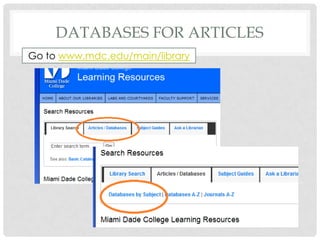
DATABASES FOR ARTICLES
Go to www.mdc.edu/main/library
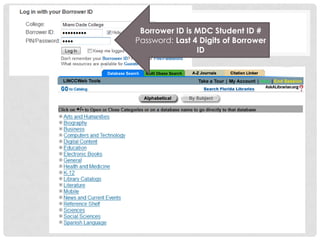
Borrower ID is MDC Student ID #
Password: Last 4 Digits of Borrower
ID
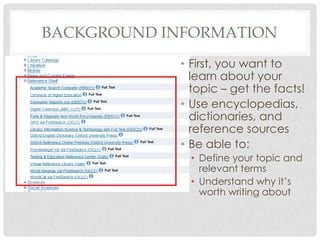
BACKGROUND INFORMATION
• First, you want to
learn about your
topic – get the facts!
• Use encyclopedias,
dictionaries, and
reference sources
• Be able to:
• Define your topic and
relevant terms
• Understand why it’s
worth writing about
SUPPORTING INFORMATION
Search Tips
• Always use Advanced
Search
• Start broad—not too
specific
• Add terms if results are
too numerous or
general
• Results usually
organized by date not
relevance
Once you are familiar with
the facts, look up information
about:
• Opposing viewpoints
• Current scholarship and
research
• Emerging theories
• Statistics and data
USING ADVANCED SEARCH
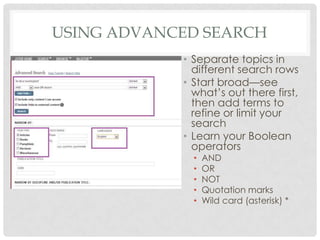
• Separate topics in
different search rows
• Start broad—see
what’s out there first,
then add terms to
refine or limit your
search
• Learn your Boolean
operators
• AND
• OR
• NOT
• Quotation marks
• Wild card (asterisk) *
SEARCHING WITH
BOOLEAN OPERATORS
• AND – links up your search terms and tells the database to find only
articles that contain all the terms you’ve linked
• Example: Hemingway AND Wilde will return articles that are each about both
Hemingway and Wilde
• OR – tells the database to find articles that contain any of the terms
you’ve lined with OR, not just ones that contain all your terms
• Example: Hemingway OR Wilde will return articles about Hemingway and articles
about Wilde though each article will not necessarily be about both
• NOT – excludes articles that contain whichever term you do NOT want
• Example: Hemingway NOT movie might help you limit your search so the results that
come back are not those about movie versions of Hemingway’s books
• Quotation marks – search exact phrases rather than individual words in a
search row
• Example: “English patient” will return results only where the words English and patient
appear together as a phrase
• Wildcard – opens your search to words that share a root or common
element without you typing every word out
• Example: child* searches for child OR child’s OR children OR childhood
MAXIMIZE YOUR EFFORTS
• Preview your articles – read the abstracts, skim the
indexing for subject headings
• Determine if it is likely to contain information
relevant to your topic
• Read through your articles with a highlighter or note
pad handy
• Check the reference list/ bibliography for interesting
materials
LIBRARY @ NORTH CAMPUS
Days Open Close
Monday-
Thursday
7:30
a.m.
9:00
p.m.
Friday 7:30
a.m.
5:00
p.m.
Saturday 8:00
a.m.
1:00
p.m.
Sunday CLOSED
Online—Access on-campus
and off-campus
http://www.mdc.edu/main/
library
Call us (305) 237-1183
Research Guide:
http://libraryguides.mdc.edu/
resources
Building Hours
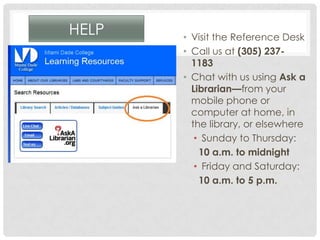
HELP • Visit the Reference Desk
• Call us at (305) 237-
1183
• Chat with us using Ask a
Librarian—from your
mobile phone or
computer at home, in
the library, or elsewhere
• Sunday to Thursday:
10 a.m. to midnight
• Friday and Saturday:
10 a.m. to 5 p.m.

Research using databases standalone

  • 1.
    B Y CR I S T Y M O R A N E M A I L C M O R A N 1 @ M D C . E D U RESEARCH YOUR TOPIC
  • 2.
    RESEARCH—GETTING STARTED 1. Comeup with a topic or research question 2. Identify the key words of your topic or question 3. Find background information on your topic – reference books 4. Search library databases for information on your topic – start broad and then narrow down 5. Advanced Search tips 6. Evaluate results 7. Read your articles and make notes of things you want to include in your writing
  • 3.
    WHAT ARE LIBRARYDATABASES? • Where you find and locate articles: scholarly, popular, newspaper, trade magazine, etc. • Massive collections of research sources • General and subject-specific collections • Also include encyclopedias and dictionaries, e-books, magazines, scholarly journals, and videos. • You can access them online remotely and on-campus. • You can send them to yourself via email or save them to your USB drive or browse them online.
  • 4.
    DATABASES FOR ARTICLES Goto www.mdc.edu/main/library
  • 5.
    Borrower ID isMDC Student ID # Password: Last 4 Digits of Borrower ID
  • 6.
    BACKGROUND INFORMATION • First,you want to learn about your topic – get the facts! • Use encyclopedias, dictionaries, and reference sources • Be able to: • Define your topic and relevant terms • Understand why it’s worth writing about
  • 7.
    SUPPORTING INFORMATION Search Tips •Always use Advanced Search • Start broad—not too specific • Add terms if results are too numerous or general • Results usually organized by date not relevance Once you are familiar with the facts, look up information about: • Opposing viewpoints • Current scholarship and research • Emerging theories • Statistics and data
  • 8.
    USING ADVANCED SEARCH •Separate topics in different search rows • Start broad—see what’s out there first, then add terms to refine or limit your search • Learn your Boolean operators • AND • OR • NOT • Quotation marks • Wild card (asterisk) *
  • 9.
    SEARCHING WITH BOOLEAN OPERATORS •AND – links up your search terms and tells the database to find only articles that contain all the terms you’ve linked • Example: Hemingway AND Wilde will return articles that are each about both Hemingway and Wilde • OR – tells the database to find articles that contain any of the terms you’ve lined with OR, not just ones that contain all your terms • Example: Hemingway OR Wilde will return articles about Hemingway and articles about Wilde though each article will not necessarily be about both • NOT – excludes articles that contain whichever term you do NOT want • Example: Hemingway NOT movie might help you limit your search so the results that come back are not those about movie versions of Hemingway’s books • Quotation marks – search exact phrases rather than individual words in a search row • Example: “English patient” will return results only where the words English and patient appear together as a phrase • Wildcard – opens your search to words that share a root or common element without you typing every word out • Example: child* searches for child OR child’s OR children OR childhood
  • 10.
    MAXIMIZE YOUR EFFORTS •Preview your articles – read the abstracts, skim the indexing for subject headings • Determine if it is likely to contain information relevant to your topic • Read through your articles with a highlighter or note pad handy • Check the reference list/ bibliography for interesting materials
  • 11.
    LIBRARY @ NORTHCAMPUS Days Open Close Monday- Thursday 7:30 a.m. 9:00 p.m. Friday 7:30 a.m. 5:00 p.m. Saturday 8:00 a.m. 1:00 p.m. Sunday CLOSED Online—Access on-campus and off-campus http://www.mdc.edu/main/ library Call us (305) 237-1183 Research Guide: http://libraryguides.mdc.edu/ resources Building Hours
  • 12.
    HELP • Visitthe Reference Desk • Call us at (305) 237- 1183 • Chat with us using Ask a Librarian—from your mobile phone or computer at home, in the library, or elsewhere • Sunday to Thursday: 10 a.m. to midnight • Friday and Saturday: 10 a.m. to 5 p.m.