Fb: facebook.com/thepakarpc
Hotline:1800-88-7508


topic: basic computer
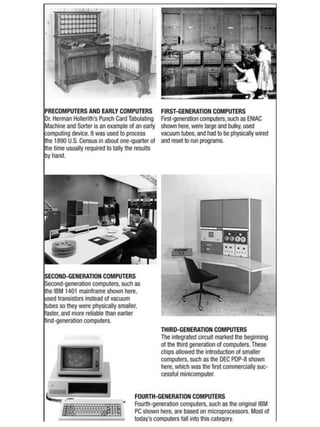
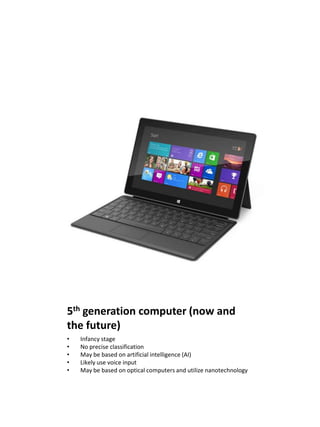
5th generation computer (now and
the future)
•   Infancy stage
•   No precise classification
•   May be based on artificial intelligence (AI)
•   Likely use voice input
•   May be based on optical computers and utilize nanotechnology
computer in education
•   Schools now use the computer as an overall student-based learning tool
•   Universities are even more integrated [Classrooms, computer
    labs, dorms, libraries / Wireless hotspots and Internet assignments]
•   Lecturers/Teachers [Prepare handouts, exams, and class presentations /
    Maintain course Web pages
•   Distance learning [Students participate from locations other than the /
    raditional classroom setting using computers and Internet access]
computer in workplace
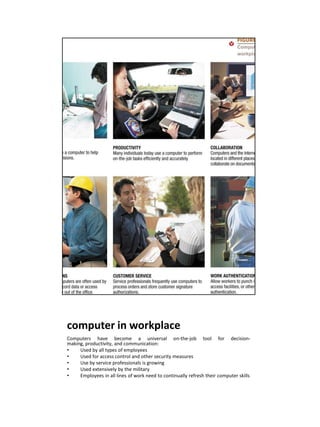
Computers have become a universal on-the-job tool for decision-
making, productivity, and communication:
•    Used by all types of employees
•    Used for access control and other security measures
•    Use by service professionals is growing
•    Used extensively by the military
•    Employees in all lines of work need to continually refresh their computer skills
computer on the go
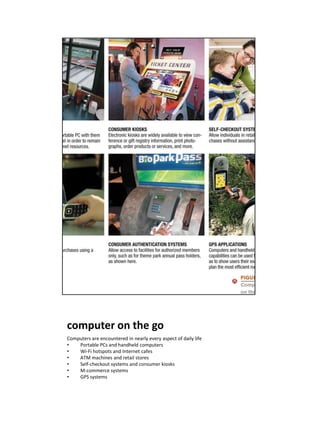
Computers are encountered in nearly every aspect of daily life
•   Portable PCs and handheld computers
•   Wi-Fi hotspots and Internet cafes
•   ATM machines and retail stores
•   Self-checkout systems and consumer kiosks
•   M-commerce systems
•   GPS systems
what is a computer and what does it
do?
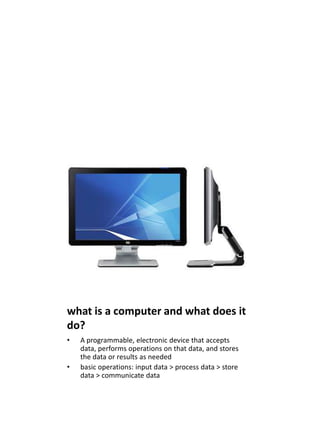
•   A programmable, electronic device that accepts
    data, performs operations on that data, and stores
    the data or results as needed
•   basic operations: input data > process data > store
    data > communicate data
Computer Hardware
Hardware: The physical parts of a computer
•   Internal hardware [Located inside the main box (system unit) of
    the computer]
•   External hardware [Located outside the system unit and plug
    into ports located on the exterior of the system unit]
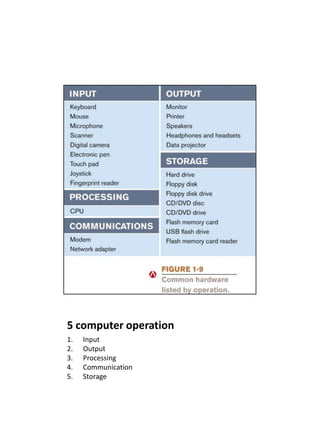
Hardware associated with all five computer operations
5 computer operation
1.   Input
2.   Output
3.   Processing
4.   Communication
5.   Storage
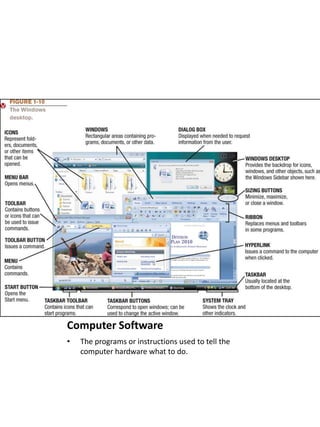
Computer Software
•   The programs or instructions used to tell the
    computer hardware what to do.
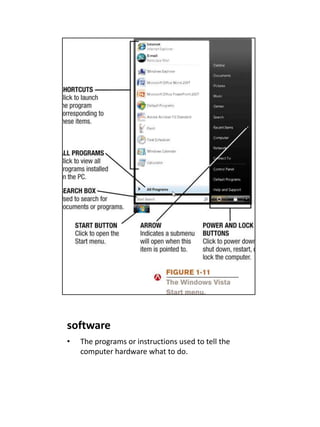
software
•   The programs or instructions used to tell the
    computer hardware what to do.
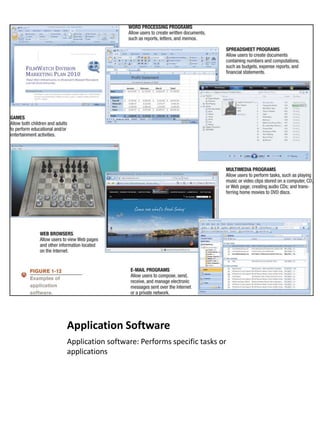
Application Software
Application software: Performs specific tasks or
applications
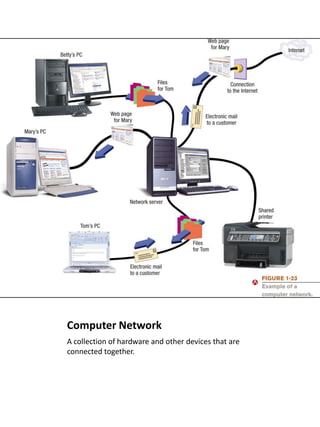
Computer Network
A collection of hardware and other devices that are
connected together.
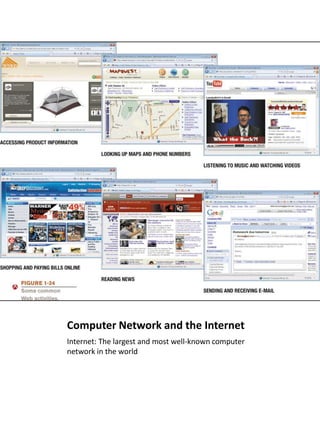
Computer Network and the Internet
Internet: The largest and most well-known computer
network in the world
to be continued….

Basic Computer

  • 1.
  • 3.
    5th generation computer(now and the future) • Infancy stage • No precise classification • May be based on artificial intelligence (AI) • Likely use voice input • May be based on optical computers and utilize nanotechnology
  • 4.
    computer in education • Schools now use the computer as an overall student-based learning tool • Universities are even more integrated [Classrooms, computer labs, dorms, libraries / Wireless hotspots and Internet assignments] • Lecturers/Teachers [Prepare handouts, exams, and class presentations / Maintain course Web pages • Distance learning [Students participate from locations other than the / raditional classroom setting using computers and Internet access]
  • 5.
    computer in workplace Computershave become a universal on-the-job tool for decision- making, productivity, and communication: • Used by all types of employees • Used for access control and other security measures • Use by service professionals is growing • Used extensively by the military • Employees in all lines of work need to continually refresh their computer skills
  • 6.
    computer on thego Computers are encountered in nearly every aspect of daily life • Portable PCs and handheld computers • Wi-Fi hotspots and Internet cafes • ATM machines and retail stores • Self-checkout systems and consumer kiosks • M-commerce systems • GPS systems
  • 7.
    what is acomputer and what does it do? • A programmable, electronic device that accepts data, performs operations on that data, and stores the data or results as needed • basic operations: input data > process data > store data > communicate data
  • 8.
    Computer Hardware Hardware: Thephysical parts of a computer • Internal hardware [Located inside the main box (system unit) of the computer] • External hardware [Located outside the system unit and plug into ports located on the exterior of the system unit] Hardware associated with all five computer operations
  • 9.
    5 computer operation 1. Input 2. Output 3. Processing 4. Communication 5. Storage
  • 10.
    Computer Software • The programs or instructions used to tell the computer hardware what to do.
  • 11.
    software • The programs or instructions used to tell the computer hardware what to do.
  • 12.
    Application Software Application software:Performs specific tasks or applications
  • 13.
    Computer Network A collectionof hardware and other devices that are connected together.
  • 14.
    Computer Network andthe Internet Internet: The largest and most well-known computer network in the world
  • 15.

Editor's Notes

  • #2 Ref:understanding computers 12th edition
  • #3 Fifth-generation (now and the future)Infancy stageNo precise classificationMay be based on artificial intelligence (AI)Likely use voice inputMay be based on optical computers and utilize nanotechnology
  • #9 Input devices-Used to input data into the computer-Keyboards, mice, scanners, cameras, microphones, joysticks, etc.Processing devices-Perform calculations and control computer’s operation-Central processing unit (CPU) and memoryOutput devices-Present results to the user-Monitors, printers, speakers, projectors, etc.Storage devices-Used to store data on or access data from storage media-Hard drives, DVD disks and drives, USB flash drives, etc.Communications devices-Allow users to communicate with others and to electronically access information -Modems, network adapters, etc.
  • #11 Software: The programs or instructions used to tell the computer hardware what to doSystem software: Operating system allows a computer to operateBoots the computer and launches programs at the user’s directionMost use a GUI to interact with the user via windows, icons, menus, buttons, etc.Windows, Mac OS, Linux, etc.
  • #13 Application software: Performs specific tasks or applicationsCreating letters, budgets, etc.Managing inventory and customer databasesEditing photographsScheduling appointmentsViewing Web pagesSending and receiving e-mailRecording / playing CDsDesigning homesPlaying games
  • #14 Computer network: A collection of hardware and other devices that are connected together.-Users can share hardware, software, and data-Users can communicate with each otherNetwork servers: Manage resources on a networkClients: Access resources through the network serverComputer networks exist in many sizes and types-Home networks-School and small business networks-Large corporate-Public wireless networks-The Internet
  • #15 Internet: The largest and most well-known computer network in the worldIndividuals connect to the Internet using an Internet service provider (ISP)World Wide Web: One resource (a vast collection of Web pages) available through the Internet-Web sites contain Web pages stored on Web servers-Web pages viewed using a Web browser (Internet Explorer, Safari, Firefox, Opera, etc.A wide variety of information is available through the Web