An Introduction to Computer
1
C.SURYA
Assistant Professor/CSE
Sri Ramakrishna College of Engineering
Perambalur.
What is Computer?
3
The computer is an electronic device that accepts
data, performs operations on that data , presents
the results, and stores the data or results as
needed.
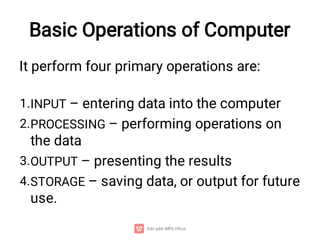
Basic Operations of Computer
1.
2.
3.
4.
It perform four primary operations are:
INPUT – entering data into the computer
PROCESSING – performing operations on
the data
OUTPUT – presenting the results
STORAGE – saving data, or output for future
use.
4
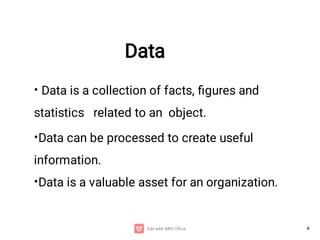
Data
•
•
•
Data is a collection of facts, figures and
statistics related to an object.
Data can be processed to create useful
information.
Data is a valuable asset for an organization.
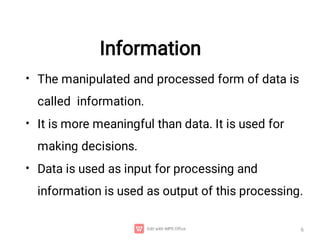
Information
•
•
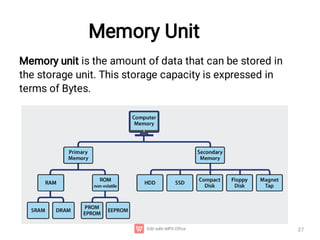
•
The manipulated and processed form of data is
called information.
It is more meaningful than data. It is used for
making decisions.
Data is used as input for processing and
information is used as output of this processing.
6
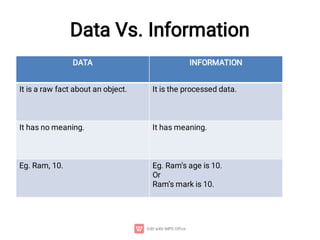
Data Vs. Information
DATA INFORMATION
It is a raw fact about an object. It is the processed data.
It has no meaning. It has meaning.
Eg. Ram, 10. Eg. Ram’s age is 10.
Or
Ram’s mark is 10.
Characteristics of Computer
•
•
•
•
•
•
•
Speed
Storage
Spontaneous (automatic)
Consistency
No feelings
Communications
Diligence
Things Get to Know about Computer ?
????
•
•
•
•
Generation of computer
Basic organization of computer
Classification of computer
Computer Languages
10
Generations of Computers
Computers can be divided into 5 upon the technologies used.





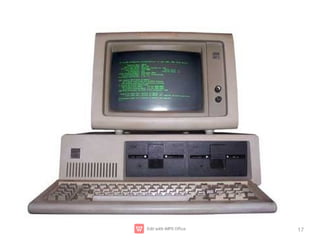
First Generation (1942 - 1955)
Second Generation (1955 - 1964)
Third Generation (1964 - 1975)
Fourth Generation (Since 1975)
Fifth Generation (Since 1980)
11
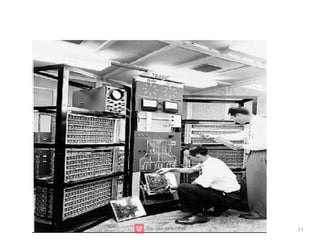
First Generation Computers
(1942 - 1955)
12
•
•
•
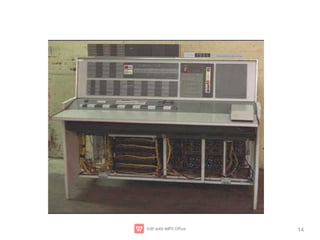
The vacuum tube technology was used in first-
generation computers.
Mark-1m, ENIAC, EDSAC, EDVAC, UNIVAC-1 etc.
The machine language only was used in first-generation
computers.
Advantages are :
These computers were the fastest of their time.
They were programmed using machine language.
Disadvantages
13
•
•
•
•
•
•
•
•
Unreliable Very costly
Generate lot of heat Huge size
Need of A.C. Non portable
Consumed lot of electricity
Constant (or frequent) maintenance
required
14
15
Second Generation Computers
(1955 - 1964)
• This generation using the transistor were cheaper,
consumed less power, more compact in size, more
reliable and faster than the first generation machines
made of vaccum tubes.
Advantages are :
•
•
•
•
•
Use of transistors
Smaller size as compared to First generation
computers
Generate less heat as compared to First generation
computers
Consumed less electricity as compared to First
generation computers
Disadvantages
16
•
•
•
Still very costly
A.C. needed
Constant (or frequent) maintenance required
17
Third Generation Computers
(1964 - 1975)
•
•
•
The third generation of computer is marked by the
use of Integrated Circuits (IC's) in place of transistors.
A single I.C has many transistors, resistors and
capacitors.
This development made computers smaller in size,
reliable and efficient.
18
19
•
•
•
•
•
•
More reliable
Smaller size
Generate less heat
Faster
Lesser maintenance
Consumed lesser electricity
Disadvantages are:
Still costly
A.C needed
Advantages are :
20
Fourth Generation Computers
(1975 onwards)
21
•
•
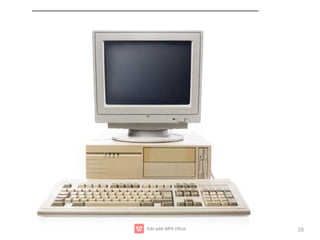
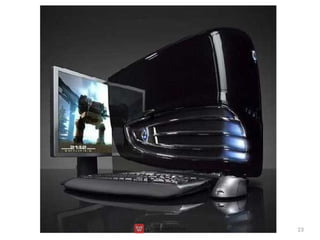
The fourth generation of computers is marked by the use of
Very Large Scale Integrated (VLSI) circuits.
As a result, it gave rise to personal computer (PC) revolution.
22
•
•
•
•
•
•
Very cheap
Portable and reliable
Smaller in size
Production cost is very low
Very high processing speed
Very large internal and external storage capacity
•
Disadvantages are:
Highly sophisticated technology required for the
manufacturer of microprocessor chips
Advantages:
23
Fifth Generation Computers
(In process)
24
The main features of Fifth Generation
are:
•
•
•
•
•
ULSIC (Ultra Large Scale Integration Circuits )
technology Development of true artificial intelligence
Advancement in Parallel Processing
More user friendly interfaces with multimedia
features Very powerful and compact computers at
cheaper rates
Advantages of Computer
25
•
•
Easy processing of complex tasks.
It saves time by quick manipulation of data as
compared to when done manually.
The errors in data processing are minimized when a
computer is used.
It has helped in making communication easier by using
internet.
It stores, retrieves, and processes a large amount of
data. It helps in multitasking of various jobs.
•
•
•
•
Disadvantages of Computer
26
•
•
•
•
Un-Employment Cyber-crime
Computer can perform only what is it programmed
to do.
Computer need well defined instructions to perform
any operation
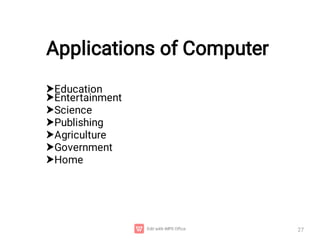
Applications of Computer
27







Education
Entertainment
Science
Publishing
Agriculture
Government
Home
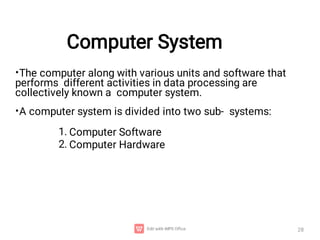
Computer System
28
•
•
The computer along with various units and software that
performs different activities in data processing are
collectively known a computer system.
A computer system is divided into two sub- systems:
1.
2.
Computer Software
Computer Hardware
Computer Software
29
•
•
•
•
A set of instructions given to the computer in machine code
that tells the computer what to do and how to perform the
given task of the user is known as computer software.
The software is developed in computer programming
languages.
You can not feel, touch or see software inside the computer
memory.
The Computer software is classified into two main
categories: 1.Application software.
2.System software.
Computer Hardware
30
•
•
2.
3.
4.
The physical parts of a computer are known as computer
hardware.
The hardware consists of electronic circuits and mechanical
equipment etc. used to perform various functions in the
computer.
The H/w componentsare:
1.Input devices
Output devices
Central Processing Unit (CPU)
Memory unit
5.Storage devices
Input Unit
32
Input is any data or instructions entered into the computer in
the form of signals. The input into the computer can be
entered:
•
•
Through keyboard (by typing characters).
By selecting commands (icons) on the screen and then
clicking with mouse.
By pressing finger on touchscreen.
By speaking into a microphone.
By scanning data printed on paper through scanner etc.
•
•
•
42
Input Devices
Now-a-days, the commonly used input devices are:
•
•
•
•
•
•
•
•
•
Keyboard Mouse Scanner Microphone
Digital Camera
Optical Bar Code Reader
Optical mark recognition (OMR) Touch
Screen
Joystick
Magnetic Ink Character Recognition (MICR)
48
Output Devices
• An output device is a hardware component used to get
output from the computer.
OUTPUT DEVICES
•
•
•
•
Monitor
Plotter
Speaker
Printer
Central Processing Unit (CPU)
–
–
–
–
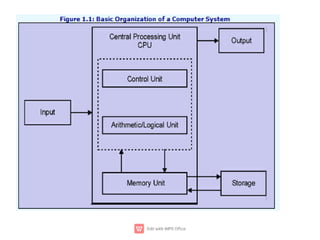
Central Processing Unit (CPU) consists of the
following features −
CPU is considered as the brain of the computer.
CPU performs all types of data processing operations.
It stores data, intermediate results, and instructions
(program).
It controls the operation of all parts of the computer.
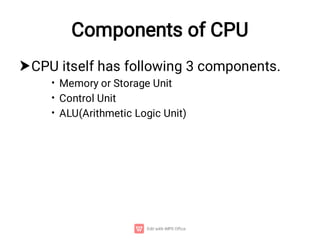
Components of CPU

•
•
•
CPU itself has following 3 components.
Memory or Storage Unit
Control Unit
ALU(Arithmetic Logic Unit)
Memory Unit
37
Memory unit is the amount of data that can be stored in
the storage unit. This storage capacity is expressed in
terms of Bytes.
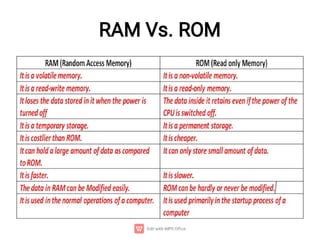
RAM Vs. ROM
Control Unit
•
•
•
•
•
Functions of control unit are −
It is responsible for controlling the transfer of data and
instructions among other units of a computer.
It manages and coordinates all the units of the
computer.
It obtains the instructions from the memory, interprets
them, and directs the operation of the computer.
It communicates with Input/Output devices for
transfer of data or results from storage.
It does not process or store data.
Arithmetic & Logic Unit (ALU)
•
•
Arithmetic section is to perform arithmetic
operations like addition, subtraction,
multiplication, and division.
Logic section is to perform logic
operations such as comparing, selecting,
matching, and merging of data.
Types of Computers
41
• Computers can also be divided into three categories
depending upon their instruction and form of input
data that they accept and process. These are:
AnalogComputers
DigitalComputers Hybrid
Computers
Analog Computers
•
•
•
It means that these computers accept input and
give output in the form of analog signals. The
output is measured on a scale.
The analog computers are used to measure the
continuous values.
Eg.The thermometer
42
Digital Computers
43



The digital computer is designed using digital circuits in
which there are two levels for an input or output signal.
These two levels are known as logic 0 and logic 1.
Digital Computers can give more accurate and faster
results.
70
Depending upon their speed and memory size, computers
are classified into following four main groups.
•
•
•
•
•
•
•
Supercomputer
Mainframe computer
Mini computer
Microcomputer
Desktop computer
Laptops
Hand-held (PDA)
Classification of Digital computers
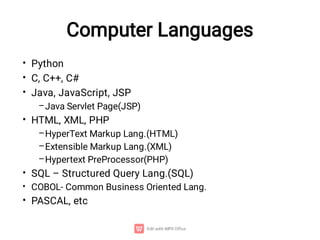
Computer Languages
•
•
•
–
•
–
–
–
•
•
•
Python
C, C++, C#
Java, JavaScript, JSP
Java Servlet Page(JSP)
HTML, XML, PHP
HyperText Markup Lang.(HTML)
Extensible Markup Lang.(XML)
Hypertext PreProcessor(PHP)
SQL – Structured Query Lang.(SQL)
COBOL- Common Business Oriented Lang.
PASCAL, etc

Computer Science and Engineering induction programme

  • 1.
    An Introduction toComputer 1 C.SURYA Assistant Professor/CSE Sri Ramakrishna College of Engineering Perambalur.
  • 3.
    What is Computer? 3 Thecomputer is an electronic device that accepts data, performs operations on that data , presents the results, and stores the data or results as needed.
  • 4.
    Basic Operations ofComputer 1. 2. 3. 4. It perform four primary operations are: INPUT – entering data into the computer PROCESSING – performing operations on the data OUTPUT – presenting the results STORAGE – saving data, or output for future use.
  • 5.
    4 Data • • • Data is acollection of facts, figures and statistics related to an object. Data can be processed to create useful information. Data is a valuable asset for an organization.
  • 6.
    Information • • • The manipulated andprocessed form of data is called information. It is more meaningful than data. It is used for making decisions. Data is used as input for processing and information is used as output of this processing. 6
  • 7.
    Data Vs. Information DATAINFORMATION It is a raw fact about an object. It is the processed data. It has no meaning. It has meaning. Eg. Ram, 10. Eg. Ram’s age is 10. Or Ram’s mark is 10.
  • 8.
    Characteristics of Computer • • • • • • • Speed Storage Spontaneous(automatic) Consistency No feelings Communications Diligence
  • 9.
    Things Get toKnow about Computer ? ???? • • • • Generation of computer Basic organization of computer Classification of computer Computer Languages
  • 10.
    10 Generations of Computers Computerscan be divided into 5 upon the technologies used.      First Generation (1942 - 1955) Second Generation (1955 - 1964) Third Generation (1964 - 1975) Fourth Generation (Since 1975) Fifth Generation (Since 1980)
  • 11.
  • 12.
    First Generation Computers (1942- 1955) 12 • • • The vacuum tube technology was used in first- generation computers. Mark-1m, ENIAC, EDSAC, EDVAC, UNIVAC-1 etc. The machine language only was used in first-generation computers. Advantages are : These computers were the fastest of their time. They were programmed using machine language.
  • 13.
    Disadvantages 13 • • • • • • • • Unreliable Very costly Generatelot of heat Huge size Need of A.C. Non portable Consumed lot of electricity Constant (or frequent) maintenance required
  • 14.
  • 15.
    15 Second Generation Computers (1955- 1964) • This generation using the transistor were cheaper, consumed less power, more compact in size, more reliable and faster than the first generation machines made of vaccum tubes. Advantages are : • • • • • Use of transistors Smaller size as compared to First generation computers Generate less heat as compared to First generation computers Consumed less electricity as compared to First generation computers
  • 16.
    Disadvantages 16 • • • Still very costly A.C.needed Constant (or frequent) maintenance required
  • 17.
  • 18.
    Third Generation Computers (1964- 1975) • • • The third generation of computer is marked by the use of Integrated Circuits (IC's) in place of transistors. A single I.C has many transistors, resistors and capacitors. This development made computers smaller in size, reliable and efficient. 18
  • 19.
    19 • • • • • • More reliable Smaller size Generateless heat Faster Lesser maintenance Consumed lesser electricity Disadvantages are: Still costly A.C needed Advantages are :
  • 20.
  • 21.
    Fourth Generation Computers (1975onwards) 21 • • The fourth generation of computers is marked by the use of Very Large Scale Integrated (VLSI) circuits. As a result, it gave rise to personal computer (PC) revolution.
  • 22.
    22 • • • • • • Very cheap Portable andreliable Smaller in size Production cost is very low Very high processing speed Very large internal and external storage capacity • Disadvantages are: Highly sophisticated technology required for the manufacturer of microprocessor chips Advantages:
  • 23.
  • 24.
    Fifth Generation Computers (Inprocess) 24 The main features of Fifth Generation are: • • • • • ULSIC (Ultra Large Scale Integration Circuits ) technology Development of true artificial intelligence Advancement in Parallel Processing More user friendly interfaces with multimedia features Very powerful and compact computers at cheaper rates
  • 25.
    Advantages of Computer 25 • • Easyprocessing of complex tasks. It saves time by quick manipulation of data as compared to when done manually. The errors in data processing are minimized when a computer is used. It has helped in making communication easier by using internet. It stores, retrieves, and processes a large amount of data. It helps in multitasking of various jobs. • • • •
  • 26.
    Disadvantages of Computer 26 • • • • Un-EmploymentCyber-crime Computer can perform only what is it programmed to do. Computer need well defined instructions to perform any operation
  • 27.
  • 28.
    Computer System 28 • • The computeralong with various units and software that performs different activities in data processing are collectively known a computer system. A computer system is divided into two sub- systems: 1. 2. Computer Software Computer Hardware
  • 29.
    Computer Software 29 • • • • A setof instructions given to the computer in machine code that tells the computer what to do and how to perform the given task of the user is known as computer software. The software is developed in computer programming languages. You can not feel, touch or see software inside the computer memory. The Computer software is classified into two main categories: 1.Application software. 2.System software.
  • 30.
    Computer Hardware 30 • • 2. 3. 4. The physicalparts of a computer are known as computer hardware. The hardware consists of electronic circuits and mechanical equipment etc. used to perform various functions in the computer. The H/w componentsare: 1.Input devices Output devices Central Processing Unit (CPU) Memory unit 5.Storage devices
  • 32.
    Input Unit 32 Input isany data or instructions entered into the computer in the form of signals. The input into the computer can be entered: • • Through keyboard (by typing characters). By selecting commands (icons) on the screen and then clicking with mouse. By pressing finger on touchscreen. By speaking into a microphone. By scanning data printed on paper through scanner etc. • • •
  • 33.
    42 Input Devices Now-a-days, thecommonly used input devices are: • • • • • • • • • Keyboard Mouse Scanner Microphone Digital Camera Optical Bar Code Reader Optical mark recognition (OMR) Touch Screen Joystick Magnetic Ink Character Recognition (MICR)
  • 34.
    48 Output Devices • Anoutput device is a hardware component used to get output from the computer. OUTPUT DEVICES • • • • Monitor Plotter Speaker Printer
  • 35.
    Central Processing Unit(CPU) – – – – Central Processing Unit (CPU) consists of the following features − CPU is considered as the brain of the computer. CPU performs all types of data processing operations. It stores data, intermediate results, and instructions (program). It controls the operation of all parts of the computer.
  • 36.
    Components of CPU  • • • CPUitself has following 3 components. Memory or Storage Unit Control Unit ALU(Arithmetic Logic Unit)
  • 37.
    Memory Unit 37 Memory unitis the amount of data that can be stored in the storage unit. This storage capacity is expressed in terms of Bytes.
  • 38.
  • 39.
    Control Unit • • • • • Functions ofcontrol unit are − It is responsible for controlling the transfer of data and instructions among other units of a computer. It manages and coordinates all the units of the computer. It obtains the instructions from the memory, interprets them, and directs the operation of the computer. It communicates with Input/Output devices for transfer of data or results from storage. It does not process or store data.
  • 40.
    Arithmetic & LogicUnit (ALU) • • Arithmetic section is to perform arithmetic operations like addition, subtraction, multiplication, and division. Logic section is to perform logic operations such as comparing, selecting, matching, and merging of data.
  • 41.
    Types of Computers 41 •Computers can also be divided into three categories depending upon their instruction and form of input data that they accept and process. These are: AnalogComputers DigitalComputers Hybrid Computers
  • 42.
    Analog Computers • • • It meansthat these computers accept input and give output in the form of analog signals. The output is measured on a scale. The analog computers are used to measure the continuous values. Eg.The thermometer 42
  • 43.
    Digital Computers 43    The digitalcomputer is designed using digital circuits in which there are two levels for an input or output signal. These two levels are known as logic 0 and logic 1. Digital Computers can give more accurate and faster results.
  • 44.
    70 Depending upon theirspeed and memory size, computers are classified into following four main groups. • • • • • • • Supercomputer Mainframe computer Mini computer Microcomputer Desktop computer Laptops Hand-held (PDA) Classification of Digital computers
  • 45.
    Computer Languages • • • – • – – – • • • Python C, C++,C# Java, JavaScript, JSP Java Servlet Page(JSP) HTML, XML, PHP HyperText Markup Lang.(HTML) Extensible Markup Lang.(XML) Hypertext PreProcessor(PHP) SQL – Structured Query Lang.(SQL) COBOL- Common Business Oriented Lang. PASCAL, etc