UNIT 4 Firewalls Information Security Sharad Institute
1.
1
UNIT 3- Firewall
Whatis Firewall?
A firewall is a network security device that monitors incoming and outgoing network traffic and
decides whether to allow or block specific traffic based on a defined set of security rules.
Firewalls have been a first line of defense in network security for over 25 years. They establish a
barrier between secured and controlled internal networks that can be trusted and untrusted
outside networks, such as the Internet.
A firewall can be hardware, software, software-as-a service (SaaS), public cloud, or private
cloud (virtual).
Why do we need a Firewall?
A Firewall is a necessary component of a company’s overall cybersecurity strategy. Most
computers have an in-built firewall, but it isn’t always the best option for security. What can a
firewall do to keep us safe?
1. It guards computers against unauthorized access.
2. It blocks unwanted content.
3. It provides a secure network when multiple people interact at the same time.
4. It prevents ransomware from spreading.
5. It protects private information, such as online banking credentials.
How does a firewall work?
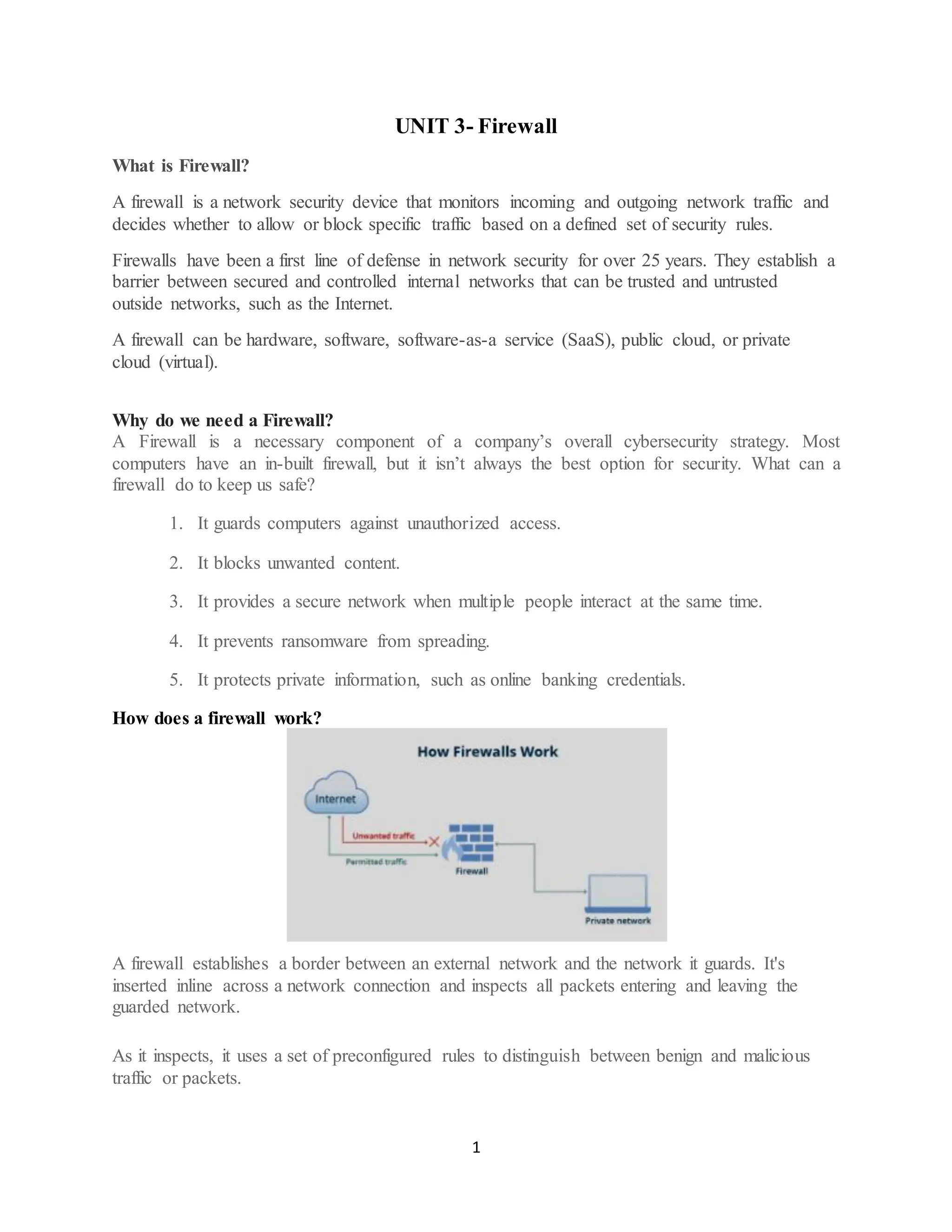
A firewall establishes a border between an external network and the network it guards. It's
inserted inline across a network connection and inspects all packets entering and leaving the
guarded network.
As it inspects, it uses a set of preconfigured rules to distinguish between benign and malicious
traffic or packets.
2.
2
The term packetrefers to a piece of data that is formatted for internet transfer.
Packets contain the data itself and information about the data, such as where it came from.
Firewalls can use this packet information to determine whether a given packet abides by the rule
set.
If it doesn't, the packet is barred from entering the guarded network.
Rule sets can be based on several things indicated by packet data, including source, destination
and content.
These characteristics can be represented differently at different levels of the network. As a
packet travels through the network, it's reformatted several times to tell the protocol where to
send it. Different types of firewalls exist to read packets at different network levels.
Uses
Threat defense. Firewalls can be installed at an organization's network perimeter to guard
against external threats, such as malware attacks or hacking attempts, or within the network to
create segmentation and guard against insider threats.
Logging and audit functions. Firewalls keep a record of events that administrators can use to
identify patterns and improve rule sets. Rules should be updated regularly to keep up with ever-
evolving cybersecurity threats. Vendors discover new threats and develop patches to cover them
as soon as possible.
Traffic filtering. In a single home network, a firewall can filter traffic and alert the user to
intrusions. They're especially useful for always-on connections, such as Digital Subscriber Line
or cable modems, because those connection types use static IP addresses. A firewall ensures that
only intended and nondestructive content from the internet passes through.
Controlling and blocking access. Firewalls can be used for controlling and blocking access to
certain websites and online services to prevent unauthorized use. For example, an organization
can use a firewall to block access to objectionable websites to ensure employees comply with
company policies when browsing the internet.
Secure remote access. Firewalls can be used to grant secure remote access to a network through
a virtual private network (VPN) or other secure remote access technology.
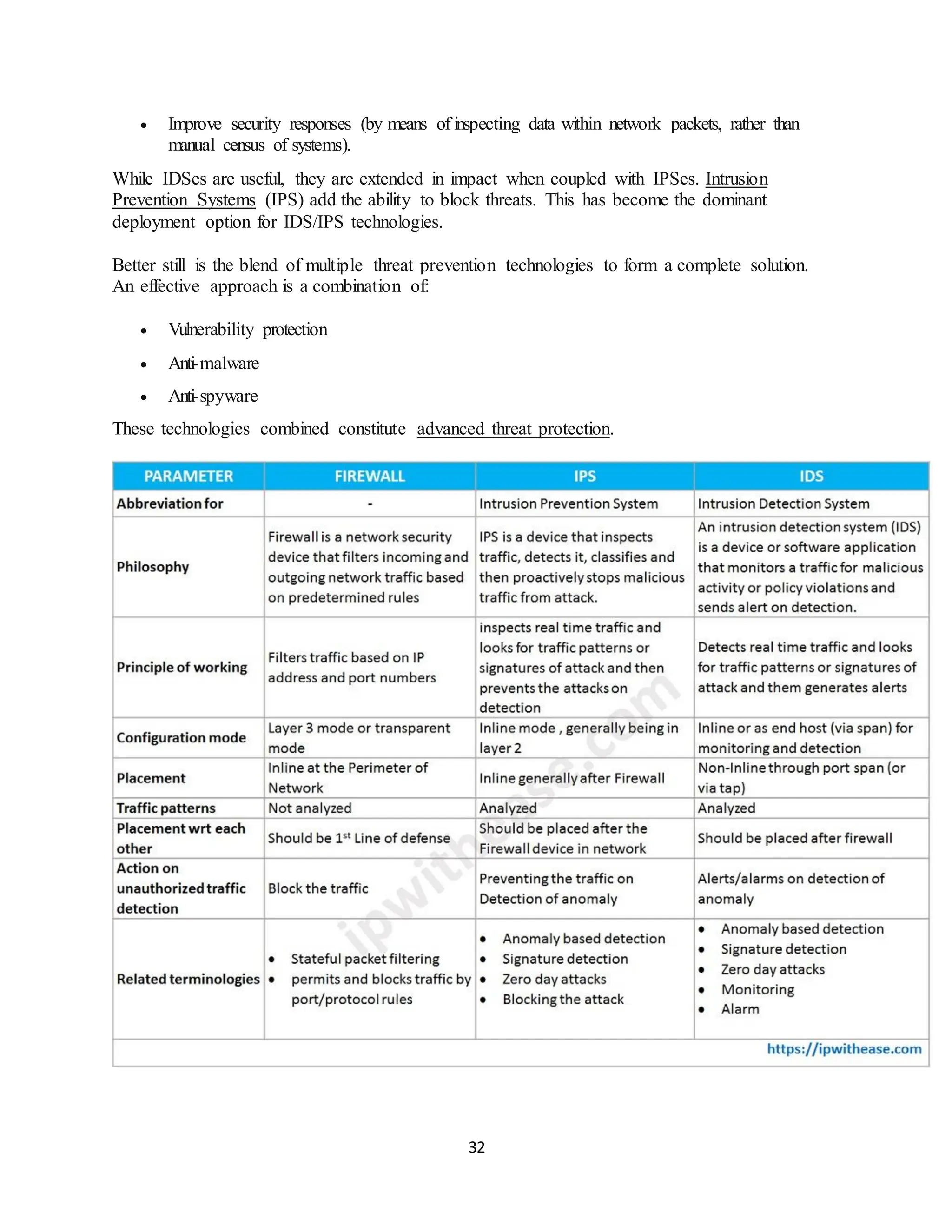
When categorizing by filtering method, the main types are as follows:
• Packet-filtering firewalls examine data packets in isolation and don't know the
packet's context.
• Stateful inspection firewalls examine network traffic to determine whether one
packet is related to another packet.
3.
3
• Circuit-level gatewayfirewalls provide security by monitoring TCP handshaking
between packets from trusted clients or servers to untrusted hosts and vice versa.
• Proxy firewalls, or application-level gateways, inspect packets at the application
layer of the Open Systems Interconnection (OSI) reference model.
• Next-generation firewalls (NGFWs) use a multilayered approach to integrate
enterprise firewall capabilities with an IPS and application control.
• Threat-focused NGFWs combine traditional firewall technology with enhanced
functionality to thwart modern threats, including application layer and advanced
malware attacks.
• Virtual firewalls, or cloud firewalls, provide traffic filtering and monitoring for
virtual machines (VMs) in a virtualized environment.
• Cloud-native firewalls provide automated scaling features that enable networking
and security operations teams to run at fast speeds.
1.Packet-filtering firewall
A Packet-filtering firewall filters all incoming and outgoing network packets. It tests them based
on a set of rules that include IP address, IP protocol, port number, and other aspects of the
packet. If the packet passes the test, the firewall allows it to proceed to its destination and rejects
those that do not pass it.
Benefits of a Packet-filtering
• Quick and inexpensive
• Oldest and most fundamental firewall
• Protection against advanced threats is limited
How DoesPacket Filtering Firewall Work?
On packet-switched networks, packets are structured data units.
Because these networks break down communications into little bits, or packets, and transport
them independently across the network, they can be fault-tolerant. Packages are reordered when
they pass through the firewall and arrive at their destination in order to show their information
accurately. Packet switching, when done effectively, maximizes network channel capacity,
reduces transmission latency, and improves communication efficacy. Two significant
components can be found in packets:
• Headers: Packet headers are used to send data to the correct destination. They contain
elements of the internet protocol (IP), addressing, and any other information needed to
deliver the packets to their destination.
• Payloads: Within the packet, the payload is the user data. This is the data that is
attempting to reach its destination.
4.
4
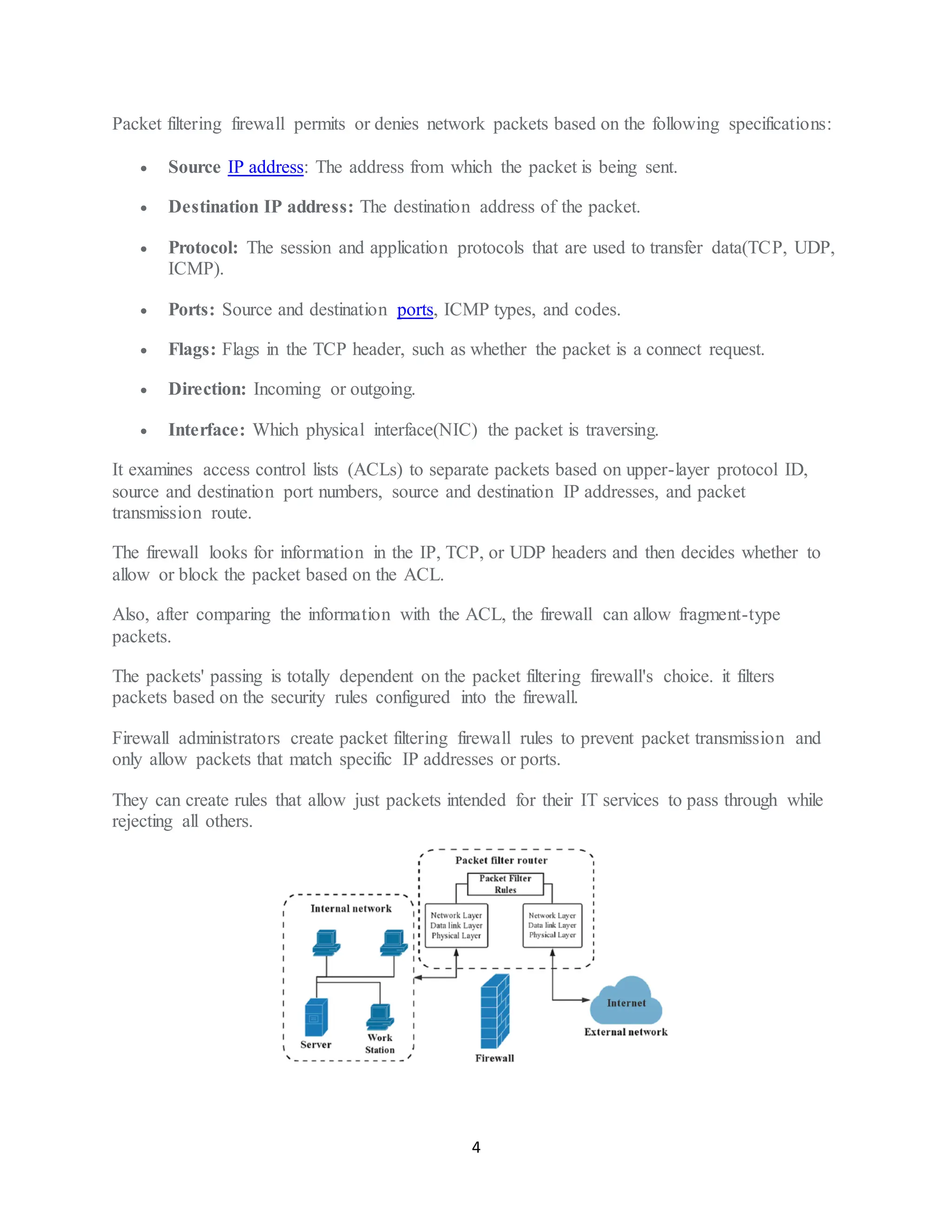
Packet filtering firewallpermits or denies network packets based on the following specifications:
• Source IP address: The address from which the packet is being sent.
• Destination IP address: The destination address of the packet.
• Protocol: The session and application protocols that are used to transfer data(TCP, UDP,
ICMP).
• Ports: Source and destination ports, ICMP types, and codes.
• Flags: Flags in the TCP header, such as whether the packet is a connect request.
• Direction: Incoming or outgoing.
• Interface: Which physical interface(NIC) the packet is traversing.
It examines access control lists (ACLs) to separate packets based on upper-layer protocol ID,
source and destination port numbers, source and destination IP addresses, and packet
transmission route.
The firewall looks for information in the IP, TCP, or UDP headers and then decides whether to
allow or block the packet based on the ACL.
Also, after comparing the information with the ACL, the firewall can allow fragment-type
packets.
The packets' passing is totally dependent on the packet filtering firewall's choice. it filters
packets based on the security rules configured into the firewall.
Firewall administrators create packet filtering firewall rules to prevent packet transmission and
only allow packets that match specific IP addresses or ports.
They can create rules that allow just packets intended for their IT services to pass through while
rejecting all others.
5.
5
What Are TheTypes of Packet Filtering?
There are four types of packet filtering listed below:
• Dynamic packet filtering firewall
• Static packet filtering firewall
• Stateless packet filtering firewall
• Stateful packet filtering firewall
2. Stateful Multi-Layer Inspection (SMLI)
Stateful Multi-Layer Inspection firewall employs packet inspection technology and TCP
handshake verification to provide protection. These firewalls, also known as dynamic packet
filtering, examine each network packet to determine whether it belongs to an existing TCP or
another network session. The SMLI firewall creates a state table to store session information like
source and destination IP address, port number, destination port number, etc.
Benefits of Stateful inspection
• Reduced traffic flow
• High-level protection
• Consumed significant system resources
• Provides extensive logging capabilities
Stateful Packet Filtering Firewall
What Is a Stateful Firewall?
A stateful firewall is a kind of firewall that keeps track and monitors the state of active network
connections while analyzing incoming traffic and looking for potential traffic and data risks. This
firewall is situated at Layers 3 and 4 of the Open Systems Interconnection (OSI) model.
Basic firewall features include blocking traffic designated as dangerous from either coming into
a network or leaving it.
It is important to monitor the state and context of network communications because this
information can be used to identify threats—either based on where they are coming from, where
they are going, or the content of their data packets.
Stateful firewalls can detect attempts by unauthorized individuals to access a network, as well as
analyze the data within packets to see if they contain malicious code.
6.
6
What Is State?
Thestate is the most recent or immediate status of a process or application. In a firewall, the state
of connections is stored, providing a list of connections against which to compare the connection
a user is attempting to make. Devices that track state ascertain which states are safe and which
pose threats.
What Is Context?
Context refers to Internet Protocol (IP) addresses, packets, and other kinds of data that can be
used to provide evidence of repeated patterns.
In the context of a connection, a stateful firewall can, for example, examine the contents of data
packets that came through the firewall and into the network.
If these packets contain unsafe data, they can be blocked by a stateful firewall in the future.
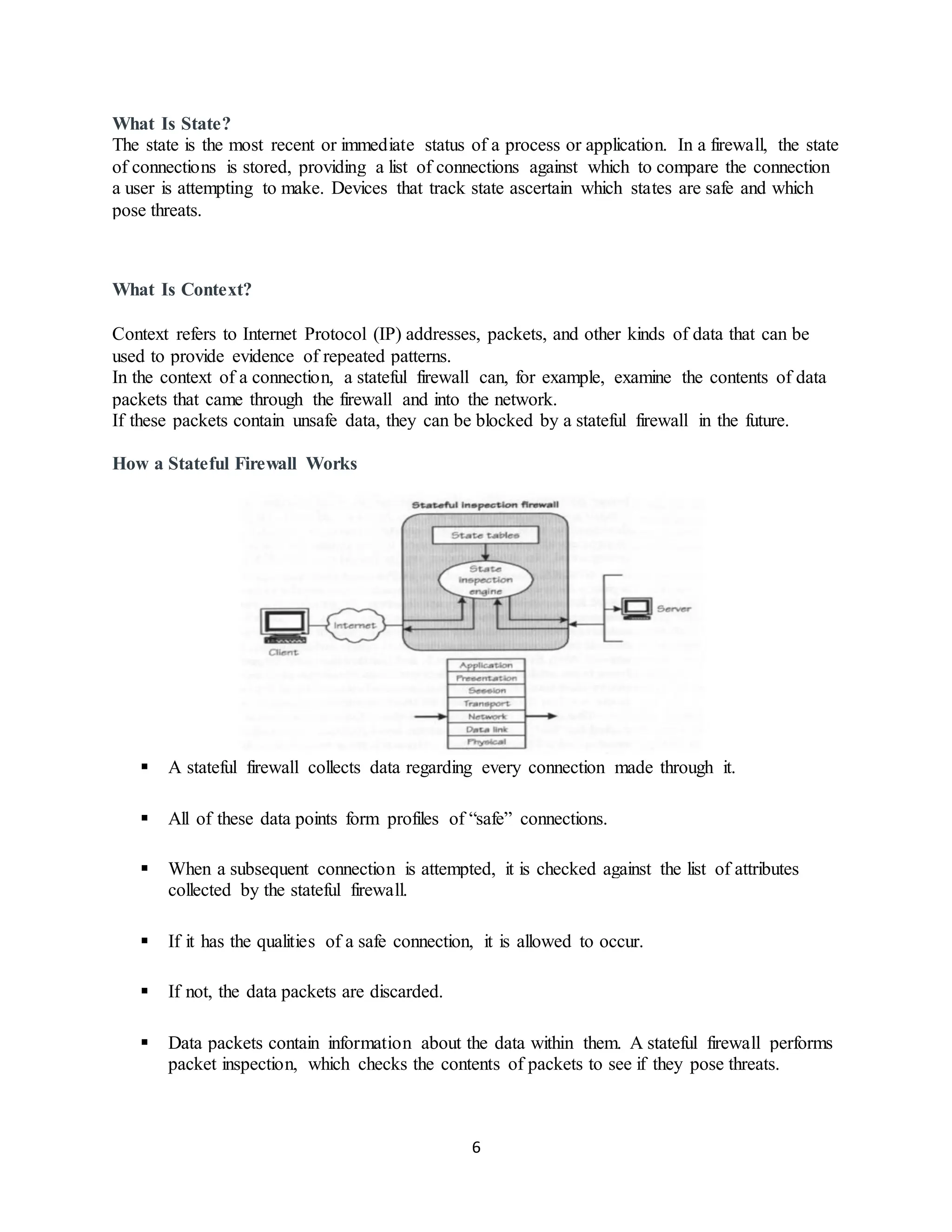
How a Stateful Firewall Works
▪ A stateful firewall collects data regarding every connection made through it.
▪ All of these data points form profiles of “safe” connections.
▪ When a subsequent connection is attempted, it is checked against the list of attributes
collected by the stateful firewall.
▪ If it has the qualities of a safe connection, it is allowed to occur.
▪ If not, the data packets are discarded.
▪ Data packets contain information about the data within them. A stateful firewall performs
packet inspection, which checks the contents of packets to see if they pose threats.
7.
7
▪ Stateful firewallscan also integrate additional services, such as encryption or tunnels.
▪ These boost performance because they block malicious actors from reading the contents
of communications, thereby making the connection safer through access control.
Stateful Packet Inspection
▪ Stateful packet inspection is a technology used by stateful firewalls to determine which
packets to allow through the firewall.
▪ It works by examining the contents of a data packet and then comparing them against
data pertaining to packets that have previously passed through the firewall.
▪ Stateful packet filtering keeps track of all connections on the network, making sure they
are all legitimate.
▪ Network-based static packet filtering also examines network connections, but only as
they come in, focusing on the data in the packets’ headers.
▪ This data provides less information to the firewall, limiting it to where it came from and
where it is going.
Stateful inspection firewall advantages
• Monitors the entire session for the state of the connection, while also checking IP
addresses and payloads for more thorough security
• Offers a high degree of control over what content is let in or out of the network
• Does not need to open numerous ports to allow traffic in or out
• Delivers substantive logging capabilities
Stateful inspection firewall disadvantages
• Resource-intensive and interferes with the speed of network communications
• More expensive than other firewall options
• Doesn't provide authentication capabilities to validate traffic sources are not spoofed
• Doesn't work with asymmetric routing (opposite directions use different paths)
Can lead to unexpected disconnections or half-open connections if connections are idle for
longer than the time-out
3. Stateless firewall
Stateless firewalls monitor the network traffic and analyze each data packet’s source, destination,
and other details to determine whether a threat is present. These firewalls can recognize packet
state and TCP connection stages, integrate encryption, and other essential updates.
8.
8
Benefits of Statelessfirewall
• Less complex
• Easy to implement
• Fast performance delivery
• Performs effectively in heavy traffic situations
4. Application-level gateway (Proxy firewall)
▪ Application-level gateway, also called Proxy firewall, is used to protect data at the
application level.
▪ It protects from potential internet hackers by not disclosing our computer’s identity (IP
address).
▪ Proxy firewalls analyze the context and content of data packets and compare them to a set
of previously defined rules using stateful and deep packet inspection.
▪ They either permit or reject a package based on the outcome. Because this firewall
checks the payload of received data packets, it is much slower than a packet-filtering
firewall.
What Does Application Gateway Mean?
▪ An application gateway or application level gateway (ALG) is a firewall proxy which
provides network security.
▪ It filters incoming node traffic to certain specifications which mean that only transmitted
network application data is filtered.
▪ Such network applications include File Transfer Protocol (FTP), Telnet, Real Time
Streaming Protocol (RTSP) and BitTorrent.
Benefits of Application-level gateways
• Safest firewall
• Deep packet inspection
• Significant slowdowns
• Safeguard resource identity and location
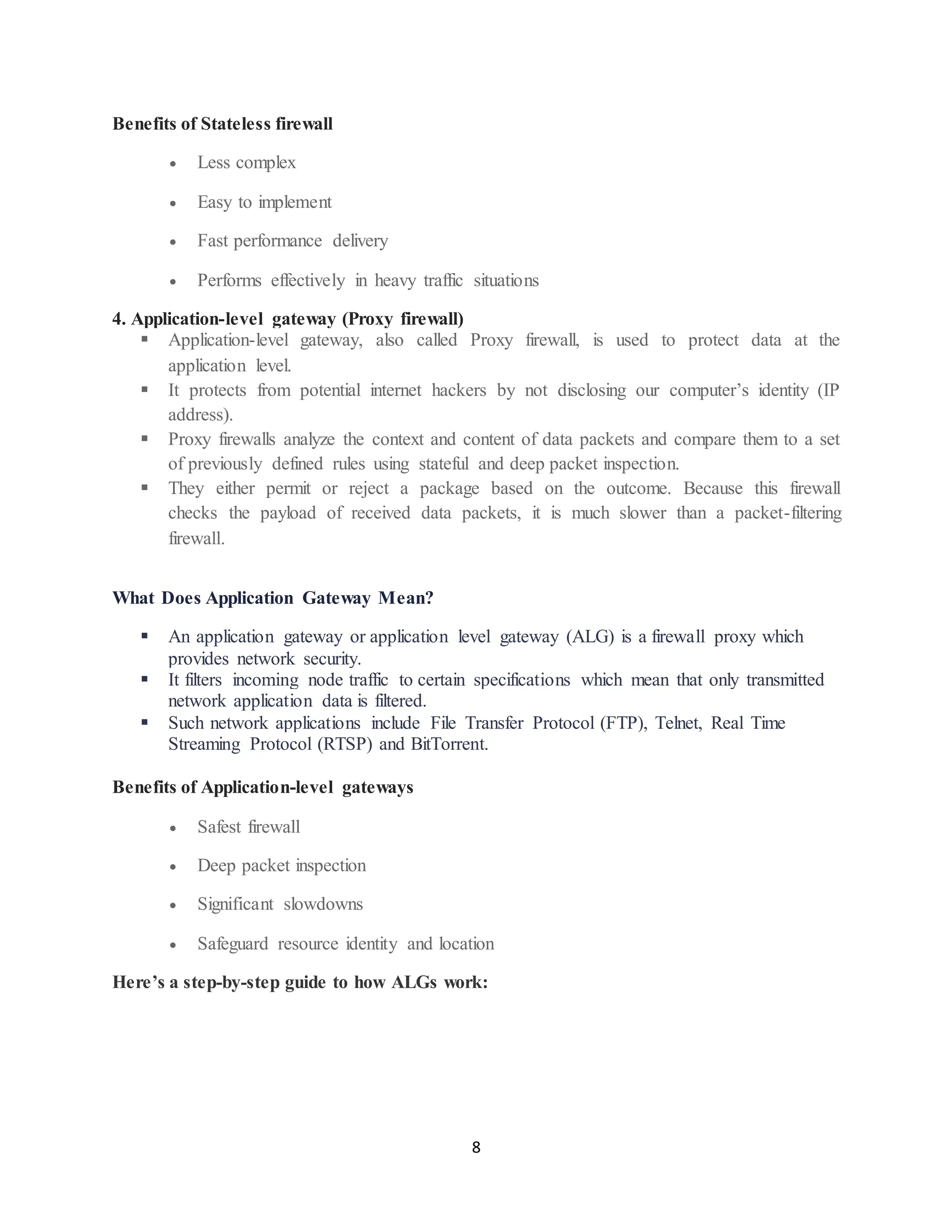
Here’s a step-by-step guide to how ALGs work:
9.
9
1. A usermakes contact with the ALG. First, a user must contact an application
gateway using a TCP or IP application. A common example of this is HTTP.
2. The ALG asks for the user’s ID. Once the user makes contact with the gateway, it
will ask about the remote host they are trying to establish a connection with. The
gateway will also request login credentials, such as a username and password.
3. The ALG verifies the user’s authenticity. The gateway will then authenticate—or
deny—the user based on their login credentials.
4. The ALG delivers the packets. Once the user is authenticated, the gateway will
access the remote host on their behalf to deliver the data packets required for the
application.
Advantages of Application-Level Gateways
Due to their enhanced security, ALGs are becoming increasingly popular with organizations of
all types—especially as the cybersecurity landscape becomes more threatening. Here are some of
the advantages offered by ALGs:
1. Bettersecurity
Perhaps the biggest advantage of using an ALG is the degree of protection it provides for
corporate networks. ALGs deliver one of the highest-level secure network systems for
communications, allowing companies to maintain their cybersecurity posture. The tool uses deep
packet inspection (DPI) to detect and block potential attacks at every layer of the OSI model.
2. Simple traffic logging
Organizations can gain more insight into who or what is trying to access their server with ALGs’
simplified traffic logging. Traffic server records store information about every transaction on the
server, so IT teams can review the granular details of potential access attempts. This fine-grained
control can help even the largest organizations identify threats.
10.
10
3. Content cachingsupport
ALGs also support content caching, which allows for optimal application performance. This is
crucial in today’s fast-paced and competitive business environment. Companies cannot afford to
have slow load speeds on their webpages, as delays can turn users away in frustration and
hamper search performance, ultimately costing the company thousands of dollars in lost revenue.
Disadvantages of Application-Level Gateways
Like any cybersecurity tool, ALGs come with some drawbacks, including network performance
issues, requiring a protocol for each proxy, and higher costs. Companies must understand these
drawbacks to help them determine if using ALGs is right for their business.
1. Impact to network performance
Since ALGs are complex firewalls with more capabilities than traditional firewalls, they can
slow down performance on unprepared networks. ALGs examine every data packet at the
application level–a much more intensive process than simply examining packet headers. Before
implementing an ALG, you’ll want to ensure your network is prepared to handle the additional
load.
2. Each protocol needs a proxy
Another disadvantage of application gateways is that each protocol, like SMTP or HTTP,
requires its own proxy application to function. Most firewall vendors offer companies generic
proxy agents to support these undefined assets, but they typically allow traffic to tunnel through
the firewall. This approach ultimately goes against the reasoning for having an ALG in the first
place.
3. More expensive
Because ALGs offer more robust and complex security, they’re often more expensive than other
types of network security tools. Most vendors charge for application gateways on an hourly
basis. For example, Microsoft Azure charges around 7 cents per hour for a basic, medium ALG,.
That may not seem like a lot, but it can add up quickly—especially since in most cases, you’ll
want the ALG in addition to, rather than instead of, your traditional network firewall.
5. Circuit-level gateway
▪ Circuit-level gateway validates established Transmission Control Protocol (TCP)
connections.
▪ These firewalls typically operate at the OSI model’s session level, verifying Transmission
Control Protocol (TCP) and User Datagram Protocol (UDP) connections and sessions.
▪ These firewalls are implemented as security software or as pre-installed firewalls.
11.
11
▪ Like packetfiltering firewalls, these firewalls do not examine the actual data packet but
observe the information about the transaction.
Benefits of Circuit-level gateway
• Simple and inexpensive
• A single form of protection is insufficient
• Setup and management are simple
A circuit-level gateway is a firewall that offers control over network traffic predominantly in the
session layer.
It delivers security for TCP and UDP networks by verifying packets and connection requests on
a virtual circuit between two transport layers.
Circuit-level gateway firewalls also function as handshaking devices between trusted servers and
clients with untrusted hosts.
The handshaking between packets helps to determine whether a session request can be deemed
secure by the circuit-level gateway.
How Circuit-Level Gateways Work
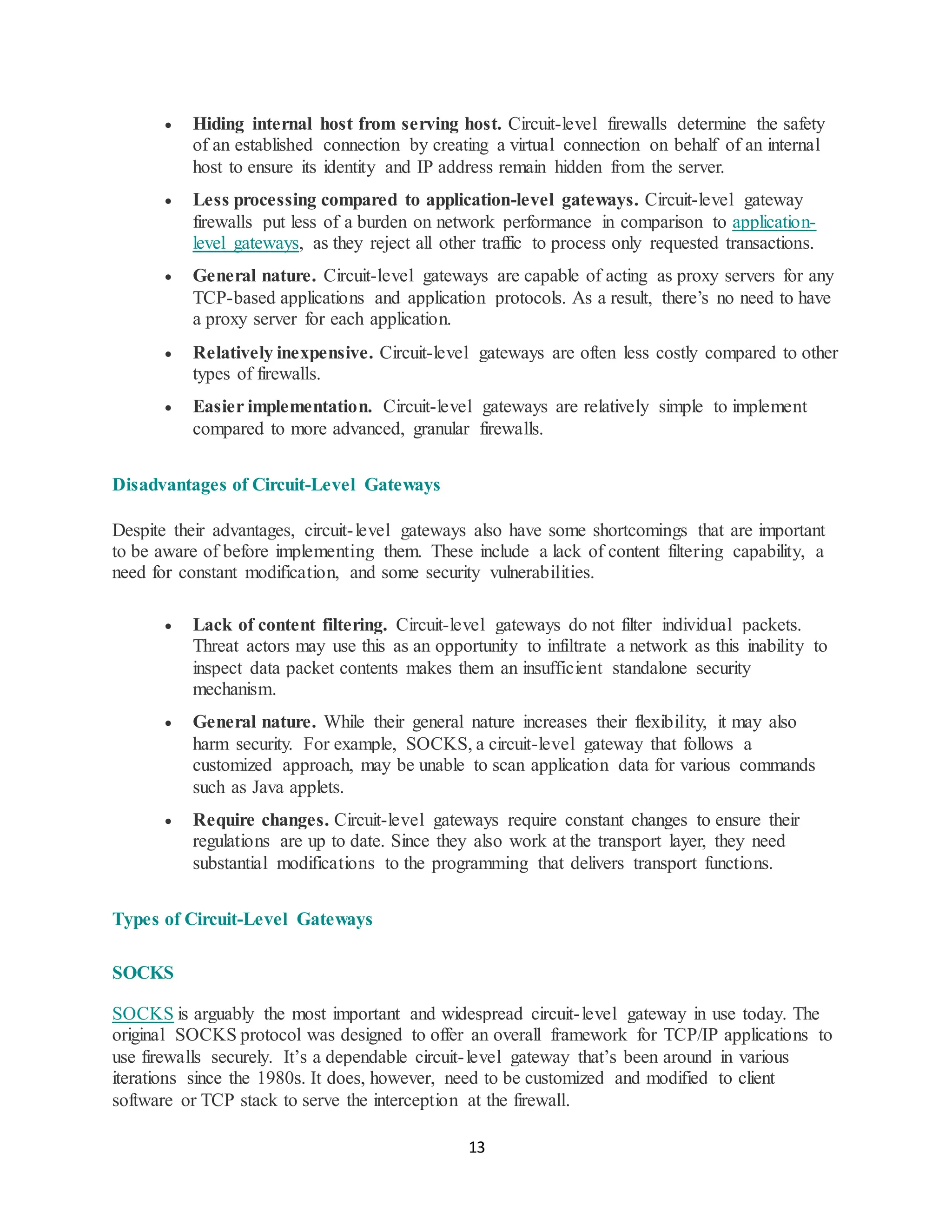
When a client seeks to initiate a TCP connection with a destination server, the circuit-level
gateway does three things:
1. The circuit-level gateway receives the request sent by a client to establish a TCP
connection.
2. It then handles authentication and sometimes authorization of the client.
3. If validated, it sets up a second TCP connection to a destination server on behalf of the
client. Otherwise, it rejects the connection.
Here’s how the above steps take place.
12.
12
The firewalls checkfor available packets in an attempted network connection and allow a
consistent open connection between two networks if they operate correctly. These firewalls can
use two TCP connections to establish a connection between an inner host TCP and an outer host
of TCP users.
After a connection is established, the gateway transmits TCP segments and the circuit-level
gateway keeps a table to help in validating connections and checking which network packets
contain data to pass when there is a match with an entry in the virtual circuit table.
The firewall then attempts to get rid of an entry from the table when the firewall ends the
connection, which results in the termination of the virtual circuit connection between two nodes.
After a session is allowed, the firewall steps back from supervising the TCP connection.
As a circuit-level gateway is not required to understand the application protocols in use, its
implementation and deployment are typically relatively straightforward.
However, it’s important to distinguish between a circuit-level gateway and a simple port
forwarding mechanism. Unlike a simple port forwarding mechanism, the client in a circuit-level
gateway is cognizant of an intermediate system, and the circuit-level gateway is generic.
Common Features of Circuit-Level Gateways
For a broader view of circuit-level gateways’ capabilities, it helps to understand their standard
features, such as TCP handshaking, Layer 4 and 5 operation, and virtual circuit connection.
• TCP handshaking. Circuit-level gateways use TCP three-way handshaking between
the client and the server to determine the validity of session requests.
• Layer 4 and 5 operation. Circuit-level gateway firewalls work at the transport and
session layers of the OSI model.
• Virtual circuit connection. Circuit-level firewalls create virtual circuit connections to
deliver anonymity to internal users.
• Table of sessionstate and sequencing information. Circuit-level gateways keep
virtual circuit tables to determine whether data packets will be allowed to pass
through.
Advantages of Circuit-Level Gateways
Circuit-level gateways provide some clear advantages for organizations, including hiding
internal hosts from serving hosts, requiring comparatively minimal processing, and being
relatively inexpensive and easy to implement.
13.
13
• Hiding internalhost from serving host. Circuit-level firewalls determine the safety
of an established connection by creating a virtual connection on behalf of an internal
host to ensure its identity and IP address remain hidden from the server.
• Less processing compared to application-level gateways. Circuit-level gateway
firewalls put less of a burden on network performance in comparison to application-
level gateways, as they reject all other traffic to process only requested transactions.
• General nature. Circuit-level gateways are capable of acting as proxy servers for any
TCP-based applications and application protocols. As a result, there’s no need to have
a proxy server for each application.
• Relatively inexpensive. Circuit-level gateways are often less costly compared to other
types of firewalls.
• Easier implementation. Circuit-level gateways are relatively simple to implement
compared to more advanced, granular firewalls.
Disadvantages of Circuit-Level Gateways
Despite their advantages, circuit-level gateways also have some shortcomings that are important
to be aware of before implementing them. These include a lack of content filtering capability, a
need for constant modification, and some security vulnerabilities.
• Lack of content filtering. Circuit-level gateways do not filter individual packets.
Threat actors may use this as an opportunity to infiltrate a network as this inability to
inspect data packet contents makes them an insufficient standalone security
mechanism.
• General nature. While their general nature increases their flexibility, it may also
harm security. For example, SOCKS, a circuit-level gateway that follows a
customized approach, may be unable to scan application data for various commands
such as Java applets.
• Require changes. Circuit-level gateways require constant changes to ensure their
regulations are up to date. Since they also work at the transport layer, they need
substantial modifications to the programming that delivers transport functions.
Types of Circuit-Level Gateways
SOCKS
SOCKS is arguably the most important and widespread circuit-level gateway in use today. The
original SOCKS protocol was designed to offer an overall framework for TCP/IP applications to
use firewalls securely. It’s a dependable circuit-level gateway that’s been around in various
iterations since the 1980s. It does, however, need to be customized and modified to client
software or TCP stack to serve the interception at the firewall.
14.
14
IBM Db2
IBM Db2delivers industry-leading performance across various workloads while reducing
storage, development, administration, and server costs. Its several editions satisfy the needs of
different business environments, with circuit-level firewall support incorporated in Db2 in the
form of SOCKS Version 4.
Proxy server
A proxy server refers to a firewall and content-caching server. Their features include not only
circuit-level gateway support but also application layer proxy and packet filtering to deliver a
complete firewall solution to secure networks. They also support the SOCKS protocol.
6. Next-Generation Firewall (NGFW)
The most common type of firewall available today is the Next-Generation Firewall (NGFW),
which provides higher security levels than packet-filtering and stateful inspection firewalls. An
NGFW is a deep-packet inspection firewall with additional features such as application
awareness and control, integrated intrusion prevention, advanced visibility of their network, and
cloud-delivered threat intelligence. This type of firewall is typically defined as a security device
that combines the features and functionalities of multiple firewalls. NGFW monitors the entire
data transaction, including packet headers, contents, and sources.
Benefits of Next-Generation Firewall
• Block malware
• Recognizing Advanced Persistent Threats (APTs)
• Less expensive
• Financially beneficial
7. Cloud firewall
A Cloud firewall, also known as FaaS (firewall-as-service), is a firewall that is designed using a
cloud solution for network protection. Third-party vendors typically manage and operate cloud
firewalls on the internet, and they are configured based on the requirements. Today, most
businesses use cloud firewalls to protect their private networks or overall cloud infrastructure.
Benefits of Cloud firewall
• Unified security policy
• Flexible deployment
• Simplified deployment and maintenance
• Improved scalability
• Automatic updates
16
Firewall policies:
What Isa Security Policy?
A security policy refers to a set of security requirements, controls, and process requirements
established by an organization to ensure its information security. It establishes the overall goal of
information security, defines the management structure of information security, as well as puts
forward the security requirements for the members of the organization. This kind of security
policy usually exists in the form of documents and belongs to the scope of enterprise governance.
When it comes to firewalls, a security policy specifies rules used to protect networks. It is
configured by the administrator in the firewall system to determine which traffic can pass
through the firewall and which traffic should be blocked. Security policies are a basic concept
and core function of firewalls. Firewalls use security policies to provide service management and
control capabilities to ensure network security.
To avoid concept ambiguity, a security policy for an organization is usually referred to as an
information security policy, and a security policy for a firewall is usually referred to as a firewall
security policy and sometimes referred to as a firewall policy or firewall rule.
Composition of a Security Policy
A security policy defines a set of rules that contain specific matching conditions and actions.
Matching Conditions
The matching conditions of a security policy describe traffic characteristics to filter the traffic
that meets the conditions. A security policy includes the following matching conditions:
• User who sends the traffic. In the Agile Controller SSO scenario, the user access mode
and terminal type can also be specified as matching conditions.
• Source and destination of traffic, including the source and destination security zones,
source and destination IP addresses, source and destination regions, and source and
destination VLANs. A region is a geographic region mapped by an IP address.
• Services, applications, or categories of URLs to be accessed.
• Time range.
Actions
A security policy has two basic actions: permit and deny, that is, allow or forbid traffic to pass
through.
• If the action is permit, you can perform further content security check on the traffic
that matches the policy. The content security check functions of Huawei firewalls
include antivirus, intrusion prevention system (IPS), URL filtering, file blocking, data
filtering, application behavior control, mail filtering, APT defense, and DNS filtering.
17.
17
Each content securitycheck has its own application scenarios and actions. The result
of all content security checks determines how the firewall processes traffic.
• If the action is deny, you can choose to send feedback packets to a server or client to
quickly terminate sessions and reduce system resource consumption.
Matching conditions such as users, terminals, time ranges, addresses, regions, services,
applications, and URL categories, and various profiles required for content security check exist
as objects on the firewall. You can create an object and reference it in multiple security policies.
Policy Identifiers
To facilitate management, the following security policy identifiers are provided:
• Name: uniquely identifies a security policy. Specifying a name, for example, a name
indicating the purpose, for each security policy can improve maintenance efficiency.
• Description: records information about a security policy. For example, you can record
the number of the application process that triggers the security policy in this field. In
this way, you can quickly understand the background of the security policy during
routine audit, for example, when the security policy is introduced, who submits the
application, and validity period of the security policy.
• Policy group: Multiple security policies with the same purpose can be added to a
policy group to simplify management. You can move, enable, or disable a policy
group.
• Label: You can add multiple labels to a security policy to filter policies with the same
characteristics. For example, you can add labels such as high-risk application and
company application based on the type of applications to which a security policy
applies. You are advised to set labels with a fixed prefix, for example, SP_, and use
different colors to differentiate actions. This makes labels easy to understand.
Basics of firewall policy design
An effective firewall policy should be a blueprint that follows firewall best practices on how an
organization’s firewalls should handle inbound and outbound network traffic for specific IP
addresses and address ranges, applications, and protocols based on the organization’s overall
information security policies.
Below are some basics of a firewall policy design.
1. Identify your security objectives
It’s crucial to first identify your organization’s security objectives before venturing into firewall
policy design. This is because a firewall policy should not just speak to your unique security
needs but also comply with the organization’s general security policy.
18.
18
Identifying your organizationalsecurity objectives should factor in the types of traffic that need
to be allowed or blocked, compliance requirements, resource allocation, and their impact on the
overall business objective.
2. Define your firewall architecture
Firewall architecture refers to the design and layout of a firewall system responsible for
controlling and monitoring network traffic. Defining your firewall architecture will involve
deciding on the type of firewall to be used, the location of the firewall within the network, and
the number of firewalls required to achieve the desired level of security in the organization.
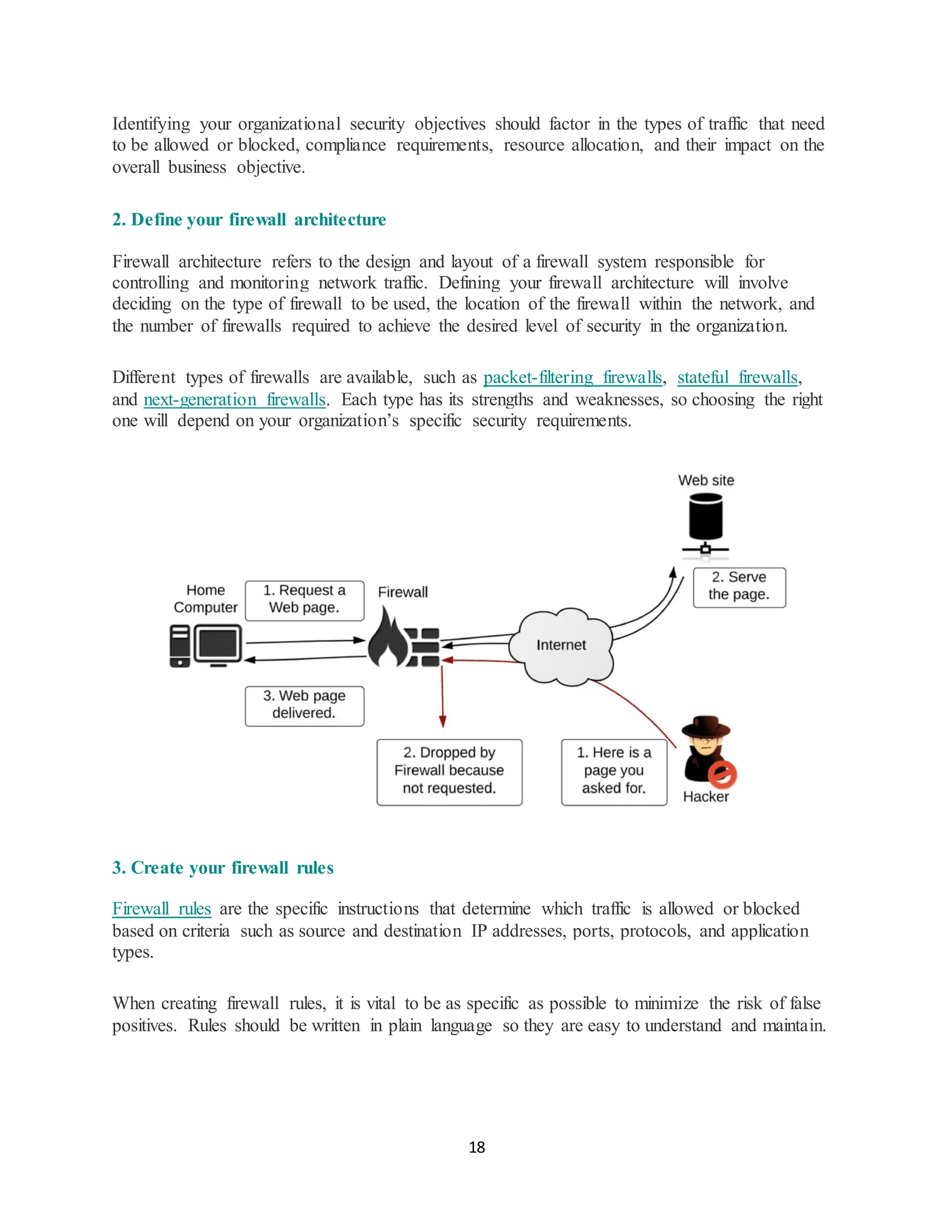
Different types of firewalls are available, such as packet-filtering firewalls, stateful firewalls,
and next-generation firewalls. Each type has its strengths and weaknesses, so choosing the right
one will depend on your organization’s specific security requirements.
3. Create your firewall rules
Firewall rules are the specific instructions that determine which traffic is allowed or blocked
based on criteria such as source and destination IP addresses, ports, protocols, and application
types.
When creating firewall rules, it is vital to be as specific as possible to minimize the risk of false
positives. Rules should be written in plain language so they are easy to understand and maintain.
19.
19
4. Monitor yourfirewall
Monitoring your firewall is essential to ensuring that it’s working effectively. This includes
regularly reviewing logs and alerts, analyzing network traffic, and testing your firewall for
vulnerabilities.
Besides monitoring logs and analyzing network traffic, monitoring your firewall also involves
ensuring that people within the organization follow and implement the firewall security rules in
the policy. In addition, regular monitoring will help you to quickly identify and respond to
potential network security threats before they can cause significant damage to the organization.
5 ways to configure a firewall policy
There are several ways to configure a firewall policy, which will depend on the organization’s
security needs, the type of firewall, and the expertise of the network administrator. Below are
some of the approaches you can adopt to configure your firewall policy.
Port-based configuration
A port-based firewall policy configuration focuses on controlling network access based on the
traffic’s communication ports. In this method, firewall rules are based on specific network ports
used to identify the type of traffic.
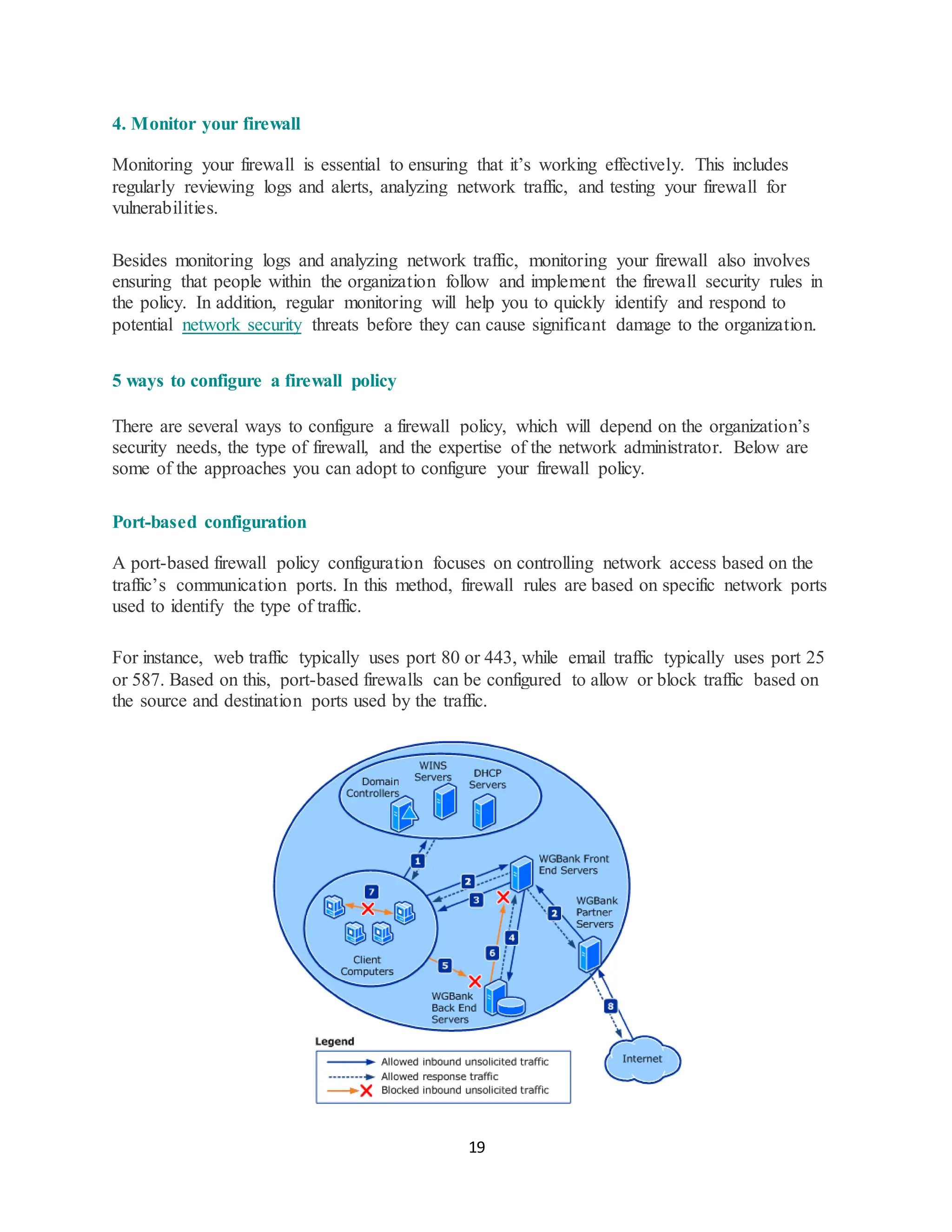
For instance, web traffic typically uses port 80 or 443, while email traffic typically uses port 25
or 587. Based on this, port-based firewalls can be configured to allow or block traffic based on
the source and destination ports used by the traffic.
20.
20
Protocol-based configuration
In thisfirewall configuration method, the focus is on configuring the firewall to allow or block
traffic based on the protocol used, such as Transmission Control Protocol (TCP), User Datagram
Protocol (UDP), or Internet Control Message Protocol (ICMP). This configuration can be done
by specifying rules that define which traffic should be allowed or blocked based on the protocols
used.
IP address-based configuration
Firewall configuration can also be based on specific IP addresses, such as blocking traffic from a
known malicious IP address or allowing traffic only from trusted sources. This method can take
the form of identifying countries with a high percentage of malicious IP addresses and
configuring your firewall to block all IPs from such countries.
Behavior-based configuration
Some advanced firewalls can be configured to analyze the behavior of network traffic and
identify patterns or anomalies that may indicate a security threat. In this configuration, the
firewall software monitors all activities on the organization’s network to identify and treat any
deviation from the normal pattern as a threat.
Application-based configuration
In this configuration, the firewall is configured to recognize and block specific applications, such
as instant messaging or peer-to-peer file-sharing programs largely considered malicious.
In this method, the firewall identifies application signatures and decides whether or not to permit,
deny, or redirect the traffic from such applications.
What are the main types of firewall policies?
There are different types of firewall policies that organizations can adopt. Some of the notable
ones include hierarchical, global network, and regional network firewall policies.
Hierarchical firewall policy
A hierarchical firewall policy allows for more granular and efficient network traffic control. In
this approach, firewall rules are grouped into a hierarchy or a tree-like structure where each level
of the hierarchy represents a specific security zone or policy domain.
21.
21
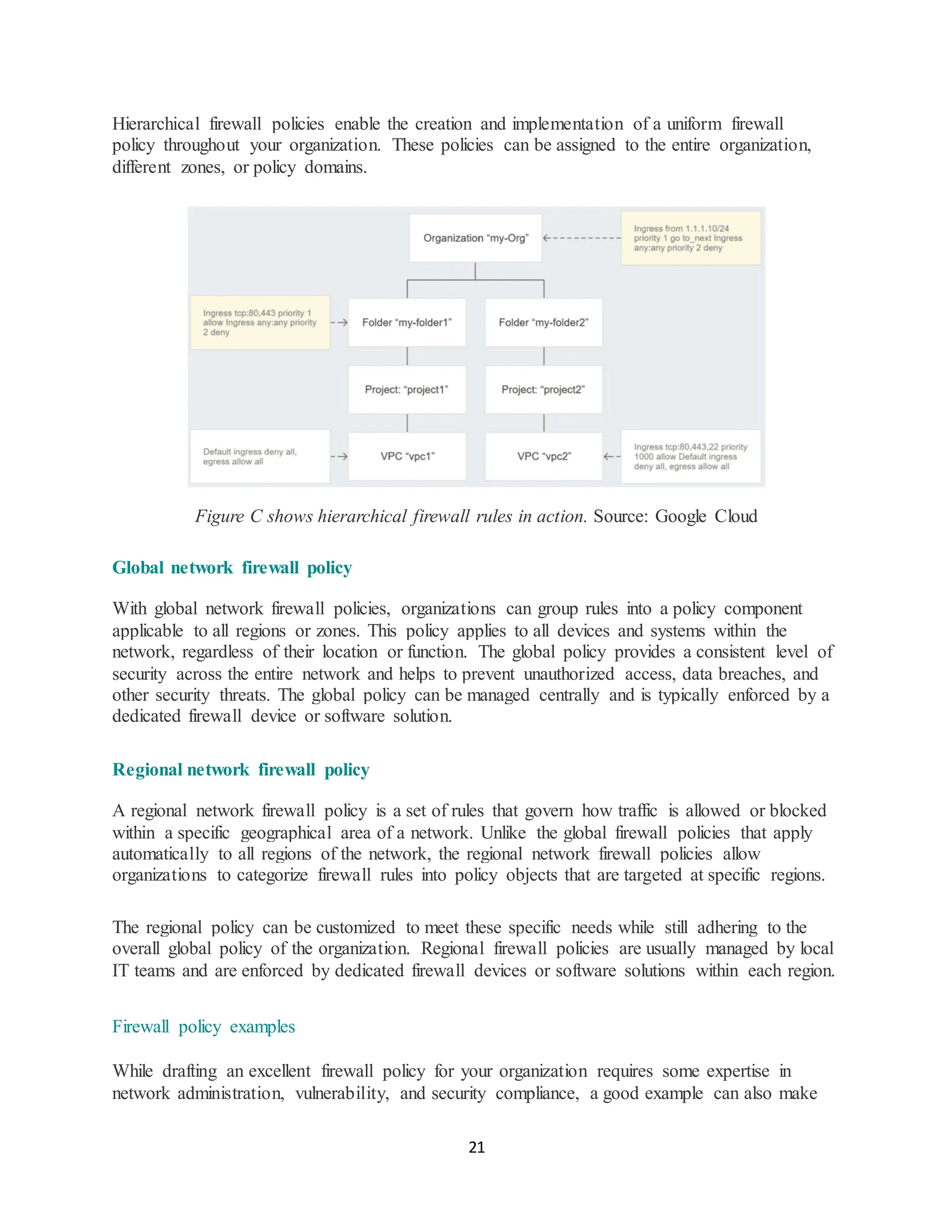
Hierarchical firewall policiesenable the creation and implementation of a uniform firewall
policy throughout your organization. These policies can be assigned to the entire organization,
different zones, or policy domains.
Figure C shows hierarchical firewall rules in action. Source: Google Cloud
Global network firewall policy
With global network firewall policies, organizations can group rules into a policy component
applicable to all regions or zones. This policy applies to all devices and systems within the
network, regardless of their location or function. The global policy provides a consistent level of
security across the entire network and helps to prevent unauthorized access, data breaches, and
other security threats. The global policy can be managed centrally and is typically enforced by a
dedicated firewall device or software solution.
Regional network firewall policy
A regional network firewall policy is a set of rules that govern how traffic is allowed or blocked
within a specific geographical area of a network. Unlike the global firewall policies that apply
automatically to all regions of the network, the regional network firewall policies allow
organizations to categorize firewall rules into policy objects that are targeted at specific regions.
The regional policy can be customized to meet these specific needs while still adhering to the
overall global policy of the organization. Regional firewall policies are usually managed by local
IT teams and are enforced by dedicated firewall devices or software solutions within each region.
Firewall policy examples
While drafting an excellent firewall policy for your organization requires some expertise in
network administration, vulnerability, and security compliance, a good example can also make
22.
22
things easier foryou when faced with the task of drafting one. Below are two examples you can
take some cues from.
University of Connecticut firewall policy
This University of Connecticut firewall policy is a basic firewall policy published on their
webpage. The policy defines the essential rules regarding managing and maintaining firewalls at
the University of Connecticut and who is bound to comply with this firewall policy.
Although this is a basic example of a typical firewall policy, it captures some key aspects of a
firewall policy, such as firewall rules, firewall configuration standards, defining the policy’s
purpose, and how any violation will be handled.
What Is Firewall Configuration?
A firewall plays a vital role in network security and needs to be properly configured to keep
organizations protected from data leakage and cyberattacks.
This is possible by configuring domain names and Internet Protocol (IP) addresses to keep the
firewall secure. Firewall policy configuration is based on network type, such as public or private,
and can be set up with security rules that block or allow access to prevent potential attacks from
hackers or malware.
Proper firewall configuration is essential, as default features may not provide maximum
protection against a cyberattack.
Importance of Basic Firewall Configuration
Improper firewall configuration can result in attackers gaining unauthorized access to protected
internal networks and resources. As a result, cyber criminals are constantly on the lookout for
networks that have outdated software or servers and are not protected. Gartner highlighted the
size and magnitude of this issue, predicting that 99% of firewall breaches would be caused by
misconfigurations in 2020.
The default settings on most firewalls and protocols like the File Transfer Protocol (FTP) do not
provide the necessary level of protection to keep networks secure from cyberattacks.
Organizations must ensure basic firewall configuration meets the unique needs of their networks.
How To Configure a Firewall
Proper configuration is essential to supporting internal networks and stateful packet inspection.
Here is how to configure a firewall securely:
23.
23
1. Secure theFirewall
Securing a firewall is the vital first step to ensure only authorized administrators have access to
it. This includes actions such as:
1. Update with the latest firmware
2. Never putting firewalls into production without appropriate configurations in place
3. Deleting, disabling, or renaming default accounts and changing default passwords
4. Use unique, secure passwords
5. Never using shared user accounts. If a firewall will be managed by multiple
administrators, additional admin accounts must have limited privileges based on
individual responsibilities
6. Disabling the Simple Network Management Protocol (SNMP), which collects and
organizes information about devices on IP networks, or configuring it for secure usage
7. Restricting outgoing and incoming network traffic for specific applications or
the Transmission Control Protocol (TCP)
2. Establish Firewall Zones and an IP Address Structure
It is important to identify network assets and resources that must be protected. This includes
creating a structure that groups corporate assets into zones based on similar functions and the
level of risk.
A good example of this is servers—such as email servers, virtual private network (VPN) servers,
and web servers—placed in a dedicated zone that limits inbound internet traffic, often referred to
as a demilitarized zone (DMZ). A general rule is that the more zones created, the more secure the
network is.
However, having more zones also demands more time to manage them. With a network zone
structure established, it is also important to establish a corresponding IP address structure that
assigns zones to firewall interfaces and subinterfaces.
3. Configure Access Control Lists (ACLs)
Access control lists (ACLs) enable organizations to determine which traffic is allowed to flow in
and out of each zone. ACLs act as firewall rules, which organizations can apply to each firewall
interface and subinterface.
ACLs must be made specific to the exact source and destination port numbers and IP addresses.
Each ACL should have a “deny all” rule created at the end of it, which enables organizations to
filter out unapproved traffic. Each interface and subinterface also needs an inbound and
24.
24
outbound ACL toensure only approved traffic can reach each zone. It is also advisable to disable
firewall administration interfaces from public access to protect the configuration and disable
unencrypted firewall management protocols.
4. Configure Other Firewall Services and Logging
Some firewalls can be configured to support other services, such as a Dynamic Host
Configuration Protocol (DHCP) server, intrusion prevention system (IPS), and Network Time
Protocol (NTP) server. It is important to also disable the extra services that will not be used.
Further, firewalls must be configured to report to a logging service to comply with and fulfill
Payment Card Industry Data Security Standard (PCI DSS) requirements.
5. Test the Firewall Configuration
With the configurations made, it is critical to test them to ensure the correct traffic is being
blocked and that the firewall performs as intended. The configuration can be tested through
techniques like penetration testing and vulnerability scanning. Remember to back up the
configuration in a secure location in case of any failures during the testing process.
6. Manage Firewall Continually
Firewall management and monitoring are critical to ensuring that the firewall continues to
function as intended. This includes monitoring logs, performing vulnerability scans, and
regularly reviewing rules. It is also important to document processes and manage the
configuration continually and diligently to ensure ongoing protection of the network
DMZ - What Is a Demilitarized Zone (DMZ)?
A demilitarized zone (DMZ) is defined as an isolated networking space or sub-network that
is cut off from the rest of the organization’s connected footprint using logical or physical
blockers to facilitate access to untrusted connections in a safe space.
25.
25
The Working ofa DMZ
▪ Demilitarized zones are isolated network spaces on the enterprise perimeter serving as a
secure and intermediary network between an organization’s internal and non-proprietary
networks.
▪ It prevents illegal traffic from entering a company’s internal local-area network. In
military parlance, a demilitarized zone (DMZ) is an area where warring parties agree to
lay aside their disagreements to achieve a state of peace — for instance, the narrow strip
of land that divides the Korean Peninsula, separating North and South Korea.
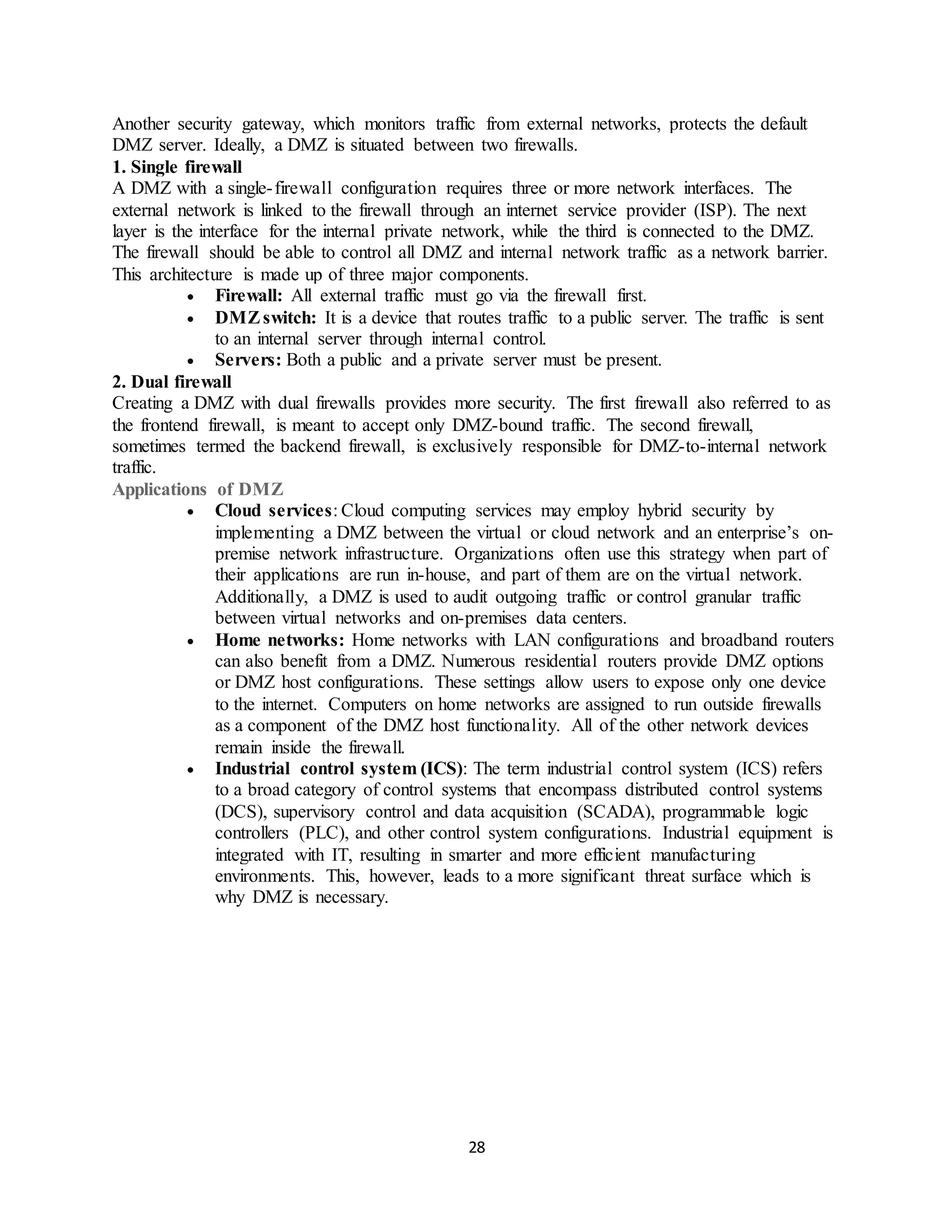
▪ Network components and services like the domain name system (DNS), file transfer
protocol (FTP) server, web servers, proxy servers, etc., are typically placed inside a
DMZ.
▪ These servers and resources are compartmentalized and have limited local area network
(LAN) access to ensure one can access them via the internet rather than the internal LAN.
The DMZ technique makes it challenging for hackers to gain direct internet access to an
organization’s data and internal systems.
▪ The DMZ aims to facilitate connectivity with untrusted or external networks (e.g., the
public internet) while keeping the private network or LAN safe and secure. Some of the
additional security benefits of a DMZ
26.
26
Security Benefits ofDMZ
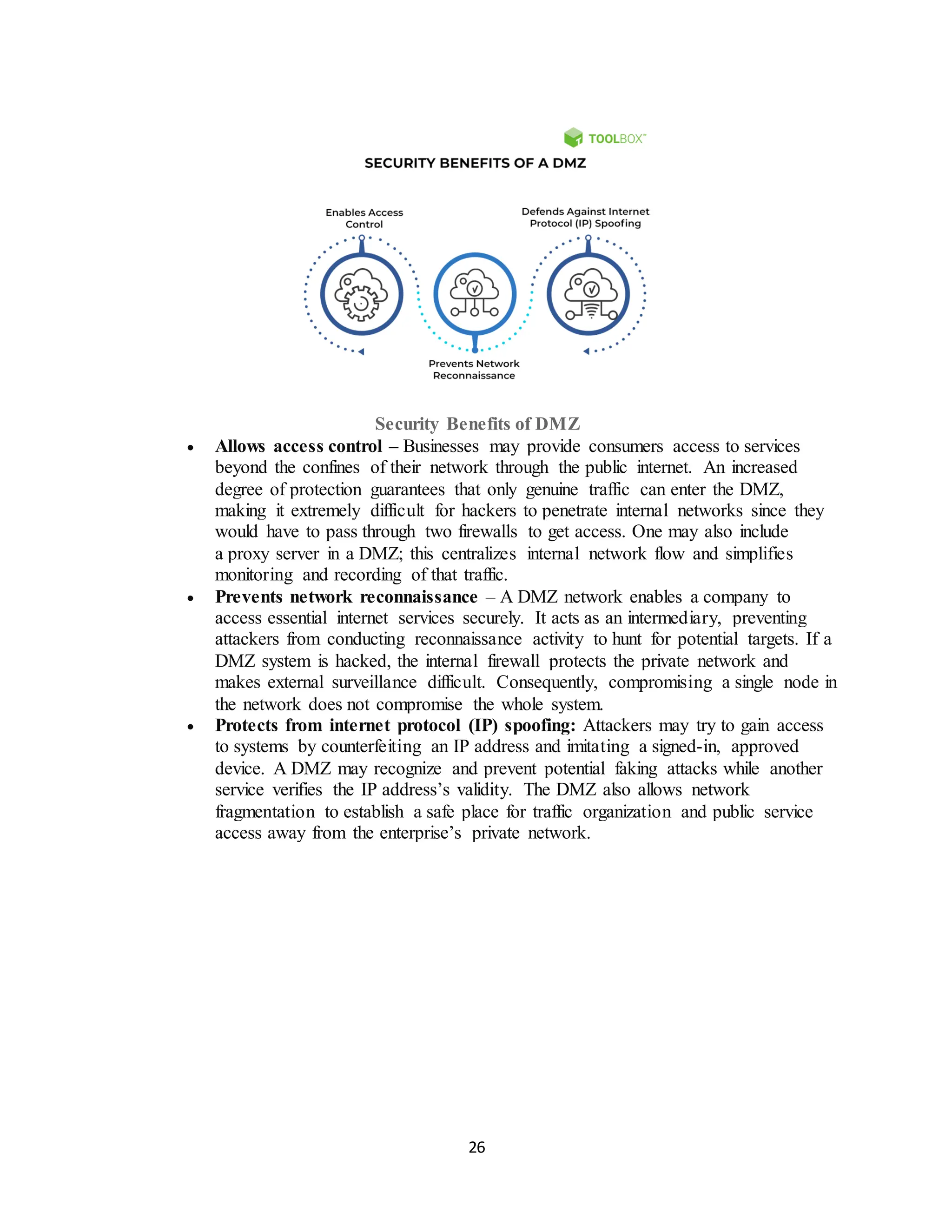
• Allows access control – Businesses may provide consumers access to services
beyond the confines of their network through the public internet. An increased
degree of protection guarantees that only genuine traffic can enter the DMZ,
making it extremely difficult for hackers to penetrate internal networks since they
would have to pass through two firewalls to get access. One may also include
a proxy server in a DMZ; this centralizes internal network flow and simplifies
monitoring and recording of that traffic.
• Prevents network reconnaissance – A DMZ network enables a company to
access essential internet services securely. It acts as an intermediary, preventing
attackers from conducting reconnaissance activity to hunt for potential targets. If a
DMZ system is hacked, the internal firewall protects the private network and
makes external surveillance difficult. Consequently, compromising a single node in
the network does not compromise the whole system.
• Protects from internet protocol (IP) spoofing: Attackers may try to gain access
to systems by counterfeiting an IP address and imitating a signed-in, approved
device. A DMZ may recognize and prevent potential faking attacks while another
service verifies the IP address’s validity. The DMZ also allows network
fragmentation to establish a safe place for traffic organization and public service
access away from the enterprise’s private network.
27.
27
Security Benefits ofDMZ
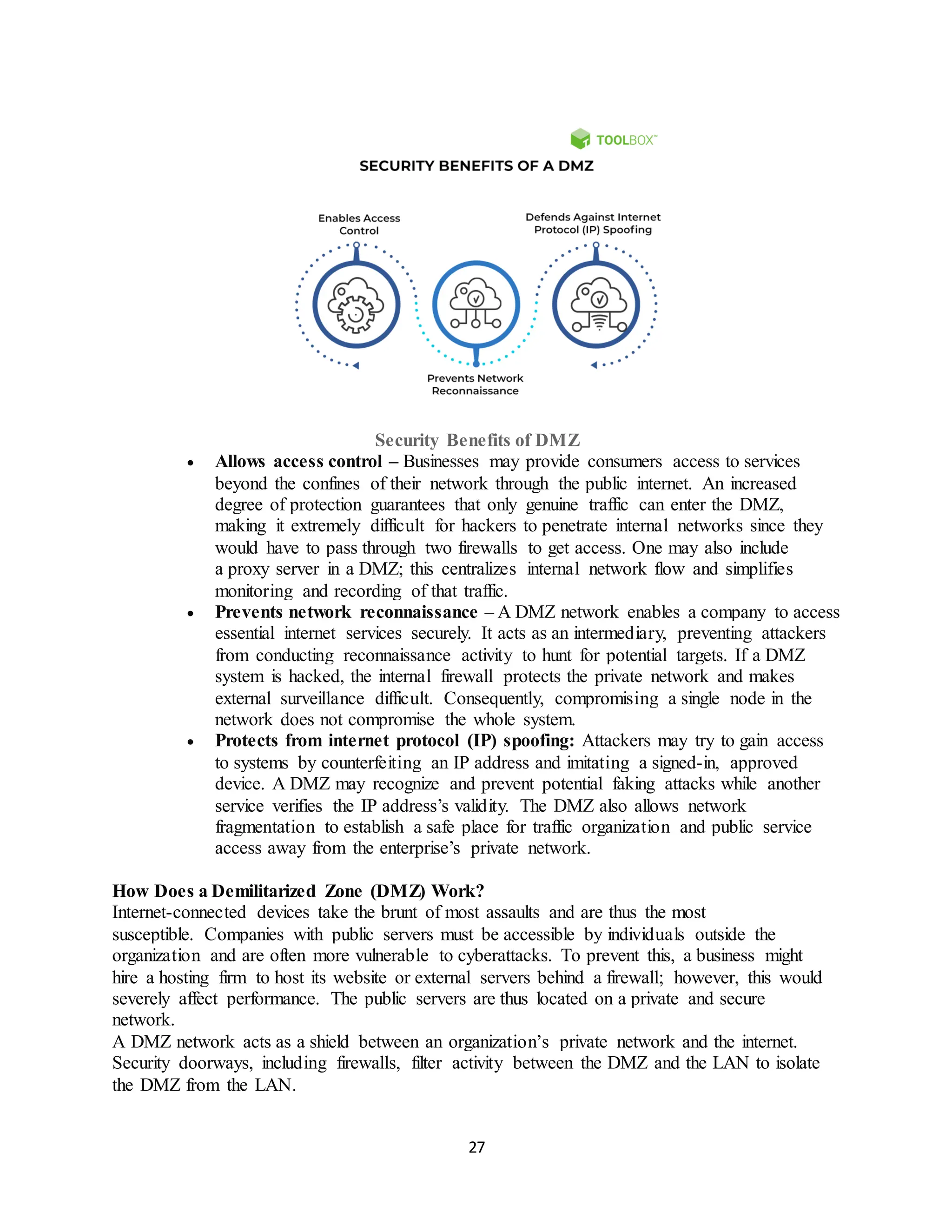
• Allows access control – Businesses may provide consumers access to services
beyond the confines of their network through the public internet. An increased
degree of protection guarantees that only genuine traffic can enter the DMZ,
making it extremely difficult for hackers to penetrate internal networks since they
would have to pass through two firewalls to get access. One may also include
a proxy server in a DMZ; this centralizes internal network flow and simplifies
monitoring and recording of that traffic.
• Prevents network reconnaissance – A DMZ network enables a company to access
essential internet services securely. It acts as an intermediary, preventing attackers
from conducting reconnaissance activity to hunt for potential targets. If a DMZ
system is hacked, the internal firewall protects the private network and makes
external surveillance difficult. Consequently, compromising a single node in the
network does not compromise the whole system.
• Protects from internet protocol (IP) spoofing: Attackers may try to gain access
to systems by counterfeiting an IP address and imitating a signed-in, approved
device. A DMZ may recognize and prevent potential faking attacks while another
service verifies the IP address’s validity. The DMZ also allows network
fragmentation to establish a safe place for traffic organization and public service
access away from the enterprise’s private network.
How Does a Demilitarized Zone (DMZ) Work?
Internet-connected devices take the brunt of most assaults and are thus the most
susceptible. Companies with public servers must be accessible by individuals outside the
organization and are often more vulnerable to cyberattacks. To prevent this, a business might
hire a hosting firm to host its website or external servers behind a firewall; however, this would
severely affect performance. The public servers are thus located on a private and secure
network.
A DMZ network acts as a shield between an organization’s private network and the internet.
Security doorways, including firewalls, filter activity between the DMZ and the LAN to isolate
the DMZ from the LAN.
28.
28
Another security gateway,which monitors traffic from external networks, protects the default
DMZ server. Ideally, a DMZ is situated between two firewalls.
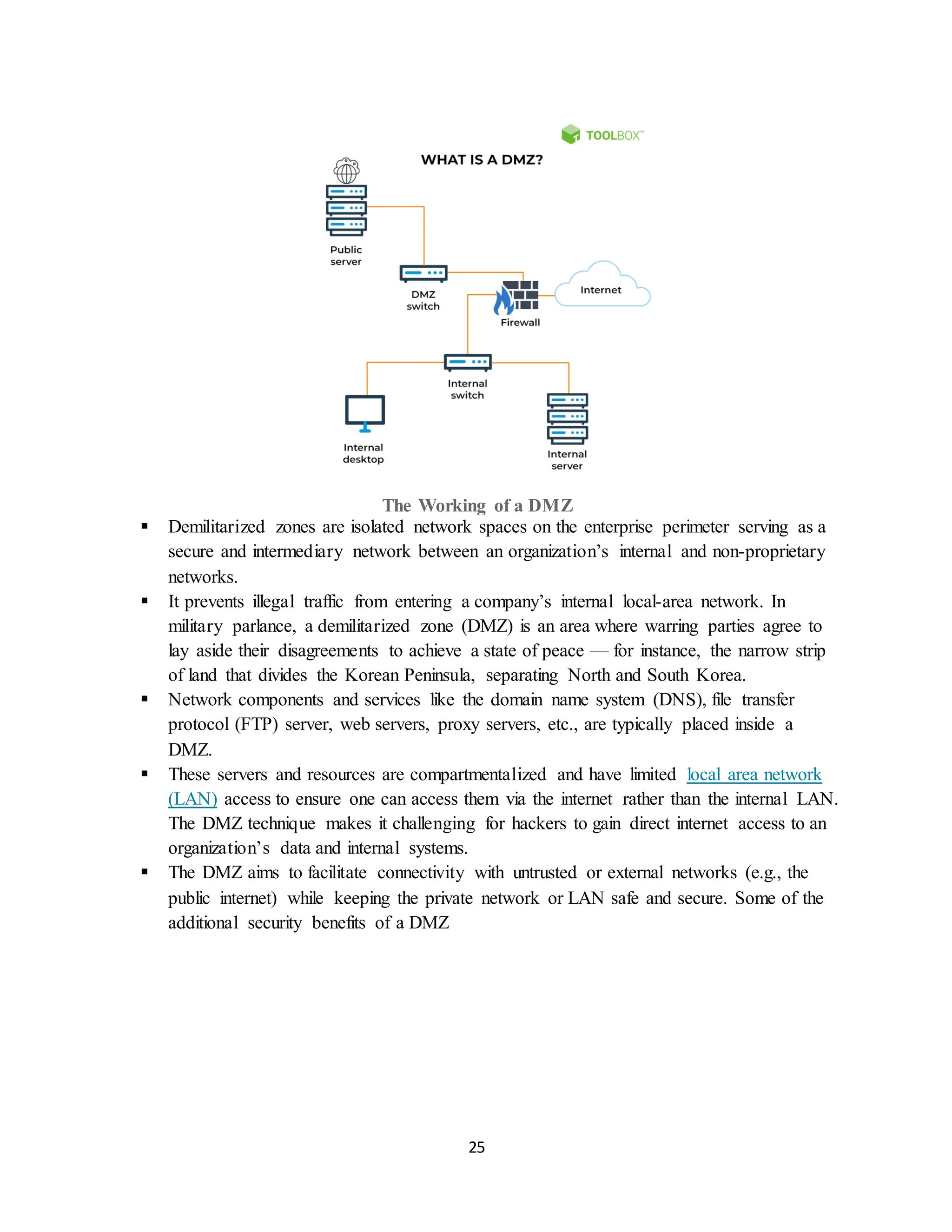
1. Single firewall
A DMZ with a single-firewall configuration requires three or more network interfaces. The
external network is linked to the firewall through an internet service provider (ISP). The next
layer is the interface for the internal private network, while the third is connected to the DMZ.
The firewall should be able to control all DMZ and internal network traffic as a network barrier.
This architecture is made up of three major components.
• Firewall: All external traffic must go via the firewall first.
• DMZswitch: It is a device that routes traffic to a public server. The traffic is sent
to an internal server through internal control.
• Servers: Both a public and a private server must be present.
2. Dual firewall
Creating a DMZ with dual firewalls provides more security. The first firewall also referred to as
the frontend firewall, is meant to accept only DMZ-bound traffic. The second firewall,
sometimes termed the backend firewall, is exclusively responsible for DMZ-to-internal network
traffic.
Applications of DMZ
• Cloud services: Cloud computing services may employ hybrid security by
implementing a DMZ between the virtual or cloud network and an enterprise’s on-
premise network infrastructure. Organizations often use this strategy when part of
their applications are run in-house, and part of them are on the virtual network.
Additionally, a DMZ is used to audit outgoing traffic or control granular traffic
between virtual networks and on-premises data centers.
• Home networks: Home networks with LAN configurations and broadband routers
can also benefit from a DMZ. Numerous residential routers provide DMZ options
or DMZ host configurations. These settings allow users to expose only one device
to the internet. Computers on home networks are assigned to run outside firewalls
as a component of the DMZ host functionality. All of the other network devices
remain inside the firewall.
• Industrial control system (ICS): The term industrial control system (ICS) refers
to a broad category of control systems that encompass distributed control systems
(DCS), supervisory control and data acquisition (SCADA), programmable logic
controllers (PLC), and other control system configurations. Industrial equipment is
integrated with IT, resulting in smarter and more efficient manufacturing
environments. This, however, leads to a more significant threat surface which is
why DMZ is necessary.
29.
29
What is anIntrusion Detection System?
An Intrusion Detection System (IDS) is a network security technology originally built for
detecting vulnerability exploits against a target application or computer.
The IDS is also a listen-only device. The IDS monitors traffic and reports results to an
administrator. It cannot automatically take action to prevent a detected exploit from taking over
the system.
Attackers are capable of exploiting vulnerabilities quickly once they enter the network.
Therefore, the IDS is not adequate for prevention. Intrusion detection and intrusion prevention
systems are both essential to security information and event management.
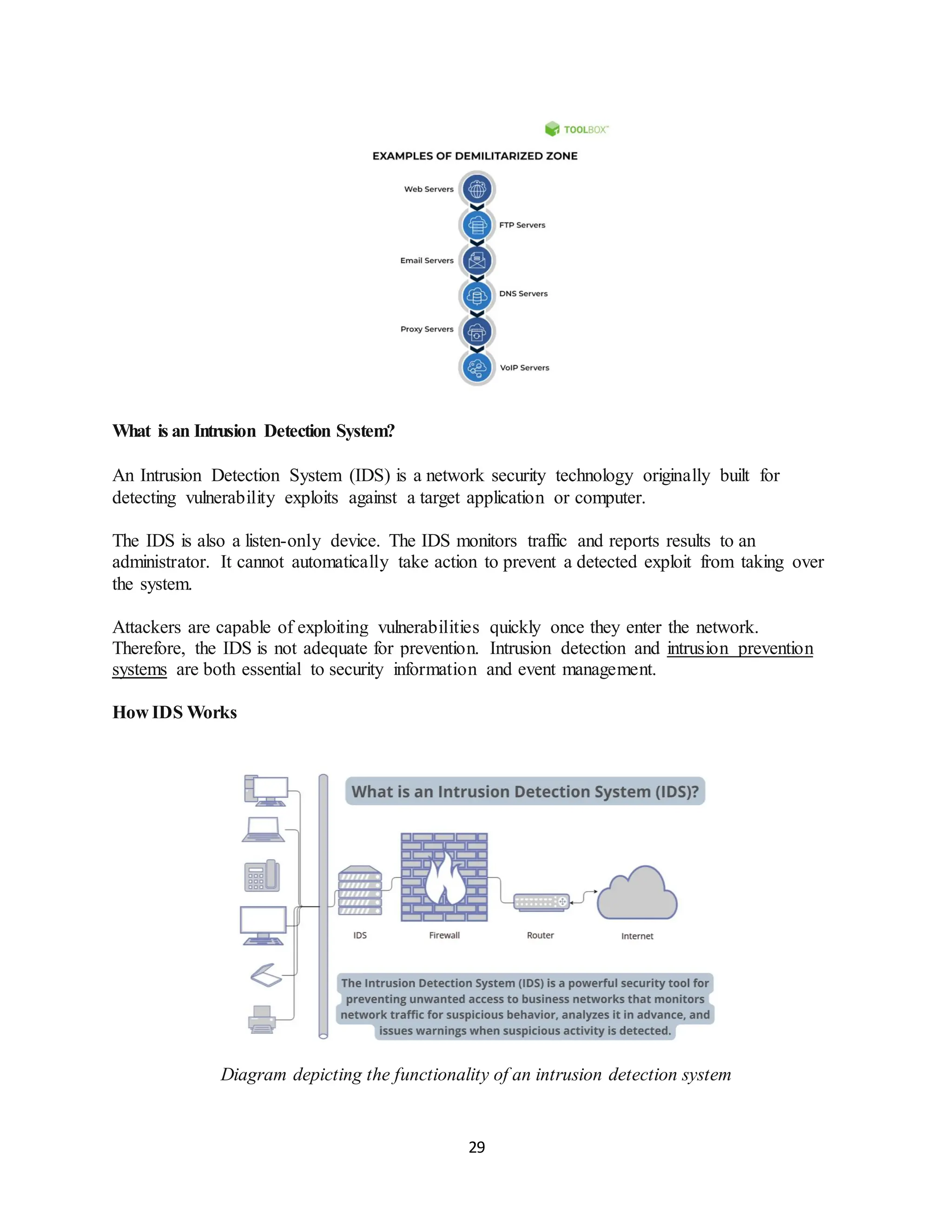
How IDS Works
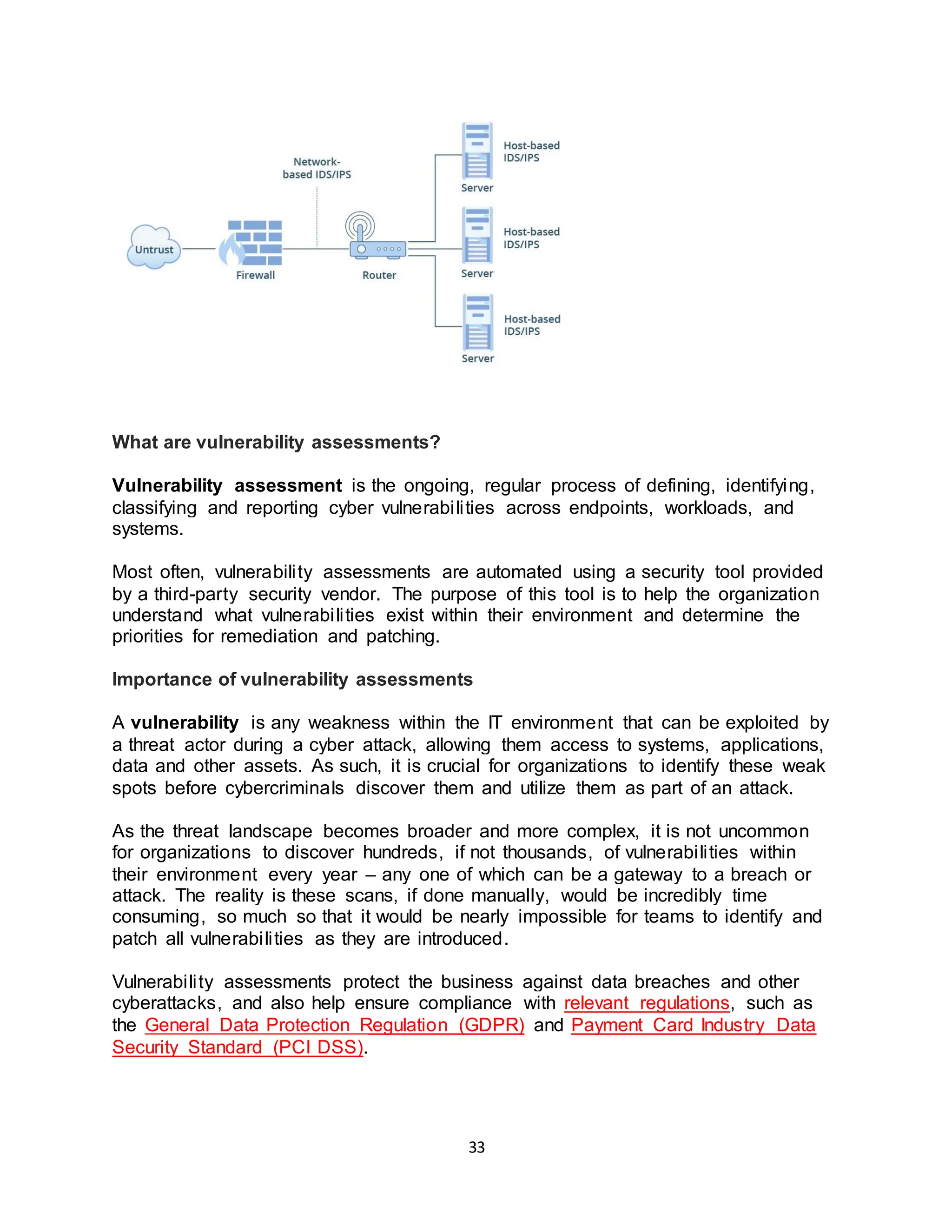
Diagram depicting the functionality of an intrusion detection system
30.
30
An IDS onlyneeds to detect potential threats. It is placed out of band on the network
infrastructure. Consequently, it is not in the real-time communication path between the sender
and receiver of information.
IDS solutions often take advantage of a TAP or SPAN port to analyze a copy of the inline traffic
stream. This ensures that the IDS does not impact inline network performance.
When IDS was developed, the depth of analysis required to detect intrusion could not be
performed quickly enough. The speed would not keep pace with components on the direct
communications path of the network infrastructure.
Network intrusion detection systems are used to detect suspicious activity to catch hackers
before damage is done to the network. There are network-based and host-based intrusion
detection systems. Host-based IDSes are installed on client computers; network-based IDSes are
on the network itself.
An IDS works by looking for deviations from normal activity and known attack signatures.
Anomalous patterns are sent up the stack and examined at protocol and application layers. It can
detect events like DNS poisonings, malformed information packets and Christmas tree scans.
An IDS can be implemented as a network security device or a software application. To protect
data and systems in cloud environments, cloud-based IDSes are also available.
Types of IDSDetection
There are five types of IDS: network-based, host-based, protocol-based, application protocol-
based and hybrid.
The two most common types of IDS are:
1. Network-based intrusion detection system (NIDS)
A network IDS monitors a complete protected network. It is deployed across the infrastructure at
strategic points, such as the most vulnerable subnets. The NIDS monitors all traffic flowing to
and from devices on the network, making determinations based on packet contents and metadata.
2. Host-based intrusion detection system (HIDS)
A host-based IDS monitors the computer infrastructure on which it is installed. In other words, it
is deployed on a specific endpoint to protect it against internal and external threats. The IDS
accomplishes this by analyzing traffic, logging malicious activity and notifying designated
authorities.
3. Protocol-based (PIDS)
A protocol-based intrusion detection system is usually installed on a web server. It monitors and
31.
31
analyzes the protocolbetween a user/device and the server. A PIDS normally sits at the front end
of a server and monitors the behavior and state of the protocol.
4. Application protocol-based (APIDS)
An APIDS is a system or agent that usually sits inside the server party. It tracks and interprets
correspondence on application-specific protocols. For example, this would monitor the SQL
protocol to the middleware while transacting with the web server.
5. Hybrid intrusion detection system
A hybrid intrusion detection system combines two or more intrusion detection approaches. Using
this system, system or host agent data combined with network information for a comprehensive
view of the system. The hybrid intrusion detection system is more powerful compared to other
systems. One example of Hybrid IDS is Prelude.
There is also a subgroup of IDS detection methods, the two most common variants being:
1. Signature-based
A signature-based IDS monitors inbound network traffic, looking for specific patterns and
sequences that match known attack signatures. While it is effective for this purpose, it is
incapable of detecting unidentified attacks with no known patterns.
2. Anomaly-based
The anomaly-based IDS is a relatively newer technology designed to detect unknown attacks,
going beyond the identification of attack signatures. This type of detection instead uses machine
learning to analyze large amounts of network data and traffic.
Anomaly-based IDS creates a defined model of normal activity and uses it to identify anomalous
behavior. However, it is prone to false positives. For example, if a machine demonstrates rare, but
healthy behavior, it is identified as an anomaly. This results in a false alarm.
Why IntrusionDetectionSystems are Important
Cyberattacks are always increasing in complexity and sophistication, and Zero Day Attacks are
common. As a result, network protection technologies must keep pace with new threats, and
businesses must maintain high levels of security.
The objective is to assure secure, trusted communication of information. Therefore, an IDS is
important to the security ecosystem. It operates as a defense for systems security when other
technologies fail.
• Identify security incidents.
• Analyze the quantity and types of attacks.
• Help identify bugs or problems with device configurations.
• Support regulatory compliance (by means of better network visibility and IDS log
documentation).
32.
32
• Improve securityresponses (by means of inspecting data within network packets, rather than
manual census of systems).
While IDSes are useful, they are extended in impact when coupled with IPSes. Intrusion
Prevention Systems (IPS) add the ability to block threats. This has become the dominant
deployment option for IDS/IPS technologies.
Better still is the blend of multiple threat prevention technologies to form a complete solution.
An effective approach is a combination of:
• Vulnerability protection
• Anti-malware
• Anti-spyware
These technologies combined constitute advanced threat protection.
33.
33
What are vulnerabilityassessments?
Vulnerability assessment is the ongoing, regular process of defining, identifying,
classifying and reporting cyber vulnerabilities across endpoints, workloads, and
systems.
Most often, vulnerability assessments are automated using a security tool provided
by a third-party security vendor. The purpose of this tool is to help the organization
understand what vulnerabilities exist within their environment and determine the
priorities for remediation and patching.
Importance of vulnerability assessments
A vulnerability is any weakness within the IT environment that can be exploited by
a threat actor during a cyber attack, allowing them access to systems, applications,
data and other assets. As such, it is crucial for organizations to identify these weak
spots before cybercriminals discover them and utilize them as part of an attack.
As the threat landscape becomes broader and more complex, it is not uncommon
for organizations to discover hundreds, if not thousands, of vulnerabilities within
their environment every year – any one of which can be a gateway to a breach or
attack. The reality is these scans, if done manually, would be incredibly time
consuming, so much so that it would be nearly impossible for teams to identify and
patch all vulnerabilities as they are introduced.
Vulnerability assessments protect the business against data breaches and other
cyberattacks, and also help ensure compliance with relevant regulations, such as
the General Data Protection Regulation (GDPR) and Payment Card Industry Data
Security Standard (PCI DSS).
34.
34
Types of vulnerabilityassessments
A comprehensive vulnerability assessment process leverages several automated
tools to perform a variety of scans across the entire IT environment. This enables
the organization to identify vulnerabilities present across applications, endpoints,
workloads, databases, and systems.
The four main scans conducted as part of the vulnerability assessment process are:
Network-based scan
• Identifies vulnerabilities that can be exploited in network security attacks.
• Includes assessments of traditional networks as well as wireless networks.
• Enforces existing network security controls and policies.
Host-based scan
• Identifies vulnerabilities in systems, servers, containers, workstations, workloads,
or other network hosts.
• Is typically deployed as an agent that can scan monitored devices and other
hosts to identify unauthorized activity, changes, or other system issues.
• Offers enhanced visibility into system configuration and patch history.
Application scan
• Identifies vulnerabilities related to software applications, including the application
architecture, source code, and database.
• Identifies misconfigurations and other security weaknesses in web and network
applications.
Database scan
• Identifies vulnerabilities within the database systems or servers.
• Helps prevent database-specific attacks, such as SQL injections, and identify
other vulnerabilities, such as escalated privileges and misconfigurations.
How to perform a vulnerability assessment
Vulnerability assessments are most commonly performed by automated tools or
software. These solutions typically scan the IT environment, searching for the
signatures of known vulnerabilities that must then be remediated either by another
automated tool or the IT team.
For maximum security protection, once the program scope and processes are
defined, these scans should be conducted continuously to proactively identify
weaknesses in a rapidly changing landscape.
35.
35
5 steps withinthe vulnerability assessment
Most organizations follow these five basic steps when preparing for and conducting
a vulnerability assessment:
1. Program scoping and preparation
During this phase, the IT team defines the scope and goals of the program. The
main objective of this exercise is to accurately scope the attack surface and
understand where the most significant threats exist. Core activity includes:
• Identifying all assets, equipment, and endpoints to be included in the scan, as
well as the software, operating systems, and other applications deployed on the
assets.
• Outlining the corresponding security controls and policies associated with each
asset.
• Determining the impact of each asset in the event of a breach (e.g. does the
asset contain or process sensitive data?
2. Vulnerability testing
In this step, organizations conduct an automated scan of the designated assets to
identify potential vulnerabilities within the environment defined in step one. This
phase almost always involves the use of a third-party tool or support from a
cybersecurity services provider. This tool or vendor relies on existing vulnerability
databases or threat intelligence feeds to detect and classify vulnerabilities.
3. Prioritization
In this stage, organizations review all vulnerabilities surfaced during the assessment
and determine which pose the greatest risk to the business. Those that will have a
significant impact on the organization should be prioritized for remediation.
Prioritization is based on several factors including:
• Scoring of the vulnerability as determined by the vulnerability database or threat
intelligence tool
• Impact to the business if the weakness is exploited (i.e., is sensitive data at risk
as a result of this vulnerability?)
• Known availability of the weakness (i.e., how likely is it that cybercriminals know
about this weakness or has it been exploited it in the past?)
• Ease of exploitation
• Availability of a patch and/or effort required to neutralize the vulnerability
4.Reporting
36.
36
In this phase,the tool produces a comprehensive report that provides the security
team with a snapshot of all vulnerabilities within the environment. The report will
also prioritize these vulnerabilities and provide some guidance on how to remediate
them.
Information contained within the report includes details about the vulnerability, such
as:
• When and where the vulnerability was discovered
• What systems or assets it affects
• Likelihood of exploitation
• Potential damage to the business if exploited
• Availability of a patch and effort required to deploy it
5. Continuous improvement
Because the vulnerability landscape changes day-to-day (if not minute-by-minute),
vulnerability assessments should be conducted regularly and frequently. This will
not only help organizations ensure that they effectively resolved vulnerabilities
identified in past scans, but also help them detect new ones as they arise.
In addition to assessing existing assets (such as networks, databases, hosts and
applications), organizations should also consider incorporating a vulnerability
assessment within the continuous integration / continuous delivery (CI/CD) process.
This will help ensure that vulnerabilities are addressed early within the development
lifecycle, thus patching and protecting these potential exploits before they go live.
Misuse detection/Signature-BasedIntrusion Detection
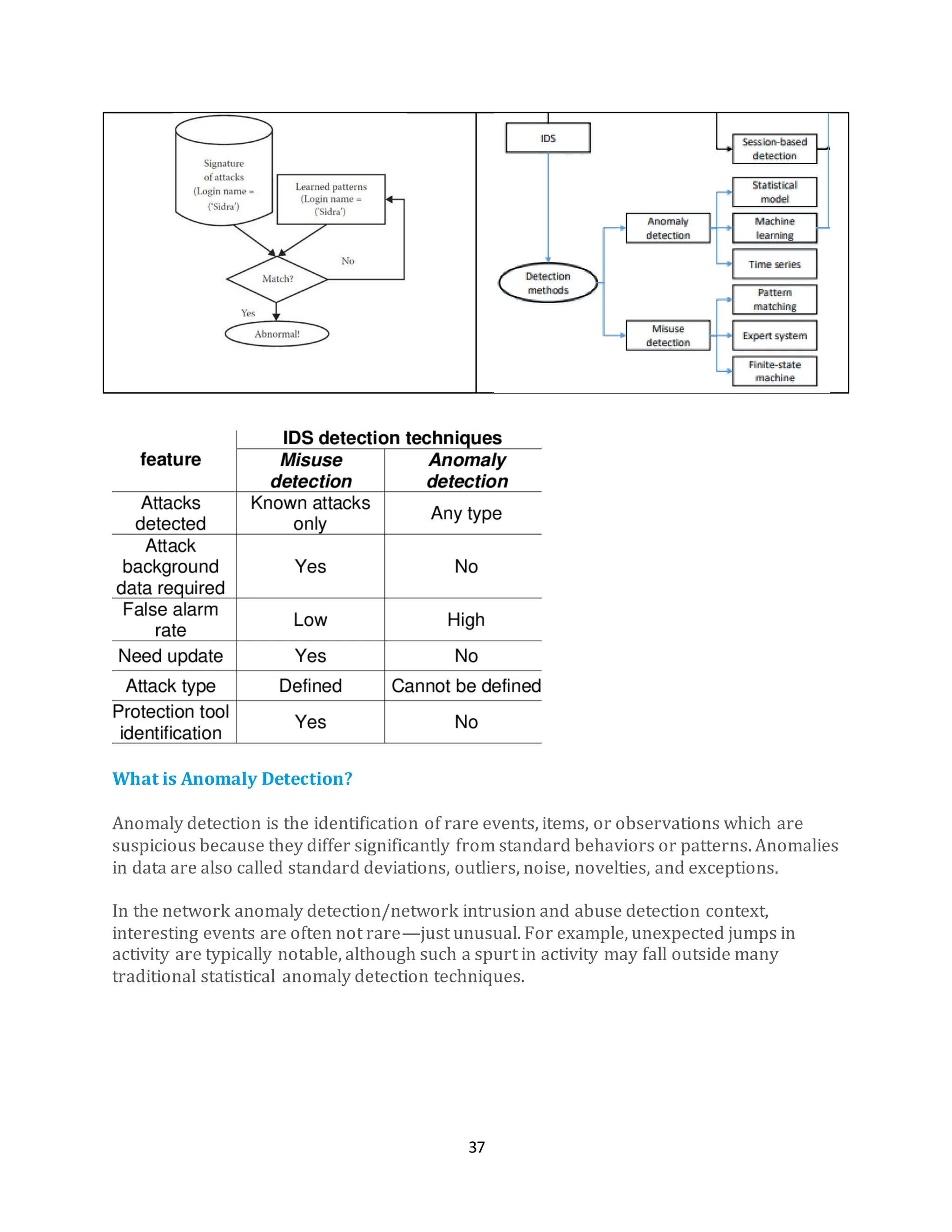
Misuse detection is an approach to detecting computer attacks.
In a misuse detection approach, abnormal system behaviour is defined first, and then all
other behaviour is defined as normal.
It stands against the anomaly detection approach which utilizes the reverse: defining
normal system behaviour first and defining all other behaviour as abnormal.
With misuse detection, anything not known is normal. An example of misuse detection is
the use of attack signatures in an intrusion detection system. Misuse detection has also
been used more generally to refer to all kinds of computer misuse.
Signature-Based Intrusion Detection Systems (SIDS) aim to identify patterns and match
them with known signs of intrusions.
A SIDS relies on a database of previous intrusions. If activity within your network
matches the “signature” of an attack or breach from the database, the detection system
notifies your administrator.
37.
37
What is AnomalyDetection?
Anomaly detection is the identification of rare events, items, or observations which are
suspicious because they differ significantly from standard behaviors or patterns. Anomalies
in data are also called standard deviations, outliers, noise, novelties, and exceptions.
In the network anomaly detection/network intrusion and abuse detection context,
interesting events are often not rare—just unusual. For example, unexpected jumps in
activity are typically notable, although such a spurt in activity may fall outside many
traditional statistical anomaly detection techniques.
38.
38
What Are Anomalies?
Anomaliescan classified generally in several ways:
Network anomalies: Anomalies in network behavior deviate from what is normal,
standard, or expected. To detect network anomalies, network owners must have a concept
of expected or normal behavior. Detection of anomalies in network behavior demands the
continuous monitoring of a network for unexpected trends or events.
Application performance anomalies: These are simply anomalies detected by end-to-end
application performance monitoring. These systems observe application function,
collecting data on all problems, including supporting infrastructure and app dependencies.
When anomalies are detected, rate limiting is triggered and admins are notified about the
source of the issue with the problematic data.
Web application security anomalies: These include any other anomalous or suspicious
web application behavior that might impact security such as CSS attacks or DDOS attacks.
Why Anomaly Detection Is Important
It is critical for network admins to be able to identify and react to changing operational
conditions. Any nuances in the operational conditions of data centers or cloud applications
can signal unacceptable levels of business risk. On the other hand, some divergences may
point to positive growth.
Therefore, anomaly detection is central to extracting essential business insights and
maintaining core operations. Consider these patterns—all of which demand the ability to
discern between normal and abnormal behavior precisely and correctly:
• An online retail business must predict which discounts, events, or new products may
trigger boosts in sales which will increase demand on their web servers.
• An IT security team must prevent hacking and needs to detect abnormal login
patterns and user behaviors.
• A cloud provider has to allot traffic and services and has to assess changes to
infrastructure in light of existing patterns in traffic and past resource failures.
▪ A evidence-based, well-constructed behavioral model can not only represent data
behavior, but also help users identify outliers and engage in meaningful predictive
analysis.
▪ Static alerts and thresholds are not enough, because of the overwhelming scale of
the operational parameters, and because it’s too easy to miss anomalies in false
positives or negatives.
▪ To address these kinds of operational constraints, newer systems use smart
algorithms for identifying outliers in seasonal time series data and accurately
forecasting periodic data patterns.