Ahmed Abdelazeem
Ahmed Abdelazeem
Ahmed Abdelazeem
Ahmed Abdelazeem
STA Basic Concepts
{ Concepts } + { Technique }
Ahmed Abdelazeem
Ahmed Abdelazeem
Ahmed Abdelazeem
03 Constraint Develop
✓ Clock Diagram
✓ Start Point, End Point, Timing Path Groups
✓ What is SDC ?
✓ Clock Creation
✓ Constraining Input/output Paths
✓ Case Analysis / Disable Timing Arcs
✓ False Path
✓ Asynchronous Clock Group
{ Logically Exclusive | Physically Exclusive }
Ahmed Abdelazeem
Ahmed Abdelazeem
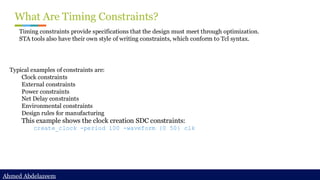
What Are Timing Constraints?
Typical examples of constraints are:
Clock constraints
External constraints
Power constraints
Net Delay constraints
Environmental constraints
Design rules for manufacturing
This example shows the clock creation SDC constraints:
create_clock -period 100 -waveform {0 50} clk
Timing constraints provide specifications that the design must meet through optimization.
STA tools also have their own style of writing constraints, which conform to Tcl syntax.
Ahmed Abdelazeem
Ahmed Abdelazeem
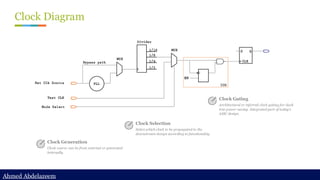
Clock Diagram
Clock Generation
Clock source can be from external or generated
internally
Clock Selection
Select which clock to be propagated to the
downstream design according to functionality
Clock Gating
Architectural or inferred clock gating for clock
tree power saving. Integrated part of today’s
ASIC design.
Ahmed Abdelazeem
Ahmed Abdelazeem
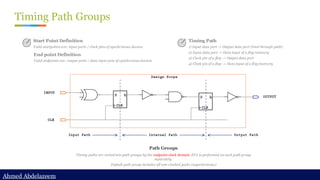
Timing Path Groups
Path Groups
Timing paths are sorted into path groups by the endpoint clock domain. STA is performed on each path group
separately.
Default path group includes all non-clocked paths (asynchronous)
Start Point Definition
Valid startpoints are: input ports / clock pins of synchronous devices
End point Definition
Valid endpoints are: output ports / data input pins of synchronous devices
Timing Path
1) Input data port -> Output data port (Feed through path)
2) Input data port -> Data input of a flop/memory
3) Clock pin of a flop -> Output data port
4) Clock pin of a flop -> Data input of a flop/memory
Ahmed Abdelazeem
Ahmed Abdelazeem
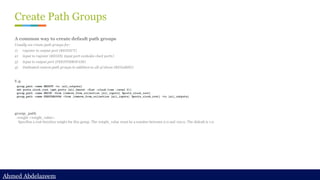
Create Path Groups
A common way to create default path groups
Usually we create path groups for:
1) register to output port (REGOUT)
2) input to register (REGIN, input port excludes clock ports)
3) input to output port (FEEDTHROUGH)
4) Dedicated custom path groups in addition to all of above (REG2REG)
E.g.
group_path
-weight <weight_value>
Specifies a cost function weight for this group. The weight_value must be a number between 0.0 and 100.0. The default is 1.0
Ahmed Abdelazeem
Ahmed Abdelazeem
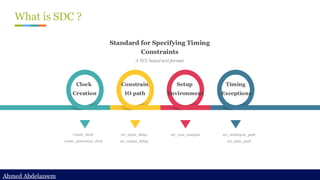
What is SDC ?
Standard for Specifying Timing
Constraints
A TCL based text format
create_clock
create_generated_clock
set_input_delay
set_output_delay
set_case_analysis set_multicycle_path
set_false_path
Clock
Creation
Constrain
IO path
Setup
Environment
Timing
Exceptions
Ahmed Abdelazeem
Ahmed Abdelazeem
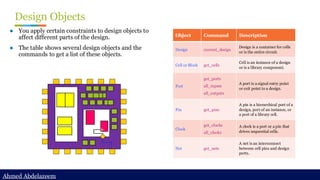
Design Objects
● You apply certain constraints to design objects to
affect different parts of the design.
● The table shows several design objects and the
commands to get a list of these objects.
Object Command Description
Design current_design
Design is a container for cells
or is the entire circuit.
Cell or Block get_cells
Cell is an instance of a design
or is a library component.
Port
get_ports
all_inputs
all_outputs
A port is a signal entry point
or exit point to a design.
Pin get_pins
A pin is a hierarchical port of a
design, port of an instance, or
a port of a library cell.
Clock
get_clocks
all_clocks
A clock is a port or a pin that
drives sequential cells.
Net get_nets
A net is an interconnect
between cell pins and design
ports.
Ahmed Abdelazeem
Ahmed Abdelazeem
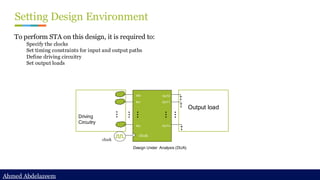
Setting Design Environment
To perform STA on this design, it is required to:
Specify the clocks
Set timing constraints for input and output paths
Define driving circuitry
Set output loads
Design Under Analysis (DUA)
Output load
Driving
Circuitry
clock
IN0
IN1
INn
OUT0
OUT1
OUTn
clock
Ahmed Abdelazeem
Ahmed Abdelazeem
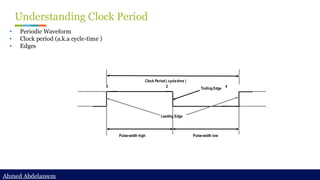
Understanding Clock Period
• Periodic Waveform
• Clock period (a.k.a cycle-time )
• Edges
Clock Period ( cycle-time )
Leading Edge
Trailing Edge
0 2 4
Pulse-width high Pulse-width low
Ahmed Abdelazeem
Ahmed Abdelazeem
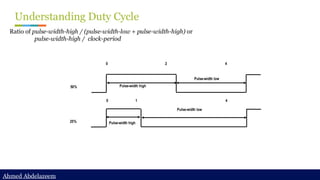
Understanding Duty Cycle
Ratio of pulse-width-high / (pulse-width-low + pulse-width-high) or
pulse-width-high / clock-period
Pulse-width high
Pulse-width low
Pulse-width high
Pulse-width low
0 2 4
0 1 4
50%
25%
Ahmed Abdelazeem
Ahmed Abdelazeem
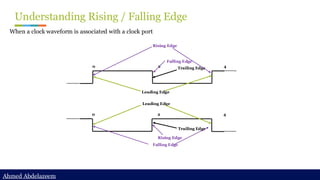
Understanding Rising / Falling Edge
When a clock waveform is associated with a clock port
0 2 4
Leading Edge
Trailing Edge
0 2 4
Leading Edge
Trailing Edge
Rising Edge
Falling Edge
Falling Edge
Rising Edge
Ahmed Abdelazeem
Ahmed Abdelazeem
Understanding Setup & Hold Times
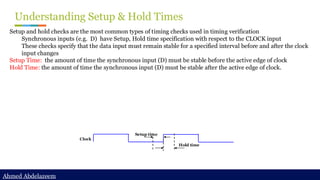
Setup and hold checks are the most common types of timing checks used in timing verification
Synchronous inputs (e.g. D) have Setup, Hold time specification with respect to the CLOCK input
These checks specify that the data input must remain stable for a specified interval before and after the clock
input changes
Setup Time: the amount of time the synchronous input (D) must be stable before the active edge of clock
Hold Time: the amount of time the synchronous input (D) must be stable after the active edge of clock.
Setup time
Hold time
Clock
Ahmed Abdelazeem
Ahmed Abdelazeem
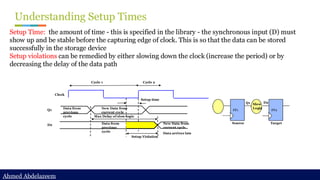
Understanding Setup Times
Setup Time: the amount of time - this is specified in the library - the synchronous input (D) must
show up and be stable before the capturing edge of clock. This is so that the data can be stored
successfully in the storage device
Setup violations can be remedied by either slowing down the clock (increase the period) or by
decreasing the delay of the data path
FF1 FF2
D2
Q1
Source Target
Slow
Logic
Setup time
Clock
Data from
previous
cycle
New Data from
current cycle
New Data from
current cycle
Data from
previous
cycle
Setup Violation
Max Delay of slow logic
Q1
D2
Data arrives late
Cycle 1 Cycle 2
Ahmed Abdelazeem
Ahmed Abdelazeem
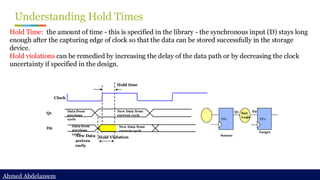
Understanding Hold Times
Hold Time: the amount of time - this is specified in the library - the synchronous input (D) stays long
enough after the capturing edge of clock so that the data can be stored successfully in the storage
device.
Hold violations can be remedied by increasing the delay of the data path or by decreasing the clock
uncertainty if specified in the design.
FF1 FF2
D2
Q1
Source
Target
fast
Logic
Hold time
Clock
Data from
previous
cycle
New Data from
current cycle
New Data from
current cycle
Data from
previous
cycle
Hold Violation
Q1
D2
New Data
arrives
early
Ahmed Abdelazeem
Ahmed Abdelazeem
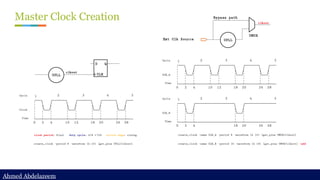
Master Clock Creation
Ahmed Abdelazeem
Ahmed Abdelazeem
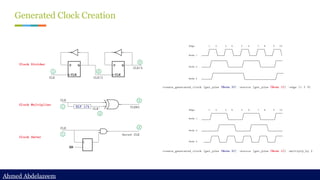
Generated Clock Creation
Ahmed Abdelazeem
Ahmed Abdelazeem
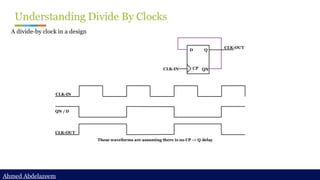
Understanding Divide By Clocks
A divide-by clock in a design
CLK-IN
CLK-OUT
D
CP
Q
QN
CLK-IN
QN / D
CLK-OUT
These waveforms are assuming there is no CP -> Q delay
Ahmed Abdelazeem
Ahmed Abdelazeem
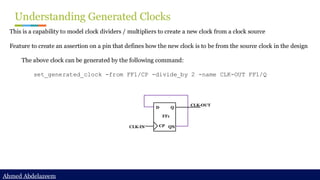
Understanding Generated Clocks
This is a capability to model clock dividers / multipliers to create a new clock from a clock source
Feature to create an assertion on a pin that defines how the new clock is to be from the source clock in the design
The above clock can be generated by the following command:
set_generated_clock -from FF1/CP -divide_by 2 -name CLK-OUT FF1/Q
CLK-IN
CLK-OUT
D
CP
Q
QN
FF1
Ahmed Abdelazeem
Ahmed Abdelazeem
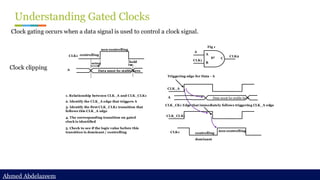
Understanding Gated Clocks
Clock gating occurs when a data signal is used to control a clock signal.
Clock clipping
A
CLK1
CLK2
A
B
C
Fig 1
g1
setup hold
CLK1
A Data must be stable here
non-controlling
controlling
CLK_A
A Data must be stable here
CLK_CLK1
non-controlling
controlling
Triggering edge for Data - A
CLK_CK1 Edge that immediately follows triggering CLK_A edge
CLK1
1. Relationship between CLK_A and CLK_CLK1
2. Identify the CLK_A edge that triggers A
3. Identify the first CLK_CLK1 transition that
follows this CLK_A edge
4. The corresponding transition on gated
clock is identified
5. Check to see if the logic value before this
transition is dominant / controlling
dominant
Ahmed Abdelazeem
Ahmed Abdelazeem
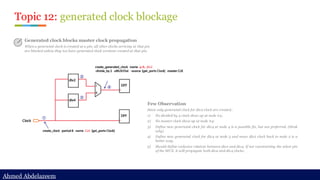
Topic 12: generated clock blockage
Generated clock blocks master clock propagation
When a generated clock is created at a pin, all other clocks arriving at that pin
are blocked unless they too have generated clock versions created at that pin.
Few Observation
Since only generated clock for div2 clock are created..
1) No divided by 4 clock show up at node #4;
2) No master clock show up at node #4;
3) Define new generated clock for div4 at node 4 is a possible fix, but not preferred. (think
why)
4) Define new generated clock for div4 at node 3 and move div2 clock back to node 2 is a
better way.
5) Should define exclusive relation between div2 and div4. If not constraining the select pin
of the MUX, it will propagate both div2 and div4 clocks;
Ahmed Abdelazeem
Ahmed Abdelazeem
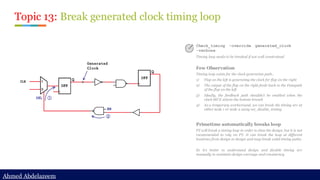
Topic 13: Break generated clock timing loop
Check_timing –override generated_clock
-verbose
Timing loop needs to be breaked if not well constrained
Few Observation
Timing loop exists for the clock generation path..
1) Flop on the left is generating the clock for flop on the right
2) The output of the flop on the right feeds back to the Datapath
of the flop on the left
3) Ideally, the feedback path shouldn’t be enabled when the
clock MUX selects the bottom branch
4) As a temporary workaround, we can break the timing arc at
either node 1 or node 2 using set_disable_timing
Primetime automatically breaks loop
PT will break a timing loop in order to time the design, but it is not
recommended to rely on PT. It can break the loop at different
locations from design to design and may break valid timing paths.
So it’s better to understand design and disable timing arc
manually to maintain design coverage and consistency.
Ahmed Abdelazeem
Ahmed Abdelazeem
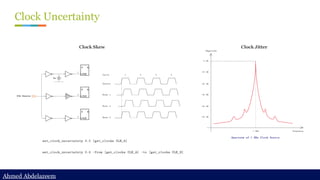
Clock Uncertainty
Clock Skew Clock Jitter
Ahmed Abdelazeem
Ahmed Abdelazeem
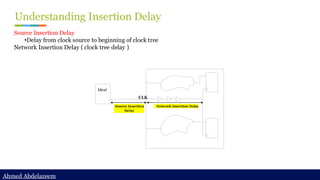
Understanding Insertion Delay
Source Insertion Delay
•Delay from clock source to beginning of clock tree
Network Insertion Delay ( clock tree delay )
Ideal
Network Insertion Delay
CLK
Source Insertion
Delay
Ahmed Abdelazeem
Ahmed Abdelazeem
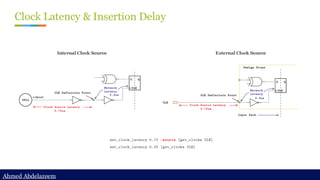
Clock Latency & Insertion Delay
Internal Clock Source External Clock Source
Ahmed Abdelazeem
Ahmed Abdelazeem
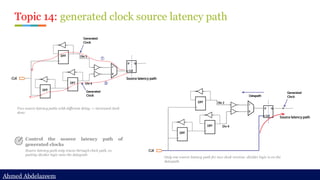
Topic 14: generated clock source latency path
Control the source latency path of
generated clocks
Source latency path only traces through clock path, so
putting divider logic onto the datapath
Two source latency paths with different delay -> increased clock
skew
Only one source latency path for two clock version: divider logic is on the
datapath.
Ahmed Abdelazeem
Ahmed Abdelazeem
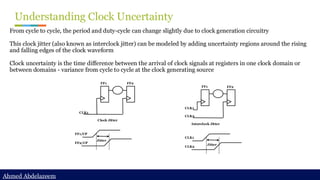
Understanding Clock Uncertainty
From cycle to cycle, the period and duty-cycle can change slightly due to clock generation circuitry
This clock jitter (also known as interclock jitter) can be modeled by adding uncertainty regions around the rising
and falling edges of the clock waveform
Clock uncertainty is the time difference between the arrival of clock signals at registers in one clock domain or
between domains - variance from cycle to cycle at the clock generating source
CLK1
FF1 FF2
Clock Jitter
FF1/CP
FF2/CP
Jitter
CLK1
CLK2
FF1 FF2
Interclock Jitter
CLK1
CLK2
Jitter
Ahmed Abdelazeem
Ahmed Abdelazeem
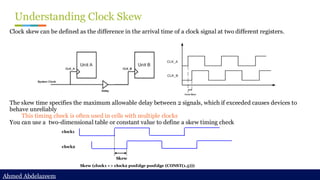
Understanding Clock Skew
Clock skew can be defined as the difference in the arrival time of a clock signal at two different registers.
The skew time specifies the maximum allowable delay between 2 signals, which if exceeded causes devices to
behave unreliably
This timing check is often used in cells with multiple clocks
You can use a two-dimensional table or constant value to define a skew timing check
clock1
clock2
Skew
Skew (clock1 => clock2 posEdge posEdge (CONST(1.5)))
Ahmed Abdelazeem
Ahmed Abdelazeem
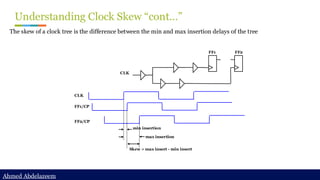
Understanding Clock Skew “cont…”
The skew of a clock tree is the difference between the min and max insertion delays of the tree
FF1/CP
FF2/CP
Skew = max insert - min insert
CLK
FF1 FF2
CLK
min insertion
max insertion
Ahmed Abdelazeem
Ahmed Abdelazeem
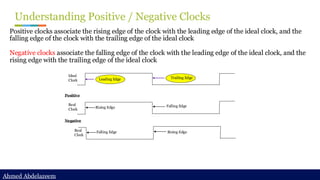
Understanding Positive / Negative Clocks
Positive clocks associate the rising edge of the clock with the leading edge of the ideal clock, and the
falling edge of the clock with the trailing edge of the ideal clock
Negative clocks associate the falling edge of the clock with the leading edge of the ideal clock, and the
rising edge with the trailing edge of the ideal clock
Falling Edge Rising Edge
Falling Edge
Trailing Edge
Rising Edge
Leading Edge
Real
Clock
Real
Clock
Ideal
Clock
Negative
Positive
Ahmed Abdelazeem
Ahmed Abdelazeem
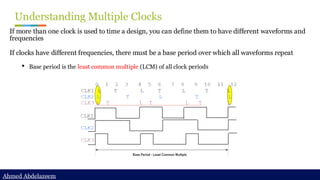
Understanding Multiple Clocks
If more than one clock is used to time a design, you can define them to have different waveforms and
frequencies
If clocks have different frequencies, there must be a base period over which all waveforms repeat
• Base period is the least common multiple (LCM) of all clock periods
Ahmed Abdelazeem
Ahmed Abdelazeem
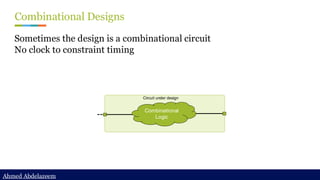
Combinational Designs
Sometimes the design is a combinational circuit
No clock to constraint timing
Circuit under design
Combinational
Logic
Ahmed Abdelazeem
Ahmed Abdelazeem
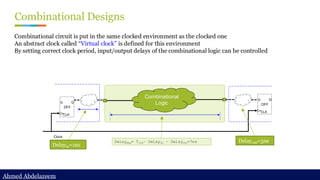
Combinational Designs
Combinational circuit is put in the same clocked environment as the clocked one
An abstract clock called “Virtual clock” is defined for this environment
By setting correct clock period, input/output delays of the combinational logic can be controlled
D Q
CLK
DFF
D Q
CLK
DFF
Clock
Combinational
Logic
Delayin=1ns
Delayout=3ns
Delaymax= Tclk– Delayin – Delayout=7ns
Ahmed Abdelazeem
Ahmed Abdelazeem
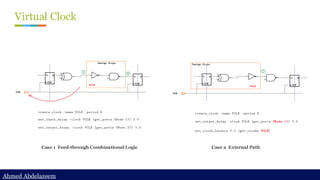
Virtual Clock
Case 1 Feed-through Combinational Logic Case 2 External Path
Ahmed Abdelazeem
Ahmed Abdelazeem
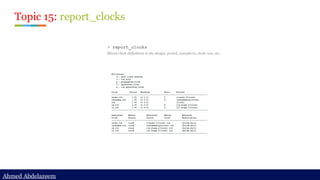
Topic 15: report_clocks
> report_clocks
Shows clock definitions in the design, period, waveform, clock root, etc..
Ahmed Abdelazeem
Ahmed Abdelazeem
Topic 16: report clock path
> report_timing -from [all_fanout -flat -clock_tree -levels 0] -to id_stage_0/clock -nosp
Report_timing to the clock pin of the sequential to check its clock path.
Note: the timing report would show the path is unconstrained
> Functional clock path
Timing path is going through
C3176/A1
Ahmed Abdelazeem
Ahmed Abdelazeem
Topic 17: Show unconstrained path
> Switch to show unconstrained path if there is any
set_app_var timing_report_uncontrained_path [true|false]
By default, report_timing or get_timing_paths command will only search for constrained path.
But sometimes we want to debug unconstrained path, so by turning it on, it allows you to check
timing path in most cases even if it is not constrained.
Ahmed Abdelazeem
Ahmed Abdelazeem
Ideal network
> Clock network is usually treated as ideal network before CTS
(clock tree synthesis)
- Clock network has a very large fanout, basically all sequential elements need clock;
- Clock path delay should be controlled and minimized in most case;
- Clock skews should be minimized during CTS.
- To avoid pre-synthesized clock network introduce large load into the timing path in the
design and adversely affect timing optimization, clock network needs to be treated as ideal
in pre-layout/pre-CTS stage.
> Set/Reset/test enable signals are also usually treated as ideal
network
- These signals don’t need to have balanced skew, but still need buffer tree to split the load
and meet design rule constraints (DRC)
- Also, to avoid large load show on these nets to affect overall timing optimization, these nets
should be set to ideal.
set_ideal_network
Specifies a list of objects (ports, pins, or nets) to mark as the sources
of an ideal network.
Source object can be:
• Input ports / Internal leaf pin
• Internal net → only with -no_propagate option. all the net’s
global driver pins are marked as ideal network source.
The -no_propagate option is very useful when you want to target a
specific net and cell. It only set ideal attribute to the net directly
connected to the ideal network sources. With this option, the ideal
attribute won’t pass through logic gates.
DRC checking is turned off so the nets in an ideal network are free of
max_capacitance, max_fanout, and max_transition design rule
constraints
In addition to disabling timing updates and timing optimizations, all
cells and nets in the ideal network have the dont_touch attribute set.
The latency and transition times of an ideal network are 0 by default,
but you can override them by using the set_ideal_latency and
set_ideal_transition commands.
➢ What are ideal nets/network
Ideal nets are networks of nets that are free from the max_cap/max_fanout DRC
Ideal networks, which are an extension of ideal nets, incorporate automatic propagation of the
ideal attribute.
Ahmed Abdelazeem
Ahmed Abdelazeem
Ideal network
Step 1: set_ideal_network at the clock source
set_ideal_network [get_ports clock]
Original clock path
Ahmed Abdelazeem
Ahmed Abdelazeem
Ideal network
Rule #1:
A combinational cell is marked as ideal if all of its input pins are either ideal or
attached to a constant net (and other input pins are ideal).
Setting the tenable to be ideal so u3479 will also become ideal
Step 2: set_ideal_network at the tenable port
set_ideal_network [get_ports tenable]
Ahmed Abdelazeem
Ahmed Abdelazeem
Ideal network
Step 1: set_ideal_network with no_propagate
set_ideal_network [get_nets cachememory/n3490] -no_propagate
Original clock path Rule #2
The size_only attribute is set on all cells of ideal network sources. If nets are specified, size_only
is set on all cells that are cells of the specified nets' global driver pins. This guarantees that ideal
network sources are not optimized away by compile.
Ahmed Abdelazeem
Ahmed Abdelazeem
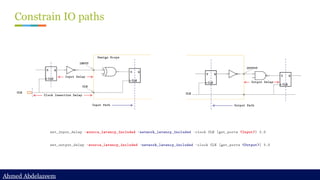
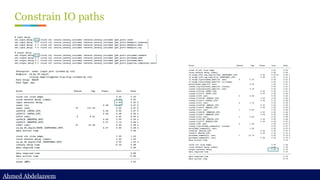
Constrain IO paths
Ahmed Abdelazeem
Ahmed Abdelazeem
Constrain IO paths
Ahmed Abdelazeem
Ahmed Abdelazeem
Constrain IO paths (cont’d)
set_driving_cell
set_driving_cell -lib_cell BFN [get_ports A]
set_load
set_load [get_attribute [get_lib_pins NAND2/A1] pin_capacitance]
[get_ports B]
Ahmed Abdelazeem
Ahmed Abdelazeem
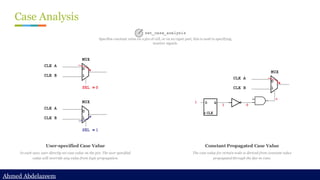
Case Analysis
User-specified Case Value
In such case, user directly set case value on the pin. The user specified
value will override any value from logic propagation.
Constant Propagated Case Value
The case value for certain node is derived from constant value
propagated through the fan-in cone.
set_case_analysis
Specifies constant value on a pin of cell, or on an input port, this is used to specifying
inactive signals.
Ahmed Abdelazeem
Ahmed Abdelazeem
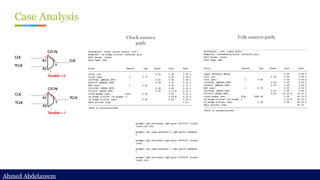
Case Analysis
Clock source
path
Tclk source path
Ahmed Abdelazeem
Ahmed Abdelazeem
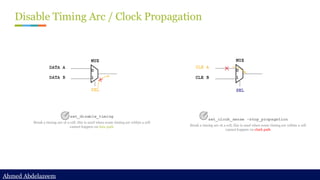
Disable Timing Arc / Clock Propagation
set_disable_timing
Break a timing arc of a cell, this is used when some timing arc within a cell
cannot happen on data path
set_clock_sense -stop_propagation
Break a timing arc of a cell, this is used when some timing arc within a cell
cannot happen on clock path
Ahmed Abdelazeem
Ahmed Abdelazeem
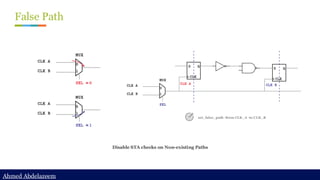
False Path
set_false_path -from CLK_A -to CLK_B
Disable STA checks on Non-existing Paths
Ahmed Abdelazeem
Ahmed Abdelazeem
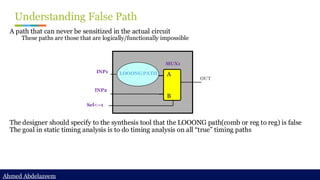
Understanding False Path
A path that can never be sensitized in the actual circuit
These paths are those that are logically/functionally impossible
The designer should specify to the synthesis tool that the LOOONG path(comb or reg to reg) is false
The goal in static timing analysis is to do timing analysis on all “true” timing paths
A
B
INP2
INP1 LOOONG PATH
Sel<--1
OUT
MUX1
Ahmed Abdelazeem
Ahmed Abdelazeem
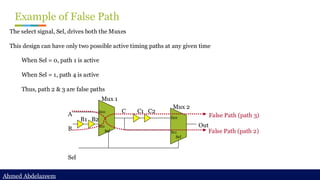
Example of False Path
The select signal, Sel, drives both the Muxes
This design can have only two possible active timing paths at any given time
When Sel = 0, path 1 is active
When Sel = 1, path 4 is active
Thus, path 2 & 3 are false paths
A
B
Sel
B1 B2
C C1 C2
In0
In1
Sel
In0
In1
Sel
Mux 1
Mux 2
Out
False Path (path 3)
False Path (path 2)
Ahmed Abdelazeem
Ahmed Abdelazeem
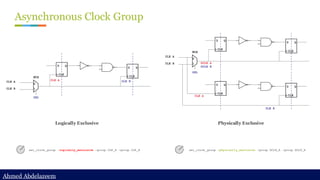
Asynchronous Clock Group
set_clock_group -logically_exclusive -group CLK_A -group CLK_B set_clock_group -physically_exclusive -group GCLK_A -group GCLK_B
Logically Exclusive Physically Exclusive
Ahmed Abdelazeem
Ahmed Abdelazeem
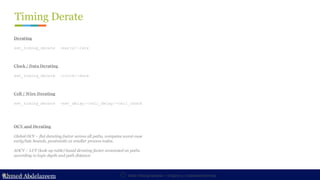
Timing Derate
Static Timing Analysis – Chapter 3 : Constraint Develop
ASIC Boot Camp
Derating
set_timing_derate -early/-late
Clock / Data Derating
set_timing_derate -clock/-date
OCV and Derating
Global OCV – flat derating factor across all paths, computes worst-case
early/late bounds, pessimistic at smaller process nodes.
AOCV – LUT (look-up table) based derating factor annotated on paths
according to logic depth and path distance
Cell / Wire Derating
set_timing_derate -net_delay/-cell_delay/-cell_check
Ahmed Abdelazeem
Ahmed Abdelazeem
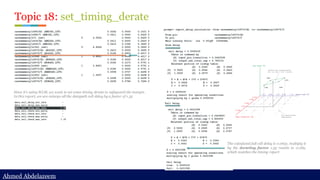
Since it’s using WLM, we want to set some timing derate to safeguard the margin.
In this report, we are enlarge all the datapath cell delay by a factor of 1.35
The calculated fall cell delay is 0.0631, multiply it
by the derating factor 1.35 results in 0.085,
which matches the timing report
Topic 18: set_timing_derate
Ahmed Abdelazeem
Ahmed Abdelazeem
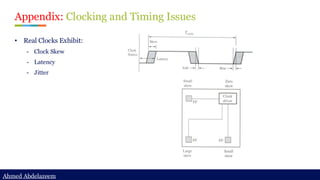
Appendix: Clocking and Timing Issues
• Real Clocks Exhibit:
- Clock Skew
- Latency
- Jitter
Ahmed Abdelazeem
Ahmed Abdelazeem
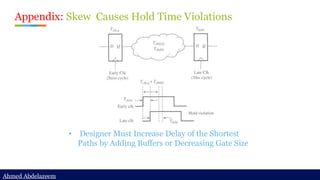
Appendix: Skew Causes Hold Time Violations
• Designer Must Increase Delay of the Shortest
Paths by Adding Buffers or Decreasing Gate Size
Ahmed Abdelazeem
Ahmed Abdelazeem
Chapter Summary
✓ Clock Diagram
✓ Start Point, End Point, Timing Path Groups
✓ What is SDC ?
✓ Clock Creation
✓ Constraining Input/output Paths
✓ Case Analysis / Disable Timing Arcs
✓ False Path
✓ Asynchronous Clock Group
{ Logically Exclusive | Physically Exclusive }
Ahmed Abdelazeem
Ahmed Abdelazeem
Ahmed Abdelazeem
Ahmed Abdelazeem
Thank You ☺

[Back2School] Constraint Develop.pdf- Chapter 3

  • 1.
    Ahmed Abdelazeem Ahmed Abdelazeem AhmedAbdelazeem Ahmed Abdelazeem STA Basic Concepts { Concepts } + { Technique } Ahmed Abdelazeem
  • 2.
    Ahmed Abdelazeem Ahmed Abdelazeem 03Constraint Develop ✓ Clock Diagram ✓ Start Point, End Point, Timing Path Groups ✓ What is SDC ? ✓ Clock Creation ✓ Constraining Input/output Paths ✓ Case Analysis / Disable Timing Arcs ✓ False Path ✓ Asynchronous Clock Group { Logically Exclusive | Physically Exclusive }
  • 3.
    Ahmed Abdelazeem Ahmed Abdelazeem WhatAre Timing Constraints? Typical examples of constraints are: Clock constraints External constraints Power constraints Net Delay constraints Environmental constraints Design rules for manufacturing This example shows the clock creation SDC constraints: create_clock -period 100 -waveform {0 50} clk Timing constraints provide specifications that the design must meet through optimization. STA tools also have their own style of writing constraints, which conform to Tcl syntax.
  • 4.
    Ahmed Abdelazeem Ahmed Abdelazeem ClockDiagram Clock Generation Clock source can be from external or generated internally Clock Selection Select which clock to be propagated to the downstream design according to functionality Clock Gating Architectural or inferred clock gating for clock tree power saving. Integrated part of today’s ASIC design.
  • 5.
    Ahmed Abdelazeem Ahmed Abdelazeem TimingPath Groups Path Groups Timing paths are sorted into path groups by the endpoint clock domain. STA is performed on each path group separately. Default path group includes all non-clocked paths (asynchronous) Start Point Definition Valid startpoints are: input ports / clock pins of synchronous devices End point Definition Valid endpoints are: output ports / data input pins of synchronous devices Timing Path 1) Input data port -> Output data port (Feed through path) 2) Input data port -> Data input of a flop/memory 3) Clock pin of a flop -> Output data port 4) Clock pin of a flop -> Data input of a flop/memory
  • 6.
    Ahmed Abdelazeem Ahmed Abdelazeem CreatePath Groups A common way to create default path groups Usually we create path groups for: 1) register to output port (REGOUT) 2) input to register (REGIN, input port excludes clock ports) 3) input to output port (FEEDTHROUGH) 4) Dedicated custom path groups in addition to all of above (REG2REG) E.g. group_path -weight <weight_value> Specifies a cost function weight for this group. The weight_value must be a number between 0.0 and 100.0. The default is 1.0
  • 7.
    Ahmed Abdelazeem Ahmed Abdelazeem Whatis SDC ? Standard for Specifying Timing Constraints A TCL based text format create_clock create_generated_clock set_input_delay set_output_delay set_case_analysis set_multicycle_path set_false_path Clock Creation Constrain IO path Setup Environment Timing Exceptions
  • 8.
    Ahmed Abdelazeem Ahmed Abdelazeem DesignObjects ● You apply certain constraints to design objects to affect different parts of the design. ● The table shows several design objects and the commands to get a list of these objects. Object Command Description Design current_design Design is a container for cells or is the entire circuit. Cell or Block get_cells Cell is an instance of a design or is a library component. Port get_ports all_inputs all_outputs A port is a signal entry point or exit point to a design. Pin get_pins A pin is a hierarchical port of a design, port of an instance, or a port of a library cell. Clock get_clocks all_clocks A clock is a port or a pin that drives sequential cells. Net get_nets A net is an interconnect between cell pins and design ports.
  • 9.
    Ahmed Abdelazeem Ahmed Abdelazeem SettingDesign Environment To perform STA on this design, it is required to: Specify the clocks Set timing constraints for input and output paths Define driving circuitry Set output loads Design Under Analysis (DUA) Output load Driving Circuitry clock IN0 IN1 INn OUT0 OUT1 OUTn clock
  • 10.
    Ahmed Abdelazeem Ahmed Abdelazeem UnderstandingClock Period • Periodic Waveform • Clock period (a.k.a cycle-time ) • Edges Clock Period ( cycle-time ) Leading Edge Trailing Edge 0 2 4 Pulse-width high Pulse-width low
  • 11.
    Ahmed Abdelazeem Ahmed Abdelazeem UnderstandingDuty Cycle Ratio of pulse-width-high / (pulse-width-low + pulse-width-high) or pulse-width-high / clock-period Pulse-width high Pulse-width low Pulse-width high Pulse-width low 0 2 4 0 1 4 50% 25%
  • 12.
    Ahmed Abdelazeem Ahmed Abdelazeem UnderstandingRising / Falling Edge When a clock waveform is associated with a clock port 0 2 4 Leading Edge Trailing Edge 0 2 4 Leading Edge Trailing Edge Rising Edge Falling Edge Falling Edge Rising Edge
  • 13.
    Ahmed Abdelazeem Ahmed Abdelazeem UnderstandingSetup & Hold Times Setup and hold checks are the most common types of timing checks used in timing verification Synchronous inputs (e.g. D) have Setup, Hold time specification with respect to the CLOCK input These checks specify that the data input must remain stable for a specified interval before and after the clock input changes Setup Time: the amount of time the synchronous input (D) must be stable before the active edge of clock Hold Time: the amount of time the synchronous input (D) must be stable after the active edge of clock. Setup time Hold time Clock
  • 14.
    Ahmed Abdelazeem Ahmed Abdelazeem UnderstandingSetup Times Setup Time: the amount of time - this is specified in the library - the synchronous input (D) must show up and be stable before the capturing edge of clock. This is so that the data can be stored successfully in the storage device Setup violations can be remedied by either slowing down the clock (increase the period) or by decreasing the delay of the data path FF1 FF2 D2 Q1 Source Target Slow Logic Setup time Clock Data from previous cycle New Data from current cycle New Data from current cycle Data from previous cycle Setup Violation Max Delay of slow logic Q1 D2 Data arrives late Cycle 1 Cycle 2
  • 15.
    Ahmed Abdelazeem Ahmed Abdelazeem UnderstandingHold Times Hold Time: the amount of time - this is specified in the library - the synchronous input (D) stays long enough after the capturing edge of clock so that the data can be stored successfully in the storage device. Hold violations can be remedied by increasing the delay of the data path or by decreasing the clock uncertainty if specified in the design. FF1 FF2 D2 Q1 Source Target fast Logic Hold time Clock Data from previous cycle New Data from current cycle New Data from current cycle Data from previous cycle Hold Violation Q1 D2 New Data arrives early
  • 16.
  • 17.
  • 18.
    Ahmed Abdelazeem Ahmed Abdelazeem UnderstandingDivide By Clocks A divide-by clock in a design CLK-IN CLK-OUT D CP Q QN CLK-IN QN / D CLK-OUT These waveforms are assuming there is no CP -> Q delay
  • 19.
    Ahmed Abdelazeem Ahmed Abdelazeem UnderstandingGenerated Clocks This is a capability to model clock dividers / multipliers to create a new clock from a clock source Feature to create an assertion on a pin that defines how the new clock is to be from the source clock in the design The above clock can be generated by the following command: set_generated_clock -from FF1/CP -divide_by 2 -name CLK-OUT FF1/Q CLK-IN CLK-OUT D CP Q QN FF1
  • 20.
    Ahmed Abdelazeem Ahmed Abdelazeem UnderstandingGated Clocks Clock gating occurs when a data signal is used to control a clock signal. Clock clipping A CLK1 CLK2 A B C Fig 1 g1 setup hold CLK1 A Data must be stable here non-controlling controlling CLK_A A Data must be stable here CLK_CLK1 non-controlling controlling Triggering edge for Data - A CLK_CK1 Edge that immediately follows triggering CLK_A edge CLK1 1. Relationship between CLK_A and CLK_CLK1 2. Identify the CLK_A edge that triggers A 3. Identify the first CLK_CLK1 transition that follows this CLK_A edge 4. The corresponding transition on gated clock is identified 5. Check to see if the logic value before this transition is dominant / controlling dominant
  • 21.
    Ahmed Abdelazeem Ahmed Abdelazeem Topic12: generated clock blockage Generated clock blocks master clock propagation When a generated clock is created at a pin, all other clocks arriving at that pin are blocked unless they too have generated clock versions created at that pin. Few Observation Since only generated clock for div2 clock are created.. 1) No divided by 4 clock show up at node #4; 2) No master clock show up at node #4; 3) Define new generated clock for div4 at node 4 is a possible fix, but not preferred. (think why) 4) Define new generated clock for div4 at node 3 and move div2 clock back to node 2 is a better way. 5) Should define exclusive relation between div2 and div4. If not constraining the select pin of the MUX, it will propagate both div2 and div4 clocks;
  • 22.
    Ahmed Abdelazeem Ahmed Abdelazeem Topic13: Break generated clock timing loop Check_timing –override generated_clock -verbose Timing loop needs to be breaked if not well constrained Few Observation Timing loop exists for the clock generation path.. 1) Flop on the left is generating the clock for flop on the right 2) The output of the flop on the right feeds back to the Datapath of the flop on the left 3) Ideally, the feedback path shouldn’t be enabled when the clock MUX selects the bottom branch 4) As a temporary workaround, we can break the timing arc at either node 1 or node 2 using set_disable_timing Primetime automatically breaks loop PT will break a timing loop in order to time the design, but it is not recommended to rely on PT. It can break the loop at different locations from design to design and may break valid timing paths. So it’s better to understand design and disable timing arc manually to maintain design coverage and consistency.
  • 23.
    Ahmed Abdelazeem Ahmed Abdelazeem ClockUncertainty Clock Skew Clock Jitter
  • 24.
    Ahmed Abdelazeem Ahmed Abdelazeem UnderstandingInsertion Delay Source Insertion Delay •Delay from clock source to beginning of clock tree Network Insertion Delay ( clock tree delay ) Ideal Network Insertion Delay CLK Source Insertion Delay
  • 25.
    Ahmed Abdelazeem Ahmed Abdelazeem ClockLatency & Insertion Delay Internal Clock Source External Clock Source
  • 26.
    Ahmed Abdelazeem Ahmed Abdelazeem Topic14: generated clock source latency path Control the source latency path of generated clocks Source latency path only traces through clock path, so putting divider logic onto the datapath Two source latency paths with different delay -> increased clock skew Only one source latency path for two clock version: divider logic is on the datapath.
  • 27.
    Ahmed Abdelazeem Ahmed Abdelazeem UnderstandingClock Uncertainty From cycle to cycle, the period and duty-cycle can change slightly due to clock generation circuitry This clock jitter (also known as interclock jitter) can be modeled by adding uncertainty regions around the rising and falling edges of the clock waveform Clock uncertainty is the time difference between the arrival of clock signals at registers in one clock domain or between domains - variance from cycle to cycle at the clock generating source CLK1 FF1 FF2 Clock Jitter FF1/CP FF2/CP Jitter CLK1 CLK2 FF1 FF2 Interclock Jitter CLK1 CLK2 Jitter
  • 28.
    Ahmed Abdelazeem Ahmed Abdelazeem UnderstandingClock Skew Clock skew can be defined as the difference in the arrival time of a clock signal at two different registers. The skew time specifies the maximum allowable delay between 2 signals, which if exceeded causes devices to behave unreliably This timing check is often used in cells with multiple clocks You can use a two-dimensional table or constant value to define a skew timing check clock1 clock2 Skew Skew (clock1 => clock2 posEdge posEdge (CONST(1.5)))
  • 29.
    Ahmed Abdelazeem Ahmed Abdelazeem UnderstandingClock Skew “cont…” The skew of a clock tree is the difference between the min and max insertion delays of the tree FF1/CP FF2/CP Skew = max insert - min insert CLK FF1 FF2 CLK min insertion max insertion
  • 30.
    Ahmed Abdelazeem Ahmed Abdelazeem UnderstandingPositive / Negative Clocks Positive clocks associate the rising edge of the clock with the leading edge of the ideal clock, and the falling edge of the clock with the trailing edge of the ideal clock Negative clocks associate the falling edge of the clock with the leading edge of the ideal clock, and the rising edge with the trailing edge of the ideal clock Falling Edge Rising Edge Falling Edge Trailing Edge Rising Edge Leading Edge Real Clock Real Clock Ideal Clock Negative Positive
  • 31.
    Ahmed Abdelazeem Ahmed Abdelazeem UnderstandingMultiple Clocks If more than one clock is used to time a design, you can define them to have different waveforms and frequencies If clocks have different frequencies, there must be a base period over which all waveforms repeat • Base period is the least common multiple (LCM) of all clock periods
  • 32.
    Ahmed Abdelazeem Ahmed Abdelazeem CombinationalDesigns Sometimes the design is a combinational circuit No clock to constraint timing Circuit under design Combinational Logic
  • 33.
    Ahmed Abdelazeem Ahmed Abdelazeem CombinationalDesigns Combinational circuit is put in the same clocked environment as the clocked one An abstract clock called “Virtual clock” is defined for this environment By setting correct clock period, input/output delays of the combinational logic can be controlled D Q CLK DFF D Q CLK DFF Clock Combinational Logic Delayin=1ns Delayout=3ns Delaymax= Tclk– Delayin – Delayout=7ns
  • 34.
    Ahmed Abdelazeem Ahmed Abdelazeem VirtualClock Case 1 Feed-through Combinational Logic Case 2 External Path
  • 35.
    Ahmed Abdelazeem Ahmed Abdelazeem Topic15: report_clocks > report_clocks Shows clock definitions in the design, period, waveform, clock root, etc..
  • 36.
    Ahmed Abdelazeem Ahmed Abdelazeem Topic16: report clock path > report_timing -from [all_fanout -flat -clock_tree -levels 0] -to id_stage_0/clock -nosp Report_timing to the clock pin of the sequential to check its clock path. Note: the timing report would show the path is unconstrained > Functional clock path Timing path is going through C3176/A1
  • 37.
    Ahmed Abdelazeem Ahmed Abdelazeem Topic17: Show unconstrained path > Switch to show unconstrained path if there is any set_app_var timing_report_uncontrained_path [true|false] By default, report_timing or get_timing_paths command will only search for constrained path. But sometimes we want to debug unconstrained path, so by turning it on, it allows you to check timing path in most cases even if it is not constrained.
  • 38.
    Ahmed Abdelazeem Ahmed Abdelazeem Idealnetwork > Clock network is usually treated as ideal network before CTS (clock tree synthesis) - Clock network has a very large fanout, basically all sequential elements need clock; - Clock path delay should be controlled and minimized in most case; - Clock skews should be minimized during CTS. - To avoid pre-synthesized clock network introduce large load into the timing path in the design and adversely affect timing optimization, clock network needs to be treated as ideal in pre-layout/pre-CTS stage. > Set/Reset/test enable signals are also usually treated as ideal network - These signals don’t need to have balanced skew, but still need buffer tree to split the load and meet design rule constraints (DRC) - Also, to avoid large load show on these nets to affect overall timing optimization, these nets should be set to ideal. set_ideal_network Specifies a list of objects (ports, pins, or nets) to mark as the sources of an ideal network. Source object can be: • Input ports / Internal leaf pin • Internal net → only with -no_propagate option. all the net’s global driver pins are marked as ideal network source. The -no_propagate option is very useful when you want to target a specific net and cell. It only set ideal attribute to the net directly connected to the ideal network sources. With this option, the ideal attribute won’t pass through logic gates. DRC checking is turned off so the nets in an ideal network are free of max_capacitance, max_fanout, and max_transition design rule constraints In addition to disabling timing updates and timing optimizations, all cells and nets in the ideal network have the dont_touch attribute set. The latency and transition times of an ideal network are 0 by default, but you can override them by using the set_ideal_latency and set_ideal_transition commands. ➢ What are ideal nets/network Ideal nets are networks of nets that are free from the max_cap/max_fanout DRC Ideal networks, which are an extension of ideal nets, incorporate automatic propagation of the ideal attribute.
  • 39.
    Ahmed Abdelazeem Ahmed Abdelazeem Idealnetwork Step 1: set_ideal_network at the clock source set_ideal_network [get_ports clock] Original clock path
  • 40.
    Ahmed Abdelazeem Ahmed Abdelazeem Idealnetwork Rule #1: A combinational cell is marked as ideal if all of its input pins are either ideal or attached to a constant net (and other input pins are ideal). Setting the tenable to be ideal so u3479 will also become ideal Step 2: set_ideal_network at the tenable port set_ideal_network [get_ports tenable]
  • 41.
    Ahmed Abdelazeem Ahmed Abdelazeem Idealnetwork Step 1: set_ideal_network with no_propagate set_ideal_network [get_nets cachememory/n3490] -no_propagate Original clock path Rule #2 The size_only attribute is set on all cells of ideal network sources. If nets are specified, size_only is set on all cells that are cells of the specified nets' global driver pins. This guarantees that ideal network sources are not optimized away by compile.
  • 42.
  • 43.
  • 44.
    Ahmed Abdelazeem Ahmed Abdelazeem ConstrainIO paths (cont’d) set_driving_cell set_driving_cell -lib_cell BFN [get_ports A] set_load set_load [get_attribute [get_lib_pins NAND2/A1] pin_capacitance] [get_ports B]
  • 45.
    Ahmed Abdelazeem Ahmed Abdelazeem CaseAnalysis User-specified Case Value In such case, user directly set case value on the pin. The user specified value will override any value from logic propagation. Constant Propagated Case Value The case value for certain node is derived from constant value propagated through the fan-in cone. set_case_analysis Specifies constant value on a pin of cell, or on an input port, this is used to specifying inactive signals.
  • 46.
    Ahmed Abdelazeem Ahmed Abdelazeem CaseAnalysis Clock source path Tclk source path
  • 47.
    Ahmed Abdelazeem Ahmed Abdelazeem DisableTiming Arc / Clock Propagation set_disable_timing Break a timing arc of a cell, this is used when some timing arc within a cell cannot happen on data path set_clock_sense -stop_propagation Break a timing arc of a cell, this is used when some timing arc within a cell cannot happen on clock path
  • 48.
    Ahmed Abdelazeem Ahmed Abdelazeem FalsePath set_false_path -from CLK_A -to CLK_B Disable STA checks on Non-existing Paths
  • 49.
    Ahmed Abdelazeem Ahmed Abdelazeem UnderstandingFalse Path A path that can never be sensitized in the actual circuit These paths are those that are logically/functionally impossible The designer should specify to the synthesis tool that the LOOONG path(comb or reg to reg) is false The goal in static timing analysis is to do timing analysis on all “true” timing paths A B INP2 INP1 LOOONG PATH Sel<--1 OUT MUX1
  • 50.
    Ahmed Abdelazeem Ahmed Abdelazeem Exampleof False Path The select signal, Sel, drives both the Muxes This design can have only two possible active timing paths at any given time When Sel = 0, path 1 is active When Sel = 1, path 4 is active Thus, path 2 & 3 are false paths A B Sel B1 B2 C C1 C2 In0 In1 Sel In0 In1 Sel Mux 1 Mux 2 Out False Path (path 3) False Path (path 2)
  • 51.
    Ahmed Abdelazeem Ahmed Abdelazeem AsynchronousClock Group set_clock_group -logically_exclusive -group CLK_A -group CLK_B set_clock_group -physically_exclusive -group GCLK_A -group GCLK_B Logically Exclusive Physically Exclusive
  • 52.
    Ahmed Abdelazeem Ahmed Abdelazeem TimingDerate Static Timing Analysis – Chapter 3 : Constraint Develop ASIC Boot Camp Derating set_timing_derate -early/-late Clock / Data Derating set_timing_derate -clock/-date OCV and Derating Global OCV – flat derating factor across all paths, computes worst-case early/late bounds, pessimistic at smaller process nodes. AOCV – LUT (look-up table) based derating factor annotated on paths according to logic depth and path distance Cell / Wire Derating set_timing_derate -net_delay/-cell_delay/-cell_check
  • 53.
    Ahmed Abdelazeem Ahmed Abdelazeem Sinceit’s using WLM, we want to set some timing derate to safeguard the margin. In this report, we are enlarge all the datapath cell delay by a factor of 1.35 The calculated fall cell delay is 0.0631, multiply it by the derating factor 1.35 results in 0.085, which matches the timing report Topic 18: set_timing_derate
  • 54.
    Ahmed Abdelazeem Ahmed Abdelazeem Appendix:Clocking and Timing Issues • Real Clocks Exhibit: - Clock Skew - Latency - Jitter
  • 55.
    Ahmed Abdelazeem Ahmed Abdelazeem Appendix:Skew Causes Hold Time Violations • Designer Must Increase Delay of the Shortest Paths by Adding Buffers or Decreasing Gate Size
  • 56.
    Ahmed Abdelazeem Ahmed Abdelazeem ChapterSummary ✓ Clock Diagram ✓ Start Point, End Point, Timing Path Groups ✓ What is SDC ? ✓ Clock Creation ✓ Constraining Input/output Paths ✓ Case Analysis / Disable Timing Arcs ✓ False Path ✓ Asynchronous Clock Group { Logically Exclusive | Physically Exclusive }
  • 57.
    Ahmed Abdelazeem Ahmed Abdelazeem AhmedAbdelazeem Ahmed Abdelazeem Thank You ☺