
AUGMENTED REALITYAUGMENTED REALITY
THE 8TH MASS MEDIUMTHE 8TH MASS MEDIUM
The first medium that takes Experiences “The first medium that takes Experiences “Out of the BoxOut of the Box””
Augmented RealityAugmented Reality is the nextis the next
Mass MediumMass Medium
What is AR?What is AR?
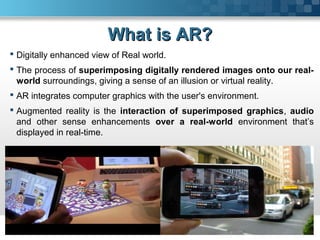
 Digitally enhanced view of Real world.
 The process of superimposing digitally rendered images onto our real-
world surroundings, giving a sense of an illusion or virtual reality.
 AR integrates computer graphics with the user's environment.
 Augmented reality is the interaction of superimposed graphics, audio
and other sense enhancements over a real-world environment that’s
displayed in real-time.
OutlineOutline
 Augmented Reality(AR) Vs. Virtual Reality(VR)
 Flavours of AR
 How it works?
 Applications
 Limitations
 Future
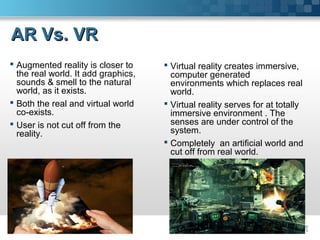
AR Vs. VRAR Vs. VR
 Augmented reality is closer to
the real world. It add graphics,
sounds & smell to the natural
world, as it exists.
 Both the real and virtual world
co-exists.
 User is not cut off from the
reality.
 Virtual reality creates immersive,
computer generated
environments which replaces real
world.
 Virtual reality serves for at totally
immersive environment . The
senses are under control of the
system.
 Completely an artificial world and
cut off from real world.
Flavours of ARFlavours of AR
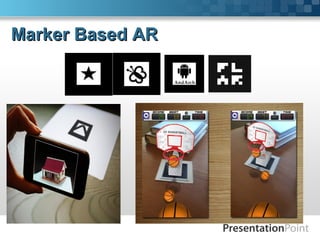
1. Marker-based Augmented reality
2. Marker less Augmented Reality
3. Position based Augmented Reality
Marker Based ARMarker Based AR
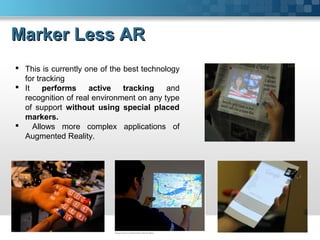
Marker Less ARMarker Less AR
 This is currently one of the best technology
for tracking
 It performs active tracking and
recognition of real environment on any type
of support without using special placed
markers.
 Allows more complex applications of
Augmented Reality.
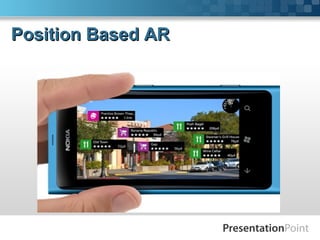
Position Based ARPosition Based AR
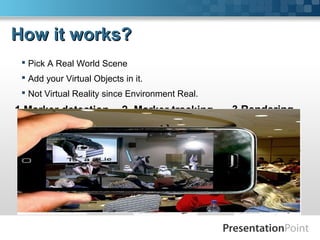
How it works?How it works?
 Pick A Real World Scene
 Add your Virtual Objects in it.
 Not Virtual Reality since Environment Real.
1.Marker detection 2. Marker tracking 3.Rendering
ApplicationsApplications
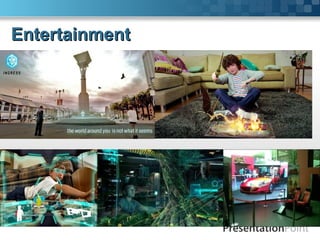
Entertainment, Games& Toys
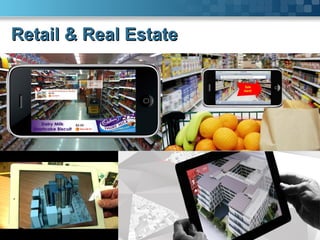
Retail & Real Estate
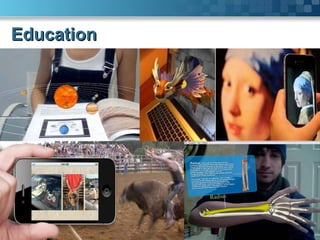
Education
Medical
Navigation
Military
Many more…..
EntertainmentEntertainment
Retail & Real EstateRetail & Real Estate
EducationEducation
LimitationsLimitations
 Scale- Calibration
 Speed- CPU speed, Processor speed
 Accuracy- For e.g., GPS is only accurate to within 30 feet (9 meters) and
doesn't work as well indoors, although improved image recognition
technology may be able to help .
 Expanding a PC screen to real environment. Program windows &
icons appear as virtual devices in real space & are eye or gesture
operated, by gazing or pointing.
 Enhanced media application ,like pseudo holographic virtual screens,
virtual surround cinema.
 City planning and architecture.
 Political campaigns
 Image-recognition software coupled with AR will, quite soon, allow us
to point our phones at people, even strangers, and instantly see
information from their Facebook, Twitter, Amazon, LinkedIn or other
online profiles.
Looking into Future….Looking into Future….
The best thing about the AR is that itThe best thing about the AR is that it
gives you the concept ofgives you the concept of
““JUST IMAGINEJUST IMAGINE“.“.
BibliographyBibliography
 http://www.metalliccloud.com/rob/future_thinking/
 http://www.howstuffworks.com/augmented-reality.html
 www.layar.com/augmented-reality
 mashable.com/category/augmented-reality
Software and Tools for Microsoft PowerPoint.
The website with innovative solutions.
Save time and money by automating your presentations.
www.presentationpoint.com
With the use of this free template you accept the
following use and license conditions.
Not for commercial use.
 The template can be used freely by private persons. The
commercial employment of the free templates is not permitted.
Any further trade with contents as well as making the
diagram/template/animations available in changed or
unchanged form for downloading on other web sites or
multiplying & the selling on data media of any kind are
forbidden.
 In no event shall PresentationPoint be liable for any indirect,
special or consequential damages arising out of or in connection
with the use of the template.
 In case of questions for commercial usage please get in contact
with us.
E-Mail: info@presentationpoint.com
Conditions
SUGGESTIONS??SUGGESTIONS??
Thank You..!Thank You..!
By: Rohit AgrawalBy: Rohit Agrawal

Augmented Reality-The 8th Mass Medium

  • 1.
    AUGMENTED REALITYAUGMENTED REALITY THE8TH MASS MEDIUMTHE 8TH MASS MEDIUM
  • 2.
    The first mediumthat takes Experiences “The first medium that takes Experiences “Out of the BoxOut of the Box”” Augmented RealityAugmented Reality is the nextis the next Mass MediumMass Medium
  • 3.
    What is AR?Whatis AR?  Digitally enhanced view of Real world.  The process of superimposing digitally rendered images onto our real- world surroundings, giving a sense of an illusion or virtual reality.  AR integrates computer graphics with the user's environment.  Augmented reality is the interaction of superimposed graphics, audio and other sense enhancements over a real-world environment that’s displayed in real-time.
  • 4.
    OutlineOutline  Augmented Reality(AR)Vs. Virtual Reality(VR)  Flavours of AR  How it works?  Applications  Limitations  Future
  • 5.
    AR Vs. VRARVs. VR  Augmented reality is closer to the real world. It add graphics, sounds & smell to the natural world, as it exists.  Both the real and virtual world co-exists.  User is not cut off from the reality.  Virtual reality creates immersive, computer generated environments which replaces real world.  Virtual reality serves for at totally immersive environment . The senses are under control of the system.  Completely an artificial world and cut off from real world.
  • 6.
    Flavours of ARFlavoursof AR 1. Marker-based Augmented reality 2. Marker less Augmented Reality 3. Position based Augmented Reality
  • 7.
  • 8.
    Marker Less ARMarkerLess AR  This is currently one of the best technology for tracking  It performs active tracking and recognition of real environment on any type of support without using special placed markers.  Allows more complex applications of Augmented Reality.
  • 9.
  • 10.
    How it works?Howit works?  Pick A Real World Scene  Add your Virtual Objects in it.  Not Virtual Reality since Environment Real. 1.Marker detection 2. Marker tracking 3.Rendering
  • 11.
    ApplicationsApplications Entertainment, Games& Toys Retail& Real Estate Education Medical Navigation Military Many more…..
  • 12.
  • 13.
    Retail & RealEstateRetail & Real Estate
  • 14.
  • 15.
    LimitationsLimitations  Scale- Calibration Speed- CPU speed, Processor speed  Accuracy- For e.g., GPS is only accurate to within 30 feet (9 meters) and doesn't work as well indoors, although improved image recognition technology may be able to help .
  • 16.
     Expanding aPC screen to real environment. Program windows & icons appear as virtual devices in real space & are eye or gesture operated, by gazing or pointing.  Enhanced media application ,like pseudo holographic virtual screens, virtual surround cinema.  City planning and architecture.  Political campaigns  Image-recognition software coupled with AR will, quite soon, allow us to point our phones at people, even strangers, and instantly see information from their Facebook, Twitter, Amazon, LinkedIn or other online profiles. Looking into Future….Looking into Future….
  • 17.
    The best thingabout the AR is that itThe best thing about the AR is that it gives you the concept ofgives you the concept of ““JUST IMAGINEJUST IMAGINE“.“.
  • 18.
  • 19.
    Software and Toolsfor Microsoft PowerPoint. The website with innovative solutions. Save time and money by automating your presentations. www.presentationpoint.com With the use of this free template you accept the following use and license conditions. Not for commercial use.  The template can be used freely by private persons. The commercial employment of the free templates is not permitted. Any further trade with contents as well as making the diagram/template/animations available in changed or unchanged form for downloading on other web sites or multiplying & the selling on data media of any kind are forbidden.  In no event shall PresentationPoint be liable for any indirect, special or consequential damages arising out of or in connection with the use of the template.  In case of questions for commercial usage please get in contact with us. E-Mail: info@presentationpoint.com Conditions SUGGESTIONS??SUGGESTIONS??
  • 20.
    Thank You..!Thank You..! By:Rohit AgrawalBy: Rohit Agrawal