Submitted to: Submitted by:
Dr. (Mrs) Lini Methew Jyoti Singh
Assistant Professor ME (Regular)
Electrical Engineering Department Branch: I & C
NITTTR, Chandigarh Roll No: 142511
(Hardware)
Contents
 Basic Sound System
 Sound Card
 Drivers
 Sound Quality
 Wireless Microphone
 Wireless Speaker
Basic Sound System
 A basic sound system consists of an input device
(microphone), a control device (mixer), an amplification
device (power amplifier), and an output device
(loudspeaker).
 The primary goal of the sound system in sound applications
is to deliver clear, intelligible speech, and, usually, high-
quality musical sound.
 There are three levels of electrical signals in a sound
system:
 microphone level ,
Principle of Sound System
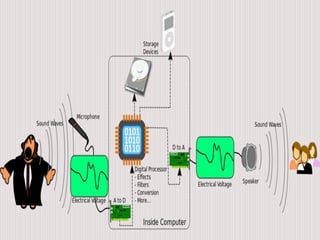
 The basic principle of all electronic audio systems is
to take sound waves convert them into an electric
current or voltage and manipulate them as desired ,
then convert back into sound waves.
 A microphone is an example of a transducer, a
device that changes information from one form to
another. Microphone changes information into
patterns of electric current or voltage.
 Computers are digital systems so they can only
produce & manipulate audio in digital format.
 The problem however is that in the real world audio is
an analog entity.
 Speakers are expecting an analog signal so they can
reproduce sounds, we can’t feed speakers with a
digital signal so D to A converter is used.
Availability of Audio System
 Today all motherboards have an embedded sound
card like on board audio.
 Some motherboards don’t come with the audio
sections on the motherboard, but add on cards that
comes with the product being installed on a PCI
slots.
 There is a chip called codec (coder/ decoder) on the
motherboard, which is incharge of converting
digital audio signals into analog and vice versa.
Sound Card
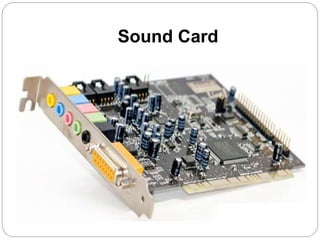
 A sound card (also known as an audio card) is an
internal computer expansion card that facilitates
input and output of audio signals to and from a
computer under control of computer programs.
 Typical uses of sound cards include providing the
audio component for multimedia applications such
as music composition, editing video or audio,
presentation, education and entertainment (games).
Sound Card
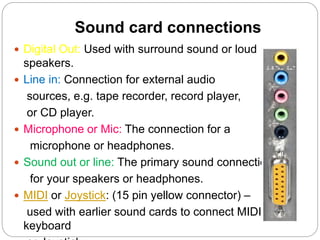
Sound card connections
 Digital Out: Used with surround sound or loud
speakers.
 Line in: Connection for external audio
sources, e.g. tape recorder, record player,
or CD player.
 Microphone or Mic: The connection for a
microphone or headphones.
 Sound out or line: The primary sound connection
for your speakers or headphones.
 MIDI or Joystick: (15 pin yellow connector) –
used with earlier sound cards to connect MIDI
keyboard
Anatomy of a Sound Card
A typical sound card has:
 a Digital Signal Processor
 a Digital to Analog Converter
 an Analog-to-Digital converter
 Read-only Memory (ROM) or Flash memory for storing
data,
 Musical Instrument Digital Interface (MIDI) for connecting
to external music equipment,
 jacks for connecting speakers and microphones, as well as
line in and line out.
Sound Card Upgrades
 Sound-card upgrades are an option if the motherboard
does not have a sound chipset built in or if the user
wants higher performance.
 A common upgrade path is to move from an ISA sound
card to a PCI sound card.
 For some audio applications, such as telephony or
certain games, full-duplex sound is a must.
 Full-duplex sound has the ability to accept a sound input
while simultaneously providing sound output.
USB sound cards
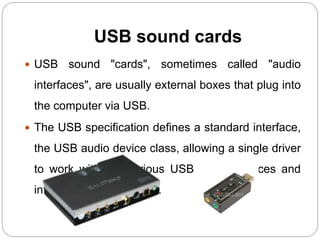
 USB sound "cards", sometimes called "audio
interfaces", are usually external boxes that plug into
the computer via USB.
 The USB specification defines a standard interface,
the USB audio device class, allowing a single driver
to work with the various USB sound devices and
interfaces on the market.
Drivers
 A driver provides a software interface to hardware
devices, enabling operating systems and other
computer programs to access hardware functions
without needing to know precise details of the
hardware being used.
 A driver acts like a translator between the device and
programs that use the device.
 Each device has its own set of specialized commands
that only its driver knows.
Quality- What is a good
Sound?
The three primary measures of sound quality are
fidelity, intelligibility, and loudness.
 The fidelity of sound is primarily determined by the
overall frequency response of the sound arriving at the
listener’s ear.
 The intelligibility of sound is determined by the
overall signal-to-noise ratio and the direct-to-
reverberant sound ratio at the listener’s ear.
Types of Speaker
Woofer
 Produces sounds from 20 to 2,000 Hz.
 Consists of one speaker driver in a speaker
enclosure.
 Inferior sound at either end of its attainable
range.
 Low-quality models produce distortion and
ringing.
Midwoofer
 Has a slightly higher range than woofers.
 Produces sounds from 200 to 5,000 Hz.
 Best acoustic range between 500 and 2,000 Hz
 Inferior sound quality at both ends of the range.
 Consists of a single speaker driver in a speaker
enclosure.
Subwoofer
 Produces sounds from 20 to 200 Hz.
 Consists of multiple speaker drivers in a speaker
enclosure.
 Focused on a very small audio range
 Does not lose quality across its attainable frequency
range.
SPEAKER ENCLOSURE
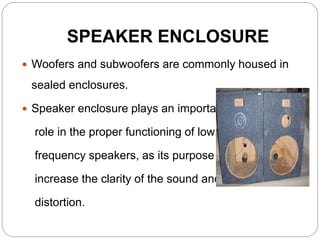
 Woofers and subwoofers are commonly housed in
sealed enclosures.
 Speaker enclosure plays an important
role in the proper functioning of low
frequency speakers, as its purpose is to
increase the clarity of the sound and reduce
distortion.
Wireless speakers
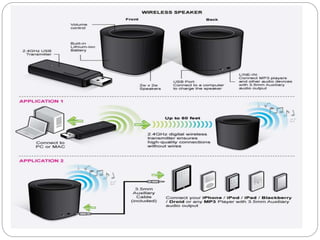
 Wireless speakers also work on the same principle as
the wired speakers do. These speakers also need to
translate an electric signal to an acoustic one, but the
only difference is that they transmit these signals to
the satellite speakers.
 Technologies used in Wireless Speakers:
1. FM (Frequency Modulation) transmission in some
speakers. This involves Radio transmission of signals
by the Transmitting system to all the receiving satellite
2. Infrared Transmission is also used in some of the
Home Theatre systems. Mostly used for the
speakers that create surround sound effect.
3. Bluetooth Transmission is most common and
advanced nowadays. It works on latest Bluetooth
technology.
 Most of the Wireless Speakers work at 900 MHz
frequency range.
 Range of Wireless speakers is 150 to 300 feet from
the Base Transmitter.
 All the Satellite speakers are generally Battery
operated. They need to be charged separately.
 Wireless speakers need extra care for their proper
functioning. Generally manufacturers claim that their
speakers are weatherproof but extra care is needed
for using in bad weather conditions.
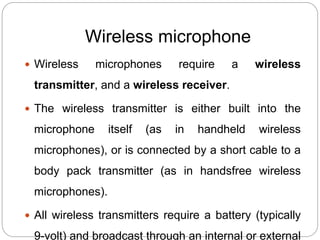
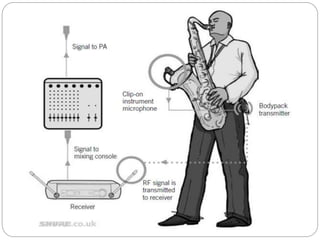
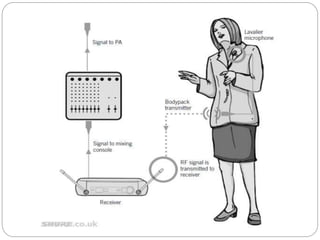
Wireless microphone
 Wireless microphones require a wireless
transmitter, and a wireless receiver.
 The wireless transmitter is either built into the
microphone itself (as in handheld wireless
microphones), or is connected by a short cable to a
body pack transmitter (as in handsfree wireless
microphones).
 All wireless transmitters require a battery (typically
9-volt) and broadcast through an internal or external
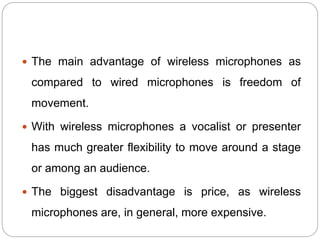
 The main advantage of wireless microphones as
compared to wired microphones is freedom of
movement.
 With wireless microphones a vocalist or presenter
has much greater flexibility to move around a stage
or among an audience.
 The biggest disadvantage is price, as wireless
microphones are, in general, more expensive.
Signal path from transmitter to
receiver
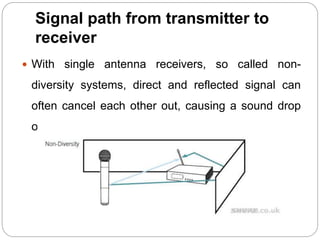
 With single antenna receivers, so called non-
diversity systems, direct and reflected signal can
often cancel each other out, causing a sound drop
out.
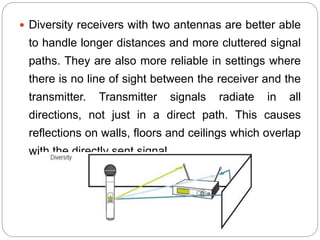
 Diversity receivers with two antennas are better able
to handle longer distances and more cluttered signal
paths. They are also more reliable in settings where
there is no line of sight between the receiver and the
transmitter. Transmitter signals radiate in all
directions, not just in a direct path. This causes
reflections on walls, floors and ceilings which overlap
with the directly sent signal.
THANK YOU

Audio systems

  • 1.
    Submitted to: Submittedby: Dr. (Mrs) Lini Methew Jyoti Singh Assistant Professor ME (Regular) Electrical Engineering Department Branch: I & C NITTTR, Chandigarh Roll No: 142511 (Hardware)
  • 2.
    Contents  Basic SoundSystem  Sound Card  Drivers  Sound Quality  Wireless Microphone  Wireless Speaker
  • 4.
    Basic Sound System A basic sound system consists of an input device (microphone), a control device (mixer), an amplification device (power amplifier), and an output device (loudspeaker).  The primary goal of the sound system in sound applications is to deliver clear, intelligible speech, and, usually, high- quality musical sound.  There are three levels of electrical signals in a sound system:  microphone level ,
  • 6.
    Principle of SoundSystem  The basic principle of all electronic audio systems is to take sound waves convert them into an electric current or voltage and manipulate them as desired , then convert back into sound waves.  A microphone is an example of a transducer, a device that changes information from one form to another. Microphone changes information into patterns of electric current or voltage.
  • 7.
     Computers aredigital systems so they can only produce & manipulate audio in digital format.  The problem however is that in the real world audio is an analog entity.  Speakers are expecting an analog signal so they can reproduce sounds, we can’t feed speakers with a digital signal so D to A converter is used.
  • 8.
    Availability of AudioSystem  Today all motherboards have an embedded sound card like on board audio.  Some motherboards don’t come with the audio sections on the motherboard, but add on cards that comes with the product being installed on a PCI slots.  There is a chip called codec (coder/ decoder) on the motherboard, which is incharge of converting digital audio signals into analog and vice versa.
  • 9.
    Sound Card  Asound card (also known as an audio card) is an internal computer expansion card that facilitates input and output of audio signals to and from a computer under control of computer programs.  Typical uses of sound cards include providing the audio component for multimedia applications such as music composition, editing video or audio, presentation, education and entertainment (games).
  • 10.
  • 11.
    Sound card connections Digital Out: Used with surround sound or loud speakers.  Line in: Connection for external audio sources, e.g. tape recorder, record player, or CD player.  Microphone or Mic: The connection for a microphone or headphones.  Sound out or line: The primary sound connection for your speakers or headphones.  MIDI or Joystick: (15 pin yellow connector) – used with earlier sound cards to connect MIDI keyboard
  • 12.
    Anatomy of aSound Card A typical sound card has:  a Digital Signal Processor  a Digital to Analog Converter  an Analog-to-Digital converter  Read-only Memory (ROM) or Flash memory for storing data,  Musical Instrument Digital Interface (MIDI) for connecting to external music equipment,  jacks for connecting speakers and microphones, as well as line in and line out.
  • 13.
    Sound Card Upgrades Sound-card upgrades are an option if the motherboard does not have a sound chipset built in or if the user wants higher performance.  A common upgrade path is to move from an ISA sound card to a PCI sound card.  For some audio applications, such as telephony or certain games, full-duplex sound is a must.  Full-duplex sound has the ability to accept a sound input while simultaneously providing sound output.
  • 14.
    USB sound cards USB sound "cards", sometimes called "audio interfaces", are usually external boxes that plug into the computer via USB.  The USB specification defines a standard interface, the USB audio device class, allowing a single driver to work with the various USB sound devices and interfaces on the market.
  • 15.
    Drivers  A driverprovides a software interface to hardware devices, enabling operating systems and other computer programs to access hardware functions without needing to know precise details of the hardware being used.  A driver acts like a translator between the device and programs that use the device.  Each device has its own set of specialized commands that only its driver knows.
  • 16.
    Quality- What isa good Sound? The three primary measures of sound quality are fidelity, intelligibility, and loudness.  The fidelity of sound is primarily determined by the overall frequency response of the sound arriving at the listener’s ear.  The intelligibility of sound is determined by the overall signal-to-noise ratio and the direct-to- reverberant sound ratio at the listener’s ear.
  • 17.
    Types of Speaker Woofer Produces sounds from 20 to 2,000 Hz.  Consists of one speaker driver in a speaker enclosure.  Inferior sound at either end of its attainable range.  Low-quality models produce distortion and ringing.
  • 18.
    Midwoofer  Has aslightly higher range than woofers.  Produces sounds from 200 to 5,000 Hz.  Best acoustic range between 500 and 2,000 Hz  Inferior sound quality at both ends of the range.  Consists of a single speaker driver in a speaker enclosure.
  • 19.
    Subwoofer  Produces soundsfrom 20 to 200 Hz.  Consists of multiple speaker drivers in a speaker enclosure.  Focused on a very small audio range  Does not lose quality across its attainable frequency range.
  • 20.
    SPEAKER ENCLOSURE  Woofersand subwoofers are commonly housed in sealed enclosures.  Speaker enclosure plays an important role in the proper functioning of low frequency speakers, as its purpose is to increase the clarity of the sound and reduce distortion.
  • 21.
    Wireless speakers  Wirelessspeakers also work on the same principle as the wired speakers do. These speakers also need to translate an electric signal to an acoustic one, but the only difference is that they transmit these signals to the satellite speakers.  Technologies used in Wireless Speakers: 1. FM (Frequency Modulation) transmission in some speakers. This involves Radio transmission of signals by the Transmitting system to all the receiving satellite
  • 22.
    2. Infrared Transmissionis also used in some of the Home Theatre systems. Mostly used for the speakers that create surround sound effect. 3. Bluetooth Transmission is most common and advanced nowadays. It works on latest Bluetooth technology.  Most of the Wireless Speakers work at 900 MHz frequency range.  Range of Wireless speakers is 150 to 300 feet from the Base Transmitter.
  • 23.
     All theSatellite speakers are generally Battery operated. They need to be charged separately.  Wireless speakers need extra care for their proper functioning. Generally manufacturers claim that their speakers are weatherproof but extra care is needed for using in bad weather conditions.
  • 25.
    Wireless microphone  Wirelessmicrophones require a wireless transmitter, and a wireless receiver.  The wireless transmitter is either built into the microphone itself (as in handheld wireless microphones), or is connected by a short cable to a body pack transmitter (as in handsfree wireless microphones).  All wireless transmitters require a battery (typically 9-volt) and broadcast through an internal or external
  • 26.
     The mainadvantage of wireless microphones as compared to wired microphones is freedom of movement.  With wireless microphones a vocalist or presenter has much greater flexibility to move around a stage or among an audience.  The biggest disadvantage is price, as wireless microphones are, in general, more expensive.
  • 27.
    Signal path fromtransmitter to receiver  With single antenna receivers, so called non- diversity systems, direct and reflected signal can often cancel each other out, causing a sound drop out.
  • 28.
     Diversity receiverswith two antennas are better able to handle longer distances and more cluttered signal paths. They are also more reliable in settings where there is no line of sight between the receiver and the transmitter. Transmitter signals radiate in all directions, not just in a direct path. This causes reflections on walls, floors and ceilings which overlap with the directly sent signal.
  • 31.