(ATS4-PLAT10) Planning your
deployment for a 64 bit world
                                     Lynn Miller
            Principal Technical Support Scientist
                      Lynn.Miller@accelrys.com
The information on the roadmap and future software development efforts are
intended to outline general product direction and should not be relied on in making
a purchasing decision.
Agenda

• Pipeline Pilot 9.0 requires 64-bit server deployments,
  requiring many sites to migrate from their current 32-bit
  environment. This session will outline:
   – Key differences between Linux and Windows
   – 32-bit-specific vs. 64-bit functionality on Windows
   – Using the Component Reader to help identify and
     assess published protocols and components that
     might require modifications when deployed to a new
     platform.
Linux vs. Windows

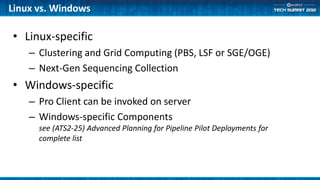
• Linux-specific
    – Clustering and Grid Computing (PBS, LSF or SGE/OGE)
    – Next-Gen Sequencing Collection
• Windows-specific
    – Pro Client can be invoked on server
    – Windows-specific Components
      see (ATS2-25) Advanced Planning for Pipeline Pilot Deployments for
      complete list
Migration Risk Introduction

• The Windows operating system does not allow calls to
  32-bit libraries within the 64-bit process. This means
  that there is some 32-bit-specific functionality that
  cannot be directly or readily migrated from a 32-bit
  Windows Server to a 64-bit Windows server.
• Some components are Windows-specific and will not
  work in Linux servers
Migration risks from 32 to 64-bit Windows

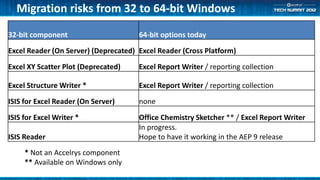
32-bit component                      64-bit options today
Excel Reader (On Server) (Deprecated) Excel Reader (Cross Platform)

Excel XY Scatter Plot (Deprecated)    Excel Report Writer / reporting collection

Excel Structure Writer *              Excel Report Writer / reporting collection

ISIS for Excel Reader (On Server)     none

ISIS for Excel Writer *               Office Chemistry Sketcher ** / Excel Report Writer
                                      In progress.
ISIS Reader                           Hope to have it working in the AEP 9 release
     * Not an Accelrys component
     ** Available on Windows only
Migration risks from 32 to 64-bit Windows

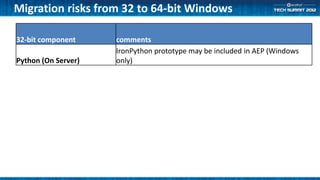
32-bit component     comments
                     IronPython prototype may be included in AEP (Windows
Python (On Server)   only)
Migration risks from 32 to 64-bit Windows
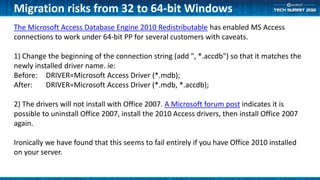
The Microsoft Access Database Engine 2010 Redistributable has enabled MS Access
connections to work under 64-bit PP for several customers with caveats.

1) Change the beginning of the connection string (add ", *.accdb") so that it matches the
newly installed driver name. ie:
Before: DRIVER=Microsoft Access Driver (*.mdb);
After:    DRIVER=Microsoft Access Driver (*.mdb, *.accdb);

2) The drivers will not install with Office 2007. A Microsoft forum post indicates it is
possible to uninstall Office 2007, install the 2010 Access drivers, then install Office 2007
again.

Ironically we have found that this seems to fail entirely if you have Office 2010 installed
on your server.
Migration risks from 32 to 64-bit Windows
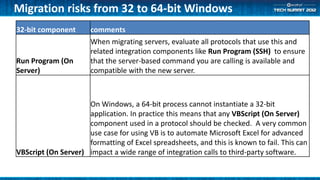
32-bit component      comments
                      When migrating servers, evaluate all protocols that use this and
                      related integration components like Run Program (SSH) to ensure
Run Program (On       that the server-based command you are calling is available and
Server)               compatible with the new server.


                     On Windows, a 64-bit process cannot instantiate a 32-bit
                     application. In practice this means that any VBScript (On Server)
                     component used in a protocol should be checked. A very common
                     use case for using VB is to automate Microsoft Excel for advanced
                     formatting of Excel spreadsheets, and this is known to fail. This can
VBScript (On Server) impact a wide range of integration calls to third-party software.
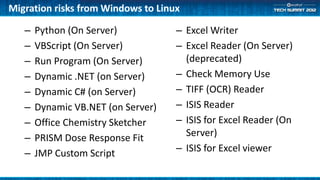
Migration risks from Windows to Linux

   –   Python (On Server)           – Excel Writer
   –   VBScript (On Server)         – Excel Reader (On Server)
   –   Run Program (On Server)        (deprecated)
   –   Dynamic .NET (on Server)     – Check Memory Use
   –   Dynamic C# (on Server)       – TIFF (OCR) Reader
   –   Dynamic VB.NET (on Server)   – ISIS Reader
   –   Office Chemistry Sketcher    – ISIS for Excel Reader (On
   –   PRISM Dose Response Fit        Server)
   –   JMP Custom Script            – ISIS for Excel viewer
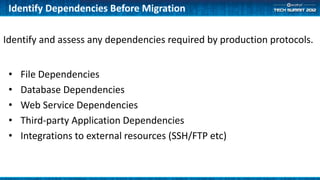
Identify Dependencies Before Migration

Identify and assess any dependencies required by production protocols.


 •   File Dependencies
 •   Database Dependencies
 •   Web Service Dependencies
 •   Third-party Application Dependencies
 •   Integrations to external resources (SSH/FTP etc)
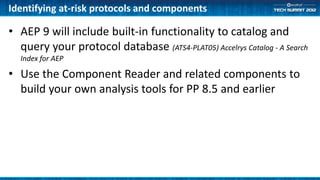
Identifying at-risk protocols and components

• AEP 9 will include built-in functionality to catalog and
  query your protocol database (ATS4-PLAT05) Accelrys Catalog - A Search
  Index for AEP

• Use the Component Reader and related components to
  build your own analysis tools for PP 8.5 and earlier
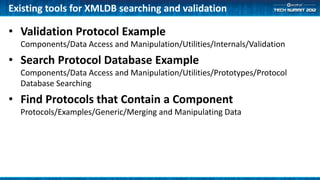
Existing tools for XMLDB searching and validation

• Validation Protocol Example
  Components/Data Access and Manipulation/Utilities/Internals/Validation
• Search Protocol Database Example
  Components/Data Access and Manipulation/Utilities/Prototypes/Protocol
  Database Searching
• Find Protocols that Contain a Component
  Protocols/Examples/Generic/Merging and Manipulating Data
Demo
• Overview of included tools for XML
  database searching
• How to build your own custom tool
Summary
  Prepare for Server Migrations by identifying protocol
  dependencies and those that use platform-specific calls.

  Other resources:
• Pipeline Pilot Server Migration document in support library
• (ATS2-21) Best Practices for Pipeline Pilot Upgrades and
  Server Migration
• (ATS4-PLAT03) Balancing Security with access for
  Development
Support

• We pride ourselves on our excellent support!
   – Reach us by email at support@accelrys.com
   – Call the support hotline
   – Take advantage of the Accelrys Community
      • No login is required to read the forums.
      • Logging in to your Accelrys Community account gives you access to the
        Support Center where you can access the software download center and
        documentation libraries. From here you can also access change request
        widgets, the Pipeline Pilot product documentation, post to the forums,
        etc….

(ATS4-PLAT10) Planning your deployment for a 64 bit world

  • 1.
    (ATS4-PLAT10) Planning your deploymentfor a 64 bit world Lynn Miller Principal Technical Support Scientist Lynn.Miller@accelrys.com
  • 2.
    The information onthe roadmap and future software development efforts are intended to outline general product direction and should not be relied on in making a purchasing decision.
  • 3.
    Agenda • Pipeline Pilot9.0 requires 64-bit server deployments, requiring many sites to migrate from their current 32-bit environment. This session will outline: – Key differences between Linux and Windows – 32-bit-specific vs. 64-bit functionality on Windows – Using the Component Reader to help identify and assess published protocols and components that might require modifications when deployed to a new platform.
  • 4.
    Linux vs. Windows •Linux-specific – Clustering and Grid Computing (PBS, LSF or SGE/OGE) – Next-Gen Sequencing Collection • Windows-specific – Pro Client can be invoked on server – Windows-specific Components see (ATS2-25) Advanced Planning for Pipeline Pilot Deployments for complete list
  • 5.
    Migration Risk Introduction •The Windows operating system does not allow calls to 32-bit libraries within the 64-bit process. This means that there is some 32-bit-specific functionality that cannot be directly or readily migrated from a 32-bit Windows Server to a 64-bit Windows server. • Some components are Windows-specific and will not work in Linux servers
  • 6.
    Migration risks from32 to 64-bit Windows 32-bit component 64-bit options today Excel Reader (On Server) (Deprecated) Excel Reader (Cross Platform) Excel XY Scatter Plot (Deprecated) Excel Report Writer / reporting collection Excel Structure Writer * Excel Report Writer / reporting collection ISIS for Excel Reader (On Server) none ISIS for Excel Writer * Office Chemistry Sketcher ** / Excel Report Writer In progress. ISIS Reader Hope to have it working in the AEP 9 release * Not an Accelrys component ** Available on Windows only
  • 7.
    Migration risks from32 to 64-bit Windows 32-bit component comments IronPython prototype may be included in AEP (Windows Python (On Server) only)
  • 8.
    Migration risks from32 to 64-bit Windows The Microsoft Access Database Engine 2010 Redistributable has enabled MS Access connections to work under 64-bit PP for several customers with caveats. 1) Change the beginning of the connection string (add ", *.accdb") so that it matches the newly installed driver name. ie: Before: DRIVER=Microsoft Access Driver (*.mdb); After: DRIVER=Microsoft Access Driver (*.mdb, *.accdb); 2) The drivers will not install with Office 2007. A Microsoft forum post indicates it is possible to uninstall Office 2007, install the 2010 Access drivers, then install Office 2007 again. Ironically we have found that this seems to fail entirely if you have Office 2010 installed on your server.
  • 9.
    Migration risks from32 to 64-bit Windows 32-bit component comments When migrating servers, evaluate all protocols that use this and related integration components like Run Program (SSH) to ensure Run Program (On that the server-based command you are calling is available and Server) compatible with the new server. On Windows, a 64-bit process cannot instantiate a 32-bit application. In practice this means that any VBScript (On Server) component used in a protocol should be checked. A very common use case for using VB is to automate Microsoft Excel for advanced formatting of Excel spreadsheets, and this is known to fail. This can VBScript (On Server) impact a wide range of integration calls to third-party software.
  • 10.
    Migration risks fromWindows to Linux – Python (On Server) – Excel Writer – VBScript (On Server) – Excel Reader (On Server) – Run Program (On Server) (deprecated) – Dynamic .NET (on Server) – Check Memory Use – Dynamic C# (on Server) – TIFF (OCR) Reader – Dynamic VB.NET (on Server) – ISIS Reader – Office Chemistry Sketcher – ISIS for Excel Reader (On – PRISM Dose Response Fit Server) – JMP Custom Script – ISIS for Excel viewer
  • 11.
    Identify Dependencies BeforeMigration Identify and assess any dependencies required by production protocols. • File Dependencies • Database Dependencies • Web Service Dependencies • Third-party Application Dependencies • Integrations to external resources (SSH/FTP etc)
  • 12.
    Identifying at-risk protocolsand components • AEP 9 will include built-in functionality to catalog and query your protocol database (ATS4-PLAT05) Accelrys Catalog - A Search Index for AEP • Use the Component Reader and related components to build your own analysis tools for PP 8.5 and earlier
  • 13.
    Existing tools forXMLDB searching and validation • Validation Protocol Example Components/Data Access and Manipulation/Utilities/Internals/Validation • Search Protocol Database Example Components/Data Access and Manipulation/Utilities/Prototypes/Protocol Database Searching • Find Protocols that Contain a Component Protocols/Examples/Generic/Merging and Manipulating Data
  • 14.
    Demo • Overview ofincluded tools for XML database searching • How to build your own custom tool
  • 15.
    Summary Preparefor Server Migrations by identifying protocol dependencies and those that use platform-specific calls. Other resources: • Pipeline Pilot Server Migration document in support library • (ATS2-21) Best Practices for Pipeline Pilot Upgrades and Server Migration • (ATS4-PLAT03) Balancing Security with access for Development
  • 16.
    Support • We prideourselves on our excellent support! – Reach us by email at support@accelrys.com – Call the support hotline – Take advantage of the Accelrys Community • No login is required to read the forums. • Logging in to your Accelrys Community account gives you access to the Support Center where you can access the software download center and documentation libraries. From here you can also access change request widgets, the Pipeline Pilot product documentation, post to the forums, etc….