

(ATS6-DEV01) What’s new for
Protocol and Component
Developers in AEP 9.0 Steven Bush
R&D, AEP Core Infrastructure
steven.bush@accelrys.com
The information on the roadmap and future software development efforts are
intended to outline general product direction and should not be relied on in making
a purchasing decision.
Content
• Protocol database searching
• Protocol comparison
• Changes to protocol links (launching protocols via URLs)
• Component icons
• Parameters
– Initialize using
– Metadata
– Promotion
• Autosave
• Pilotscript hashmap improvements
• XML and hierarchical data record parsing
• Unicode (International character encoding) updates
Protocol DB Searching
• More Information: (ATS6-PLAT02) Accelrys Catalog &
Protocol Validation
• Indexing runs periodically
– Components and protocols
– Usage information
• Configure schedule in Admin Portal
– Setup->Catalog Settings
– 1 am by default
– Disable if processing is too great
Protocol DB Searching Options
• Pro Client
– Text search in toolbar
– “Find Usage” right click option in Component/Protocols tabs
• Web Port
– Search for protocols
• Admin Portal
– Advanced searching
• Multiple servers
• Usage
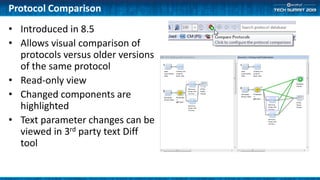
Protocol Comparison
• Introduced in 8.5
• Allows visual comparison of
protocols versus older versions
of the same protocol
• Read-only view
• Changed components are
highlighted
• Text parameter changes can be
viewed in 3rd party text Diff
tool
Protocol Links
• REST interface for launching jobs/protocols
• /auth/launchjob
– Replacement for runjob.pl
• Same basic URL syntax
• Runjob.pl links still work
– Much faster
– Works with Kerberos
– Better non-blocking/asynchronous implementation
• Add ‘&progressmessage=<MESSAGE>’ to URL
Protocol Links: Streaming Data
• Stream data back without redirecting
– Allows bookmarking a query instead of the result
– ‘&_streamfile=<VALUE>‘
• Return a result file
• <VALUE>
– Empty or ‘?’: return first file found
– Specific filename: return the matching file
– Regular expression ‘/<REGEX>/’: return the first file matching the regex
– ‘&_streamdata=<VALUE>‘
• Return a set of result properties
• <VALUE>
– Empty or ‘?’: return only the first result property
– ‘*’: return all result properties
– Property name: return that property
– Regular Expression ‘/<REGEX>/’: return properties whose names match
• Optionally add &_format=<xml | json | html | text>
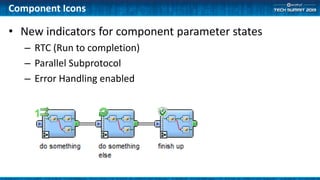
Component Icons
• New indicators for component parameter states
– RTC (Run to completion)
– Parallel Subprotocol
– Error Handling enabled
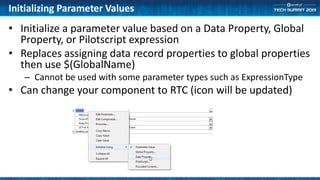
Initializing Parameter Values
• Initialize a parameter value based on a Data Property, Global
Property, or Pilotscript expression
• Replaces assigning data record properties to global properties
then use $(GlobalName)
– Cannot be used with some parameter types such as ExpressionType
• Can change your component to RTC (icon will be updated)
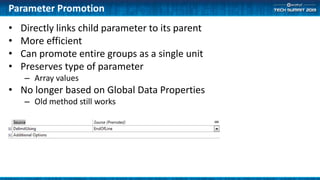
Parameter Promotion
• Directly links child parameter to its parent
• More efficient
• Can promote entire groups as a single unit
• Preserves type of parameter
– Array values
• No longer based on Global Data Properties
– Old method still works
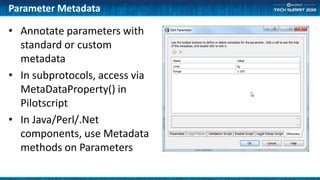
Parameter Metadata
• Annotate parameters with
standard or custom
metadata
• In subprotocols, access via
MetaDataProperty() in
Pilotscript
• In Java/Perl/.Net
components, use Metadata
methods on Parameters
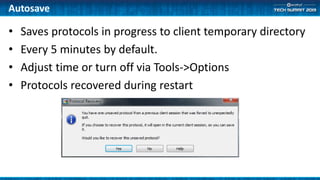
Autosave
• Saves protocols in progress to client temporary directory
• Every 5 minutes by default.
• Adjust time or turn off via Tools->Options
• Protocols recovered during restart
Hierarchical Improvements
• New components in Data Access and
Manipulation/Utilities/Data Tree Manipulators
– Allow direct manipulation of hierarchical data records
• XML Reader and Writer (Generic)
– New Pad and Flatten options
– Handling Text Content in XML documents
• Can now read XHTML documents
– Convert HTML to XHTML
– Use XML Reader
– Set “Element Names->Text Content” parameter
Pilotscript Hashmaps
• Use HashValueCreate() instead of HashCreate()
– No longer need to call HashDestroy()
– Other functions are same
– Old protocols will still work with the old implementation
• Works with
– Viewers
– Watch windows
– Data Record Tree Viewer
• Access from Perl/Java/.Net components
• No longer leaks memory
• Works with Cache Writers and checkpoints
• Cloned when splitting pipes
• Can copy to new properties
• Optionally use typed keys (default is string keys)
Pilotscript
• Array() function to quickly create an array property
– myArr := Array(1,2,3,4,5);
• Single line comments
– “// example comment”
• FOREACH item IN array
• Faster property manipulation
– Vastly improved performance of deleting and renaming properties
• Faster hierarchical property processing
Unicode and Readers
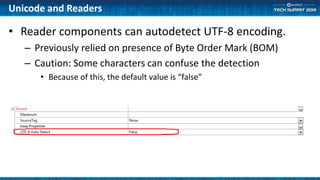
• Reader components can autodetect UTF-8 encoding.
– Previously relied on presence of Byte Order Mark (BOM)
– Caution: Some characters can confuse the detection
• Because of this, the default value is “false”
Unicode and HTTP
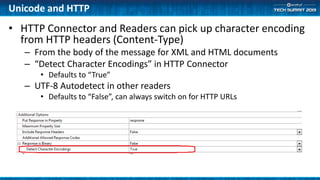
• HTTP Connector and Readers can pick up character encoding
from HTTP headers (Content-Type)
– From the body of the message for XML and HTML documents
– “Detect Character Encodings” in HTTP Connector
• Defaults to “True”
– UTF-8 Autodetect in other readers
• Defaults to “False”, can always switch on for HTTP URLs
Unicode and Pilotscript
• ConvertBytesToString and ConvertStringToBytes can
convert any character encoding
– Shift_JIS
– Big5
– Koi8-r
– Etc.
Summary
• New features in 9.0
– Making the platform the best that we possibly can
• Please tell us your suggestions
– We are as much users as we are developers

(ATS6-DEV01) What’s new for Protocol and Component Developers in AEP 9.0

  • 1.
    (ATS6-DEV01) What’s newfor Protocol and Component Developers in AEP 9.0 Steven Bush R&D, AEP Core Infrastructure steven.bush@accelrys.com
  • 2.
    The information onthe roadmap and future software development efforts are intended to outline general product direction and should not be relied on in making a purchasing decision.
  • 3.
    Content • Protocol databasesearching • Protocol comparison • Changes to protocol links (launching protocols via URLs) • Component icons • Parameters – Initialize using – Metadata – Promotion • Autosave • Pilotscript hashmap improvements • XML and hierarchical data record parsing • Unicode (International character encoding) updates
  • 4.
    Protocol DB Searching •More Information: (ATS6-PLAT02) Accelrys Catalog & Protocol Validation • Indexing runs periodically – Components and protocols – Usage information • Configure schedule in Admin Portal – Setup->Catalog Settings – 1 am by default – Disable if processing is too great
  • 5.
    Protocol DB SearchingOptions • Pro Client – Text search in toolbar – “Find Usage” right click option in Component/Protocols tabs • Web Port – Search for protocols • Admin Portal – Advanced searching • Multiple servers • Usage
  • 6.
    Protocol Comparison • Introducedin 8.5 • Allows visual comparison of protocols versus older versions of the same protocol • Read-only view • Changed components are highlighted • Text parameter changes can be viewed in 3rd party text Diff tool
  • 7.
    Protocol Links • RESTinterface for launching jobs/protocols • /auth/launchjob – Replacement for runjob.pl • Same basic URL syntax • Runjob.pl links still work – Much faster – Works with Kerberos – Better non-blocking/asynchronous implementation • Add ‘&progressmessage=<MESSAGE>’ to URL
  • 8.
    Protocol Links: StreamingData • Stream data back without redirecting – Allows bookmarking a query instead of the result – ‘&_streamfile=<VALUE>‘ • Return a result file • <VALUE> – Empty or ‘?’: return first file found – Specific filename: return the matching file – Regular expression ‘/<REGEX>/’: return the first file matching the regex – ‘&_streamdata=<VALUE>‘ • Return a set of result properties • <VALUE> – Empty or ‘?’: return only the first result property – ‘*’: return all result properties – Property name: return that property – Regular Expression ‘/<REGEX>/’: return properties whose names match • Optionally add &_format=<xml | json | html | text>
  • 9.
    Component Icons • Newindicators for component parameter states – RTC (Run to completion) – Parallel Subprotocol – Error Handling enabled
  • 10.
    Initializing Parameter Values •Initialize a parameter value based on a Data Property, Global Property, or Pilotscript expression • Replaces assigning data record properties to global properties then use $(GlobalName) – Cannot be used with some parameter types such as ExpressionType • Can change your component to RTC (icon will be updated)
  • 11.
    Parameter Promotion • Directlylinks child parameter to its parent • More efficient • Can promote entire groups as a single unit • Preserves type of parameter – Array values • No longer based on Global Data Properties – Old method still works
  • 12.
    Parameter Metadata • Annotateparameters with standard or custom metadata • In subprotocols, access via MetaDataProperty() in Pilotscript • In Java/Perl/.Net components, use Metadata methods on Parameters
  • 13.
    Autosave • Saves protocolsin progress to client temporary directory • Every 5 minutes by default. • Adjust time or turn off via Tools->Options • Protocols recovered during restart
  • 14.
    Hierarchical Improvements • Newcomponents in Data Access and Manipulation/Utilities/Data Tree Manipulators – Allow direct manipulation of hierarchical data records • XML Reader and Writer (Generic) – New Pad and Flatten options – Handling Text Content in XML documents • Can now read XHTML documents – Convert HTML to XHTML – Use XML Reader – Set “Element Names->Text Content” parameter
  • 15.
    Pilotscript Hashmaps • UseHashValueCreate() instead of HashCreate() – No longer need to call HashDestroy() – Other functions are same – Old protocols will still work with the old implementation • Works with – Viewers – Watch windows – Data Record Tree Viewer • Access from Perl/Java/.Net components • No longer leaks memory • Works with Cache Writers and checkpoints • Cloned when splitting pipes • Can copy to new properties • Optionally use typed keys (default is string keys)
  • 16.
    Pilotscript • Array() functionto quickly create an array property – myArr := Array(1,2,3,4,5); • Single line comments – “// example comment” • FOREACH item IN array • Faster property manipulation – Vastly improved performance of deleting and renaming properties • Faster hierarchical property processing
  • 17.
    Unicode and Readers •Reader components can autodetect UTF-8 encoding. – Previously relied on presence of Byte Order Mark (BOM) – Caution: Some characters can confuse the detection • Because of this, the default value is “false”
  • 18.
    Unicode and HTTP •HTTP Connector and Readers can pick up character encoding from HTTP headers (Content-Type) – From the body of the message for XML and HTML documents – “Detect Character Encodings” in HTTP Connector • Defaults to “True” – UTF-8 Autodetect in other readers • Defaults to “False”, can always switch on for HTTP URLs
  • 19.
    Unicode and Pilotscript •ConvertBytesToString and ConvertStringToBytes can convert any character encoding – Shift_JIS – Big5 – Koi8-r – Etc.
  • 20.
    Summary • New featuresin 9.0 – Making the platform the best that we possibly can • Please tell us your suggestions – We are as much users as we are developers